На чтение 9 мин. Просмотров 9.9k. Опубликовано 03.09.2019
GameGuard или GG, как его обычно называют, – это античит-программа, устанавливаемая вместе с многопользовательскими ролевыми онлайн-играми (MMORPG), такими как 9Dragons, Cabal Online и другие, для блокировки вредоносных приложений и других распространенных методов мошенничества.
GG скрывает процесс игровых приложений, отслеживая диапазон памяти и закрывая приложения, определенные поставщиком игр, а также читы в Интернете INCA, а также блокирует некоторые вызовы функций DirectX, API-интерфейсов Windows и выполняет автоматические обновления при каждой новой возникающей угрозе. ,
Этот инструмент работает как руткит, поэтому он может иметь некоторые нежелательные побочные эффекты, такие как блокировка установки оборудования и активация периферийных устройств во время работы программ. Он также контролирует память вашего компьютера, поэтому влияет на производительность, когда защищаемая игра одновременно загружает больше ресурсов.
Некоторые пользователи GameGuard сообщают, что у них возникли проблемы на их компьютерах, и мы рассмотрим некоторые распространенные типы ошибок Windows 10 GameGuard и способы их устранения.
Содержание
- ИСПРАВЛЕНИЕ: Windows 10 GameGuard ошибка
- Общие исправления
- Загрузите новую версию GameGuard
- Типичные ошибки Windows 10 GameGuard и их исправления
- Другие ошибки
ИСПРАВЛЕНИЕ: Windows 10 GameGuard ошибка
Содержание:
- Общие исправления
- Загрузите новую версию GameGuard
- Типичные ошибки Windows 10 GameGuard и их исправления
- Другие ошибки
Общие исправления
GameGuard – деликатный инструмент, поэтому одна из вещей, которые вы можете сделать для устранения ошибки Windows 10 GameGuard, заключается в том, чтобы гарантировать, что GameGuard не прерывается вашим антивирусом. Большинство проблем с ошибками Windows 10 GameGuard вызвано широким использованием прокси-серверов, таких как ограниченные интернет-соединения, из-за программного обеспечения безопасности, такого как брандмауэры или антивирус, которое заставляет GameGuard не обновляться.
В этом случае добавьте GameGuard и PSO2 в белый список защиты в реальном времени на панели управления антивирусом. Многочисленные антивирусные программы на вашем компьютере могут быть одной из причин проблемы.
Также убедитесь, что ваша операционная система обновлена. Вы также можете запустить проверку средства проверки системных файлов, чтобы проверить файлы операционной системы на наличие повреждений и попытаться восстановить их, а также проверить жесткий диск на наличие проблем с согласованностью.
Если прокси-сервер включен, запустите браузер и отключите или выключите его, выполнив следующие действия:
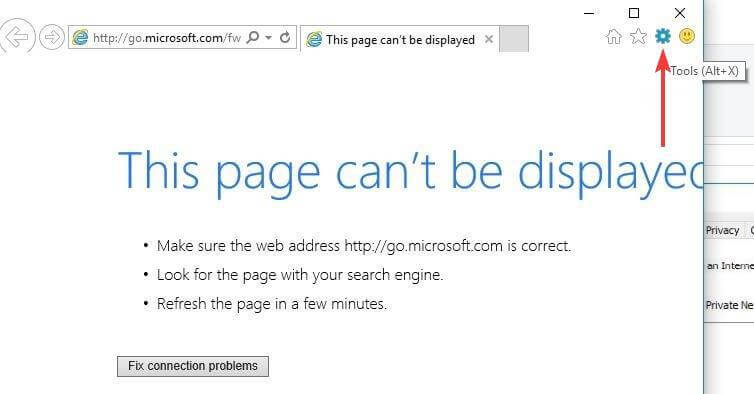
- Откройте Internet Explorer и нажмите Инструменты .

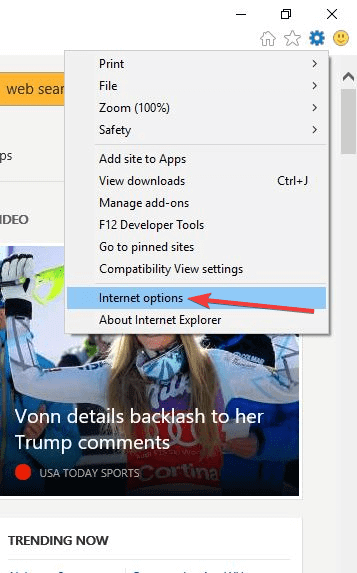
- Выберите Свойства обозревателя .

- Перейдите на вкладку Подключения .
- Выберите Настройки локальной сети .
- Снимите флажок: Использовать прокси-сервер для вашей локальной сети .
Вы также можете исправить ошибку Windows 10 GameGuard, изменив файл hosts, который может изменить интернет-адрес на другой из-за изменений, внесенных шпионским ПО или вирусами. Вот как это исправить:
- Откройте файл hosts из File Explorer в папке System32
- Выберите Блокнот в окне Открыть с помощью
- Удалите все связанные с игрой и GameGuard строки (строки без #) и сохраните их
Загрузите новую версию GameGuard
Для этого вам нужно удалить папку GameGuard в вашей папке blade и soul, затем запустить восстановление из панели запуска и запустить игру. Стоит скачать новую версию GameGuard. Это также работает для 4049 Windows 10 GameGuard ошибка.
Типичные ошибки Windows 10 GameGuard и их исправления
- Ошибка 100 . Это означает, что ваш компьютер заражен вирусом. Обновите антивирус до последней версии, а затем просканируйте компьютер. Если ошибка не устранена, это может быть вирус, который нелегко обнаружить.
- Ошибка 110 означает, что NProtect был загружен один раз, но все еще находится в памяти вашего компьютера. Откройте диспетчер задач из комбинации клавиш CTRL + ALT + DEL, выберите «Процессы» и завершите процесс для u_skidprogram и GameMon.des. Если это не помогает, перезагрузите компьютер.
- Ошибка 112: , чтобы устранить эту ошибку, убедитесь, что ваш компьютер не содержит вирусов и у вас достаточно памяти. Обновите антивирус и убедитесь, что у вас одновременно открыто несколько программ. Временно отключите любое защитное программное обеспечение, так как оно может помешать запуску GameGuard, затем просканируйте компьютер с помощью обновленного антивируса, чтобы удалить все вирусы, влияющие на GameGuard, и проверьте компьютер на наличие минимальных системных требований.
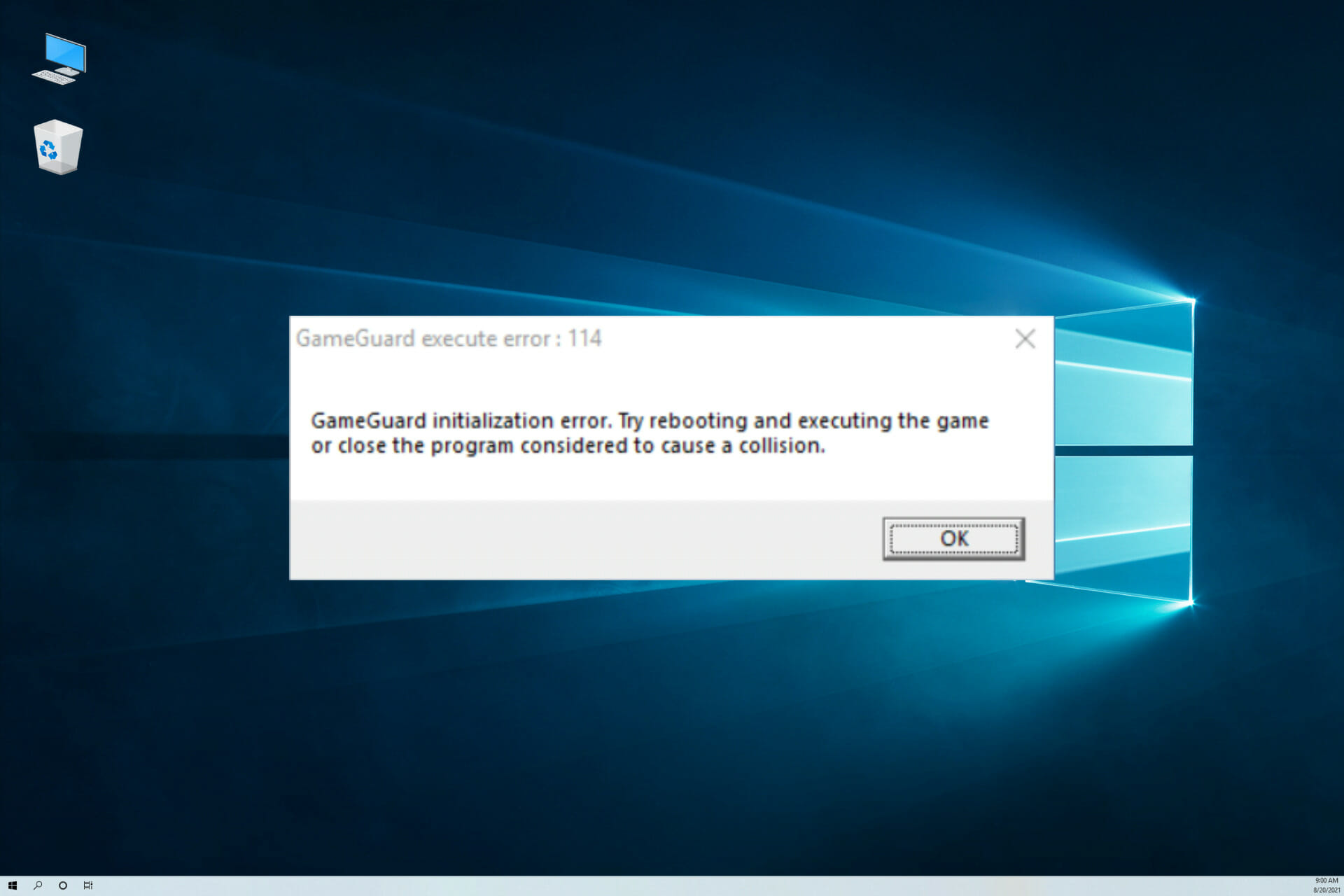
- Ошибка 114 очень распространена, но нет конкретного решения этой ошибки. Однако обычно это указывает на то, что некоторые программы на вашем компьютере препятствуют загрузке NProtect. Убедитесь, что у вас есть доступ администратора к вашему компьютеру, и вы отключили все ненужное программное обеспечение.Вы также можете завершить процессы или системные службы, которые не нужны, и временно отключить программное обеспечение безопасности, которое может помешать запуску GameGuard. Перезагрузите компьютер и посмотрите, исчезла ли ошибка Windows 10 GameGuard 114.
- Ошибка 115: это указывает на то, что игра выполнялась несколько раз или что GameGuard уже запущен. Закройте игру и перезагрузите компьютер.
- Ошибка 120/124/141/142: эта ошибка Windows 10 GameGuard указывает на то, что NProtect либо неполон, либо поврежден. В этом случае удалите папку GameGuard и перепакуйте ее или попробуйте нажать кнопку «Проверить файлы».
- Ошибка 150/153 . Это означает, что установочный файл GameGuard либо не существует, либо поврежден. Удалите папку GameGuard и перезагрузите компьютер, затем снова загрузите GameGuard. Вы также можете скачать установочный файл для GameGuard и установить папку GameGuard.
- Ошибка 155 : эта ошибка указывает на наличие серьезного вируса на вашем компьютере или повреждение вашей ОС/жесткого диска. Обратитесь в службу поддержки Microsoft, чтобы помочь восстановить файл в конкретной версии операционной системы. Вы также можете проверить наличие вирусов и переустановить браузер или rsabase.dll в системной папке в зависимости от используемой версии Internet Explorer.
- Ошибка 157 : если вы получили эту ошибку Windows 10 GameGuard, возможно, инструмент все еще работает, но закройте 9Dragons, если он открыт, затем подождите одну-две минуты и перезапустите игру. Если это не помогло, перезагрузите компьютер.
- Ошибка 170: это вызвано проблемой с INI GameGuard, поэтому программа не запускается. Удалите папку GameGuard и снова запустите игру, чтобы загрузить файлы NProtect. Вы также можете удалить папку, перезагрузить компьютер и позволить загрузчику снова загрузить папку GameGuard, или переустановить установочный файл и снова запустить игру.
- Ошибка 174 : это также называется ошибкой завершающего навыка, и она вызвана наложением компьютерных и других навыков и может привести к частым DC, приводящим к постоянному бану, поскольку это считается быстрым хакерством. Переустановите GameGuard и убедитесь, что клиент исправен, чтобы исправить эту ошибку Windows 10 GameGuard.
- Ошибка 200: это означает, что была обнаружена нелегальная программа. Закройте все ненужные программы и попробуйте снова (проверьте также на наличие сторонних программных инструментов). Запустите диспетчер задач и завершите все незаконные или ненужные программы и процессы. Сканируйте свой компьютер с помощью обновленного антивирусного сканера, чтобы удалить вирусы, которые могут быть в черном списке NProtect. Запустите Windows при запуске диагностики, щелкнув правой кнопкой мыши Пуск> Выполнить>, введите msconfig> OK, затем в разделе «Общие» выберите «Запуск диагностики» и перезагрузите компьютер.
- Ошибка 230: это ошибка инициализации. Обновите DirectX и драйверы вашей видеокарты. Если это не поможет, удалите папку GameGuard и перезапустите игру, чтобы переустановить и обновить GameGuard.
- Ошибка 340: это означает, что не удалось загрузить исправления NProtect из-за проблем с сетью или из-за чрезмерно ограничительного брандмауэра, приводящего к неудачным загрузкам. Проверьте настройки брандмауэра или антивируса и дайте GameGuard исправлять свои файлы. если сеть в настоящее время нестабильна, возможно, возникли некоторые проблемы с настройками Интернета или брандмауэра, поэтому их необходимо настроить вручную. Если GameGuard по-прежнему не обновляется, найдите файлы hosts в C: Windows System32 drivers и щелкните правой кнопкой мыши файл хоста, выберите свойства, а затем убедитесь, что опция «Только чтение» не включена. Откройте файл hosts с помощью Блокнота и удалите все строки и текст в разделе …. # …… .. 127.0.0.1 …… .. localhost . Закройте файл hosts, примите изменения и перезагрузите компьютер. Убедитесь, что у вас достаточно пропускной способности, и нет необходимости загружать/загружать интернет-соединение. Если вы используете WiFi, убедитесь, что он стабилен, и никто другой не использует его, а затем закройте другие приложения, кроме 9Dragons.
- Ошибка 350: GameGuard была отменена пользователем компьютера, поэтому перезапустите и не отменяйте опцию GameGuard. Вы также можете попробовать подключиться снова или подтвердить состояние сети, нажав кнопку повтора.
- Ошибка 360: это означает, что процесс исправления NProtect завершился неудачно из-за поврежденных файлов или чрезмерно ограничительного брандмауэра. Чтобы исправить эту ошибку Windows 10 GameGuard, разрешите NProtect доступ через брандмауэр, а если он не исчезнет, удалите каталог GameGuard. Если обновление не прошло успешно или файл GameGuard поврежден, повторите попытку позже или проверьте настройки брандмауэра. Также отсканируйте папку GameGuard из каталога игры и загрузите ее, используя ссылку на руководство, установите и попробуйте снова.
- Ошибка 361: это означает, что GameGuard не был установлен должным образом, возможно, он был отменен или что-то произошло. Вы можете снова загрузить GameGuard или перейти в Интернет> Настройки> Сеть> Проверить, работает ли программа безопасности или нет.Также проверьте, если вам нужно разрешение на использование Интернета, прежде чем подключаться к нему.
- Ошибка 380 : это указывает на проблему с вашим интернет-соединением и программным обеспечением безопасности. Вы можете подождать и попробовать позже, или проверить настройки брандмауэра. Если вам не удается подключиться к серверу обновлений GameGuard, загрузите GameGuard вручную и установите его снова.
- Ошибка 405: это относится к недопустимой временной метке, или временная метка выходит за допустимые границы, с которыми сталкиваются при входе в подземелья, поэтому безопасным является предотвращение входа ботов в подземелья с использованием поддельных или поддельных пакетов. Вам нужно отследить все случаи либо до нескольких человек в команде, пытающихся войти в темницу одновременно, чтобы каждый получал ошибку, когда команда находится в постоянном токе, либо соединение людей нестабильно из-за чрезмерной загрузки/выгрузки по сети. или неэффективное сетевое оборудование (маршрутизатор/карты WiFi/WiFi Ariels). Решите его, проверив состояние соединения и определив источник слабого соединения, затем устраните проблему.
- Ошибка 421 : это связано с ошибкой GameGuard, поэтому удалите папку GameGuard и переустановите ее, или пусть загрузчик загрузит свежую копию или заменит ее работающей (от другого человека)
- Ошибка 500 : указывает на наличие программы, конфликтующей с GameGuard. Проверьте диспетчер задач на наличие такой программы и закройте ее, нажав «Завершить процесс».
- Ошибка 610/620/102/1013/1014 : это означает, что файлы GameGuard не найдены или были изменены. Удалите папку GameGuard и попробуйте снова.
- Ошибка 905/1015 . Это относится и к анимации, и к GameGuard. Переустановка GameGuard и обеспечение работоспособности клиента устранят эту ошибку Windows 10 GameGuard.
- Ошибка ____ (без цифр) : указывает, что ваш компьютер отстает
Другие ошибки
Если вы получили сообщение об ошибке «Невозможно отобразить режим видео», переустановите игру или установите видеокарту. Если вы продолжаете получать DC в течение нескольких минут, перейдите по ссылке C: ProgramFiles GamersFirst 9dragons NDLAUNCHERprogram . Нажмите правой кнопкой мыши и выберите Свойства> Совместимость> Изменить на другие более низкие .
Помогло ли какое-либо из этих решений устранить ошибку Windows 10 GameGuard для вас? Дайте нам знать в комментариях ниже.
От
Baal · Опубликовано 6 часов назад
Основной темой этой трансляции стала доработка Танка ко второму альфа-тесту Ashes of Creation. Этот архетип получил немало обновлений как визуальных, так и в умениях и пришло время рассказать о них подробнее. Стоит отметить, что видео, которое использовалось во время стрима, было перезаписано после него и на официальном канале выложена уже обновленная версия. Основная причина перезаписи — проблема с громкостью звука, из-за чего в некоторых случаях разработчиков было практически не слышно. Плюс, в новой версии Стивен больше внимания уделял игре, а не записи. Если в первой версии он практически не пользовался умениями танка и не удерживал агр противников, то в новой все выглядит гораздо лучше.
Оба видео записывались и выкладывались без редактирования после записи, так что вы можете заметить некоторые баги и проблемы. Не забывайте, что Ashes of Creation находится в стадии разработки! Перейдем к просмотру
Стивен с тремя разработчиками — инженером Киноном, и двумя дизайнерами Брайаном и Трэддом — отправились в локацию, находящуюся в зоне рек (Riverlands). Эта местность была некогда центром империи людей Аэла и вы найдете здесь немало свидетельств их былой мощи.
Одна из целей разработчиков — собрать сет брони для танка, а заодно и продемонстрировать его возможности. Как и в случае с демонстрацией Клирика ранее, разработчики создали на официальном форуме несколько тем, в которых собирают отзывы по различным аспектам архетипа. Так что, если у вас есть чем поделиться — обязательно оставляйте свой фидбек. После предыдущего стрима, например, были существенно доработаны анимации движения и ударов клирика, а также эффекты и анимации умений. Но вернемся к танку.
В видео продемонстрировали несколько умений танка и рассказали о его механиках.
Умения танка в Ashes of Creation
Shield Assault
Удар щитом по цели, наносящий урон и состояние дезориентации shaken (пошатнувшийся). Если на цели уже есть такое состояние, то вместо этого она будет оглушена.
Для использования требуется щит.
Inciting Strikes
Наносит два удара мечом крест-накрест, нанося урон в конусе перед персонажем, генерируя при этом дополнительную угрозу.
Tremoring Bellow
Ужасающий крик, распространяющийся по конусу перед персонажем и накладывающий состояние staggered (пошатнувшийся) на враждебные цели. ,
Также сотрясает землю вокруг персонажа, нанося урон вокруг и опрокидывая врагов, на которых действует состояние snared (захват) или shaken (пошатнувшийся).
Grit
Накладывает бафф на персонажа, уменьшающий входящий урона на 15%, но также снижающий скорость передвижения на 30% и исходящий урон на 20%. Каждый входящий удар также поглощает стек Отваги (Courage), дополнительно снижая урон на 15%. При этом, пока этот бафф активен, Отвага не может генерироваться.
Aegis
Моментально снимает все негативные эффекты с персонажа. Затем создает защитный купол перед танком на 15 секунд, перенаправляя 50% всего полученного союзниками, находящимися за щитом, урона на танка. Все союзники, находящиеся в области действия также получают улучшенный эффект сопротивления на время действия умения.
Grapple
Персонаж прицеливается и метает по линии перед собой крюк с цепью. Первой цели, попавшей под действие умения наносится урон и она притягивается к танку. На цель также накладывается дебафф tapering snare на 3 сек.
Геймплей за танка в Ashes of Creation
Роль танка абсолютно классическая — держать на себе агр противников, генерируя угрозу и не давая им бить других персонажей в группе, выдерживая при этом атаки противников, поглощая урон и контролируя врагов. Для того, чтобы выдерживать высокий наносимый урон, у танка есть несколько дополнительных механик.
Отвага (Courage) — особый ресурс танка. При получении урон, танк получает один стек этого ресурса, который в дальнейшем может использоваться для некоторых умений (например, Grit).
Блокирование щитом — этот навык доступен в принципе всем классам, но лучше всего им владеет танк. Это активная способность (нужно зажать кнопку мыши, чтобы прикрыться щитом), которая снижает входящий урон в зависимости от его направления. Урон от атак спереди снижается на 50%, от атак с боков — на 25%. Блокировать можно и без щита, но эффективность будет ниже.
Вопросы после видео про Танка
Как работает уклонение (кувырок)?
На данный момент уклонение увеличивает определенные характеристики, используемые в расчетах нанесения урона. Например, проверка точности против проверки уклонения. Также, возможно, кувырок будет кратковременно увеличивать поглощение урона.
Эффекты умений, влияющие на окружение, могут сильно сказаться на производительности. Вы учитываете это?
Да, вы сможете менять настройки в клиенте игры, даже полностью отключая подобные эффекты.
Будет ли возможность автолута? Или, например, питомец, который сам собирает добычу с поверженных врагов?
Питомцев таких не будет, однако у вас будет возможность собрать сразу всю добычу с врага, не открывая окно просмотра.
Имена персонажей и врагов сейчас выглядят очень похоже. Будет ли возможность изменять их?
Да, эти элементы интерфейса будут существенно переработаны как для производительности, так и для лучшего визуального отображения. Цвета этих элементов можно будет менять.
Боссы в продемонстрированном видео выглядят как увеличенные копии обычных противников. Будут ли ворлдбоссы с уникальным обликом?
Зависит от типа босса — их множество видов. Элитные противники, которых вы и видели на видео, будут обычно про сто больше. Но если это уникальный именной босс или мировой босс, то у него будет уникальный облик.
Будет ли в интерфейсе отмечаться, находится ли цель в области действия умения?
Да. Если это умение на цель — вы увидите индикатор, позволяющий определить дальность действия. Если же это умение, действующее по шаблону, то вам нужно будет понимать принципа его работы, однако и в этом случае у некоторых умений будут индикаторы, показывающие зону действия.
Танк будет единственным архетипом, способным выполнять эту роль или другие тоже смогут танковать?
Зависит от контента, который вы проходите. В некоторых случаях другие классы тоже смогут танковать, но, если речь идет о высокоуровневых рейдах, подземельях и т.п. — танк станет лучшим выбором. При этом не забывайте, что вы можете взять вторичный архетип, получив гибрид разных ролей и соответствующий горизонтальный прогресс персонажа за счет системы аугментов. Но лучшими танками все же будут те, кто выберет Танка в качестве и первичного и вторичного архетипа.
Будут ли в игре сценарии, в которых активный блок будет необходим?
Его полезность зависит от врагов, с которыми вы столкнулись
Интересные мелочи
Некоторые умения оказывают влияние на окружающую растительность, прижимая к земле траву или заставляя колыхаться ветви.
В демонстрируемой области деревья некогда были магическими, но сейчас их осталось всего несколько штук.
Развалины, в которых сражаются разработчики были некогда крупной крепостью, в которой обучались новички, пришедшие в легион империи Аэла.
Разработчики продемонстрировали систему лута. Лидер группы может изменить тип распределения, но только после того, как его поддержит большинство участников группы. Есть несколько типов распределения, среди которых свободный и Need or Greed.
В луте попадаются сертификаты охотника (Hunting certificates) — они используются в экономической составляющей игры — позволяют оплачивать свою собственность. Их также можно просто обменять на деньги, и они могут использоваться в других частях игры, связанных с экономикой.
Обновление от команды персонажей
По традиции не обошлось и без демонстрации новых моделей от команды персонажей Ashes of Creation. Модели оружия циклопов, двуручный меч, молот, щит, модели врагов, новые прически орков… в общем — смотрите сами
Ответы на вопросы
Должен ли умелый танк полностью защищать группу от урона?
Зависит от вашей текущей схватки. У танка будет определенный контроль над боем, но не полный. В бою всегда должен быть элемент случайности. Прогнозируемые бои скучны.
Будут ли у танка определенные стойки? Например, для увеличения урона в ущерб защите?
У вас будут определенные варианты в зависимости от вторичного архетипа. Их можно в дальнейшем изменять и усиливать при помощи аугментации. Также многое зависит от того, как вы соберете свой билд и дерево умений.
Танк должен, по сути, делать две вещи: снижать урон и держать агр. Как броня, щиты и оружие танка будут балансировать два этих момента?
Во-первых, снаряжение может влиять на характеристики. Танку имеет смысл выбирать, например, элементы с характеристикой constitution. Также очень многое зависит от вашего выбора умений и их ротации в бою. Вы можете сосредоточиться на генерации угрозы, на количестве и удержании здоровья или на снижении урона (физического или магического) — все зависит также и от цели, с которой вы собираетесь сражаться. У вас много вариантов стратегии.
Смогу ли я получить огромное количество здоровья в ущерб другим атрибутам?
Вы сможете в значительно мере влиять на распределение характеристик. Это зависит и от выбранного архетипа, но по большей части — от выбранного снаряжения, татуировок и других элементов, которые вы можете применить к снаряжению. В целом, если вы хотите сделать танка, ориентированного на количество здоровья, вы можете это сделать.
Какие шаги вы предпринимаете, чтобы сделать танка жизнеспособным в PvP?
Мы учитываем множество разных моментов. Не забывайте, что Ashes of Creation в первую очередь PvX-игра, рассчитанная на группы игроков. При разработке классов мы следим, чтобы их механика и дизайн были ориентированы как на PvE, так и на PvP. Есть также особые механики, например, в случае танка — как работает в PvP система угрозы или как в PvP работают насмешки. Эти моменты требуют тестирования, но у нас есть идеи, которые сделают их актуальными. Мы хотим избежать ситуации, когда некоторые умения не актуальны в PvP или PvE.
Будут ли актуальны офф-танки (танк второй линии) в ситуациях, когда им не приходится танковать в определенных схватках?
Офф-танки актуальны в определенных моментах. Например — когда вы сражаетесь с боссом и он призывает помощников. Основной танк держит босса, а второй — новых врагов. Также у вас будут умения вроде насмешки, которые моментально перенаправляют цель на вас. В зависимости от ситуации это может быть очень полезно. В общем и целом, у вас широкое поле для выбора и взаимодействия, учитывая возможность выбрать вторичный архетип.
Вы не думали выбрать архетипу Танк другое название?
Да, мы обсуждали этот вопрос. С одной стороны, название архетипа должно сразу давать понимание о его роли. С другой, хочется, чтобы это название также вплеталось в мир и лор игры с точки зрения отыгрыша роли. Но пока к окончательному решению разработчики не пришли.
Будет ли на кораблях механика, позволяющая нанять NPC для управления, например, пушками или парусами?
Нет, для кораблей такой механики не будет. Вообще, подобное будет в игре, но не для кораблей.
Будут ли ограничения по уровню или еще чему-то для призыва больших осадных сущностей (во время осады)?
Зависит от того, что вы имеете в виду. Если это просто осадные орудия вроде катапульты, то установить их может каждый, у кого есть рецепт и материалы. Конечно, вы должны быть участником осады с одной из сторон.
Класс призыватель сможет вызвать своих питомцев, если является активным зарегистрированным участником осады.
Если речь о групповых призывах (вроде огромного элементаля) — то призыв подобных существ лежит на лидере конкретной группы, также зарегистрированной для участия в осаде.
Вы говорили, что рейдбоссы могут менять сложность в зависимости от того, как быстро их уничтожают. В случает с открытыми рейдами (а не инстансами) — как это будет работать? Или комнаты блокируются после того, как вы добрались до босса?
Рейдбоссы знают, сколько противников находится поблизости. В зависимости от этого определяется их поведения. Оценивая типы бойцов, их количество, расположение, способности и количество здоровья, босс выбирает определенные действия в своем дереве поведения, а затем действует в соответствии с выбранным планом. В сценарии, когда вы имеете подавляющее превосходство, босс может усилить свои АоЕ атаки или использовать гораздо больше способностей во время боя.
Есть ли ограничения пор количеству и типу предметов, которыми мы можем украшать дома?
Есть несколько. Некоторые основаны на типе жилья, некоторые ограничения идут из типа рецептов и вашей профессии крафта. Например, если у вас есть особняк, вы можете разместить в нем лучшую мебель, а лучшая мебели есть свои игровые механики. Кроме того, могут существовать ограничения на количество определенных предметов мебели или декора, которые вы можете разместить в доме.
by Milan Stanojevic
Milan has been enthusiastic about technology ever since his childhood days, and this led him to take interest in all PC-related technologies. He’s a PC enthusiast and he… read more
Updated on March 11, 2022
- No multiplayer gamer likes cheaters. The playing field show is leveled so that everybody can enjoy the gaming experience. Fortunately, cheaters have to face anti-cheating and anti-hacking software like GameGuard.
- If GameGuard shows errors on your Windows computer, you need to fix this so you can enjoy the game: check your antivirus or replace it and update the client.
- You have effective software that can resolve various errors with this anti-cheating solution due to light resource usage and anti-malware support.
- Hence, avoid the issues on your Windows PC and enjoy multiplayer games with peace of mind and no cheaters on your watch.
XINSTALL BY CLICKING THE DOWNLOAD FILE
This software will repair common computer errors, protect you from file loss, malware, hardware failure and optimize your PC for maximum performance. Fix PC issues and remove viruses now in 3 easy steps:
- Download Restoro PC Repair Tool that comes with Patented Technologies (patent available here).
- Click Start Scan to find Windows issues that could be causing PC problems.
- Click Repair All to fix issues affecting your computer’s security and performance
- Restoro has been downloaded by 0 readers this month.
GameGuard or GG as it is commonly known as an anti-cheating software installed alongside multiplayer online roleplaying games (MMORPGs) like 9Dragons, Cabal Online, and others, to block malicious apps and other common cheating methods.
GG hides the game app process while monitoring the memory range, and terminating apps defined by the vendor of the games as well as INCA Internet cheats, plus it blocks some calls to DirectX functions, Windows APIs and makes automatic updates with every new threat that arises.
This tool works like a rootkit so it may have some unwanted side effects, like blocking hardware installation and activation of peripherals while the programs are running. It also monitors your computer’s memory, so it will affect performance when the game that is being protected loads more resources at the same time.
Some users of GameGuard have reported that they’ve experienced issues on their computers, and we’ll look at some of the common Windows 10 GameGuard error types, and how to fix them.
FIX: Windows 10/11 GameGuard error
- General fixes
- Use a reliable antivirus
- Download a new version of GameGuard
- Common Windows 10 GameGuard error types and their fixes
- Other errors
1. General fixes
GameGuard is a delicate tool, so one of the things you can do to resolve the Windows 10 GameGuard error includes ensuring that GameGuard is not being interrupted by your antivirus.
Most Windows 10 GameGuard error problems are caused by the large use of proxy servers such as restricted internet connections due to security software like firewalls or antivirus, which makes GameGuard not update.
In this case, add GameGuard and PSO2 to the real-time protection whitelist in the control panel of your antivirus. Multiple antivirus software on your computer may be one of the causes of the problem.
Also, ensure your operating system is up to date. You can also run a system file checker scan to check the operating system files for corruption and attempts to repair them, plus check your hard drive for consistency issues.
If a proxy server is on, launch your browser, and disable or turn it off by doing the following:
- Open Internet Explorer and click Tools
- Select Internet Options
- Click Connections tab
- Select LAN settings
- Uncheck the option: Use a proxy server for your LAN
Some PC issues are hard to tackle, especially when it comes to corrupted repositories or missing Windows files. If you are having troubles fixing an error, your system may be partially broken.
We recommend installing Restoro, a tool that will scan your machine and identify what the fault is.
Click here to download and start repairing.
You can also fix Windows 10 GameGuard errors by modifying the hosts’ file, which can change an internet address to a different one, due to modifications by spyware or viruses. Here’s how to fix it:
- Open the hosts file from File Explorer in the System32 folder
- Select Notepad in the Open With window
- Delete all game and GameGuard related lines (lines without #) and save them
2. Use a reliable antivirus
For each computer, we recommend having good protection software installed. You can’t always depend on common sense only to evade malware. Get a good antivirus solution and keep it updated.
As far as reliability goes, we highly recommend ESET Internet Security. This anti-malware guarding software can offer anti-phishing tools and no slowdowns on your PC while you’re playing or watching anything.
Moreover, this multi-layered antivirus can protect the operating system from spyware or ransomware attacks, and without interfering with GameGuard software or other applications on your PC.

ESET Internet Security
This lightweight antivirus tool is perfectly suited for malware without compromising GameGuard software.
3. Download a new version of GameGuard
In order to do this, you need to delete the GameGuard folder in your blade and soul folder, then run the repair from the launcher, and start the game. It should download a new version of GameGuard. This also works for the 4049 Windows 10 GameGuard error.
4. Common Windows 10 GameGuard error types and their fixes
- Error 100, it means your computer has a virus infection. Update your antivirus to the latest and then scan your computer. If the error persists, it may be a virus that cannot be easily detected.
- Error 110 indicates that NProtect has been loaded once but still resides in your computer’s memory. Open Task Manager from CTRL+ALT+DELETE, select Processes, and end process for u_skidprogram and GameMon.des. If this doesn’t help, restart your computer.
- Error 112: to resolve this error, ensure your computer is virus free and you have enough memory available. Update your antivirus, and ensure you have few programs open at the same time. Disable any security software, temporarily, as these may prevent GameGuard from executing, then scan your computer with an updated antivirus to remove any viruses that are affecting GameGuard, and check your computer for minimum system requirements.
- Error 114 is very common, but there’s no specific solution to this error. However, it generally indicates that some software on your computer is hindering NProtect from loading. Check that you have admin access to your computer and you have shut down any unnecessary software. You can also end processes or system services that aren’t necessary, and temporarily disable your security software which may prevent GameGuard from executing. Restart your computer and see if the Windows 10 GameGuard error 114 goes away.
- Error 115: This indicates that the game has executed multiple times, or that GameGuard is running already. Close the game and reboot your PC.
- Error 120/124/141/142: this Windows 10 GameGuard error indicates that NProtect is either incomplete or damaged. In this case, delete the GameGuard folder and repatch it, or try to click on the Check Files button.
- Error 150/153: This means the setup file for GameGuard either doesn’t exist, or has been corrupted. Delete the GameGuard folder and restart your computer, then download GameGuard all over again. You can also download the setup file for GameGuard and install the GameGuard folder.
- Error 155: this error indicates your computer has a severe virus or your OS/Hard disk are corrupted. Check with Microsoft support to help restore the file in your specific operating system version. You can also check for viruses and reinstall your browser or rsabase.dll in the system folder based on the version of Internet Explorer you use.
- Error 157: if you get this Windows 10 GameGuard error, the tool may still be running, but close 9Dragons if it is open, then wait for about one to two minutes and restart the game. If it persists, restart your computer.
- Error 170: this is caused by a problem with GameGuard INI, so the program doesn’t launch. Delete the GameGuard folder and re-run the game again to download the NProtect files. You can also delete the folder, restart your computer and let the launcher download the GameGuard folder again, or reinstall the setup file and try running the game again.
- Error 174: this is also called the completer skill bug, and it is caused by overlapping computer and other skills and can cause frequent DC’s leading to a permanent ban as it is considered speedhacking. Reinstall GameGuard and ensure the client is functional to fix this Windows 10 GameGuard error.
- Error 200: this indicates that an illegal program has been detected. Close all unnecessary programs and try again (check for third party tool programs as well). Launch Task Manager and terminate any illegal or unnecessary programs and processes. Scan your PC with an updated virus scanner to remove viruses that may be in the NProtect blacklist. Run Windows in Diagnostic startup by right clicking Start>Run>type msconfig>OK then under General, select Diagnostic startup and reboot your PC
- Error 230: this is an initialization error. Update DirectX and your graphics card drivers. If this doesn’t help, delete the GameGuard folder and restart the game to reinstall and update GameGuard.
- Error 340: this indicates that NProtect patches failed to download either due to network issues or an overly restrictive firewall leading to failed downloads. Check your firewall or antivirus settings and let GameGuard patch its files. if the network is not stable currently, the internet or firewall settings might be having some issues so you need to manually adjust them. If GameGuard still doesn’t update, find the hosts files from C:WindowsSystem32drivers and right click on the host file, select properties, then ensure the read only option is unchecked. Open the hosts file with Notepad, and delete all lines and text under …. # …….. 127.0.0.1 …….. localhost. Close the hosts file, accept changes, and restart your computer. Ensure you have enough bandwidth and no upload/download is crowding your internet connection. If using WiFi, ensure it is stable and no one else is using it, then close any other apps besides 9Dragons.
- Error 350: GameGuard has been canceled by the computer’s user, so restart and do not cancel GameGuard option. You can also try connecting again or confirm if the network status by pressing retry button.
- Error 360: this means the NProtect patch process has failed due to corrupted files or an overly restrictive firewall. To fix this Windows 10 GameGuard error, allow NProtect access through your firewall, and if it persists, delete GameGuard directory. If the update isn’t successful or GameGuard file is corrupted, try again later or check firewall settings. Also scan GameGuard folder from the game directory and download it using the manual link, install and try again.
- Error 361: this means GameGuard did not install well, probably it was canceled or something happened. You can download GameGuard again, or go to Internet>Settings>Network>Check security program is working or not. Also check if you need authorization to use the internet before connecting to it.
- Error 380: this indicates the problem is with your internet connection, and security software. You can either wait and try later, or verify your firewall settings. If you fail to connect to GameGuard update server, download GameGuard manually and install it again.
- Error 405: this relates to invalid timestamp or the timestamp is out of the acceptable boundaries, encountered when entering dungeons so it is a failsafe to stop bots from entering dungeons using fake or forged packets. You need to trace all cases to either multiple people in a team trying to enter a dungeon at the same time so each will get the error as the team is DC, or, the people’s connection is unstable due to excessive uploading/downloading on the network, or inefficient networking hardware (router/WiFi cards/WiFi Ariels). Resolve it by checking the connection status and identify the source of the weak connection, then remove the problem.
- Error 421: this is due to a GameGuard error, so delete the GameGuard folder and reinstall it or let the launcher download a fresh copy, or replace with the one that works (from another person)
- Error 500: indicates that there’s a program that conflicts with GameGuard. Check Task Manager for such a program and close it by clicking End Process.
- Error 610/620/102/1013/1014: this indicates that GameGuard files are not found or have been changed. Delete the GameGuard folder and try again.
- Error 905/1015: This is related to animations and GameGuard too. Reinstalling GameGuard and ensuring the client is functional will resolve this Windows 10 GameGuard error.
- Error ____ (no numbers): indicates that your computer is lagging
5.Other errors
If you get an error such as ‘Cannot display video mode’, reinstall the game or reinstall the graphics card. If you keep getting DC’ed a few minutes into the game, go to C:ProgramFilesGamersFirst9dragonsNDLAUNCHERprogram. Right-click and select Properties>Compatibility>Change to other lower ones.
Did any of these solutions help resolve the Windows 10 GameGuard error for you? let us know in the comments section below.
This article is part of the Gaming series where we write about the latest games news but also troubleshoot any errors or glitches they have.
You can scroll through our multiplayer section on the site to read news about new game launches and other tools. Or search straight for your favorite game.

Newsletter
by Milan Stanojevic
Milan has been enthusiastic about technology ever since his childhood days, and this led him to take interest in all PC-related technologies. He’s a PC enthusiast and he… read more
Updated on March 11, 2022
- No multiplayer gamer likes cheaters. The playing field show is leveled so that everybody can enjoy the gaming experience. Fortunately, cheaters have to face anti-cheating and anti-hacking software like GameGuard.
- If GameGuard shows errors on your Windows computer, you need to fix this so you can enjoy the game: check your antivirus or replace it and update the client.
- You have effective software that can resolve various errors with this anti-cheating solution due to light resource usage and anti-malware support.
- Hence, avoid the issues on your Windows PC and enjoy multiplayer games with peace of mind and no cheaters on your watch.
XINSTALL BY CLICKING THE DOWNLOAD FILE
This software will repair common computer errors, protect you from file loss, malware, hardware failure and optimize your PC for maximum performance. Fix PC issues and remove viruses now in 3 easy steps:
- Download Restoro PC Repair Tool that comes with Patented Technologies (patent available here).
- Click Start Scan to find Windows issues that could be causing PC problems.
- Click Repair All to fix issues affecting your computer’s security and performance
- Restoro has been downloaded by 0 readers this month.
GameGuard or GG as it is commonly known as an anti-cheating software installed alongside multiplayer online roleplaying games (MMORPGs) like 9Dragons, Cabal Online, and others, to block malicious apps and other common cheating methods.
GG hides the game app process while monitoring the memory range, and terminating apps defined by the vendor of the games as well as INCA Internet cheats, plus it blocks some calls to DirectX functions, Windows APIs and makes automatic updates with every new threat that arises.
This tool works like a rootkit so it may have some unwanted side effects, like blocking hardware installation and activation of peripherals while the programs are running. It also monitors your computer’s memory, so it will affect performance when the game that is being protected loads more resources at the same time.
Some users of GameGuard have reported that they’ve experienced issues on their computers, and we’ll look at some of the common Windows 10 GameGuard error types, and how to fix them.
FIX: Windows 10/11 GameGuard error
- General fixes
- Use a reliable antivirus
- Download a new version of GameGuard
- Common Windows 10 GameGuard error types and their fixes
- Other errors
1. General fixes
GameGuard is a delicate tool, so one of the things you can do to resolve the Windows 10 GameGuard error includes ensuring that GameGuard is not being interrupted by your antivirus.
Most Windows 10 GameGuard error problems are caused by the large use of proxy servers such as restricted internet connections due to security software like firewalls or antivirus, which makes GameGuard not update.
In this case, add GameGuard and PSO2 to the real-time protection whitelist in the control panel of your antivirus. Multiple antivirus software on your computer may be one of the causes of the problem.
Also, ensure your operating system is up to date. You can also run a system file checker scan to check the operating system files for corruption and attempts to repair them, plus check your hard drive for consistency issues.
If a proxy server is on, launch your browser, and disable or turn it off by doing the following:
- Open Internet Explorer and click Tools
- Select Internet Options
- Click Connections tab
- Select LAN settings
- Uncheck the option: Use a proxy server for your LAN
Some PC issues are hard to tackle, especially when it comes to corrupted repositories or missing Windows files. If you are having troubles fixing an error, your system may be partially broken.
We recommend installing Restoro, a tool that will scan your machine and identify what the fault is.
Click here to download and start repairing.
You can also fix Windows 10 GameGuard errors by modifying the hosts’ file, which can change an internet address to a different one, due to modifications by spyware or viruses. Here’s how to fix it:
- Open the hosts file from File Explorer in the System32 folder
- Select Notepad in the Open With window
- Delete all game and GameGuard related lines (lines without #) and save them
2. Use a reliable antivirus
For each computer, we recommend having good protection software installed. You can’t always depend on common sense only to evade malware. Get a good antivirus solution and keep it updated.
As far as reliability goes, we highly recommend ESET Internet Security. This anti-malware guarding software can offer anti-phishing tools and no slowdowns on your PC while you’re playing or watching anything.
Moreover, this multi-layered antivirus can protect the operating system from spyware or ransomware attacks, and without interfering with GameGuard software or other applications on your PC.
ESET Internet Security
This lightweight antivirus tool is perfectly suited for malware without compromising GameGuard software.
3. Download a new version of GameGuard
In order to do this, you need to delete the GameGuard folder in your blade and soul folder, then run the repair from the launcher, and start the game. It should download a new version of GameGuard. This also works for the 4049 Windows 10 GameGuard error.
4. Common Windows 10 GameGuard error types and their fixes
- Error 100, it means your computer has a virus infection. Update your antivirus to the latest and then scan your computer. If the error persists, it may be a virus that cannot be easily detected.
- Error 110 indicates that NProtect has been loaded once but still resides in your computer’s memory. Open Task Manager from CTRL+ALT+DELETE, select Processes, and end process for u_skidprogram and GameMon.des. If this doesn’t help, restart your computer.
- Error 112: to resolve this error, ensure your computer is virus free and you have enough memory available. Update your antivirus, and ensure you have few programs open at the same time. Disable any security software, temporarily, as these may prevent GameGuard from executing, then scan your computer with an updated antivirus to remove any viruses that are affecting GameGuard, and check your computer for minimum system requirements.
- Error 114 is very common, but there’s no specific solution to this error. However, it generally indicates that some software on your computer is hindering NProtect from loading. Check that you have admin access to your computer and you have shut down any unnecessary software. You can also end processes or system services that aren’t necessary, and temporarily disable your security software which may prevent GameGuard from executing. Restart your computer and see if the Windows 10 GameGuard error 114 goes away.
- Error 115: This indicates that the game has executed multiple times, or that GameGuard is running already. Close the game and reboot your PC.
- Error 120/124/141/142: this Windows 10 GameGuard error indicates that NProtect is either incomplete or damaged. In this case, delete the GameGuard folder and repatch it, or try to click on the Check Files button.
- Error 150/153: This means the setup file for GameGuard either doesn’t exist, or has been corrupted. Delete the GameGuard folder and restart your computer, then download GameGuard all over again. You can also download the setup file for GameGuard and install the GameGuard folder.
- Error 155: this error indicates your computer has a severe virus or your OS/Hard disk are corrupted. Check with Microsoft support to help restore the file in your specific operating system version. You can also check for viruses and reinstall your browser or rsabase.dll in the system folder based on the version of Internet Explorer you use.
- Error 157: if you get this Windows 10 GameGuard error, the tool may still be running, but close 9Dragons if it is open, then wait for about one to two minutes and restart the game. If it persists, restart your computer.
- Error 170: this is caused by a problem with GameGuard INI, so the program doesn’t launch. Delete the GameGuard folder and re-run the game again to download the NProtect files. You can also delete the folder, restart your computer and let the launcher download the GameGuard folder again, or reinstall the setup file and try running the game again.
- Error 174: this is also called the completer skill bug, and it is caused by overlapping computer and other skills and can cause frequent DC’s leading to a permanent ban as it is considered speedhacking. Reinstall GameGuard and ensure the client is functional to fix this Windows 10 GameGuard error.
- Error 200: this indicates that an illegal program has been detected. Close all unnecessary programs and try again (check for third party tool programs as well). Launch Task Manager and terminate any illegal or unnecessary programs and processes. Scan your PC with an updated virus scanner to remove viruses that may be in the NProtect blacklist. Run Windows in Diagnostic startup by right clicking Start>Run>type msconfig>OK then under General, select Diagnostic startup and reboot your PC
- Error 230: this is an initialization error. Update DirectX and your graphics card drivers. If this doesn’t help, delete the GameGuard folder and restart the game to reinstall and update GameGuard.
- Error 340: this indicates that NProtect patches failed to download either due to network issues or an overly restrictive firewall leading to failed downloads. Check your firewall or antivirus settings and let GameGuard patch its files. if the network is not stable currently, the internet or firewall settings might be having some issues so you need to manually adjust them. If GameGuard still doesn’t update, find the hosts files from C:WindowsSystem32drivers and right click on the host file, select properties, then ensure the read only option is unchecked. Open the hosts file with Notepad, and delete all lines and text under …. # …….. 127.0.0.1 …….. localhost. Close the hosts file, accept changes, and restart your computer. Ensure you have enough bandwidth and no upload/download is crowding your internet connection. If using WiFi, ensure it is stable and no one else is using it, then close any other apps besides 9Dragons.
- Error 350: GameGuard has been canceled by the computer’s user, so restart and do not cancel GameGuard option. You can also try connecting again or confirm if the network status by pressing retry button.
- Error 360: this means the NProtect patch process has failed due to corrupted files or an overly restrictive firewall. To fix this Windows 10 GameGuard error, allow NProtect access through your firewall, and if it persists, delete GameGuard directory. If the update isn’t successful or GameGuard file is corrupted, try again later or check firewall settings. Also scan GameGuard folder from the game directory and download it using the manual link, install and try again.
- Error 361: this means GameGuard did not install well, probably it was canceled or something happened. You can download GameGuard again, or go to Internet>Settings>Network>Check security program is working or not. Also check if you need authorization to use the internet before connecting to it.
- Error 380: this indicates the problem is with your internet connection, and security software. You can either wait and try later, or verify your firewall settings. If you fail to connect to GameGuard update server, download GameGuard manually and install it again.
- Error 405: this relates to invalid timestamp or the timestamp is out of the acceptable boundaries, encountered when entering dungeons so it is a failsafe to stop bots from entering dungeons using fake or forged packets. You need to trace all cases to either multiple people in a team trying to enter a dungeon at the same time so each will get the error as the team is DC, or, the people’s connection is unstable due to excessive uploading/downloading on the network, or inefficient networking hardware (router/WiFi cards/WiFi Ariels). Resolve it by checking the connection status and identify the source of the weak connection, then remove the problem.
- Error 421: this is due to a GameGuard error, so delete the GameGuard folder and reinstall it or let the launcher download a fresh copy, or replace with the one that works (from another person)
- Error 500: indicates that there’s a program that conflicts with GameGuard. Check Task Manager for such a program and close it by clicking End Process.
- Error 610/620/102/1013/1014: this indicates that GameGuard files are not found or have been changed. Delete the GameGuard folder and try again.
- Error 905/1015: This is related to animations and GameGuard too. Reinstalling GameGuard and ensuring the client is functional will resolve this Windows 10 GameGuard error.
- Error ____ (no numbers): indicates that your computer is lagging
5.Other errors
If you get an error such as ‘Cannot display video mode’, reinstall the game or reinstall the graphics card. If you keep getting DC’ed a few minutes into the game, go to C:ProgramFilesGamersFirst9dragonsNDLAUNCHERprogram. Right-click and select Properties>Compatibility>Change to other lower ones.
Did any of these solutions help resolve the Windows 10 GameGuard error for you? let us know in the comments section below.
This article is part of the Gaming series where we write about the latest games news but also troubleshoot any errors or glitches they have.
You can scroll through our multiplayer section on the site to read news about new game launches and other tools. Or search straight for your favorite game.