Перейти к содержимому раздела
Форумы CADUser
Информационный портал для профессионалов в области САПР
Вы не вошли. Пожалуйста, войдите или зарегистрируйтесь.
Дерево сообщений Активные темы Темы без ответов
Страницы 1
Чтобы отправить ответ, вы должны войти или зарегистрироваться
#1 9 июня 2019г. 11:03:27

- kasha_l
- Участник
- На форуме с 9 июня 2019г.
- Сообщений: 6
- Спасибо: 0
Тема: Ошибка Automation. Ошибка файлера
подскажите, что не так делаю? файл пустой. в него пытаюсь вставить блок (блок сохранен отдельным файлом)
(vla-InsertBlock (vla-get-modelspace active_document) (vlax-3d-point ‘(0.0 0.0 0.0)) «имя_файла» 1. 1. 1. 0).
выдает ошибку: Ошибка Automation. Ошибка файлера.
autocad 2014
#2 Ответ от Александр Ривилис 10 июня 2019г. 18:38:33

- Александр Ривилис
- Активный участник
- Откуда: Украина / Киев
- На форуме с 15 апреля 2005г.
- Сообщений: 8,659
- Спасибо: 157
Re: Ошибка Automation. Ошибка файлера
Или файл не находится, или версия файла более новая, чем может прочитать AutoCAD 2014
#3 Ответ от kasha_l 10 июня 2019г. 22:14:52
- kasha_l
- Участник
- На форуме с 9 июня 2019г.
- Сообщений: 6
- Спасибо: 0
Re: Ошибка Automation. Ошибка файлера
спасибо за ответ. блок не вставляется после его сохранения через WBLOCK. У меня таких блоков большиство. можно ли их как то вставить?
#4 Ответ от Александр Ривилис 11 июня 2019г. 17:00:17
- Александр Ривилис
- Активный участник
- Откуда: Украина / Киев
- На форуме с 15 апреля 2005г.
- Сообщений: 8,659
- Спасибо: 157
Re: Ошибка Automation. Ошибка файлера
Проверил у себя такой код:
(defun C:testIns ( / )
 (vl-load-com)
 (setq acadObj (vlax-get-acad-object))
 (setq doc (vla-get-ActiveDocument acadObj))
 (vla-InsertBlock  (vla-get-modelspace doc) (vlax-3d-point '(0.0 0.0 0.0)) "C:\test.dwg"  1. 1. 1. 0)
)
Всё работает. Убедись, что команда _INSERT позволяет вставить твои блоки и ты задаёшь правильный путь к ним.
#5 Ответ от kasha_l 11 июня 2019г. 21:26:32
- kasha_l
- Участник
- На форуме с 9 июня 2019г.
- Сообщений: 6
- Спасибо: 0
Re: Ошибка Automation. Ошибка файлера
_INSERT вставляет без проблем и при задании полного пути к файлу, если файл не во вспомогательных папках и при сокращенной записи, если лежит в вспомогательной папке. vla-InsertBlock не работает ни в том ни в другом случае. если задан полный путь, пишет ; ошибка: Ошибка Automation. Файл не найден. при краткой записи пишет: ; ошибка: Ошибка Automation. Ошибка файлера.
#6 Ответ от Александр Ривилис 13 июня 2019г. 20:59:55
- Александр Ривилис
- Активный участник
- Откуда: Украина / Киев
- На форуме с 15 апреля 2005г.
- Сообщений: 8,659
- Спасибо: 157
Re: Ошибка Automation. Ошибка файлера
kasha_l пишет:
_INSERT вставляет без проблем и при задании полного пути к файлу, если файл не во вспомогательных папках и при сокращенной записи, если лежит в вспомогательной папке. vla-InsertBlock не работает ни в том ни в другом случае. если задан полный путь, пишет ; ошибка: Ошибка Automation. Файл не найден. при краткой записи пишет: ; ошибка: Ошибка Automation. Ошибка файлера.
Попробуйте мой код, предварительно сохранив dwg-файл по пути C:test.dwg
В этом файле не должно быть блока с именем TEST.
#7 Ответ от kasha_l 13 июня 2019г. 22:07:15
- kasha_l
- Участник
- На форуме с 9 июня 2019г.
- Сообщений: 6
- Спасибо: 0
Re: Ошибка Automation. Ошибка файлера
Спасибо за помощь! Писал имя без расширения. Все работает.
#8 Ответ от Александр Ривилис 13 июня 2019г. 23:55:39
- Александр Ривилис
- Активный участник
- Откуда: Украина / Киев
- На форуме с 15 апреля 2005г.
- Сообщений: 8,659
- Спасибо: 157
Re: Ошибка Automation. Ошибка файлера
kasha_l пишет:
Спасибо за помощь! Писал имя без расширения. Все работает.
Совсем другое дело! 
Сообщения 8
Тему читают: 1 гость
Страницы 1
Чтобы отправить ответ, вы должны войти или зарегистрироваться
Добро пожаловать!
Войдите или зарегистрируйтесь сейчас!
Войти

Несколько слов об ошибках в Geo_Tools
Здесь что то вроде FAQ пополам с особенностями geo_tools.
- Обзoр
- Рецензии (2)
- Обсуждение
Страница 7 из 10
-

- Регистрация:
- 24 июл 2013
- Сообщения:
- 16
- Симпатии:
- 0
Доброго времени суток. Суть проблемы такая. Я удалил каждую палитру отдельно ручную. Теперь переустанавливаю и они никак не загружается. Даже автокад переустановил. Все пути прописал. Может кто сталкивался?
#121
-

Форумчанин
Нужно заменить полностью папку geo_tools, тогда появятся. Удалите ту, что у вас сейчас есть, и поставьте ту, которую скачали с интернета.
#122
Андрей_ и Байдыбек нравится это.
-
Форумчанин
-
- Регистрация:
- 24 июл 2013
- Сообщения:
- 16
- Симпатии:
- 0
-
Форумчанин
- Регистрация:
- 22 июл 2011
- Сообщения:
- 34
- Симпатии:
- 8
- Адрес:
-
Беларусь
Господа, подскажите пожалуйста такой момент (по форуму не смог найти).
По работе часто требуется одну и ту же съёмку выдавать в разных масштабах (500, 1000, 2000, 5000), но типы линий не меняют свой масштаб (только когда чертишь в нужном масштабе всё работает).Что-то можно сделать, чтобы условные знаки линий меняли свой масштаб или только в ручную по каждому типу линии менять масштаб?#125
-

- Регистрация:
- 29 авг 2016
- Сообщения:
- 5
- Симпатии:
- 3
При создании профиля не могу воспользоваться функцией «Добавить линию на профиль» при выборе полилинии выдает ошибку.
#126
-
- Регистрация:
- 10 мар 2018
- Сообщения:
- 1
- Симпатии:
- 0
Qvinto,
Qvinto,
Qvinto,
Qvinto,
Qvinto,— Сообщения объединены, 10 авг 2019, Оригинальное время сообщения: 10 авг 2019 —
Здравствуйте .Как устранить ошибку ,которая выскакивает при установке geo_tools на acad map 2014 aeccwatershedsres.dll not found. Пожалуйста подскажите..
#127
-

Форумчанин
- Регистрация:
- 25 май 2013
- Сообщения:
- 145
- Симпатии:
- 69
И еще один неприятный момент. После установки Geo_tools перестает работать лисп Geo_otkl, а именно перестают вычерчиваться стрелки и размеры отклонений. Даже не создаются слои для стрелок и отклонений. Для справки : win10, AutoCAD 2017.
#128
-

- Регистрация:
- 22 сен 2015
- Сообщения:
- 4
- Симпатии:
- 0
после установки при нажатии на праваю кнопку не отображается GTглавная как сделать????
#129
-
Форумчанин
-

Форумчанин
- Регистрация:
- 22 фев 2008
- Сообщения:
- 34
- Симпатии:
- 0
Добрый день, коллеги. Кто то пробовал функцию «нанести пересечения» при создании профиля? Сколько не бился, не присваивал различные типы линий к пересечкам, на профиле пусто. Пробовал создавать пересечки отрезками, полилиниями, 3d полилиниями.
#131
-

- Регистрация:
- 26 июн 2013
- Сообщения:
- 1
- Симпатии:
- 2
У меня все создает без проблем. Пришлось чуток поковыряться, настроить под себя.
Я при создании профиля, нажимала кнопку «настроить» и там настраивала пересечки, каждому типу линии присваивала название. На чертеже полилиниям указала нужный тип линии. а то если тип линии стоял по слою, то он их игнорировал и не создавал пересечки.#132
Андрей_ и Qvinto нравится это.
-
- Регистрация:
- 31 янв 2021
- Сообщения:
- 1
- Симпатии:
- 0
Добрый день, случайно наткнулся на ваш форум с этой прекрасной програмкой, решил ей воспользоваться в части координат точек и нумерации точек Прочие/Геоданные, линия подземная, 30км и надо её выделить по координатам.
я выделяю замкнутую полилинию, указываю точку вставки таблицы, и автокад мне пишет «ошибка: Ошибка Automation. Ошибка файлера», на чистом листе попробовал, ничего не помогает, как такое исправить?#134
-
Форумчанин
- Регистрация:
- 9 авг 2011
- Сообщения:
- 381
- Симпатии:
- 586
- Адрес:
-
г.Саратов
Добрый день. В последней версии инструментов для установки по умолчанию шаблона geo_tools нужно перейти в палитру «GT Настройки» и нажать на кнопку «Установка шаблона geo_tools на команду БСОЗДАТЬ». После этого попробуйте создать чистый лист и на нем должно заработать.
#135
AGF и Qvinto нравится это.
-

Форумчанин
- Регистрация:
- 27 июн 2014
- Сообщения:
- 49
- Симпатии:
- 1
Добрый день, коллеги. Инструмент поворот пикетов поворачивает текст под 90 градусов от линии а должен вдоль нее. Куда нажать ? Как исправить?

#136
-

Форумчанин
- Регистрация:
- 27 июн 2014
- Сообщения:
- 5.304
- Симпатии:
- 1.852
- Адрес:
-
г. Москва
А ежели в настройках чертежа поменять «нулевое направление»?
#137
Negaday и Андрей_ нравится это.
-
Форумчанин
- Регистрация:
- 9 авг 2011
- Сообщения:
- 381
- Симпатии:
- 586
- Адрес:
-
г.Саратов
-
Форумчанин
- Регистрация:
- 27 июн 2014
- Сообщения:
- 49
- Симпатии:
- 1
А все нашел
— Сообщения объединены, 5 мар 2021, Оригинальное время сообщения: 5 мар 2021 —
Всем спасибо за оперативность! Все заработало как надо!
#139
-
Форумчанин
Добрый день. установил геотулс и не пойму что с сеткой в шаблоне autocad civil. Она отображается в прямоугольнике 300 на 400 метров, а дальше нет. Это баг или фича?
#140
Страница 7 из 10
Поделиться этой страницей
- Печать
Страницы: [1] Вниз

Тема: Microsoft Visual Basic: Ошибка файлера (Run-time error ‘-2145386445 (80200033)’) (Прочитано 2779 раз)
0 Пользователей и 1 Гость просматривают эту тему.
Тема содержит сообщение с Решением. Нажмите здесь чтобы посмотреть его.
Добрый день!
Есть приложение к автокаду, которое считает молниезащиту. У нас работает только на одном компьютере, который судя по всему по-тихоньку умирает.
Манул, который был в комплекте с программой содержал такую инструкцию:
1. Кидаешь все в папку support.
2. Запускаешь автокад и подгружаешь файл elt.mnu
3. Надо добавить папку с файлом в качестве вспомогательной
Собственно на тот компьютер где все работает, все так и ставилось.
А на остальных компьютерах при тех же действиях по установке и расчету выскакивает ошибка:
Microsoft Visual BasicСкрин ошибки:
Run-time error '-2145386445 (80200033)':
Ошибка файлера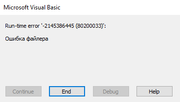
Или другая, подобная ей: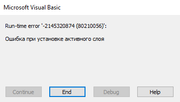
На рабочей машине пашет на 2007 и 2016 версии автокада.
Подскажите в чем может быть проблема? С разработчиком связаться возможности нет.
Для проверки нужно открыть файл «молниеотводы.dwg», там находятся блоки. Скопировать один из блоков, чтобы получилось три.
Нажать на первую клавишу меню, ввести высоту (например 5) и нажать «ОК».
Меню: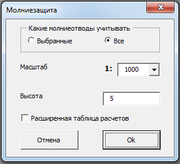
Результат: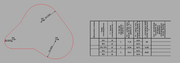
« Последнее редактирование: 20-08-2021, 12:35:48 от AppaL »

Записан
AppaL,
Исходник добавь к сообщению (если он < 5Mb) или переложи на Google-диск, если больше.
Кроме того уточни как запускается программа (какой командой).
Записан
Александр Ривилис,
Добавил в первое сообщение.
Записан
AppaL,
Исходные файлы запаролены:

Заниматься взламыванием защиты я не буду и такие действия здесь запрещены. Так что к сожалению помочь ничем не смогу. Если есть возможность — обращайтесь к разработчику или заказывайте новую разработку.
Записан
Отмечено как Решение Александр Ривилис 20-08-2021, 17:11:17
Всё оказалось намного проще. В этом каталоге не хватало файла шрифта wwcade.shx, который программа использует и при попытке его установить возникает эта ошибка. Видимо на рабочем компьютере он есть. Попробуй его добавить в этот же каталог.

Я проверял в AutoCAD 2021. Само-собой в логику работы программы я не лез и насколько корректные результаты не знаю.
Записан
Александр Ривилис,
Не знаю с какой вы планеты, но вы ГЕНИЙ!!!! 
Записан
Записан
- Печать
Страницы: [1] Вверх
|
|||
|
|||
|
|||
|
|||
|
|||
|
|||
|
|||
|
|||
|
|||
|
|||
|
|||
|
|||
|
|||
|
|||


Сейчас Вы — Гость на форумах «Проектант». Гости не могут писать сообщения и создавать новые темы.
Преодолейте несложную формальность — зарегистрируйтесь! И у Вас появится много больше возможностей на форумах «Проектант».
Последние сообщения на форуме «Программное обеспечение Autodesk»
05 Ноября 2022 года, 15:40
21 Октября 2022 года, 13:45
14 Октября 2022 года, 14:27
19 Сентября 2022 года, 18:47
07 Сентября 2022 года, 11:58
15 Апреля 2022 года, 15:25
09 Апреля 2022 года, 07:50
Issue
You saw an Automation Error message when using one of our plugins with AutoCAD or F/X CAD.
Several different Automation Error messages are possible. Here are the Automation Error messages we’ve seen so far:
- Error: ‘Automation Error. Description was not provided.’ – when placing or sizing irrigation heads
- Error: ‘Automation Error. Invalid argument … in SetBitmap’ – when placing or sizing irrigation heads
- Error: ‘Automation Error: Problem in loading application’ – when opening one of the Land F/X tools
- Error: ‘Automation Error: No database’ – can occur when opening CAD or attempting to use one of our tools
- Error connecting to LandFX database: Automation Error – when attempting to use one of our tools
- Error: ‘Automation Error: Error decrypting data’ – when editing a detail
- Automation Error. Null object ID – when working with block or detail files, such as updating details
- Error: ‘Automation Error: On locked layer’ – when placing a schedule or block
- Error: ‘Automation Error: Access is denied’ (possibly accompanied by a 404 File not found error) – when placing a block or updating Land F/X
- Error: ‘Automation Error: An invalid character was found in text content’
- Error: ‘Automation Error: The system cannot locate the resource specified’
- Error connecting to LandFX database: Automation Error. connect failed – having recently installed the C3D Object Enabler and attempting to open a DWG file
- Automation error. Invalid class
- Automation error. AcRxClassName is not in the system registry
- Automation Error when attempting to send us a technical support ticket
- Error connecting to LandFX database: Automation Error. Provider cannot be found. It may not be properly installed
Cause
A core architecture within Windows operating systems is the ability to call other programs for common tasks. In regards to this error, this process is called «automation.»
An error in the automation process can mean anything from a legitimate cause (a common library was unable to open a file) to a bug (the variable name for the task was misspelled, or mistakenly released).
The important thing to note is that the fact that the error is an «Automation Error» really doesn’t mean much of anything on its own. For all practical purposes, that phrase is irrelevant, and the «actual» error message is the text that follows the text «Automation Error.»
We’ve adjusted all Automation Error messages so each message now includes the source of the error, which is commonly the most important component of the error – especially when these messages are accompanied by the text No description provided.
Note that in some cases, an alert box comes up and just includes an error message to the effect of Error connecting to landfx.com, but the Command line will contain more information, such as Automation Error: no description provided.rn [MSXML.HTTP], for example.
In some cases, the cause of the error will be fairly obvious in the error message, such as: Automation Error: Permission denied [Scripting.FileSystemObject.Folder.Delete]. Even in that case, however, the information in square brackets helps to clarify exactly what the error text applies to. In this particular case, the error will have popped up when the user attempts to delete a folder. «Permission denied» indicates that the user doesn’t have permission to delete the requested folder.
Solution
Below is a list of each calling object we’ve added to Automation Error messages. If one of these calling objects is included in the error message you’re seeing, use the relevant link below to find the solution.
If the error message you are seeing does not include one of these calling ojects, or you tried resolving the calling object you saw in the message but you’re still seeing the error, see our list of specific Automation Error messages and their solutions.
List of calling objects:
- MSXML.HTTP
- Scripting.FileSystemObject.Folder.Delete (when attempting to delete a folder)
- ADODB.Stream.SaveToZip (when an attempt to create a zip file fails)
- Shell.Application.Zip.CopyHere (when attempting to copy files into zip file)
- GetArea
- GetArea.Boundary.Rebuild
- AutoCAD.AcCmColor
- InsertBlock (when attempting to insert a block)
- Excel.Application (when attempting to export a schedule or other item to MS Excel)
- OpenDCL.Load
- ObjectDBX.AxDbDocument.Open
- LayerState.Read.0 (attempting to read the first line of a layer state file)
- LayerState.Read.1 (attempting to read subsequent lines of a layer state file)
- VLA.Open
• MSXML.HTTP
Cause: This message affects a basic Internet object, commonly called Ajax, and indicates a problem with the way Land F/X communicates with Cloud Data. If you see an Automation Error message and this text in the Command line, it means either:
- The user’s Internet connection is down, or
- A firewall or permissions are preventing the Internet call
Solution: Check your Internet connection, then determine whether a firewall or folder permissions are in fact preventing Land F/X from communicating with Cloud Data. If so, troubleshoot and address these issues.
• Scripting.FileSystemObject.Folder.Delete (when attempting to delete a folder)
Cause: The user doesn’t have permissions to delete the folder, or the folder is not empty.
Solution: Ensure that you have (or the user has) proper permissions for the folder and that the folder is not empty.
• ADODB.Stream.SaveToZip (when an attempt to create a zip file fails)
Cause: This error is typically the result of an expired trial installation of a zip program such as WinZip, 7-Zip, WinRar, etc.
Solution: Look for and delete any trial installations of this type of app.
• Shell.Application.Zip.CopyHere (when attempting to copy files into zip file)
Cause & Solution: Currently unknown
At present, we are unsure what might cause this error, but it’s still helpful to narrow the issue down. Our best guess in this case is that something like one of the files that were attempted to be copied is open or locked in some fashion.
• GetArea
Cause: The system is unable to query the area of an AutoCAD entity such as a hatch or a closed polyline or spline.
Solution: Select hatches and/or enclosed objects in your drawing and note the contents of the Area entry in the Properties panel. The object causing the error will not have an area listed.
Redraw any enclosed regions of this nature that lack an Area entry in the Properties panel.
• GetArea.Boundary.Rebuild
Cause: The system has attempted unsuccessfully to rebuild the boundary of a hatch with no area.
Solution: Delete the problematic hatch and place it on a valid boundary.
• AutoCAD.AcCmColor
Cause: The system has attempted unsuccessfully to assign a Truecolor to a hatch.
Solution: Follow our instructions to uninstall and reinstall CAD.
• InsertBlock (when attempting to insert a block)
Cause: This error is occurring because the block file is missing or inaccessible, or is unable to be inserted for reasons such as a corrupt file or the wrong CAD version.
Solution: Verify that you are able to find or access the block’s source file. If you can’t find or access the file, add the file to the correct location. If the block you’re trying to insert or place is one of our blocks (such as a plant or irrigation symbol), you can try to delete the subfolder within the LandFX folder where the source file is located (taking cafe to back up any custom block files you currently have in that folder), then place the block again. The source file should download automatically. If the file was corrupt, the newly downloaded one should be functional.
If your LandFX folder is in a location you cannot access, you’ll need to make that location accessible from your computer by either mapping a letter drive to that location or giving yourself the proper permissions to the LandFX folder on either your computer (Single-User installations) or your network (Multi-User installations).
Is the block source file in the correct location and you’re able to access it? Or are you still seeing the error after addressing the location and accessibility issues? It’s time to troubleshoot your version of CAD. You may be using the wrong version, or your installation may have become corrupt. At this point, it’s best to send us a technical support ticket so our team can investigate the issue further.
• Excel.Application (when attempting to export a schedule or other item to MS Excel)
Cause: This error most commonly means your Excel license has expired.
Solution: Ensure that your Excel license is up to date.
• OpenDCL.Load
Cause: This error pops up when the system attempts unsuccessfully to load the OpenDCL project from the Landfx.VLX file. In this case, the VLX file has been damaged, typically from running an update.
Solution: Follow our steps to revert to the previous version of Land F/X, then run the update again.
• ObjectDBX.AxDbDocument.Open
Cause: An automated method of opening a DWG file used by our fxREF tool, for example, has failed because of any of the typical reasons that your version of CAD may not be able to open this type of file. The file may be corrupt or of a file type that your version is unable to open, for example.
Solution: Troubleshoot and address any issues with the file type of the file you’re attempting to open when using fxREF or another tool. You may need to clean the file or ensure its file type is compatible with your version of CAD.
• LayerState.Read.0 (attempting to read the first line of a layer state file)
Cause: This error message is most likely occurring because you have (or the user has) improper permissions for the file, or because the file is corrupted.
Solution: You may need to obtain the proper permissions for the file, or determine whether or not the file is corrupted.
• LayerState.Read.1 (attempting to read subsequent lines of a layer state file)
Cause: The file is undoubtedly corrupt.
Solution: Troubleshoot corruption in the file.
• VLA.Open
Cause: A simple method to open a file has failed because of any of the typical reasons that your version of CAD may not be able to open this type of file. The file may be corrupt or of a file type that your version is unable to open, for example.
Solution: Troubleshoot and address any issues with the file type of the file you’re attempting to open when using fxREF or another tool. You may need to clean the file or ensure its file type is compatible with your version of CAD.
List of specific Automation Error messages and their solutions:
If the error message you saw did not include one of the calling objects listed above, or if you attempted the solution for the calling object you saw but you’re still seeing the error message, see the solution to your particular Automation Error message below.
- Error: ‘Automation Error. Description was not provided.’ (when placing or sizing irrigation heads)
- Error: ‘Automation Error. Invalid argument … in SetBitmap’ (when placing or sizing irrigation heads)
- Error: ‘Automation Error: Problem in loading application’ (when opening one of our tools)
- Error: ‘Automation Error: No database’ (when opening CAD or attempting to use one of our tools)
- Error connecting to LandFX database: Automation Error (when attempting to use one of our tools)
- Error: ‘Automation Error: Error decrypting data’ (when editing a detail)
- Automation Error. Null object ID (when working with block or detail files, such as updating details)
- Error: ‘Automation Error: On locked layer’ – when placing a schedule or block
- Error: ‘Automation Error: Access is denied’ (possibly accompanied by a 404 File not found error) – when placing a block
- Error: ‘Automation Error: An invalid character was found in text content’
- Error: ‘Automation Error: The system cannot locate the resource specified’
- Error connecting to LandFX database: Automation Error. connect failed – having recently installed the C3D Object Enabler and attempting to open a DWG file
- Automation error: Invalid class
- Automation Error. AcRxClassName is not in the system registry
- Error connecting to LandFX database: Automation Error. Provider cannot be found. It may not be properly installed
- Automation Error when attempting to send us a technical support ticket
• Error: ‘Automation Error. Description was not provided.’
• Error: ‘Automation Error. Invalid argument … in SetBitmap’
You may have received one of these Automation Error messages when placing or sizing irrigation heads.
With either of these functions, the system attempts to set the legacy toolbar image to the radius of the spray head selected. If you receive an Automation Error when doing this, it’s because you are using an extremely old version of one of our toolbars. As a result, the common Windows library for dealing with toolbars is unable to load the revised bitmap image.
If you’ve received either of these Automation Error messages, please follow our steps to download and run the latest Land F/X Workstation installer.
We also recommend that you start using our ribbons rather than the toolbars.
• Error: ‘Automation Error: Problem in loading application’
• Error: ‘Automation Error: No database’
You may see one of these errors when opening one of our tools or when opening AutoCAD or F/X CAD.
A Problem in loading application error means that the library itself cannot be loaded. A No database error means that there’s no object database at all. Either way, the only solution is to reinstall AutoCAD or F/X CAD.
• Error connecting to LandFX database: Automation Error
You might see this error when attempting to use one of our tools. The cause will depend on whether your office has Local Data or Cloud Data, although in either case you’ll need to send us a technical support ticket.
Don’t know whether your office has Local or Cloud Data? Ask your IT administrator.
- If your office has Local Data and you saw this error, you are likely experiencing a problem with your MySQL database server.
- If you have Cloud Data, you may also see the following error message: Access denied for user ‘ODBC’@‘XXX.XX.XX.XXX’ (where XXX.XX.XX.XXX represents your Internet IP address). In this case, your install.xml file has been mistakenly switched to Local Data.
In either case, please send us a technical support ticket that includes:
- The fact that you received the error message Error connecting to LandFX database: Automation Error
- A screenshot of the error (if possible).
- A description of the action you attempted within AutoCAD right before you saw the error (i.e., which of our tools you attempted to use).
- The type of data your office is supposed to be using (Cloud or Local). If you’re on Cloud, please inform us whether you received the ‘ODBC’@ error mentioned above.
• Error: ‘Automation Error: Error decrypting data’
You may have received this error when editing a detail. The error is an indication that the system is unable to open the detail you are trying to edit. Possible reasons include:
- The detail file could already be open. Another user in your office might have it open, or you might even have it open in another window.
- Your account might not have permissions to open the detail file.
- The detail could be saved in a later version of AutoCAD from what you have (for instance, if an AutoCAD 2018 user has saved the detail and you don’t have 2018).
- The detail could be damaged or require an Audit
1. Open the File menu in AutoCAD and select Open. Then select the detail file you’re trying to edit.
2. You should now receive a clearer error message, which you can then troubleshoot. You will most likely received one of the following two error messages:
- That file is open by (name of person in your office)
- Error opening file, DWG must be recovered (or a similar error)
Seeing a different error at this point? If so, use the search box at the top of this page to search for the exact text of that error message on our website. Odds are, we already have a solution for it!
• That file is open by (name of person in your office)
If you receive this message, you’ll know the CAD user named in the error message has the detail open. If so, that person will need to close the detail file before you can edit it.
• Error opening file, DWG must be recovered (or a similar error)
If you see this message, you’ll need to recover the detail file.
Run the RECOVER command by either:
- Typing RECOVER in the Command line and pressing Enter, or …
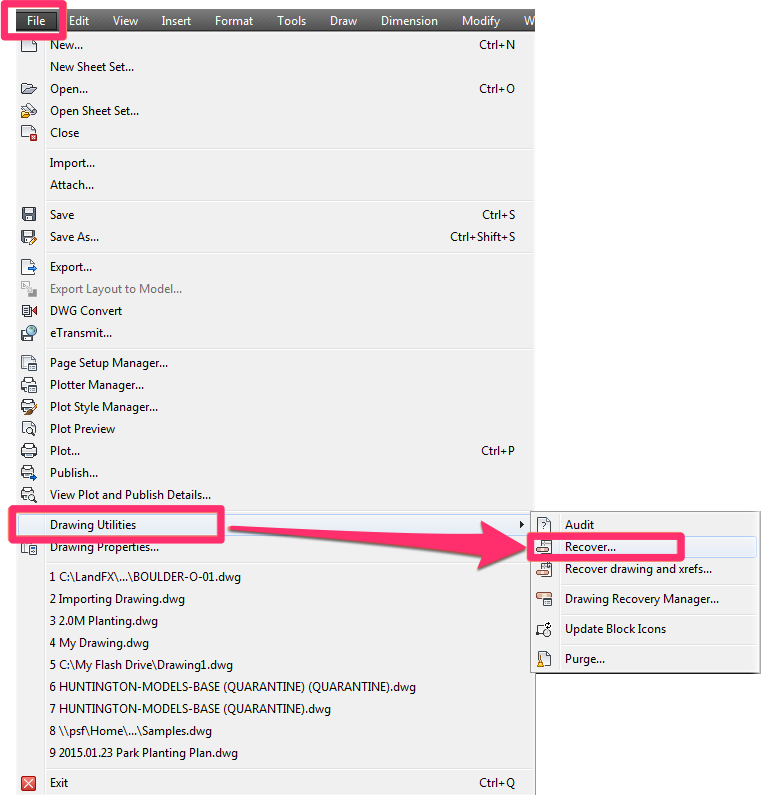
- Selecting Drawing Utilities from the AutoCAD File menu and then selecting Recover… from the menu that opens (as pictured to the right).
You should now be able to open and edit the detail successfully.
• Automation Error. Null object ID
This error can occur when you’re trying to work with a block or detail file, such as updating a detail.
1. Try to open the block or detail file causing the error. (If you’re using our software on a Mac using Parallels, try to open the file on the Windows side.)
2. This error can be caused by drawing corruption. Follow our drawing cleanup steps on both the file causing the issue and the drawing where you tried to use it.
3. Verify that the block or detail causing the error isn’t saved in a newer DWG version. For example, the error can result from an older CAD version trying to use a block saved in a newer file type. If the file is saved in a newer version, save it into a version that is compatible with the CAD version you’re using.
• Error: ‘Automation Error: On locked layer’
You might receive this error when attempting to place a schedule or block. If so, the current layer is locked.
If you receive this error, open the Layer Properties Manager and follow our steps to unlock the current layer.
You should now be able to place the block or schedule without seeing the error.
• Error: ‘Automation Error: access is denied’ – possibly accompanied by a 404 File not found error
Did your get this error when attempting to update our software? If so, your security software (such as Symantec or Norton) may be preventing files on your computer from updating. Try disabling your security software temporarily while updating. Once the updates have gone through, you can re-enable your security software.
You might see the Automation Error: Access denied message, and possibly a 404 File not found error, when placing blocks. The error occurs because the blocks are failing to download due to a connection error. The blocks can be problematic in several possible ways. Examples include:
- Outdated Land F/X symbol blocks without the letter prefix in their file names (which we added to our default blocks a few years ago)
- Blocks in incorrect locations
The file names of the problematic blocks should be listed just before or after the error message in the Command line. Take note of these file names.
First, try deleting the block’s source file from the folder LandFX/Blocks. Then try to place the same object again. You may need to re-assign the symbol to the block before you can place it.
Still getting the error? You may need to create the slide (SLD) files manually in the directory that contains the blocks you attempted to download. Doing so will prevent the drawing from trying to download those files every time, which will prevent the Automation Error.
• Error: ‘Automation Error: An invalid character was found in text context’
This error is the result of illegal characters in your drawing or schedule.
You’ll need to do a bit of digging to figure out which entity has an illegal character in its name. Here’s an example:
Near the top of the Command line, you might see something like the following:
- [3.164] (sys-error «Automation Error. An invalid character was found in text content.rn»)
- :ERROR-BREAK.159 nil
- [4.156] (intelligent-invoke # TEXT 4 «037»)
- [5.148] (vlax-put-property # TEXT «037”)
The key text to look for here is:
- The error message itself, and
- The number within quotation marks following #TEXT
Essentially, look for the Automation Error text, then look for # TEXT after it. Take note of the charactes within the quotation marks right after # TEXT (in our example: «037»).
To find the item with the illegal character, you’ll need to do a search for all items related to this value in the Command line. This search will identify which items you need to check for the illegal characters. We recommend that you:
- Copy the whole command line and paste that text into a text file or word processing document, and then …
- Use the FIND command (CTRL+F on a Windows keyboard, or Command+F on a Mac keyboard) in the text file or word processing document to search for the value that came up in your Command line.
The screenshot to the right shows an example of text you might see in the Command line when encountering this error, as copied and pasted into a text file. We’ve used three boxes to mark the clues to the problematic item.
To find the item causing the error:
1. Verify the error message and value for the object that’s causing it (middle box).
2. Search for the value you’ve identified in the Command line (top box).
3. Record the name of the item (such as a block or hatch) associated with that value (bottom box).

In this example, we’ve searched for 037 and found that the problematic item is the tree Acer saccharum. We know this because the name of the symbol assigned to that tree is followed by an empty set of quotation marks (the attribute value), then by a set of quotes containing the value we’ve searched for, which is followed directly by another number.
If the issue is resulting from a plant in your drawing, for example, the issue commonly results from editing a plant and mistakenly adding an illegal character to the Remarks or Notes field. Note that the problem is with the data in the active Land F/X project – not with the symbol block – despite the fact that the illegal character appears in the name of the block in the Command line.
In this case, we’d edit the plant and check for and remove illegal characters in the text boxes in the Plant Info dialog box, such as the Remarks field (most commonly) or even the name fields.
In this example, the illegal character, which appears to be 037, was actually a hidden character code, which happened to be in the user’s plant remarks. In this case, you should be able to select that character (it might look like a block-like black question mark, or even just a space), and delete it.
You might also encounter this error if you’re using one of our old default Preference Sets. Specifically, the problem would lie with Schematic Irrigation categories. If so, you’ll see characters that resemble the «Wingding» font in the Command line.
The main idea is to figure out which entity has the illegal character in its name, and to remove that illegal character. If you are unable to determine which entity includes the illegal character, the next step may unfortunately be to abandon the current Land F/X project. Although that option isn’t ideal, it may be necessary at this point, since that project is essentially corrupt and is preventing you from working in your drawing. If you’re using project templates, you may be able to simply create a new project based on a template and then assign it to this drawing. If you really can’t find the illegal character, and you are able to re-create the data in the current project (such as your plant palette), it may very well be time to leave the current project behind.
• Error: ‘Automation Error: The system cannot locate the resource specified’
You might also see the following error message: Unable to connect to FXDatabase on this computer. Database connection confirmed to be running yet connection refused.
If you see this Automation Error message, a physical or software firewall is preventing CAD from functioning correctly.
1. Close CAD.
2. Follow our instructions to add AutoCAD or F/X CAD as an exception.
3. Reopen CAD and repeat the action that resulted in the error.
Still seeing the error? Move on to the next step.
4. Create a new AutoCAD or F/X CAD profile, or open a different existing profile. Then attempt the action that resulted in the error.
- Don’t see the error now? The issue was linked to the profile you were using when you saw the error. You’ll need to keep using this new (or existing) profile moving forward. If necessary, you can customize this profile with your preferred settings.
- Still seeing the error in the new (or existing) profile? Move on to the next step.
5. Follow our steps to tether Land F/X using your phone.
- Don’t see the error now? The problem is with your network rather than with anything related to Land F/X. Ask your IT administrator to troubleshoot your network.
- Still seeing the error? It’s time to send us a technical support ticket describing the error. Remember to send us the exact text of the error message and let us know that you’ve tried all these steps.
• Error connecting to LandFX database: Automation Error. connect failed
You might see this error message if you’ve recently installed the C3D Object Enabler and are attempting to open a DWG file.
This error occurs because Autodesk has begun using SQLite for the C3D Object Enabler, which interferes with the version of SQLite we deployed with Single-User Local Data installations.

We’ve changed the version of SQLite deployed in new installations to be compatible with the C3D Object Enabler. You can correct this issue by downloading and running the latest Land F/X Workstation installer. The installer will load the updated version and resolve the error.
Still seeing the error after running the latest F/X Workstation installer?
If you’ve already run the latest F/X Workstation installer and are continuing to see this error, you may be on a domain (you would have had to press Ctrl + Alt + Delete to sign on) and the user who is currently logged in does not have Modify permissions for the Land F/X database file.
To correct this error, the user will need to be granted Modify permissions to the following directory and all its contents: C:ProgramDataLandFX
Need help? Follow our steps for changing permissions on the directory listed above, taking care to select the Modify box under Allow.
Your drive letter may not match our example. If you’re unsure, contact your systems administrator. Also note that a user account on a domain may not be able to modify anything without being made an owner first, so it’s generally best to involve your systems administrator at this point. How to make a user an owner of a directory
• Automation error: Invalid class
This error is caused by the software failing to make a connection to your MySQL server. We attempted to make a test connection to your MySQL server, but the ping service on that system has most likely been disabled. In general, this issue will only occur in domain environments that are managed by an IT representative.
To address this issue, have your IT administrator follow our MySQL errors and troubleshooting steps.
• AcRxClassName is not in the system registry
You may have seen this error when trying to place a schedule. Here’s the solution.
• Error connecting to LandFX database: Automation Error. Provider cannot be found. It may not be properly installed
You might have seen this error message when trying to use Local Data with an M1 Mac, which is currently not supported due to the unavailability of ODBC connectors for ARM architecture.
To address this issue, follow our steps to select Cloud Data (step 4 of our Switch to Cloud Data steps). The software will not function in a Local Data configuration, so the other steps in that article cannot be completed on the machine where you saw this error.
If you (or the user you are assisting) had a Local Data installation on a previous machine and need to migrate your project data to Cloud, you’ll need to complete our entire process of switching to Cloud Data on that other machine. Otherwise you can restore from backups:
- Back Up and Restore Projects, Templates, and Preference Sets
- Import Project Data from .lfx or auto_projdata.lfx or Backup File
• Automation Error when attempting to send us a technical support ticket
If you saw an Automation Error message when attempting to use our Support tool to send us a file in a technical support ticket, or if the tool is simply not working, check whether you have zip file software installed on your computer – specifically, WinZip.
We’ve seen this issue occur on computers that have an expired trial of Winzip installed. If so, try removing it or purchasing it.
You can also try making a zip file of your drawing and Land F/X project data manually, and emailing the zip file to us at support@landfx.com.

Topic: vla-insertblock produces filer error, why? (Read 1751 times)
0 Members and 1 Guest are viewing this topic.
Given that PointData is:
("1" "6239.957" "11857.009" "4909.98" "X")and I’m using the following to insert a block:
(vla-insertblockWhy am I getting the following error?
mspace
(vlax-3d-point
(list
(distof (caddr pointdata))
(distof (cadr pointdata))
(distof (cadddr pointdata))
)
)
"SurveyControlPoint"
1
1
1
0
)
«Automation Error. Filer error»
This code was working fine yesterday, but not today.
Any help would be appreciated.
Mike

Logged
Most likely the block definition does not exist in the drawing or cannot be found in the support paths. Also another issue could be the block you are trying to insert is in a DWG format later than your current version … Just guessing.
Logged
You nailed it.
I had code ensuring the block existed in the drawing, but broke it making another change.
It’s all working now.
Thanks!
Mike
Logged
Glad to help 
Logged