What causes ArrayIndexOutOfBoundsException?
If you think of a variable as a «box» where you can place a value, then an array is a series of boxes placed next to each other, where the number of boxes is a finite and explicit integer.
Creating an array like this:
final int[] myArray = new int[5]
creates a row of 5 boxes, each holding an int. Each of the boxes has an index, a position in the series of boxes. This index starts at 0 and ends at N-1, where N is the size of the array (the number of boxes).
To retrieve one of the values from this series of boxes, you can refer to it through its index, like this:
myArray[3]
Which will give you the value of the 4th box in the series (since the first box has an index of 0).
An ArrayIndexOutOfBoundsException is caused by trying to retrieve a «box» that does not exist, by passing an index that is higher than the index of the last «box», or negative.
With my running example, these code snippets would produce such an exception:
myArray[5] //tries to retrieve the 6th "box" when there is only 5
myArray[-1] //just makes no sense
myArray[1337] //way to high
How to avoid ArrayIndexOutOfBoundsException
In order to prevent ArrayIndexOutOfBoundsException, there are some key points to consider:
Looping
When looping through an array, always make sure that the index you are retrieving is strictly smaller than the length of the array (the number of boxes). For instance:
for (int i = 0; i < myArray.length; i++) {
Notice the <, never mix a = in there..
You might want to be tempted to do something like this:
for (int i = 1; i <= myArray.length; i++) {
    final int someint = myArray[i - 1]
Just don’t. Stick to the one above (if you need to use the index) and it will save you a lot of pain.
Where possible, use foreach:
for (int value : myArray) {
This way you won’t have to think about indexes at all.
When looping, whatever you do, NEVER change the value of the loop iterator (here: i). The only place this should change value is to keep the loop going. Changing it otherwise is just risking an exception, and is in most cases not necessary.
Retrieval/update
When retrieving an arbitrary element of the array, always check that it is a valid index against the length of the array:
public Integer getArrayElement(final int index) {
    if (index < 0 || index >= myArray.length) {
        return null; //although I would much prefer an actual exception being thrown when this happens.
    }
    return myArray[index];
}
Java supports the creation and manipulation of arrays as a data structure. The index of an array is an integer value that has value in the interval [0, n-1], where n is the size of the array. If a request for a negative or an index greater than or equal to the size of the array is made, then the JAVA throws an ArrayIndexOutOfBounds Exception. This is unlike C/C++, where no index of the bound check is done.
The ArrayIndexOutOfBoundsException is a Runtime Exception thrown only at runtime. The Java Compiler does not check for this error during the compilation of a program.
Java
public class NewClass2 {
public static void main(String[] args)
{
int ar[] = { 1, 2, 3, 4, 5 };
for (int i = 0; i <= ar.length; i++)
System.out.println(ar[i]);
}
}
Expected Output:
1
2
3
4
5
Original Output:
Runtime error throws an Exception:
Exception in thread "main" java.lang.ArrayIndexOutOfBoundsException: 5
    at NewClass2.main(NewClass2.java:5)
Here if you carefully see, the array is of size 5. Therefore while accessing its element using for loop, the maximum index value can be 4, but in our program, it is going till 5 and thus the exception.
Let’s see another example using ArrayList:
Java
import java.util.ArrayList;
public class NewClass2
{
public static void main(String[] args)
{
ArrayList<String> lis = new ArrayList<>();
lis.add("My");
lis.add("Name");
System.out.println(lis.get(2));
}
}
Runtime error here is a bit more informative than the previous time-
Exception in thread "main" java.lang.IndexOutOfBoundsException: Index: 2, Size: 2
    at java.util.ArrayList.rangeCheck(ArrayList.java:653)
    at java.util.ArrayList.get(ArrayList.java:429)
    at NewClass2.main(NewClass2.java:7)
Let us understand it in a bit of detail:
- Index here defines the index we are trying to access.
- The size gives us information on the size of the list.
- Since the size is 2, the last index we can access is (2-1)=1, and thus the exception.
The correct way to access the array is :
for (int i=0; i<ar.length; i++){

}
Correct Code –
Java
public class NewClass2 {
public static void main(String[] args)
{
int ar[] = { 1, 2, 3, 4, 5 };
for (int i = 0; i < ar.length; i++)
System.out.println(ar[i]);
}
}
Handling the Exception:
1. Using for-each loop:
This automatically handles indices while accessing the elements of an array.
Syntax:
for(int m : ar){
}
Example:
Java
import java.io.*;
class GFG {
public static void main (String[] args) {
int arr[] = {1,2,3,4,5};
for(int num : arr){
System.out.println(num);
}
}
}
2. Using Try-Catch:
Consider enclosing your code inside a try-catch statement and manipulate the exception accordingly. As mentioned, Java won’t let you access an invalid index and will definitely throw an ArrayIndexOutOfBoundsException. However, we should be careful inside the block of the catch statement because if we don’t handle the exception appropriately, we may conceal it and thus, create a bug in your application.
Java
public class NewClass2 {
public static void main(String[] args)
{
int ar[] = { 1, 2, 3, 4, 5 };
try {
for (int i = 0; i <= ar.length; i++)
System.out.print(ar[i]+" ");
}
catch (Exception e) {
System.out.println("nException caught");
}
}
}
Output
1 2 3 4 5
Exception caught
Here in the above example, you can see that till index 4 (value 5), the loop printed all the values, but as soon as we tried to access the arr[5], the program threw an exception which is caught by the catch block, and it printed the “Exception caught” statement.
Explore the Quiz Question.
This article is contributed by Rishabh Mahrsee. If you like GeeksforGeeks and would like to contribute, you can also write an article and mail your article to review-team@geeksforgeeks.org. See your article appearing on the GeeksforGeeks main page and help other Geeks. Please write comments if you find anything incorrect or you want to share more information about the topic discussed above.
What causes ArrayIndexOutOfBoundsException?
If you think of a variable as a «box» where you can place a value, then an array is a series of boxes placed next to each other, where the number of boxes is a finite and explicit integer.
Creating an array like this:
final int[] myArray = new int[5]
creates a row of 5 boxes, each holding an int. Each of the boxes has an index, a position in the series of boxes. This index starts at 0 and ends at N-1, where N is the size of the array (the number of boxes).
To retrieve one of the values from this series of boxes, you can refer to it through its index, like this:
myArray[3]
Which will give you the value of the 4th box in the series (since the first box has an index of 0).
An ArrayIndexOutOfBoundsException is caused by trying to retrieve a «box» that does not exist, by passing an index that is higher than the index of the last «box», or negative.
With my running example, these code snippets would produce such an exception:
myArray[5] //tries to retrieve the 6th "box" when there is only 5
myArray[-1] //just makes no sense
myArray[1337] //way to high
How to avoid ArrayIndexOutOfBoundsException
In order to prevent ArrayIndexOutOfBoundsException, there are some key points to consider:
Looping
When looping through an array, always make sure that the index you are retrieving is strictly smaller than the length of the array (the number of boxes). For instance:
for (int i = 0; i < myArray.length; i++) {
Notice the <, never mix a = in there..
You might want to be tempted to do something like this:
for (int i = 1; i <= myArray.length; i++) {
    final int someint = myArray[i - 1]
Just don’t. Stick to the one above (if you need to use the index) and it will save you a lot of pain.
Where possible, use foreach:
for (int value : myArray) {
This way you won’t have to think about indexes at all.
When looping, whatever you do, NEVER change the value of the loop iterator (here: i). The only place this should change value is to keep the loop going. Changing it otherwise is just risking an exception, and is in most cases not necessary.
Retrieval/update
When retrieving an arbitrary element of the array, always check that it is a valid index against the length of the array:
public Integer getArrayElement(final int index) {
    if (index < 0 || index >= myArray.length) {
        return null; //although I would much prefer an actual exception being thrown when this happens.
    }
    return myArray[index];
}
What causes ArrayIndexOutOfBoundsException?
If you think of a variable as a «box» where you can place a value, then an array is a series of boxes placed next to each other, where the number of boxes is a finite and explicit integer.
Creating an array like this:
final int[] myArray = new int[5]
creates a row of 5 boxes, each holding an int. Each of the boxes has an index, a position in the series of boxes. This index starts at 0 and ends at N-1, where N is the size of the array (the number of boxes).
To retrieve one of the values from this series of boxes, you can refer to it through its index, like this:
myArray[3]
Which will give you the value of the 4th box in the series (since the first box has an index of 0).
An ArrayIndexOutOfBoundsException is caused by trying to retrieve a «box» that does not exist, by passing an index that is higher than the index of the last «box», or negative.
With my running example, these code snippets would produce such an exception:
myArray[5] //tries to retrieve the 6th "box" when there is only 5
myArray[-1] //just makes no sense
myArray[1337] //way to high
How to avoid ArrayIndexOutOfBoundsException
In order to prevent ArrayIndexOutOfBoundsException, there are some key points to consider:
Looping
When looping through an array, always make sure that the index you are retrieving is strictly smaller than the length of the array (the number of boxes). For instance:
for (int i = 0; i < myArray.length; i++) {
Notice the <, never mix a = in there..
You might want to be tempted to do something like this:
for (int i = 1; i <= myArray.length; i++) {
    final int someint = myArray[i - 1]
Just don’t. Stick to the one above (if you need to use the index) and it will save you a lot of pain.
Where possible, use foreach:
for (int value : myArray) {
This way you won’t have to think about indexes at all.
When looping, whatever you do, NEVER change the value of the loop iterator (here: i). The only place this should change value is to keep the loop going. Changing it otherwise is just risking an exception, and is in most cases not necessary.
Retrieval/update
When retrieving an arbitrary element of the array, always check that it is a valid index against the length of the array:
public Integer getArrayElement(final int index) {
    if (index < 0 || index >= myArray.length) {
        return null; //although I would much prefer an actual exception being thrown when this happens.
    }
    return myArray[index];
}
The ArrayIndexOutOfBoundsException is a runtime exception in Java that occurs when an array is accessed with an illegal index. The index is either negative or greater than or equal to the size of the array.
Since the ArrayIndexOutOfBoundsException is an unchecked exception, it does not need to be declared in the throws clause of a method or constructor.
What Causes ArrayIndexOutOfBoundsException
The ArrayIndexOutOfBoundsException is one of the most common errors in Java. It occurs when a program attempts to access an invalid index in an array i.e. an index that is less than 0, or equal to or greater than the length of the array.
Since a Java array has a range of [0, array length — 1], when an attempt is made to access an index outside this range, an ArrayIndexOutOfBoundsException is thrown.
ArrayIndexOutOfBoundsException Example
Here is an example of a ArrayIndexOutOfBoundsException thrown when an attempt is made to retrieve an element at an index that falls outside the range of the array:
public class ArrayIndexOutOfBoundsExceptionExample {
    public static void main(String[] args) {
        String[] arr = new String[10];
        System.out.println(arr[10]);
    }
}
In this example, a String array of length 10 is created. An attempt is then made to access an element at index 10, which falls outside the range of the array, throwing an ArrayIndexOutOfBoundsException:
Exception in thread "main" java.lang.ArrayIndexOutOfBoundsException: Index 10 out of bounds for length 10
    at ArrayIndexOutOfBoundsExceptionExample.main(ArrayIndexOutOfBoundsExceptionExample.java:4)
How to Fix ArrayIndexOutOfBoundsException
To avoid the ArrayIndexOutOfBoundsException, the following should be kept in mind:
- The bounds of an array should be checked before accessing its elements.
- An array in Java starts at index
0and ends at indexlength - 1, so accessing elements that fall outside this range will throw anArrayIndexOutOfBoundsException. - An empty array has no elements, so attempting to access an element will throw the exception.
- When using loops to iterate over the elements of an array, attention should be paid to the start and end conditions of the loop to make sure they fall within the bounds of an array. An enhanced for loop can also be used to ensure this.
Track, Analyze and Manage Errors With Rollbar
Managing errors and exceptions in your code is challenging. It can make deploying production code an unnerving experience. Being able to track, analyze, and manage errors in real-time can help you to proceed with more confidence. Rollbar automates error monitoring and triaging, making fixing Java errors easier than ever. Sign Up Today!
Содержание
- Array Index Out Of Bounds Exception in Java
- Handling the Exception:
- 1. Using for-each loop:
- 2. Using Try-Catch:
- How to Fix the Array Index Out Of Bounds Excepiton in Java
- What Causes ArrayIndexOutOfBoundsException
- ArrayIndexOutOfBoundsException Example
- How to Fix ArrayIndexOutOfBoundsException
- Track, Analyze and Manage Errors With Rollbar
- java.lang.arrayindexoutofboundsexception – How to handle Array Index Out Of Bounds Exception
- Common error cases
- How to deal with the exception
- Array Index Out OfBounds Exception Class
- Definition
- Remarks
- Constructors
- Fields
- Properties
- Methods
- Explicit Interface Implementations
- Extension Methods
- java.lang.arrayindexoutofboundsexception – How to handle Array Index Out Of Bounds Exception
- Common error cases
- How to deal with the exception
Array Index Out Of Bounds Exception in Java
Java supports the creation and manipulation of arrays as a data structure. The index of an array is an integer value that has value in the interval [0, n-1], where n is the size of the array. If a request for a negative or an index greater than or equal to the size of the array is made, then the JAVA throws an ArrayIndexOutOfBounds Exception. This is unlike C/C++, where no index of the bound check is done.
The ArrayIndexOutOfBoundsException is a Runtime Exception thrown only at runtime. The Java Compiler does not check for this error during the compilation of a program.
Expected Output:
Original Output:
Runtime error throws an Exception:
Here if you carefully see, the array is of size 5. Therefore while accessing its element using for loop, the maximum index value can be 4, but in our program, it is going till 5 and thus the exception.
Let’s see another example using ArrayList:
Runtime error here is a bit more informative than the previous time-
Let us understand it in a bit of detail:
- Index here defines the index we are trying to access.
- The size gives us information on the size of the list.
- Since the size is 2, the last index we can access is (2-1)=1, and thus the exception.
The correct way to access the array is :
Correct Code –
Handling the Exception:
1. Using for-each loop:
This automatically handles indices while accessing the elements of an array.
Syntax:
Example:
2. Using Try-Catch:
Consider enclosing your code inside a try-catch statement and manipulate the exception accordingly. As mentioned, Java won’t let you access an invalid index and will definitely throw an ArrayIndexOutOfBoundsException. However, we should be careful inside the block of the catch statement because if we don’t handle the exception appropriately, we may conceal it and thus, create a bug in your application.
Here in the above example, you can see that till index 4 (value 5), the loop printed all the values, but as soon as we tried to access the arr[5], the program threw an exception which is caught by the catch block, and it printed the “Exception caught” statement.
Explore the Quiz Question.
Источник
How to Fix the Array Index Out Of Bounds Excepiton in Java

Table of Contents
The ArrayIndexOutOfBoundsException is a runtime exception in Java that occurs when an array is accessed with an illegal index. The index is either negative or greater than or equal to the size of the array.
Since the ArrayIndexOutOfBoundsException is an unchecked exception, it does not need to be declared in the throws clause of a method or constructor.
What Causes ArrayIndexOutOfBoundsException
The ArrayIndexOutOfBoundsException is one of the most common errors in Java. It occurs when a program attempts to access an invalid index in an array i.e. an index that is less than 0, or equal to or greater than the length of the array.
Since a Java array has a range of [0, array length — 1], when an attempt is made to access an index outside this range, an ArrayIndexOutOfBoundsException is thrown.
ArrayIndexOutOfBoundsException Example
Here is an example of a ArrayIndexOutOfBoundsException thrown when an attempt is made to retrieve an element at an index that falls outside the range of the array:
In this example, a String array of length 10 is created. An attempt is then made to access an element at index 10, which falls outside the range of the array, throwing an ArrayIndexOutOfBoundsException :
How to Fix ArrayIndexOutOfBoundsException
To avoid the ArrayIndexOutOfBoundsException , the following should be kept in mind:
- The bounds of an array should be checked before accessing its elements.
- An array in Java starts at index 0 and ends at index length — 1 , so accessing elements that fall outside this range will throw an ArrayIndexOutOfBoundsException .
- An empty array has no elements, so attempting to access an element will throw the exception.
- When using loops to iterate over the elements of an array, attention should be paid to the start and end conditions of the loop to make sure they fall within the bounds of an array. An enhanced for loop can also be used to ensure this.
Track, Analyze and Manage Errors With Rollbar
Managing errors and exceptions in your code is challenging. It can make deploying production code an unnerving experience. Being able to track, analyze, and manage errors in real-time can help you to proceed with more confidence. Rollbar automates error monitoring and triaging, making fixing Java errors easier than ever. Sign Up Today!
Источник
java.lang.arrayindexoutofboundsexception – How to handle Array Index Out Of Bounds Exception
Posted by: Sotirios-Efstathios Maneas in exceptions December 27th, 2013 0 Views
In this post, we feature a comprehensive Example on How to handle Array Index Out Of Bounds Exception. Java supports the creation and manipulation of arrays, as a data structure. A bunch of Java data structures are implemented using arrays to store and expand their data. Thus, arrays are massively used in programming, as they provide a very fast and easy way to store and access pieces of data.
Each array consists of a concrete number of elements and thus, it has a fixed size. The index of an array is an integer value that resides in the interval [0, n-1] , where n is the size of the matrix. If we request for an index that is either negative, or greater than or equal to the size of the array, an ArrayIndexOutOfBoundsException is thrown.
The ArrayIndexOutOfBoundsException is a RuntimeException thrown only at runtime. The Java Compiler does not check for this error during the compilation of a program.
For example, let’s carefully observe the following code snippet:
The above code snippet throws the following exception:
If we carefully observe the exception we will see that in line 10 of our code, we ask the matrix[5] element. However, this element does not exist, as our matrix has size 5 and thus, a valid index resides in the interval [0, 4].
One more example that throws an ArrayIndexOutOfBoundsException is the following:
The above code snippet throws the following exception:
In this case, the exception is a little more descriptive and it is interpreted as follows:
- The index field denotes the position of the element that we requested for.
- The Size field denotes the size of the matrix.
- An ArrayList with a size of 2 has valid indices in the interval [0, 1].
- The exception is thrown because we requested for an invalid index. So, if we want to access the 2 nd element of the list, we must write:
because the 1 st element of a List , as with arrays, starts at index 0.
Common error cases
The most common case is to declare an array with size “n” and access the n-th element. However, as we already mentioned, the indices of an array with size “n”, reside in the interval [0, n – 1] and thus, statements like:
Moreover, a common error case is found while iterating over the elements of an array, using a for loop . The following statement is wrong:
because in the last iteration, the value of i equals to the length of the array and thus, it is not a valid index. The correct iteration with a for loop is show below:
How to deal with the exception
Java is a safe programming language and won’t let you access an invalid index of an array. The internal data structures of Java, such as ArrayList , contain methods that check if the requested index is actually valid or not. For example, in Java 7, the get method of the ArrayList class, contains the following check, before returning the required object:
which is implemented as:
In order to avoid the exception, first, be very careful when you iterating over the elements of an array of a list. Make sure that your code requests for valid indices.
Second, consider enclosing your code inside a try-catch statement and manipulate the exception accordingly. As mentioned, Java won’t let you access an invalid index and will definitely throw an ArrayIndexOutOfBoundsException . However, be very careful inside the block of the catch statement, because if you don’t handle the exception appropriately, you may conceal it and thus, create a bug in your application.
This was a tutorial on how to handle Array Index Out Of Bounds Exception ( ArrayIndexOutOfBoundsException ).
Источник
Array Index Out OfBounds Exception Class
Definition
Some information relates to prerelease product that may be substantially modified before it’s released. Microsoft makes no warranties, express or implied, with respect to the information provided here.
Thrown to indicate that an array has been accessed with an illegal index.
Portions of this page are modifications based on work created andВ shared by the Android Open Source Project and used according to terms described in the Creative Commons 2.5 Attribution License.
Constructors
Constructs an ArrayIndexOutOfBoundsException with no detail message.
Constructs a new ArrayIndexOutOfBoundsException class with an argument indicating the illegal index.
A constructor used when creating managed representations of JNI objects; called by the runtime.
Constructs an ArrayIndexOutOfBoundsException class with the specified detail message.
Fields
Properties
Returns the cause of this throwable or null if the cause is nonexistent or unknown.
(Inherited from Throwable) Class (Inherited from Throwable) Handle
The handle to the underlying Android instance.
(Inherited from Throwable) JniIdentityHashCode (Inherited from Throwable) JniPeerMembers LocalizedMessage
Creates a localized description of this throwable.
(Inherited from Throwable) Message
Returns the detail message string of this throwable.
(Inherited from Throwable) PeerReference (Inherited from Throwable) StackTrace (Inherited from Throwable) ThresholdClass
This API supports the Mono for Android infrastructure and is not intended to be used directly from your code.
This API supports the Mono for Android infrastructure and is not intended to be used directly from your code.
Methods
Appends the specified exception to the exceptions that were suppressed in order to deliver this exception.
(Inherited from Throwable) Dispose() (Inherited from Throwable) Dispose(Boolean) (Inherited from Throwable) FillInStackTrace()
Fills in the execution stack trace.
(Inherited from Throwable) GetStackTrace()
Provides programmatic access to the stack trace information printed by #printStackTrace() .
(Inherited from Throwable) GetSuppressed()
Returns an array containing all of the exceptions that were suppressed, typically by the try -with-resources statement, in order to deliver this exception.
(Inherited from Throwable) InitCause(Throwable)
Initializes the cause of this throwable to the specified value.
(Inherited from Throwable) PrintStackTrace()
Prints this throwable and its backtrace to the standard error stream.
(Inherited from Throwable) PrintStackTrace(PrintStream)
Prints this throwable and its backtrace to the specified print stream.
(Inherited from Throwable) PrintStackTrace(PrintWriter)
Prints this throwable and its backtrace to the specified print writer.
(Inherited from Throwable) SetHandle(IntPtr, JniHandleOwnership)
Sets the Handle property.
(Inherited from Throwable) SetStackTrace(StackTraceElement[])
Sets the stack trace elements that will be returned by #getStackTrace() and printed by #printStackTrace() and related methods.
(Inherited from Throwable) ToString() (Inherited from Throwable) UnregisterFromRuntime() (Inherited from Throwable)
Explicit Interface Implementations
| IJavaPeerable.Disposed() | (Inherited from Throwable) |
| IJavaPeerable.DisposeUnlessReferenced() | (Inherited from Throwable) |
| IJavaPeerable.Finalized() | (Inherited from Throwable) |
| IJavaPeerable.JniManagedPeerState | (Inherited from Throwable) |
| IJavaPeerable.SetJniIdentityHashCode(Int32) | (Inherited from Throwable) |
| IJavaPeerable.SetJniManagedPeerState(JniManagedPeerStates) | (Inherited from Throwable) |
| IJavaPeerable.SetPeerReference(JniObjectReference) | (Inherited from Throwable) |
Extension Methods
Performs an Android runtime-checked type conversion.
Источник
java.lang.arrayindexoutofboundsexception – How to handle Array Index Out Of Bounds Exception
Posted by: Sotirios-Efstathios Maneas in exceptions December 27th, 2013 0 Views
In this post, we feature a comprehensive Example on How to handle Array Index Out Of Bounds Exception. Java supports the creation and manipulation of arrays, as a data structure. A bunch of Java data structures are implemented using arrays to store and expand their data. Thus, arrays are massively used in programming, as they provide a very fast and easy way to store and access pieces of data.
Each array consists of a concrete number of elements and thus, it has a fixed size. The index of an array is an integer value that resides in the interval [0, n-1] , where n is the size of the matrix. If we request for an index that is either negative, or greater than or equal to the size of the array, an ArrayIndexOutOfBoundsException is thrown.
The ArrayIndexOutOfBoundsException is a RuntimeException thrown only at runtime. The Java Compiler does not check for this error during the compilation of a program.
For example, let’s carefully observe the following code snippet:
The above code snippet throws the following exception:
If we carefully observe the exception we will see that in line 10 of our code, we ask the matrix[5] element. However, this element does not exist, as our matrix has size 5 and thus, a valid index resides in the interval [0, 4].
One more example that throws an ArrayIndexOutOfBoundsException is the following:
The above code snippet throws the following exception:
In this case, the exception is a little more descriptive and it is interpreted as follows:
- The index field denotes the position of the element that we requested for.
- The Size field denotes the size of the matrix.
- An ArrayList with a size of 2 has valid indices in the interval [0, 1].
- The exception is thrown because we requested for an invalid index. So, if we want to access the 2 nd element of the list, we must write:
because the 1 st element of a List , as with arrays, starts at index 0.
Common error cases
The most common case is to declare an array with size “n” and access the n-th element. However, as we already mentioned, the indices of an array with size “n”, reside in the interval [0, n – 1] and thus, statements like:
Moreover, a common error case is found while iterating over the elements of an array, using a for loop . The following statement is wrong:
because in the last iteration, the value of i equals to the length of the array and thus, it is not a valid index. The correct iteration with a for loop is show below:
How to deal with the exception
Java is a safe programming language and won’t let you access an invalid index of an array. The internal data structures of Java, such as ArrayList , contain methods that check if the requested index is actually valid or not. For example, in Java 7, the get method of the ArrayList class, contains the following check, before returning the required object:
which is implemented as:
In order to avoid the exception, first, be very careful when you iterating over the elements of an array of a list. Make sure that your code requests for valid indices.
Second, consider enclosing your code inside a try-catch statement and manipulate the exception accordingly. As mentioned, Java won’t let you access an invalid index and will definitely throw an ArrayIndexOutOfBoundsException . However, be very careful inside the block of the catch statement, because if you don’t handle the exception appropriately, you may conceal it and thus, create a bug in your application.
This was a tutorial on how to handle Array Index Out Of Bounds Exception ( ArrayIndexOutOfBoundsException ).
Источник
Posted by Marta on March 4, 2022 Viewed 5706 times
In this article, you will learn the main reason why you will face the java.lang.ArrayIndexOutOfBoundsException Exception in Java along with a few different examples and how to fix it.
I think it is essential to understand why this error occurs, since the better you understand the error, the better your ability to avoid it.
This tutorial contains some code examples and possible ways to fix the error.
Watch the tutorial on Youtube:
What causes a java.lang.ArrayIndexOutOfBoundsException?
The java.lang.ArrayIndexOutOfBoundsException error occurs when you are attempting to access by index an item in indexed collection, like a List or an Array. You will this error, when the index you are using to access doesn’t exist, hence the “Out of Bounds” message.
To put it in simple words, if you have a collection with four elements, for example, and you try to access element number 7, you will get java.lang.ArrayIndexOutOfBoundsException error.
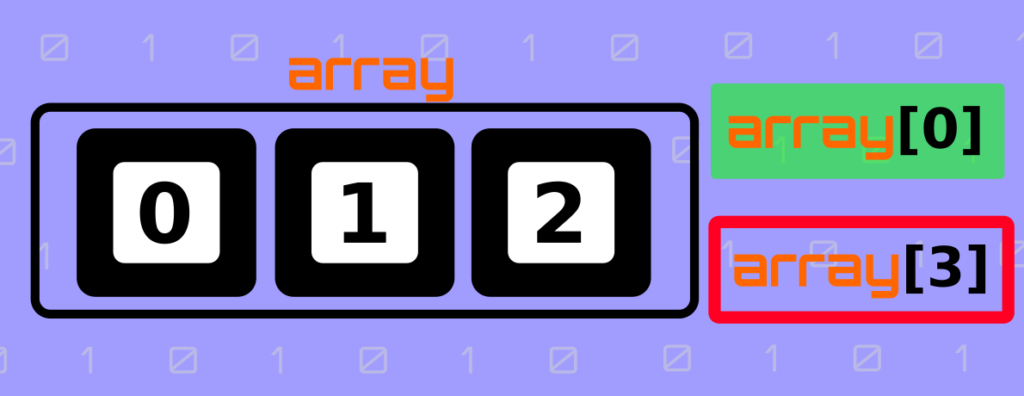
To help you visualise this problem, you can think of arrays and index as a set of boxes with label, where every label is a number. Note that you will start counting from 0.
For instance, we have a collection with three elements, the valid indexes are 0,1 and 2. This means three boxes, one label with 0, another one with 1, and the last box has the label 2. So if you try to access box number 3, you can’t, because it doesn’t exist. That’s when you get the java.lang.ArrayIndexOutOfBoundsException error.
The Simplest Case
Let’s see the simplest code snippet which will through this error:
public class IndexError {

    public static void main(String[] args){
        String[] fruits = {"Orange", "Pear", "Watermelon"};
        System.out.println(fruits[4]);
    }
}
Output:
Exception in thread "main" java.lang.ArrayIndexOutOfBoundsException: Index 4 out of bounds for length 3
Although the error refer to arrays, you could also encounter the error when working with a List, which is also an indexed collection, meaning a collection where item can be accessed by their index.
import java.util.Arrays;
import java.util.List;
public class IndexError {

    public static void main(String[] args){
        List<String> fruits = Arrays.asList("Orange", "Pear", "Watermelon");
        System.out.println(fruits.get(4));
    }
}
Output:
Exception in thread "main" java.lang.ArrayIndexOutOfBoundsException: Index 4 out of bounds for length 3
Example #1: Using invalid indexes in a loop
An instance where you might encounter the ArrayIndexOutOfBoundsException exception is when working with loops. You should make sure the index limits of your loop are valid in all the iterations. The loop shouldn’t try to access an item that doesn’t exist in the collection. Let’s see an example.
import java.util.Arrays;
import java.util.List;

public class IndexError {

    public static void main(String[] args){
        List<String> fruits = Arrays.asList("Orange", "Pear", "Watermelon");
        for(int index=0;index<=fruits.size();index++){
            System.out.println(fruits.get(index));
        }
    }
}
Output:
Exception in thread "main" java.lang.ArrayIndexOutOfBoundsException: Index 3 out of bounds for length 3
Orange
Pear
Watermelon
	at java.base/java.util.Arrays$ArrayList.get(Arrays.java:4351)
	at com.hellocodeclub.IndexError.main(IndexError.java:11)
The code above will loop through every item in the list and print its value, however there is an exception at the end. The problem in this case is the stopping condition in the loop: index<=fruits.size(). This means that it will while index is less or equal to 3, therefore the index will start in 0, then 1, then 2 and finally 3, but unfortunately 3 is invalid index.
How to fix it – Approach #1
You can fix this error by changing the stopping condition. Instead of looping while the index is less or equal than 3, you can replace by “while index is less than 3”. Doing so the index will go through 0, 1, and 2, which are all valid indexes. Therefore the for loop should look as below:
for(int index=0;index<fruits.size();index++){
That’s all, really straightforward change once you understand the root cause of the problem. Here is how the code looks after the fix:
import java.util.Arrays;
import java.util.List;

public class IndexError {
    public static void main(String[] args){
        List<String> fruits = Arrays.asList("Orange", "Pear", "Watermelon");
        for(int index=0;index<fruits.size();index++){
            System.out.println(fruits.get(index));
        }
    }
}
Output:
How to fix it – Approach #2
Another way to avoid this issue is using the for each syntax. Using this approach, you don’t have to manage the index, since Java will do it for you. Here is how the code will look:
import java.util.Arrays;
import java.util.List;

public class IndexError {

    public static void main(String[] args){
        List<String> fruits = Arrays.asList("Orange", "Pear", "Watermelon");
        for(String fruit: fruits){
            System.out.println(fruit);
        }
    }
}
Example #2: Loop through a string
Another example. Imagine that you want to count the appearances of character ‘a’ in a given sentence. You will write a piece of code similar to the one below:
public class CountingA {

    public static void main(String[] args){
        String sentence = "Live as if you were to die tomorrow. Learn as if you were to live forever";
        char [] characters = sentence.toCharArray();
        int countA = 0;
        for(int index=0;index<=characters.length;index++){
            if(characters[index]=='a'){
                countA++;
            }
        }
        System.out.println(countA);
    }
}
Output:
Exception in thread "main" java.lang.ArrayIndexOutOfBoundsException: Index 73 out of bounds for length 73
	at com.hellocodeclub.dev.CountingA.main(CountingA.java:8)
The issue in this case is similar to the one from the previous example. The stopping condition is the loop is right. You should make sure the index is within the boundaries.
How to fix it
As in the previous example, you can fix it by removing the equal from the stopping condition, or by using a foreach and therefore avoid managing the index. See below both fixes:
public class CountingA {
    public static void main(String[] args){
        String sentence = "Live as if you were to die tomorrow. Learn as if you were to live forever";
        int countA = 0;
        for(Character charater: sentence.toCharArray()){ // FOR EACH
            if(charater=='a'){
                countA++;
            }
        }
        System.out.println(countA);
    }
}
Output:
Conclusion
In summary, we have seen what the “java.lang.ArrayIndexOutOfBoundsException” error means . Additionally we covered how you can fix this error by making sure the index is within the collection boundaries, or using foreach syntax so you don’t need to manage the index.
I hope you enjoy this article, and understand this issue better to avoid it when you are programming.
Thank you so much for reading and supporting this blog!
Happy Coding!


