
- Members
- 135 posts
 Last active: Apr 04 2012 04:04 PM
- Joined: 27 Jul 2011
I have this code in my script that worked fine until updating from 1.1.0.4.00 to 1.1.0.5.01:
if (Tag = "")
	  global Tag := pWin.document.all["s_1_1_46_0"].value
Now when this script runs, I get an error stating «Error: Declaration conflicts with existing var.» The problem appears to be that the if statement is being recognized as a declaration (commenting the IF out eliminates the problem.) This seems to me like an error with AHK_L rather than something I’m doing wrong, but maybe I’m incorrect. Any advice for this?
#1

—
Posted 17 October 2011 — 12:02 PM
 Back to top

CodeKiller
- Members
- 2067 posts
- Last active: Feb 26 2016 09:30 AM
- Joined: 10 Jul 2008
LOL ! 😆
«global» is for using an external var in a function !
Not to declare a global var !
Global variables
To refer to an existing global variable inside a function (or create a new one), declare the variable as global prior to using it. For example:LogToFile(TextToLog)
{
global LogFileName ; This global variable was previously given a value somewhere outside this function.
FileAppend, %TextToLog%`n, %LogFileName%
}
By the way the error you get is not the real error, the real one is :
if (Tag = "")
	global Tag := "test"
Error at line 11 (I have something before).
Line Text: global Tag := «test»
Error: This line does not contain a recognized action.The program will exit.
I guess your error is detected before the mine because you already have an otherl ine in yoru code with Tag := «» (or Tag = ) in it…
#2
—
Posted 17 October 2011 — 01:06 PM
- Back to top
Thermopyle
- Members
- 135 posts
- Last active: Apr 04 2012 04:04 PM
- Joined: 27 Jul 2011
Thanks for the input, but unfortunately that’s not the cause. I’ve got a number of the exact same global variable declarations in that function—the only one with the issue is the one with the if statement. Also, if it were an issue with the line above the if statement, commenting out the if would not cause the error to go away.
Here is the entire block, which works absolutely fine with the if commented out, as shown:
if RegExMatch(pWin.Document.All["s_1_1_50_0"].value, "@")
  {
    global name := RegExReplace(RegExReplace(pWin.document.all["s_1_1_51_0"].value, "s)^(s*)(.)(.*)$", "$1$U2$L3"),  "([^w.']|R)([a-z])", "$1$U2")
    global LName := RegExReplace(RegExReplace(pWin.document.all["s_1_1_47_0"].value, "s)^(s*)(.)(.*)$", "$1$U2$L3"),  "([^w.']|R)([a-z])", "$1$U2")
	;if Tag =
	  global Tag := pWin.document.all["s_1_1_46_0"].value
    global SR := pWin.document.all["s_1_1_36_0"].value
    global Email := pWin.document.all["s_1_1_50_0"].value
  }
#3
—
Posted 17 October 2011 — 01:24 PM
- Back to top

- Guests
- Last active:
- Joined: —
1.1.0.5 introduced super globals:
<!— m —>https://ahknet.autoh… … uperGlobal<!— m —>
#4
—
Posted 17 October 2011 — 01:24 PM
- Back to top
Thermopyle
- Members
- 135 posts
- Last active: Apr 04 2012 04:04 PM
- Joined: 27 Jul 2011
1.1.0.5 introduced super globals:
<!— m —>https://ahknet.autoh… … uperGlobal<!— m —>
This particular variable (Tag) IS declared as global in another function, but that’s also not causing the problem.
Here’s what the simplified breakdown of the code is like:
Function1{
global tag := XXX
}

Function2 {
;if tag =
  global tag := YYY
}
This works perfectly as long as the if statement is commented out, as shown. I do not believe this is an issue with the global variables due to that—if it were, then commenting out the if statement would have no effect, correct? I think what’s happening here is that the «if tag =» line is declaring a new variable named tag, thus preventing the following declaration from working. I tested it by doing this:
Function2 {
  tag =
  global tag := YYY
}
With the above code, the exact same error occurred.
Now, I thought about fixing the issue by declaring the variable to be global in the if statement, like so:
Function2 {
  if global tag =
  tag := YYY
}
But this doesn’t work either—the value of the Tag variable is not set correctly outside the function, probably because the second declaration creates a new local tag variable while leaving the global one untouched.
So, is there a way, other than «if tag = » to check to see if the tag variable exists without calling the variable into existence? That seems to be what’s occurring here.
#5
—
Posted 17 October 2011 — 01:54 PM
- Back to top
CodeKiller
- Members
- 2067 posts
- Last active: Feb 26 2016 09:30 AM
- Joined: 10 Jul 2008
Repport this in the «Bug» section, I think it’s one…
#6
—
Posted 17 October 2011 — 02:02 PM
- Back to top
Thermopyle
- Members
- 135 posts
- Last active: Apr 04 2012 04:04 PM
- Joined: 27 Jul 2011
Repport this in the «Bug» section, I think it’s one…
Done.
#7
—
Posted 17 October 2011 — 02:06 PM
- Back to top

Lexikos
- Administrators
- 9844 posts
- AutoHotkey Foundation
- Last active:
- Joined: 17 Oct 2006
So, is there a way, other than «if tag = » to check to see if the tag variable exists without calling the variable into existence? That seems to be what’s occurring here.
There is no way to check if a variable exists without calling it into existence (unless you count ListVars). Please note:
Common source of confusion: Any non-dynamic reference to a variable creates that variable the moment the script launches.
Furthermore, there is little or no reason to try to avoid creating the variable.
#8
—
Posted 18 October 2011 — 04:34 AM
- Back to top

Bug Report
Plugin Name: YEP AutoUpdater
Error Message:
«Error at line 111
Line Text: Personal <a href=»/open-source» class=»js-selected-navigation-item nav-item nav-item ope…
Error: This line does not contain a recognized action.
The program will exit.
How to Replicate Bug:
I just downloaded the newest version of autohotkey and this plugin today. At first I got an error at line 1 but it was just a quotation mark error that I fixed when I opened the code. However, I’m not sure how to fix this error. I try to run the auto-updater and this is what I keep getting.

Since I haven’t updated this in a bit, at first I thought maybe Yanfly had updated his page to something the updater couldn’t recognize, so I did a forced update. I got no such error. The only thing I can think is that your downloaded .ahk is somehow corrupt, you’ve changed the URL in config that you’re using to find the latest (default still works http://yanfly.moe/yep/changelog/), or there was a moment where something wasn’t working on his site.
That being said, I also looked at his changelog’s source looking for «Personal» and found nothing, so I’m assuming it’s one of the first options.
Try copying just the .ahk to another folder, running it, and if you absolutely have to, change the path to your extraction tool in the newly generated .config file, but don’t change the ChangelogURL.
Let me know if that works or doesn’t for you, and worst case scenario I can get you into Discord and we can troubleshoot.
Well i re-downloaded to a new folder, and now i’m getting the error at line 1 again, I’ll try and fix that with the proper quotation marks, but I’m guessing it’ll end up erroring at line 111 again…
this is really really weird, I change the ‘ to » at line 1 this time trying the fix I did last time and now I still have a «left most character is illegal» error. BTW, neither of the .exe files work for me either. I’m running windows 8.1, why is that?
I’m sorry man, I think I left out some info, I was discussing this on another forum early and got confused. When I very first ran this I got an error at line 1 saying ‘utf the left most character is illegal, I changed that ‘ on ‘utf — 8’ to «utf — 8» and that’s when I got the line 111 error, now on the new download I can’t get past the line 1 error. Again, sorry for the confusion, its late, lol
hey man, I got up early this morning and tried copying the raw code instead of just downloading the file and it worked, don’t know what’s wrong with the downloaded file. Cheers!
Given the fact that you had something on line 1 that even mentioned «utf — 8», you’ve obviously not downloaded the .ahk correctly, as you can see the contents of the .ahk don’t include that string.
I’m glad you got it working, but I’m thinking this may have just been a case of not being familiar with Github. For just downloading the .ahk file, you would want to navigate to that file, then click the «Raw» button which send you to https://raw.githubusercontent.com/nekoyoubi/yep_util/master/yep_autoupdate/yep_autoupdate.ahk You can save that file as is and not have any issues.
As for not being able to run the binaries, Windows 8.1 wouldn’t be an issue, no. Roughly ~500 unique people come and download this every couple of weeks, and I’ve seen no one have an issue with the binaries on any Windows operating system thus far.
Either way, I’m glad you got it working. Cheers.
На чтение 4 мин. Опубликовано 15.12.2019
I’m currently trying to write an Autohotkey command, which pastes a SQL code, but i only get this message:
Error at line 3. Line Text: Create table #tmp (
Error: This line does not contain a recognized action.
The script was not reloaded; the old Version will remain in effect.
there are also some variations of this message.
I already tried to use SendRaw or SendInput. Even the escape character ´ does not work. Putting it in quotation marks neither. I do not have any clues anymore.
well, i expected it to send the SQL-Statement, but I’m just getting errors like the one above. Sometimes it refers to the line «Create Table #tmp(«, sometimes to «insert into #tmp (row1, number)». And I don’t know what to do. Does anyone has a clue and can help me with this?
Содержание
- Comments
- quinnjamin commented Dec 8, 2014
- This comment has been minimized.
- valleyman86 commented Dec 14, 2014
Copy link Quote reply
At first it says «Error at line 15. The following variable name contains an illegal character: «File.Length» The program will exit.» I the only way i could get it to go away was to delete the period (.) but then it says «Error at line 21. Line Text: #If WinActive(«ahk_exe csgo.exe») Error: This line does not contain a recognized action. The program will exit.» I’m just having great difficulty getting this to work, I have never used anything like this (scripts or AutoHotKey) If you could help me it would be greatly appreciated!
Copy link Quote reply
Make sure you get the latest version of autohotkey.
On Sunday, December 7, 2014, quinnjamin notifications@github.com wrote:
At first it says «Error at line 15. The following variable name contains
an illegal character: «File.Length» The program will exit.» I the only way
i could get it to go away was to delete the period (.) but then it says
«Error at line 21. Line Text: #If WinActive(«ahk_exe csgo.exe») Error: This
line does not contain a recognized action. The program will exit.» I’m just
having great difficulty getting this to work, I have never used anything
like this (scripts or AutoHotKey) If you could help me it would be greatly
appreciated!
—
Reply to this email directly or view it on GitHub
#1.
Thread Tools
Display
- Linear Mode
- Switch to Hybrid Mode
- Switch to Threaded Mode
Yeah maybe I’ll try that, I was thinking about it but thought it might take him off /follow but it doesn’t. I kind of wanted something that I didn’t have to conciously do every couple minutes but I guess jumping a couple times every 5 minutes isn’t hard lol.
EDIT: Meh.
This seems to work just fine. Dunno what I did wrong last time o.O
Numpad0::ControlSend, , , ahk_id %idClone%
Numpad0 Up::ControlSend, , , ahk_id %idClone% [/code:1]
I have this problem with ahk. Currently I’m testing with two computers: a normal desktop pc and a laptop. I’m running two wow clients on both of them so I have four characters now. Main character is A which ofcourse runs on my primary computer. On the same computer is also other char which is B. Char C is fullscreen client on my laptop and D is minimized client. I’m using Synergy/Multibox (both of them seems to work exactly the same in WoW) to broadcast my keys from desktop pc to laptop. So A and C which are on fullscreen work just fine but B and D causes some problems.
I’ve been searching some scripts from this forum but no matter which one I use it does not work properly. For example I have Frost Armor binded to «1». When I hold 1 down on my keyboard B and D casts their frost armor instantly and keep casting it as long as the button is hold down. A and C in the other hand cast it only after the button is released, which is ofcourse how it should work. So the problem is that ahk keeps spamming the button up and down as long as I keep it pressed down. Any ideas?
The scripts I’ve tested this with:
1::
ControlSend, , <1 down>, ahk_id %idClone%
1 Up::
ControlSend, , <1 up>, ahk_id %idClone%
[/code:1]
[code:1]#IfWinActive, World of Warcraft
2::
;ControlSend,, <1 down>, ahk_id %idMain%
ControlSend,, <1 down>, ahk_id %idClone%
KeyWait, 2
;ControlSend,, <1 up>, ahk_id %idMain%
ControlSend,, <1 up>, ahk_id %idClone%
Return[/code:1]
[code:1]#IfWinActive, World of Warcraft
error at line 1 autohotkey
I’m currently trying to write an Autohotkey command, which pastes a SQL code, but i only get this message:
Error at line 3. Line Text: Create table #tmp (
Error: This line does not contain a recognized action.
The script was not reloaded; the old Version will remain in effect.
there are also some variations of this message.
I already tried to use SendRaw or SendInput. Even the escape character ´ does not work. Putting it in quotation marks neither. I do not have any clues anymore.
well, i expected it to send the SQL-Statement, but I’m just getting errors like the one above. Sometimes it refers to the line «Create Table #tmp(«, sometimes to «insert into #tmp (row1, number)». And I don’t know what to do. Does anyone has a clue and can help me with this?
Comments
Copy link Quote reply
quinnjamin commented Dec 8, 2014
At first it says «Error at line 15. The following variable name contains an illegal character: «File.Length» The program will exit.» I the only way i could get it to go away was to delete the period (.) but then it says «Error at line 21. Line Text: #If WinActive(«ahk_exe csgo.exe») Error: This line does not contain a recognized action. The program will exit.» I’m just having great difficulty getting this to work, I have never used anything like this (scripts or AutoHotKey) If you could help me it would be greatly appreciated!
This comment has been minimized.
Copy link Quote reply
valleyman86 commented Dec 14, 2014
Make sure you get the latest version of autohotkey.
On Sunday, December 7, 2014, quinnjamin notifications@github.com wrote:
At first it says «Error at line 15. The following variable name contains
an illegal character: «File.Length» The program will exit.» I the only way
i could get it to go away was to delete the period (.) but then it says
«Error at line 21. Line Text: #If WinActive(«ahk_exe csgo.exe») Error: This
line does not contain a recognized action. The program will exit.» I’m just
having great difficulty getting this to work, I have never used anything
like this (scripts or AutoHotKey) If you could help me it would be greatly
appreciated!
—
Reply to this email directly or view it on GitHub
#1.
Thread Tools
Display
- Linear Mode
- Switch to Hybrid Mode
- Switch to Threaded Mode
Yeah maybe I’ll try that, I was thinking about it but thought it might take him off /follow but it doesn’t. I kind of wanted something that I didn’t have to conciously do every couple minutes but I guess jumping a couple times every 5 minutes isn’t hard lol.
EDIT: Meh.
This seems to work just fine. Dunno what I did wrong last time o.O
Numpad0::ControlSend, , , ahk_id %idClone%
Numpad0 Up::ControlSend, , , ahk_id %idClone% [/code:1]
I have this problem with ahk. Currently I’m testing with two computers: a normal desktop pc and a laptop. I’m running two wow clients on both of them so I have four characters now. Main character is A which ofcourse runs on my primary computer. On the same computer is also other char which is B. Char C is fullscreen client on my laptop and D is minimized client. I’m using Synergy/Multibox (both of them seems to work exactly the same in WoW) to broadcast my keys from desktop pc to laptop. So A and C which are on fullscreen work just fine but B and D causes some problems.
I’ve been searching some scripts from this forum but no matter which one I use it does not work properly. For example I have Frost Armor binded to «1». When I hold 1 down on my keyboard B and D casts their frost armor instantly and keep casting it as long as the button is hold down. A and C in the other hand cast it only after the button is released, which is ofcourse how it should work. So the problem is that ahk keeps spamming the button up and down as long as I keep it pressed down. Any ideas?
The scripts I’ve tested this with:
1::
ControlSend, , , ahk_id %idClone%
1 Up::
ControlSend, , , ahk_id %idClone%
[/code:1]
[code:1]#IfWinActive, World of Warcraft
2::
;ControlSend,, , ahk_id %idMain%
ControlSend,, , ahk_id %idClone%
KeyWait, 2
;ControlSend,, , ahk_id %idMain%
ControlSend,, , ahk_id %idClone%
Return[/code:1]
[code:1]#IfWinActive, World of Warcraft
Источник
Ошибка ahk error at line 11
I am writing a C # program that runs file .ahk and should receive the error code (text). (Text from an error in the window when ahk cannot start due to an error)
Example:
Error at line 1.
Line Text: 123432141243
Error: This line does not contain a recognized action.
How to get / intercept it in C #?
I run the file in C # «Process.Start (namefile);»
Or just write C ++ code to work with memory, and just like hacking games, gain access to memory and content. But I do not know C ++.
Please help, we will spend a lot of time and could not do anything.

Re: How to get error line code to exit code process
Re: How to get error line code to exit code process
Thanks for the reply and link.
I managed to run the ahk file itself through Ahk.exe, but in the output I get an empty line, instead of the error that it usually displays when there is an error in the file syntax. (added the line #ErrorSdt to the ahk file). What do you think could be the problem?
I suspect that I am using the output stream incorrectly. I’m trying to figure it out further. I will be grateful for any ideas!

Re: How to get error line code to exit code process
Re: How to get error line code to exit code process
I try to open the ahk file in a C # stream and intercept the text of the syntax error that I get after starting the ahk file.
Example from the ahk window on error:
Error line at 19.
Line text: sometext
The program will be exit
P.s. I already found the OnError function, but I can’t figure out how to apply it.
Re: How to get error line code to exit code process
Re: How to get error line code to exit code process
Re: How to get error line code to exit code process
Great solution, but there is a problem.
My task: there is ahk file and I need to find out if there are syntax errors in it and write data (about number error line) to the C # program.
No windows with errors, because I use the ErrorStdOut mode.
Re: How to get error line code to exit code process
I also read about StdOut and StdErr. Perhaps through them it is possible to get this data?
Because trying to read data from the C # program error stream, I get exceptions that the stream is not redirected.
Re: How to get error line code to exit code process
Re: How to get error line code to exit code process
Re: How to get error line code to exit code process
Re: How to get error line code to exit code process
Although no, maybe you’re wrong, ErrorStdour is needed in this situation.
So I accidentally found a screenshot where the command is indicated, which shows how the line number «(37)» was received.
(Although it’s probably not a line number and I’m wrong)

Re: How to get error line code to exit code process
Re: How to get error line code to exit code process
I read the documentation and saw this option before, but for some reason it didn’t work for me. Now through cmd, I passed the line number with the error to the file.
This is part of the victory!
Now I’ll deal with the implementation of the interception of this text.
P.s. I’ve even thought about how to embed the debugger DLL for ahk in my program or calculate a pointer to a variable where error data is stored and read from memory. And here everything is so simple
Autohotkey.exe /ErrorStdOut test.ahk 2> try.txt
Re: How to get error line code to exit code process
Yeah that is what I like about Autohotkey, simple commands with simple documentation.
I don’t understand in C#, but you couldn’t get the CMD window output inside variable in your C# script? or just read the log file and get your output from it.
Источник
Error at line 111 #8
Comments
itsaruse commented Mar 23, 2016
Plugin Name: YEP AutoUpdater
The program will exit.
How to Replicate Bug:
I just downloaded the newest version of autohotkey and this plugin today. At first I got an error at line 1 but it was just a quotation mark error that I fixed when I opened the code. However, I’m not sure how to fix this error. I try to run the auto-updater and this is what I keep getting.
The text was updated successfully, but these errors were encountered:
nekoyoubi commented Mar 24, 2016
Since I haven’t updated this in a bit, at first I thought maybe Yanfly had updated his page to something the updater couldn’t recognize, so I did a forced update. I got no such error. The only thing I can think is that your downloaded .ahk is somehow corrupt, you’ve changed the URL in config that you’re using to find the latest (default still works http://yanfly.moe/yep/changelog/ ), or there was a moment where something wasn’t working on his site.
That being said, I also looked at his changelog’s source looking for «Personal» and found nothing, so I’m assuming it’s one of the first options.
Try copying just the .ahk to another folder, running it, and if you absolutely have to, change the path to your extraction tool in the newly generated .config file, but don’t change the ChangelogURL .
Let me know if that works or doesn’t for you, and worst case scenario I can get you into Discord and we can troubleshoot.
itsaruse commented Mar 24, 2016
Well i re-downloaded to a new folder, and now i’m getting the error at line 1 again, I’ll try and fix that with the proper quotation marks, but I’m guessing it’ll end up erroring at line 111 again.
itsaruse commented Mar 24, 2016
this is really really weird, I change the ‘ to » at line 1 this time trying the fix I did last time and now I still have a «left most character is illegal» error. BTW, neither of the .exe files work for me either. I’m running windows 8.1, why is that?
itsaruse commented Mar 24, 2016
I’m sorry man, I think I left out some info, I was discussing this on another forum early and got confused. When I very first ran this I got an error at line 1 saying ‘utf the left most character is illegal, I changed that ‘ on ‘utf — 8’ to «utf — 8» and that’s when I got the line 111 error, now on the new download I can’t get past the line 1 error. Again, sorry for the confusion, its late, lol
itsaruse commented Mar 24, 2016
hey man, I got up early this morning and tried copying the raw code instead of just downloading the file and it worked, don’t know what’s wrong with the downloaded file. Cheers!
nekoyoubi commented Mar 24, 2016
Given the fact that you had something on line 1 that even mentioned «utf — 8», you’ve obviously not downloaded the .ahk correctly, as you can see the contents of the .ahk don’t include that string.
I’m glad you got it working, but I’m thinking this may have just been a case of not being familiar with Github. For just downloading the .ahk file, you would want to navigate to that file, then click the «Raw» button which send you to https://raw.githubusercontent.com/nekoyoubi/yep_util/master/yep_autoupdate/yep_autoupdate.ahk You can save that file as is and not have any issues.
As for not being able to run the binaries, Windows 8.1 wouldn’t be an issue, no. Roughly
500 unique people come and download this every couple of weeks, and I’ve seen no one have an issue with the binaries on any Windows operating system thus far.
Either way, I’m glad you got it working. Cheers.
Источник
Error at line #


- Members
- 16 posts
- Last active: Jan 13 2017 08:46 AM
- Joined: 06 Feb 2014
Sometimes when I try to launch AHK script, it gives me the error:
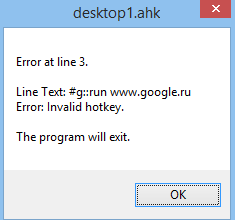
Mainly happens at auto-launch when I boot up Windows. But, sometimes it doesn’t happen and it starts normally (usually if I wait some minutes after the error and retry). I don’t change the contents of the script file in any way.
It’s really annoying, what can be the reason of this error?

- Members
- 2395 posts
- Last active: Nov 04 2015 06:46 AM
- Joined: 19 Nov 2010
An intermittent error like that sounds like there is something wrong somewhere. You might try reinstalling AhtoHotkey.
- Members
- 16 posts
- Last active: Jan 13 2017 08:46 AM
- Joined: 06 Feb 2014
An intermittent error like that sounds like there is something wrong somewhere. You might try reinstalling AhtoHotkey.
I have this error on 2 different PCs. At work and at home. Both run Windows 8 x64, and in both cases the issue happenes sometime and sometime it’s not.
- Members
- 755 posts
- Last active: Sep 08 2016 06:26 PM
- Joined: 25 Aug 2011
Have you checked to see if the keyboard language is correct? AHK looks if the key exist in a «virtual» way so to say.
What i mean is if you press «g», when that error happens, do you still get the letter g?
- Members
- 16 posts
- Last active: Jan 13 2017 08:46 AM
- Joined: 06 Feb 2014
Have you checked to see if the keyboard language is correct? AHK looks if the key exist in a «virtual» way so to say.
What i mean is if you press «g», when that error happens, do you still get the letter g?
Heh, you’re right! I live in Russia so I use 2 layouts: English and Russian. When russian is active, AHK doesn’t launch and show this error. However, if I activate english layout and launch AHK, after this I can swith to Russian and all the scripts are working normally.
I’ll file this issue in the corresponding section because I think this should be corrected. I assume this issue is valid for any cyrillic users
Источник
Recommend Projects
-

ReactA declarative, efficient, and flexible JavaScript library for building user interfaces.
-
Vue.js🖖 Vue.js is a progressive, incrementally-adoptable JavaScript framework for building UI on the web.
-

TypescriptTypeScript is a superset of JavaScript that compiles to clean JavaScript output.
-
TensorFlowAn Open Source Machine Learning Framework for Everyone
-
DjangoThe Web framework for perfectionists with deadlines.
-

LaravelA PHP framework for web artisans
-
D3Bring data to life with SVG, Canvas and HTML. 📊📈🎉

Recommend Topics
-
javascript
JavaScript (JS) is a lightweight interpreted programming language with first-class functions.
-
web
Some thing interesting about web. New door for the world.
-
server
A server is a program made to process requests and deliver data to clients.
-
Machine learning
Machine learning is a way of modeling and interpreting data that allows a piece of software to respond intelligently.
-
Visualization
Some thing interesting about visualization, use data art
-
Game
Some thing interesting about game, make everyone happy.
Recommend Org
-
FacebookWe are working to build community through open source technology. NB: members must have two-factor auth.
-
MicrosoftOpen source projects and samples from Microsoft.
-
GoogleGoogle ❤️ Open Source for everyone.
-
AlibabaAlibaba Open Source for everyone
-
D3Data-Driven Documents codes.
-
TencentChina tencent open source team.


Jobs
Jooble