Ошибка 87:10 HP DesignJet T120 | T125 | T130 | T520 | T525 | T530
Данная ошибка возникает с плоттерами старых моделей HP DesignJet T120 и T520, а также с новыми моделями HP DesignJet T125 T130 T525 и T530. С чем это связано и как это устранить рассмотрим ниже.
System error (Системная ошибка): 87:10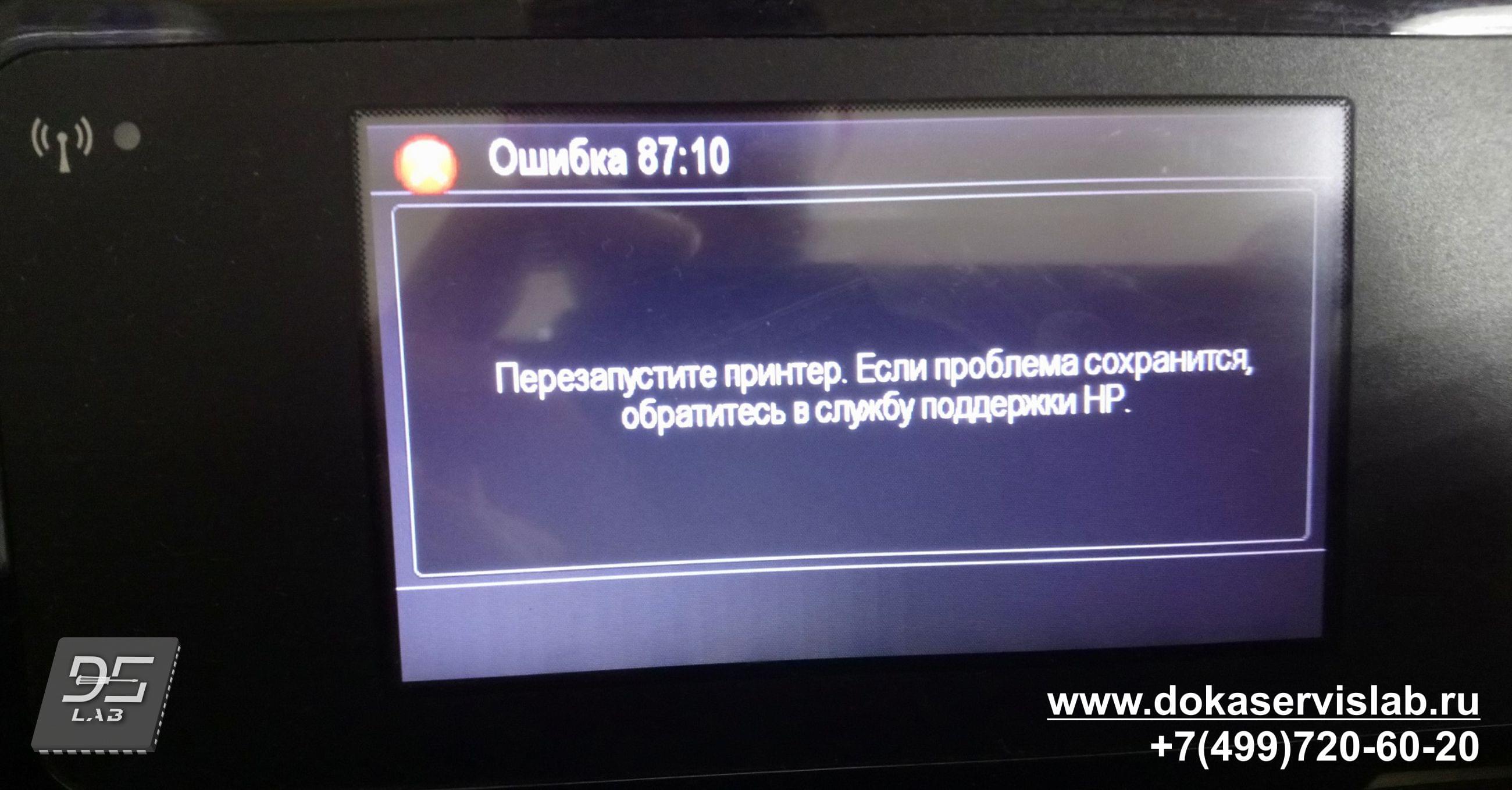 Описание проблемы: Ошибка ленты позиционирования
Узлы, связанные с ошибкой: Отсутствуют
Корректирующее действие:
1. Выключите принтер и отсоедините шнур питания. Снова подсоедините кабель питания и включите принтер.
2. Пользователь должен организовать визит сервисного инженера, чтобы заменить ленту позиционирования (энкодера) и выполнить устранение неполадок на месте.
● Encoder Strip – Лента позиционирования (24) – CQ890-67003
● Encoder Strip – Лента позиционирования (36) – CQ890-67004
3. Если отображается другая системная ошибка, пользователь должен выполнить соответствующую процедуру устранения неполадок.
Поиск и устранение неисправностей на месте (сервисный инженер)
1. Снимите крышки и убедитесь, что лента энкодера не повреждена и не загрязнена.
● Cables Sk (набор кабелей) – CQ890-67021
2. Очистите ленту энкодера.
3. При повреждении диска энкодера, замените его.
● Encoder Disk – Диск энкодера – CQ890-67033
Данная ошибка обычно начинает отображаться после длительного использования плоттера. Когда плоттер загрязняется изнутри, то датчики начинают плохо считывать информацию с ленты позиционирования и с диска энкодера. Обычно техническое обслуживание помогает решить данную проблему. Если чистка не помогла, то следует заменить либо ленту позиционирования, либо диск энкодера.
Ниже указаны цены по данной ошибке без учета деталей. Более детальную информацию Вы можете получить, перейдя на страницу ремонт плоттеров HP DesignJet T 120 T520 и T125 T130 T525 T530
- Полное техническое обслуживание 4 500 рублей
- Замена ленты позиционирования 2 200 рублей
- Замена диска энкодера 2 000 рублей
|
Обращайтесь в наш сервисный центр, будем рады Вам помочь! |
|
Ответим на интересующие Вас вопросы ( в чатах моментальные ответы / Будние дни). |
|
Дадим профессиональную консультацию. |
|
Примем меры по устранению неполадок! |
|
Связаться с нами можно по телефонам: |
Introduction:
This document explains the general procedure to solve the system error code 87:10 or 87:11. This system error refers to the inability of the Carriage Encoder Sensor to properly read the encoder strip. This may happen because that sensor is damaged. However, in most of the cases, this happens because the Encoder Strip is dirty (or damaged in some specific scenarios).
This document is valid for:
HP Designjet T-Series Printers: T610/T620/T1100/T1120/T1200/T770/T2300/T790/T1300
HP Designjet Z-Series Printers: Z2100/Z3100/Z3200/Z5200
Follow the steps listed below to accurately clean the encoder strip and solve the problem.
Cleaning the encoder strip:
1. Make sure that the printer is not printing.
2. Make sure the carriage is located on the right hand side (Service Station).
3. Open the window.
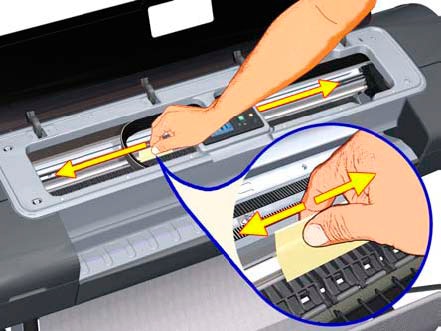
4. Clean the Encoder Strip using a non-abrasive liquid and a lint-free cloth. a. Hold the cloth in an inverted «U» shape around the Encoder Strip.
Important: Be very careful not to scratch it. Do not move the Carriage Assembly to the left.


b. Carefully wipe until no ink residue appears on the cloth.
5. Close the window.
6. On the front panel, select the Ink Menu or Printhead Menu (depending on the printer), and then select «Replace printheads».
7. Open the window when prompted to do so.
8. Turn Off the printer (use the SWITCH on the back).
9. Disconnect the power cord.
10. Manually move the carriage to the left (enough to have access to the Service Station).
11. Clean the part of the Encoder Strip inside the Service Station.
12. Close the window (leave the carriage in the middle of the printer).
13. Reconnect the power cord and restart.
Important: When cleaning the Encoder Strip it is important to carefully inspect for damage or deep scratches on it as this will cause issues (error codes or messages) and incorrect behavior of the printer.
14. If no problem persists, attempt to verify functionality.
15. If the problem persists, contact HP Technical Support for further assistance.
- Sign up
- Sign in
- HP Community
- Printers
- DesignJet, Large Format Printers and Digital Press
- Error 87:10
Options
- Mark Topic as New
- Mark Topic as Read
- Float this Topic for Current User
- Bookmark
- Subscribe
- Mute
- Printer Friendly Page


Create an account on the HP Community to personalize your profile and ask a question
Your account also allows you to connect with HP support faster, access a personal dashboard to manage all of your devices in one place, view warranty information, case status and more.
Get help with Large Format Printers, with direct access to all Latex Knowledge Center · Ask anything · Find anything · Share anything at HP LKC

11-18-2017
02:37 AM

HP Recommended
- Mark as New
- Bookmark
- Subscribe
- Permalink
- Flag Post
What does error message 87:10 mean and how do I cure the fault?
1 REPLY 1
11-19-2017
07:07 AM
HP Recommended
- Mark as New
- Bookmark
- Subscribe
- Permalink
- Flag Post
This is an encoder strip issue where the plotter can not read the encoder due to it being disconnected, camaged or just plain dirty. Attached are instructions for cleaning the encoder strip is being dirty is the issue. If damaged it will need to be replaced and if disconnected you need to check on the left side where it hooks into the frame to see if it just came off or if the strip is broken where it hooks in and will need to be replaced.
1 person found this reply helpful
Was this reply helpful?
Yes
No

Be alert for scammers posting fake support phone numbers and/or email addresses on the community.
If you think you have received a fake HP Support message, please report it to us by clicking on «Flag Post».
† The opinions expressed above are the personal opinions of the authors, not of HP. By using this site, you accept the Terms of Use and Rules of Participation.

-
English
Open Menu

† The opinions expressed above are the personal opinions of the authors, not of HP. By using this site, you accept the <a href=»https://www8.hp.com/us/en/terms-of-use.html» class=»udrlinesmall»>Terms of Use</a> and <a href=»/t5/custom/page/page-id/hp.rulespage» class=»udrlinesmall»> Rules of Participation</a>.
- Sign up
- Sign in
- HP Community
- Printers
- DesignJet, Large Format Printers and Digital Press
- Error 87:10
Options
- Mark Topic as New
- Mark Topic as Read
- Float this Topic for Current User
- Bookmark
- Subscribe
- Mute
- Printer Friendly Page
Create an account on the HP Community to personalize your profile and ask a question
Your account also allows you to connect with HP support faster, access a personal dashboard to manage all of your devices in one place, view warranty information, case status and more.
Get help with Large Format Printers, with direct access to all Latex Knowledge Center · Ask anything · Find anything · Share anything at HP LKC
11-18-2017
02:37 AM
HP Recommended
- Mark as New
- Bookmark
- Subscribe
- Permalink
- Flag Post
What does error message 87:10 mean and how do I cure the fault?
1 REPLY 1
11-19-2017
07:07 AM
HP Recommended
- Mark as New
- Bookmark
- Subscribe
- Permalink
- Flag Post
This is an encoder strip issue where the plotter can not read the encoder due to it being disconnected, camaged or just plain dirty. Attached are instructions for cleaning the encoder strip is being dirty is the issue. If damaged it will need to be replaced and if disconnected you need to check on the left side where it hooks into the frame to see if it just came off or if the strip is broken where it hooks in and will need to be replaced.
1 person found this reply helpful
Was this reply helpful?
Yes
No
Be alert for scammers posting fake support phone numbers and/or email addresses on the community.
If you think you have received a fake HP Support message, please report it to us by clicking on «Flag Post».
† The opinions expressed above are the personal opinions of the authors, not of HP. By using this site, you accept the Terms of Use and Rules of Participation.
-
English
Open Menu
† The opinions expressed above are the personal opinions of the authors, not of HP. By using this site, you accept the <a href=»https://www8.hp.com/us/en/terms-of-use.html» class=»udrlinesmall»>Terms of Use</a> and <a href=»/t5/custom/page/page-id/hp.rulespage» class=»udrlinesmall»> Rules of Participation</a>.
- Sign up
- Sign in
- HP Community
- Archived Topics
- Printers Archive
- HP Designjet T520 Plotter error code 87:10
Options
- Mark Topic as New
- Mark Topic as Read
- Float this Topic for Current User
- Bookmark
- Subscribe
- Mute
- Printer Friendly Page
Create an account on the HP Community to personalize your profile and ask a question
Your account also allows you to connect with HP support faster, access a personal dashboard to manage all of your devices in one place, view warranty information, case status and more.
 This topic has been archived. Information and links in this thread may no longer be available or relevant. If you have a question create a new topic by clicking here and select the appropriate board.
05-17-2017
07:01 AM
— edited
05-17-2017
07:02 AM
HP Recommended
- Mark as New
- Bookmark
- Subscribe
- Permalink
- Flag Post
Product: Designjet T20
Operating System: Microsoft Windows 10 (64-bit)
Plotter has stopped priniting, it jammed but there are no papers jammed inside. it shows error code 87:10. I have tried restarting it several times but the error persist.
1 REPLY 1
05-17-2017
07:18 AM
HP Recommended
- Mark as New
- Bookmark
- Subscribe
- Permalink
- Flag Post
You have an issue with the encoder strip which could be damaged or just dirty. Try cleaning first using the instructions below and if that does not help the encoder will need to be replaced.
Was this reply helpful?
Yes
No
This topic has been archived. Information and links in this thread may no longer be available or relevant. If you have a question create a new topic by clicking here and select the appropriate board.
† The opinions expressed above are the personal opinions of the authors, not of HP. By using this site, you accept the Terms of Use and Rules of Participation.
-
English
Open Menu

† The opinions expressed above are the personal opinions of the authors, not of HP. By using this site, you accept the <a href=»https://www8.hp.com/us/en/terms-of-use.html» class=»udrlinesmall»>Terms of Use</a> and <a href=»/t5/custom/page/page-id/hp.rulespage» class=»udrlinesmall»> Rules of Participation</a>.
- Sign up
- Sign in
- HP Community
- Archived Topics
- Printers Archive
- HP Designjet T520 Plotter error code 87:10
Options
- Mark Topic as New
- Mark Topic as Read
- Float this Topic for Current User
- Bookmark
- Subscribe
- Mute
- Printer Friendly Page
Create an account on the HP Community to personalize your profile and ask a question
Your account also allows you to connect with HP support faster, access a personal dashboard to manage all of your devices in one place, view warranty information, case status and more.
This topic has been archived. Information and links in this thread may no longer be available or relevant. If you have a question create a new topic by clicking here and select the appropriate board.
05-17-2017
07:01 AM
— edited
05-17-2017
07:02 AM
HP Recommended
- Mark as New
- Bookmark
- Subscribe
- Permalink
- Flag Post
Product: Designjet T20
Operating System: Microsoft Windows 10 (64-bit)
Plotter has stopped priniting, it jammed but there are no papers jammed inside. it shows error code 87:10. I have tried restarting it several times but the error persist.
1 REPLY 1
05-17-2017
07:18 AM
HP Recommended
- Mark as New
- Bookmark
- Subscribe
- Permalink
- Flag Post
You have an issue with the encoder strip which could be damaged or just dirty. Try cleaning first using the instructions below and if that does not help the encoder will need to be replaced.
Was this reply helpful?
Yes
No
This topic has been archived. Information and links in this thread may no longer be available or relevant. If you have a question create a new topic by clicking here and select the appropriate board.
† The opinions expressed above are the personal opinions of the authors, not of HP. By using this site, you accept the Terms of Use and Rules of Participation.
-
English
Open Menu

† The opinions expressed above are the personal opinions of the authors, not of HP. By using this site, you accept the <a href=»https://www8.hp.com/us/en/terms-of-use.html» class=»udrlinesmall»>Terms of Use</a> and <a href=»/t5/custom/page/page-id/hp.rulespage» class=»udrlinesmall»> Rules of Participation</a>.
В данной статье мы поговорим об общем положении ошибок. Все системные ошибки можно посмотреть в сервисном мануале вашего плоттера. Опытные мастера без проблем определяют причину возникновения той или иной ошибки и устраняют их в большинстве случаев на территории заказчика. Большинство ошибок плоттера не имеют прямую связь с кодом ошибки и не могут быть исправлены описанными действиями, но тем не менее существуют и не критические ошибки, которые устраняются действиями рядового пользователя. В таких случаях компания HP рекомендует вызывать квалифицированных инженеров.
При некоторых ошибках можно продолжать работу, нажав кнопку Enter на передней панели; при других ошибках продолжать работу нельзя — попробуйте выключить и включить принтер, если ошибка не исчезла, то требуется квалифицированное вмешательство.
Код ошибки состоит из четырех цифр; в таблице 1 приведены расшифровки первых двух цифр, в таблице 2 — последних двух. Чтоб открыть таблицу нажмите на кнопку Показать/Скрыть
Таблица 1: первые две цифры кода ошибки
Таблица 2: последние две цифры кода ошибки
Утилита просмотра лог-файла ошибок
Подробное описание кодов ошибок плоттеров HP
Если Вы умный, смелый, ловкий и умелый, желаете работать в дружном коллективе и зарабатывать достойную заработную плату, то просто позвоните нам,…
Для юридических лиц мы рекомендуем заключить договор на сервисное техническое обслуживание. В случае, если Вы заключите договор во время покупки…