This section lists codes and descriptions of errors and warnings in response messages from the Yandex Direct API version 5.
- Errors
- Warnings
| Error code | Message | Comments and possible reasons |
| Server errors | ||
|---|---|---|
| 52 | Authorization server temporarily unavailable | The Yandex Direct API server is temporarily unable to get information from the Yandex OAuth service. Try calling the method again later. |
| 1000 | Server temporarily unavailable | Internal error on the Yandex Direct API server. Try calling the method again later. If the error persists, contact the support service. |
| 1001 | Service initialization error | |
| 1002 | Operation error | |
| 1003 | Couldn’t create a Yandex user account | An error occurred when creating the account. Try calling the method again later. |
| 1004 | Couldn’t create client | An error occurred when creating a client in Yandex Direct. Try calling the method again later. Use a different username to repeat the request. |
| 1020 | Internal server error | The list of available currencies isn’t defined. Contact the Support service. |
| Authentication error | ||
| 53 | Authorization error |
Invalid OAuth token. The reasons for a token becoming invalid are listed in the section Revoking tokens in the Yandex OAuth guide. |
| Incomplete app registration | ||
| 58 | Incomplete registration | You must submit a request for API access and wait for it to be approved. |
| Permission errors | ||
| 54 | No rights |
|
| 513 | Your login is not enabled for Yandex Direct | The request is on behalf of a user who doesn’t have a Yandex Direct account. To register an account, create an advertising campaign in this user’s name in the web interface. See also Access and authorization. |
| 3000 | No API access |
|
| 3001 | No access to the method |
Access to the AgencyClients.add method is granted to the agency on request. |
| Restrictions, points | ||
| 152 | Not enough Yandex units | |
| 506 | Exceeded limit on number of connections | You have reached the maximum number of simultaneous connections to the Yandex Direct server. |
| Unsupported fields, objects, and operations | ||
| 3500 | Not supported | Attempt to add bid adjustment is not compatible with the campaign type. |
| 3600 | Limited functionality | Attempt to use the PAY_FOR_CONVERSION or PAY_FOR_CONVERSION_PER_CAMPAIGN strategy. |
| Invalid request parameters | ||
| 4000 | Invalid request parameters |
|
| 4001 | Invalid SelectionCriteria filter parameters |
|
| 4002 | Invalid page settings | Invalid value for the Limit or Offset parameter. |
| 4003 | All required parameters were omitted | The request must contain at least one parameter from the set, but none of them were specified. |
| 4004 | More than one parameter was passed | Mutually exclusive parameters were specified. Only one of them can be present in the request. |
| 4005 | A single type of Id must be used within a request | Bids are set with IDs of heterogeneous objects (for example, one Bids structure has CampaignId, but the other structure has AdGroupId). |
| 4006 | Incompatible operations are entered in the same request | To edit ad callouts, either use the ADD and REMOVE operations, or use the SET operation. |
| Invalid field value | ||
| 5000 | Required field | A required field is empty, or the value consists of spaces. |
| 5001 | Exceeded allowed length |
|
| 5002 | Forbidden symbols used |
|
| 5003 | Empty value specified | There is an empty string, for example, in the Href parameter in an ad. |
| 5004 | Invalid format |
Incorrect value for an object field, such as:
|
| 5005 | Field set incorrectly |
Incorrect value for an object field, such as:
|
| 5006 | Invalid use of field |
|
| 5007 | Duplicated element | Sitelink texts are duplicates, or they link to the same webpage. |
| 5008 | All required fields were omitted | The object must have at least one field specified from the set, but none of them are specified. |
| 5009 | More than one field was passed | The object has mutually exclusive fields specified. |
| 5100 | Incorrect template use | Incorrect use of templates (##) in the ad title and text. |
| 5120 | Geotargeting set incorrectly |
|
| 5140 | Keyword contains too many words | Exceeded the number of words in a keyword. |
| 5141 | Incorrect use of stop words | A keyword consists exclusively of stop words. |
| 5142 | Exceeded the maximum word length in a keyword | |
| 5160 | Negative keyword can’t be a phrase | Attempt to use a negative keyword with a space in it. |
| 5161 | Incorrect use of negative keywords |
|
| 5162 | Exceed the maximum length of a negative keyword | |
| 5181 | You cannot change the advertised application | |
| 5200 | Login already in use | Attempt to create a client with a login name that is already used by another Yandex account. |
| Inconsistent object | ||
| 6000 | Inconsistent object state |
|
| 6001 | Wrong object type specified |
|
| 6100 | The display region doesn’t match the ad text (title, text, sitelinks) | When trying to change the display region in a group, the ad language was not appropriate for the new region (for example, the ad has Kazakh letters, but geotargeting is being changed to Russia) |
| 6101 | Language doesn’t match geotargeting | When adding or modifying ads, display region compatibility was violated (for example, an ad was created in Ukrainian but geotargeting is set to Russia) |
| Object restrictions | ||
| 7000 | Number of allowed elements exceeded or equal to zero |
|
| 7001 | Reached the maximum number of objects |
|
| 7002 | This tracking system domain isn’t supported | |
| Request parsing errors | ||
| 55 | Operation not found | Invalid value specified for the method key in a JSON request. |
| 8000 | Invalid request |
|
| Can’t perform operation | ||
| 8300 | Invalid object status |
|
| 8301 | Can’t delete object |
|
| 8302 | Displays can’t be suspended | Attempt to suspend the only active keyword in a group (if there are no audience targets). |
| 8303 | Object can’t be archived |
|
| 8304 | Object can’t be unarchived |
|
| 8305 | Can’t perform action | Attempt to change the daily budget amount more than 3 times during the same day. |
| 8312 | Can’t build a report in online mode | A report with the specified parameters can only be generated in offline mode. Change processingMode in the HTTP request header. See the section Online and offline reports. |
| 8600 | Error enabling the shared account | |
| Object not found | ||
| 8800 | Object not found |
|
| Limits on the number of objects in operations in a single request | ||
| 9300 | Exceeded the limit on the number of objects in operations in a single request | Exceeded the maximum number of objects in the method’s input array |
| 9301 | Selection condition is too broad | Exceeded the maximum number of selected adjustments. The total of the Limit and Offset values must not exceed 120,000. |
| Dependency of bids on strategies | ||
| 9600 | The field does not correspond to the set strategy | The request does not have a field that is required in certain conditions (for example, Bid in the Bids.Set method for manual display strategies). |
| 9601 | Bid can’t be changed |
|
| Duplicated objects | ||
| 9800 | An object can’t be in the request more than once | A single call of the update, set, or delete method contains multiple objects with the same ID |
| 9801 | An object with the specified characteristics already exists | Attempt to add an adjustment that already exists (for example, repeatedly adding a mobile adjustment or an adjustment for the same target audience). |
| 9802 | An item can’t be in the list more than once |
|
| Warning code | Message |
|---|---|
| 10000 | The object is in the request more than once |
| 10020 | The object is already suspended. |
| 10021 | The object is not suspended. |
| 10022 | The object is already archived. |
| 10025 | The object is already marked as deleted |
| 10100 | The specified vCard duplicates a previously created vCard |
| 10120 | The specified set of sitelinks duplicates a previously created set |
| 10140 | Keyword already exists |
| 10141 | New keyword created as the result of updating |
| 10160 | Bid won’t be applied |
| 10161 | Priority won’t be applied |
| 10163 | Setting won’t be changed |
| 10165 | Parameter won’t be applied |
| 10200 | Ad already paused |
| 10201 | Ad not paused |
| 10202 | Ad already archived |
| 10203 | Ad not archived |
| 10240 | Keyword already stopped |
| 10241 | Keyword not stopped |
| 10242 | Dynamic text ad target is already stopped |
| 10243 | Dynamic text ad target is not stopped |

Яндекс.Директ иногда может выдать предупреждение и всё. Ни сохранить, ни включить, ни выключить. И бывает это не так уж редко. Однако без опыта эту проблему не решить, а новичкам поисковик предлагает отличные завирусившиеся статьи в духе «100 и 1 способ настройки Директа».
Но что делать с таким багом?
1. Предъявите документы
Возникает техническая ошибка: Директ не пропускает объявление и требует предъявить документы. Это зависит от вида продукции. Например, модерация может решить, что услуги рекламодателя требуют медицинской лицензии.
Если можно доказать, что это не так, проблема будет решена в течение пары часов. Нужно написать/позвонить в техподдержку и сообщить, что продвигается услуга, для которой не нужны документы.
2. Сегмент Яндекс.Аудиторий не найден, и реклама остановлена
Яндекс не нашел людей и выдал техническую ошибку. Нет, это не роботы захватили мир, просто возникла проблема с аудиторией. Когда такая проблема появляется, реклама будет поставлена на стоп.
Почему так получилось? Если к аккаунту имеет доступ кто-то еще – этот кто-то мог полностью удалить аудиторию или поменять настройки так, что сегмент, по которому показывалась реклама, теперь оказался недоступен.
Если не получается запустить рекламу на выбранный сегмент, нужно разобраться, есть ли вообще доступ к этому сегменту аудитории.
3. Появляется заглушка, и переход на вредоносный сайт заблокирован
Если при попытке зайти в Директ или запустить кампанию, пользователь видит предупреждение о том, что переход на сайт заблокирован, поскольку страница является вредоносной – необходим полный стоп. Антивирус Яндекса проверил сайт и посчитал его вредоносным – далее делаем такие шаги:
1. Рекламу отключить, поскольку клики считаются, но переходов нет.
2. Проверить сайт на вирусы и как можно скорее.
4. Ваш лимит исчерпан
Когда создается объявление, в его заголовке, описании и линке должно быть ограниченное количество символов.
◆ Заголовок не должен превышать 56 символов (пробелы считаются).
◆ Одно слово не должно превышать 22 символа
◆ Дополнительный заголовок – 30 символов
◆ В тексте всего 81 знак
◆ Знаков препинания не более 15
Все нужно исправить вручную. Если ошибка уже вылезла, стоит исправить ее следующим образом: занести все в любую удобную таблицу и выставить там проверку по формуле «Длина строки» (пишем ее как =ДЛСТР и адрес ячейки).

5. Сайта просто нет?
Яндекс сообщает, что если ссылка попадет в объявление, то будет ошибка 404. Это наверняка связано с проблемой непродленного доменного имени – в большинстве случаев. Есть еще возможность, что страница, на которую ссылаются, еще не создана, ошибка в ссылке. В любом случае, следует проверить, работает ли сайт и эта конкретная ссылка.
6. Минусованные фразы не сохраняются в Директе
Куда делись фразы и слова, которые собирались отминусовать? Кросс-минусация в Директе нужна обязательна, поскольку она помогает отсортировать аудиторию точнее, позволяет убрать возможные пересечения ключей и не дает объявлениям подавлять друг друга.
Обычно минусуют через Директ.Коммандер или другие приложения. Иногда бывает так, что форматирование сбивается и фразы в Директе отсутствуют. В этом случае фразы нужно повторно перенести в Excel, а оттуда уже заново в Яндекс.Директ.

Другие ошибки
Что делать, если предупреждение Директа не касается всех перечисленных случаев? Поддержка Яндекса все еще не написала FAQ по всем этим проблемам, так что придется решать самим. Что же делать, куда бежать?
1. Внимательно перечитать справку Яндекса. Возможно, ответ там уже есть.
2. Связаться с техподдержкой Директа. Опыт показывает, что позвонить будет удобнее – отвечают быстро, решают тоже.
Написать сотруднику можно в чате или в форме, которая находится в справке Яндекс. Директ, там же приведен круглосуточный телефон поддержки – 8 800 234 24 80.
?? Инфа была полезной? Тогда скорее подписывайтесь на наши соц. сети и будьте в курсе всех новостей!
Официальный сайт ?? https://rocketprofit.com
Мы Вконтакте ?? https://vk.com/rocketprofit
Наш Telegram-чат ?? https://t.me/dosug_rocketprofit
Мы на Facebook ?? https://www.facebook.com/RocketProfit.ru
Мы в Teletype ?? https://teletype.in/@rocketprofit
Всем конверта и ROI высоченного ✌️?

Настройка рекламной кампании требует особенного внимания, знаний и опыта, потому что ошибки встречаются очень часто. Мы проводим аудиты рекламных кампаний и сегодня расскажем, где рекламодатели ошибаются чаще всего, почему возникают недочёты и как их избежать.
Причин для ошибок очень много и всех не перечислить. Одним рекламодателям не хватает квалификации, а другим — времени на подготовку. Многих подводит неудачное тестирование или внешние факторы, которые не были учтены при настройке. Некоторые ошибаются, доверившись советам неопытных коллег и друзей. Но помните, ошибку может допустить каждый. Важно научиться их исправлять и не повторять в дальнейшем.
Основные группы ошибок в рекламных кампаниях
Мы выделили 4 основные группы ошибок, с которыми сталкиваются рекламодатели на разных этапах запуска: в настройке параметров, при проработке семантического ядра, при выборе рекламной стратегии и в создании самого рекламного объявления.
Ошибки в работе с параметрами рекламной кампании
Запуск рекламной кампании — это, в первую очередь, грамотная настройка параметров и выстраивание архитектуры аккаунта. На этом этапе могут ждать следующие ошибки:
-
Смешиваются разные аудитории в одной рекламной кампании. Например, ошибкой будет поместить в одну группу пользователей, уже готовых к покупке и использующих на Поиске фразы, включающие запросы «купить», «дешевле» или «купить с доставкой» и пользователей, которые ещё не сделали выбор и только сравнивают характеристики по интересующему их товару или услуге.
-
Запускается реклама, которая не важна бизнесу. Например, реклама немаржинальных или несезонных товаров.
-
Изменяются параметры кампании, включаются или отключаются опции без опоры на статистику и гипотезы.
-
Отсутствует Яндекс Метрика на сайте, не подключена в параметрах кампании или цели и события настроены некорректно.
-
UTM-метки настраиваются некорректно или вовсе отсутствуют. Без них вам будет сложнее отследить источники трафика.
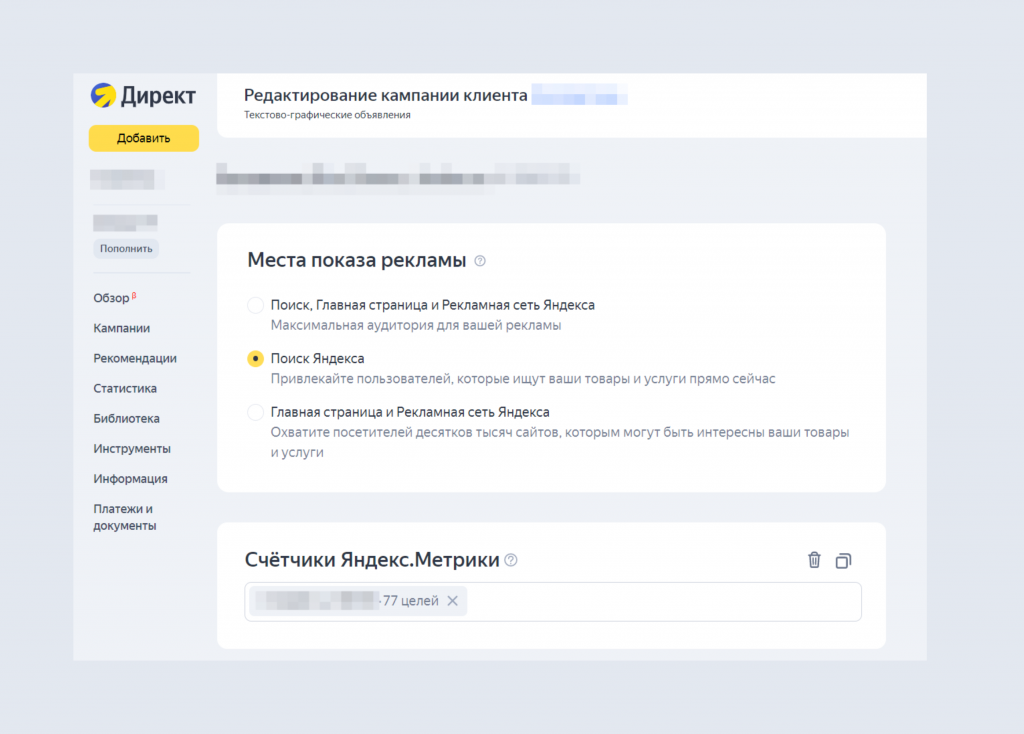
Посмотрим на примере одной ошибки, которую мы часто встречали в рекламных аудитах. Многие рекламодатели намеренно ограничивают показы рекламы ночью, в выходные и праздничные дни или по определённым часам.
Но, если на вашем сайте можно совершить целевое действие в любое время, то не стоит ограничивать кампанию по времени. Например, если клиент может оставить заявку или оформить заказ самостоятельно без менеджера. И наоборот, когда целевое действие требует мгновенного ответа, то стоит запускать рекламу только в рабочие часы компании.
Соберите подробную статистику по рекламной кампании, проанализируйте эффективность и активность пользователей. После чего вносите обоснованные изменения в настройку.
Ошибки в работе с семантическим ядром
Семантическое ядро — это слова и фразы, по которым потенциальный клиент может найти вашу компанию, товары и услуги. Проработанное семантическое ядро — основа качественной контекстной рекламы. Какие ошибки здесь встречаются чаще всего:
-
Разные по смыслу и направленности ключевые фразы формируются в одной группе объявлений рекламы на поиске. Рекомендуем объединять запросы, которые имеют несколько общих слов, например, «каркасные дома цена», «каркасные дома цены 2022» и «каркасные дома проекты и цены», если мы говорим о рекламе строительства домов.
-
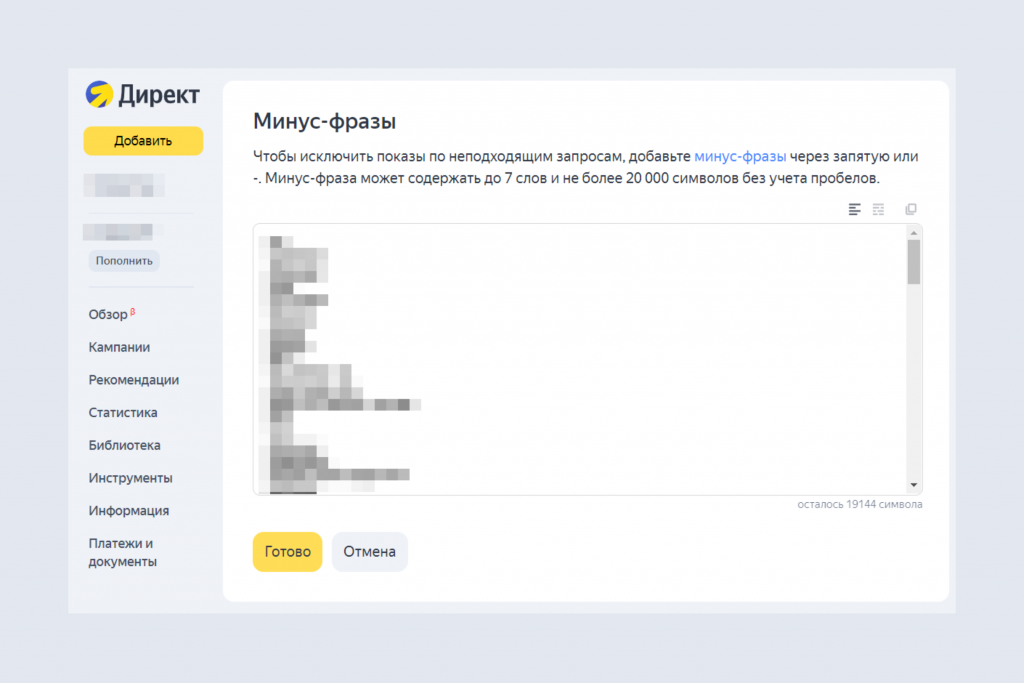
Используются чересчур широкие целевые запросы без минус-слов. Например, при рекламе бассейна в фитнес-клубе необходимо в минус-словах прописать «надувной», «садовый», «каркасный» или «сборный».
-
В семантическое ядро включаются ключевые фразы, по которым приходит нецелевой трафик — клиентам предлагается приобрести то, что вы не продаёте.
-
Бездумно используется автотаргетинг на поиске. Автотаргетинг Яндекса сильно расширяет охват аудитории, которой будет показываться реклама. Среди них будет много нецелевой аудитории. Поэтому для подключения автотаргетинга на поиске нужны веские причины, и не для каждого бизнеса он будет эффективен. В любом случае, при подключении автотаргетинга, нужно выделить его в отдельную группу или кампанию, ограничить по ней бюджет и регулярно проверять конверсию.
-
Не исключаются важные кампании минус-фразы. Например, при рекламе моющих средств для дома нужно убрать автохимию и моющие средства для автомоек.
Ошибки при выборе рекламной стратегии
Рекламная стратегия — это поэтапный план продвижения компании, её услуг или товаров. Ошибки на этом этапе:
-
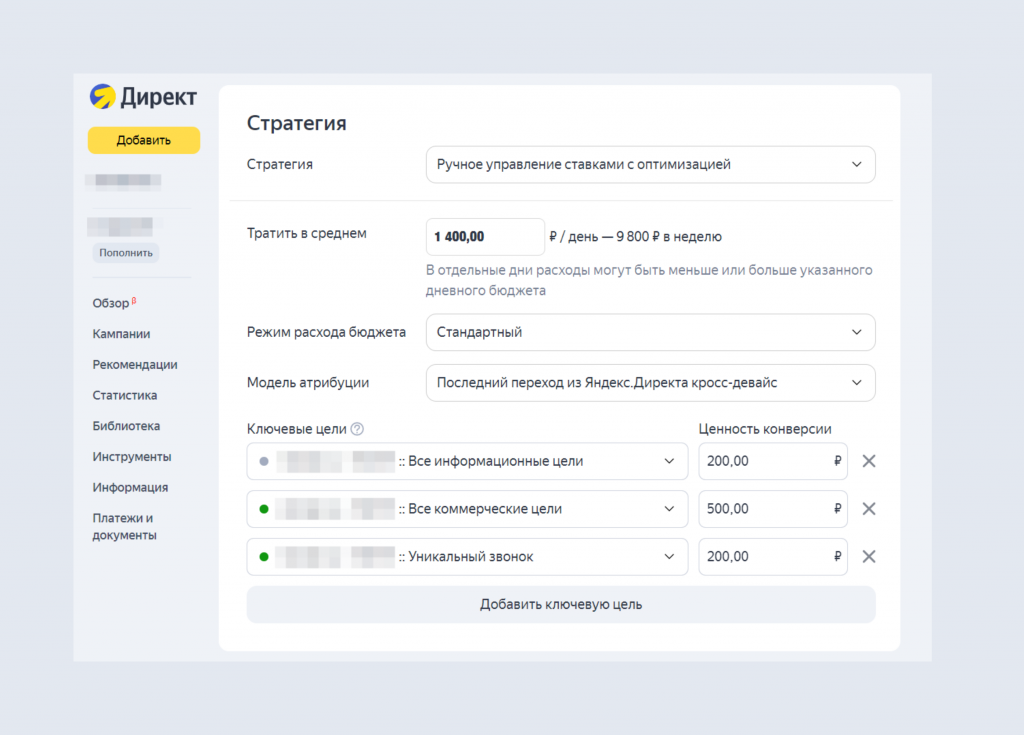
В стратегии не учитывается цель продвижения и статистика. К примеру, в кампании настроена стратегия «Оптимизация конверсий», но нет статистики по конверсиям.
-
Ставится некорректная цель для оптимизации рекламной кампании. Например, цель продвижения — привлечь трафик, но кампания настроена на конверсии.
-
Во время работы автостратегий настройки кампании сильно меняются. Помните, что для обучения стратегии нужно не меньше 2 недель. Поэтому будьте аккуратны, когда автостратегии начинают показывать высокую эффективность. Даже незначительные изменения могут привести к переобучению. Подробнее об этом мы рассказывали в видео.
-
Устанавливается слишком много ограничений для стратегии.
-
Не контролируется работа стратегии. Например, не стоит ограничение по суточному, недельному или общему бюджету кампании.
Ошибки в рекламных объявлениях
Чаще всего в кампаниях используют текстово-графические объявления, которые состоят из креатива и краткого оффера. Объявление — это первое, что увидит пользователь, поэтому очень важно избежать ошибок:
-
Неконкурентноспособные креативы, офферы и тексты. Стоит проанализировать рынок конкурентов и предложить то, в чём вы лучше.
-
Объявление не соответствует запросу пользователя. Если предложение релевантно запросу, то Яндекс выделяет текст жирным шрифтом, чтобы привлечь внимание.
-
Неинформативные посадочные страницы. Чтобы избежать высокого процента отказов, стоит наполнить страницу полезной и релевантной для пользователя информацией.
-
Одинаковые объявления и для поиска, и для РСЯ без опоры на работу алгоритмов. Подробнее об этом мы рассказывали в видео. Например, в заголовке объявления в РСЯ не указывается рекламируемый продукт.
-
Нет дополнительных выгод, важных для потенциального клиента.
-
Не заданы смарт-центры для текстово-графических объявлений в РСЯ.
Как избежать ошибок?
Ошибки случаются и это абсолютно нормально. Но можно постараться избежать самых популярных. Что для этого нужно? На этапе подготовки продумайте структуру и наполнение рекламных кампаний. При этом учитывайте анализ целевой аудитории и результаты конкурентного мониторинга.
Регулярно освежайте знания о работе алгоритмов и типах кампаний. Следите за обновлениями и новыми возможностями рекламы в блоге R-брокер и в Блоге рекламных технологий Яндекса.
Отслеживайте статистику рекламных кампаний. Проверяйте качество закупаемого трафика, работайте над исключением нецелевых и низкоконверсионных лидов. Вносите изменения в рекламные кампании, опираясь на цели продвижения, гипотезы, выводы и зависимости показателей.
Помните, настоящая ошибка — не исправлять прошлые ошибки. Мы надеемся, что статья будет вам полезна. Если у вас остались вопросы о рекламе или вы хотите проверить запущенные кампании, то записывайтесь на бесплатную консультацию с нашим экспертом. Мы оценим эффективность вашей рекламы и предложим варианты улучшения.