Обновлено 20.11.2020

Добрый день! Уважаемые читатели и гости одного из крупнейших IT блогов в рунете Pyatilistnik.org. В прошлый раз мы с вами разобрали методы оплаты телефона Билайн. В сегодняшней же публикации я хочу вам вновь показать практику траблшутинга активного каталога, и мы разберем очень частую ошибку репликации ID 2042, которую вы можете лицезреть в своем Active Directory, сразу скажу, что она не смертельная и решается весьма просто и без лишних телодвижений.
Описание проблемы вызывающей ошибку ID 2042
И так у меня есть установленные Active Directory на базе Windows Server 2019, который работает в виде виртуальных машин на гипервизоре ESXI 6.5. Была проблема с репликацией между двумя сайтами AD, где было установлено, что один из контроллеров домена не получал репликацию более 50 дней, там об этом сигнализировала ошибка «SyncAll exited with fatal Win32 error: 8440 (0x20f8)», которую мы успешно устранили. Как только пробежали все реплики, мы успокоились, но на следующий день у нас массово в логах Windows стали появляться события с кодом ID 2042:
It has been too long since this machine last replicated with the named source machine. The time between replications with this source has exceeded the tombstone lifetime. Replication has been stopped with this source.
The reason that replication is not allowed to continue is that the two DCs may contain lingering objects. Objects that have been deleted and garbage collected from an Active Directory Domain Services partition but still exist in the writable partitions of other DCs in the same domain, or read-only partitions of global catalog servers in other domains in the forest are known as «lingering objects». If the local destination DC was allowed to replicate with the source DC, these potential lingering object would be recreated in the local Active Directory Domain Services database.
Time of last successful replication:
2020-09-08 14:47:05
Invocation ID of source directory server:
f96c8e1b-f760-4e75-b2b2-ec464646d663
Name of source directory server:
d06896a3-be4b-4b8a-b75f-e524564526a0f._msdcs.root.pyatilistnik.org
Tombstone lifetime (days): 60
The replication operation has failed.
User Action:
The action plan to recover from this error can be found at http://support.microsoft.com/?id=314282.
If both the source and destination DCs are Windows Server 2003 DCs, then install the support tools included on the installation CD. To see which objects would be deleted without actually performing the deletion run «repadmin /removelingeringobjects <Source DC> <Destination DC DSA GUID> <NC> /ADVISORY_MODE». The event logs on the source DC will enumerate all lingering objects. To remove lingering objects from a source domain controller run «repadmin /removelingeringobjects <Source DC> <Destination DC DSA GUID> <NC>».
If either source or destination DC is a Windows 2000 Server DC, then more information on how to remove lingering objects on the source DC can be found at http://support.microsoft.com/?id=314282 or from your Microsoft support personnel.
If you need Active Directory Domain Services replication to function immediately at all costs and don’t have time to remove lingering objects, enable replication by setting the following registry key to a non-zero value:
Registry Key:
HKLMSystemCurrentControlSetServicesNTDSParametersAllow Replication With Divergent and Corrupt Partner
Replication errors between DCs sharing a common partition can prevent user and computer accounts, trust relationships, their passwords, security groups, security group memberships and other Active Directory Domain Services configuration data to vary between DCs, affecting the ability to log on, find objects of interest and perform other critical operations. These inconsistencies are resolved once replication errors are resolved. DCs that fail to inbound replicate deleted objects within tombstone lifetime number of days will remain inconsistent until lingering objects are manually removed by an administrator from each local DC. Additionally, replication may continue to be blocked after this registry key is set, depending on whether lingering objects are located immediately.
Alternate User Action:
Force demote or reinstall the DC(s) that were disconnected.
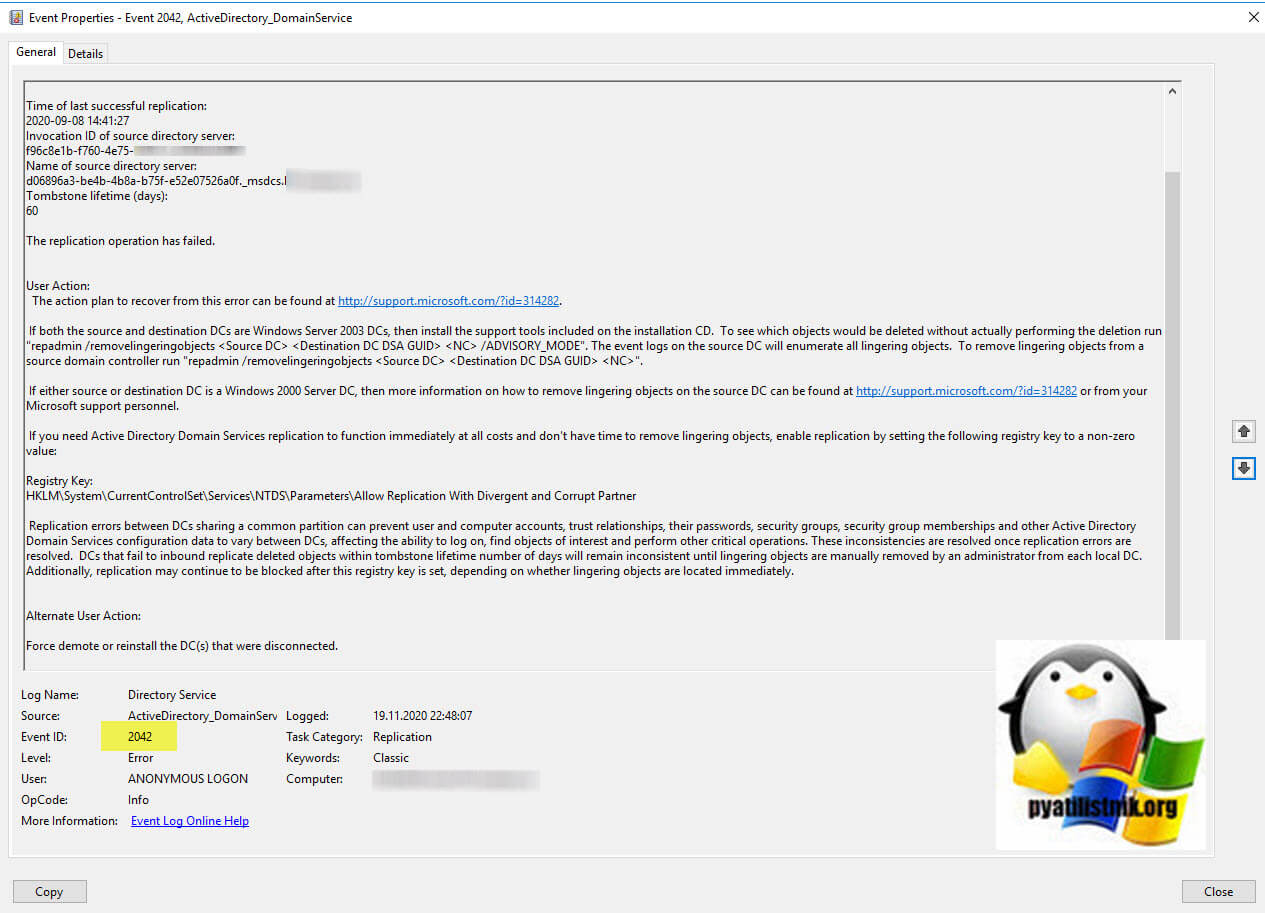
Я выделил тут участок Tombstone lifetime (days): 60, именно это является ключевым вопросом. Так как у вас сбойный контроллер не принимал реплики более 60 дней, то ваш Active Directory просто перестраховывается, чтобы ничего не наломать, есть там такой защитный механизм, называется принудительный запрет репликации.
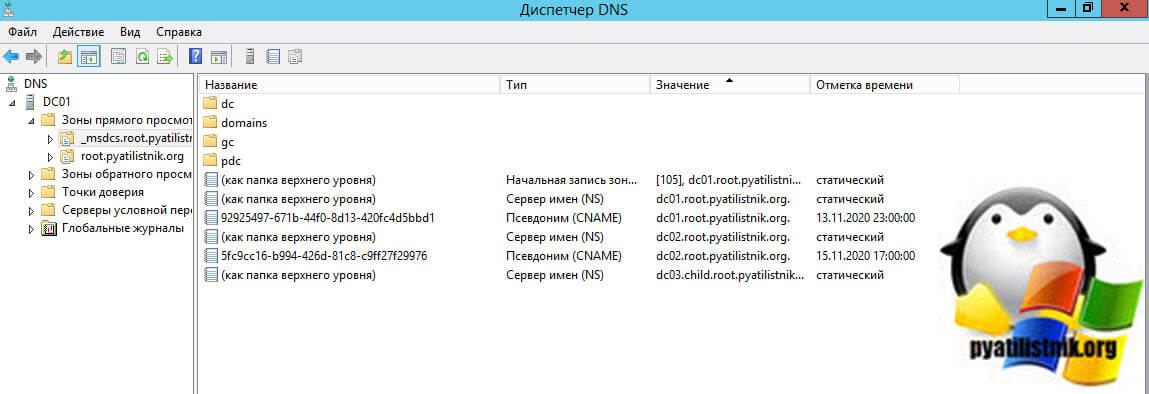
Событие 2042 — событие указывает на то, что включена строгая репликация, исходный контроллер домена не реплицировался в в период tombstone и пытается реплицировать, поэтому репликация отключена из источника. Событие предоставляет GUID источника в формате записи DNS CName:982a942e-40e4-4e3c-8609-bae0cfd2affb._msdcs.pyatilistnik.org. Понятное имя контроллера домена можно легко найти, просмотрев записи псевдонимов в зоне _msdcs в оснастке DNS.
Как устранить ошибку ID 2042
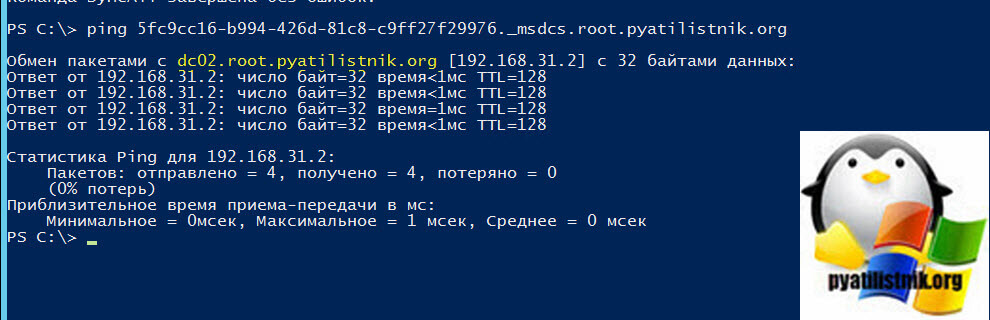
Первое, что вам необходимо сделать, это вычислить имя контроллера домена с которого у вас не идет репликация на сбойный, это можно сделать несколькими методами. В тексте ошибки есть GUID контроллера домена, выглядит он приблизительно вот так 5fc9cc16-b994-426d-81c8-c9ff27f29976._msdcs.root.pyatilistnik.org. Понятно, что для нас он не читаем. Откройте командную строку и введите команду PING.
ping 5fc9cc16-b994-426d-81c8-c9ff27f29976._msdcs.root.pyatilistnik.org
На выходе вы получите точное имя контроллера домена.
Либо через оснастку DNS в разделе _msdcs.root, где вы увидите псевдонимы CNAME в виде привычных имен контроллеров домена.
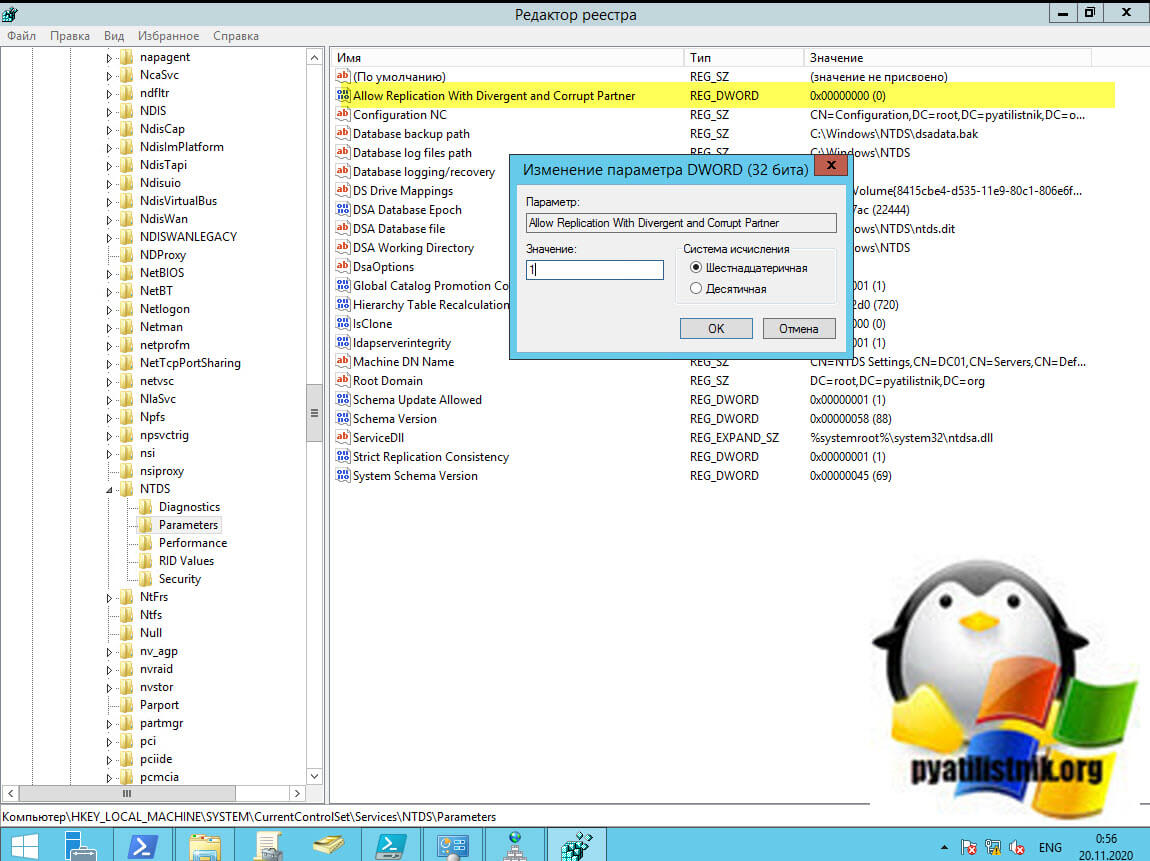
Теперь зная имя контроллера домена источника, вам необходимо произвести на сбойном контроллере домена правку реестра Windows, чтобы слегка ослабить уровень контроля к репликации. Запустите оснастку реестра Windows и перейдите в раздел:
HKEY_LOCAL_MACHINESYSTEMCurrentControlSet ServicesNTDSParameters
Найдите там ключ «Allow Replication With Divergent and Corrupt Partner«, по умолчанию он имеет значение «0«. Поменяйте его на единицу «1«. Перезагружать ничего не нужно, все применится сразу.
Повторите эти действия на тех контролерах домена, на которых наблюдается ошибка 2042. После этого в командной строке вам нужно воспользоваться утилитой Repadmin.
После того, как ошибка репликации ID 2042 исчезнет, вам необходимо ключу «Allow Replication With Divergent and Corrupt Partner» вернуть значение «0». Если не хотите возиться с реестром или вы боитесь это делать на контроллере домена, то можно через команду для определенного контроллера снять повышенные ограничения при репликации. Для этого в командной строке в режиме администратора вам нужно выполнить команды:
repadmin /regkey <hostname> -allowDivergent
- /regkey — (+) Включает и отключает значение записи реестра Строгую согласованность репликации в HKEY_LOCAL_MACHINESYSTEMCurrentControlSetServicesNTDS Parameters(-)
- <hostname> — Имя контроллера домена с которого будет реплицироваться дельта, можно вообще поставить значок звездочки «*«, чтобы разрешить репликацию со всех контроллеров домена.
- +allowDivergent/-allowDivergent — Позволяет начать новую репликацию с партнером, убедитесь, что у вас удалены все устаревшие объекты (По поводу устаревших объектов можно почитать вот тут https://support.microsoft.com/ru-ru/help/4469622/active-directory-replication-event-id-2042-it-has-been-too-long-since и советую почитать про дублированные имена и ID 11)
repadmin /regkey dc2.root.pyatilistnik.org -allowDivergent
Для dc2.root.pyatilistnik.org будет установлен Allow Replication With Divergent and Corrupt Partner со значением «0». На этом у меня все, с вами был Иван Семин, автор и создатель IT портала Pyatilistnik.org.
- Remove From My Forums
-
Вопрос
-
На основном контроллере домена DC1 Ошибка 2042 — С момента последней репликации этой машины с указанной исходной машиной прошло слишком много времени.
Время последней успешной репликации:
2014-03-16 19:25:50На дополнительном контроллере домена DC3 Ошибка 1864 — Этот сервер каталога давно не получал информацию о репликации от нескольких серверов каталогов.
Как можно возобновить репликацию между серверами?
Ответы
-
Можно понизить и повысить один из контроллеров через dcpromo /forceremoval. Это запустит репликацию точно.
Можно на DC3 создать ключ реестра HKEY_LOCAL_MACHINESYSTEMCurrentControlSetServicesNTDSParametersAllow Replication With Divergent and Corrupt Partner
Поставить значение 1
Перезагрузить контроллер и пнуть репликацию.
После завершения репликации поменять значение ключа на 0
-
Предложено в качестве ответа
5 июня 2014 г. 11:31
-
Изменено
Kirill Meyya-Pir
5 июня 2014 г. 11:32 -
Помечено в качестве ответа
Vladyslav Samko
5 июня 2014 г. 11:34 -
Снята пометка об ответе
Vladyslav Samko
5 июня 2014 г. 12:43 -
Помечено в качестве ответа
Vladyslav Samko
5 июня 2014 г. 12:43
-
Предложено в качестве ответа
-
Начнём с начала — возобновление успешной репликации после истечения срока жизни захороненных объектов (ваш случай) не гарантирует того, что базы данных AD на разных КД будут в согласованном состоянии: удалённые на одном из КД объекты могут остаться на втором
КД. Это может вызвать ошибки как в работе сети, так и сделать в какой-то момент репликацию невозможной.Поэтому, если на запасном КД нет других ролей, кроме службы каталогов AD и связанной с ней ролью сервера DNS, то я рекомендую понизить принудительно (комндой dcpromo /forceremoval) запасной КД, удалить его как КД из домена (через консоль AD Sites and Services,
например) а затем заново сделать его контроллером домена.Альтернативный вариант, если нет возможности или желания понизить и затем повысить КД: удалить застрявшие (lingering, удалённые на одном КД но не удалённые на другом) объекты командой repadmin /removelingeringobjects , разрешить через реестр репликацию после
истечения времени жизни захороненных объектов — установить параметр Allow replication with divergent and corrupt partner = 1 в разделе hkey_local_machinesystemccsservicesntdsparameters, произвести успешную репликацию и вернуть значение параметра в реестре
в 0. Подробно эта процедура описана в MS Knowledhe Base
http://support.microsoft.com/kb/2020053
Слава России!
-
Предложено в качестве ответа
R.LevchenkoMVP
5 июня 2014 г. 12:04 -
Отменено предложение в качестве ответа
R.LevchenkoMVP
5 июня 2014 г. 12:04 -
Предложено в качестве ответа
R.LevchenkoMVP
5 июня 2014 г. 12:04 -
Помечено в качестве ответа
Vladyslav Samko
5 июня 2014 г. 12:44
-
Предложено в качестве ответа
На днях у нас случилась неприятность — электрики арендуемого здания возились в щитке и случайно отключили нас как от основного, так и от резервного питания. Серверы поработали на UPS-сах, но когда запас заряда батарей ИБП начал заканчиваться, стало ясно что нужно быстро корректно завершать работу всех серверов.
Когда все наладилось — сервера были включены и обнаружилась неприятность: сбросилось время на наших стареньких доменных контролерах. Контролеры домена, думая что сейчас 2006-й год, успешно между собой реплицировались и после перевода времени в корректное значение отображали ошибку в журнале Directory Service:
It has been too long since this machine last replicated with the named source machine. The time between replications with this source has exceeded the tombstone lifetime. Replication has been stopped with this source.
The reason that replication is not allowed to continue is that the two machine’s views of deleted objects may now be different. The source machine may still have copies of objects that have been deleted (and garbage collected) on this machine. If they were allowed to replicate, the source machine might return objects which have already been deleted.
Time of last successful replication:
2006-01-01 00:26:25
Invocation ID of source:Name of source:
Tombstone lifetime (days):
60The replication operation has failed.
User Action:
Determine which of the two machines was disconnected from the forest and is now out of date. You have three options:
1. Demote or reinstall the machine(s) that were disconnected.
2. Use the «repadmin /removelingeringobjects» tool to remove inconsistent deleted objects and then resume replication.
3. Resume replication. Inconsistent deleted objects may be introduced. You can continue replication by using the following registry key. Once the systems replicate once, it is recommended that you remove the key to reinstate the protection.
Registry Key:
HKLMSystemCurrentControlSetServicesNTDSParametersAllow Replication With Divergent and Corrupt Partner
For more information, see Help and Support Center at http://go.microsoft.com/fwlink/events.asp.
Отчего начали всплывать разные неприятные ошибки связанные с авторизацией участников домена на его ресурсах.
В интернете записей посвященных этой ошибке достаточно много и решают ее разными способами, вплоть до радикальных — переинсталяция контролеров домена. У меня слава богу все решилось намного проще. Смотрим на третью подсказку в описании Event ID 2042:
«3. Resume replication. Inconsistent deleted objects may be introduced. You can continue replication by using the following registry key. Once the systems replicate once, it is recommended that you remove the key to reinstate the protection.
Registry Key:
HKLMSystemCurrentControlSetServicesNTDSParametersAllow Replication With Divergent and Corrupt Partner»
Опишу эти действия более подробно
- Запустите regedit
- Перейдите по адресу HKEY_LOCAL_MACHINESYSTEMCurrentControlSetServicesNTDSParameters
- Отредактируйте или создайте DWord-параметр «Allow Replication With Divergent and Corrupt Partner» и присвойте ему значение 1
- Повторите эти действия на тех контролерах домена, на которых наблюдается ошибка 2042
- Запустите репликацию между контролерами домена и убеждаемся что она прошла корректно
- Присвойте DWord-параметр «Allow Replication With Divergent and Corrupt Partner» значение 0 или удалите его.
Готово! Проблема решена!
Понравилось? =) Поделись с друзьями:

При некорректном отключении компьютера, на котором установлен контроллера домена, если он продолжительное время находился недоступным для репликации может произойти такая неприятная ситуация, как ошибка в репликации Active Directory. Также проблемы с репликацией могут случиться, если будет сброшено или настроено некорректно системное время на сервере. Поэтому следите за этим.
Рассмотрим ситуацию с ошибкой EVENT ID 2042, которая звучит как «С момента последней репликации этой машины с указанной исходной машиной прошло слишком много времени. Промежуток между репликациями с этим источником превысил время жизни захоронения. Репликация с данного источника прекращена.»

Репликация не может быть осуществлена, потому что оба контроллера домена могут содержать устаревшие объекты. Объекты, удаленные или собранные как мусор из раздела доменных служб Active Directory, но все еще существующие на записываемых разделах других контроллеров доменов в том же домене, или разделов только для чтения глобальных серверов каталогов в других доменах леса, называются «призрачными» или устаревшими объектами. Если локальный конечный контроллер домена получил разрешение на репликацию с исходного контроллера домена, эти вероятные устаревшие объекты могли быть заново созданы в локальной базе данных доменных служб Active Directory.
Если есть возможность, нужно понизить контроллер до уровня обычного сервера (удалить роль DC) и поставить эту роль заново.
Но, как советует Microsoft, можно попробовать разрешить принудительную репликацию, добавив ключ реестра:
1. Создайте DWORD-параметр Allow Replication With Divergent and Corrupt Partner в разделе реестра HKLMSystemCurrentControlSetServicesNTDSParameters и присвойте ему значение 1.
2. Запустите репликацию на контроллере командой repadmin /syncall
3. После реплицирования удалите созданный параметр или присвойте значение равное «0».
Hi,
eveything seemened perfect until the PDC emulator /DC-A1 (suppsed to be our NTP server) changed time to June 2011 and now we are in Oct 2011.
As you said, PDC is loosing the time and DC generates above mentioned events. This error can occur if the DC has been offline for more than 60 days, has not replicated with another DC for more than 60 days or if the time on your servers is not set correctly.
Time configuration, It should be proper on every DC and clients in network else replication, authentication..etc will fail.
1. First try to fix the time configuration.
Understanding time synchronization in a domain.
The domain controller that is the pdc emulator is the “primary time server” for the domain.
All other domain controllers get their time from the pdc emulator, and the workstations and member servers get their time from any domain controller.
On PDC:
Use below command as it is on DC that must be a PDC emulator role owner in forest root domain.
w32tm /config /manualpeerlist:time.windows.com,0x1 /syncfromflags:manual /update
Now stop and restart the Windows Time service using the following commands:
net stop w32time
net start w32time
if you don’t want to wait for time convergence to occur between your stratum 2 time server (your forest root PDC Emulator) and the external stratum 1 time server, you can run the following command on your PDC Emulator:
w32tm /resync /rediscover
Now on clients:
w32tm /config /syncfromflags:domhier /update
net stop w32time
net start w32time
w32tm /resync /rediscover
Time server configuration to sync PDC emulator to an External Time Source
http://abhijitw.wordpress.com/2011/10/08/time-server-configuration-to-sync-pdc-emulator-to-an-external-time-source/
2. Then Also you may need to review the Active directory Sites configuration, subnets and IPSite Links. You probably have that DC out of sync with the actual Site/Subnets/IP Site Links configuration in other DCs.
3. Then «If a domain controller has not replicated with its partner for longer than a tombstone lifetime, it is possible that a lingering object problem exists on one or both domain controllers. When this condition occurs, inbound replication with the source
partner is stopped on the destination domain controller and event ID 2042 is logged in the Directory Services event log».
Also to solve this error you need to remove lingering objects:
http://support.microsoft.com/kb/870695
http://support.microsoft.com/kb/888794
4. Then you should try running dcpromo with the /forceremoval switch (if its a FSMO role owner first transfer or seize roles to another DC then run forceremoval) and then do a metadata cleanup on AD to remove all traces of that DC. Once this is done, it
can be re-promoted if desired.
Force demotion :
http://support.microsoft.com/kb/332199
Metadata cleanup :
http://www.petri.co.il/delete_failed_dcs_from_ad.htm
Seizing FSMO Roles :http://www.petri.co.il/seizing_fsmo_roles.htm
Transferring FSMO Roles:
http://www.petri.co.il/transferring_fsmo_roles.htm
Hope this helps.
Regards,
Abhijit Waikar.
——————————-
MCSA|MCSA:Messaging|MCTS|MCITP:SA
My Blog: http://abhijitw.wordpress.com
This posting is provided AS IS with no warranties, and confers no rights.
-
Proposed as answer by
Thursday, October 20, 2011 7:58 AM
-
Marked as answer by
Elytis Cheng
Monday, October 24, 2011 4:55 AM
Hi,
eveything seemened perfect until the PDC emulator /DC-A1 (suppsed to be our NTP server) changed time to June 2011 and now we are in Oct 2011.
As you said, PDC is loosing the time and DC generates above mentioned events. This error can occur if the DC has been offline for more than 60 days, has not replicated with another DC for more than 60 days or if the time on your servers is not set correctly.
Time configuration, It should be proper on every DC and clients in network else replication, authentication..etc will fail.
1. First try to fix the time configuration.
Understanding time synchronization in a domain.
The domain controller that is the pdc emulator is the “primary time server” for the domain.
All other domain controllers get their time from the pdc emulator, and the workstations and member servers get their time from any domain controller.
On PDC:
Use below command as it is on DC that must be a PDC emulator role owner in forest root domain.
w32tm /config /manualpeerlist:time.windows.com,0x1 /syncfromflags:manual /update
Now stop and restart the Windows Time service using the following commands:
net stop w32time
net start w32time
if you don’t want to wait for time convergence to occur between your stratum 2 time server (your forest root PDC Emulator) and the external stratum 1 time server, you can run the following command on your PDC Emulator:
w32tm /resync /rediscover
Now on clients:
w32tm /config /syncfromflags:domhier /update
net stop w32time
net start w32time
w32tm /resync /rediscover
Time server configuration to sync PDC emulator to an External Time Source
http://abhijitw.wordpress.com/2011/10/08/time-server-configuration-to-sync-pdc-emulator-to-an-external-time-source/
2. Then Also you may need to review the Active directory Sites configuration, subnets and IPSite Links. You probably have that DC out of sync with the actual Site/Subnets/IP Site Links configuration in other DCs.
3. Then «If a domain controller has not replicated with its partner for longer than a tombstone lifetime, it is possible that a lingering object problem exists on one or both domain controllers. When this condition occurs, inbound replication with the source
partner is stopped on the destination domain controller and event ID 2042 is logged in the Directory Services event log».
Also to solve this error you need to remove lingering objects:
http://support.microsoft.com/kb/870695
http://support.microsoft.com/kb/888794
4. Then you should try running dcpromo with the /forceremoval switch (if its a FSMO role owner first transfer or seize roles to another DC then run forceremoval) and then do a metadata cleanup on AD to remove all traces of that DC. Once this is done, it
can be re-promoted if desired.
Force demotion :
http://support.microsoft.com/kb/332199
Metadata cleanup :
http://www.petri.co.il/delete_failed_dcs_from_ad.htm
Seizing FSMO Roles :http://www.petri.co.il/seizing_fsmo_roles.htm
Transferring FSMO Roles:
http://www.petri.co.il/transferring_fsmo_roles.htm
Hope this helps.
Regards,
Abhijit Waikar.
——————————-
MCSA|MCSA:Messaging|MCTS|MCITP:SA
My Blog: http://abhijitw.wordpress.com
This posting is provided AS IS with no warranties, and confers no rights.
-
Proposed as answer by
Thursday, October 20, 2011 7:58 AM
-
Marked as answer by
Elytis Cheng
Monday, October 24, 2011 4:55 AM

Today I was teaching Microsoft’s Windows Server 2003 Active Directory Best Practices Workshop and ran into a problem where the students’ Virtual PCs refused to raise Domain Functional level from Windows 2000 Native to Windows Server 2003. The two DCs were able to ping each other by name, the replication (repadmin /syncall /P) worked fine and revealed no errors. The error said that the domain controller was too busy so the functional level could not be raised. The Event Viewer showed error 2042.
This TechNet article explains in more detail how to resolve the issue. According to the article “If a domain controller has not replicated with its partner for longer than a tombstone lifetime, it is possible that a lingering object problem exists on one or both domain controllers. When this condition occurs, inbound replication with the source partner is stopped on the destination domain controller and event ID 2042 is logged in the Directory Services event log.”
By adding the Allow Replication with Divergent and Corrupted Partner registry key and then replicating the A.D. database, the students were able to raise the Domain Functional level.
This div height required for enabling the sticky sidebar
- Remove From My Forums
-
Question
-
hello i have two DC Controller as name DC1,DC2 but DC2 can not replicate with DC1 and faced with error bellow
How to Resolve this problem?
Event ID 2042: replication error
the flowing error occureed during the attempt to synchoronize naming context myDomain.com from domain controller DC2 to Domain controller DC1.
the directory service can not replicate with this server because the last replication with this server has exceeded the timebstone lifetime
the opration will not continue
Answers
-
Run the repadmin /showrepl command on the domain controller that received the error to determine which domain controller has been disconnected for longer than a tombstone lifetime.
To restart replication following event ID 2042
-
Click Start, click Run, type regedit, and then click
OK. -
Navigate to HKEY_LOCAL_MACHINESYSTEMCurrentControlSetServicesNTDSParameters
-
In the details pane, create or edit the registry entry as follows:
If the registry entry exists in the details pane, modify the entry as follows:
- In the details pane, right-click Allow Replication With Divergent and Corrupt Partner, and then click
Modify. - In the Value data box, type 1, and then click
OK.
If the registry entry does not exist, create the entry as follows:
- Right-click Parameters, click New, and then click
DWORD Value. - Type the name Allow Replication With Divergent and Corrupt Partner, and then press ENTER.
- Double-click the entry. In the Value data box, type
1, and then click OK.
- In the details pane, right-click Allow Replication With Divergent and Corrupt Partner, and then click
Also check below link to resolve your issue
http://technet.microsoft.com/en-us/library/cc757610%28v=ws.10%29.aspx
Please remember, if you see a post that helped you please click «Vote As Helpful» and if it answered your question, please click «Mark As Answer»
-
Proposed as answer by
Sunday, January 26, 2014 12:09 AM
-
Marked as answer by
Vivian_Wang
Tuesday, February 18, 2014 4:52 AM
-