Дата последнего изменения раздела:
2008-01-18
Средство устранения неполадок с базами данных Microsoft Exchange
обнаружило в журнале приложений одно или несколько событий ESE 455
с кодом ошибки -1811 (0xfffff8ed). Это событие указывает, что
текущий файл журнала транзакций (exx.log) отсутствует, недоступен
или имеет несовпадающую подпись.
 Объяснение
Ниже перечислены возможные причины этой ошибки.
- Ошибка 1811, которая соответствует ошибке JET_errFileNotFound.
Эта проблема может быть связана с файлом журнала Exchange, который
имеет несовпадающую подпись и внутренний номер журнала
(LGeneration). Обычно файлом журнала Exchange является файл
E00.log. Если файл E00.log имеет несовпадающую подпись, невозможно
подключиться к банку данных, даже если база данных согласована. - Антивирусная программа отправляет на карантин или удаляет файл
журнала Exchange. - Команда восстановления eseutil /p была применена к неисправным
базам данных и файлы журнала транзакций не были удалены. - Команда восстановления eseutil /p была применена с неправильным
основным именем файла журнала, например eseutil /r Exx.log,
где Exx.log – трехсимвольное основное имя файла журнала.
Эта ошибка также может определяться как -1811,
JET_errFileNotFound. Эта ошибка применима к следующим версиям
сервера Exchange Server:
- Microsoft Exchange Server 2007
- Microsoft Exchange Server 2003
- Microsoft Exchange 2000 Server
Действия пользователя
Для устранения этой проблемы воспользуйтесь указанными
ниже способами.
- Если файл журнала имеет несовпадающую подпись и номер версии,
обратитесь в службу поддержки пользователей Майкрософт.
Дополнительные сведения см. на странице «Контакты» веб-узла
Справка и поддержка Microsoft. - Если антивирусная программа отправила на карантин или удалила
файл журнала Exchange, выполните следующие действия.- Проверьте настройки антивирусной программы.
- Убедитесь в том, что она не настроена на проверку каталогов
сервера Exchange Server. - По умолчанию некоторые антивирусные программы еженедельно
проверяют диски и каталоги в автоматическом режиме или после
запуска вручную. Этот параметр можно легко упустить из виду.
Убедитесь в том, что каталоги сервера Exchange Server добавлены в
антивирусной программе в список каталогов, которые проверять не
надо. Дополнительные сведения о настройке антивирусных программ для
совместной работы с сервером Exchange Server см. в статье 823166
базы знаний Майкрософт, Использование антивирусных программ на сервере
Exchange Server 2003. - Проверьте файлы журналов антивирусной программы, чтобы
убедиться в том, что файл журнала Exchange был отправлен на
карантин или удален.
Восстановите файл журнала Exchange, используя один из описанных
ниже способов.
Способ 1. Если файл журнала Exchange был отправлен на карантин
-
Восстановите журнал Exchange в папку, содержащую файлы
журналов рабочей среды. -
Запустите службу банка данных Microsoft
Exchange. Если все остальные файлы журналов имеются в наличии,
база данных подключается. Если другие файлы журналов отсутствуют,
посмотрите, нет ли их в папке карантина антивирусной программы.
Если их там нет, см. способ 2.
Если файл журнала Exchange был удален, необходимо
восстановить базу данных группы хранения из резервной копии. Затем
необходимо преобразовать файлы журналов. Чтобы восстановить
имеющуюся базу данных, выполните следующие действия.
Способ 2. Если файл журнала Exchange был удален
-
Переместите все несогласованные базы данных в папку
резервных копий. -
Если был создан новый файл E00.log, переместите его в
папку резервных копий. Кроме того, переместите в нее файл
E00.chk. -
Скопируйте все существующие файлы журналов в папку
резервных копий. Примечание.
Необходимо скопировать файлы журналов. а не переместить. -
Присвойте последнему файлу E00*.log имя E00.log.
-
Восстановите базу данных из резервной копии. После
этого преобразуйте файлы журналов. Это приведет базу данных в
согласованное состояние. Однако база данных не будет включать файл
E00.log, который был скопирован в папку резервных копий. Несмотря
на утрату некоторых данных, теперь базу данных можно
подключить.Примечание.Если базу данных не удается восстановить из резервной копии,
запустите для нее программу восстановления, чтобы перевести базу
данных в согласованное состояние. -
Запустите службу банка данных Microsoft
Exchange.
Если команда восстановления eseutil /p была выполнена
для неисправных баз данных и файлы журнала не были удалены,
выполните следующие действия.
Определение того, была ли выполнена команда eseutil /p
-
Нажмите кнопку «Пуск», выберите пункт «Выполнить»,
введите «cmd» и нажмите кнопку ОК. -
Введите в командной строке следующую команду:
 Копировать код
c:program filesexchsrvrbineseutil /mh "c:program filesexchsrvrmdbdata<name of Exchange database.edb>"
Синтаксис данной команды основан на следующих
предположениях:- Программные файлы Exchange Server были установлены в папку
c:program filesexchsrvr. - База данных находится в папке c:program
filesexchsrvrmdbdata.
- Программные файлы Exchange Server были установлены в папку
-
Прочитайте значение атрибута «количество исправлений».
Если оно равно нулю, команда eseutil /p не выполнялась. Если оно
отлично от нуля, команда eseutil /p была выполнена для базы
данных.
Если общие и частные базы данных находятся в
согласованном состоянии или состоянии чистого отключения, файлы
журнала транзакций можно переместить в другую папку. Чтобы
определить, находятся ли базы данных в этих состояниях, выполните
следующие действия.
Определение того, находятся ли базы данных в согласованном
состоянии или состоянии чистого отключения
-
Нажмите кнопку «Пуск», выберите пункт «Выполнить»,
введите «cmd» и нажмите кнопку ОК. -
Чтобы проверить частный банк данных, выполните
следующую команду:Копировать кодc:program filesexchsrvrbineseutil /mh "drive:program filesexchsrvrmdbdatapriv1.edb"
-
Чтобы проверить общий банк данных, выполните следующую
команду:Копировать кодc:program filesexchsrvrbineseutil /mh "drive:program filesexchsrvrmdbdatapub1.edb"
Синтаксис приведенных в примерах 2 и 3 команд основан
на следующих предположениях:- Файлы сервера Exchange Server были установлены в папку
c:program filesexchsrvr. - База данных находится в папке c:program
filesexchsrvrmdbdata.
- Файлы сервера Exchange Server были установлены в папку
-
Изучите результаты проверки согласованности. Если база
данных является согласованной (находится в состоянии чистого
отключения), это означает, что все файлы журналов были сохранены в
банке данных. Если база данных не является согласованной (находится
в состоянии неправильного отключения), это не означает, что она
повреждена. Возможно, файлы журналов еще не были сохранены в
ней. -
Если база данных находится в состоянии чистого
отключения, переместите все файлы журналов из всех каталогов
mdbdata в папку резервных копий. -
Подключите базы данных.
Если команда восстановления eseutil /r была выполнена с
неправильным основным именем файла журнала, выполните ее с
правильным параметром. К универсальным основным именам файлов
журналов относятся имена e00, e01, e02 и e03. Например, в следующей
команде указано правильное основное имя файла журнала:
eseutil /r e00
Если после выполнения описанных выше действий проблема
не исчезнет, обратитесь в службу поддержки пользователей корпорации
Майкрософт. Дополнительные сведения см. на странице «Контакты»
веб-узла Справка и поддержка Microsoft.
Одобрено: ASR Pro
Повысьте производительность вашего компьютера с помощью этой простой загрузки. г.
Если в вашей системе появляется текущая ошибка eseutil / mh 1811, большинство из нас надеется, что это сообщение в блоге может вам помочь.Неисправность 1811 Exchange также возникает, когда вы пытаетесь дефрагментировать почтовый ящик с помощью полезной нагрузки eseutil на внешней стороне Интернета. В этом случае желательно, чтобы вы вводили правильный путь к папке и блокировали удивительный путь к папке в кавычках. Приглашаются все, кто ищет решение для исправления ошибки 1811 Exchange Jet.
Ошибки Jet Engine серьезно трудно исправить, и они могут легко повредить весь файл базы данных Exchange. В большинстве случаев здесь тип ошибки легко исправить, но, опять же, когда дело доходит до Exchange Jet Error One 1811, некоторые детали требуются для ее улучшения.
Microsoft Exchange относится к наиболее широко используемым платформам обмена сообщениями, тем не менее, Exchange, как и другие приложения Microsoft, подвержен сбоям. Решить их непросто, особенно когда игра доходит до реальных ошибок, таких как сбои Exchange Jet.
Поэтому в этой статье мы действительно пытаемся понять ошибку, такую как Jet Error 1811, каковы ее возможные причины, а также как ее эффективно исправить. Но сначала, если вы сообщите нам, когда возникает эта альтернативная ошибка 1811.
Совет от профессионалов: если вы получаете доступ к ошибкам в файлах базы данных, таких как Priv.edb или Pub.edb, из-за повреждения Exchange, вы можете попробовать SysTools Exchange Recovery Tool EDB для восстановления файлов баз данных собак. Вы можете отремонтировать и восстановить свой почтовый ящик Exchange как можно скорее, а также увидеть, как восстанавливаются поврежденные файлы базы данных Exchange Server при разработке с использованием программного обеспечения, поддерживающего восстановление, и принимать меры, которые помогут вам исправить файл Exchange 2016 EDB, 2013 и позже. некоторые из следующих поддерживаемых версух.
После успешного восстановления из всех файлов базы данных Exchange и, кроме того, из почтовых ящиков, вы можете легко экспортировать восстановленные почтовые ящики Exchange в Live Exchange Server, O365 и во все другие форматы приложений.
Как Exchange Jet получил ошибку 1811?
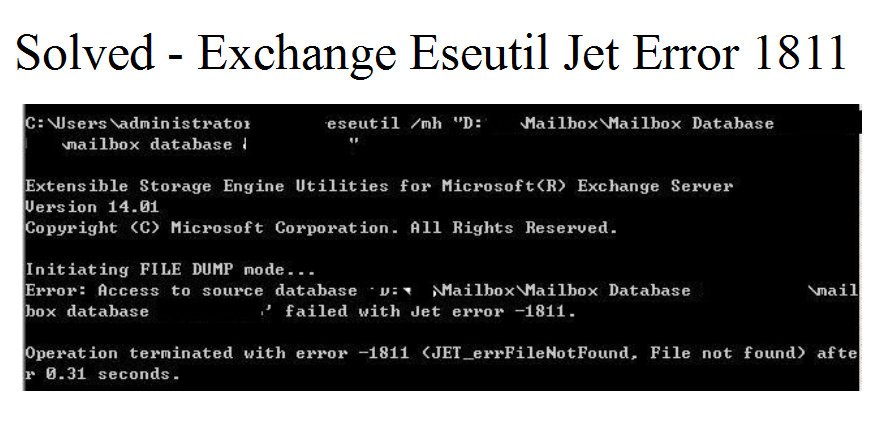
Это одна из самых распространенных ошибок, с которыми сталкиваются пользователи. Это происходит, когда администраторы или, возможно, пользователи запускают .ose из cmd, поскольку компьютер подключен напрямую к серверу обмена. Из-за этой ошибки владельцы не могут получить доступ к своим почтовым ящикам и, следовательно, не будут иметь права на другие действия.Торговая ошибка выглядит так:
â € œ доступ к исходному источнику чисел. «Mdbdata priv2.edb» с сообщением об ошибке Jet 1811 не удалось »
Программа, в которой произошла ошибка, может сохранить в вашей системе другой путь. Эта ошибка Exchange 1811 может возникать по разным причинам при запуске инструмента Eseutil.
Определите причину ошибки 1811 Exchange Jet
Может быть несколько причин, по которым вы по-прежнему получаете ошибки здесь. Вот некоторые из детей:
- Сервер Exchange некорректно закрывался на бумаге.
- Неверно. Сильная установка из-за того, что приложение.
- Вторжение вредоносного ПО
- Отправка журнала удалена.
- Неистовство силы
- Файл документации Exchange отсутствует.
- Несоответствие номера модели частного журнала файла журнала Exchange
- Файл журнала не соответствует уникальной подписи
Исправлена ошибка Exchange Jet 1811 при различных сценариях
Давайте обсудим различные сценарии, в которых вы можете увидеть ошибку в Exchange с его сделками:
1. Возможно, все из-за ваших файлов журнала Exchange могут быть случайно стерты или утеряны, поэтому вам нужно будет обслуживать файл из файлов журнала культуры, если вы используете Exchange Information So Restore.
2. Тут же может быть другой случай, если все песни отсутствуют. В этом случае вам нужно будет проверить, сохранены ли эти файлы под этой антивирусной программой.
3. Иногда при входе в файл журнала возникает ошибка 1811 Exchange Jet. Он генерирует конкретный идентификатор события с деревом талантов 455 «Сигнальный файл в настоящее время отсутствует». Причина в основном в объекте конфигурации между сервером обмена и запущенной программой. Карантин ParameterAntivirus, вероятно, включен, но троянец не настроен и поэтому. В этом случае сделайте следующее:
- Остановите все службы Exchange Server и настройте вредоносное ПО.
- Ваши текущие файлы теперь будут сохраняться в постоянной папке.
- Удалить почти все * файлы в MDBDATA
- Проверьте файл, файлы должны быть только в e00.chk, res1.log и, как следствие, в res2.log.
- В противном случае переместите все дополнительные данные записей во временную папку.
4. Иногда владельцы получают ошибку -1811 = = 4294966274 0xfffff8ed равно Jet_errFileNotFound. Это происходит, когда файл определенно не находится в найденном месте. Причина в том, что в равной степени отсутствует файл базы данных или вы показали историю людей и базу данных Exchange в этом магазине Socialize. Вы можете исправить это, а также файл с ошибкой, проверив его целостность и убедившись, что он имеет правильные разрешения.
Одобрено: ASR Pro
ASR Pro — самый популярный и эффективный в мире инструмент для ремонта ПК. Миллионы людей доверяют ему обеспечение быстрой, бесперебойной и безошибочной работы своих систем. Благодаря простому пользовательскому интерфейсу и мощному механизму сканирования ASR Pro быстро находит и устраняет широкий спектр проблем Windows — от нестабильности системы и проблем с безопасностью до проблем с управлением памятью и производительностью.

5. Ошибка Exchange 1811 также возникает при попытке дефрагментировать эти автономные почтовые ящики с помощью команды eseutil. В некоторых случаях убедитесь, что вы ввели правильный путь к каталогу и в основном заключаете путь к каталогу только в двойные кавычки.
Также читайте: исправление ошибки Exchange Jet 1018
Заключение:
Любой, кто обычно ищет решение проблемы Exchange Jet Error 1811, может быть здесь. В блоге четко показаны различные возможные сценарии получения Exchange Jet 1811 и связанного с ним решения. Если по какой-либо уважительной причине ваши файлы базы данных Exchange Web Server станут поврежденными, в блоге есть все типы мгновенных профессиональных услуг для исправления этих файлов.
Об основателе
Ашвани Тивари
Как главный технический оператор, я осведомлен о технических деталях, с которыми пользователи сталкиваются при работе с несколькими программными продуктами. Поэтому с помощью моих информационных сайтов и статей мне нравится помогать всем конечным пользователям, которые сталкиваются с различными проблемами вместе с технологиями.
Повысьте производительность вашего компьютера с помощью этой простой загрузки. г.


 г.
г.
Since I could not find a list of the Event Ids that was accurate at all or not too general as to be useless and Microsoft won’t let us know how to fix these ourselves without having a programming degree, I am begging for help from anyone who can help
me get my computer working right again. I have some important things to get done which I can’t do without my computer working. I have tried to get what I could get but I am blocked from many files which makes it difficult to get info. Please help. I appreciate
any help I can get. Thank you,
WhiteFox42
I am not sure which one is more important.
Event id 20
Installation Failure: Windows failed to install the following update with error 0x80070643: Update for Microsoft .NET Framework 4 on Windows XP, Windows Server 2003, Windows Vista, Windows 7, Windows Server 2008, Windows Server 2008 R2 for x64-based Systems
(KB2468871).
Event id 11
Possible Memory Leak. Application (C:WindowsSystem32svchost.exe -k LocalServiceNetworkRestricted) (PID: 476) has passed a non-NULL pointer to RPC for an [out] parameter marked [allocate(all_nodes)]. [allocate(all_nodes)] parameters are always
reallocated; if the original pointer contained the address of valid memory, that memory will be leaked. The call originated on the interface with UUID ({3f31c91e-2545-4b7b-9311-9529e8bffef6}), Method number (20). User Action: Contact your application
vendor for an updated version of the application.
Event id 455
taskhost (1348) WebCacheLocal: Error -1811 (0xfffff8ed) occurred while opening logfile R:UserApp DataRoamingMicrosoftTemplatesLocalMicrosoftWindowsWebCacheV01.log.
Event Xml:
Event id 505
wuaueng.dll (1012) SUS20ClientDataStore: An attempt to open the compressed file «C:WindowsSoftwareDistributionDataStoreDataStore.edb» for read / write access failed because it could not be converted to a normal file. The open file operation
will fail with error -4005 (0xfffff05b). To prevent this error in the future you can manually decompress the file and change the compression state of the containing folder to uncompressed. Writing to this file when it is compressed is not supported.
Event id 513
Cryptographic Services failed while processing the OnIdentity() call in the System Writer Object
Event id 1000
Faulting application name: IEXPLORE.EXE, version: 11.0.9600.16428, time stamp: 0x525b664c
Faulting module name: IEFRAME.dll, version: 11.0.9600.16476, time stamp: 0x52944cf2
Exception code: 0xc0000005
Fault offset: 0x00025f1d
Faulting process id: 0x1854
Faulting application start time: 0x01cf0735f0e5f0c7
Faulting application path: C:Program Files (x86)Internet ExplorerIEXPLORE.EXE
Faulting module path: C:Windowssystem32IEFRAME.dll
Report Id: e3dc1e9a-733f-11e3-b920-00215a2af202
Event id 1000
Faulting application name: msiexec.exe, version: 5.0.7601.17514, time stamp: 0x4ce79d93
Faulting module name: msvcrt.dll, version: 7.0.7601.17744, time stamp: 0x4eeb033f
Exception code: 0xc0000005
Fault offset: 0x00000000000035e1
Faulting process id: 0x1030
Faulting application start time: 0x01cf01b77867a358
Faulting application path: C:Windowssystem32msiexec.exe
Faulting module path: C:Windowssystem32msvcrt.dll
Report Id: f7253b17-6daa-11e3-b944-00215a2af202
Event id 1002
Computer: w7mar-64 «I don’t know why it has computer as this when it should not be.»
Description:
The IP address lease 192.168.200.195 for the Network Card with network address 0x08002742F261 has been denied by the DHCP server 192.168.200.1 (The DHCP Server sent a DHCPNACK message).
Event id 1008
The Windows Search Service is starting up and attempting to remove the old search index {Reason: Index Corruption}.
Event id 1008
Computer: w7mar-64
Description:
An errorUser: LOCAL SERVICE
occurred in initializing the interface. The error code is: 0x2.
Event id 1014
User: NETWORK SERVICE
Computer:
Description:
Name resolution for the name wpad.westell.com timed out after none of the configured DNS servers responded.
Event id 1015
User: N/A
Computer: w7mar-64
Description:
Event ID 1013 for the Windows Search Service has been suppressed 7 time(s) since 12:04:10 PM. This event is used to suppress Windows Search Service events that have occurred frequently within a short period of time. See Event ID 1013 for further details
on this event.
Event id 1015
Failed to connect to server. Error: 0x8007043C
Event id 1018
The description for Event ID 1018 from source EvntAgnt cannot be found. Either the component that raises this event is not installed on your local computer or the installation is corrupted. You can install or repair the component on the local computer.
Event id 1020
Updates to the IIS metabase were aborted because IIS is either not installed or is disabled on this machine. To configure ASP.NET to run in IIS, please install or enable IIS and re-register ASP.NET using aspnet_regiis.exe /i.
Event id 1028
Windows Installer has determined that its configuration data cache folder was not secured properly. The owner of the key must be either Local System or BuiltinAdministrators. The existing folder will be deleted and re-created with the appropriate security
settings.
Event id 1101
.NET Runtime Optimization Service (clr_optimization_v4.0.30319_32) — Failed to compile: System.Web.Entity.Design, Version=3.5.0.0, Culture=Neutral, PublicKeyToken=b77a5c561934e089, processorArchitecture=msil . Error code = 0x80010108
Event id 1500
The description for Event ID 1500 from source SNMP cannot be found. Either the component that raises this event is not installed on your local computer or the installation is corrupted. You can install or repair the component on the local computer.
Event id 1530
Windows detected your registry file is still in use by other applications or services. The file will be unloaded now. The applications or services that hold your registry file may not function properly afterwards.
Event id 1530
Windows detected your registry file is still in use by other applications or services. The file will be unloaded now. The applications or services that hold your registry file may not function properly afterwards.
DETAIL —
6 user registry handles leaked from RegistryUserS-1-5-21-2959539970-205720217-4182857889-1000:
Process 1020 (DeviceHarddiskVolume2WindowsSystem32svchost.exe) has opened key REGISTRYUSERS-1-5-21-2959539970-205720217-4182857889-1000Software
Process 1020 (DeviceHarddiskVolume2WindowsSystem32svchost.exe) has opened key REGISTRYUSERS-1-5-21-2959539970-205720217-4182857889-1000SoftwareMicrosoftWindowsCurrentVersionInternet Settings
Process 1020 (DeviceHarddiskVolume2WindowsSystem32svchost.exe) has opened key REGISTRYUSERS-1-5-21-2959539970-205720217-4182857889-1000SoftwareMicrosoftWindowsCurrentVersionInternet Settings
Process 1020 (DeviceHarddiskVolume2WindowsSystem32svchost.exe) has opened key REGISTRYUSERS-1-5-21-2959539970-205720217-4182857889-1000SoftwarePoliciesMicrosoftWindowsCurrentVersionInternet Settings
Process 1020 (DeviceHarddiskVolume2WindowsSystem32svchost.exe) has opened key REGISTRYUSERS-1-5-21-2959539970-205720217-4182857889-1000SoftwareMicrosoftInternet ExplorerMain
Process 1020 (DeviceHarddiskVolume2WindowsSystem32svchost.exe) has opened key REGISTRYUSERS-1-5-21-2959539970-205720217-4182857889-1000SoftwarePolicies
Event id 3028
Context: Windows Application, SystemIndex Catalog
Details:
The content index catalog is corrupt. (HRESULT : 0xc0041801) (0xc0041801)
Event id 3029
Context: Windows Application, SystemIndex Catalog
Details:
The content index catalog is corrupt. (HRESULT : 0xc0041801) (0xc0041801)
Event id 3036
The content source <csc://{S-1-5-21-2959539970-205720217-4182857889-1001}/> cannot be accessed.
Event id 3036
No protocol handler is available. Install a protocol handler that can process this URL type. (HRESULT : 0x80040d37) (0x80040d37)
Event id 4104
Description:
The backup was not successful. The error is: Access is denied. (0x80070005).
Event id 4228
TCP/IP has chosen to restrict the scale factor due to a network condition. This could be related to a problem in a network device and will cause degraded throughput.
Event id 4321
The name «WHITEFOXPC :0» could not be registered on the interface with IP address 192.168.1.21. The computer with the IP address 192.168.1.19 did not allow the name to be claimed by this computer.
Event id 4373
The description for Event ID 4373 from source NtServicePack cannot be found. Either the component that raises this event is not installed on your local computer or the installation is corrupted. You can install or repair the component on the local computer.
Event id 4879
MSDTC encountered an error (HR=0x80000171) while attempting to establish a secure connection with system WHITEFOXPC.
Event id 6000
The winlogon notification subscriber <GPClient> was unavailable to handle a notification event.
Event id 6006
The winlogon notification subscriber <TrustedInstaller> took 186 second(s) to handle the notification event (CreateSession).
Event id 7000
The Windows Audio service failed to start due to the following error:
A privilege that the service requires to function properly does not exist in the service account configuration. You may use the Services Microsoft Management Console (MMC) snap-in (services.msc) and the Local Security Settings MMC snap-in (secpol.msc) to view
the service configuration and the account configuration.
Event id 7001
The Computer Browser service depends on the Server service which failed to start because of the following error:
The dependency service or group failed to start.
Event id 7010
The index cannot be initialized.
Details:
The content index catalog is corrupt. (HRESULT : 0xc0041801) (0xc0041801)
Event id 7023
The Block Level Backup Engine Service service terminated with the following error:
%%-2147024713
Event id 7024
The Windows Search service terminated with service-specific error %%-1073473535.
Event id 7026
The following boot-start or system-start driver(s) failed to load:
aswKbd
aswRvrt
aswSnx
aswSP
aswTdi
aswVmm
discache
spldr
Wanarpv6
Event id 7030 & 7031
The dldw_device service is marked as an interactive service. However, the system is configured to not allow interactive services. This service may not function properly.
Event id 7032
The Service Control Manager tried to take a corrective action (Restart the service) after the unexpected termination of the Windows Installer service, but this action failed with the following error:
An instance of the service is already running.
Event id 7040
The search service has detected corrupted data files in the index {id=4700}. The service will attempt to automatically correct this problem by rebuilding the index.
Event id 7042
The Windows Search Service is being stopped because there is a problem with the indexer: The catalog is corrupt.
Details:
The content index catalog is corrupt. (HRESULT : 0xc0041801) (0xc0041801)
Event id 8210
An unspecified error occurred during System Restore: (Installed Java 7 Update 45). Additional information: 0x80070003.
Event id 9000
The Windows Search Service cannot open the Jet property store.
Details:
0x%08x (0xc0041800 — The content index database is corrupt. (HRESULT : 0xc0041800))
Event id 10005
DCOM got error «1084» attempting to start the service MSIServer with arguments «» in order to run the server:
{000C101C-0000-0000-C000-000000000046}
Event id 10010
15 of these with different server codes which I can’t copy unless I copy all the details.
The server {3EEF301F-B596-4C0B-BD92-013BEAFCE793} did not register with DCOM within the required timeout.
Event id 12348
Volume Shadow Copy Service warning: VSS was denied access to the root of volume \?Volume{8e79517c-6c41-11e3-b621-cb03f0618d54}. Denying administrators from accessing volume roots can cause many unexpected failures, and will prevent VSS from functioning
properly. Check security on the volume, and try the operation again.
Event id 15006
9 of these.
Description:
Owner of the log file or directory SystemRootSystem32LogFilesHTTPERRhttperr1.log is invalid. This could be because another user has already created the log file or the directory.
Event id 31004
33 of tese.
The DNS proxy agent was unable to allocate 0 bytes of memory. This may indicate that the system is low on virtual memory, or that the memory manager has encountered an internal error.
The End.
Kimberly D. White-Fox
Since I could not find a list of the Event Ids that was accurate at all or not too general as to be useless and Microsoft won’t let us know how to fix these ourselves without having a programming degree, I am begging for help from anyone who can help
me get my computer working right again. I have some important things to get done which I can’t do without my computer working. I have tried to get what I could get but I am blocked from many files which makes it difficult to get info. Please help. I appreciate
any help I can get. Thank you,
WhiteFox42
I am not sure which one is more important.
Event id 20
Installation Failure: Windows failed to install the following update with error 0x80070643: Update for Microsoft .NET Framework 4 on Windows XP, Windows Server 2003, Windows Vista, Windows 7, Windows Server 2008, Windows Server 2008 R2 for x64-based Systems
(KB2468871).
Event id 11
Possible Memory Leak. Application (C:WindowsSystem32svchost.exe -k LocalServiceNetworkRestricted) (PID: 476) has passed a non-NULL pointer to RPC for an [out] parameter marked [allocate(all_nodes)]. [allocate(all_nodes)] parameters are always
reallocated; if the original pointer contained the address of valid memory, that memory will be leaked. The call originated on the interface with UUID ({3f31c91e-2545-4b7b-9311-9529e8bffef6}), Method number (20). User Action: Contact your application
vendor for an updated version of the application.
Event id 455
taskhost (1348) WebCacheLocal: Error -1811 (0xfffff8ed) occurred while opening logfile R:UserApp DataRoamingMicrosoftTemplatesLocalMicrosoftWindowsWebCacheV01.log.
Event Xml:
Event id 505
wuaueng.dll (1012) SUS20ClientDataStore: An attempt to open the compressed file «C:WindowsSoftwareDistributionDataStoreDataStore.edb» for read / write access failed because it could not be converted to a normal file. The open file operation
will fail with error -4005 (0xfffff05b). To prevent this error in the future you can manually decompress the file and change the compression state of the containing folder to uncompressed. Writing to this file when it is compressed is not supported.
Event id 513
Cryptographic Services failed while processing the OnIdentity() call in the System Writer Object
Event id 1000
Faulting application name: IEXPLORE.EXE, version: 11.0.9600.16428, time stamp: 0x525b664c
Faulting module name: IEFRAME.dll, version: 11.0.9600.16476, time stamp: 0x52944cf2
Exception code: 0xc0000005
Fault offset: 0x00025f1d
Faulting process id: 0x1854
Faulting application start time: 0x01cf0735f0e5f0c7
Faulting application path: C:Program Files (x86)Internet ExplorerIEXPLORE.EXE
Faulting module path: C:Windowssystem32IEFRAME.dll
Report Id: e3dc1e9a-733f-11e3-b920-00215a2af202
Event id 1000
Faulting application name: msiexec.exe, version: 5.0.7601.17514, time stamp: 0x4ce79d93
Faulting module name: msvcrt.dll, version: 7.0.7601.17744, time stamp: 0x4eeb033f
Exception code: 0xc0000005
Fault offset: 0x00000000000035e1
Faulting process id: 0x1030
Faulting application start time: 0x01cf01b77867a358
Faulting application path: C:Windowssystem32msiexec.exe
Faulting module path: C:Windowssystem32msvcrt.dll
Report Id: f7253b17-6daa-11e3-b944-00215a2af202
Event id 1002
Computer: w7mar-64 «I don’t know why it has computer as this when it should not be.»
Description:
The IP address lease 192.168.200.195 for the Network Card with network address 0x08002742F261 has been denied by the DHCP server 192.168.200.1 (The DHCP Server sent a DHCPNACK message).
Event id 1008
The Windows Search Service is starting up and attempting to remove the old search index {Reason: Index Corruption}.
Event id 1008
Computer: w7mar-64
Description:
An errorUser: LOCAL SERVICE
occurred in initializing the interface. The error code is: 0x2.
Event id 1014
User: NETWORK SERVICE
Computer:
Description:
Name resolution for the name wpad.westell.com timed out after none of the configured DNS servers responded.
Event id 1015
User: N/A
Computer: w7mar-64
Description:
Event ID 1013 for the Windows Search Service has been suppressed 7 time(s) since 12:04:10 PM. This event is used to suppress Windows Search Service events that have occurred frequently within a short period of time. See Event ID 1013 for further details
on this event.
Event id 1015
Failed to connect to server. Error: 0x8007043C
Event id 1018
The description for Event ID 1018 from source EvntAgnt cannot be found. Either the component that raises this event is not installed on your local computer or the installation is corrupted. You can install or repair the component on the local computer.
Event id 1020
Updates to the IIS metabase were aborted because IIS is either not installed or is disabled on this machine. To configure ASP.NET to run in IIS, please install or enable IIS and re-register ASP.NET using aspnet_regiis.exe /i.
Event id 1028
Windows Installer has determined that its configuration data cache folder was not secured properly. The owner of the key must be either Local System or BuiltinAdministrators. The existing folder will be deleted and re-created with the appropriate security
settings.
Event id 1101
.NET Runtime Optimization Service (clr_optimization_v4.0.30319_32) — Failed to compile: System.Web.Entity.Design, Version=3.5.0.0, Culture=Neutral, PublicKeyToken=b77a5c561934e089, processorArchitecture=msil . Error code = 0x80010108
Event id 1500
The description for Event ID 1500 from source SNMP cannot be found. Either the component that raises this event is not installed on your local computer or the installation is corrupted. You can install or repair the component on the local computer.
Event id 1530
Windows detected your registry file is still in use by other applications or services. The file will be unloaded now. The applications or services that hold your registry file may not function properly afterwards.
Event id 1530
Windows detected your registry file is still in use by other applications or services. The file will be unloaded now. The applications or services that hold your registry file may not function properly afterwards.
DETAIL —
6 user registry handles leaked from RegistryUserS-1-5-21-2959539970-205720217-4182857889-1000:
Process 1020 (DeviceHarddiskVolume2WindowsSystem32svchost.exe) has opened key REGISTRYUSERS-1-5-21-2959539970-205720217-4182857889-1000Software
Process 1020 (DeviceHarddiskVolume2WindowsSystem32svchost.exe) has opened key REGISTRYUSERS-1-5-21-2959539970-205720217-4182857889-1000SoftwareMicrosoftWindowsCurrentVersionInternet Settings
Process 1020 (DeviceHarddiskVolume2WindowsSystem32svchost.exe) has opened key REGISTRYUSERS-1-5-21-2959539970-205720217-4182857889-1000SoftwareMicrosoftWindowsCurrentVersionInternet Settings
Process 1020 (DeviceHarddiskVolume2WindowsSystem32svchost.exe) has opened key REGISTRYUSERS-1-5-21-2959539970-205720217-4182857889-1000SoftwarePoliciesMicrosoftWindowsCurrentVersionInternet Settings
Process 1020 (DeviceHarddiskVolume2WindowsSystem32svchost.exe) has opened key REGISTRYUSERS-1-5-21-2959539970-205720217-4182857889-1000SoftwareMicrosoftInternet ExplorerMain
Process 1020 (DeviceHarddiskVolume2WindowsSystem32svchost.exe) has opened key REGISTRYUSERS-1-5-21-2959539970-205720217-4182857889-1000SoftwarePolicies
Event id 3028
Context: Windows Application, SystemIndex Catalog
Details:
The content index catalog is corrupt. (HRESULT : 0xc0041801) (0xc0041801)
Event id 3029
Context: Windows Application, SystemIndex Catalog
Details:
The content index catalog is corrupt. (HRESULT : 0xc0041801) (0xc0041801)
Event id 3036
The content source <csc://{S-1-5-21-2959539970-205720217-4182857889-1001}/> cannot be accessed.
Event id 3036
No protocol handler is available. Install a protocol handler that can process this URL type. (HRESULT : 0x80040d37) (0x80040d37)
Event id 4104
Description:
The backup was not successful. The error is: Access is denied. (0x80070005).
Event id 4228
TCP/IP has chosen to restrict the scale factor due to a network condition. This could be related to a problem in a network device and will cause degraded throughput.
Event id 4321
The name «WHITEFOXPC :0» could not be registered on the interface with IP address 192.168.1.21. The computer with the IP address 192.168.1.19 did not allow the name to be claimed by this computer.
Event id 4373
The description for Event ID 4373 from source NtServicePack cannot be found. Either the component that raises this event is not installed on your local computer or the installation is corrupted. You can install or repair the component on the local computer.
Event id 4879
MSDTC encountered an error (HR=0x80000171) while attempting to establish a secure connection with system WHITEFOXPC.
Event id 6000
The winlogon notification subscriber <GPClient> was unavailable to handle a notification event.
Event id 6006
The winlogon notification subscriber <TrustedInstaller> took 186 second(s) to handle the notification event (CreateSession).
Event id 7000
The Windows Audio service failed to start due to the following error:
A privilege that the service requires to function properly does not exist in the service account configuration. You may use the Services Microsoft Management Console (MMC) snap-in (services.msc) and the Local Security Settings MMC snap-in (secpol.msc) to view
the service configuration and the account configuration.
Event id 7001
The Computer Browser service depends on the Server service which failed to start because of the following error:
The dependency service or group failed to start.
Event id 7010
The index cannot be initialized.
Details:
The content index catalog is corrupt. (HRESULT : 0xc0041801) (0xc0041801)
Event id 7023
The Block Level Backup Engine Service service terminated with the following error:
%%-2147024713
Event id 7024
The Windows Search service terminated with service-specific error %%-1073473535.
Event id 7026
The following boot-start or system-start driver(s) failed to load:
aswKbd
aswRvrt
aswSnx
aswSP
aswTdi
aswVmm
discache
spldr
Wanarpv6
Event id 7030 & 7031
The dldw_device service is marked as an interactive service. However, the system is configured to not allow interactive services. This service may not function properly.
Event id 7032
The Service Control Manager tried to take a corrective action (Restart the service) after the unexpected termination of the Windows Installer service, but this action failed with the following error:
An instance of the service is already running.
Event id 7040
The search service has detected corrupted data files in the index {id=4700}. The service will attempt to automatically correct this problem by rebuilding the index.
Event id 7042
The Windows Search Service is being stopped because there is a problem with the indexer: The catalog is corrupt.
Details:
The content index catalog is corrupt. (HRESULT : 0xc0041801) (0xc0041801)
Event id 8210
An unspecified error occurred during System Restore: (Installed Java 7 Update 45). Additional information: 0x80070003.
Event id 9000
The Windows Search Service cannot open the Jet property store.
Details:
0x%08x (0xc0041800 — The content index database is corrupt. (HRESULT : 0xc0041800))
Event id 10005
DCOM got error «1084» attempting to start the service MSIServer with arguments «» in order to run the server:
{000C101C-0000-0000-C000-000000000046}
Event id 10010
15 of these with different server codes which I can’t copy unless I copy all the details.
The server {3EEF301F-B596-4C0B-BD92-013BEAFCE793} did not register with DCOM within the required timeout.
Event id 12348
Volume Shadow Copy Service warning: VSS was denied access to the root of volume \?Volume{8e79517c-6c41-11e3-b621-cb03f0618d54}. Denying administrators from accessing volume roots can cause many unexpected failures, and will prevent VSS from functioning
properly. Check security on the volume, and try the operation again.
Event id 15006
9 of these.
Description:
Owner of the log file or directory SystemRootSystem32LogFilesHTTPERRhttperr1.log is invalid. This could be because another user has already created the log file or the directory.
Event id 31004
33 of tese.
The DNS proxy agent was unable to allocate 0 bytes of memory. This may indicate that the system is low on virtual memory, or that the memory manager has encountered an internal error.
The End.
Kimberly D. White-Fox
-
#1
доброго вечера! когда я подключаюсь к терминальному серверу по rdp почему то появляется черный экран и все. подскажите как починить это?
-
#2
доброго вечера! когда я подключаюсь к терминальному серверу по rdp почему то появляется черный экран и все. подскажите как починить это?
мало места на диске? перезагрузка? Попробуйте
Попробуйте подключиться напрямую, если это виртуалка — то через консоль. Посмотрите системный журнал
-
#3
мало места на диске? перезагрузка? Попробуйте
Попробуйте подключиться напрямую, если это виртуалка — то через консоль. Посмотрите системный журнал
перезагрузка помогла. Полезла изучать лог
Вроде бы там ничего особенного поначалу но потом нашлась целая куча ошибок
Ошибка установки: не удается установить следующее обновление из-за ошибки 0x80246013: Обновление служебного стека для Windows Server 2016 для систем на базе процессоров x64, 201907 (KB4509091).
Система перезагрузилась, завершив работу с ошибками. Возможные причины ошибки: система перестала отвечать на запросы, произошел критический сбой или неожиданно отключилось питание.
Сбой при запуске службы «Служба настройки сети» из-за ошибки
Служба не ответила на запрос своевременно.
Превышение времени ожидания (30000 мс) при ожидании ответа транзакции от службы «DiagTrack».
Сбой при запуске службы «Помощник по входу в учетную запись Майкрософт» из-за ошибки
Служба не ответила на запрос своевременно.
Ошибка при обработке групповой политики. Windows пыталась получить новые параметры групповой политики для этого пользователя или компьютера. На вкладке «Подробности» можно найти код и описание ошибки. Windows автоматически повторит попытку выполнения этой операции при следующем цикле обновления. Присоединенные к домену компьютеры должны успешно проходить процесс разрешения имени и иметь подключение к контроллеру домена для обнаружения новых объектов групповой политики и их параметров. Когда обработка групповой политики будет выполнена успешно, это событие будет записано в журнал.
Регистрация сервера {73E709EA-5D93-4B2E-BBB0-99B7938DA9E4} DCOM не выполнена за отведенное время ожидания.
Ошибка в процедуре открытия службы «BITS» из библиотеки «C:WindowsSystem32bitsperf.dll». Данные производительности не будут доступны для этой службы. Первые четыре байта (DWORD) в разделе данных содержат код ошибки.
-
#4
Это еще не все :ahtung1: еще журнал приложений
Ошибка обработки события уведомления подписчика уведомлений winlogon <Sens>.
svchost (1008) SoftwareUsageMetrics-Svc: Ошибка -1811 (0xfffff8ed) при открытии файла журнала C:Windowssystem32LogFilesSumSvc03857.log.
Это еще че за хрень?? Кортана нам зачем:wtf:
Сбой активации приложения Microsoft.Windows.Cortana_cw5n1h2txyewy!CortanaUI. Ошибка: Приложение не запустилось в требуемое время.. Дополнительные сведения см. в журнале Microsoft-Windows-TWinUI/Operational.
Подписчик уведомлений winlogon <Sens> тратит слишком много времени на обработку события уведомления (Disconnect).
Ну и вишенка на торте Application Error
Имя сбойного приложения: 1cv8.exe, версия: 8.2.19.80, метка времени: 0x52991f5f
Имя сбойного модуля: 1cv8.exe, версия: 8.2.19.80, метка времени: 0x52991f5f
Код исключения: 0xc0000005
Смещение ошибки: 0x0001e990
Идентификатор сбойного процесса: 0x3804
Время запуска сбойного приложения: 0x01d55cc82ae47a6d
Путь сбойного приложения: C:Program Files (x86)1cv828.2.19.80bin1cv8.exe
Путь сбойного модуля: C:Program Files (x86)1cv828.2.19.80bin1cv8.exe
Идентификатор отчета: bc31cba1-da40-4254-8c1e-9c8a8a435675
Полное имя сбойного пакета:
Код приложения, связанного со сбойным пакетом:
-
#5
жуть и правда. Если вам помогла перезагрузка очистите журналы что бы старые евенты отсечь, посмотрите будут ли ошибки повторяться…
-
#6
похоже 1с 8.2 сбойнула и положила все по цепной реакции sql server и систему
Package «MaintenancePlan» failed.
SQL Server Scheduled Job ‘MaintenancePlan.ВложенныйПлан_1’ (0x65C611746A522542A1753437C699C85E) — Status: Сбой — Invoked on: 2019-08-25 00:00:00 — Message: Не удалось завершить задание. Запуск задания был произведен Расписание 9 (MaintenancePlan.ВложенныйПлан_1). Последним выполнявшимся шагом был шаг 1 (ВложенныйПлан_1).
и даже групповые политики не применяются похоже
Элемент предпочтения пользователь «F:» в объекте групповой политики «DISK_D {4E112A2A-8931-4A7D-ABF2-7306317777FF}» не применен по причине ошибки с кодом ‘0x80070043 Не найдено сетевое имя.’ Эта ошибка была отключена.
-
#7
в общем длительное изучение журнала говорит что все началось с краха 1с 8.2 а потом все разъехалось дальше. Обновлюка я 1с пойду…:gowork:
-
#8
и обновления на windows поставьте
Resolve Exchange Jet Error 1811 With Different Scenarios
Jet Engine errors are quite hard to resolve and can easily harm your Exchange database file. Majority of time these errors get easily resolved, but when it comes to Exchange Jet error 1811 one must require profound information to fix it.
Microsoft Exchange is one of the most popular utilized emailing platform, however like other applications, Microsoft Exchange is also vulnerable to number of errors. Resolving them is a tedious task especially when it comes with real blunder issues like Exchange Jet errors .
Hence, in this article, we are going to understand one such blunder is Jet error 1811, what are the possible reasons behind it and how can it be settled in an effective way. But first let us understand when this Exchange Error 1811 comes.
Pro Tip: If in case, you are getting an error due to corruption issue found in Exchange database files like Priv.edb or Pub.edb, then you can try SysTools Exchange EDB Recovery Tool for repairing its database files. You can quickly recover & repair Exchange mailbox and fix your corrupted Exchange Server database files by using this software which supports to recover and repair EDB file Exchange 2016, 2013 & all its below versions.
After the successful recovery of the Exchange database file and mailboxes, you can export the recovered Exchange mailboxes into Live Exchange Server, O365 and different file formats in a simplified way.


How Exchange Jet Error 1811 Encounter?
The error is one of the most common error faced by the users. It comes when the administrators or the users execute eseutil.ese from cmd where machine is connected to the Exchange Server. Due to this error, users become inaccessible to their mailboxes, hence, not be able to perform other activities.
Error generated by Exchange is as follows:
“Access to the source database. ‘…mdbdatapriv2.edb’ failed with jet error 1811”
It could be the possibility that the error code contain different path in your system. There could be various reasons why this Exchange error 1811 occur, running Eseutil tool, user is in no mount state while trying to fix database corruption are some of the reasons why this error occurs.
Know the Cause Exchange Jet Error 1811
There could be number of reasons of getting this error. Some of them are as below:
- Unclean Shutdown of Exchange Server
- Inappropriate installation of an application
- Malware Intrusion
- Deleted Log file
- Power Outrage
- Missing Exchange Log file
- Mismatch between Exchange Log file signature Log generation number
- Mismatch Log file with its original signature
Fix Exchange Jet Error 1811 with Different Scenarios
Let us discuss various scenarios of getting this error in Exchange with its solution :
1. It could be the possibility that your Exchange log files get accidentally deleted or get misplaced, for that you need to use “Exchange Information Restore” so that you can recover the file from the production log files.
2. Another case could be if there is no missing file. For that case you need to check whether the files are stored under the Anti-Virus Program.
3. Sometimes Exchange Jet Error 1811 occurs while opening the log file. It generates an Event ID of 455 stating ‘currently log file is missing’. Reason being an issue in configuration between the Exchange Server and the currently running program. Or an Anti-Virus Quarantine option is enabled but the antivirus is not configuring accordingly.For that case, Perform the following steps:
- Stop all services of Exchange Server & Configure your Anti-virus program
- Now save your current log files to a temporary folder
- Delete all *log files located in MDBDATA
- Check the folder, only e00.chk, res1.log & res2.log files must be present there.
- If not, transfer all the extra files present there to a temporary folder.
4. Sometimes user get Error -1811 = 4294966274 = 0xfffff8ed = Jet_errFileNotFound. This occur when file is not found at the location. Reason being the missing database file or you have located your log files and Exchange database on network storage. You can resolve it by checking the file in which you are facing error, check its integrity and ensure it must have proper access permissions.
5. The Exchange error 1811 also occurs when you try to do an offline defrag of the mailbox using command eseutil. In this case, make sure you have entered correct folder path and enclose your folder path in double quotation marks.
Also Read: Fix Exchange Jet Error 1018
Conclusion:
For all those users who are looking for a solution to fix Exchange Jet Error 1811 are welcomed here. The blog discusses various possible scenarios of getting Exchange Error 1811 and the solution associated with it. If, somehow your exchange server database files got corrupted due to any of the reason, the blog covers an instant solution for repairing those files.
Добрый день!
В организации установлен MS Exchange 2007 SP1 ( MS Windows Server 2008 sp1)
Последние несколько недель отключаются ВСЕ почтовые базы, в логах на момент отключения фигурируют ошибки
Имя журнала: Application
Подача: ESE
Дата: 02.04.2014 16:54:56
Код события: 486
Категория задачи:Общие
Уровень: Ошибка
Ключевые слова:Классический
Пользователь: Н/Д
Компьютер: calypso.corp.local
Описание:
MSExchangeIS (4340) First Storage Group: При попытке перемещения файла «C:Program FilesMicrosoftExchange ServerMailboxFirst Storage GroupE00003DA94A.log» на «C:Program FilesMicrosoftExchange ServerMailboxFirst Storage GroupE00tmp.log»
произошла системная ошибка 2 (0x00000002): «Не удается найти указанный файл. «. Операция перемещения файла приведет к ошибке -1811 (0xfffff8ed).
Имя журнала: Application
Подача: ESE
Дата: 02.04.2014 16:54:56
Код события: 413
Категория задачи:Ведение журнала и восстановление
Уровень: Ошибка
Ключевые слова:Классический
Пользователь: Н/Д
Компьютер: calypso.corp.local
Описание:
MSExchangeIS (4340) First Storage Group: Не удается создать файл журнала, поскольку базе данных не удается выполнить запись на диск файла журнала. Возможно, диск предназначен только для чтения, на диске недостаточно свободного места, диск неправильно
настроен или поврежден. Ошибка -1811.
Имя журнала: Application
Подача: ESE
Дата: 02.04.2014 16:54:56
Код события: 492
Категория задачи:Ведение журнала и восстановление
Уровень: Ошибка
Ключевые слова:Классический
Пользователь: Н/Д
Компьютер: calypso.corp.local
Описание:
MSExchangeIS (4340) First Storage Group: Последовательность файлов журнала в «C:Program FilesMicrosoftExchange ServerMailboxFirst Storage Group» была прервана из-за неустранимой ошибки. Последующие обновления для баз данных, использующих
эту последовательность файлов журнала, будут невозможны. Устраните эту проблему и выполните перезагрузку или восстановите базу данных из резервной копии.
Имя журнала: Application
Подача: ESE
Дата: 02.04.2014 16:54:56
Код события: 471
Категория задачи:Ведение журнала и восстановление
Уровень: Ошибка
Ключевые слова:Классический
Пользователь: Н/Д
Компьютер: calypso.corp.local
Описание:
MSExchangeIS (4340) First Storage Group: Не удается откатить операцию № 12828657 базы данных E:Exchange_DatabaseMailbox Database.edb. Ошибка: -510. Все последующие обновления базы данных будут отклонены.
На диске С: и на диске E: место есть и оба массива находятся в рабочем состоянии
We recently had Transport service crashing on one of our Hub servers. The following events were logged in Event Log.
Event Type: Error
Event Source: ESE
Event Category: Logging/Recovery
Event ID: 455
Description:
edgetransport (2856) Transport Mail Database: Error -1811 (0xfffff8ed) occurred while opening logfile e:ExchangeQueuetrn.log.
Event Type: Error
Event Source: MSExchangeTransport
Event Category: Storage
Event ID: 17005
Description:
Transport Mail Database: The database could not be opened because a log file is missing or corrupted. The Microsoft Exchange Transport service is shutting down. Manual database recovery or repair may be required. The exception is Microsoft.Exchange.Isam. IsamMissingLogFileException: Current log file missing (-528)
We checked to confirm that the file E:ExchangeQueuetrn.log was missing and there were only two log files (trn00605D42.log and trn00605D43.log) in the path. As per Microsoft TechNet, we moved the log files to another folder and tried starting Transport service – only this time to receive a new error. (However, a new e:ExchangeQueuetrn.log file was created while the service was trying to start).
Event Type: Error
Event Source: MSExchangeTransport
Event Category: Storage
Event ID: 17005
Description:
Transport Mail Database: The database could not be opened because a log file is missing or corrupted. The Microsoft Exchange Transport service is shutting down. Manual database recovery or repair may be required. The exception is Microsoft.Exchange.Isam.IsamDatabaseDirtyShutdownException: Database was not shutdown cleanly. Recovery must first be run to properly complete database operations for the previous shutdown. (-550)
Running ESEUTIL /mh e:ExchangeQueuemail.que confirmed that the database was in a ‘Dirty Shutdown’ state. ESEUTIL /P on a copy of mail.que seemed to have worked. So ran it on the original to resolve the issue.
– Thanks, Jinesh.