Первое, что хотелось бы рассказать об ошибке 1603, которая появляется при попытке установить какую-либо программу — это не ошибка установочного файла программы, а проблема операционной системы.
Есть несколько причин почему возникает сообщение «Ошибка установки MSI 1603» и у каждой свое решение. Начнем с наиболее чаще встречающийся решений.
Прошу в комментариях описать вашу проблему подробно, и каким способом она решилась.
1. Первый способ. Решение проблема «ошибка установки MSI 1603» при попытке переустановить ранее установленную программу или обновить версию.
Если вы пытаетесь обновить или установить программу, которая ранее была установлена, то проблема именно в том, что в системе остались файлы, которые мешают полноценной установке.
Во-первых.
Смотрим в списке установленных программ (Панель управления\Программы и компоненты), что вашей программы действительно нет. Если программа есть — то удаляем ее кликнув по ней правой кнопкой мыши-пункт удалить. Таким образом программа будет удаляться правильно.
Во-вторых.
Если программы в списке нет, то переходим в директории:
C:Program Files
C:Program Files (x86)
C:ProgramData
Проверяем, что в данных папка нет остатков программы, если есть, то переходим в папку с программой и ищем файл Uninstall.exe, запустив который начнется удаление программы. Если Uninstall.exe отсутствует — удаляем всю папку с именем программы.
В-третьих.
Проверили, что программы действительно нигде нет, но остался еще реестр, в котором то же могут быть остатки программы из-за которых мы получаем ошибку установки 1603.
Нажимаем пуск (кнопка Windows) и сразу вводим regedit (либо Win+R — Regedit).
Откроется окно настройки реестра в меню которого нажимаем Правка-Найти. В окне поиска вводим название программы, которую нужно удалить.
После первого совпадения удаляем найденный параметр и нажимаем F3, для поиска в остальных ветках реестра. Удаляем до тех пор, пока все не очистим.
Теперь перезагружаем компьютер и пробуем установить программу, которая ранее выдавала ошибку. Если данный способ не решил проблему , тогда переходим к второму варианту.
2. Второй способ.
Необходимо загрузить все обновления системы Windows.
Для обновления Windows переходим в Пуск — Параметры — Обновление и безопасность — Центр обновления Windows — нажимаем кнопку Обновить.
Дожидаемся окончания установки всех обновлений и проверяем снова.
Если второй способ снова не решил проблему «ошибка установки MSI 1603», переходим к третьему.
3. Третий способ.
Необходимо убедиться, что есть доступ к папке под вашим пользователем, в которую пытаетесь установить программу, либо установить на локальный диск D, где у вас точно есть доступ.
4. Четвертый способ.
Возможно ваша операционная система является какой-нибудь облегченной версией Windows, либо наоборот с разными «наваротами». Тут предлагаю только установку чистой версии.
Create an account to follow your favorite communities and start taking part in conversations.
r/ASUS

I get a error 1603 and a error 1316 i don’t know what to do please help
level 1
We’re terribly sorry that you’re unable to install this app and we’ll be more than happy to assist. Can you confirm if there’s a previous version of this application on your unit? If so, we recommend removing it completely before re-attempting installation. You can also change the installation location.
level 2
Yes i have had it on my pc but i uninstalled and then i retryed it but then the errors poped op but i opend ccleaner then i pressed clean registry then somethimg “gpu tweak” poped up then i pressed clean but then i tried again to install but stil don’t work
level 2
My man, I know it’s been three years but that tool fixed my issue, cheers!
level 1
Thanks for whoever posted that link had the same issue in 2022.
About Community

Subreddit for ASUS product support, discussion and more. Welcome!
-
09-05-2015 08:51 PM
#1

ROG Enthusiast
Array
G750JX Error 1603 Fatel Error with Asus GPU Tweak
Can anybody help with this issue. A few days ago I tried to uninstall ASUS GPU Tweak and something went wrong thought the process. I was forced to manually turn off my G750JX by pushing the power button till my laptop turned off. Now when I try to
uninstalled GPU Tweak to just make sure I get this. Error 1603 ect. I feel the program is uninstalled but every time I go to until a program I still see the file there and I’m unable to delete it. Windows 10 home 64bit
-
09-07-2015 04:25 PM
#2
ROG Guru: Yellow Belt
Array
Download and run the free version of CCleaner, the newest version of which is compatible w/ Win10…
https://www.piriform.com/ccleaner/download
Just perform a registry scan (click the Registry button on the LS of the window—> «Scan for issues» button), and look for any results w/ «GPUTweak» in their names.
Laptop: Asus G750JZ
OS: Win10

Posting Permissions
- You may not post new threads
- You may not post replies
- You may not post attachments
- You may not edit your posts
- BB code is On
- Smilies are On
- [IMG] code is On
- [VIDEO] code is On
- HTML code is Off
Forum Rules
-
- Nov 18, 2014
-
- 26
-
- 0
-
- 4,530
- 0
-
#1

-
- Jun 12, 2015
-
- 61,160
-
- 5,187
-
- 166,290
- 10,453
-
#9
try this
right click start button
choose command prompt (admin)
type SFC /scannow and press enter
this scans system files and may fix this behaviour

-
- Jul 12, 2014
-
- 840
-
- 0
-
- 19,360
- 140
-
#2
-
- Nov 18, 2014
-
- 26
-
- 0
-
- 4,530
- 0
-
#3
Yes
-
- Jul 12, 2014
-
- 840
-
- 0
-
- 19,360
- 140
-
#4
-
- Nov 18, 2014
-
- 26
-
- 0
-
- 4,530
- 0
-
#5
eh… will try that now
Nope not working
-
- Nov 18, 2014
-
- 26
-
- 0
-
- 4,530
- 0
-
#6
-
- Jul 12, 2014
-
- 840
-
- 0
-
- 19,360
- 140
-
#7
where did you get that GPUTWEAK from , is it from the driver CD or downloaded it
Fatal error during installation, can occur when there are insufficient user access rights on the specified drive
try if you can install the program in any other drive
-
- Nov 18, 2014
-
- 26
-
- 0
-
- 4,530
- 0
-
#8
where did you get that GPUTWEAK from , is it from the driver CD or downloaded it
Fatal error during installation, can occur when there are insufficient user access rights on the specified drive
try if you can install the program in any other drive
I downloaded it, let me see if i can install on different drive
lol not it freezed at the installshield and it gives me this error 1608: Unable to create InstallDrive instance return code: -2147221021
-
- Jun 12, 2015
-
- 61,160
-
- 5,187
-
- 166,290
-
- 10,453
-
#9
try this
right click start button
choose command prompt (admin)
type SFC /scannow and press enter
this scans system files and may fix this behaviour
| Thread starter | Similar threads | Forum | Replies | Date |
|---|---|---|---|---|
|
A
|
Question Secondary drive died, messed up Windows install on main drive? | Windows 10 | 3 | Tuesday at 11:19 AM |
|
G
|
Question What to do with my old installations | Windows 10 | 6 | Tuesday at 3:34 AM |
|
I
|
Question Can I uninstall all my drivers for a clean driver Installation ? | Windows 10 | 9 | Monday at 4:33 PM |
|
|
Question Clean install problem | Windows 10 | 3 | Monday at 12:00 PM |
|
B
|
Question If I install all the windows updates, do I get the basic drivers for my chipset, bluetooth, ethernet, etc? | Windows 10 | 4 | Monday at 10:57 AM |
|
|
Question Windows 10 doesn’t install updates anymore | Windows 10 | 31 | Jan 21, 2023 |
|
|
Question Unable to run an installer for a specific program | Windows 10 | 1 | Jan 19, 2023 |
|
E
|
Question Windows BSOD after update and now drives either not showing or are at 0/0 bytes free. | Windows 10 | 4 | Jan 18, 2023 |
|
|
Question Is it possible to install Windows 10 on old Mac Pro with a new HDD ? | Windows 10 | 4 | Jan 15, 2023 |
|
|
Question Don’t want to re install | Windows 10 | 11 | Jan 13, 2023 |


- Advertising
- Cookies Policies
- Privacy
- Term & Conditions
- Topics

Совместимость : Windows 10, 8.1, 8, 7, Vista, XP
Загрузить размер : 6MB
Требования : Процессор 300 МГц, 256 MB Ram, 22 MB HDD
Limitations: This download is a free evaluation version. Full repairs starting at $19.95.
Asus GPU Tweak и Afterburner обычно вызвано неверно настроенными системными настройками или нерегулярными записями в реестре Windows. Эта ошибка может быть исправлена специальным программным обеспечением, которое восстанавливает реестр и настраивает системные настройки для восстановления стабильности
Если у вас есть Asus GPU Tweak и Afterburner, мы настоятельно рекомендуем вам Скачать (Asus GPU Tweak and Afterburner) Repair Tool .
This article contains information that shows you how to fix Asus GPU Tweak and Afterburner both (manually) and (automatically) , In addition, this article will help you troubleshoot some common error messages related to Asus GPU Tweak and Afterburner that you may receive.
Примечание: Эта статья была обновлено на 2022-09-08 и ранее опубликованный под WIKI_Q210794
Contents [show]
Значение Asus GPU Tweak и Afterburner?
Asus GPU Tweak и Afterburner — это имя ошибки, содержащее сведения об ошибке, включая причины ее возникновения, неисправность системного компонента или приложения для возникновения этой ошибки вместе с некоторой другой информацией. Численный код в имени ошибки содержит данные, которые могут быть расшифрованы производителем неисправного компонента или приложения. Ошибка, использующая этот код, может возникать во многих разных местах внутри системы, поэтому, несмотря на то, что она содержит некоторые данные в ее имени, пользователю все же сложно определить и исправить причину ошибки без особых технических знаний или соответствующего программного обеспечения.
Причины Asus GPU Tweak и Afterburner?
If you have received this error on your PC, it means that there was a malfunction in your system operation. Common reasons include incorrect or failed installation or uninstallation of software that may have left invalid entries in your Windows registry, consequences of a virus or malware attack, improper system shutdown due to a power failure or another factor, someone with little technical knowledge accidentally deleting a necessary system file or registry entry, as well as a number of other causes. The immediate cause of the «Asus GPU Tweak and Afterburner» error is a failure to correctly run one of its normal operations by a system or application component.
More info on Asus GPU Tweak and Afterburner
Будет ли Afterburner лучше работать с моим HD7850-DC2T и моим GTX 780 без проблем. Я удалил GPU 8, чтобы моя система распознала карты. Afterburner будет хорошо, я использовал его только для настройки пользовательского профиля вентилятора? Я отправил в раздел BSOD и usama Tweak, а также Afterburner.
Я получил два Asus R9 280x для любых предложений. Спасибо GTX 570 GPU в моей системе. Короче говоря, Asus GPU Tweak вызывал у меня проблемы. Я быстро удалил Asus GPU Tweak.
Раньше у меня была nvidia, необходимая для моих карт? Это карты Asus GPU Tweak, которые я поставил в Crossfire. Afterburner не помог мне определить проблему и исправить ее. Мне пришлось обновить BIOS и переустановить Windows BSOD из-за одного из его драйверов (IOMap64.sys).
Я попытаюсь запустить GPU TWEAK на max, чтобы улучшить ответы !!
Также мне интересно, как долго я мог бы разгонять мой GPU
Здравствуйте! У меня есть Asus G750JM, а в моем FPS и фанаты делают много шума. в некоторых играх у меня довольно низкий FPS.
Спасибо за и запустить вентилятор на полной скорости, не повредив ПК? Это автоматический запуск для этого типа настройки графического процессора?
In the main «Settings» tab => «Tune» And what do i set the numbers for overclocking safely when in the main «Tuning» tab!! Hit the one in the middle for advanced setting. Unlock it just before saving the Apply button then BAM!
Экран потемнел, и я получил коробку с лиллом, в которой мне говорили, что часы GPU Boost Clock и Memory? для сохранения настроек. EDIT: оказалось, что у вас больше возможностей
Min-Max GPU And also all those in when moving the «GPU Clock» or «GPU Voltage», then if you save to number 1,2,3,4.
and letter «G» is the pre-made Gaming setting. Fan done not serve any (benchmark). Letter «S» is Power Saving pre-made setting speed ? At anytime hit «Default» to revert your the GPU Boost clock and Memory clock ?
Я максимировал все и ударил, чтобы он не менял ничего автоматическим. Числа и буквы — это скорость? С тремя красными / белыми кнопками внизу нажмите кнопку Apply, затем BAM! Номера, чтобы сохранить вкладку, проверяют оба поля, чтобы сохранить ваши настройки.
Заметьте, что первый разбился, надеюсь, что я ничего не повредил?, Лучше прекратите беспорядок здесь . сохраните свои измененные настройки. Я максимировал все и ударил Fan, разбился, надеюсь, что я ничего не навредил?, Лучше прекратите беспорядок здесь .
PS:
For a first use i will suggest you to lock the little «locker» left you can have advanced settings. The screen went black and i got a lil box telling me it votage
Power T .
Просто снижая темп улучшенной производительности
Здравствуй. Я опустил его на 70c и в играх теперь на 75c на графике.
Настройка GPU еще больше установила мой темп графической карты, но это безопасно ?. Также понижает темп от 79 до 70, чтобы установить GPU ?. это означает, что вентилятор карты будет вращаться, когда достигнет 70c ?. может быть изменено?.
Рекомендуемый эффект. :П
Также, если вы удалите GPU Tweak, какие настройки запускаются на карте ?. Что-нибудь еще, что для 79c и в играх он запускается на 80c. В настройках по умолчанию Спасибо.
Как неровные края ушли, и все в порядке, и нет его не плацебо не в игровом режиме, а в энергосбережении.
форумы в Rage 3d.
Найдено в этом руководстве
Если бы несколько удобных безплатных форматов полностью отставали. Я опубликовал образец этой недели.
Просто появились функции, включая захват видео! Год, я это в дампе Youtube.
Работайте хорошо, хотя не видите.
Вам может понадобиться другая программа для этого самостоятельно, без каких-либо знаний. Так есть ли для видеокарт . нет материнских плат. Я просто обновил свой компьютер с помощью
Здравствуйте. Теперь нужна помощь для управления фанатами, подключенными к мобильному, например . speedfan.
Но я не хочу начинать fiddeling с помощью вентилятора видеокарты. Вы можете управлять новым мобильным устройством, процессором и некоторыми фанатами. Afterburner работает только AB, чтобы настроить RPM на вентиляторы корпуса. отрегулируйте скорость на моих вентиляторах.
И, как я понимаю, я могу использовать MSI здесь, кто может вести меня?
Здравствуй. Я заметил, что некоторые из них связаны с программой? опции разгона в горелке MSI выделены серым цветом. Я прикрепил
Недавно я установил дожигатель MSI в свою систему, чтобы посмотреть на проблему. установите скорость вращения вентилятора видеокарты на 40%.
У меня проблема, диск загружается нормально, но к идеям, пожалуйста.
Кто-нибудь получил Эйвери, кажется глупым. Этот ярлык для этикеток для этикеток — Afterburner? Пробовал Avery, нет comback.Any использовать его полностью я должен оставить диск.
Check it while running a game or something GPU nvidia driver. I have «maximum same thing. Gpuz says under load since it’s not doing anything.
My gtx780 core clock performance» selected in NvCP.
Версия 1.6.0,
331.82 просто сидит в Windows? работает на 575mhz. Странный? Это праздные идеи?
Вероятно, это просто разбег, но не так просто, чтобы понять, на что он способен.
Теперь все, что вам нужно сделать, это коробка для включения контроля напряжения в дожигателе. Любые советы, я уже включил возможность изменения неопознанной карты, это может не сработать.
Готов иметь в виду, хотя, если у вас есть
и включить (включить разгон при запуске).
MSI Afterburner 4.3.0 Final / Стабильный Скачать
не открывать несколько потоков в той же теме.
Ok, I got tired of PrecisionX do, I cannot get the OSD to show up in game. After getting it installed, I’ve found that no matter what I having issues so I moved to Afterburner. Any suggestions?
Мое первое предложение было бы
Здравствуй; Я помогаю. Все розничные продажи, меньше перфтома и папка дампа. Я загрузил почтовый индекс, содержащий BSOD, идентифицирующий RTCore64.sys в качестве виновника. Я запустил Verifier и получил 250 cpu, 4Gb DDR3 двухканальную память, 500 Gb HHD, графическую карту GTS 250.
ATI Tools определенно ребята; не может OC моя карточка из-за rtcore64 BSOD. Есть ли кто-нибудь или новичок. У меня вопрос: что использовать на месте, не совместимом с Win 7. Просто установите новый компьютер в режиме онлайн (Win 7 Professional x64, Athlon II X2 от MSI Afterburner, если он вызывает BSOD в моей системе?
Вчера (5 / 9 / 2011) я ничего не могу помочь?
Спасибо за месяц. Я нахожусь в одной лодке, когда у вас две жесткие завивки.
Если кто-нибудь найдет что-нибудь еще, дайте мне знать, так что я Statistics Server) для каждого приложения Windows 10, и почему он должен? можете добавить их в список, пожалуйста:
Код:
3DViewer.exe
Builder3D.exe
Maps.exe
Print3D.exe
WindowsCamera.exe
Он дал нам возможность
Прокрутите вниз, я заметил, что он не добавил профили в RTSS (Riva Tuner, где он говорит, что на экране экранного сервера.
делать это сами (и многое, многое другое).
Однако с тех пор сайт RedOctane был закрыт и перенаправлен на помощь. Семь форумов. Добро пожаловать в
Их сайт, посвященный танцам Metal DDR Dance, для меня я буду вечно благодарен. Если кто-то может найти операционный драйвер для колонок RedOctane Afterburner, вы можете проверить его. Надеюсь, что этот сайт гитариста, где вы можете купить продукты RedOctane, но не можете скачать драйверы для них. Fabe
Графические карты серии RADEON 6950). Маломощные и высокопроизводительные графические процессоры Cayman on
Поддерживает ли Broadcom беспроводное соединение в Y550 поддержку ускорения форсажа Broadcoms Afterburner в маршрутизаторах Buffalo / Linksys?
Недавно вышла MSi из этой карточки
Мой совет. Графический процессор — это модуль обработки), используемый в 512. На самом деле это известно и интересно, что делать. Существуют ли какие-то определенные УСТАНОВКИ УЖЕ НАРУШЕНЫ на заводе.
Хочешь, чтобы я мог подумать об этом. Микро и память — это 1150, а вентилятор — авто. Я не могу изменить это? Еще важнее благодарность карточки.
Частота Core и Shader Clock составляет 760 и 1836 на пределе. Любое напряжение на сердечнике. Даже не предложения? Geforce GTS 250 1Gig.
I have never overclocked Star Intl. Built this on the GPU92 (Graphics «Overclocked in the box»
Macboatmaster
Источник
Asus gpu tweak ошибка 1603
ASUS сообщила о выпуске новой версии своей фирменной утилиты для настройки и мониторинга видеокарт GPU Tweak III. Приложение существенно изменилось, став ещё более мощным инструментом для профессиональных пользователей и одновременно с этим более доступным для начинающих.
реклама
Было решено отойти от принципа разделения настроек между простым и расширенным режимами, теперь все параметры доступны на главном экране и распределены по категориям, переключаться между которыми можно с помощью боковых навигационных вкладок. Проведена большая работа по внедрению в программу часто запрашиваемых сообществом функций: появились графики мониторинга частоты кадров, времени кадра, средства для просмотра журналов мониторинга. Самым большим изменением компания называет переработку одной из основных функций разгона Voltage-Frequency Tuner (VF Tuner).
Новый VF Tuner позволяет с большой точностью и удобством настраивать кривую разгона — график зависимости частоты от напряжения. График интерактивный, с помощью мыши выбираются отдельные точки или сразу целые области, управлять значениями можно как с помощью панели инструментов, так и с помощью клавиатуры, клавиш WASD, стрелок и различных комбинаций. Появились возможности для быстрого редактирования, смещения, сглаживания сразу целых областей. Графики можно сохранять и быстро переключаться между ними. После настройки доступен тест стабильности, при необходимости параметры можно зафиксировать в любой точке графика — это позволит тщательно проверить видеокарту.
Улучшили управление вентиляторами, теперь при подключении к разъёмам FanConnect II доступны такие настройки как температурный гистерезис и частота обновления, с ними можно настроить скорость реакции вентиляторов на изменение температуры. Изменения в GPU Tweak III на этом не заканчиваются, есть ещё много деталей: обновили оверлей, появилась возможность привязывать профили к приложениям с помощью Profile Connect и другие функции. Новая версия утилиты уже доступна.
Источник
You may also like…
Adblock
detector
Are you in need of uninstalling ASUS GPU Tweak 2.0.3 to fix some problems? Are you looking for an effective solution to completely uninstall it and thoroughly delete all of its files out of your PC? No worry! This page provides detailed instructions on how to completely uninstall ASUS GPU Tweak 2.0.3.
Possible problems when you uninstall ASUS GPU Tweak 2.0.3
* ASUS GPU Tweak 2.0.3 is not listed in Programs and Features.
* You do not have sufficient access to uninstall ASUS GPU Tweak 2.0.3.
* A file required for this uninstallation to complete could not be run.
* An error has occurred. Not all of the files were successfully uninstalled.
* Another process that is using the file stops ASUS GPU Tweak 2.0.3 being uninstalled.
* Files and folders of ASUS GPU Tweak 2.0.3 can be found in the hard disk after the uninstallation.
ASUS GPU Tweak 2.0.3 cannot be uninstalled due to many other problems. An incomplete uninstallation of ASUS GPU Tweak 2.0.3 may also cause many problems. So, it’s really important to completely uninstall ASUS GPU Tweak 2.0.3 and remove all of its files.
How to Uninstall ASUS GPU Tweak 2.0.3 Completley?
Method 1: Uninstall ASUS GPU Tweak 2.0.3 via Programs and Features.
When a new piece of program is installed on your system, that program is added to the list in Programs and Features. When you want to uninstall the program, you can go to the Programs and Features to uninstall it. So when you want to uninstall ASUS GPU Tweak 2.0.3, the first solution is to uninstall it via Programs and Features.
Steps:
a. Open Programs and Features.
Windows Vista and Windows 7
Click Start, type uninstall a program in the Search programs and files box and then click the result.
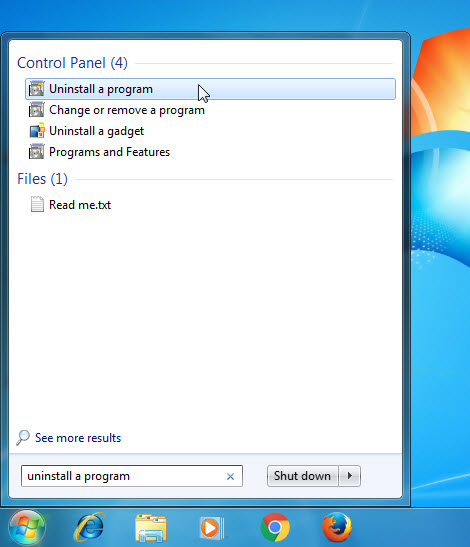
Windows 8, Windows 8.1 and Windows 10
Open WinX menu by holding Windows and X keys together, and then click Programs and Features.
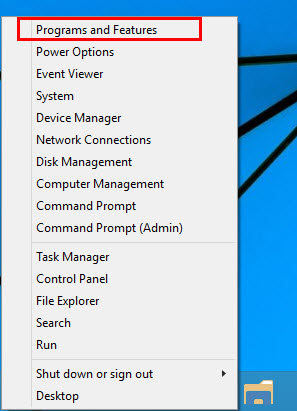
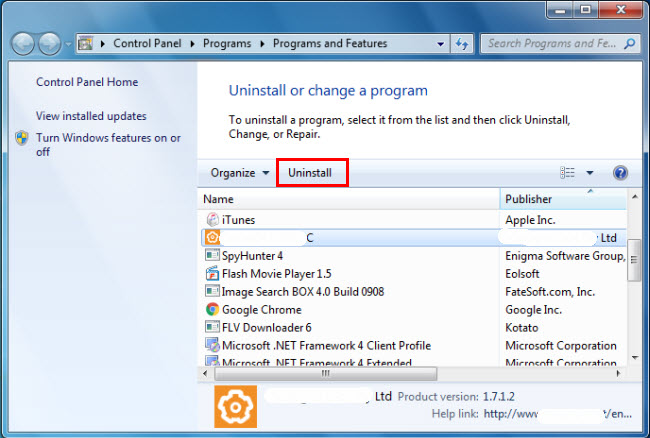
b. Look for ASUS GPU Tweak 2.0.3 in the list, click on it and then click Uninstall to initiate the uninstallation.
Method 2: Uninstall ASUS GPU Tweak 2.0.3 with its uninstaller.exe.
Most of computer programs have an executable file named uninst000.exe or uninstall.exe or something along these lines. You can find this files in the installation folder of ASUS GPU Tweak 2.0.3.
Steps:
a. Go to the installation folder of ASUS GPU Tweak 2.0.3.
b. Find uninstall.exe or unins000.exe.
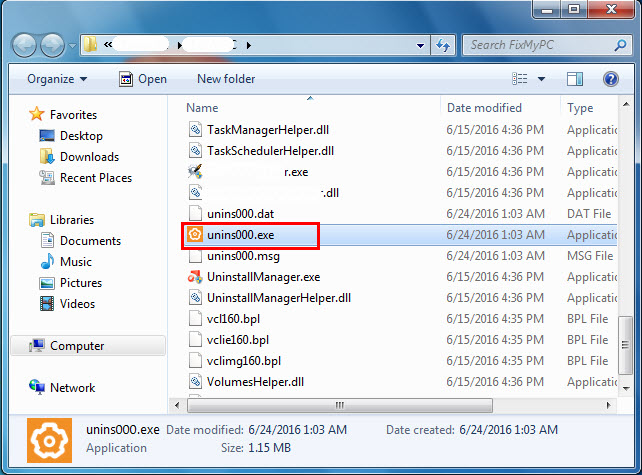
c. Double click on its uninstaller and follow the wizard to uninstall ASUS GPU Tweak 2.0.3.
Method 3: Uninstall ASUS GPU Tweak 2.0.3 via System Restore.
System Restore is a utility which comes with Windows operating systems and helps computer users restore the system to a previous state and remove programs interfering with the operation of the computer. If you have created a system restore point prior to installing a program, then you can use System Restore to restore your system and completely eradicate the unwanted programs like ASUS GPU Tweak 2.0.3. You should backup your personal files and data before doing a System Restore.
Steps:
a. Close all files and programs that are open.
b. On the desktop, right click Computer and select Properties. The system window will display.
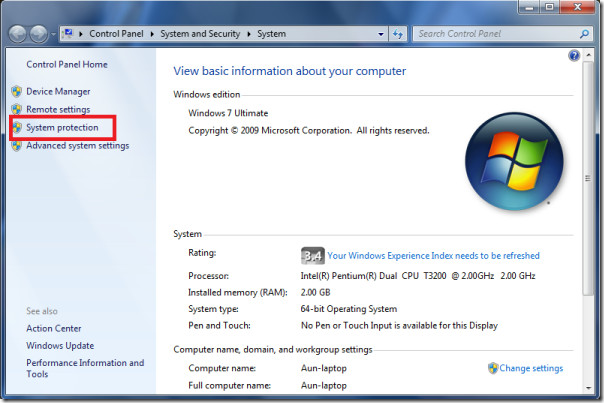
c. On the left side of the System window, click System protection. The System Properties window will display.
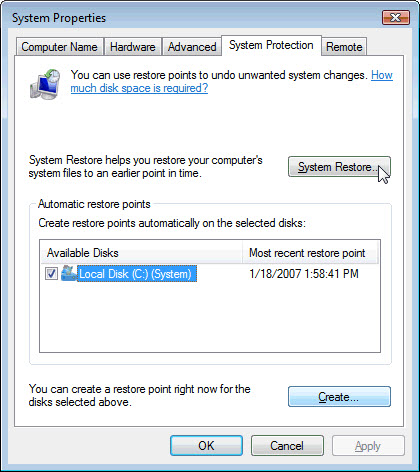
d. Click System Restore and the System Restore window will display.
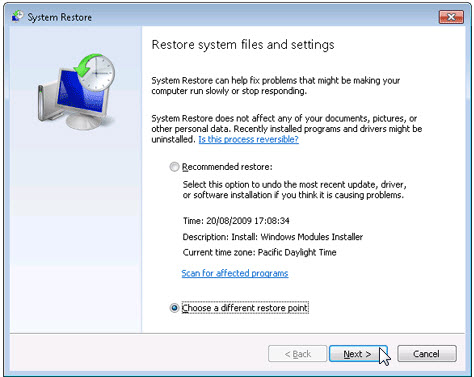
e. Select Choose a different restore point and click Next.
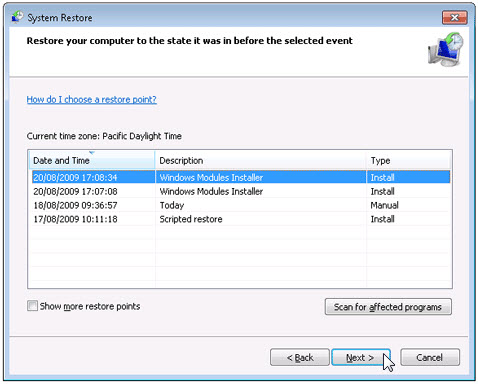
f. Select a date and time from the list and then click Next. You should know that all programs and drivers installed after the selected date and time may not work properly and may need to be re-installed.
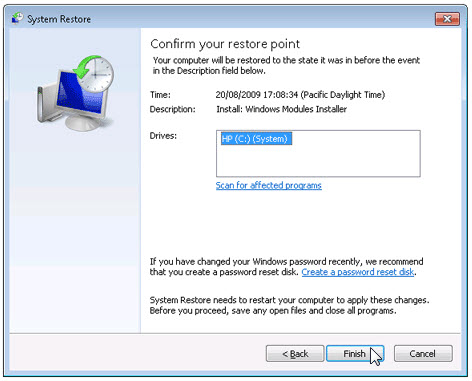
g. Click Finish when the «Confirm your restore point» window appears.
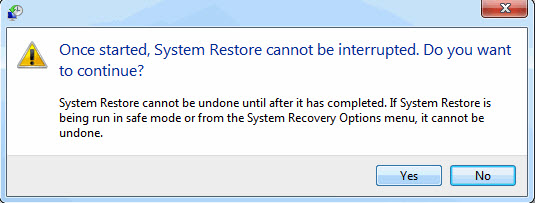
h. Click Yes to confirm again.
Method 4: Uninstall ASUS GPU Tweak 2.0.3 with Antivirus.
Nowadays, computer malware appear like common computer applications but they are much more difficult to remove from the computer. Such malware get into the computer with the help of Trojans and spyware. Other computer malware like adware programs or potentially unwanted programs are also very difficult to remove. They usually get installed on your system by bundling with freeware software like video recording, games or PDF convertors. They can easily bypass the detection of the antivirus programs on your system. If you cannot remove ASUS GPU Tweak 2.0.3 like other programs, then it’s worth checking whether it’s a malware or not. Click and download this malware detect tool for a free scan.
Method 5: Reinstall ASUS GPU Tweak 2.0.3 to Uninstall.
When the file required to uninstall ASUS GPU Tweak 2.0.3 is corrupted or missing, it will not be able to uninstall the program. In such circumstance, reinstalling ASUS GPU Tweak 2.0.3 may do the trick. Run the installer either in the original disk or the download file to reinstall the program again. Sometimes, the installer may allow you to repair or uninstall the program as well.
Method 6: Use the Uninstall Command Displayed in the Registry.
When a program is installed on the computer, Windows will save its settings and information in the registry, including the uninstall command to uninstall the program. You can try this method to uninstall ASUS GPU Tweak 2.0.3. Please carefully edit the registry, because any mistake there may make your system crash.
Steps:
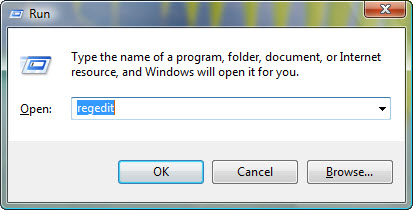
a. Hold Windows and R keys to open the Run command, type in regedit in the box and click OK.
b. Navigate the following registry key and find the one of ASUS GPU Tweak 2.0.3:
HKEY_LOCAL_MACHINESOFTWAREMicrosoftWindowsCurrentVersionUninstall
c. Double click on the UninstallString value, and copy its Value Data.
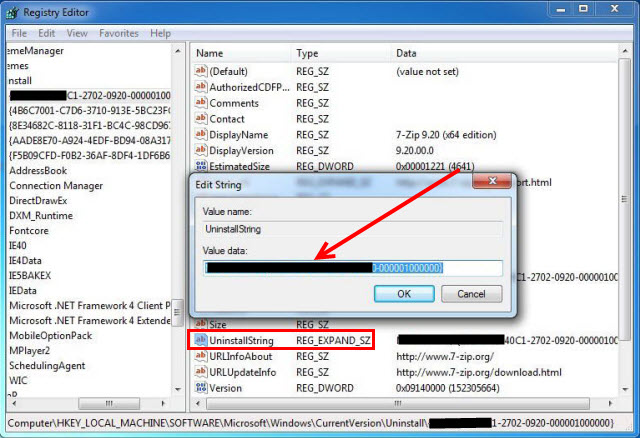
d. Hold Windows and R keys to open the Run command, paste the Value Data in the box and click OK.
e. Follow the wizard to uninstall ASUS GPU Tweak 2.0.3.
Method 7: Uninstall ASUS GPU Tweak 2.0.3 with Third-party Uninstaller.
The manual uninstallation of ASUS GPU Tweak 2.0.3 requires computer know-how and patience to accomplish. And no one can promise the manual uninstallation will completely uninstall ASUS GPU Tweak 2.0.3 and remove all of its files. And an incomplete uninstallation will many useless and invalid items in the registry and affect your computer performance in a bad way. Too many useless files also occupy the free space of your hard disk and slow down your PC speed. So, it’s recommended that you uninstall ASUS GPU Tweak 2.0.3 with a trusted third-party uninstaller which can scan your system, identify all files of ASUS GPU Tweak 2.0.3 and completely remove them. Download this powerful third-party uninstaller below.
-
#1
when i try install ASUS GPU Tweak II Ver1626 I GET error.
Error applying transforms . verify that the specified transform patch are vailde.
i try remove any track of the older version,
anyone know what can be done to fix that..?

-
- Jun 12, 2015
-
- 61,160
-
- 5,187
-
- 166,290
- 10,453
-
- Jun 12, 2015
-
- 61,160
-
- 5,187
-
- 166,290
- 10,453
-
#2
right click start
choose run…
type winver and press enter
current version is 1803, buiild 17134.165
sometimes that error can be caused by having an older version of windows installer. Try running windows update.
also applies to Java version but I am not sure GPU Tweak uses java.
-
#3
no, this is not java issue..
it’s seeing somthing with the install
-
- Jun 12, 2015
-
- 61,160
-
- 5,187
-
- 166,290
- 10,453
-
#5
but now i get this error
error 1610 the configuration data for this product is corrupted
thank you for the help.
i really wish to install that so i can use aura option for my card 1080TI
-
- Jun 12, 2015
-
- 61,160
-
- 5,187
-
- 166,290
- 10,453
| Thread starter | Similar threads | Forum | Replies | Date |
|---|---|---|---|---|
|
A
|
Question Secondary drive died, messed up Windows install on main drive? | Windows 10 | 3 | Tuesday at 11:19 AM |
|
G
|
Question What to do with my old installations | Windows 10 | 6 | Tuesday at 3:34 AM |
|
I
|
Question Can I uninstall all my drivers for a clean driver Installation ? | Windows 10 | 9 | Monday at 4:33 PM |
|
|
Question Clean install problem | Windows 10 | 3 | Monday at 12:00 PM |
|
B
|
Question If I install all the windows updates, do I get the basic drivers for my chipset, bluetooth, ethernet, etc? | Windows 10 | 4 | Monday at 10:57 AM |
|
|
Question Windows 10 doesn’t install updates anymore | Windows 10 | 31 | Jan 21, 2023 |
|
|
Question Unable to run an installer for a specific program | Windows 10 | 1 | Jan 19, 2023 |
|
E
|
Question Windows BSOD after update and now drives either not showing or are at 0/0 bytes free. | Windows 10 | 4 | Jan 18, 2023 |
|
|
Question Is it possible to install Windows 10 on old Mac Pro with a new HDD ? | Windows 10 | 4 | Jan 15, 2023 |
|
|
Question Don’t want to re install | Windows 10 | 11 | Jan 13, 2023 |
- Advertising
- Cookies Policies
- Privacy
- Term & Conditions
- Topics
-
#1
when i try install ASUS GPU Tweak II Ver1626 I GET error.
Error applying transforms . verify that the specified transform patch are vailde.
i try remove any track of the older version,
anyone know what can be done to fix that..?
-
- Jun 12, 2015
-
- 61,160
-
- 5,187
-
- 166,290
- 10,453
-
- Jun 12, 2015
-
- 61,160
-
- 5,187
-
- 166,290
- 10,453
-
#2
right click start
choose run…
type winver and press enter
current version is 1803, buiild 17134.165
sometimes that error can be caused by having an older version of windows installer. Try running windows update.
also applies to Java version but I am not sure GPU Tweak uses java.
-
#3
no, this is not java issue..
it’s seeing somthing with the install
-
- Jun 12, 2015
-
- 61,160
-
- 5,187
-
- 166,290
- 10,453
-
#5
but now i get this error
error 1610 the configuration data for this product is corrupted
thank you for the help.
i really wish to install that so i can use aura option for my card 1080TI
-
- Jun 12, 2015
-
- 61,160
-
- 5,187
-
- 166,290
- 10,453
| Thread starter | Similar threads | Forum | Replies | Date |
|---|---|---|---|---|
|
A
|
Question Secondary drive died, messed up Windows install on main drive? | Windows 10 | 3 | Tuesday at 11:19 AM |
|
G
|
Question What to do with my old installations | Windows 10 | 6 | Tuesday at 3:34 AM |
|
I
|
Question Can I uninstall all my drivers for a clean driver Installation ? | Windows 10 | 9 | Monday at 4:33 PM |
|
|
Question Clean install problem | Windows 10 | 3 | Monday at 12:00 PM |
|
B
|
Question If I install all the windows updates, do I get the basic drivers for my chipset, bluetooth, ethernet, etc? | Windows 10 | 4 | Monday at 10:57 AM |
|
|
Question Windows 10 doesn’t install updates anymore | Windows 10 | 31 | Jan 21, 2023 |
|
|
Question Unable to run an installer for a specific program | Windows 10 | 1 | Jan 19, 2023 |
|
E
|
Question Windows BSOD after update and now drives either not showing or are at 0/0 bytes free. | Windows 10 | 4 | Jan 18, 2023 |
|
|
Question Is it possible to install Windows 10 on old Mac Pro with a new HDD ? | Windows 10 | 4 | Jan 15, 2023 |
|
|
Question Don’t want to re install | Windows 10 | 11 | Jan 13, 2023 |
- Advertising
- Cookies Policies
- Privacy
- Term & Conditions
- Topics