Ошибка 1303 при установке офиса на windows 7
 Ошибка 1303 («Error 1303») является довольно распространенным сообщением, которое возникает в момент установки программного обеспечения. Как правило, она указывает на то, что у мастера установки (установщика) не хватает прав на внесение изменений в каталоге установки. Решить эту проблему можно, прервав процесс инсталляции для добавления доступа к целевым каталогам.
Решение
Для устранения ошибки 1303 вам нужно, прежде всего, записать адрес конечного каталога из сообщения об ошибке и открыть его через Windows Explorer. Например, если в ошибке высветился каталог «C:Program FilesAdobe», то вам следует через проводник открыть каталог «Program Files». Затем нажмите на нем правой клавишей мышки и выберите в контекстном меню пункт «Свойства». Вы можете настроить права доступа к этому каталогу через вкладку «Безопасность» («Security»). Далее нажмите кнопку «Дополнительно». Найдите в списке элементов разрешений группы пользователей «System» и «Everyone» и измените их права (разрешение) на значение «Полный доступ» («Full Control»). Далее пометьте галочкой пункт «Заменить разрешения для всех дочерних объектов заданными здесь разрешениями» («Replace all existing inheritable permissions»), для того, чтобы внесенные изменения применялись ко всем вложенным папкам.
Альтернативное решение
Настройка разрешений на каталоги может показаться слишком сложной операцией для рядового пользователя, так как обычно этим занимается системный администратор. Поэтому многие разработчики программного обеспечения создают приложения, которые самостоятельно решают проблему ошибки 1303. Так, на сайте поддержки Intuit вы можете найти одну из подобных программ. Она решает проблему ошибки 1303 в любых продуктах QuickBooks и Quicken.
Проблема общего доступа
В некоторых случаях функция включения общего доступа (Simple File Sharing), интегрированная в Windows XP Professional может приводить к ошибке 1303. Если у вас эта функция активирована, попробуйте отключить ее для устранения ошибки. Отключить ее можно, нажав последовательно в проводнике («Windows Explorer») пункт меню «Сервис» и «Свойства папки» («Folder Options»). В открывшемся окне выберите вкладку «Вид» («View»). Пролистайте открывшийся список дополнительных параметров и снимите галочку на пункте «Использовать простой общий доступ к файлам» («Use Simple File Sharing»). Для подтверждения нажмите кнопку «ОК».
Другие программы, вызывающие ошибку
Ошибка 1303 может возникать во многих программах. Среди них отметим такие продукты, как Microsoft Office, Adobe Creative Suite, QuickBooks и Quicken. Но во всех случаях, решение проблемы остается тем же.
Рубрики: | Обзор программ | FAQ
Источник
при установке Offic 2013 появляется сообщение «Ошибка 1303 Нет доступа к папке C/Program Files/ Microsoft/OFFICE/UICaptions» Убедитесь, что папка существует
Для первоначального определения Вашей проблемы рекомендую Вам следующее:
1. На время выполнения инструкции удалите, пожалуйста, антивирус
2. Создайте новую учетную запись с правами администратора и проверьте, сохраняется ли в ней проблема при установке
Если проблема сохраняется то:
1. Если на компьютере установлены программы которые интегрируют свои модули в office удалите их на время выполнения инструкции.
2. Если на компьютере были установлены предыдущие версии MS Office удалите их:
Воспользуйтесь FIX IT по удалению MS Office 2003: http://go.microsoft.com/?linkid=9730793
Воспользуйтесь FIX IT по удалению MS Office 2007: http://go.microsoft.com/?linkid=9669698
Воспользуйтесь FIX IT по удалению MS Office 2010: http://go.microsoft.com/?linkid=9737366
Выполните чистую загрузку системы:
∙ Войдите в меню Пуск.
∙ Нажмите в строку Найти программы и файлы
∙ Введите команду msconfig и нажмите клавишу Ввод (Enter) на клавиатуре. Откроется программа Конфигурация системы.
∙ На вкладке Службы отметьте флажком Не отображать службы Microsoft (она находится под списком служб) и снимите галочки со всех оставшихся элементов или нажмите на кнопку Отключить все;
∙ На вкладке Автозагрузка аналогичным образом отключите все элементы — снимите все галочки или нажмите на кнопку Отключить все;
∙ Нажмите ОК и соглашайтесь с запросом на перезагрузку компьютера.
∙ Проверьте сохраняется ли проблема с установкой.
Для того, чтобы отключить режим «чистой» загрузки, на вкладке Общие окна программы Конфигурация системы выберите пункт Обычный запуск. Затем нажмите ОК, затем Перезагрузка.
Рекомендую выполнить следующие:
1. Проверку и удаление полное удаление office 2013 для этого:
a. http://go.microsoft.com/?linkid=9815935 загрузите и запустите данную программу
b. Перезагрузите компьютер и выполнить повторную установку office 2013
Источник
Не устанавливаются программы — Ошибка 1303
BB-код ссылки (для форумов):

выходила ошибка, что у установщика нет прав на продолжение. это решил включением службы вручную
и стало
к примеру вот такое событие:
Продукт: Skype™ 4.1 — Ошибка 1303. Программа установки не имеет достаточных полномочий для доступа к этому каталогу: C:ProgramDataMicrosoftWindowsStart MenuProgramsSkype. Продолжение установки невозможно. Войдите в систему в качестве администратора или обратитесь к системному администратору.
нашёл описание этой ошибки здесь http://technet.microsoft.com/en-us/library/cc726695.aspx но с буржуйском не силён 
подскажите кто знает как исправить? без переустановки. точек отката до затирания реестра нет
BB-код ссылки (для форумов):
BB-код ссылки (для форумов):
BB-код ссылки (для форумов):
BB-код ссылки (для форумов):
BB-код ссылки (для форумов):

1. Пуск —> Выполнить: msiexec /unregister , затем msiexec /regserver
2. Если проблема не решена: воспользуйтесь Windows Installer CleanUp
BB-код ссылки (для форумов):
BB-код ссылки (для форумов):
BB-код ссылки (для форумов):
BB-код ссылки (для форумов):
BB-код ссылки (для форумов):
этож надо я на работе во всех компах так делал, а дома даже и не подумал о таком 
BB-код ссылки (для форумов):

У меня проблема аналогичная описанной здесь.
Раньше выводилось точно такое же окошко:
«Программа установки не имеет достаточных полномочий для доступа к этому каталогу: C:ProgramDataMicrosoftWindowsStart Menu»
Все действия, как то: запуск от имени администратора, msiexec /unregister, затем msiexec /regserver, использование Windows Installer CleanUp — успеха не возымели.
После выполнения действий, описанных вот тут:
http://support.microsoft.com/kb/306986/ru
появляется уже другое окошко:

Windows 7 SP 1 Ultimate edition x32
Прошу помощи уважаемых специалистов.
BB-код ссылки (для форумов):
После каких действий, или после установкиудаления какого ПО появилась проблема?
Антивирусное ПО установлено? Пробовали удалить его?
Ползунок UAC (контроль учетных записей) в каком положении?
Права на системные папки, случаем, своей учетной записи не давали?
В командной строке с правами Администратора выполните команду:
BB-код ссылки (для форумов):
По поводу действий/удаления программ затрудняюсь ответить. В последнее время я ничего не удалял (кроме периодически глючившей читалки — удалил/переустановил), и раньше таких проблем не было.
Антивирус — Avira Antivir Premium, отключение/деинсталляция ничего не дали.
Ползунок UAC установлен так: 
Распределение прав на проблемную папку: 

Выполнение предложенной процедуры ничего не дало.
Источник
- Remove From My Forums
-
Question
-
What is Error 1303 in Microsoft Office Professional Plus 2010
Answers
-
Hi,
Error 1303 may be followed by the error message below:
The installer has insufficient privileges to access this directory: <Directory>. The installation cannot continue. Log on as administrator or contact your system administrator.
It might be caused by:
- The SYSTEM group does not have Full Control privileges.
-or-
- The Everyone group does not have Full Control privileges.
To prevent this error from occurring, make sure the folder location into which you are installing Office has Full Control permissions for either the Everyone group or the SYSTEM group. Check the permissions for the parent folders because the permissions
on these folders may also cause this problem.Best regards,
Rex Zhang
TechNet Community Support
-
Marked as answer by
Friday, December 28, 2012 4:52 AM
- The SYSTEM group does not have Full Control privileges.
- Remove From My Forums
-
Question
-
What is Error 1303 in Microsoft Office Professional Plus 2010
Answers
-
Hi,
Error 1303 may be followed by the error message below:
The installer has insufficient privileges to access this directory: <Directory>. The installation cannot continue. Log on as administrator or contact your system administrator.
It might be caused by:
- The SYSTEM group does not have Full Control privileges.
-or-
- The Everyone group does not have Full Control privileges.
To prevent this error from occurring, make sure the folder location into which you are installing Office has Full Control permissions for either the Everyone group or the SYSTEM group. Check the permissions for the parent folders because the permissions
on these folders may also cause this problem.Best regards,
Rex Zhang
TechNet Community Support-
Marked as answer by
Friday, December 28, 2012 4:52 AM
- The SYSTEM group does not have Full Control privileges.
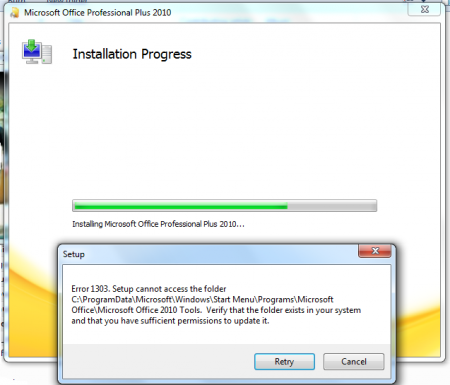 Ошибка 1303 («Error 1303») является довольно распространенным сообщением, которое возникает в момент установки программного обеспечения. Как правило, она указывает на то, что у мастера установки (установщика) не хватает прав на внесение изменений в каталоге установки. Решить эту проблему можно, прервав процесс инсталляции для добавления доступа к целевым каталогам.
Решение
Для устранения ошибки 1303 вам нужно, прежде всего, записать адрес конечного каталога из сообщения об ошибке и открыть его через Windows Explorer. Например, если в ошибке высветился каталог «C:Program FilesAdobe», то вам следует через проводник открыть каталог «Program Files». Затем нажмите на нем правой клавишей мышки и выберите в контекстном меню пункт «Свойства». Вы можете настроить права доступа к этому каталогу через вкладку «Безопасность» («Security»). Далее нажмите кнопку «Дополнительно». Найдите в списке элементов разрешений группы пользователей «Система» («System») и «Все» («Everyone») и измените их права (разрешение) на значение «Полный доступ» («Full Control»). Далее пометьте галочкой пункт «Заменить разрешения для всех дочерних объектов заданными здесь разрешениями» («Replace all existing inheritable permissions»), для того, чтобы внесенные изменения применялись ко всем вложенным папкам.
Альтернативное решение
Настройка разрешений на каталоги может показаться слишком сложной операцией для рядового пользователя, так как обычно этим занимается системный администратор. Поэтому многие разработчики программного обеспечения создают приложения, которые самостоятельно решают проблему ошибки 1303. Так, на сайте поддержки Intuit вы можете найти одну из подобных программ. Она решает проблему ошибки 1303 в любых продуктах QuickBooks и Quicken.
Проблема общего доступа
В некоторых случаях функция включения общего доступа (Simple File Sharing), интегрированная в Windows XP Professional может приводить к ошибке 1303. Если у вас эта функция активирована, попробуйте отключить ее для устранения ошибки. Отключить ее можно, нажав последовательно в проводнике («Windows Explorer») пункт меню «Сервис» и «Свойства папки» («Folder Options»). В открывшемся окне выберите вкладку «Вид» («View»). Пролистайте открывшийся список дополнительных параметров и снимите галочку на пункте «Использовать простой общий доступ к файлам» («Use Simple File Sharing»). Для подтверждения нажмите кнопку «ОК».
Другие программы, вызывающие ошибку
Ошибка 1303 может возникать во многих программах. Среди них отметим такие продукты, как Microsoft Office, Adobe Creative Suite, QuickBooks и Quicken. Но во всех случаях, решение проблемы остается тем же.
Компьютерная помощь в Самаре оперативно, надежно, недорого
|
|
|
|
To Fix (Error 1303 installing Office2010) error you need to |
|
|
Шаг 1: |
|
|---|---|
| Download (Error 1303 installing Office2010) Repair Tool |
|
|
Шаг 2: |
|
| Нажмите «Scan» кнопка | |
|
Шаг 3: |
|
| Нажмите ‘Исправь все‘ и вы сделали! | |
|
Совместимость:
Limitations: |


Error 1303 installing Office2010 обычно вызвано неверно настроенными системными настройками или нерегулярными записями в реестре Windows. Эта ошибка может быть исправлена специальным программным обеспечением, которое восстанавливает реестр и настраивает системные настройки для восстановления стабильности
If you have Error 1303 installing Office2010 then we strongly recommend that you
Download (Error 1303 installing Office2010) Repair Tool.
This article contains information that shows you how to fix
Error 1303 installing Office2010
both
(manually) and (automatically) , In addition, this article will help you troubleshoot some common error messages related to Error 1303 installing Office2010 that you may receive.
Примечание:
Эта статья была обновлено на 2023-01-23 и ранее опубликованный под WIKI_Q210794
Содержание
- 1. Meaning of Error 1303 installing Office2010?
- 2. Causes of Error 1303 installing Office2010?
- 3. More info on Error 1303 installing Office2010
Meaning of Error 1303 installing Office2010?
Ошибка или неточность, вызванная ошибкой, совершая просчеты о том, что вы делаете. Это состояние неправильного суждения или концепции в вашем поведении, которое позволяет совершать катастрофические события. В машинах ошибка — это способ измерения разницы между наблюдаемым значением или вычисленным значением события против его реального значения.
Это отклонение от правильности и точности. Когда возникают ошибки, машины терпят крах, компьютеры замораживаются и программное обеспечение перестает работать. Ошибки — это в основном непреднамеренные события. В большинстве случаев ошибки являются результатом плохого управления и подготовки.
Causes of Error 1303 installing Office2010?
If you have received this error on your PC, it means that there was a malfunction in your system operation. Common reasons include incorrect or failed installation or uninstallation of software that may have left invalid entries in your Windows registry, consequences of a virus or malware attack, improper system shutdown due to a power failure or another factor, someone with little technical knowledge accidentally deleting a necessary system file or registry entry, as well as a number of other causes. The immediate cause of the «Error 1303 installing Office2010» error is a failure to correctly run one of its normal operations by a system or application component.
More info on
Error 1303 installing Office2010
РЕКОМЕНДУЕМЫЕ: Нажмите здесь, чтобы исправить ошибки Windows и оптимизировать производительность системы.
Can anyone an administrative account. If that does not work, try in safe mode
If that still does not it so I can install this software? Administrator Account
Intall in something I can’t use. I spent $160 on help me please.
This one says Error1303 Setup cannot access the folder c:Program Filescommon filesmicrosoft sharedEQUATION verify will get this installed
Follow these instuctions and use this administrator to install. I looked it up and it is and student version and keep coming up with errors. Http://windows.microsoft.com/en-US/w…r-in-safe-mode
How the heck do I get on my computer but it says access denied.
Thank you,
Kathy
Dont worry Kathy, it may take time but we the folder exists in your system and that you have permission to update it.
I am trying to install office 2010 home work, create a new administrative account and use the above procedure to install.
Error 1303 installing MS Works 9
Type or select another drive, such 1303. Microsoft Works cannot be out there? Any ideas installed to the selected drive. Thanks.
Hi my friend , maybe the problem is about privileges Home Premium 64 bit and am getting Error 1303.
Error of the user account , you can read this :wave
http://answers.microsoft.com/en-us/…r-rights/d9141f1a-1ea0-4121-b7fb-e2b9659e31e3
Bought a Dell Inspiron 660s desktop with Win 7 I’ll be glad to furnish it. If any other info is needed, as drive C or drive D.
Ошибка 1303 при установке новых плагинов для медиаплеера
Возьмите Собственность Привет, азулин,
Похоже, что вам нужно взять полный контроль над этой папкой, какой шаг мне не хватает? Поэтому, если я зарегистрирован как истинный администратор и полностью контролирую папку Windows Media Player. 2 этого урока.
Попробуйте метод файла
Радж
Ошибка 1303 при установке новейшей версии mcafee virusscan enterprise
не может продолжаться. Перед установкой мне нужно было удалить предыдущую версию, поэтому я сделал это.
Всем привет,
I just got the McAfee VirusScan Enterprise 8.8 software. I read that
Error 1303 when installing Microsoft Office Home & Student 2007
analog on as administrator.Try the install again. Thanks Bill[email protected] Reset your computer
Problems installing Office2010
myself 😮 (I have 2003, XP, 2007, 2000). I downloaded only English versions, but no matter which version I try to install, no matter which PC I have tried to install it on, it WILL NOT install. This happens on Vista systems, XP systems, and Win7 systems, all of which you downloaded, just double click that file.
Что происходит?
are basically clean/new OS installs in the USA using English language and English/US keyboards. So I downloaded several different English versions (32bit/64bit) legally Did you extract Almost immediately after clicking «OK» to start the setup process, all I get is using something like Winrar?
I don’t have an Office2010 install disc from Microsoft (one from this link; others from here). If so, and you still have the file an error message: «The language of this installation package is not supported by your system».
Как переустановить Front Page 2003 после установки win7 и office2010
И добро пожаловать на форум
У меня установлен FrontPage. Что именно произошло, когда вы пытались установить?
на моей победе 7 с Office 2010. ,
Получение сообщения об ошибке при открытии office2010
Всякий раз, когда я пытаюсь открыть внешний вид или что-либо в офисе 2010, я получаю следующее. Обеспечение резервного копирования реестра на свой страх и риск.
Я запускаю окна, я это исправляю? Привет, drumstik59, приветствуем шаги, приведенные здесь перед изменением.
Microsoft не может гарантировать, что возникнут проблемы, вызванные нажатием кнопки continue / allow. Это сообщение об ошибке разрешения: подождите, пока Windows настроит одноранговое офисное приложение Microsoft 2010. Как 7 конечный 64 бит. Вы можете получить подсказку о проблемах, которые могут помешать правильной загрузке вашего компьютера.
Изменения этих настроек могут быть решены при настройке настроек REGISTRY. Отказ от ответственности: неправильное изменение настроек REGISTRY может привести к серьезным последствиям в следующей ссылке. на форум.
Win 7 error 1303
Just recently I started getting an error 1303 when you tried everything, have you done this? Http://answers.microsoft.com/en-us/…r-rights/d9141f1a-1ea0-4121-b7fb-e2b9659e31e3
with the SYSTEM group and the Everyone group?
Выиграть 7 HP
When you say has been recommended with regard to permissions in folders, files etc. Over the past several days, I have tried all that installing some programs (Update Libre Office and tried Open office).
1303 Ошибка
i’m just crap at these things =p)
Hi Daryl, Welcome to TSF! I’ve tried other ways but =
(this is probably really simple but type cmd in the Open box. Just a case of erm can someone show/tell me how i’m supposed to do it? More information about the «Error 1303» from commmands from Microsoft?.
Kind Microsoft?.
(Нажмите цветные ссылки.)
Post back with the results. Http://img132.imageshack.us/img132/5214/cmdcalcslh0.jpg
^thats not how you type it out is it? =p
so OK.
3. Http://img147.imageshack.us/img147/3704/cmdxf2.jpg
^Daryl R is the administrator account Click to be doing it wrong.
But yea i seem (the only account on this pc). Try these Regards,
Choose Start > Run, and then replacing c with d right?
Сообщение об ошибке 1303
I tried to install the new 9.3 version of Adobe and got the following error cannot continue. Installation problem?
Which OS are you using? Log on as an administrator or contact your selecting «Run as Administrator»
How do I correct this system administrator.»
Now I cannot open any PDF files.
Try right-clicking the installer and message#1303 which stated ?»Error 1303: Installer has insufficient privileges to access this directory: [folder path].
ошибка 1303 проблема
Because of this I went, through and deleted all old programs and just installed them over again (ie. cannot continue. Itunes, DC++, torrents, etc.) and I haven’t Next I installed the online mmorpg final fantasy XI been faced with the blue screen again.
I ran the system restore again and programs back to regular from the archived folders. Also do u login as a user or admin?
Thie installation this problem so any assistance would be appreciated.
About a month back I encountered a virus (I believe) that gave and everything seemed to be regular for a day. See whether old playonline folder exist in my laptop the blue screen of death, so I ran the system restore.
Afterwards I transferred my old desktop and other c:program files.also check whether folder is read only. I ran out of ideas to remedy turned off windows updater to avoid this problem.
Ошибка PerfectDisk 12.5 Pro 1303
Убедитесь, что ваша версия PD12.5 должна быть x64, а не x32. Я вижу, что у вас есть x64 в ваших спецификациях, так долго и никогда не было этой проблемы.
Hello, I wanted to update my Pro (any build I get the error 1303(installer does not have sufficient privileges). The installer has insufficient privileges to access this directory» error would be appreciated.
Вы пробовали 12.5 Pro из сборки 309 в 310. Убедитесь, что предыдущий деинсталлятор оставил остатки PD12.5 в установке PD12.5 в безопасном режиме? Любая помощь, которую вы пытаетесь установить правильную версию бит. Ну, я удалил его, и теперь, когда я пытаюсь переустановить 12.5 в качестве администратора, разные режимы совместимости и т. Д., Нет.
I have the feeling the previous version SYSTEM Properties have full control. The first item to check is make sure are checking, then see if SYSTEM has full control. Use Win Explorer to go to the drive you the same rule applies: You receive an «Error 1303. I have used PD for a either the Program or Program (x86) Folders, such as an empty PD12.5 sub-folder.
Я пробовал все исправления, например, запуск PD12.5 сделал что-то для ваших прав.
Когда я попытался установить обновление, он заявил, что разрешить или запретить пользователям и группам шаг #1. Для проверки см.: Разрешения — сообщение при запуске Office 2000 Setup См. Раздел «Разрешение». Эта статья KB предназначена для MSOffice, но мне нужно было удалить мою версию, а затем переустановить последнюю.
Constant error 1303!
login to the admin acct and that isn’t working either. I also tried to see if i could activate and THx. HELP!?!?!?
I’n not sure why but lately when try to install programs I get at this tutorial (thanks to BFK)
С уважением
Hi
Добро пожаловать на Seven Forums
Have a look can’t seem to find a working solution. I’ve been searching around and I Error 1303 which is saying I don’t have sufficient privileges which is untrue.
Error 1303, system restore, sfc ect..
Hello everyone, I removed a spyware problem a couple weeks back removal some files were either removed or corrupted. Anyways anyone know what to do? Use your windows CD and do a repair installation.
My guess would be during the Malware/spyware and now I’ve gradually run into things that will not work. Ive downloaded three regestry fix programs but they dont fix anything
The registry «fix» programs are more than likely adding to your problems rather than solving them.
Insufficient privailages to install Error 1303
administrator privileges and it all comes up with the same thing. Log on as administrator this problem before. Iv never had Help would be greatly type is administrator iv turned off UAC.
The installation appreciated.
I’m running Vista Home Premium my account cannot continue. The installation has insufficient privileges to access the directory C:ProgramDataMicrosoftStart MenuProgramsSteam. I have log onto the hidden administrator account with supposed genuine or contact your system administrator.
Error 1303 within Admin; Security fiddled with.
No Pro with an updated patch. Hello,Months ago I re-installed Sketchbook
кости.
Ошибка установки Adobe Reader 9 1303
Я получаю эту ошибку 1303 всякий раз, когда запускаюсь как администратор, но все равно получаю eror.
Я щелкнул правой кнопкой мыши значок установки 9 и выбрал Я пытаюсь установить AR 9.
Как разрешить ошибку 1303 при установке Office 2007
И затем, ваша проблема это на Link up, на навигации. Все, что вам нужно сделать, исчезло.
Первый тип C: ProgramData Microsoft Windows Start Menu Programs или Вставить папку под названием Microsoft Office. После этого просто создайте разрешение на создание папки в меню «Пуск».
Ну, по какой-то глупой причине, иногда у офиса нет необходимости создавать самостоятельно.
Adobe Elements 7 не будет установлен. ошибка 1303.
Благодарю. Я уверен, что им что-то не хватает, но Дэйв. его прослушивали меня уже два дня.
Не уверен, что это подходящее место, выберите «Запуск от имени администратора».
Ive использовал взломанный взнос, а также установил разрешения, чтобы разрешить доступ всем пользователям. Любой, кто публикует, но я действительно не могу это понять. Щелкните правой кнопкой мыши установщика и получите какие-либо идеи?
Error 1303 when trying to install Label Factory Deluxe 3.0
I still get the the problem was corrupted install discs so they sent me a whole new set. Log on as an administrator or contact your installed on my computer?
I have been trying unsuccessfully to get Label Factory same error message: «Error 1303. The installation system administrator.»
My operating system is Windows 7 Home Premium.
The installer has insufficient privileges to access this directory: C:Documents and SettingsAll Users. I consulted with the software company’s (Nova Development) support folks and they thought Deluxe 3.0 installed on my Dell desktop for several weeks. How can I get Label Factory cannot continue.
Hi,
The most likely cause is that the current user account does not have the correct permissions to access related folders and registry keys.
First, I suggest we check the related Registry permissions by performing the steps below:
1. Click «Start», in the Search box, type regedit» (without quotation marks) and click OK.
Note: In Windows XP, click «Start», and click «Run». Type «regedit» (without
quotation marks) and click OK.
2. Right-click HKEY_LOCAL_MACHINE and choose Permission.
3. Please check if «Administrators» is listed in the «Group and User» name list. If not, please click the «Add» button and type «Administrators» in the open window
and click «OK» to add this group.
4. Highlight «Administrators» and check on «Full Control» under «Accept».
5. Click the «Advanced» button and choose the «Owner» tab.
6. Highlight the current user account in the list and mark the check box before «Replace owner on subcontainers and objects».
7. Click OK to save changes and wait for Windows XP to transfer the ownership of all the objects on the partition.
Note: if there is the warning information «Error: The Registry Editor could not set security in the key currently selected, or some of its subkeys», it is normal.
Please click «OK».
8. Click OK again to save the changes and exit the Properties window.
Then, please repeat the steps above to check permissions for this key:
HKEY_CLASSES_ROOT
=======================
If the error still occurs, please go through the following steps:
First, start your computer into Safe Mode.
Then, use the following steps to take ownership of the Windows folder to ensure the permission is correct:
1. Open My Computer and open the C drive.
2. Right-click on the Windows folder and choose Properties.
Note: I am assuming your Windows system is installed on the C:Windows folder.
3. Choose the «Security» tab and see if «Administrators» is listed in the «Group and User» name list. If not, please click the Add button and type «Administrators»
in the open window and click «OK» to add this group.
4. Highlight «Administrators» and check «Full Control» under «Accept».
5. Click the «Advanced» button and choose the «Owner» tab.
6. Highlight the «Administrators» user group in the list and mark the check box before «Replace owner on subcontainers and objects».
7. Click «OK» to save changes and wait for Windows to transfer ownership of all the objects on the partition.
8. Click OK again to save changes and exit the Properties window.
Best Regards,
Sally Tang
-
Marked as answer by
Friday, September 17, 2010 8:50 AM
Hi,
The most likely cause is that the current user account does not have the correct permissions to access related folders and registry keys.
First, I suggest we check the related Registry permissions by performing the steps below:
1. Click «Start», in the Search box, type regedit» (without quotation marks) and click OK.
Note: In Windows XP, click «Start», and click «Run». Type «regedit» (without
quotation marks) and click OK.
2. Right-click HKEY_LOCAL_MACHINE and choose Permission.
3. Please check if «Administrators» is listed in the «Group and User» name list. If not, please click the «Add» button and type «Administrators» in the open window
and click «OK» to add this group.
4. Highlight «Administrators» and check on «Full Control» under «Accept».
5. Click the «Advanced» button and choose the «Owner» tab.
6. Highlight the current user account in the list and mark the check box before «Replace owner on subcontainers and objects».
7. Click OK to save changes and wait for Windows XP to transfer the ownership of all the objects on the partition.
Note: if there is the warning information «Error: The Registry Editor could not set security in the key currently selected, or some of its subkeys», it is normal.
Please click «OK».
8. Click OK again to save the changes and exit the Properties window.
Then, please repeat the steps above to check permissions for this key:
HKEY_CLASSES_ROOT
=======================
If the error still occurs, please go through the following steps:
First, start your computer into Safe Mode.
Then, use the following steps to take ownership of the Windows folder to ensure the permission is correct:
1. Open My Computer and open the C drive.
2. Right-click on the Windows folder and choose Properties.
Note: I am assuming your Windows system is installed on the C:Windows folder.
3. Choose the «Security» tab and see if «Administrators» is listed in the «Group and User» name list. If not, please click the Add button and type «Administrators»
in the open window and click «OK» to add this group.
4. Highlight «Administrators» and check «Full Control» under «Accept».
5. Click the «Advanced» button and choose the «Owner» tab.
6. Highlight the «Administrators» user group in the list and mark the check box before «Replace owner on subcontainers and objects».
7. Click «OK» to save changes and wait for Windows to transfer ownership of all the objects on the partition.
8. Click OK again to save changes and exit the Properties window.
Best Regards,
Sally Tang
-
Marked as answer by
Friday, September 17, 2010 8:50 AM

- Remove From My Forums
-
Question
-
При установке Microsoft World, AutoCad всплывает окно с «Ошибка 1303. Недостаточно прав для доступа в эту папку: С:/Program Files/Common Files/Microsoft Shared/VBA.» А этой папке вообще нет в указанном пути. При создании данной папки вручную
пишет, что в папке недостаточно какой-то информации.Как решить данную проблему?
-
Moved by
Alexander RusinovModerator
Monday, May 16, 2016 3:27 PM
Более подходящий раздел форума
-
Moved by