Обновлено 06.05.2022

Добрый день! Уважаемые читатели и гости одного из крупнейших IT блогов Pyatilistnik.org. В прошлый раз мы с вами рассматривали менеджер пакетов Winget, который позволяет с помощью PowerShell много чего устанавливать. В сегодняшней статье я буду бороться с пресловутым синим экраном 0xc00002e2, который я поймал на одном из контроллеров домена. Что ж не приятно, но не смертельно, давайте выходить из этой ситуации.
❌Описание ситуации с BSOD 0xc00002e2 на контроллере домена
И так есть Active Directory состоящий из леса и трех доменов, в одном из доменов есть четыре контроллера домена. Один из них в какой-то момент перестал отвечать в системе мониторинга. Это была виртуальная машина на базе Vmware ESXI. Подключившись к консольному подключению я увидел вот такую картину:

После перезагрузки сервер опять выпадал в BSOD, и далее по циклу. В логах вы можете потом обнаружить, если доберетесь:
STOP c000002e2 Directory Services could not start because of the following error:
A device attached to the system is not functioning.
Error Status: 0xc0000001
Please shutdown this system and reboot into Directory Services Restore Mode, check the event log for more detailed information.
Как исправить синий экран 0xc00002e2
Надеюсь, что у вас это не последний контроллер домена в сети, поэтому самый простой способ это:
- Восстановить из резервной копии данный контроллер, при условии, что его копия не старше дня, чтобы не было проблем с репликацией
- Полностью удалить недоступный контроллер домена и заменить его на новый. Если на сервере были роли FSMO, то их сначала нужно захватить и перенести.
- Но если решились восстанавливать то давайте приступать, может, что и получиться.
Когда вы раза три увидите синий экран с кодом 0xc00002e2, то сервер загрузиться в режиме восстановления WinPE, его при желании можно вызвать клавишей F8 при загрузке. У любого контроллера домена есть специальный режим восстановления службы каталогов (Directory Services Repair Mode — DSRM).
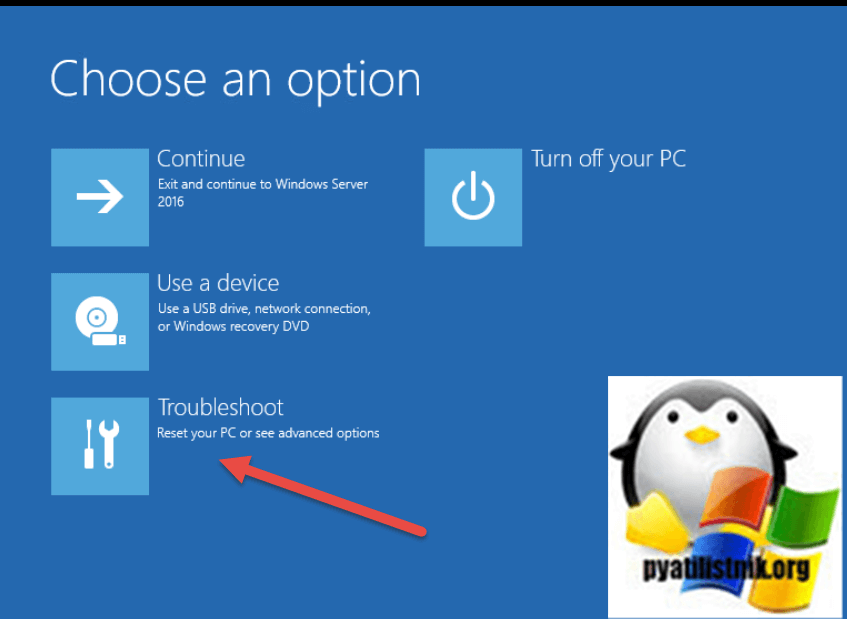
На экране «Choose an option» выберите пункт «Troubleshoot«.
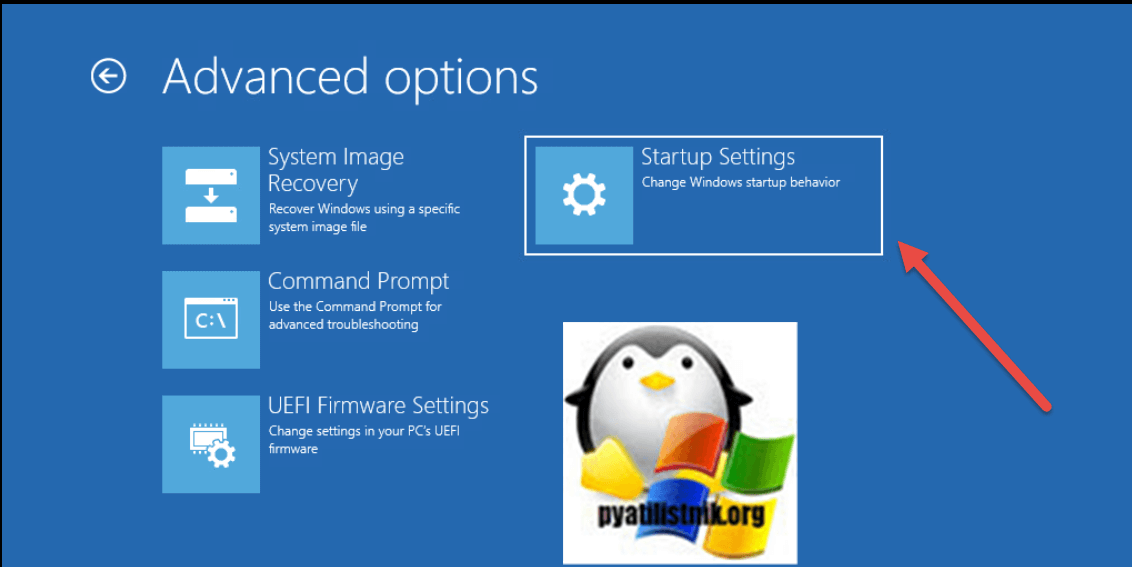
Далее выбираем пункт «Startup Settings«.
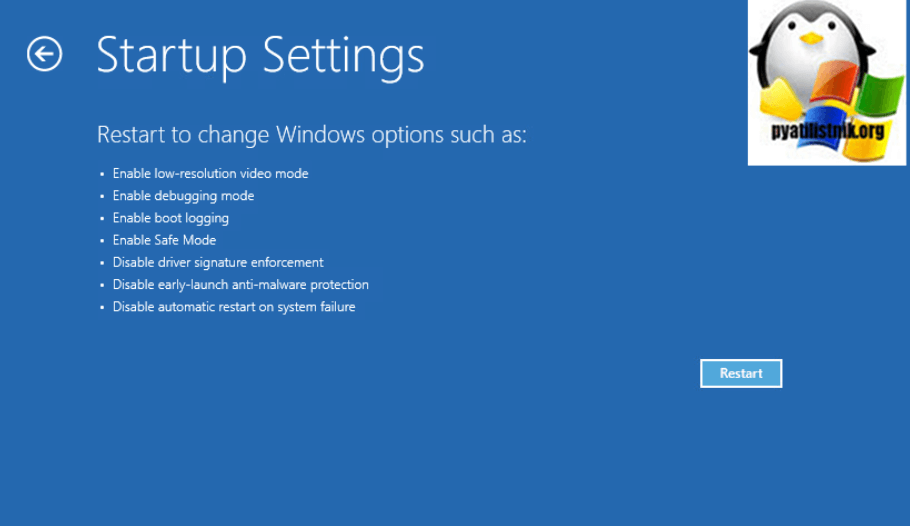
Перезагружаем сервер.
Далее при загрузке найдите пункт «Directory Services Repair Mode»
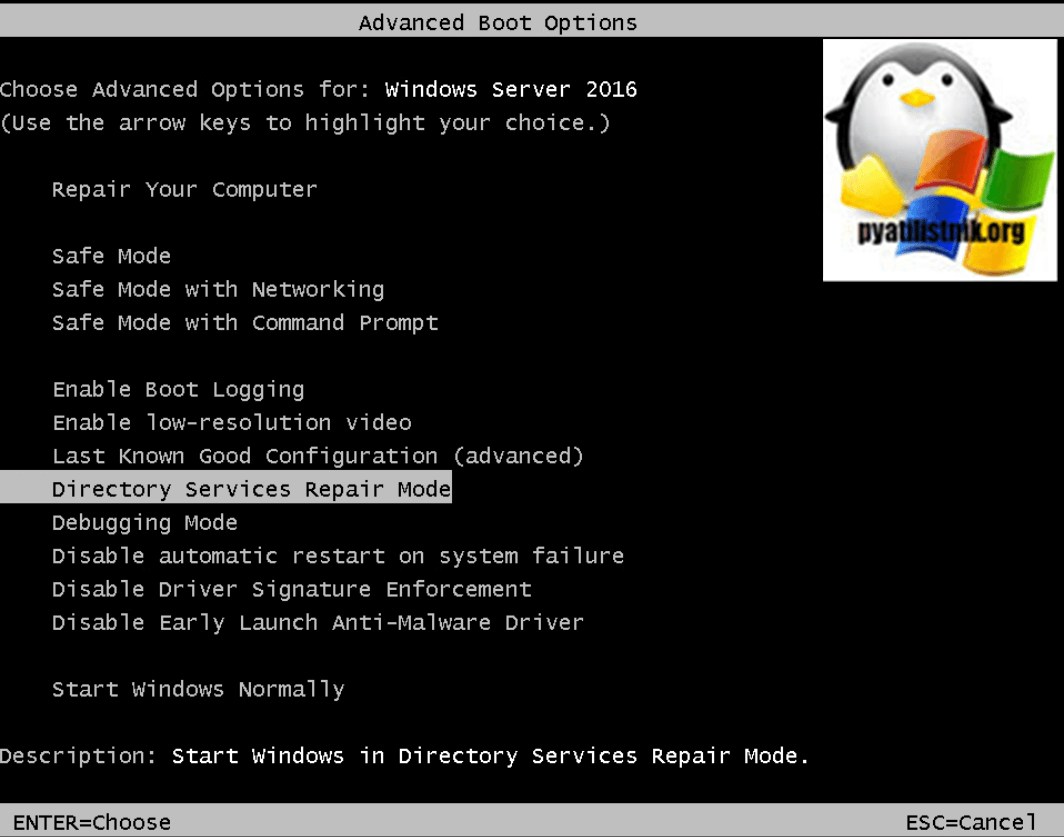
Начнется загрузка DSRM, по сути вы увидите привычную загрузку Windows, в которую вы сможете войти под локальным администратором DSRM, он задается при настройке.
Если вы не помните пароль от Администратора DSRM, то придется его сбрасывать, например через MsDART или любой другой загрузочный диск
Попав в систему вы первым делом должны запустить командную строку от имени администратора, и далее нам понадобиться одна из самых важных утилит в Active Directory ntdsutil. Вводим команды:
- Ntdsutil (Запускаем саму утилиту)
- activate instance ntds (Подключаемся к активной БД Active Directory)
- Files (Делаем запрос к файлам. где лежит БД)
- Info (Смотрим все файлы и их расположение)
(по умолчанию это будет директория C:WindowsNTDS)
В моем случае это нестандартный каталог, у меня все лежит в папке C:ADDSNTDS. Тут же вы можете посмотреть размер файла БД NTDS.dit.
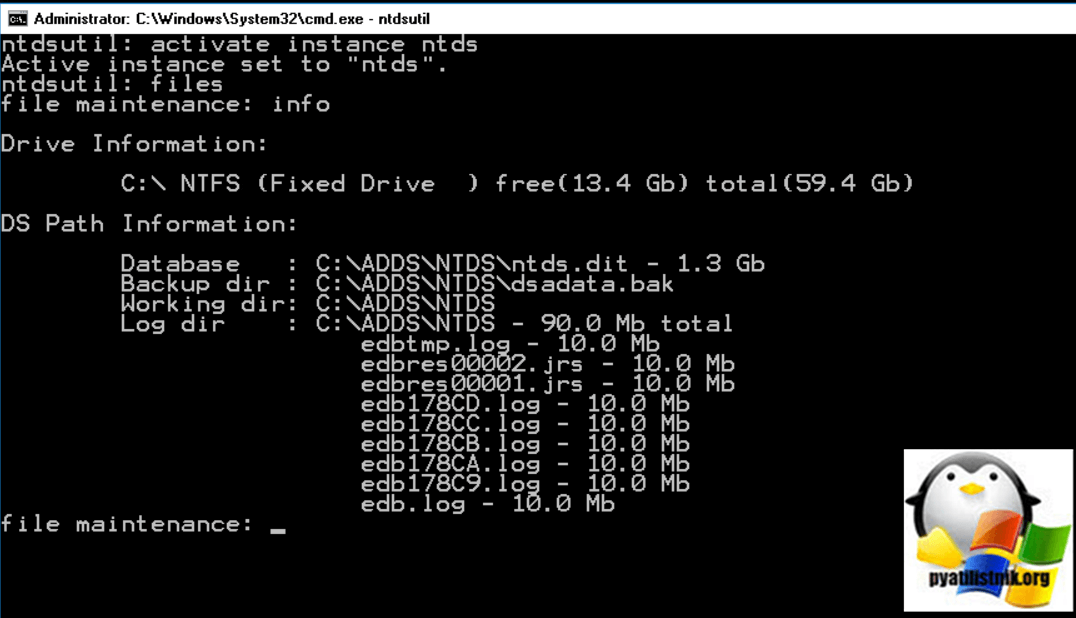
Теперь попробуйте проверить целостность базы данных, для этого вводим:
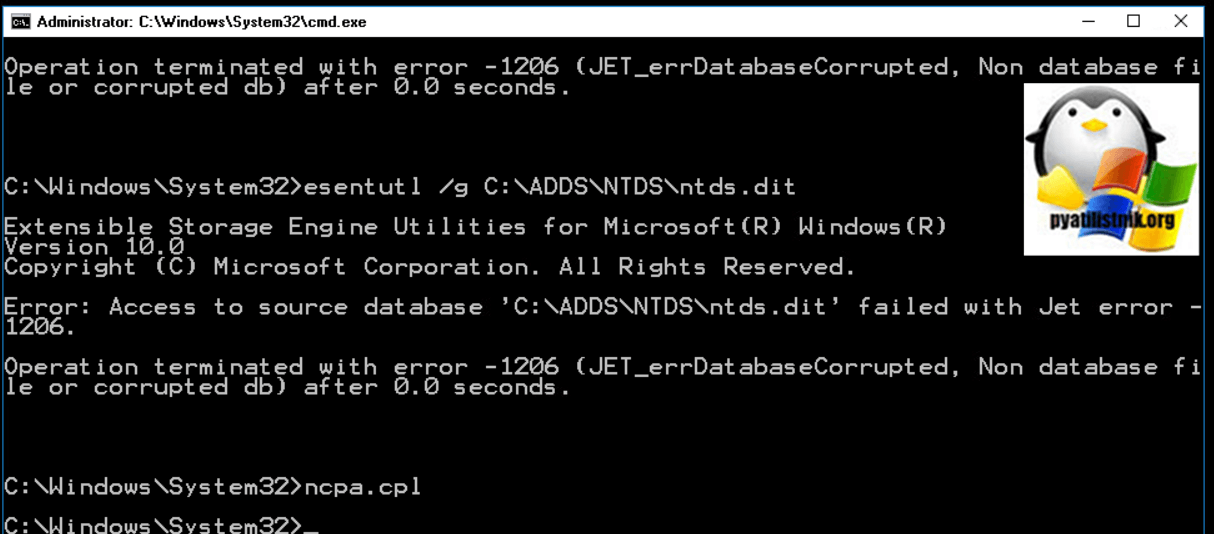
У меня выскочила ошибка:
Error: Access to source database ‘C:ADDSNTDSntds.dit’ failed with Jet error — 1206. Operation terminated with error — 1206 (Jet_errDatabaseCorrupted, Non database file or corrupted db) after 0.0 seconds
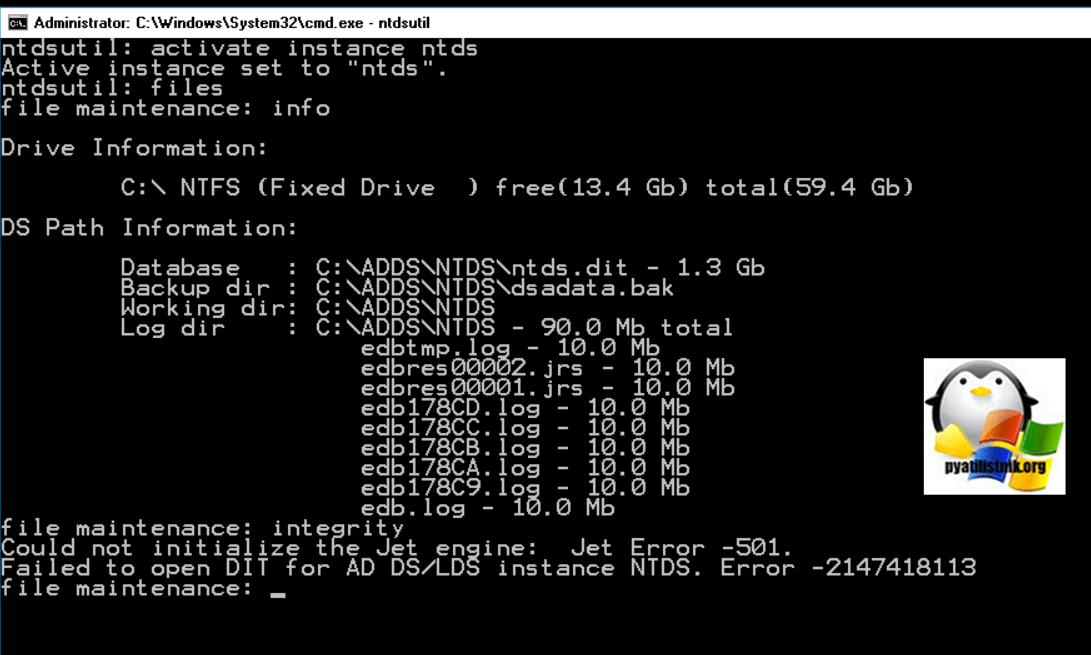
Или еще распространенная ошибка:
Could not initialize the Jet engine: database is inconsistent.
Failed to open DIT for AD DS/LDS instance NTDS. Error -2147418113
Попробуем восстановить целостность Базы данных Active Directory, для этого есть всем известная утилита esentutl, она очень часто используется при работе с почтовым сервером Exchange. Перед любыми работами всегда нужно сделать резервную копию данных, для этого:
mkdir c:ntds_backup — Создаем папку для резервных копий
xcopy c:ADDSNTDS*.* c:ntds_backup — Копируем содержимое c:ADDSNTDS в c:ntds_backup
Проверим целостность файла ntds.dit:
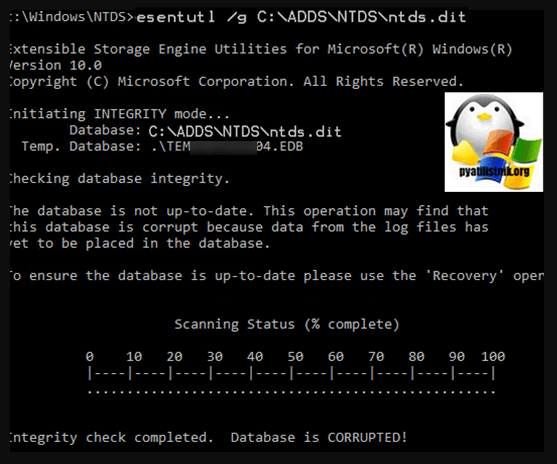
esentutl /g c:ADDSNTDSntds.dit
Утилита вам сообщит. что с базой не все хорошо и она повреждена:
The database is not up-to-date. This operation may find that this database is corrupted because data from the log files has not yet to be placed in the database. To ensure the database is up-to-date please use the Recovery operation. Integrity check completed. Database is CORRUPTED.
После чего начнется процесс восстановления, а может и не начаться и вы легко можете опять получить ошибку Jet error — 1206.
Первый процесс закончен, попробуем исправить найденные ошибки, для этого выполните команду:
esentutl /p c:ADDSNTDS\ntds.dit
Если все хорошо, то вы должны получить сообщение «Operation completed successfully in xx seconds«.
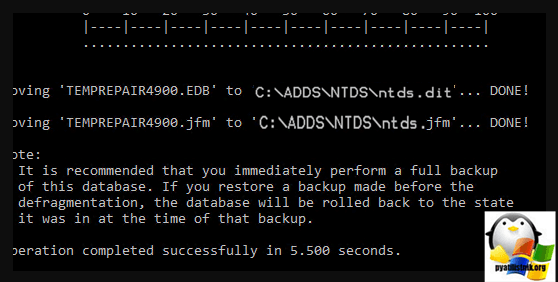
Обязательно еще раз проверьте в целостности базы данных, выполните:
должно появиться сообщение:
Integrity test successful. It is recommended you to run semantic database analysis to ensure semantic database consistence as well.
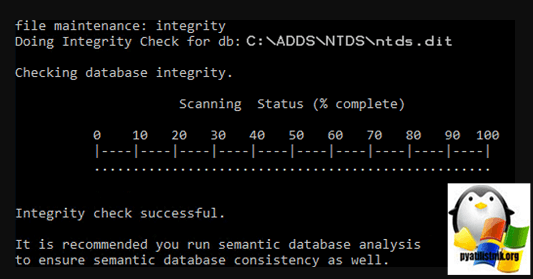
теперь выполним семантический анализ, для этого:
ntdsutil
activate instance ntds
semantic database analysis
go
При обнаружении семантических ошибок примените ключ fixup:
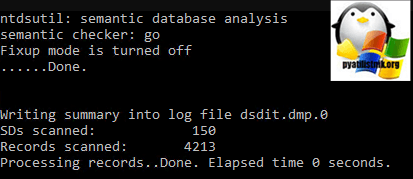
Произведем сжатие БД ntds.dit:
activate instance ntds
files
compact to c:ADDSNTDSTemp
Перезапишем оригинальный файл ntds.dit:
copy c:ADDSNTDSTempntds.dit c:ADDSNTDSntds.dit
Удалите все лог файлы из каталога NTDS:
Перезагрузка
Проверка прав на файлы NTDS
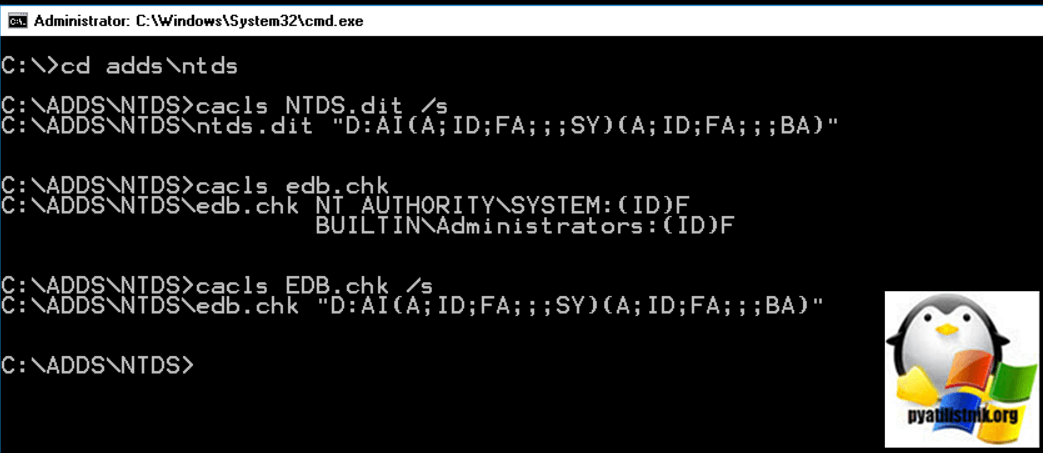
Еще очень важно проверить не сброшены ли были чем-то права на файлы из папки NTDS. Для этого в командной строке введите предварительно попав нужный каталог:
Должны быть права NT AUTHORITYSYSTEM: (ID) F и BUILTINAdministrators: (id) f
Должны быть D:AI(A;ID;FA;;;SY)(A;ID;FA;;;BA)
Должно быть NT AUTHORITYSYSTEM: (ID) F и BUILTINAdministrators: (id) f
Должно быть D:AI (A; ID; FA;;; SY) (A; ID; FA;;; BA)
Надеюсь, что было полезно. С вам был Иван Сёмин, автор и создатель IT проекта Pyatilistnik.org.
День добрый.
подскажите пожалуйста по такой проблеме .
есть домен на 2х контроллерах Win srv 2012 r2 .
один не смог загрузиться из-за переполнения диска где лежит журнал AD. вываливается теперь с
Server 2012 CRASH – ERROR 0XC00002E2
нормально грузится в режиме восстановления . файл базы сначало вообще не давал ничего с собой делать через ntdsutil. ругался что не может запустить JET .
журналы переименовывал (как одно из средств восстановления, создаются по новой.)
после Esentutl с разными ключами , база начала хоть как то дефрагментироваться
и проверяться. но есть ошибка:
_____________________________
ntdsutil: Activate Instance NTDS
Активный экземпляр — «NTDS».
ntdsutil: files
file maintenance: Compact to c:temptempNTDS
Запуск режима ДЕФРАГМЕНТАЦИИ…
Исходная база данных: C:WindowsNTDSntds.dit
Конечная база данных: c:temptempNTDSntds.dit
Defragmentation Status (% complete)
0 10 20 30 40 50 60 70 80 90 100
|—-|—-|—-|—-|—-|—-|—-|—-|—-|—-|
………………………………………….Операция прекращена с
ошибкой -1605( JET_errKeyDuplicate, Illegal duplicate key ).
______________________________
проверял все доступы к папкам журнала и базы . все нормально.
recover проходит без ошибок. а вот
—————————————
file maintenance: integrity
Выполнение проверки целостности для базы данных: C:WindowsNTDSntds.dit.
Checking database integrity.
Scanning Status (% complete)
0 10 20 30 40 50 60 70 80 90 100
|—-|—-|—-|—-|—-|—-|—-|—-|—-|—-|
……………………………………………
Integrity check completed. Database is CORRUPTED!
Операция прекращена с ошибкой -1206( JET_errDatabaseCorrupted, Non database file
or corrupted db ).
———————————————————
вопроса 2 :
— в домене трудится второй контроллер — с него как то можно взять файл базы или синхронизировать ?
— можно сломанный сервер освободить от роли AD загрузиться в нормальном режиме и опять развернуть службу AD — домен его как » страый «второй КД подхватит?
-
Изменено
20 июля 2016 г. 6:53
За месяц встретил два сервера у различных организаций с такой ошибкой. И первый и второй являлись контроллерами домена.

“STOP: c00002e2 Directory Services could not start because of the following error: A device attached to the system is not functioning.
Error Status: 0xc0000001. Please shutdown this system and reboot into Directory Services Restore Mode, check the event log for more detailed information.”
Случилось это все из-за перепада напряжения, и резервных копий конечно не было.
Сервер загружался только в режиме восстановления служб и каталогов.
Поиск в интернете подсказал использовать утилиту ntdsutil для починения:
-
Restart the server and press F8 key, select Directory Services restore mode.
-
Log in with the local administrator username and password
-
Type: cd windowssystem32
-
Type: NTDSUTIL
-
Type: activate instance NTDS
-
Type: files
-
If you encounter an error stating that the Jet engine could not be initialized exit out of ntdsutil.
-
Type: cd
-
Type: md backupad
-
Type: cd windowsntds
-
Type: copy ntds.dit c:backupad
-
Type: cd windowssystem32
-
Type: esentutl /g c:windowsntdsntds.dit
-
This will perform an integrity check, (the results indicate that the jet database is corrupt)
-
Type: esentutl /p c:windowsntdsntds.dit
-
Agree with the prompt
-
Type: cd windowsntds
-
Type: move *.log c:backupad (or just delete the log files)
Это должно завершить ремонт. Чтобы убедиться, что после ремонта успешно работает:
-
Type: cd windowssystem32
-
Type: ntdsutil
-
Type: activate instance ntds
-
Type: files (you should no longer get an error when you do this)
-
Type: info (file info should now appear correctly)
One final step, now sure if it’s required:
From the NTDSUTIL command prompt:
-
Type: Semantic Database Analysis
-
Type: Go
You have no rights to post comments

Windows Server running on a virtualized domain controller might face an issue like this. It just would not boot up properly and display an error message that would say “Your PC ran into a problem and needs to restart. We’re just collecting some error info, and then we’ll restart for you. (0% complete). If you’d like to know more, you can search online later for this error: 0xc00002e2).”
Active directory contains very sensitive and valuable data that can can get damaged. This sometimes occurs if you are implemented a Certificate Authority, deploying a Lync server, or data corruption in DC (Domain Controller) Databases, or just plain old power interruption.
The host/base server running the Hyper-V server would boot up smoothly and you can still see all the virtual machines. However, the Domain Controller server or virtual machine would show it is rebooting in a loop with this error:
Your PC ran into a problem and needs to restart. We’re just collecting some error info, and then we’ll restart for you. (0% complete). If you’d like to know more, you can search online later for this error: 0xc00002e2)
In cases of power failure, it will really cause an issue because the DC has a specific cache memory handled by the OS not RAID controller. The said cache will get corrupted and thus would result to the 0xc00002e2 error.
Before you do anything else, make sure to do a backup to avoid further data loss.
Here is how you could recover from this issue.
Restart the machine/virtual machine/instance and press F8 until you reach the boot menu.
Boot into Directory Services Repair Mode (DSRM).
Login with a local administrator account. This is important since Active Directory service is not running during this time.
Open a Command Prompt (Win-R, CMD, Enter)
Navigate to C:WindowsNTDS folder
Create a backup copy of everything in this location.
Type NTDSUTIL and press Enter.
Type “activate instance ntds” and press Enter.
Type “Files” and press Enter.
Type “Info” and press Enter.
Navigate to logs Location and delete (or rename) the *.log.
reboot normally.
Boot into Directory Services Repair Mode for second time
A defrag/compact is necessary.
Open a Command Prompt (Win-R, CMD, Enter).
Type NTDSUTIL and press Enter.
Type “activate instance ntds” and press Enter.
Type “Files” and press Enter.
Type “Info” and press Enter.
Verify the folder is actually C:WindowsNTDS.
Type “Compact to ” and press Enter. I created C:WindowsNTDSTemp and used that.
Copy the new file Ntds.dit in the temp folder over the old one in NTDS, and delete all the *.log files.
Reboot normally.
How to fix Error 0xc00002e2 after rebooting Windows Domain Controller
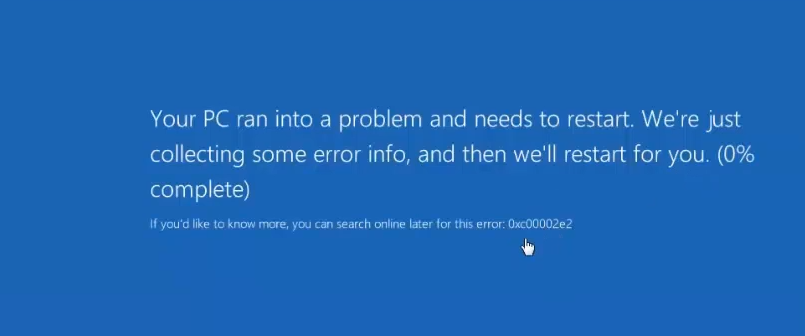
This error is an indication that the Active Directory database (NTDS.DIT) is corrupt.
Error code 0xc00002e2 is only seen on a system with Active Directory.
Remediation:
Reboot the server into Directory Services Restore Mode by pressing F8 before the OS begins loading. You will be required to use the local Administrator account password.
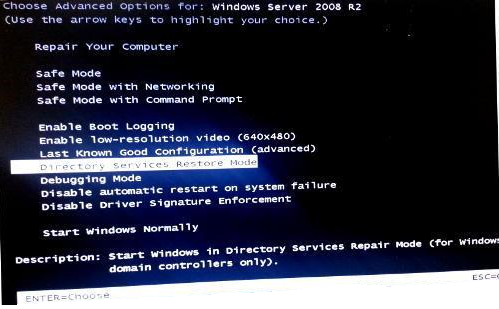
In Directory Services Restore Mode, you can check if there is a problem with the database by running the following commands:
ntdsutil.exe
activate instance ntds
files
If there is a problem with the Active Directory database NTDS.DIT, you will see an error like the following:
Could not initialize the Jet engine: Jet Error -501. Failed to open DIT for AD DS/LDS instance NTDS. Error -2147418113
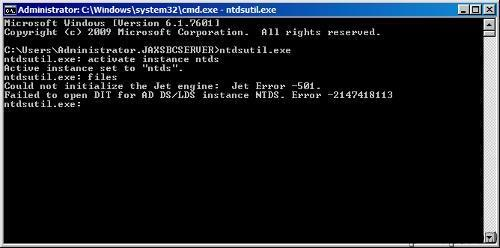
To resolve this issue, rename all of the .log files located in C:WindowsNTDS to .log.old, so the logs can be recreated after reboot.
This should fixed the database after the server is rebooted once more. If you continue to get the error, you can access again Directory Services Restore Mode and run the following command:
esentutl /p «c:windowsntdsntds.dit»
Reboot the server and the issue should be solved.
Created: October 02, 2018 22:30
Last Updated: October 08, 2020 05:41
Related articles
Have More Questions?
Contact our support instantly via Live Chat
Источник
Server 2012 CRASH – ERROR 0XC00002E2
нормально грузится в режиме восстановления . файл базы сначало вообще не давал ничего с собой делать через ntdsutil. ругался что не может запустить JET .
журналы переименовывал (как одно из средств восстановления, создаются по новой.)
после Esentutl с разными ключами , база начала хоть как то дефрагментироваться и проверяться. но есть ошибка:
ntdsutil: Activate Instance NTDS
Активный экземпляр — «NTDS».
ntdsutil: files
file maintenance: Compact to c:temptempNTDS
Запуск режима ДЕФРАГМЕНТАЦИИ.
Исходная база данных: C:WindowsNTDSntds.dit
Конечная база данных: c:temptempNTDSntds.dit
Defragmentation Status (% complete)
0 10 20 30 40 50 60 70 80 90 100
|—-|—-|—-|—-|—-|—-|—-|—-|—-|—-|
. Операция прекращена с
ошибкой -1605( JET_errKeyDuplicate, Illegal duplicate key ).
______________________________
проверял все доступы к папкам журнала и базы . все нормально.
recover проходит без ошибок. а вот
file maintenance: integrity
Выполнение проверки целостности для базы данных: C:WindowsNTDSntds.dit.
Checking database integrity.
Scanning Status (% complete)
Integrity check completed. Database is CORRUPTED!
Операция прекращена с ошибкой -1206( JET_errDatabaseCorrupted, Non database file
or corrupted db ).
— в домене трудится второй контроллер — с него как то можно взять файл базы или синхронизировать ?
— можно сломанный сервер освободить от роли AD загрузиться в нормальном режиме и опять развернуть службу AD — домен его как » страый «второй КД подхватит?
Ответы

ВОПРОС — МОЖНО ЕГО СЕЙЧАС В СЕТЬ ВОЗВРАЩАТЬ чтоб он реплицировался и встал в строй полноценно??
проверки есть какие нибудь ??
Лучше не возвращать, а принудительно понизить (Uninstall-ADDSDomainController -ForceRemoval в Powershell), вычистить на другом КД информацию о нём из Active Directory (к примеру — удалить подобъект NTDS Settings объекта этого сервера в AD Sites and services) и, если он ещё нужен как КД — повысить заново.
Дело в том, что после выполнения esentutl /p потеря данных при таком исправлении может привести к рассогласованию БД Active Directory с копией на другом КД, которое практически невозможно выявить. А также — к другим трудновыявляемым ошибкам.
Поэтому Microsoft советует (есть статья 258062 в MS KB) прибегать к esentutl /p только как крайней мере — для восстановления единственного КД в домене при отсутствии резервной копии — и даже рекомендует после этого по возможности быстрее произвести миграцию учётных записей пользователей и компьютеров в неповреждённый домен.
Источник
Memorise
How to Fix C00002E2 Directory Services Could Not Start – Blue Screen
There are several reasons you may get get this error. The most common being a corrupt Active Directory database (NTDS.DIT). I know this sounds detrimental, but it’s actually easy to fix this blue screen.
*** This is the Active Directory Database we’re talking about here, so make sure you have a good backup of the server, in case this doesn’t work***
This Stop code is only seen on a system with Active Directory on it. You notice it when the server is booting. You’ll get a blue screen and an error code, like the following:
STOP: c00002e2 Directory Services could not start because of the following error:
A device attached to the system is not functioning.
Error Status: 0xc0000001.
Please shutdown this system and reboot into Directory Services Restore Mode, check the event log for more detailed information.

To begin, do as the message says, and boot into Directory Services Restore Mode. When the server powers on, press F8 before the OS begins to load. You should see a selection screen like this. Choose Directory Services Restore Mode:
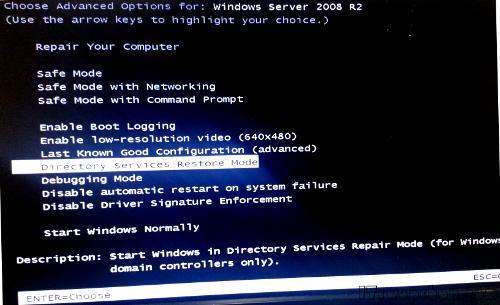
Once in Directory Services Restore Mode, you can check if there is a problem with the database by running the following commands:
ntdsutil.exe
activate instance ntds
files
If there is a problem with it, you’ll see something like this returned:
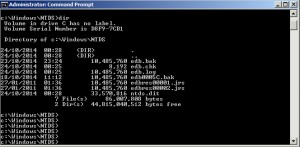
To fix, just rename all of the .log files located in C:windowsntds to .log.old, or anything else, so they can be recreated.
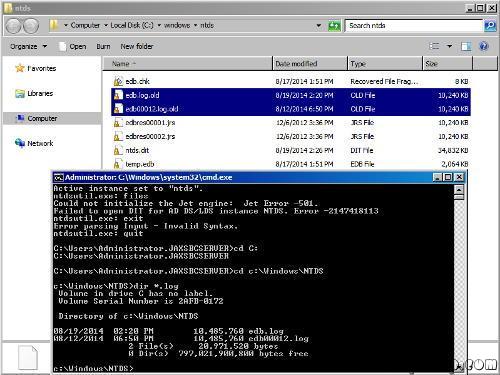
Now reboot the server. For most people, this fixed the database, and the server booted up. For others, it still blue screened after this. If you continue to get a blue screen, run the following command in Directory Services Restore Mode, and then reboot:
esentutl /p “c:windowsntdsntds.dit”
—– Same instruction above in details —
STOP: c00002e2 Directory Services could not start because of the following error: A device attached to the system is not functioning.
Error Status: 0xc0000001. Please shutdown this system and reboot into Directory Services Restore Mode, check the event log for more detailed information.
- Restart the server and press F8 key, select Directory Services restore mode.
- Log in with the local administrator username and password
- Type: cd windowssystem32
- Type: NTDSUTIL
- Type: activate instance NTDS
- Type: files
- If you encounter an error stating that the Jet engine could not be initialized exit out of ntdsutil.
- Type: cd
- Type: md backupad
- Type: cd windowsntds
- Type: copy ntds.dit c:backupad
- Type: cd windowssystem32
- Type: esentutl /g c:windowsntdsntds.dit
- This will perform an integrity check, (the results indicate that the jet database is corrupt)
- Type: esentutl /p c:windowsntdsntds.dit
- Agree with the prompt
- Type: cd windowsntds
- Type: move *.log c:backupad (or just delete the log files)
This should complete the repair. To verify that the repair has worked successfully:
- Type: cd windowssystem32
- Type: ntdsutil
- Type: activate instance ntds
- Type: files (you should no longer get an error when you do this)
- Type: info (file info should now appear correctly)
I then rebooted and windows started normally.
Источник
Yesterday morning I discovered that my Synology NAS had an unexpected shutdown in the middle of the night while my homelab VMs/workloads were still running. This caused both of my Domain Controllers databases to become corrupt resulting in being unable to boot those machines. When attempting to boot them, they would get stuck in a BSOD boot-loop and would display a Stop Error Code of 0x00002e2.
.
After some research I was able to figure out how to recover my VMs and get them to boot up again. This had happened to me once before sometime earlier this year and luckily I remembered that I had taken some notes on how to fix it so I figured this time I would put together a formal “How To:” guide to have it documented for myself and hopefully to help others facing this issue as well. So without further adieu…let’s get to it!
.
To start, you will need to power-on the machine and then keep pressing the F8 key to bring up the “Advanced Boot Options” boot menu. Navigate down to Directory Services Repair Mode enter press Enter to boot you into Safe Mode.

When you reach the login screen, log in with the Local Administrator account since Active Directory Domain Services are obviously unavailable.

Once at the Desktop, open an elevated Command Prompt window.

As a best practice, I feel it is always wise and important to make a backup of the files before doing any modifications. Since we will be backing up the NTDS directory, create a directory at your preferred location to store the backup files. I chose to make a backup folder on the root of “C:” and a sub-directory with the name/date of the directory I am backing up.
md C:BackupNTDS_11122017
Then copy everything from the “C:WindowsNTDS” directory to this new location using xcopy.
xcopy C:WindowsNTDS* C:BackupNTDS_11122017 /E /Y /V /C /I

Once done, let’s rename any .log file extensions in the NTDS directory to .log.old
cd C:WindowsNTDS

ren *.log *.log.old

Now, this is where we get to the good stuff!
First, run the following command to repair the database.
esentutl /p "C:WindowsNTDSntds.dit"

This will display the following warning message, click “OK“

Let it do its thing and you will see the following once complete.

Now we need to use the NTDS Utility (ntdsutil.exe) to activate the NTDS instance and compact the DB to a new file which will then be used to overwrite the original. I will be compacting it to a new TEMP directory within the NTDS directory. The command will automatically create the new directory if it’s not already present. Enter the following commands.
ntdsutil

activate instance ntds

files

compact to C:WindowsNTDSTEMP
If successful, you will be presented with instructions to copy the newly compacted file to the NTDS directory, overwriting the original, and also to delete any .log files in the NTDS directory. Before we can do that we need to exit out of the ntdsutil. Type quit twice to exit.
quit

quit

Let’s follow those instructions and also delete the *.log.old files we renamed earlier.
copy "C:WindowsNTDSTEMPntds.dit" "C:WindowsNTDSntds.dit"

Yes
Ensure you are still in the NTDS directory before entering the following delete commands.
del *.log

del *.log.old

The hard part is now over! Let’s go ahead and reboot the machine normally.

If all goes well and as expected, your machine will boot successfully and you can log in again with an Active Directory Domain Admin account.


Awesome! Well, I hope you’ve found this guide useful. Please feel free to share this and provide me some feedback/comments below. Thanks for reading!
-virtualex-


Fixing A Corrupt Domain Controller – Stop Code 0x00002e2 by virtualex is licensed under a Creative Commons Attribution-NonCommercial-ShareAlike 4.0 International License.
Hi. I have a server running Windows Server 2012 R2 Standard that has worked just fine for 3 years that will no longer boot. Each time it comes up with error 0xc00002e2.
It all started about 4 months ago after I installed a Microsoft CRM upgrade on my server and it did not work properly so I did an image restore like I have done maybe 10 or 15 times over the years.
As soon as the restore completed the error came up and it has been there ever since.
I have tried restoring from 3 other backups that I have done and each time I get the same error.
I have tried using both NTDSUTIL and ESENTUTL that people have successfully used to eliminate this problem that are listed on various forums but it keeps appearing for me.
I have tried replacing the hard drive and I still get that error.
I have 2 4 GB memory chips in the server so I have tried just having 1 chip in and then the other and I still get the error.
My biggest concern with just replacing the server is that I don’t want to lose all of my information that is in my Microsoft CRM data base.
Any other ideas of what I can try before I just consider the server a complete loss?
Thanks.
Rick Bellefond
RB Data Services
www.rbdata.com
Rick Bellefond RB Data Services www.rbdata.com