Ошибка 08:04 в плоттерах HP DesignJet T790, T795, T1300, T2300
Системная ошибка: 08:04
Описание проблемы: Сенсорная панель управления функционирует при инициализации, но при нормальной работе теряется связь.
Корректирующее действие: Попробовать следующее:
- Переустановите форматер принтера (сделайте это, ослабив винты форматера, отсоедините и снова подсоедините форматер и снова затяните винты).
- Замените плату форматера.
- Выполните обновление FW с помощью USB-накопителя.
- Проверьте подключение кабеля USB главной платы РСА с соединительной платой.
- Замените жесткий диск. Для принтеров версии В (Revision B) форматер и жесткий диск заменяются как единая деталь.
- Замените соединительную плату.
- Замените сенсорную панель.
В 95% случаев ошибка 08 04 связана с платой форматирования. С платой в совокупности идет жесткий диск. Иногда данная ошибка может быть связана с прошивкой. Тогда плоттер при диагностике выдаст детальную ошибку 08:04.1.
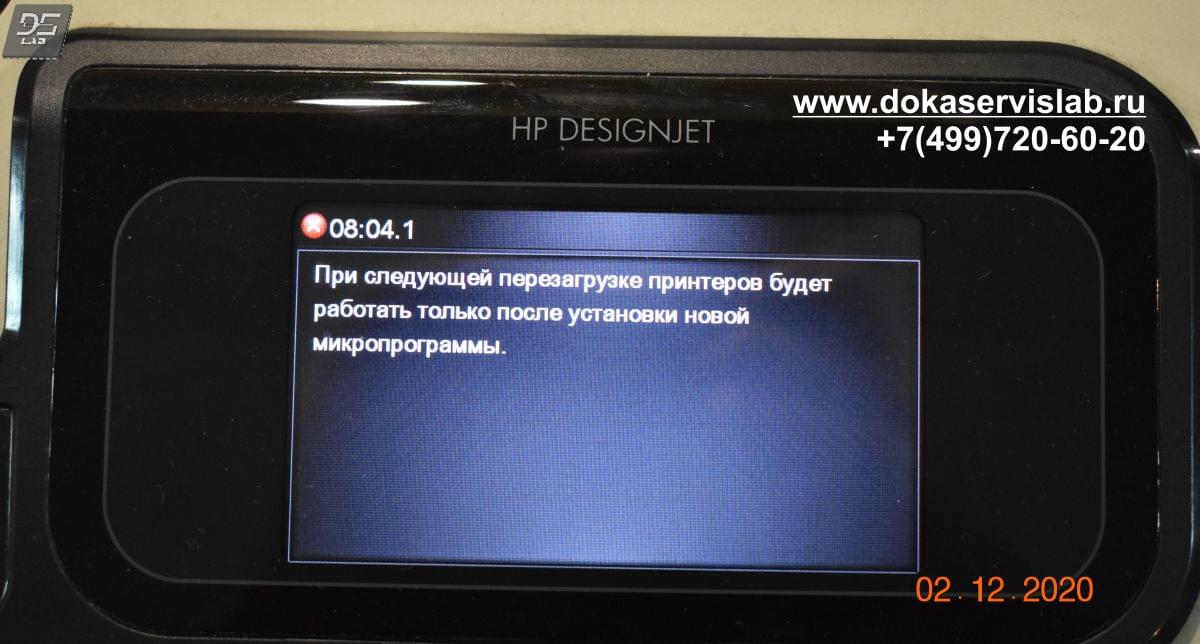
В этом случае следует обновить прошивку. Очень редко выходит из строя сам форматор. В основном сыплется жесткий диск. В первую очередь надо прослушать при включении сам диск. Если слышны характерные звуки в виде щелчков, то однозначно, данный диск под замену. Если же диск в порядке, то следует искать причину в самой плате форматирования. Проще обратить внимание на индикаторы платы форматера и воспользовавшись таблицей определить, что вышло из строя.
Если же и эти два компонента исправны, то ошибка сидит либо в главной плате, либо очень в редких случаях в блоке питания.
У нас в наличии имеются все расходные материалы для устранения данной ошибки. Ремонт выполняется в течении одного рабочего дня.
Так же проводим работы по замене жесткого диска, его установке и заливки свежей прошивки.
|
Обращайтесь в наш сервисный центр, будем рады Вам помочь! |
|
Ответим на интересующие Вас вопросы ( в чатах моментальные ответы / Будние дни). |
|
Дадим профессиональную консультацию. |
|
Примем меры по устранению неполадок! |
|
Связаться с нами можно по телефонам: |
Дата статьи 15.12.2020. Пишите любые замечания и рекомендации для улушения сайта и компании. Будем признательны за работу. При регистрации на сайте Вы получаете 10% скидку на все виды работ и покупку деталей для плоттеров серии HP DesignJet
Менеджер компании перезвонит Вам в течении 2-3 минут и согласует заявку.
Вы можете установить наше мобильное приложение для оперативной заявки. Заявка будет считаться приоритетной.


 Всем добра.
Ошибка плоттера 08:04 в моем случи, решение стало отключить микро usb кабель( по парт номеру из мануала CN27–50010,но меняется только вместе с комплектом по парту CH538-67006 инфа с HP partsurer. если нужно сфотографирую сам кабель )
от платы Interconnect PCA по парту CN727-67020.После отключения аппарат заработал без выхода в ошибку 08:04, Жду кабель поменяю как смогу.
Инфа о том как вышел на неисправность.или просто жизненное везение.
Аппарат был мертв и полтора года ждал запчасти,выдали значит мне три запчасти, Форматтер, жесткий диск и Engine PCA.
поменял все платы по одной, включил плоттер вышел в готовность, перезагрузил и началось плоттер инициализируется до ста процентов,выходит на главный, и через 1-2 сек начинает выключатся и выдавать ошибку 08:04, раз десят перезагрузил ошибка остается
на одиннадцатый вышел в готовность. 
попросил головки , картриджи, бумагу, дал ему все (only original), распечатал тесты все окай перезагрузил все норм, перезагрузил снова ошибка 08:04. 
Так же если при во время инициализации открыть крышку или поднять прижимной рычаг, аппарат сообщает об этом и также сразу уходит в ошибку 08:04.
Хорошо мануал советует обновить прошивку, скачиваю с оф сайта полную версию, кидаю на флешку ( флешка проверенная ) вставляю в аппарат и все плоттер грузится на 20% процентов и стоит долго час ждал нифига, перезагружал его снова до готовности, плоттер вышел вставил флешку он опознал прошивку и начал грузит, но не смог завершить снова выпал в ошибку 08:04.
Дале на правильность подключения USB кабелей на Interconnect PCAs, проверил все вроде норм негде не отходит окислений тоже нету, ну включил заработал, попечатал и снова ошибка 08:04.
Дале советуется замена платы Interconnect PCAs (взял с рабочего) включил загружается все норм плоттер готв, раз 5 перезагрузил все ок выключил собираю ошибка и снова 08:04,плата рабочая проверил на другом потом вернул обратно.
пробовать менять экран не стал так как,нового у меня не было, а старый он не примет.
собрав все факты пришел к выводу что аппарат глушит один из электронных компонентов подключенных к Interconnect PCA, по этому стал
отключать один из компонентов и грузить без него, так и вышел на злосчастный USB.
Ну вот и все вроде, аппарат работает уже больше двух дней не выпадая в ошибку, кабель поменяю, старый прозвоню может где то начался обрыв что и объяснять случайность выхода в готовность.все всем Рахмет надеюсь вам это поможет.
Hi
Hope my solution below can help you resolve your problem.
Problem Description:
Touch Control Panel communication to the product functions at the initialization, but during
normal working the communication is lost.
Corrective action:
1. Reseat printer’s formatter (do this by loosening the formatter screws, disconnect and
reconnect the formatter, and tighten the screws again).
2. Replace the Formatter Board
NOTE: For Revision B printers the Formatter and Hard Disk are replaced as a single
part,
3. Perform an Emergency FW Upgrade using a USB flash drive,
4. Check connections of USB cable from Engine PCA to Interconnect PCAs.
5. Replace the HDD
NOTE: For Revision B printers the Formatter and Hard Disk are replaced as a single
part,
6. Replace the Interconnect PCA
7. Replace the Touch Control Panel
8. Check the event log at the EWS support pages to see if there is another SE (for instance
07:10) and troubleshoot the problem more accurately
Although I am HP Employee
I am speaking for myself and not for HP
Please click the Thumbs up icon below to say “Thanks” for helping! .
If my post help resolve your issue, please mark as «RESOLVED»
Hi
Hope my solution below can help you resolve your problem.
Problem Description:
Touch Control Panel communication to the product functions at the initialization, but during
normal working the communication is lost.
Corrective action:
1. Reseat printer’s formatter (do this by loosening the formatter screws, disconnect and
reconnect the formatter, and tighten the screws again).
2. Replace the Formatter Board
NOTE: For Revision B printers the Formatter and Hard Disk are replaced as a single
part,
3. Perform an Emergency FW Upgrade using a USB flash drive,
4. Check connections of USB cable from Engine PCA to Interconnect PCAs.
5. Replace the HDD
NOTE: For Revision B printers the Formatter and Hard Disk are replaced as a single
part,
6. Replace the Interconnect PCA
7. Replace the Touch Control Panel
8. Check the event log at the EWS support pages to see if there is another SE (for instance
07:10) and troubleshoot the problem more accurately
Although I am HP Employee
I am speaking for myself and not for HP
Please click the Thumbs up icon below to say “Thanks” for helping! .
If my post help resolve your issue, please mark as «RESOLVED»
 Likes: 0
 Dislikes: 0
-
4 Weeks Ago
#1

Technician

- Rep Power
- 9
Error 08:04 Plotter HP Designjet T2300PS eMPF
Hello everybody!
I have an HP Designjet T2300PS eMPF plotter with error 08:04. The manual guides to update firmware. I already have the latest firmware version installed, but the error still occurs. I think I will have to change hard drive and formatter. As they are expensive parts, I would like to know if anyone has had this problem and how they managed to get around it. I welcome suggestions for tests I can take to get a more accurate diagnosis. Thanks in advance to everyone who can collaborate.
-
4 Weeks Ago
#2
Re: Error 08:04 Plotter HP Designjet T2300PS eMPF
It’s most likely the hard drive. But it can be the also the formatter, or power supply. Start with the hard drive.
HP Designjet T2300 Hard Disk Drive HDD CN727-67045
Kiran
-
4 Weeks Ago
#3
Technician
- Rep Power
- 9
Re: Error 08:04 Plotter HP Designjet T2300PS eMPF
 Originally Posted by Kiran Otter

Thank you, Kiran! Always helpful! Today the error did not occur. This makes diagnosis difficult. I’ll monitor to see where it goes. Parts for this machine cost a lot here in Brazil. And that’s when you find them! Just to give you an idea: here in Brazil this piece is found for sale. Comparatively, it costs US$2,100. It’s disheartening. But we fought until the end. I will update the post whenever I do something. Grateful!
-
2 Weeks Ago
#4
Technician
- Rep Power
- 6
Re: Error 08:04 Plotter HP Designjet T2300PS eMPF
I had this with an old T1100. It was the battery on the formatter Board (had low voltage). So perhaps you should check the voltage of the battery first.
-
2 Weeks Ago
#5
Re: Error 08:04 Plotter HP Designjet T2300PS eMPF
Here’s a suggestion on testing that backup battery. It was a common issue on older analog Mitas. The machine would lose it’s PM data, and the maintenance light would blink.
So find the battery, and clip leads onto the battery. Any time the power is connected there will be 5vdc at the battery. Now power off the machine and unplug the power. If the value drops below 3.6vdc your battery is failing. I’ve seen that value drop from 5vdc to 0.1vdc is 3 seconds. =^..^=
If you’d like a serious answer to your request:
1) demonstrate that you’ve read the manual
2) demonstrate that you made some attempt to fix it.
3) if you’re going to ask about jams include the jam code.
4) if you’re going to ask about an error code include the error code.
5) You are the person onsite. Only you can make observations.
blackcat: Master Of The Obvious =^..^=
Tags for this Thread
Bookmarks
Bookmarks

Posting Permissions
- You may not post new threads
- You may not post replies
- You may not post attachments
- You may not edit your posts
- BB code is On
- Smilies are On
- [IMG] code is On
- [VIDEO] code is On
- HTML code is Off
Forum Rules
Hi!
I have a Designjet T1300, a few years old (2010 I think), and I have printed a few rolls of paper on it. (5-6?) A few firmware updates ago it started showing the 08:04 error message. It asks me to update the firmware if the problem persists (well it does). I have the newest firmware (?) IG_04_00_05.2.
Sometimes I have to restart it 10-15 times before I can print. sometimes it goes into error mode if i dont use it for an hour or so . sometimes it goes into error mode in the middle of printing, or just while rotating or when ever. Sometimes it starts up immediately and I can print all day without any problems.
Any Ideas?
Now I checked again for new firmware. the printer says there is new firmware, but it went into 08:04 error mode while checking.
Now after 4 restarts, the printer started to install the new firmware. at the end of installation the program shuts down and during restart the printer goes into 08:04 mode.
Restarting the printer over and over again. Allways the 08:04 code. What does the 08:04 code mean??
Ok… update history:
today first MS_01_01_23.1 was installed and after that IG_04_00_05.2.
No newer firmware available.
I will update this if it doesn´t go into error mode anymore..
Today I finally had the time to print again. The T1300 still goes into error mode 08:04.
Help!
System Error: 08:04
Problem Description: Touch Control Panel communication to the product functions at the initialization, but during
normal working the communication is lost.
Corrective action: Try the following:
1. Reseat printer’s formatter (do this by loosening the formatter screws, disconnect and
reconnect the formatter, and tighten the screws again).
2. Replace the Formatter Board see Formatter on page 290
NOTE: For Revision B printers the Formatter and Hard Disk are replaced as a single
part,
3. Replace the HDD, see Hard Disk Drive on page 296
NOTE: For Revision B printers the Formatter and Hard Disk are replaced as a single
part,
4. Check connections of USB cable from Engine PCA to Interconnect PCAs.
5. Replace the Interconnect PCA, see Interconnect PCA on page 316.
6. Replace the Touch Control Panel Touch Control Panel on page 429
7. Check the event log at the EWS support pages to see if there is another SE (for instance
07:10) and troubleshoot the problem more accurately.Appendix C: Obtaining the product
log and the diagnostics package on page 75
System Error: 08:04
Problem Description: Touch Control Panel communication to the product functions at the initialization, but during
normal working the communication is lost.
Corrective action: Try the following:
1. Reseat printer’s formatter (do this by loosening the formatter screws, disconnect and
reconnect the formatter, and tighten the screws again).
2. Replace the Formatter Board see Formatter on page 290
NOTE: For Revision B printers the Formatter and Hard Disk are replaced as a single
part,
3. Replace the HDD, see Hard Disk Drive on page 296
NOTE: For Revision B printers the Formatter and Hard Disk are replaced as a single
part,
4. Check connections of USB cable from Engine PCA to Interconnect PCAs.
5. Replace the Interconnect PCA, see Interconnect PCA on page 316.
6. Replace the Touch Control Panel Touch Control Panel on page 429
7. Check the event log at the EWS support pages to see if there is another SE (for instance
07:10) and troubleshoot the problem more accurately.Appendix C: Obtaining the product
log and the diagnostics package on page 75