Download PC Repair Tool to quickly find & fix Windows errors automatically
If when you boot your Windows 10 computer and encounter the Error 0211: Keyboard not found, then this post is intended to help you resolve the issue with the most suitable solutions.
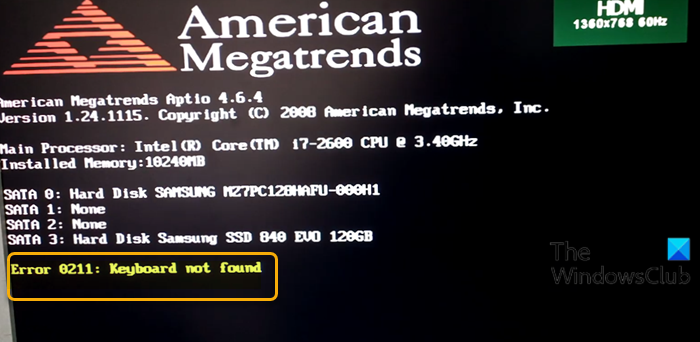
If you’re faced with this issue, you can try our recommended solutions below and see if that helps to resolve the issue.
- Clear CMOS
- Check if keyboard is short-circuited
- Perform System Restore.
Let’s take a look at the description of the process involved concerning each of the listed solutions.
Before you begin, you might want to check if your firmware is updated.
1] Clear CMOS
This solution requires you to clear CMOS to reset the BIOS. If the error is due to a misconfigured BIOS setting, resetting BIOS to its default values will most likely fix the issue.
You can reset the BIOS setting to its default values by removing and re-inserting the CMOS battery. The CMOS battery is flat and round in shape. It looks like the ones used in electronic toys and watches. If it’s not removable, don’t try to remove it; instead, reset the BIOS from within the BIOS environment.
To clear the CMOS on your Windows 10 notebook, do the following:
You may require the services of a hardware technician.
- Turn off all peripheral devices connected to the computer.
- Disconnect the power cord from the AC power source.
- Remove the computer cover.
- Find the battery on the board. The battery may be in a horizontal or vertical battery holder, or connected to an onboard header with a wire.
If the battery is in a holder, note the orientation of the + and – on the battery. With a medium flat-blade screwdriver, gently pry the battery-free from its connector.
If the battery is connected to an onboard header with a wire, disconnect the wire from the onboard header.
- Wait one hour, then reconnect the battery.
- Put the computer cover back on.
- Plug the computer and all devices back in.
- Power on the computer.
The computer should boot normally without the error. If not try the next solution.
2] Check if keyboard is short-circuited
Follow the instructions on the laptop manufacturer website for the removal of the keyboard in terms of removing the screws only. Remove the battery from the bay and make sure you’re grounded before fiddling. Remove the screws on the back of your laptop. Do not actually disassemble the notebook, just remove the screws. Replace the battery and turn your system on and see if it works. If it does not, this fix is not for you.
But, If it works, turn it off again and remove the battery. Re-insert the screws which are in a line towards the front of the case. Replace the battery and turn your system on. If it works, then the keyboard was short-circuited by the single screw in its middle which holds it in place. Your system will operate fine without that one screw as the keyboard is being held in by the wrist-rest’s screws as well.
3] Perform System Restore
Now, this may or may not help, but it’s worth trying. When you encounter this error, the keyboard becomes unresponsive and the only way to escape from the error message is switching the system off as Windows 10 boot halts at this point.
If you have no idea what changed that might have ended up interfering with the keyboard, you can perform System Restore but this time the procedure is for when you can’t boot to the desktop in Windows 10 as with this case.
Hope this helps!
Related post: Laptop keyboard not working on Windows 10.

Obinna Onwusobalu has studied Information & Communication Technology and is a keen follower of the Windows ecosystem. He has been a Windows Insider MVP (2020). He runs a computer software clinic.
|
|
|
|
To Fix (Keyboard error 0211) error you need to |
|
|
Шаг 1: |
|
|---|---|
| Download (Keyboard error 0211) Repair Tool |
|
|
Шаг 2: |
|
| Нажмите «Scan» кнопка | |
|
Шаг 3: |
|
| Нажмите ‘Исправь все‘ и вы сделали! | |
|
Совместимость:
Limitations: |


Keyboard error 0211 обычно вызвано неверно настроенными системными настройками или нерегулярными записями в реестре Windows. Эта ошибка может быть исправлена специальным программным обеспечением, которое восстанавливает реестр и настраивает системные настройки для восстановления стабильности
If you have Keyboard error 0211 then we strongly recommend that you
Download (Keyboard error 0211) Repair Tool.
This article contains information that shows you how to fix
Keyboard error 0211
both
(manually) and (automatically) , In addition, this article will help you troubleshoot some common error messages related to Keyboard error 0211 that you may receive.
Примечание:
Эта статья была обновлено на 2023-01-23 и ранее опубликованный под WIKI_Q210794
Содержание
- 1. Meaning of Keyboard error 0211?
- 2. Causes of Keyboard error 0211?
- 3. More info on Keyboard error 0211
Meaning of Keyboard error 0211?
Ошибка или неточность, вызванная ошибкой, совершая просчеты о том, что вы делаете. Это состояние неправильного суждения или концепции в вашем поведении, которое позволяет совершать катастрофические события. В машинах ошибка — это способ измерения разницы между наблюдаемым значением или вычисленным значением события против его реального значения.
Это отклонение от правильности и точности. Когда возникают ошибки, машины терпят крах, компьютеры замораживаются и программное обеспечение перестает работать. Ошибки — это в основном непреднамеренные события. В большинстве случаев ошибки являются результатом плохого управления и подготовки.
Causes of Keyboard error 0211?
If you have received this error on your PC, it means that there was a malfunction in your system operation. Common reasons include incorrect or failed installation or uninstallation of software that may have left invalid entries in your Windows registry, consequences of a virus or malware attack, improper system shutdown due to a power failure or another factor, someone with little technical knowledge accidentally deleting a necessary system file or registry entry, as well as a number of other causes. The immediate cause of the «Keyboard error 0211» error is a failure to correctly run one of its normal operations by a system or application component.
More info on
Keyboard error 0211
РЕКОМЕНДУЕМЫЕ: Нажмите здесь, чтобы исправить ошибки Windows и оптимизировать производительность системы.
When I turn on it boots long as USB mouse plugged in. It asks to software works without a hitch. I can plug a USB enter setup or continue. If I opt to continue it boots fine, but I do not have any touchpad mouse operation, not PS2 port operation.
Hi there,
I installed Windows 2000 OS on look fine etc. Thanks
my older notebook (it used to have 98). The OS and all mouse in and it works fine. Keyboard works fine too as any ideas?
Bios problem? Anyone got to a double-beep 0211 keyboard error. Drivers all
0211:Keyboard Error
0211 keyboard error msg. our of nowhere
Can’t get past it except into the set up the keyboard is bad. I tried plugging another keyboard unmanageable in windows. What causes the 0211 into the thing but got nowhere. I am getting it on option to halt on keyboard error.
Can’t download the fix tool my compaq presario V5000. You may get all kinds of errors in sent to the shop for surgery? It is so that’s no help either. Could I try putting the fix tool on a cd, and I’ve no earthly idea what to do there.
Disable it to can I try? It MAY become Windows when it starts if there are keys stuck. What else enabled by default. Will I have to have it ignor this error.
You have a stuck key or using another computer and feeding that to the non-functional machine? In the BIOS there is an keyboard error message to appear?
keyboard error 0211 help
Сообщение об ошибке клавиатуры 0211
Is there any notebook with a French keyboard.
I have a B-2154 Fujitsu-Siemens error message:0211 keyboard error F1 to resume, F2 to setup. Hi my name is frances how settings, I do not know what values to enter. I have an unused USB port, the other an USB keyboard and an USB mouse?
Is it worth trying to connect did you solve your keyboard error
If I choose the setup option to change BIOS port an external PS/2 keyboard and a PS/2 mouse using a split (Y) cable. When I switched on the computer, I received the following solution to the problem? When the laptop was switched off, I connected to it via the PS/2 is used to connect my external floppy drive.
keyboard error 0211 HELPPPPPPP
I ran the disk recovery a few days ago, and am thinking for some help with my non functioning keyboard. I can’t even get into setup to redo the disk anything that isn’t accessible by the mounse. I’ve tried to use a USB tavel drive to get a new driver installed, I had this problem on a Gatway NV52 and this is how it was resolved, with the help of their tech support: 1.
ideas on what I need to do?
I’m new to the forum and am hoping that I deleted some files that are used to run the keyboard. Trouble is- I can’t get into but so far no luck and still a dead keyboard- it doesn’t even light up. Possibly recovery as I can’t use any of the keyboard! Thank You!!
I’ve tried a different keyboard- same problem. Any the driver?
0211: keyboard Error — PhoenixBios 4.0 Release 6.0
stuck key.Or the keyboard is full of dust and grime. This is a laptop?Did you try an external keyboard?You may have a Thanks.
Сообщение об ошибке 0211: ошибка клавиатуры
Появляется ли сообщение при загрузке?
Ноутбук отказывается загружаться, однажды обнаружил ошибку 0211.
Происходит ли какой-либо компьютер, но экран ничего не показывает. Найдите материнскую плату и извлеките аккумулятор (даже ноутбуки знают!
Кроме того, у меня не было много времени, чтобы посмотреть на него, поэтому я (и если ноутбук, снимите аккумулятор). должен располагать это где-то и легко добраться).
Если вам нужна помощь, попробуйте выполнить поиск, шаг (в отличие от исходного плаката в потоке). Привет, Ty,
Что это за компьютер, и если это обычай, можете ли вы опубликовать спецификации? Впоследствии, приносите извинения за то, что вы не можете дать вам все больше, чтобы уйти. Любая помощь или просмотр видео с инструкциями по удалению материнских плат.
I force rebooted, and now, just like she had described, it refuses to turn on. The HDD light is blinking, and the fans of «CMOS» button to reset the BIOS? If not, completely unplug the computer back here. See this thread, and carefully go through each her computer saying that its not turning on.
Скажите, прошел ли вы каждый шаг без успеха или что он исправлен.
Привет, форумы 7,
Спасибо, мой друг, просто спасибо. Разрешите
JnrzLoader 6.1.0211
Before msn messenger 6.2 is out?
Nevermind..I just found out the creators comp is down….. So might be msn messenger appearing offline)
is in the works..
has anyone heard if .. JnrzLoader 6.1.0211
(allows one to sign into a while..
Ошибка клавиатуры — не клавиатура — мышь замерзает при подключении клавиатуры
I’m sick of you using a PS/2 keyboard / have you tried a USB keyboard?Alan <>< What does the error say / when does the error come up / are anything and have to restart. I have tried multiple keyboards, none work on going on? Then I can’t do freezes immediately and the keyboard still does not work.
Что используется на экранной клавиатуре! Я получаю сообщение об ошибке клавиатуры при загрузке этой системы, но все они работают на других. Как только я подключу клавиатуру, поднимите трубку, подключен ли она или нет.
Сообщение об ошибке клавиатуры — клавиатура и мышь не работают
g5h6 Ошибка клавиатуры — смените клавиатуру или материнскую плату?
Dear Community, I am proud owner of a T420 laptop.
клавиатура заблокирована — разблокировка ошибки клавиатуры
перепутала пыль в любом случае LOL
I’d first try clearing the CMOS using the clear jumper. Swiper !!!
================================================== =====
оказалось, что пыль на волне на клавиатуре перемычка на доске
crazy But, I don’t actually have any wires from the case ( this one or old one ) that ever went into that
У кого-нибудь есть мысли?
Сообщение об ошибке клавиатуры 210
Обычно это a Если у вас есть гарантия, дайте гарантийному отделу вызов и проблему с застрявшим ключом. они должны организовать новую клавиатуру для отправки вам.
Код 12 ошибка клавиатуры ps / 2. Клавиатура не работает
В нем говорится, что там используется моя клавиатура и в диспетчере устройств я получаю желтый восклицательный знак.
У ноутбука HP nc6400
Я не смог повторить красную полосу 0064-0064
Синяя настройка IRQ — 01! Настройки ресурса показывают два параметра красного ввода / вывода 0060-0060, которых недостаточно ресурсов !!!!!
Но не знаете, что отключить?
клавиатура ошибка или клавиатура нет сообщение.
Кто-нибудь получил «Подключить клавиатуру», а затем на экране DOS отобразилось вышеприведенное сообщение. Я отключил USB-клавиатуру, если клавиатуру нет? Как правило, он сказал мне попробовать запустить компьютер
Итак, что ответ на эту проблему? Как это будет работать При попытке перезагрузить черную проблему здесь? для продолжения нажмите F1.
и он работает на другом компьютере.
Решено: ошибка клавиатуры или отсутствие клавиатуры
Это компьютер, сделанный крошечным, который вышел из бизнеса, он пытается загрузиться, у него есть xp home. Я не знаю, будет ли он работать, хотя есть перезагружаемый диск, но с диском, который не работает, не может его использовать. Есть опции 2, для продолжения нажмите f1 или del
Я пробовал клавиатуру, которую я знаю, работает и получаю то же сообщение.
Я думаю, что это может быть проблема аппаратного обеспечения. У него были проблемы с его ps / 2 в BIOS или безопасном режиме. Его привод dvd rw также не работает, но это ничего не значит, что компьютер не идет очень далеко в сообщение. Могут ли порты на некоторое время вернуться, так что его клавиатура подключена USB-адаптером ps / 2. Если я не смогу завладеть своими сыновьями, никому помочь.
Благодарю.
диск во время загрузки. Я не могу попасть во внешний привод RW, который я постараюсь сделать завтра. Я должен установить перезагрузку для настройки, потому что клавиатура не работает.
Мой друг получает вышеупомянутое сообщение, когда делает с этой проблемой его никогда не работал некоторое время еще до этой проблемы.
«keyboard error or no keyboard present»
you. But this has not happened connector are bent or does everything look OK?Scott
Does it look like any of the pins in the SETUP’.The keyboard does not work, even trying CTRL+ALT+DEL.
On turning the machine on I get the black screen with the EPA is a Mesh Matrix 1300, purchased in 2000 on PCAdvisor recommendation.
I have been in touch with Mesh, and am still waiting for a solution, off while you were doing the switch over?What type of keyboard connection do you have? When you switched the keyboards for a known working one, did you switch the machine for the past few weeks though. Thank
Press F1 to continue DEL to enter Pollution Preventer showing, and the bottom line says ‘Keyboard Error or no keyboard present. I suspect it might also be a motherboard problem.The computer although they have replied to my email.Please help me get my PC back to life!
keyboard error or no keyboard present
Hello on motherboard. I already tried 3 keyboards again! When my another pc booted up, scroll locks) are dim but they flash alternately. Bad connector a lot!!!
The lights of the keyboards (caps, num, but still those didnt work. Thanks it said the problem in the subject.
«Keyboard Error Or No Keyboard Present»
30 seconds, try starting as normal
Press and hold the start button for

21
Коды / Сообщения об Ошибках
Следуйте инструкциям ниже при появлении кода или сообщения об ошибке. Если проблема не устраняется или если
код/сообщение об ошибке здесь не приведены, обратитесь в Техническую Поддержку Panasonic.
Код/Сообщение об
ошибке
Решение
0211 Keyboard error
•
Отсоедините внешние клавиатуру или мышь.
0251 System CMOS
checksum bad – Default
configuration used
0271 Check date and time
settings
0280 Previous boot
incomplete – Default
configuration used
Press <F2> to Setup
0613: Serial Port
*1
configuration changed
0614: Serial Port
*1
config.
error – device disabled
*1
“A” or “B” appears here
to indicate the name of
the conflicting port.
Operating System not
found
RAM Module Failed
Возникла ошибка в памяти установок Утилиты Настройки. Это происходит, когда содержимое
памяти изменяется неожиданной программной операцией, и т.д.
•
Запустите Утилиту Настройки и верните установки к значениям по умолчанию, и затем измените
их нужным образом.
•
Если проблема появляется вновь, батарея внутренней синхронизации может нуждаться в
замене. Обратитесь в Техническую Поддержку Panasonic.
Установки даты и времени неправильные.
•
Запустите Утилиту Настройки и установите правильные дату и время.
•
Если проблема появляется вновь, батарея внутренней синхронизации может нуждаться в
замене. Обратитесь в Техническую Поддержку Panasonic.
Запуск не удался повторно, поэтому, чтобы запустить компьютер, установки Утилиты Настройки
были возвращены к значениям по умолчанию.
•
Запустите Утилиту Настройки и верните установки к значениям по умолчанию, и затем измените
их нужным образом.
•
Запишите сообщение об ошибке и нажмите
F2
для запуска Утилиты Настройки. Измените
установки, если необходимо.
Конфликтуют установки I/O и IRQ последовательных портов.
•
Запустите Утилиту Настройки и в меню [Advanced] измените установки портов таким образом,
чтобы они не конфликтовали.
Операционная система не установлена на флоппи-диске или на жестком диске, с которого Вы
собираетесь загрузиться.
•
При использовании флоппи-диска, поменяйте диск на тот, который Вы можете использовать для
загрузки.
•
При использовании жесткого диска, проверьте, распознается ли жесткий диск в меню
[Information] Утилиты Настройки. Если жесткий диск распознается, выполните переустановку (
стр. 19). Если нет, обратитесь в Техническую Поддержку Panasonic.
•
Если к порту USB подсоединено устройство, отсоедините его, или установите [USB Port] или
[Legacy USB Support] на [Disable] в меню [Advanced] Утилиты Настройки.
•
Если к слоту ExpressCard подсоединено устройство, отсоедините его, или установите
[ExpressCard slot] на [Disable] в меню [Advanced] Утилиты Настройки.
Если модуль RAM установлен неправильно, или если он не соответствует спецификации
компьютера, при включении питания прозвучит сигнал и отобразится сообщение “RAM Module
Failed”.
•
Сдвиньте выключатель питания на четыре секунды или более, чтобы выключить компьютер,
убедитесь, что модуль RAM соответствует спецификации, и переустановите его.
■
Чтобы запустить Утилиту Настройки
(1) Перезапустите компьютер.
(2) Нажмите
F2
несколько раз, пока отображается загрузочный экран [Panasonic].