The ORA-01031: “insufficient privileges” error occurs when you attempt to execute a program or function for which you have not been granted the appropriate privileges.
For the DBA, the ORA-01031 can happen if the target OS executables do not have read and execute permissions (e.g. (770) in UNIX/Linux), and ensure that the oracle user is a member of the dba group (e.g. /etc/group). There are similar permission in the Windows registry.
Inside Oracle, the “ORA-01031: insufficient privileges” error can be avoided by signing on “as sysdba” with unlimited database privileges.
You can check the user has which privileges. The below command shows all exist privileges for the existing user.
select * from session_privs;SQL> select * from session_privs;
PRIVILEGE
---------------------------------
CREATE SESSION
UNLIMITED TABLESPACE
CREATE TABLE
CREATE CLUSTER
CREATE SEQUENCE
CREATE PROCEDURE
CREATE TRIGGER
CREATE TYPE
CREATE OPERATOR
CREATE INDEXTYPE
10 rows selected.We can see there are only few privileges are there for “SCOTT” user. Now, we will grant USER SCOTT for all privileges.
For this enter in the database as a DBA. Steps to enter into the the database as a DBA,
Step1) Open command prompt.
Step2) In the command prompt logged into the database without providing required credentials.
sqlplus/nologC:UsersKnowProgram> sqlplus/nolog
SQL*Plus: Release 11.2.0.1.0 Production on Tue Apr 21 06:53:31 2020
Copyright (c) 1982, 2010, Oracle. All rights reserved.Step3) Authenticated yourself for the underlying O/S and entered in database as DBA. For that, type below command in the command prompt:
connect / as sysdba;SQL> connect / as sysdba;
Connected.Step4) Evaluated who is the DBA user in my database if exists. For that, type below command in the command prompt:
select name from V$database;SQL> select name from V$database;
NAME
---------
KNOWPROGStep5) Finally this is the most important step to solve our error: ORA-01031 Insufficient privileges.
Now, we have two options,
1) Grant for all Privileges
2) Grant only for particular privileges
Grant for all Previliges
grant all privileges to <dbusername>;Here <dbusername> should be replaced with the name of the user you want to give access to. Example:-
SQL> grant all privileges to scott;
Grant succeeded.Our problem is solved. Now, the scott user grant access for all privileges. We can see this in SQL Plus tools. In SQL Plus tool,
SQL> select * from session_privs;
PRIVILEGE
----------------------------------------
ALTER SYSTEM
AUDIT SYSTEM
CREATE SESSION
ALTER SESSION
RESTRICTED SESSION
CREATE TABLESPACE
.....................
.....................
.....................
200 rows selected.Grant only for Particular Privileges
If you want to give grant only for certain privileges then you can use below command in the command prompt after signing on “as sysdba”,
grant <privileges> to <dbusername>;In the Oracle doc for Privileges, you can get the list of all System privileges, Object privileges, Privilege hierarchy, the PUBLIC role.
Example:-
I was trying to creating a view but the USER doesn’t have privileges to create the view,
SQL> create or replace view v
2 as
3 select * from emp where deptno=10;
create or replace view v
*
ERROR at line 1:
ORA-01031: insufficient privilegesThen I have logged in the database as SYSDBA account and issue the command,
GRANT CREATE VIEW TO <dbusername>;C:UsersKnowProgram> sqlplus/nolog
SQL*Plus: Release 11.2.0.1.0 Production on Tue Apr 21 06:53:31 2020
Copyright (c) 1982, 2010, Oracle. All rights reserved.
SQL> connect / as sysdba;
Connected.
SQL> select name from V$database;

NAME
---------
KNOWPROG
SQL> grant create view to scott;
Grant succeeded.Now, I am able to create view in Oracle database for SCOTT user.
How to Revoke Privileges:- Revoke
Also see:- How to unlock scott user in SQL Plus
If you enjoyed this post, share it with your friends. Do you want to share more information about the topic discussed above or do you find anything incorrect? Let us know in the comments. Thank you!
Are you getting the “ORA-01031 insufficient privileges” error? Learn what causes this error and how to resolve it in this article.
ORA-01031 Cause
The cause of the ORA-01031 error is that you’re trying to run a program or function and you don’t have the privileges to run it.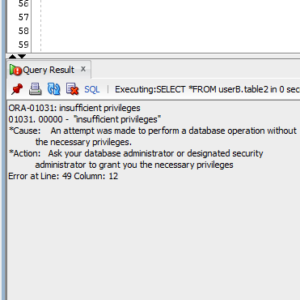
This could happen in many situations, such as:
- You attempted to change a username or password, without having the appropriate privileges.
- You attempted to query a table where you have at least one privilege but not the required privilege to run the query (e.g. you have SELECT but not UPDATE).
- You attempted to start an Oracle database using the CONNECT INTERNAL command.
- You attempted to install an Oracle database without having the appropriate privileges on the operating system.
There are many solutions to this error message.
First, you could ask the Oracle database administrator to grant you the privileges you are missing. Often this can be an oversight (a missing privilege in a script or a change that wasn’t implemented correctly), so they may grant it to you.
If they won’t grant you the required privileges, you can ask the DBA to execute the code or statement for you.
This is common if you have some privileges but not the required privileges. Let’s take a look at an example.
Some Privileges But Not All Required Privileges
You might get the ORA-01031 error if you have SELECT privileges on a table, but you’re trying to run another statement (such as UPDATE or DELETE) and don’t have permission to do that.
Let’s see an example.
CREATE USER userA IDENTIFIED BY password;
CREATE USER userB IDENTIFIED BY password;
CREATE USER testUser IDENTIFIED BY password;
GRANT CONNECT, CREATE SESSION TO testUser;
CREATE TABLE userA.table1(someValue VARCHAR2(1));
CREATE TABLE userB.table2(someValue VARCHAR2(1));
GRANT DELETE ON userB.table2 to testUser;
The above statements show that:
- Two users have been created (userA and userB)
- They each have one table in their schema (userA.table1, and userB.table2)
- We’ll use testUser to test our SELECT queries.
- The only privilege granted to testUser is DELETE on userB.table2. Nothing has been granted on userA.table1.
Now, let’s connect as the testUser and run some queries.
SELECT *
FROM userA.table1;
ORA-00942: table or view does not exist
More information on the ORA-00942 error can be found here.
SELECT *
FROM userB.table2;
ORA-01031: insufficient privileges
We get the first error because, according to testUser, the table doesn’t exist. It actually does exist, but testUser has no privileges on it, so this is expected behaviour.
Now, we get the ORA-01031 on the second table because we have the DELETE privilege, but not the SELECT privilege. We can see the table because we have at least one privilege on it, but we get this error because we don’t have the privilege to do what we want on it.
ORA-01031 On Create View
If you’re getting this error when creating a view, then it’s likely due to not having the correct privileges on the underlying table, or tables.
A CREATE VIEW statement contains a SELECT statement. So, check that you can run the SELECT statement successfully.
If you can’t, then check your privileges against this table. You might need to ask for the privileges from the DBA, or ask the DBA to create the view (as mentioned above).
If you can see the data from the SELECT query, but can’t create the view, it could be you don’t have the appropriate privileges to create the view.
To create a view in the database, you need the CREATE VIEW privilege, as well as the SELECT privilege on the underlying tables. If you don’t have this, then ask the DBA to grant it to you, or ask them to create the view for you.
ORA-01031 Create Table
You could get this error as you’re creating a table.
If so, then it means you don’t have the right privileges to create the table.
This might seem obvious, but I thought I’d clarify.
You need the CREATE TABLE privilege to create a table on the database.
Just like with the earlier scenarios of this error message, you can ask the DBA to grant you the privilege, or get the DBA to run the statement and create the table for you.
Содержание
- ORA-01031: insufficient privileges
- Best Answer
- Answers
- How to Resolve ORA-01031: Insufficient Privileges
- ORA-01031
- Select (Query)
- Solution to ORA-01031
- Create Table
- Solution to ORA-01031
- Create Index
- Solution to ORA-01031
- Create View
- Inherit Privilege from Role
- Solution to ORA-01031
- Alter Table (ADD CONSTRAINT)
- Solution to ORA-01031
- Alter User
- Password Change
- Insert, Update and Delete
- Solution to ORA-01031
- EXECUTE IMMEDIATE
- Inherit Privilege from Role
- Rationale
- Solutions to ORA-01031
- 1. Directly Granting to User
- 2. Use Invoker’s Right
- 3. Anonymous PL/SQL Block
- DGMGRL
- DGMGRL Switchover
- DGMGRL Convert
- Solution to ORA-01031
- Alter Pluggable Database Close
- 1. Grant SYSDBA to the User
- 2. Connect as SYSDBA
ORA-01031: insufficient privileges
I’ve a 10.2.0.4 instance. It was running for long time a go. Today, I want log in use sqlplus as sysdba user, and I get the error: ORA-01031: insufficient privileges
On linux, I’m login as oracle user. I always did the same without problems but today is impossible.
I’ve try to recreate the orapwd file but, I get the same error.
Please, any way to log in as sysdba with sqlplus without need to restart the instance?
Best Answer
rajeysh wrote:
create a password file for your database,
set command shows password file is in /oracle folder create a new password file in ORACLE_HOME/dbs folder
PWD=/oracle
you created a password file in $ORACLE_HOME check it and correct it.
Answers
Have you tried to login as;
OR
What is your database state, is it open or idle? Can you please show the «lsnrctl status» output please?
thx for your support.
If i try connect with all connection string I’ve no problem:
SQL*Plus: Release 10.2.0.4.0 — Production on Fri Jul 30 12:13:55 2010
Copyright (c) 1982, 2007, Oracle. All Rights Reserved.
Connected to:
Oracle Database 10g Enterprise Edition Release 10.2.0.4.0 — 64bit Production
With the Partitioning, OLAP, Data Mining and Real Application Testing options
SQL> select status from v$instance;
but with short mode I can’t:
]$ sqlplus ‘/as sysdba’
SQL*Plus: Release 10.2.0.4.0 — Production on Fri Jul 30 12:11:13 2010
Copyright (c) 1982, 2007, Oracle. All Rights Reserved.
ERROR:
ORA-01031: insufficient privileges
The listener is ok and running:
[[email protected]
]$ lsnrctl status LISTENER_BPELPRO
LSNRCTL for Linux: Version 10.2.0.4.0 — Production on 30-JUL-2010 12:10:05
Copyright (c) 1991, 2007, Oracle. All rights reserved.
Connecting to (DESCRIPTION=(ADDRESS=(PROTOCOL=TCP)(HOST=vip-lhorabpel)(PORT=1525)))
STATUS of the LISTENER
————————
Alias LISTENER_BPELPRO
Version TNSLSNR for Linux: Version 10.2.0.4.0 — Production
Start Date 22-JUN-2010 14:10:13
Uptime 37 days 21 hr. 59 min. 52 sec
Trace Level off
Security ON: Local OS Authentication
SNMP OFF
Listener Parameter File /oracle/10.2.0/db_1/network/admin/listener.ora
Listener Log File /oracle/10.2.0/db_1/network/log/listener_bpelpro.log
Listening Endpoints Summary.
(DESCRIPTION=(ADDRESS=(PROTOCOL=tcp)(HOST=192.168.31.115)(PORT=1525)))
(DESCRIPTION=(ADDRESS=(PROTOCOL=tcp)(HOST=10.121.11.153)(PORT=1523)))
(DESCRIPTION=(ADDRESS=(PROTOCOL=ipc)(KEY=EXTPROC0)))
Services Summary.
Service «BPELPRO» has 1 instance(s).
Instance «BPELPRO», status READY, has 1 handler(s) for this service.
Service «PLSExtProc» has 1 instance(s).
Instance «PLSExtProc», status UNKNOWN, has 1 handler(s) for this service.
Service «bpelproXDB» has 1 instance(s).
Instance «BPELPRO», status READY, has 1 handler(s) for this service.
Service «bpelpro_XPT» has 1 instance(s).
Instance «BPELPRO», status READY, has 1 handler(s) for this service.
The command completed successfully
Here is an illustration for you;
Your problem is nothing to do with the password file than. It could be because of your environmental variables maybe. Can you please show the «env» output and your database name?
By the way do you have the same databases on 10.121.11.153 and 192.168.31.115 ip address?
Also can you please try to connect to the database like;
Hope That Helps.
]$ sqlplus ‘/as sysdba’+
SQL*Plus: Release 10.2.0.4.0 — Production on Fri Jul 30 12:11:13 2010
Copyright (c) 1982, 2007, Oracle. All Rights Reserved.
ERROR:
ORA-01031: insufficient privileges
Do not execute sqlplus ‘/as sysdba’ ,you need execute sqlplus «/as sysdba»,in additionally to connecting sqlplus «/as sysdba» your currently logged user(OS user) must member of dba group(OS group).Check this.
Here you have the results you demand:
]$ env
HOSTNAME=srvprodb01
SHELL=/bin/bash
TERM=vt100
HISTSIZE=1000
NLS_LANG=AMERICAN_AMERICA.AL32UTF8
OLDPWD=/oracle/10.2.0/db_1/dbs
USER=oracle
LD_LIBRARY_PATH=/oracle/10.2.0/db_1/lib
LS_COLORS=no=00:fi=00:di=01;34:ln=01;36:pi=40;33:so=01;35:bd=40;33;01:cd=40;33;01:or=01;05;37;41:mi=01;05;37;41:ex=01;32:*.cmd=01;32:*.exe=01;32:*.com=01;32:*.btm=01;32:*.bat=01;32:*.sh=01;32:*.csh=01;32:*.tar=01;31:*.tgz=01;31:*.arj=01;31:*.taz=01;31:*.lzh=01;31:*.zip=01;31:*.z=01;31:*.Z=01;31:*.gz=01;31:*.bz2=01;31:*.bz=01;31:*.tz=01;31:*.rpm=01;31:*.cpio=01;31:*.jpg=01;35:*.gif=01;35:*.bmp=01;35:*.xbm=01;35:*.xpm=01;35:*.png=01;35:*.tif=01;35:
ORACLE_SID=BPELPRO
ORACLE_HOSTNAME=vip-lhorabpel
ORACLE_BASE=/oracle
MAIL=/var/spool/mail/oracle
PATH=/oracle/10.2.0/db_1/bin:/oracle/10.2.0/db_1/opmn/bin:/oracle/10.2.0/db_1/dcm/bin:/oracle/10.2.0/db_1/bin:/oracle/10.2.0/db_1/opmn/bin:/oracle/10.2.0/db_1/dcm/bin:/usr/kerberos/bin:/usr/local/bin:/bin:/usr/bin:/oracle/bin
INPUTRC=/etc/inputrc
PWD=/oracle
LANG=en_US.UTF-8
ORACLE_TERM=xterm
SSH_ASKPASS=/usr/libexec/openssh/gnome-ssh-askpass
SHLVL=1
HOME=/oracle
LOGNAME=oracle
CVS_RSH=ssh
LESSOPEN=|/usr/bin/lesspipe.sh %s
ORACLE_HOME=/oracle/10.2.0/db_1
G_BROKEN_FILENAMES=1
_=/bin/env
SQL> select name from v$database;
Before use sqlplus, I always charge this enviroment file:
[[email protected]
Источник
How to Resolve ORA-01031: Insufficient Privileges
ORA-01031
ORA-01031: Insufficient Privileges means that the current user did not use the right privilege to process the SQL statement.
Since this error can be seen almost in every kind of SQL statement, sometimes you would never know what privilege you lack. So I do my best to collect cases for you.
There’re several error patterns of ORA-01031 in this post. You may click whichever situation you encountered.
Select (Query)
Tried to select other’s table, we got ORA-01031: insufficient privileges.
SQL> show user
USER is «HR»
SQL> select distinct gender from oe.customers;
select distinct gender from oe.customers
*
ERROR at line 1:
ORA-01031: insufficient privileges
Theoretically, if we can’t see other’s table, we got ORA-00942: table or view does not exist. But the error message indicates us that we don’t use the right privilege to do it. Why? We’d better do some tests.
The first test is that, can we describe the table’s definition?
Yes, we can see its metadata, but not data.
So what object privileges we have now? Let’s check them by a privileged user.
SQL> show user
USER is «SYSTEM»
SQL> select privilege from dba_tab_privs where owner = ‘OE’ and table_name = ‘CUSTOMERS’ and grantee = ‘HR’ order by 1;
OK, we can INSERT , UPDATE and DELETE , but no SELECT privilege. This is really weird.
Solution to ORA-01031
To solve insufficient privilege in querying, we should grant SELECT privilege to the user.
SQL> grant select on oe.customers to hr;
Then we query the table again.
SQL> select distinct gender from oe.customers;
OK, the problem is solved.
Create Table
ORA-01031 is very common when a new user wants to create a table. Let’s see an example.
SQL> conn / as sysdba
Connected.
SQL> create user thomas identified by thomas;
SQL> grant create session to thomas;
As you can see, a new user THOMAS is created, but we only grant CREATE SESSION to him, which allows him to connect to the database. Let’s see what will happen if the new user wants to create a table.
C:Usersedchen>sqlplus thomas/thomas@orcl
.
SQL> create table test1 (id number, e_id number);
create table test1 (id number, e_id number)
*
ERROR at line 1:
ORA-01031: insufficient privileges
Immediately, ORA-01031: insufficient privileges shows up, which tells THOMAS he doesn’t have the right privilege to do that.
Solution to ORA-01031
The solution is simple, just grant CREATE TABLE to user, a schema-based privilege or CREATE ANY TABLE , a system-wide privilege.
SQL> conn / as sysdba
Connected.
SQL> grant create table to thomas;
Then tell Thomas to try it again.
SQL> create table test1 (id number, e_id number);
If you use EXECUTE IMMEDIATE to run CREATE TABLE in a stored procedure, you may check ORA-01031 in EXECUTE IMMEDIATE section in this post.
Create Index
In the above section, we have granted CREATE TABLE to THOMAS , which enables Thomas the ability to CREATE INDEX in his schema.
Please note that, CREATE INDEX is not a valid privilege, but CREATE ANY INDEX is.
Let’s see an example and then we guess what privilege we need.
Suppose Thomas wants to create an index for SH.CUSTOMERS in Thomas’s schema, so we grant SELECT on that table (object privilege) by instinct.
SQL> grant select on sh.customers to thomas;
Then Thomas tries to create an index on that table.
SQL> create index customer_id_gen_idx on sh.customers (cust_id, cust_gender);
create index oe.customer_id_gen_idx on sh.customers (cust_id, cust_gender)
*
ERROR at line 1:
ORA-01031: insufficient privileges
Solution to ORA-01031
This is because SELECT on that table is not enough, you should additionally grant INDEX on that table to user, which is an object privilege.
SQL> grant index on sh.customers to thomas;
SQL> create index customer_id_gen_idx on sh.customers (cust_id, cust_gender);
Even though the case is possible in reality, we seldom create index for other user’s table in our schema.
Create View
If you have read the above section, then you have known that you have to grant CREATE VIEW to the user who complain ORA-01031.
SQL> grant create view to thomas;
If the user still got ORA-01031 after granting CREATE VIEW to him, it must be a deeper problem. That’s why this section is little longer.
Inherit Privilege from Role
Some privileges inherited from the role might not work in some situation, especially when accessing intermediate kinds of object, like views or store procedures.
Here is a case that can reproduce the error.
We grant role RESOURCE to THOMAS . Then we grant the system privilege SELECT ANY TABLE to the role RESOURCE .
SQL> grant resource to thomas;
SQL> grant select any table to resource;
So we can expect that the user THOMAS inherits the system privilege from RESOURCE . That is, THOMAS can select any other’s table.
Let’s do the first test. Use THOMAS to select other user’s table SH.SALE .
SQL> select count(*) from sh.sales;
Good, it acts as we expected, although THOMAS has not any object privilege on SH.SALE .
Let’s do the second test. Use THOMAS to create a view which is based on other user’s table SH.SALE .
SQL> create view sh_sales_v as select * from sh.sales;
create view sh_sales_v as select * from sh.sales
*
ERROR at line 1:
ORA-01031: insufficient privileges
What happened? THOMAS has CREATE VIEW and inherit SELECT ANY TABLE from RESOURCE , it should have no problem.
The result implies that the role’s privileges does not reach underlying objects through intermediate objects like views.
Solution to ORA-01031
The solution to this problem is to grant SELECT on the table to user directly.
First, grant the object privilege explicitly to resolve the problem.
SQL> grant select on sh.sales to thomas;
Then tell Thomas to create view again.
SQL> create view sh_sales_v as select * from sh.sales;
Now, it’s no problem.
Please notice that, if you create a synonym on SH.SALES , it will succeed whether the explicit object privilege is granted directly or not.
Alter Table (ADD CONSTRAINT)
In the above section, we have granted CREATE TABLE to THOMAS . Implicitly, he also has the right to ALTER TABLE on schema-level. So the cause of ORA-01031 in ALTER TABLE is not so obvious as we thought.
Please note that, ALTER TABLE is not a privilege, but ALTER ANY TABLE is. That’s why there’s no such GRANT ALTER TABLE TO statement.
Let’s see an example. User Thomas wants to add a constraint so as to make a reference to another user’s data, so we grant SELECT on that table to THOMAS by instinct.
SQL> grant select on hr.employees to thomas;
Then we make the reference.
SQL> alter table test1 add constraint fk_eid foreign key (e_id) references hr.employees (employee_id);
alter table test1 add constraint fk_eid foreign key (e_id) references hr.employees (employee_id)
*
ERROR at line 1:
ORA-01031: insufficient privileges
We got ORA-01031.
Solution to ORA-01031
The right privilege to reference other’s data is not SELECT , it’s REFERENCES .
We should grant REFERENCES on the table to user either by HR or privileged users.
SQL> grant references on hr.employees to thomas;
Now Thomas can finish his job.
SQL> alter table test1 add constraint fk_eid foreign key (e_id) references hr.employees (employee_id);
Alter User
Tried to add some quota on tablespace to itself, but it lacks of some privileges.
SQL> show user
USER is «HR»
SQL> alter user hr quota unlimited on users;
alter user hr quota unlimited on users
*
ERROR at line 1:
ORA-01031: insufficient privileges
The right privilege in this case is ALTER USER .
SQL> show user
USER is «SYSTEM»
SQL> grant alter user to hr;
Then we do it again.
SQL> show user
USER is «HR»
SQL> alter user hr quota unlimited on users;
SQL> alter user oe account lock;
As you can see, with ALTER USER privilege, the user not only can grant some quota to itself, but also can change other’s status.
Password Change
Tried to change other’s password by SQL*Plus command password , but the user has inadequate privileges.
SQL> show user
USER is «HR»
SQL> password oe
Changing password for oe
New password:
Retype new password:
ERROR:
ORA-01031: insufficient privileges
Since password command is actually an ALTER USER statement, the correct privilege to change other’s password is ALTER USER .
Insert, Update and Delete
You may have the right to select other’s table.
SQL> conn sh/sh
Connected.
SQL> select * from hr.t1;
But you may not have the right to modify the table. For example, INSERT INTO some data like this:
SQL> insert into hr.t1 values (4);
insert into hr.t1 values (4)
*
ERROR at line 1:
ORA-01031: insufficient privileges
This is because you lack INSERT , UPDATE or DELETE privilege to modify on that table which is usually owned by others.
Solution to ORA-01031
Clearly, the right privilege is INSERT , UPDATE or DELETE at object-level. You may ask for DBA or the object owner to grant the privilege to you.
SQL> conn hr/hr
Connected.
SQL> grant insert,update,delete on hr.t1 to sh;
As we can see, the grantor grants 3 object privileges INSERT , UPDATE and DELETE on the table to the grantee at a time.
In some cases, you may consider to grant all possible object privileges to user, for example:
SQL> grant all on hr.t1 to sh;
In the statement, ALL is a keyword which means all possible privileges on specified object. For a table, it naturally includes not only SELECT , but also INSERT , UPDATE and DELETE .
As a result, we can insert some rows.
SQL> conn sh/sh
Connected.
SQL> insert into hr.t1 values (4);
Commit complete. SQL> select * from hr.t1;
That is to say, not only SELECT , but also INSERT , UPDATE or DELETE privilege you should have to manipulate tables owned by other users.
Let’s see how I reproduce ORA-01031 for statements using EXECUTE IMMEDIATE by the following example.
Inherit Privilege from Role
In the above section, I have granted role RESOURCE to THOMAS . Now I grant CREATE ANY DIRECTORY and DROP ANY DIRECTORY to the role RESOURCE .
SQL> grant create any directory, drop any directory to resource;
So we can expect that user THOMAS can also do such operations by inheriting all privileges from RESOURCE .
Things look fine when we use THOMAS to create or drop directories.
SQL> create directory tmp_path as ‘/u02/tmp’;
SQL> drop directory tmp_path;
SQL> create directory tmp_path as ‘/u02/tmp’;
Now, Thomas would like to create directories in stored procedures which is also called named PL/SQL blocks or programming units.
First of all, DBA have to grant CREATE PROCEDURE to him before Thomas doing anything.
SQL> grant create procedure to thomas;
Then Thomas create a procedure like this:
SQL> create or replace procedure drop_create_tmp_dir is
begin
execute immediate ‘drop directory tmp_path’;
execute immediate ‘create or replace directory tmp_path as »/u02/tmp»’;
end drop_create_tmp_dir;
/
2 3 4 5 6
Procedure created.
It seems no problem. But when we execute the stored procedure (named PL/SQL), we got ORA-01031 at line 3.
SQL> exec drop_create_tmp_dir;
BEGIN drop_create_tmp_dir; END;
*
ERROR at line 1:
ORA-01031: insufficient privileges
ORA-06512: at «THOMAS.DROP_CREATE_TMP_DIR», line 3
ORA-06512: at line 1
Rationale
Solutions to ORA-01031
Now we have several options, the first one is to grant all necessary privilege to the user directly, the second one is to use invoker’s right, and the last one is to use anonymous PL/SQL blocks.
1. Directly Granting to User
THOMAS should directly get the system privilege from DBA, not inherit from role.
SQL> grant create any directory, drop any directory to thomas;
Back to THOMAS , we can execute it again.
SQL> exec drop_create_tmp_dir;
PL/SQL procedure successfully completed.
The better thing is that we don’t have to recompile the procedure.
2. Use Invoker’s Right
Another way to solve ORA-01031 for statements in EXECUTE IMMEDIATE is to use invoker’s right to define the procedure.
Let’s revert the granting by SYS.
SQL> revoke create any directory, drop any directory from thomas;
SQL> create or replace procedure drop_create_tmp_dir authid current_user is
begin
execute immediate ‘drop directory tmp_path’;
execute immediate ‘create or replace directory tmp_path as »/u02/tmp»’;
end drop_create_tmp_dir;
/
2 3 4 5 6
Procedure created.
Try to execute the procedure by THOMAS .
SQL> exec drop_create_tmp_dir;
PL/SQL procedure successfully completed.
By invoker’s right, we can use role’s privileges.
3. Anonymous PL/SQL Block
What we mean in the above is that role privileges cannot penetrate NAMED stored procedures. That is to say, you can use role privileges in anonymous PL/SQL blocks. For instance, we can rewrite the stored procedure to an anonymous PL/SQL as this:
begin
execute immediate ‘drop directory tmp_path’;
execute immediate ‘create or replace directory tmp_path as »/u02/tmp»’;
end;
/
You can save and use it as a normal SQL script file.
For the same reason, CREATE TABLE in EXECUTE IMMEDIATE can also throw ORA-01031.
DGMGRL
DGMGRL allows user to query the status of all nodes involved through the local authentication without problem, but it might fail to switchover to a standby database or convert to a snapshot standby.
DGMGRL Switchover
Let’s see a switchover in 11g, it will fail when you connect DGMGRL with local authentication.
]$ dgmgrl /
.
DGMGRL> switchover to standb
Performing switchover NOW, please wait.
Operation requires shutdown of instance «primdb2» on database «primdb»
Shutting down instance «primdb2».
ORA-01031: insufficient privileges
Warning: You are no longer connected to ORACLE.
Please complete the following steps and reissue the SWITCHOVER command:
shut down instance «primdb2» of database «primdb»
But if you connect DGMGRL with the database password, the switchover will succeed.
]$ dgmgrl sys/password@primdb1
.
DGMGRL> switchover to standb
Performing switchover NOW, please wait.
Operation requires shutdown of instance «primdb2» on database «primdb»
Shutting down instance «primdb2».
Database closed.
Database dismounted.
ORACLE instance shut down.
New primary database «standb» is opening.
Operation requires shutdown of instance «primdb1» on database «primdb»
Shutting down instance «primdb1».
ORA-01109: database not open
Database dismounted.
ORACLE instance shut down.
Operation requires startup of instance «primdb1» on database «primdb»
Starting instance «primdb1».
ORACLE instance started.
Database mounted.
Switchover succeeded, new primary is «standb»
DGMGRL>
DGMGRL Convert
Same error happened in a conversion.
]$ dgmgrl /
.
DGMGRL> CONVERT DATABASE standb TO SNAPSHOT STANDBY;
Converting database «standb» to a Snapshot Standby database, please wait.
Operation requires shutdown of instance «standb2» on database «standb»
Shutting down instance «standb2».
ORA-01031: insufficient privileges
Warning: You are no longer connected to ORACLE.
Please complete the following steps and reissue the CONVERT command:
shut down instance «standb2» of database «standb»
Solution to ORA-01031
You must use the database authentication to convert a standby database.
]$ dgmgrl sys/password@primdb1
.
DGMGRL> CONVERT DATABASE standb TO SNAPSHOT STANDBY;
Converting database «standb» to a Snapshot Standby database, please wait.
Operation requires shutdown of instance «standb2» on database «standb»
Shutting down instance «standb2».
ORA-01109: database not open
Database dismounted.
ORACLE instance shut down.
Continuing to convert database «standb» .
Database «standb» converted successfully
.
Alter Pluggable Database Close
We saw an error when we tried to close a pluggable database (PDB) by a normal user.
SQL> conn hr/password@orclpdb
Connected.
SQL> show user
USER is «HR»
SQL> alter pluggable database close;
alter pluggable database close
*
ERROR at line 1:
ORA-01031: insufficient privileges
To solve ORA-01031, we take two steps to make the user be able to close a PDB.
1. Grant SYSDBA to the User
Please make sure that you login as SYS and are in the right container.
SQL> show user
USER is «SYS»
SQL> show con_namev
CON_NAME
——————————
ORCLPDB
Then we grant SYSDBA privilege to the user.
SQL> grant sysdba to hr;
2. Connect as SYSDBA
The user should use SYSDBA privilege to connect to the PDB.
SQL> conn hr/password@orclpdb as sysdba
Connected.
SQL> alter pluggable database close;
Pluggable database altered.
Actually, the normal user has become a SYS which of course has the ability to maintain database.
Источник