You are here means you are facing “ora-01033 oracle initialization or shutdown in progress” error while trying to login into the Oracle database. A few days ago I faced the same issue and here are the steps that I have followed to troubleshoot which helped me login into the database successfully.
This article will help you understand the error message, possible causes, and their solutions. So without wasting time, let’s start digging into the error message.
What does “ora-01033 oracle initialization or shutdown in progress” error mean?
The error message is very clear and explains that the Oracle initialization or shutdown process is in progress, hence we cannot perform any other action on the database till initialization/shutdown is in progress. After completion of either initialization or shutdown, you will be able to perform the required action on the database.
There are following five reasons that may result in the error message and the steps you need to follow in order to fix the error.
1. The database is in the middle of starting or shutdown process
Reason:
If you have just started or shut down the database and executed a new command then you may end up receiving “ora-01033 oracle initialization or shutdown in progress” error message as already some process is going on and you are trying to execute a new command.
Solution:
Wait for the process to complete. Sometimes starting or shutdown down the database may take some time due to system performance or some processes are used in another application. If you still facing the same error after some time, then check out the below point.
2. An issue with the database services
Reason:
There may be some issues with the database services. Either database services are stopped or getting issues while starting. Many users have observed that they faced an issue while starting the database service due to updated security settings. Due to security settings, users may face port or access-related issues.
Solution:
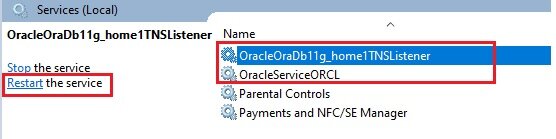
Restart the database services. Check if database services are up and running. There is a possibility of the database service got hung and in that case, restarting the Oracle services will solve the issue. Here are the steps to do so.
- Got to search bar, type Services and select Services app.
- Restart Oracle Service and then Oracle Listener Service as shown below.
3. Forced shutdown or incomplete shutdown of database
Reason:
When you execute a command to shut down the database, database software internally executes some stepwise procedures to shut down the database. And it may take a few minutes. If you forcefully close the database service or shut down the system due to a power cut issue in between the database shutdown process then it may result in a complete shutdown of the database. Which can cause the above error message while login into the database again.
Solution:
Shut down and start the database. If there is any issue during the shutdown and startup process then try shutting down the database forcefully and start again using the below steps.
- Open command prompt and log in as sysdba using the following command
sqlplus / as sysdba - Enter the following command to forcefully shutdown database
shutdown abort; - Execute the below command to startup the database again
startup;
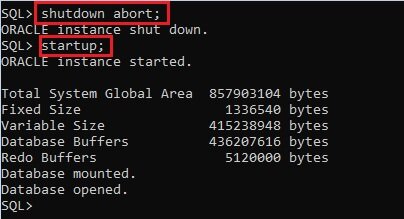
Now try to login into the database and you should be able to log in without any error message. If you are still getting the error then try the next step.
4. The database is not mounted or opened
Reason:
If the database is not mounted properly, while starting the database then it can result in the error message “ora-01033 oracle initialization or shutdown in progress“. If the database is mounted then it’s available for the database administrators only. Normal users can’t access a database that is mounted but not opened.
Solution:
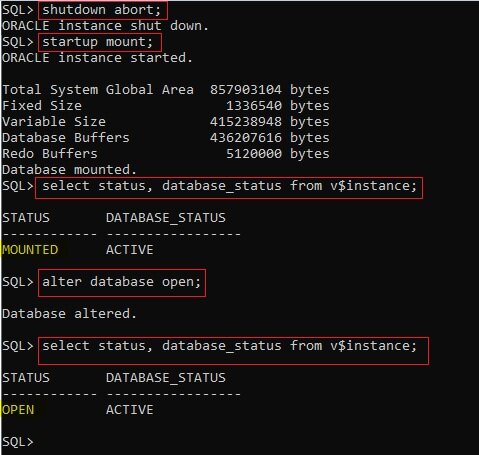
Try to mount and open the database using the following steps and it should fix the error.
If the database is mounted but not open then you may end up getting the error as well. To check whether the database is MOUNTED or OPEN or neither of those, you can execute points #4 and #6 to understand the current status.
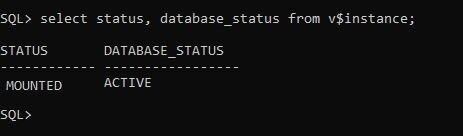
Note: If STATUS is MOUNTED then it means the database is mounted but not opened.
- Open command prompt and log in to database as sysdba.
sqlplus / as sysdba - Forcefully shutdown database.
shutdown abort; - Mount the database.
startup mount; - Check whether the database is mounted or not.
select status, database_status from v$instance; - Open the database.
alter database open; - Check whether the database is open or not.
select status, database_status from v$instance;
5. Corrupted database files
Some intentional or unintentional invalid activity may damage some database files. If DBF, CTL, or ORA files are corrupted then it can cause the error “ora-01033 oracle initialization or shutdown in progress”.
If all the above steps do not work and you are still getting the same error message, then uninstall the database software and install it again. Before uninstalling the DB, make sure you take a backup of the data.
Create a new database instance and try to import the previous database files if you have taken the backup of the running instance.
Note: It’s highly recommended to take a backup of the database from time to time. If you come across such issues where it cannot be resolved, then restoring the DB to a previous stage is easy or else you will end up losing all the data.
Final thoughts:
We hope you are able to get rid of the “ora-01033 oracle initialization or shutdown in progress” error using the above steps. Let us know in the comments which steps helped you fix the error. If you are still having challenges, do mention them in the comment section and we would be happy to help you.
Read also:
How to use Column Mode Editing in Notepad++
Introduction
Before starting the topic, first I want to explain why this started up or shutdown error occurs. Sometimes while making the clone of production database into a test server this type of error may be encountered.So there are the following major reasons why ORA-01033 error occurs:
- The ORA-01033 error also happens when you have leftover RAM regions held by the OS that makes Oracle think that an instance is already running.
- The ORA-01033 error also happens when the database is not open.
- The ORA-01033: ORACLE initialization or shutdown in progress error can also happen when Oracle is attempting startup or shutdown and is «hanging» on a resource such as a failed disk, writing to redo, etc.

To fix this error follow the bellow steps,
Step 1
Open command prompt and give the command,
- sqlplus / as sysdba

When you hit the ENTER key, it shows it’s connected to Oracle 12c.

Step 2
To check the connection name, use the following command,
- show con_name;

When you hit the ENTER key, It shows connection CDB$ROOT (container Database Selected from root).
Step 3
Check the schema name and connection id using the below command–
- select name,con_id from v$pdbs;

When you hit the ENTER key, it shows the name of schema object with respect to their id’s.

Note that, in PDB$SEED the ‘SEED’ is template, used to create a new pluggable database within the container database (CDB).
Step 4
Now, select name of pluggable database from active services whose connection id=3, by using the following command –
- select name from v$active_services where con_id=3;

When you hit the ENTER key, It shows the name ‘pdborcl’.

Step 5
Now, close the command prompt and follow the below procedure.
- Open the ‘app’ folder which is created, while installing the oracle 12c.
- After opening the ‘app’ folder open the ‘DB user folder’. The ‘DB user folder’ is that folder, whose name you assigned by your own, while installing oracle 12c. In my case it is ‘sanghdeep’.
- After this, you see the same folder. From those folders, open the ‘product’ folder.

- After opening the ‘product’ folder, open the ‘12.1.0’ folder. It varies from your Oracle DB version.
- After opening the ‘12.1.0’ folder, open the ‘dbhome_1’ folder.
- The ‘dbhome_1’ folder contains many different types of folders, from those folders you should open the ‘ NETWORK ‘ folder.

- After opening the ‘NETWORK’ folder, open the ‘ADMIN’ folder.

- After opening the ‘ADMIN’ folder, open the ‘ tnsnames.ora’ file in any text editor.

After opening the ‘ tnsnames.ora’ file in text editor, you see the following code.
- # tnsnames.ora Network Configuration File: E:appsanghdeepproduct12.1.0dbhome_1networkadmintnsnames.ora
- # Generated by Oracle configuration tools.
- LISTENER_ORCL = (
- ADDRESS = (PROTOCOL = TCP)(HOST = localhost)(PORT = 1521)
- ) ORACLR_CONNECTION_DATA = (
- DESCRIPTION = (
- ADDRESS_LIST = (
- ADDRESS = (PROTOCOL = IPC)(KEY = EXTPROC1521)
- )
- ) (
- CONNECT_DATA = (SID = CLRExtProc) (PRESENTATION = RO)
- )
- ) ORCL = (
- DESCRIPTION = (
- ADDRESS = (PROTOCOL = TCP)(HOST = localhost)(PORT = 1521)
- ) (
- CONNECT_DATA = (SERVER = DEDICATED) (SERVICE_NAME = orcl)
- )
- )
From the above code copy the last portion of the code i.e.:
- ORCL = (
- DESCRIPTION = (
- ADDRESS = (PROTOCOL = TCP)(HOST = localhost)(PORT = 1521)
- ) (
- CONNECT_DATA = (SERVER = DEDICATED) (SERVICE_NAME = orcl)
- )
- )
And paste it at the end of the whole code. Then, make the change into it as follows. After making the following changes save it.
- PDBORCL = (
- DESCRIPTION = (
- ADDRESS = (PROTOCOL = TCP)(HOST = localhost)(PORT = 1521)
- ) (
- CONNECT_DATA = (SERVER = DEDICATED) (SERVICE_NAME = pdborcl)
- )
- )
Finally ensure that your entire code will looks as follows. And close the ‘tnsnames.ora’ file and also close the ‘app’ folder.
- # tnsnames.ora Network Configuration File: E:appsanghdeepproduct12.1.0dbhome_1networkadmintnsnames.ora
- # Generated by Oracle configuration tools.
- LISTENER_ORCL = (
- ADDRESS = (PROTOCOL = TCP)(HOST = localhost)(PORT = 1521)
- ) ORACLR_CONNECTION_DATA = (
- DESCRIPTION = (
- ADDRESS_LIST = (
- ADDRESS = (PROTOCOL = IPC)(KEY = EXTPROC1521)
- )
- ) (
- CONNECT_DATA = (SID = CLRExtProc) (PRESENTATION = RO)
- )
- ) ORCL = (
- DESCRIPTION = (
- ADDRESS = (PROTOCOL = TCP)(HOST = localhost)(PORT = 1521)
- ) (
- CONNECT_DATA = (SERVER = DEDICATED) (SERVICE_NAME = orcl)
- )
- ) PDBORCL = (
- DESCRIPTION = (
- ADDRESS = (PROTOCOL = TCP)(HOST = localhost)(PORT = 1521)
- ) (
- CONNECT_DATA = (SERVER = DEDICATED) (SERVICE_NAME = pdborcl)
- )
- )
Step 6
Open the command prompt as ‘administrator’ and give the following command.
- lsnrctl reload

When you hit the ENTER key, it shows a description about connection.

Step 7
Now, give the command,
- sqlplus / as sysdba

When you hit the ENTER key, it shows a description about connection.

Step 8
To alter the session from container database to pluggable database give the command-
- alter session set container=pdborcl;

When you hit the ENTER key, it shows session altered.

Step 9
To check if the session is altered from CDB$ROOT to PDBORCL use the following command-
- show con_name;

When you hit the ENTER key, It shows connection name as ‘PDBORCL’.

Step 10
Now check the connection mode, give the following command-
- select name,open_mode from v$pdbs;

When you hit the ENTER key, It shows connection mode is ‘OPEN_MODE’ but pluggable database is ‘MOUNTED’

Step 11
Now, alter the pluggable database to change the open mode from ‘MOUNTED’ to ‘READ WRITE’, by using the command-
- alter pluggable database open;

Step 12
To ensure the ‘OPEN_MODE’ of pluggable database is changed from ‘MOUNTED’ to ‘READ WRITE’, once again use the command-
- select name,open_mode from v$pdbs;
When you hit the Enter key, ‘OPEN_MODE’ is ‘READ WRITE’.

Step 13
Now the pluggable database is altered and the open mode is also changed as ‘READ WRITE’. So we can unlock the HR Schema. To unlock the HR schema use the following command,
- alter user HR identified by HR account unlock;
When you hit the Enter key, then HR schema will unlock and it shows user altered.

Step 14
To connect with the pluggable database using HR schema use the following command-
- conn HR/HR @pdborcl;
When you hit the Enter key, it shows as connected.

Step 15
- show user;
When you hit the Enter key, it shows USER is “HR”.

In this way, we successfully fix the ORA-01033 error, to unlock th HR schema object. Now we can connect with pluggable database using HR user. Open the SQL developer tool and enter username as ‘HR’ and password is also ‘HR’ and click on ‘OK’ button.

Now you see that, the ORA-01033 error is successfully fixed and we successfully connected with pluggable database using HR schema object/HR user.

Summary
In this article we learned about how to fix the start up or shutdown error (ORA — 01033 error).
Introduction
Before starting the topic, first I want to explain why this started up or shutdown error occurs. Sometimes while making the clone of production database into a test server this type of error may be encountered.So there are the following major reasons why ORA-01033 error occurs:
- The ORA-01033 error also happens when you have leftover RAM regions held by the OS that makes Oracle think that an instance is already running.
- The ORA-01033 error also happens when the database is not open.
- The ORA-01033: ORACLE initialization or shutdown in progress error can also happen when Oracle is attempting startup or shutdown and is «hanging» on a resource such as a failed disk, writing to redo, etc.
To fix this error follow the bellow steps,
Step 1
Open command prompt and give the command,
- sqlplus / as sysdba
When you hit the ENTER key, it shows it’s connected to Oracle 12c.
Step 2
To check the connection name, use the following command,
- show con_name;
When you hit the ENTER key, It shows connection CDB$ROOT (container Database Selected from root).
Step 3
Check the schema name and connection id using the below command–
- select name,con_id from v$pdbs;
When you hit the ENTER key, it shows the name of schema object with respect to their id’s.
Note that, in PDB$SEED the ‘SEED’ is template, used to create a new pluggable database within the container database (CDB).
Step 4
Now, select name of pluggable database from active services whose connection id=3, by using the following command –
- select name from v$active_services where con_id=3;
When you hit the ENTER key, It shows the name ‘pdborcl’.
Step 5
Now, close the command prompt and follow the below procedure.
- Open the ‘app’ folder which is created, while installing the oracle 12c.
- After opening the ‘app’ folder open the ‘DB user folder’. The ‘DB user folder’ is that folder, whose name you assigned by your own, while installing oracle 12c. In my case it is ‘sanghdeep’.
- After this, you see the same folder. From those folders, open the ‘product’ folder.
- After opening the ‘product’ folder, open the ‘12.1.0’ folder. It varies from your Oracle DB version.
- After opening the ‘12.1.0’ folder, open the ‘dbhome_1’ folder.
- The ‘dbhome_1’ folder contains many different types of folders, from those folders you should open the ‘ NETWORK ‘ folder.
- After opening the ‘NETWORK’ folder, open the ‘ADMIN’ folder.
- After opening the ‘ADMIN’ folder, open the ‘ tnsnames.ora’ file in any text editor.
After opening the ‘ tnsnames.ora’ file in text editor, you see the following code.
- # tnsnames.ora Network Configuration File: E:appsanghdeepproduct12.1.0dbhome_1networkadmintnsnames.ora
- # Generated by Oracle configuration tools.
- LISTENER_ORCL = (
- ADDRESS = (PROTOCOL = TCP)(HOST = localhost)(PORT = 1521)
- ) ORACLR_CONNECTION_DATA = (
- DESCRIPTION = (
- ADDRESS_LIST = (
- ADDRESS = (PROTOCOL = IPC)(KEY = EXTPROC1521)
- )
- ) (
- CONNECT_DATA = (SID = CLRExtProc) (PRESENTATION = RO)
- )
- ) ORCL = (
- DESCRIPTION = (
- ADDRESS = (PROTOCOL = TCP)(HOST = localhost)(PORT = 1521)
- ) (
- CONNECT_DATA = (SERVER = DEDICATED) (SERVICE_NAME = orcl)
- )
- )
From the above code copy the last portion of the code i.e.:
- ORCL = (
- DESCRIPTION = (
- ADDRESS = (PROTOCOL = TCP)(HOST = localhost)(PORT = 1521)
- ) (
- CONNECT_DATA = (SERVER = DEDICATED) (SERVICE_NAME = orcl)
- )
- )
And paste it at the end of the whole code. Then, make the change into it as follows. After making the following changes save it.
- PDBORCL = (
- DESCRIPTION = (
- ADDRESS = (PROTOCOL = TCP)(HOST = localhost)(PORT = 1521)
- ) (
- CONNECT_DATA = (SERVER = DEDICATED) (SERVICE_NAME = pdborcl)
- )
- )
Finally ensure that your entire code will looks as follows. And close the ‘tnsnames.ora’ file and also close the ‘app’ folder.
- # tnsnames.ora Network Configuration File: E:appsanghdeepproduct12.1.0dbhome_1networkadmintnsnames.ora
- # Generated by Oracle configuration tools.
- LISTENER_ORCL = (
- ADDRESS = (PROTOCOL = TCP)(HOST = localhost)(PORT = 1521)
- ) ORACLR_CONNECTION_DATA = (
- DESCRIPTION = (
- ADDRESS_LIST = (
- ADDRESS = (PROTOCOL = IPC)(KEY = EXTPROC1521)
- )
- ) (
- CONNECT_DATA = (SID = CLRExtProc) (PRESENTATION = RO)
- )
- ) ORCL = (
- DESCRIPTION = (
- ADDRESS = (PROTOCOL = TCP)(HOST = localhost)(PORT = 1521)
- ) (
- CONNECT_DATA = (SERVER = DEDICATED) (SERVICE_NAME = orcl)
- )
- ) PDBORCL = (
- DESCRIPTION = (
- ADDRESS = (PROTOCOL = TCP)(HOST = localhost)(PORT = 1521)
- ) (
- CONNECT_DATA = (SERVER = DEDICATED) (SERVICE_NAME = pdborcl)
- )
- )
Step 6
Open the command prompt as ‘administrator’ and give the following command.
- lsnrctl reload
When you hit the ENTER key, it shows a description about connection.
Step 7
Now, give the command,
- sqlplus / as sysdba
When you hit the ENTER key, it shows a description about connection.
Step 8
To alter the session from container database to pluggable database give the command-
- alter session set container=pdborcl;
When you hit the ENTER key, it shows session altered.
Step 9
To check if the session is altered from CDB$ROOT to PDBORCL use the following command-
- show con_name;
When you hit the ENTER key, It shows connection name as ‘PDBORCL’.
Step 10
Now check the connection mode, give the following command-
- select name,open_mode from v$pdbs;
When you hit the ENTER key, It shows connection mode is ‘OPEN_MODE’ but pluggable database is ‘MOUNTED’
Step 11
Now, alter the pluggable database to change the open mode from ‘MOUNTED’ to ‘READ WRITE’, by using the command-
- alter pluggable database open;
Step 12
To ensure the ‘OPEN_MODE’ of pluggable database is changed from ‘MOUNTED’ to ‘READ WRITE’, once again use the command-
- select name,open_mode from v$pdbs;
When you hit the Enter key, ‘OPEN_MODE’ is ‘READ WRITE’.
Step 13
Now the pluggable database is altered and the open mode is also changed as ‘READ WRITE’. So we can unlock the HR Schema. To unlock the HR schema use the following command,
- alter user HR identified by HR account unlock;
When you hit the Enter key, then HR schema will unlock and it shows user altered.
Step 14
To connect with the pluggable database using HR schema use the following command-
- conn HR/HR @pdborcl;
When you hit the Enter key, it shows as connected.
Step 15
- show user;
When you hit the Enter key, it shows USER is “HR”.
In this way, we successfully fix the ORA-01033 error, to unlock th HR schema object. Now we can connect with pluggable database using HR user. Open the SQL developer tool and enter username as ‘HR’ and password is also ‘HR’ and click on ‘OK’ button.
Now you see that, the ORA-01033 error is successfully fixed and we successfully connected with pluggable database using HR schema object/HR user.
Summary
In this article we learned about how to fix the start up or shutdown error (ORA — 01033 error).
Yesterday I installed Oracle 12c Enterprise edition on my laptop. When I tried to connect to DB via SQLPLUS i got the below error
C:UsersUSER>sqlplus

SQL*Plus: Release 12.1.0.2.0 Production on Sun Feb 28 14:12:46 2016

Copyright (c) 1982, 2014, Oracle.  All rights reserved.

Enter user-name: userdb
Enter password:
ERROR:
ORA-01033: ORACLE initialization or shutdown in progress
Process ID: 0
Session ID: 0 Serial number: 0
I tried all the tricks mentioned on internet but couldn’t get rid of this error.
I also tried below
SQL> shutdown immediate;
ORA-01109: database not open


Database dismounted.
ORACLE instance shut down.
SQL> startup;
ORACLE instance started.

Total System Global Area 1543503872 bytes
Fixed Size                  3045984 bytes
Variable Size             989857184 bytes
Database Buffers          536870912 bytes
Redo Buffers               13729792 bytes
Database mounted.
ORA-01157: cannot identify/lock data file 10 - see DBWR trace file
ORA-01110: data file 10:
'C:ORACLEDB12CAPPUSERNAMEORADATAORCLPDBORCLEXAMPLE01.DBF'
also tried below but still getting error’s
SQL> shutdown abort
ORACLE instance shut down.
SQL> startup nomount
ORACLE instance started.

Total System Global Area 1543503872 bytes
Fixed Size                  3045984 bytes
Variable Size             989857184 bytes
Database Buffers          536870912 bytes
Redo Buffers               13729792 bytes
SQL> alter database mount;

Database altered.

SQL> alter database open;
alter database open
*
ERROR at line 1:
ORA-01157: cannot identify/lock data file 10 - see DBWR trace file
ORA-01110: data file 10:
'C:ORACLEDB12CAPPUSERNAMEORADATAORCLPDBORCLEXAMPLE01.DBF'


SQL> recover database;
ORA-00283: recovery session canceled due to errors
ORA-01110: data file 10:
'C:ORACLEDB12CAPPUSERNAMEORADATAORCLPDBORCLEXAMPLE01.DBF'
ORA-01157: cannot identify/lock data file 10 - see DBWR trace file
ORA-01110: data file 10:
'C:ORACLEDB12CAPPUSERNAMEORADATAORCLPDBORCLEXAMPLE01.DBF'
Can someone help here? thanks!
Summary: in this tutorial, you will learn how to fix the ORACLE initialization or shutdown in progress error when you connect to the Oracle Database.
Sometimes, you may encounter the following error when you connect to an Oracle pluggable database in Oracle Database 12c:
Code language: SQL (Structured Query Language) (sql)
An error was encountered performing the requested operation: ORA-01033: ORACLE initialization or shutdown in progress 01033. 00000 - "ORACLE initialization or shutdown in progress" *Cause: An attempt was made to log on while Oracle is being started up or shutdown. *Action: Wait a few minutes. Then retry the operation. Vendor code 1033
To fix this issue, you use the follwing steps:
First, launch the SQL*Plus program and login to the database instance as a SYSDBA user:
Code language: SQL (Structured Query Language) (sql)
Enter user-name: ot@pdborcl as sysdba Enter password: <password>
This statement connected to the PDBORCL database using the OT user.
Second, issue the following statement to check the status of the current instance:
Code language: SQL (Structured Query Language) (sql)
SQL> select status, database_status from v$instance; STATUS DATABASE_STATUS ------------ ----------------- MOUNTED ACTIVE
The output showed that the instance status is mounted.
Third, change the state of the Oracle Database instance to OPEN:
Code language: SQL (Structured Query Language) (sql)
SQL> alter database open; Database altered.
For more information on the Oracle Database stages, check it out the Startup Oracle Database instance tutorial.
Finally, double check the database status by using the following statement:
Code language: SQL (Structured Query Language) (sql)
select status, database_status from v$instance; STATUS DATABASE_STATUS ------------ ----------------- OPEN ACTIVE
The instance status is open and available to all users for normal operations.
Now, you should be able to connect to the OT pluggable database without any issue.
Was this tutorial helpful?

Are you getting the ORA-1033: ORACLE initialization or shutdown in progress error each time when you try to get connect with your database?
If yes, then read out this informative post which contains detailed information about ORACLE initialization or shutdown in progress error. Moreover, the post also covers some best fixes on how to resolve ORA-1033 error.
The Oracle error 1033 is in the form of Hexadecimal format. It is a very common error code format used by windows and other windows compatible software and driver vendors. This code is generally used by the vendors in order to identify the error caused. This error has a numeric value and a technical description. In most of the cases, the error may have more parameters in Oracle Error 1033 format. These hexadecimal codes are the addresses of the memory locations where the instructions were loaded at the error time.
What Are The Different Oracle Database Shutdown And Startup Modes?
Well, there are various stages that come under the process of database startup and shutdown. Let’s know about them more briefly.
Oracle Database Startup
Before the database is been opened for use, your database has to go through the following stages.
- Nomount State:
In this state database file, the control file and online redo log files are been closed. So these are not accessible. During this stage, Oracle instance and some v$ views (dynamic performance views) seem available.
- Mount state:
It’s is the next stage through which the oracle database has to pass before starting up the database.
In this stage, the control file will get open and the presence of all online redo log files and database files is verified.
- Open:
In this phase, online redo log files and data files are being opened. Now your database is ready to get used.
If any of the data file and online redo log file has got corrupted or goes missing then Oracle won’t allow you to open your database.
Oracle Database Shutdown
Oracle shutdown has three main modes: normal, immediate, and abort.
- Shutdown normal:
It’s a default mode of shut down the Oracle database. In this state, the Oracle server needs to until all the users disconnected from the database.
- Shutdown Transactional:
In this stage, the database will wait until the entire transaction process gets over, after then only it shut down the database. In this phase, the oracle database denies setting any new connection.
- Shutdown immediate:
During this stage, all the sessions are being disconnected. So the database will roll back all the on-going transactions and after the shutdown itself.
- Shutdown aborts:
In this phase, there is no option of rollback any transaction. It simply shutdowns the database directly. So if you take any backup after the database enters into the shutdown abort mode then that backup is not consistent anymore.
What Causes Ora-1033: ORACLE Initialization Or Shutdown In Progress?
The following are the causes of Ora-1033: ORACLE initialization or shutdown in progress error.
- Ora-1033 error also occurs when someone tries to attempt to log on while Oracle is either shutting down or starting up.
- The “Oracle 1033 Error may take place due to Windows system file damage. The corrupted system files entries can be a real threat to your computer.
- Oracle database is not mounted correctly.
- Oracle Database files like CTL, DBF, or ORA is either corrupted or moved somewhere else.
- When there some problem has occurred in the database services.
How To Fix Ora-1033 error: ORACLE Initialization Or Shutdown In Progress?
Try the below mentioned fixes to resolve Ora-1033 error: ORACLE Initialization or Shutdown in Progress.
Fix 1# Restart Your System Or The Database Service
If your Oracle database is still continuing with the process of shutting down or startup. Wait for few minutes and let the Oracle application to finish this process. If after waiting for a long time still the process won’t get over then restart your oracle application again or restart your complete system.
Fix 2# Release RAM Memory
Behind getting these ORA-1033 error chances are high that your PC’s operating system has kept some RAM regions leftover which Oracle count as an instance.
In that case, you need to remove all the oracle processes which are mainly associated with ORACLE_SID.
Look into all the segments of RAM memory and after that release the unwanted space from RAM memory.
Fix 3# Mount The Database Properly
The problem of ORACLE initialization or shutdown in progress also arises when the database is not correctly mounted. You need to mount and restart your Oracle database. You can do this easily with the help of the “alter database open” and “alter the database mount” query.
Here is the code to be applied for mounting the database properly:
SQL> connect / as sysdba
ConnectÚ.
SQL> shutdown abort
Instance ORACLE arrÛtÚe.
SQL> startup nomount
Instance ORACLE lancÚe.
SQL> alter database mount;
SQL> alter database open;
After performing this don’t forget to restart the database.
Fix 4# Problem With The Database CTL , DBF Or ORA Files )
You need to recover the Oracle Database CTL , DBF Or ORA Files if by mistakenly you have moved or changed these files.
Additionally, if you are getting the error ORA-19809 along with the ORA-01033 then it means the limit for the recovery files has exceeded now.
Fix 5# Delete Service And Recreate The Database
If still you are getting the same Ora 1033: ORACLE initialization or shutdown in progress then deleting the service and database is the only option. After that just re-create the database.
Note: Before performing this operation, just make a proper backup of your complete data.
- Go to the service.msc. After that stop the respective service.
- Using the command prompt just delete the service.in the cmd window type: sc delete <service name >
- Now recreate your Oracle database.
Fix 6# Try The Automated Option
If the above-given fixes won’t work to resolve Oracle Error 1033 try this last option i.e Oracle File Repair Tool.
As it is seen that oracle stuck into this initialization or shutdown in progress like issues also when some oracle database file got corrupted. So by resolving the corruption issue you can easily get over this Oracle error ORA-1033.


This software successfully recovers the entire database whether it is lost in any situation. With this tool, you can also repair damaged Oracle database files and also helps to restore tables, user names, and much more stuff.
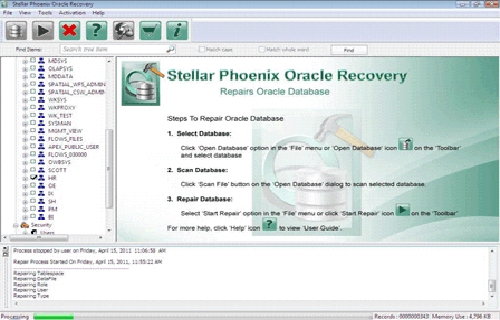
Steps To Use Oracle File repair tool
Step 1: Search the Initial screen of Oracle File repair tool with a pop-up window showing options to select or search corrupt Oracle databases on your computer.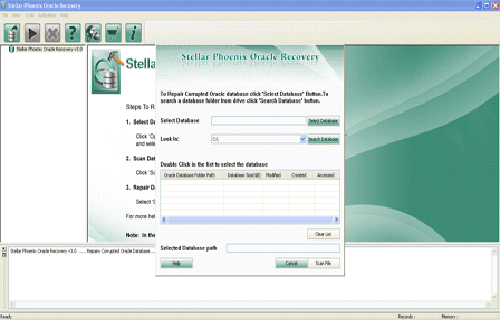
Step 2: Click Scan File to initiate the scan process after selecting the oracle database. The recoverable database objects get listed in left-side pane.
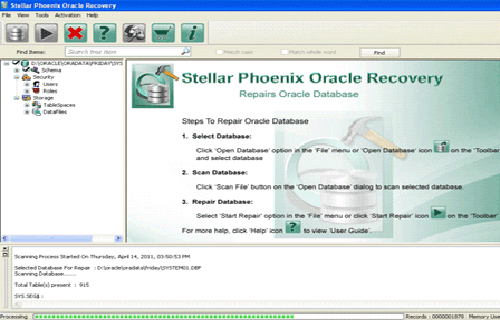
Step 3: Click an object to see its preview.
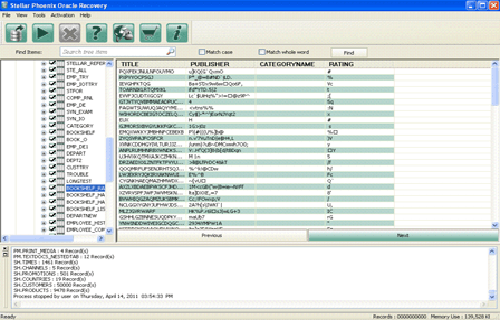
Step 4: : Click Start Repair in the icon bar to start the repair process. A pop-up window is displayed which show the steps needed to perform further. Click next and continue.

Step 5: Give the user name, password and path of the blank database where you want to save the repaired database objects.
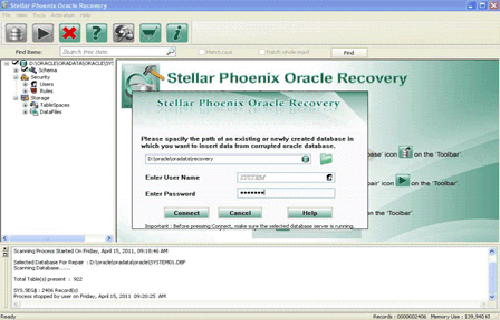
Step 6: Repairing and restoring various database objects after establishing a connection with blank oracle database.
Final Verdict:
Now that you know what’s causing this ORA-01033 error to get happened. So make sure that the Oracle database is not undergoing any process of shutting down or starting up. Also, check whether the database is mounted correctly or there is some problem with database files or services.
One very simple solution to fix many problems of the oracle database is to shut down and restarting the application again.
Even after trying all the fixes outlined above if the problem persists and still, you are getting ORA-1033 then contact the database administrator for further assistance. Or you can consult with the licensed Oracle professionals.

Jacob Martin is a technology enthusiast having experience of more than 4 years with great interest in database administration. He is expertise in related subjects like SQL database, Access, Oracle & others. Jacob has Master of Science (M.S) degree from the University of Dallas. He loves to write and provide solutions to people on database repair. Apart from this, he also loves to visit different countries in free time.
|
0 / 0 / 0 Регистрация: 06.02.2010 Сообщений: 14 |
|
|
1 |
|
|
06.02.2010, 16:36. Показов 55127. Ответов 33
Возникла следующая проблема: Я думал, возможно после установки на клиентском компьютере сервера oracle клиенты каким-то образом стали прослушивать бд не на сервере, а на этом клиенте, поэтому его удалил, но всеравно не работает.
__________________
0 |

|
64 / 44 / 6 Регистрация: 10.01.2010 Сообщений: 99 |
|
|
07.02.2010, 09:30 |
2 |
|
Ошибка ORA-01033 возникает при попытке подключения к не открытой или вовсе не запущенной БД. Попробуйте подключиться к БД под пользователем sys и выполнить команду startup. Какие ошибки возникают?
2 |
|
0 / 0 / 0 Регистрация: 06.02.2010 Сообщений: 14 |
|
|
08.02.2010, 12:38 [ТС] |
3 |
|
Сделал startup, в результате чего получил ошибку: Добавлено через 2 часа 7 минут
0 |
|
648 / 77 / 0 Регистрация: 23.01.2010 Сообщений: 193 |
|
|
08.02.2010, 14:51 |
4 |
|
Я redo лог, указанный в сообщении об ошибке, существует?
0 |
|
0 / 0 / 0 Регистрация: 06.02.2010 Сообщений: 14 |
|
|
08.02.2010, 16:55 [ТС] |
5 |
|
Нет. Его восстановить можно? Добавлено через 55 минут Другой вопрос, есть возможность восстановить данные, т.к. база оказалась пустой. Еще вопрос, что значит ошибка: Добавлено через 12 минут
0 |
|
648 / 77 / 0 Регистрация: 23.01.2010 Сообщений: 193 |
|
|
08.02.2010, 22:32 |
6 |
|
При ошибке: ORA-00942 либо не существует таблицы (представления), либо у у пользователя нет прав на выборку из нее.
1 |
|
0 / 0 / 0 Регистрация: 06.02.2010 Сообщений: 14 |
|
|
10.02.2010, 21:42 [ТС] |
7 |
|
По логам можно восстановить даннные? Если да, то как?
0 |
|
648 / 77 / 0 Регистрация: 23.01.2010 Сообщений: 193 |
|
|
11.02.2010, 15:15 |
8 |
|
Backup есть? База в archivlog или noarchivlog (чтобы узнать нужно в состоянии open или mount выполнить select log_mode from v$database; )?
0 |
|
0 / 0 / 0 Регистрация: 06.02.2010 Сообщений: 14 |
|
|
11.02.2010, 17:56 [ТС] |
9 |
|
noarchivelog.
0 |
|
12 / 11 / 1 Регистрация: 11.02.2010 Сообщений: 57 |
|
|
11.02.2010, 19:42 |
10 |
|
Также возможен вариант, когда вы ображаетесь к чужому объекту из хранимой процедуры, а права на таблицу выданы через роль. Гхм… ) Я всегда считал, что процедура выполняется из под пользователя ее запустившего) Насколько я понимаю без бэкапа ничего не сделать(. Это будем самым простым и быстрым решение, вероятнее всего) Добавлено через 20 минут Я думал, возможно после установки на клиентском компьютере сервера oracle клиенты каким-то образом стали прослушивать бд не на сервере, а на этом клиенте, поэтому его удалил, но всеравно не работает. А клиенты вообще как работают с сервером? (механизм)
0 |
|
648 / 77 / 0 Регистрация: 23.01.2010 Сообщений: 193 |
|
|
11.02.2010, 21:15 |
11 |
|
noarchivelog. Похоже что да. В крайнем случае мне не известна последовательность действий, необходимая при таких входных данных.
Гхм… ) Я всегда считал, что процедура выполняется из под пользователя ее запустившего) Это не совсем так. По умолчанию хранимые процедуры (пакеты, функции, процедуры) выполняются с правами владельца. Для того чтобы они выполнялись с правами текущего пользователя они должны быть определены AUTHID CURRENT_USER
0 |


|
12 / 11 / 1 Регистрация: 11.02.2010 Сообщений: 57 |
|
|
11.02.2010, 21:18 |
12 |
|
Пардон протупил)
0 |
|
5 / 5 / 0 Регистрация: 22.12.2011 Сообщений: 121 |
|
|
27.03.2012, 14:08 |
13 |
|
Вроде заработало. Скажите что конктретно сделали, та же ошибка …. Но я немогу под sys законектится(
0 |
|
Модератор 4186 / 3026 / 576 Регистрация: 21.01.2011 Сообщений: 13,096 |
|
|
27.03.2012, 14:25 |
14 |
|
Скажите что конктретно сделали, та же ошибка …. Но я немогу под sys законектится( Какая та же? ТС несколько ошибок упоминал
0 |

|
5 / 5 / 0 Регистрация: 22.12.2011 Сообщений: 121 |
|
|
27.03.2012, 15:11 |
15 |
|
Какая та же? ТС несколько ошибок упоминал Ошибка ORA-01033
0 |
|
Модератор 4186 / 3026 / 576 Регистрация: 21.01.2011 Сообщений: 13,096 |
|
|
27.03.2012, 15:17 |
16 |
|
Ничего не понял. К какой из них тебе надо коннектиться? И как выглядит «смерть» SQL*Plus?
0 |
|
5 / 5 / 0 Регистрация: 22.12.2011 Сообщений: 121 |
|
|
27.03.2012, 15:22 |
17 |
|
К какой из них тебе надо коннектиться — к локальной, она на моем компе.
И как выглядит «смерть» SQL*Plus? Вот так — Copyright (c) 1982, 2007, Oracle. All rights reserved. Enter user-name: system Enter user-name:
0 |
|
Модератор 4186 / 3026 / 576 Регистрация: 21.01.2011 Сообщений: 13,096 |
|
|
27.03.2012, 15:47 |
18 |
|
У тебя БД в непонятном состоянии. Найди файл alert.log чтобы определить, что с ней сейчас происходит. Может быть придется перезапустить службу экземпляра. PS
0 |
|
5 / 5 / 0 Регистрация: 22.12.2011 Сообщений: 121 |
|
|
27.03.2012, 16:44 |
19 |
|
файл alert.log такого файла не находит, есть только — C894D538793FFA3B4727BCBCD84D4925.alert.log.xml Добавлено через 4 минуты
Кстати, пишешь про коннект под sys-ом, а показываешь коннект под system Вот sys SQL> connect sys
0 |
|
Модератор 4186 / 3026 / 576 Регистрация: 21.01.2011 Сообщений: 13,096 |
|
|
27.03.2012, 16:57 |
20 |
|
Начиная с Ora 11 у Oracle 2 файла alert.log. XML-формат в директории alert и прежний текстовый формат — в директории trace. И лучше его найти, поскольку без этого трудно разбираться с проблемами БД, особенно запуска.
0 |
|
IT_Exp Эксперт 87844 / 49110 / 22898 Регистрация: 17.06.2006 Сообщений: 92,604 |
27.03.2012, 16:57 |
|
20 |