-
mitushinem
- Завсегдатай
- Сообщения: 25
- Зарегистрирован: 20 сен 2013 04:07
- Откуда: Смоленск
- Контактная информация:
Проблема при установке ПО через Application Catalog
Есть проблема с установкой любого ПО через Application Catalog.
После запуска на установку вроде бы как все проходит нормально и программы устанавливаются, но выдается ошибка установки (код ошибки 0x87d00324 2016410844).
Правила проверки настраиваю по пути до запускаемого файла. При повторном запуске уже говорит что программа установлена, ну это и логично.
Все разворачивается для категории Все пользователи, режим установки — для системы.
Но если приложение удалить, то потом оно становится хорошо
Буду пробовать назначить на устройство, хотя не уверен что это что-то изменит

Спасибо!
-
Виталий Якоб
- Администратор сайта
- Сообщения: 36
- Зарегистрирован: 19 сен 2013 09:52
Re: Проблема при установке ПО через Application Catalog
Сообщение
Виталий Якоб » 07 окт 2013 17:03
mitushinem писал(а):
Правила проверки настраиваю по пути до запускаемого файла. При повторном запуске уже говорит что программа установлена, ну это и логично.
Не очень удачный выбор метода обнаружения. Кто-то может установить ПО в какой-то другой каталог, с точки зрения системы ПО будет установлено, с CM — нет. Выйдет подобная коллизия и если мне не изменяет память, CM будет пробовать развернуть задачу 1004 раза.
В данном случае, установка производится с MSI пакета, поэтому лучший метод обнаружения будет «Установщик Windows» с кодом продукта.
Такая ошибка сто процентов возникает у Вас и при обязательном развёртывании, либо на x86 либо на x64 системах.
-
Виталий Якоб
- Администратор сайта
- Сообщения: 36
- Зарегистрирован: 19 сен 2013 09:52
Re: Проблема при установке ПО через Application Catalog
Сообщение
Виталий Якоб » 16 окт 2013 10:36
Обнаружение программ установленных через различные инсталляторы завёрнутые в EXE мы делаем через реестр:
Обнаружение настраивается на существование ключа реестра. Необходимо настраивать обнаружение для двух типов систем, x64 и x86.
Пример для обнаружения Mozilla FireFox 15
X86
Код: Выделить всё
HKLMSOFTWAREMicrosoftWindowsCurrentVersionUninstallMozilla Firefox 15.0.1 (x86 ru)
X64
Код: Выделить всё
HKLMSOFTWAREWow6432NodeMicrosoftWindowsCurrentVersionUninstallMozilla Firefox 15.0.1 (x86 ru)
-
alyam
- Сообщения: 2
- Зарегистрирован: 08 мар 2017 07:25
Re: Проблема при установке ПО через Application Catalog
Сообщение
alyam » 04 май 2018 09:50
здрасьте!
а как быть, если устанавливаешь приложение — сценарий BAT (распаковка архива в папку %userprofile%ПАПКА111)
я указываю в методе обнаружения папку. путь %userprofile%. имя папки ПАПКА111
сценарий отрабатывает, приложение развертывается, но выдается ошибка проверки установки
- Remove From My Forums

Установка программ из Каталога приложений.
-
Вопрос
-
Приветствую!!! Простите если задаю повторный вопрос по поводу установки приложений с расширением .exe
Как все-таки добиться, чтобы после установки вручную программы с расширением
*.EXE из каталога приложений В Центре программного обеспечения в состоянии было
Установлено а не Ошибка??Программа то устанавливается!!!
Ответы
-
Все разобрался, позвольте на будущее описать главный аспект установки программ с расширением
*.exeПри наличии ошибки 0x87D00324(-2016410844) в файле AppEnforce.log Наблюдается следующая
строчка:<![LOG[+++ Application not discovered. [AppDT Id: ScopeId_0674945A-210C-49BD-B0F3-BDB409102618/DeploymentType_b3e2b0b4-04c0-498f-955a-e4191b4633eb, Revision: 1]]LOG]!><time=»13:53:25.416-240″ date=»09-17-2012″ component=»AppEnforce» context=»» type=»1″
thread=»10992″ file=»localapphandler.cpp:291″>Все это обозначает, что программа не может проверить наличии её на данном компе. А все дело в настройке Метода обнаружения!!!
Необходимо ПРАВИЛЬНО указывать путь, где предположительно будет находится ваше приложение!!!
-
Помечено в качестве ответа
17 сентября 2012 г. 11:07
-
Помечено в качестве ответа
установка приложения с ошибкой 0x87D00324 (-2016410844)
12.02.2014, 19:57
Ошибка из серии «поспешишь — людей насмешишь и будешь читать логи».
Установка Visio 2013 x86 на операционную систему x64 заканчивается ошибкой:
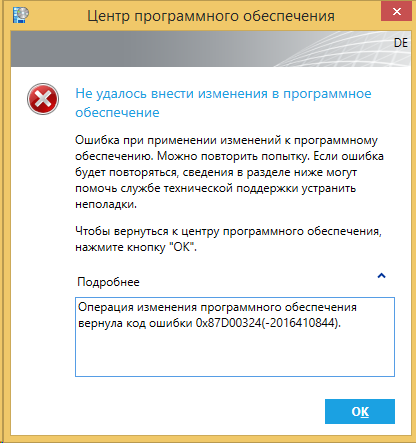

AppEnforce.log:
Executing Command line: «C:Windowsccmcache8setup.exe» /adminfile silent.msp with user context
Working directory C:Windowsccmcache8
Post install behavior is BasedOnExitCode
Waiting for process 2268 to finish. Timeout = 120 minutes.
Process 2268 terminated with exitcode: 0 <— код возврата 0 говорит о том, что приложение установилось корректно
Looking for exit code 0 in exit codes table…
Matched exit code 0 to a Success entry in exit codes table.
Performing detection of app deployment type Silent install Visio 2013 x86(ScopeId_59A4B277-455C-46D4-9A22-85B0F4D6D8AF/DeploymentType_49e90a4a-5471-4fbb-af43-ca04b25a4c17, revision 1) for user.
+++ Application not discovered. [AppDT Id: ScopeId_59A4B277-455C-46D4-9A22-85B0F4D6D8AF/DeploymentType_49e90a4a-5471-4fbb-af43-ca04b25a4c17, Revision: 1] <— приложение не было найдено
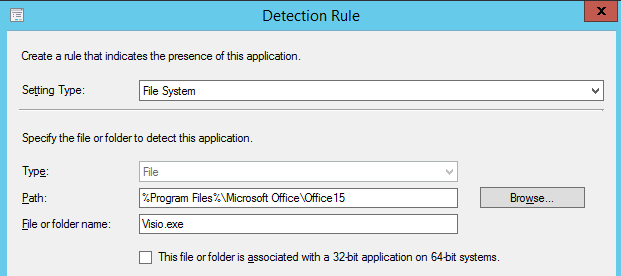
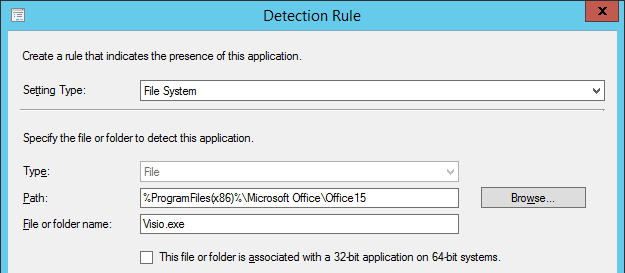
Т.е. приложение корректно устанавливается, но после завершения установки выдаёт ошибку. Это происходило из-за того, что в методах обнаружения в спешке был указан файл Visio.exe в папке %Program Files%Microsoft OfficeOffice15. 32-битное приложение в системе х64 устанавливается в папку Program Files (x86), а переменная %Program Files% перенаправляет нас в Program Files, где, понятное дело, нужных нам файлов нет.
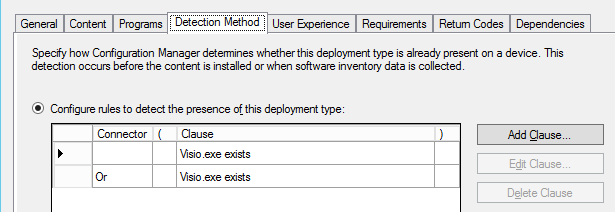
Правильным решением в данном случае будет указать два метода обнаружения:
I have a Lync 2013 SP1 deployment that is completing successfully but the Software Center is throwing «The software change returned error code 0x87D00324(-2016410844).»
The Lync 2013 SP1 deployment contains my custom MSP and the Sept 2014 update MSPs in the Updates directories for for the respective x86 and x64 clients.
I am calling the setup.exe from the root of the installation folder so the appropriate client is installed based on the bitness of Office.
I have tried several different detection methods from detection of Lync.exe in the %programfiles(x86)% and %programfiles%MicrosoftOffice15.0 directories as well as checking for the MSI product codes {90150000-012C-0000-1000-0000000FF1CE} and {90150000-012C-0000-0000-0000000FF1CE}
from the lyncwww.msi files for the different bitness of clients.
No matter what I choose the installation kicks off from Software Center but immediately it fails in Software Center with the error «The software change returned error code 0x87D00324(-2016410844).» However the setup.exe install continues
and successfully installs Lync 2013.
I am going mad trying to figure out what is causing the error in Software Center. As I understand it the detection engine is supposed to determine the presence of the application BEFORE it installs. So why is the application installing if the
detection is failing.
If it is trying to detect the application AFTER it has installed then why is it trying to do so before the application has finished installing?
Pertinent AppEnforce.log data:
![LOG[+++ Starting Install enforcement for App DT "Silent Install" ApplicationDeliveryType - ScopeId_CDCBD835-D896-47BB-B166-0E236669438B/DeploymentType_4912c99c-916e-4642-9c31-b50a4787c840, Revision - 4, ContentPath - C:Windowsccmcachej, Execution Context - System]LOG]!><time="11:20:11.998+240" date="10-24-2014" component="AppEnforce" context="" type="1" thread="16296" file="appprovider.cpp:1702">
<![LOG[    A user is logged on to the system.]LOG]!><time="11:20:12.000+240" date="10-24-2014" component="AppEnforce" context="" type="1" thread="16296" file="appprovider.cpp:2083">
<![LOG[    Performing detection of app deployment type Silent Install(ScopeId_CDCBD835-D896-47BB-B166-0E236669438B/DeploymentType_4912c99c-916e-4642-9c31-b50a4787c840, revision 4) for user.]LOG]!><time="11:20:12.007+240" date="10-24-2014" component="AppEnforce" context="" type="1" thread="16296" file="appprovider.cpp:2148">
<![LOG[+++ Application not discovered. [AppDT Id: ScopeId_CDCBD835-D896-47BB-B166-0E236669438B/DeploymentType_4912c99c-916e-4642-9c31-b50a4787c840, Revision: 4]]LOG]!><time="11:20:12.032+240" date="10-24-2014" component="AppEnforce" context="" type="1" thread="16296" file="localapphandler.cpp:291">
<![LOG[    App enforcement environment:
	Context: Machine
	Command line: "setup.exe"
	Allow user interaction: No
	UI mode: 1
	User token: not null
	Session Id: 1
	Content path: C:Windowsccmcachej
	Working directory: ]LOG]!><time="11:20:12.034+240" date="10-24-2014" component="AppEnforce" context="" type="1" thread="16296" file="appcontext.cpp:85">
<![LOG[    Prepared working directory: C:Windowsccmcachej]LOG]!><time="11:20:12.037+240" date="10-24-2014" component="AppEnforce" context="" type="1" thread="16296" file="appcontext.cpp:189">
<![LOG[    Prepared command line: "C:Windowsccmcachejsetup.exe"]LOG]!><time="11:20:12.042+240" date="10-24-2014" component="AppEnforce" context="" type="1" thread="16296" file="appcontext.cpp:338">
<![LOG[    Executing Command line: "C:Windowsccmcachejsetup.exe" with user context]LOG]!><time="11:20:12.045+240" date="10-24-2014" component="AppEnforce" context="" type="1" thread="16296" file="appexcnlib.cpp:205">
<![LOG[    Working directory C:Windowsccmcachej]LOG]!><time="11:20:12.046+240" date="10-24-2014" component="AppEnforce" context="" type="1" thread="16296" file="appexcnlib.cpp:219">
<![LOG[    Post install behavior is BasedOnExitCode]LOG]!><time="11:20:12.098+240" date="10-24-2014" component="AppEnforce" context="" type="1" thread="16296" file="appcommon.cpp:1094">
<![LOG[    Waiting for process 15676 to finish.  Timeout = 15 minutes.]LOG]!><time="11:20:12.101+240" date="10-24-2014" component="AppEnforce" context="" type="1" thread="16296" file="appexcnlib.cpp:2015">
<![LOG[    Process 15676 terminated with exitcode: 0]LOG]!><time="11:20:12.280+240" date="10-24-2014" component="AppEnforce" context="" type="1" thread="16296" file="appexcnlib.cpp:2024">
<![LOG[    Looking for exit code 0 in exit codes table...]LOG]!><time="11:20:12.281+240" date="10-24-2014" component="AppEnforce" context="" type="1" thread="16296" file="appexcnlib.cpp:508">
<![LOG[    Matched exit code 0 to a Success entry in exit codes table.]LOG]!><time="11:20:12.282+240" date="10-24-2014" component="AppEnforce" context="" type="1" thread="16296" file="appexcnlib.cpp:587">
<![LOG[    Performing detection of app deployment type Silent Install(ScopeId_CDCBD835-D896-47BB-B166-0E236669438B/DeploymentType_4912c99c-916e-4642-9c31-b50a4787c840, revision 4) for user.]LOG]!><time="11:20:12.287+240" date="10-24-2014" component="AppEnforce" context="" type="1" thread="16296" file="appprovider.cpp:2148">
<![LOG[+++ Application not discovered. [AppDT Id: ScopeId_CDCBD835-D896-47BB-B166-0E236669438B/DeploymentType_4912c99c-916e-4642-9c31-b50a4787c840, Revision: 4]]LOG]!><time="11:20:12.304+240" date="10-24-2014" component="AppEnforce" context="" type="1" thread="16296" file="localapphandler.cpp:291">
<![LOG[++++++ App enforcement completed (0 seconds) for App DT "Silent Install" [ScopeId_CDCBD835-D896-47BB-B166-0E236669438B/DeploymentType_4912c99c-916e-4642-9c31-b50a4787c840], Revision: 4, User SID: S-1-5-21-1960408961-1303643608-1801674531-36323] ++++++]LOG]!><time="11:20:12.306+240" date="10-24-2014" component="AppEnforce" context="" type="1" thread="16296" file="appprovider.cpp:2448">
You can see in the line sixth from the bottom that the install process seems to be terminating immediately after it begins, at least according to the engine..Yet the app install continues on successfully. It doesn’t seem to be respecting the timeout
setting for the application deployment.
-
Edited by
Friday, October 24, 2014 3:42 PM
I have a Lync 2013 SP1 deployment that is completing successfully but the Software Center is throwing «The software change returned error code 0x87D00324(-2016410844).»
The Lync 2013 SP1 deployment contains my custom MSP and the Sept 2014 update MSPs in the Updates directories for for the respective x86 and x64 clients.
I am calling the setup.exe from the root of the installation folder so the appropriate client is installed based on the bitness of Office.
I have tried several different detection methods from detection of Lync.exe in the %programfiles(x86)% and %programfiles%MicrosoftOffice15.0 directories as well as checking for the MSI product codes {90150000-012C-0000-1000-0000000FF1CE} and {90150000-012C-0000-0000-0000000FF1CE}
from the lyncwww.msi files for the different bitness of clients.
No matter what I choose the installation kicks off from Software Center but immediately it fails in Software Center with the error «The software change returned error code 0x87D00324(-2016410844).» However the setup.exe install continues
and successfully installs Lync 2013.
I am going mad trying to figure out what is causing the error in Software Center. As I understand it the detection engine is supposed to determine the presence of the application BEFORE it installs. So why is the application installing if the
detection is failing.
If it is trying to detect the application AFTER it has installed then why is it trying to do so before the application has finished installing?
Pertinent AppEnforce.log data:
![LOG[+++ Starting Install enforcement for App DT "Silent Install" ApplicationDeliveryType - ScopeId_CDCBD835-D896-47BB-B166-0E236669438B/DeploymentType_4912c99c-916e-4642-9c31-b50a4787c840, Revision - 4, ContentPath - C:Windowsccmcachej, Execution Context - System]LOG]!><time="11:20:11.998+240" date="10-24-2014" component="AppEnforce" context="" type="1" thread="16296" file="appprovider.cpp:1702">
<![LOG[    A user is logged on to the system.]LOG]!><time="11:20:12.000+240" date="10-24-2014" component="AppEnforce" context="" type="1" thread="16296" file="appprovider.cpp:2083">
<![LOG[    Performing detection of app deployment type Silent Install(ScopeId_CDCBD835-D896-47BB-B166-0E236669438B/DeploymentType_4912c99c-916e-4642-9c31-b50a4787c840, revision 4) for user.]LOG]!><time="11:20:12.007+240" date="10-24-2014" component="AppEnforce" context="" type="1" thread="16296" file="appprovider.cpp:2148">
<![LOG[+++ Application not discovered. [AppDT Id: ScopeId_CDCBD835-D896-47BB-B166-0E236669438B/DeploymentType_4912c99c-916e-4642-9c31-b50a4787c840, Revision: 4]]LOG]!><time="11:20:12.032+240" date="10-24-2014" component="AppEnforce" context="" type="1" thread="16296" file="localapphandler.cpp:291">
<![LOG[    App enforcement environment:
	Context: Machine
	Command line: "setup.exe"
	Allow user interaction: No
	UI mode: 1
	User token: not null
	Session Id: 1
	Content path: C:Windowsccmcachej
	Working directory: ]LOG]!><time="11:20:12.034+240" date="10-24-2014" component="AppEnforce" context="" type="1" thread="16296" file="appcontext.cpp:85">
<![LOG[    Prepared working directory: C:Windowsccmcachej]LOG]!><time="11:20:12.037+240" date="10-24-2014" component="AppEnforce" context="" type="1" thread="16296" file="appcontext.cpp:189">
<![LOG[    Prepared command line: "C:Windowsccmcachejsetup.exe"]LOG]!><time="11:20:12.042+240" date="10-24-2014" component="AppEnforce" context="" type="1" thread="16296" file="appcontext.cpp:338">
<![LOG[    Executing Command line: "C:Windowsccmcachejsetup.exe" with user context]LOG]!><time="11:20:12.045+240" date="10-24-2014" component="AppEnforce" context="" type="1" thread="16296" file="appexcnlib.cpp:205">
<![LOG[    Working directory C:Windowsccmcachej]LOG]!><time="11:20:12.046+240" date="10-24-2014" component="AppEnforce" context="" type="1" thread="16296" file="appexcnlib.cpp:219">
<![LOG[    Post install behavior is BasedOnExitCode]LOG]!><time="11:20:12.098+240" date="10-24-2014" component="AppEnforce" context="" type="1" thread="16296" file="appcommon.cpp:1094">
<![LOG[    Waiting for process 15676 to finish.  Timeout = 15 minutes.]LOG]!><time="11:20:12.101+240" date="10-24-2014" component="AppEnforce" context="" type="1" thread="16296" file="appexcnlib.cpp:2015">
<![LOG[    Process 15676 terminated with exitcode: 0]LOG]!><time="11:20:12.280+240" date="10-24-2014" component="AppEnforce" context="" type="1" thread="16296" file="appexcnlib.cpp:2024">
<![LOG[    Looking for exit code 0 in exit codes table...]LOG]!><time="11:20:12.281+240" date="10-24-2014" component="AppEnforce" context="" type="1" thread="16296" file="appexcnlib.cpp:508">
<![LOG[    Matched exit code 0 to a Success entry in exit codes table.]LOG]!><time="11:20:12.282+240" date="10-24-2014" component="AppEnforce" context="" type="1" thread="16296" file="appexcnlib.cpp:587">
<![LOG[    Performing detection of app deployment type Silent Install(ScopeId_CDCBD835-D896-47BB-B166-0E236669438B/DeploymentType_4912c99c-916e-4642-9c31-b50a4787c840, revision 4) for user.]LOG]!><time="11:20:12.287+240" date="10-24-2014" component="AppEnforce" context="" type="1" thread="16296" file="appprovider.cpp:2148">
<![LOG[+++ Application not discovered. [AppDT Id: ScopeId_CDCBD835-D896-47BB-B166-0E236669438B/DeploymentType_4912c99c-916e-4642-9c31-b50a4787c840, Revision: 4]]LOG]!><time="11:20:12.304+240" date="10-24-2014" component="AppEnforce" context="" type="1" thread="16296" file="localapphandler.cpp:291">
<![LOG[++++++ App enforcement completed (0 seconds) for App DT "Silent Install" [ScopeId_CDCBD835-D896-47BB-B166-0E236669438B/DeploymentType_4912c99c-916e-4642-9c31-b50a4787c840], Revision: 4, User SID: S-1-5-21-1960408961-1303643608-1801674531-36323] ++++++]LOG]!><time="11:20:12.306+240" date="10-24-2014" component="AppEnforce" context="" type="1" thread="16296" file="appprovider.cpp:2448">
You can see in the line sixth from the bottom that the install process seems to be terminating immediately after it begins, at least according to the engine..Yet the app install continues on successfully. It doesn’t seem to be respecting the timeout
setting for the application deployment.
-
Edited by
Friday, October 24, 2014 3:42 PM