This article, suggests a way of resolving the below error message, when you are trying to access SQL Server using “Microsoft OLE DB Provider for SQL Server” and TLS 1.0: [DBNETLIB] [ConnectionOpen (SECDoClientHandshake()).] SSL Security Error
Prior to start writing this article, I was thinking of using a title like “How to still use TLS 1.0”, or something similar, but besides the fact that would have given a wrong message, it would not help so much because many people, usually search for such articles using the error message (SSL Security error)…
So, I anticipate that this article, with this title, would help as many people as possible 🙂
Drop me a line if you find the article useful and why not, subscribe to my newsletter to stay up to date with future articles!
A Few Words About TLS 1.0
TLS 1.0 is considered a deprecated protocol and it is not recommended anymore to be used to secure connections. That’s why many organizations (if not all) transitioned or are in the process of transitioning to newer versions of TLS such as TLS1.1 or above.
However, you may still encounter outdated applications that still need to use this protocol, even for a while for just performing a single operation. One such example, is to try and connect to a SQL Server instance via Microsoft OLE DB Driver for SQL Server using TLS 1.0.
If you are in such situation, I have good news, from a technical aspect, it is still possible to do this.
Read on to learn more.
SQL Server Support for TLS 1.0 and Above
SQL Server still supports all TLS protocols, currently from 1.0 to 1.2. However, depending on the version of SQL Server you have, especially in cases of older SQL Server versions, you might need a patch.
Read this article on SQLNetHub to learn more about SQL Server support for TLS versions.
Now let’s jump to the juicy part of this article and see how finally we can resolve the above error and manage to connect to SQL Server using Microsoft OLE DB Driver for SQL Server and TLS 1.0.
Note that if you are just trying to connect with TLS 1.0 for a while in order to perform a specific task, then make sure to revert the below changes in order to restore the security level of your systems back to their previous level.
Latest Microsoft OLE DB Driver for SQL Server
The first step towards resolving the SSL Security error, is to make sure that the version of the target SQL Server instance you want to connect to, is supported by the driver.
For example, Microsoft OLE DB Driver 18.1 for SQL Server supports connecting to SQL Server 2012 or later.
For older versions of SQL Server, you will need to find an earlier version of Microsoft OLE DB Provider for SQL Server as well.
You can find the latest version of the OLE DB driver here.
Useful details:
The Microsoft OLE DB Provider for SQL Server, allows ADO to access Microsoft SQL Server. However, This is an older driver and it is not recommended to be used driver for new development, since it is deprecated.
The new OLE DB provider is called the Microsoft OLE DB Driver for SQL Server (MSOLEDBSQL) which will be updated with the most recent server features going forward (learn more)
Registry Changes
The next step is, to edit the Windows Registry (* always be careful when messing up with Windows Registry – only certified engineers should do that).
To enable TLS 1.0 in Windows
In Windows Registry, add the below dword keys:
[HKEY_LOCAL_MACHINESYSTEMCurrentControlSetControlSecurityProvidersSCHANNELProtocolsTLS 1.0Server]
- “Enabled”=dword:00000001
- “DisabledByDefault”=dword:00000000
[HKEY_LOCAL_MACHINESYSTEMCurrentControlSetControlSecurityProvidersSCHANNELProtocolsTLS 1.0Client]
- “Enabled”=dword:00000001
- “DisabledByDefault”=dword:00000000
To disable TLS 1.0 in Windows
[HKEY_LOCAL_MACHINESYSTEMCurrentControlSetControlSecurityProvidersSCHANNELProtocolsTLS 1.1Server]
- “Enabled”=dword:00000000
- “DisabledByDefault”=dword:00000001
[HKEY_LOCAL_MACHINESYSTEMCurrentControlSetControlSecurityProvidersSCHANNELProtocolsTLS 1.1Client]
- “Enabled”=dword:00000000
- “DisabledByDefault”=dword:00000001
Learn more about the above registry changes in this MS Docs article.
Local Security Policy
The next step is to check the Local Security Policy on the database server.
So, in Local Security Policy on the Database Server, make sure that the setting “System Cryptography: Use FIPS compliant algorithms for encryption, hashing, and signing” is disabled.
If you want to learn more about this security option, you can check this MS Docs article.
Strengthen your SQL Server Administration Skills – Enroll to our Online Course!
Check our online course on Udemy titled “Essential SQL Server Administration Tips”
(special limited-time discount included in link).Via the course, you will learn essential hands-on SQL Server Administration tips on SQL Server maintenance, security, performance, integration, error handling and more. Many live demonstrations and downloadable resources included!
(Lifetime Access/ Live Demos / Downloadable Resources and more!) Enroll from $12.99

Server Protocols, Ciphers, Hashes and Client Protocols
The last step in this troubleshooting guide, is to use IISCrypto, which is an excellent free tool, that allows you to control which protocols, ciphers, and more are enabled (or not) on a Windows server.
That being set, you will need to run IISCrypto and make sure that the “TLS 1.0” Server and Client Protocols, as well as the”SHA” hash are enabled.
Here’s a screenshot of IISCrypto, running on my PC, having TLS 1.0 and “SHA” enabled for illustration purposes:
![[DBNETLIB] [ConnectionOpen (SECDoClientHandshake()).] SSL Security Error - How to Resolve - Article on SQLNetHub](https://www.sqlnethub.com/wp-content/uploads/2019/02/IISCrypto-Example-SQLNetHub-SSL-Security-Error-Article.png "[DBNETLIB] [ConnectionOpen (SECDoClientHandshake()).] SSL Security Error - How to Resolve - Article on SQLNetHub")
Note that, if finally you need to perform any changes using IISCrypto, you will need to restart the server.
Actually, for any changes you might need to perform, it is recommended to restart the server.
A Piece of Advice
As mentioned in this article’s beginning, TLS 1.0 is considered a deprecated protocol and it is not recommended anymore to be used to secure connections.
Instead, you should be using newer versions of TLS.
In case you just need to switch to TLS 1.0 for performing an ad hoc task, you need to make sure that after you completed the task, you revoked any changes you might have applied, and disable again TLS 1.0 and the “SHA” hash.
See More
Check out DBA Security Advisor, a SQL Server security tool to assess your SQL Server instances against a rich set of security checks and get security best practice recommendations.
Featured Online Courses:
- SQL Server 2022: What’s New – New and Enhanced Features [New]
- Data Management for Beginners – Main Principles
- Introduction to Azure Database for MySQL
- Working with Python on Windows and SQL Server Databases
- Boost SQL Server Database Performance with In-Memory OLTP
- Introduction to Azure SQL Database for Beginners
- Essential SQL Server Administration Tips
- SQL Server Fundamentals – SQL Database for Beginners
- Essential SQL Server Development Tips for SQL Developers
- Introduction to Computer Programming for Beginners
- .NET Programming for Beginners – Windows Forms with C#
- SQL Server 2019: What’s New – New and Enhanced Features
- Entity Framework: Getting Started – Complete Beginners Guide
- A Guide on How to Start and Monetize a Successful Blog
- Data Management for Beginners – Main Principles
Read Also
- DBA Security Advisor v2.3 is Now Out!
- The OLE DB provider “SQLNCLI11” for linked server “…” supplied inconsistent metadata for a column… – How to Resolve
- SQL Server 2022: What’s New – New and Enhanced Features (Course Preview)
- How to Connect to SQL Server Databases from a Python Program
- What is Data Security and which are its Main Characteristics?
- Introduction to Azure Database for MySQL (Course Preview)
- Data Management for Beginners – Main Principles (Course Preview)
Other SQL Server Security-Related Articles
- How to Enable SSL Certificate-Based Encryption on a SQL Server Failover Cluster
- Why You Need to Secure Your SQL Server Instances
- Policy-Based Management in SQL Server
- Should Windows “Built-InAdministrators” Group be SQL Server SysAdmins?
- Frequent Password Expiration: Time to Revise it?
- The “Public” Database Role in SQL Server
- Encrypting SQL Server Databases
- 10 Facts About SQL Server Transparent Data Encryption
- Encrypting a SQL Server Database Backup
- …check all
Subscribe to our newsletter and stay up to date!
Subscribe to our YouTube channel (SQLNetHub TV)
Easily generate snippets with Snippets Generator!
Secure your databases using DBA Security Advisor!
Generate dynamic T-SQL scripts with Dynamic SQL Generator!
Check our latest software releases!
Check our eBooks!
Rate this article:  (8 votes, average: 5.00 out of 5)
 Loading…
Reference: SQLNetHub.com (https://www.sqlnethub.com)
© SQLNetHub

Artemakis Artemiou is a Senior SQL Server Architect, Author, a 9 Times Microsoft Data Platform MVP (2009-2018). He has over 20 years of experience in the IT industry in various roles. Artemakis is the founder of SQLNetHub and {essentialDevTips.com}. Artemakis is the creator of the well-known software tools Snippets Generator and DBA Security Advisor. Also, he is the author of many eBooks on SQL Server. Artemakis currently serves as the President of the Cyprus .NET User Group (CDNUG) and the International .NET Association Country Leader for Cyprus (INETA). Moreover, Artemakis teaches on Udemy, you can check his courses here.
Views: 20,582
- Remove From My Forums
-
Вопрос
-
When I am trying to test SQL connection from WebFOCUS Windows server ( under segment network) with SQL server 2008. I got the following error :
Connection Failed:
SQL State: ‘01000’
SQL server Error: 772
[Microsoft][ODBC SQL Server Driver][DBNETLIB][ConnectionOpen (SECDoClientHandshake())
Connection Failed:
SQL state: ‘08001’
SQL Server Error :18
[Microsoft][ODBC SQL Server Driver][DBNETLIB]SSL security error
Ответы
-
Hi Neha,
Could you ping the SQL Server successfully? Clients that have the Force Protocol Encryption option set ON on the client may fail to connect to SQL Server if clients specify an IP address for the server name.
Please try:
Use the server name to connect to SQL Server. You can use the SQL Server Client Network Utility to set up an alias for the server that is running SQL Server or implement name resolution by using WINS, DNS, or LMHOST file so that you can connect by server
name.Or Set the Force Protocol Encryption option to ON on the server by using the SQL Server Server Network Utility. If you turn on encryption on the server, all the clients must connect by using encryption and you must install a certificate
on the server. For more information, refer to the «Net-Library Encryption» topic in SQL Server 2000 Books Online.For more information please see:
http://support.microsoft.com/kb/316779
Best Regards,
Iric
Please remember to mark the replies as answers if they help and unmark them if they provide no help.-
Помечено в качестве ответа
9 августа 2012 г. 2:11
-
Помечено в качестве ответа
- Remove From My Forums
-
Question
-
When I am trying to test SQL connection from WebFOCUS Windows server ( under segment network) with SQL server 2008. I got the following error :
Connection Failed:
SQL State: ‘01000’
SQL server Error: 772
[Microsoft][ODBC SQL Server Driver][DBNETLIB][ConnectionOpen (SECDoClientHandshake())
Connection Failed:
SQL state: ‘08001’
SQL Server Error :18
[Microsoft][ODBC SQL Server Driver][DBNETLIB]SSL security error
Answers
-
Hi Neha,
Could you ping the SQL Server successfully? Clients that have the Force Protocol Encryption option set ON on the client may fail to connect to SQL Server if clients specify an IP address for the server name.
Please try:
Use the server name to connect to SQL Server. You can use the SQL Server Client Network Utility to set up an alias for the server that is running SQL Server or implement name resolution by using WINS, DNS, or LMHOST file so that you can connect by server
name.Or Set the Force Protocol Encryption option to ON on the server by using the SQL Server Server Network Utility. If you turn on encryption on the server, all the clients must connect by using encryption and you must install a certificate
on the server. For more information, refer to the «Net-Library Encryption» topic in SQL Server 2000 Books Online.For more information please see:
http://support.microsoft.com/kb/316779
Best Regards,
Iric
Please remember to mark the replies as answers if they help and unmark them if they provide no help.-
Marked as answer by
Thursday, August 9, 2012 2:11 AM
-
Marked as answer by
- Remove From My Forums
-
Question
-
When I am trying to test SQL connection from WebFOCUS Windows server ( under segment network) with SQL server 2008. I got the following error :
Connection Failed:
SQL State: ‘01000’
SQL server Error: 772
[Microsoft][ODBC SQL Server Driver][DBNETLIB][ConnectionOpen (SECDoClientHandshake())
Connection Failed:
SQL state: ‘08001’
SQL Server Error :18
[Microsoft][ODBC SQL Server Driver][DBNETLIB]SSL security error
Answers
-
Hi Neha,
Could you ping the SQL Server successfully? Clients that have the Force Protocol Encryption option set ON on the client may fail to connect to SQL Server if clients specify an IP address for the server name.
Please try:
Use the server name to connect to SQL Server. You can use the SQL Server Client Network Utility to set up an alias for the server that is running SQL Server or implement name resolution by using WINS, DNS, or LMHOST file so that you can connect by server
name.Or Set the Force Protocol Encryption option to ON on the server by using the SQL Server Server Network Utility. If you turn on encryption on the server, all the clients must connect by using encryption and you must install a certificate
on the server. For more information, refer to the «Net-Library Encryption» topic in SQL Server 2000 Books Online.For more information please see:
http://support.microsoft.com/kb/316779
Best Regards,
Iric
Please remember to mark the replies as answers if they help and unmark them if they provide no help.-
Marked as answer by
Thursday, August 9, 2012 2:11 AM
-
Marked as answer by
My server is windows 2008 server r2.
I found the following error on my server after disable tls 1.0 and SSLv3.
[DBNETLIB][ConnectionOpen (SECCreateCredentials()).]SSL Security
error.
Currently, only TLS 1.2 is enabled on my server, and at the client side the TLS 1.2 is set on
Is it posible if [DBNETLIB] is running on TLS 1.2?

UditS
1,91615 silver badges37 bronze badges
asked Apr 6, 2016 at 13:29

2
There might be chances that ODBC 11.0 earlier version is been installed. In this case the connection string should be
Driver={ODBC Driver 11 for SQL Server};Server=myServerAddress;Database=myDataBase;Trusted_Connection=yes;
And also check TLS 1.2 is enabled
answered Dec 12, 2018 at 16:04

After disabling TLS 1.0 and 1.1 on Windows Server 2016 we were able to get our ASP Classic scripts database connections working again in the following way:
- Download and install Microsoft OLE DB Driver for SQL Server (MSOLEDBSQL)
- Replace
Provider=SQLOLEDB;withProvider=MSOLEDBSQL;in all connection strings for the ASP Classic scripts - Done! (no restart needed)
Note: The previous (same name but different abbreviation) Microsoft OLE DB Provider for SQL Server (SQLOLEDB) and SQL Server Native Client OLE DB provider (SQLNCLI) remains deprecated and it is not recommended to use either for new development work. (source)
answered Jan 12, 2022 at 13:25

I had to do several things. The server was Windows 2016 Standard testing with a .txt file I changed to .UDL. This server was trying to connect to our Sql Server 2008 R2 SP3
On the 2016 box I installed SQL Server Native client 10.0
Get that here : https://www.microsoft.com/en-us/download/details.aspx?id=57606
Finally on the sql server box I had to install patch KB4057113 to enable TLS1.2
Note when testing the connection by opening the .UDL file don’t forget to change the provider to SQL Server Native Client 10.0
answered Jun 21, 2019 at 18:58

drzoundsdrzounds
3683 silver badges15 bronze badges
Similiar to Jonas Appelgran’s answer, but some slight changes to solve our issue.
- Download and install install Microsoft OLE DB Driver for SQL Server (MSOLEDBSQL)
- Replace Provider=SQLOLEDB; with Provider=MSOLEDBSQL19; in all connection strings for the ASP Classic scripts (note the version of the driver was needed)
- At this point, was still getting the following error:
SSL Provider: The certificate chain was issued by an authority that is
not trusted.
After some research, I found that I also needed to either trust the server certificate or set the encryption to false in the connection string:
Trust Server Certificate=True;
and/or
Use Encryption for Data=False;
Need to update these depending on your situation but it was an internal intranet application only for us so either option was fine. (Otherwise you would need to create and install either a self-signed certificate or one from your organization’s CA.)
answered Jul 11, 2022 at 22:27
TahariTahari
1316 bronze badges
- Open Regedit (Wind+R > regedit)
- Locate HKLMSOFTWAREMicrosoftMSSQLServerMSSQLServerSuperSocketNetLib
- Create a new word value and name it «Certificate» set the value to this: «Certificate=0»
- Also modify the default REG_SZ and set the value to «Certificate=0»
- Restart the MSSQL service
Hope this helps since worked for me.
answered Dec 15, 2017 at 15:03

Содержание
- [08001][unixODBC][Microsoft][ODBC Driver 17 for SQL Server]SSL Provider: [error:14090086:SSL routines:ssl3_get_server_certificate:certificate verify failed:subject name does not match host name] #799
- Comments
- Environment
- Issue
- Footer
- SQLSTATE[08001]: [Microsoft][ODBC Driver 17 for SQL Server]SSL Provider: [error:1425F102:SSL routines:ssl_choose_client_version:unsupported protocol] #1056
- Comments
- PHP Driver version or file name
- SQL Server version
- Client operating system
- PHP version
- Microsoft ODBC Driver version
- Table schema
- Problem description
- Expected behavior and actual behavior
- Repro code or steps to reproduce
- SQL SERVER:
- Ssl security error 08001
- Answered by:
- Question
- Ssl security error 08001
[08001][unixODBC][Microsoft][ODBC Driver 17 for SQL Server]SSL Provider: [error:14090086:SSL routines:ssl3_get_server_certificate:certificate verify failed:subject name does not match host name] #799
Environment
Hi, I am running the following —
Python: 3.6 (64 bit)
pyodbc: 4.0.27
OS: Linux (Redhat 7.6)
driver: ODBC Driver 17 for SQL Server
and am trying to access a SQL SERVER (version 13) hosted on a linux machine.
Issue
When I run following command:
isql -v -k «DRIVER=;SERVER=SERVER_ADDRESS,1433;UID= USERID;Authentication=ActiveDirectoryInteractive;»
I’m receiving following error:
I am able to connect to SQL server on my local machine using Jetbrains Datagrip which uses JDBC connector and driver that automatically downloaded for me.
#610 Looks similar, however, error message is different.
I’ve also tried running isql command with Encrypt=no. But still getting the same error. Python pyodbc code also gives the exact same error as shown above.
Is there anything else I could do? Or is it just some sort of a bug?
Thanks in advance for you help.
The text was updated successfully, but these errors were encountered:
The server is configured to use encryption — if either side requests encryption then connection will be encrypted.
Check that the SERVER_ADDRESS you specify in the connection string matches the name configured in the server’s certificate. If you have no control over it, you can add TrustServerCertificate=Yes to not check the certificate.
Are you really trying to use AAD Interactive authentication on Linux ? That is currently not supported. so even if you get past the initial connection to the server you would not be able to login. Login with AAD credentials is also only for Azure SQL/DW/MI — if this is an instance of SQL that you installed, even if it is running in a VM in Azure, it will only support regular username/password and Windows Integrated (Kerberos) authentication methods.
@v-chojas thanks for the guidance. Didn’t notice Interactive authentication mode is not supported on linux.
I’ve tried
isql -v -k «DRIVER=;SERVER=SERVER_ADDRESS,1433;UID= USERID;PWD=PASSWORD;Authentication=SqlPassword;TrustServerCertificate=Yes»
but still giving the same error. When you say server’s certificate, is it the certificate on server’s side or CA cert on client side?
Try to not specify Authentication as that’s the default you get with UID/PWD (and this must be a SQL Server login — not an AAD credential).
To be clear, is this server Azure SQL, or just an instance of SQL Server installed somewhere (even if it’s an Azure VM)?
Tried without Authentication
[28000][unixODBC][Microsoft][ODBC Driver 17 for SQL Server][SQL Server]Login failed for user ‘USERID’.
Problem is I don’t have control over MSSQL server. But it is a MSSQL server that is installed on linux machine not on Azure SQL nor Azure VM.
That’s better, that error just means your credentials are incorrect. It should work once you have the user and pass correct.
Ended up using SQL authentication instead of Windows.
© 2023 GitHub, Inc.
You can’t perform that action at this time.
You signed in with another tab or window. Reload to refresh your session. You signed out in another tab or window. Reload to refresh your session.
Источник
SQLSTATE[08001]: [Microsoft][ODBC Driver 17 for SQL Server]SSL Provider: [error:1425F102:SSL routines:ssl_choose_client_version:unsupported protocol] #1056
PHP Driver version or file name
SQL Server version
Client operating system
Ubuntu 16.04.6 LTS (Docker container)
PHP version
Microsoft ODBC Driver version
Table schema
Problem description
I am start using Docker for PHP development, and I want to connect to SQL Server from Laravel Project. I am not able to setup SQL Server driver on PHP-FPM container.
on SQL query I am getting this error:
SQLSTATE[08001]: [Microsoft][ODBC Driver 17 for SQL Server]SSL Provider: [error:1425F102:SSL routines:ssl_choose_client_version:unsupported protocol] (SQL: select .
Please take in account I am trying to connect to an SQL Server 2008 R2 and upgrade server is not an option.. at least for now.
Expected behavior and actual behavior
Connection to SQL Server successfully
Repro code or steps to reproduce
I am using laradoc project to setup my needed docker containers.
https://laradock.io/
Simply follow steps from here: https://laradock.io/getting-started/#2-2-installation
and execute:
docker-composer up -d nginx mysql
this is the DockerFile script to install SQL Server driver on PHP-FPM container
SQL SERVER:
The text was updated successfully, but these errors were encountered:
@crisleiria There is a known issue with older versions of SQL Server not supporting TLS 1.2 without an update — this may be the cause of the error. See #1023. If your SQL Server has not been updated to support TLS 1.2, I suggest you try updating it first — instructions here. Another option is downgrade the minimum supported TLS version on the client as suggested in #1023, but obviously this is not advised.
This is an development enviroment on an save local network, so I dont mind to downgrade TLS version, at least for now.
I already saw #1023 and try that option with no luck.
On my case I dont have [system_default_sect] section on /etc/ssl/openssl.cnf
I would like to go to @Afroty solution on issue #1023:
But when I build PHP-FPM container with this code I have an error. Maybe the order on the script is not correct. I honestly dont know.
Note:
I have 2 other PCs running vagrant with Homestead machine, I have installed SQL Server driver manually and connect to the same SQL Server and never found this issue..
I will investigate TLS configuration on vagrant homestead client machine.
I have not been able to get your Dockerfile to work, so I can’t reproduce the issue. I’m also not sure I’m using Laradock correctly — I assume you are running docker-compose up -d nginx mssql rather than docker-compose up -d nginx mysql ? Could you provide more detail, along with the Dockerfile you are using?
Hi @david-puglielli there is a very good question. 😉 I was not clear, sorry for that.
Laradock is very complex project with a lot of diferent container setup mainly for Laravel developers. On this case it is nginx container that leverages also php-fpm and workspace containers (where docker file has the mssql script).
It happens that my Laravel web application connects to mysql and mssql. mysql container was irrelevant for this case.
Assuming that you have laradoc setup (follow docs or videos on Youtube).
To consume mssql you need to edit .env file on laradoc folder and set this 2 variables to true:
WORKSPACE_INSTALL_MSSQL=true
PHP_FPM_INSTALL_MSSQL=true
this will install mssql requirement on php-fpm and workspace containers.
docker files can be found on [laradock folder]/php-fpm and [laradock folder]/workspace
If you search for SQL Server you will see batch script to install.
I have attached both docker files
dockerFiles.zip
My main question is: What should I change to not use TLS on connection, or to overpass this error..
I can also downgrade mssql driver.. I dont know..
I think this is very usefull for anyone that uses PHP development with Docker and connects to mssql server. Docker is becoming very popular.
Источник
Ssl security error 08001

This forum has migrated to Microsoft Q&A. Visit Microsoft Q&A to post new questions.
Answered by:

Question
I need to connect to SQL Server 2016/17 using .NET client and ODBC driver (in a legacy application). [I cannot change the code from ODBC driver to SQL driver]
After disabling TLS 1.0 on the client machine (which also runs IIS server), I get the following error:
System.Data.Odbc.OdbcException (0x80131937): ERROR [08001] [Microsoft][ODBC SQL Server Driver][DBNETLIB]SSL Security error
ERROR [01000] [Microsoft][ODBC SQL Server Driver][DBNETLIB]ConnectionOpen (SECDoClientHandshake())
I can confirm that this error does NOT occur if I try to connect to SQL Server version 2014. My requirement is to connect to SQL Server 2016 or 2017. Both these version throws SSL Security error SECDoClientHandshake if TLS 1.0 is disabled.
After checking the forums, I have already tried the following solutions:
1) Upgrading Microsoft® ODBC Driver version 13 and version 17. Neither of them solved the problem.
2) Enabled — «Use FIPS-compliant algorithms for encryption, hashing, and signing».
3) Updated .NET Framework to 4.8
4) Setting: ServicePointManager.SecurityProtocol = SecurityProtocolType.Tls12;
None of the above solution seem to work.
I know there is a possible solution for this because SQLCMD uses ODBC driver and SQLCMD works if TLS 1.0 is disabled.
Источник
Ssl security error 08001
Добрый день.
Коллеги помогите, как исправить ошибку.
при попытке подключение к MS SQL R2 2008 и 2016 аналогично
получаю ошибку
[08001][unixODBC][Microsoft][ODBC Driver 18 for SQL Server]SSL Provider: [error:1416F086:SSL routines:tls_process_server_certificate:certificate verify failed:self signed certificate]
[08001][unixODBC][Microsoft][ODBC Driver 18 for SQL Server]Client unable to establish connection
Устанавливал/ настраивал руководствуясь
Понимаю что проблема проверки сертификата.
в
/etc/ssl/openssl.cnf
внёс
[default_conf]
ssl_conf = ssl_sect
[system_default_sect]
MinProtocol = TLSv1
CipherString = DEFAULT@SECLEVEL=1
Помогите пож-та решить проблему.
Ответить | Правка | Cообщить модератору
- gt оверквотинг удален А обязательно надо с сертификатом Ну, наверное надо уста, ыы (?), 18:48 , 24-Фев-22, (1)
- gt оверквотинг удален Нет, у меня в настройка MSSQL отключено обязательное шиф, gusak80 (?), 12:37 , 25-Фев-22, (2)
- gt оверквотинг удален Ошибку вам выдает ODBCА ссылка которую вы показываете от, ыы (?), 14:13 , 25-Фев-22, (3)
- gt оверквотинг удален Да, если тестировать подключение из консолиisql -v MSSQL, gusak80 (?), 20:46 , 26-Фев-22, (4)
- gt оверквотинг удален Покажите конфиги ODBC, ыы (?), 21:08 , 26-Фев-22, (5)
- gt оверквотинг удален etc cat odbcinst ini ODBC Driver 18 for SQL Server Des, gusak80 (?), 22:51 , 26-Фев-22, (6)
- Encrypt YesTrustServerCertificate Yesможет этими ключами поиграться, eRIC (ok), 12:15 , 28-Фев-22, (7)
- TrustServerCertificate Yes — как раз решает проблему самоподписанного сертификат, underflow (?), 16:37 , 08-Июн-22, ( 8 )
- Encrypt YesTrustServerCertificate Yesможет этими ключами поиграться, eRIC (ok), 12:15 , 28-Фев-22, (7)
- gt оверквотинг удален etc cat odbcinst ini ODBC Driver 18 for SQL Server Des, gusak80 (?), 22:51 , 26-Фев-22, (6)
- gt оверквотинг удален Покажите конфиги ODBC, ыы (?), 21:08 , 26-Фев-22, (5)
- gt оверквотинг удален Да, если тестировать подключение из консолиisql -v MSSQL, gusak80 (?), 20:46 , 26-Фев-22, (4)
- gt оверквотинг удален Ошибку вам выдает ODBCА ссылка которую вы показываете от, ыы (?), 14:13 , 25-Фев-22, (3)
- gt оверквотинг удален Нет, у меня в настройка MSSQL отключено обязательное шиф, gusak80 (?), 12:37 , 25-Фев-22, (2)
1
| Сообщения | [Сортировка по времени | RSS] |
>[оверквотинг удален]
> внёс
> [default_conf]
> ssl_conf = ssl_sect
> [ssl_sect]
> system_default = system_default_sect
> [system_default_sect]
> MinProtocol = TLSv1
> CipherString = DEFAULT@SECLEVEL=1
> не помогло.
> Помогите пож-та решить проблему.
А обязательно надо с сертификатом?
Ну, наверное надо установоить корневой сертификат (которым подписывали) в число доверенных. Да и тот сертификат что сгенерировали- тоже установить в доверенные.
| 1. «Не могу подключится через ODBC к MS-SQL. ОС Ubuntu 18.04» | + / – |  |
| Сообщение от ыы (?), 24-Фев-22, 18:48 | ||
| Ответить | Правка | Наверх | Cообщить модератору |
 |
||
| 2. «Не могу подключится через ODBC к MS-SQL. ОС Ubuntu 18.04» | + / – |  |
Сообщение от gusak80 (?), 25-Фев-22, 12:37 (?), 25-Фев-22, 12:37 |
||
Нет, у меня в настройка MSSQL отключено обязательное шифрование. openssl s_client -showcerts -connect 192.168.5.2:1433 в настройках подключения я указываю |
||
| Ответить | Правка | Наверх | Cообщить модератору |
|
||
| 3. «Не могу подключится через ODBC к MS-SQL. ОС Ubuntu 18.04» | + / – | |
| Сообщение от ыы (?), 25-Фев-22, 14:13 | ||
Ошибку вам выдает ODBC Как вы ставили ODBC и имеет ли эта ошибка место при тестировании собственно ODBC подключения? |
||
| Ответить | Правка | Наверх | Cообщить модератору |
|
||
| 4. «Не могу подключится через ODBC к MS-SQL. ОС Ubuntu 18.04» | + / – | |
| Сообщение от gusak80 (?), 26-Фев-22, 20:46 |
||
Да, если тестировать подключение из консоли получаю аналогичную ошибку. |
||
| Ответить | Правка | Наверх | Cообщить модератору |
|
||
| 5. «Не могу подключится через ODBC к MS-SQL. ОС Ubuntu 18.04» | + / – | |
| Сообщение от ыы (?), 26-Фев-22, 21:08 | ||
|
||
| Ответить | Правка | Наверх | Cообщить модератору |
|
||
| 6. «Не могу подключится через ODBC к MS-SQL. ОС Ubuntu 18.04» | + / – | |
| Сообщение от gusak80 (?), 26-Фев-22, 22:51 |
||
/etc# cat odbcinst.ini [MSSQLTest] |
||
| Ответить | Правка | Наверх | Cообщить модератору |
|
||
| 7. «Не могу подключится через ODBC к MS-SQL. ОС Ubuntu 18.04» | + / – |  |
| Сообщение от eRIC (ok), 28-Фев-22, 12:15 | ||
может этими ключами поиграться |
||
| Ответить | Правка | Наверх | Cообщить модератору |
|
||
| 8 . «Не могу подключится через ODBC к MS-SQL. ОС Ubuntu 18.04» | + / – | |
| Сообщение от underflow (?), 08-Июн-22, 16:37 | ||
TrustServerCertificate=Yes — как раз решает проблему самоподписанного сертификата. Источник READ Lenovo vibe z2 k920 mini прошивка китай |
Problem
Administrator is trying to create an ODBC connection (called ‘FAP’) for the Controller functionality ‘FAP’ to work.
During the creation process, an error appears.
Symptom
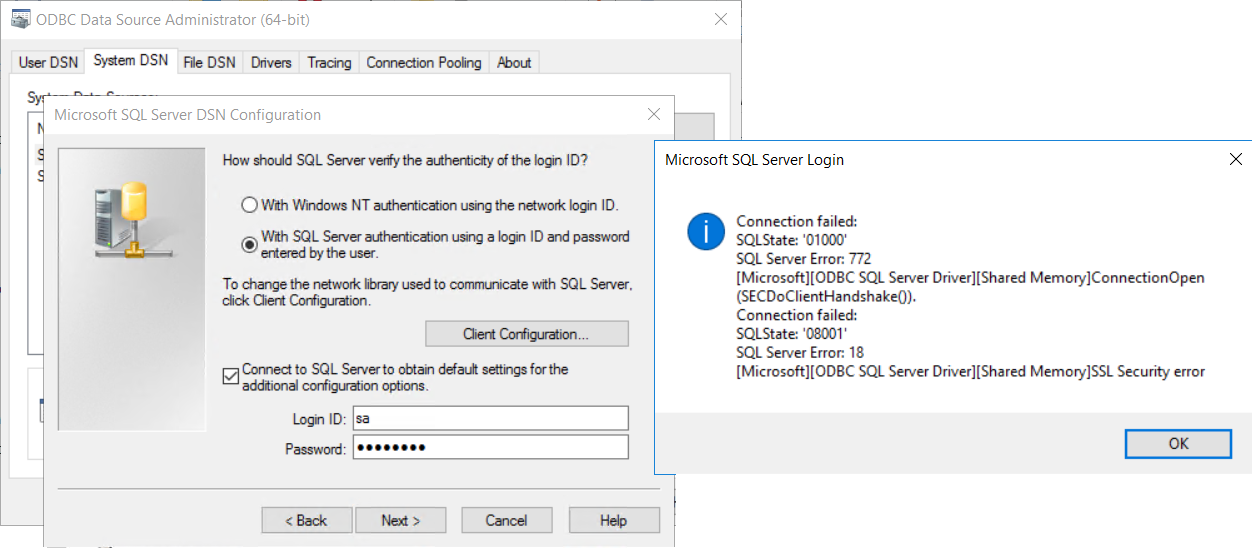
Microsoft SQL Server Login
Connection failed:
SQLState: ‘0100’
SQL Server Error: 772
[Microsoft][ODBC SQL Server Driver][Shared Memory]ConnectionOpen (SECDoClientHandshake()).
Connection failed:
SQLState: ‘08001’
SQL Server Error: 18
[Microsoft][ODBC SQL Server Driver][Shared Memory]SSL Security error
Cause
Both of the following are true:
(1) TLS 1.0 has been disabled on one (or both) of the following servers:
- Planning Analytics (TM1) application server
- Microsoft SQL server.
(2) Administrator is using the older ‘SQL Server‘ ODBC driver (see below, circled in red)
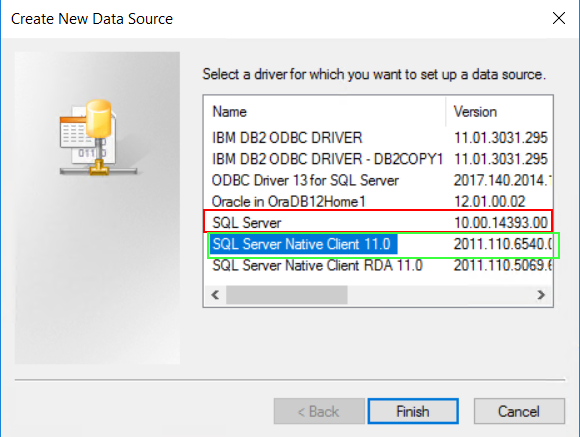
This is incompatible with TLS 1.2.
Resolving The Problem
Fix:
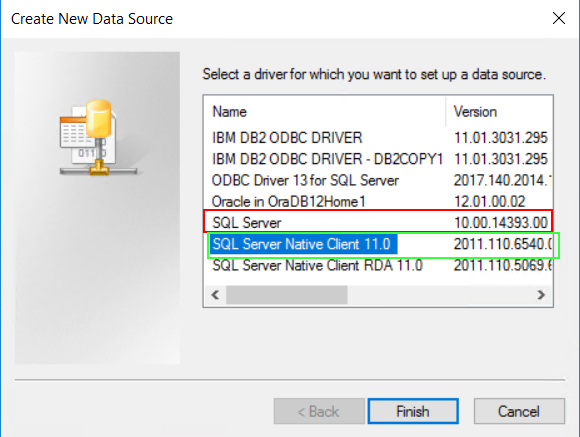
Change the ODBC connection to use the newer «SQL Server Native Client 11.0» driver (highlighted in green below):
Workaround:
Re-enable TLS 1.0 on the Planning Analaytics (TM1) and/or SQL servers.
- TIP: For more details, see separate IBM Technote #728129.
Related Information
Document Location
Worldwide
[{«Business Unit»:{«code»:»BU059″,»label»:»IBM Software w/o TPS»},»Product»:{«code»:»SS9S6B»,»label»:»IBM Cognos Controller»},»Component»:»»,»Platform»:[{«code»:»PF033″,»label»:»Windows»}],»Version»:»10.4.1″,»Edition»:»»,»Line of Business»:{«code»:»LOB10″,»label»:»Data and AI»}}]
I’m running SQL Server 2016 sp1 on a Windows Server 2012 r2 box. Supposedly, unlike earlier versions of SQL Server, SQL Server 2016 is compatible with TLS 1.2 right out of the box…. Right? Anyway, everything in my application works fine until I disable TLS 1.0 and 1.1, then I get this error:
Could not open data connection. Error:
[Microsoft][ODBC SQL Server Driver][TCP/IP Sockets]SSL Security error
When I look at the SQL Server ODBC 11 drivers they only apply to SQL server 2014 or earlier releases. What gives? I’m unclear as to how to update ODBC to be TLS 1.1 & 1.2 compatible on SQL Server 2016 which isn’t even supposed to have this problem (after all, TLS 1.0 vulnerability is retro 2016 at this point) ?
SQL Server ODBC 11 Driver download: «Microsoft ODBC Driver 11 for SQL Server is a single dynamic-link library (DLL) containing run-time support for applications using native-code APIs to connect to Microsoft SQL Server 2005, 2008, 2008 R2, SQL Server 2012, SQL Server 2014 and Windows Azure SQL Database.»
Doesn’t make sense…what am I doing wrong? I’m using the standard SQL Server ODBC driver. Is that the problem? Perhaps I should be using the ODBC driver version 13 for SQL Server?
asked Jul 25, 2017 at 1:01
Michael BarberMichael Barber
1652 gold badges3 silver badges10 bronze badges
2
Ran into the same issue with SQL 2016 (though it was on a Server 2016 box). Couldn’t find a fix via ODBC drivers but found a Symantec article where a Backup Exec agent was unable to connect to the DB with TLS 1.0 disabled.
The suggested fix is enabling FIPS on the SQL box, this fixed it in our case but I couldn’t work out why. Here’s some guidance on how to enable FIPS — with the caveat that it isn’t recommended unless you need to comply with a regulatory or legislative directive. (I would provide links to articles that go into detail but apparently as I’m a newbie I only get to post two links. Googling «why you shouldn’t enable FIPS» should get you the articles in question)
answered Sep 4, 2017 at 9:24
