-
#1
New SPD Chipset Device Flashing Issue.
Stuck on NV_WLTE Failed while Flashing
Issue Mostly On Hang On logo Devices.
(Handset =Karbonn,Jivi,Itel..etc)
So In this Situation
Need to First Flash Vit Below Tool For Fixing Nv
Factory Download Tool 9832
After Following Below Guide if stuck On «System».while flashing
Then again use
SPD Upgrade Tool R4.0.0001
And Flash It
Steps :
Extract the tool
Enter Bin Folder and run FactoryDownload.exe


SPD Upgrade Tool R4.0.0001
Already Posted By me.same Guide
But people Thinks That is only for Karbonn device.
Check Below Thread (Same Method for others devices)
Last edited: Feb 2, 2018
-
#3
The Above guide is Infomation/ regarding to fix flashing error while flashing
And after Reading your post i saw u had sucessfully flashed your device. but your device still in dead condition
It vill be Better If you Create your Own New Thread
and post Full Details
like Device model number.sw version,Hw Version…etc for correct firmware.
-
#4
karbonn aura 4g flashing error PLZ HILP SIR
-
#5
karbonn aura 4g flashing error PLZ HILP SIR
Make NEw thread Frnd
-
#6
Zen M72 smart sucfully flash Done ,Thank For This UsefullGuide
-

1.png
49.1 KB
· Views: 7,007
-
#7
getting error for karbon A41 power like this plz help me from this
-

A41 power.PNG
65.4 KB
· Views: 6,531
-
#9
not working with the tool
-
#10
getting error for karbon A41 power like this plz help me from this
Repartition Error.
Hw fault.Try Rehot Emmc.then flash again.
If Still Same .then replace emmc
-
#11
zen m72 smart succesfully flash done by usefull guide thnxxx sir
-
#12
sir,i flashed karbonn aoura 4g with this tool,Factory Download Tool 9832. nd this file ,Karbonn_Aura_4G_V12_23022017..flashing complate. but phone is dead.only show blue screen.
-
#13
sir,i flashed karbonn aoura 4g with this tool,Factory Download Tool 9832. nd this file ,Karbonn_Aura_4G_V12_23022017..flashing complate. but phone is dead.only show blue screen.
Create your Own New Thread ,
and Post Device Imei Sticker Pic
or Post Sw version/Hw version Printed On Sticker.
For Correct Firmware
-
#14
thanks .problem solved.
-

2222.jpg
182.3 KB
· Views: 77
-
#15
zen m72 smart
thanks sir my problem solved
-
#16
Same my set is dead itel a 42 plus same prosusess do next set dead
-
#18
Thank You Bro GD_Mekail92 …. My problem solved with your guid… Very use full tip……
-

sucess.png
385.1 KB
· Views: 1,234
-
#20
Gd mekail92 bro nice work its working for me
-

27.12.2018, 15:16
Fish

- Регистрация:
- 17.08.2013
- Сообщений:
- 34,064
- Репутация:
13194
Сообщение от Григорий Клинских
Ну теперь он вообще не видит дров а лишь тупо неизвестное устройство и при попытке в ручную поставить дрова говорит что все окей
удали драйвер и попробуй установить вручную выбрав inf-файл из папки driver для своей разрядности ОС
-
27.12.2018, 15:23
Григорий Клинских

- Регистрация:
- 13.01.2015
- Сообщений:
- 77
- Репутация:
0
Сообщение от Fish
удали драйвер и попробуй установить вручную выбрав inf-файл из папки driver для своей разрядности ОС
А как его полностью снести? Ибо я могу его удалить лишь тогда когда он определяет устройство
-
27.12.2018, 15:26
Григорий Клинских
- Регистрация:
- 13.01.2015
- Сообщений:
- 77
- Репутация:
0
И что именно из выбранного ставить?
-
27.12.2018, 15:44
Fish
- Регистрация:
- 17.08.2013
- Сообщений:
- 34,064
- Репутация:
13194
Сообщение от Григорий Клинских
И что именно из выбранного ставить?
sprd_vcom
-
27.12.2018, 15:45
Григорий Клинских
- Регистрация:
- 13.01.2015
- Сообщений:
- 77
- Репутация:
0
А тут?
-
28.12.2018, 23:20
Fish
- Регистрация:
- 17.08.2013
- Сообщений:
- 34,064
- Репутация:
13194
Сообщение от Григорий Клинских
А тут?
у тебя телефон включен, он не в режиме загрузчика
на скриншоте драйвера только для отладки, для прошивки они не подходят
-
16.01.2019, 17:33
Dionis_Z

- Регистрация:
- 16.01.2019
- Сообщений:
- 1
- Репутация:
0
-
16.01.2019, 17:45
Fish
- Регистрация:
- 17.08.2013
- Сообщений:
- 34,064
- Репутация:
13194
Сообщение от Dionis_Z
Всем добра! Пытаюсь прошить планшет Irbis TZ81L на проце spreadtrum 9830a, прошивка и researchdownload R3.15.4901 с оф. сайта, выдаёт ошибку failed uart send error. Пробовал разные пк, шнуры, скорости, проги, убирал в вкладке Backup галки, переустанавливал дрова, перезагружал компы — не помогает. Подскажите что можно сделать
попробуй использовать UPGRADEDOWNLOAD_R21.0.0001, в момент подключения удерживай клавишу увеличения (также можешь попробовать и уменьшения, зависит от модели) громкости, кнопку держи пока не начнётся процесс прошивки
upd: данная ошибка может быть легко из-за севшей батареи
-
01.04.2019, 19:57
Jazztin
- Регистрация:
- 01.04.2019
- Сообщений:
- 1
- Репутация:
0
Всем привет. Есть зверь FinePower A2? после замены тача инвертирована ось Х. Где можно найти данный параметр,что бы прошить. Или как нужно поступить?
-
02.05.2019, 20:05
djdichka
- Регистрация:
- 02.05.2019
- Сообщений:
- 2
- Репутация:
0
Сообщение от Fish
идёт сразу после подключения телефона? или даже без него? если сразу после подключения, то попробуй сменить кабель USBподключить в другой порт USB
Прошу помощи. Перепрошиваю телефон Dexp ES550, пробовал 4 прошивки, на каждой процесс прерывается на операции repartition, статус reading flash и выдаёт ошибку.
-
02.05.2019, 20:59
Fish
- Регистрация:
- 17.08.2013
- Сообщений:
- 34,064
- Репутация:
13194
Сообщение от djdichka
Прошу помощи. Перепрошиваю телефон Dexp ES550, пробовал 4 прошивки, на каждой процесс прерывается на операции repartition, статус reading flash и выдаёт ошибку.
не видит флэш
попробуй использовать другие версии прошивальщика, попробуй залить какой-нибудь один только раздел, например boot или recovery, ну и попробуй сменить кабель
если всегда будет ошибка и на этом же месте, то возможная причина — это вышедшая из строя флэшпамять
-
02.05.2019, 23:23
djdichka
- Регистрация:
- 02.05.2019
- Сообщений:
- 2
- Репутация:
0
Сообщение от Fish
не видит флэш
попробуй использовать другие версии прошивальщика, попробуй залить какой-нибудь один только раздел, например boot или recovery, ну и попробуй сменить кабель
если всегда будет ошибка и на этом же месте, то возможная причина — это вышедшая из строя флэшпамять
Спасибо. Жаль, но ничего не проходит
-
06.10.2019, 17:53
Юлиан Акушко
- Регистрация:
- 04.10.2019
- Сообщений:
- 7
- Репутация:
0
Добрый вечер.
Помогите с прошивкой для Ginzzu GT1050 Black(plastic) SN:71uth58h00553
С офф сайта(ginzzu.ru) скачал прошивку, поставил дрова, перепробовал 3 версии RD(23.0.0001, 2.9.7003, 4.0.0001), зажимал разные клавиши(+,-). К сожалению ничего не происходит. В диспе не обнаруживается.
Планшет не включается, в рекавери не попасть(скорее всего разряжен), не заряжается. В общем кирпич имеется, есть шанс своими силами оживить? -
06.10.2019, 18:06
Fish
- Регистрация:
- 17.08.2013
- Сообщений:
- 34,064
- Репутация:
13194
Сообщение от Юлиан Акушко
Добрый вечер.
Помогите с прошивкой для Ginzzu GT1050 Black(plastic) SN:71uth58h00553
С офф сайта(ginzzu.ru) скачал прошивку, поставил дрова, перепробовал 3 версии RD(23.0.0001, 2.9.7003, 4.0.0001), зажимал разные клавиши(+,-). К сожалению ничего не происходит. В диспе не обнаруживается.
Планшет не включается, в рекавери не попасть(скорее всего разряжен), не заряжается. В общем кирпич имеется, есть шанс своими силами оживить?кнопки ресета у него никакой нет?
попробуй выпаять и зарядить акб напрямую
если не поможет и заряд, то тогда попробуй поискать тестпоинт на плате
в системе он должен у тебя определяться так «SPRD U2S Diag» и рядом номер com-порта
-
06.10.2019, 19:14
Юлиан Акушко
- Регистрация:
- 04.10.2019
- Сообщений:
- 7
- Репутация:
0
Сообщение от Fish
кнопки ресета у него никакой нет?
попробуй выпаять и зарядить акб напрямую
если не поможет и заряд, то тогда попробуй поискать тестпоинт на плате
в системе он должен у тебя определяться так «SPRD U2S Diag» и рядом номер com-порта
reset есть, никак не реагирует на нее. Долгое нажатие, единичное — ноль.
А вот с разборкой и прочим вариант не очень. Наверное лучше в сц отдать.Он один раз завелся при подключении к ПК, драйвера пытался поставить и все.
-
06.10.2019, 19:18
Юлиан Акушко
- Регистрация:
- 04.10.2019
- Сообщений:
- 7
- Репутация:
0
Fish, кхм, upd. Сейчас он таки отобразился в диспетчере(https://yadi.sk/d/luEcPVYyXMz6hA)
Но в RD так и не стартует процесс. Висит на этапе Ready после нажатия Play/Upd2: Ну и все. Больше в диспетчере не видно. В РД ничего не не изменилось и не происходит.
-
06.10.2019, 19:44
Юлиан Акушко
- Регистрация:
- 04.10.2019
- Сообщений:
- 7
- Репутация:
0
Fish, так. Есть прогресс. Зажал 3 клавиши — power, +, — Процесс пошел, но ошибка на этапе BKF_phaseCheck, Failed: Incompatible partition. Скрин — https://yadi.sk/d/R5aRNjb4M7IOaA
Получается не подходящая разбивка какая то? Дело в прошивке?Вот через RD 4.0.0001 — http://prntscr.com/pfl3qh
RD 2.9.7003 выдает, что файл прошивки поврежден или маленького размера. -
06.10.2019, 21:20
Fish
- Регистрация:
- 17.08.2013
- Сообщений:
- 34,064
- Репутация:
13194
Сообщение от Юлиан Акушко
от через RD 4.0.0001 — http://prntscr.com/pfl3qh
RD 2.9.7003 выдает, что файл прошивки поврежден или маленького размера.в прошивальщике дело
попробуй этой версией прошиться
Cкачать:
 RESEARCHDOWNLOAD_R23.0.0001.7z
-
06.10.2019, 21:49
Юлиан Акушко
- Регистрация:
- 04.10.2019
- Сообщений:
- 7
- Репутация:
0
Сообщение от Fish
в прошивальщике дело
попробуй этой версией прошиться
Пробовал этой. Самый первый раз через него пробовал. Похоже надо просто все версии перебирать что ли.
-
11.10.2019, 12:51
Юлиан Акушко
- Регистрация:
- 04.10.2019
- Сообщений:
- 7
- Репутация:
0
Планшет Ginzzu GT1050.
RD r3.0.0001 — NV_WLITE, Ошибка записи flash (write flash failed). Дальнейшие попытки приводят к Incompatible partition. Что можно сделать?
r4.0.0001 — NV_WLITE, write flash failed.
r6.0.0001 — Не стартует прошивка, при разных комбинациях клавиш.
r7.0.0001 — Incompatible partition. Хотя там проскочила какая то надпись красная(не успел увидеть), а потом партиция.
r8.0.0001 — NV_WLITE, write flash failed.
r17.0.0001 — NV_WLITE, write flash failed.
r19.0.0001 — Не стартует прошивка, при разных комбинациях клавиш.
r21.0.0001 — Не стартует, ругается на драйвера, хотя они поставлены. (https://yadi.sk/d/BX3F4gTqHNN-aQ)
r22.19.1301 — Аналогично с предыдущей.
r23.0.0001 — NV_WLITE, write flash failed.Остальные версии вылетают на этапе выбора прошивки — маленький размер или файл поврежден.
Compression is ON
Z3X EasyJtag Box JTAG Софт версия. 2.9.0.1
Loading eMMC GEN1 Firmware… IO: 1800 mV
Box S/N: 090110056553626B, ,FW Ver.: 01.63
Напряжение подтяжки линии CMD :1680 mV
Напряжение активной линии CMD :1732 mV
Box IO Level:1800 mV
CLK Rate:7000 kHz
Bus Width:1bit,SDR
HiPower mode is ON!
———- eMMC Device Information ———-
EMMC CID : 880103455042313030495BD81A442590
EMMC CSD : D0FFFF320F5903FFFFFFFFE7964000EA
Р?зготовитель eMMC: ID: 0088 , OEM ID: 0103
EMMC Date: 02/2018 Rev.0x49
EMMC NAME: EPB100 , S/N: 1540889156
EMMC NAME (HEX): 45504231303000
EMMC ROM1 (Main User Data) Capacity: 7393 MB
EMMC ROM2 (Boot Р*аздел 1) Емкость: 4096 kB
EMMC ROM3 (Boot Р*аздел 2) Емкость: 4096 kB
EMMC RPMB (Replay Protected Memory Block) Capacity: 4096 kB
EMMC Permanent Write Protection: No
EMMC Temporary Write Protection: No
EMMC Password Locked: No
Extended CSD rev 1.7 (MMC 5.0)
Boot configuration [PARTITION_CONFIG: 0x08] Boot from:ROM2 (Boot Partition 1)
Boot bus config [177]: 0x00 , width 1bit , Partition config [179]: 0x08.
H/W reset function [RST_N_FUNCTION]: 0x00
High-capacity W protect group size [HC_WP_GRP_SIZE: 0x00000000]
Partitioning Support [PARTITIONING_SUPPORT]: 0x07
Device support partitioning feature
Device can have enhanced tech.
Partitioning Setting [PARTITION_SETTING_COMPLETED]: 0x00
———————————————
Backup saved: EPB100_1540889156_20201001_1638.extcsd
Сделано.
#Тыжпрограммист #Ремонттелефонов #Прошивка
https://www.youtube.com/channel/UCEO1Vc4wDbQIRWCmDmB2zIQ/join Поддержать или отблагодарить меня очень просто!!!
https://allgps.ru Мой сайт со всеми инструкциями и файлами
https://t.me/allgps Мой Telegram
https://www.youtube.com/c/Unlockers Канал разблокировщиков
http://www.youtube.com/c/ТЫЖБЛОГЕР Тыжблогер на Ютубе
https://vk.com/allgpssu Вступайте в мою группу Тыжпрограммист, Вконтакте.
https://www.instagram.com/all_gps/ Инстаграм Тыжпрограммиста
Это лишь одна из ошибок при прошивке телефонов или планшетов на Spreadtrum. Ошибка bkf nv w появляется в программах ResearchDownload и Upgrade Download. И к сожалению не всегда она решается, но попробовать обязательно нужно и для начала вы можете сменить программу прошивальщик, а ее можно взять у меня на сайте allgps.ru
Всё самое полезное для Вас:
https://youtu.be/c9Qwmg5laBM Здесь можно скачать всё нужное для прошивки, ссылки в описании
https://youtu.be/emFtp9mJG9A Самая большая инструкция, как попасть в рекавери
https://youtu.be/9r3kwrgqEZM Самая большая инструкция, как работать с FRP
https://youtu.be/DQ4KHvd1wQA Сброс настроек Андроид через аккаунт Google
https://youtu.be/PVaFV46JfFE Прошивка и Hard Reset любого Xiaomi
https://youtu.be/D4YFHfEI58M Перезагрузить не разборный телефон планшет
https://www.youtube.com/playlist?list=PLG7Q6U2ZzrmkXxOqXzyWGFx3ho7TrN30i Если сброс настроек не помог, здесь можно найти как прошить любой смартфон, планшет
https://youtu.be/EyoduEjetRM Если завис Samsung (2016, 2017, 2018, 2019 годов) https://youtu.be/3CII6PyffuY Команды НЕТ
https://www.youtube.com/playlist?list=PLG7Q6U2ZzrmnJFzn5PtsU1DdZBBBHi4k2 Плэйлист Диагностика
https://www.youtube.com/playlist?list=PLG7Q6U2ZzrmkXxOqXzyWGFx3ho7TrN30i Плэйлист Любая прошивка
https://youtu.be/GBpSw8qxCso Удаление вирусов СМСММС на Андроид без потери данных
https://youtu.be/Zb1uTYMAt8Y Если строчка Recovery не выбирается
https://youtu.be/ghs_y9BO2Ow Разблокировка телефона и планшета от Билайн https://youtu.be/JR1E72WUrCQ Отключение проверки цифровой подписи драйверов
https://youtu.be/2JD6vUNrpNs Какой программатор выбрать
https://www.youtube.com/playlist?list=PLG7Q6U2Zzrmmae6Ig8cM4YXUtyoIVmNO7 Весь плэйлист Windows
- Категория
- Инструкции
SPD Flashing Error Nv Wlte Incompatible Part Prodnv User Cancel Repartition Failed Fix Spd Flashing
23:45
31.26 MB
12.8K
Spd Flash Tool Error Failed User Cancel Operation Failed Write Flash Failed 100 Solved
03:53
5.11 MB
10.9K
ব শ ষ অন র ধ দ য় হল SPD Tool Failed Error All Solution Milon Vai
06:52
9.04 MB
23.3K
SPD FLASH TOOL BKF NV ERROR Solution All In One Tested 100 Working
07:07
9.37 MB
178.2K
BKF NV W FAILED ALL PROBLEMS
05:09
6.78 MB
7.1K
SPD Flash Tool Error Nv WLTE Failed Bkf Nv Error Solution
10:05
13.27 MB
15.5K
SPD Flash Tool Error Solution 100 Working
22:32
29.66 MB
108.7K
BKF NV WLTE Failed How To Fix NV Data Read In Phone Is Crashed In Reserach Download Tool
07:07
9.37 MB
136.3K
Nv WLTE Failed Write Flash Failed Solution SPD Flash Tool Error Solution
15:45
20.73 MB
130.5K
How To Fix NV Data In Device Is Crashed In SPD Flash Tool Romshillzz
11:11
14.72 MB
39.1K
Upgrade Download Failed User Cancel Fix SPD Flash Tool
04:56
6.49 MB
22K
Spd Flash Tool Bkf Nv Error Solution Tested 100 Working
01:53
2.48 MB
7.6K
Fix Research Download Failed Incompatible Partition
07:44
10.18 MB
112.6K
Micromax Q402 Flashing Failed Spd Upgrade Tool User Cancel Errer Spd Upgrade Tool Flashing Fail
08:43
11.47 MB
9.9K
How To NV WLTE Failed Write Flash Failed Solution SPD CPU Flash Error Solution 100
04:06
5.40 MB
668
РЕШЕНО ошибка Step BKF NV в Progress Failed Operation Failed ResearchDownload HelpDroid
01:43
2.26 MB
38K
Ошибка Bkf Nv W про прошивке Spreadtrum
05:18
6.98 MB
1.7K
Solution Configure Dangerous Have Not Selected To Erase Flash Spd Upgrade Tool By Software Bare
03:23
4.45 MB
3.6K
SPD CPU Flashing Error Or Failed
12:19
16.21 MB
65
Realme C11 3231 Flash Umt Spd Problem Bkf Phase Check Failed Bkf Nv Lte Failed Repartition Failed
06:38
8.73 MB
235
Cara Mengatasi BKF NV W Failed Via Research Download
09:11
12.09 MB
18.2K
Flash MITO A21 Fix Error System Failed NV Data In Device Is Crashed
03:39
4.80 MB
2.2K
How To FIX BKF NV W Failed 100 Fix РЕШЕНИЕ Upgrade Download Or Research Download
03:51
5.07 MB
9.9K
Failed Wait Input Timeout Solved Spd Flash Tool Error Fix By RoSe Tech
03:27
4.54 MB
5.7K
Failed Wait Input Time Out
14:06
18.56 MB
10.9K
All Spd ITel Hang On Logo Solution Repartition Fail Error Fix
04:12
5.53 MB
43.6K
Failed Wait Input Time Out Solution
03:55
5.15 MB
33.8K
How To Format Spreadtrum SPD Android Devices Using Miracle Box Romshillzz
01:22
1.80 MB
1.7K
SOS Mobile Tool SOS Mobile Qualcomm Cracked 2018 Tool Mi Oppo Vivo Pin Pass Account Remover Tool
13:20
17.55 MB
2K
Fix SPD UPGRADE TOOL Bin Packet S Size Is Too Small Maybe It Has Been Destructed
01:47
2.35 MB
9.3K
Zen Admire Unity Dead Flash
01:22:44
108.88 MB
263
Walton Primo HM6 Flash File Customer Care File
51
1.12 MB
87
Micromax Q402 Plus Flashing Error Fix Solve 100
05:30
7.24 MB
3.7K
InfernoTool UniTool V1 5 7 Full Cracked Setup Latest Tool
06:57
9.15 MB
286
HOTWAV VENUS R8 SPD 7731C VER 6 0 FLASH TUTORIAL FLASH TUTORIAL FREE
04:00
5.26 MB
0.9K
ITEL A23 Flashing Error Fix Hang Logo Solutions 2019
04:19
5.68 MB
772
Oppo F1s A1601 Pattern Unlock Oppo A1601 Pattern Read In Miracle Crack Oppo Reset Frp Via Miracle
03:57
5.20 MB
1.9K
Inferno UniTool V1 5 7 Cracked Upload By Mobisoft Solution
04:13
5.55 MB
129
Firmware Maxtron V20 M2 Tested
03:08
4.12 MB
519
Karbonn A9 Indian Pin Lock Frp Privacy Lock Solution
07:24
9.74 MB
9K
Telenor Smart Max After Flash Blue Display Solution With Flash FIle LINK IN Tested By Mirza Asim
08:02
10.57 MB
713
Symphony I74 Frp Reset Flash Cm2 Done Boot Failed Boot Error Fail To Boot FDL 100 Done File Fee
08:17
10.90 MB
1.5K
Samsung J5 Prime G570F Frp G570F Frp Google Account Removed Without Flash New 2018 Easy
12:16
16.14 MB
326
Below is a comprehensive list of Research / Upgrade Download tool errors, what they mean and how to fix them. We’ll keep building this list to ensure it captures all errors and proffers effective solutions. Ensure to see the tutorial on how to use Research Download tool / Upgrade Download tool to be sure you’re doing it right else you’ll keep running into error after error. Research Download tool & Upgrade Download tool are Windows desktop applications for flashing firmware / pac files to Spreadtrum (SPD) Android devices.
List of Research Download tool / Upgrade Download tool errors and their solutions
Phone is totally dead
Message: The phone doesnt respond to power button or only vibrates after pressing the power button but doesnt come on
Meaning: The OS is either corrupted or there’s no power to boot the phone
Solution:
- Ensure the battery is well charged
- Re-flash the pac file
Research / Upgrade download tool does not show waiting…. instead, the phone just charges
Message: After you click Start and connect the phone to the PC, the tool doesn’t show waiting. Instead, the phone begins charging or shows a charging sign. You could sometimes get the USB connection-disconnection sound on the PC
Meaning: The Spreadtrum drivers have not been properly associated with the device
Solution:
- Launch Device manager (Right-click My Computer > Select Manage)
- Connect the phone to the PC via a USB cord, Device manager should refresh
- Take note of what the phone is detected as (often as Unknown or Spreadtrum under Other devices)
- Right-click whatever the phone is detect as and select Update Driver Software…
- Select Browse my computer for driver software
- Select Let me pick from a list of device drivers on my computer
- Click Next
- Click Have Disk
- Proceed with the Spreadtrum (SCiU2S) driver installation steps described at https://www.hovatek.com/forum/thread-827.html and click Yes if you get an Update Driver warning
Progress bar stuck at waiting….
Message: After clicking Start Downloading and connecting the phone, the Progress bar gets stuck at Waiting…
Meaning: The tools is having problems finding the phone
Solution:
- Ensure the phone is switched off with a charged battery inside before connecting to PC for flashing
- Ensure to install Spreadtrum drivers before flashing (see https://www.hovatek.com/forum/thread-827.html)
- Try using a different USB cord, PC port or PC
- Try holding the volume decrease button while connecting to PC for flashing. You could try the Volume increase button also
Failed: NV data in device is crashed
Message: Failed: NV data in phone is crashed
Meaning: The tool is unable to properly read nv data items on the phone
Solution:
- Retry flashing using upgrade download tool or factory download tool @ https://www.hovatek.com/forum/thread-15611.html
Failed: NV data read in phone is crashed
Message: Failed:NV data read in phone is crashed
Meaning: The NV items (Calibration) are causing a clash
Solution:
- Follow this guide @ https://www.hovatek.com/forum/thread-2718.html
USB device not recognized
Message: USB device not recognized prompt at system tray after connecting the phone to PC
Meaning: The PC is having problems communicating with the phone (often due to interruption, hardware or driver problems)
Solution:
- Try a different USB cord, PC port or PC
- Re-install Spreadtrum drivers (see https://www.hovatek.com/forum/thread-827.html)
- Ensure the phone is switched off before connecting to PC for flashing (take out the battery and slot back in to be sure)
Failed: Operation failed
Message: Failed: Operation failed error during flashing
Meaning: An error was encountered during flashing
Solution:
- Flash one file at a time (fdl 1 & 2 are required so the third will be selected one at a time from the remaining files)
- Ensure the flashing process isn’t interrupted by a shaky USB cord / Port
- Try using a higher version of Research Download tool
- Try a different pac file
Failed: download size error
Message: Failed: download size error
Meaning: There was a problem flashing a file to its assigned partition due to its size
Solution:
- Flash one file at a time (fdl 1 & 2 are required so the third will be selected one at a time from the remaining files)
- Try a different pac file
- Use the latest version of Research Download tool or Upgrade Download tool (V r2.9.9008 and above)
Downloading failed : wait input time out / remote data too large
Message: Downloading failed : wait input time out
Meaning: A timeout was reached as a result of the flashing process taking too long
Solution:
- Use the latest version of Research Download tool or Upgrade Download tool (V r2.9.9008 and above)
Failed incompatible partition
Message: Failed incompatible partition
Meaning: There was an error flashing to certain partitions
Solution:
- Go to Settings > Options > Option . Tick Repartition
- Use the latest version of Research Download tool or Upgrade Download tool (V r2.9.9008 and above)
- Flash one item at a time (fdl 1&2 are constant)
- Flash using a different tool e.g Miracle box, CM2SPD, or any other with support for flashing SPD phones
Stuck at checking Bautrate
Message: Checking Bautrate
Meaning: The tool encountered an error initializing flashing
Solution:
- Disconnect the phone from the PC, take out the battery and slot back in
- Close Research Download / Upgrade download tool and relaunch
Failed: buffer error
Message: Failed: decode or verify received buffer error
Meaning: The tool encountered a problem flashing the pac file
Solution:
- Download the latest version of Research Download or Upgrade Download tool @ https://www.hovatek.com/forum/thread-15611.html
Failed: uart send error
Message: [Removed] Failed: uart send error
Meaning: The flashing process got interrupted
Solution:
- Try using a different USB cord, port and PC
- Download the latest version of Research Download or Upgrade Download tool @ https://www.hovatek.com/forum/thread-15611.html
- Try flashing with Miracle Box
- Ensure to hold the Volume down button when connecting to the PC for flashing
- Try changing the phone’s USB port
The second enumeration port timeout
Message: Failed: The second enumeration port timeout
Meaning: There was an error maintaining communication to the device
Solution:
- Try using a different USB cord, port and PC
Image size is over its partition
Message: Failed: Image size is over its partition
Meaning: One or more of the files in the firmware (pac file) is too large
Solution:
- Try a different firmware
- Untick traditionally large partitions like system and userdata
Failed: User cancel
Message: Failed: User cancel
Meaning: The flashing process was interrupted by holding or releasing the volume down button at the wrong time
Solution:
- Ensure to hold the volume down button when connecting to PC for flashing and don’t release till flashing is complete
Failed: !!!GSM Cali in phone is not calibrated.Reserved[7]:0x00000000,[ID=0x2]
Message: Failed: !!!GSM Cali in phone is not calibrated.Reserved[7]:0x00000000,[ID=0x2]
Meaning: The tool is unable to read the calibration data off the device or the device isn’t properly calibrated
Solution:
- Try a different version of Research Download tool or Upgrade Download tool @ https://www.hovatek.com/forum/thread-15611.html
Failed: Open port fail
Message: Failed: Open port fail
Meaning: The tool encountered an error while communicating with the phone
Solution:
- Disconnect the phone from the PC, take out the battery and slot back in then ensure to hold the Volume down button when connecting to the PC for flashing
- Try a different cord, port and PC
_REPARTITION_ error
Message: Failed: Operation failed
Meaning: The tool encountered a partition table error while trying to flash the device
Solution:
Use Factory Download tool @ https://www.hovatek.com/forum/thread-15611.html or a box / dongle which supports your Spreadtrum chipset
Update Driver error
Message: Your driver version is *****, it is too low. Please upgrade download driver!!!
Meaning: The tool detects you still have an old driver and won’t proceed until its updated
Solution:
Download and install any driver from ‘version 2015″ upwards @ https://www.hovatek.com/forum/thread-26658.html
Flashing failed or stuck at System.img
Message: Failed
Meaning: The tool encountered an error while trying to flash system.img
Solution:
Use Research Download tool @ https://www.hovatek.com/forum/thread-15611.html
Failed: the data packet with type(0x96) returned was misformatted
Message: Failed: the data packet with type(0x96) returned was misformatted
Meaning: The tool is unable to proceed with flashing the specified firmware
Solution:
- Try flashing using factory download tool @ https://www.hovatek.com/forum/thread-15611.html
ReadPartition Finish
Message: Failed: Software has not supported this feature
Meaning: A backup setting is interfering with flashing
Solution:
- In Research Download, go to Settings > Options > Read Option and untick Read Partition
Bin packet version is not support
Message: Bin packet version is not support! Load bin packet failed!
Meaning: You’re either using an old version of the tool or an improperly built pac file
Solution:
- Try using the latest version of Research / Upgrade / Factory download tool
- Ensure you’re using a valid pac file
- Home
- chevron_right
- Полезности для Android
- chevron_right
- Ответы на вопросы читателей
- chevron_right
- Исправляем Failed Incompatible Partition в ResearchDownload

Вопрос: Как исправить Failed Incompatible Partition при прошивке?
Здравствуйте! Помогите разобраться. При прошивке флешером процесс останавливается через 3-5 сек и дальше не шьется. Почему?
Вот что пишет прошивальщик: Failed Incompatible Partition.
Пошаговая инструкция по исправлению ResearchDownload Incompatible Partition
Перед исправлением ошибки убедитесь, что скачана официальная прошивка из проверенного источника, так как неоригинальное ПО может повредить ваше устройство. Скачать официальные прошивки можно здесь. Если с прошивкой всё хорошо — переходите к исправлению ошибки:
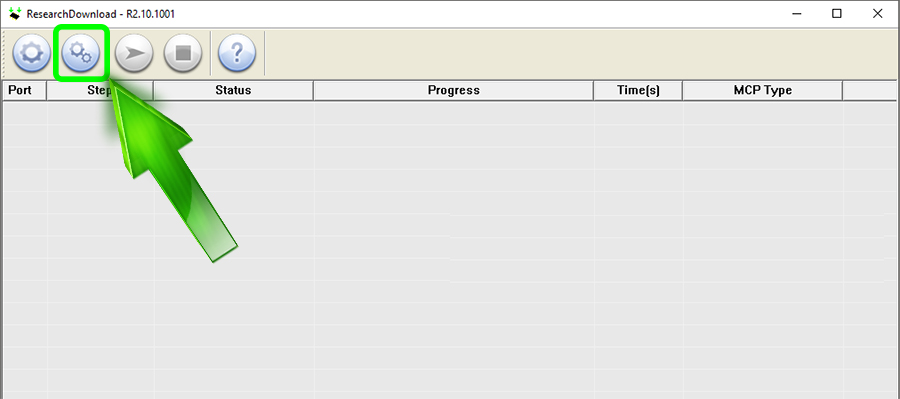
- Откройте ResearchDownload
- Перейдите в Настройки
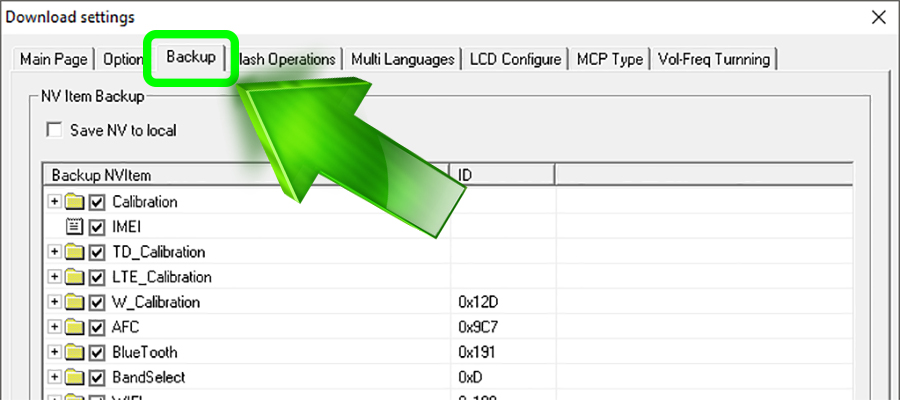
- Выберите пункт Backup
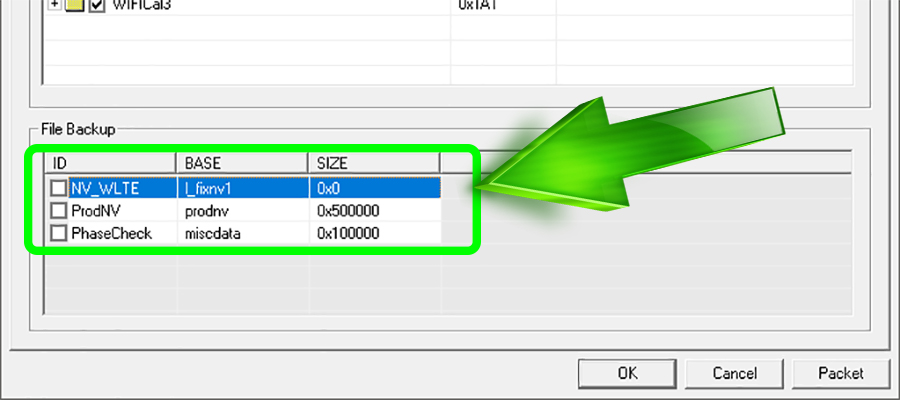
- В левом нижнем углу уберите галочки с трех последних пунктов
- Устанавливайте прошивку
Готово! Вы исправили Incompatible Partition в ResearchDownload! Если что-то не получилось или возникли вопросы — пишите в комментарии!