ОШИБКА СКАНЕРА 12 И ОШИБКА СКАНЕРА 20 НА HP LJ m1005.
В этой статье рассмотрим ошибки сканера HP LJ m1005 и основные причины их возникновения.
Данные МФУ довольно-таки интересны для пользователей и инженеров. Аппараты просты использовании, компактны, нешумны. Отвечают всем требованиям домашнего МФУ. Или МФУ для небольшого офиса. Где небольшие объемы печати, копирования и сканирования. Они довольно-таки просты в обслуживании. Вся механика изучена вдоль и поперек. И для любого мало-мальски инженера, эти аппараты не представляют сложности. Запчасти есть в огромном числе в свободной продаже. Одно из самых привлекательных черт этих МФУ — картридж q2612a — один из самых простых и надежных по заправке. Нечипованный.
Болячка этих МФУ — их сканер. Причем, если он вышел из строя, то МФУ можно использовать как принтер. Но, в связи с популярностью этой модели, сканер можно и нужно отремонтировать. И дальше долго и счастливо пользоваться устройством.
Итак, вот примеры ошибок.
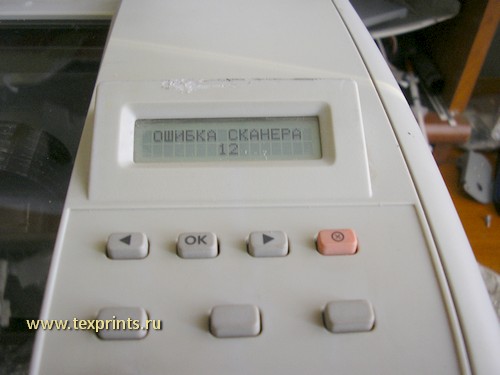
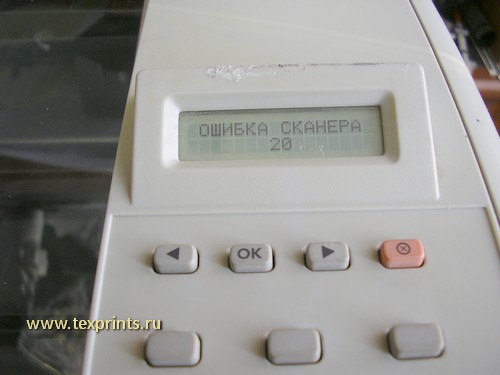
Как правило, причина их возникновения такая:
1. стерлись шестерни каретки сканера или сломаны их шкивы.
2. неисправен моторчик сканера
3. неисправна сканирующая линейка
4. неисправен шлейф сканера
5. неисправен форматтер
Редуктор планшетного сканера hp LJ m1005 CB376-67901 вместе со сканирующей линейкой можно приобрести здесь:
редуктор CB376-67901 со сканирующей линейкой
Чтобы добраться до каретки сканера, надо снять панель и стекло.
Нам понадобится инструмент:
— крестовая отвёртка
— шлицевая отвёртка
— насадка- шестигранник
У меня такая:
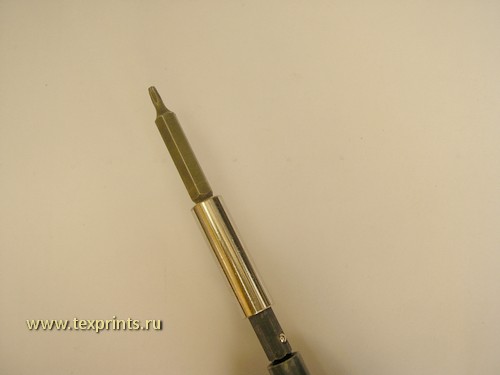
Итак приступаем.
Поддеваем декоративную наклейку. Снимем её. Под ней саморез. Откручиваем.
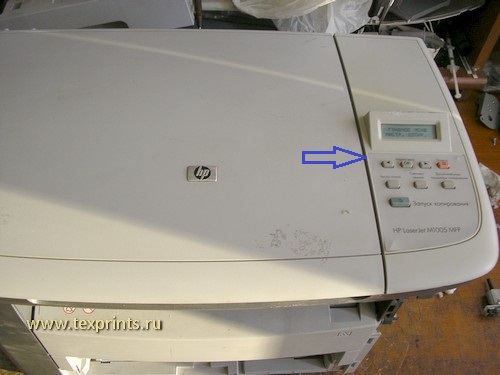
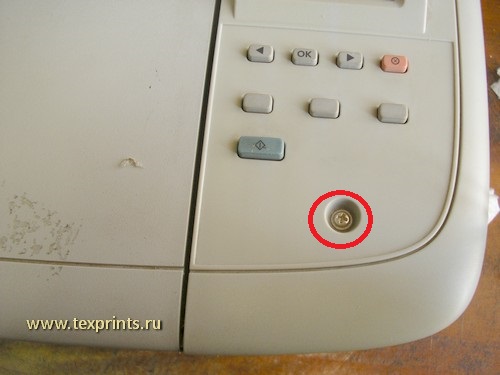
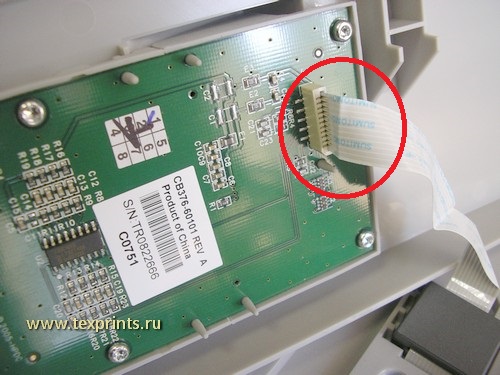
Сдвигаем панель на себя. Аккуратно поднимаем, отсоединяем шлейф. И откладываем панель в сторону.
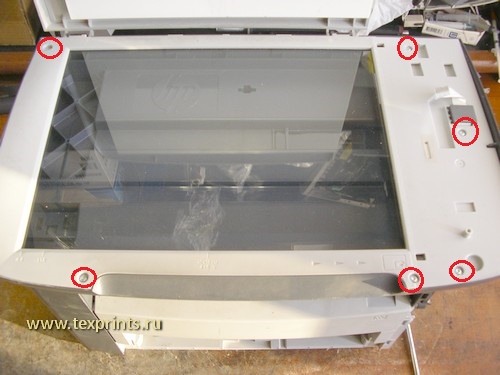
Откручиваем шесть саморезов, снимаем стекло. Под ним каретка сканера.
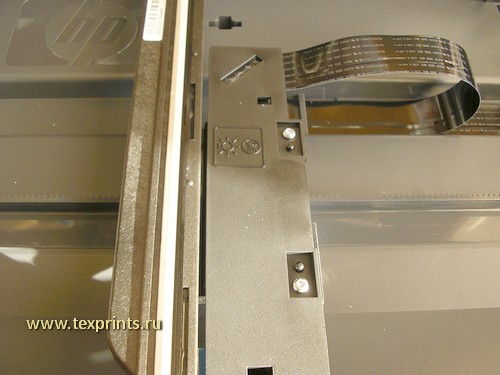
В первую очередь смотрим на состояние шестеренок и их шкивов.
Шестерни должны сидеть довольно-таки плотно, не люфтить. И уж тем более, шкивы не должны быть сломаны.
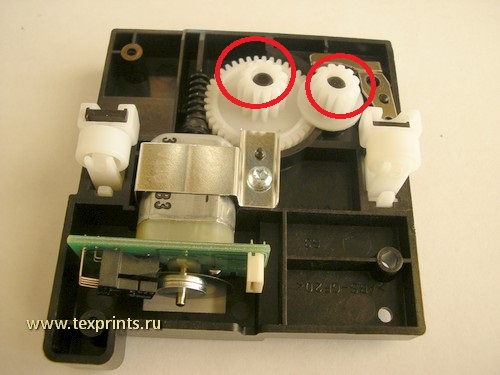
На фото ниже видно, что шкив большой шестерни был сломан. И что его кто-то пытался отремонтировать (там стоит саморез).
Вся каретка сканера выполнена из хрупкого, неплавкого пластика. Очень тяжело ремонтировать.
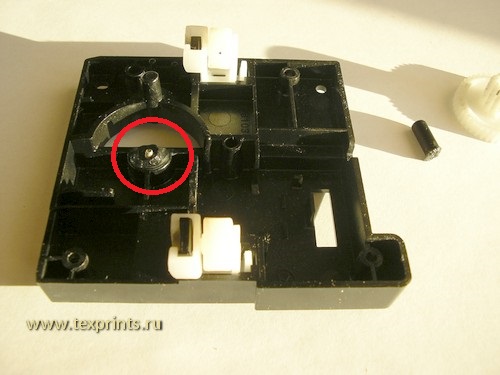
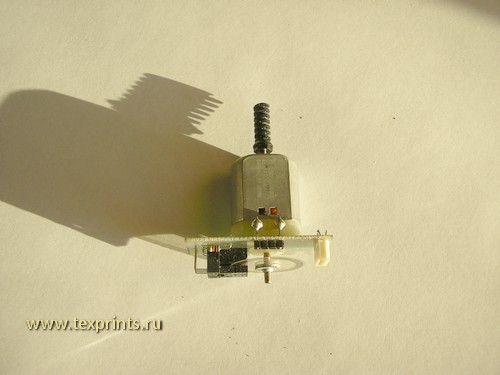
Помимо выхода из строя шестеренок и их шкивов, выходит из строя и сам моторчик.
Бывает, что из строя выходит сама сканирующая линейка и шлейф. Проверяются заменой.
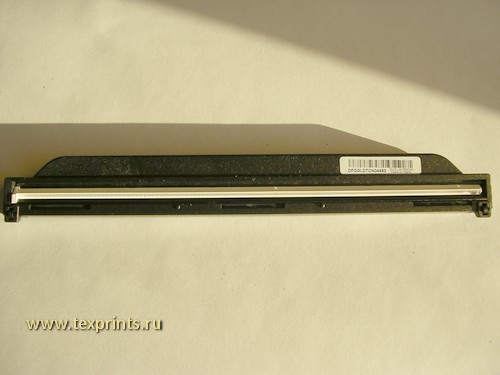
Редуктор планшетного сканера hp LJ m1005 CB376-67901 вместе со сканирующей линейкой можно приобрести здесь:
редуктор CB376-67901 со сканирующей линейкойС уважением,
www.texprints.ru
info@texprints.ru
Москва,2014
Читайте также:
 This topic has been archived. Information and links in this thread may no longer be available or relevant. If you have a question create a new topic by clicking here and select the appropriate board.
03-10-2010
09:24 AM

HP Recommended
- Mark as New
- Bookmark
- Subscribe
- Permalink
- Flag Post
I’ve got a all-in-one printer of HP LaserJet M1120 MFP. When I switch it on the screen shows «Scanner Error 20». And I cannot use the scan function. It can print when connected to computer.
I’ve read about the <user guid> but it didn’t help. So how can I fix it up? Thanks!
10 REPLIES 10
08-28-2011
04:47 AM
HP Recommended
- Mark as New
- Bookmark
- Subscribe
- Permalink
- Flag Post
sir my problem is hp Scanner Error 20″ of HP LaserJet M1120 MFP
plz solve
1 person found this reply helpful
Was this reply helpful?
Yes
No
11-23-2011
05:54 AM
HP Recommended
- Mark as New
- Bookmark
- Subscribe
- Permalink
- Flag Post
Hello,
Try to clean-up very well the scanner glass. The scanner cannot find home point.
If that help, plese replay.
Excuse my poor English.
Was this reply helpful?
Yes
No

grind
1
0
0
35,895
New member
06-28-2012
06:10 PM
— edited
06-28-2012
06:10 PM
HP Recommended
- Mark as New
- Bookmark
- Subscribe
- Permalink
- Flag Post
So I understand, the problem «Error 20» is caused by problems in the flat cable to the scanner reader.
To solve … Just changing the flat cable, it is necessary to access the guts of it and on the side.
This requires knowledge of how to disassemble the equipment and a new flat cable.
I recommend looking for a technician to do so.
And forgive me for my bad English.
PS: If you want to risk a maintenance check this out (The audio is in Brazilian Portuguese):
Was this reply helpful?
Yes
No
06-06-2013
05:40 AM
HP Recommended
- Mark as New
- Bookmark
- Subscribe
- Permalink
- Flag Post
«Scanner Error 20» of HP LaserJet M1120 MFP
Was this reply helpful?
Yes
No
09-11-2013
09:19 AM
HP Recommended
- Mark as New
- Bookmark
- Subscribe
- Permalink
- Flag Post
plz advise
@grind wrote:
So I understand, the problem «Error 20» is caused by problems in the flat cable to the scanner reader.
To solve … Just changing the flat cable, it is necessary to access the guts of it and on the side.
This requires knowledge of how to disassemble the equipment and a new flat cable.
I recommend looking for a technician to do so.
And forgive me for my bad English.
PS: If you want to risk a maintenance check this out (The audio is in Brazilian Portuguese):
@grind wrote:
So I understand, the problem «Error 20» is caused by problems in the flat cable to the scanner reader.
To solve … Just changing the flat cable, it is necessary to access the guts of it and on the side.
This requires knowledge of how to disassemble the equipment and a new flat cable.
I recommend looking for a technician to do so.
And forgive me for my bad English.
PS: If you want to risk a maintenance check this out (The audio is in Brazilian Portuguese):
Was this reply helpful?
Yes
No
11-21-2013
12:38 AM
HP Recommended
- Mark as New
- Bookmark
- Subscribe
- Permalink
- Flag Post
«Scanner Error 20» of HP LaserJet M1005 MFP
please help me
Was this reply helpful?
Yes
No


Gemini02
16,806
2,657
1,045
31,266
Retired
11-22-2013
07:40 AM
HP Recommended
- Mark as New
- Bookmark
- Subscribe
- Permalink
- Flag Post
I am sorry, but to get your issue more exposure I would suggest posting it in the commercial forums since this is a commercial printer.
Gemini02 I work on behalf of HP
Click the Thumbs Up below to say “Thanks” for helping!
Was this reply helpful?
Yes
No
02-26-2014
02:56 AM
HP Recommended
- Mark as New
- Bookmark
- Subscribe
- Permalink
- Flag Post
How to Solved the problem
@apersuperior wrote:
I’ve got a all-in-one printer of HP LaserJet M1120 MFP. When I switch it on the screen shows «Scanner Error 20». And I cannot use the scan function. It can print when connected to computer.
I’ve read about the <user guid> but it didn’t help. So how can I fix it up? Thanks!
1 person found this reply helpful
Was this reply helpful?
Yes
No
gm3gm
1
0
0
29,451
New member
04-02-2014
02:38 AM
HP Recommended
- Mark as New
- Bookmark
- Subscribe
- Permalink
- Flag Post
Hi ,
I have HP laserjet M1005 MFP and i get «Scanner error 20». I took the printer to HP authorised center in Chennai and they told they will change the scanner unit which will cost Rs 3000/- approximately. So stupid, seems they will not do any troubleshooting and just change the whole scanner unit. Unfortunately. warrantly expired in my case. so i took it back without fixing.  … Do anyone have solution for this ? thxs !
Was this reply helpful?
Yes
No
-
Previous
-
- 1
- 2
-
Next
This topic has been archived. Information and links in this thread may no longer be available or relevant. If you have a question create a new topic by clicking here and select the appropriate board.
This topic has been archived. Information and links in this thread may no longer be available or relevant. If you have a question create a new topic by clicking here and select the appropriate board.
03-10-2010
09:24 AM
HP Recommended
- Mark as New
- Bookmark
- Subscribe
- Permalink
- Flag Post
I’ve got a all-in-one printer of HP LaserJet M1120 MFP. When I switch it on the screen shows «Scanner Error 20». And I cannot use the scan function. It can print when connected to computer.
I’ve read about the <user guid> but it didn’t help. So how can I fix it up? Thanks!
10 REPLIES 10
08-28-2011
04:47 AM
HP Recommended
- Mark as New
- Bookmark
- Subscribe
- Permalink
- Flag Post
sir my problem is hp Scanner Error 20″ of HP LaserJet M1120 MFP
plz solve
1 person found this reply helpful
Was this reply helpful?
Yes
No
11-23-2011
05:54 AM
HP Recommended
- Mark as New
- Bookmark
- Subscribe
- Permalink
- Flag Post
Hello,
Try to clean-up very well the scanner glass. The scanner cannot find home point.
If that help, plese replay.
Excuse my poor English.
Was this reply helpful?
Yes
No
grind
1
0
0
35,895
New member
06-28-2012
06:10 PM
— edited
06-28-2012
06:10 PM
HP Recommended
- Mark as New
- Bookmark
- Subscribe
- Permalink
- Flag Post
So I understand, the problem «Error 20» is caused by problems in the flat cable to the scanner reader.
To solve … Just changing the flat cable, it is necessary to access the guts of it and on the side.
This requires knowledge of how to disassemble the equipment and a new flat cable.
I recommend looking for a technician to do so.
And forgive me for my bad English.
PS: If you want to risk a maintenance check this out (The audio is in Brazilian Portuguese):
Was this reply helpful?
Yes
No
06-06-2013
05:40 AM
HP Recommended
- Mark as New
- Bookmark
- Subscribe
- Permalink
- Flag Post
«Scanner Error 20» of HP LaserJet M1120 MFP
Was this reply helpful?
Yes
No
09-11-2013
09:19 AM
HP Recommended
- Mark as New
- Bookmark
- Subscribe
- Permalink
- Flag Post
plz advise
@grind wrote:
So I understand, the problem «Error 20» is caused by problems in the flat cable to the scanner reader.
To solve … Just changing the flat cable, it is necessary to access the guts of it and on the side.
This requires knowledge of how to disassemble the equipment and a new flat cable.
I recommend looking for a technician to do so.
And forgive me for my bad English.
PS: If you want to risk a maintenance check this out (The audio is in Brazilian Portuguese):
@grind wrote:
So I understand, the problem «Error 20» is caused by problems in the flat cable to the scanner reader.
To solve … Just changing the flat cable, it is necessary to access the guts of it and on the side.
This requires knowledge of how to disassemble the equipment and a new flat cable.
I recommend looking for a technician to do so.
And forgive me for my bad English.
PS: If you want to risk a maintenance check this out (The audio is in Brazilian Portuguese):
Was this reply helpful?
Yes
No
11-21-2013
12:38 AM
HP Recommended
- Mark as New
- Bookmark
- Subscribe
- Permalink
- Flag Post
«Scanner Error 20» of HP LaserJet M1005 MFP
please help me
Was this reply helpful?
Yes
No
Gemini02
16,806
2,657
1,045
31,266
Retired
11-22-2013
07:40 AM
HP Recommended
- Mark as New
- Bookmark
- Subscribe
- Permalink
- Flag Post
I am sorry, but to get your issue more exposure I would suggest posting it in the commercial forums since this is a commercial printer.
Gemini02 I work on behalf of HP
Click the Thumbs Up below to say “Thanks” for helping!
Was this reply helpful?
Yes
No
02-26-2014
02:56 AM
HP Recommended
- Mark as New
- Bookmark
- Subscribe
- Permalink
- Flag Post
How to Solved the problem
@apersuperior wrote:
I’ve got a all-in-one printer of HP LaserJet M1120 MFP. When I switch it on the screen shows «Scanner Error 20». And I cannot use the scan function. It can print when connected to computer.
I’ve read about the <user guid> but it didn’t help. So how can I fix it up? Thanks!
1 person found this reply helpful
Was this reply helpful?
Yes
No
gm3gm
1
0
0
29,451
New member
04-02-2014
02:38 AM
HP Recommended
- Mark as New
- Bookmark
- Subscribe
- Permalink
- Flag Post
Hi ,
I have HP laserjet M1005 MFP and i get «Scanner error 20». I took the printer to HP authorised center in Chennai and they told they will change the scanner unit which will cost Rs 3000/- approximately. So stupid, seems they will not do any troubleshooting and just change the whole scanner unit. Unfortunately. warrantly expired in my case. so i took it back without fixing.  … Do anyone have solution for this ? thxs !
Was this reply helpful?
Yes
No
-
Previous
-
- 1
- 2
-
Next
This topic has been archived. Information and links in this thread may no longer be available or relevant. If you have a question create a new topic by clicking here and select the appropriate board.
HP LJ M1005 MFP Ошибка сканера 20
Добрый день, Специалисты. Очень нужна помощь.
Купил HP LaserJet M1005 MFP. Установил драйвера с прилагающихся дисков. Принтер работает — отпечатал пробную страницу. В список устройств выведен. На минимониторе на самом устройстве постоянно горит надпись «Ошибка сканера 20». «Лампа» сканирования не движется, лишь слегка подергивается при включении. При попытки запустить сканирование через ПК, выдается сообщение «Нет связи со сканером».
Подскажите, пожалуйста, как решить указанную проблему. Заранее благодарен за любую реальную помощь!
- Ant
- новичок
- Сообщения: 4
- Зарегистрирован: 00:26 — 17.11.07
- Откуда: Москва
- Баллы репутации: 0

 Олег Ал » 07:53 — 17.11.07
Блокировки все сняли.,если таковые существуют?
А так по гарантии назад
- Олег Ал
- Консультант
- Сообщения: 2238
- Зарегистрирован: 19:43 — 18.12.06
- Откуда: Ульяновск
- Баллы репутации: 1

-
- ICQ
Ant » 10:05 — 17.11.07
Олег Ал писал(а):Блокировки все сняли.,если таковые существуют?
Спасибо за совет.
Я предполагал, что могут быть блокировки этой самой «лампы». Но я все осмотрел и не понимаю где они могут быть. Есть ли какие-нибудь стандартные способы блокировки?
Подскажите, пожалуйста.
- Ant
- новичок
- Сообщения: 4
- Зарегистрирован: 00:26 — 17.11.07
- Откуда: Москва
- Баллы репутации: 0
Ant » 10:40 — 17.11.07
Хотел бы еще выяснить — можно ли где-нибудь посмотреть расшифровку уведомлений об ошибках в НР. Если есть «Ошибка сканера 20», то значит существуют еще как минимум девятнадцать ошибок.
В прилагающихся документах, в том числе электронном руководстве пользователя, есть разделы «Уведомления» и «Критические ошибки», но там нет упоминания о подобных ошибках.
Заранее спасибо.
- Ant
- новичок
- Сообщения: 4
- Зарегистрирован: 00:26 — 17.11.07
- Откуда: Москва
- Баллы репутации: 0
Владимир А. » 17:13 — 17.11.07
Ant
А пользователям и не надо знать о каких то еще ошибках.
А если вы запускаете аппарат, то потрудитесь сами узнать об ошибках этого аппарата.
Ant
Обычно все расписано, как и в какой последовательности устанавливать МФУ(все прилагается к устройству). Если не получается—в сервис его по гарантии.
Ежели Вам хочется—то могу в понедельник сервис мануал скинуть.
- Владимир А.
- Помощник админа Консультант
- Сообщения: 6638
- Зарегистрирован: 14:47 — 09.02.06
- Откуда: г.Обнинск
- Баллы репутации: 1
-
- ICQ
Ant » 20:13 — 18.11.07
Владимир А. писал(а):Обычно все расписано, как и в какой последовательности устанавливать МФУ(все прилагается к устройству). Если не получается—в сервис его по гарантии.
Устанавливал согласно инструкциям. Спрашивая о том, как «самостоятельно» исправить ошибки, надеялся, что они будут несложными.
Владимир А. писал(а):Ежели Вам хочется—то могу в понедельник сервис мануал скинуть.
Нет, не надо. Использую Ваш первый совет.
Спасибо.
- Ant
- новичок
- Сообщения: 4
- Зарегистрирован: 00:26 — 17.11.07
- Откуда: Москва
- Баллы репутации: 0
Re: HP LJ M1005 MFP Ошибка сканера 20
XaKeP_HEO » 12:12 — 27.01.11
Только сейчас был такой случай.Решением оказалось то,что в лампе экспонирования поломался штифт,удерживающий шестеренку,с помощью которой эта лампа двигается под стеклом сканера.Приклеил на место,подождал пока присохнет(для надежности час),потом просверлил вертикально вдоль штифта дырочку 1,2, а потом 1,5мм,воткнул туда тоненький винтик и сверху все ещё раз залил клеем для надежности.Теперь другая проблема — лампа двигается,но копия выходит с широкой темной полосой…Кто-нить скажет,мож это дело в калибровке лампы экспонирования,и как это лечится?Проблема не в картридже точно.Всем спасибо за внимание
- XaKeP_HEO
Вернуться в HEWLETT PACKARD (HP)
Кто сейчас на конференции
Сейчас этот форум просматривают: нет зарегистрированных пользователей и гости: 1
This topic has been archived. Information and links in this thread may no longer be available or relevant. If you have a question create a new topic by clicking here and select the appropriate board.
03-10-2010
09:24 AM
HP Recommended
- Mark as New
- Bookmark
- Subscribe
- Permalink
- Flag Post
I’ve got a all-in-one printer of HP LaserJet M1120 MFP. When I switch it on the screen shows «Scanner Error 20». And I cannot use the scan function. It can print when connected to computer.
I’ve read about the <user guid> but it didn’t help. So how can I fix it up? Thanks!
10 REPLIES 10
08-28-2011
04:47 AM
HP Recommended
- Mark as New
- Bookmark
- Subscribe
- Permalink
- Flag Post
sir my problem is hp Scanner Error 20″ of HP LaserJet M1120 MFP
plz solve
1 person found this reply helpful
Was this reply helpful?
Yes
No
11-23-2011
05:54 AM
HP Recommended
- Mark as New
- Bookmark
- Subscribe
- Permalink
- Flag Post
Hello,
Try to clean-up very well the scanner glass. The scanner cannot find home point.
If that help, plese replay.
Excuse my poor English.
Was this reply helpful?
Yes
No
grind
1
0
0
35,895
New member
06-28-2012
06:10 PM
— edited
06-28-2012
06:10 PM
HP Recommended
- Mark as New
- Bookmark
- Subscribe
- Permalink
- Flag Post
So I understand, the problem «Error 20» is caused by problems in the flat cable to the scanner reader.
To solve … Just changing the flat cable, it is necessary to access the guts of it and on the side.
This requires knowledge of how to disassemble the equipment and a new flat cable.
I recommend looking for a technician to do so.
And forgive me for my bad English.
PS: If you want to risk a maintenance check this out (The audio is in Brazilian Portuguese):
Was this reply helpful?
Yes
No
06-06-2013
05:40 AM
HP Recommended
- Mark as New
- Bookmark
- Subscribe
- Permalink
- Flag Post
«Scanner Error 20» of HP LaserJet M1120 MFP
Was this reply helpful?
Yes
No
09-11-2013
09:19 AM
HP Recommended
- Mark as New
- Bookmark
- Subscribe
- Permalink
- Flag Post
plz advise
@grind wrote:
So I understand, the problem «Error 20» is caused by problems in the flat cable to the scanner reader.
To solve … Just changing the flat cable, it is necessary to access the guts of it and on the side.
This requires knowledge of how to disassemble the equipment and a new flat cable.
I recommend looking for a technician to do so.
And forgive me for my bad English.
PS: If you want to risk a maintenance check this out (The audio is in Brazilian Portuguese):
@grind wrote:
So I understand, the problem «Error 20» is caused by problems in the flat cable to the scanner reader.
To solve … Just changing the flat cable, it is necessary to access the guts of it and on the side.
This requires knowledge of how to disassemble the equipment and a new flat cable.
I recommend looking for a technician to do so.
And forgive me for my bad English.
PS: If you want to risk a maintenance check this out (The audio is in Brazilian Portuguese):
Was this reply helpful?
Yes
No
11-21-2013
12:38 AM
HP Recommended
- Mark as New
- Bookmark
- Subscribe
- Permalink
- Flag Post
«Scanner Error 20» of HP LaserJet M1005 MFP
please help me
Was this reply helpful?
Yes
No
Gemini02
16,806
2,657
1,045
31,266
Retired
11-22-2013
07:40 AM
HP Recommended
- Mark as New
- Bookmark
- Subscribe
- Permalink
- Flag Post
I am sorry, but to get your issue more exposure I would suggest posting it in the commercial forums since this is a commercial printer.
Gemini02 I work on behalf of HP
Click the Thumbs Up below to say “Thanks” for helping!
Was this reply helpful?
Yes
No
02-26-2014
02:56 AM
HP Recommended
- Mark as New
- Bookmark
- Subscribe
- Permalink
- Flag Post
How to Solved the problem
@apersuperior wrote:
I’ve got a all-in-one printer of HP LaserJet M1120 MFP. When I switch it on the screen shows «Scanner Error 20». And I cannot use the scan function. It can print when connected to computer.
I’ve read about the <user guid> but it didn’t help. So how can I fix it up? Thanks!
1 person found this reply helpful
Was this reply helpful?
Yes
No
gm3gm
1
0
0
29,451
New member
04-02-2014
02:38 AM
HP Recommended
- Mark as New
- Bookmark
- Subscribe
- Permalink
- Flag Post
Hi ,
I have HP laserjet M1005 MFP and i get «Scanner error 20». I took the printer to HP authorised center in Chennai and they told they will change the scanner unit which will cost Rs 3000/- approximately. So stupid, seems they will not do any troubleshooting and just change the whole scanner unit. Unfortunately. warrantly expired in my case. so i took it back without fixing.  … Do anyone have solution for this ? thxs !
Was this reply helpful?
Yes
No
-
Previous
-
- 1
- 2
-
Next
This topic has been archived. Information and links in this thread may no longer be available or relevant. If you have a question create a new topic by clicking here and select the appropriate board.
This topic has been archived. Information and links in this thread may no longer be available or relevant. If you have a question create a new topic by clicking here and select the appropriate board.
03-10-2010
09:24 AM
HP Recommended
- Mark as New
- Bookmark
- Subscribe
- Permalink
- Flag Post
I’ve got a all-in-one printer of HP LaserJet M1120 MFP. When I switch it on the screen shows «Scanner Error 20». And I cannot use the scan function. It can print when connected to computer.
I’ve read about the <user guid> but it didn’t help. So how can I fix it up? Thanks!
10 REPLIES 10
08-28-2011
04:47 AM
HP Recommended
- Mark as New
- Bookmark
- Subscribe
- Permalink
- Flag Post
sir my problem is hp Scanner Error 20″ of HP LaserJet M1120 MFP
plz solve
1 person found this reply helpful
Was this reply helpful?
Yes
No
11-23-2011
05:54 AM
HP Recommended
- Mark as New
- Bookmark
- Subscribe
- Permalink
- Flag Post
Hello,
Try to clean-up very well the scanner glass. The scanner cannot find home point.
If that help, plese replay.
Excuse my poor English.
Was this reply helpful?
Yes
No
grind
1
0
0
35,895
New member
06-28-2012
06:10 PM
— edited
06-28-2012
06:10 PM
HP Recommended
- Mark as New
- Bookmark
- Subscribe
- Permalink
- Flag Post
So I understand, the problem «Error 20» is caused by problems in the flat cable to the scanner reader.
To solve … Just changing the flat cable, it is necessary to access the guts of it and on the side.
This requires knowledge of how to disassemble the equipment and a new flat cable.
I recommend looking for a technician to do so.
And forgive me for my bad English.
PS: If you want to risk a maintenance check this out (The audio is in Brazilian Portuguese):
Was this reply helpful?
Yes
No
06-06-2013
05:40 AM
HP Recommended
- Mark as New
- Bookmark
- Subscribe
- Permalink
- Flag Post
«Scanner Error 20» of HP LaserJet M1120 MFP
Was this reply helpful?
Yes
No
09-11-2013
09:19 AM
HP Recommended
- Mark as New
- Bookmark
- Subscribe
- Permalink
- Flag Post
plz advise
@grind wrote:
So I understand, the problem «Error 20» is caused by problems in the flat cable to the scanner reader.
To solve … Just changing the flat cable, it is necessary to access the guts of it and on the side.
This requires knowledge of how to disassemble the equipment and a new flat cable.
I recommend looking for a technician to do so.
And forgive me for my bad English.
PS: If you want to risk a maintenance check this out (The audio is in Brazilian Portuguese):
@grind wrote:
So I understand, the problem «Error 20» is caused by problems in the flat cable to the scanner reader.
To solve … Just changing the flat cable, it is necessary to access the guts of it and on the side.
This requires knowledge of how to disassemble the equipment and a new flat cable.
I recommend looking for a technician to do so.
And forgive me for my bad English.
PS: If you want to risk a maintenance check this out (The audio is in Brazilian Portuguese):
Was this reply helpful?
Yes
No
11-21-2013
12:38 AM
HP Recommended
- Mark as New
- Bookmark
- Subscribe
- Permalink
- Flag Post
«Scanner Error 20» of HP LaserJet M1005 MFP
please help me
Was this reply helpful?
Yes
No
Gemini02
16,806
2,657
1,045
31,266
Retired
11-22-2013
07:40 AM
HP Recommended
- Mark as New
- Bookmark
- Subscribe
- Permalink
- Flag Post
I am sorry, but to get your issue more exposure I would suggest posting it in the commercial forums since this is a commercial printer.
Gemini02 I work on behalf of HP
Click the Thumbs Up below to say “Thanks” for helping!
Was this reply helpful?
Yes
No
02-26-2014
02:56 AM
HP Recommended
- Mark as New
- Bookmark
- Subscribe
- Permalink
- Flag Post
How to Solved the problem
@apersuperior wrote:
I’ve got a all-in-one printer of HP LaserJet M1120 MFP. When I switch it on the screen shows «Scanner Error 20». And I cannot use the scan function. It can print when connected to computer.
I’ve read about the <user guid> but it didn’t help. So how can I fix it up? Thanks!
1 person found this reply helpful
Was this reply helpful?
Yes
No
gm3gm
1
0
0
29,451
New member
04-02-2014
02:38 AM
HP Recommended
- Mark as New
- Bookmark
- Subscribe
- Permalink
- Flag Post
Hi ,
I have HP laserjet M1005 MFP and i get «Scanner error 20». I took the printer to HP authorised center in Chennai and they told they will change the scanner unit which will cost Rs 3000/- approximately. So stupid, seems they will not do any troubleshooting and just change the whole scanner unit. Unfortunately. warrantly expired in my case. so i took it back without fixing.  … Do anyone have solution for this ? thxs !
Was this reply helpful?
Yes
No
-
Previous
-
- 1
- 2
-
Next
This topic has been archived. Information and links in this thread may no longer be available or relevant. If you have a question create a new topic by clicking here and select the appropriate board.