Issue:
When exporting a CAT rig from 3ds Max, the following warning message occurs:
Warnings and Errors
Warning: Non-Orthogonal Matrix Support
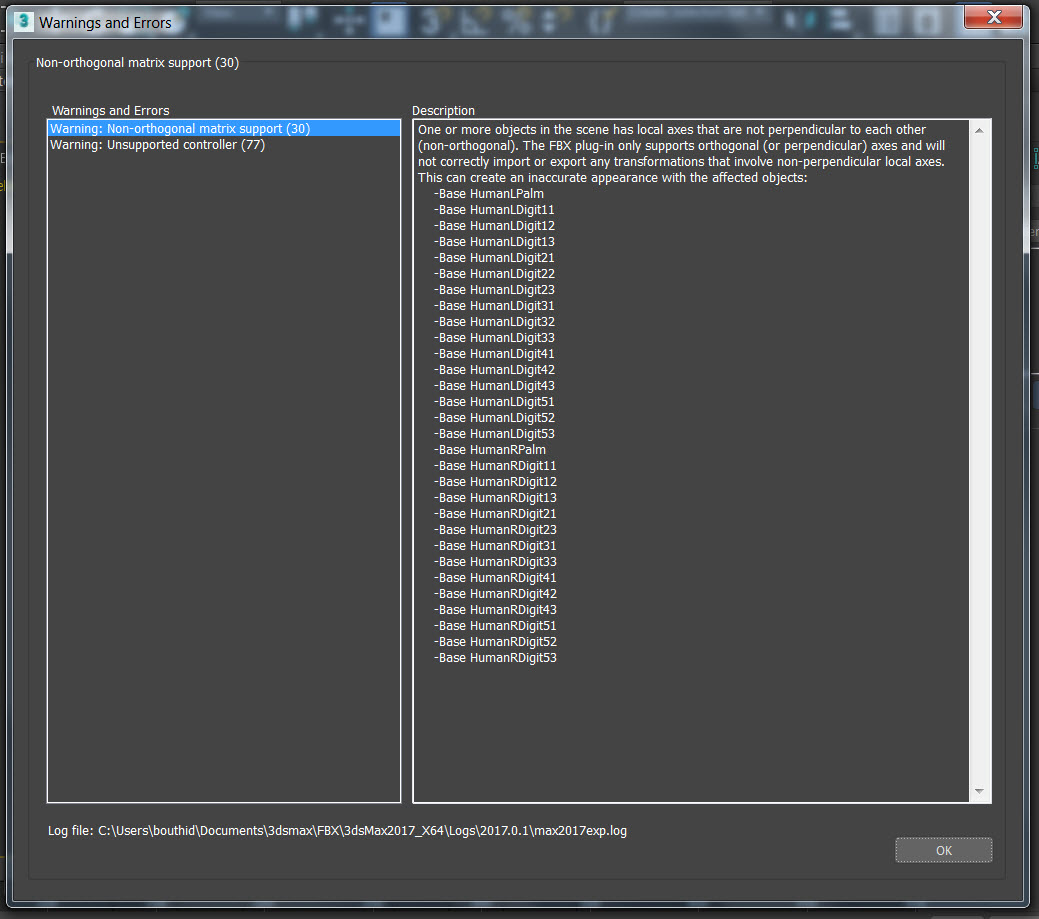
Causes:
This warning will occur on export of a rig when CAT Bones have been non-uniformly scaled (do not use 100% Absolute:Local scaling.)
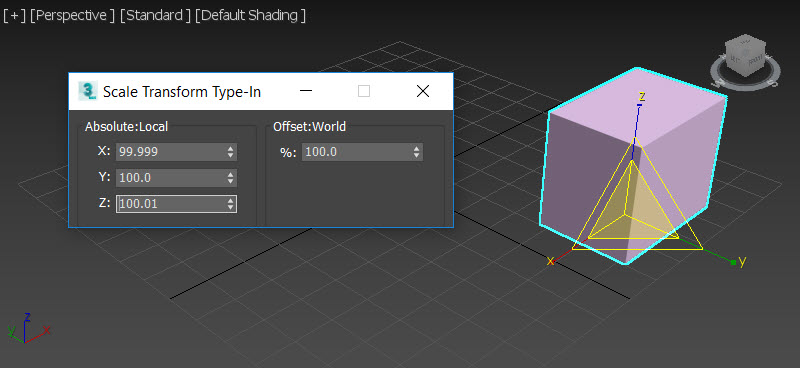
Solution:
To resolve the warning message, try the following:
Adjust the CAT bone Absolute:Local scale in Animation Mode
To adjust the CAT rig while in Animation Mode, see the solution in this forum thread: Non orthogonal matrix support.
Adjust the CAT bone Absolute:Local scale in Setup Mode
When working with CAT rigs, sometimes the Absolute:Local bone values cannot be manually entered or changed in the Scale Transform Type-In window in Setup Mode.

To remove the «Non-Orthogonal Matrix Support» warnings and change the scale of the Absolute:Local bone values of a CAT rig in Setup Mode:
- Download the Fix_CAT_BoneScale.ms file from this article.
- In 3ds Max, go to Scripting > Open script.
- In the Open File window, find and select the Fix_CAT_BoneScale.ms.
- Once the script file has loaded, find the highest bone in the rig hierarchy that has a non-uniform scale value (something other than 100%.)
- In the scripting window, choose Tools > Evaluate All. This will return the X, Y and Z Absolute:Local scale values to 100%.
- Repeat steps 4 and 5 for each affected bone down the rig hierarchy.
Note: Some bones that are very close to a uniform scale can register their X, Y and Z values as 100%, which can prevent the script from being used on other bones further down the hierarchy.
If this happens, run the script on each bone within the rig from the highest bone within the hierarchy.
|
На сайте c 25.06.2012 |
27.10.2012 10:44
Привет.не нашла на форуме,да и в инете инфы нет как таковой, знатоки,как правильно сохранять в этих форматах? особенно фбх? а то у меня получается, что все полики порваны да и вообще объект в хлам превращается. |


|
На сайте c 04.07.2007 |
27.10.2012 11:04
alisok Перед сохранением в FBX — всю геометрию переводите в poly и желательно объединить в единый polymesh объект Если присутствует материал Blend — заменить на другой, т.к. FBX его не понимает и сохраняет с ошибкой |

|
На сайте c 25.06.2012 |
28.10.2012 22:10
вот све и было в поли. я имею ввиду при переводе в фбх выходит окошко. нужно просто ок нажать? или что-то понажимать там,поднастроить? |
|
На сайте c 13.04.2012 |
19.01.2013 14:30
«Mozart» wrote: alisok Перед сохранением в FBX — всю геометрию переводите в poly и желательно объединить в единый polymesh объект
Перевела, а он мне пишет: Non orthogonal matrix support- это про геометрию |

|
На сайте c 04.09.2008 |
19.01.2013 15:48
Nastyafil |

|
На сайте c 29.12.2008 |
30.01.2013 16:52
Ребят чёто я уже мозг сломал Skorpionchik не не помогло тоже самое( |

 почему у меня при экспорте в FBX, сбрасываются UVW координаты?
|
На сайте c 25.02.2009 |
30.01.2013 17:11
Заметил, что фбх лучше експортируется, если конвертировать не в поли, а в меш…у меня поли почему то с ошибками получается периодически. |

|
На сайте c 30.01.2014 |
16.01.2017 02:14
всем привет. подскажите пожалуйста как сохранить в архикаде на маке в obj ну или другой формат для макса. заказчица утверждает, что там нет такого формата. зы архикад русский |

|
На сайте c 14.06.2012 |
16.01.2017 03:25
Цитата Di06: всем привет. подскажите пожалуйста как сохранить в архикаде на маке в obj ну или другой формат для макса. заказчица утверждает, что там нет такого формата. зы архикад русский Существует плагин 3d in (3DStudio16-3014-RUS) например, вроде так пишется. Для винды и для мака. В сайте архикада-адд оунс. Сохраняет из 3д окна архикада в формат max Только так. Или как в двж или двикс без этого плагина.Есть тема форуме специальная. Стоп я ошибся сори. |

 3d in для импорта. Для экспорта никаких плагов не нужно вроде
|
На сайте c 30.01.2014 |
16.01.2017 06:17
Не не мне с Маковского архикада в виндовский макс))) |
|
На сайте c 17.06.2011 Account is banned Пожизненный бан |
18.01.2017 10:08
Здравствуйте, такая проблема..После модерации модели прислали такую картинку с просьбой исправить, но у меня ошибок при импорте либо экспорте нет, что нужно исправить в модели (перевел через переводчик ничего не понял..)? Заранее спасибо.
|


|
На сайте c 04.04.2010 |
18.01.2017 11:19
Цитата aleksanDR_AGeev: Здравствуйте, такая проблема..После модерации модели прислали такую картинку с просьбой исправить, но у меня ошибок при импорте либо экспорте нет, что нужно исправить в модели (перевел через переводчик ничего не понял..)? Заранее спасибо.
двойные полигоны? |

|
На сайте c 28.10.2016 |
23.01.2017 23:00
Ребята помогите! Что это за ошибка? как с ней бороться? Max 2014, материалы короновские, кирилицы нигде нету, текстуры на которые ругается, тоже нет ни в сцене ни в асет трекинге.
|


|
На сайте c 16.03.2016 |
23.01.2017 23:48
Цитата ///GTR: Ребята помогите! Что это за ошибка? как с ней бороться? Max 2014, материалы короновские, кирилицы нигде нету, текстуры на которые ругается, тоже нет ни в сцене ни в асет трекинге. А разве FBX поддерживает экспорт короновских материалов? FBX — универсальный формат, поэтому экспортировать материалы, для отображения которых требуется установка сторонних плагинов, он не станет, о чём, собственно, и сообщает вам. |

|
На сайте c 31.03.2008 |
22.09.2017 19:21
Привет всем! Столкнулась с проблемой при экспортировании — вес модели в формате FBX и obj становится больше в 3-4 раза. Модель разгруппирована, конвертирована в Mesh. Тема такая уже поднималась, но полезной информации по ней я не нашла. |

|
На сайте c 07.03.2016 |
02.11.2017 13:50
А у меня при попытке импорта fbx в сцену Макс вылетает. Знатоки, подскажите, с чем это может быть связано и как это исправить? |

|
На сайте c 16.03.2010 |
07.02.2019 10:16
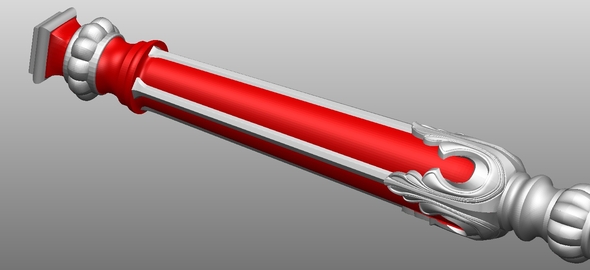
Добрый день ГОСПОДА!!! такая проблема — экспортирую модель из 3dsmax в obj для PowerShape. в модели отображаются полигноы, которые видит фреза чпу станка. как исправить. спасибо!!!
|


|
На сайте c 06.02.2012 |
07.02.2019 11:48
Цитата tadamori: Добрый день ГОСПОДА!!! такая проблема — экспортирую модель из 3dsmax в obj для PowerShape. в модели отображаются полигноы, которые видит фреза чпу станка. как исправить. спасибо!!! Попробуйте экспортировать в stl и пройтись исправлением ошибок от Netfabb А может проблемы с нормалями. |

|
На сайте c 16.03.2010 |
28.02.2019 15:31 |
Пытался экспортировать скелетный меш из одной игрушки через FBX-плагин, получил ошибку:
Warning: Non-orthogonal matrix support (11)
One or more objects in the scene has local axes that are not perpendicular to each other (non-orthogonal). The FBX plug-in only supports orthogonal (or perpendicular) axes and will not correctly import or export any transformations that involve non-perpendicular local axes. This can create an inaccurate appearance with the affected objects:
-Bip01 L Clavicle
-Bip01 L UpperArm
-Bip01 L Forearm
-ZS_LEFTARM
-Bip01 R Clavicle
-Bip01 R UpperArm
-Bip01 R Forearm
-Bip01 R Hand
-Bip01 R Finger0
-ZS_RIGHTHAND
-Bip01 L Calf
Вопрос в том, что такое локальные оси, как их ортогонализировать и может ли данная операция сказаться на анимации этого меша?
-

Junior Member
- Join Date: Jan 2023
- Posts: 3
Hey,
I’ve rigged a character using CAT in 3Ds Max and exported it as an FBX with 1 25 second long animation.
I received a few errors on export & the Skeletal mesh imported as rotated and offset while the bones were still in the correct place as shown in the screenshot below.

The Errors received were :-
1) Geometry Conversion — The plug-in does not support the following objects’ geometry type and will convert them to an editable mesh. Morph and skin deformations may be lost. If ‘Enable in Viewport’ is deactivated, closed shapes are capped and open shapes are converted to dummy objects with no edges or faces.
2) Non-orthogonal matrix support — One or more objects in the scene has local axes that are not perpendicular to each other (non-orthogonal). The FBX plug-in only supports orthogonal (or perpendicular) axes and will not correctly import or export any transformations that involve non-perpendicular local axes.I’d be glad if someone could help me figure out if i’m missing a step or something.
Thanks in advance!
-Ashwin -
Senior Member
- Join Date: Jan 2023
- Posts: 2201
I’m not sure if it’s the same term in Max, but did you freeze the transformations on the mesh before skinning? (ie. reset the location and rotation values to be at 0)
Comment
-
Senior Member
- Join Date: Jan 2023
- Posts: 171
Maya — freeze transformations.
Max — reset Xform.Maya — delete construction history.
Max — collapse the stack.2 things you should do before skinning (binding) the mesh.
Comment
I have a big problem (in Maya 2011) that I hope someone can figure out.
I have this rig of a crow that a project partner and I have been using for a whole bunch of animations. I converted one to an FBX to bring into Unity this afternoon for testing, but the mesh was essentially a blob. I realized that an error message I received after export, «Warning: Non-orthogonal matrix support,» was likely the culprit.
In the Outliner, one of the joints, «joint1,» appears to be the child of a transform. This transform, «transform2,» is non-orthogonal. Now, I can’t delete the transform, because the joint will disappear and warp the mesh around where it was. I want to try freezing or resetting the joint’s transformations, but I can’t do that without detaching the skin. If I detach the skin, my partner and I would have to repaint the skin weights…and that would mean a lot of animations to repaint!
Worse comes to worst, we could reanimate, but we only have until the end of the week or so to get our animations working in Unity, and so we want to avoid having to do this. Does anyone know how I could fix this?
Thank you very much,
Chris