In this tutorial, Learn how to fix java.util.NoSuchElementException: No value present error in java application.
This error java.util.NoSuchElementException: No value present thrown when there is no element found in Optional object with Stream API in java8.
Let’s create an array and initialize it with string values. You can check how to create and initialize an array in a single line
Let’s see a simple example to check if a string exists in an array.
import java.util.ArrayList;
import java.util.Arrays;
import java.util.List;

public class Test {
    public static void main(String[] args) {
        List<String> srs = new ArrayList<>(Arrays.asList("One", "two", "three"));
        String str=srs.stream().filter(e->e.equals("ten")).findFirst().get();


    }
}
It throws an error Exception in thread “main” java.util.NoSuchElementException: No value present
Exception in thread "main" java.util.NoSuchElementException: No value present
    at java.util.Optional.get(Optional.java:135)
    at Test.main(Test.java:8)
Let’s understand the above code.
- Iterated an array using stream API in java8, Stream is another way to iterate the enumerated object to improve performance
- It returns the Stream object using the stream() method
- Calling filter method on stream which matched with a given predicate for each element and returns matched values with stream
- Calling the first element using findFirst from the matched stream and returns Optional class
- if
optionalObject is empty,getmethod returnno value presenterror
i.e Optional.get() method gives java.util.NoSuchElementException when Optional object is empty
Here is a get method implemented in java8
 public T get() {
        if (value == null) {
            throw new NoSuchElementException("No value present");
        }
        return value;
    }
There are multiple ways we can fix to check for the optional object is empty or not.
Let’s see some other simple examples to reproduce and solution for this error
Optional<Integer> number1  =  Optional.of(123);
Optional<Integer> number2  =  Optional.empty();
System.out.println(number1.get()); // 123
System.out.println(number2.get()); // Exception in thread "main" java.util.NoSuchElementException: No value present
One way,
We can check Optional empty or not using isPresent() method in Optional class
        if (number2.isPresent()){
            System.out.println(number2.get());
    }else{
            System.out.println("number2 is an empty");
        }
isPresent()method returns true if value exists, else return false.
Thus, we can avoid an error.
Another way using the orElse method
The orElse method returns the default value assigned with an argument if optional is empty.
otherwise, the returns value is present in the Optional class.
Optional<Integer> number1 = Optional.of(123);
System.out.println(number1.orElse(0)); // 123
Optional<Integer> number2 = Optional.empty();
System.out.println(number2.orElse(0));
Finally, you can use the orElseThrow method.
Sometimes we want to throw an error if Optional is empty, It is handy and helpful.
        Optional<Integer> number1 = Optional.of(123);
        System.out.println(number1.orElse(0)); // 123
        Optional<Integer> number2 = Optional.empty();
        System.out.println(number2.orElseThrow(Exception::new));
We can use either orElse with the default value orElseThrow method.
How to fix NoSuchElement error in java8 streams
Here is a complete example to avoid errors in the java8 stream.
It usually occurs during the streaming process with map, filter etc. methods.
We have to use orElse returns assigned default value else the return value exists in the Optional class.
import java.util.List;
import java.util.Optional;

public class Test {
    public static void main(String[] args)  throws Exception{
        List<String> srs = new ArrayList<>(Arrays.asList("one", "two", "three"));
        String result=srs.stream().filter(e->e.equals("ten")).findFirst().orElse("");
        System.out.println(result);
        String result1=srs.stream().filter(e->e.equals("one")).findFirst().orElse("");
        System.out.println(result1);

    }
}
Conclusion
You learned multiple ways to fix java.util.NoSuchElementException: No value present error in java8 streams.
Есть поиск в коллекции:
for (Object dataRow : objects) {
    AttributeModel attribute = document.getAttributeModels().stream()
    .filter(atr -> atr.getName().equals(nameField)).findFirst().get();
....
....
}
но если элемента с таким именем нету в коллекции, вы,выбрасывает ошибку :
Exception in thread «main» java.util.NoSuchElementException: No value
present
Как правильно обработать эту ошибку в стриме?
И как можно сделать, чтобы при отсутствии элемента, выполнялся следующий цикл for() ?

задан 6 окт 2018 в 9:24

Используйте метод Optional.get() только после проверки Optional.isPresent()
for (Object dataRow : objects) {
    Optional<AttributeModel> opt = document.getAttributeModels()
    .stream()
    .filter(atr -> atr.getName().equals(nameField))
    .findFirst();
    if (opt.isPresent()){
      AttributeModel attribute = opt.get();
    }
....
....
}
ответ дан 6 окт 2018 в 9:31

Vlad MamaevVlad Mamaev
7313 серебряных знака7 бронзовых знаков
1
The java.util.NoSuchElementException: No value present error occurred in spring boot application when an entity object is being attempted to get it from an optional object. If the hibernate returns an empty optional object, this exception Servlet.service() for servlet [dispatcherServlet] in context with path [] threw exception [Request processing failed; nested exception is java.util.NoSuchElementException: No value present] will be thrown.The optional object should be validated before accessing the entity object in it. Otherwise, the No value present error will be thrown.
Exception
ERROR 2448 --- [nio-8080-exec-1] o.a.c.c.C.[.[.[/].[dispatcherServlet]    : Servlet.service() for servlet [dispatcherServlet] in context with path [] threw exception [Request processing failed; nested exception is java.util.NoSuchElementException: No value present] with root cause
 java.util.NoSuchElementException: No value present
     at java.base/java.util.Optional.get(Unknown Source) ~[na:na]
     at com.yawintutor.BookController.findOne(BookController.java:42) ~[classes/:na]
     at java.base/jdk.internal.reflect.NativeMethodAccessorImpl.invoke0(Native Method) ~[na:na]
     at java.base/jdk.internal.reflect.NativeMethodAccessorImpl.invoke(Unknown Source) ~[na:na]
     at java.base/jdk.internal.reflect.DelegatingMethodAccessorImpl.invoke(Unknown Source) ~[na:na]
     at java.base/java.lang.reflect.Method.invoke(Unknown Source) ~[na:na]
     at org.springframework.web.method.support.InvocableHandlerMethod.doInvoke(InvocableHandlerMethod.java:190) ~[spring-web-5.1.10.RELEASE.jar:5.1.10.RELEASE]
     at org.springframework.web.method.support.InvocableHandlerMethod.invokeForRequest(InvocableHandlerMethod.java:138) ~[spring-web-5.1.10.RELEASE.jar:5.1.10.RELEASE]
     at org.springframework.web.servlet.mvc.method.annotation.ServletInvocableHandlerMethod.invokeAndHandle(ServletInvocableHandlerMethod.java:105) ~[spring-webmvc-5.1.10.RELEASE.jar:5.1.10.RELEASE]
     at org.springframework.web.servlet.mvc.method.annotation.RequestMappingHandlerAdapter.invokeHandlerMethod(RequestMappingHandlerAdapter.java:893) ~[spring-webmvc-5.1.10.RELEASE.jar:5.1.10.RELEASE]
     at org.springframework.web.servlet.mvc.method.annotation.RequestMappingHandlerAdapter.handleInternal(RequestMappingHandlerAdapter.java:798) ~[spring-webmvc-5.1.10.RELEASE.jar:5.1.10.RELEASE]
     at org.springframework.web.servlet.mvc.method.AbstractHandlerMethodAdapter.handle(AbstractHandlerMethodAdapter.java:87) ~[spring-webmvc-5.1.10.RELEASE.jar:5.1.10.RELEASE]
     at org.springframework.web.servlet.DispatcherServlet.doDispatch(DispatcherServlet.java:1040) ~[spring-webmvc-5.1.10.RELEASE.jar:5.1.10.RELEASE]
     at org.springframework.web.servlet.DispatcherServlet.doService(DispatcherServlet.java:943) ~[spring-webmvc-5.1.10.RELEASE.jar:5.1.10.RELEASE]
     at org.springframework.web.servlet.FrameworkServlet.processRequest(FrameworkServlet.java:1006) ~[spring-webmvc-5.1.10.RELEASE.jar:5.1.10.RELEASE]
     at org.springframework.web.servlet.FrameworkServlet.doGet(FrameworkServlet.java:898) ~[spring-webmvc-5.1.10.RELEASE.jar:5.1.10.RELEASE]
     at javax.servlet.http.HttpServlet.service(HttpServlet.java:634) ~[tomcat-embed-core-9.0.26.jar:9.0.26]
     at org.springframework.web.servlet.FrameworkServlet.service(FrameworkServlet.java:883) ~[spring-webmvc-5.1.10.RELEASE.jar:5.1.10.RELEASE]
     at javax.servlet.http.HttpServlet.service(HttpServlet.java:741) ~[tomcat-embed-core-9.0.26.jar:9.0.26]
     at org.apache.catalina.core.ApplicationFilterChain.internalDoFilter(ApplicationFilterChain.java:231) ~[tomcat-embed-core-9.0.26.jar:9.0.26]
     at org.apache.catalina.core.ApplicationFilterChain.doFilter(ApplicationFilterChain.java:166) ~[tomcat-embed-core-9.0.26.jar:9.0.26]
     at org.apache.tomcat.websocket.server.WsFilter.doFilter(WsFilter.java:53) ~[tomcat-embed-websocket-9.0.26.jar:9.0.26]
     at org.apache.catalina.core.ApplicationFilterChain.internalDoFilter(ApplicationFilterChain.java:193) ~[tomcat-embed-core-9.0.26.jar:9.0.26]
     at org.apache.catalina.core.ApplicationFilterChain.doFilter(ApplicationFilterChain.java:166) ~[tomcat-embed-core-9.0.26.jar:9.0.26]
     at org.springframework.web.filter.RequestContextFilter.doFilterInternal(RequestContextFilter.java:100) ~[spring-web-5.1.10.RELEASE.jar:5.1.10.RELEASE]
     at org.springframework.web.filter.OncePerRequestFilter.doFilter(OncePerRequestFilter.java:119) ~[spring-web-5.1.10.RELEASE.jar:5.1.10.RELEASE]
     at org.apache.catalina.core.ApplicationFilterChain.internalDoFilter(ApplicationFilterChain.java:193) ~[tomcat-embed-core-9.0.26.jar:9.0.26]
     at org.apache.catalina.core.ApplicationFilterChain.doFilter(ApplicationFilterChain.java:166) ~[tomcat-embed-core-9.0.26.jar:9.0.26]
     at org.springframework.web.filter.FormContentFilter.doFilterInternal(FormContentFilter.java:93) ~[spring-web-5.1.10.RELEASE.jar:5.1.10.RELEASE]
     at org.springframework.web.filter.OncePerRequestFilter.doFilter(OncePerRequestFilter.java:119) ~[spring-web-5.1.10.RELEASE.jar:5.1.10.RELEASE]
     at org.apache.catalina.core.ApplicationFilterChain.internalDoFilter(ApplicationFilterChain.java:193) ~[tomcat-embed-core-9.0.26.jar:9.0.26]
     at org.apache.catalina.core.ApplicationFilterChain.doFilter(ApplicationFilterChain.java:166) ~[tomcat-embed-core-9.0.26.jar:9.0.26]
     at org.springframework.web.filter.HiddenHttpMethodFilter.doFilterInternal(HiddenHttpMethodFilter.java:94) ~[spring-web-5.1.10.RELEASE.jar:5.1.10.RELEASE]
     at org.springframework.web.filter.OncePerRequestFilter.doFilter(OncePerRequestFilter.java:119) ~[spring-web-5.1.10.RELEASE.jar:5.1.10.RELEASE]
     at org.apache.catalina.core.ApplicationFilterChain.internalDoFilter(ApplicationFilterChain.java:193) ~[tomcat-embed-core-9.0.26.jar:9.0.26]
     at org.apache.catalina.core.ApplicationFilterChain.doFilter(ApplicationFilterChain.java:166) ~[tomcat-embed-core-9.0.26.jar:9.0.26]
     at org.springframework.web.filter.CharacterEncodingFilter.doFilterInternal(CharacterEncodingFilter.java:201) ~[spring-web-5.1.10.RELEASE.jar:5.1.10.RELEASE]
     at org.springframework.web.filter.OncePerRequestFilter.doFilter(OncePerRequestFilter.java:119) ~[spring-web-5.1.10.RELEASE.jar:5.1.10.RELEASE]
     at org.apache.catalina.core.ApplicationFilterChain.internalDoFilter(ApplicationFilterChain.java:193) ~[tomcat-embed-core-9.0.26.jar:9.0.26]
     at org.apache.catalina.core.ApplicationFilterChain.doFilter(ApplicationFilterChain.java:166) ~[tomcat-embed-core-9.0.26.jar:9.0.26]
     at org.apache.catalina.core.StandardWrapperValve.invoke(StandardWrapperValve.java:202) ~[tomcat-embed-core-9.0.26.jar:9.0.26]
     at org.apache.catalina.core.StandardContextValve.invoke(StandardContextValve.java:96) [tomcat-embed-core-9.0.26.jar:9.0.26]
     at org.apache.catalina.authenticator.AuthenticatorBase.invoke(AuthenticatorBase.java:526) [tomcat-embed-core-9.0.26.jar:9.0.26]
     at org.apache.catalina.core.StandardHostValve.invoke(StandardHostValve.java:139) [tomcat-embed-core-9.0.26.jar:9.0.26]
     at org.apache.catalina.valves.ErrorReportValve.invoke(ErrorReportValve.java:92) [tomcat-embed-core-9.0.26.jar:9.0.26]
     at org.apache.catalina.core.StandardEngineValve.invoke(StandardEngineValve.java:74) [tomcat-embed-core-9.0.26.jar:9.0.26]
     at org.apache.catalina.connector.CoyoteAdapter.service(CoyoteAdapter.java:343) [tomcat-embed-core-9.0.26.jar:9.0.26]
     at org.apache.coyote.http11.Http11Processor.service(Http11Processor.java:408) [tomcat-embed-core-9.0.26.jar:9.0.26]
     at org.apache.coyote.AbstractProcessorLight.process(AbstractProcessorLight.java:66) [tomcat-embed-core-9.0.26.jar:9.0.26]
     at org.apache.coyote.AbstractProtocol$ConnectionHandler.process(AbstractProtocol.java:860) [tomcat-embed-core-9.0.26.jar:9.0.26]
     at org.apache.tomcat.util.net.NioEndpoint$SocketProcessor.doRun(NioEndpoint.java:1589) [tomcat-embed-core-9.0.26.jar:9.0.26]
     at org.apache.tomcat.util.net.SocketProcessorBase.run(SocketProcessorBase.java:49) [tomcat-embed-core-9.0.26.jar:9.0.26]
     at java.base/java.util.concurrent.ThreadPoolExecutor.runWorker(Unknown Source) [na:na]
     at java.base/java.util.concurrent.ThreadPoolExecutor$Worker.run(Unknown Source) [na:na]
     at org.apache.tomcat.util.threads.TaskThread$WrappingRunnable.run(TaskThread.java:61) [tomcat-embed-core-9.0.26.jar:9.0.26]
     at java.base/java.lang.Thread.run(Unknown Source) [na:na]
How to reproduce this issue
From the rest controller, find an entity object that is not available in the database. Spring database repositories returns with optional class without any value. If you tries to access the object, it throws NoSuchElementException.
Root Cause
Access a element in an optional that has no value in it. Optional class throws no such element exception as no element available.
Solution 1
Add proper exception handling code around optional element in rest controller class
@GetMapping("/books/{id}")
Book findOne(@PathVariable Long id) {
    return repository.findById(id).get()
            .orElseThrow(() -> new Exception());
}
Solution 2
Add try catch block to catch and leave this exception
@GetMapping("/books/{id}")
Book findOne(@PathVariable Long id) {
 try {
    return repository.findById(id).get();
 } catch (Exception e) {
    // do nothing or add action code
 }
}
Solution 3
Check the url, path variables and parameters. validate with the database tables and identify why the data is not available in the database.
A quick strip down found out that.
This is the code that cause the error with LexicalPrinter
class InstallPluginCommand extends EnvironmentAwareCommand {

    /** Downloads a zip from the url, into a temp file under the given temp dir. */
    // pkg private for tests
    @SuppressForbidden(reason = "We use getInputStream to download plugins")
    Path downloadZip(Terminal terminal, String urlString, Path tmpDir, boolean isBatch) throws IOException {
        terminal.println(VERBOSE, "Retrieving zip from " + urlString);
        URL url = new URL(urlString);
        Path zip = Files.createTempFile(tmpDir, null, ".zip");
        URLConnection urlConnection = url.openConnection();
        urlConnection.addRequestProperty("User-Agent", "elasticsearch-plugin-installer");
        try (
                InputStream in = isBatch
                        ? urlConnection.getInputStream()
                        : new TerminalProgressInputStream(urlConnection.getInputStream(), urlConnection.getContentLength(), terminal)
        ) {
            // must overwrite since creating the temp file above actually created the file
            Files.copy(in, zip, StandardCopyOption.REPLACE_EXISTING);
        }
        return zip;
    }


}
Remove either one or all of 2 comment lines before @Supress make setup LexicalPrinter successfully
class InstallPluginCommand extends EnvironmentAwareCommand {


    @SuppressForbidden(reason = "We use getInputStream to download plugins")
    Path downloadZip(Terminal terminal, String urlString, Path tmpDir, boolean isBatch) throws IOException {
        terminal.println(VERBOSE, "Retrieving zip from " + urlString);
        URL url = new URL(urlString);
        Path zip = Files.createTempFile(tmpDir, null, ".zip");
        URLConnection urlConnection = url.openConnection();
        urlConnection.addRequestProperty("User-Agent", "elasticsearch-plugin-installer");
        try (
                InputStream in = isBatch
                        ? urlConnection.getInputStream()
                        : new TerminalProgressInputStream(urlConnection.getInputStream(), urlConnection.getContentLength(), terminal)
        ) {
            // must overwrite since creating the temp file above actually created the file
            Files.copy(in, zip, StandardCopyOption.REPLACE_EXISTING);
        }
        return zip;
    }


}
Table Of Contents
- What is it?
- Quick Video Fix
- How to fix ‘Exception in thread “main” java.util.NoSuchElementException’
- 1st Fix
- 2nd Fix
- 3rd Fix:
- 4th fix (Preventive)
- Forum Feedback
- Summing Up
- Related Posts:
In this post, we’ll provide 4+ fixes for the ‘Exception in thread “main” java.util.NoSuchElementException’ error.
Java programming is a widely known programming language that serves a general purpose in application development. Java is easily the most popular coding language and is running on more or less 3 billion devices worldwide.
However, Java users also encounter errors whilst in the process of programming. One of which is the Exception in thread “main” java.util.NoSuchElementException. This will occur if the exception is thrown to indicate that there are no more elements in an enumeration.
In simpler terms, exceptions are considered abnormal conditions in Java programming. These are events that disrupt the normal flow of a program. You can see a bunch of people experiencing this error over on Twitter:
Exception in thread «main» java.util.NoSuchElementException: No line found
at java.util.Scanner.nextLine(Unknown Source)
at aya.SecondFilePreproc.main(https://t.co/24bmqe3V4W)— ␀ (@typenullbot) January 26, 2019
#Geeting Exception in thread «main» java.util.NoSuchElementException while retrieving the element from HashMap#Te… https://t.co/bFba7LW8gO
— Micheal Hartwig (@eblogit) March 29, 2016
What is it?
This exception message will appear as a result of various coding errors. The most common cause of this error is when it is in the context of a Scanner when programmers call nextLine(), and there’s no next line that follows.
Also, this exception error can also stem from the following ways:
- Enumeration::nextElement()
- NamingEnumeration::next()
- StringTokenizer::nextElement() – a string tokenizer class allows an application to break and divide a string into multiple tokens
- Iterator::next() – An iterator allows the programmer to remove elements from an underlying collection. The exception error is shown when the iterator is empty. For example, when the following method of an Iterator instance is called when hasNext of that instance returns false.
Quick Video Fix
In the video below, the tech vlogger says that you will find this kind of exception while automating a web application. He covers the reasons for this exception and how you can resolve it.
Programmers initially expect the machine to initially output “Text Input:”. After which it allows the user to input more text which will result in becoming output afterward. If you encounter the “Exception in thread “main” java.util.NoSuchElementException” message while in the middle of typing your codes or after scanning, you can follow these easy steps listed below.
1st Fix
As was mentioned before, this exception error message usually results from a multitude of causes. Therefore, the first fix to be discussed will be the most common and general fix.
Based on oracle.com, it is imperative that you should use a Scanner when trying to fix these kinds of errors. Listed below are important steps in ensuring you have not avoided these.
- While using Scanner, the user must check if there is a next line with hasNextLine().
- Also, keep in mind that it is dependent on whether the input is properly formatted.
A Scanner class also issues this same exception if it encounters special characters it cannot read. Also, ensure that the correct encoding is passed to the Scanner constructor.
2nd Fix
Here is another fix to a common error source. According to Javacodegeeks, this is a very common and average error case. This case usually occurs when a Java application tends to iterate over an empty Set. In order to prevent this error from happening, a Java application should call the hasNext first.
An example from their website is shown below:
| 01
02 03 04 05 06 07 08 09 10 11 12 13 14 15 |
import java.util.HashSet;
import java.util.Iterator; import java.util.Set; public class MapIterationExample { private final static int TOTAL_ELEMENTS = 100; public static void main(String[] args) { Set sampleSet = new HashSet(TOTAL_ELEMENTS); Iterator ite = sampleSet.iterator(); while(ite.hasNext()) System.out.println(ite.next()); } } |
If a Java application uses multiple enumerations, the hasMoreElements method should be utilized:
| 01
02 03 04 05 06 07 08 09 10 11 12 13 14 |
import java.util.Enumeration;
import java.util.Hashtable; public class EnumerationIterationExample { private final static int TOTAL_ELEMENTS = 100; public static void main(String[] args) { Hashtable sampleTable= new Hashtable(TOTAL_ELEMENTS); Enumeration tableEnum = sampleTable.elements(); while(tableEnum.hasMoreElements()) System.out.println(tableEnum.nextElement()); } } |
Lastly, the most appropriate user of the StringTokenizer is as follows:
| 01
02 03 04 05 06 07 08 09 10 11 |
import java.util.StringTokenizer;
public class StringTokenizerExample { public static void main(String[] args) { String str = “Hello:from:Java,Code:Geeks”; StringTokenizer tokenizer = new StringTokenizer(str, “:,”); while(tokenizer.hasMoreTokens()) System.out.println(tokenizer.nextToken()); } } |
3rd Fix:
The NoSuchElementException lengthens the period of the RuntimeException class and hence belongs to the exceptions which can be thrown during the Java Virtual Machine (JVM) operation. A RuntimeException class is considered the superclass of these exceptions that can be commonly thrown when under the normal operation process of the JVM. It’s an unchecked exception, and it doesn’t need to be proclaimed in a constructor’s or a method’s throws clause.
In order to indicate that no more elements are present, all the aforementioned methods try to revert to the next element of an enumeration and throw that exception.
Whenever a Java application tries to iterate over an empty Set is considered a very common error. In order for the programmer to avoid this error, the following steps are listed below:
- A Java application should have the hasNext
- If hasNext is not available, try to have a hasMoreElements or StringTokenizer methods
4th fix (Preventive)
This fourth fix is a preventive measure rather than an actual solution. This helps in avoiding the exception to be thrown into the code. Follow the two steps listed below:
- If a programmer is not sure about the number of ints in his or her file, do not try to store them into a fixed-size array. Try to utilize ArrayList instead.
- Do not use endless loop while(true) but consider using Input.hasNext() to examine if there still is something to read from a file.
Forum Feedback
To understand more about this common Java error, we search through several Java support forums.
In general, users were asking about Exception in thread “main” java.util.NoSuchElementException no value present, Exception in thread “main” java.util.NoSuchElementException scanner, and Exception in thread “main” java.util.NoSuchElementException next on empty iterator.
They also wanted to know about Exception in thread “main” java.util.NoSuchElementException none.get.

A forum user shared that he was a novice to Java programming and that he was trying to write a code to execute a program converting inches to centimeters.
- However, he kept getting an error saying, “Exception in thread “main” java.util.NoSuchElementException.”
- He looked over his code, but he couldn’t find his mistake, so he asked other Java programmers to help him.
- The community was very helpful, and they explained that Exception in thread “main” java.util.NoSuchElementException appears when you attempt to read something from the “Scanner,” but there is nothing to be read. So, you get an error because the element you’re looking for doesn’t exist.
#Encountering «Exception in thread «main» java.util.NoSuchElementException» error for assignment#Tech #HowTohttps://t.co/SiHwXgTqt9
— Micheal Hartwig (@eblogit) January 25, 2016
A couple of Java programmer recommend that if you want to learn how to fix NoSuchElementException errors, you must learn to read your stack and find the line of code where the exception is thrown. Then it’s easy to work from there and fix the problem.
Another forum member explained that if you get the Exception in thread “main” java.util.NoSuchElementException error, you should read more about exception-handling mechanisms in Java. He adds that you have to check that you’ve implemented your “Scanner” method correctly or if you have programmed “new Scanner” twice. The user also advises that you spell check to make sure that you’ve not mistyped anything in the code.
An individual advised that you check if you have any elements in the “Scanner” when you get NoSuchElementException. He adds that “Scanner” is a class and as such, it has a method. Namely: hasNext() which you should use to test if there is anything more to be read. For example, you can use the following code to check:
if(scan.hasNextInt()){
person = scan.nextInt();
} else {
//show error
return;
}
Another user also complained that he kept getting NoSuchElementException even though he has checked his elements. Other Java users took a look at this code and recommended that he close some of his System.in statements because they were throwing the exception. They also said that he should add a catch to prevent crashes.
A person suggests that Exception in thread “main” java.util.NoSuchElementException might appear if you’re reading and writing one file without saving it first. He also adds that you might want to use RandomAccessFile which is accessed directly and as such, doesn’t need other files to be read first.
What does this error mean? – Java Forums: Exception in thread «main» java.util.NoSuchElementException at java.ut… http://bit.ly/e6DHEJ
— Jon (@compgurru) January 25, 2011
Another forum poster explains that you’ll get the NoSuchElementException error if the file your program is supposed to read is empty or what’s inside it doesn’t match the parameters you’ve inputted in the code. For example, if you’ve programmed the code to read 40 values from a file of 10, you’ll get an error after the 10th because there is nothing else to read. That’s why the Java expert points out that you have to employ “hasNext()” method to check if you have a Next item.
A Java programmer comments that it’s not a good practice to have too many “Scanners” in your code and that it’s better to instantiate “Scanner” once and then use it again if there is a need for it. He also remarks that you shouldn’t close those Scanner objects which point to System in. You might forget to open it again and that will create an error such as Exception in thread “main” java.util.NoSuchElementException.
#Exception in thread «main» java.util.NoSuchElementException – not sure what’s going wrong#HowTo #Question #Techhttps://t.co/PFr7QDPGrP
— Micheal Hartwig (@HartwigMicheal) January 6, 2016
Another person also said that he had problems with the NoSuchElementException. When he posted his code on a Java forum, he understood that one line of his code was calling nextInt() but since there was no next input available, he got the error. A fellow member that he had to read more about Scanner’s class methods and employ one of them to check for available input before calling nextInt(). The user also recommended that he read the API doc for more information.
A novice programmer was baffled when he got the error Exception in thread “main” java.util.NoSuchElementException: No line found. However, the problem was a very simple one – he had forgotten one square bracket in the main method and that what throwing the exception. Other users also pointed out that you’ll get NoSuchElementException: No line found if you’re calling “sc.nextLine()” when you don’t have more lines that could be called.
Summing Up
Various programmer errors that are usually overlooked can contribute to the exception being thrown in the code. As such, a multitude of solutions is also needed in order to fix these errors.
The most common cause of the exception is when it looks like you are trying to call next even if the scanner no longer has a next element to provide. When you trying to fix this exception error message, try to check if a scanner has next item to read. You can use hasNext(), hasNextInt().
Also, a more detailed discussion on Scanner exception errors and whatnot can be found through this Reddit link.

Ryan is a computer enthusiast who has a knack for fixing difficult and technical software problems. Whether you’re having issues with Windows, Safari, Chrome or even an HP printer, Ryan helps out by figuring out easy solutions to common error codes.
Issue
I have a problem with a table that has 2 types of IDs (a primary key and a foreing key). The problem originates, when I only want to retrieve those that do matchmaking with the ID of the primary key, not counting those of the foreign key passed by http.
Inside the class, I have an ID embeded as a serializable object.
When I do a search missing one of the two id’s it gives the error java.util.NoSuchElementException: No value present
My classes:
I have an order class (table) that has 2 keys. (one is a foreigner)
..
@IdClass(PedidoId.class)
public class Pedido {
    @Id
    //@GeneratedValue(strategy = GenerationType.IDENTITY)
    private Long numero_pedido;
    @Id
    private String codigo_cliente;
..
Controller
@Autowired
private PedidoRepository eRepo;

@GetMapping("/pedidos/{id}")
public Pedido getPedidoById(@PathVariable Long id) {
    //return eRepo.findById(new PedidoId(id,"CT25")).get(); // OK
    //return eRepo.findById(new PedidoId(id,"")).get(); // ERROR
    Pedido pedido = eRepo.findById(new PedidoId(id,null)).get(); // ERROR
    // List<Pedido> pedido2 = eRepo.findByNumeroPedido(id); // CRASH  Unsatisfied dependency...
    return pedido;
}
It works correctly when I have the two Id’s with data.
The problem arises when one arrives empty. (Because we are only consulting the table itself, regardless of the foreign key)
When I use the pathUrl/pedidos/5 I get the following error
Whitelabel Error Page

This application has no explicit mapping for /error, so you are seeing this as a fallback.
Wed Sep 15 14:28:15 CEST 2021
There was an unexpected error (type=Internal Server Error, status=500).
No value present
java.util.NoSuchElementException: No value present
This is due to the parameter «customer_code» (FK another table) of the OrderId object reaches null.
I think it should search the same way even if it is only for one of the 2 IDs or with all 2 at the same time. Is there any way to fix this? Or is it simply necessary to create the service -> DAO and do it manually? I think I remember that it is possible without doing it manually.
Eddited: 15/09/2021 18:07
Adding a derived query:
@Repository

public interface PedidoRepository extends JpaRepository<Pedido, PedidoId> {

     public List<Pedido> findByNumeroPedido(final Long numero_pedido);

}
If I add a derived query I get:
org.springframework.beans.factory.UnsatisfiedDependencyException: Error creating bean with name 'pedidoController': Unsatisfied dependency expressed through field 'eRepo'; nested exception is org.springframework.beans.factory.BeanCreationException: Error creating bean with name 'pedidoRepository' defined in com.baeldung.core.repository.PedidoRepository defined in @EnableJpaRepositories declared on JpaRepositoriesRegistrar.EnableJpaRepositoriesConfiguration: Invocation of init method failed; nested exception is org.springframework.data.repository.query.QueryCreationException: Could not create query for public abstract java.util.List com.baeldung.core.repository.PedidoRepository.findByNumeroPedido(java.lang.Long)! Reason: Failed to create query for method public abstract java.util.List com.baeldung.core.repository.PedidoRepository.findByNumeroPedido(java.lang.Long)! No property numeroPedido found for type Pedido! Did you mean 'numero_pedido'?; nested exception is java.lang.IllegalArgumentException: Failed to create query for method public abstract java.util.List com.baeldung.core.repository.PedidoRepository.findByNumeroPedido(java.lang.Long)! No property numeroPedido found for type Pedido! Did you mean 'numero_pedido'?
    at org.springframework.beans.factory.annotation.AutowiredAnnotationBeanPostProcessor$AutowiredFieldElement.resolveFieldValue(AutowiredAnnotationBeanPostProcessor.java:660) ~[spring-beans-5.3.9.jar:5.3.9]
    at org.springframework.beans.factory.annotation.AutowiredAnnotationBeanPostProcessor$AutowiredFieldElement.inject(AutowiredAnnotationBeanPostProcessor.java:640) ~[spring-beans-5.3.9.jar:5.3.9]
    at org.springframework.beans.factory.annotation.InjectionMetadata.inject(InjectionMetadata.java:119) ~[spring-beans-5.3.9.jar:5.3.9]
    at org.springframework.beans.factory.annotation.AutowiredAnnotationBeanPostProcessor.postProcessProperties(AutowiredAnnotationBeanPostProcessor.java:399) ~[spring-beans-5.3.9.jar:5.3.9]
    at org.springframework.beans.factory.support.AbstractAutowireCapableBeanFactory.populateBean(AbstractAutowireCapableBeanFactory.java:1413) ~[spring-beans-5.3.9.jar:5.3.9]
    at org.springframework.beans.factory.support.AbstractAutowireCapableBeanFactory.doCreateBean(AbstractAutowireCapableBeanFactory.java:601) ~[spring-beans-5.3.9.jar:5.3.9]
    at org.springframework.beans.factory.support.AbstractAutowireCapableBeanFactory.createBean(AbstractAutowireCapableBeanFactory.java:524) ~[spring-beans-5.3.9.jar:5.3.9]
    at org.springframework.beans.factory.support.AbstractBeanFactory.lambda$doGetBean$0(AbstractBeanFactory.java:335) ~[spring-beans-5.3.9.jar:5.3.9]
    at org.springframework.beans.factory.support.DefaultSingletonBeanRegistry.getSingleton(DefaultSingletonBeanRegistry.java:234) ~[spring-beans-5.3.9.jar:5.3.9]
    at org.springframework.beans.factory.support.AbstractBeanFactory.doGetBean(AbstractBeanFactory.java:333) ~[spring-beans-5.3.9.jar:5.3.9]
    at org.springframework.beans.factory.support.AbstractBeanFactory.getBean(AbstractBeanFactory.java:208) ~[spring-beans-5.3.9.jar:5.3.9]
    at org.springframework.beans.factory.support.DefaultListableBeanFactory.preInstantiateSingletons(DefaultListableBeanFactory.java:944) ~[spring-beans-5.3.9.jar:5.3.9]
    at org.springframework.context.support.AbstractApplicationContext.finishBeanFactoryInitialization(AbstractApplicationContext.java:918) ~[spring-context-5.3.9.jar:5.3.9]
    at org.springframework.context.support.AbstractApplicationContext.refresh(AbstractApplicationContext.java:583) ~[spring-context-5.3.9.jar:5.3.9]
    at org.springframework.boot.web.servlet.context.ServletWebServerApplicationContext.refresh(ServletWebServerApplicationContext.java:145) ~[spring-boot-2.5.4.jar:2.5.4]
    at org.springframework.boot.SpringApplication.refresh(SpringApplication.java:754) ~[spring-boot-2.5.4.jar:2.5.4]
    at org.springframework.boot.SpringApplication.refreshContext(SpringApplication.java:434) ~[spring-boot-2.5.4.jar:2.5.4]
    at org.springframework.boot.SpringApplication.run(SpringApplication.java:338) ~[spring-boot-2.5.4.jar:2.5.4]
    at org.springframework.boot.SpringApplication.run(SpringApplication.java:1343) ~[spring-boot-2.5.4.jar:2.5.4]
    at org.springframework.boot.SpringApplication.run(SpringApplication.java:1332) ~[spring-boot-2.5.4.jar:2.5.4]
    at com.baeldung.core.BaeldungReactApplication.main(BaeldungReactApplication.java:10) ~[classes/:na]
    at java.base/jdk.internal.reflect.NativeMethodAccessorImpl.invoke0(Native Method) ~[na:na]
    at java.base/jdk.internal.reflect.NativeMethodAccessorImpl.invoke(NativeMethodAccessorImpl.java:78) ~[na:na]
    at java.base/jdk.internal.reflect.DelegatingMethodAccessorImpl.invoke(DelegatingMethodAccessorImpl.java:43) ~[na:na]
    at java.base/java.lang.reflect.Method.invoke(Method.java:567) ~[na:na]
    at org.springframework.boot.devtools.restart.RestartLauncher.run(RestartLauncher.java:49) ~[spring-boot-devtools-2.5.4.jar:2.5.4]
Caused by: org.springframework.beans.factory.BeanCreationException: Error creating bean with name 'pedidoRepository' defined in com.baeldung.core.repository.PedidoRepository defined in @EnableJpaRepositories declared on JpaRepositoriesRegistrar.EnableJpaRepositoriesConfiguration: Invocation of init method failed; nested exception is org.springframework.data.repository.query.QueryCreationException: Could not create query for public abstract java.util.List com.baeldung.core.repository.PedidoRepository.findByNumeroPedido(java.lang.Long)! Reason: Failed to create query for method public abstract java.util.List com.baeldung.core.repository.PedidoRepository.findByNumeroPedido(java.lang.Long)! No property numeroPedido found for type Pedido! Did you mean 'numero_pedido'?; nested exception is java.lang.IllegalArgumentException: Failed to create query for method public abstract java.util.List com.baeldung.core.repository.PedidoRepository.findByNumeroPedido(java.lang.Long)! No property numeroPedido found for type Pedido! Did you mean 'numero_pedido'?
    at org.springframework.beans.factory.support.AbstractAutowireCapableBeanFactory.initializeBean(AbstractAutowireCapableBeanFactory.java:1786) ~[spring-beans-5.3.9.jar:5.3.9]
    at org.springframework.beans.factory.support.AbstractAutowireCapableBeanFactory.doCreateBean(AbstractAutowireCapableBeanFactory.java:602) ~[spring-beans-5.3.9.jar:5.3.9]
    at org.springframework.beans.factory.support.AbstractAutowireCapableBeanFactory.createBean(AbstractAutowireCapableBeanFactory.java:524) ~[spring-beans-5.3.9.jar:5.3.9]
    at org.springframework.beans.factory.support.AbstractBeanFactory.lambda$doGetBean$0(AbstractBeanFactory.java:335) ~[spring-beans-5.3.9.jar:5.3.9]
    at org.springframework.beans.factory.support.DefaultSingletonBeanRegistry.getSingleton(DefaultSingletonBeanRegistry.java:234) ~[spring-beans-5.3.9.jar:5.3.9]
    at org.springframework.beans.factory.support.AbstractBeanFactory.doGetBean(AbstractBeanFactory.java:333) ~[spring-beans-5.3.9.jar:5.3.9]
    at org.springframework.beans.factory.support.AbstractBeanFactory.getBean(AbstractBeanFactory.java:208) ~[spring-beans-5.3.9.jar:5.3.9]
    at org.springframework.beans.factory.config.DependencyDescriptor.resolveCandidate(DependencyDescriptor.java:276) ~[spring-beans-5.3.9.jar:5.3.9]
    at org.springframework.beans.factory.support.DefaultListableBeanFactory.doResolveDependency(DefaultListableBeanFactory.java:1380) ~[spring-beans-5.3.9.jar:5.3.9]
    at org.springframework.beans.factory.support.DefaultListableBeanFactory.resolveDependency(DefaultListableBeanFactory.java:1300) ~[spring-beans-5.3.9.jar:5.3.9]
    at org.springframework.beans.factory.annotation.AutowiredAnnotationBeanPostProcessor$AutowiredFieldElement.resolveFieldValue(AutowiredAnnotationBeanPostProcessor.java:657) ~[spring-beans-5.3.9.jar:5.3.9]
    ... 25 common frames omitted
Caused by: org.springframework.data.repository.query.QueryCreationException: Could not create query for public abstract java.util.List com.baeldung.core.repository.PedidoRepository.findByNumeroPedido(java.lang.Long)! Reason: Failed to create query for method public abstract java.util.List com.baeldung.core.repository.PedidoRepository.findByNumeroPedido(java.lang.Long)! No property numeroPedido found for type Pedido! Did you mean 'numero_pedido'?; nested exception is java.lang.IllegalArgumentException: Failed to create query for method public abstract java.util.List com.baeldung.core.repository.PedidoRepository.findByNumeroPedido(java.lang.Long)! No property numeroPedido found for type Pedido! Did you mean 'numero_pedido'?
    at org.springframework.data.repository.query.QueryCreationException.create(QueryCreationException.java:101) ~[spring-data-commons-2.5.4.jar:2.5.4]
    at org.springframework.data.repository.core.support.QueryExecutorMethodInterceptor.lookupQuery(QueryExecutorMethodInterceptor.java:106) ~[spring-data-commons-2.5.4.jar:2.5.4]
    at org.springframework.data.repository.core.support.QueryExecutorMethodInterceptor.lambda$mapMethodsToQuery$1(QueryExecutorMethodInterceptor.java:94) ~[spring-data-commons-2.5.4.jar:2.5.4]
    at java.base/java.util.stream.ReferencePipeline$3$1.accept(ReferencePipeline.java:197) ~[na:na]
    at java.base/java.util.Iterator.forEachRemaining(Iterator.java:133) ~[na:na]
    at java.base/java.util.Collections$UnmodifiableCollection$1.forEachRemaining(Collections.java:1056) ~[na:na]
    at java.base/java.util.Spliterators$IteratorSpliterator.forEachRemaining(Spliterators.java:1801) ~[na:na]
    at java.base/java.util.stream.AbstractPipeline.copyInto(AbstractPipeline.java:484) ~[na:na]
    at java.base/java.util.stream.AbstractPipeline.wrapAndCopyInto(AbstractPipeline.java:474) ~[na:na]
    at java.base/java.util.stream.ReduceOps$ReduceOp.evaluateSequential(ReduceOps.java:913) ~[na:na]
    at java.base/java.util.stream.AbstractPipeline.evaluate(AbstractPipeline.java:234) ~[na:na]
    at java.base/java.util.stream.ReferencePipeline.collect(ReferencePipeline.java:682) ~[na:na]
    at org.springframework.data.repository.core.support.QueryExecutorMethodInterceptor.mapMethodsToQuery(QueryExecutorMethodInterceptor.java:96) ~[spring-data-commons-2.5.4.jar:2.5.4]
    at org.springframework.data.repository.core.support.QueryExecutorMethodInterceptor.lambda$new$0(QueryExecutorMethodInterceptor.java:86) ~[spring-data-commons-2.5.4.jar:2.5.4]
    at java.base/java.util.Optional.map(Optional.java:260) ~[na:na]
    at org.springframework.data.repository.core.support.QueryExecutorMethodInterceptor.<init>(QueryExecutorMethodInterceptor.java:86) ~[spring-data-commons-2.5.4.jar:2.5.4]
    at org.springframework.data.repository.core.support.RepositoryFactorySupport.getRepository(RepositoryFactorySupport.java:360) ~[spring-data-commons-2.5.4.jar:2.5.4]
    at org.springframework.data.repository.core.support.RepositoryFactoryBeanSupport.lambda$afterPropertiesSet$5(RepositoryFactoryBeanSupport.java:323) ~[spring-data-commons-2.5.4.jar:2.5.4]
    at org.springframework.data.util.Lazy.getNullable(Lazy.java:230) ~[spring-data-commons-2.5.4.jar:2.5.4]
    at org.springframework.data.util.Lazy.get(Lazy.java:114) ~[spring-data-commons-2.5.4.jar:2.5.4]
    at org.springframework.data.repository.core.support.RepositoryFactoryBeanSupport.afterPropertiesSet(RepositoryFactoryBeanSupport.java:329) ~[spring-data-commons-2.5.4.jar:2.5.4]
    at org.springframework.data.jpa.repository.support.JpaRepositoryFactoryBean.afterPropertiesSet(JpaRepositoryFactoryBean.java:144) ~[spring-data-jpa-2.5.4.jar:2.5.4]
    at org.springframework.beans.factory.support.AbstractAutowireCapableBeanFactory.invokeInitMethods(AbstractAutowireCapableBeanFactory.java:1845) ~[spring-beans-5.3.9.jar:5.3.9]
    at org.springframework.beans.factory.support.AbstractAutowireCapableBeanFactory.initializeBean(AbstractAutowireCapableBeanFactory.java:1782) ~[spring-beans-5.3.9.jar:5.3.9]
    ... 35 common frames omitted
Caused by: java.lang.IllegalArgumentException: Failed to create query for method public abstract java.util.List com.baeldung.core.repository.PedidoRepository.findByNumeroPedido(java.lang.Long)! No property numeroPedido found for type Pedido! Did you mean 'numero_pedido'?
    at org.springframework.data.jpa.repository.query.PartTreeJpaQuery.<init>(PartTreeJpaQuery.java:96) ~[spring-data-jpa-2.5.4.jar:2.5.4]
    at org.springframework.data.jpa.repository.query.JpaQueryLookupStrategy$CreateQueryLookupStrategy.resolveQuery(JpaQueryLookupStrategy.java:107) ~[spring-data-jpa-2.5.4.jar:2.5.4]
    at org.springframework.data.jpa.repository.query.JpaQueryLookupStrategy$CreateIfNotFoundQueryLookupStrategy.resolveQuery(JpaQueryLookupStrategy.java:218) ~[spring-data-jpa-2.5.4.jar:2.5.4]
    at org.springframework.data.jpa.repository.query.JpaQueryLookupStrategy$AbstractQueryLookupStrategy.resolveQuery(JpaQueryLookupStrategy.java:81) ~[spring-data-jpa-2.5.4.jar:2.5.4]
    at org.springframework.data.repository.core.support.QueryExecutorMethodInterceptor.lookupQuery(QueryExecutorMethodInterceptor.java:102) ~[spring-data-commons-2.5.4.jar:2.5.4]
    ... 57 common frames omitted
Caused by: org.springframework.data.mapping.PropertyReferenceException: No property numeroPedido found for type Pedido! Did you mean 'numero_pedido'?
    at org.springframework.data.mapping.PropertyPath.<init>(PropertyPath.java:90) ~[spring-data-commons-2.5.4.jar:2.5.4]
    at org.springframework.data.mapping.PropertyPath.create(PropertyPath.java:437) ~[spring-data-commons-2.5.4.jar:2.5.4]
    at org.springframework.data.mapping.PropertyPath.create(PropertyPath.java:413) ~[spring-data-commons-2.5.4.jar:2.5.4]
    at org.springframework.data.mapping.PropertyPath.lambda$from$0(PropertyPath.java:366) ~[spring-data-commons-2.5.4.jar:2.5.4]
    at java.base/java.util.concurrent.ConcurrentMap.computeIfAbsent(ConcurrentMap.java:330) ~[na:na]
    at org.springframework.data.mapping.PropertyPath.from(PropertyPath.java:348) ~[spring-data-commons-2.5.4.jar:2.5.4]
    at org.springframework.data.mapping.PropertyPath.from(PropertyPath.java:331) ~[spring-data-commons-2.5.4.jar:2.5.4]
    at org.springframework.data.repository.query.parser.Part.<init>(Part.java:81) ~[spring-data-commons-2.5.4.jar:2.5.4]
    at org.springframework.data.repository.query.parser.PartTree$OrPart.lambda$new$0(PartTree.java:249) ~[spring-data-commons-2.5.4.jar:2.5.4]
    at java.base/java.util.stream.ReferencePipeline$3$1.accept(ReferencePipeline.java:197) ~[na:na]
    at java.base/java.util.stream.ReferencePipeline$2$1.accept(ReferencePipeline.java:179) ~[na:na]
    at java.base/java.util.Spliterators$ArraySpliterator.forEachRemaining(Spliterators.java:948) ~[na:na]
    at java.base/java.util.stream.AbstractPipeline.copyInto(AbstractPipeline.java:484) ~[na:na]
    at java.base/java.util.stream.AbstractPipeline.wrapAndCopyInto(AbstractPipeline.java:474) ~[na:na]
    at java.base/java.util.stream.ReduceOps$ReduceOp.evaluateSequential(ReduceOps.java:913) ~[na:na]
    at java.base/java.util.stream.AbstractPipeline.evaluate(AbstractPipeline.java:234) ~[na:na]
    at java.base/java.util.stream.ReferencePipeline.collect(ReferencePipeline.java:682) ~[na:na]
    at org.springframework.data.repository.query.parser.PartTree$OrPart.<init>(PartTree.java:250) ~[spring-data-commons-2.5.4.jar:2.5.4]
    at org.springframework.data.repository.query.parser.PartTree$Predicate.lambda$new$0(PartTree.java:383) ~[spring-data-commons-2.5.4.jar:2.5.4]
    at java.base/java.util.stream.ReferencePipeline$3$1.accept(ReferencePipeline.java:197) ~[na:na]
    at java.base/java.util.stream.ReferencePipeline$2$1.accept(ReferencePipeline.java:179) ~[na:na]
    at java.base/java.util.Spliterators$ArraySpliterator.forEachRemaining(Spliterators.java:948) ~[na:na]
    at java.base/java.util.stream.AbstractPipeline.copyInto(AbstractPipeline.java:484) ~[na:na]
    at java.base/java.util.stream.AbstractPipeline.wrapAndCopyInto(AbstractPipeline.java:474) ~[na:na]
    at java.base/java.util.stream.ReduceOps$ReduceOp.evaluateSequential(ReduceOps.java:913) ~[na:na]
    at java.base/java.util.stream.AbstractPipeline.evaluate(AbstractPipeline.java:234) ~[na:na]
    at java.base/java.util.stream.ReferencePipeline.collect(ReferencePipeline.java:682) ~[na:na]
    at org.springframework.data.repository.query.parser.PartTree$Predicate.<init>(PartTree.java:384) ~[spring-data-commons-2.5.4.jar:2.5.4]
    at org.springframework.data.repository.query.parser.PartTree.<init>(PartTree.java:95) ~[spring-data-commons-2.5.4.jar:2.5.4]
    at org.springframework.data.jpa.repository.query.PartTreeJpaQuery.<init>(PartTreeJpaQuery.java:89) ~[spring-data-jpa-2.5.4.jar:2.5.4]
    ... 61 common frames omitted
Solution:
Rename the variable numero_pedidode to numeroPedido from the Pedidos class and it worked.
-
Add the method «public List findByNumeroPedido(final Long numero_pedido);» inside the repository
-
Rename the variable numero_pedidode to numeroPedido from the Pedidos class
Solution
Since the Pedido class has a composite primary key, querying the respective repository with numero_pedido would result in a collection of results. I would adapt the Repository to look something like so:
@Repository
public interface PedidoRepository extends JpaRepository<Pedido, PedidoId>{

    (...)

    public List<Pedido> findByNumeroPedido(final Long numero_pedido);

}
You could use this method to get a list of Pedido’s and process them afterwards as required.
If you are interested in any Pedido with a specific numero_pedido, you could also implement one of the following repository methods:
        public Pedido findFirstByNumeroPedido(final Long numero_pedido);
        public Pedido findAnyByNumeroPedido(final Long numero_pedido);
Here is a small tutorial from Baeldung on this.
Answered By – Vasco
This Answer collected from stackoverflow, is licensed under cc by-sa 2.5 , cc by-sa 3.0 and cc by-sa 4.0
An unexpected, unwanted event that disturbed the normal flow of a program is called Exception. Most of the time exceptions are caused by our program and these are recoverable. Suppose if our program requirement is to read data from the remote file locating in the U.S.A. At runtime, if a remote file is not available then we will get RuntimeException saying fileNotFoundException. If fileNotFoundException occurs we can provide the local file to the program to read and continue the rest of the program normally.
There are mainly two types of exception in java as follows:
1. Checked Exception: The exception which is checked by the compiler for the smooth execution of the program at runtime is called a checked exception. In our program, if there is a chance of rising checked exceptions then compulsory we should handle that checked exception (either by try-catch or throws keyword) otherwise we will get the compile-time error. Examples of checked exceptions are ClassNotFoundException, IOException, SQLException, etc.
2. Unchecked Exception: The exceptions which are not checked by the compiler, whether programmer handling or not such type of exception are called an unchecked exception. Examples of unchecked Exceptions are ArithmeticException, ArrayStoreException, etc.
Whether the exception is checked or unchecked every exception occurs at run time only if there is no chance of occurring any exception at compile time.
NoSuchElementException:
It is the child class of RuntimeException and hence it is an unchecked exception. This exception is rise automatically by JVM and given by the accessors methods of Enumeration, Iterator or Tokenizer such as next() or nextElement() or nextToken() when we are trying to access the content of an array, collection, or any other object and if these objects are empty or if we are trying to get next element after reaching the end of an object then we will get java.util.NoSuchElementException.
In the below example we are trying to access a HashMap by using the accessor method next() of the Iterator class but as the HashMap is empty we will be going to get NoSuchElementException.
Example 1:
Java
import java.io.*;
import java.lang.*;
import java.util.*;
class Geek {
public static void main(String[] args)
{
HashMap<Integer, Integer> map = new HashMap<>();
Iterator itr = map.keySet().iterator();
itr.next();
}
}
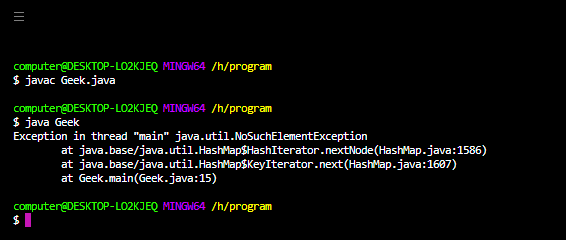
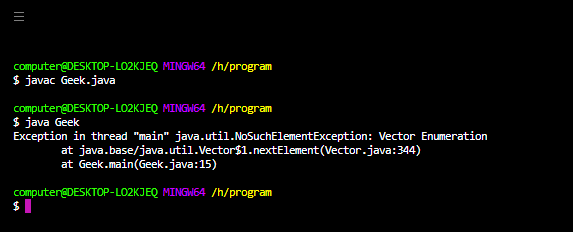
Example 2: Here we are trying to access the element of an empty vector object through an enumerator.
Java
import java.io.*;
import java.lang.*;
import java.util.*;
class Geek {
public static void main(String[] args)
{
Vector<Integer> v = new Vector<>();
Enumeration enumerator = v.elements();
enumerator.nextElement();
}
}
How to solve this error?
Almost all the classes whose accessor methods give NoSuchElementException contains their respective method to check whether the object contains more elements or not. So in order to avoid this NoSuchElementException we need to always call,
- Iterator.hasNext() or
- Enumeration.hasMoreElements() or
- hasMoreToken() method before calling next( ) or nextElement or nextToken() method.
Below is the implementation of the above statement :
Example 1:
Java
import java.io.*;
import java.lang.*;
import java.util.*;
class Geek {
public static void main(String[] args)
{
HashMap<Integer, Integer> map = new HashMap<>();
Iterator itr = map.keySet().iterator();
while (itr.hasNext())
System.out.println(itr.next());
}
}
Output:
Example 2:
Java
import java.io.*;
import java.lang.*;
import java.util.*;
class Geek {
public static void main(String[] args)
{
Vector<Integer> v = new Vector<>();
Enumeration enumerator = v.elements();
while (enumerator.hasMoreElements())
System.out.println(enumerator.nextElement());
}
}
Output:
java.util.NoSuchElementException is a RuntimeException or say an UncheckedException and therefore it does not need to be declared in a constructor’s or a method’s throw block.
Table of Contents
- Scenario 1: In case of Enumeration
- Solution
- Scenario 2: In case of Iterator
- Solution
- Scenario 3: In case of StringTokenizer
- Solution
java.util.NoSuchElementException is usually thrown when we try to access some element which is not present or reserved for the underlying data structure in the heap, and, thrown by the different classes, which have method to fetch the next element or next tokens, like Iterator :: next(), Enumeration :: nextElement() , StringTokenizer :: nextToken().
Example
When we are iterating over hashmap without implementing the condition to check if there is any element or not, this exception is raised or thrown by Java, now this is the reason we use hasNext() before calling next() on Iterator.
There can be multiple scenarios for java.util.NoSuchElementException. Let’s understand each with the help of examples.
Scenario 1: In case of Enumeration
In Enumeration, if we call the method nextElement() and there is no element present in enumeration then this exception is raised, refer the code below.
Syntax :
|
package org.arpit.java2blog; import java.util.*; class Main { public static void main(String args[]) { Hashtable hmap = new Hashtable(); Enumeration enumer = hmap.elements(); enumer.nextElement(); // java.util.NoSuchElementExcepiton // because the enumeration is empty } } |
Output:
Exception in thread “main” java.util.NoSuchElementException
at java.util.Collections$EmptyEnumeration.nextElement(Collections.j ava:4270)
at Main.main(Main.java:7)
Solution
By using a condition to check if it really have elements by calling method hasMoreElements().
Code:
|
package org.arpit.java2blog; import java.util.*; class Main { public static void main(String args[]) { Hashtable hmap = new Hashtable(); Enumeration enumer = hmap.elements(); if (enumer.hasMoreElements()) { //java.util.NoSuchElementExcepiton handled by checking enumer.nextElement(); } } } |
Above program will run perfectly fine with no exceptions.
Scenario 2: In case of Iterator
In iterator, if we call the method next() and there is no element present in iterator then this exception is raised, refer the code below.
|
package org.arpit.java2blog; import java.util.*; class Main { public static void main(String args[]) { HashMap hMap = new HashMap(); Iterator itr = hMap.keySet().iterator(); itr.next(); //java.util.NoSuchElementException here because iterator is //empty } } |
Output:
Exception in thread “main” java.util.NoSuchElementException at
java.util.HashMap$HashIterator.nextNode(HashMap.java:1447) at java.util.HashMap$KeyIterator.next(HashMap.java:1469)
at Main.main(Main.java:6)
Solution
By implementing a condition to check if there is any next element by calling method hasNext().
Code:
|
package org.arpit.java2blog; import java.util.*; class Main { public static void main(String args[]) { HashMap hMap = new HashMap(); Iterator itr = hMap.keySet().iterator(); if (itr.hasNext()) itr.next(); // java.util.NoSuchElementExcepiton handled } } |
Now, this runs without throwing the given Exception.
Scenario 3: In case of StringTokenizer
In StringTokenizer, if we call the method nextElement() or nextToken() and there is no element or token present then this exception is raised, refer the code below.
|
package org.arpit.java2blog; import java.util.StringTokenizer; class Main { public static void main(String args[]) { StringTokenizer token = new StringTokenizer(«», «:»); System.out.println(token.nextToken()); } } |
Output:
Exception in thread “main” java.util.NoSuchElementException
at java.util.StringTokenizer.nextToken (StringTokenizer.java:349)
at Main.main (Main.java:5)
Solution
By using Stringtokenizer’s hasMoreTokens() or hashMoreElements() before proceding to call nextToken() or nextElement().
Code:
|
package org.arpit.java2blog; import java.util.StringTokenizer; class Main { public static void main(String args[]) { StringTokenizer token = new StringTokenizer(«», «:»); while (token.hasMoreTokens()) // Exception Handled System.out.println(token.nextToken()); } } |
Above program will run perfectly fine with no exceptions.
В этой статье — обзор способов обработки исключений в Spring Boot.
Приложение
Мы рассмотрим простое REST API приложение с одной сущностью Person и с одним контроллером.
Класс Person:
@Entity
@NoArgsConstructor
@AllArgsConstructor
@Data
public class Person {
    @Id
    @GeneratedValue(strategy = GenerationType.IDENTITY)
    private Long id;
    private String name;

}
Контроллер PersonController:
@RestController
@RequestMapping("/persons")
public class PersonController {

    @Autowired
    private PersonRepository personRepository;

    @GetMapping
    public List<Person> listAllPersons() {
        List<Person> persons = personRepository.findAll();
        return persons;
    }

    @GetMapping(value = "/{personId}")
    public Person getPerson(@PathVariable("personId") long personId){
        return personRepository.findById(personId).orElseThrow(() -> new MyEntityNotFoundException(personId));
    }

    @PostMapping
    public Person createPerson(@RequestBody Person person) {
        return personRepository.save(person);
    }

    @PutMapping("/{id}")
    public Person updatePerson(@RequestBody Person person, @PathVariable long id)  {
        Person oldPerson = personRepository.getOne(id);
        oldPerson.setName(person.getName());
        return personRepository.save(oldPerson);
    }

}
При старте приложения выполняется скрипт data.sql, который добавляет в базу данных H2 одну строку — Person c id=1. То есть Person c id=2 в базе отсутствует.
При попытке запросить Person c id=2:
GET localhost:8080/persons/2
метод контроллера getPerson() выбрасывает исключение — в данном случае наше пользовательское MyEntityNotFoundException:
public class MyEntityNotFoundException extends RuntimeException {

    public MyEntityNotFoundException(Long id) {
        super("Entity is not found, id="+id);
    }
}
BasicErrorController
По умолчанию все исключения попадают на адрес /error в BasicErrorController, в метод error():
@Controller
@RequestMapping({"${server.error.path:${error.path:/error}}"})
public class BasicErrorController extends AbstractErrorController {

...
    @RequestMapping
    public ResponseEntity<Map<String, Object>> error(HttpServletRequest request) {
        HttpStatus status = this.getStatus(request);
        if (status == HttpStatus.NO_CONTENT) {
            return new ResponseEntity(status);
        } else {
            Map<String, Object> body = this.getErrorAttributes(request, this.getErrorAttributeOptions(request, MediaType.ALL));
            return new ResponseEntity(body, status);
        }
    }
 ...
}
Если поставить в этом методе break point, то будет понятно, из каких атрибутов собирается ответное JSON сообщение.
Проверим ответ по умолчанию, запросив с помощью клиента Postman отсутствующий Person, чтобы выбросилось MyEntityNotFoundException:
GET localhost:8080/persons/2
Получим ответ:
{
    "timestamp": "2021-02-28T15:33:56.339+00:00",
    "status": 500,
    "error": "Internal Server Error",
    "message": "Entity is not found, id=2",
    "path": "/persons/2"
}
Причем для того, чтобы поле message было непустым, в application.properties нужно включить свойство:
server.error.include-message=always
В текущей версии Spring сообщение не включается по умолчанию из соображений безопасности.
Обратите внимание, что поле status JSON-тела ответа дублирует реальный http-код ответа. В Postman он виден:
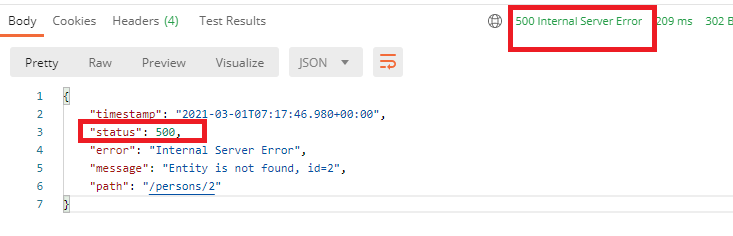
Поле message заполняется полем message выброшенного исключения.
Независимо от того, какое исключение выбросилось: пользовательское или уже существующее, ответ стандартный — в том смысле, что набор полей одинаковый. Меняется только внутренняя часть и, возможно, код ответа (он не обязательно равен 500, некоторые существующие в Spring исключения подразумевают другой код).
Но структура ответа сохраняется.
Проверим это.
Не пользовательское исключение
Например, если изменить код, убрав пользовательское MyEntityNotFoundException, то при отсутствии Person исключение будет все равно выбрасываться, но другое:
@GetMapping(value = "/{personId}")
public Person getPerson(@PathVariable("personId") long personId){
    return personRepository.findById(personId).get();
}
findById() возвращает тип Optional, а Optional.get() выбрасывает исключение NoSuchElementException с другим сообщением:
java.util.NoSuchElementException: No value present
в итоге при запросе несуществующего Person:
GET localhost:8080/persons/2
ответ сохранит ту же структуру, но поменяется поле message:
{
    "timestamp": "2021-02-28T15:44:20.065+00:00",
    "status": 500,
    "error": "Internal Server Error",
    "message": "No value present",
    "path": "/persons/2"
}
Вернем обратно пользовательское исключение MyEntityNotFoundException.
Попробуем поменять ответ, выдаваемый в ответ за запрос. Статус 500 для него явно не подходит.
Рассмотрим способы изменения ответа.
@ResponseStatus
Пока поменяем только статус ответа. Сейчас возвращается 500, а нам нужен 404 — это логичный ответ, если ресурс не найден.
Для этого аннотируем наше исключение:
@ResponseStatus(HttpStatus.NOT_FOUND)
public class MyEntityNotFoundException extends RuntimeException {

    public MyEntityNotFoundException(Long id) {
        super("Entity is not found, id="+id);
    }
}
Теперь ответ будет таким:
{
    "timestamp": "2021-02-28T15:54:37.070+00:00",
    "status": 404,
    "error": "Not Found",
    "message": "Entity is not found, id=2",
    "path": "/persons/2"
}
Уже лучше.
@ControllerAdvice
Есть еще более мощный способ изменить ответ — @ControllerAdvice, и он имеет больший приоритет, чем @ResponseStatus.
В @ControllerAdvice можно не только изменить код ответа, но и тело. К тому же один обработчик можно назначить сразу для нескольких исключений.
Допустим мы хотим, чтобы ответ на запрос несуществующего Person имел такую структуру:
@Data
@AllArgsConstructor
@NoArgsConstructor
public class ApiError {
    private String message;
    private String debugMessage;
}
Для этого создадим обработчик в @ControllerAdvice, который перехватывает наше исключение MyEntityNotFoundException:
@ControllerAdvice
public class RestExceptionHandler {


    @ExceptionHandler({MyEntityNotFoundException.class, EntityNotFoundException.class})
    protected ResponseEntity<Object> handleEntityNotFoundEx(RuntimeException ex, WebRequest request) {
      ApiError apiError = new ApiError("entity not found ex", ex.getMessage());
      return new ResponseEntity<>(apiError, HttpStatus.NOT_FOUND);
    }

}
Теперь в ответ на запрос
GET localhost:8080/persons/2
мы получаем статус 404 с телом:
{
    "message": "entity not found ex",
    "debugMessage": "Entity is not found, id=2"
}
Но помимо MyEntityNotFoundException, наш обработчик поддерживает и javax.persistence.EntityNotFoundException (см. код выше).
Попробуем сделать так, чтобы оно возникло.
Это исключение EntityNotFoundException возникает в методе updatePerson() в контроллера. А именно, когда мы обращаемся с помощью метода PUT к несуществующей сущности в попытке назначить ей имя:
PUT localhost:8080/persons/2

{
    "name": "new name"
}
В этом случае мы тоже получим ответ с новой структурой:
{
    "message": "entity not found ex",
    "debugMessage": "Unable to find ru.sysout.model.Person with id 2"
}
Итого, обработчик в @ControllerAdvice позволил изменить не только код ответа, но и тело сообщение. Причем один обработчик мы применили для двух исключений.
Последовательность проверок
Обратите внимание, что MyEntityNotFoundException мы «обработали» дважды — изменили код с помощью @ResponseStatus (1) и прописали в @ContollerAdvice — тут изменили как код, так и тело ответа (2). Эти обработки могли быть противоречивы, но существует приоритет:
- Когда выбрасывается исключение MyEntityNotFoundException, сначала Spring проверяет @ControllerAdvice-класс. А именно, нет ли в нем обработчика, поддерживающего наше исключение. Если обработчик есть, то исключение в нем и обрабатывается. В этом случае код @ResponseStatus значения не имеет, и в BasicErrorController исключение тоже не идет.
- Если исключение не поддерживается в @ControllerAdvice-классе, то оно идет в BasicErrorController. Но перед этим Spring проверяет, не аннотировано ли исключение аннотацией @ResponseStatus. Если да, то код ответа меняется, как указано в @ResponseStatus. Далее формируется ответ в BasicErrorController.
- Если же первые два условия не выполняются, то исключение обрабатывается сразу в BasicErrorController — там формируется стандартный ответ со стандартным кодом (для пользовательских исключений он равен 500).
Но и стандартный ответ можно изменить, для этого нужно расширить класс DefaultErrorAttributes.
Попробуем это сделать.
Изменение DefaultErrorAttributes
Давайте добавим в стандартный ответ еще одно поле. Для этого расширим класс:
@Component
public class CustomErrorAttributes extends DefaultErrorAttributes {


    @Override
    public Map<String, Object> getErrorAttributes(WebRequest webRequest, ErrorAttributeOptions options) {
        Map<String, Object> errorAttributes=super.getErrorAttributes(webRequest, options);
        errorAttributes.put("newAttribute", "value");
        return errorAttributes;
    }

}
В Map errorAttributes перечисляются поля ответа. Мы взяли их из родительского метода и добавили свое поле newAttribute.
Чтобы выполнить проверку, надо убрать @ControllerAdvice, поскольку он самый приоритетный и с ним мы даже не дойдем до BasicErrorController со «стандартными» полями.
Далее запросим ресурс:
localhost:8080/persons/2
Получим ответ:
{
    "timestamp": "2021-02-28T18:50:14.479+00:00",
    "status": 404,
    "error": "Not Found",
    "message": "Entity is not found, id=2",
    "path": "/persons/2",
    "newAttribute": "value"
}
В JSON-ответе появилось дополнительное поле.
ResponseStatusException
Рассмотрим еще один вариант, позволяющий сразу протолкнуть код ответа и сообщение стандартные поля, не прописывая обработку пользовательских или встроенных исключений. А вместо этого просто выбросив специально предназначенное исключение ResponseStatusException.
Изменим код метода контроллера getPerson():
@GetMapping(value = "/{personId}")
public Person getPerson(@PathVariable("personId") long personId){
    return personRepository.findById(personId).orElseThrow(() -> new ResponseStatusException(
            HttpStatus.NOT_FOUND, "Person Not Found"));
}
Теперь тут не выбрасывается ни MyEntityNotFoundException, ни java.util.NoSuchElementException. А выбрасывается ResponseStatusException с заданным сообщением и кодом ответа.
Теперь при запросе
GET localhost:8080/persons/2
ответ будет таким:
{
    "timestamp": "2021-03-01T07:42:19.164+00:00",
    "status": 404,
    "error": "Not Found",
    "message": "Person Not Found",
    "path": "/persons/2",
    "newAttribute": "value"
}
Как код, так и сообщение появилось в полях стандартного ответа.
ResponseStatusException не вступает в конкуренцию ни со способом @ControllerAdvice, ни с @ResponseStatus — просто потому, что это другое исключение.
Итоги
Код примера доступен на GitHub. В следующей части мы унаследуем RestExceptionHandler от ResponseEntityExceptionHandler. Это класс-заготовка, которая уже обрабатывает ряд исключений.