I have a Nikon D90 camera body and today I started getting a CHA error on the display on the top of the body that shows f-stop and other settings. Looking around, I do not find a definition for exactly what this means, only suggestions like remove the battery and memory card and reseat them to make it go away, but many say it returns later. What exactly does CHA mean and how should one resolve it more definitively?
asked Oct 1, 2013 at 23:37

The D90 uses CHA as a generic ‘card error’ condition if a problem occurs while the card is in use. If the card works at all or has been working then it’s unlikely to be a formatting issue.
This could just be a case of a poor connection and cleaning the contacts on the card and reseating everything may solve it.
If it has been working then there could be a problem with the card in which case you should be able to test it in a desktop machine and retire/replace it if necessary.
There is also an issue I’ve had with the D90 and larger memory cards (over 8gb) where it incorrectly calculates ‘checksums’ used to determine if there is a problem (although it writes them correctly) when the value isn’t what it expects then you’ll get a CHA message.
As a temporary resolution you can access the card in a reader and copy & remove the last written file but if this is your issue then the problem will return at some point.
I’ve been in touch with Nikon about it but without being able to reproduce the issue at will Nikon have not been helpful. The solution I ended up with was just to use multiple cards, which is no great hardship.
answered Oct 2, 2013 at 11:59

James SnellJames Snell
9,51924 silver badges38 bronze badges
According to Nikon:
When a CF card is inserted into a Nikon Digital Camera the camera checks the card for compatibility and usability. There are three possible results of the test:
Camera displays “CHA” in top LCD. The camera has detected an invalid partition type or is not working properly. Reformatting the card may allow it to be used. If an approved card gives the «CHA» indicator contact the cards manufacturer for assistance.
Please note that the default disk format used in Windows XP is FAT32 and if a card is formatted with this setting on an XP system the D1 will report CHA. Reformat the card as «FAT» to use in the D1 series camera.
Source: https://support.nikonusa.com/app/answers/detail/a_id/25/~/what-are-cha-and-for-codes%3F
Sounds like you should try a different SD card, or attempt to repair/format the one you have.

answered Oct 2, 2013 at 0:04

dpollittdpollitt
46.1k20 gold badges135 silver badges263 bronze badges
These answers were very helpful in helping me find the problem on my Nikon D90, but in my case it was much more simple. The write lock tab had slid to lock mode when inserting the card. This may be one of the first things to check, pull the card, make sure the tab is in the writeable position, and reinsert it carefully into the camera to avoid brushing it back during the insert. If that doesn’t work, I’ve found placing a small bit of clear transparent tape over the switch helps to keep it from sliding on insert.
answered Dec 26, 2013 at 18:01

-
Try formatting the card with the camera. Most PCs now use either FAT32 or the NTFS file system rather than the older FAT (file allocation table) system that your Nikon D90 uses.
-
If you can’t format the card in camera, try to use your computer to format it in «FAT» format.
-
If that doesn’t work it is probably time to try another card. Be sure the new card is formated to the «FAT» system.
answered Oct 2, 2013 at 10:36

Michael CMichael C
171k10 gold badges199 silver badges542 bronze badges
6
Just format the SD on your laptop or desktop computer, not in-camera. I did that with a batch of micro SD cards, it worked fine. They were supposed to have been already formatted with FAT32, but apparently not. Or if they were formatted, it was with something else that my D90 did not recognize. Attempting to format them in-camera did not work for me.
answered Sep 4, 2022 at 1:53

I have a Nikon D90 camera body and today I started getting a CHA error on the display on the top of the body that shows f-stop and other settings. Looking around, I do not find a definition for exactly what this means, only suggestions like remove the battery and memory card and reseat them to make it go away, but many say it returns later. What exactly does CHA mean and how should one resolve it more definitively?
asked Oct 1, 2013 at 23:37
The D90 uses CHA as a generic ‘card error’ condition if a problem occurs while the card is in use. If the card works at all or has been working then it’s unlikely to be a formatting issue.
This could just be a case of a poor connection and cleaning the contacts on the card and reseating everything may solve it.
If it has been working then there could be a problem with the card in which case you should be able to test it in a desktop machine and retire/replace it if necessary.
There is also an issue I’ve had with the D90 and larger memory cards (over 8gb) where it incorrectly calculates ‘checksums’ used to determine if there is a problem (although it writes them correctly) when the value isn’t what it expects then you’ll get a CHA message.
As a temporary resolution you can access the card in a reader and copy & remove the last written file but if this is your issue then the problem will return at some point.
I’ve been in touch with Nikon about it but without being able to reproduce the issue at will Nikon have not been helpful. The solution I ended up with was just to use multiple cards, which is no great hardship.
answered Oct 2, 2013 at 11:59
James SnellJames Snell
9,51924 silver badges38 bronze badges
According to Nikon:
When a CF card is inserted into a Nikon Digital Camera the camera checks the card for compatibility and usability. There are three possible results of the test:
Camera displays “CHA” in top LCD. The camera has detected an invalid partition type or is not working properly. Reformatting the card may allow it to be used. If an approved card gives the «CHA» indicator contact the cards manufacturer for assistance.
Please note that the default disk format used in Windows XP is FAT32 and if a card is formatted with this setting on an XP system the D1 will report CHA. Reformat the card as «FAT» to use in the D1 series camera.
Source: https://support.nikonusa.com/app/answers/detail/a_id/25/~/what-are-cha-and-for-codes%3F
Sounds like you should try a different SD card, or attempt to repair/format the one you have.
answered Oct 2, 2013 at 0:04
dpollittdpollitt
46.1k20 gold badges135 silver badges263 bronze badges
These answers were very helpful in helping me find the problem on my Nikon D90, but in my case it was much more simple. The write lock tab had slid to lock mode when inserting the card. This may be one of the first things to check, pull the card, make sure the tab is in the writeable position, and reinsert it carefully into the camera to avoid brushing it back during the insert. If that doesn’t work, I’ve found placing a small bit of clear transparent tape over the switch helps to keep it from sliding on insert.
answered Dec 26, 2013 at 18:01
-
Try formatting the card with the camera. Most PCs now use either FAT32 or the NTFS file system rather than the older FAT (file allocation table) system that your Nikon D90 uses.
-
If you can’t format the card in camera, try to use your computer to format it in «FAT» format.
-
If that doesn’t work it is probably time to try another card. Be sure the new card is formated to the «FAT» system.
answered Oct 2, 2013 at 10:36
Michael CMichael C
171k10 gold badges199 silver badges542 bronze badges
6
Just format the SD on your laptop or desktop computer, not in-camera. I did that with a batch of micro SD cards, it worked fine. They were supposed to have been already formatted with FAT32, but apparently not. Or if they were formatted, it was with something else that my D90 did not recognize. Attempting to format them in-camera did not work for me.
answered Sep 4, 2022 at 1:53
- Вы не можете создать новую тему
- Вы не можете отвечать в этой теме
#1


Отправлено 10 Август 2010 — 09:57
Приобрёл камеру D90. C периодичностью в 2 недели сгорели уже две 16gb SD карты Transcend. Аппарат выдаёт CHA. В последний раз это произошло когда я случайно включил внешнюю вспышку (SB-900) при включенной камере. Возможно, что в 1й раз из-за того же. Закономерность? Быть аккуратнее со вспышкой?
0
- Наверх of the page up there ^
 Ответить
#2
Zed 
Отправлено 10 Август 2010 — 11:46
 Potapchik (10.8.2010, 9:57):
Приобрёл камеру D90. C периодичностью в 2 недели сгорели уже две 16gb SD карты Transcend. Аппарат выдаёт CHA. В последний раз это произошло когда я случайно включил внешнюю вспышку (SB-900) при включенной камере. Возможно, что в 1й раз из-за того же. Закономерность? Быть аккуратнее со вспышкой?
В интернет имеются обсуждения этой проблемы, например
здесь
и
здесь
.
Отмечают, что это ошибка взаимодействия камеры с контроллером карты. Читайте.
(Вспышку Вы лихо сюда пристегнули, конечно.)
Насчет «сгорели карточки». Уверены?
Сообщение изменено: Zed (10 Август 2010 — 11:47)
0
- Наверх of the page up there ^
- Ответить
#3
Potapchik
- Автор темы

Отправлено 10 Август 2010 — 12:13
Насчёт сгорели или нет не уверен, но ни в одной камере они не пашут. Попробую сегодня запихнуть карточку в ноут и форматнуть.
По ссылкам никакой конкретики, много разных мнений.
CHA написал именно тогда, когда я врубил вспышку, вот и приплёл её…
Если карты и дальше так будут гореть, то буду скидывать тушку 
Сообщение изменено: Potapchik (10 Август 2010 — 12:14)
0
- Наверх of the page up there ^
- Ответить
#4
Zed
Отправлено 10 Август 2010 — 12:52
Potapchik (10.8.2010, 12:13):
Если карты и дальше так будут гореть, то буду скидывать тушку
Не надо никого больше подставлять  . Попробуйте разобраться.
Проверьте программами восстановления сами карточки на компе. Может и с разными кардридерами. Если оживут, переформатируйте на «нормальной» камере (может, и на своей). Это стандартная рекомендация производителя фотокамер.
Теперь личный опыт.
Многие карточки — дерьмо. (Картридеры, правда, тоже).
Экономить на карточках нельзя. Я пользуюсь информацией
такого рода
. Беру те, что на верхних ступеньках. Фактическая скорость работы карточки — косвенное подтверждение ее совместимости с камерой (при всех прочих равных условиях). Дальше выбираю по производителю. Это должен быть общепризнанный авторитетный производитель. Потом по цене. Самое главное на стадии покупки, не нарваться на подделку. Здесь уже надо смотреть на продавца. Подделок хороших карточек много, в том числе и Transcend.
Как видно по статистике (какая уж есть), Ваша карточка не в числе лидеров, если я не ошибся с ее типом. Более того, весьма далека от них. У меня она не попала бы в претенденты, зато под сомнение поставил бы ее в первую очередь. Потом бы грешил на камеру.
Удачи.
Сообщение изменено: Zed (10 Август 2010 — 12:55)
0
- Наверх of the page up there ^
- Ответить
#5
Potapchik
- Автор темы
Отправлено 11 Август 2010 — 08:18
Спасибо!
Да, действительно похоже, что на камеру зря грешил. На камере форматирование не срабатывало (писала, что карта отформатирована, но «CHA» не исчезало). Отформатировал в ноуте — заработала, но недолго. Через некоторое время снова вылезло «CHA». Снова переформатировал — пока работает.
Хоть карточка и не в числе лидеров, но она, всё же, присутствует в списке совместимости по приведённой выше ссылке и, следовательно, таких косяков быть не должно.
P.S. Данные не пострадали, ноут сразу всё прочитал без проблем.
0
- Наверх of the page up there ^
- Ответить
#6
MadFox

Отправлено 11 Август 2010 — 08:42
Potapchik, это не список совместимости, это тестирование скорости карт. присутствие ее в списке — означает что ее протестировали 🙂
вообще рекомендация — кпить сандиск, или лексар, и забыть о всяких трансцендах и прочих кингсонах. пройдитесь поиском по форуму — сравните сколько встретите жалобю на потерю информации на трансцендо-кингстонах и сколько на сандисках. А еще сандиск на морозе не мерзнет.
0
- Наверх of the page up there ^
- Ответить
#7
monohrom

Отправлено 27 Август 2010 — 22:58
Zed, MadFox
Здравствуйте!
и все же, как вывод, эта ошибка вылезает только при использовании корявых карт памяти? почему тогда некоторые люди пишут, что те же самые карты работают на других фотоаппаратах?
Подобные проблемы возникают и в д700.
дело в том, что в поисках 700-ки позвонил в магазин и там оператор предупредил, что к ним постоянно приносят тушки с проблемами такого рода.
в форуме через поиск я не встретил повальных сообщений о проблеме, но все же как-то меня напрягли его слова…
Сообщение изменено: monohrom (27 Август 2010 — 23:12)
0
- Наверх of the page up there ^
- Ответить
- ← Предыдущая тема
- ВОПРОС-ОТВЕТ
- Следующая тема →
- Вы не можете создать новую тему
- Вы не можете отвечать в этой теме
1 посетителей читают эту тему
0 пользователей, 1 гостей, 0 скрытых
- 12 Окт 2013
Всем доброго времени суток. Принесли D700 с ошибкой CHA с любой картой, разобрал, проверил картридер, все в порядке. Распросив клиента, оказалось проблема появилась после форматирования карти на компьютере и использования в фотоаппарате. Похоже проблема с памятью, возможно ли очистить?
- 12 Окт 2013
toly_084, В моем случае-тема чуть ниже ,выскакивала эта абривиатура,пока я работал с разъемом слота на материнке,на слоте не было защелки.
- 12 Окт 2013
toly_084 сказал(а):
Похоже проблема с памятью, возможно ли очистить?
Не бывает проблем с памятью из-за CF.
- 12 Окт 2013
Извините ,ошибся-на разъеме не было защелки.
- 12 Окт 2013
НиконовВС сказал(а):
toly_084, В моем случае-тема чуть ниже ,выскакивала эта абривиатура,пока я работал с разъемом слота на материнке,на слоте не было защелки.
Шлейф и картридер проверил когда разбирал-собирал. Да и как я писал все случилось после установки отформатированной карти на компьютере. Нужно обнулить память или прошить, но как если не работает карта.
- 12 Окт 2013
toly_084, было что то похожее. Зайди в меню фота и измени название папки, в которую фот ложит фотки. У меня была папка 999. Камера не могла сама поменять на 001 А после отформатируй карту в фоте.
- 12 Окт 2013
Maxbin сказал(а):
toly_084, было что то похожее. Зайди в меню фота и измени название папки, в которую фот ложит фотки. У меня была папка 999. Камера не могла сама поменять на 001
А после отформатируй карту в фоте.
Спасибо. Завтра попробую.
- 14 Окт 2013
Меню там где менять название папки не активно. Да и фотоаппарат не может отформатировать карту.
- 14 Окт 2013
toly_084, А без карты дает изменить?
- 14 Окт 2013
А возможно прошить не через карту?
- 14 Окт 2013
toly_084 сказал(а):
Распросив клиента, оказалось проблема появилась после форматирования карти на компьютере и использования в фотоаппарате.
toly_084, жене верь наполовину, клиенту ваще не верь
Ремонтируй слот карты, проверяй питание, прозванивай выводы. А про глюки памяти забудь.
- 14 Окт 2013
Vikt(or) сказал(а):
Распросив клиента, оказалось проблема появилась после форматирования карти на компьютере и использования в фотоаппарате.
toly_084, жене верь наполовину, клиенту ваще не верь
Ремонтируй слот карты, проверяй питание, прозванивай выводы. А про глюки памяти забудь.
На первый взгляд все там нормально с картридером, там он вытаскивается полностью. И контакты не погнутые, правда под крышкой не очень хорошо видно, сниму тогда крышку металическую и посмотрю получше. Спасибо Виктор.
- 15 Окт 2013
Всем доброго времени суток. Действительно, была чуть подогнута нога на которой питание. Транзистор с обозначением WV, выход которого идет на ногу питания имеет 2,5В. Должно быть я так понимаю 3,3 или 5В. Чем его можна заменить?
- 15 Окт 2013
- 15 Окт 2013
Vikt(or) сказал(а):
Большущее спасиба, как всегда выручил. Буду искать IRLML6302.
- 30 Мар 2015
Прошу прощения за поднятие старой темы (наиболее свежа, относительно остальных), но тут столько демагогии (как и по всему форуму на счет этих картридеров) и ниодного реального решения, так вот:
Поставил полевик с маркировкой JF (их полно на платах), все заработало. 3,3 пришло.
- 30 Мар 2015
Nikolaev-Ufa сказал(а):
Прошу прощения за поднятие старой темы (наиболее свежа, относительно остальных), но тут столько демагогии (как и по всему форуму на счет этих картридеров) и ниодного реального решения, так вот:
Поставил полевик с маркировкой JF (их полно на платах), все заработало. 3,3 пришло.
Проблема решилась заменой на такой же что и стоял.
Всем привет. последнее время с моим D70s регулярно случаются проблемы. Началось все 2 месяца назад, когда ни с того ни с сего, включив камеру, у меня было написано «CHA», и вся файловая система на карте полетела. Файлы которые там были смог вытащить программой для восстановления.
В праздники снимал на выставке, так первые несколько кадров были битые — при просмотре нижняя половина фоток была какой-то зеленой, а при увеличении они были все в каком-то цветном муаре. Несколько раз форматнул карту, все стало нормально. Сегодня снимал в клубе, так во время съемки мне камера пару раз не давала сделать кадр, и на верхнем дисплее было написано «FOR», после выключения-включения камеры, все становилось нормально.
Я теперь волнуюсь — это фотик или карта накрывается? Если карточка, то хрен с ней, а вот фотик не хотелось бы на 2 месяца отдавать в ремонт.
Карта CF Transcend 1Gb 80x, ей немного меньше двух лет. Пробег фотика примерно 15000.
Карту пробовал форматировать в карл-ридере, после этого записать на нее кучу файлов различных, никаких проблем не было, все файлы записались и прочитались.
Жду комментов…
Спасибо за внимание!
- Article ID 000004783
- Date Published 07/10/2016
- Date Last Updated 17/11/2017
Коды ошибок фотокамеры For и Cd/Err
При установке карты памяти в цифровую зеркальную фотокамеру фотокамера проверяет карту памяти на совместимость и пригодность к использованию. Если проверка прошла успешно, на панели управления отобразится число оставшихся снимков. В случае обнаружения проблем могут отобразиться коды ошибок ‘For’ или ‘Cd/Err’.
Код ошибки For
Если на панели управления мигает код ошибки For (Форматировать карту), это означает, что фотокамера обнаружила правильную схему разбиения диска, но не может прочитать первый сектор карты памяти. Для решения этой проблемы отформатируйте карту памяти, как показано ниже, или выключите фотокамеру и вставьте новую карту памяти.
Код ошибки Cd/Err (Cha error на более старых фотокамерах)
Если на панели управления фотокамеры отображается код ошибки Cd/Err error (Ошибка карты памяти), это означает, что фотокамера обнаружила неправильную схему разбиения диска, или что фотокамера неисправна.
Прежде чем форматировать карту памяти, необходимо произвести следующие действия.
- Чтобы убедиться, что вы используете рекомендованную карту памяти, нажмите на ссылку и перейдите к списку рекомендованных карт.
- Если вы уже пользовались картой, сделайте резервные копии имеющихся на ней данных, которые вы хотите сохранить.
Как отформатировать карту памяти
- Чтобы отформатировать карту памяти, установленную в фотокамере, перейдите в Menu («Меню») > Setup Menu («Меню настройки») > Format memory card («Форматировать карту памяти») >, выберите гнездо, карту в котором необходимо отформатировать (если их несколько), а затем выберите OK.
- Не выключайте фотокамеру и не извлекайте из нее батарею или карту памяти до завершения форматирования.
- Форматирование занимает несколько секунд. По его завершении появится соответствующее сообщение.
Если это не помогло устранить проблему, возможно, карта неисправна или повреждена. Попробуйте использовать другую карту памяти.
Если вам требуется дополнительная помощь в форматировании карты, обратитесь к продавцу или в службу поддержки клиентов.
Previously viewed answers
Skip to Contact
Summary: Are you unable to use your Nikon camera due to errors like ERR, FEE, F, F0, For, E, etc.? Learn how to fix 12 most common Nikon errors and how to recover photos and videos from camera lost due to these errors.


Table of Content:
- 12 Nikon camera error codes & their solutions
- How to format Nikon camera SD card?
- How to recover photos and videos lost or deleted due to error?
- How to repair photos & videos corrupted due to Nikon error?
- Tips to avoid errors on Nikon camera
Nikon users often face various kinds of errors that pop up on their camera display panel. The common ERR, FEE, For, E, etc. freeze camera to the extent that even turning it off and on doesn’t help. The situation is annoying as these errors don’t let you use your camera further and may lead to loss of photos and videos from the camera SD card.
Whether it is Nikon D70, D80, D90, D750, D3500, D7200 or any other model, the error could be due to multiple reasons such as non-CPU lens, improper SD card, dust, etc.
Read on to know how to fix 12 such common Nikon errors, and how to recover deleted or corrupt Nikon photos & videos from Nikon cameras.
12 Most Common Nikon Camera Error Codes & Solutions
- ERR error message
- FEE error message
- ‘F’ error message
- Triangle with ‘F0’ error
- ‘For’ error code
- ‘Cd/Err’ error code
- Information icon error in Nikon
- Nikon Error (-E-)
- Nikon ‘This card cannot be used/read’ error
- Nikon error ‘Recording interrupted. Please wait.’
- Error Press shutter release button
- Nikon error code r18, r19, r02, etc.
1. ‘Err’ error message
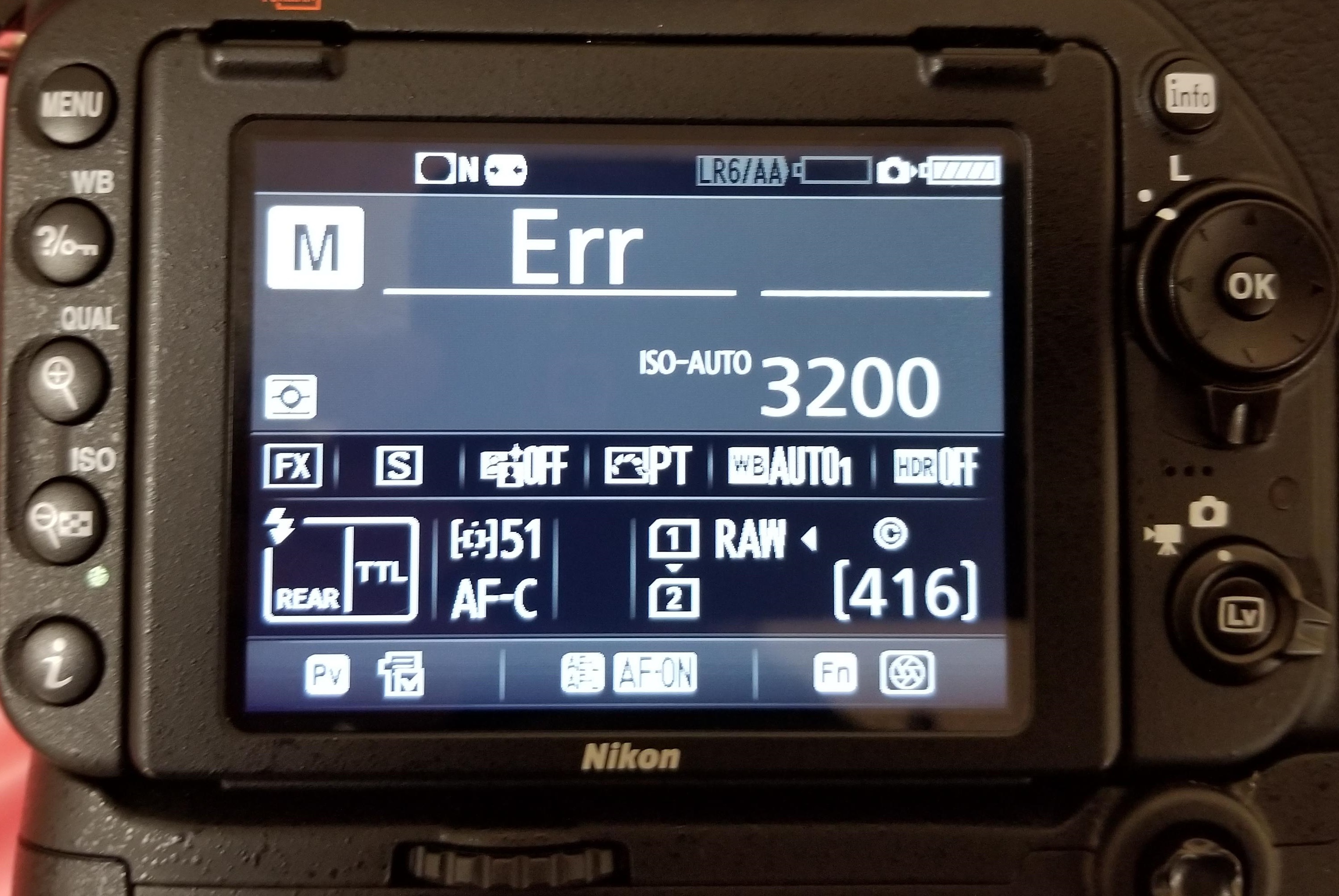
Figure 1: Nikon ‘Err’ message in D750
‘Err’ message on Nikon D750, D80, D810, D90, etc., points toward internal camera issues. The error could be because of faulty lens, dirt, incompatible SD card, inappropriate camera exposure settings. It may also occur when you turn-on the camera and immediately start recording at high shutter speed, which more often than not, disables or crashes your Nikon DSLR.
Solution: You can do the following to fix Nikon ‘Err’ camera error:
- Remove and reattach the lens.
- Clean the connection points on the lens and the camera using a microfiber cloth.
- Remove the camera battery and SD card for 10-15 min and then re-insert.
- Check if the lens connection pins or Aperture control lever are broken.
- Replace the lens with a new one.
- If the problem persists, contact an Authorised Nikon Service Centre for service or for damaged Aperture lever.
2. ‘FEE’ error message
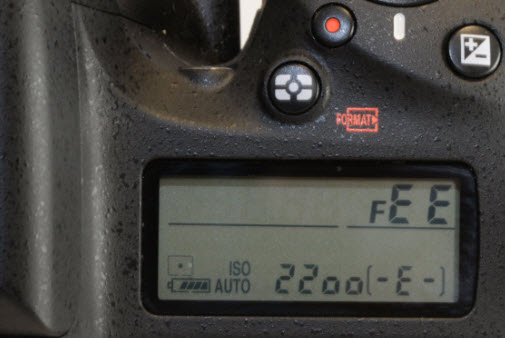
Figure 2: FEE error message on Nikon DSLR
The ‘FEE’ error on Nikon DSLR appears when the camera lens is not attached properly; has incorrect aperture setting; or you’re using non-CPU lens such as the NIKKOR AF or NIKKOR P lenses.
Solution: To fix ‘FEE’ error in Nikon, you may try the following:
- Set the aperture to F22, or the highest aperture number normally marked in orange on the lens. Lock it using the aperture locking switch.
- Check that the EE servo coupling on the lens and F-min switch highlighted on the camera body are not broken.
Figure 3: Highest aperture marked in orange in camera
Figure 4: EE servo coupling on Nikon lens Figure 5: F-min switch on Nikon camera
If either of the two is broken, the lens issue could be due to this. Contact the authorized service centre for return or service.
3. ‘F’ error message
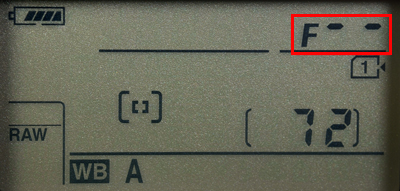
Figure 6: F error on Nikon camera screen
If you see ‘F’ error message on your Nikon D7000, D7100, D850 or other camera, this can indicate a lens issue. Either the camera lens is not connected properly or the non-CPU lens is attached.
Solution: Remove and reattach the camera lens ensuring that it fixes properly. It’s recommended to use a CPU lens, such as NIKKOR lenses type D, E and G. However, if you have old non-CPU lens, select the exposure mode A (aperture-priority auto) or M (manual) on the camera.
If the problem continues, try a different lens.
4. Triangle with F0 error
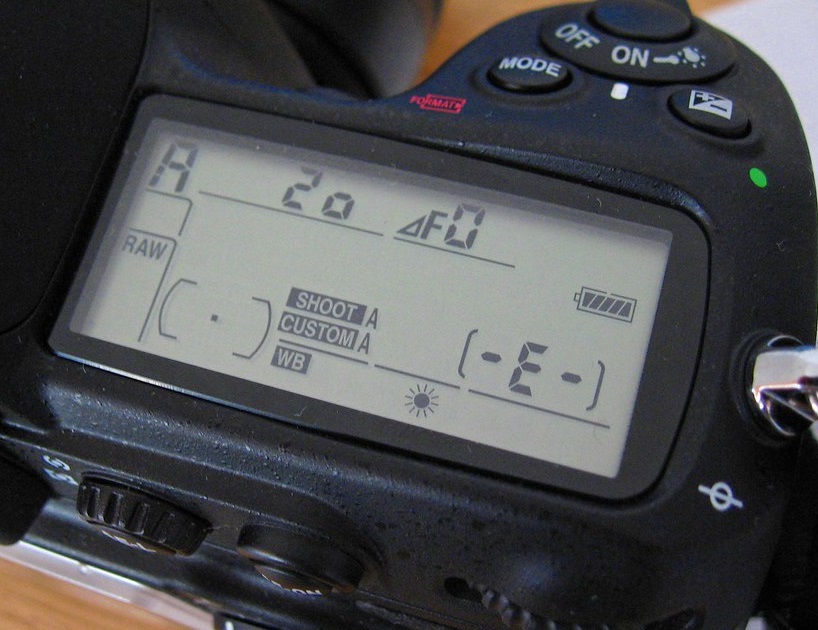
Figure 7: Nikon error triangle with F0
A triangle with ‘f0’ is typically reported in Nikon D700, D300, and D200 using G-series lenses. It is also one of the case where the lens is not attached to the camera properly because of dirt or alignment issue.
Solution: Turn-off the camera. Remove and reattach the lens so that it attaches properly to the camera. Also, clean the connection points between the lens and camera using a microfiber cloth.
5. ‘For’ error code
Nikon D7200, D500, D80, D90, D70 and others often show ‘For’ error code in the camera’s control panel. It is a format card error, which means your DSLR is unable to read the first sector of the SD Card.
Solution: To fix the ‘For’ error in Nikon devices, you may do the following:
- Turn-off the camera.
- Format your camera SD card.
- Insert a new memory card in the camera.
6. ‘Cd/Err’/’Cha’ error code
Figure 8: Nikon D80 Cha error
‘Cd/Err’ or ‘Cha’ is old Nikon D40, D70, D80 error issue. When you see ‘Cd’ or ‘Cha’ error in the control panel of the camera, it indicates memory card problem. Either your camera doesn’t recognize the SD card or it has detected an invalid partition. ‘Cha’ error is commonly reported after users copy or delete photos from the Nikon SD card and reuse it without formatting.
Solution: You can do the following to fix ‘Cd or ‘Cha’ error:
- Try once by removing and then reinserting the SD card properly.
- Format SD card within the camera.
- Ensure you are using a memory card compatible with Nikon model.
- If the problem remains, contact the Nikon service centre.
7. Information icon error in Nikon
If you see an ‘i’ in a circle on your camera display, it is the information error icon. The error appears because of camera battery or SD card issue. Nikon battery may be drained out or your camera SD card is unable to store photos and videos.
Solution:
- Remove and charge the camera battery, if it is drained out.
- Unlock your camera SD card, if it’s write-protected. Slide upward the lock switch.
- Check if the SD card is full. Transfer its photos and video files to another device.
8. Nikon Error (-E-)
The (-E-) message on Nikon display screen is a memory card error. Either SD card is not inserted in camera or the camera is unable to read the card.
Solution: Do the following to fix the Nikon error:
- Turn-off the camera. Remove its SD card. Clean and insert it again.
- Use a Nikon approved SD camera.
- If the SD card is full, it will not record any more videos or photos and may show error. Move the files from camera card to your PC or other media.
- If still the same error message appears, then format your SD card either within the camera or on the computer.
9. Nikon ‘This card cannot be used/read’ error
‘This card cannot be used’ or ‘this card cannot be read’ error message on Nikon camera means your SD card is either incompatible with the camera, damaged, corrupt or not inserted properly.
Solution: Do the following to fix Nikon memory card error:
- Use Nikon approved memory card.
- Remove and reinsert the SD card properly.
- Check the camera card, it is not damaged.
- Gently clean the SD card and contact points with camera with soft dry cloth. Next re-insert the card.
- Reformat the SD card.
- If none of the methods are helpful, change SD card, and make sure you use the Nikon approved camera card.
You can also apply the same troubleshooting methods in case of ‘No memory card error’ message on Nikon screen.
10. Nikon error ‘Recording interrupted. Please wait.’
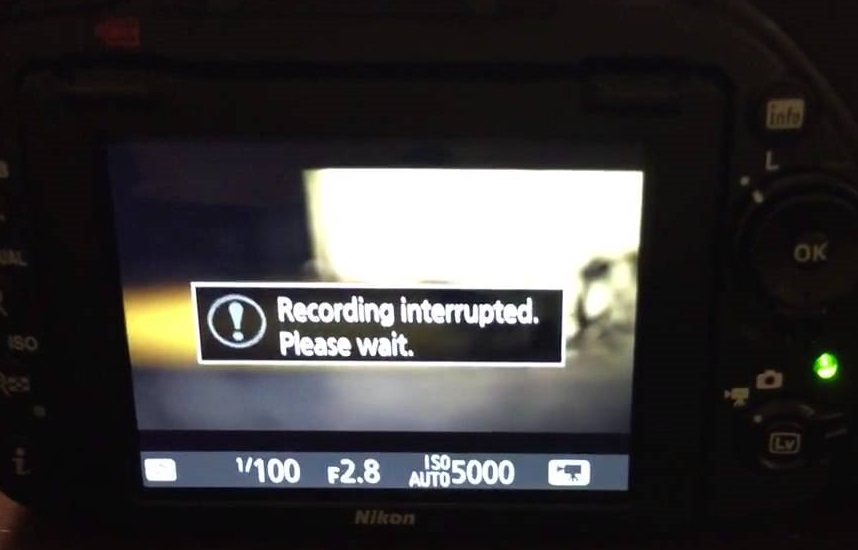
Figure 9: Nikon Recording interrupted error
You turn on the camera and start recording. But after few seconds receive the message, ‘Recording interrupted please wait’. This may be followed by camera freeze or ERR card error, after you turn-off and turn-on your Nikon DSLR.
The record movie error, ‘Recording interrupted. Please wait’ is commonly reported in Nikon D750, D3100, D3300 and other D-series models. It occurs when the camera can’t save the recording data to the SD card. This usually happens when the memory card is of lower Class, which has slow read/ write speed. Most of the other video recording error messages in Nikon camera are due to slow SD card.
Solution: Get a memory card that has faster write speed. It is recommended to use Class 10 SD cards such as Extreme SanDisk SDXC UHS-I Card or Lexar Professional 633X UHS-I etc.
11. Press shutter release button
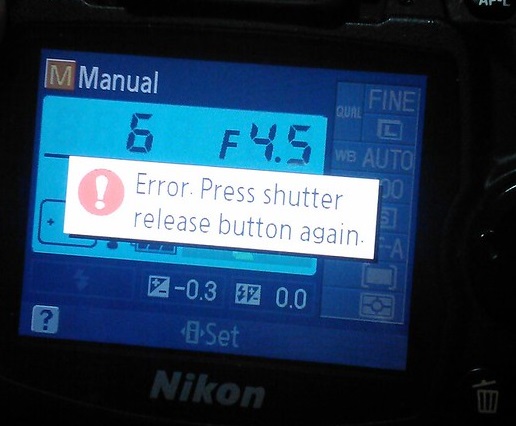
Figure 10: Nikon Shutter Release error
Nikon ‘Press Shutter Release button’ error appears when your camera’s shutter is jammed due to dust particles.
Solution: Turn off the camera and clean the Shutter button.
12. Nikon error code r18, r19, r02 etc.
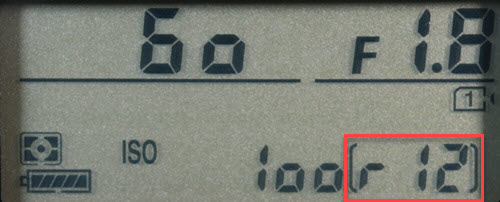
Figure 11: Nikon r12 error
Nikon camera display stuck with letter ‘r’ and a number like r13, r12, r04, etc., when you half press the shutter button is often mistaken as an error. However, it’s simply a notification from your camera about the number of more shots your buffer memory can hold under the current camera settings. When the buffer shots are full, you won’t be able to shoot temporarily till the images are processed. Post processing, buffer space is again available and recording automatically continues. So no need to worry if you receive r12, r02, r20 and so on message on Nikon camera.
How to format Nikon camera SD card ?
Before formatting camera card, backup your photos and videos. If the SD card is not accessible due to any error or other logical issue, use a Nikon SD card recovery software that retrieves lost photos and videos.
Also read:
How to fix corrupt SD card on Windows PC
How to fix corrupt SD card on Mac
Steps to format the Nikon SD card in camera :
- Go to Menu > Setup Menu > Format memory card
- Choose your card slot in case there are more than one slot
- Select OK. Wait till the process completion message appears.
If you are trying to fix any Nikon DSLR error using formatting, but the problem doesn’t resolve, it means the SD card is damaged. Get the new SDXC or SDHC camera card.
How to recover photos & video lost after fixing Nikon error?
Get the Nikon file recovery software — Stellar Photo Recovery . It is compatible with all models of Nikon cameras and their memory cards. The software can help you restore files deleted or lost while fixing Nikon camera error. Stellar Photo Recovery is an advanced tool that recovers photos and videos from corrupt and formatted camera SD cards as well. It is available for both Windows and Mac system.
Step-by-step: How to recover from Nikon photos and videos
- Install and launch Stellar Photo Recovery on your computer.
- Connect the Nikon SD card to the system.
- Next, select the SD card in software interface and click Scan.
- Click Recover
- Preview and Save the recovered photos and videos.
Note: Don’t use the camera SD card, until the lost files are recovered to avoid overwriting of data.
How to Repair Photos & Videos Corrupted due to errors in Nikon DSLR?
There are instances reported that after fixing an error code in Nikon DSLR, the saved videos and photos are corrupted.
You can use Nikon photo repair software – Stellar Repair for Photo to fix corrupt JPEG, and RAW (NEF and NRW) image files.
While the best tool to repair corrupt video is Stellar Repair for Video that supports Nikon H.264/ H.265 MP4, MOV, and AVI files.
These software are compatible with Nikon memory cards including Class 10 UHS-I SanDisk, Transcend, Lexar Professional and others.
Recommended: You may be interested in Stellar Photo Recovery Premium — a unique software that not only recovers Nikon’s deleted photos and videos but also repairs those (photos +videos) that get corrupt.
You can avoid the above errors on Nikon Camera! Here are the tips.
- Use Nikon CPU lens instead of old non-CPU lens.
- Use only Nikon approved SD cards of Class 10 speed.
- After copying, format the Nikon SD card instead of deletingthefiles.
- Always format card inside the camera.
- Carefully insert/ remove SD Card from camera.
- Don’t wait for Nikon battery to fully discharge. Recharge it before.
- Don’t continue recording when the card storage is nearly full
Wrapping Up
Nikon camera error troubleshooting is helpful. However, if you are not able to fix the error, contact the authorized Nikon Service Centre near you.
In order to recover photos & videos lost due to camera error, use Nikon Recovery software – Stellar Photo Recovery. It’s best to try the free demo version to preview the recoverable Nikon camera files.