
132 Технические примечания/Устранение неисправностей
Сообщения об ошибках и индикация фотокамеры
В этом разделе приведены различные предупреждения и сообщения об ошибках,
отображаемые в видоискателе, на контрольном дисплее и на мониторе фотокамеры.
Индикатор
Неисправность
Способ устранения
Контрольный
дисплей
Видоискатель
(мигает)
Кольцо диафрагмы на объективе не
заблокировано на минимальном
значении
Заблокируйте
кольцо
на
минимальном
значении
(максимальное число f/).
11
(мигает)
• Объектив не установлен.
• Установлен
объектив
без
микропроцессора.
• Установите
объектив
(за
исключением объективов IX Nikkor).
• Выберите режим M.
7, 117
50
Низкий уровень заряда батареи.
Подготовьте полностью заряженную
запасную батарею.
12,
123
(мигает)
(мигает)
• Батарея разряжена.
• Сведения о батарее недоступны.
• Перезарядите батарею или вставьте
полностью заряженную запасную
батарею.
• Эта
батарея
не
может
использоваться в фотокамере.
12,
123
13
(мигает)
Часы фотокамеры не установлены.
Установите часы фотокамеры.
103
/
Отсутствует карточка памяти.
Вставьте карточку памяти.
15
(мигает)
(мигает)
Недостаточно
памяти
для
записи
следующих
снимков
при
текущих
настройках, или в фотокамере закончились
номера для файлов или папок.
• Выберите
меньшие
значения
качества или размера снимков.
• Удалите снимки.
• Вставьте новую карточку памяти.
33
65, 74
15
z
(мигает)
Автоматическая
фокусировка
фотокамеры невозможна.
Измените компоновку снимка или
воспользуйтесь ручной фокусировкой.
22, 32
Объект слишком светлый, снимок
будет переэкспонирован.
• Выберите
меньшее
значение
чувствительности ISO.
• Уменьшите выдержку.
• Установите меньшую диафрагму
(большее число f/).
• Используйте нейтрально-серый (ND)
светофильтр (приобретается отдельно).
43
48, 50
49, 50
122
Объект слишком темный, снимок
будет недоэкспонирован.
• Выберите
более
высокую
чувствительность ISO.
• Увеличьте выдержку.
• Установите большую диафрагму
(меньшее число f/).
43
48, 50
49, 50
(мигает)
• Для
правильной
экспозиции
необходимо использовать вспышку.
•
мигает в течение 3с после
срабатывания вспышки: вспышка
сработала с полной мощностью.
• Поднимите встроенную вспышку.
• Просмотрите снимок на экране; если
он недоэкспонирован, измените
настройки и повторите съемку.
23
26, 61
(мигает)
(мигает)
Для
внешней
вспышки,
не
поддерживающей i-TTL, выбран режим TTL.
Измените
режим
управления
внешней вспышкой.
120,
141
(мигает)
В режиме M выбрана выдержка
«bulb», после чего диск выбора
режимов установлен в положение S. Измените выдержку или выберите
режим M.
48, 50
(мигает)
В режиме M выбрана выдержка «—»,
после чего диск выбора режимов
установлен в положение S.
(мигает)
Неисправность фотокамеры.
Нажмите спусковую кнопку затвора
еще раз. Если ошибка сохраняется,
обратитесь
в
авторизованный
сервисный центр компании Nikon.
—
Few things are as frustrating as seeing an error message appear on your DSLR digital camera’s LCD or electronic viewfinder. However, before you get too frustrated, take a deep breath. The nice thing about error messages is that they give you clues to the problems your camera might be experiencing, which is better than no error message at all.
The eight common errors listed here include tips for diagnosing and fixing problems with your Nikon DSLR camera.
ERR Error Message
If you see «ERR» on your LCD or electronic viewfinder, you likely have experienced one of three problems.
- The shutter button may not have depressed properly. Make sure the button is seated properly and pressed fully.
- The camera could not capture the image using your manual exposure settings. Change the settings or using automatic settings.
- The Nikon camera may have experienced a start-up error. Remove the battery and memory card for at least 15 minutes and turn on the camera again.
F— Error Message
Most of the time, this error message is limited to Nikon DSLR cameras because it’s related to a lens error. Specifically, the F— error message indicates that the lens and camera are not communicating. Check the lens to ensure it’s locked into place.
If you cannot make this particular lens work, try a different lens to see whether the F— error message continues. You’ll then know whether the problem is with the original lens or the camera.
FEE Error Message
The FEE error message on a Nikon DSLR camera indicates that the camera cannot shoot the photo at the aperture you selected. Turn the manual aperture ring to the highest number, which should fix the error message. You may need to allow the camera to automatically choose the aperture to shoot the photo at the proper exposure.
‘Information’ Icon Error Message
If you see an «i» in a circle, it indicates one of three likely errors.
- The battery may be exhausted. Charge it.
- The memory card may be full or locked. Look for a small toggle switch on the side of the card and flip it to the unlocked position to fix the problem.
- The camera may have detected that one of the subjects of the photo blinked as the photo was shot, allowing you to shoot the photo again.
No Memory Card Error Message
If you have a memory card installed in the camera, the No Memory Card Error message can have a few different causes.
- Make sure the type of memory card is compatible with your Nikon camera.
- The card may be full, meaning you’ll need to download the photos on it to your computer.
- The memory card could be malfunctioning or may have been formatted with a different camera. If this is the case, you may need to reformat the memory card with this camera. Keep in mind that formatting a memory card erases all data stored on it.
Record Movie Error Message
The Cannot Record Movie error message usually means that your Nikon DSLR cannot pass the data to the memory card fast enough to record it. This is almost always a problem with the memory card; you’ll need a memory card with a faster write speed. This error message also could refer to a problem with the camera, but try a different memory card first.
Shutter Release Error Message
A Shutter Release Error message with your Nikon DSLR camera indicates a jammed shutter release. Check the shutter button for any foreign objects or any sticky grime that could be jamming the shutter button. Clean the button and try again.
This Image Cannot Be Deleted Error Message
The image you are trying to delete has been protected by the software in the camera. You’ll need to remove the protection label from the image before you can delete it.
Further Troubleshooting
Different models of Nikon cameras may provide a different set of error messages than shown here. If you see Nikon camera error messages that aren’t listed here, check with your Nikon camera user guide for a list of other error messages specific to your camera model.
After reading through these tips, if you still cannot solve the problem indicated by the Nikon camera error message, you may need to take the camera to a repair center. Look for a trustworthy camera repair center when trying to decide where to take your camera.
Thanks for letting us know!
Get the Latest Tech News Delivered Every Day
Subscribe
Few things are as frustrating as seeing an error message appear on your DSLR digital camera’s LCD or electronic viewfinder. However, before you get too frustrated, take a deep breath. The nice thing about error messages is that they give you clues to the problems your camera might be experiencing, which is better than no error message at all.
The eight common errors listed here include tips for diagnosing and fixing problems with your Nikon DSLR camera.
ERR Error Message
If you see «ERR» on your LCD or electronic viewfinder, you likely have experienced one of three problems.
- The shutter button may not have depressed properly. Make sure the button is seated properly and pressed fully.
- The camera could not capture the image using your manual exposure settings. Change the settings or using automatic settings.
- The Nikon camera may have experienced a start-up error. Remove the battery and memory card for at least 15 minutes and turn on the camera again.
F— Error Message
Most of the time, this error message is limited to Nikon DSLR cameras because it’s related to a lens error. Specifically, the F— error message indicates that the lens and camera are not communicating. Check the lens to ensure it’s locked into place.
If you cannot make this particular lens work, try a different lens to see whether the F— error message continues. You’ll then know whether the problem is with the original lens or the camera.
FEE Error Message
The FEE error message on a Nikon DSLR camera indicates that the camera cannot shoot the photo at the aperture you selected. Turn the manual aperture ring to the highest number, which should fix the error message. You may need to allow the camera to automatically choose the aperture to shoot the photo at the proper exposure.
‘Information’ Icon Error Message
If you see an «i» in a circle, it indicates one of three likely errors.
- The battery may be exhausted. Charge it.
- The memory card may be full or locked. Look for a small toggle switch on the side of the card and flip it to the unlocked position to fix the problem.
- The camera may have detected that one of the subjects of the photo blinked as the photo was shot, allowing you to shoot the photo again.
No Memory Card Error Message
If you have a memory card installed in the camera, the No Memory Card Error message can have a few different causes.
- Make sure the type of memory card is compatible with your Nikon camera.
- The card may be full, meaning you’ll need to download the photos on it to your computer.
- The memory card could be malfunctioning or may have been formatted with a different camera. If this is the case, you may need to reformat the memory card with this camera. Keep in mind that formatting a memory card erases all data stored on it.
Record Movie Error Message
The Cannot Record Movie error message usually means that your Nikon DSLR cannot pass the data to the memory card fast enough to record it. This is almost always a problem with the memory card; you’ll need a memory card with a faster write speed. This error message also could refer to a problem with the camera, but try a different memory card first.
Shutter Release Error Message
A Shutter Release Error message with your Nikon DSLR camera indicates a jammed shutter release. Check the shutter button for any foreign objects or any sticky grime that could be jamming the shutter button. Clean the button and try again.
This Image Cannot Be Deleted Error Message
The image you are trying to delete has been protected by the software in the camera. You’ll need to remove the protection label from the image before you can delete it.
Further Troubleshooting
Different models of Nikon cameras may provide a different set of error messages than shown here. If you see Nikon camera error messages that aren’t listed here, check with your Nikon camera user guide for a list of other error messages specific to your camera model.
After reading through these tips, if you still cannot solve the problem indicated by the Nikon camera error message, you may need to take the camera to a repair center. Look for a trustworthy camera repair center when trying to decide where to take your camera.
Thanks for letting us know!
Get the Latest Tech News Delivered Every Day
Subscribe
Не ошибается лишь тот, кто ничего не делает. Это
выражение справедливо и для техники. Чем больше и чаще используют камеру, тем
быстрее она выдаст ошибку. Одни ошибки не требуют большого внимания, другие же
сообщают о неисправности. И, конечно, очень здорово, когда производитель создал
классификацию таких сообщений. Так поступили в Canon. А вот с фотоаппаратами бренда Nikonвсе
не так просто.
Наши инженеры собрали 8 самых распространенных ошибок
и дали несколько советов о том, что же с ними делать.
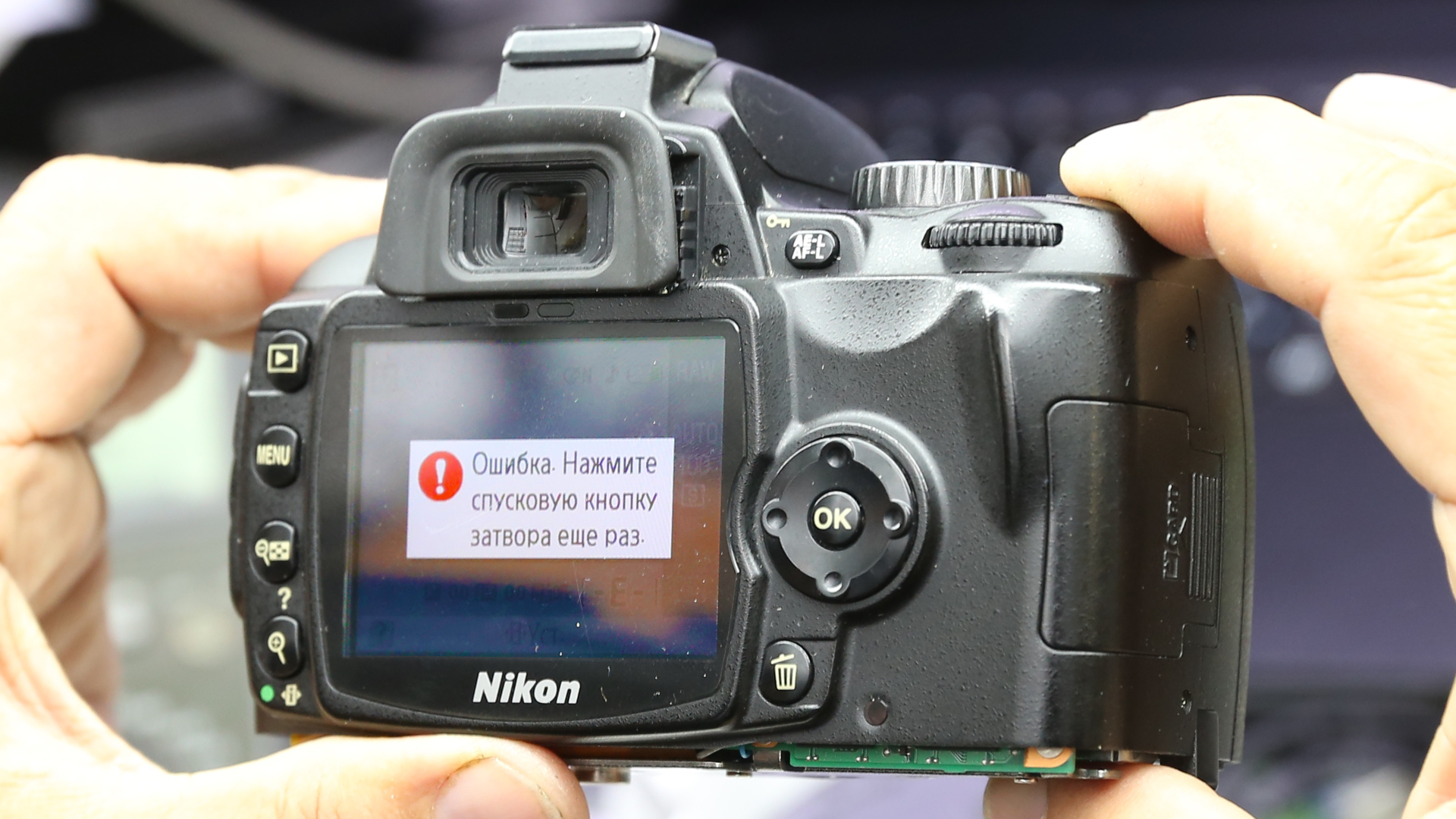
Ошибка ERR
У этой надписи на дисплее вашей камеры Никон может
быть три причины.
Во-первых, стоит проверить кнопку спуска затвора.
Возможно, она неправильно установлена или неверно сработала. Также есть
вероятность, что пользователь не зажал ее до конца.
Во-вторых, камере не удалось зафиксировать кадр в
мануальном режиме. В таком случае, можно поменять настройки экспозиции или
перейти на автоматический режим.
В-третьих, ошибка могла случиться при запуске. Для
того чтобы исправить положение, достаньте аккумулятор и карту памяти, подождите
15 минут и включите устройство.
Ошибка -E-
Если вы увидели такой
символ, значит нужно проверить положение карты памяти. Возможно, она
неправильно установлена.
Ошибка F—
С таким сообщением чаще всего сталкиваются владельцы
зеркалок Nikon. Дело в том, что ошибка указывает на проблемы с объективом. А
именно на отсутствие связи между оптикой и тушкой.
Если вы видите эту надпись на экране камеры, первым
делом нужно проверить, насколько хорошо зафиксирован объектив. Лучше отключить
и подключить его заново. Если это не помогло, попробуйте подключить другую
линзу. Так вы поймете, где же кроется проблема (в самой камере или в объективе).
Каким бы ни был ответ, скорее всего вам придется
обратиться в сервисный центр по ремонту Никон.
Кроме того, эта ошибка может означать, что объектив
попросту не совместим с камерой.
Ошибка FEE
Эта аббревиатура означает, что настройки диафрагмы,
выбранные вами, не позволяют фотоаппарату сделать снимок. В таком случае нужно
повернуть кольцо диафрагмы до максимального значения, это поможет решить проблему.
Если же не выйдет, воспользуйтесь автоматическими настройками диафрагмы.
Ошибка «i» в круге
У этой ошибки также несколько причин:
- Аккумулятор разряжен. Необходима
подзарядка. - Заблокирована или заполнена карта памяти.
В таком случае нужно проверить положение рычажка на карте. - Фотоаппарат сообщает вам, что объект
съемки моргнул в процессе.
Сообщение «Нет карты памяти»
Казалось бы, все просто, нужно вставить карту. Однако
такое сообщение может появиться, даже если накопитель на месте. Это случается,
если:
- Карта не совместима с камерой.
- Накопитель заполнен.
- Карта памяти неисправна или
отформатирована на другом фотоаппарате.
В последнем случае устранить проблему можно с помощью
форматирования карты на вашей камере. Если же не сработало, покупайте новую.
Сообщение «Невозможна запись видео»
Эта надпись говорит о том, что у камеры не получается
быстро отправлять информацию на накопитель. Зачастую дело в самой карте, это
значит вам нужен более скоростной вид. Кроме того, проблема может быть и в
самой камере. Но для начала стоит испытать другую карту.
Ошибка спуска затвора
Вероятно, заклинила кнопка спуска затвора. Проверьте,
может быть в нее попала грязь или посторонний предмет.
Сообщение «Это изображение не может быть удалено»
Фотографию, которую вы хотите удалить, защищает
программное обеспечение камеры. Поэтому перед тем, как удалить файл, снимите с
него защитную метку.
Конечно, это не все ошибки, которые могут случиться с
камерами Никон. Некоторые зависят от модели, поэтому их значение можно найти в
инструкции. Если же наши советы и рекомендации из мануала не сработали,
обращайтесь в сервисный центр Фотоблик. Мы поможем.
Поделиться с друзьями
Summary: Are you unable to use your Nikon camera due to errors like ERR, FEE, F, F0, For, E, etc.? Learn how to fix 12 most common Nikon errors and how to recover photos and videos from camera lost due to these errors.


Table of Content:
- 12 Nikon camera error codes & their solutions
- How to format Nikon camera SD card?
- How to recover photos and videos lost or deleted due to error?
- How to repair photos & videos corrupted due to Nikon error?
- Tips to avoid errors on Nikon camera
Nikon users often face various kinds of errors that pop up on their camera display panel. The common ERR, FEE, For, E, etc. freeze camera to the extent that even turning it off and on doesn’t help. The situation is annoying as these errors don’t let you use your camera further and may lead to loss of photos and videos from the camera SD card.
Whether it is Nikon D70, D80, D90, D750, D3500, D7200 or any other model, the error could be due to multiple reasons such as non-CPU lens, improper SD card, dust, etc.
Read on to know how to fix 12 such common Nikon errors, and how to recover deleted or corrupt Nikon photos & videos from Nikon cameras.
12 Most Common Nikon Camera Error Codes & Solutions
- ERR error message
- FEE error message
- ‘F’ error message
- Triangle with ‘F0’ error
- ‘For’ error code
- ‘Cd/Err’ error code
- Information icon error in Nikon
- Nikon Error (-E-)
- Nikon ‘This card cannot be used/read’ error
- Nikon error ‘Recording interrupted. Please wait.’
- Error Press shutter release button
- Nikon error code r18, r19, r02, etc.
1. ‘Err’ error message
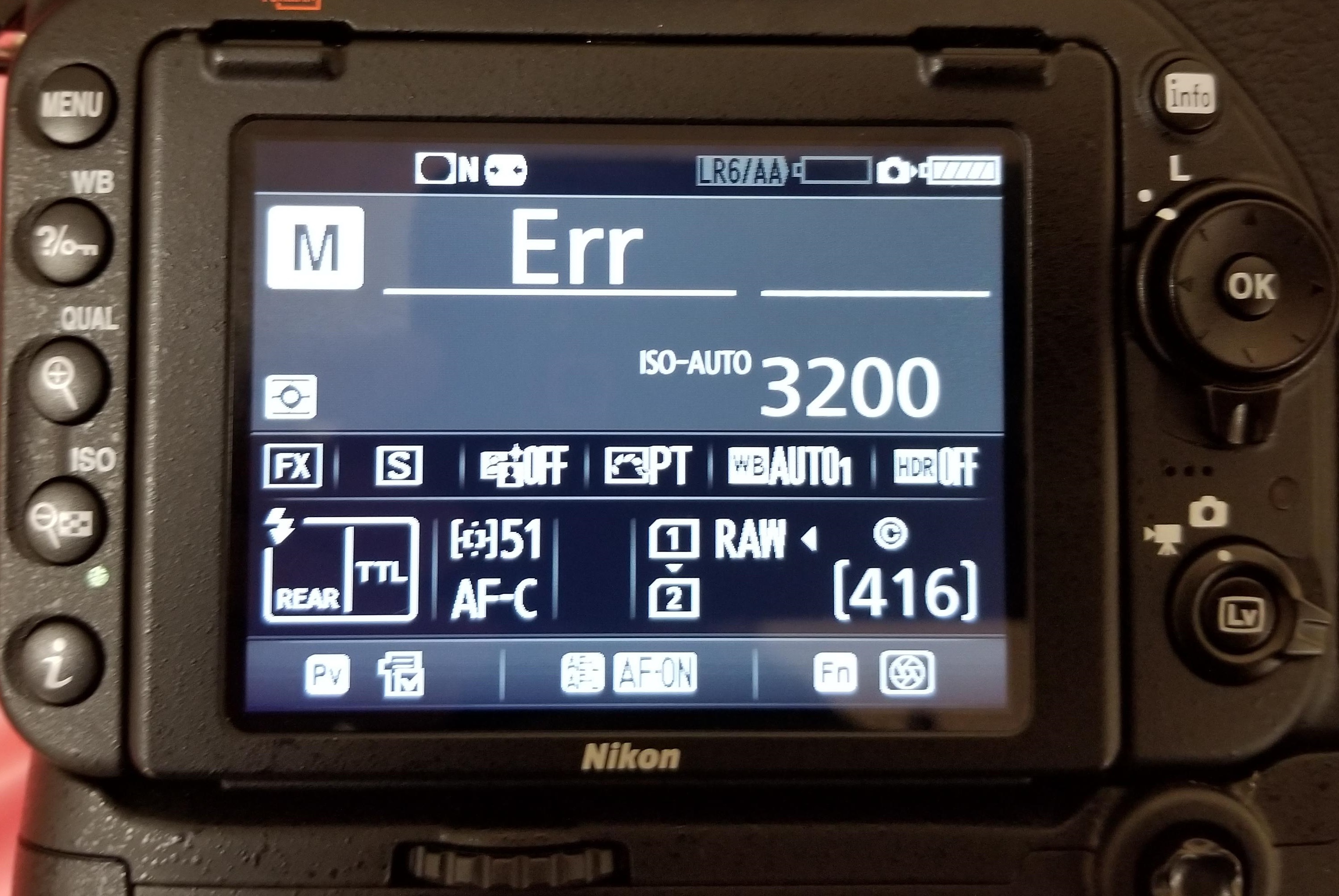
Figure 1: Nikon ‘Err’ message in D750
‘Err’ message on Nikon D750, D80, D810, D90, etc., points toward internal camera issues. The error could be because of faulty lens, dirt, incompatible SD card, inappropriate camera exposure settings. It may also occur when you turn-on the camera and immediately start recording at high shutter speed, which more often than not, disables or crashes your Nikon DSLR.
Solution: You can do the following to fix Nikon ‘Err’ camera error:
- Remove and reattach the lens.
- Clean the connection points on the lens and the camera using a microfiber cloth.
- Remove the camera battery and SD card for 10-15 min and then re-insert.
- Check if the lens connection pins or Aperture control lever are broken.
- Replace the lens with a new one.
- If the problem persists, contact an Authorised Nikon Service Centre for service or for damaged Aperture lever.
2. ‘FEE’ error message
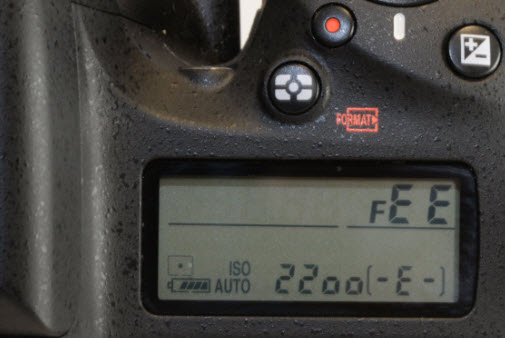
Figure 2: FEE error message on Nikon DSLR
The ‘FEE’ error on Nikon DSLR appears when the camera lens is not attached properly; has incorrect aperture setting; or you’re using non-CPU lens such as the NIKKOR AF or NIKKOR P lenses.
Solution: To fix ‘FEE’ error in Nikon, you may try the following:
- Set the aperture to F22, or the highest aperture number normally marked in orange on the lens. Lock it using the aperture locking switch.
- Check that the EE servo coupling on the lens and F-min switch highlighted on the camera body are not broken.
Figure 3: Highest aperture marked in orange in camera
Figure 4: EE servo coupling on Nikon lens Figure 5: F-min switch on Nikon camera
If either of the two is broken, the lens issue could be due to this. Contact the authorized service centre for return or service.
3. ‘F’ error message
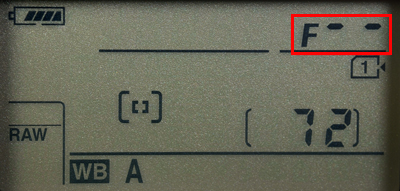
Figure 6: F error on Nikon camera screen
If you see ‘F’ error message on your Nikon D7000, D7100, D850 or other camera, this can indicate a lens issue. Either the camera lens is not connected properly or the non-CPU lens is attached.
Solution: Remove and reattach the camera lens ensuring that it fixes properly. It’s recommended to use a CPU lens, such as NIKKOR lenses type D, E and G. However, if you have old non-CPU lens, select the exposure mode A (aperture-priority auto) or M (manual) on the camera.
If the problem continues, try a different lens.
4. Triangle with F0 error
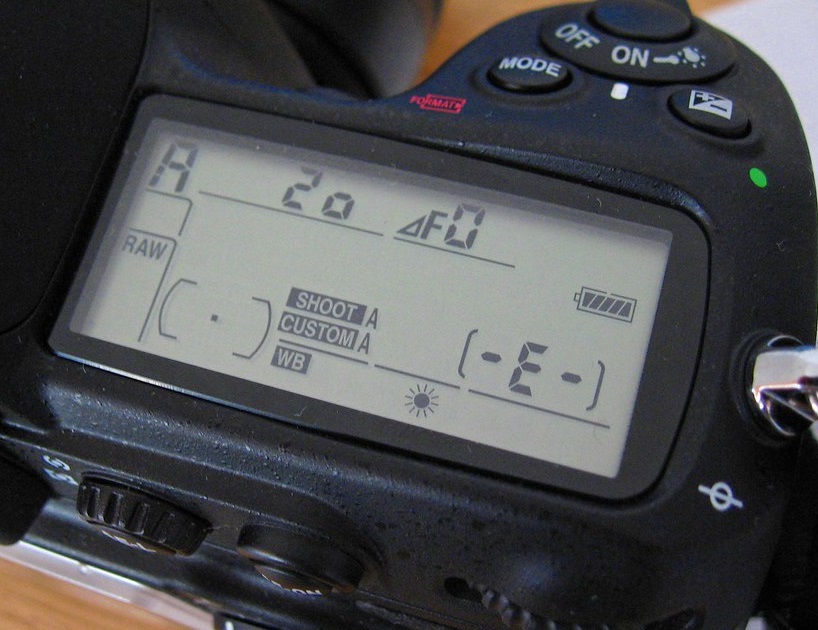
Figure 7: Nikon error triangle with F0
A triangle with ‘f0’ is typically reported in Nikon D700, D300, and D200 using G-series lenses. It is also one of the case where the lens is not attached to the camera properly because of dirt or alignment issue.
Solution: Turn-off the camera. Remove and reattach the lens so that it attaches properly to the camera. Also, clean the connection points between the lens and camera using a microfiber cloth.
5. ‘For’ error code
Nikon D7200, D500, D80, D90, D70 and others often show ‘For’ error code in the camera’s control panel. It is a format card error, which means your DSLR is unable to read the first sector of the SD Card.
Solution: To fix the ‘For’ error in Nikon devices, you may do the following:
- Turn-off the camera.
- Format your camera SD card.
- Insert a new memory card in the camera.
6. ‘Cd/Err’/’Cha’ error code
Figure 8: Nikon D80 Cha error
‘Cd/Err’ or ‘Cha’ is old Nikon D40, D70, D80 error issue. When you see ‘Cd’ or ‘Cha’ error in the control panel of the camera, it indicates memory card problem. Either your camera doesn’t recognize the SD card or it has detected an invalid partition. ‘Cha’ error is commonly reported after users copy or delete photos from the Nikon SD card and reuse it without formatting.
Solution: You can do the following to fix ‘Cd or ‘Cha’ error:
- Try once by removing and then reinserting the SD card properly.
- Format SD card within the camera.
- Ensure you are using a memory card compatible with Nikon model.
- If the problem remains, contact the Nikon service centre.
7. Information icon error in Nikon
If you see an ‘i’ in a circle on your camera display, it is the information error icon. The error appears because of camera battery or SD card issue. Nikon battery may be drained out or your camera SD card is unable to store photos and videos.
Solution:
- Remove and charge the camera battery, if it is drained out.
- Unlock your camera SD card, if it’s write-protected. Slide upward the lock switch.
- Check if the SD card is full. Transfer its photos and video files to another device.
8. Nikon Error (-E-)
The (-E-) message on Nikon display screen is a memory card error. Either SD card is not inserted in camera or the camera is unable to read the card.
Solution: Do the following to fix the Nikon error:
- Turn-off the camera. Remove its SD card. Clean and insert it again.
- Use a Nikon approved SD camera.
- If the SD card is full, it will not record any more videos or photos and may show error. Move the files from camera card to your PC or other media.
- If still the same error message appears, then format your SD card either within the camera or on the computer.
9. Nikon ‘This card cannot be used/read’ error
‘This card cannot be used’ or ‘this card cannot be read’ error message on Nikon camera means your SD card is either incompatible with the camera, damaged, corrupt or not inserted properly.
Solution: Do the following to fix Nikon memory card error:
- Use Nikon approved memory card.
- Remove and reinsert the SD card properly.
- Check the camera card, it is not damaged.
- Gently clean the SD card and contact points with camera with soft dry cloth. Next re-insert the card.
- Reformat the SD card.
- If none of the methods are helpful, change SD card, and make sure you use the Nikon approved camera card.
You can also apply the same troubleshooting methods in case of ‘No memory card error’ message on Nikon screen.
10. Nikon error ‘Recording interrupted. Please wait.’
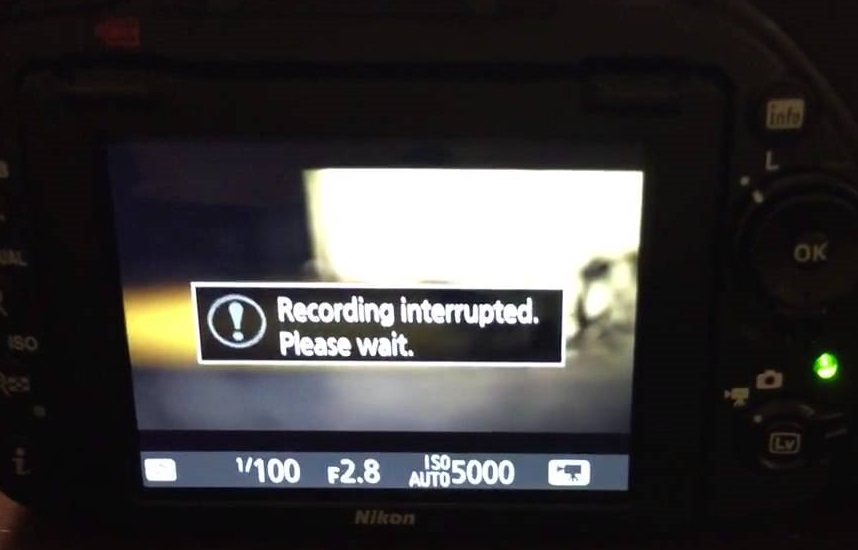
Figure 9: Nikon Recording interrupted error
You turn on the camera and start recording. But after few seconds receive the message, ‘Recording interrupted please wait’. This may be followed by camera freeze or ERR card error, after you turn-off and turn-on your Nikon DSLR.
The record movie error, ‘Recording interrupted. Please wait’ is commonly reported in Nikon D750, D3100, D3300 and other D-series models. It occurs when the camera can’t save the recording data to the SD card. This usually happens when the memory card is of lower Class, which has slow read/ write speed. Most of the other video recording error messages in Nikon camera are due to slow SD card.
Solution: Get a memory card that has faster write speed. It is recommended to use Class 10 SD cards such as Extreme SanDisk SDXC UHS-I Card or Lexar Professional 633X UHS-I etc.
11. Press shutter release button
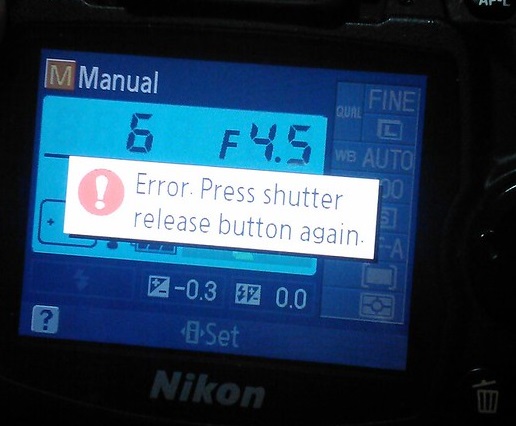
Figure 10: Nikon Shutter Release error
Nikon ‘Press Shutter Release button’ error appears when your camera’s shutter is jammed due to dust particles.
Solution: Turn off the camera and clean the Shutter button.
12. Nikon error code r18, r19, r02 etc.
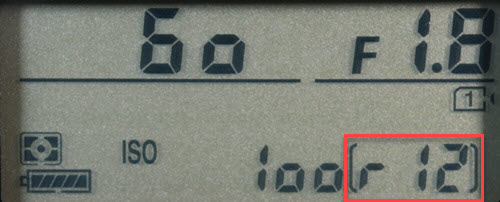
Figure 11: Nikon r12 error
Nikon camera display stuck with letter ‘r’ and a number like r13, r12, r04, etc., when you half press the shutter button is often mistaken as an error. However, it’s simply a notification from your camera about the number of more shots your buffer memory can hold under the current camera settings. When the buffer shots are full, you won’t be able to shoot temporarily till the images are processed. Post processing, buffer space is again available and recording automatically continues. So no need to worry if you receive r12, r02, r20 and so on message on Nikon camera.
How to format Nikon camera SD card ?
Before formatting camera card, backup your photos and videos. If the SD card is not accessible due to any error or other logical issue, use a Nikon SD card recovery software that retrieves lost photos and videos.
Also read:
How to fix corrupt SD card on Windows PC
How to fix corrupt SD card on Mac
Steps to format the Nikon SD card in camera :
- Go to Menu > Setup Menu > Format memory card
- Choose your card slot in case there are more than one slot
- Select OK. Wait till the process completion message appears.
If you are trying to fix any Nikon DSLR error using formatting, but the problem doesn’t resolve, it means the SD card is damaged. Get the new SDXC or SDHC camera card.
How to recover photos & video lost after fixing Nikon error?
Get the Nikon file recovery software — Stellar Photo Recovery . It is compatible with all models of Nikon cameras and their memory cards. The software can help you restore files deleted or lost while fixing Nikon camera error. Stellar Photo Recovery is an advanced tool that recovers photos and videos from corrupt and formatted camera SD cards as well. It is available for both Windows and Mac system.
Step-by-step: How to recover from Nikon photos and videos
- Install and launch Stellar Photo Recovery on your computer.
- Connect the Nikon SD card to the system.
- Next, select the SD card in software interface and click Scan.
- Click Recover
- Preview and Save the recovered photos and videos.
Note: Don’t use the camera SD card, until the lost files are recovered to avoid overwriting of data.
How to Repair Photos & Videos Corrupted due to errors in Nikon DSLR?
There are instances reported that after fixing an error code in Nikon DSLR, the saved videos and photos are corrupted.
You can use Nikon photo repair software – Stellar Repair for Photo to fix corrupt JPEG, and RAW (NEF and NRW) image files.
While the best tool to repair corrupt video is Stellar Repair for Video that supports Nikon H.264/ H.265 MP4, MOV, and AVI files.
These software are compatible with Nikon memory cards including Class 10 UHS-I SanDisk, Transcend, Lexar Professional and others.
Recommended: You may be interested in Stellar Photo Recovery Premium — a unique software that not only recovers Nikon’s deleted photos and videos but also repairs those (photos +videos) that get corrupt.
You can avoid the above errors on Nikon Camera! Here are the tips.
- Use Nikon CPU lens instead of old non-CPU lens.
- Use only Nikon approved SD cards of Class 10 speed.
- After copying, format the Nikon SD card instead of deletingthefiles.
- Always format card inside the camera.
- Carefully insert/ remove SD Card from camera.
- Don’t wait for Nikon battery to fully discharge. Recharge it before.
- Don’t continue recording when the card storage is nearly full
Wrapping Up
Nikon camera error troubleshooting is helpful. However, if you are not able to fix the error, contact the authorized Nikon Service Centre near you.
In order to recover photos & videos lost due to camera error, use Nikon Recovery software – Stellar Photo Recovery. It’s best to try the free demo version to preview the recoverable Nikon camera files.
- 27 Май 2014
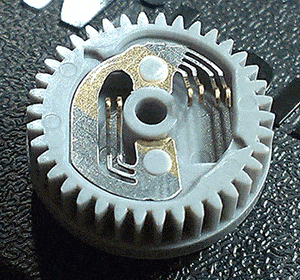
Nikon D80 — на верхнем дисплее при включении появляется надпись ERR и секунд через 5 пропадает. При половинном нажатии на спуск — снова появляется…. Затвор срабатывает, зеркало «прыгает», но съемка при этом не производится (по крайней мере, на карточке фотки не появляются). По подсказкам форума добрался до программной шестерни. Никакого «криминала» там не увидел. Тем не менее, контакты протер, слегка подогнул. Собрал. Все равно пишет ERR. Еще раз разобрал. Все пересмотрел аккуратно, подвигал — снова ничего не нашел. Собрал. Ситуация не изменилась — все так же ERR. Куда лезть? Можно как-то выяснить, что конкретно вызывает эту надпись на дисплее? Спасибо!
- 27 Май 2014
Jagupop сказал(а):
— все так же ERR. Куда лезть?
В петлю …
Jagupop сказал(а):
что конкретно вызывает эту надпись на дисплее?
Это поди там где должно быть число кадров?
- 27 Май 2014
Jagupop, про заклепку ничего не сказал.Заклепка целая?
- 27 Май 2014
ЕВ.ЮР. сказал(а):
Это та что в шестерне пластмассовая? Целая! И штырёк целый! Или я не о той заклепке подумал?
Добавлено 27-05-2014 14:07
Martemyanovich сказал(а):
Это поди там где должно быть число кадров?
")
Вот как на рисунке 1
ссылка скрыта от публикации
- 27 Май 2014
- 27 Май 2014
Хмммммм. Я понял. Разбираю снова…
- 27 Май 2014
В общем, восстановил шестеренку. Там действительно заклепка оторвана была. Вкрутил винтик — как на фото. Собрал. ERR все равно. А давайте я его стукну и он станет фиолетовым в крапинку. (с)
- 28 Май 2014
- 25 Сен 2014
Всем добрый день.
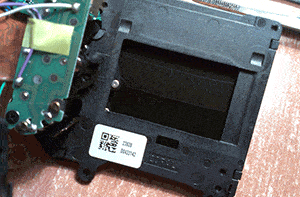
Разобрал тут на днях свой старый фот, лежал около трех месяцев после того как неожиданно зеркало зависло вверху, добрался до шестерни, на визуальный осмотр — все в порядке. Лапки чуть подогнул к верху, клепки держат хорошо, вся механика привода в норме.
Все продул воздухом, на предмет инородных тел. Собрал. При нажатии из положения «0»:
1. Зеркало поднимается вверх и стопорится
2. Слышно только жужжание моторчика в течении 1-1,2 секунд
Последующие нажатия кнопки дают лишь жужжание моторчика, при этом зеркало стоит как мертвое.
Вопрос уважаемые:
1. Если слышно жужжание моторчика, при том что шестерни не крутятся (иначе двигалось бы зеркало и затвор), значит идет пробуксовка вала моторчика и его шестерни. — Нормально ли это?
2. Заказывать затвор?
3. Ремонтопригодел ли затвор?
- 25 Сен 2014
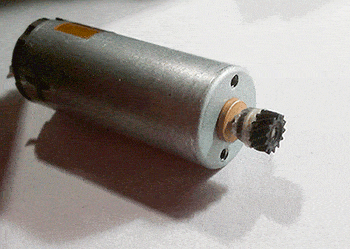
Скорее всего треснула шестерня на моторе.
- 25 Сен 2014
кстати я на китайщине шестерню мотора нашел и удивительно но она оказалась стоковой! правда 15$ сволочи захотели но деваться было некуда
- 25 Сен 2014
S.L.Clemens сказал(а):
Скорее всего треснула шестерня на моторе.
Снимал ее, специально рассматривал под лупой, естественно ничего не увидел, одел обратно.
Т.е. то что вал пробуксовывает — это 100% не нормально?
Придется еще раз разобрать, надо только подумать, где взять шестерню, и есть ли возможность отремонтировать старую?
- 25 Сен 2014
Восстанавливал несколько:накатал надфилем на валу движка насечки,шестерню на цианакрилат и на место где зубцов нет стяжку в виде витка пружинной проволоки(от автомагнитол Sony идеально подходит пружинка)
Добавлено 25-09-2014 14:35
от блока питания в разобраном виде крутим и смотрим
- 25 Сен 2014
S.L.Clemens сказал(а):
виде витка пружинной проволоки
Можно колечко от трубки нужного диаметра.Например от телескопической антенны.
- 25 Сен 2014
В принципе и так логично подумать, что шестерня должна стоять жестко, но тут встает вопрос: о чем думали разработчики применив такое соединение вала с ведущей шестеренкой?
Я как технолог полагал, что они, при заклинивании самого затвора, задумывали пробуксовку вала как страховку от сгорания мотора либо механической поломки самих шестеренок.
И по логике это бы означало замену затвора
Добавлено 25-09-2014 12:57
S.L.Clemens сказал(а):
от блока питания в разобраном виде крутим и смотрим
+1
Добавлено 25-09-2014 13:38
А подобрать ни кто не пытался?
- 25 Сен 2014
Филгут сказал(а):
кстати я на китайщине шестерню мотора нашел и удивительно но она оказалась стоковой! правда 15$ сволочи захотели но деваться было некуда
Ссыль дай.
- 25 Сен 2014
Друзья, есть у кого тех. хар-ки ведущей шестерни мотора?
- 25 Сен 2014
4 SVR_JT, ссылка скрыта от публикации тот шоп где брал что-то не вижу, а тут есть, но цена…
- 25 Сен 2014
hruniki, Если ты хочешь её сделать сам то врядли найдёшь, только самому обмерять
Филгут, Эту и я находи, при рыночной цене на д80 не сильно приятная цена.
- 25 Сен 2014
SVR_JT сказал(а):
Если ты хочешь её сделать сам то врядли найдёшь, только самому обмерять
Я пытаюсь подобрать, рынок то шестеренок велик ссылка скрыта от публикации / (как вариант)
продавцы везде требуют четкие размеры
- 25 Сен 2014
S.L.Clemens сказал(а):
на место где зубцов нет стяжку в виде витка пружинной проволоки(от автомагнитол Sony идеально подходит пружинка) улыбка
ЕВ.ЮР. сказал(а):
Можно колечко от трубки нужного диаметра.Например от телескопической антенны.
Это РАБОТАЕТ !!! Работы на полчаса.Черт,не понимаю зачем искать,заказывать,тратить деньги(я так понял не малые),ждать неделями.Когда можно завтра отдать фот клиенту и заработать за скорость.
- 25 Сен 2014
А если в месте где нет зубцов просверлить отверстие Ф1 мм и вставить расширяющеюся иглу, до клина, остатки с двух сторон убрать, плюс для надежности стяжку.
В случае заклинивания затвора, не подлетит ли моторчик?
- 26 Сен 2014
Всем большое спасибо за помощь, отдельное S.L.Clemens .
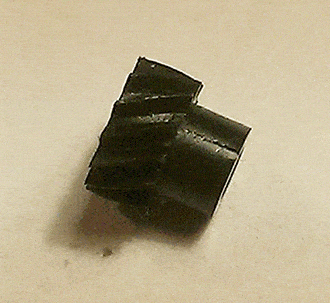
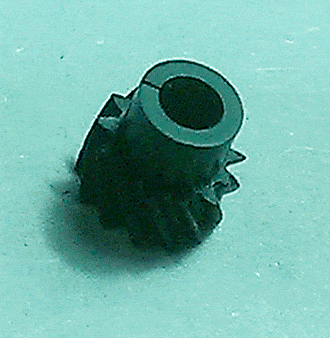
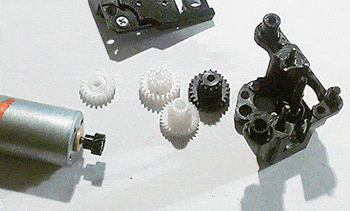
Разобрал, шестерня мотора треснутая, в прошлый раз не увидел, так как даже и не грешил на нее.
Отремонтировал, сколько нибудь походит, отдам дочке, пусть учится.
При сборке решил профилактически смазать, снял крышку со старого видачка Sony, там насобирал «ихней» мази.
Снял размеры шестерни на всяк случай, выложу позже, может кому пригодится.
- 17 Сен 2015