При работе в Nextcloud возникают ошибки.
Для их устранения необходимо перевести облачное хранилище в режим обслуживания. Сделаем это с помощью утилиты occ находящаяся в корне web-проекта.
Переводим в режим обслуживания выполнив команду:
# sudo -u www-data php occ maintenance:mode --on
Для отключения режима обслуживания выполним команду:
# sudo -u www-data php occ maintenance:mode --off
В режиме обслуживания на Desktop-клиентах будет запрошен пароль пользователя.
Ошибка «File is locked»
Ошибка при использовании серверов с медленной дисковой подсистемой.
Для исправления потребует перевести хранилища в режим обслуживания и выполненить SQL-запрос по очистке таблицы блокировок.
> delete from oc_file_locks;
Ошибка «Файл был удален с сервера» («File was deleted from server»)
Это довольно распространенная не блокирующая ошибка и синхронизация будет продолжаться, но в логах клиента будут присутствовать соответствующие ошибки.
Для устранения этой ошибки необходимо воспользоваться встроенной функцией сканирования файлового хранилища. Эта функция может быть запущена для всех пользователей:
# sudo -u www-data php occ files:scan --all
Это доволно длительная операция и зависящая от того сколько пользователей и файлов и для устранения проблем у одного пользователя можно указать вместо параметра его имя или идентификатор из Active Directory:
# sudo -u www-data php occ files:scan 2718B513-40C2-497A-8461-5CA930CEC4E9
Если вам известно расположение сбойного файла, то можно указать какой каталог требуется пересканировать:
# sudo -u www-data php occ files:scan 2718B513-40C2-497A-8461-5CA930CEC4E9
--path="2718B513-40C2-497A-8461-5CA930CEC4E9/files_versions/"
Когда штатные средства не помогают, придется удалить записи о файлах напрямую из базы данных, подключаемся базе данных mysql и выполняем запрос файлового идентификатора искомого файла.
> select fileid,path from oc_filecache where path like '%data/4.%';
Где, ‘%data/4.%’ — это запрос части имени файла вызывающего ошибку.
Следующим этапом удаляем идентификаторы сбойных файлов:
> delete from oc_filecache where fileid=589434;
589434 — соответственно идентификатор сбойного файла.
Ошибка «Precondition failed (An If-Match header was specified and the resource did not exist)»
Ошибка возникает на стороне клиента и оптимальным решением является переместить файл на временное хранение в другой каталог и после окончания синхронизации переместить файл обратно.
Содержание
- Устраняем предупреждения в админ панели NextCloud
- Индексирование файлов
- Предупреждения о текущей конфигурации /.well-known/.
- Зависание входа в панель NextCloud
- Не настроена система кэширования.
- Модуль php-imagick не поддерживает SVG
- Не указан регион размещения этого сервера Nextcloud
- Предупреждение headers
- Заголовок HTTP «Strict-Transport-Security»
- PHP не настроен для системного окружения.
- Значение PHP ниже рекомендуемого значения .
- Не скачиваются файлы больше 1Гб
- Nextcloud won’t upload larger files #5438
- Comments
- Steps to reproduce
- Expected behaviour
- Actual behaviour
- Server configuration
- LDAP configuration (delete this part if not used)
- Client configuration
- Web server error log
- Nextcloud log (data/nextcloud.log)
- Browser log
- Почему скачивается, но не закачивается файл в nextcloud по WebDav?
- NextCloud – ошибка при загрузке изображения, видео файла
- Устраняем предупреждения в админ панели NextCloud
- Индексирование файлов
- Предупреждения о текущей конфигурации /.well-known/.
- Зависание входа в панель NextCloud
- Не настроена система кэширования.
- Модуль php-imagick не поддерживает SVG
- Не указан регион размещения этого сервера Nextcloud
- Предупреждение headers
- Заголовок HTTP «Strict-Transport-Security»
- PHP не настроен для системного окружения.
- Значение PHP ниже рекомендуемого значения .
- Не скачиваются файлы больше 1Гб
Устраняем предупреждения в админ панели NextCloud
В предыдущей статье я писал как можно установить и настроить nextcloud на операционной системе Ubuntu Server 20.04 с web-сервером nginx+php-fpm и базой данных postgresql. Почитать можно тут.
После успешного запуска nextcloud в панели администратора Вы можете в пункте общие сведения, увидеть следующие предупреждения:
Индексирование файлов
Для устранения запустим команды для ускорения индексирования файлов. В терминале набираем:
Включаем режим обслуживания:
И вводим данные строки:
Выключаем режим обслуживания
После данной манипуляции ошибка должна исчезнуть.
Предупреждения о текущей конфигурации /.well-known/.
- Веб-сервер не настроен должным образом для разрешения «/.well-known/webfinger».
- Веб-сервер не настроен должным образом для разрешения «/.well-known/nodeinfo».
- Веб-сервер не настроен должным образом для разрешения «/.well-known/caldav».
- Веб-сервер не настроен должным образом для разрешения «/.well-known/carddav».
Чтобы исправить данные предупреждения в конфигурационный файл nginx вашего облака внесем следующую location:
Адрес https://mynextcloud.ru измените на свой.
Также внесём следующие строки в файл .htaccess
Зависание входа в панель NextCloud
Включил https на web сервере для nextclou и появился неприятный глюк: в google chrome, opera и яндекс браузере, а также в firefox, IE и edge при входе в аккаунт и выходе из него браузер «зависает» на странице входа, но при этом авторизуется. Если нажать F5, то окажемся в своем аккаунте.
Как же победить данную проблему?
Лечится добавлением в конфигурационный файл NexCloud:
Не настроена система кэширования.
Не настроена система кэширования. Для увеличения производительности сервера, по возможности, настройте memcache.
Хочу использовать Memcached. Для этого надо установите модуль для PHP и сам memcached.
Как оказалось есть два похожих пакета:
- php-memcache — модуль Memcache для PHP,
- php-memcached — расширение PHP для взаимодействия с memcached.
Нужен с буквой d в конце.
настройки в /etc/php/8.0/mods-available/memcached.ini оставляю все без изменений.
В выводе phpinfo(); появился блок с описанием memcached.
Настройки запуска сервиса в /etc/systemd/system/multi-user.target.wants/memcached.service и конфигурационный файл /etc/memcached.conf тоже не менял.
Проверяем запустился ли сервис
Должно выдать что-то вроде этого
Теперь в конфиге NextCloud добавим строки:
Модуль php-imagick не поддерживает SVG
Для устранения данного предупреждения необходимо установить модуль imagick:
Не указан регион размещения этого сервера Nextcloud
Не указан регион размещения этого сервера Nextcloud, что требуется для возможности проверки номеров телефонов без указания кода страны.
Чтобы разрешить пользователям сервера указывать номера телефонов без указания кода страны, добавьте параметр «default_phone_region» с соответствующим кодом страны в соответствии с ISO 3166-1↗.
Для устранения данного предупреждения откроем конфигурационный файл NextCloud :
и добавим следующие строки:
Для устранения данных ошибок в терминале набираем следующее:
И заполняем данным текстом:
Сохраняем файл (ctrl+o, ctrl+x). И перезагружаем nginx
Заголовок HTTP «Strict-Transport-Security»
Для устранения данного предупреждения отредактируем файл Nginx headers.conf:
Добавим следующие строки:
PHP не настроен для системного окружения.
PHP не настроен правильно для получения переменных системного окружения.
Запрос getenv(«PATH») возвращает пустые результаты.
Обратитесь к разделу о конфигурации PHP и примечаниям к конфигурации PHP из руководства по установке. Обратите внимание на настройку параметров PHP, особенно при использовании механизма php-fpm.
Когда вы используете php-fpm, системные переменные среды, такие как PATH, TMP или другие, не заполняются автоматически так же, как при использовании php-cli. Вызов функции PHP, такой как getenv(‘PATH’); может возвращать пустой результат. Поэтому вам может потребоваться вручную настроить переменные среды в файле конфигурации php-fpm.
И сними с них комментарий (;).
Далее перезапустим php8.0-fpm
Значение PHP ниже рекомендуемого значения .
Разрешённое максимальное значение использования памяти PHP ниже рекомендуемого значения в 512 МБ.
В терминале набираем:
Находим и редактируем следующие строки:
Не скачиваются файлы больше 1Гб
При попытках скачать из облака файлы объемом более 1гб скачивание прерывается при достижении 1гб. Такое происходит при условии использования Nginx как реверс-прокси. Решается очень просто, нужно добавить в конфигурационный файл сайта опцию «proxy_buffering off». Открываем и добавляем эту опцию:
Если есть вопросы, то пишем в комментариях.
Также можете вступить в Телеграм канал, ВКонтакте или подписаться на Twitter. Ссылки в шапке страницы.
Заранее всем спасибо.
Если вы нашли ошибку, пожалуйста, выделите фрагмент текста и нажмите Ctrl+Enter.

Решаем проблему с ошибкой W: mdadm. Имеется сервер работающий на Ubuntu Server 16.04, после обновления системы в логах, да и Читать

NextCloud на Ubuntu Server в журнале первого выходила постоянная Ошибка «PHP Startup: Unable to load dynamic library ‘xmlrpc.so’ «
Если при работе в Linux вы получаете ошибку «getcwd() failed: No such file or directory» при запуске какого-либо скрипта или Читать
Источник
Nextcloud won’t upload larger files #5438
Steps to reproduce
I try to upload a file 200 MB large (not that big, thus), yet I can’t get it done. Neither via nextcloud web, WebDAV nor nextcloud client. I properly set up the php.ini configuration and everything around.
- Install nextcloud and try to upload the file
Expected behaviour
The file is uploaded
Actual behaviour
Web: It uploads, but finally nothing happens. After the (upload) process, just nothing
WebDAV on Windows: I/O Device Error
Nextcloud Client: Nothing happens (the nextcloud log doesn’t say anything else)
Server configuration
Operating system: Deb 8
Web server: Plesk’s apache
Database: mysql
PHP version: 7
Nextcloud version: (see Nextcloud admin page) latest
Updated from an older Nextcloud/ownCloud or fresh install: —
Where did you install Nextcloud from: setup.php
Signing status:
List of activated apps:
Nextcloud configuration:
Are you using external storage, if yes which one: —
Are you using encryption: yes
Are you using an external user-backend, if yes which one: —
LDAP configuration (delete this part if not used)
Client configuration
Browser:
Operating system:
Web server error log
Nextcloud log (data/nextcloud.log)
Browser log
The text was updated successfully, but these errors were encountered:
Hi, there is a maximum file size option under Admin > Additional Settings. Please take a look at what it is currently set to. Fyi, I set mine to 2gb. Be sure to post back the solution if you find it. 🙂
Also, here is a way to change maximum upload filesize in Apache. You can google for Nginx info, etc.
- vim /etc/php*/apache2/php.ini
- vim /etc/php*/apache2/php.ini
- Find upload_max_filesize and change it (along with post_max_size)
- Save the file
- Restart apache2
- Edit admin settings in NC to reflect php.ini
For Plesk use following Settings:
PHP Settings for your-nextcloud.com:
Leave everything default, except:
max_execution_timem => 3600
max_input_time => 3600
open_basedir => add «:/dev/urandom:/proc/meminfo» to the end of line
Additional directives:
opcache.enable_cli=1
opcache.interned_strings_buffer=8
opcache.max_accelerated_files=10000
opcache.memory_consumption=128
opcache.save_comments=1
opcache.revalidate_freq=1
As @sunjam mentioned change Setting under Admin > Additional Settings.
Do not change php.ini directly, but only with Plesk Gui
If you use nginx there will be additional steps to to
Источник
Почему скачивается, но не закачивается файл в nextcloud по WebDav?
Установлен сервер nextcloud на ubuntu 16.04 Apache2.
Доступ по webdav работает нормально. На телефоне установлен Android 6.0.2 и программа FolderSync, которая в автоматическом режиме по webdav синхронизирует папку на телефоне и в nextcloud.
При синхронизации скачиваются файлы с сервера — всё ок. Но, если происходит попытка закачать файл с телефона на сервер, с сервера приходит следующая ошибка:
Debug webdav SabreDAVExceptionNotFound: File with name /test/Kn7IrxJgukU.jpg could not be located
/var/www/nextcloud/3rdparty/sabre/dav/lib/DAV/Tree.php — line 76: OCADAVConnectorSabreDirectory->getChild(‘Kn7IrxJgukU.jpg’)
/var/www/nextcloud/3rdparty/sabre/dav/lib/DAV/Server.php — line 967: SabreDAVTree->getNodeForPath(‘files/***/tes. ‘)
/var/www/nextcloud/3rdparty/sabre/dav/lib/DAV/Server.php — line 1666: SabreDAVServer->getPropertiesIteratorForPath(‘files/***/tes. ‘, Array, 0)
/var/www/nextcloud/3rdparty/sabre/dav/lib/DAV/CorePlugin.php — line 355: SabreDAVServer->generateMultiStatus(Object(Generator), false)
[internal function] SabreDAVCorePlugin->httpPropFind(Object(SabreHTTPRequest), Object(SabreHTTPResponse))
/var/www/nextcloud/3rdparty/sabre/event/lib/EventEmitterTrait.php — line 105: call_user_func_array(Array, Array)
/var/www/nextcloud/3rdparty/sabre/dav/lib/DAV/Server.php — line 479: SabreEventEventEmitter->emit(‘method PROPFIND’, Array)
/var/www/nextcloud/3rdparty/sabre/dav/lib/DAV/Server.php — line 254: SabreDAVServer->invokeMethod(Object(SabreHTTPRequest), Object(SabreHTTPResponse))
/var/www/nextcloud/apps/dav/lib/Server.php — line 258: SabreDAVServer->exec()
/var/www/nextcloud/apps/dav/appinfo/v2/remote.php — line 33: OCADAVServer->exec()
/var/www/nextcloud/remote.php — line 162: require_once(‘/var/www/nextcl. ‘)
Подозреваю, что проблема с правами доступа. Может кто-нибудь лог расшифровать?
- Вопрос задан более трёх лет назад
- 1302 просмотра
Сам вопрос задал — сам отвечаю:
Изначально сам NC дает для WebDav ссылку вида:
https://DOMEN/remote.php/webdav/ — она не правильная., с ней синхронизация будет в одну сторону.
С ней всё синхронизируется и устанавливается.
Источник
NextCloud – ошибка при загрузке изображения, видео файла

Задача:
Исправить ошибку nextcloud при открытии видео или аудио файлов в браузере
Пробуем открыть файл и сразу смотрим, что записалось в логах: “Настройки > Журналирование”
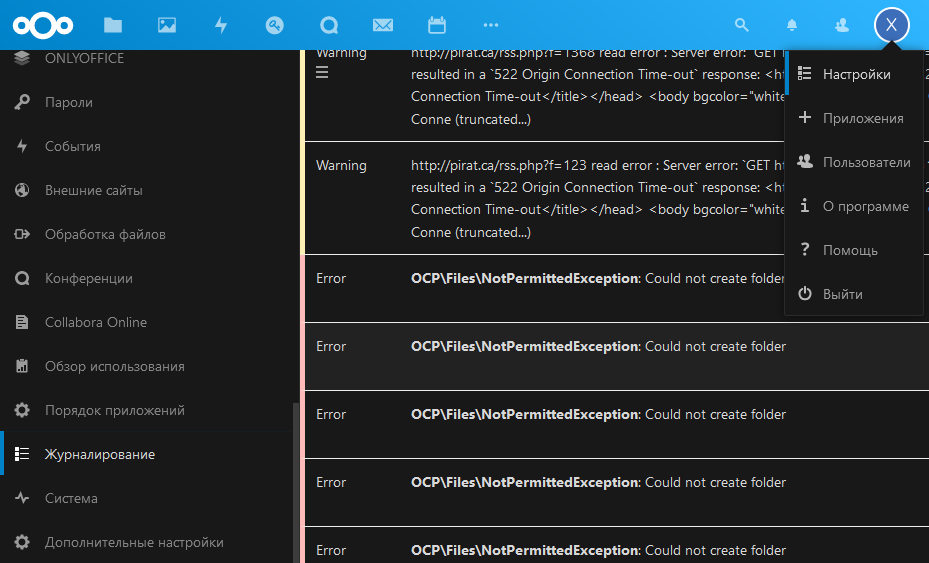
По дате и времени находим, какая запись в логах соответствует попытке открыть файл.
Из логов видно, что ошибка прав доступа. Nextcloud не может создать папку.
OCPFilesNotPermittedException: Could not create folder
Авторизуемся в консоли сервера и проверяем какой веб сервер у нас используется
Или можно узнать более короткой командой
Теперь необходимо узнать пользователя от кого работает nginx
в какой группе состоит пользователь www
После того как мы получили нужную информацию, переходим в веб-директорию nextcloud
назвачаем необходимые права на файлы и директории
может быть, что файлы пользователей лежат в другой директории. Проверяем
назначаем нужные права на папку
Пробуем генерировать файлы предварительного просмотра самостоятельно
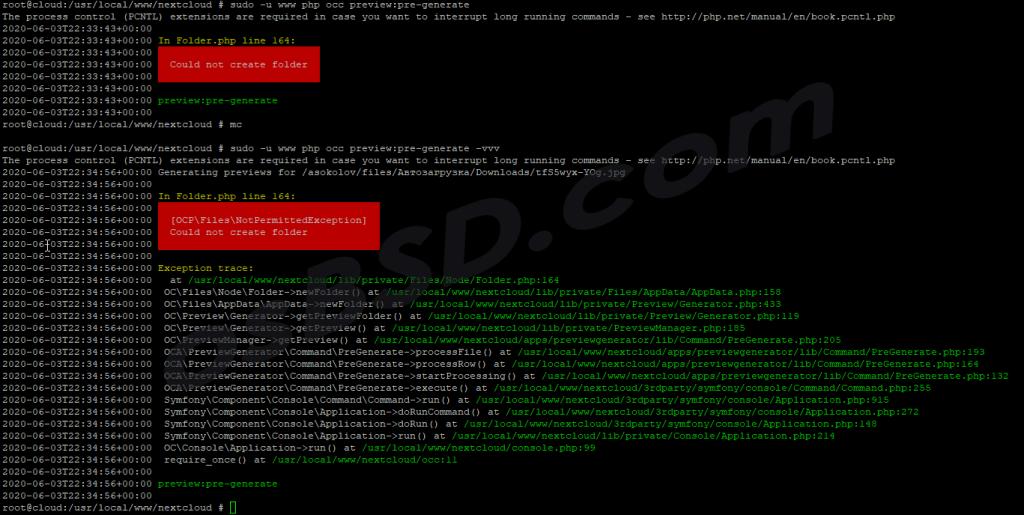
Удаляем папку data/appdata_*
Пробуем пересканировать файлы приложений
Запускаем режим восстановления и ещё раз сканирование файлов приложений
Источник
Устраняем предупреждения в админ панели NextCloud
В предыдущей статье я писал как можно установить и настроить nextcloud на операционной системе Ubuntu Server 20.04 с web-сервером nginx+php-fpm и базой данных postgresql. Почитать можно тут.
После успешного запуска nextcloud в панели администратора Вы можете в пункте общие сведения, увидеть следующие предупреждения:
Индексирование файлов
Для устранения запустим команды для ускорения индексирования файлов. В терминале набираем:
Включаем режим обслуживания:
И вводим данные строки:
Выключаем режим обслуживания
После данной манипуляции ошибка должна исчезнуть.
Предупреждения о текущей конфигурации /.well-known/.
- Веб-сервер не настроен должным образом для разрешения «/.well-known/webfinger».
- Веб-сервер не настроен должным образом для разрешения «/.well-known/nodeinfo».
- Веб-сервер не настроен должным образом для разрешения «/.well-known/caldav».
- Веб-сервер не настроен должным образом для разрешения «/.well-known/carddav».
Чтобы исправить данные предупреждения в конфигурационный файл nginx вашего облака внесем следующую location:
Адрес https://mynextcloud.ru измените на свой.
Также внесём следующие строки в файл .htaccess
Зависание входа в панель NextCloud
Включил https на web сервере для nextclou и появился неприятный глюк: в google chrome, opera и яндекс браузере, а также в firefox, IE и edge при входе в аккаунт и выходе из него браузер «зависает» на странице входа, но при этом авторизуется. Если нажать F5, то окажемся в своем аккаунте.
Как же победить данную проблему?
Лечится добавлением в конфигурационный файл NexCloud:
Не настроена система кэширования.
Не настроена система кэширования. Для увеличения производительности сервера, по возможности, настройте memcache.
Хочу использовать Memcached. Для этого надо установите модуль для PHP и сам memcached.
Как оказалось есть два похожих пакета:
- php-memcache — модуль Memcache для PHP,
- php-memcached — расширение PHP для взаимодействия с memcached.
Нужен с буквой d в конце.
настройки в /etc/php/8.0/mods-available/memcached.ini оставляю все без изменений.
В выводе phpinfo(); появился блок с описанием memcached.
Настройки запуска сервиса в /etc/systemd/system/multi-user.target.wants/memcached.service и конфигурационный файл /etc/memcached.conf тоже не менял.
Проверяем запустился ли сервис
Должно выдать что-то вроде этого
Теперь в конфиге NextCloud добавим строки:
Модуль php-imagick не поддерживает SVG
Для устранения данного предупреждения необходимо установить модуль imagick:
Не указан регион размещения этого сервера Nextcloud
Не указан регион размещения этого сервера Nextcloud, что требуется для возможности проверки номеров телефонов без указания кода страны.
Чтобы разрешить пользователям сервера указывать номера телефонов без указания кода страны, добавьте параметр «default_phone_region» с соответствующим кодом страны в соответствии с ISO 3166-1↗.
Для устранения данного предупреждения откроем конфигурационный файл NextCloud :
и добавим следующие строки:
Для устранения данных ошибок в терминале набираем следующее:
И заполняем данным текстом:
Сохраняем файл (ctrl+o, ctrl+x). И перезагружаем nginx
Заголовок HTTP «Strict-Transport-Security»
Для устранения данного предупреждения отредактируем файл Nginx headers.conf:
Добавим следующие строки:
PHP не настроен для системного окружения.
PHP не настроен правильно для получения переменных системного окружения.
Запрос getenv(«PATH») возвращает пустые результаты.
Обратитесь к разделу о конфигурации PHP и примечаниям к конфигурации PHP из руководства по установке. Обратите внимание на настройку параметров PHP, особенно при использовании механизма php-fpm.
Когда вы используете php-fpm, системные переменные среды, такие как PATH, TMP или другие, не заполняются автоматически так же, как при использовании php-cli. Вызов функции PHP, такой как getenv(‘PATH’); может возвращать пустой результат. Поэтому вам может потребоваться вручную настроить переменные среды в файле конфигурации php-fpm.
И сними с них комментарий (;).
Далее перезапустим php8.0-fpm
Значение PHP ниже рекомендуемого значения .
Разрешённое максимальное значение использования памяти PHP ниже рекомендуемого значения в 512 МБ.
В терминале набираем:
Находим и редактируем следующие строки:
Не скачиваются файлы больше 1Гб
При попытках скачать из облака файлы объемом более 1гб скачивание прерывается при достижении 1гб. Такое происходит при условии использования Nginx как реверс-прокси. Решается очень просто, нужно добавить в конфигурационный файл сайта опцию «proxy_buffering off». Открываем и добавляем эту опцию:
Если есть вопросы, то пишем в комментариях.
Также можете вступить в Телеграм канал, ВКонтакте или подписаться на Twitter. Ссылки в шапке страницы.
Заранее всем спасибо.
Если вы нашли ошибку, пожалуйста, выделите фрагмент текста и нажмите Ctrl+Enter.
Решаем проблему с ошибкой W: mdadm. Имеется сервер работающий на Ubuntu Server 16.04, после обновления системы в логах, да и Читать
NextCloud на Ubuntu Server в журнале первого выходила постоянная Ошибка «PHP Startup: Unable to load dynamic library ‘xmlrpc.so’ «
Если при работе в Linux вы получаете ошибку «getcwd() failed: No such file or directory» при запуске какого-либо скрипта или Читать
Источник
Steps to reproduce
-
Upgrade NC from 14 to 15 using the instructions here: https://docs.nextcloud.com/server/15/admin_manual/maintenance/manual_upgrade.html (see bug: File Permissions documentation#1142)
-
Visit your website
Expected behaviour
I expect a login screen.
Actual behaviour
I get this error:
The server was unable to complete your request.

If this happens again, please send the technical details below to the server administrator.

More details can be found in the server log.
Technical details

    Remote Address: <private>
    Request ID: nI04wIe4C2WrAAVG4KBV
    Type: OCPFilesNotFoundException
    Code: 0
    Message:
    File: /var/www/nextcloud/lib/private/Files/Node/Node.php
    Line: 97


Trace

#0 /var/www/nextcloud/lib/private/Files/Node/Node.php(216): OCFilesNodeNode->getFileInfo()
#1 /var/www/nextcloud/lib/private/Files/Node/Node.php(117): OCFilesNodeNode->getPermissions()
#2 /var/www/nextcloud/lib/private/Files/Node/File.php(64): OCFilesNodeNode->checkPermissions(2)
#3 /var/www/nextcloud/lib/private/Files/SimpleFS/SimpleFile.php(104): OCFilesNodeFile->putContent('/**n * @copyrig...')
#4 /var/www/nextcloud/lib/private/Template/SCSSCacher.php(309): OCFilesSimpleFSSimpleFile->putContent('/**n * @copyrig...')
#5 /var/www/nextcloud/lib/private/Template/SCSSCacher.php(153): OCTemplateSCSSCacher->cache('/var/www/nextcl...', '339f-319d-jquer...', 'jquery-ui-fixes...', Object(OCFilesSimpleFSSimpleFolder), '/core/css')
#6 /var/www/nextcloud/lib/private/Template/CSSResourceLocator.php(109): OCTemplateSCSSCacher->process('/var/www/nextcl...', 'core/css/jquery...', 'core')
#7 /var/www/nextcloud/lib/private/Template/CSSResourceLocator.php(61): OCTemplateCSSResourceLocator->cacheAndAppendScssIfExist('/var/www/nextcl...', 'core/css/jquery...')
#8 /var/www/nextcloud/lib/private/Template/ResourceLocator.php(78): OCTemplateCSSResourceLocator->doFind('css/jquery-ui-f...')
#9 /var/www/nextcloud/lib/private/TemplateLayout.php(286): OCTemplateResourceLocator->find(Array)
#10 /var/www/nextcloud/lib/private/TemplateLayout.php(195): OCTemplateLayout::findStylesheetFiles(Array)
#11 /var/www/nextcloud/lib/private/legacy/template.php(211): OCTemplateLayout->__construct('user', 'files')
#12 /var/www/nextcloud/lib/public/AppFramework/Http/TemplateResponse.php(157): OC_Template->fetchPage(Array)
#13 /var/www/nextcloud/lib/private/AppFramework/Http/Dispatcher.php(119): OCPAppFrameworkHttpTemplateResponse->render()
#14 /var/www/nextcloud/lib/private/AppFramework/App.php(118): OCAppFrameworkHttpDispatcher->dispatch(Object(OCAFilesControllerViewController), 'index')
#15 /var/www/nextcloud/lib/private/AppFramework/Routing/RouteActionHandler.php(47): OCAppFrameworkApp::main('ViewController', 'index', Object(OCAppFrameworkDependencyInjectionDIContainer), Array)
#16 [internal function]: OCAppFrameworkRoutingRouteActionHandler->__invoke(Array)
#17 /var/www/nextcloud/lib/private/Route/Router.php(297): call_user_func(Object(OCAppFrameworkRoutingRouteActionHandler), Array)
#18 /var/www/nextcloud/lib/base.php(987): OCRouteRouter->match('/apps/files/')
#19 /var/www/nextcloud/index.php(42): OC::handleRequest()
#20 {main}
The file /var/www/nextcloud/lib/private/Files/Node/Node.php exists.
Server configuration
Operating system: Ubuntu 16.04
Web server: Apache2
Database: mariaDB (& redis)
PHP version: 7.0.32
Nextcloud version: 15
Updated from an older Nextcloud/ownCloud or fresh install: from 14
Where did you install Nextcloud from: What does this question mean?
Signing status: What does this question mean?
Signing status
Login as admin user into your Nextcloud and access
http://example.com/index.php/settings/integrity/failed
paste the results here.
I can’t do that because I can’t log in.
List of activated apps:
App list
root@nextcloud:/var/www/nextcloud# sudo -u www-data php occ app:list
Enabled:
  - accessibility: 1.1.0
  - activity: 2.8.2
  - cloud_federation_api: 0.1.0
  - comments: 1.5.0
  - dav: 1.8.1
  - federatedfilesharing: 1.5.0
  - files: 1.10.0
  - files_external: 1.6.0
  - files_pdfviewer: 1.4.0
  - files_sharing: 1.7.0
  - files_texteditor: 2.7.0
  - files_trashbin: 1.5.0
  - files_versions: 1.8.0
  - files_videoplayer: 1.4.0
  - firstrunwizard: 2.4.0
  - gallery: 18.2.0
  - logreader: 2.0.0
  - lookup_server_connector: 1.3.0
  - nextcloud_announcements: 1.4.0
  - notifications: 2.3.0
  - oauth2: 1.3.0
  - password_policy: 1.5.0
  - provisioning_api: 1.5.0
  - serverinfo: 1.5.0
  - sharebymail: 1.5.0
  - support: 1.0.0
  - survey_client: 1.3.0
  - systemtags: 1.5.0
  - theming: 1.6.0
  - twofactor_backupcodes: 1.4.1
  - updatenotification: 1.5.0
  - workflowengine: 1.5.0
Disabled:
  - admin_audit
  - encryption
  - federation
  - user_ldap
Nextcloud configuration:
Config report
root@nextcloud:/var/www/nextcloud# sudo -u www-data php occ config:list system
{
    "system": {
        "instanceid": "***REMOVED SENSITIVE VALUE***",
        "passwordsalt": "***REMOVED SENSITIVE VALUE***",
        "secret": "***REMOVED SENSITIVE VALUE***",
        "trusted_domains": [
            "nextcloud.mydomain.com",
            "files.mydomain.com"
        ],
        "datadirectory": "***REMOVED SENSITIVE VALUE***",
        "overwrite.cli.url": "https://nextcloud.mydomain.com",
        "dbtype": "mysql",
        "version": "15.0.2.0",
        "dbname": "***REMOVED SENSITIVE VALUE***",
        "dbhost": "***REMOVED SENSITIVE VALUE***",
        "dbport": "",
        "dbtableprefix": "oc_",
        "mysql.utf8mb4": true,
        "dbuser": "***REMOVED SENSITIVE VALUE***",
        "dbpassword": "***REMOVED SENSITIVE VALUE***",
        "installed": true,
        "theme": "",
        "loglevel": 2,
        "debug": true,
        "maintenance": false,
        "mail_from_address": "***REMOVED SENSITIVE VALUE***",
        "mail_smtpmode": "smtp",
        "mail_sendmailmode": "smtp",
        "mail_domain": "***REMOVED SENSITIVE VALUE***",
        "mail_smtpauthtype": "PLAIN",
        "mail_smtphost": "***REMOVED SENSITIVE VALUE***",
        "mail_smtpport": "587",
        "mail_smtpauth": 1,
        "mail_smtpname": "***REMOVED SENSITIVE VALUE***",
        "mail_smtppassword": "***REMOVED SENSITIVE VALUE***",
        "mail_smtpsecure": "tls",
"updater.release.channel": "stable",
        "memcache.local": "\OC\Memcache\Redis",
        "redis": {
            "host": "***REMOVED SENSITIVE VALUE***",
            "port": 6379
        },
        "memcache.locking": "\OC\Memcache\Redis"
    }
}
Are you using external storage, if yes which one: local/smb/sftp/…
No
Are you using encryption: yes/no
No
Are you using an external user-backend, if yes which one: LDAP/ActiveDirectory/Webdav/…
No
Client configuration
Browser:
Firefox
Operating system:
Linux
Logs
Web server error log
Web server error log
Nextcloud log (data/nextcloud.log)
Nextcloud log
Do you really want this? It looks like a lot of HTML.
Browser log
Browser log
What do you want here? I don't get browser errors so do you need this?
New issue
Have a question about this project? Sign up for a free GitHub account to open an issue and contact its maintainers and the community.
By clicking “Sign up for GitHub”, you agree to our terms of service and
privacy statement. We’ll occasionally send you account related emails.
Already on GitHub?
Sign in
to your account
Closed
jsalatiel opened this issue
Jun 2, 2017
· 44 comments
Comments

After upgrade the server from 11.0.2 to 12.0, a few users are reporting the client is not being able to sync anymore. I got the client log from one of them and it shows:
6/2/17 7:47:31 PM, Programas/mendeleydesktop_1.17.9-stable_amd64.deb,           Documents/nextCloud,Error downloading https://server.fqn/remote.php/dav/files/ana/Programas/mendeleydesktop_1.17.9-stable_amd64.deb-chunking-3534620524-14-0 - server replied: Precondition failed (An If-Match header was specified and the resource did not exist)
6/2/17 7:47:27 PM, Programas/ChemDoodle-linux-8.1.0.bin,           Documents/nextCloud,Error downloading https://server.fqn/remote.php/dav/files/ana/Programas/ChemDoodle-linux-8.1.0.bin-chunking-1120403321-13-1 - server replied: Precondition failed (An If-Match header was specified and the resource did not exist)
I have checked her directory directly in the server file system, and the file mendeleydesktop_1.17.9-stable_amd64.deb already exists and it is there. The same for the ChemDoodle-linux-8.1.0.bin file.
The client is 2.3.1-20170514.194620~xenial1
I also tried to run a rescan on the server, but it didn’t help;
Server configuration
Operating system:
Debian Jessie
Web server:
Apache 2.4.10-10+deb8u8
Database:
mysql 5.5.55-0+deb8u1
PHP version:
5.6.30+dfsg-0+deb8u1
Nextcloud version: (see Nextcloud admin page)
12.0.0
Updated from an older Nextcloud/ownCloud or fresh install:
updated from 11.0.2
Where did you install Nextcloud from:
download.nextcloud.com/server/releases/nextcloud-12.0.0.tar.bz2

Same for me, Error came with Client update to 2.3.1,

Same error, windows client 2.3.1
I diid some testes and noticed strange behavior:
- I had downloaded 14MB zip file that did not get synced (file1)
- I copied the 14MB zip file and renamed its extension to pdf (file2) — this file got synced.
- small files (100kB) get synced no matter what extension is.
- I copied above pdf (file2) to another file (file3) with zip extension and file3 got synced.
- I changed an extension of original file1 to exe extnsion — it got synced
- I changed file1 extension from exe to zip and it stayed synced.
Crazy:-)

Hey dudes
Same error here with a linux client 2.3.1 ubuntu, server version 12
I tried to reproduce @pafcioooo steps but my results are a bit different as I noticed the tests are not that very reproducible. I guess it might depends of wether your «replace» the file or «make a new one», timing of creation/change while upload is not done yet. Also i notice the bigger the file, the harder to sync.

I have the Same Problem wenn downlaoding files directly into the nextcloud directory to sync and can reproduce it quite often running with
Nextcloud 12 on raspbian (raspberry pi 3) updated from version 11.0.3
MySql — 5.5.54
PhP -5.6.30
Windows 10 — Client Version 2.3.1 (build 8)
If i download a file directly into the nextcloud folder locally and the download takes some time i get the error
server replied: Precondition failed (An If-Match header was specified and the resource did not exist).
Logging into my Nextcloud instance an empty file is listed with the same name as the file downloaded. This file was created before the download was completed. It appears that the file cannot be updated for some reason after this point. If the empty file is deleted the client will sync the file correctly.


I can confirm this error also on Nextcloud 11.0.3 with the Linux Nextcloud client version 2.3.2-1.fc25.
The error occurred when downloading via Firefox directly in a Nextcloud shared directory.

We are also getting this error with NextCloud 12. Downloading a file directly into NC causes it and the solution is to either move it out and put it back, or logon to the web interface and delete the empty file from there.

I also experienced this error when downloading an .exe file using Firefox 53.0.3 (32-bit) on Win7 SP1 (updated fully) with Nextcloud client 2.3.1 (build 8)
Backend:
Nextcloud 11.0.3
PHP 5.6.30
MariaDB/Mysql 5.5.52
CentOS 7.3.1611

Users of my server are also having this issue, running the newest client. Server is a docker image from rootlogin. I’m not sure how, but if you need logs or anything I’m happy to help.

Getting the same issue here. Seemed to happen with new client upgrade.

Same here. Users have same problem on the Windows Client. Can’t reproduce on Linux. User just created a Folder in ah shared Folder from another user. Also happened in a notshared folder.
Want to geht Notifactions. Hi Guys.

I confirm the problem with desktop-client 2.3.2beta (build 1)/ server 12.0.0
22.06.2017 15:03:29, InstantUpload/2017/06/2017-06-17 17-38-12 3036_stitch.jpg, Nextcloud,Error transferring https://<fqdn>/remote.php/dav/files/hias/InstantUpload/2017/06/2017-06-17 17-38-12 3036_stich.jpg-chunking-3292803479-2-0 - server replied: Precondition failed (An If-Match header was specified and the resource did not exist).
++umgfoin

Same issue
Server:
Nextcloud 12.0.0
PHP 7.0.18
Mysql 5.7.18
Ubuntu Server 16.04.2
Client:
Windows 10
Nextcloud-client 2.3.1.8
Issue still seems to persist in newest Server 11.0.4 and Client 2.3.2, at least for me.

Same (An If-Match header was specified and the resource did not exist) with NC 12.0.1 (PHP 7.0.8, mysql 5.5.57, ubuntu server 14.04.1, Apache/2.4.7) and latest public stable clients (2.3.2. build 1) on MSW10.

Ditto the above, I /literally/ just build the client to ensure it wasn’t fixed in a commit recently, but Debian 9 (PHP 7.0+49, mysql 5.5.9999 (mariadb really) apache2 2.4.25-3+deb9u2)

I just started running into this late yesterday afternoon. I’ve been running NextCloud 11.0.4 on CentOS 7.3 using windows client 2.3.2(build 1). This setup has been working well until last night, and the only change was to bump PHP versions. Previously I was running php5.6 with NC, but upgraded to php7.0 yesterday, which is the only change that happened prior to this issue cropping up.

+1 here: Client Version 2.3.2 (build 1), Fresh install of server is 12.0.1 via docker container on 16.04 LTS host.

I have the same problem with version 2.3.2 on OpenSUSE Tumbleweed.

is there a timeline for the fix?

I can also reproduce this error:
- Saving two Adobe Illustrator documents, each ~16MB. The first save of the file synced successfully. Subsequent saves have reported the error described in this report:

Also happened with a 11MB PDF on a different computer. Moving the file out of the synced folder, allowing Nextcloud time to recognize the «deletion», then moving it back in is the workaround.
Updating smaller files doesn’t appear to cause this error. (Use case: frequently updated KeePass database, ~330KB)
Client Computer 1 (from screenshot):
- Windows 10 Home with latest OS updates applied, including the Fall Creators Update
- Nextcloud client «Version 2.3.2 (build 1)» built from git revision 820899
Client Computer 2 (the PDF case):
- Windows 10 Home with latest critical updates applied, but not the Creators Update
- Same client
Server:
An AWS EC2 instance running Ubuntu 16.04 and PHP7, with Nextcloud, latest stable, installed via apt using the https://repo.morph027.de/nextcloud package repo. New build, 1 user.
Long-winded details:
→  lsb_release -a
No LSB modules are available.
Distributor ID: Ubuntu
Description:    Ubuntu 16.04.3 LTS
Release:        16.04
Codename:       xenial


→  apt-cache show nextcloud-files
Package: nextcloud-files
Priority: extra
Section: default
Installed-Size: 136902
Maintainer: Stefan Heitmüller <***@***.com>
Architecture: all
Version: 12.0.2
Filename: pool/main/n/nextcloud-files/nextcloud-files_12.0.2_all.deb
Size: 48329332
MD5sum: 8676f82f5824559240b68e1a72eb1f37
SHA1: b3fed39119d410828512f0322566f12fca16f30e
SHA256: e3a8f973973a36db5bc12580548973b6200922e791ac498f77e812ba27bd2a70
SHA512: 650f27f896dd776e9e875b7158e5df25ef324761aceae464d275247ff1d0120ce5061726b08d0ea01b39d782c578e6e1209e133fb9ba11e415a941b0b0ffca5a
Description: Nextcloud server: a safe home for all your data - community-driven, free & open source
Description-md5: 8b28f596887af20f991dfdfa23234e1a
Homepage: https://nextcloud.com/
License: unknown
Vendor: Nextcloud

→  mysqld --version; apache2 -v; php -v; sudo apache2ctl -M
mysqld  Ver 5.7.19-0ubuntu0.16.04.1 for Linux on x86_64 ((Ubuntu))

Server version: Apache/2.4.18 (Ubuntu)
Server built:   2017-07-27T14:34:01

PHP 7.0.22-0ubuntu0.16.04.1 (cli) ( NTS )
Copyright (c) 1997-2017 The PHP Group
Zend Engine v3.0.0, Copyright (c) 1998-2017 Zend Technologies
    with Zend OPcache v7.0.22-0ubuntu0.16.04.1, Copyright (c) 1999-2017, by Zend Technologies

Loaded Modules:
 core_module (static)
 so_module (static)
 watchdog_module (static)
 http_module (static)
 log_config_module (static)
 logio_module (static)
 version_module (static)
 unixd_module (static)
 access_compat_module (shared)
 alias_module (shared)
 auth_basic_module (shared)
 authn_core_module (shared)
 authn_file_module (shared)
 authz_core_module (shared)
 authz_host_module (shared)
 authz_user_module (shared)
 autoindex_module (shared)
 deflate_module (shared)
 dir_module (shared)
 env_module (shared)
 filter_module (shared)
 headers_module (shared)
 mime_module (shared)
 mpm_prefork_module (shared)
 negotiation_module (shared)
 php7_module (shared)
 rewrite_module (shared)
 setenvif_module (shared)
 socache_shmcb_module (shared)
 ssl_module (shared)
 status_module (shared)

Hi, this problem still exists on server 12.03 (16.04 LTS host, latest updates applied) with client 2.3.2.1
any updates on this issue?
thanks!

I am working on running Nextcloud in a Tomcat web server.
If I remember correctly, I got «Precondition failed» (HTTP RESPONSE CODE 412), when the webserver did not forward the REQUESTTOKEN http header to the PHP script.
This was referenced
Sep 26, 2017

it’s really a pity — the reason for the problem is known, a solution is already approved but the build is not available on the website yet…really hoping they can upload this file anytime soon

This issue is really bad as it may cause data loss. We use it for shared PPT editing and here, when A uploads a file, B gets it corrupted, repairs it and uploads the file again. Now only broken version of the file are around. Please provide an updated nextcloud client.


@jospoortvliet It works for me, thank you!
my environment:
client: windows 10 pro 1709 (FCU)
server os: centos 7
nextcloud ver: 12.0.3)
For linux , the beta version is asking for another app password! Why ? Every user will have to reconfigure it ? This is not good…
For linux , the beta version is asking for another app password! Why ? Every user will have to reconfigure it ? This is not good…
Cannot confirm, worked for me. Did you change anything on the server, or perhaps deleted the app password? However, this is not in the scope of this issue, please don’t hijack. Instead open a new issue here.
Hi, @blizzz , nothing has been changed.
Actually i just closed the installed nextcloud client instance and executed Nextcloud-2.3.3-beta-x86_64.AppImage from the url above. If i close this new version, and reopen the installed version again it will sync just fine. Anyway, i was just reporting the results i got, not trying to «hijack» anything.
As it happened random here, I cannot tell 100% for sure. But when i tried to trigger the issue, I was unable to. So I conclude that this beta client seems to work on MacOS Sierra (not yet High Sierra).
@snowball77 As i said earlier it works with High Sierra as well:
@jospoortvliet Within macOS High Sierra 17A362a it works just fine!

Beta version 2.3.3.1 also fixed the issue for me on Windows 10. Thanks.
Given the positive reports, I’ll close the issue as fixed.
When will the 2.3.3 client officially become available? Any estimate? Because only then the issue is fixed for the normal user.
When will the 2.3.3 client officially become available? Any estimate? Because only then the issue is fixed for the normal user.
Sure, nevertheless bugs are getting closed when they are fixed, not when the releases are out. Common standard procedure.
There is not a fixed date, yet. Perhaps @rullzer can give an update at some point.

Hi, I tested client 2.3.3Beta (build 1) on macOS High Sierra with the nc server 12.0.3 docker image and it worked fine.
However I then tested the same client with nc 11.0.2, and while the error is gone when syncing files above 10mb they are still just triggering initial creation-event and no update-events as described in: owncloud/client#5854 (comment)

Did a lot of reasearch.. upgrading to 2.3.3 fixed it for me. Sadly my client (nearly one year old) did not offer any updates. Manual installation did the trick.
New issue
Have a question about this project? Sign up for a free GitHub account to open an issue and contact its maintainers and the community.
By clicking “Sign up for GitHub”, you agree to our terms of service and
privacy statement. We’ll occasionally send you account related emails.
Already on GitHub?
Sign in
to your account
Closed
jsalatiel opened this issue
Jun 2, 2017
· 44 comments
Comments
After upgrade the server from 11.0.2 to 12.0, a few users are reporting the client is not being able to sync anymore. I got the client log from one of them and it shows:
6/2/17 7:47:31 PM, Programas/mendeleydesktop_1.17.9-stable_amd64.deb,           Documents/nextCloud,Error downloading https://server.fqn/remote.php/dav/files/ana/Programas/mendeleydesktop_1.17.9-stable_amd64.deb-chunking-3534620524-14-0 - server replied: Precondition failed (An If-Match header was specified and the resource did not exist)
6/2/17 7:47:27 PM, Programas/ChemDoodle-linux-8.1.0.bin,           Documents/nextCloud,Error downloading https://server.fqn/remote.php/dav/files/ana/Programas/ChemDoodle-linux-8.1.0.bin-chunking-1120403321-13-1 - server replied: Precondition failed (An If-Match header was specified and the resource did not exist)
I have checked her directory directly in the server file system, and the file mendeleydesktop_1.17.9-stable_amd64.deb already exists and it is there. The same for the ChemDoodle-linux-8.1.0.bin file.
The client is 2.3.1-20170514.194620~xenial1
I also tried to run a rescan on the server, but it didn’t help;
Server configuration
Operating system:
Debian Jessie
Web server:
Apache 2.4.10-10+deb8u8
Database:
mysql 5.5.55-0+deb8u1
PHP version:
5.6.30+dfsg-0+deb8u1
Nextcloud version: (see Nextcloud admin page)
12.0.0
Updated from an older Nextcloud/ownCloud or fresh install:
updated from 11.0.2
Where did you install Nextcloud from:
download.nextcloud.com/server/releases/nextcloud-12.0.0.tar.bz2
Same for me, Error came with Client update to 2.3.1,
Same error, windows client 2.3.1
I diid some testes and noticed strange behavior:
- I had downloaded 14MB zip file that did not get synced (file1)
- I copied the 14MB zip file and renamed its extension to pdf (file2) — this file got synced.
- small files (100kB) get synced no matter what extension is.
- I copied above pdf (file2) to another file (file3) with zip extension and file3 got synced.
- I changed an extension of original file1 to exe extnsion — it got synced
- I changed file1 extension from exe to zip and it stayed synced.
Crazy:-)
Hey dudes
Same error here with a linux client 2.3.1 ubuntu, server version 12
I tried to reproduce @pafcioooo steps but my results are a bit different as I noticed the tests are not that very reproducible. I guess it might depends of wether your «replace» the file or «make a new one», timing of creation/change while upload is not done yet. Also i notice the bigger the file, the harder to sync.
I have the Same Problem wenn downlaoding files directly into the nextcloud directory to sync and can reproduce it quite often running with
Nextcloud 12 on raspbian (raspberry pi 3) updated from version 11.0.3
MySql — 5.5.54
PhP -5.6.30
Windows 10 — Client Version 2.3.1 (build 8)
If i download a file directly into the nextcloud folder locally and the download takes some time i get the error
server replied: Precondition failed (An If-Match header was specified and the resource did not exist).
Logging into my Nextcloud instance an empty file is listed with the same name as the file downloaded. This file was created before the download was completed. It appears that the file cannot be updated for some reason after this point. If the empty file is deleted the client will sync the file correctly.
I can confirm this error also on Nextcloud 11.0.3 with the Linux Nextcloud client version 2.3.2-1.fc25.
The error occurred when downloading via Firefox directly in a Nextcloud shared directory.
We are also getting this error with NextCloud 12. Downloading a file directly into NC causes it and the solution is to either move it out and put it back, or logon to the web interface and delete the empty file from there.
I also experienced this error when downloading an .exe file using Firefox 53.0.3 (32-bit) on Win7 SP1 (updated fully) with Nextcloud client 2.3.1 (build 8)
Backend:
Nextcloud 11.0.3
PHP 5.6.30
MariaDB/Mysql 5.5.52
CentOS 7.3.1611
Users of my server are also having this issue, running the newest client. Server is a docker image from rootlogin. I’m not sure how, but if you need logs or anything I’m happy to help.
Getting the same issue here. Seemed to happen with new client upgrade.
Same here. Users have same problem on the Windows Client. Can’t reproduce on Linux. User just created a Folder in ah shared Folder from another user. Also happened in a notshared folder.
Want to geht Notifactions. Hi Guys.
I confirm the problem with desktop-client 2.3.2beta (build 1)/ server 12.0.0
22.06.2017 15:03:29, InstantUpload/2017/06/2017-06-17 17-38-12 3036_stitch.jpg, Nextcloud,Error transferring https://<fqdn>/remote.php/dav/files/hias/InstantUpload/2017/06/2017-06-17 17-38-12 3036_stich.jpg-chunking-3292803479-2-0 - server replied: Precondition failed (An If-Match header was specified and the resource did not exist).
++umgfoin
Same issue
Server:
Nextcloud 12.0.0
PHP 7.0.18
Mysql 5.7.18
Ubuntu Server 16.04.2
Client:
Windows 10
Nextcloud-client 2.3.1.8
Issue still seems to persist in newest Server 11.0.4 and Client 2.3.2, at least for me.
Same (An If-Match header was specified and the resource did not exist) with NC 12.0.1 (PHP 7.0.8, mysql 5.5.57, ubuntu server 14.04.1, Apache/2.4.7) and latest public stable clients (2.3.2. build 1) on MSW10.
Ditto the above, I /literally/ just build the client to ensure it wasn’t fixed in a commit recently, but Debian 9 (PHP 7.0+49, mysql 5.5.9999 (mariadb really) apache2 2.4.25-3+deb9u2)
I just started running into this late yesterday afternoon. I’ve been running NextCloud 11.0.4 on CentOS 7.3 using windows client 2.3.2(build 1). This setup has been working well until last night, and the only change was to bump PHP versions. Previously I was running php5.6 with NC, but upgraded to php7.0 yesterday, which is the only change that happened prior to this issue cropping up.
+1 here: Client Version 2.3.2 (build 1), Fresh install of server is 12.0.1 via docker container on 16.04 LTS host.
I have the same problem with version 2.3.2 on OpenSUSE Tumbleweed.
is there a timeline for the fix?
I can also reproduce this error:
- Saving two Adobe Illustrator documents, each ~16MB. The first save of the file synced successfully. Subsequent saves have reported the error described in this report:
Also happened with a 11MB PDF on a different computer. Moving the file out of the synced folder, allowing Nextcloud time to recognize the «deletion», then moving it back in is the workaround.
Updating smaller files doesn’t appear to cause this error. (Use case: frequently updated KeePass database, ~330KB)
Client Computer 1 (from screenshot):
- Windows 10 Home with latest OS updates applied, including the Fall Creators Update
- Nextcloud client «Version 2.3.2 (build 1)» built from git revision 820899
Client Computer 2 (the PDF case):
- Windows 10 Home with latest critical updates applied, but not the Creators Update
- Same client
Server:
An AWS EC2 instance running Ubuntu 16.04 and PHP7, with Nextcloud, latest stable, installed via apt using the https://repo.morph027.de/nextcloud package repo. New build, 1 user.
Long-winded details:
→  lsb_release -a
No LSB modules are available.
Distributor ID: Ubuntu
Description:    Ubuntu 16.04.3 LTS
Release:        16.04
Codename:       xenial


→  apt-cache show nextcloud-files
Package: nextcloud-files
Priority: extra
Section: default
Installed-Size: 136902
Maintainer: Stefan Heitmüller <***@***.com>
Architecture: all
Version: 12.0.2
Filename: pool/main/n/nextcloud-files/nextcloud-files_12.0.2_all.deb
Size: 48329332
MD5sum: 8676f82f5824559240b68e1a72eb1f37
SHA1: b3fed39119d410828512f0322566f12fca16f30e
SHA256: e3a8f973973a36db5bc12580548973b6200922e791ac498f77e812ba27bd2a70
SHA512: 650f27f896dd776e9e875b7158e5df25ef324761aceae464d275247ff1d0120ce5061726b08d0ea01b39d782c578e6e1209e133fb9ba11e415a941b0b0ffca5a
Description: Nextcloud server: a safe home for all your data - community-driven, free & open source
Description-md5: 8b28f596887af20f991dfdfa23234e1a
Homepage: https://nextcloud.com/
License: unknown
Vendor: Nextcloud

→  mysqld --version; apache2 -v; php -v; sudo apache2ctl -M
mysqld  Ver 5.7.19-0ubuntu0.16.04.1 for Linux on x86_64 ((Ubuntu))

Server version: Apache/2.4.18 (Ubuntu)
Server built:   2017-07-27T14:34:01

PHP 7.0.22-0ubuntu0.16.04.1 (cli) ( NTS )
Copyright (c) 1997-2017 The PHP Group
Zend Engine v3.0.0, Copyright (c) 1998-2017 Zend Technologies
    with Zend OPcache v7.0.22-0ubuntu0.16.04.1, Copyright (c) 1999-2017, by Zend Technologies

Loaded Modules:
 core_module (static)
 so_module (static)
 watchdog_module (static)
 http_module (static)
 log_config_module (static)
 logio_module (static)
 version_module (static)
 unixd_module (static)
 access_compat_module (shared)
 alias_module (shared)
 auth_basic_module (shared)
 authn_core_module (shared)
 authn_file_module (shared)
 authz_core_module (shared)
 authz_host_module (shared)
 authz_user_module (shared)
 autoindex_module (shared)
 deflate_module (shared)
 dir_module (shared)
 env_module (shared)
 filter_module (shared)
 headers_module (shared)
 mime_module (shared)
 mpm_prefork_module (shared)
 negotiation_module (shared)
 php7_module (shared)
 rewrite_module (shared)
 setenvif_module (shared)
 socache_shmcb_module (shared)
 ssl_module (shared)
 status_module (shared)
Hi, this problem still exists on server 12.03 (16.04 LTS host, latest updates applied) with client 2.3.2.1
any updates on this issue?
thanks!
I am working on running Nextcloud in a Tomcat web server.
If I remember correctly, I got «Precondition failed» (HTTP RESPONSE CODE 412), when the webserver did not forward the REQUESTTOKEN http header to the PHP script.
This was referenced
Sep 26, 2017
it’s really a pity — the reason for the problem is known, a solution is already approved but the build is not available on the website yet…really hoping they can upload this file anytime soon
This issue is really bad as it may cause data loss. We use it for shared PPT editing and here, when A uploads a file, B gets it corrupted, repairs it and uploads the file again. Now only broken version of the file are around. Please provide an updated nextcloud client.
@jospoortvliet It works for me, thank you!
my environment:
client: windows 10 pro 1709 (FCU)
server os: centos 7
nextcloud ver: 12.0.3)
For linux , the beta version is asking for another app password! Why ? Every user will have to reconfigure it ? This is not good…
For linux , the beta version is asking for another app password! Why ? Every user will have to reconfigure it ? This is not good…
Cannot confirm, worked for me. Did you change anything on the server, or perhaps deleted the app password? However, this is not in the scope of this issue, please don’t hijack. Instead open a new issue here.
Hi, @blizzz , nothing has been changed.
Actually i just closed the installed nextcloud client instance and executed Nextcloud-2.3.3-beta-x86_64.AppImage from the url above. If i close this new version, and reopen the installed version again it will sync just fine. Anyway, i was just reporting the results i got, not trying to «hijack» anything.
As it happened random here, I cannot tell 100% for sure. But when i tried to trigger the issue, I was unable to. So I conclude that this beta client seems to work on MacOS Sierra (not yet High Sierra).
@snowball77 As i said earlier it works with High Sierra as well:
@jospoortvliet Within macOS High Sierra 17A362a it works just fine!
Beta version 2.3.3.1 also fixed the issue for me on Windows 10. Thanks.
Given the positive reports, I’ll close the issue as fixed.
When will the 2.3.3 client officially become available? Any estimate? Because only then the issue is fixed for the normal user.
When will the 2.3.3 client officially become available? Any estimate? Because only then the issue is fixed for the normal user.
Sure, nevertheless bugs are getting closed when they are fixed, not when the releases are out. Common standard procedure.
There is not a fixed date, yet. Perhaps @rullzer can give an update at some point.
Hi, I tested client 2.3.3Beta (build 1) on macOS High Sierra with the nc server 12.0.3 docker image and it worked fine.
However I then tested the same client with nc 11.0.2, and while the error is gone when syncing files above 10mb they are still just triggering initial creation-event and no update-events as described in: owncloud/client#5854 (comment)
Did a lot of reasearch.. upgrading to 2.3.3 fixed it for me. Sadly my client (nearly one year old) did not offer any updates. Manual installation did the trick.