-
Question
-
I have lots of the following error messages in the event viewer.
Session «Circular Kernel Context Logger» failed to start with the following error: 0xC0000035
Is there a doctor in the room please ?
— What does it mean ?
— Is something wrong with my computer ? or with me ?
— How to avoid this ?
Regards
Picsoe
All replies
-
Seems to occur at restart/boot. Wonder what it means.
Doc
-
I have lots of the following error messages in the event viewer.
Session «Circular Kernel Context Logger» failed to start with the following error: 0xC0000035
Is there a doctor in the room please ?
— What does it mean ?
— Is something wrong with my computer ? or with me ?
— How to avoid this ?
Regards Picsoe
Hi Picsoe
In the Event Viewer, double click one of these events to see the details. At the lower/left corner of the details window, click the Copy Button and paste the results in a reply back here.
Regards,
Thank You for testing Windows 7
Ronnie Vernon MVP
-
Proposed as answer by
Monday, April 21, 2014 7:45 AM
-
Proposed as answer by
-
Hi Picsoe
In the Event Viewer, double click one of these events to see the details. At the lower/left corner of the details window, click the Copy Button and paste the results in a reply back here.
Regards,
Thank You for testing Windows 7
Ronnie Vernon MVP
Thanks Ronnie, here is the copy that you asked for :
Log Name: Microsoft-Windows-Kernel-EventTracing/Admin
Source: Microsoft-Windows-Kernel-EventTracing
Date: 15/09/2009 14:48:38
Event ID: 2
Task Category: Session
Level: Error
Keywords: Session
User: SYSTEM
Computer: Picsoetje-PC
Description:
Session «Circular Kernel Context Logger» failed to start with the following error: 0xC0000035
Event Xml:
<Event xmlns=»http://schemas.microsoft.com/win/2004/08/events/event»>
<System>
<Provider Name=»Microsoft-Windows-Kernel-EventTracing» Guid=»{B675EC37-BDB6-4648-BC92-F3FDC74D3CA2}» />
<EventID>2</EventID>
<Version>0</Version>
<Level>2</Level>
<Task>2</Task>
<Opcode>12</Opcode>
<Keywords>0x8000000000000010</Keywords>
<TimeCreated SystemTime=»2009-09-15T12:48:38.940841700Z» />
<EventRecordID>1421</EventRecordID>
<Correlation />
<Execution ProcessID=»4″ ThreadID=»52″ />
<Channel>Microsoft-Windows-Kernel-EventTracing/Admin</Channel>
<Computer>Picsoetje-PC</Computer>
<Security UserID=»S-1-5-18″ />
</System>
<EventData>
<Data Name=»SessionName»>Circular Kernel Context Logger</Data>
<Data Name=»FileName»>
</Data>
<Data Name=»ErrorCode»>3221225525</Data>
<Data Name=»LoggingMode»>268436608</Data>
</EventData>
</Event>
Regards
Picsoe -
Hi Picsoe
I did some research on this event and it appears to be one of those ‘non-event’ events?
The ‘Microsoft-Windows-Kernel-EventTracing’ appears to run each time the system is started along with the associated ‘Circular Kernel Context Logger’. These components are part of the Performance Diagnostics.
The ‘0xC0000035’ error code returns as ‘STATUS_OBJECT_NAME_COLLISION’. This error code has been associated with a duplicate domain security identifier (SID) being detected, also as ‘the event logger is full’ with Session «Circular Kernel Context Logger» failed to start.
There are many threads that refer to this event and associate it with many different behaviors, but i think these are redundant since the users were just looking for the cause for a problem that did not actually have anything to do with this event.
For now I would recommend that you monitor how often this event is recorded, but otherwise simply ignore it. It will likely disappear at some point.
Hope this helps.
Thank You for testing Windows 7
Ronnie Vernon MVP
-
Marked as answer by
Robinson Zhang
Monday, September 21, 2009 4:18 AM -
Unmarked as answer by
Picsoe
Monday, September 21, 2009 5:08 AM
-
Marked as answer by
-
Hi,
I have a clean install of Windows 7 downloaded from MSDN. This is running stand alone as a media centre PC. It is not a member of a domain. I appear to get the error message
Session «Circular Kernel Context Logger» failed to start with the following error: 0xC0000035
Repeated ~1second. It appears to start when the computer resumes from standby and then continues. The system appears to be brought out of standby by an attempt to access something at Microsoft and I receive a warning
Name resolution for the name dns.msftncsi.com timed out after none of the configured DNS servers responded.After this the kernel error starts to appear.
There is clearly something wrong. Advice would be appreciated.
Paul Ireland
-
Exactly the same here.
It goes on and on, up to 3 times per second.
Regards
Picsoe -
Hi,
I had the same trouble with Windows 7 (the RTM version). The Kernel context logger is a bit like a flight data recorder and takes snapshots of the system (I think every second) into a 100MB RAM file (not a log file on disk). It is needed.
I found the fix:
Rename this file: %windir%panthersetup.etl to setup.old and reboot.
Worked for me. To prove this, delete the logs in event viewer and keep an eye out for any recurrence. Can’t tell you why it was broken in the first place, though!
Regards,
RichardVet
-
Proposed as answer by
Doug Shreve
Friday, March 22, 2013 11:18 PM
-
Proposed as answer by
-
Seems I only and always get this error when I do a logoff/logon (same user, I’m only one on my system). Doesn’t happen on normal boots/reboots.
-
Proposed as answer by
jonathanVerrier
Tuesday, September 20, 2016 2:28 PM
-
Proposed as answer by
-
I’ve been away for months, but I can see that the event viewer filter on our brand new Windows 7 has not made much progress in the event 35 series [processor drivers not seen as installed or running by Windows] and I can see a new thread after I installed
Microsoft Security Essentials that the scanner will stop unexpectedly due to this filter not being solved? Error code 3221225458 ?In answer to your question, NO nothing is wrong with either your computer or your software and I think not you either, but you may want to check with a professional just in case?
-
hi,
thanks rename solve the problem.
regards
Basel
-
THis fix worked for me! Using Windows 7 Ultimate 64-bit. I was getting 10 of these errors each and everytime the desktop (Dell Optiplex 780) was restarted..it was maddening! Thank you for taking the time to nail this down RichardVet!
Doug Shreve
-
Proposed as answer by
Doug Shreve
Friday, March 22, 2013 11:16 PM -
Unproposed as answer by
Doug Shreve
Friday, March 22, 2013 11:16 PM
-
Proposed as answer by
-
Hi,
I had the same trouble with Windows 7 (the RTM version). The Kernel context logger is a bit like a flight data recorder and takes snapshots of the system (I think every second) into a 100MB RAM file (not a log file on disk). It is needed.
I found the fix:
Rename this file: %windir%panthersetup.etl to setup.old and reboot.
Worked for me. To prove this, delete the logs in event viewer and keep an eye out for any recurrence. Can’t tell you why it was broken in the first place, though!
Regards,
RichardVet
Thank you RichardVet!!!
-
Log Name: Microsoft-Windows-Kernel-EventTracing/Admin
Source: Microsoft-Windows-Kernel-EventTracing
Date: 1/16/2013 6:22:23 PM
Event ID: 3
Task Category: Session
Level: Error
Keywords: Session
User: SYSTEM
Computer: shahjanand-PC
Description:
Session «Circular Kernel Context Logger» stopped due to the following error: 0xC0000188
Event Xml:
<Event xmlns=»http://schemas.microsoft.com/win/2004/08/events/event»>
<System>
<Provider Name=»Microsoft-Windows-Kernel-EventTracing» Guid=»{B675EC37-BDB6-4648-BC92-F3FDC74D3CA2}» />
<EventID>3</EventID>
<Version>0</Version>
<Level>2</Level>
<Task>2</Task>
<Opcode>14</Opcode>
<Keywords>0x8000000000000010</Keywords>
<TimeCreated SystemTime=»2013-01-17T02:22:23.969514500Z» />
<EventRecordID>8</EventRecordID>
<Correlation />
<Execution ProcessID=»4″ ThreadID=»5440″ />
<Channel>Microsoft-Windows-Kernel-EventTracing/Admin</Channel>
<Computer>shahjanand-PC</Computer>
<Security UserID=»S-1-5-18″ />
</System>
<EventData>
<Data Name=»SessionName»>Circular Kernel Context Logger</Data>
<Data Name=»FileName»>C:windowssystem32WDILogFilesShutdownCKCL.etl</Data>
<Data Name=»ErrorCode»>3221225864</Data>
<Data Name=»LoggingMode»>128</Data>
</EventData>
</Event> -
Nombre de registro:Microsoft-Windows-Kernel-EventTracing/Admin
Origen: Microsoft-Windows-Kernel-EventTracing
Fecha: 07/10/3013 09:42:31 a. m.
Id. del evento:3
Categoría de la tarea:Sesión
Nivel: Error
Palabras clave:Sesión
Usuario: SYSTEM
Equipo: SERVIDOR
Descripción:
Finalizó la sesión «Circular Kernel Context Logger» con el siguiente error: 0xC0000188
XML de evento:
<Event xmlns=»http://schemas.microsoft.com/win/2004/08/events/event»>
<System>
<Provider Name=»Microsoft-Windows-Kernel-EventTracing» Guid=»{B675EC37-BDB6-4648-BC92-F3FDC74D3CA2}» />
<EventID>3</EventID>
<Version>1</Version>
<Level>2</Level>
<Task>2</Task>
<Opcode>14</Opcode>
<Keywords>0x8000000000000010</Keywords>
<TimeCreated SystemTime=»3013-10-07T14:42:31.653255200Z» />
<EventRecordID>4</EventRecordID>
<Correlation />
<Execution ProcessID=»4″ ThreadID=»212″ />
<Channel>Microsoft-Windows-Kernel-EventTracing/Admin</Channel>
<Computer>SERVIDOR</Computer>
<Security UserID=»S-1-5-18″ />
</System>
<EventData>
<Data Name=»SessionName»>Circular Kernel Context Logger</Data>
<Data Name=»FileName»>C:Windowssystem32WDILogFilesBootCKCL.etl</Data>
<Data Name=»ErrorCode»>3221225864</Data>
<Data Name=»LoggingMode»>41943168</Data>
<Data Name=»FailureReason»>0</Data>
</EventData>
</Event>
PLEASE HELP!!!
-
Can’t tell you why it was broken in the first place, though!
Regards,
RichardVet
Thanks! This worked for me as well, but I too, don’t know why it broke in the first place. It was a new PC, freshly joined to the domain and updated. If it is somewhat related or tied in, I was having issues with WMI that I had to deal with. Had to rebuild
it and re-register everything.
Ranie
-
I can’t find this, I have win 7 64 SP1…help
-
Had an incident this morning that may throw some light on this issue.
A Win 7 Pro machine in an Active Directory Domain could not access a mapped share (H:) on the server. I disconnected the share, then attempted to remap it but found that H: was not available among the drive letters offered. I mapped the share
to another drive letter so the user could continue.When I followed up to try to find the cause, I found a device named H: under Portable Devices in Device Manager. User said that a USB flash drive had been left in the machine over the weekend and the machine had been shut down. I would surmise
that on startup, the flash drive was recognised and obtained drive H: before the network connection was re-established so mapping the share failed.May or may not be significant, but 20 instances of «Circular Kernel Context Logger» on each startup.
-
I cannot find the file ‘setup.etl’ in win7 pro. I found a ‘panthersetup.exe’ and a ‘panthersetup’ any advice is appreciated.
-
You sure you aren’t looking at FOLDERS? There is a folder named setup.exe, BUT setup.etl is a FILE plainly listed (probably a bit lower on your screen), not even hidden. Check again, IMO.
BTW, renaming the file and autocreating a new one worked for me, too. Thanks 🙂
-
Edited by
WillB69
Thursday, November 7, 2013 5:21 PM -
Proposed as answer by
Franco Tsang
Sunday, May 8, 2016 2:34 PM -
Unproposed as answer by
Franco Tsang
Sunday, May 8, 2016 2:34 PM
-
Edited by
-
I believe this IS VERY significant. I recently discovered my girlfriend was using a KeyLogger program to monitor all internet activity as well as gain all of my passcode information. Since she knew I would monitor activity on my PCs, all of the program data
was stored on her portable device, in this case, her ipod. Every time she rebooted the system with this device attached it automatically first, discovered my system admin password, then Impersonates the Administrator. There are several other things that happen
this is simply an abridged version of the event.Here is a complete list of privileges it assigns to this «new user» :
Privileges: SeSecurityPrivilege
SeTakeOwnershipPrivilege
SeLoadDriverPrivilege
SeBackupPrivilege
SeRestorePrivilege
SeDebugPrivilege
SeSystemEnvironmentPrivilege
SeImpersonatePrivilege -
First, I apologize for hitting the wrong button, as a proposed answer instead of a reply.
My reply to this issue would be to monitor your system for a KeyLogger program. This program may be hosted on a portable device. It will usually hide from the system, and run in a cloaked mode. The intent of these programs is to take periodic snapshots of
your activity, as well as monitor EVERY keystroke made. This allows the program to monitor all emails, texts, chats, messaging of all types, as well as obtain log in information to ANY site visited.Most are designed to email these snap shots and logged keystrokes to a designated person.. The one snooping your activity.
-
Hi,
I had the same trouble with Windows 7 (the RTM version). The Kernel context logger is a bit like a flight data recorder and takes snapshots of the system (I think every second) into a 100MB RAM file (not a log file on disk). It is needed.
I found the fix:
Rename this file: %windir%panthersetup.etl to setup.old and reboot.
Worked for me. To prove this, delete the logs in event viewer and keep an eye out for any recurrence. Can’t tell you why it was broken in the first place, though!
Regards,
RichardVet
I am having this exact same error. I tried to perform this fix, but I could not find the setup.etl file. The only setup files in this directory close are setuperr and setupact. Any ideas? I would like to fix this error.
-
Hi,
I had the same trouble with Windows 7 (the RTM version). The Kernel context logger is a bit like a flight data recorder and takes snapshots of the system (I think every second) into a 100MB RAM file (not a log file on disk). It is needed.
I found the fix:
Rename this file: %windir%panthersetup.etl to setup.old and reboot.
Worked for me. To prove this, delete the logs in event viewer and keep an eye out for any recurrence. Can’t tell you why it was broken in the first place, though!
Regards,
RichardVet
Well, I stumbled my way in here, because I started experiencing some problems with some Windows 7 SP1 64 Bit Enterprise Virtual Machines I have running and you can imagine the headache of dealing with this error appearing 20 times after each reboot on each
VM. If you have some form of consolidated Event Error Log that is «farming» all of these event logs into one then you can imagine the nightmare of seeing constant errors showing up and flooding logs, so no THANK YOU MICROSOFT… 😛Anyway, Thank You RichardVet for your solution although I wanted to add an addendum for those of you who also found that RichardVet’s solution did not actually work 100% of the time. I went ahead and renamed the file, same error. I went ahead and deleted
the file, same error. It seems this file is created as part of the initial install and then might get updated over time, but I found that it must exist otherwise error is generated even though it might never be used again.So basically, I created a blank TXT file and renamed it setup.etl — empty file, no edit, etc. Errors stopped, so just thought I would share that with others who still gets errors after RENAME or DELETION.
If you have issues creating the file in the Panther folder or it does not exist, then create the file on your desktop and then COPY/PASTE into the Panther folder which you can also manually create.
C:WindowsPanther —> setup.etl
Thanks and Good Luck… 🙂
-
Edited by
DonChino
Sunday, June 1, 2014 6:53 AM
Mention File Permission and Existence
-
Edited by
-
Hi DonChino,
How do you create a blank TXT file.
Best regards, Luis
-
To create a blank txt file, right-click on the desktop, and select «New» -> «Text Document»
Change the name as usual … right-click on the document icon (not the name) and select «Rename.»
You may need an administrative password.
-
Is she still your girlfriend? Sounds like a female character out of a James Bond movie.
-
Proposed as answer by
trmark123
Thursday, August 20, 2015 3:11 PM
-
Proposed as answer by
-
Used your solution with success until the setup.etl dissapeared.
After some testing in a Win 7 ultimate installation: The root cause seems to be a bug in login logout. If you do a logout and then login the error stream starts. If you then reboot it stops.
-
okay, here is my dumb question. Which file are you saying to rename « %windir%panthersetup.etl to setup.old
and reboot»?I know enough to fix somethings, but this fix isnt resonating with me. I trust its corrrect, but I need just a how
to on this.I have a number of errors as well in a brand new os in my new drive. So, I am taking these one at a time. And this is exactly the error code and problem I have in my logs, but I dont understand which file to rename. Just please show a step by step, (but
a simple one will do).Since this is a brand new OS windows 10 pro in my new replacement drive I am hoping to eliminate all/most of the events I am seeing on a regular basis. I just wonder if I should just undue everything and re-install my system, since it is beginning to lag
now like it did before my drive needed replacing. Since drive and os are new, I really dont see why I should be seeing any errors. But before I do all the reinstall, I thought I would work through each issue and see if I can figure out whats going on. The
dell guys are good at unclogging a system full of malware, but debugging is another story. Please help on this one issue though. -
Rename the file called «setup.etl» (found in the folder location: %windir%panther) to «setup.old»
James Wolf MS-MVP [Media Center]
-
Hi Ronnie,
Have we ever found a solution to the above problem…0xC0000035, from the event logs?
Best regards…trying my best to avoid windows 10 on my desk top but mebbe that needs replaced too.
Paul Stockwell
stockwellpg@ gmail.com
-
Question
-
I have lots of the following error messages in the event viewer.
Session «Circular Kernel Context Logger» failed to start with the following error: 0xC0000035
Is there a doctor in the room please ?
— What does it mean ?
— Is something wrong with my computer ? or with me ?
— How to avoid this ?
Regards
Picsoe
All replies
-
Seems to occur at restart/boot. Wonder what it means.
Doc
-
I have lots of the following error messages in the event viewer.
Session «Circular Kernel Context Logger» failed to start with the following error: 0xC0000035
Is there a doctor in the room please ?
— What does it mean ?
— Is something wrong with my computer ? or with me ?
— How to avoid this ?
Regards Picsoe
Hi Picsoe
In the Event Viewer, double click one of these events to see the details. At the lower/left corner of the details window, click the Copy Button and paste the results in a reply back here.
Regards,
Thank You for testing Windows 7
Ronnie Vernon MVP
-
Proposed as answer by
Monday, April 21, 2014 7:45 AM
-
Proposed as answer by
-
Hi Picsoe
In the Event Viewer, double click one of these events to see the details. At the lower/left corner of the details window, click the Copy Button and paste the results in a reply back here.
Regards,
Thank You for testing Windows 7
Ronnie Vernon MVP
Thanks Ronnie, here is the copy that you asked for :
Log Name: Microsoft-Windows-Kernel-EventTracing/Admin
Source: Microsoft-Windows-Kernel-EventTracing
Date: 15/09/2009 14:48:38
Event ID: 2
Task Category: Session
Level: Error
Keywords: Session
User: SYSTEM
Computer: Picsoetje-PC
Description:
Session «Circular Kernel Context Logger» failed to start with the following error: 0xC0000035
Event Xml:
<Event xmlns=»http://schemas.microsoft.com/win/2004/08/events/event»>
<System>
<Provider Name=»Microsoft-Windows-Kernel-EventTracing» Guid=»{B675EC37-BDB6-4648-BC92-F3FDC74D3CA2}» />
<EventID>2</EventID>
<Version>0</Version>
<Level>2</Level>
<Task>2</Task>
<Opcode>12</Opcode>
<Keywords>0x8000000000000010</Keywords>
<TimeCreated SystemTime=»2009-09-15T12:48:38.940841700Z» />
<EventRecordID>1421</EventRecordID>
<Correlation />
<Execution ProcessID=»4″ ThreadID=»52″ />
<Channel>Microsoft-Windows-Kernel-EventTracing/Admin</Channel>
<Computer>Picsoetje-PC</Computer>
<Security UserID=»S-1-5-18″ />
</System>
<EventData>
<Data Name=»SessionName»>Circular Kernel Context Logger</Data>
<Data Name=»FileName»>
</Data>
<Data Name=»ErrorCode»>3221225525</Data>
<Data Name=»LoggingMode»>268436608</Data>
</EventData>
</Event>
Regards
Picsoe -
Hi Picsoe
I did some research on this event and it appears to be one of those ‘non-event’ events?
The ‘Microsoft-Windows-Kernel-EventTracing’ appears to run each time the system is started along with the associated ‘Circular Kernel Context Logger’. These components are part of the Performance Diagnostics.
The ‘0xC0000035’ error code returns as ‘STATUS_OBJECT_NAME_COLLISION’. This error code has been associated with a duplicate domain security identifier (SID) being detected, also as ‘the event logger is full’ with Session «Circular Kernel Context Logger» failed to start.
There are many threads that refer to this event and associate it with many different behaviors, but i think these are redundant since the users were just looking for the cause for a problem that did not actually have anything to do with this event.
For now I would recommend that you monitor how often this event is recorded, but otherwise simply ignore it. It will likely disappear at some point.
Hope this helps.
Thank You for testing Windows 7
Ronnie Vernon MVP
-
Marked as answer by
Robinson Zhang
Monday, September 21, 2009 4:18 AM -
Unmarked as answer by
Picsoe
Monday, September 21, 2009 5:08 AM
-
Marked as answer by
-
Hi,
I have a clean install of Windows 7 downloaded from MSDN. This is running stand alone as a media centre PC. It is not a member of a domain. I appear to get the error message
Session «Circular Kernel Context Logger» failed to start with the following error: 0xC0000035
Repeated ~1second. It appears to start when the computer resumes from standby and then continues. The system appears to be brought out of standby by an attempt to access something at Microsoft and I receive a warning
Name resolution for the name dns.msftncsi.com timed out after none of the configured DNS servers responded.After this the kernel error starts to appear.
There is clearly something wrong. Advice would be appreciated.
Paul Ireland
-
Exactly the same here.
It goes on and on, up to 3 times per second.
Regards
Picsoe -
Hi,
I had the same trouble with Windows 7 (the RTM version). The Kernel context logger is a bit like a flight data recorder and takes snapshots of the system (I think every second) into a 100MB RAM file (not a log file on disk). It is needed.
I found the fix:
Rename this file: %windir%panthersetup.etl to setup.old and reboot.
Worked for me. To prove this, delete the logs in event viewer and keep an eye out for any recurrence. Can’t tell you why it was broken in the first place, though!
Regards,
RichardVet
-
Proposed as answer by
Doug Shreve
Friday, March 22, 2013 11:18 PM
-
Proposed as answer by
-
Seems I only and always get this error when I do a logoff/logon (same user, I’m only one on my system). Doesn’t happen on normal boots/reboots.
-
Proposed as answer by
jonathanVerrier
Tuesday, September 20, 2016 2:28 PM
-
Proposed as answer by
-
I’ve been away for months, but I can see that the event viewer filter on our brand new Windows 7 has not made much progress in the event 35 series [processor drivers not seen as installed or running by Windows] and I can see a new thread after I installed
Microsoft Security Essentials that the scanner will stop unexpectedly due to this filter not being solved? Error code 3221225458 ?In answer to your question, NO nothing is wrong with either your computer or your software and I think not you either, but you may want to check with a professional just in case?
-
hi,
thanks rename solve the problem.
regards
Basel
-
THis fix worked for me! Using Windows 7 Ultimate 64-bit. I was getting 10 of these errors each and everytime the desktop (Dell Optiplex 780) was restarted..it was maddening! Thank you for taking the time to nail this down RichardVet!
Doug Shreve
-
Proposed as answer by
Doug Shreve
Friday, March 22, 2013 11:16 PM -
Unproposed as answer by
Doug Shreve
Friday, March 22, 2013 11:16 PM
-
Proposed as answer by
-
Hi,
I had the same trouble with Windows 7 (the RTM version). The Kernel context logger is a bit like a flight data recorder and takes snapshots of the system (I think every second) into a 100MB RAM file (not a log file on disk). It is needed.
I found the fix:
Rename this file: %windir%panthersetup.etl to setup.old and reboot.
Worked for me. To prove this, delete the logs in event viewer and keep an eye out for any recurrence. Can’t tell you why it was broken in the first place, though!
Regards,
RichardVet
Thank you RichardVet!!!
-
Log Name: Microsoft-Windows-Kernel-EventTracing/Admin
Source: Microsoft-Windows-Kernel-EventTracing
Date: 1/16/2013 6:22:23 PM
Event ID: 3
Task Category: Session
Level: Error
Keywords: Session
User: SYSTEM
Computer: shahjanand-PC
Description:
Session «Circular Kernel Context Logger» stopped due to the following error: 0xC0000188
Event Xml:
<Event xmlns=»http://schemas.microsoft.com/win/2004/08/events/event»>
<System>
<Provider Name=»Microsoft-Windows-Kernel-EventTracing» Guid=»{B675EC37-BDB6-4648-BC92-F3FDC74D3CA2}» />
<EventID>3</EventID>
<Version>0</Version>
<Level>2</Level>
<Task>2</Task>
<Opcode>14</Opcode>
<Keywords>0x8000000000000010</Keywords>
<TimeCreated SystemTime=»2013-01-17T02:22:23.969514500Z» />
<EventRecordID>8</EventRecordID>
<Correlation />
<Execution ProcessID=»4″ ThreadID=»5440″ />
<Channel>Microsoft-Windows-Kernel-EventTracing/Admin</Channel>
<Computer>shahjanand-PC</Computer>
<Security UserID=»S-1-5-18″ />
</System>
<EventData>
<Data Name=»SessionName»>Circular Kernel Context Logger</Data>
<Data Name=»FileName»>C:windowssystem32WDILogFilesShutdownCKCL.etl</Data>
<Data Name=»ErrorCode»>3221225864</Data>
<Data Name=»LoggingMode»>128</Data>
</EventData>
</Event> -
Nombre de registro:Microsoft-Windows-Kernel-EventTracing/Admin
Origen: Microsoft-Windows-Kernel-EventTracing
Fecha: 07/10/3013 09:42:31 a. m.
Id. del evento:3
Categoría de la tarea:Sesión
Nivel: Error
Palabras clave:Sesión
Usuario: SYSTEM
Equipo: SERVIDOR
Descripción:
Finalizó la sesión «Circular Kernel Context Logger» con el siguiente error: 0xC0000188
XML de evento:
<Event xmlns=»http://schemas.microsoft.com/win/2004/08/events/event»>
<System>
<Provider Name=»Microsoft-Windows-Kernel-EventTracing» Guid=»{B675EC37-BDB6-4648-BC92-F3FDC74D3CA2}» />
<EventID>3</EventID>
<Version>1</Version>
<Level>2</Level>
<Task>2</Task>
<Opcode>14</Opcode>
<Keywords>0x8000000000000010</Keywords>
<TimeCreated SystemTime=»3013-10-07T14:42:31.653255200Z» />
<EventRecordID>4</EventRecordID>
<Correlation />
<Execution ProcessID=»4″ ThreadID=»212″ />
<Channel>Microsoft-Windows-Kernel-EventTracing/Admin</Channel>
<Computer>SERVIDOR</Computer>
<Security UserID=»S-1-5-18″ />
</System>
<EventData>
<Data Name=»SessionName»>Circular Kernel Context Logger</Data>
<Data Name=»FileName»>C:Windowssystem32WDILogFilesBootCKCL.etl</Data>
<Data Name=»ErrorCode»>3221225864</Data>
<Data Name=»LoggingMode»>41943168</Data>
<Data Name=»FailureReason»>0</Data>
</EventData>
</Event>
PLEASE HELP!!!
-
Can’t tell you why it was broken in the first place, though!
Regards,
RichardVet
Thanks! This worked for me as well, but I too, don’t know why it broke in the first place. It was a new PC, freshly joined to the domain and updated. If it is somewhat related or tied in, I was having issues with WMI that I had to deal with. Had to rebuild
it and re-register everything.
Ranie
-
I can’t find this, I have win 7 64 SP1…help
-
Had an incident this morning that may throw some light on this issue.
A Win 7 Pro machine in an Active Directory Domain could not access a mapped share (H:) on the server. I disconnected the share, then attempted to remap it but found that H: was not available among the drive letters offered. I mapped the share
to another drive letter so the user could continue.When I followed up to try to find the cause, I found a device named H: under Portable Devices in Device Manager. User said that a USB flash drive had been left in the machine over the weekend and the machine had been shut down. I would surmise
that on startup, the flash drive was recognised and obtained drive H: before the network connection was re-established so mapping the share failed.May or may not be significant, but 20 instances of «Circular Kernel Context Logger» on each startup.
-
I cannot find the file ‘setup.etl’ in win7 pro. I found a ‘panthersetup.exe’ and a ‘panthersetup’ any advice is appreciated.
-
You sure you aren’t looking at FOLDERS? There is a folder named setup.exe, BUT setup.etl is a FILE plainly listed (probably a bit lower on your screen), not even hidden. Check again, IMO.
BTW, renaming the file and autocreating a new one worked for me, too. Thanks 🙂
-
Edited by
WillB69
Thursday, November 7, 2013 5:21 PM -
Proposed as answer by
Franco Tsang
Sunday, May 8, 2016 2:34 PM -
Unproposed as answer by
Franco Tsang
Sunday, May 8, 2016 2:34 PM
-
Edited by
-
I believe this IS VERY significant. I recently discovered my girlfriend was using a KeyLogger program to monitor all internet activity as well as gain all of my passcode information. Since she knew I would monitor activity on my PCs, all of the program data
was stored on her portable device, in this case, her ipod. Every time she rebooted the system with this device attached it automatically first, discovered my system admin password, then Impersonates the Administrator. There are several other things that happen
this is simply an abridged version of the event.Here is a complete list of privileges it assigns to this «new user» :
Privileges: SeSecurityPrivilege
SeTakeOwnershipPrivilege
SeLoadDriverPrivilege
SeBackupPrivilege
SeRestorePrivilege
SeDebugPrivilege
SeSystemEnvironmentPrivilege
SeImpersonatePrivilege -
First, I apologize for hitting the wrong button, as a proposed answer instead of a reply.
My reply to this issue would be to monitor your system for a KeyLogger program. This program may be hosted on a portable device. It will usually hide from the system, and run in a cloaked mode. The intent of these programs is to take periodic snapshots of
your activity, as well as monitor EVERY keystroke made. This allows the program to monitor all emails, texts, chats, messaging of all types, as well as obtain log in information to ANY site visited.Most are designed to email these snap shots and logged keystrokes to a designated person.. The one snooping your activity.
-
Hi,
I had the same trouble with Windows 7 (the RTM version). The Kernel context logger is a bit like a flight data recorder and takes snapshots of the system (I think every second) into a 100MB RAM file (not a log file on disk). It is needed.
I found the fix:
Rename this file: %windir%panthersetup.etl to setup.old and reboot.
Worked for me. To prove this, delete the logs in event viewer and keep an eye out for any recurrence. Can’t tell you why it was broken in the first place, though!
Regards,
RichardVet
I am having this exact same error. I tried to perform this fix, but I could not find the setup.etl file. The only setup files in this directory close are setuperr and setupact. Any ideas? I would like to fix this error.
-
Hi,
I had the same trouble with Windows 7 (the RTM version). The Kernel context logger is a bit like a flight data recorder and takes snapshots of the system (I think every second) into a 100MB RAM file (not a log file on disk). It is needed.
I found the fix:
Rename this file: %windir%panthersetup.etl to setup.old and reboot.
Worked for me. To prove this, delete the logs in event viewer and keep an eye out for any recurrence. Can’t tell you why it was broken in the first place, though!
Regards,
RichardVet
Well, I stumbled my way in here, because I started experiencing some problems with some Windows 7 SP1 64 Bit Enterprise Virtual Machines I have running and you can imagine the headache of dealing with this error appearing 20 times after each reboot on each
VM. If you have some form of consolidated Event Error Log that is «farming» all of these event logs into one then you can imagine the nightmare of seeing constant errors showing up and flooding logs, so no THANK YOU MICROSOFT… 😛Anyway, Thank You RichardVet for your solution although I wanted to add an addendum for those of you who also found that RichardVet’s solution did not actually work 100% of the time. I went ahead and renamed the file, same error. I went ahead and deleted
the file, same error. It seems this file is created as part of the initial install and then might get updated over time, but I found that it must exist otherwise error is generated even though it might never be used again.So basically, I created a blank TXT file and renamed it setup.etl — empty file, no edit, etc. Errors stopped, so just thought I would share that with others who still gets errors after RENAME or DELETION.
If you have issues creating the file in the Panther folder or it does not exist, then create the file on your desktop and then COPY/PASTE into the Panther folder which you can also manually create.
C:WindowsPanther —> setup.etl
Thanks and Good Luck… 🙂
-
Edited by
DonChino
Sunday, June 1, 2014 6:53 AM
Mention File Permission and Existence
-
Edited by
-
Hi DonChino,
How do you create a blank TXT file.
Best regards, Luis
-
To create a blank txt file, right-click on the desktop, and select «New» -> «Text Document»
Change the name as usual … right-click on the document icon (not the name) and select «Rename.»
You may need an administrative password.
-
Is she still your girlfriend? Sounds like a female character out of a James Bond movie.
-
Proposed as answer by
trmark123
Thursday, August 20, 2015 3:11 PM
-
Proposed as answer by
-
Used your solution with success until the setup.etl dissapeared.
After some testing in a Win 7 ultimate installation: The root cause seems to be a bug in login logout. If you do a logout and then login the error stream starts. If you then reboot it stops.
-
okay, here is my dumb question. Which file are you saying to rename « %windir%panthersetup.etl to setup.old
and reboot»?I know enough to fix somethings, but this fix isnt resonating with me. I trust its corrrect, but I need just a how
to on this.I have a number of errors as well in a brand new os in my new drive. So, I am taking these one at a time. And this is exactly the error code and problem I have in my logs, but I dont understand which file to rename. Just please show a step by step, (but
a simple one will do).Since this is a brand new OS windows 10 pro in my new replacement drive I am hoping to eliminate all/most of the events I am seeing on a regular basis. I just wonder if I should just undue everything and re-install my system, since it is beginning to lag
now like it did before my drive needed replacing. Since drive and os are new, I really dont see why I should be seeing any errors. But before I do all the reinstall, I thought I would work through each issue and see if I can figure out whats going on. The
dell guys are good at unclogging a system full of malware, but debugging is another story. Please help on this one issue though. -
Rename the file called «setup.etl» (found in the folder location: %windir%panther) to «setup.old»
James Wolf MS-MVP [Media Center]
-
Hi Ronnie,
Have we ever found a solution to the above problem…0xC0000035, from the event logs?
Best regards…trying my best to avoid windows 10 on my desk top but mebbe that needs replaced too.
Paul Stockwell
stockwellpg@ gmail.com
-
Question
-
I have lots of the following error messages in the event viewer.
Session «Circular Kernel Context Logger» failed to start with the following error: 0xC0000035
Is there a doctor in the room please ?
— What does it mean ?
— Is something wrong with my computer ? or with me ?
— How to avoid this ?
Regards
Picsoe
All replies
-
Seems to occur at restart/boot. Wonder what it means.
Doc
-
I have lots of the following error messages in the event viewer.
Session «Circular Kernel Context Logger» failed to start with the following error: 0xC0000035
Is there a doctor in the room please ?
— What does it mean ?
— Is something wrong with my computer ? or with me ?
— How to avoid this ?
Regards Picsoe
Hi Picsoe
In the Event Viewer, double click one of these events to see the details. At the lower/left corner of the details window, click the Copy Button and paste the results in a reply back here.
Regards,
Thank You for testing Windows 7
Ronnie Vernon MVP
-
Proposed as answer by
Monday, April 21, 2014 7:45 AM
-
Proposed as answer by
-
Hi Picsoe
In the Event Viewer, double click one of these events to see the details. At the lower/left corner of the details window, click the Copy Button and paste the results in a reply back here.
Regards,
Thank You for testing Windows 7
Ronnie Vernon MVP
Thanks Ronnie, here is the copy that you asked for :
Log Name: Microsoft-Windows-Kernel-EventTracing/Admin
Source: Microsoft-Windows-Kernel-EventTracing
Date: 15/09/2009 14:48:38
Event ID: 2
Task Category: Session
Level: Error
Keywords: Session
User: SYSTEM
Computer: Picsoetje-PC
Description:
Session «Circular Kernel Context Logger» failed to start with the following error: 0xC0000035
Event Xml:
<Event xmlns=»http://schemas.microsoft.com/win/2004/08/events/event»>
<System>
<Provider Name=»Microsoft-Windows-Kernel-EventTracing» Guid=»{B675EC37-BDB6-4648-BC92-F3FDC74D3CA2}» />
<EventID>2</EventID>
<Version>0</Version>
<Level>2</Level>
<Task>2</Task>
<Opcode>12</Opcode>
<Keywords>0x8000000000000010</Keywords>
<TimeCreated SystemTime=»2009-09-15T12:48:38.940841700Z» />
<EventRecordID>1421</EventRecordID>
<Correlation />
<Execution ProcessID=»4″ ThreadID=»52″ />
<Channel>Microsoft-Windows-Kernel-EventTracing/Admin</Channel>
<Computer>Picsoetje-PC</Computer>
<Security UserID=»S-1-5-18″ />
</System>
<EventData>
<Data Name=»SessionName»>Circular Kernel Context Logger</Data>
<Data Name=»FileName»>
</Data>
<Data Name=»ErrorCode»>3221225525</Data>
<Data Name=»LoggingMode»>268436608</Data>
</EventData>
</Event>
Regards
Picsoe -
Hi Picsoe
I did some research on this event and it appears to be one of those ‘non-event’ events?
The ‘Microsoft-Windows-Kernel-EventTracing’ appears to run each time the system is started along with the associated ‘Circular Kernel Context Logger’. These components are part of the Performance Diagnostics.
The ‘0xC0000035’ error code returns as ‘STATUS_OBJECT_NAME_COLLISION’. This error code has been associated with a duplicate domain security identifier (SID) being detected, also as ‘the event logger is full’ with Session «Circular Kernel Context Logger» failed to start.
There are many threads that refer to this event and associate it with many different behaviors, but i think these are redundant since the users were just looking for the cause for a problem that did not actually have anything to do with this event.
For now I would recommend that you monitor how often this event is recorded, but otherwise simply ignore it. It will likely disappear at some point.
Hope this helps.
Thank You for testing Windows 7
Ronnie Vernon MVP
-
Marked as answer by
Robinson Zhang
Monday, September 21, 2009 4:18 AM -
Unmarked as answer by
Picsoe
Monday, September 21, 2009 5:08 AM
-
Marked as answer by
-
Hi,
I have a clean install of Windows 7 downloaded from MSDN. This is running stand alone as a media centre PC. It is not a member of a domain. I appear to get the error message
Session «Circular Kernel Context Logger» failed to start with the following error: 0xC0000035
Repeated ~1second. It appears to start when the computer resumes from standby and then continues. The system appears to be brought out of standby by an attempt to access something at Microsoft and I receive a warning
Name resolution for the name dns.msftncsi.com timed out after none of the configured DNS servers responded.After this the kernel error starts to appear.
There is clearly something wrong. Advice would be appreciated.
Paul Ireland
-
Exactly the same here.
It goes on and on, up to 3 times per second.
Regards
Picsoe -
Hi,
I had the same trouble with Windows 7 (the RTM version). The Kernel context logger is a bit like a flight data recorder and takes snapshots of the system (I think every second) into a 100MB RAM file (not a log file on disk). It is needed.
I found the fix:
Rename this file: %windir%panthersetup.etl to setup.old and reboot.
Worked for me. To prove this, delete the logs in event viewer and keep an eye out for any recurrence. Can’t tell you why it was broken in the first place, though!
Regards,
RichardVet
-
Proposed as answer by
Doug Shreve
Friday, March 22, 2013 11:18 PM
-
Proposed as answer by
-
Seems I only and always get this error when I do a logoff/logon (same user, I’m only one on my system). Doesn’t happen on normal boots/reboots.
-
Proposed as answer by
jonathanVerrier
Tuesday, September 20, 2016 2:28 PM
-
Proposed as answer by
-
I’ve been away for months, but I can see that the event viewer filter on our brand new Windows 7 has not made much progress in the event 35 series [processor drivers not seen as installed or running by Windows] and I can see a new thread after I installed
Microsoft Security Essentials that the scanner will stop unexpectedly due to this filter not being solved? Error code 3221225458 ?In answer to your question, NO nothing is wrong with either your computer or your software and I think not you either, but you may want to check with a professional just in case?
-
hi,
thanks rename solve the problem.
regards
Basel
-
THis fix worked for me! Using Windows 7 Ultimate 64-bit. I was getting 10 of these errors each and everytime the desktop (Dell Optiplex 780) was restarted..it was maddening! Thank you for taking the time to nail this down RichardVet!
Doug Shreve
-
Proposed as answer by
Doug Shreve
Friday, March 22, 2013 11:16 PM -
Unproposed as answer by
Doug Shreve
Friday, March 22, 2013 11:16 PM
-
Proposed as answer by
-
Hi,
I had the same trouble with Windows 7 (the RTM version). The Kernel context logger is a bit like a flight data recorder and takes snapshots of the system (I think every second) into a 100MB RAM file (not a log file on disk). It is needed.
I found the fix:
Rename this file: %windir%panthersetup.etl to setup.old and reboot.
Worked for me. To prove this, delete the logs in event viewer and keep an eye out for any recurrence. Can’t tell you why it was broken in the first place, though!
Regards,
RichardVet
Thank you RichardVet!!!
-
Log Name: Microsoft-Windows-Kernel-EventTracing/Admin
Source: Microsoft-Windows-Kernel-EventTracing
Date: 1/16/2013 6:22:23 PM
Event ID: 3
Task Category: Session
Level: Error
Keywords: Session
User: SYSTEM
Computer: shahjanand-PC
Description:
Session «Circular Kernel Context Logger» stopped due to the following error: 0xC0000188
Event Xml:
<Event xmlns=»http://schemas.microsoft.com/win/2004/08/events/event»>
<System>
<Provider Name=»Microsoft-Windows-Kernel-EventTracing» Guid=»{B675EC37-BDB6-4648-BC92-F3FDC74D3CA2}» />
<EventID>3</EventID>
<Version>0</Version>
<Level>2</Level>
<Task>2</Task>
<Opcode>14</Opcode>
<Keywords>0x8000000000000010</Keywords>
<TimeCreated SystemTime=»2013-01-17T02:22:23.969514500Z» />
<EventRecordID>8</EventRecordID>
<Correlation />
<Execution ProcessID=»4″ ThreadID=»5440″ />
<Channel>Microsoft-Windows-Kernel-EventTracing/Admin</Channel>
<Computer>shahjanand-PC</Computer>
<Security UserID=»S-1-5-18″ />
</System>
<EventData>
<Data Name=»SessionName»>Circular Kernel Context Logger</Data>
<Data Name=»FileName»>C:windowssystem32WDILogFilesShutdownCKCL.etl</Data>
<Data Name=»ErrorCode»>3221225864</Data>
<Data Name=»LoggingMode»>128</Data>
</EventData>
</Event> -
Nombre de registro:Microsoft-Windows-Kernel-EventTracing/Admin
Origen: Microsoft-Windows-Kernel-EventTracing
Fecha: 07/10/3013 09:42:31 a. m.
Id. del evento:3
Categoría de la tarea:Sesión
Nivel: Error
Palabras clave:Sesión
Usuario: SYSTEM
Equipo: SERVIDOR
Descripción:
Finalizó la sesión «Circular Kernel Context Logger» con el siguiente error: 0xC0000188
XML de evento:
<Event xmlns=»http://schemas.microsoft.com/win/2004/08/events/event»>
<System>
<Provider Name=»Microsoft-Windows-Kernel-EventTracing» Guid=»{B675EC37-BDB6-4648-BC92-F3FDC74D3CA2}» />
<EventID>3</EventID>
<Version>1</Version>
<Level>2</Level>
<Task>2</Task>
<Opcode>14</Opcode>
<Keywords>0x8000000000000010</Keywords>
<TimeCreated SystemTime=»3013-10-07T14:42:31.653255200Z» />
<EventRecordID>4</EventRecordID>
<Correlation />
<Execution ProcessID=»4″ ThreadID=»212″ />
<Channel>Microsoft-Windows-Kernel-EventTracing/Admin</Channel>
<Computer>SERVIDOR</Computer>
<Security UserID=»S-1-5-18″ />
</System>
<EventData>
<Data Name=»SessionName»>Circular Kernel Context Logger</Data>
<Data Name=»FileName»>C:Windowssystem32WDILogFilesBootCKCL.etl</Data>
<Data Name=»ErrorCode»>3221225864</Data>
<Data Name=»LoggingMode»>41943168</Data>
<Data Name=»FailureReason»>0</Data>
</EventData>
</Event>
PLEASE HELP!!!
-
Can’t tell you why it was broken in the first place, though!
Regards,
RichardVet
Thanks! This worked for me as well, but I too, don’t know why it broke in the first place. It was a new PC, freshly joined to the domain and updated. If it is somewhat related or tied in, I was having issues with WMI that I had to deal with. Had to rebuild
it and re-register everything.
Ranie
-
I can’t find this, I have win 7 64 SP1…help
-
Had an incident this morning that may throw some light on this issue.
A Win 7 Pro machine in an Active Directory Domain could not access a mapped share (H:) on the server. I disconnected the share, then attempted to remap it but found that H: was not available among the drive letters offered. I mapped the share
to another drive letter so the user could continue.When I followed up to try to find the cause, I found a device named H: under Portable Devices in Device Manager. User said that a USB flash drive had been left in the machine over the weekend and the machine had been shut down. I would surmise
that on startup, the flash drive was recognised and obtained drive H: before the network connection was re-established so mapping the share failed.May or may not be significant, but 20 instances of «Circular Kernel Context Logger» on each startup.
-
I cannot find the file ‘setup.etl’ in win7 pro. I found a ‘panthersetup.exe’ and a ‘panthersetup’ any advice is appreciated.
-
You sure you aren’t looking at FOLDERS? There is a folder named setup.exe, BUT setup.etl is a FILE plainly listed (probably a bit lower on your screen), not even hidden. Check again, IMO.
BTW, renaming the file and autocreating a new one worked for me, too. Thanks 🙂
-
Edited by
WillB69
Thursday, November 7, 2013 5:21 PM -
Proposed as answer by
Franco Tsang
Sunday, May 8, 2016 2:34 PM -
Unproposed as answer by
Franco Tsang
Sunday, May 8, 2016 2:34 PM
-
Edited by
-
I believe this IS VERY significant. I recently discovered my girlfriend was using a KeyLogger program to monitor all internet activity as well as gain all of my passcode information. Since she knew I would monitor activity on my PCs, all of the program data
was stored on her portable device, in this case, her ipod. Every time she rebooted the system with this device attached it automatically first, discovered my system admin password, then Impersonates the Administrator. There are several other things that happen
this is simply an abridged version of the event.Here is a complete list of privileges it assigns to this «new user» :
Privileges: SeSecurityPrivilege
SeTakeOwnershipPrivilege
SeLoadDriverPrivilege
SeBackupPrivilege
SeRestorePrivilege
SeDebugPrivilege
SeSystemEnvironmentPrivilege
SeImpersonatePrivilege -
First, I apologize for hitting the wrong button, as a proposed answer instead of a reply.
My reply to this issue would be to monitor your system for a KeyLogger program. This program may be hosted on a portable device. It will usually hide from the system, and run in a cloaked mode. The intent of these programs is to take periodic snapshots of
your activity, as well as monitor EVERY keystroke made. This allows the program to monitor all emails, texts, chats, messaging of all types, as well as obtain log in information to ANY site visited.Most are designed to email these snap shots and logged keystrokes to a designated person.. The one snooping your activity.
-
Hi,
I had the same trouble with Windows 7 (the RTM version). The Kernel context logger is a bit like a flight data recorder and takes snapshots of the system (I think every second) into a 100MB RAM file (not a log file on disk). It is needed.
I found the fix:
Rename this file: %windir%panthersetup.etl to setup.old and reboot.
Worked for me. To prove this, delete the logs in event viewer and keep an eye out for any recurrence. Can’t tell you why it was broken in the first place, though!
Regards,
RichardVet
I am having this exact same error. I tried to perform this fix, but I could not find the setup.etl file. The only setup files in this directory close are setuperr and setupact. Any ideas? I would like to fix this error.
-
Hi,
I had the same trouble with Windows 7 (the RTM version). The Kernel context logger is a bit like a flight data recorder and takes snapshots of the system (I think every second) into a 100MB RAM file (not a log file on disk). It is needed.
I found the fix:
Rename this file: %windir%panthersetup.etl to setup.old and reboot.
Worked for me. To prove this, delete the logs in event viewer and keep an eye out for any recurrence. Can’t tell you why it was broken in the first place, though!
Regards,
RichardVet
Well, I stumbled my way in here, because I started experiencing some problems with some Windows 7 SP1 64 Bit Enterprise Virtual Machines I have running and you can imagine the headache of dealing with this error appearing 20 times after each reboot on each
VM. If you have some form of consolidated Event Error Log that is «farming» all of these event logs into one then you can imagine the nightmare of seeing constant errors showing up and flooding logs, so no THANK YOU MICROSOFT… 😛Anyway, Thank You RichardVet for your solution although I wanted to add an addendum for those of you who also found that RichardVet’s solution did not actually work 100% of the time. I went ahead and renamed the file, same error. I went ahead and deleted
the file, same error. It seems this file is created as part of the initial install and then might get updated over time, but I found that it must exist otherwise error is generated even though it might never be used again.So basically, I created a blank TXT file and renamed it setup.etl — empty file, no edit, etc. Errors stopped, so just thought I would share that with others who still gets errors after RENAME or DELETION.
If you have issues creating the file in the Panther folder or it does not exist, then create the file on your desktop and then COPY/PASTE into the Panther folder which you can also manually create.
C:WindowsPanther —> setup.etl
Thanks and Good Luck… 🙂
-
Edited by
DonChino
Sunday, June 1, 2014 6:53 AM
Mention File Permission and Existence
-
Edited by
-
Hi DonChino,
How do you create a blank TXT file.
Best regards, Luis
-
To create a blank txt file, right-click on the desktop, and select «New» -> «Text Document»
Change the name as usual … right-click on the document icon (not the name) and select «Rename.»
You may need an administrative password.
-
Is she still your girlfriend? Sounds like a female character out of a James Bond movie.
-
Proposed as answer by
trmark123
Thursday, August 20, 2015 3:11 PM
-
Proposed as answer by
-
Used your solution with success until the setup.etl dissapeared.
After some testing in a Win 7 ultimate installation: The root cause seems to be a bug in login logout. If you do a logout and then login the error stream starts. If you then reboot it stops.
-
okay, here is my dumb question. Which file are you saying to rename « %windir%panthersetup.etl to setup.old
and reboot»?I know enough to fix somethings, but this fix isnt resonating with me. I trust its corrrect, but I need just a how
to on this.I have a number of errors as well in a brand new os in my new drive. So, I am taking these one at a time. And this is exactly the error code and problem I have in my logs, but I dont understand which file to rename. Just please show a step by step, (but
a simple one will do).Since this is a brand new OS windows 10 pro in my new replacement drive I am hoping to eliminate all/most of the events I am seeing on a regular basis. I just wonder if I should just undue everything and re-install my system, since it is beginning to lag
now like it did before my drive needed replacing. Since drive and os are new, I really dont see why I should be seeing any errors. But before I do all the reinstall, I thought I would work through each issue and see if I can figure out whats going on. The
dell guys are good at unclogging a system full of malware, but debugging is another story. Please help on this one issue though. -
Rename the file called «setup.etl» (found in the folder location: %windir%panther) to «setup.old»
James Wolf MS-MVP [Media Center]
-
Hi Ronnie,
Have we ever found a solution to the above problem…0xC0000035, from the event logs?
Best regards…trying my best to avoid windows 10 on my desk top but mebbe that needs replaced too.
Paul Stockwell
stockwellpg@ gmail.com

В последнее несколько месяцев в журнале стала появляться ошибка «Не удалось запустить сеанс «Circular Kernel Context Logger» со следующей ошибкой: 0xC0000035″. Нашел лишь
рекомендацию на answers.microsoft.com следующего характера:
Здравствуйте.
Данная событие не критично, можно продолжить работу не обращая на него внимание.
Если Вы все-таки хотите устранить данное событие, то:
1.Переименуйте файл setup.etl в setup.old, находится он в директории C:WindowsPanther
2.Удалите все события журнала Windows
3.Перезагрузите компьютер.
Если проблема сохранится, отключите IPv6, кроме интерфейса замыкания на себя с помощью Microsoft Fix it 50444.
Данное решение НЕ помогает ! Более того, специалисты на answers.microsoft.com утверждали, что ошибка некритична, а оказалось что вполне себе критична, да еще как ! Сегодня вылетел синий экран смерти, с ошибками в журнале
следующего содержания:
Имя журнала: System
Источник: Microsoft-Windows-WER-SystemErrorReporting
Дата: 25.07.2014 10:53:47
Код события: 1001
Категория задачи: Отсутствует
Уровень: Ошибка
Ключевые слова: Классический
Пользователь: Н/Д
Компьютер: Александр-ПК
Описание:
Компьютер был перезагружен после критической ошибки. Код ошибки: 0x00000116 (0x876853f0, 0x920c2e08, 0x00000000, 0x00000002). Дамп памяти сохранен в: C:WindowsMEMORY.DMP. Код отчета: 072514-16801-01.
Имя журнала: System
Источник: Microsoft-Windows-Kernel-Power
Дата: 25.07.2014 10:53:31
Код события: 41
Категория задачи: (63)
Уровень: Критический
Ключевые слова: (2)
Пользователь: система
Компьютер: Александр-ПК
Описание:
Система перезагрузилась, не завершив полностью работу. Эта ошибка может быть результатом того, что система перестала отвечать, произошел критический сбой, или неожиданно отключилось питание.
Есть ли какое то решение этой проблемы ? Судя по отзывам, подобная ошибка есть у многих, переустановка ОСи не помогает…
__________________
Помощь в написании контрольных, курсовых и дипломных работ, диссертаций здесь
by Milan Stanojevic
Milan has been enthusiastic about technology ever since his childhood days, and this led him to take interest in all PC-related technologies. He’s a PC enthusiast and he… read more
Updated on May 27, 2022
- The session circular kernel context logger failed to start with the following error: 0xc0000035 message is a very common appearance.
- To find out the details about how this error can be solved, scroll down, and read on.
- You can find step-by-step guides on how to disable IPv6, adjust the maximum file size of the startup event trace sessions, and more.
- Plus, for those of you who want to save some time, we offer our top recommendations when it comes to third-party apps that can help.

XINSTALL BY CLICKING THE DOWNLOAD FILE
This software will repair common computer errors, protect you from file loss, malware, hardware failure and optimize your PC for maximum performance. Fix PC issues and remove viruses now in 3 easy steps:
- Download Restoro PC Repair Tool that comes with Patented Technologies (patent available here).
- Click Start Scan to find Windows issues that could be causing PC problems.
- Click Repair All to fix issues affecting your computer’s security and performance
- Restoro has been downloaded by 0 readers this month.
The session circular kernel context logger failed to start with the following error: 0xc0000035is a ghost that has haunted the last three major releases of Windows. It’s an error that Windows 10 essentially inherited from Windows 7.
While it occurs less frequently on Windows 10, it still shows up to cause a blue screen of death from time to time. But why and how can you fix it? In this guide, we’ll answer these questions and more.
How do I fix a session circular kernel context logger error?
What is a session circular kernel context logger error: 0xc0000035?
In most cases, the context logger error: 0xc0000035 is caused by the system detecting a duplicate domain security identifier (SID). That’s why it seems to be more prevalent in computers hooked up to a local area network.
In most cases, this error isn’t fatal and won’t impact the way your computer runs. However, on some rare occasions, y0ur computer may crash, run sluggishly or its output devices may not be able to function properly.
You can find the error in Windows Event Viewer.
How to find session circular kernel context logger error: 0xc0000035 message?
Identify the location:
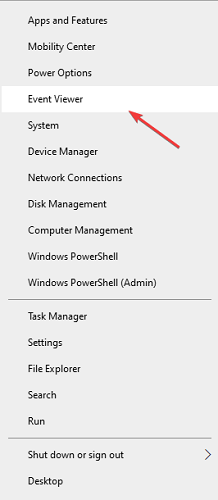
- Right-click on the Windows Start icon.
- Select Event Viewer from the menu.
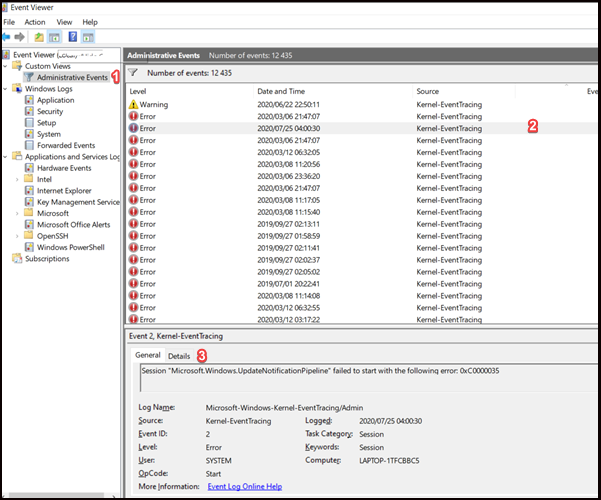
- On the left panel, expand the Custom Views branch and click on Administrative Events.
- Sort the list according to Event ID.
- Look through every error with the Event ID of 2 till you find the latest 0xc0000035 error message.
To fix this issue:
1. Reboot your computer completely
- Click on the Start Menu.
- Click on the power button.
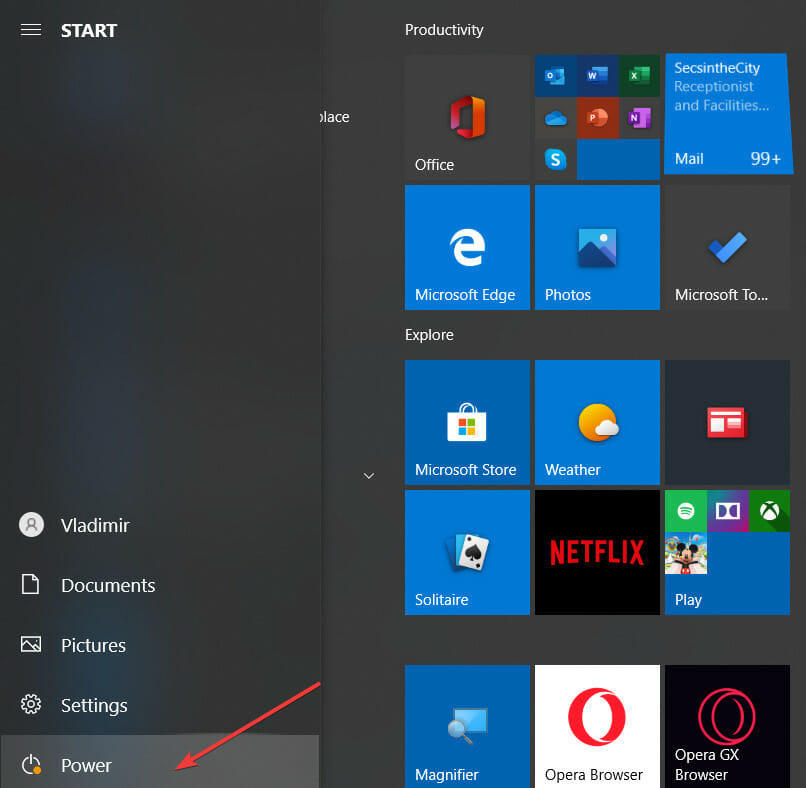
- Hold the Shift key and click on Restart.
2. Delete the MSSEOOBE.etl file
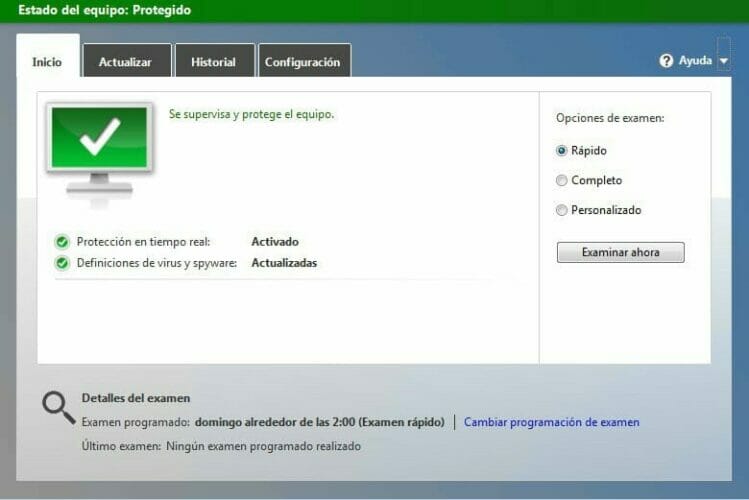
- Navigate to the ProgramData folder in your local (C:) drive.
- Click on Microsoft and then Microsoft Security Essentials.
- Click on Support.
- Delete the MSSEOOBE.etl file.
- Reboot your computer.
Note: This solution only works for users running Microsoft Security Essentials.
3. Enable the Superfetch/SysMain service
- Open the Run dialog (Win + R).
- Type services.msc into the open field and press Enter.
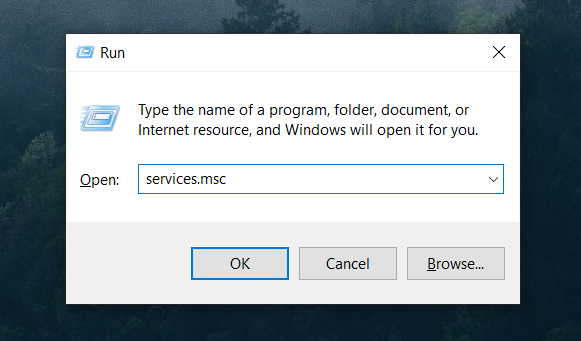
- Sort the values according to name.
- Look for a service labeled Superfetch or SysMain.
- Double-click on it to open its properties.
- Make sure that it’s running according to the Service status. If not, click on the Start button to see if it produces any error messages.
- Set the Startup type to Automatic.
- Click on OK.
- Restart your PC.
Don’t be alarmed. In later versions of Windows 10, the Superfetch service is named SysMain. They virtually do the same thing.
4. Adjust the maximum file size of the startup event trace sessions
- Open the Windows Run Dialog.
- Type perfmon into the open text field and press enter.
- Expand Data Collector Sets from the left tree.
- Click on Startup Even Trace Sessions.
- In the main panel, scroll down till you find the ReadyBoot entry and then double click on it.
- Click on the Stop Condition tab.
- Set maximum size to 40MB (or more).
- Click on OK and close the Performance Monitor.
The session circular kernel context logger failed to start with the following error: 0xc0000035 message may be appearing because the maximum file size of the Startup Event Trace Sessions isn’t enough. You can use this solution to fix it.
5. Disable IPv6
- Open the Windows Run Dialog (Win + R).
- Type in Control Panel and then hit Enter.
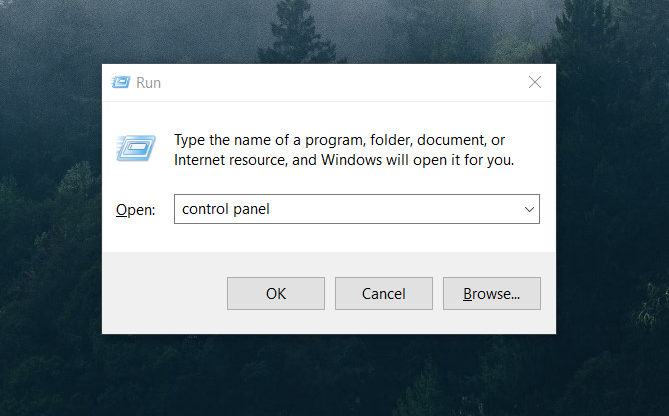
- On the left panel, click on Change adapter settings.
- Right-click on the first connection you see and click on Properties.
- Under the this connection uses the following items panel, find Internet Protocol Version 6 (TCP/IPV6) and uncheck it.
- Click on OK.
- Follow steps 4-6 for the rest of the connections in the list.
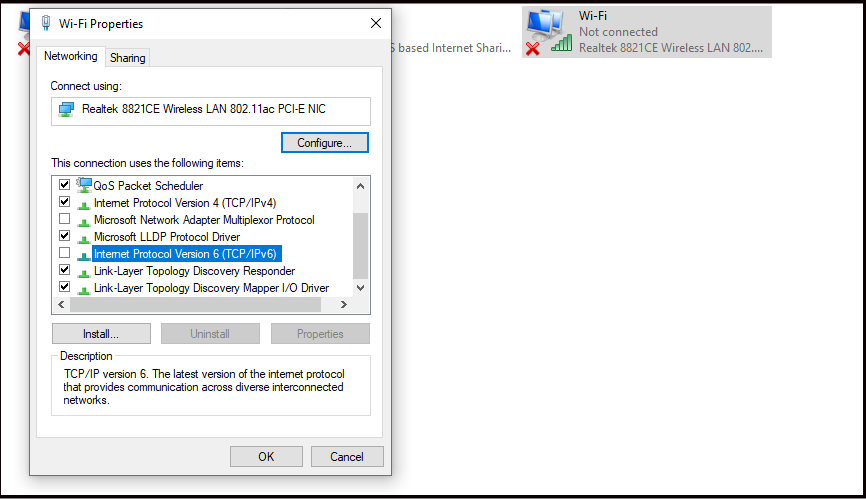
6. Update your network drivers
- Right-click on the Start Menu to open the Windows Power Menu.
- Select Device Manager.
- Right-click on your main LAN device and select Update driver from the context menu.
- Click on Search automatically for updated driver software.
- Confirm any prompts from Windows.
- Close the window.
- Restart your PC.
Some PC issues are hard to tackle, especially when it comes to corrupted repositories or missing Windows files. If you are having troubles fixing an error, your system may be partially broken.
We recommend installing Restoro, a tool that will scan your machine and identify what the fault is.
Click here to download and start repairing.
Alternatively, you can update your drivers automatically with the help of dedicated software. This way you will save time and be sure you get the right driver version.
In this regard, we recommend DriverFix because it is easy to use and very light. To get started, just install the program, select the driver you want it to update, and let it find the best versions available.
You can also opt to scan all your drivers and find if you need to update or repair any. The tool will give you a simple report about the state of each driver. You just have to let it start updating/repairing.
⇒ Get DriverFix
If none of the solutions in this guide worked for you, then your only other option is to reinstall or upgrade Windows if you’re using an older version.
However, if this error persists but doesn’t impact the way your system runs, then it’s okay to ignore it.
So which solution worked for you? Would you like to point out a blind spot on our side?
Please don’t hesitate to leave a comment down below. As always, thank you for reading.
Acquaint yourself with more useful software fixes by exploring our thorough Software Hub.
To see how to fix other software and Windows 10 problems, we recommend our Troubleshooting Tech Issues section.
