Запуск проверки: NCSecDesc
* Security Permissions check for all NC’s on DC PDC.
The forest is not ready for RODC. Will skip checking ERODC ACEs.
* Проверка разрешений безопасности для
DC=ForestDnsZones,DC=DOMAIN,DC=Local
(NDNC,Version 3)
Ошибка — NT AUTHORITYКОНТРОЛЛЕРЫ ДОМЕНА ПРЕДПРИЯТИЯ не имеет
Replicating Directory Changes In Filtered Set
прав доступа для контекста именования:
DC=ForestDnsZones,DC=DOMAIN,DC=Local
* Проверка разрешений безопасности для
DC=DomainDnsZones,DC=DOMAIN,DC=Local
(NDNC,Version 3)
Ошибка — NT AUTHORITYКОНТРОЛЛЕРЫ ДОМЕНА ПРЕДПРИЯТИЯ не имеет
Replicating Directory Changes In Filtered Set
прав доступа для контекста именования:
DC=DomainDnsZones,DC=DOMAIN,DC=Local
* Проверка разрешений безопасности для
CN=Schema,CN=Configuration,DC=DOMAIN,DC=Local
(Schema,Version 3)
* Проверка разрешений безопасности для
CN=Configuration,DC=DOMAIN,DC=Local
(Configuration,Version 3)
* Проверка разрешений безопасности для
DC=DOMAIN,DC=Local
(Domain,Version 3)
……………………. PDC — не пройдена проверка NCSecDesc
Здравствуйте.
Прошу совета, как решить проблему.
В корпоративной сети есть 2 домен контроллера. Все началось с того, как я пришел в компанию и попробовал решать некоторые задачи с помощью GPO. Дело в том, что политики как-то странно отрабатываются. Вернее отрабатываются не у всех.
Стал смотреть, на клиентских ПК с ХР, они работают, на 7-ках тоже, на 8.1 и выше нет. Посмотрел в папку sysvol на DC, сравнил. Клиентские пк с 8.1 и выше, ищут политики на DC02, в то время, как DC02 не реплецирует их с DC01, количество политик
в папка не совпадают. Запустил dcdiag и вbжу такeю картину.
Directory Server Diagnosis
Performing initial setup:
Trying to find home server…
Home Server = DC01
* Identified AD Forest.
Done gathering initial info.
Doing initial required tests
Testing server: Default-First-Site-NameDC01
Starting test: Connectivity
……………………. DC01 passed test Connectivity
Doing primary tests
Testing server: Default-First-Site-NameDC01
Starting test: Advertising
……………………. DC01 passed test Advertising
Starting test: FrsEvent
There are warning or error events within the last 24 hours after the
SYSVOL has been shared. Failing SYSVOL replication problems may cause
Group Policy problems.
……………………. DC01 failed test FrsEvent
Starting test: DFSREvent
……………………. DC01 passed test DFSREvent
Starting test: SysVolCheck
……………………. DC01 passed test SysVolCheck
Starting test: KccEvent
……………………. DC01 passed test KccEvent
Starting test: KnowsOfRoleHolders
……………………. DC01 passed test KnowsOfRoleHolders
Starting test: MachineAccount
……………………. DC01 passed test MachineAccount
Starting test: NCSecDesc
Error NT AUTHORITYENTERPRISE DOMAIN CONTROLLERS doesn’t have
Replicating Directory Changes In Filtered Set
access rights for the naming context:
CN=Schema,CN=Configuration,DC=domen,DC=com
Error NT AUTHORITYENTERPRISE DOMAIN CONTROLLERS doesn’t have
Replicating Directory Changes In Filtered Set
access rights for the naming context:
DC=domen,DC=com
……………………. DC01 failed test NCSecDesc
Starting test: NetLogons
……………………. DC01 passed test NetLogons
Starting test: ObjectsReplicated
……………………. DC01 passed test ObjectsReplicated
Starting test: Replications
……………………. DC01 passed test Replications
Starting test: RidManager
……………………. DC01 passed test RidManager
Starting test: Services
……………………. DC01 passed test Services
Starting test: SystemLog
……………………. DC01 failed test SystemLog
Starting test: VerifyReferences
……………………. DC01 passed test VerifyReferences
Running partition tests on : ForestDnsZones
Starting test: CheckSDRefDom
……………………. ForestDnsZones passed test CheckSDRefDom
Starting test: CrossRefValidation
……………………. ForestDnsZones passed test
CrossRefValidation
Running partition tests on : DomainDnsZones
Starting test: CheckSDRefDom
……………………. DomainDnsZones passed test CheckSDRefDom
Starting test: CrossRefValidation
……………………. DomainDnsZones passed test
CrossRefValidation
Running partition tests on : Schema
Starting test: CheckSDRefDom
……………………. Schema passed test CheckSDRefDom
Starting test: CrossRefValidation
……………………. Schema passed test CrossRefValidation
Running partition tests on : Configuration
Starting test: CheckSDRefDom
……………………. Configuration passed test CheckSDRefDom
Starting test: CrossRefValidation
……………………. Configuration passed test CrossRefValidation
Running partition tests on : domen
Starting test: CheckSDRefDom
……………………. domen passed test CheckSDRefDom
Starting test: CrossRefValidation
……………………. domen passed test CrossRefValidation
Running enterprise tests on : domen.com
Starting test: LocatorCheck
……………………. domen.com passed test LocatorCheck
Starting test: Intersite
……………………. domen.com passed test Intersite
netdom query fsmo
Schema master DC01.domen.com
Domain naming master DC01.domen.com
PDC DC01.domen.com
RID pool manager DC01.domen.com
Infrastructure master DC01.domen.com
The command completed successfully.
Нашел вот такой ответ по поиску:
OK I resolved it… It was a permissions issue.
The Enterprise Domain Controllers group was set to full control on «dc=domain,dc=com» I removed it and gave it the following permissions to match the rest of the security settings across the board.
Manage replication topology
- Replicating Directory Changes
- Replicating Directory Changes All
- Replicating Directory Changes In Filtered Set
- Replication Synchronization
DCDiag came back as passed.
Но, что и как исправил автор, не понятно, прошу помощи в решении данного вопроса.
This was a real pain and we ended up having to call Microsoft and spend several hours to resolve what seem to be a simple issue. When running dcdiag you get an error that the NCSecDesc test failed with:
Error NT AUTHORITYENTERPRISE DOMAIN CONTROLLERS doesn’t have Replicating Directory Changes In Filtered Set access rights for the naming context: DC=cosgro,DC=com
Normally running adprep /rodcprep at the command line would correct the issues but in this case we kept getting the same response when running adprep.
Adprep detected the operation on partition DC=ForestDnsZones,DC=cosgro,DC=com has been performed. Skipping to next partition. ============================================================================== Adprep detected the operation on partition DC=DomainDnsZones,DC=cosgro,DC=com has been performed. Skipping to next partition. ============================================================================== Adprep detected the operation on partition DC=cosgro,DC=com has been performe d. Skipping to next partition. ============================================================================== Adprep completed without errors. All partitions are updated. See the ADPrep.log in directory C:Windowsdebugadpreplogs20130213141646 for more information.
And when we re ran DCDiag we would still get the same error. All the online documents say this should of resolved the issues but it had not.
The problem was not the ADPrep /rodcprep but the permissions were seen to be to “open” for the Enterprise Domain Controllers Group. The security permissions for this group was set to “full” on the main domain partition. This set of permissions needed to be more restrictive for the group. To fix we needed to open ADSI Edit and reset the permissions on the domain partition.
The picture below shows you where the domain partition resides, right click the partition and select properties.
Then on the pop up windows select the security tab. In the Groups and Users box find the “Enterprise Domain Controllers” group and then uncheck all permissions.
Now re-add only the list below to the allow column.
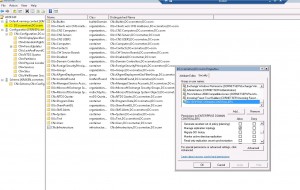
- Manage replication topology
- Replicating Directory Changes
- Replicating Directory Changes All
- Replicating Directory Changes In Filtered Set
- Replication Synchronization
Apply the changes and rerun DCDiag to verify that the changes are working.
Thats it.
Enjoy Cubert 😎
- Remove From My Forums
-
Question
-
Directory Server Diagnosis
… (tests ok)
Starting test: NCSecDesc
Error NT AUTHORITYENTERPRISE DOMAIN CONTROLLERS doesn’t have
Replicating Directory Changes In Filtered Set
access rights for the naming context:DC=ForestDnsZones,DC=AIM,DC=local
Error NT AUTHORITYENTERPRISE DOMAIN CONTROLLERS doesn’t haveReplicating Directory Changes In Filtered Set
access rights for the naming context:DC=DomainDnsZones,DC=AIM,DC=local
……………………. XXXX-SBS2011 failed test NCSecDescAm I missing something? I tried to read similar errors but…
Thanks!
Constantine
Answers
-
Hi,
If you have not run the
adprep /rodcprep command, Dcdiag.exe returns an error when it runs the NCSecDesc test. This test checks that the security descriptors on the naming context heads have appropriate permissions for replication. The error indicates that
the Enterprise Domain Controllers group does not have Replicating Directory Changes In Filtered Set access rights for the DNS application directory partitions. If you do not plan to add an RODC to the forest, you can disregard this error. If you plan to add
an RODC to the forest, you must run adprep /rodcprep. For
adprep /rodcprep, you can run the version of Adprep.exe that appears in either Windows Server 2008 or Windows Server 2008 R2 because that parameter performs the same set of operations in each version.You may refer to the following Microsoft TechNet article to read the above sentences. If you have no plan to add RODC, you may ignore this error.
Known Issues for Installing and Removing AD DS
http://technet.microsoft.com/en-US/library/6c438941-f9b5-4edb-a9ee-1781526389e5.aspx
Regards,
Please remember to click “Mark as Answer” on the post that helps you, and to click “Unmark as Answer” if a marked post does not actually answer your question. This can be beneficial to other community members reading the thread.
-
Marked as answer by
Monday, May 30, 2011 1:47 AM
-
Marked as answer by
- Remove From My Forums
-
Question
-
Directory Server Diagnosis
… (tests ok)
Starting test: NCSecDesc
Error NT AUTHORITYENTERPRISE DOMAIN CONTROLLERS doesn’t have
Replicating Directory Changes In Filtered Set
access rights for the naming context:DC=ForestDnsZones,DC=AIM,DC=local
Error NT AUTHORITYENTERPRISE DOMAIN CONTROLLERS doesn’t haveReplicating Directory Changes In Filtered Set
access rights for the naming context:DC=DomainDnsZones,DC=AIM,DC=local
……………………. XXXX-SBS2011 failed test NCSecDescAm I missing something? I tried to read similar errors but…
Thanks!
Constantine
Answers
-
Hi,
If you have not run the
adprep /rodcprep command, Dcdiag.exe returns an error when it runs the NCSecDesc test. This test checks that the security descriptors on the naming context heads have appropriate permissions for replication. The error indicates that
the Enterprise Domain Controllers group does not have Replicating Directory Changes In Filtered Set access rights for the DNS application directory partitions. If you do not plan to add an RODC to the forest, you can disregard this error. If you plan to add
an RODC to the forest, you must run adprep /rodcprep. For
adprep /rodcprep, you can run the version of Adprep.exe that appears in either Windows Server 2008 or Windows Server 2008 R2 because that parameter performs the same set of operations in each version.You may refer to the following Microsoft TechNet article to read the above sentences. If you have no plan to add RODC, you may ignore this error.
Known Issues for Installing and Removing AD DS
http://technet.microsoft.com/en-US/library/6c438941-f9b5-4edb-a9ee-1781526389e5.aspx
Regards,
Please remember to click “Mark as Answer” on the post that helps you, and to click “Unmark as Answer” if a marked post does not actually answer your question. This can be beneficial to other community members reading the thread.
-
Marked as answer by
Monday, May 30, 2011 1:47 AM
-
Marked as answer by