Пример текста сообщения об ошибке
HRESULT=80004005, SQLSrvr: Error state=3, Severity=C, native=601, line=1
Как расшифровывается
HRESULT=80004005 — номер ошибки, именно номер «80004005» обозначает ошибку СУБД, а в данном контексте это Microsoft OLE DB Provider. Кроме этого, описание большей части номеров здесь
Error state=3 — номер состояния сообщения об ошибке, имеет значение от 0 до 127
Severity=C — уровень серьезности ошибки. Имеет значение от 0 до 25
Уровень серьезности от 0 до 18 может указать любой пользователь. Уровни серьезности от 19 до 25 могут быть указаны только членами фиксированной серверной роли sysadmin и пользователями с разрешениями ALTER TRACE. Для уровней серьезности от 19 до 25 требуется параметр WITH LOG.Если ошибка возникла в компоненте SQL Server Database Engine, серьезность ошибки указывает на тип проблемы, с которой столкнулся сервер SQL Server.
native=601 — номер ошибки, список номеров
Ошибки 1505, 1508 случаются когда предпринимается попытка создания индекса (уникального или кластерного)
2601 — при попытке вставки записи (либо изменении поля существующей записи) и при этом нарушается уникальность уже существующего индекса
line=1 — номер строки, в которой произошла ошибка
Microsoft SQL Server Ошибки
Useful links
- System Error Messages
- Database Engine Error Severities
- Integration Services Error and Message Reference
- View and Read SQL Server Setup Log Files
- Troubleshoot the SQL Server Utility
- Common Issues: Licensing Errors
- SQL Server 2016 Distributed Replay Errors
- The Instance ID MSSQLSERVER Is Already In Use
- SQL Server: Detach/Attach Gotchas!
SQL Server All Errors List
SELECT message_id, severity, text
  FROM sys.messages
 WHERE language_id = 1033; /* assuming US English */
Your language_id you can find in
sys.syslanguages
system view, column msglangid:
| langid | dateformat | datefirst | upgrade | name | alias | months | shortmonths | days | lcid | msglangid |
|---|---|---|---|---|---|---|---|---|---|---|
| 0 | mdy | 7 | 0 | us_english | English | January,February,March,April,May,June,July,August,September,October,November,December | Jan,Feb,Mar,Apr,May,Jun,Jul,Aug,Sep,Oct,Nov,Dec | Monday,Tuesday,Wednesday,Thursday,Friday,Saturday,Sunday | 1033 | 1033 |
| 1 | dmy | 1 | 0 | Deutsch | German | Januar,Februar,März,April,Mai,Juni,Juli,August,September,Oktober,November,Dezember | Jan,Feb,Mär,Apr,Mai,Jun,Jul,Aug,Sep,Okt,Nov,Dez | Montag,Dienstag,Mittwoch,Donnerstag,Freitag,Samstag,Sonntag | 1031 | 1031 |
| 2 | dmy | 1 | 0 | Français | French | janvier,février,mars,avril,mai,juin,juillet,août,septembre,octobre,novembre,décembre | janv,févr,mars,avr,mai,juin,juil,août,sept,oct,nov,déc | lundi,mardi,mercredi,jeudi,vendredi,samedi,dimanche | 1036 | 1036 |
| 3 | ymd | 7 | 0 | 日本語 | Japanese | 01,02,03,04,05,06,07,08,09,10,11,12 | 01,02,03,04,05,06,07,08,09,10,11,12 | 月曜日,火曜日,水曜日,木曜日,金曜日,土曜日,日曜日 | 1041 | 1041 |
| 4 | dmy | 1 | 0 | Dansk | Danish | januar,februar,marts,april,maj,juni,juli,august,september,oktober,november,december | jan,feb,mar,apr,maj,jun,jul,aug,sep,okt,nov,dec | mandag,tirsdag,onsdag,torsdag,fredag,lørdag,søndag | 1030 | 1030 |
| 5 | dmy | 1 | 0 | Español | Spanish | Enero,Febrero,Marzo,Abril,Mayo,Junio,Julio,Agosto,Septiembre,Octubre,Noviembre,Diciembre | Ene,Feb,Mar,Abr,May,Jun,Jul,Ago,Sep,Oct,Nov,Dic | Lunes,Martes,Miércoles,Jueves,Viernes,Sábado,Domingo | 3082 | 3082 |
| 6 | dmy | 1 | 0 | Italiano | Italian | gennaio,febbraio,marzo,aprile,maggio,giugno,luglio,agosto,settembre,ottobre,novembre,dicembre | gen,feb,mar,apr,mag,giu,lug,ago,set,ott,nov,dic | lunedì,martedì,mercoledì,giovedì,venerdì,sabato,domenica | 1040 | 1040 |
| 7 | dmy | 1 | 0 | Nederlands | Dutch | januari,februari,maart,april,mei,juni,juli,augustus,september,oktober,november,december | jan,feb,mrt,apr,mei,jun,jul,aug,sep,okt,nov,dec | maandag,dinsdag,woensdag,donderdag,vrijdag,zaterdag,zondag | 1043 | 1043 |
| 8 | dmy | 1 | 0 | Norsk | Norwegian | januar,februar,mars,april,mai,juni,juli,august,september,oktober,november,desember | jan,feb,mar,apr,mai,jun,jul,aug,sep,okt,nov,des | mandag,tirsdag,onsdag,torsdag,fredag,lørdag,søndag | 2068 | 2068 |
| 9 | dmy | 7 | 0 | Português | Portuguese | janeiro,fevereiro,março,abril,maio,junho,julho,agosto,setembro,outubro,novembro,dezembro | jan,fev,mar,abr,mai,jun,jul,ago,set,out,nov,dez | segunda-feira,terça-feira,quarta-feira,quinta-feira,sexta-feira,sábado,domingo | 2070 | 2070 |
| 10 | dmy | 1 | 0 | Suomi | Finnish | tammikuuta,helmikuuta,maaliskuuta,huhtikuuta,toukokuuta,kesäkuuta,heinäkuuta,elokuuta,syyskuuta,lokakuuta,marraskuuta,joulukuuta | tammi,helmi,maalis,huhti,touko,kesä,heinä,elo,syys,loka,marras,joulu | maanantai,tiistai,keskiviikko,torstai,perjantai,lauantai,sunnuntai | 1035 | 1035 |
| 11 | ymd | 1 | 0 | Svenska | Swedish | januari,februari,mars,april,maj,juni,juli,augusti,september,oktober,november,december | jan,feb,mar,apr,maj,jun,jul,aug,sep,okt,nov,dec | måndag,tisdag,onsdag,torsdag,fredag,lördag,söndag | 1053 | 1053 |
| 12 | dmy | 1 | 0 | čeština | Czech | leden,únor,březen,duben,květen,červen,červenec,srpen,září,říjen,listopad,prosinec | I,II,III,IV,V,VI,VII,VIII,IX,X,XI,XII | pondělí,úterý,středa,čtvrtek,pátek,sobota,neděle | 1029 | 1029 |
| 13 | ymd | 1 | 0 | magyar | Hungarian | január,február,március,április,május,június,július,augusztus,szeptember,október,november,december | jan,febr,márc,ápr,máj,jún,júl,aug,szept,okt,nov,dec | hétfő,kedd,szerda,csütörtök,péntek,szombat,vasárnap | 1038 | 1038 |
| 14 | dmy | 1 | 0 | polski | Polish | styczeń,luty,marzec,kwiecień,maj,czerwiec,lipiec,sierpień,wrzesień,październik,listopad,grudzień | I,II,III,IV,V,VI,VII,VIII,IX,X,XI,XII | poniedziałek,wtorek,środa,czwartek,piątek,sobota,niedziela | 1045 | 1045 |
| 15 | dmy | 1 | 0 | română | Romanian | ianuarie,februarie,martie,aprilie,mai,iunie,iulie,august,septembrie,octombrie,noiembrie,decembrie | Ian,Feb,Mar,Apr,Mai,Iun,Iul,Aug,Sep,Oct,Nov,Dec | luni,marţi,miercuri,joi,vineri,sîmbătă,duminică | 1048 | 1048 |
| 16 | ymd | 1 | 0 | hrvatski | Croatian | siječanj,veljača,ožujak,travanj,svibanj,lipanj,srpanj,kolovoz,rujan,listopad,studeni,prosinac | sij,vel,ožu,tra,svi,lip,srp,kol,ruj,lis,stu,pro | ponedjeljak,utorak,srijeda,četvrtak,petak,subota,nedjelja | 1050 | 1050 |
| 17 | dmy | 1 | 0 | slovenčina | Slovak | január,február,marec,apríl,máj,jún,júl,august,september,október,november,december | I,II,III,IV,V,VI,VII,VIII,IX,X,XI,XII | pondelok,utorok,streda,štvrtok,piatok,sobota,nedeľa | 1051 | 1051 |
| 18 | dmy | 1 | 0 | slovenski | Slovenian | januar,februar,marec,april,maj,junij,julij,avgust,september,oktober,november,december | jan,feb,mar,apr,maj,jun,jul,avg,sept,okt,nov,dec | ponedeljek,torek,sreda,četrtek,petek,sobota,nedelja | 1060 | 1060 |
| 19 | dmy | 1 | 0 | ελληνικά | Greek | Ιανουαρίου,Φεβρουαρίου,Μαρτίου,Απριλίου,Μα_ου,Ιουνίου,Ιουλίου,Αυγούστου,Σεπτεμβρίου,Οκτωβρίου,Νοεμβρίου,Δεκεμβρίου | Ιαν,Φεβ,Μαρ,Απρ,Μαϊ,Ιουν,Ιουλ,Αυγ,Σεπ,Οκτ,Νοε,Δεκ | Δευτέρα,Τρίτη,Τετάρτη,Πέμπτη,Παρασκευή,Σάββατο,Κυριακή | 1032 | 1032 |
| 20 | dmy | 1 | 0 | български | Bulgarian | януари,февруари,март,април,май,юни,юли,август,септември,октомври,ноември,декември | януари,февруари,март,април,май,юни,юли,август,септември,октомври,ноември,декември | понеделник,вторник,сряда,четвъртък,петък,събота,неделя | 1026 | 1026 |
| 21 | dmy | 1 | 0 | русский | Russian | Январь,Февраль,Март,Апрель,Май,Июнь,Июль,Август,Сентябрь,Октябрь,Ноябрь,Декабрь | янв,фев,мар,апр,май,июн,июл,авг,сен,окт,ноя,дек | понедельник,вторник,среда,четверг,пятница,суббота,воскресенье | 1049 | 1049 |
| 22 | dmy | 1 | 0 | Türkçe | Turkish | Ocak,Şubat,Mart,Nisan,Mayıs,Haziran,Temmuz,Ağustos,Eylül,Ekim,Kasım,Aralık | Oca,Şub,Mar,Nis,May,Haz,Tem,Ağu,Eyl,Eki,Kas,Ara | Pazartesi,Salı,Çarşamba,Perşembe,Cuma,Cumartesi,Pazar | 1055 | 1055 |
| 23 | dmy | 1 | 0 | British | British English | January,February,March,April,May,June,July,August,September,October,November,December | Jan,Feb,Mar,Apr,May,Jun,Jul,Aug,Sep,Oct,Nov,Dec | Monday,Tuesday,Wednesday,Thursday,Friday,Saturday,Sunday | 2057 | 1033 |
| 24 | dmy | 1 | 0 | eesti | Estonian | jaanuar,veebruar,märts,aprill,mai,juuni,juuli,august,september,oktoober,november,detsember | jaan,veebr,märts,apr,mai,juuni,juuli,aug,sept,okt,nov,dets | esmaspäev,teisipäev,kolmapäev,neljapäev,reede,laupäev,pühapäev | 1061 | 1061 |
| 25 | ymd | 1 | 0 | latviešu | Latvian | janvāris,februāris,marts,aprīlis,maijs,jūnijs,jūlijs,augusts,septembris,oktobris,novembris,decembris | jan,feb,mar,apr,mai,jūn,jūl,aug,sep,okt,nov,dec | pirmdiena,otrdiena,trešdiena,ceturtdiena,piektdiena,sestdiena,svētdiena | 1062 | 1062 |
| 26 | ymd | 1 | 0 | lietuvių | Lithuanian | sausis,vasaris,kovas,balandis,gegužė,birželis,liepa,rugpjūtis,rugsėjis,spalis,lapkritis,gruodis | sau,vas,kov,bal,geg,bir,lie,rgp,rgs,spl,lap,grd | pirmadienis,antradienis,trečiadienis,ketvirtadienis,penktadienis,šeštadienis,sekmadienis | 1063 | 1063 |
| 27 | dmy | 7 | 0 | Português (Brasil) | Brazilian | Janeiro,Fevereiro,Março,Abril,Maio,Junho,Julho,Agosto,Setembro,Outubro,Novembro,Dezembro | Jan,Fev,Mar,Abr,Mai,Jun,Jul,Ago,Set,Out,Nov,Dez | Segunda-Feira,Terça-Feira,Quarta-Feira,Quinta-Feira,Sexta-Feira,Sábado,Domingo | 1046 | 1046 |
| 28 | ymd | 7 | 0 | 繁體中文 | Traditional Chinese | 一月,二月,三月,四月,五月,六月,七月,八月,九月,十月,十一月,十二月 | 01,02,03,04,05,06,07,08,09,10,11,12 | 星期一,星期二,星期三,星期四,星期五,星期六,星期日 | 1028 | 1028 |
| 29 | ymd | 7 | 0 | 한국어 | Korean | 01,02,03,04,05,06,07,08,09,10,11,12 | 01,02,03,04,05,06,07,08,09,10,11,12 | 월요일,화요일,수요일,목요일,금요일,토요일,일요일 | 1042 | 1042 |
| 30 | ymd | 7 | 0 | 简体中文 | Simplified Chinese | 01,02,03,04,05,06,07,08,09,10,11,12 | 01,02,03,04,05,06,07,08,09,10,11,12 | 星期一,星期二,星期三,星期四,星期五,星期六,星期日 | 2052 | 2052 |
| 31 | dmy | 1 | 0 | Arabic | Arabic | Muharram,Safar,Rabie I,Rabie II,Jumada I,Jumada II,Rajab,Shaaban,Ramadan,Shawwal,Thou Alqadah,Thou Alhajja | Jan,Feb,Mar,Apr,May,Jun,Jul,Aug,Sep,Oct,Nov,Dec | Monday,Tuesday,Wednesday,Thursday,Friday,Saturday,Sunday | 1025 | 1025 |
| 32 | dmy | 7 | 0 | ไทย | Thai | มกราคม,กุมภาพันธ์,มีนาคม,เมษายน,พฤษภาคม,มิถุนายน,กรกฎาคม,สิงหาคม,กันยายน,ตุลาคม,พฤศจิกายน,ธันวาคม | ม.ค.,ก.พ.,มี.ค.,เม.ย.,พ.ค.,มิ.ย.,ก.ค.,ส.ค.,ก.ย.,ต.ค.,พ.ย.,ธ.ค. | จันทร์,อังคาร,พุธ,พฤหัสบดี,ศุกร์,เสาร์,อาทิตย์ | 1054 | 1054 |
| 33 | dmy | 1 | 0 | norsk (bokmål) | Bokmål | januar,februar,mars,april,mai,juni,juli,august,september,oktober,november,desember | jan,feb,mar,apr,mai,jun,jul,aug,sep,okt,nov,des | mandag,tirsdag,onsdag,torsdag,fredag,lørdag,søndag | 1044 | 1044 |
Levels of Severity
| Severity level | Description |
|---|---|
| 0-9 | Informational messages that return status information or report errors that are not severe. The Database Engine does not raise system errors with severities of 0 through 9. |
| 10 | Informational messages that return status information or report errors that are not severe. For compatibility reasons, the Database Engine converts severity 10 to severity 0 before returning the error information to the calling application. |
| 11-16 | Indicate errors that can be corrected by the user. |
| 11 | Indicates that the given object or entity does not exist. |
| 12 | A special severity for queries that do not use locking because of special query hints. In some cases, read operations performed by these statements could result in inconsistent data, since locks are not taken to guarantee consistency. |
| 13 | Indicates transaction deadlock errors. |
| 14 | Indicates security-related errors, such as permission denied. |
| 15 | Indicates syntax errors in the Transact-SQL command. |
| 16 | Indicates general errors that can be corrected by the user. |
| 17-19 | Indicate software errors that cannot be corrected by the user. Inform your system administrator of the problem. |
| 17 | Indicates that the statement caused SQL Server to run out of resources (such as memory, locks, or disk space for the database) or to exceed some limit set by the system administrator. |
| 18 | Indicates a problem in the Database Engine software, but the statement completes execution, and the connection to the instance of the Database Engine is maintained. The system administrator should be informed every time a message with a severity level of 18 occurs. |
| 19 | Indicates that a nonconfigurable Database Engine limit has been exceeded and the current batch process has been terminated. Error messages with a severity level of 19 or higher stop the execution of the current batch. Severity level 19 errors are rare and must be corrected by the system administrator or your primary support provider. Contact your system administrator when a message with a severity level 19 is raised. Error messages with a severity level from 19 through 25 are written to the error log. |
| 20-24 | Indicate system problems and are fatal errors, which means that the Database Engine task that is executing a statement or batch is no longer running. The task records information about what occurred and then terminates. In most cases, the application connection to the instance of the Database Engine may also terminate. If this happens, depending on the problem, the application might not be able to reconnect. Error messages in this range can affect all of the processes accessing data in the same database and may indicate that a database or object is damaged. Error messages with a severity level from 19 through 24 are written to the error log. |
| 20 | Indicates that a statement has encountered a problem. Because the problem has affected only the current task, it is unlikely that the database itself has been damaged. |
| 21 | Indicates that a problem has been encountered that affects all tasks in the current database, but it is unlikely that the database itself has been damaged. |
| 22 | Indicates that the table or index specified in the message has been damaged by a software or hardware problem. Severity level 22 errors occur rarely. If one occurs, run DBCC CHECKDB to determine whether other objects in the database are also damaged. The problem might be in the buffer cache only and not on the disk itself. If so, restarting the instance of the Database Engine corrects the problem. To continue working, you must reconnect to the instance of the Database Engine; otherwise, use DBCC to repair the problem. In some cases, you may have to restore the database. If restarting the instance of the Database Engine does not correct the problem, then the problem is on the disk. Sometimes destroying the object specified in the error message can solve the problem. For example, if the message reports that the instance of the Database Engine has found a row with a length of 0 in a nonclustered index, delete the index and rebuild it. |
| 23 | Indicates that the integrity of the entire database is in question because of a hardware or software problem. Severity level 23 errors occur rarely. If one occurs, run DBCC CHECKDB to determine the extent of the damage. The problem might be in the cache only and not on the disk itself. If so, restarting the instance of the Database Engine corrects the problem. To continue working, you must reconnect to the instance of the Database Engine; otherwise, use DBCC to repair the problem. In some cases, you may have to restore the database. |
| 24 | Indicates a media failure. The system administrator may have to restore the database. You may also have to call your hardware vendor. |
SQL Server Errors
| message_id | Description | Article |
|---|---|---|
| 0 | You may see “out of user memory quota” message in errorlog when you use In-Memory OLTP feature … | Out of user memory quota |
| 0 | Logon Failure: The User has not Been Granted. The operating system returned the error ????? while … | Compressed backup errors |
| 0 | A transport-level error has occurred when receiving results from the server. | link1 |
| 0 | The MSSQLSERVER service was unable to log on as SQLAuthoritySQLFarmService with the currently c … | The User has not Been Granted |
| 0 | A server error occurred on current command. The results, if any, should be discarded. | Who owns your availability groups? |
| 0 | A network-related issue or instance-specific error occured while establishing a connection to SQL Server | Cannot Connect to SQL Server |
| 0 | Connecting to Azure SQL Database: Requested tenant identifier ‘00000000-0000-0000-0000-000000000000’ is… | Requested tenant identifier |
| 102 | Incorrect syntax near ‘%.*ls’. | 102_link1,102_link2 |
| 120 | The select list for the INSERT statement contains fewer items than the insert list. The number of … | 120_link1 |
| 121 | The select list for the INSERT statement contains more items than the insert list. The number of … | 121_link1 |
| 131 | The size (%d) given to the %S_MSG ‘%.*ls’ exceeds the maximum allowed for any data type (%d). | 131_link1 |
| 145 | ORDER BY items must appear in the select list if SELECT DISTINCT is specified. | 145_link1 |
| 156 | Incorrect syntax near the keyword ‘ORDER’. | 156_link1 |
| 207 | Invalid column name ‘%.*ls’. | 207_link1 |
| 213 | Column name or number of supplied values does not match table definition. | 213_link1,213_link2 |
| 229 | The %ls permission was denied on the object ‘%.ls’, database ‘%.ls’, schema ‘%.*ls’. | 229_link1 |
| 241 | Conversion failed when converting date and/or time from character string. | 241_link1 |
| 257 | Implicit conversion from data type %ls to %ls is not allowed. Use the CONVERT function to run this query | 257_link1 |
| 264 | The column name ‘%.*ls’ is specified more than once in the SET clause or column list of an INSERT … | 264_link1 |
| 297 | The user does not have permission to perform this action. | 297_link1 |
| 352 | The table-valued parameter «%.*ls» must be declared with the READONLY option. | 352_link1 |
| 459 | Collation ‘%.*ls’ is supported on Unicode data types only and cannot be applied to char, varchar or … | 459_link1 |
| 535 | The datediff function resulted in an overflow. The number of dateparts separating two date/time | 535_link1 |
| 596 | Cannot continue execution because the session is in the kill state. | 596_link1,596_link2,596_link3 |
| 650 | You can only specify the READPAST lock in the READ COMMITTED or REPEATABLE READ isolation levels. | 650_link1 |
| 657 | Could not disable support for increased partitions in database … | 657_link1 |
| 666 | The maximum system-generated unique value for a duplicate group was exceeded for index with … | 666_link1 |
| 701 | There is insufficient system memory in resource pool ‘%ls’ to run this query. … | 701_link1,701_link2 |
| 824 | SQL Server detected a logical consistency-based I/O error … | 824_link1,824_link2,KB2152734,824_link3 |
| 825 | The operating system returned error %ls to SQL Server. It failed creating event for a %S_MSG at … | 825_link1 |
| 913 | Could Not Find Database %d. Database May Not be Activated Yet or May be in Transition … | 913_link1 |
| 922 | Database ‘%.*ls’ is being recovered. Waiting until recovery is finished. | 922_link1 |
| 926 | Database ‘%.*ls’ cannot be opened. It has been marked SUSPECT by recovery. See the SQL Server errorlog … | 926_link1 |
| 1052 | Conflicting %ls options «%ls» and «%ls». | 1052_link1 |
| 1065 | The NOLOCK and READUNCOMMITTED lock hints are not allowed for target tables of INSERT, UPDATE, DELETE … | 1065_link1 |
| 1105 | Could not allocate space for object ‘%.ls’%.ls in database ‘%.ls’ because the ‘%.ls’ filegroup is … | 1105_link1 |
| 1204 | The instance of the SQL Server Database Engine cannot obtain a LOCK resource at this time. Rerun your … | 1204_link1 |
| 1205 | Transaction (Process ID %d) was deadlocked on %.*ls resources with another process and has been chosen … | 1205_link1 |
| 1222 | Lock request time out period exceeded. | 1222_link1 |
| 1219 | Your session has been disconnected because of a high priority DDL operation. | 1219_link1 |
| 1480 | The %S_MSG database «%.*ls» is changing roles from «%ls» to «%ls» because the mirroring session or … | 1480_link1 |
| 1701 | Creating or altering table %ls failed because the minimum row size would be 8061, including 10 b … | 1701_link1 |
| 1807 | Could not obtain exclusive lock on database ‘model’. Retry the operation later. … | 1807_link1 |
| 1904 | The statistics on table has 65 columns in the key list … | 1904_link1 |
| 1908 | Column ‘%.ls’ is partitioning column of the index ‘%.ls’. Partition columns for a unique index … | 1908_link1 |
| 2533 | Table error: page %S_PGID allocated to object ID %d, index ID %d, partition ID %I64d, alloc unit ID … | 2533_link1 |
| 2534 | Table error: page %S_PGID, whose header indicates that it is allocated to object ID %d, index ID %d, … | 2534_link1 |
| 2812 | Could not find stored procedure ‘%.*ls’. | 2812_link1 |
| 3101 | Exclusive access could not be obtained because the database is in use. … | 3101_link1 |
| 3154 | The backup set holds a backup of a database other than the existing … | 3154_link1 |
| 3241 | The media family on device ‘%ls’ is incorrectly formed. SQL Server cannot process this media fam … | 3241_link1 |
| 3314 | During undoing of a logged operation in database ‘%.*ls’, an error occurred at log record ID %S … | 3314_link1 |
| 3634 | The operating system returned the error ‘%ls’ while attempting ‘%ls’ on ‘%ls’. … | 3634_link1 |
| 3637 | A parallel operation cannot be started from a DAC connection. | 3637_link1 |
| 3743 | The database ‘%.*ls’ is enabled for database mirroring. Database mirroring must be removed befor … | 3743_link1 |
| 3906 | Failed to update database «%.*ls» because the database is read-only. | 3906_link1 |
| 3930 | The current transaction cannot be committed and cannot support operations that write to the log … | 3930_link1 |
| 3956 | Snapshot isolation transaction failed to start in database ‘%.*ls’ because the ALTER DATABASE command … | 3956_link1 |
| 3960 | Snapshot isolation transaction aborted due to update conflict. You cannot use snapshot isolation to … | 3960_link1 |
| 4064 | Cannot open user default database. Login failed.Login failed. … | 4064_link1 |
| 4189 | Cannot convert to text/ntext or collate to ‘%.*ls’ because these legacy LOB types do not support UTF-8 … | 4189_link1 |
| 4353 | Conflicting file relocations have been specified for file ‘%.*ls’. Only a single WITH MOVE clause … | 4353_link1 |
| 4629 | Permissions on server scoped catalog views or system stored procedures or extended stored … | 4629_link1 |
| 4901 | ALTER TABLE only allows columns to be added that can contain nulls, or have a DEFAULT definition … | 4901_link1 |
| 4922 | ALTER TABLE ALTER COLUMN Address failed because one or more objects access this column. … | 4922_link1 |
| 4934 | Computed column ‘%.ls’ in table ‘%.ls’ cannot be persisted because the column does user or … | 4934_link1 |
| 4947 | ALTER TABLE SWITCH statement failed. There is no identical index in source table ‘%.*ls’ for the … | 4947_link1 |
| 5004 | To use ALTER DATABASE, the database must be in a writable state in which a checkpoint can be executed. | 5004_link1 |
| 5011 | User does not have permission to alter database ‘%.*ls’, the database does not exist, or the database … | 5011_link1 |
| 5061 | ALTER DATABASE failed because a lock could not be placed on database ‘%.*ls’. Try again later. | 5061_link1 |
| 5084 | Setting database option %ls to %ls for database ‘%.*ls’. | 5084_link1 |
| 5120 | Unable to open the physical file … Operating system error 5: «5(Access is denied.)» … | SQL SERVER — FIX Error 5120 |
| 5123 | CREATE FILE encountered operating system error «%ls»(The system cannot find the path specified.) … | 5123_link1, 5123_link2 |
| 5171 | %.*ls is not a primary database file. | 5171_link1 |
| 5172 | The header for file ‘%ls’ is not a valid database file header. The %ls property is incorrect. | 5172_link1 |
| 5235 | %lsDBCC %ls (%ls%ls%ls)%ls executed by %ls terminated abnormally due to error state %d. Elapsed time: … | 5235_link1 |
| 5846 | Common language runtime (CLR) execution is not supported under lightweight pooling. Disable one of two … | 5846_link1 |
| 6335 | XML datatype instance has too many levels of nested nodes. Maximum allowed depth is 128 levels. | 6335_link1 |
| 6348 | Specified collection ‘%.*ls’ cannot be created because it already exists or you do not have permission. | 6348_link1 |
| 6401 | Cannot roll back %.*ls. No transaction or savepoint of that name was found. | 6401_link1 |
| 7341 | Cannot get the current row value of column «%ls.%ls» from OLE DB provider «%ls» for linked server «%ls … | 7341_link1 |
| 7344 | The OLE DB provider «%ls» for linked server «%ls» could not %ls table «%ls» because of column … | 7344_link1 |
| 7356 | The OLE DB provider «%ls» for linked server «%ls» supplied inconsistent metadata for a column. … | 7356_link1 |
| 7357 | Cannot process the object «%ls». The OLE DB provider «%ls» for linked server «%ls» indicates that … | 7357_link1, 7357_link2 |
| 7391 | The operation could not be performed because OLE DB provider «%ls» for linked server «%ls» … … | 7391_link2 |
| 7719 | CREATE/ALTER partition function failed as only maximum of 1000 partitions can be created. … | 657_link1 |
| 7926 | Check statement aborted. The database could not be checked as a database snapshot could not be created … | 7926_link1 |
| 8101 | An explicit value for the identity column in table ‘%.*ls’ can only be specified when a column list is … | 8101_link1 |
| 8107 | IDENTITY_INSERT is already ON for table ‘%.ls.%.ls.%.*ls’. Cannot perform SET operation for table ‘% … | 8107_link1 |
| 8115 | Arithmetic overflow error converting %ls to data type %ls. | 8115_link1 |
| 8116 | Argument data type %ls is invalid for argument %d of %ls function. | 8116_link1 |
| 8117 | Operand data type %ls is invalid for %ls operator. | 8117_link1 |
| 8180 | Statement(s) could not be prepared. | 8180_link1 |
| 8127 | Column «%.ls.%.ls» is invalid in the ORDER BY clause because it is not contained in either an … | 8127_link1 |
| 8152 | String or binary data would be truncated. | 8152_link1 |
| 8624 | Internal Query Processor Error: The query processor could not produce a query plan. | 8624_link1 |
| 8645 | A timeout occurred while waiting for memory resources to execute the query in resource pool ‘%ls’ (%ld … | 8645_link1 |
| 8651 | Could not perform the operation because the requested memory grant was not available in resource … | 8651_link1 |
| 8672 | The MERGE statement attempted to UPDATE or DELETE the same row more than once… … | 8672_link1 |
| 8909 | Table error: Object ID %d, index ID %d, partition ID %I64d, alloc unit ID %I64d (type %.*ls), pa … | 8909_link1 |
| 8921 | Check terminated. A failure was detected while collecting facts. Possibly tempdb out of space or … | 8921_link1 |
| 8928 | Object ID %d, index ID %d, partition ID %I64d, alloc unit ID %I64d (type %.*ls): Page %S_PGID could not… | 8928_link1 |
| 8939 | Table error: Object ID %d, index ID %d, partition ID %I64d, alloc unit ID %I64d (type %.*ls), page … | 8939_link1 |
| 8948 | Database error: Page %S_PGID is marked with the wrong type in PFS page %S_PGID. PFS status 0x%x … | 8948_link1 |
| 9001 | The log for database ‘%.*ls’ is not available. Check the operating system error log for related … | 9001_link1 |
| 9002 | The transaction log for database ‘%ls’ is full due to ‘%ls’. … | 9002_link1,9002_link2,9002_link3 |
| 9105 | The provided statistics stream is corrupt. | 9105_link1 |
| 9642 | An error occurred in a Service Broker/Database Mirroring transport connection endpoint, Error: %i, … | 9105_link1 |
| 10314 | An error occurred in the Microsoft .NET Framework while trying to load assembly id %d. The server may … | 10314_link1,10314_link2 |
| 10637 | Cannot perform this operation on ‘%.*ls’ with ID %I64d as one or more indexes are currently in … | 10637_link1 |
| 10794 | The %S_MSG ‘%ls’ is not supported with %S_MSG. | 10794_link1,10794_link2 |
| 11442 | Columnstore index creation is not supported in tempdb when memory-optimized metadata mode is enabled. … | [11442_link1][51] |
| 11535 | EXECUTE statement failed because its WITH RESULT SETS clause specified %d result set(s), and the … | 11535_link1 |
| 12349 | Operation not supported for memory optimized tables having columnstore index. | 12349_link1 |
| 13609 | JSON text is not properly formatted. Unexpected character ‘%lc’ is found at position %d. | 13609_link1 |
| 13515 | Setting SYSTEM_VERSIONING to ON failed because history table ‘%.*ls’ has custom unique keys defined. … | 13515_link1 |
| 13518 | Setting SYSTEM_VERSIONING to ON failed because history table ‘%.*ls’ has IDENTITY column specification … | 13518_link1 |
| 13523 | Setting SYSTEM_VERSIONING to ON failed because table ‘%.ls’ has %d columns and table ‘%.ls’ has %d … | 13523_link1 |
| 13543 | Setting SYSTEM_VERSIONING to ON failed because history table ‘%.*ls’ contains invalid records with end … | 13543_link1 |
| 13570 | The use of replication is not supported with system-versioned temporal table ‘%s’ | 13570_link1 |
| 13573 | Setting SYSTEM_VERSIONING to ON failed because history table ‘%.*ls’ contains overlapping records. | 13573_link1 |
| 13575 | ADD PERIOD FOR SYSTEM_TIME failed because table ‘%.*ls’ contains records where end of period is not … | 13575_link1 |
| 13901 | Identifier ‘%.*ls’ in a MATCH clause is not a node table or an alias for a node table. | 13901_link1 |
| 13902 | Identifier ‘%.*ls’ in a MATCH clause is not an edge table or an alias for an edge table. | 13902_link1 |
| 15002 | The procedure ‘sys.sp_dbcmptlevel’ cannot be executed within a transaction. … | 15002_link1 |
| 15021 | Invalid value given for parameter %s. Specify a valid parameter value. | 15021_link1 |
| 15136 | The database principal is set as the execution context of one or more procedures, functions, … | 15136_link1 |
| 15190 | There are still remote logins or linked logins for the server ‘%s’. | 15190_link1 |
| 15199 | The current security context cannot be reverted. Please switch to the original database where … | 15199_link1 |
| 15274 | Access to the remote server is denied because the current security context is not trusted. | 15274_link1 |
| 15404 | Could not obtain information about Windows NT group/user ‘%ls’, error code %#lx. | 15404_link1 |
| 15406 | Cannot execute as the server principal because the principal «%.*ls» does not exist, this type of … | 15406_link1 |
| 15457 | Configuration option ‘%ls’ changed from %ld to %ld. Run the RECONFIGURE statement to install. | 5457_link1 |
| 17051 | SQL Server evaluation edition has expired. | 17051_link1 |
| 17182 | TDSSNIClient initialization failed with error 0x%lx, status code 0x%lx. Reason: %S_MSG %.*ls | 17182_link1 |
| 17190 | Initializing the FallBack certificate failed with error code: %d, state: %d, error number: %d. … | 17190_link1 |
| 17300 | SQL Server was unable to run a new system task, either because there is insufficient memory or the … | 17300_link1 |
| 17836 | Length specified in network packet payload did not match number of bytes read; the connection has been … | 17836_link1 |
| 18054 | Error %d, severity %d, state %d was raised, but no message with that error number was found in … | 18054_link1 |
| 18272 | During restore restart, an I/O error occurred on checkpoint file ‘%s’ (operating system error %s … | 18272_link1 |
| 18357 | Reason: An attempt to login using SQL authentication failed. Server is configured for Integrated … | 18357_link1 |
| 18401 | Login failed for user ‘%.*ls’. Reason: Server is in script upgrade mode. Only administrator can connect… | 18401_link1 |
| 18452 | Login failed. The login is from an untrusted domain and cannot be used with Windows authenticati … | 18452_link1 |
| 18456 | Login failed for user ‘%.ls’.%.ls%.*ls | 18456_link1 |
| 20598 | The row was not found at the Subscriber when applying the replicated %S_MSG command for Table ‘%s’ with… | 20598_link1 |
| 22911 | The capture job cannot be used by Change Data Capture to extract changes from the log when … | 22911_link1 |
| 25713 | The value specified for %S_MSG, «%.ls», %S_MSG, «%.ls», is invalid. | 25713_link1,25713_link2 |
| 26023 | Server TCP provider failed to listen on [ %s <%s> %d]. Tcp port is already in use. | 26023_link1 |
| 33111 | Cannot find server %S_MSG with thumbprint ‘%.*ls’. | 33111_link1 |
| 33206 | SQL Server Audit failed to create the audit file ‘%s’. Make sure that the disk is not full and … | 33206_link1 |
| 35217 | The thread pool for Always On Availability Groups was unable to start a new worker thread because … | [35217_link1] |
| 35250 | The connection to the primary replica is not active. The command cannot be processed. | 35250_link1 |
| 35264 | Always On Availability Groups data movement for database ‘%.*ls’ has been suspended for the following … | 35264_link1 |
| 35320 | Column store indexes are not allowed on tables for which the durability option SCHEMA_ONLY is specified. | 35320_link1 |
| 35337 | UPDATE STATISTICS failed because statistics cannot be updated on a columnstore index. … | 35337_link1 |
| 35343 | The statement failed. Column ‘%.*ls’ has a data type that cannot participate in a columnstore index. | 35343_link1 |
| 39004 | A ‘%s’ script error occurred during execution of ‘sp_execute_external_script’ with HRESULT 0x%x. | 39004_link1 |
| 41121 | The local availability replica of availability group ‘%.*ls’ cannot accept signal ‘%s’ in its current … | 41121_link1 |
| 41317 | A user transaction that accesses memory optimized tables or natively compiled modules cannot access more… | [41317_link1][51] |
| 41922 | The backup operation for a database with service-managed transaprent data encryption is not supported on… | 41922_link1 |
[51]:
[35217_link1] :https://www.seangallardy.com/error-35217-and-availability-groups-smh/
| title | description | author | ms.author | ms.date | ms.service | ms.subservice | ms.topic | f1_keywords | helpviewer_keywords | dev_langs | monikerRange | ||||||||||||||
|---|---|---|---|---|---|---|---|---|---|---|---|---|---|---|---|---|---|---|---|---|---|---|---|---|---|
|
RAISERROR (Transact-SQL) |
RAISERROR (Transact-SQL) |
rwestMSFT |
randolphwest |
08/09/2022 |
sql |
t-sql |
reference |
|
|
TSQL |
>= aps-pdw-2016 || = azuresqldb-current || = azure-sqldw-latest || >= sql-server-2016 || >= sql-server-linux-2017 || = azuresqldb-mi-current |
[!INCLUDE sql-asdb-asdbmi-asa-pdw]
[!NOTE]
TheRAISERRORstatement does not honorSET XACT_ABORT. New applications should useTHROWinstead ofRAISERROR.
Generates an error message and initiates error processing for the session. RAISERROR can either reference a user-defined message stored in the sys.messages catalog view, or build a message dynamically. The message is returned as a server error message to the calling application or to an associated CATCH block of a TRY...CATCH construct. New applications should use THROW instead.
:::image type=»icon» source=»../../includes/media/topic-link-icon.svg» border=»false»::: Transact-SQL syntax conventions
Syntax
Syntax for SQL Server and Azure SQL Database:
RAISERROR ( { msg_id | msg_str | @local_variable }
    { , severity, state }
    [ , argument [ , ...n ] ] )
    [ WITH option [ , ...n ] ]
Syntax for Azure Synapse Analytics and Parallel Data Warehouse:
RAISERROR ( { msg_str | @local_variable }
    { , severity, state }
    [ , argument [ , ...n ] ] )
    [ WITH option [ , ...n ] ]
[!INCLUDEsql-server-tsql-previous-offline-documentation]
Arguments
msg_id
A user-defined error message number stored in the sys.messages catalog view using sp_addmessage. Error numbers for user-defined error messages should be greater than 50000. When msg_id is not specified, RAISERROR raises an error message with an error number of 50000.
msg_str
A user-defined message with formatting similar to the printf function in the C standard library. The error message can have a maximum of 2,047 characters. If the message contains 2,048 or more characters, only the first 2,044 are displayed and an ellipsis is added to indicate that the message has been truncated. Note that substitution parameters consume more characters than the output shows because of internal storage behavior. For example, the substitution parameter of %d with an assigned value of 2 actually produces one character in the message string but also internally takes up three additional characters of storage. This storage requirement decreases the number of available characters for message output.
When msg_str is specified, RAISERROR raises an error message with an error number of 50000.
msg_str is a string of characters with optional embedded conversion specifications. Each conversion specification defines how a value in the argument list is formatted and placed into a field at the location of the conversion specification in msg_str. Conversion specifications have this format:
% [[flag] [width] [. precision] [{h | l}]] type
The parameters that can be used in msg_str are:
flag
A code that determines the spacing and justification of the substituted value.
| Code | Prefix or justification | Description |
|---|---|---|
| — (minus) | Left-justified | Left-justify the argument value within the given field width. |
| + (plus) | Sign prefix | Preface the argument value with a plus (+) or minus (-) if the value is of a signed type. |
| 0 (zero) | Zero padding | Preface the output with zeros until the minimum width is reached. When 0 and the minus sign (-) appear, 0 is ignored. |
| # (number) | 0x prefix for hexadecimal type of x or X | When used with the o, x, or X format, the number sign (#) flag prefaces any nonzero value with 0, 0x, or 0X, respectively. When d, i, or u are prefaced by the number sign (#) flag, the flag is ignored. |
| ‘ ‘ (blank) | Space padding | Preface the output value with blank spaces if the value is signed and positive. This is ignored when included with the plus sign (+) flag. |
width
An integer that defines the minimum width for the field into which the argument value is placed. If the length of the argument value is equal to or longer than width, the value is printed with no padding. If the value is shorter than width, the value is padded to the length specified in width.
An asterisk (*) means that the width is specified by the associated argument in the argument list, which must be an integer value.
precision
The maximum number of characters taken from the argument value for string values. For example, if a string has five characters and precision is 3, only the first three characters of the string value are used.
For integer values, precision is the minimum number of digits printed.
An asterisk (*) means that the precision is specified by the associated argument in the argument list, which must be an integer value.
{h | l} type
Used with character types d, i, o, s, x, X, or u, and creates shortint (h) or longint (l) values.
| Type specification | Represents |
|---|---|
| d or i | Signed integer |
| o | Unsigned octal |
| s | String |
| u | Unsigned integer |
| x or X | Unsigned hexadecimal |
These type specifications are based on the ones originally defined for the printf function in the C standard library. The type specifications used in RAISERROR message strings map to [!INCLUDEtsql] data types, while the specifications used in printf map to C language data types. Type specifications used in printf are not supported by RAISERROR when [!INCLUDEtsql] does not have a data type similar to the associated C data type. For example, the %p specification for pointers is not supported in RAISERROR because [!INCLUDEtsql] does not have a pointer data type.
To convert a value to the [!INCLUDEtsql] bigint data type, specify %I64d.
@local_variable
Is a variable of any valid character data type that contains a string formatted in the same manner as msg_str. @local_variable must be char or varchar, or be able to be implicitly converted to these data types.
severity
The user-defined severity level associated with this message. When using msg_id to raise a user-defined message created using sp_addmessage, the severity specified on RAISERROR overrides the severity specified in sp_addmessage.
For severity levels from 19 through 25, the WITH LOG option is required. Severity levels less than 0 are interpreted as 0. Severity levels greater than 25 are interpreted as 25.
[!CAUTION]
Severity levels from 20 through 25 are considered fatal. If a fatal severity level is encountered, the client connection is terminated after receiving the message, and the error is logged in the error and application logs.
You can specify -1 to return the severity value associated with the error as shown in the following example.
RAISERROR (15600, -1, -1, 'mysp_CreateCustomer');
[!INCLUDEssResult]
Msg 15600, Level 15, State 1, Line 1
An invalid parameter or option was specified for procedure 'mysp_CreateCustomer'.
state
An integer from 0 through 255. Negative values default to 1. Values larger than 255 should not be used.
If the same user-defined error is raised at multiple locations, using a unique state number for each location can help find which section of code is raising the errors.
argument
The parameters used in the substitution for variables defined in msg_str or the message corresponding to msg_id. There can be 0 or more substitution parameters, but the total number of substitution parameters cannot exceed 20. Each substitution parameter can be a local variable or any of these data types: tinyint, smallint, int, char, varchar, nchar, nvarchar, binary, or varbinary. No other data types are supported.
option
A custom option for the error and can be one of the values in the following table.
| Value | Description |
|---|---|
LOG |
Logs the error in the error log and the application log for the instance of the [!INCLUDEmsCoName] [!INCLUDEssNoVersion] [!INCLUDEssDE]. Errors logged in the error log are currently limited to a maximum of 440 bytes. Only a member of the sysadmin fixed server role or a user with ALTER TRACE permissions can specify WITH LOG.
[!INCLUDEapplies] [!INCLUDEssNoVersion] |
NOWAIT |
Sends messages immediately to the client.
[!INCLUDEapplies] [!INCLUDEssNoVersion], [!INCLUDEssSDS] |
SETERROR |
Sets the @@ERROR and ERROR_NUMBER values to msg_id or 50000, regardless of the severity level.
[!INCLUDEapplies] [!INCLUDEssNoVersion], [!INCLUDEssSDS] |
Remarks
The errors generated by RAISERROR operate the same as errors generated by the [!INCLUDEssDE] code. The values specified by RAISERROR are reported by the ERROR_LINE, ERROR_MESSAGE, ERROR_NUMBER, ERROR_PROCEDURE, ERROR_SEVERITY, ERROR_STATE, and @@ERROR system functions. When RAISERROR is run with a severity of 11 or higher in a TRY block, it transfers control to the associated CATCH block. The error is returned to the caller if RAISERROR is run:
-
Outside the scope of any
TRYblock. -
With a severity of 10 or lower in a
TRYblock. -
With a severity of 20 or higher that terminates the database connection.
CATCH blocks can use RAISERROR to rethrow the error that invoked the CATCH block by using system functions such as ERROR_NUMBER and ERROR_MESSAGE to retrieve the original error information. @@ERROR is set to 0 by default for messages with a severity from 1 through 10.
When msg_id specifies a user-defined message available from the sys.messages catalog view, RAISERROR processes the message from the text column using the same rules as are applied to the text of a user-defined message specified using msg_str. The user-defined message text can contain conversion specifications, and RAISERROR will map argument values into the conversion specifications. Use sp_addmessage to add user-defined error messages and sp_dropmessage to delete user-defined error messages.
RAISERROR can be used as an alternative to PRINT to return messages to calling applications. RAISERROR supports character substitution similar to the functionality of the printf function in the C standard library, while the [!INCLUDEtsql] PRINT statement does not. The PRINT statement is not affected by TRY blocks, while a RAISERROR run with a severity of 11 to 19 in a TRY block transfers control to the associated CATCH block. Specify a severity of 10 or lower to use RAISERROR to return a message from a TRY block without invoking the CATCH block.
Typically, successive arguments replace successive conversion specifications; the first argument replaces the first conversion specification, the second argument replaces the second conversion specification, and so on. For example, in the following RAISERROR statement, the first argument of N'number' replaces the first conversion specification of %s; and the second argument of 5 replaces the second conversion specification of %d.
RAISERROR (N'This is message %s %d.', -- Message text.
           10, -- Severity,
           1, -- State,
           N'number', -- First argument.
           5); -- Second argument.
-- The message text returned is: This is message number 5.
GO
If an asterisk (*) is specified for either the width or precision of a conversion specification, the value to be used for the width or precision is specified as an integer argument value. In this case, one conversion specification can use up to three arguments, one each for the width, precision, and substitution value.
For example, both of the following RAISERROR statements return the same string. One specifies the width and precision values in the argument list; the other specifies them in the conversion specification.
RAISERROR (N'<<%*.*s>>', -- Message text.
           10, -- Severity,
           1, -- State,
           7, -- First argument used for width.
           3, -- Second argument used for precision.
           N'abcde'); -- Third argument supplies the string.
-- The message text returned is: <<    abc>>.
GO
RAISERROR (N'<<%7.3s>>', -- Message text.
           10, -- Severity,
           1, -- State,
           N'abcde'); -- First argument supplies the string.
-- The message text returned is: <<    abc>>.
GO
Permissions
Severity levels from 0 through 18 can be specified by any user. Severity levels from 19 through 25 can only be specified by members of the sysadmin fixed server role or users with ALTER TRACE permissions.
Examples
A. Returning error information from a CATCH block
The following code example shows how to use RAISERROR inside a TRY block to cause execution to jump to the associated CATCH block. It also shows how to use RAISERROR to return information about the error that invoked the CATCH block.
[!NOTE]
RAISERRORonly generates errors with state from 1 through 127. Because the [!INCLUDEssDE] may raise errors with state 0, we recommend that you check the error state returned by ERROR_STATE before passing it as a value to the state parameter ofRAISERROR.
BEGIN TRY
    -- RAISERROR with severity 11-19 will cause execution to
    -- jump to the CATCH block.
    RAISERROR ('Error raised in TRY block.', -- Message text.
               16, -- Severity.
               1 -- State.
               );
END TRY
BEGIN CATCH
    DECLARE @ErrorMessage NVARCHAR(4000);
    DECLARE @ErrorSeverity INT;
    DECLARE @ErrorState INT;

    SELECT
        @ErrorMessage = ERROR_MESSAGE(),
        @ErrorSeverity = ERROR_SEVERITY(),
        @ErrorState = ERROR_STATE();

    -- Use RAISERROR inside the CATCH block to return error
    -- information about the original error that caused
    -- execution to jump to the CATCH block.
    RAISERROR (@ErrorMessage, -- Message text.
               @ErrorSeverity, -- Severity.
               @ErrorState -- State.
               );
END CATCH;
B. Creating an ad hoc message in sys.messages
The following example shows how to raise a message stored in the sys.messages catalog view. The message was added to the sys.messages catalog view by using the sp_addmessage system stored procedure as message number 50005.
EXEC sp_addmessage @msgnum = 50005,
              @severity = 10,
              @msgtext = N'<<%7.3s>>';
GO
RAISERROR (50005, -- Message id.
           10, -- Severity,
           1, -- State,
           N'abcde'); -- First argument supplies the string.
-- The message text returned is: <<    abc>>.
GO
EXEC sp_dropmessage @msgnum = 50005;
GO
C. Using a local variable to supply the message text
The following code example shows how to use a local variable to supply the message text for a RAISERROR statement.
DECLARE @StringVariable NVARCHAR(50);
SET @StringVariable = N'<<%7.3s>>';

RAISERROR (@StringVariable, -- Message text.
           10, -- Severity,
           1, -- State,
           N'abcde'); -- First argument supplies the string.
-- The message text returned is: <<    abc>>.
GO
See also
- Built-in Functions (Transact-SQL)
- DECLARE @local_variable (Transact-SQL)
- PRINT (Transact-SQL)
- sp_addmessage (Transact-SQL)
- sp_dropmessage (Transact-SQL)
- sys.messages (Transact-SQL)
- xp_logevent (Transact-SQL)
- @@ERROR (Transact-SQL)
- ERROR_LINE (Transact-SQL)
- ERROR_MESSAGE (Transact-SQL)
- ERROR_NUMBER (Transact-SQL)
- ERROR_PROCEDURE (Transact-SQL)
- ERROR_SEVERITY (Transact-SQL)
- ERROR_STATE (Transact-SQL)
- TRY…CATCH (Transact-SQL)
Обработка ошибок
Последнее обновление: 14.08.2017
Для обработки ошибок в T-SQL применяется конструкция TRY…CATCH. Она имеет следующий формальный синтаксис:
BEGIN TRY
	инструкции
END TRY
BEGIN CATCH
	инструкции
END CATCH
Между выражениями BEGIN TRY и END TRY помещаются инструкции, которые потенциально могут вызвать ошибку, например,
какой-нибудь запрос. И если в этом блоке TRY возникнет ошибка, то управление передается в блок CATCH, где можно обработать ошибку.
В блоке CATCH для обаботки ошибки мы можем использовать ряд функций:
-
ERROR_NUMBER(): возвращает номер ошибки
-
ERROR_MESSAGE(): возвращает сообщение об ошибке
-
ERROR_SEVERITY(): возвращает степень серьезности ошибки. Степень серьезности представляет числовое значение. И если оно равно 10 и меньше, то
такая ошибка рассматривается как предупреждение и не обрабатывается конструкцией TRY…CATCH. Если же это значение равно 20 и выше, то
такая ошибка приводит к закрытию подключения к базе данных, если она не обрабатывается конструкцией TRY…CATCH. -
ERROR_STATE(): возвращает состояние ошибки
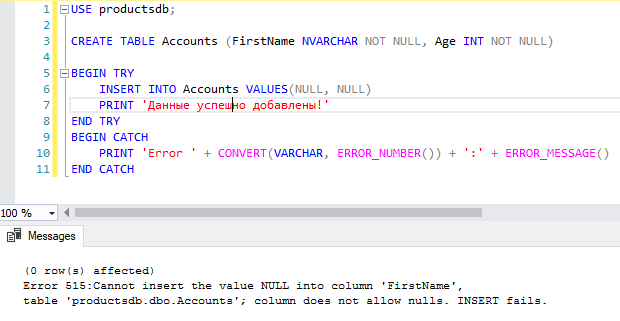
Например, добавим в таблицу данные, которые не соответствуют ограничениям столбцов:
CREATE TABLE Accounts (FirstName NVARCHAR NOT NULL, Age INT NOT NULL)

BEGIN TRY
	INSERT INTO Accounts VALUES(NULL, NULL)
	PRINT 'Данные успешно добавлены!'
END TRY
BEGIN CATCH
	PRINT 'Error ' + CONVERT(VARCHAR, ERROR_NUMBER()) + ':' + ERROR_MESSAGE()
END CATCH
В данном случае для столбцов таблицы вставляются недопустимые данные — значения NULL, поэтому обработка программы перейдет к блоку CATCH:
message_text — сообщение, которое вы хотите показать при ошибке. Замечание: вы можете добавлять пользовательские сообщения для вывода информации об ошибке. Смотрите следующий раздел статьи.
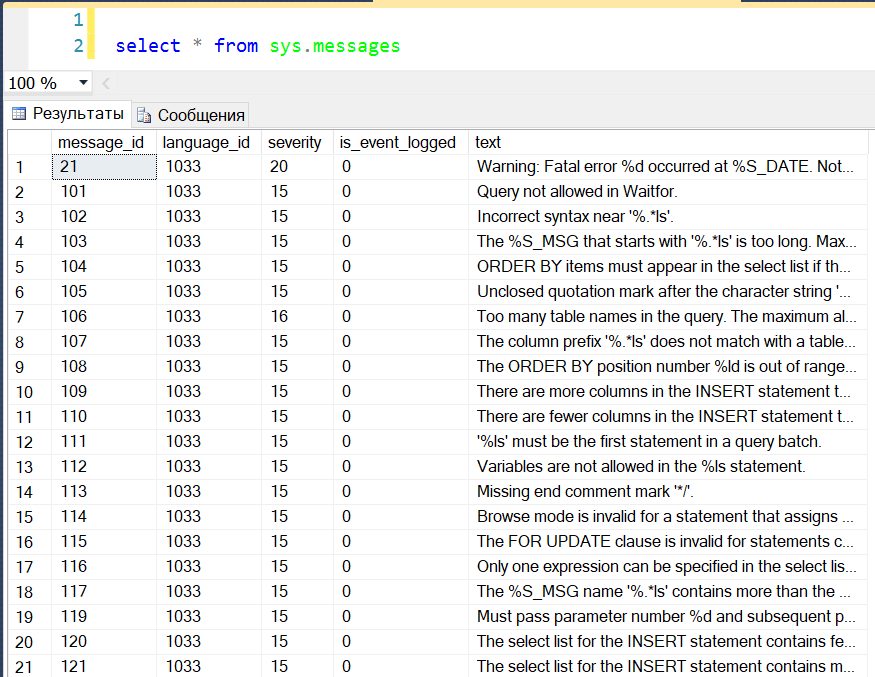
message_id — id сообщения об ошибке. Если вы хотите вывести пользовательское сообщение, вы можете определить этот идентификатор. Посмотрите список идентификаторов сообщений в sys.messages DMV.
Запрос:
select * from sys.messages
Вывод:
severity — серьезность ошибки. Тип данных переменной severity — smallint, значения находятся в диапазоне от 0 до 25. Допустимыми значениями серьезности ошибки являются:
- 0-10
- 11-18
- 19-25
— информационные сообщения
— ошибки
— фатальные ошибки
Замечание: Если вы создаете пользовательское сообщение, сложность, указанная в этом сообщении, будет перебиваться сложностью, заданной в операторе RAISERROR.
state — уникальное идентификационное число, которое может использоваться для раздела кода, вызывающего ошибку. Тип данных параметра state — smallint, и допустимые значения между 0 и 255.
Теперь давайте перейдем к практическим примерам.
Пример 1: использование оператора SQL Server RAISERROR для вывода сообщения
В этом примере вы можете увидеть, как можно отобразить ошибку или информационное сообщение с помощью оператора RAISERROR.
Предположим, что вы хотите отобразить сообщение после вставки записей в таблицу. Мы можем использовать операторы PRINT или RAISERROR. Ниже — код:
SET nocount ON

INSERT INTO tblpatients

            (patient_id,

             patient_name,

             address,

             city)

VALUES     ('OPD00006',

            'Nimesh Upadhyay',

            'AB-14, Ratnedeep Flats',

            'Mehsana')

RAISERROR ( 'Patient detail added successfully',1,1)
Вывод:
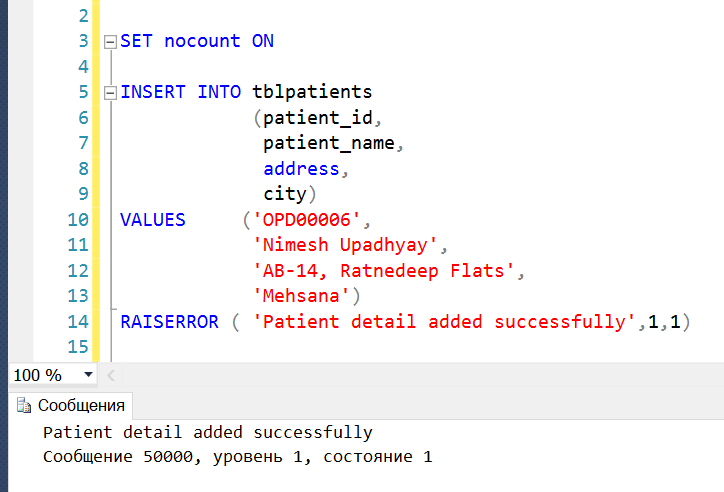
Как видно на рисунке выше, ID сообщения равно 50000, поскольку это пользовательское сообщение.
Пример 2: оператор SQL RAISERROR с текстом динамического сообщения
Теперь посмотрите, как мы можем создать текст динамического сообщения для оператора SQL RAISERROR.
Предположим, что мы хотим напечатать в сообщении ID пациента. Я описал локальную переменную с именем @PatientID, которая содержит patient_id. Чтобы отобразить значение переменной @PatientID в тексте сообщения, мы можем использовать следующий код:
DECLARE @PatientID VARCHAR(15)

DECLARE @message NVARCHAR(max)

SET @PatientID='OPD00007'

SET @message ='Patient detail added successfully. The OPDID is %s'

INSERT INTO tblpatients

            (patient_id,

             patient_name,

             address,

             city)

VALUES     ('' + @PatientID + '',

            'Nimesh Upadhyay',

            'AB-14, Ratnedeep Flats',

            'Mehsana')

RAISERROR ( @message,1,1,@patientID)
Вывод:
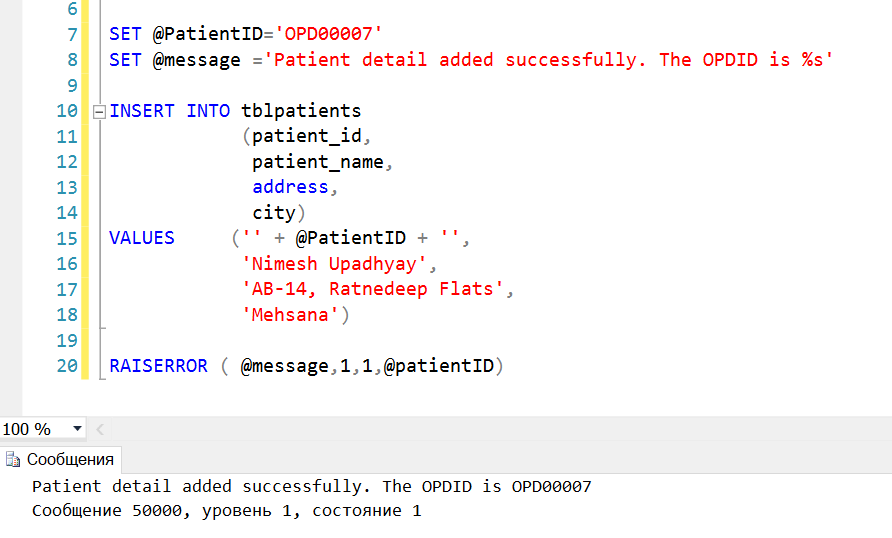
Для отображения строки в операторе RAISERROR, мы должны использовать операторы print в стиле языка Си.
Как видно на изображении выше, для вывода параметра в тексте сообщения я использую опцию %s, которая отображает строковое значение параметра. Если вы хотите вывести целочисленный параметр, вы можете использовать опцию %d.
Использование SQL RAISERROR в блоке TRY..CATCH
В этом примере мы добавляем SQL RAISERROR в блок TRY. При запуске этого кода он выполняет связанный блок CATCH. В блоке CATCH мы будем выводить подробную информацию о возникшей ошибке.
BEGIN try

    RAISERROR ('Error invoked in the TRY code block.',16,1 );

END try

BEGIN catch

    DECLARE @ErrorMsg NVARCHAR(4000);

    DECLARE @ErrSeverity INT;

    DECLARE @ErrState INT;

    SELECT @ErrorMsg = Error_message(),

           @ErrSeverity = Error_severity(),

           @ErrState = Error_state();

    RAISERROR (@ErrorMsg,

               @ErrSeverity,

               @ErrState

    );

END catch;
Так мы добавили оператор RAISERROR с ВАЖНОСТЬЮ МЕЖДУ 11 И 19. Это вызывает выполнение блока CATCH.
В блоке CATCH мы показываем информацию об исходной ошибке, используя оператор RAISERROR.
Вывод:
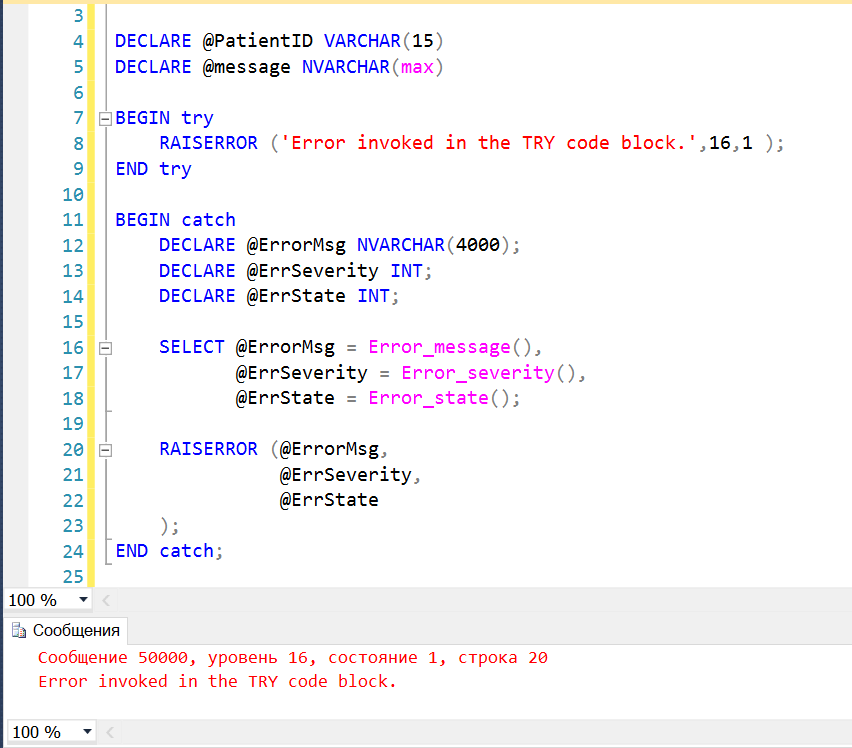
Как вы можете увидеть, код вернул информацию об исходной ошибке.
Теперь давайте разберемся, как добавить пользовательское сообщение, используя хранимую процедуру sp_addmessage.
Хранимая процедура sp_addmessage
Мы можем добавить пользовательское сообщение, выполнив хранимую процедуру sp_addmessages. Синтаксис процедуры:
EXEC Sp_addmessage

  @msgnum= 70001,

  @severity=16,

  @msgtext='Please enter the numeric value',

  @lang=NULL,

  @with_log='TRUE',

  @replace='Replace';
@msgnum: задает номер сообщения. Тип данных параметра — integer. Это ID пользовательского сообщения.
@severity: указывает уровень серьезности ошибки. Допустимые значения от 1 до 25. Тип данных параметра — smallint.
@messagetext: задает текст сообщения, который вы хотите выводить. Тип данных параметра nvarchar(255), значение по умолчанию NULL.
@lang: задает язык, который вы хотите использовать для вывода сообщения об ошибке. Значение по умолчанию NULL.
@with_log: этот параметр используется для записи сообщения в просмотрщик событий. Допустимые значения TRUE и FALSE. Если вы задаете TRUE, сообщение об ошибке будет записано в просмотрщик событий Windows. Если выбрать FALSE, ошибка не будет записана в журнал ошибок Windows.
@replace: если вы хотите заменить существующее сообщение об ошибке на пользовательское сообщение и уровень серьезности, вы можете указать это в хранимой процедуре.
Предположим, что вы хотите создать сообщение об ошибке, которое возвращает ошибку о недопустимом качестве (invalid quality). В операторе INSERT значение invalid_quality находится в диапазоне между 20 и 100. Сообщение следует рассматривать как ошибку с уровнем серьезности 16.
Чтобы создать такое сообщение, выполните следующий запрос:
USE master;

go

EXEC Sp_addmessage

  70001,

  16,

  N'Product Quantity must be between 20 and 100.';

go
После добавления сообщения выполните запрос ниже, чтобы увидеть его:
USE master

go

SELECT * FROM   sys.messages WHERE  message_id = 70001
Вывод:

Как использовать пользовательские сообщения об ошибках
Как упоминалось выше, мы должны использовать message_id в операторе RAISERROR для пользовательских сообщений.
Мы создали сообщение с ID = 70001. Оператор RAISERROR должен быть таким:
USE master

go

RAISERROR (70001,16,1 );

go
Вывод:
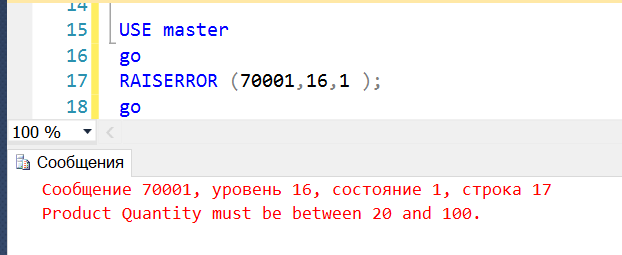
Оператор RAISERROR вернул пользовательское сообщение.
Хранимая процедура sp_dropmessage
Хранимая процедура sp_dropmessage используется для удаления пользовательских сообщений. Синтаксис оператора:
EXEC Sp_dropmessage @msgnum
Здесь @msgnum задает ID сообщения, которое вы хотите удалить.
Теперь мы хотим удалить сообщение, с ID = 70001. Запрос:
EXEC Sp_dropmessage 70001
Выполним следующий запрос для просмотра сообщения после его удаления:
USE master

go

SELECT * FROM   sys.messages WHERE  message_id = 70001
Вывод:
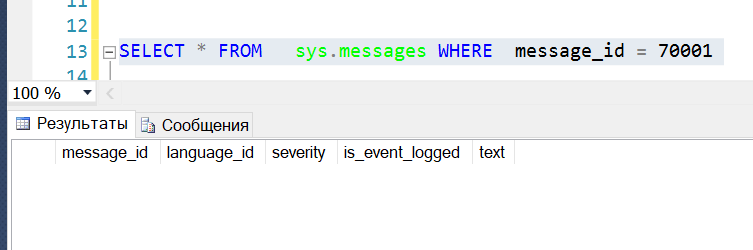
Как видно, сообщение было удалено.