(450 Kb) Автор:
Обновлено: 7.11.2022, 19:37
Опубликовал(а): ColonolNutty
Правила написания и публикации комментариев. За несоблюдение правил — блокировка! Запрещено:
Сообщения, нарушающие данные правила, будут удалены, а злостные нарушители — лишены возможности добавлять комментарии на сайте! Ссылки на внешние сайты разрешены, но только те что относятся к нашей тематике или материалу.
|
|


Sims 4 Community Library – это скорее API, чем сам мод. Сама по себе она не изменяет никаких аспектов The Sims 4, а просто делает написание модов с использованием Python намного проще и доступнее для тех, кто хочет создавать свои собственные моды. Устанавливайте библиотеку только в том случае, если вы установили мод, который ее требует!
Краткий список текущих возможностей
- Обширная библиотека идентификаторов Vanilla Tuning для легкого поиска
- Логирование
- Обработка исключений
- Пользовательские диалоги
- Пользовательские уведомления
- Пользовательские взаимодействия
- Пользовательские иконки
- Обработка событий (создание, диспетчеризация и прослушивание)
- Различные утилиты
- Манипулируйте симами, объектами, погодой, местностью, пользовательским интерфейсом и многим другим!
- Механизм тестирования
Полный список функций и утилит можно найти в документации.
Чтобы начать создавать моды с помощью S4CL, посмотрите проект шаблонов.
Установка
- Скачайте последний zip-архив.
- Распакуйте архив с помощью вашего любимого инструмента архивации.
- Перетащите файлы в каталог The Sims 4/Mods.
Помните, что файл ts4script ДОЛЖЕН находиться либо на верхнем уровне (непосредственно в папке Mods/<ts4script file>), либо в глубине папки (Mods/Blah/<ts4script file>). Любой более глубокий уровень не будет работать.
Требования
- Sims 4 Patch Version 1.90.358.1030 (High School Years) или выше.
- DLC НЕ требуются, вам нужно иметь только обновленную игру (проверьте текущую версию внизу главного меню).
Wicked Whims by Turbodriver and MCCC by Deaderpool are not compatible with this API
Welcome to The Sims 4 Community Library!
Description:
This is more of an API than a mod itself. By itself, it does not modify any aspect of The Sims 4 it simply makes writing mods using Python much easier and more accessible for those looking to create their own mods. Only install the library if you have installed a mod that requires it!
A Short List Of Current Features (Not all features are listed here!):
For a complete list of features and utilities, check out the documentation
— A vast library of Vanilla Tuning identifiers for easy retrieval
— Logging
— Exception Handling
— Custom Dialogs
— Custom Notifications
— Custom Interactions
— Custom Icons
— Event Handling (Creating, Dispatching, and Listening)
— Miscellaneous Utilities
— Manipulate Sims, Objects,. the Weather, the Terrain, the UI, and many more!
— Test Framework
— Write and run tests (Can be run from within the game)
To see the documentation for S4CL check out the docs!
To start creating mods using S4CL check out the template project!
Looking to install S4CL?
Follow the installation instructions below for details.
Looking for the Source Files?
Find them over in the repository here.
Changelog:
For a changelog of the most recent updates and additions, take a look at the releases page.
Installation:
— Download the latest zip archive from the releases page (It is the one with the version number in it Example: sims4communitylib.v0.0.0.zip) (Ignore the ones that contain Source Code in their name)
— Unpack the archive using your favorite archiving tool.
— Drag the files and folder to your The Sims 4/Mods directory. So `mod_data` will be at `The Sims 4/Mods/mod_data` and the other files will be at `The Sims 4/Mods`. Overwrite All if asked!
— Keep in mind the ts4script file MUST be either top level (Directly in the Mods/<ts4script file> folder) or one folder deep (Mods/Blah/<ts4script file>). Any deeper and it will not work.
Requirements:
— Sims 4 Patch Version 1.90.358.1030 (High School Years) or above
— DLCs are NOT required, you only need to have an up to date game (Check the bottom of the main menu for your current version).
Planned Features:
— For a list of planned features, take a look at the repository.
Note for Modders:
— If you have ideas for additions to add or want one of the planned features sooner rather than later, I’m all ears! Let’s work together to create a library that we all can use!
— To see the documentation for S4CL check out the docs!
What is the workflow for working with S4CL?
— Create a project based off of the Template Project
— Use the green button in the top right The Main Page to download this project as a zip file.
— In your project, create another directory called `S4CL`.
— Open the downloaded project and copy the `Scripts/sims4communitylib` folder itself into the `S4CL` folder we created in the previous step. The folder structure should then be: `<Your Project>/S4CL/sims4communitylib`
— Right click the `S4CL` folder -> Mark Directory as -> Sources Root
— The `S4CL` folder should turn a blue color and the `sims4communitylib` folder should look like a folder with a dot (In other words, it should NOT be blue).
— Your folder structure should look like this: `<Your Project>/S4CL/sims4communitylib` at this point.
— Ensure you list in the description of your mod a link to the github releases (You may even link a specific release to ensure compatibility.)
— Ensure you properly attribute S4CL and its author according to the license located at the bottom of this readme.
— In order to prevent users from accidentally installing multiple copies of S4CL into their Mods folder, it is preferred to redirect the users of your mod to download S4CL from either the github repository or releases pages instead of bundling it with your mod.
Copyright:
The Sims 4 Community Library is licensed under the Creative Commons Attribution 4.0 International public license (CC BY 4.0).
https://creativecommons.org/licenses/by/4.0/
https://creativecommons.org/licenses/by/4.0/legalcode
Copyright (c) COLONOLNUTTY
Прежде чем писать в тему, прочтите:
При описании своей проблемы, во избежание ненужной выясняловки, занимающее немало времени и места, пишите сразу:
1. Тип ОС (Windows XX, MacOS), разрядность ОС
Версия Sims 4
Указание какая игра, лицензия, пиратка, Legacy (некоторые моды, например BD, не поддерживают такую версию)
Версии основных модов с датой их выпуска
WickedWhims (WW)
Nisa’s Wicked Perversions (NWP)
Basemental Drugs (BD)
McCmdCenter (MCCC)
Указать, имеется ли DeviousDesires (Wicked Whims Kinky, CNWW более не существует)
Указать, играете ли вы со включенным антивирусником AWAST
Указать после обновления 1.58, прогоняли ли вы свои моды через S4S на тест «Slot195»
Если вопрос касается конкретного мода, указывайте его версию и дату
2. Полное описание проблемы,
желательно прикладывать графику, на которой видна ваша проблема, это поможет быстрее ее понять.
3. Приложить lastException.txt (в дальнейшем LE), если таковой имеется, а также WickedWhims.log, BE-ExceptionReport.html, (находятся в корне папки Electronic ArtsThe Sims 4), BE-PatchScannerReport.html, (последний находится в папке The Sims 4ModsTMEX-Settings), mc_lastexception.html, (находится в одной папке с модом МССС ) и др логи. Логи паковать в архиве rar, zip, 7z, (размещать в посту сам текст LE, в виду некоторых проблем, не надо) и прикладывать к посту.
Просьба отписываться, если проблема решилась и каким образом. Это поможет другим.
Примечание: обладателям Legacy убедиться, что ваши моды поддерживают Legacy
Правило:
Если играешь с DeviousDesires и видишь ошибки, прежде чем писать сюда, первым делом удали, этот самый глючный из всех, мод вместе с его библиотекой.
Скорей всего, у вас все наладится.
——————————————————————————————————————
Прежде чем давать описание проблемы прочитайте про типовые проблемы, (имеющие наиболее частые однотипные вопросы) см. скрытый текст.
— прежде чем писать о своей проблеме, проверьте ее на так называемом чистом сохранении. Создание его: старую игровую папку переименовать, например, The Sims 41. Игра при запуске БЕЗ МОДОВ создаст новую папку The Sims 4. Создаете семью, сохраняетесь и выходите. Это называется ЧИСТОЕ СОХРАНЕНИЕ. Именно оно поможет легко вычислить глюки и проблемы с любым модом или папкой модов.
— проблемы сразу после обновления игры. После обновления игры или установки дополнения, всегда обновляйте моды, ошибки гарантированы. Подготовьте обновленную отдельную папку Mods, и только после этого обновляйте игру.
— если проблема началась после установки новых модов, удалите их все и устанавливайте по одному, контролируя на каком этапе возникает проблема. Для этого перед установкой модов всегда делайте бэкап своей игровой папки в укромном месте.
—Wicked Whims Kinky (CNWW) не пишется под Patreon-версии WW! Только под его публичные версии с LL. Причем каждой публичной версии WW соответствует своя версия Wicked Whims Kinky (CNWW) . Проверяйте по датам выпуска. Дата выпуска Wicked Whims Kinky (CNWW) всегда должна быть позже выпуска соответствующего WW. Несоблюдение этого правила приводит не только к появлению оранжевых сообщений и LE, но и к проблемам в игре.
-Nisa’s Wicked Perversions (NWP) всегда выпускается вслед за версией WW. Проверяйте по датам выпуска. Дата выпуска NWP всегда должна быть позже выпуска соответствующего WW. Несоблюдение этого правила приводит к появлению оранжевых сообщений и LE.
— в виду требований Patreon в части отношений подростков со взрослыми и инцеста, данные настройки были удалены из Patreon-версий мода WW, но не удалены, (и не будут удаляться) из публичных версий LL, теперь для Patreon-версий WW необходим патч, разблокирующий данные настройки TURBODRIVER_WickedWhims_InappropriateUnlock. Этот патч НЕ ТРЕБУЕТСЯ для публичных версий WW.
— если появилась цензура на обнаженных телах, удалите патч Turbodriver_WickedWhims_StreamerMode или TURBODRIVER_WickedWhims_Censorship (старое название того же мода). Этот патч требуется для подготовки видео для различных ресурсов, где имеются такие требования . Если у вас такой необходимости нет, удалите этот патч, для WW он не требуется.
— дыры в телах симок в верхней половине — это следствие грудных слайдеров. Удалите их или обновите их, если обновления существуют. Либо смиритесь с их появлением, но не следует сюда писать, если нет сил читать тему.
— исчезание половины верхней части тела или нижней, может целиком фигура при удалении камеры от сима, лечится только поиском и удалением бракованной одежды CC.
— При пустых строках в русских переводах, или когда перевод полностью не виден, выполняйте следующие правила:
убедитесь, что перевод соответствует версии мода
перевод должен быть всегда в одной папке с модом
перевод должен должен читаться первым в прямом алфавитном порядке (для Windows), при этом учитывать, что спецсимволы и цифры всегда читаются первыми.
В виду специфичности MacOS, который читает в обратном алфавитном порядке, эти правила для него должны выполняться в другом порядке. Желательно впереди названия перевода ставить цифру «1», а мода «2». При таком раскладе перевод будет читаться гарантировано.
— переводы всегда имеют конфликт с оригиналами, это нормально. Исключение, перевод WW (для него делается шаблон).
— при проблемах с WW, примените команду ww.fix, сохранитесь и выйдете. Возможно, при следующем заходе их уже не будет. Если продолжатся, то примените более глубокую очистку этого мода. Описана в «Методике…» на первой странице.
— проблема в интерпретации результатов работы программы нахождения конфликтовModConflictDetector (MCD). Прежде чем, писать, о якобы, большом количестве конфликтов, почитайте о проблеме нулевых конфликтов тут.
— после любых изменений в модах и допах, не забывать удалять файл кеша localthumbcache. Он содержит остатки переменных от предыдущих модов, а также допы. Допы кешируются целиком для более быстрого их чтения.
Чистка сейвов от Турбо
ОЧИСТКА ИГРЫ
Есть вероятность, что после обновления или из-за ошибок у вас будут проблемы с застрявшими переменными. Лучший способ справиться с ними — очистить свою сохраненку.
Прежде чем пытаться это сделать, попробуйте использовать команду ww.fix в игре. Это будет иметь аналогичный эффект для мелкой очистки без сброса настроек.
Вы можете очистить свою сохраненку в два этапа, но выполнение мелкой очистки должно быть достаточно в большинстве ситуаций.
МЕЛКАЯ ОЧИСТКА
WickedWhims сохраняет большинство дополнительных данных во внешних файлах, которые не встроены в игру. Все дополнительные файлы данных можно найти в папке «saves» ( Documents Electronic Arts The Sims 4 saves). Вы можете удалить папку под названием «WickedWhimsMod». Имейте в виду, что это приведет к удалению всех ваших настроек, связанных с WickedWhims и дополнительной информацией. Все настроения, черты, навыки и объекты будут сохранены.
ГЛУБОКАЯ ОЧИСТКА
НЕ ВЫПОЛНЯЙТЕ глубокую очистку, не выполняя сначала мелкую очистку.
Детали данных WickedWhims встроены в игру. Вы можете очистить эти данные, удалив все файлы WickedWhims из папки «Моды» ( Documents Electronic Arts The Sims 4 Mods), включив игру и сохраните ее.
Сохранение игры без установленного мода позволит удалить лишние данные, которые больше не нужны. Вы потеряете все навыки WickedWhims, moodlets, черты и объекты.
————————————————————————————————————————————————————————
После выхода патча 1.52 поломались некоторые прически и черты характера. При этом возникают проблемы с самой игрой, вплоть до краха.
Также возникла проблема бликования персонажей при любом параметре отображения персонажей ниже «Самого высокого». Проблему решать удалением поиска и удаления допов, поскольку они кроме отображения, могут вызывать случайные оранжевые окна и образование LE.
Способ решения вопроса с бликованием персонажей см. подробней тут.
После выхода патча 1.58 поломались элементы декора мебели, объектов. При этом возникают проблемы с самой игрой, вплоть до краха.
Метод поиска сломанных допов Slot195
Для тех, у кого происходит краш игры, нужно сделать следующее:
Скачайте и установите Sims 4 Studio
Запустите её и откройте чит-консоль комбинацией клавиш Ctrl+Shift+C
В появившемся окошке введите «Slot195» (без кавычек)
Далее выберите паку «Mods». Нажмите «Ok».
Дождитесь пока программа просканирует вашу папку «Mods»
Появится окно со списком сломанных модов, которые нужно будет удалить уже вручную из вашей папки «Mods»
Убедитесь, что у вас установлена самая последняя версия Sims 4 Studio, перед тем как сделать всё выше перечисленное.
Проблема с кастомными стульями, на которые симы отказываются садиться, только на игровые от ЕА.
В весеннем обновлении игры были сломаны все кастомные стулья. Симы избегают и выбирают только стулья по умолчанию. Чтобы симы снова на них садились, нужно скачать и установить последнюю версию Sims 4 Studio. Далее через неё пофиксить все стулья (Управление контентом — Batch Fixes — Objects — Fix Chairs). Игру запускать не надо. Дождитесь результата в виде отчета. Запустите программу еще раз нажмите комбинацию клавиш Ctrl + Shift + C и в появившейся консоли введите код «chairfix.savegames.update» без кавычек. Нажмите ОК. Эта команда исправит стулья в вашем сохранении. После этого можно запустить игру.
Метод дихотомии (50/50) поиска мода/допа, вызывающего проблемы.
Другие названия метода, половинного деления, 50/50, возможны другие.
Суть, сократить число проверяемых папок, путем исключения из проверки папок, заведомо чистых от глючного мода.
Если имеется проблема, все свои папки делите на равные половины и проверяете в какой половине находится ваша проблема. Чистую папку убираете, например, в корзину или иное место и снова делите пополам. Снова чистую половину убираете и продолжаете процесс до одной папки. В последней папке точно также делите все файлы пополам и выясняете в какой половине находится ваша проблема. Процесс продолжаете пока не останется проблемный мод/доп.
Существует более сложный способ выявления и удаления плохих CC, (искажающих облика сима, отсутствие лица, крест вместо одежды и прочее), но он предполагает использование Sims 4 Tray Importer.
Создайте сима,
Нажмите на красный крестик на всей одежде, волосах, волосах на лице, обуви, лице, деталях кожи, косметике, шляпах и всех дополнительных категориях, чтобы гарантировать, что сим действительно пустой.
Наденьте на сима подозрительную, поломанную шмотку/аксессуар и более ничего.
Выполните вышеперечисленное для всех категорий нарядов, а также убедитесь, что у сима только один наряд на категорию.
Сохраните сим в вашу библиотеку (трей).
Откройте Sims 4 Tray Importer.
Прокрутите вниз, пока не увидите своего недавно созданного сима и выберите его.
Нажмите «Экспортировать с CC» и сохраните его.
Откройте сохраненный файл и посмотрите на файлы CC. Если вы сделали это правильно, то должны быть только один или два файла пакета (.package).
Вы можете просмотреть эти файлы в Sims 4 Studio, можно S4PE, если вы не уверены, какой файл является плохим CC: Sims 4 Studio — «My CC».
Удалите плохой файл из папки модов Sims 4.
________________________________________________________________________________________________________________________________________
Черный список (ЧС)
Список глючных допов и модов находится в скрытом тексте:
Примечание:
список составляется на основе сообщений участников и названия даются так, как есть в их сообщениях.
При появлении обновлений модов или допов, просьба сообщать для внесения их сюда.
Список поломанных объектов, возникших в версии 1.58
(проблема с уменьшением числа костей до 195)
Список модов и допов, найденные участниками AML
[MiniGiles]Azmodan22_UpdatedRig_MPEdit
[dreamteamsims] Starbucks Fridge
[KKB]kitchen set-3-counter ver.3
[KKB]Korean Style Goods-Bench
[YUMIA] BEAUTY TABLE
[Severinka] TS4 Chemical laboratory — cabinet
[Severinka] TS4 Alwine kidsroom — shelf
[Severinka] TS4 Antique set — chest coffee table
[Severinka] TS4 Evelina nursery — balloons floor lamp
[Severinka] TS4 Evelina nursery — toddlers bed
[Severinka] TS4 Evelina nursery — wigwam (armchair)
[Severinka] TS4 WildWest — bar shelf
[Severinka] TS4 Era livingroom — wooden big coffee table
[Severinka] TS4 Evelina kidsroom — vanity table
[Severinka] TS4 — wood burning stove v1
[Severinka] TS4 — wood burning stove v1
[Severinka] TS4 — wood burning stove v2
[W-Patreon] Celtis Coffee Table
amoebae — OMSP Shelf
AmericanDinerTableWithSockets
BS_20170405_BathIndustryShower
BS_20170406_BathIndustryShowerCurtain
ATS4_object_maruslife_cardboardboxbed_PETS
ATS4_object_maruslife_tentbed_PETS
ATS4_object_maruslife_tentbed_PETS
ATS4_object_garagesale_salecardboard_CL.package
ATS4_object_garagesale_saletablex1_CL.package
ATS4_object_giftsforsims_trubridgecoffeetable.package
ATS4_object_maruslife_cardboardballbed_PETS.package
ATS4_object_maruslife_cardboardboxbed_PETS.package
ATS4_object_maruslife_tentbed_PETS.package
ATS4_object_maruslife_tinbed_PETS.packageShinoKCRS4 Shabby Sidetable
daer0n BIBLIOTHEQUE E.package
daer0n MDN NSD outdoor set Softtub Hot Tub structure.package
DOX atelier fireplace.package
DOX Lorenzo Comfort Set concrete fireplace.package
Dresser Minimalist perfection (short) by Zonbka.package
Jomsims the roulette the table.package
kardofe_Kitchen dining room_Sideboard.package
linzlu-antique-wicker-coffee-table.package
mango_s4_Elisa_Console_Mesh.package
ND_732 — Aura Nursery — Crib Canopy
ND_737 — Aura Nursery — Throw Blanket
ND_828 — Erin Living — Throw Blanket
ND_1050 — Lyne Build Set — Three Quarters Window — 1×1 Left
ND_1051 — Lyne Build Set — Three Quarters Window — 1×1 Right
NynaeveDesign_479 — Soho Kitchen — Counter Island
NynaeveDesign_069 — Altara — Shelves (Shiftable)
OnyxSims4NaomiBookcaseLeftSide01252018
OnyxSims4NaomiBookcaseRightSide01252018
Pilar Brazil DisplayCabinet
Pilar CerezoAparador S4
SIMc-TSR-Tropics4-Firepit
SIMc-Verat-Brazier
SrslySims_FaireDresser
SaudadeSims_CharlestonFM_Dining Merged Al
SanoysimsLykkeLRMetalBookcase
ShinoKCRS4 CliveC N Shower
ShinoKCRS4 Shabby Sidetable
SIMc-Clarity4-Bikedecor
SIMc-Clarity4-Bikedecor
SIMc-Clarity4-CTable1x1
SIMc-Clarity4-EndTable
SIMc-Hacienda4-Cabinet2Pts
SIMc-TSR-Incantatrix-Cauldron
SIMc-TSR-Tropics4-Firepit
SIMc-TSR-ComeCozy4-CabinetH
SIMc-TSR-ScandiFeverL-Fireplace
SIMc-TSR-ScandiFeverL-Fireplace2
SIMc-TSR-Regenerate-Fireplace-CL.
SIMc-TSR-Tropics4-Firepit
SIMc-Recreio4-Brazier
SloxCompactKitchenCupboard1x1Slotted
SloxCompactKitchenCupboard2x1Slotted
SloxHuleaKitchenItemsShelf
SloxPatronExclusive102018Cabinet1
SloxPatronExclusive102018Cabinet2
SloxPatronExclusive102018Cabinet3
SloxPatronExclusive102018Cabinet4
SloxPatronExclusive201906ShelfHigh
Sn4_Bibliophile_bookcase_withbooks
Vega Industrial Shelving
Viviansims4_42_bookshelf
А также другие проблемы, связанные с этой версией и новым дополнением «Университет»
Моды, вызывающие отсутствие меню «Университет» во всех компьютерах
RVSN_Another_One_Bytes_The_Dust_Computer_Neutrals
RVSN_Another_One_Bytes_The_Dust_Computer_Colors.
————————————————————————————————————————————————
Все, что ломает игру:
Прически, ломающие игру
Тяжелое свопирование 2 сек. с интервалом 7 сек. Возникает «дергалка». Вызываются прическами CURBS «Colores Urbanos»
— curbs_yfHair_BettiePage01
— Curbs_hairsS4_36
— Simpliciaty_PrivateHairOctober2019
Скорее всего прически данных авторов следует удалять все. поскольку у авторов принято их делать по одному шаблону.
Черты характера, ломающие игру и/или вызывающие ошибки
— черта булимии (англ. эквивалент не сообщен автором сообщения)
— некоторые из этих черт
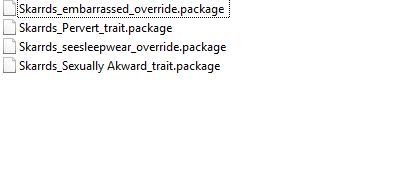
Глючная одежда, вызывающая проблемы с загрузкой игры

— 142-blackrecolors одежда, черный пиджак. При загрузке игры вылет.
Объекты, ломающие игру
Сильные графические артефакты при активации объекта, затем краш игры.
— [Noir and Dark sims 4] Sex Doll — Maria — 01
Скины, ломающие игру
S-Club WMLL ts4 HS3.0 F skin.package
____________________________________________________________________________________________________________________________________________
Проблемы отсутствия частей тела
Нет головы
NANDONG_ymHead Default Replacement without EA Eyelash.package
NANDONG_yfHead Default Replacement without EA Eyelash.package
Проблема отсутствия тел у мужских симов
— LLS_PectacularNewReplacement
— [fixed]LUUMIA_DR_BODEII_Lean.package
Проблема отсутствия верхней половины тела
— [THISISTHEM] Denny’s Skin Overlay
PK — Pastel Streak Crop Tank Top.package
PK — Floral Crop Top.package
PK — Fur Crop Tank Top.package
Проблема отсутствия нижней половины тела
142-blackrecolors
[fixed]LUUMIA_DR_BODEII_Lean.package
Проблема отсутствия верхней половины женского тела
LUUMIA DR’s tit
Проблема отсутствия нижней половины женского тела
Simtasia’s Female Body Bottom.
Проблема отсутствия лица связан с ресницами
— epp-noEAeyelashhesUPDATE.package
— Cien-No EA Lashes For-Females only TN YA AD EL AL Vamp доп обновлен, проблема решена.
— ZombieApocalypse_Decapitated Head_NoHead
— NANDONG_yfHeadDefault
SympxlsWinterScarfRC.package
Пропадание руки из-за слайдера
— LUUMIA_mod_HandFingerSliders (пока не обновлен)
Проблема черного пениса
— скинтон S-Club WM ts4 skincolor 09 (22.09.2015)
— скинтон Simsperience_FreshSkins_1-63_Fixed (15.10.2018)
— MsBlue_LauraSkintones
— MsBlue_SkintoneSetV1
— MsBlue_SkintoneSetV2
— PauleanR_SkinTone_v1.0
— PYXIS_StuckOnYou_Skintones_NATURAL-IL
— SIMSINSPRING_Genetic-HumanSkin_BNatural-Fair
— SIMSINSPRING_Genetic-HumanSkin_BNatural-Pale
Проблема зеленого пениса
— скинтон xmiramiramelaninpack1 (27.10.2017)
Проблема отделения языка от лица и пениса у мужчин от тела
— merman hair physics mod
— NANDONG_yfHeadDefault
— NANDONG_ymHeadDefaultHQ
— NANDONG_OverideSliderHeadJawMouthForTongueCompability
— Non_EVE.package из пакета BodySelectorNonEve.zip
Другие проблемы, связанные с телом
Проблема застревания симок в розовом лифчике
Вина лежит на одном из этих модов
— REDHEADSIMS_S4Presets_ChubbyV2
— EVOL_EVOLVED-ExpandedPhysiqueRange_x3
— [fixed]LUUMIA_DR_BODEII_Lean
— [fixed]LUUMIA_DR_TIT-E_Medium
Точнее не сказать, проблема так обозначена по сообщениям участников на LL.
Пресет носа вызывает порчу лица персонажа (чернота лица), и черный силуэт вместо фигуры.
-obscurus_nose_presets_2m.package
— а также MidBobBangsConversion by KiaraZurk
Черный силуэт в режиме жизни (в CAS нормально)
— HallowSims_PoseidonsimsTulip
Причина невозможности выбрать цвет глаз в CAS (по умолчанию становятся карими)
— Alf-si_eyes_04_HQ_default
— [Ts4]Taty_JemEyes_Default
Причина нарушения элементов меню в CAS (отсутствие крестиков и др.)
CC wrench override
——————————————————————————————————————-
Разные проблемы
Исчезновение одежды
DarkCottageCore.package
Большая очередь из взаимодействий
BaddiesHangoutV3.package
BaddiesHangoutV3.ts4script
Объекты, вызывающие образование LE
PC-TS4-HG-Bathtub
iradium metal shower
MOTHERLODEshower
Невозможность увидеть профиль сима
Excitable Trait Snowiii95.package
Enchanter Trait 2.0 Snowiii95.package
Depressed Trait Snowiii95.package
FalseHope_SuicidalBehaviorDisorder_v2.package
FalseHope_SuicidalBehaviorDisorder_v2.ts4script
Serial Killer — BASE GAME + ALL AGES.package
Entomophobia — JUNGLE ADVENTURES REQUIRED — ALL AGES.package
JustAnotherSimsFanLongerInteractionQueue16054.package
Lover_Trait.package
Darkening_Demise_customtrait_nymphomaniac_icon.package
Darkening_Demise_customtrait_horny_icon.package
Darkening_Demise_customtrait_attention_whore_icon.package
Мод, который не дает создать сима с историей
— NoMoreVampireGrowling_DDF
— или NoMoreVampireGrowling_СDF
— или NoMoreVampireGrowling_CAS Only
Моды, возможно, обновлены.
Невозможно создать любое мероприятие через календарь или по телефону, пустое окно без списка мероприятий
Требует обновления мод
— Peculiar Desires Mod
MSQSIMS_New_Year’s_Eve_Party_Event.package
———————————————————————————————————————-
Допы, вызывающие бликование персонажей.
Бликование возникает при установке ниже самого высоко уровня качества отображения симов в настройках графики.
Мейкап (вызывал бликование симов)
— некоторые помады от FashionRoyaltySims, в частности (могут найтись другие от того же автора)
FRS Kara Lip Liquid
FRS Lipstick N25 (HQ) по мотивам Библии Карли.
Прически
— некоторые прически от Newsea, в частности J139 (могут найтись другие от того же автора)
— многие прически от WINGS, в частности, (могут найтись другие от того же автора)
WINGS HAIR TS4 OE0316 F
WINGS HAIR TS4 OE0510 F
WINGS HAIR TS4 OS0514 F
WINGS DAY TS4 OS0408 F
Одежда
Вызывает бликование одежды от Harmonia, Cleotopia, by bukovka, Devilicious, Laupipi, Leia, Sims2fanbg и др. Проверяйте этих авторов в первую очередь или просто удаляйте, не проверяя, поскольку, судя по сообщениям участников, приходилось удалять до 80 допов от Harmonia.
В частности бликование вызывают
по bukovka_ya female_skirt_ultra shor.package
Cleotopia-AshleyRippedHighWaistedShorts.package
Cleotopia-LaceSummerTopBralet.package
Cleotopia-LittleDenimShortsRipped40.package
Cleotopia-SkinnyJeansBasicAnkleBootcut.package
Cleotopia-ZipperLeggings.package
Devilicious-AF-EternallyWeddingDress.package
Laupipi_Camilaвытягивание нитей.package
Лея-SlaveOutfit.package
MidBobBangsConversion по KiaraZurk (черный цвет) .package
Pixel_RealisticBottom_Chuby.package
Sims2fanbg_Dress_with_leather_jacket_new mesh.package
____________________________________________________________________________________________________________________________________________
—————————————————————————————————————————————————
Методические материалы по Sims 4
(см. скрытый текст)
Текст будет дополняться.
Troubleshooting Steps:
The following are a few steps used to troubleshoot Mods. These steps can be used for mods that don’t use The Sims 4 Community Library as well as those that do use The Sims 4 Community Library. Depending on how a Mod has been setup, these troubleshooting steps may or may not work for you!
- These steps may be used to track down rogue mods causing issues as well! (Even if unrelated to S4CL itself)
Step One:
- Ensure you have the Custom Scripts option enabled in-game in the settings
- At the Main Menu Press
Esc - Open
Game Options - Open
Other Settings - Make sure the
Enable Custom Content and Modsoption is checked.
- If it was not checked, restart your game.
- At the Main Menu Press
- If you get a corrupted file error while unzipping, update the version of your 7-zip and start over
- Verify, that you have fulfilled all of the requirements and their specific versions for the Mod being troubleshooted.
- It should be obvious, but if a Mod has directed you to these Troubleshooting Steps, ensure you have installed S4CL.
- Verify, that you have completed all of the steps in the installation process (Steps for installation are likely described in the description of the Mod)
- Ensure you have not accidentally installed duplicates of the Mod you are troubleshooting.
- Ensure you have not installed duplicates of the requirements of the Mod you are troubleshooting.
- If you have done all of the above and the Mod still does not work, move to Step Two
Step Two:
- Rename your
DocumentsElectronic ArtsThe Sims 4folder toDocumentsElectronic ArtsThe Sims 4.bak- This will ensure Sims 4 will recreate the folder in a clean state.
- You can always recreate your existing game by deleting the
DocumentsElectronic ArtsThe Sims 4folder and renamingDocumentsElectronic ArtsThe Sims 4.baktoDocumentsElectronic ArtsThe Sims 4
- Start Sims 4 and create a simple household with an Adult, a Teen, and a Pet (Cat or Dog, if you can)
- If you cannot create a household or cannot load The Sims 4, skip this step.
- Save and exit the game
- Download and install the Mod (and all of its requirements) you are trying to get working
- Start the game with the household you created above (or create a new one, if the previous step was skipped)
- Does the problem persist?
- Yes:
- Go to the next step
- No:
- You have some other Mod or a bad save that is causing you problems
- Yes:
- Does the problem persist?
Step Three:
- Add your other Mods one by one
- Does the problem persist?
- Yes:
- You have found the Mod that causes things to break, report it to the author of that Mod
- No:
- Continue adding Mods one by one until the problem begins to appear
- If you’ve run out of Mods to add, then it was probably just a fluke in the system. (Magic sparkle sparkle)
- Yes:
- Does the problem persist?
Step Three (Alternative, 50/50 method)
- Put half your mods in
- Does the problem persist?
- No:
- This means the mods you haven’t added contain the mod that breaks things.
- Yes:
- Repeat this step until it stops breaking.
- No:
- If you’ve added all of your mods and it is still breaking, this could point to a couple of things:
- A previous step may have been missed, which can sometimes happen.
- There may actually be a problem with the mod you are troubleshooting and you should follow the Problem Reporting steps below.
- Does the problem persist?
Problem Reporting:
- Send a message in the Discord server or Post in the Support Thread of the Mod being troubleshooted, while providing the following details:
- A detailed description of the problem (Or your best guess at the time it occurred)
- These are essentially the steps you took that led you to the problem, or a best guess of what you were doing at the time of the error.
- Example: I clicked on the fridge to make a Sim grab a plate of leftovers, then they put it down and immediately began doing flips out of nowhere.
- These are essentially the steps you took that led you to the problem, or a best guess of what you were doing at the time of the error.
- Upload the following files that are located in the
DocumentsElectronic ArtsThe Sims 4andDocumentsElectronic ArtsThe Sims 4mod_logsfolders- THESE FILES ARE ABSOLUTELY REQUIRED IF YOU HAVE AN ORANGE NOTIFICATION BOX IN-GAME
- The
lastexception.txt (lastexception)file - The
<Mod Name>_Exceptions.txt (<Mod Name>_Exceptions)file - Only provide
<Mod Name>_Messages.txt (<Mod Name>_Messages)files if asked for.
- Information about the Sim(s) you are having problems with (Adult, Teen, Pet, etc.)
- The current version of all requirements of the Mod you are troubleshooting that you have installed. («Most Recent» or «Latest» are not valid answers)
- This is an example of what you’d say if you are reporting the problem for the Custom Gender Settings Mod (Since it has a requirement of S4CL)
- «I am using version 1.30 of S4CL and version 1.0 of Custom Gender Settings.»
- This is an example of what you’d say if you are reporting the problem for the Custom Gender Settings Mod (Since it has a requirement of S4CL)
- Your current Sims 4 version. Look at the bottom of the Main Menu to find the version.
- A detailed description of the problem (Or your best guess at the time it occurred)
Things that will NOT help to solve the problem you are having:
- The mod is not working!
- What about the mod isn’t working and what do you mean by «not working»?
- The thing is not working!
- What do you mean by «not working»?
- A screenshot of the orange «error» text box you get in-game telling you there is a problem
- This does not contain any useful information to a Mod Author. What it does tell you is where you can find the file you need to upload.
- A «prettified» exception message.
- Most of the time the most important details are cut out from the «prettified» exceptions which makes them useless for debugging issues.
- A one line statement only containing the main message of the exception.
- Doing this tells me nothing about WHERE the problem is, it only tells me WHAT the problem is. I need the full details of exceptions to properly debug issues!
- A generic statement «I has problem, fix it please!»
- I don’t know what your problem is or if it is even related to the Mod (Mod Authors are not psychiatrists or mind readers!)
- A statement such as «I had a problem with your mod, so I uninstalled it, just wanted to let you know»
- This doesn’t help anyone and is very rude, even if you didn’t mean it that way!
- If asked what version of something you are using, you answer with «latest» or «newest».
- There are a couple issues by saying you are using «latest»:
- Latest for me could mean a completely different version from you, you or I may not even know what the latest version is.
- Most problems occur due to a difference in versions. Saying «latest» makes this avenue of troubleshooting impossible.
- There are a couple issues by saying you are using «latest»:
Community Library for The Sims 4!
Description:
This is more of an API than the mod itself. It doesn’t do anything by itself and is intended as a framework for other Sims 4 developers to use in their own codebases. Install the library only if you have installed a mod that requires it!
German translation by PLG_Dante: Download
Russian translation by Origamika : Download (suitable for all versions — updated 10/28/2020)
Chinese translation by Zoophx: Download (1.73)
Polish translation by astercholik: Download (1.77)
Documentation
To start creating mods with S4CL, check out the project template !
Requirements:
— The Sims 4 Version at least 1.80.69.1030 (Cottage Living)
Changelog:
https://github.com/ColonolNutty/Sims4CommunityLibrary/releases
Installation:
— Download the latest zip archive above.
— Unpack the archive using your favorite archiving tool.
— Drag files / folders to Mods directory.
— Keep in mind that the ts4script file must be either a top level (directly in the Mods / < ts4script file > folder) or one deep folder (Mods / Blah / < ts4script file>). Even deeper, and nothing will come of it.
!!!Alert!!!
To those using this mod, if you are told that my mods do any of the following:
— Will break or cause severe issues within your game
— Contain themes endangering or abusing Children
— Contain themes endangering or abusing Animals
— Contains illegal content
Please know that ALL of this is misinformation, and completely false.
The mod authors known as TURBODRIVER and Deaderpool have chosen to Stalk, Target, and Cyberbully me and anyone who chooses to use any of my mods. They have chosen to spread misinformation (slander) about my mods for years, and have gone so far as to put malicious code in Wicked Whims targeting my mods (and by extension those who make mods using S4CL which is a fairly large chunk of mod authors). I believe in creating mods that better the community as a whole, even if I have no personal interest in the criteria of the mod itself. Even the API called Sims 4 Community Library, which I have created for new and old mod authors to create simpler and more stable mods while also providing a vast store of functionality for said mods, has been targeted by these mod authors. They go on witch hunts, banning or threatening anyone who dares join my discord. They have threatened other mod authors, discords, websites, and various other forms of media into also banning and threatening people for using my mods.
Sadly, this has put me in a place where the very community I love and support, slanders me and continues to spread the same misinformation, without knowing that many of the negative things being said have zero evidence to back them and are nothing more than cyberbullying.
Though these Mod Authors are extremely successful, they have been using their popularity to ruin my reputation and railroad the community into believing these lies. This has caused many discords to ban people for using any of my mods and it has turned my name into something that frightens everyone when it is even mentioned. I try my best to support and create content for this community out of my own pocket and this is completely unacceptable.
Please do not believe everything you read on the internet. There’s always two sides
to a story but above all there is the absolute truth. Its up to us as people to find it out
and refrain from hopping onto bandwagons stirred up by popular mod authors.
I love this community, and despite what TURBODRIVER and Deaderpool say to ruin me, I will continue doing my best to support this community, noone deserves this treatment, especially not someone who makes mods for free.
Previous versions:
There is not really a reason to use an older version. S4CL is always and will always be backwards compatible.
Обновлено: 28.01.2023
Description:
This is more of an API than the mod itself. It doesn’t do anything by itself and is intended as a framework for other Sims 4 developers to use in their own codebases. Install the library only if you have installed a mod that requires it!
Russian translation by Origamika : Download (suitable for all versions — updated 10/28/2020)
Chinese translation by Zoophx: Download (1.73)
Documentation
To start creating mods with S4CL, check out the project template !
Requirements:
— The Sims 4 Version at least 1.80.69.1030 (Cottage Living)
— Choose Sim Dialog
— Custom Icons:
— Right Arrow
— Navigate Into Arrow
— Question Mark
— Six Sided Dice
— Checked Box
— Unchecked Box
— Notifications
— Sim Icons
— Warnings
— Errors
— Info
— Story Dialogs (Add custom buttons, add sim icons)
— Sim Picker
— Prompt the player to choose a sim or a number of sims from a dialog.
— Custom Notifications
— Basic Notification — Display a notification with a title and description of varying urgency.
— Interactions
— Registration
— Register Interactions to:
— Terrain
— Ocean
— Objects (Sims, Furniture, etc.)
— Custom Interactions
— Create interactions the run Python code in their backends
— Interaction Types:
— CommonInteraction — Inherit from this to hook into an interaction and add python functionality to its functions
— Immediate Super Interaction — An interaction that doesn’t require a target to perform. It is started immediately and without an animation.
— Super Interaction — Like the Immediate Super interaction but these require a target to perform. (sim_chat is one example of a Super Interaction)
— Mixer Interaction — Use this for custom Mixer interactions.
— Social Mixer Interaction — Use this for custom Social Mixer interactions.
— Terrain Interaction — Use for interactions that appear when clicking on the ground.
— Perform logical checks to determine whether or not to show an interaction
— Or display an interaction as disabled, with a displayed tooltip that shows when the player hovers the interaction.
— Run Python code when an interaction is started, cancelled, or has finished.
— Custom Interaction Tooltips
— Display tooltips on interactions that display on hover.
— Locate CommonInteraction for an example of how to utilize custom tooltips in your own interactions.
— Event Handling
— Create, Dispatch, and Handle Dynamic Events
— Handle events without needing a reference to the code that sends the event.
— Decouple that code!
— Interval Events
— Run functions on millisecond intervals.
— Run functions once, after an amount of time has passed.
— Interaction events (Queued, Started, Ended, Interaction Outcomes)
— Sim
— Spawn — Occurs when a Sim spawns or is born into the world.
— Initialization — Occurs when a Sim is initialized (before being spawned).
— Occult Swapping — Occurs when a Sim changes to a different Occult (i.e. Human to Mermaid or Human to Vampire or vice verse)
— Zone Events
— Zone Update — Occurs every time the zone updates. (Basically every time the game ticks)
— Zone Teardown — Occurs every time the zone is torn down. Occurs before a loading screen, but only after a Zone had been previously loaded. (See Zone Early/Late Load)
— Zone Save — Occurs every time a zone is saved. This occurs before the game saves for the player. Be careful with this one!
— Zone Early Load — Occurs when a zone is loaded, but before the players household has loaded.
— Zone Late Load — Occurs when a zone is loaded, but after the players household has loaded.
— Utilities
— Sim utilities
— Get the Active Sim
— Get Sim Info, Sim Instance, and Sim Ids
— Get All Sims nearby and filter which types of sims to get (Age, Species, Occult, Traits, Buffs, etc.)
— Occults — Check Occult Types of sims.
— Ages — Get/Set/Check Ages of sims.
— Genders — Get/Set/Check Genders of sims.
— Species — Get/Set/Check Species of sims.
— Buffs — Add/Remove/Check Buffs of sims.
— Traits — Add/Remove/Check Traits of sims.
— Sim State — Check various states of sims. (Wearing towel, Dying, etc.)
— Sim Spawn/Despawn — Spawn, Despawn, and Delete Sims.
— CAS
— Outfit — Set/Get/Update/Check the current outfit of sims.
— CAS Utils — Attach/Detach/Check cas parts of a sims outfit. You can put any cas part in any BodyType via these.
— Components — Get various components of objects (Statistics, Traits, Buffs, etc.)
— Resources — Load Resources or Tuning files by their identifiers. (Buffs, Traits, Statistics, Snippets, etc.)
— Icons — Load Icons provided by S4CL or your own Icons.
— Types — Determine the type of objects without needing to use isinstance or having a reference to the type itself in your own code.
— Time — Manage time. Pause the game, get/change the current game speed, get/set the time of day, etc.
— Collections — Determine if an object is a collection, combine collections, flatten collections, etc.
— Injection — Inject custom functionality into functions
— IO (Input/Output) — Write string data to a file or load string data from a file.
— Stack Trace — Retrieve the complete and full stack trace.
— Localization utilities
— Retrieve LocalizedStrings from StringTables of .package files.
— Format tokens into LocalizedStrings
— Display text in specific colors (Colors can be added by request)
— Blue
— Green
— Red
— Create Localized Tooltips — Use to display tooltips on interactions (while also displaying the interaction)
— These can be useful to give more information to the player about why something cannot be performed, instead of simply hiding that something.
— Weather
— Statistics
— Motives
Installation:
— Download the latest zip archive above.
— Unpack the archive using your favorite archiving tool.
— Drag files / folders to Mods directory.
— Keep in mind that the ts4script file must be either a top level (directly in the Mods / < ts4script file > folder) or one deep folder (Mods / Blah / < ts4script file>). Even deeper, and nothing will come of it.
To those using this mod, if you are told that my mods do any of the following:
— Will break or cause severe issues within your game
— Contain themes endangering or abusing Children
— Contain themes endangering or abusing Animals
— Contains illegal content
Please know that ALL of this is misinformation, and completely false.
The mod authors known as TURBODRIVER and Deaderpool have chosen to Stalk, Target, and Cyberbully me and anyone who chooses to use any of my mods. They have chosen to spread misinformation (slander) about my mods for years, and have gone so far as to put malicious code in Wicked Whims targeting my mods (and by extension those who make mods using S4CL which is a fairly large chunk of mod authors). I believe in creating mods that better the community as a whole, even if I have no personal interest in the criteria of the mod itself. Even the API called Sims 4 Community Library, which I have created for new and old mod authors to create simpler and more stable mods while also providing a vast store of functionality for said mods, has been targeted by these mod authors. They go on witch hunts, banning or threatening anyone who dares join my discord. They have threatened other mod authors, discords, websites, and various other forms of media into also banning and threatening people for using my mods.
Sadly, this has put me in a place where the very community I love and support, slanders me and continues to spread the same misinformation, without knowing that many of the negative things being said have zero evidence to back them and are nothing more than cyberbullying.
Though these Mod Authors are extremely successful, they have been using their popularity to ruin my reputation and railroad the community into believing these lies. This has caused many discords to ban people for using any of my mods and it has turned my name into something that frightens everyone when it is even mentioned. I try my best to support and create content for this community out of my own pocket and this is completely unacceptable.
Please do not believe everything you read on the internet. There’s always two sides
to a story but above all there is the absolute truth. Its up to us as people to find it out
and refrain from hopping onto bandwagons stirred up by popular mod authors.
I love this community, and despite what TURBODRIVER and Deaderpool say to ruin me, I will continue doing my best to support this community, noone deserves this treatment, especially not someone who makes mods for free.
Previous versions:
There is not really a reason to use an older version. S4CL is always and will always be backwards compatible.
В The Sims 4 не работают сохранения
Чтобы работали сохранения вы должны быть подключены к сети в Origin.
The Sims 4 не запускается или отсутствует msvcp120.dll
Установите vcredist_x64 и vcredist_x86, из папки Installer, которая находится в каталоге игры.
Черный экран при запуске The Sims 4
Удалите игру из Origins
Теперь удалите Origins из Панели Управления, если его там нет, то пройдите по такому пути C: Program Files (x86) /Origin/OriginUninstall.exe
Перезагрузите компьютер
Переустановите Origin
Переустановите Sims 4
Играйте
При запуске игры — Вне диапозона. Есть решение?
Заходим в ДокументыElectronic ArtsThe Sims 4. Находим и открываем файл Options.ini.
В нем ищем строку fullscreen = 1 и меняем на fullscreen = 0.
Далее заходим в игру, настраиваем графику под допустимые значения и играем.
P.S Если вы не нашли решение своей проблемы,напишите об этом в комментариях и мы попробуем вам помочь.
Писать можно только о проблемах и их решениях !

Мы заметил, что у многих пользователей часто возникают вопросы по работе и установке мода DeviousDesires. Поэтому и решил подробно рассказать как нужно правильно установить его, чтобы мод функционировал должным образом.
- Для начала очистите кэш игры. Те, кто уже пользуется DD и имеет проблемы с ним, удалите все файлы и папки связанные с данным модом, в том числе и папку mods log, которая находится по адресу: Документы-Electronic Arts-The Sims 4.
- Скачиваем библиотеку sims4communitylib с официального сайта и устанавливаем все файлы из архива в папку Mods не глубже одной подпапки. Она необходима для работы абсолютно всех модов от ColonolNutty.
- Создаём папку с названием к примеру «DeviousDesires» и помещаем её в папку «Mods». Скачиваем сам мод DeviousDesires. Открываем архив и извлекаем оттуда в созданную вами папку «DeviousDesires» все файлы и папку под названием «deviousdesires_features». Папку с названием «mod_data» устанавливаем в корень папки «Mods».
- Скачиваем и устанавливаем мод Mod Settings Menu (MSM). Он служит для того, что все настройки мода отображались в игре. Его можно установить как в папку «Mods», не глубже одной подпапки, так и в папку с самим модом, но уже без подпапок.
- Скачайте и установите необходимые моды Custom Slider Framework и CSF Adult Body Sliders. Установить их можно также в папку с самим модом DD без подпапок.
- Русификаторы устанавливайте в те папки, где расположены файлы надлежащих для них модов.
- Также можете установить файл Cruxmyth Customization.json, созданный другим автором. Он служит для интеграции анимаций из мода WW в мод DD. Файл должен быть установлен по адресу: Electronic Arts/Sims 4/Mods/mod_data/deviousdesires/animation customization.
— Примите к сведению ещё тот факт, о котором говорил сам ColonolNutty, что мод создаётся с использованием официальной лицензионной игры от Origin и на некоторых пиратских версиях игры он может давать ошибки. И даже не столь сам мод, а библиотека.
— Ко всему прочему, упомянем ещё один факт: все модули для DD являются необязательными (опциональными). Можете установить их все, либо то, что считаете для себя нужным. Все модули располагаются в папке «deviousdesires_features».
— При обновлении мода, не удаляйте папку «mod_data», так как она содержит в себе все ваши настройки для DD. Обновляйте там только те файлы, которые обновились с выпуском новой версии DD (если таковые имеются).
— DeviousDesires в настоящее время является независимым модом от WickedWhims. Он не ломает WW и не ломается им.
Если всё же у вас будут иметься ошибки, созданные непосредственно модами CN, то вы можете обратиться с ними на официальный канал Discord CN.
The text was updated successfully, but these errors were encountered:
MiraMora commented Sep 5, 2020
Yeah, I have the SOL mod and was trying to send my sim to the hospital but the error came up. It does that to almost everything I try to do :/
ColonolNutty commented Sep 5, 2020
I’m going to figure out a way to log what interaction is actually causing the issue, so it can be debugged better in the future.
MiraMora commented Sep 5, 2020
Thanks, take your time <3
ColonolNutty commented Sep 5, 2020
See if you can reproduce the same issue with version 1.31 of S4CL. Then upload your log here. It may give us additional insight into which interaction is actually causing the error.
MiraMora commented Sep 5, 2020
okay ill try that
MiraMora commented Sep 5, 2020

its still the same with a few reactions but I could now do certain stuff without the error
Of course it’s still throwing an error! Give me your log file as I have asked.
It is NOT the same.
MiraMora commented Sep 5, 2020
Aha, the interaction name! Perfect:
Error occurred while running _on_interaction_queued for interaction with short name KawaiiStacie: Visit_Hospital_Now and display name hash: 11366770
Find the mod with this interaction and it will be the mod causing the error.
KawaiiStacie: Visit_Hospital_Now
and before you ask, NO it is not an «incompatibility» with S4CL, whoever made the mod causing this error simply wrote it in a crappy and broken way.
MiraMora commented Sep 5, 2020
Oh, thanks. Sorry I couldnt understand I didnt read that well lol
MiraMora commented Sep 5, 2020
So it would be best if I just deleted it?
ColonolNutty commented Sep 5, 2020
If you know of a way to contact the author of that mod, that would help them solve it, otherwise yeah, I’d just delete it or not even use the interaction.
MiraMora commented Sep 5, 2020
OK, thanks again
You can’t perform that action at this time.
You signed in with another tab or window. Reload to refresh your session. You signed out in another tab or window. Reload to refresh your session.
Читайте также:
- Симс 3 делюкс системные требования
- Raid shadow legends как запустить в 2 окна
- Dark souls как убрать интерфейс
- Как запустить фоллаут шелтер на 32 битной системе
- Как включить прожекторы на машине в гта 5