The “OpenGL Error 1282 (Invalid operation)” is one of the common errors occurring in Minecraft. When this error occurs, you may experience lag issues or error message pop-ups. It’s annoying. But don’t worry. You can fix the error easily with the following methods.
There are seven methods available for you to try. You can try them one by one:
Method 1: Manually add the opengl32.dll file
Method 2: Update graphics card drivers
Method 3: Disable shaders
Method 4: Update OptiFine
Method 5: Update Java
Method 6: Try a different game version
Method 7: Turn off Show GL Errors
Method 1: Manually add the opengl32.dll file
The OpenGL error 1282 can be caused by missing the opengl32.dll file in the Minecraft folder. To fix the error , you can try manually adding the opengle32.dll file to the folder. Many Minecraft users have reported they fixed the same error with this fix. You can give it a try and see if it works for you too.
You can follow these steps to manually add the opengl32.dll file.
Firstly, download the opengl32.dll file.
1) Download the “OpenGL fix.7z” file to your computer (you can download the file from mediafire.com).
2) Extract the file.
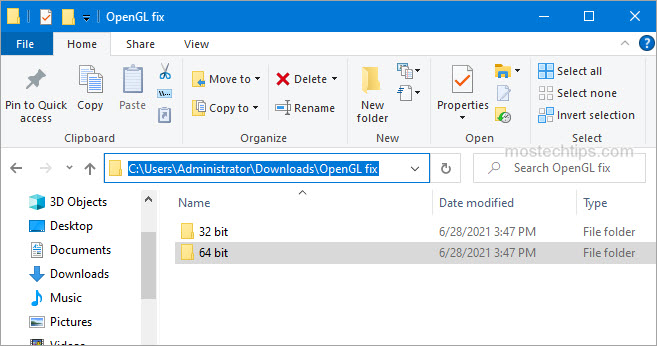
3) In the extracted folder, you’ll see two subfolders: 32 bit and 64 bit. Select one of them according to your Windows version (How to check what Windows version you have?). In my case, I have Windows 10 64-bit version, then I need to open the 64 bit folder (see the screenshot below).
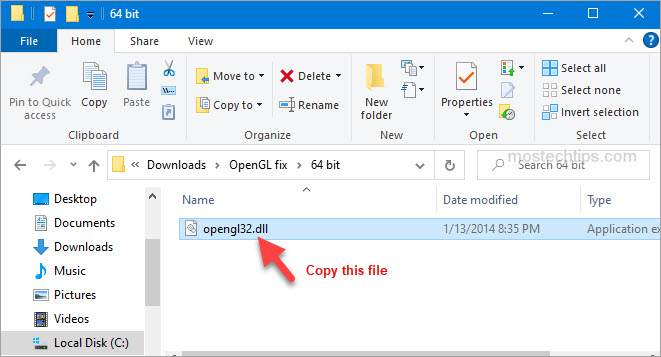
4) Copy the opengl32.dll file.
Secondly, paste the opengl32.dll file to the Minecraft folder.
1) Right-click on the shortcut of Minecraft and then select Open file location.
2) Navigate to the following location
MinecraftRuntime*JRE Version*bin
Note: The JRE Version is simply a placeholder. It depends on the game version you have, for example, Jre-x64, or something like that.
3) Paste the opengl32.dll file to the bin folder mentioned in Step 2).
4) Re-launch Minecraft and see if the error persists. If the error persists, continue to try Method 2.
Method 2: Update graphics card drivers
A faulty or missing graphics card driver can cause the Minecraft OpenGL 1282 error. You can try updating your graphics card driver and see if it helps.
You can update the graphics card driver via Device Manager:
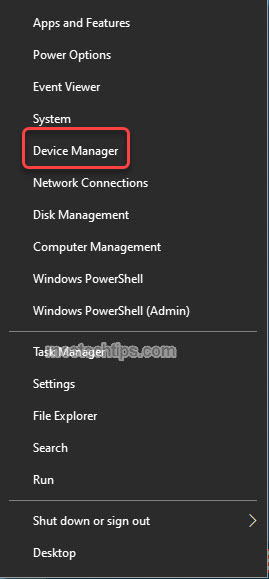
1) Right-click on the Start menu button and select Device Manager. Then the Device Manager window will open.
2) Expand category “Display adapters”. Right-click on your graphics card device and then select Update driver.
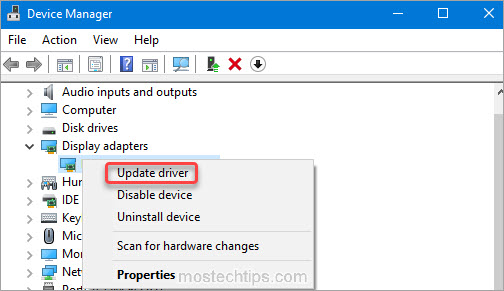
3) Select Search automatically for drivers. Then Windows will search for a new driver and install the driver automatically.
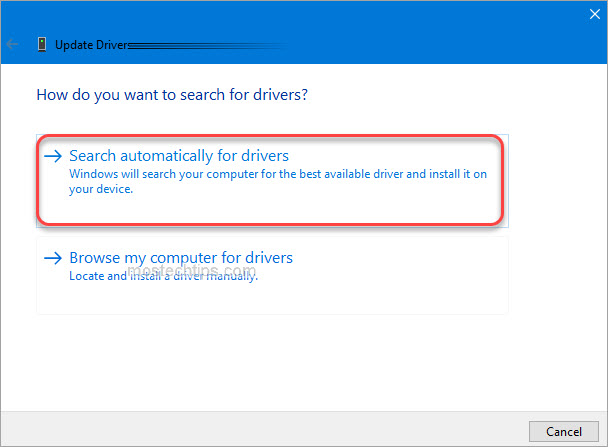
Alternatively, you can go to the PC manufacturer’s website to download the latest graphics card driver. Usually, drivers can be downloaded from the Drivers, Support or Download section.
Method 3: Disable shaders
Shaders in Minecraft allow you to set different terrains and settings so you can have a better game experience. But in the meantime, they can take up a lot of system resources, and may cause the OpenGL 1282 error. To fix the error, you can try disabling shaders in Minecraft. To do so:
1) Launch Minecraft.
2) On your keyboard, press the Esc key to pull up the Menu screen.
3) Go to Options -> Shaders.
4) Select OFF and click Done.
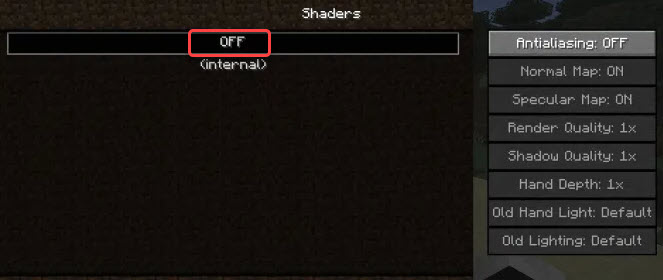
After you’re done with it, re-launch Minecraft and see if you’re still facing the OpenGL 1282 error.
Method 4: Update OptiFine
The OpenGL Error 1282 can be an OptiFine issue. If you’re using OptiFine for Minecraft , updating OptiFine to the latest version may help remove the error. If you’re using OptiFine, skip this method and continue to the next method.
Go to OptiFine’s official website and download the latest version of OptiFine, then install it on your computer. Once done, check to see if the error still occurs.

Method 5: Update Java
Minecraft relies on Java very much. If you have a low version Java or the Java files are corrupted, the OpenGL Error 1282 can occur. To fix the error, you can try updating Java to the latest version.
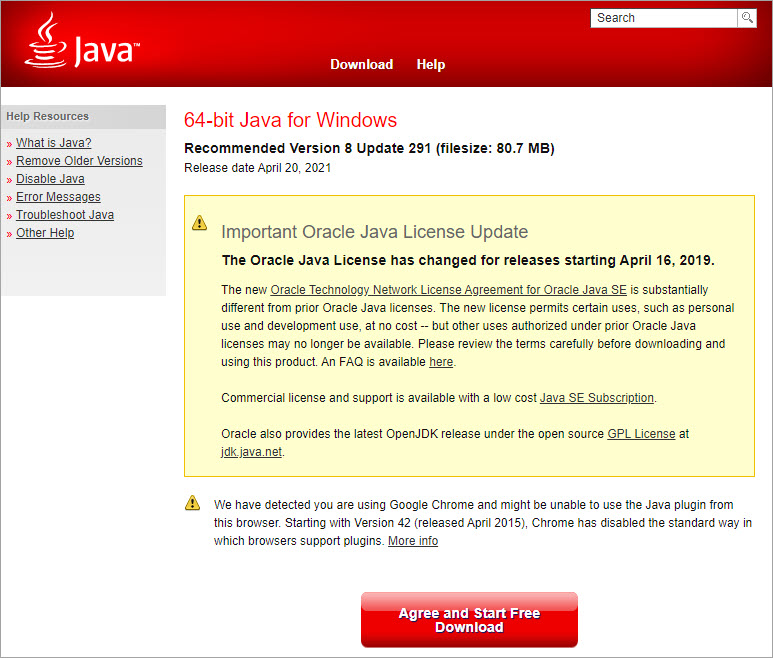
Go to Java’s website and download the latest version of Java to your computer, then follow the on-screen instructions to install it.
Once the installation completes, re-launch Minecraft and check to see if the OpenGL Error 1282 is fixed.
Method 6: Try a different game version
The error can occur in a specific version of Minecraft. So you could try switching to a different game version, for example a lower version, and see if the error continues.
Method 7: Turn off Show GL Errors
In some cases, the OpenGL Error 1282 is not a real error but just a bunch of pop-ups. If your game performance is not influenced due to this error, it’s nothing to worry about. To get rid of these annoying notifications, you can just turn off the Show GL Errors option in Minecraft. After that, you won’t receive any error notifications.
Here’s how to turn off the Show GL Errors option in Minecraft.
1) Launch Minecraft.
2) Go to Options > Video Settings > Others…
3) Click Show GL Errors and turn it off.
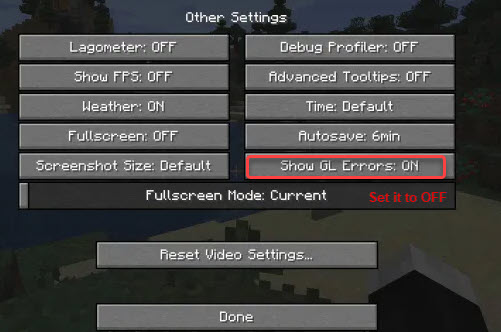
4) Save the changes and re-launch Minecraft, then you won’t see the annoying OpenGL Error 1282 message.
Hopefully you can fix OpenGL Error 1282 (Invalid operation) with the steps above. If you have any questions or suggestions, feel free to leave a comment below. I’ll get back to you ASAP.

как исправить ошибку opengl 1282 Майнкрафт
.games > Minecraft > как исправить ошибку opengl 1282 Minecraft
Обратите внимание, если хотите узнать, как исправить ошибку opengl 11282 Minecraf, ведь здесь у нас есть все вам нужно знать.
Что такое ошибка opengl 1282 Minecraft?
Это одна из многих ошибок OpenGL, которые вы можете найти в игре и это помешает вам играть в нее.
Как исправить ошибку opengl 1282 Minecraf? — Добавить файл OpenGL32.dll вручную
Первое, что вы можете сделать, это вручную добавить файл OpenGL32.dll. это потому, что иногда этот файл отсутствует, но существует 17 различных версий этого файла, поэтому вам придется выбрать правильную. проблема в том, что вы ничего не можете сделать, чтобы узнать, правильный ли вы выбрали.
К сожалению, сайты загрузки DLL не являются безопасным источником для файла. Вот почему мы рекомендуем вам проверять наличие обновлений Windows, использовать восстановление системы, если ошибка появилась после недавнего изменения, или попытаться восстановить Windows.
Как исправить ошибку opengl 1282 Minecraf? — Графика
Читайте также:
Еще одна вещь, которую вы можете сделать, это обновить графические драйверы, так как они могут быть устаревшими или неисправными. Поэтому зайдите на веб-сайт производителя вашей видеокарты, Nvidia, AMD или Intel, чтобы обновить их.
После их обновления мы рекомендуем вам проверить правильность настроек графики, потому что в противном случае они могут вызвать появление этой ошибки. Итак, войдите в игру и перейдите в «Параметры» > Настройки видео > отключить VBO, Render Region и Clear Water > измените знак включения на выключение > перезапустите игру и проверьте, устранена ли проблема.
Отключение шейдеров также может устранить эту ошибку, поэтому перейдите в раздел «Параметры» > Шейдеры > измените его с Вкл. на Выкл. > перезапустите игру и проверьте.
Как исправить ошибку opengl 1282 Minecraf? — Optifine
Обновление Optifine также может исправить эту ошибку, если она у вас есть. Поэтому зайдите на официальный сайт Optifine, чтобы загрузить последнюю версию.
Как исправить ошибку opengl 1282 Minecraf? — Показывать ошибки GL
Если вы столкнулись с этой ошибкой, но она не влияет на вашу игру, вы можете отключить уведомления. Для этого вам потребуется доступ к игре > Параметры > Настройки видео > Другое > нажмите «Показать ошибки GL» и отключите его, чтобы сохранить изменения и перезапустить игру.
Вы даже можете попробовать отключить OpenGL. Для этого вам потребуется доступ к игре > Параметры > Настройки видео > Расширенные настройки OpenGL > отключить OpenGL > Сохраните изменения и перезапустите игру, чтобы проверить, устранена ли проблема.
Как исправить ошибку opengl 1282 Minecraf? — Модификации
Вы должны знать, что если у вас много модификаций в игре, вы можете столкнуться с этой ошибкой. Поэтому мы рекомендуем вам отключить все модификации, а затем повторно активировать их одну за другой, чтобы определить, вызывает ли какая-либо из них проблемы. Если он есть, вам просто придется его удалить.
Как исправить ошибку opengl 1282 Minecraf? — Переустановка
Если пока ничего не помогло, рекомендуем удалить игру напрямую, а затем переустановить ее. То есть выполнить переустановку, которая должна исправить более одной ошибки.
Это все, что вам нужно знать о том, как исправить opengl ошибка 1282 Minecraf, и теперь, когда мы подошли к концу, вы более чем готовы избавиться от этой проблемы, поэтому принимайтесь за каждое решение одно за другим, пока не найдете подходящее для вас.
Платформы: ПК, macOS, Linux, PS4, Xbox One, Nintendo SwitchЖанры: Песочница, выживание Разработчики: Mojang, Xbox, Sony, Nintendo eShopИздатели: Mojang, Microsoft Studios, Sony Computer EntertainmentДата выпуска: 18 ноября 2011 г.Режим: Одиночная игра, многопользовательская Возрастной рейтинг (PEGI): 7+ Официальный сайт: https://www.minecraft. net/
Другие теги
видеоигры, геймплей, цена, 60fps, steam
С таким количеством движущихся частей в Minecraft: Java Edition ваша игра может легко перестать работать должным образом. Если ваш экран потемнел, а в игровом чате продолжает появляться сообщение «Ошибка OpenGL: 1282 (недопустимая операция)», вы определенно не хотите продолжать биться головой о стену, надеясь, что проблема исправится сама собой. Вот как исправить эту надоедливую ошибку и снова запустить игру.
Что делать, если вы получаете ошибку OpenGL 1282 в Minecraft: Java Edition
Если единственная проблема, которую вы видите, — это всплывающее окно чата с кодом ошибки, и все остальное в порядке, вы можете отключить это сообщение. Перейдите в «Параметры» в меню паузы и войдите в «Настройки видео». Прокрутите вниз, чтобы найти «Другое», и отключите параметр «Показывать ошибки GL».

Если вы получаете ошибку OpenGL 1282 в Minecraft, когда экран становится черным, вероятно, где-то в вашей игре есть какой-то поврежденный или устаревший файл, который все портит. Для начала выйдите из игры и убедитесь, что у вас установлена последняя версия Minecraft: Java Edition. Чтобы быть в полной безопасности, вы можете удалить и переустановить игру, просто убедитесь, что вы сделали копию своего мира, чтобы не потерять его.
После того, как игра будет полностью обновлена, вы также захотите проверьте и убедитесь, что Java также обновлена. Зайдите на официальный сайт и скачайте нужную версию для вашей операционной системы. Следуйте инструкциям по установке, пока она не будет завершена. Вы также можете попробовать обновить графический драйвер, если он в этом нуждается.
Если описанное выше не помогло вам решить проблему, возможно, у вас несовместимые или поврежденные моды. Если у вас куча модов от разных создателей, они могут конфликтовать друг с другом и вызывать ошибки. Проверьте страницу загрузки для каждого мода, чтобы узнать, для каких обновлений эти моды работают, и посмотрите, есть ли какие-либо сообщения о том, что они не работают с другими имеющимися у вас модами. Удалите все последние установленные вами моды, которые могут все испортить. Если у вас есть OptiFine, обязательно проверьте и обновите его.
Comments

Hello everyone,
I’m getting a strange message pop up whenever I use Optifine. It’s been happening since 1.13.1 and continues into 1.13.2
The chat/command will display «OpenGL Error: 1282 (Invalid Operation)» every 10 seconds or so which can be really tedious in multiplayer when you’re trying to follow a chat.
I’ve tried everything I can think of. Full/clean reinstall of Minecraft, updating Java, updating Windows, updating graphics drivers, but the moment I run the game with Optifine it pops up again.
Has anyone else had this bug, and if so, how do you get rid of it? I am hoping to avoid having to play Minecraft without Optifine, but that’s the only way I can stop it happening at the moment.

Can you post the game output (error log)?
It should have more details about the error.
Actually getting a 2nd error in there now, «1281 (Invalid Value)»

Before the issue is fixed, there is a setting to turn off OpenGL errors. I believe it is Options... -> Video Settings -> Other -> Show OpenGL errors.
Hope this helps.
That is really useful, AndanteDevs, thank you!

I am also getting this error periodically on 1.12.2 using the extreme current version of sildurs vibrant shaders.
Mixed with the OpenGL errors are also some NullPointerExceptions which may be related:
Caused by: java.lang.NullPointerException
	at cfc.d(SourceFile:199)
	at crd.a(SourceFile:1809)
	at lo.a(SourceFile:122)
	at lo.a(SourceFile:16)
	at ix.lambda$checkThreadAndEnqueue$0(PacketThreadUtil.java:21)
	at ix$$Lambda$1032/114356890.run(Unknown Source)
	at java.util.concurrent.Executors$RunnableAdapter.call(Executors.java:511)
	at java.util.concurrent.FutureTask.run(FutureTask.java:266)
	at k.a(Util.java:157)
The OpenGL error is very strange: OpenGL API ERROR: 1281 (GL_INVALID_VALUE error generated. View frustum must not have a zero values of: (right-left), (top-bottom), or (zFar-zNear).)
As if the view frustum is incorrectly defined.
What OS, GPU, drivers?
F3 debug screenshot?
Windows 10 1909. GTX 1070, nvidia driver version 441.41. I’ll try to get the screenshot in a bit.

Here’s the debug screenshot.
@cybercatgurrl you are running Forge with 59 mods loaded, most probably a conflict with one of the installed mods.
The original problem is OptiFine standalone, no other mods.

so im having the same errors but my game is a black screen. i can open my inventory and see my hotbar. im running on 1.7.10. i’ll post the mod list below.

Thank you and pls get back to me asap. 🙂

should probably update optifine, E3 is outdated
thanks man ill try it out and get back to you if it works or not
also do you think you can help me with some other issues im having. either through email, here or discord.
also updating the optifine version did not work still the same
here is a pic of how my game looks


@Hilife808 If u are running shaders. It can sometimes give u a black screen bc the shaders is trying to add visual effects but cant bc a mod is doing the same thing. And for ur error 1282. that is also a shader error message. which is to do with visals again. This error ecours mostly when u have a dimension mod installed since dimension mods can cause shaders issue’s.
How i fixed that error is just turn off the gui errors in your settings. but other then that with the black scrren i would contact the shader owner if still avalible for the issue to be resolved.
Most of all its a shader visual conflict

I have the same problem i select a shader and when its on the screen is black and i get the error Open GL Error 1282 (invalid operation).


You should be able to just reload the shader, and it should work. also why not use pre30
i have tried to reload the shader and the same thing happened

Hi, I am also having this error however I am not getting the black screen however my shader still isn’t loading, I also used a preview version of optifine because there was no 1.16 version, could that be the issue or do you think it was the shader? (the shader is SEUS renewed and is v1.0.1) I also don’t have any mods loaded on the game. How do I fix this error and load my shader?

Yes I have the same problem too with a different shader the other one gave me the black screen but trying a different one I got the error and can see my screen but the shader doesn’t work
Also I did get the newer preview optfine pre 30


This happens for me on mac but it does tell me that my device doesn’t support it and I get some bits of the screen staying still

My brother is running Aristois 1.16.5 with optifine and baritone on his survival hack game but it shows Open GL Error 1282 (Invalid Operation), He turns off mods and it still shows it every second please help someone?
Just regular shader errors. Always happens with optifine. To solve this issue of not getting the text. Go into options, video settings, Other settings and turn show GL errors: to off.
Edit: Some shaders are out of date and can cause more issues such as black screen and other issues. i would try finding the correct updated version of that shader.zip or find another shader to use. ^^


The thing is, im getting the same problem with Lunar Client (im using it because my normal minecraft crashes when i open it, it would be helpful if someone helps)


Hello I play forgeoptifine in 1.12.2 and when I put shaders my hand and the nether are either black or white I attach an image with my components and shader
This is what my hand looks like
that is not the color of my skin
Attached capture of the mods that I use
Plis if anyone knows how to solve it tell me and in the chat it also says OpenGl 1282


Man I actually have found out how to solve this problem. Your mod list screenshot helped me a lot. Delete «albedo». I don’t know why but this mod is ruining the visuals of your game.

Ran into the OpenGL 1282 error myself just now.
I was able to resolve the conflict by referring to the logs, where I found that at least in my case, it was Pneumaticraft having issues drawing the overlay for the pressure gauges.
Look at your latest log, scroll to the bottom and find the last occurrence of the error.
Read through the error and look for mention of a mod you have used or a default MC setting that is conflicting with Optifine.
Here is my error for reference and don’t get overwhelmed if you don’t understand everything.
You’re just looking to find what is causing the issue for OpenGL so just look for a reference to something for you to investigate further.
Then you can disable the mod or delete any error-causing items in game and the error should no longer be an issue.
Much better solution that just ignoring it and suffering the performance cost.
Hopefully this helps others figure out how to troubleshoot their specific conflict.
[20:28:13] [Client thread/ERROR]: OpenGL API ERROR: 1282 (GL_INVALID_OPERATION error generated. State(s) are invalid: primitive mode match.) java.lang.Exception: Stack trace at org.lwjgl.opengl.GLDebugMessageCallbackI.callback(GLDebugMessageCallbackI.java:39) [lwjgl-opengl-3.2.2.jar:build 10] at org.lwjgl.opengl.GL11C.glDrawArrays(Native Method) ~[lwjgl-opengl-3.2.2.jar:build 10] at org.lwjgl.opengl.GL11.glDrawArrays(GL11.java:1879) [lwjgl-opengl-3.2.2.jar:build 10] at com.mojang.blaze3d.platform.GlStateManager.drawArrays(GlStateManager.java:975) [?:?] at net.optifine.shaders.SVertexBuilder.drawArrays(SVertexBuilder.java:360) [?:?] at net.minecraft.client.renderer.WorldVertexBufferUploader.func_181679_a(WorldVertexBufferUploader.java:83) [?:?] at net.minecraft.client.renderer.Tessellator.func_78381_a(Tessellator.java:33) [?:?] at me.desht.pneumaticcraft.client.util.GuiUtils.drawPressureGauge(GuiUtils.java:95) [?:1.14.4-1.0.8-22] at me.desht.pneumaticcraft.client.model.module.ModelPressureGauge.renderDynamic(ModelPressureGauge.java:55) [?:1.14.4-1.0.8-22] at me.desht.pneumaticcraft.client.model.module.ModelPressureGauge.renderDynamic(ModelPressureGauge.java:13) [?:1.14.4-1.0.8-22] at me.desht.pneumaticcraft.client.model.module.ModelModuleBase.render(ModelModuleBase.java:25) [?:1.14.4-1.0.8-22] at me.desht.pneumaticcraft.client.render.tileentity.RenderPressureTubeModule.render(RenderPressureTubeModule.java:68) [?:1.14.4-1.0.8-22] at me.desht.pneumaticcraft.client.render.tileentity.RenderPressureTubeModule.func_199341_a(RenderPressureTubeModule.java:21) [?:1.14.4-1.0.8-22] at net.minecraft.client.renderer.tileentity.TileEntityRendererDispatcher.func_203602_a(TileEntityRendererDispatcher.java:201) [?:?] at net.minecraft.client.renderer.tileentity.TileEntityRendererDispatcher.func_180546_a(TileEntityRendererDispatcher.java:154) [?:?] at net.minecraft.client.renderer.WorldRenderer.func_215326_a(WorldRenderer.java:989) [?:?] at net.optifine.shaders.ShadersRender.renderShadowMap(ShadersRender.java:362) [?:?] at net.optifine.shaders.Shaders.beginRender(Shaders.java:4243) [?:?] at net.minecraft.client.renderer.GameRenderer.func_78471_a(GameRenderer.java:1029) [?:?] at net.minecraft.client.renderer.GameRenderer.func_195458_a(GameRenderer.java:795) [?:?] at net.minecraft.client.Minecraft.func_195542_b(Minecraft.java:890) [?:?] at net.minecraft.client.Minecraft.func_99999_d(Minecraft.java:384) [?:?] at net.minecraft.client.main.Main.main(SourceFile:155) [?:?] at sun.reflect.NativeMethodAccessorImpl.invoke0(Native Method) ~[?:1.8.0_51] at sun.reflect.NativeMethodAccessorImpl.invoke(NativeMethodAccessorImpl.java:62) ~[?:1.8.0_51] at sun.reflect.DelegatingMethodAccessorImpl.invoke(DelegatingMethodAccessorImpl.java:43) ~[?:1.8.0_51] at java.lang.reflect.Method.invoke(Method.java:497) ~[?:1.8.0_51] at net.minecraftforge.fml.loading.FMLClientLaunchProvider.lambda$launchService$0(FMLClientLaunchProvider.java:56) [forge-1.14.4-28.2.20.jar:28.2] at net.minecraftforge.fml.loading.FMLClientLaunchProvider$$Lambda$431/1353093587.call(Unknown Source) [forge-1.14.4-28.2.20.jar:28.2] at cpw.mods.modlauncher.LaunchServiceHandlerDecorator.launch(LaunchServiceHandlerDecorator.java:37) [modlauncher-4.1.0.jar:?] at cpw.mods.modlauncher.LaunchServiceHandler.launch(LaunchServiceHandler.java:54) [modlauncher-4.1.0.jar:?] at cpw.mods.modlauncher.LaunchServiceHandler.launch(LaunchServiceHandler.java:72) [modlauncher-4.1.0.jar:?] at cpw.mods.modlauncher.Launcher.run(Launcher.java:81) [modlauncher-4.1.0.jar:?] at cpw.mods.modlauncher.Launcher.main(Launcher.java:65) [modlauncher-4.1.0.jar:?]

hi, i have been having this problemwith my shaders in 1.17 and idk how to fix it, ive tried praticly evrything and nothing changes


I am also experiencing this issue, my game is vanilla except for Optifine, running through MultiMC.
The relevant line of my game log is [21:23:48] [Render thread/ERROR]: [OptiFine] OpenGL error: 1282 (Invalid operation), at: Expand VBO.
Minecraft 1.17.1, on macOS 11.5.2 on Intel.
The «OpenGL Error: 1282» is a general error which means «something is wrong».
OpenGL uses this error for many different problems at many different places.
The original issue from @bmcwal is for 1.13 about invalid frustum size with Forge and mods.
@cybercatgurrl reports it for 1.12 and running with shaders.
@Hilife808 reports it for 1.7.10 and Forge + mods.
@progamerdixie reports it for 1.15.2 with shaders.
@WilliamD47 reports it for a Mac.
@michealREEEEE reports it for https://github.com/cabaletta/baritone
@soopi-n reports it for Lunar client
@skyyxX reports it for 1.17 with shaders.
@ajs256 reports it for 1.17 on Mac running with MultiMC.
Those are different problems that need separate issues.

i having an error that says opengl error:1282 invalid operation
otherwise when i launch the game it just gets stuck at the loading screen with thedirt background pls help me some one

Error 1281 I solved it, enter the server, then press the ESC key, then, Graphics, Various Options, Reset all the configuration, Then yes, and reset all the unnecessary activity that you used.

In my case, the error stopped occurring when I turned off the «Render Regions» option of optifine.

how do i fix this error>> message: id=1282, source=API, type=ERROR, severity=HIGH, message=’Error has been generated. GL error GL_INVALID_OPERATION in (null): (ID: 173538523) Generic error’ im on vanilla by the way.
the thing is im on complete vanilla and im getting this error