Keep getting a Generic Trust Failure when trying to install Microsoft Visual C++ 2010 x86 Redistributable Setup. It says that «a required certificate is not within its validity period …»
I also get this erro when trying to install .NET 4 client package
thanks
joe
CommandLine = c:12c7a854e15f213896d943Setup.exe
TimeZone = Eastern Daylight Time
Initial LCID = 1033
Environment details
succeeded
Using Simultaneous Download and Install mechanism
succeeded
Exists evaluated to false
MaintenanceMode determination evaluates to ‘not in maintenance mode’
Operation: Installing
Operation Type
Package Name = Microsoft Visual C++ 2010 x86 Redistributable Setup
Package Version = 10.0.30319
Package details
User Experience Data Collection Policy: UserControlled
User Experience Data Collection Policy
succeeded
Equals evaluated to true
GreaterThan evaluated to false
And evaluated to false
BlockIf evaluated to false
Equals evaluated to true
LessThan evaluated to false
And evaluated to false
BlockIf evaluated to false
Global Block Checks no blocking conditions found
Exists evaluated to false
Determining state of c:12c7a854e15f213896d943vc_red.cab — available but not verified yet
Exists evaluated to false
Determining state of c:12c7a854e15f213896d943vc_red.msi — available but not verified yet
Exists evaluated to false
Determining state of c:12c7a854e15f213896d943vc_red.msi — authored action for this item is NoOp
Determining state of MSIServer — payload not required for this item to perform action.
Exists evaluated to false
Exists evaluated to false
Applicability for Installing determination is complete
Number of applicable items: 3
Applicability Result Count
Action complete
Action complete
Action complete
Action complete
c:12c7a854e15f213896d943vc_red.cab — Signature verification for file vc_red.cab (c:12c7a854e15f213896d943vc_red.cab) failed with error 0x800b0101 (A required certificate is not within its validity
period when verifying against the current system clock or the timestamp in the signed file.)
c:12c7a854e15f213896d943vc_red.cab Signature could not be verified for vc_red.cab
No FileHash provided. Cannot perform FileHash verification for vc_red.cab
File vc_red.cab (c:12c7a854e15f213896d943vc_red.cab), failed authentication. (Error = -2146762495). It is recommended that you delete this file and retry setup again.
Failed to verify and authenticate the file -c:12c7a854e15f213896d943vc_red.cab
Please delete the file, c:12c7a854e15f213896d943vc_red.cab and run the package again
Action complete
Final Result: Installation failed with error code: (0x800B010B), «Generic trust failure. » (Elapsed time: 0 00:00:06).
OS Version = 5.1.2600, Platform 2, Service Pack 3
OS Description = WinXP — x86 Professional Service Pack 3
OS Version Information
-
Moved by
Friday, April 22, 2011 3:28 AM
it is not related c++ (From:Visual C++ General)
Keep getting a Generic Trust Failure when trying to install Microsoft Visual C++ 2010 x86 Redistributable Setup. It says that «a required certificate is not within its validity period …»
I also get this erro when trying to install .NET 4 client package
thanks
joe
CommandLine = c:12c7a854e15f213896d943Setup.exe
TimeZone = Eastern Daylight Time
Initial LCID = 1033
Environment details
succeeded
Using Simultaneous Download and Install mechanism
succeeded
Exists evaluated to false
MaintenanceMode determination evaluates to ‘not in maintenance mode’
Operation: Installing
Operation Type
Package Name = Microsoft Visual C++ 2010 x86 Redistributable Setup
Package Version = 10.0.30319
Package details
User Experience Data Collection Policy: UserControlled
User Experience Data Collection Policy
succeeded
Equals evaluated to true
GreaterThan evaluated to false
And evaluated to false
BlockIf evaluated to false
Equals evaluated to true
LessThan evaluated to false
And evaluated to false
BlockIf evaluated to false
Global Block Checks no blocking conditions found
Exists evaluated to false
Determining state of c:12c7a854e15f213896d943vc_red.cab — available but not verified yet
Exists evaluated to false
Determining state of c:12c7a854e15f213896d943vc_red.msi — available but not verified yet
Exists evaluated to false
Determining state of c:12c7a854e15f213896d943vc_red.msi — authored action for this item is NoOp
Determining state of MSIServer — payload not required for this item to perform action.
Exists evaluated to false
Exists evaluated to false
Applicability for Installing determination is complete
Number of applicable items: 3
Applicability Result Count
Action complete
Action complete
Action complete
Action complete
c:12c7a854e15f213896d943vc_red.cab — Signature verification for file vc_red.cab (c:12c7a854e15f213896d943vc_red.cab) failed with error 0x800b0101 (A required certificate is not within its validity
period when verifying against the current system clock or the timestamp in the signed file.)
c:12c7a854e15f213896d943vc_red.cab Signature could not be verified for vc_red.cab
No FileHash provided. Cannot perform FileHash verification for vc_red.cab
File vc_red.cab (c:12c7a854e15f213896d943vc_red.cab), failed authentication. (Error = -2146762495). It is recommended that you delete this file and retry setup again.
Failed to verify and authenticate the file -c:12c7a854e15f213896d943vc_red.cab
Please delete the file, c:12c7a854e15f213896d943vc_red.cab and run the package again
Action complete
Final Result: Installation failed with error code: (0x800B010B), «Generic trust failure. » (Elapsed time: 0 00:00:06).
OS Version = 5.1.2600, Platform 2, Service Pack 3
OS Description = WinXP — x86 Professional Service Pack 3
OS Version Information
-
Moved by
Friday, April 22, 2011 3:28 AM
it is not related c++ (From:Visual C++ General)
|
0 / 0 / 1 Регистрация: 21.06.2019 Сообщений: 32 |
|
|
1 |
|
|
14.09.2021, 05:44. Показов 3403. Ответов 11
Удалил фреймворк т.к. на смартианинсталлере она была показана как повреждённая. Сначала появилась ошибка 0x80070643, после регистрации некоторых длл появилась «общая ошибка доверия». Я так понимаю не хватает сертефикатов. Дайте мне их у кого есть. Миниатюры
__________________
0 |

|
11043 / 7599 / 1176 Регистрация: 21.01.2016 Сообщений: 28,578 |
|
|
14.09.2021, 07:53 |
2 |
|
bereaverking, гугл говорит сделать так.
1 |

|
0 / 0 / 1 Регистрация: 21.06.2019 Сообщений: 32 |
|
|
15.09.2021, 08:53 [ТС] |
3 |
|
bereaverking, гугл говорит сделать так. Я не тп, гугл и сам весь переискал, без толку. Миниатюры
0 |


|
11043 / 7599 / 1176 Регистрация: 21.01.2016 Сообщений: 28,578 |
|
|
15.09.2021, 09:08 |
4 |
|
bereaverking, значит не судьба будет поставить замшелую версию .NET на умершую версию ОС.
0 |

|
0 / 0 / 1 Регистрация: 21.06.2019 Сообщений: 32 |
|
|
15.09.2021, 09:38 [ТС] |
5 |
|
bereaverking, значит не судьба будет поставить замшелую версию .NET на умершую версию ОС. Так стояла же. В чём её проблема???
0 |
|
11043 / 7599 / 1176 Регистрация: 21.01.2016 Сообщений: 28,578 |
|
|
15.09.2021, 11:48 |
6 |
|
bereaverking, видимо поистекали сертификаты какие-то. Это же всё уже лет сто не обновлялось. Ожидаемо.
0 |
|
0 / 0 / 1 Регистрация: 21.06.2019 Сообщений: 32 |
|
|
16.09.2021, 10:46 [ТС] |
7 |
|
bereaverking, видимо поистекали сертификаты какие-то. Это же всё уже лет сто не обновлялось. Ожидаемо. Пох, я снёс винду, терь всё в шоколаде
0 |
|
11043 / 7599 / 1176 Регистрация: 21.01.2016 Сообщений: 28,578 |
|
|
16.09.2021, 11:03 |
8 |
|
bereaverking, если взамен поставили Linux, то там можно использовать
0 |
|
0 / 0 / 1 Регистрация: 21.06.2019 Сообщений: 32 |
|
|
17.09.2021, 07:26 [ТС] |
9 |
|
bereaverking, видимо поистекали сертификаты какие-то. Это же всё уже лет сто не обновлялось. Ожидаемо. Чтобы захотеть поставить на пк линукс надо очень сильно удариться головой об что-то твердое
0 |
|
11043 / 7599 / 1176 Регистрация: 21.01.2016 Сообщений: 28,578 |
|
|
17.09.2021, 08:06 |
10 |
|
bereaverking, расскажите это в ветке С++, где каждый второй разработчик под линуксом сидит. Я думаю, они оценят ваше мнение.
0 |
|
0 / 0 / 1 Регистрация: 21.06.2019 Сообщений: 32 |
|
|
17.09.2021, 10:58 [ТС] |
11 |
|
bereaverking, расскажите это в ветке С++, где каждый второй разработчик под линуксом сидит. Я думаю, они оценят ваше мнение. …разработчик своего очка
0 |
|
11043 / 7599 / 1176 Регистрация: 21.01.2016 Сообщений: 28,578 |
|
|
17.09.2021, 11:28 |
12 |
|
bereaverking, всегда приятно пообщаться с культурным и интересным собеседником.
0 |
|
IT_Exp Эксперт 87844 / 49110 / 22898 Регистрация: 17.06.2006 Сообщений: 92,604 |
17.09.2021, 11:28 |
|
12 |
-
#1
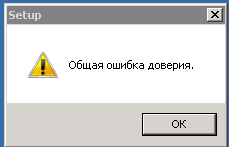
Добрый день! Есть система, давно не обновлялась, работает на windows server 2008r2. Хочу установить там новую версию av Kaspersky Security for Windows server. Но установщик не запускается — пишет ошибку «Общая ошибка доверия». Инсталл запускаю с расшаренной папки на сервере администрирования. Подскажите в чем дело??
Последнее редактирование: 06.02.2022
-
#2
Попробуйте установить сертификаты.
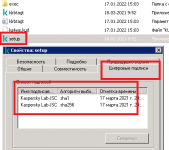
Потом в cmd
certutil.exe -generateSSTFromWU roots.sst