1. Включение и выключение подсветки дисплея
CODE→↑
2. Учет фиксированного веса тары
Установите на весы пустую тару → T→ F
2.1 Ввод тары
CODE→ ↑→ *→ 3→ 0→ *→ номер тары→ 1-16→ установите тару→ CODE→ CODE
Вес тары привязан к PLU с помощью номера предварительно запрограммированной тары, для того чтобы вызвать из памяти вес тары, необходимо выбрать соответствующий PLU.
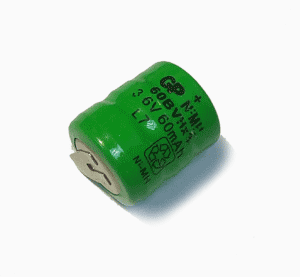
Батарея 3,6В 60mAh, для весов Mettler Toledo Tiger
3. Проверка. Можно ли загружать состав блюда на весы
CODE→ 55555→ *→ ↑→ Пункт 3→ *
Печатает две этикетки. Если память 1024кБ, то состав не загрузить. Если память 4096кБ, то можно загрузить.
4. Автоматическая печать этикетки. Режим предупаковки.
CODE→ 4444→ *→ MODE→ 02→ *→ 0→ ↓
или
MODE→ 02→ *→ 0→ ↓
0 или 1 вкл или выкл. автопечать.
5. Весы работают как принтер этикеток
В PLU товара нужно указать, что товар шт.. Выпускаем ленту наружу и отключаем датчик снятия этикетки;
CODE→ 666666→ *→ 26→ PLU→ *→ кол.этикеток от 1 до 999
Коды ошибок весов
Ошибка типа 1:После получения такого сообщения можно продолжать работать с весами.
Ошибка типа 2:Нажмите клавишу «CODE». Выберите одно из меню CODE. Вернитесь в режим взвешивания.
Ошибка типа 3:Нажмите клавишу «CODE» и переключитесь в режим обслуживания; после возврата в нормальный режим работы будет выполнен сброс весов.
ERROR 300 PRINTER
Причина:Дефект драйвера принтера.Тип:2. Решение
ERROR 301 PRINTER
Причина:Дефект драйвера принтера.Тип:2. Решение
ERROR 307 PRINTER
Причина:Неисправность печатающей головки.Тип:2. Решение
ERROR 308 PRINTER
Причина:Дефект драйвера
принтера.Тип:1. Решение
ERROR 310 PRINTER
Причина:Дефект драйвера
принтера.Тип:2. Решение
ERROR 101 AP
Причина:Неисправность часов
реального времени.Тип:1. Решение
ERROR 400 CELL
Причина:Неисправность датчика
веса.Тип:-. Решение
ERROR 401 CELL
Причина:Неисправность датчика
веса.Тип:-. Решение
ERROR 200 DATABASE
Причина:Ошибка банка данных.Тип:3. Решение
ERROR 200 BD — Решение
Значение XX
01 Продавец
02 Данные чека
03 Данные общего времени работы
04 Текстовые данные
05 Данные штрих-кода
06 Данные тарирования
07 Данные группы
13 Данные этикетки
15 Текстовые данные даты
21 Данные PLU этикетки
23 Адрес хранения
24 Данные PLU
Значение YY
01 Конфигурация продавца
03 Конфигурация клавиатуры
04 Конфигурация паролей
ERROR 201 XX DATABASE
Причина:XX Ошибка данных.Тип:2. Решение
ERROR 202 XX DATABASE
Причина:XX Ошибка данных.Тип:2. Решение
ERROR 203 YY DATABASE
Причина:YY Ошибка данных.Тип:2. Решение
ERROR 205 DATABASE
Причина:Ошибка банка данных.Тип:3. Решение
ERROR EEPROM
Причина: сброс калибровочных значения тензодатчика или юстировочные значения сенсора границы этикеток или вышла из строя память EEPROM. Решение
Вопросы и ответы
Весы меттлер толедо печатают этикетку наполовину — проверьте прижимной валик и термоголовку на наличие этикетки. Возможно эти блоки засорились. Не в коем случаи не используйте нож или ножницы, острые металлические предметы для очистки.
Смещается этикетка при печати. Смещается штрих код на этикетки.
Меттлер. Как выключить автопечать — См. Пункт 4 автоматическая печать этикетки.
Автор: Нуруллин И.Н. Дата: 2017-10-07
При появлении кода ошибки весы следует выключить и снова включить. В большинстве случаев сообщение об ошибке после этого исчезнет.
Сообщения об ошибках могут быть трех видов:
Ошибка типа 1:
Внимание! После получения такого сообщения можно продолжать работать с весами.
Ошибка типа 2:
Нажмите клавишу «CODE». Выберите одно из меню CODE. Вернитесь в режим взвешивания.
Ошибка типа 3:
Нажмите клавишу «CODE» и переключитесь в режим обслуживания; после возврата в нормальный режим работы будет выполнен сброс весов.
Сообщение об ошибке — Причина — Тип ошибки — Решение
ERROR 300 PRINTER — Дефект драйвера принтера — 2 — Заменить материнскую плату
ERROR 301 PRINTER — Дефект драйвера принтера — 2 — 1. Произвести перезагрузку ПО 2. Заменить материнскую плату
ERROR 307 PRINTER — Неисправность печатающей головки — 2 — 1. Заменить термоголовку 2. Заменить кабель термоголовки 3. Заменить материнскую плату
ERROR 308 PRINTER — Дефект драйвера принтера — 1 — Заменить материнскую плату
ERROR 310 PRINTER — Дефект драйвера принтера — 2 — Заменить материнскую плату
ERROR 101 AP — Неисправность часов реального времени — 1 — Заменить материнскую плату
ERROR 400 CELL — Неисправность датчика веса — 1. Заменить материнскую плату 2. Заменить датчик веса
ERROR 401 CELL — Неисправность датчика веса — 1. Произвести настройку 2. Заменить материнскую плату 3. Заменить датчик веса
ERROR 200 DATABASE — Ошибка базы данных — 3 — Сделать Заводскую конфигурацию
ERROR 201 XX DATABASE — XX Ошибка данных — 2 — 1. Сделать Заводскую конфигурацию 2. Удалить данные ХХ
ERROR 202 XX DATABASE — XX Ошибка данных — 2 — 1. Сделать Заводскую конфигурацию 2. Удалить данные ХХ
ERROR 203 YY DATABASE — YY Ошибка данных — 2 — 1. Сделать Заводскую конфигурацию
Значение XX
01 Продавец
02 Данные чека
03 Данные общего времени работы
04 Текстовые данные
05 Данные штрих-кода
06 Данные тарирования
07 Данные группы
13 Данные этикетки
15 Текстовые данные даты
21 Данные PLU этикетки
23 Адрес хранения
24 Данные PLU
Значение YY
01 Конфигурация продавца
03 Конфигурация клавиатуры
04 Конфигурация паролей
power source. If a problem occurs but that specific problem is not listed in Table
4-1, or the suggested fix does not resolve the problem, contact an authorized
METTLER TOLEDO service representative for assistance.
Table 4-1: Symptoms and Suggested Fixes
Symptom
Blank display – no LEDs Confirm source of AC or DC power is OK.
Blank display – LEDs on
Display on but no
weight change
No serial port
communications
Discrete inputs or
outputs don’t operate.
The IND131 and IND331 terminals use error codes and error messages to indicate
error conditions that occur in the terminal. An example of an error code display is
given in Figure 4-2.
Error messages that occur as a result of an operator action will remain on the
display until cleared by pressing PRINT. Error messages that result from a remote
operation and not an operator action will clear automatically after approximately 3
seconds. In either case, after the message is cleared, the display reverts to the
previous data shown before the error was detected. The possible error codes and
messages are listed in Table 4-2 with a brief description of the error.
Error Code
0004
No factory calibration for A/D circuit.
0005
The function currently being accessed has been disabled.
0007
Access denied. Scale is approved.
0008
Data is out of range of valid entries.
0009
Zero failed – weight is beyond capture range.
0010
Comparator data entry error: High Limit value must be larger than Limit value.
0011
Command failed.
0012
Command failed – motion.
IND131/IND331 Terminals Technical Manual
Possible problem with communication to the display PCB.
Contact service representative.
Check wiring to load cell. Look for broken wires, open
connections or mis-wiring.
Use serial diagnostics section of Maintenance block of setup to
determine if the problem is internal or external to the terminal.
Use the discrete input and output diagnostics section of the
Maintenance block of setup to determine if the problem is
internal or external to the terminal.
Figure 4-2: Error Code Display
Table 4-2: Error Codes
Description
Suggestion
4-3
-
Contents
-
Table of Contents
-
Troubleshooting
-
Bookmarks
Quick Links
Related Manuals for Mettler Toledo BC
Summary of Contents for Mettler Toledo BC
-
Page 1
Shipping Scale… -
Page 2
BC Shipping Scale Essential Services for Dependable Performance of Your BC Shipping Scale Congratulations on choosing the quality and precision of METTLER TOLEDO. Proper use of your new equipment according to this Manual and regular calibration and maintenance by our factory- trained service team ensures dependable and accurate operation, protecting your investment. -
Page 3
Copyright 2014 METTLER TOLEDO. This documentation contains proprietary information of METTLER TOLEDO. It may not be copied in whole or in part without the express written consent of METTLER TOLEDO. METTLER TOLEDO reserves the right to make refinements or changes to the product or manual without notice. COPYRIGHT ®… -
Page 4
ALWAYS REMOVE ALL POWER BEFORE SERVICING ANY EQUIPMENT. METTLER-TOLEDO RECOMMENDS THAT ONLY QUALIFIED TECHNICIANS OPEN THE UNIT UP FOR MAINTENANCE AND REPAIR. IF YOU MUST OPEN THE BC SCALE, READ THIS SECTION CAREFULLY TO AVOID DAMAGE TO THE INTERNAL COMPONENTS. -
Page 5: Table Of Contents
Wall-Mounted Display ………………..2-11 2.3.1.3. Dual Displays …………………… 2-11 2.3.2. Ball and Roller Top Platters …………….2-12 2.3.3. Conveyor Drop-In Kit for BC-150 …………….. 2-13 2.3.3.1. Conveyor Drop-In-Kit 64058112 ………………2-13 30126862 04/2014 METTLER TOLEDO BC Shipping Scales User’s Service Manual…
-
Page 6
4.4.2. Keyboard Shortcuts ………………… 4-7 4.4.3. Exiting Setup Mode ………………..4-8 4.4.4. Remote Configuration ………………4-8 4.5. Configuration: Info ……………. 4-8 4.5.1. Model …………………… 4-9 4.5.2. Cal Info ………………….4-9 METTLER TOLEDO BC Shipping Scales User’s Service Manual 30126862 04/2014… -
Page 7
Calibration ………………….4-29 4.11.5.1. Calibration Weight ………………….4-29 4.11.5.2. Calibration ……………………4-30 4.11.5.3. Use GEO ……………………4-32 4.11.5.4. Cal Prompt ……………………4-34 4.11.6. Zero ……………………. 4-34 4.11.6.1. Pushbutton Zero ………………….4-35 30126862 04/2014 METTLER TOLEDO BC Shipping Scales User’s Service Manual… -
Page 8
Scale Status Byte Information …………A-5 A.4. Scale Confidence Byte Format …………A-5 A.5. Calibrate Using Host Interface …………A-6 USB Host Interface …………… B-1 B.1. References ………………. B-1 B.2. Hardware ………………B-1 METTLER TOLEDO BC Shipping Scales User’s Service Manual 30126862 04/2014… -
Page 9
E.1. Software Application …………..E-1 E.2. Driver Installation …………….E-1 E.3. Price Command …………….E-1 E.4. Logo Command …………….E-1 E.5. Custom Message Command …………E-1 GEOCAL Codes …………….F-1 30126862 04/2014 METTLER TOLEDO BC Shipping Scales User’s Service Manual… -
Page 10: Introduction
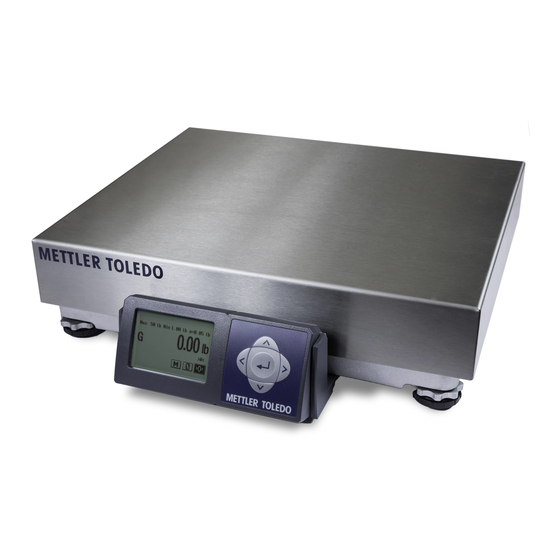
The BC scale family has 4 main models with maximum capacity at 15 kg (30 lb), 30 kg (70 lb), 60 kg (150 lb) and 150 kg (300lb). There are four postal versions with high resolution to process letters as well as parcels.
-
Page 11: Standard Features
Simple to communicate to a PC. Scale is capable of communicating via USB or RS232. For USB, the BC scale can be set up to use Microsoft POS HID scale protocol, virtual serial (serial communication over a USB cable), or Keyboard wedge functionality.
-
Page 12: Bc15
Roller Top transfer platter (BC-60 and BC-150) is used for conveyor applications. It allows easy movement of package in bi-directional (right-left) motion. • Ball Top transfer platter (BC-60 and BC-150) that allows easy rotation of package on the platter. •…
-
Page 13: 0271 Graphical Or 0270 Basic Display Options
• RS232 extension cable, 10 ft with male / female adapters. 1.3. Specifications The BC shipping scale conforms to and operates best within the specifications described in Figure 1-1, Table 1-2 and Table 1-3. 1.3.1. Physical Dimensions Figure 1-1: Key to Physical Dimensions…
-
Page 14: Power Requirements
Power Requirements The BC operates over an input voltage of 5 VDC, at a current of 100 mA or less. The scale is powered through the USB port on the scale so the USB cable is always used for power.
-
Page 15: Environmental Requirements
An external 5 VDC power supply is required for power to the BC scale for standalone applications, RS232 applications, Ethernet applications or BlueTooth applications. For these applications, the scale will be powered by the universal power adapter located in the scale’s shipping box. The wall mounted transformer is rated between 110-220V and 50-60 Hz.
-
Page 16: Rfi Susceptibility
1.7. RFI Susceptibility The BC scale meets the requirements of the European Norm. 45501 for RFI susceptibility as listed below with a maximum of one display increment of change when calibrated for recommended builds. Radio Interference Frequency Field Strength 80 — 2000 MHz…
-
Page 17: Installation
METTLER TOLEDO. The BC is a precision instrument and may be permanently damaged if not shipped in factory-approved packaging. Open box and remove the packaging material from the top of the scale. Remove the platter (BC- 15/30/3L/60/6L). Remove scale by grasping the bottom sides and lifting straight up. Do not lift the scale by grasping the sub-platter.
-
Page 18: Box Contents
(for Serial connection to PC) RS-232 cable – 10 ft. 2.1.2.2. BC-60, 6L, 30, 3L Differs from BC-15 only in the appearance of the base and platter Scale base and display Platter METTLER TOLEDO BC Shipping Scales Service Manual 30126862…
-
Page 19: Setup
PROTECTION IN ACCORDANCE WITH LOCAL AND NATIONAL ELECTRICAL REGULATIONS. FAILURE TO PROVIDE THIS MAY RESULT IN BODILY INJURY AND/OR PROPERTY DAMAGE. The BC shipping scale is fully assembled at the factory and ready for installation. For the BC-60, BC-6L, BC-30, BC-3L, and BC-15, proceed to section 2.2.2.
-
Page 20: Scale Base Preparation, Bc-150 Only
3. Adjust the display angle according to the scale’s mounting position. Hold the top and bottom of the display and gently rotate it up or down. METTLER TOLEDO BC Shipping Scales Service Manual 30126862 04/2014…
-
Page 21: Preparation, All Models
1. Level the scale by turning the adjustable feet on the bottom of the unit. The scales are equipped with a level bubble. When the bubble is within the circle in the bubble indicator, the BC scale is level. The feet must be adjusted so the scale is stable and does not rock. After leveling, tighten the thumb wheel locking nut if equipped.
-
Page 22: Pc Connection
USB must be used if the scale is to communicate with multiple shipping programs. 2.2.3. PC Connection 2.2.3.1. USB is the preferred method of connection. 1. Plug the small end of the USB cable (B connector) into the scale connector port marked USB. METTLER TOLEDO BC Shipping Scales Service Manual 30126862 04/2014…
-
Page 23: Serial
Figure 2-5: Serial Connections, Scale(left, top) and PC (bottom center); Power Supply (right) 1. Plug the small connector of the RS232 cable (B connector) into the scale connector port marked “RS232”. 30126862 04/2014 METTLER TOLEDO BC Shipping Scales Service Manual…
-
Page 24: Scale Configuration
(where the scale was calibrated) and the scale’s point of use location. Since the Earth’s gravity varies based on latitude and altitude, the GeoCal feature allows the BC scale to maintain the sensitive factory calibration to ensure the most accurate weighting results.
-
Page 25
Figure 2-6: Initial Boot Screen, Graphical Display 2. Enter GEOCAL Set up code on Initial Boot Up screen. Note: If the GEOCAL™ capabilities of your BC unit have been activated, the scale will only prompt for the “Geo in” code on the first power up. -
Page 26: Installing Accessory Items
2.3.1. Remote Displays METTLER TOLEDO offers several options for displays: they can be base-, wall- or tower-mounted. Power down the scale before plugging in a remote or base mounted display. If display is plugged in “Hot” and is displaying erratically, power down the scale for 10 seconds and reboot.
-
Page 27: Second Display, In Addition To Base-Mounted Display
Two 0270-3X00-000 each with a 10 ft. cable or o Two 0271-3100-000 each with a10 ft. cable, • 2 sided Tower display o 0270-6X00-000 with one Y cable o 0271-6100-000 with two10 ft. cable 30126862 04/2014 METTLER TOLEDO BC Shipping Scales Service Manual 2-11…
-
Page 28: Ball And Roller Top Platters
2.3.2. Ball and Roller Top Platters A ball top or roller top transfer platter is available for the BC-60 and BC-150. To install the ball or roller transfer platter: 1. Remove the platter supplied with the BC-60. BC-150 can be ordered without a platter.
-
Page 29: Conveyor Drop-In Kit For Bc-150
2.3.3. Conveyor Drop-In Kit for BC-150 The Conveyor drop in kit includes two adjustable width rail brackets that allow a BC-150 scale to be integrated into a standard gravity conveyor, that measures between 22 and 32 inches wide (between the conveyor frame rails). The kit is designed for standard conveyors that use 1.9”…
-
Page 30: Operation And Maintenance
Operation and Maintenance This chapter provides operating instructions for the BC scale during normal This chapter covers operation. Before weighing parcels, the BC Scale should be configured properly • Power-Up Sequence and power applied as instructed below. How the scale operates is based on the •…
-
Page 31: Keypad And Display
3.2.1. Display The BC scale graphical display has a monochrome screen with a resolution of 240 x 160 pixels. Each weight digit is 12 mm high standard, with option for 21mm high. The BC’s status symbols METTLER TOLEDO BC Shipping Scales Service Manual…
-
Page 32: Keys And Navigation
Figure 3-2: Over- and Under-Capacity Displays 3.3. Keys and Navigation The BC keypad contains a navigation key for easy scrolling and selection of the softkeys, as well as entering of parameter options. 3.3.1. Navigation Keys Four navigation keys (Figure 3-3) allow the cursor to be moved UP, DOWN, RIGHT, and LEFT, to select softkeys and parameters on the graphical display.
-
Page 33: Mode
UP, LEFT, RIGHT, DOWN and ENTER keys Multi-line display shows additional information Functional softkeys, if enabled Figure 3-4: Weighing Mode Display The screen may include one or more of the following status indicators: METTLER TOLEDO BC Shipping Scales Service Manual 30126862 04/2014…
-
Page 34: Accessing And Navigating Setup Mode
Use the RIGHT arrow to scroll to select Setup, then press ENTER. The first Setup screen will appear. Menu structure location indication; displays one level back Current location Parameter selection softkeys Current setting of selected parameter Figure 3-6: Initial Setup Mode Display 30126862 04/2014 METTLER TOLEDO BC Shipping Scales Service Manual…
-
Page 35: Navigation
9600 is the current setting), pressing ENTER returns the display to the next level up – this case, the Serial setup screen (Figure 3-8). Figure 3-8: Serial Setup Screen METTLER TOLEDO BC Shipping Scales Service Manual 30126862 04/2014…
-
Page 36
Figure 3-10: Abort Confirmation Screen Save After displaying a notice screen, saves changes made in setup, restarts the scale, and returns to weighing mode. Figure 3-11: Save and Update Confirmation Screen 30126862 04/2014 METTLER TOLEDO BC Shipping Scales Service Manual… -
Page 37: Operator Functions
Remove all weight and debris from the scale platter and press ZERO to capture the zero weight. The BC display will indicate a zero reading 0.00 and a center of zero icon ( >0< ) on the right side of the screen.
-
Page 38: Unit Switching
In this case, the only option available will be Disabled. The BC scale allows the displayed scale weight to be viewed in primary and secondary units. Unit switching must be enabled in setup mode (refer to section 4.11.4 in Chapter 4) to convert and display in secondary units.
-
Page 39: Weight And Tare Mode
4. If Auto-Clear Tare is selected, the tare will be cleared once the scale sees a zero gross weight. If Keypad Tare is selected, the tare is cleared only when the TARE softkey is pressed with nothing 3-10 METTLER TOLEDO BC Shipping Scales Service Manual 30126862 04/2014…
-
Page 40: Label Offset Mode
Gross weight is indicated by the “G” on the display, and is in the large typeface. The verification weight is shown below the Gross weight in smaller typeface. 30126862 04/2014 METTLER TOLEDO BC Shipping Scales Service Manual 3-11…
-
Page 41: Take-Away Mode: Differential Weighing
(lb. or kg). The tare value is still shown in the line below the Net weight on an increasing weight. It will show the decremented weight once a letter is removed. 3-12 METTLER TOLEDO BC Shipping Scales Service Manual 30126862 04/2014…
-
Page 42: Bulk Mail/Counting Mode
Bulk Mail/Count can be set at Home > OPMode > COUNT > Enable. Once Enable is pressed, options for the APW quantity are shown. The BC scales have a simple counting mode designed for bulk mailers and warehouse packing stations to determine non-critical quantities. Accuracy of the counting mode is based on the accuracy of the load cell.
-
Page 43: Price Mode
3.6. Cleaning and Regular Maintenance The BC scale is basically maintenance free. Depending on environmental conditions, it may be necessary to wipe the keypad and platter with a clean, soft cloth that has been dampened with a mild cleaner. Do not use any type of industrial solvent such as toluene or isopropanol (IPA).
-
Page 44: Display Check
Figure 3-17: Maintenance – Cal Weight Check First, press the zero softkey with nothing on the platter. A pop up window will appear stating ZERO OK. Select EXIT and press ENTER to proceed. 30126862 04/2014 METTLER TOLEDO BC Shipping Scales Service Manual 3-15…
-
Page 45
Figure 3-19: Cal Weight Check Pop-Up The test weight must be within the scale capacity range. The weight shown is the weight before rounding (X 10 resolution). If weight is outside tolerances, recalibrate the scale. 3-16 METTLER TOLEDO BC Shipping Scales Service Manual 30126862 04/2014… -
Page 46: Technical Manual
4.1.1. Quick Setup to Carrier’s Defaults For a quick setup process that does not include calibration parameters, the BC scale menu has a specific default setting for each of the major Shipping Carriers (FedEx, UPS, DHL NA, Purolator, etc). Go directly to the Default (Deflt) soft key in the Home screen and select the default for the carrier.
-
Page 47: Bypassing The Metrology Lock
The SW2 Cal button is located under the green cap which is under the platter on the right center side of the scale (BC-60U / BC-30U), as viewed from display side. First, remove the platter, then unscrew the green cap: BC15 Turn scale over and remove the screw securing the plastic cover.
-
Page 48
The Metrology Lock can be enabled or disabled. Scroll to desired option and press ENTER to accept. To implement this change, Save the parameters from the End screen. Saving changed parameters will cause the scale to restart. 30126862 04/2014 METTLER TOLEDO BC Shipping Scales Service Manual… -
Page 49: Scale Program Menus
4-6 and Figure 4-7 show all the branches of the menu structure. In these figures, blue shading indicates displays of information, while green shading highlights lists of parameter options available for selection. Figure 4-5: Info, Defaults and Operating Mode Menu Structure METTLER TOLEDO BC Shipping Scales Service Manual 30126862 04/2014…
-
Page 50
Figure 4-6: Setup Menu Structure 30126862 04/2014 METTLER TOLEDO BC Shipping Scales Service Manual… -
Page 51: Configuration: Overview
Note that limitations of the 7-segment display mean that a limited set of alpha characters is available. For example, the letter “m” cannot be displayed, and will be replaced with an “n.” METTLER TOLEDO BC Shipping Scales Service Manual 30126862…
-
Page 52: Entering Setup Mode
Displays scale status information such as full model number, scale calibration weight, capacity and increment size, etc. (Figure 4-5) Deflt Allows setting of the METTLER TOLEDO defaults, carrier defaults, or a Custom default previous saved from the END menu. (Figure 4-5) OPMode Configure the availability of modes available to the operator when the M (Mode) softkey is pressed on the weighing screen.
-
Page 53: Exiting Setup Mode
Disconnect the scale from power. Changes will not be saved. 4.4.4. Remote Configuration The BC scale can also be configured remotely using the METTLER TOLEDO Host Interface. Details on the use of this interface are given in Appendix D. 4.5.
-
Page 54: Model
4.5.6. HELP This screen displays information about service and product assistance resources: • URL for the scale product web page • Contact telephone number for METTLER TOLEDO service or local dealership. 30126862 04/2014 METTLER TOLEDO BC Shipping Scales Service Manual…
-
Page 55: Defaults
CUSTOM – Values saved ast END > CUSTOM 3. Scroll up to the Home softkey and press ENTER. 4. Scroll to END and press ENTER. 5. Scroll to Save, press ENTER, and confirm the operation. 4-10 METTLER TOLEDO BC Shipping Scales Service Manual 30126862 04/2014…
-
Page 56: Operating Mode
Key pad Tare can be used for multiple weighments with the same container. To enable the Tare function, scroll to WtTare and press ENTER. 1. Select Disable or Enable, and press ENTER. 30126862 04/2014 METTLER TOLEDO BC Shipping Scales Service Manual 4-11…
-
Page 57: Hold
This is important for Pre-pay and Add scenarios, where Carriers will back-charge for a higher weight than the one originally determined when the parcel was shipped. 4-12 METTLER TOLEDO BC Shipping Scales Service Manual 30126862 04/2014…
-
Page 58: Takeaw — Differential Weighign
Net weight by the APW. To enable the counting function, scroll to Count and press ENTER. 1. Select Disable or Enable, and press ENTER. 30126862 04/2014 METTLER TOLEDO BC Shipping Scales Service Manual 4-13…
-
Page 59: Prodvy
Sets operator interface parameters such as Language, COMM Communications Sets parameters for Serial USB, Ethernet, etc. Scale Scale configuration Configures scale metrology calibration Maintc Maintenance options Accesses scale information useful for troubleshooting and preventive maintenance 4-14 METTLER TOLEDO BC Shipping Scales Service Manual 30126862 04/2014…
-
Page 60: Setup: Display
Custom message Enables the display of a custom message PwdSet Password set Used to set the manager’s password 4.9.1. Language Five standard languages are supported in the BC scale series: • English • Spanish — Español • French — Français •…
-
Page 61: Filter
This setting configures the vibration noise filter used to determin weight stability on the scale. The BC disregards environmental vibrations that affect the weighing accuracy, depending on the filter setting. If the scale display reading is not stabilized while a steady load is on the scale, then increase the filter setting to LIGHT or HEAVY.
-
Page 62: Feedback
A manager’s password can be set in the BC scale, to limit access to the program modes. In the HOME page, the DEFAULTS, OPERATOR MODE, and SETUP soft keys are password protected. Only INFORMATION and END are not password protected.
-
Page 63
6. Use the arrow keys to enter a password sequence of 1 to 6 key-presses; press ENTER to assign the password. 7. A confirmation prompt will appear; re-enter the password and press ENTER. Figure 4-17: Password Confirmation Screen 4-18 METTLER TOLEDO BC Shipping Scales Service Manual 30126862 04/2014… -
Page 64: Setup: Communications
PC must match. The weight request command is case sensitive. Thus, if a weight “request” command is a capital W, sending a lower case w will not get a weight response from the scale. 30126862 04/2014 METTLER TOLEDO BC Shipping Scales Service Manual 4-19…
-
Page 65: Baud
If ASCII = 7, then typical Parity options are Space, Mark, Odd and Even. • If ASCII = 8, then Parity is typically set to None. To configure parity: 1. In the Serial screen, scroll to Parity and press ENTER. 4-20 METTLER TOLEDO BC Shipping Scales Service Manual 30126862 04/2014…
-
Page 66: Stop Bit
To configure the parameter from the USB screen, scroll to HIDPOS and press ENTER. To exit the page, press ENTER again to go back to the USB screen, or press the UP arrow and select the desired page and press ENTER. 30126862 04/2014 METTLER TOLEDO BC Shipping Scales Service Manual 4-21…
-
Page 67: Ethernet
ENTER. Serial settings and protocol will apply. See SERIAL program block above. KBWed The BC scale has the flexibility to configure the scale to operate like a Keyboard without any additional cabling or hardware. In this setting, the scale is configured as a keyboard in the HID of the PC.
-
Page 68: Setup: Scale
Figure 4-21: Scale Setup Screen The following options are available from this screen: metlck Metrology lock Enable or disable the metrology lock, which prevents modification of the Scale setup parameters. 30126862 04/2014 METTLER TOLEDO BC Shipping Scales Service Manual 4-23…
-
Page 69: Metrology Lock
European Community (EC) 3. Press ENTER to confirm the selection, then press ENTER again to return to the Setup screen. 4-24 METTLER TOLEDO BC Shipping Scales Service Manual 30126862 04/2014…
-
Page 70: Set Default
Primry Primary units Sets the scale’s primary units of measure UntSwt Unit switching Enables switching between primary and secondary units Sndary Secondary units Sets the scale’s secondary units of measure 30126862 04/2014 METTLER TOLEDO BC Shipping Scales Service Manual 4-25…
-
Page 71: Primary Units
(Example: 20.840 kg) • (Example: 20840 g) 4.11.4.1.2. Ranges Options for a single range, multiple ranges, or multiple increments. Options are: Single Single range Two ranges Three ranges Two intervals Three intervals 4-26 METTLER TOLEDO BC Shipping Scales Service Manual 30126862 04/2014…
-
Page 72
Multi-Interval Multi-Interval Multi-Range Multi-Interval Multi-Range OIML 60 x 0.02 kg 30 x 0.01 kg 3 x 0.001 kg 15 x 0.005 kg 3 x 0.001 kg 60 x 0.02 kg 30126862 04/2014 METTLER TOLEDO BC Shipping Scales Service Manual 4-27… -
Page 73
1, 2 or 5, and is equal to or less than the primary unit size. Options for the Sndary parameter are: • Lb-Lb ( Example 45.85 lb.) • Lb-oz (Example 45 lb. 13.6oz) • (Example 20.840 kg) • (example: 20840 g) 4-28 METTLER TOLEDO BC Shipping Scales Service Manual 30126862 04/2014… -
Page 74: Calibration
4.11.5.1. Calibration Weight The versatility of the BC scale allows it to be configured for a primary unit of pounds, but be calibrated with a kg test weight. This parameter sets the size of the weight used to calibrate the scale.
-
Page 75
Refer to Appendix F for a table of areas and corresponding Geo codes. 1. When the Calibration screen is first accessed, the GEO Adjust softkey will be highlighted. (If it is not highlighted, scroll to it using the arrow keys). 4-30 METTLER TOLEDO BC Shipping Scales Service Manual 30126862 04/2014… -
Page 76
6. Now the scale will request to Put Load, then Press ENTER. The calibration weight value is shown at lower left of this screen. The scale will capture span. Figure 4-30: Calibration Sequence – Place Load 30126862 04/2014 METTLER TOLEDO BC Shipping Scales Service Manual 4-31… -
Page 77: Use Geo
4.11.5.3. Use GEO The METTLER TOLEDO GEOCAL procedure, which prompts for the Geo-Code update on the first power up, uses the USEGEO parameter. In remote areas, it is expensive to send a service technician to the scale’s location. The Use GEO function will update the GEO-code value for a location other than the calibration site.
-
Page 78
5. Press the DOWN arrow and scroll to the Save softkey. Press ENTER to confirm the setting. The Calib screen will display. Refer to Chapter 2 for a table of areas and corresponding Geo codes. 30126862 04/2014 METTLER TOLEDO BC Shipping Scales Service Manual 4-33… -
Page 79: Cal Prompt
The Zero screen allows the configuration of parameters that affect the way the scale zeroes. The options in this screen are: Pb 0 Pushbutton zero >0< Zero Indicator – displays a center-of-zero icon on weighing display when the scale is zeroed 4-34 METTLER TOLEDO BC Shipping Scales Service Manual 30126862 04/2014…
-
Page 80: Pushbutton Zero
(the scale’s smallest increment size) of calibrated zero, an indicator will appear on the weighing screen at right, immediately below the weight display. Figure 4-37: Center of Zero Indication 30126862 04/2014 METTLER TOLEDO BC Shipping Scales Service Manual 4-35…
-
Page 81: Automatic Zero Maintenance
Pwr 0 sets the range, in percent of scale capacity, within which the scale will capture zero when it is first powered up. Options are: • Disabl • • If Power-Up Zero does not capture zero, try re-booting the scale. 4-36 METTLER TOLEDO BC Shipping Scales Service Manual 30126862 04/2014…
-
Page 82: Rounding
The Func screen enables and disables weighing modes available to the operator. The set of modes available is protected by the metrology lock. Functions enabled here must also be selected in the Home > OPMode screen in order to be available from the weighing screen. 30126862 04/2014 METTLER TOLEDO BC Shipping Scales Service Manual 4-37…
-
Page 83: Boot-Up
For example, if G+M+L is selected and the configuration saved, the next time the scale is powered up, the initial screen will be like the one shown in Figure 4-42. 4-38 METTLER TOLEDO BC Shipping Scales Service Manual 30126862 04/2014…
-
Page 84: Geocal
For details about GeoCal, refer to section 2.2.4, Scale Configuration, in Chapter 2. This section also includes a table of locations and corresponding GEO codes. The METTLER TOLEDO GeoCal™ procedure uses the USEGEO parameter. Geo values can be viewed in the Home > Info > Cal Info screen.
-
Page 85: Exit
The scale tracks the number of times it has been overloaded. It keeps track of the date and time as long as power is applied to the scale. Figure 4-44: Scale Overloads Display 4-40 METTLER TOLEDO BC Shipping Scales Service Manual 30126862 04/2014…
-
Page 86: Display Test
3. For the calibration weight test, place a test weight on the platter, scroll to the calwt softkey, and press ENTER. The scale will display the weight in expanded mode before rounding. 30126862 04/2014 METTLER TOLEDO BC Shipping Scales Service Manual 4-41…
-
Page 87: End
Figure 4-49: End Screen The End screen offers the following options: Abort After the selection is confirmed, the scale will reboot without saving setup changes. Figure 4-50: Abort Confirmation Screen 4-42 METTLER TOLEDO BC Shipping Scales Service Manual 30126862 04/2014…
-
Page 88: Basic Display
The scale functionality is greatly reduced in comparison to use of the graphical display. Basic weighing is the only operating mode when this 30126862 04/2014 METTLER TOLEDO BC Shipping Scales Service Manual 4-43…
-
Page 89: Metrological Sealing
4.15. Metrological Sealing If a wire seal is required for Weights and Measures approval, the BC scale can be sealed after calibration and setup by installing a wire seal on the Main PCB access cover, BC-15 Single seal…
-
Page 90
2. The green cap and tab hole on the housing scale (right, in Figure 4-55). Figure 4-55: BC-60, -6L, -30 and -3L Sealing BC-150 Two seals 1. Loop the wire through the holding screw for the PCB cover on the bottom of the scale (left, in Figure 4-56). -
Page 91: Service And Repair
5.1.1. Error Codes The BC scale keeps a log of the five most recent errors. This information can be viewed by pressing the UP arrow for 5 seconds, then navigating to Home > Info > Errors. When error codes are displayed on the weight indicator, they are shown with a leading E to distinguish them from weight data.
-
Page 92: Check Power Adapter
Contact METTLER TOLEDO for the correct power adapter part number. Using the wrong type of adapter may damage the scale. The BC scale can have either of two power sources, depending on its mode of communication: Does not require the power adapter. Scale is powered by PC.
-
Page 93: Blank Display
4. If there is still no power, try another USB cable that is known to be functional. Connect the new USB cable to the scale and PC. If there is still no activity, consult a METTLER TOLEDO technician. The PCB may be damaged. 5.1.3.
-
Page 94: No Keypad Interaction
If the scale is able to display the correct weight Run this test whenever it is unknown why the manifest or shipping software is not showing a weight, or the proper weight, on the PC screen. METTLER TOLEDO BC Shipping Scales Service Manual 30126862 04/2014…
-
Page 95
HyperTerminal will show numerous suppliers. Figure 5-3: Opening Hyperterminal 5. Once HyperTerminal is opened, choose File | New Connection. Name the connection BC Scale for future reference and click OK. Click on the drop-down bar for Connect Using. Select the… -
Page 96
10. Enter the weight command that corresponds to the scale’s protocol setting (Home > Setup > COMM > Serial > Protoc). Weight Protocol Proto Enter METTLER TOLEDO Toledo FedEx Proto F W <CR> Proto U <CR> METTLER TOLEDO BC Shipping Scales Service Manual 30126862 04/2014… -
Page 97
12. If the same weight is displayed on the scale and HyperTerminal screen, the scale is communicating correctly to the PC. Consult the Shipping Software provider for further assistance. Note: Exit HyperTerminal before trying to communicate to the manifest software again. 30126862 04/2014 METTLER TOLEDO BC Shipping Scales Service Manual… -
Page 98: Update Scale Software
Ensure that current settings are saved by backing them up for future reference. The BC scale software can be updated without any hardware changes. Simple Loader is a METTLER TOLEDO application used to load the new software into the scale. The application can be downloaded from the METTLER TOLEDO website at www.mt.com/ind-BCscale.
-
Page 99
Once the process is started, the system must be rebooted quickly – within 3 seconds. The procedure is to click Start, immediately unplug the scale’s power adapter, then plug it back in to reboot the scale. 30126862 04/2014 METTLER TOLEDO BC Shipping Scales Service Manual… -
Page 100: Main Pcb Replacement
3. Use an appropriate wrist wire or other means to ensure static grounding. 4. Turn the scale upside down. 5. Disconnect the scale display cable, communication cable (USB/RS-232), and power adapter cable (if used) from the scale connectors. 5-10 METTLER TOLEDO BC Shipping Scales Service Manual 30126862 04/2014…
-
Page 101
Remove the slotted screw. Release the snap tab next to the connector opening and lift the cover assembly from the scale frame. The PCB is attached to the cover. 7. Remove the PCB. Figure 5-10: BC Scale PCB Mounting – Example 30126862 04/2014 METTLER TOLEDO BC Shipping Scales Service Manual… -
Page 102
12. Reinstall PCB cover using the fasteners removed in step 6, and power up scale. 13. Press and hold the UP arrow to access setup. Enter required setup parameters and calibrate the scale, as described in Chapter 4, section 4.11.5. 5-12 METTLER TOLEDO BC Shipping Scales Service Manual 30126862 04/2014… -
Page 103: Load Cell Replacement
Home > Info > Model. (Press the UP arrow for 5 seconds to access the Home screen.) In case of uncertainty, contact METTLER TOLEDO Technical Service for the correct part number to order.
-
Page 104
Remove the four T30 Torx screws and lift off the sub-platter frame. 4. Remove load cell cover (BC-60, -6L, -30, & -3L only). Use a small flat blade screw driver to release the cover from the retention tabs (one on each side) on the scale base. -
Page 105
Note: There may be up to 5 overloads – four corner overloads and one under the scale load cell. 18. If required, add metrology seal/s per local regulations. Refer to Chapter 4, section 4.15. 30126862 04/2014 METTLER TOLEDO BC Shipping Scales Service Manual 5-15… -
Page 106: Base-Mounted Display Replacement
Three T20 Torx (M4 10 mm) screws BC-60, 6L, 30 and 3L BC-150 Three T20 Torx . The BC-150 is equipped with a long cable since a high percentage of BC-150 installations have the display mounted remotely, rather than base-mounted. If the scale has a base- mounted display unit, the standard model 0270-1100-000 is an acceptable replacement and the long cable is not needed.
-
Page 107
5. Attach display cable to one of the connector sockets labeled Display (Figure 5-14). 30126862 04/2014 METTLER TOLEDO BC Shipping Scales Service Manual 5-17… -
Page 108: Serial (Rs-232) Host Interface
Zero the scale and/or switch units (depending on setup) This Appendix presents information and instructions on how to use the BC in host mode. The scale does not reply to host weight commands if it is in calibration mode or if the scale cannot capture zero on power-up A.1.
-
Page 109: Ascii Characters And Conversions
ESCAPE 00011011 00111011 FS (Cur. Right) 00011100 < 00111100 GS (Cur. Left) 00011101 00111101 RS (Cursor Up) 00011110 > 00111110 US (Cur. Down) 00011111 00111111 01000000 01100000 01000001 01100001 01000010 01100010 METTLER TOLEDO BC Shipping Scales Service Manual 30126862 04/2014…
-
Page 110
01110000 01010001 01110001 01010010 01110010 01010011 01110011 01010100 01110100 01010101 01110101 01010110 01110110 01010111 01110111 01011000 01111000 01011001 01111001 01011010 01111010 01011011 01111011 01011100 01111100 01011101 01111101 01011110 01111110 01011111 01111111 30126862 04/2014 METTLER TOLEDO BC Shipping Scales Service Manual… -
Page 111: Toledo Protocol Host Commands
G=Gross, N= Net, D= differential wt (x10) <stx>…lb…ozG<SP>…lb…ozN<sp>…lb..ozD?<statusbyte><cr > Note: …lb…oz is 11-byte string, …lb..oz is 12-byte string for x10 expand weight Note: Differential Weight is always reported as Absolute Value = +Positive value only METTLER TOLEDO BC Shipping Scales Service Manual 30126862 04/2014…
-
Page 112: Scale Status Byte Information
A.4. Scale Confidence Byte Format When communicating in host mode using the standard Toledo protocol, the host may ask the BC to store and send confidence bytes containing information about RAM, ROM, and EEPROM testing. The message <STX>?<confidence byte><CR> indicates transmission of a confidence byte. The confidence byte sent is an ASCII character that must be converted to binary form for decoding the bits.
-
Page 113: Calibrate Using Host Interface
A.5. Calibrate Using Host Interface The BC shipping scale can be calibrated using the host interface. The command to initiate the calibration sequence is available in the METTLER TOLEDO command set. Calibration is based on the current scale configuration for units and capacity/increment. These can be changed (through the keypad or the host interface) before calibrating the scale through the host interface.
-
Page 114: Busb Host Interface
Electrical Connection The scale supports one USB interface. Refer to Universal Serial Bus Specification Revision 2.0 for details on signal termination, signal levels and other electrical specifications for the USB interface. 30126862 04/2014 METTLER TOLEDO BC Shipping Scales Service Manual…
-
Page 115: Power
PS scales by USB. Please request document 30126465, USB Protocol Specifications for BC Scales, from your local METTLER TOLEDO representative or call 1-800-786-0812. In addition to the usage tables referenced above, this document includes the vendor extensions for full BC scale functionality.
-
Page 116: Cusb Virtual Serial Driver
PC’s that do not have a serial connection. C.2. Driver Installation The software program required to enable the virtual serial capability of the BC scale is called the Mettler Toledo Virtual Serial Port Installer, and it can be downloaded from the Mettler Toledo website •…
-
Page 117: Installation
C.2.1. Installation 1. With the BC scale unplugged from the USB port, double-click the setup.exe file in the driver installation directory. 2. Click Next > to begin the installation. The installer will install the drivers to the preconfigured driver’s directory on the computer.
-
Page 118
4. Windows will search the preconfigured driver’s folder to find the GSP driver. 5. When the search and configuration is complete, the BC scale Virtual Serial Port is ready to use. In this case, the BC scale has been configured to use COM13. This COM port should be used by any software that wishes to communicate with the scale. -
Page 119: D Host Interface For Setup
Host Interface for Setup The Host Interface for Setup is not included in the current version of the BC scale. This appendix covers • Software Application • Driver Installation D.1. Software Application D.2. Driver Installation The BC scale software driver can be downloaded. Program is called METTLER TOLEDO Virtual Serial Port Installer.
-
Page 120: E Special Configuration
Software Application E.2. Driver Installation The BC scale software driver can be downloaded. Program is called METTLER TOLEDO Virtual Serial Port Installer. This driver can be downloaded from the METTLER TOLEDO website at. www.mt.com/ind-BCscale Go to the Download tab, select Virtual Driver, and download to a folder on the local PC.
-
Page 121: Fgeocal Codes
South of Salmon River Mt. South of Green Bay Illinois New Mexico Wyoming Bloomington & North New York North of Casper South of Bloomington Albany & North Casper & South South of Albany 30126862 04/2014 METTLER TOLEDO BC Shipping Scales Service Manual…
-
Page 122
To protect your METTLER TOLEDO product’s future: Congratulations on choosing the quality and precision of METTLER TOLEDO. Proper use according to these instructions and regular calibration and maintenance by our factory-trained service team ensure dependable and accurate operation, protecting your investment. Contact us about a METTLER TOLEDO service agreement tailored to your needs and budget.
-
Contents
-
Table of Contents
-
Troubleshooting
-
Bookmarks
Quick Links
Related Manuals for Mettler Toledo BC
Summary of Contents for Mettler Toledo BC
-
Page 1
Shipping Scale… -
Page 2
BC Shipping Scale Essential Services for Dependable Performance of Your BC Shipping Scale Congratulations on choosing the quality and precision of METTLER TOLEDO. Proper use of your new equipment according to this Manual and regular calibration and maintenance by our factory- trained service team ensures dependable and accurate operation, protecting your investment. -
Page 3
Copyright 2014 METTLER TOLEDO. This documentation contains proprietary information of METTLER TOLEDO. It may not be copied in whole or in part without the express written consent of METTLER TOLEDO. METTLER TOLEDO reserves the right to make refinements or changes to the product or manual without notice. COPYRIGHT ®… -
Page 4
ALWAYS REMOVE ALL POWER BEFORE SERVICING ANY EQUIPMENT. METTLER-TOLEDO RECOMMENDS THAT ONLY QUALIFIED TECHNICIANS OPEN THE UNIT UP FOR MAINTENANCE AND REPAIR. IF YOU MUST OPEN THE BC SCALE, READ THIS SECTION CAREFULLY TO AVOID DAMAGE TO THE INTERNAL COMPONENTS. -
Page 5: Table Of Contents
Wall-Mounted Display ………………..2-11 2.3.1.3. Dual Displays …………………… 2-11 2.3.2. Ball and Roller Top Platters …………….2-12 2.3.3. Conveyor Drop-In Kit for BC-150 …………….. 2-13 2.3.3.1. Conveyor Drop-In-Kit 64058112 ………………2-13 30126862 04/2014 METTLER TOLEDO BC Shipping Scales User’s Service Manual…
-
Page 6
4.4.2. Keyboard Shortcuts ………………… 4-7 4.4.3. Exiting Setup Mode ………………..4-8 4.4.4. Remote Configuration ………………4-8 4.5. Configuration: Info ……………. 4-8 4.5.1. Model …………………… 4-9 4.5.2. Cal Info ………………….4-9 METTLER TOLEDO BC Shipping Scales User’s Service Manual 30126862 04/2014… -
Page 7
Calibration ………………….4-29 4.11.5.1. Calibration Weight ………………….4-29 4.11.5.2. Calibration ……………………4-30 4.11.5.3. Use GEO ……………………4-32 4.11.5.4. Cal Prompt ……………………4-34 4.11.6. Zero ……………………. 4-34 4.11.6.1. Pushbutton Zero ………………….4-35 30126862 04/2014 METTLER TOLEDO BC Shipping Scales User’s Service Manual… -
Page 8
Scale Status Byte Information …………A-5 A.4. Scale Confidence Byte Format …………A-5 A.5. Calibrate Using Host Interface …………A-6 USB Host Interface …………… B-1 B.1. References ………………. B-1 B.2. Hardware ………………B-1 METTLER TOLEDO BC Shipping Scales User’s Service Manual 30126862 04/2014… -
Page 9
E.1. Software Application …………..E-1 E.2. Driver Installation …………….E-1 E.3. Price Command …………….E-1 E.4. Logo Command …………….E-1 E.5. Custom Message Command …………E-1 GEOCAL Codes …………….F-1 30126862 04/2014 METTLER TOLEDO BC Shipping Scales User’s Service Manual… -
Page 10: Introduction
The BC scale family has 4 main models with maximum capacity at 15 kg (30 lb), 30 kg (70 lb), 60 kg (150 lb) and 150 kg (300lb). There are four postal versions with high resolution to process letters as well as parcels.
-
Page 11: Standard Features
Simple to communicate to a PC. Scale is capable of communicating via USB or RS232. For USB, the BC scale can be set up to use Microsoft POS HID scale protocol, virtual serial (serial communication over a USB cable), or Keyboard wedge functionality.
-
Page 12: Bc15
Roller Top transfer platter (BC-60 and BC-150) is used for conveyor applications. It allows easy movement of package in bi-directional (right-left) motion. • Ball Top transfer platter (BC-60 and BC-150) that allows easy rotation of package on the platter. •…
-
Page 13: 0271 Graphical Or 0270 Basic Display Options
• RS232 extension cable, 10 ft with male / female adapters. 1.3. Specifications The BC shipping scale conforms to and operates best within the specifications described in Figure 1-1, Table 1-2 and Table 1-3. 1.3.1. Physical Dimensions Figure 1-1: Key to Physical Dimensions…
-
Page 14: Power Requirements
Power Requirements The BC operates over an input voltage of 5 VDC, at a current of 100 mA or less. The scale is powered through the USB port on the scale so the USB cable is always used for power.
-
Page 15: Environmental Requirements
An external 5 VDC power supply is required for power to the BC scale for standalone applications, RS232 applications, Ethernet applications or BlueTooth applications. For these applications, the scale will be powered by the universal power adapter located in the scale’s shipping box. The wall mounted transformer is rated between 110-220V and 50-60 Hz.
-
Page 16: Rfi Susceptibility
1.7. RFI Susceptibility The BC scale meets the requirements of the European Norm. 45501 for RFI susceptibility as listed below with a maximum of one display increment of change when calibrated for recommended builds. Radio Interference Frequency Field Strength 80 — 2000 MHz…
-
Page 17: Installation
METTLER TOLEDO. The BC is a precision instrument and may be permanently damaged if not shipped in factory-approved packaging. Open box and remove the packaging material from the top of the scale. Remove the platter (BC- 15/30/3L/60/6L). Remove scale by grasping the bottom sides and lifting straight up. Do not lift the scale by grasping the sub-platter.
-
Page 18: Box Contents
(for Serial connection to PC) RS-232 cable – 10 ft. 2.1.2.2. BC-60, 6L, 30, 3L Differs from BC-15 only in the appearance of the base and platter Scale base and display Platter METTLER TOLEDO BC Shipping Scales Service Manual 30126862…
-
Page 19: Setup
PROTECTION IN ACCORDANCE WITH LOCAL AND NATIONAL ELECTRICAL REGULATIONS. FAILURE TO PROVIDE THIS MAY RESULT IN BODILY INJURY AND/OR PROPERTY DAMAGE. The BC shipping scale is fully assembled at the factory and ready for installation. For the BC-60, BC-6L, BC-30, BC-3L, and BC-15, proceed to section 2.2.2.
-
Page 20: Scale Base Preparation, Bc-150 Only
3. Adjust the display angle according to the scale’s mounting position. Hold the top and bottom of the display and gently rotate it up or down. METTLER TOLEDO BC Shipping Scales Service Manual 30126862 04/2014…
-
Page 21: Preparation, All Models
1. Level the scale by turning the adjustable feet on the bottom of the unit. The scales are equipped with a level bubble. When the bubble is within the circle in the bubble indicator, the BC scale is level. The feet must be adjusted so the scale is stable and does not rock. After leveling, tighten the thumb wheel locking nut if equipped.
-
Page 22: Pc Connection
USB must be used if the scale is to communicate with multiple shipping programs. 2.2.3. PC Connection 2.2.3.1. USB is the preferred method of connection. 1. Plug the small end of the USB cable (B connector) into the scale connector port marked USB. METTLER TOLEDO BC Shipping Scales Service Manual 30126862 04/2014…
-
Page 23: Serial
Figure 2-5: Serial Connections, Scale(left, top) and PC (bottom center); Power Supply (right) 1. Plug the small connector of the RS232 cable (B connector) into the scale connector port marked “RS232”. 30126862 04/2014 METTLER TOLEDO BC Shipping Scales Service Manual…
-
Page 24: Scale Configuration
(where the scale was calibrated) and the scale’s point of use location. Since the Earth’s gravity varies based on latitude and altitude, the GeoCal feature allows the BC scale to maintain the sensitive factory calibration to ensure the most accurate weighting results.
-
Page 25
Figure 2-6: Initial Boot Screen, Graphical Display 2. Enter GEOCAL Set up code on Initial Boot Up screen. Note: If the GEOCAL™ capabilities of your BC unit have been activated, the scale will only prompt for the “Geo in” code on the first power up. -
Page 26: Installing Accessory Items
2.3.1. Remote Displays METTLER TOLEDO offers several options for displays: they can be base-, wall- or tower-mounted. Power down the scale before plugging in a remote or base mounted display. If display is plugged in “Hot” and is displaying erratically, power down the scale for 10 seconds and reboot.
-
Page 27: Second Display, In Addition To Base-Mounted Display
Two 0270-3X00-000 each with a 10 ft. cable or o Two 0271-3100-000 each with a10 ft. cable, • 2 sided Tower display o 0270-6X00-000 with one Y cable o 0271-6100-000 with two10 ft. cable 30126862 04/2014 METTLER TOLEDO BC Shipping Scales Service Manual 2-11…
-
Page 28: Ball And Roller Top Platters
2.3.2. Ball and Roller Top Platters A ball top or roller top transfer platter is available for the BC-60 and BC-150. To install the ball or roller transfer platter: 1. Remove the platter supplied with the BC-60. BC-150 can be ordered without a platter.
-
Page 29: Conveyor Drop-In Kit For Bc-150
2.3.3. Conveyor Drop-In Kit for BC-150 The Conveyor drop in kit includes two adjustable width rail brackets that allow a BC-150 scale to be integrated into a standard gravity conveyor, that measures between 22 and 32 inches wide (between the conveyor frame rails). The kit is designed for standard conveyors that use 1.9”…
-
Page 30: Operation And Maintenance
Operation and Maintenance This chapter provides operating instructions for the BC scale during normal This chapter covers operation. Before weighing parcels, the BC Scale should be configured properly • Power-Up Sequence and power applied as instructed below. How the scale operates is based on the •…
-
Page 31: Keypad And Display
3.2.1. Display The BC scale graphical display has a monochrome screen with a resolution of 240 x 160 pixels. Each weight digit is 12 mm high standard, with option for 21mm high. The BC’s status symbols METTLER TOLEDO BC Shipping Scales Service Manual…
-
Page 32: Keys And Navigation
Figure 3-2: Over- and Under-Capacity Displays 3.3. Keys and Navigation The BC keypad contains a navigation key for easy scrolling and selection of the softkeys, as well as entering of parameter options. 3.3.1. Navigation Keys Four navigation keys (Figure 3-3) allow the cursor to be moved UP, DOWN, RIGHT, and LEFT, to select softkeys and parameters on the graphical display.
-
Page 33: Mode
UP, LEFT, RIGHT, DOWN and ENTER keys Multi-line display shows additional information Functional softkeys, if enabled Figure 3-4: Weighing Mode Display The screen may include one or more of the following status indicators: METTLER TOLEDO BC Shipping Scales Service Manual 30126862 04/2014…
-
Page 34: Accessing And Navigating Setup Mode
Use the RIGHT arrow to scroll to select Setup, then press ENTER. The first Setup screen will appear. Menu structure location indication; displays one level back Current location Parameter selection softkeys Current setting of selected parameter Figure 3-6: Initial Setup Mode Display 30126862 04/2014 METTLER TOLEDO BC Shipping Scales Service Manual…
-
Page 35: Navigation
9600 is the current setting), pressing ENTER returns the display to the next level up – this case, the Serial setup screen (Figure 3-8). Figure 3-8: Serial Setup Screen METTLER TOLEDO BC Shipping Scales Service Manual 30126862 04/2014…
-
Page 36
Figure 3-10: Abort Confirmation Screen Save After displaying a notice screen, saves changes made in setup, restarts the scale, and returns to weighing mode. Figure 3-11: Save and Update Confirmation Screen 30126862 04/2014 METTLER TOLEDO BC Shipping Scales Service Manual… -
Page 37: Operator Functions
Remove all weight and debris from the scale platter and press ZERO to capture the zero weight. The BC display will indicate a zero reading 0.00 and a center of zero icon ( >0< ) on the right side of the screen.
-
Page 38: Unit Switching
In this case, the only option available will be Disabled. The BC scale allows the displayed scale weight to be viewed in primary and secondary units. Unit switching must be enabled in setup mode (refer to section 4.11.4 in Chapter 4) to convert and display in secondary units.
-
Page 39: Weight And Tare Mode
4. If Auto-Clear Tare is selected, the tare will be cleared once the scale sees a zero gross weight. If Keypad Tare is selected, the tare is cleared only when the TARE softkey is pressed with nothing 3-10 METTLER TOLEDO BC Shipping Scales Service Manual 30126862 04/2014…
-
Page 40: Label Offset Mode
Gross weight is indicated by the “G” on the display, and is in the large typeface. The verification weight is shown below the Gross weight in smaller typeface. 30126862 04/2014 METTLER TOLEDO BC Shipping Scales Service Manual 3-11…
-
Page 41: Take-Away Mode: Differential Weighing
(lb. or kg). The tare value is still shown in the line below the Net weight on an increasing weight. It will show the decremented weight once a letter is removed. 3-12 METTLER TOLEDO BC Shipping Scales Service Manual 30126862 04/2014…
-
Page 42: Bulk Mail/Counting Mode
Bulk Mail/Count can be set at Home > OPMode > COUNT > Enable. Once Enable is pressed, options for the APW quantity are shown. The BC scales have a simple counting mode designed for bulk mailers and warehouse packing stations to determine non-critical quantities. Accuracy of the counting mode is based on the accuracy of the load cell.
-
Page 43: Price Mode
3.6. Cleaning and Regular Maintenance The BC scale is basically maintenance free. Depending on environmental conditions, it may be necessary to wipe the keypad and platter with a clean, soft cloth that has been dampened with a mild cleaner. Do not use any type of industrial solvent such as toluene or isopropanol (IPA).
-
Page 44: Display Check
Figure 3-17: Maintenance – Cal Weight Check First, press the zero softkey with nothing on the platter. A pop up window will appear stating ZERO OK. Select EXIT and press ENTER to proceed. 30126862 04/2014 METTLER TOLEDO BC Shipping Scales Service Manual 3-15…
-
Page 45
Figure 3-19: Cal Weight Check Pop-Up The test weight must be within the scale capacity range. The weight shown is the weight before rounding (X 10 resolution). If weight is outside tolerances, recalibrate the scale. 3-16 METTLER TOLEDO BC Shipping Scales Service Manual 30126862 04/2014… -
Page 46: Technical Manual
4.1.1. Quick Setup to Carrier’s Defaults For a quick setup process that does not include calibration parameters, the BC scale menu has a specific default setting for each of the major Shipping Carriers (FedEx, UPS, DHL NA, Purolator, etc). Go directly to the Default (Deflt) soft key in the Home screen and select the default for the carrier.
-
Page 47: Bypassing The Metrology Lock
The SW2 Cal button is located under the green cap which is under the platter on the right center side of the scale (BC-60U / BC-30U), as viewed from display side. First, remove the platter, then unscrew the green cap: BC15 Turn scale over and remove the screw securing the plastic cover.
-
Page 48
The Metrology Lock can be enabled or disabled. Scroll to desired option and press ENTER to accept. To implement this change, Save the parameters from the End screen. Saving changed parameters will cause the scale to restart. 30126862 04/2014 METTLER TOLEDO BC Shipping Scales Service Manual… -
Page 49: Scale Program Menus
4-6 and Figure 4-7 show all the branches of the menu structure. In these figures, blue shading indicates displays of information, while green shading highlights lists of parameter options available for selection. Figure 4-5: Info, Defaults and Operating Mode Menu Structure METTLER TOLEDO BC Shipping Scales Service Manual 30126862 04/2014…
-
Page 50
Figure 4-6: Setup Menu Structure 30126862 04/2014 METTLER TOLEDO BC Shipping Scales Service Manual… -
Page 51: Configuration: Overview
Note that limitations of the 7-segment display mean that a limited set of alpha characters is available. For example, the letter “m” cannot be displayed, and will be replaced with an “n.” METTLER TOLEDO BC Shipping Scales Service Manual 30126862…
-
Page 52: Entering Setup Mode
Displays scale status information such as full model number, scale calibration weight, capacity and increment size, etc. (Figure 4-5) Deflt Allows setting of the METTLER TOLEDO defaults, carrier defaults, or a Custom default previous saved from the END menu. (Figure 4-5) OPMode Configure the availability of modes available to the operator when the M (Mode) softkey is pressed on the weighing screen.
-
Page 53: Exiting Setup Mode
Disconnect the scale from power. Changes will not be saved. 4.4.4. Remote Configuration The BC scale can also be configured remotely using the METTLER TOLEDO Host Interface. Details on the use of this interface are given in Appendix D. 4.5.
-
Page 54: Model
4.5.6. HELP This screen displays information about service and product assistance resources: • URL for the scale product web page • Contact telephone number for METTLER TOLEDO service or local dealership. 30126862 04/2014 METTLER TOLEDO BC Shipping Scales Service Manual…
-
Page 55: Defaults
CUSTOM – Values saved ast END > CUSTOM 3. Scroll up to the Home softkey and press ENTER. 4. Scroll to END and press ENTER. 5. Scroll to Save, press ENTER, and confirm the operation. 4-10 METTLER TOLEDO BC Shipping Scales Service Manual 30126862 04/2014…
-
Page 56: Operating Mode
Key pad Tare can be used for multiple weighments with the same container. To enable the Tare function, scroll to WtTare and press ENTER. 1. Select Disable or Enable, and press ENTER. 30126862 04/2014 METTLER TOLEDO BC Shipping Scales Service Manual 4-11…
-
Page 57: Hold
This is important for Pre-pay and Add scenarios, where Carriers will back-charge for a higher weight than the one originally determined when the parcel was shipped. 4-12 METTLER TOLEDO BC Shipping Scales Service Manual 30126862 04/2014…
-
Page 58: Takeaw — Differential Weighign
Net weight by the APW. To enable the counting function, scroll to Count and press ENTER. 1. Select Disable or Enable, and press ENTER. 30126862 04/2014 METTLER TOLEDO BC Shipping Scales Service Manual 4-13…
-
Page 59: Prodvy
Sets operator interface parameters such as Language, COMM Communications Sets parameters for Serial USB, Ethernet, etc. Scale Scale configuration Configures scale metrology calibration Maintc Maintenance options Accesses scale information useful for troubleshooting and preventive maintenance 4-14 METTLER TOLEDO BC Shipping Scales Service Manual 30126862 04/2014…
-
Page 60: Setup: Display
Custom message Enables the display of a custom message PwdSet Password set Used to set the manager’s password 4.9.1. Language Five standard languages are supported in the BC scale series: • English • Spanish — Español • French — Français •…
-
Page 61: Filter
This setting configures the vibration noise filter used to determin weight stability on the scale. The BC disregards environmental vibrations that affect the weighing accuracy, depending on the filter setting. If the scale display reading is not stabilized while a steady load is on the scale, then increase the filter setting to LIGHT or HEAVY.
-
Page 62: Feedback
A manager’s password can be set in the BC scale, to limit access to the program modes. In the HOME page, the DEFAULTS, OPERATOR MODE, and SETUP soft keys are password protected. Only INFORMATION and END are not password protected.
-
Page 63
6. Use the arrow keys to enter a password sequence of 1 to 6 key-presses; press ENTER to assign the password. 7. A confirmation prompt will appear; re-enter the password and press ENTER. Figure 4-17: Password Confirmation Screen 4-18 METTLER TOLEDO BC Shipping Scales Service Manual 30126862 04/2014… -
Page 64: Setup: Communications
PC must match. The weight request command is case sensitive. Thus, if a weight “request” command is a capital W, sending a lower case w will not get a weight response from the scale. 30126862 04/2014 METTLER TOLEDO BC Shipping Scales Service Manual 4-19…
-
Page 65: Baud
If ASCII = 7, then typical Parity options are Space, Mark, Odd and Even. • If ASCII = 8, then Parity is typically set to None. To configure parity: 1. In the Serial screen, scroll to Parity and press ENTER. 4-20 METTLER TOLEDO BC Shipping Scales Service Manual 30126862 04/2014…
-
Page 66: Stop Bit
To configure the parameter from the USB screen, scroll to HIDPOS and press ENTER. To exit the page, press ENTER again to go back to the USB screen, or press the UP arrow and select the desired page and press ENTER. 30126862 04/2014 METTLER TOLEDO BC Shipping Scales Service Manual 4-21…
-
Page 67: Ethernet
ENTER. Serial settings and protocol will apply. See SERIAL program block above. KBWed The BC scale has the flexibility to configure the scale to operate like a Keyboard without any additional cabling or hardware. In this setting, the scale is configured as a keyboard in the HID of the PC.
-
Page 68: Setup: Scale
Figure 4-21: Scale Setup Screen The following options are available from this screen: metlck Metrology lock Enable or disable the metrology lock, which prevents modification of the Scale setup parameters. 30126862 04/2014 METTLER TOLEDO BC Shipping Scales Service Manual 4-23…
-
Page 69: Metrology Lock
European Community (EC) 3. Press ENTER to confirm the selection, then press ENTER again to return to the Setup screen. 4-24 METTLER TOLEDO BC Shipping Scales Service Manual 30126862 04/2014…
-
Page 70: Set Default
Primry Primary units Sets the scale’s primary units of measure UntSwt Unit switching Enables switching between primary and secondary units Sndary Secondary units Sets the scale’s secondary units of measure 30126862 04/2014 METTLER TOLEDO BC Shipping Scales Service Manual 4-25…
-
Page 71: Primary Units
(Example: 20.840 kg) • (Example: 20840 g) 4.11.4.1.2. Ranges Options for a single range, multiple ranges, or multiple increments. Options are: Single Single range Two ranges Three ranges Two intervals Three intervals 4-26 METTLER TOLEDO BC Shipping Scales Service Manual 30126862 04/2014…
-
Page 72
Multi-Interval Multi-Interval Multi-Range Multi-Interval Multi-Range OIML 60 x 0.02 kg 30 x 0.01 kg 3 x 0.001 kg 15 x 0.005 kg 3 x 0.001 kg 60 x 0.02 kg 30126862 04/2014 METTLER TOLEDO BC Shipping Scales Service Manual 4-27… -
Page 73
1, 2 or 5, and is equal to or less than the primary unit size. Options for the Sndary parameter are: • Lb-Lb ( Example 45.85 lb.) • Lb-oz (Example 45 lb. 13.6oz) • (Example 20.840 kg) • (example: 20840 g) 4-28 METTLER TOLEDO BC Shipping Scales Service Manual 30126862 04/2014… -
Page 74: Calibration
4.11.5.1. Calibration Weight The versatility of the BC scale allows it to be configured for a primary unit of pounds, but be calibrated with a kg test weight. This parameter sets the size of the weight used to calibrate the scale.
-
Page 75
Refer to Appendix F for a table of areas and corresponding Geo codes. 1. When the Calibration screen is first accessed, the GEO Adjust softkey will be highlighted. (If it is not highlighted, scroll to it using the arrow keys). 4-30 METTLER TOLEDO BC Shipping Scales Service Manual 30126862 04/2014… -
Page 76
6. Now the scale will request to Put Load, then Press ENTER. The calibration weight value is shown at lower left of this screen. The scale will capture span. Figure 4-30: Calibration Sequence – Place Load 30126862 04/2014 METTLER TOLEDO BC Shipping Scales Service Manual 4-31… -
Page 77: Use Geo
4.11.5.3. Use GEO The METTLER TOLEDO GEOCAL procedure, which prompts for the Geo-Code update on the first power up, uses the USEGEO parameter. In remote areas, it is expensive to send a service technician to the scale’s location. The Use GEO function will update the GEO-code value for a location other than the calibration site.
-
Page 78
5. Press the DOWN arrow and scroll to the Save softkey. Press ENTER to confirm the setting. The Calib screen will display. Refer to Chapter 2 for a table of areas and corresponding Geo codes. 30126862 04/2014 METTLER TOLEDO BC Shipping Scales Service Manual 4-33… -
Page 79: Cal Prompt
The Zero screen allows the configuration of parameters that affect the way the scale zeroes. The options in this screen are: Pb 0 Pushbutton zero >0< Zero Indicator – displays a center-of-zero icon on weighing display when the scale is zeroed 4-34 METTLER TOLEDO BC Shipping Scales Service Manual 30126862 04/2014…
-
Page 80: Pushbutton Zero
(the scale’s smallest increment size) of calibrated zero, an indicator will appear on the weighing screen at right, immediately below the weight display. Figure 4-37: Center of Zero Indication 30126862 04/2014 METTLER TOLEDO BC Shipping Scales Service Manual 4-35…
-
Page 81: Automatic Zero Maintenance
Pwr 0 sets the range, in percent of scale capacity, within which the scale will capture zero when it is first powered up. Options are: • Disabl • • If Power-Up Zero does not capture zero, try re-booting the scale. 4-36 METTLER TOLEDO BC Shipping Scales Service Manual 30126862 04/2014…
-
Page 82: Rounding
The Func screen enables and disables weighing modes available to the operator. The set of modes available is protected by the metrology lock. Functions enabled here must also be selected in the Home > OPMode screen in order to be available from the weighing screen. 30126862 04/2014 METTLER TOLEDO BC Shipping Scales Service Manual 4-37…
-
Page 83: Boot-Up
For example, if G+M+L is selected and the configuration saved, the next time the scale is powered up, the initial screen will be like the one shown in Figure 4-42. 4-38 METTLER TOLEDO BC Shipping Scales Service Manual 30126862 04/2014…
-
Page 84: Geocal
For details about GeoCal, refer to section 2.2.4, Scale Configuration, in Chapter 2. This section also includes a table of locations and corresponding GEO codes. The METTLER TOLEDO GeoCal™ procedure uses the USEGEO parameter. Geo values can be viewed in the Home > Info > Cal Info screen.
-
Page 85: Exit
The scale tracks the number of times it has been overloaded. It keeps track of the date and time as long as power is applied to the scale. Figure 4-44: Scale Overloads Display 4-40 METTLER TOLEDO BC Shipping Scales Service Manual 30126862 04/2014…
-
Page 86: Display Test
3. For the calibration weight test, place a test weight on the platter, scroll to the calwt softkey, and press ENTER. The scale will display the weight in expanded mode before rounding. 30126862 04/2014 METTLER TOLEDO BC Shipping Scales Service Manual 4-41…
-
Page 87: End
Figure 4-49: End Screen The End screen offers the following options: Abort After the selection is confirmed, the scale will reboot without saving setup changes. Figure 4-50: Abort Confirmation Screen 4-42 METTLER TOLEDO BC Shipping Scales Service Manual 30126862 04/2014…
-
Page 88: Basic Display
The scale functionality is greatly reduced in comparison to use of the graphical display. Basic weighing is the only operating mode when this 30126862 04/2014 METTLER TOLEDO BC Shipping Scales Service Manual 4-43…
-
Page 89: Metrological Sealing
4.15. Metrological Sealing If a wire seal is required for Weights and Measures approval, the BC scale can be sealed after calibration and setup by installing a wire seal on the Main PCB access cover, BC-15 Single seal…
-
Page 90
2. The green cap and tab hole on the housing scale (right, in Figure 4-55). Figure 4-55: BC-60, -6L, -30 and -3L Sealing BC-150 Two seals 1. Loop the wire through the holding screw for the PCB cover on the bottom of the scale (left, in Figure 4-56). -
Page 91: Service And Repair
5.1.1. Error Codes The BC scale keeps a log of the five most recent errors. This information can be viewed by pressing the UP arrow for 5 seconds, then navigating to Home > Info > Errors. When error codes are displayed on the weight indicator, they are shown with a leading E to distinguish them from weight data.
-
Page 92: Check Power Adapter
Contact METTLER TOLEDO for the correct power adapter part number. Using the wrong type of adapter may damage the scale. The BC scale can have either of two power sources, depending on its mode of communication: Does not require the power adapter. Scale is powered by PC.
-
Page 93: Blank Display
4. If there is still no power, try another USB cable that is known to be functional. Connect the new USB cable to the scale and PC. If there is still no activity, consult a METTLER TOLEDO technician. The PCB may be damaged. 5.1.3.
-
Page 94: No Keypad Interaction
If the scale is able to display the correct weight Run this test whenever it is unknown why the manifest or shipping software is not showing a weight, or the proper weight, on the PC screen. METTLER TOLEDO BC Shipping Scales Service Manual 30126862 04/2014…
-
Page 95
HyperTerminal will show numerous suppliers. Figure 5-3: Opening Hyperterminal 5. Once HyperTerminal is opened, choose File | New Connection. Name the connection BC Scale for future reference and click OK. Click on the drop-down bar for Connect Using. Select the… -
Page 96
10. Enter the weight command that corresponds to the scale’s protocol setting (Home > Setup > COMM > Serial > Protoc). Weight Protocol Proto Enter METTLER TOLEDO Toledo FedEx Proto F W <CR> Proto U <CR> METTLER TOLEDO BC Shipping Scales Service Manual 30126862 04/2014… -
Page 97
12. If the same weight is displayed on the scale and HyperTerminal screen, the scale is communicating correctly to the PC. Consult the Shipping Software provider for further assistance. Note: Exit HyperTerminal before trying to communicate to the manifest software again. 30126862 04/2014 METTLER TOLEDO BC Shipping Scales Service Manual… -
Page 98: Update Scale Software
Ensure that current settings are saved by backing them up for future reference. The BC scale software can be updated without any hardware changes. Simple Loader is a METTLER TOLEDO application used to load the new software into the scale. The application can be downloaded from the METTLER TOLEDO website at www.mt.com/ind-BCscale.
-
Page 99
Once the process is started, the system must be rebooted quickly – within 3 seconds. The procedure is to click Start, immediately unplug the scale’s power adapter, then plug it back in to reboot the scale. 30126862 04/2014 METTLER TOLEDO BC Shipping Scales Service Manual… -
Page 100: Main Pcb Replacement
3. Use an appropriate wrist wire or other means to ensure static grounding. 4. Turn the scale upside down. 5. Disconnect the scale display cable, communication cable (USB/RS-232), and power adapter cable (if used) from the scale connectors. 5-10 METTLER TOLEDO BC Shipping Scales Service Manual 30126862 04/2014…
-
Page 101
Remove the slotted screw. Release the snap tab next to the connector opening and lift the cover assembly from the scale frame. The PCB is attached to the cover. 7. Remove the PCB. Figure 5-10: BC Scale PCB Mounting – Example 30126862 04/2014 METTLER TOLEDO BC Shipping Scales Service Manual… -
Page 102
12. Reinstall PCB cover using the fasteners removed in step 6, and power up scale. 13. Press and hold the UP arrow to access setup. Enter required setup parameters and calibrate the scale, as described in Chapter 4, section 4.11.5. 5-12 METTLER TOLEDO BC Shipping Scales Service Manual 30126862 04/2014… -
Page 103: Load Cell Replacement
Home > Info > Model. (Press the UP arrow for 5 seconds to access the Home screen.) In case of uncertainty, contact METTLER TOLEDO Technical Service for the correct part number to order.
-
Page 104
Remove the four T30 Torx screws and lift off the sub-platter frame. 4. Remove load cell cover (BC-60, -6L, -30, & -3L only). Use a small flat blade screw driver to release the cover from the retention tabs (one on each side) on the scale base. -
Page 105
Note: There may be up to 5 overloads – four corner overloads and one under the scale load cell. 18. If required, add metrology seal/s per local regulations. Refer to Chapter 4, section 4.15. 30126862 04/2014 METTLER TOLEDO BC Shipping Scales Service Manual 5-15… -
Page 106: Base-Mounted Display Replacement
Three T20 Torx (M4 10 mm) screws BC-60, 6L, 30 and 3L BC-150 Three T20 Torx . The BC-150 is equipped with a long cable since a high percentage of BC-150 installations have the display mounted remotely, rather than base-mounted. If the scale has a base- mounted display unit, the standard model 0270-1100-000 is an acceptable replacement and the long cable is not needed.
-
Page 107
5. Attach display cable to one of the connector sockets labeled Display (Figure 5-14). 30126862 04/2014 METTLER TOLEDO BC Shipping Scales Service Manual 5-17… -
Page 108: Serial (Rs-232) Host Interface
Zero the scale and/or switch units (depending on setup) This Appendix presents information and instructions on how to use the BC in host mode. The scale does not reply to host weight commands if it is in calibration mode or if the scale cannot capture zero on power-up A.1.
-
Page 109: Ascii Characters And Conversions
ESCAPE 00011011 00111011 FS (Cur. Right) 00011100 < 00111100 GS (Cur. Left) 00011101 00111101 RS (Cursor Up) 00011110 > 00111110 US (Cur. Down) 00011111 00111111 01000000 01100000 01000001 01100001 01000010 01100010 METTLER TOLEDO BC Shipping Scales Service Manual 30126862 04/2014…
-
Page 110
01110000 01010001 01110001 01010010 01110010 01010011 01110011 01010100 01110100 01010101 01110101 01010110 01110110 01010111 01110111 01011000 01111000 01011001 01111001 01011010 01111010 01011011 01111011 01011100 01111100 01011101 01111101 01011110 01111110 01011111 01111111 30126862 04/2014 METTLER TOLEDO BC Shipping Scales Service Manual… -
Page 111: Toledo Protocol Host Commands
G=Gross, N= Net, D= differential wt (x10) <stx>…lb…ozG<SP>…lb…ozN<sp>…lb..ozD?<statusbyte><cr > Note: …lb…oz is 11-byte string, …lb..oz is 12-byte string for x10 expand weight Note: Differential Weight is always reported as Absolute Value = +Positive value only METTLER TOLEDO BC Shipping Scales Service Manual 30126862 04/2014…
-
Page 112: Scale Status Byte Information
A.4. Scale Confidence Byte Format When communicating in host mode using the standard Toledo protocol, the host may ask the BC to store and send confidence bytes containing information about RAM, ROM, and EEPROM testing. The message <STX>?<confidence byte><CR> indicates transmission of a confidence byte. The confidence byte sent is an ASCII character that must be converted to binary form for decoding the bits.
-
Page 113: Calibrate Using Host Interface
A.5. Calibrate Using Host Interface The BC shipping scale can be calibrated using the host interface. The command to initiate the calibration sequence is available in the METTLER TOLEDO command set. Calibration is based on the current scale configuration for units and capacity/increment. These can be changed (through the keypad or the host interface) before calibrating the scale through the host interface.
-
Page 114: Busb Host Interface
Electrical Connection The scale supports one USB interface. Refer to Universal Serial Bus Specification Revision 2.0 for details on signal termination, signal levels and other electrical specifications for the USB interface. 30126862 04/2014 METTLER TOLEDO BC Shipping Scales Service Manual…
-
Page 115: Power
PS scales by USB. Please request document 30126465, USB Protocol Specifications for BC Scales, from your local METTLER TOLEDO representative or call 1-800-786-0812. In addition to the usage tables referenced above, this document includes the vendor extensions for full BC scale functionality.
-
Page 116: Cusb Virtual Serial Driver
PC’s that do not have a serial connection. C.2. Driver Installation The software program required to enable the virtual serial capability of the BC scale is called the Mettler Toledo Virtual Serial Port Installer, and it can be downloaded from the Mettler Toledo website •…
-
Page 117: Installation
C.2.1. Installation 1. With the BC scale unplugged from the USB port, double-click the setup.exe file in the driver installation directory. 2. Click Next > to begin the installation. The installer will install the drivers to the preconfigured driver’s directory on the computer.
-
Page 118
4. Windows will search the preconfigured driver’s folder to find the GSP driver. 5. When the search and configuration is complete, the BC scale Virtual Serial Port is ready to use. In this case, the BC scale has been configured to use COM13. This COM port should be used by any software that wishes to communicate with the scale. -
Page 119: D Host Interface For Setup
Host Interface for Setup The Host Interface for Setup is not included in the current version of the BC scale. This appendix covers • Software Application • Driver Installation D.1. Software Application D.2. Driver Installation The BC scale software driver can be downloaded. Program is called METTLER TOLEDO Virtual Serial Port Installer.
-
Page 120: E Special Configuration
Software Application E.2. Driver Installation The BC scale software driver can be downloaded. Program is called METTLER TOLEDO Virtual Serial Port Installer. This driver can be downloaded from the METTLER TOLEDO website at. www.mt.com/ind-BCscale Go to the Download tab, select Virtual Driver, and download to a folder on the local PC.
-
Page 121: Fgeocal Codes
South of Salmon River Mt. South of Green Bay Illinois New Mexico Wyoming Bloomington & North New York North of Casper South of Bloomington Albany & North Casper & South South of Albany 30126862 04/2014 METTLER TOLEDO BC Shipping Scales Service Manual…
-
Page 122
To protect your METTLER TOLEDO product’s future: Congratulations on choosing the quality and precision of METTLER TOLEDO. Proper use according to these instructions and regular calibration and maintenance by our factory-trained service team ensure dependable and accurate operation, protecting your investment. Contact us about a METTLER TOLEDO service agreement tailored to your needs and budget.
Смещение
(на
SM300 точно работает)
Удерживая
набрать
514. Выставить можно от -30 до 30 (на некоторых
моделях диапазон шире до 120, пробуйте).
Запомнить — PLU. (печатать исправленное
начнет со 2-й этикетки, т.к. первая будет
по старым шаблонам).
SM-300
Изменение
даты и времени на весах.
-
нажать:
,
,
,
8
,
Х
-
набрать
время в формате DD—MM—YY
и нажать кнопку -
ввести
время ЧЧ:ММ и нажать кнопку PLU -
нажимать
до выхода весов в рабочий режим.
Ввод IP-адреса
весов.
-
Перейти в Z-режим
(нажать :
, ,
,
). -
Удерживая
, набрать 0416.
На дисплее весов отобразится текущий
IP-адрес в десятичном виде. Ввести первые
три байта нового IP-адреса в десятичном
виде. Например, для адреса 200.58.1.178, надо
ввести 200058001.
Нажать клавишу PLU.
-
Удерживая
, набрать 0418.
На дисплее весов отобразится текущая
маска подсети. По умолчанию это
255.255.255.0 Ввести первые три байта новой
маски подсети в десятичном виде.
Например, для маски 255.255.0.0, надо ввести
255255000.
Нажать клавишу PLU.
Последний байт маски подсети весов
всегда равен нулю. Вернитесь в режим
регистрации, последовательно нажимая
на клавишу
пока на дисплее весов не появятся
весовые показания. -
Ввести последний байт
IP-адреса. Для этого
войти в режим настроек весов (удерживая
, набрать
141),
перейти к 135-й настройке (нажать 135Х,
на дисплее должно появиться SPEC135). Ввести
в десятичном виде значение четвертого
байта IP-адреса, нажать , а затем — PLU.
Для активации введенного IP-адреса
выключить и включить весы. -
После изменения
IP-адреса необходимо произвести частичный
сброс весов.
ВНИМАНИЕ! Ввод
нулевого значения для четвертого байта
IP-адреса может привести к зависанию
весов (при включении появится надпись
ETHER DOWN). Выйти из этого состояния можно
только путем полного сброса весов с
последующим вводом всех настроек и
калибровкой. Аналогичный сбой может
произойти, если выключить весы во время
записи настроек в память весов (то есть
в период после нажатия на
PLU и до появления
на индикаторе значения веса).
Будьте внимательны!
Частичный
сброс памяти весов.
Частичный сброс весов
обнуляет данные товаров, форматов
этикеток, накопленных итогов и ряда
других параметров (название магазина,
ингредиенты и т.д.). Настройки весов
(SPEC) при этом сохраняются. Частичный
сброс – очень полезная операция. С её
помощью решается более половины проблем
в ходе эксплуатации весов.
Частичный сброс надо
производить в
следующих случаях:
-
На
новых весах. -
После
смены типа интерфейса. -
После
смены IP-адреса или маски подсети. -
После
изменения системных настроек. -
При
невозможности установить с весами
соединение по интерфейсу. -
При
отладке программ, работающих с весами,
если в весы был загружен «мусор». -
Если
весы подают звуковой сигнал и выводят
на дисплей коды ошибок E13 и E16.
Для
частичного сброса надо:
-
Выключить
весы. -
Нажать
кнопки
и . -
Удерживая
эти кнопки нажатыми, включить питание
весов. -
На
дисплее появится сообщение “Очистить
память? C(Да), T(Нет)”.
Нажать кнопку С
(круглая, под цифрой 2) для подтверждения
очистки памяти. -
На
дисплее появится просьба подождать.
Идет очистка памяти. -
Весы
перегрузятся. Частичный сброс произведен.
SM-100
Изменение
даты и времени на весах.
-
Войти
в режим программирования -
Войти
в режим программирования даты 8,
-
Ввести
дату в формате ДДММГГ -
Сохранить
дату и войти в режим программирования
времени -
Ввести
время в формате ЧЧММ
-
Сохранить
дату и время
Ввод
IP адреса на весах.
Весы
могут работать со статическим и
динамическим IP-адресом. Они поддерживают
протокол
автоматического получения IP-адреса
DHCP. При этом идентификация весов
производится
по символьному имени. Это имя вводится
в режиме программирования (надо
последовательно
нажать ). DHCP протокол включается
установкой
SPEC214=1.
Во
время предпродажной подготовки всем
весам присваивается статический IP-адрес
192.168.0.95.
Если весы должны иметь другой IP-адрес,
его следует ввести в весы до их
физического
подключения к локальной сети.
ВНИМАНИЕ!
Если в одной сети будет использоваться
несколько весов, то им обязательно
надо
присвоить уникальные IP-адреса! В противном
случае в сети будет конфликт.
IP-адрес
весов вводятся следующим образом:
1.
Перейти в Z-режим (нажать ).
2.
Удерживая
, набрать 0416. На дисплее весов
отобразится текущий IP-адрес в
десятичном
виде. Ввести первые три байта нового
IP-адреса в десятичном виде.
Например,
для адреса 200.58.1.178, надо ввести 200058001.
Нажать клавишу PLU.
3.
Удерживая
, набрать 0418. На дисплее весов отобразится
текущая маска подсети.
По
умолчанию это 255.255.255.0. Ввести первые
три байта новой маски подсети в
десятичном
виде. Например, для маски 255.255.0.0, надо
ввести 255255000. Нажать
клавишу
PLU. Последний байт маски подсети
весов всегда равен нулю. Вернитесь
в
режим
регистрации, последовательно нажимая
на клавишу пока на дисплее весов не
появятся
весовые показания.
4.
Ввести последний байт IP-адреса. Для
этого войти в режим настроек весов
(перейти в Z-
режим
и, удерживая
, набрать 141), перейти к 135-й настройке
(нажать 135Х, на
дисплее
должно появиться SP135). Ввести в десятичном
виде значение четвертого байта
IP-адреса,
нажать , а затем — PLU. Для активации
введенного IP-адреса выключить и
включить
весы.
5.
После изменения IP-адреса необходимо
произвести частичный сброс весов.
ВНИМАНИЕ!
Ввод нулевого значения для четвертого
байта IP-адреса может привести к
зависанию
весов. Выйти из этого состояния можно
только путем полного сброса весов
с
последующим вводом всех настроек и
калибровкой. Аналогичный сбой может
произойти,
если выключить весы во время записи
настроек в память весов (то есть в
период
после нажатия на PLU и до возврата в
Z-режим). Будьте внимательны!
Частичный
сброс памяти весов SM100.
Частичный сброс весов
обнуляет данные товаров, форматов
этикеток, накопленных итогов и ряда
других параметров (название магазина,
ингредиенты и т.д.). Настройки весов
(SPEC) при этом сохраняются. Частичный
сброс – очень полезная операция. С её
помощью решается более половины проблем
в ходе эксплуатации весов.
Частичный сброс надо
производить в следующих случаях:
-
На
новых весах. -
После
смены типа интерфейса. -
После
смены IP-адреса или маски подсети. -
После
изменения системных настроек. -
При
невозможности установить с весами
соединение по интерфейсу. -
При
отладке программ, работающих с весами,
если в весы был загружен «мусор».
Для частичного сброса
надо:
-
Перейти
в Z-режим (При включенных весах 4 раза
нажать на клавишу ) -
Удерживая
нажатой кнопку , набрать 230. На дисплее
появится сообщение “Clear PLU File ”. -
Далее
3 раза нажать кнопку X
для появления сообщения “Чист. Memory
Data”. -
Нажать
. Подтвердить очистку нажатием кнопки
С.
-
Появятся
черточки. Весы вернутся в Z-режим.
Частичный сброс произведен. -
Выйти
из Z-режима
После частичного сброса
необходимо установить весы в режим
печати на этикетках,
для
этого нажать одновременно клавиши
и . Появится сообщение Работа с Этик.
Made
by Fr@@$ty!eR $-)