-

Newbie
- Join Date: Oct 2017
- Posts: 3
When running memtest86 in order to diagnose a string of random crashes and BSoD, I noticed that regardless of RAM used (I alternated between 2), Test 6 would consistently produce errors when ran on a specific CPU core, which is CPU 6 aka Physical Core 4. The same test, when run using other cores, does not produce any errors. Therefore, is this indicative of a bad CPU core? Also all tests prior to test 6 and does not produce errors on any cores.
Log: https://pastebin.com/GMkidSNG
-
Administrator
- Join Date: Jan 2003
- Posts: 9598
Looking at the log it is clear that something is wrong.
Despite the CPU looking like it is at fault, RAM sticks are easier to change, compared to the CPU. So I would still be tempted to remove one of the RAM sticks at a time and retest.Comment
-
Newbie
- Join Date: Oct 2017
- Posts: 3
I have tested each stick individually, removing one at a time. And they still show the same results, no errors up to test 6, and no errors on all but core 4.
Comment
-
Newbie
- Join Date: Oct 2017
- Posts: 2
Wow, this is an interesting coincidence. I’m hitting the same problem — one specific core is failing block moves. Have you resolved it yet?
Here’s what I’ve done so far:
— first memory kit worked in Windows for about a week, but showed some bluescreens after that
— memtest86+ failed with first memory kit at this point (single cpu mode)
— reseated CPU & RAM, no different
— replaced RAM, different vendor also on motherboard QVL
— passed ~12 hours of single threaded tests with memtest86+
— wouldn’t boot Windows without bugchecking
— switched to Memtest86, ran multicore tests
— core 2 failing a bunch of stuff on block move & moving inversions and eventually hang. Core 0 or 4 will pass alone
— Switched motherboard settings to use just 1 CPU core — Windows boots!This is the strangest issue I’ve ever dealt with.
I’m about to try swapping the power supply because I have a known good one available. If that fails, I’ll try CPU tomorrow since I can’t get another of the same board motherboard locally.
Comment
-
Administrator
- Join Date: Jan 2003
- Posts: 9598
For the record the CPU in the initial case as a Intel Core i7-7700HQ @ 2.80GHz and the errors where generally one or two bit errors,
[MEM ERROR — Data] Test: 6, CPU: 6, Address: 2FCD4028, Expected: EFFFFFFF, Actual: E7FFFFFF
[MEM ERROR — Data] Test: 6, CPU: 6, Address: 30D74F08, Expected: 00FFFF05, Actual: 0000FFBF
[MEM ERROR — Data] Test: 6, CPU: 6, Address: 31483048, Expected: 00FFFF00, Actual: 0000BB7F
[MEM ERROR — Data] Test: 6, CPU: 6, Address: 3154CF08, Expected: FFFE7FFF, Actual: FFFFFFFF
[MEM ERROR — Data] Test: 6, CPU: 6, Address: 3172A188, Expected: 00FFFFF7, Actual: 0000FFFFComment
-
Newbie
- Join Date: Oct 2017
- Posts: 3
Originally posted by patricklang
View Post
Wow, this is an interesting coincidence. I’m hitting the same problem — one specific core is failing block moves. Have you resolved it yet?
Here’s what I’ve done so far:
— first memory kit worked in Windows for about a week, but showed some bluescreens after that
— memtest86+ failed with first memory kit at this point (single cpu mode)
— reseated CPU & RAM, no different
— replaced RAM, different vendor also on motherboard QVL
— passed ~12 hours of single threaded tests with memtest86+
— wouldn’t boot Windows without bugchecking
— switched to Memtest86, ran multicore tests
— core 2 failing a bunch of stuff on block move & moving inversions and eventually hang. Core 0 or 4 will pass alone
— Switched motherboard settings to use just 1 CPU core — Windows boots!This is the strangest issue I’ve ever dealt with.
I’m about to try swapping the power supply because I have a known good one available. If that fails, I’ll try CPU tomorrow since I can’t get another of the same board motherboard locally.
Well, regrettably for me, this is a laptop. And most of my crashing issues was worked around by configuring windows to only use the first 3 cores. So I’d say there’s probably something wrong with the fourth core?
Comment
-
Newbie
- Join Date: Oct 2017
- Posts: 2
Well I guess it may be possible for certain cores to fail now. I swapped power supplies — no change. I swapped CPUs today leaving the RAM alone and it’s passing with the new CPU. I have never seen a CPU fail that wasn’t overclocked and overvolted.
Before swap (Intel i7-8700)
Last 10 Errors [Data Error] Test: 5, CPU: 0, Address: 2B8301074, Expected: EE56B51A, Actual: EE56B53A [Data Error] Test: 5, CPU: 0, Address: 2B830105C, Expected: EE56B51A, Actual: EE56B50A [Data Error] Test: 5, CPU: 0, Address: 2B1F41174, Expected: A6EF1BCF, Actual: A6EF1B86 [Data Error] Test: 5, CPU: 0, Address: 2B1F41164, Expected: A6EF1BCF, Actual: A6EF1BA6 [Data Error] Test: 5, CPU: 0, Address: 2B1F41154, Expected: A6EF1BCF, Actual: A6EF1B59 [Data Error] Test: 5, CPU: 0, Address: 2B1F41144, Expected: A6EF1BCF, Actual: A6EF1B59 [Data Error] Test: 5, CPU: 0, Address: 2AC561174, Expected: B711BCD2, Actual: B711BCF2 [Data Error] Test: 5, CPU: 0, Address: 2AC56115C, Expected: B711BCD2, Actual: B711BCC2 [Data Error] Test: 5, CPU: 0, Address: 2AFE51174, Expected: 18D96198, Actual: 18D961B8 [Data Error] Test: 5, CPU: 0, Address: 2AFE5115C, Expected: 18D96198, Actual: 18D96188 After swap (Intel i3-8100 — only thing in stock)
Test # Tests Passed Errors Test 0 [Address test, walking ones, 1 CPU] 2/2 (100%) 0 Test 1 [Address test, own address, 1 CPU] 2/2 (100%) 0 Test 2 [Address test, own address] 2/2 (100%) 0 Test 3 [Moving inversions, ones & zeroes] 2/2 (100%) 0 Test 4 [Moving inversions, 8-bit pattern] 2/2 (100%) 0 Test 5 [Moving inversions, random pattern] 2/2 (100%) 0 Test 6 [Block move, 64-byte blocks] 2/2 (100%) 0 Test 7 [Moving inversions, 32-bit pattern] 2/2 (100%) 0 Test 8 [Random number sequence] 2/2 (100%) 0 Test 9 [Modulo 20, ones & zeros] 2/2 (100%) 0 Test 10 [Bit fade test, 2 patterns, 1 CPU] 2/2 (100%) 0 Test 13 [Hammer test] 1/1 (100%) 0 Comment
-
Administrator
- Join Date: Jan 2003
- Posts: 9598
Here’s the funny thing. I’ve been building and fixing PCs for 30 years. I’ve never seen a CPU failure either. Lots of RAM, disk failures. motherboard and PSU failures. Never a CPU. But in a single week we have 3 people in the forums saying they have CPU failures. Maybe the quality assurance processes are getting worse. Or maybe it was AMD pushing Intel into doing releases for new CPUs before they were properly tested.
Comment
-
Newbie
- Join Date: Jan 2018
- Posts: 1
Hi,
This morning I stared to get browsers crashes and blue screen in Win10 (64). Three times in a row after system reboot.
Then I’ve run memorytest84 7.4 and on 3th pass received CPU related errors on test 6 — attached.
Is this the same thing as above mention or maybe something else?P.S. there is something like this in Event Viewer:
[ Name] Microsoft-Windows-Kernel-Power [ Guid] {331C3B3A-2005-44C2-AC5E-77220C37D6B4} Keywords 0x8000400000000002 [ SystemTime] 2018-01-28T11:16:47.362218800Z BugcheckParameter2 0xffffee0000015ee8 BugcheckParameter3 0x80000001e69dc867 ConnectedStandbyInProgress false SystemSleepTransitionsToOn 0 CsEntryScenarioInstanceId 0 I would appreciate your help on this one.
Thank you in advance.
DamjanComment
-
Administrator
- Join Date: Jan 2003
- Posts: 9598
Damjan,
At the risk of stating the obvious, your RAM errors reported in MemTest86 look like RAM errors. Replace the RAM.
Comment
-
Newbie
- Join Date: Jan 2020
- Posts: 1
I had the exact same issue as Damjan.
Just want to let you know that it might not necessarily be a memory issue. Had it happen on the insanely binned trident neo 3600 cl14, possibly motherboard was not able to handle it as it acted differently with every bios update.
Icreasing the voltage might have also fixed it but I went instead with increasing the delays slightly so it doesn’to overheat from 14-15-15-15-35 to 15-15-15-15-35 and now it’s completely stable with no noticable difference.Comment
-
Newbie
- Join Date: Jul 2020
- Posts: 1
I’m not a super experienced person with computers. I started doing some research when my system would just suddenly turn off and reboot (not always successfully). My research lead to me doing a test with memtest86. I can’t give a full report like Damjam but I can say my BugcheckCode was 0 (meaning no error code was recorded). I’m wondering if my CPU has gone bad because of my overclocking (I keep my system cool, usually below 75c tops) any advice as to how I can further diagnose or fix would be appreciated. Also here’s a picture of my errors reported by memtest86
Comment
-
Administrator
- Join Date: Jan 2003
- Posts: 9598
Comment
![[H]ard|Forum](https://hardforum.com/styles/hardforum/xenforo/logo_dark.png)
-
[H]ard|Ware
-
Memory
You should upgrade or use an alternative browser.
Memtest86 Test 6 Errors
-
Thread starterSlvrDragon50
-
Start dateMay 18, 2016
-
#1
- Joined
- Apr 28, 2013
- Messages
- 346
I only decided to run Memtest86 because my computer isn’t waking from sleep (turns on, screens dead). It is a brand new build:
MSI Z170-G45 Mobo
i7-6600k stock
2x8gb G.Skill Ripjaws V Ram (I had one kit, and one stick did not work with my mobo; new kit, both sticks seem to work)
EVGA NEX 650G1 PSU
7950 GPU
I have XMP enabled.
I have absolutely no clue what a test 6 error means or how to fix it… any suggestions?

-
#2
- Joined
- Apr 25, 2001
- Messages
- 1,789
-
#3
- Joined
- Apr 28, 2013
- Messages
- 346
I do belie I have the latest BIOS though. I will ask G.skill too.
-
#4
- Joined
- Apr 28, 2013
- Messages
- 346
-
[H]ard|Ware
-
Memory
-
#1
The ram i got is SK Hynix SO-DiMM 1.35v 1600MHz My CPU only uses 1333 only though.
Previously i had 3Gb 1x1gb 1333Mhz and 1x2Gb 1333Mhz oth 1.5v — some preinstalled modules frome the factory of Laptop.
i was using Linux Mint on that laptop it felt slow so i upgraded the CPU to the same that was listed on the compatible list from producer.
After installing those 2 modules the system booted up but the CInamon GUI or whatever it is crasshed on login, and it happens each time.
I did try to boot with 1 module out of those two and i had no crash on that Cinamon thingy. I did not try to swap out and see other module on its own I decided to do the mem test — found the memtest86 free and ran some test.
I had errors only on test-6 , bellow are some screens and logs. Im not sure if those errors are something thats common, or those modules are totaly bad and i should send them back, or maybe i should test them in some other way.
There could be some other error with the system itself cause i installed the system when there was only 3GB of ram, maybe there is some kernel problems when I install 8Gb im totaly newb and this is the frist time i used this system to try it out.
single module results

after this first error I installed the other Dimm and ran the tests again


System Information
| EFI Specifications | 2.00 |
| System | |
| Manufacturer | ASUSTeK Computer Inc. |
| Product Name | K53SJ |
| Version | 1.0 |
| Serial Number | filled by O.E.M. |
| BIOS | |
| Vendor | American Megatrends Inc. |
| Version | K53SJ.216 |
| Release Date | 04/27/2011 |
| Baseboard | |
| Manufacturer | ASUSTeK Computer Inc. |
| Product Name | K53SJ |
| Version | 1.0 |
| Serial Number | |
| CPU Type | Intel Core i7-2630QM @ 2.00GHz |
| CPU Clock | 1996 MHz [Turbo: 2594.2 MHz] |
| # Logical Processors | 8 (1 enabled for testing) |
| L1 Cache | 4 x 64K (35159 MB/s) |
| L2 Cache | 4 x 256K (25957 MB/s) |
| L3 Cache | 6144K (16614 MB/s) |
| Memory | 8104M (13390 MB/s) |
| DIMM Slot #0 | 4GB DDR3 PC3-12800 |
| SK Hynix / HMT451S6DFR8A-PB / 27537BD7 | |
| 11-11-11-28 / 1600 MHz / 1.5V, 1.35V | |
| DIMM Slot #1 | 4GB DDR3 PC3-12800 |
| SK Hynix / HMT451S6BFR8A-PB / 0E5C6DB5 | |
| 11-11-11-28 / 1600 MHz / 1.5V, 1.35V |
Result summary
| Test Start Time | 2019-04-11 04:45:50 |
| Elapsed Time | 0:31:06 |
| Memory Range Tested | 0x0 — 24FE00000 (9470MB) |
| CPU Selection Mode | Single: CPU # 0 |
| ECC Polling | Enabled |
| # Tests Passed | 7/8 (87%) |
| Lowest Error Address | 0x1F304F018 (7984MB) |
| Highest Error Address | 0x1F3907018 (7993MB) |
| Bits in Error Mask | 0000000000020000 |
| Bits in Error | 1 |
| Max Contiguous Errors | 1 |
| Test | # Tests Passed | Errors |
| Test 6 [Block move, 64-byte blocks] | 3/4 (75%) | 4 |
| Test 13 [Hammer test] | 4/4 (100%) | 0 |
| Last 10 Errors |
| 2019-04-11 04:46:30 — [Data Error] Test: 6, CPU: 0, Address: 1F3907018, Expected: 00000400, Actual: 00020400 |
| 2019-04-11 04:46:30 — [Data Error] Test: 6, CPU: 0, Address: 1F35FB018, Expected: 00080000, Actual: 000A0000 |
| 2019-04-11 04:46:30 — [Data Error] Test: 6, CPU: 0, Address: 1F35DF018, Expected: 00000200, Actual: 00020200 |
| 2019-04-11 04:46:30 — [Data Error] Test: 6, CPU: 0, Address: 1F304F018, Expected: 00080000, Actual: 000A0000 |
-
- Feb 19, 2013
-
- 11,727
-
- 332
-
- 76,490
- 3,371
-
#2
Memory is guaranteed in the form sold. Other combinations you decide to make have no guarantee to be compatible together.
-
#3
| Thread starter | Similar threads | Forum | Replies | Date |
|---|---|---|---|---|
|
S
|
Question My games keep crashing and I suspect its due to my RAM settings | Memory | 7 | Jan 9, 2023 |
|
C
|
Question For the love of god.. i cannot get memtest 86 to boot | Memory | 1 | Jan 6, 2023 |
|
|
[SOLVED] Corsair DDR5 ram throwing lots of memtest errors … | Memory | 4 | Dec 1, 2022 |
|
W
|
Question Memtest reporting errors on two new RAM kits ? | Memory | 27 | Oct 15, 2022 |
|
|
Question What could have damaged my RAM | Memory | 1 | Oct 10, 2022 |
|
H
|
[SOLVED] PC restarting itself — error during memtest | Memory | 2 | May 23, 2022 |
|
F
|
Question My brand new DRAM causing crashes errors and freezings in games | Memory | 6 | May 23, 2022 |
|
N
|
Question Memtest 86 error Confidence value 213 | Memory | 10 | Apr 14, 2022 |
|
T
|
[SOLVED] Memtest86 errors, possible culprits (Cpu, MoBo, RAM)? | Memory | 9 | Mar 6, 2022 |
|
L
|
Question Ryzen 5600x crashes after PBO with WHEA-Logger Event ID 46,Memory tested with memtest and passed ,kinda confused but please have a look | Memory | 13 | Mar 2, 2022 |


- Advertising
- Cookies Policies
- Privacy
- Term & Conditions
- Topics
While I think it’s my ram, I know some errors with memory can be due to cpu as well. The test is for “moving 64-bit blocks” or something along those lines.
Ryzen 7 2700x G.Skill Trident 32gb (2x 16gb) 3200mhz ram
I originally had it running with a tomahawk max motherboard, something messed up with bios and currently being rma’d but I started using an ASUS b450-f.
Everything was running fine, woke up one morning and tried to play a movie, computer powered off and turned back on, couldn’t boot into windows.
I’ve had ram problems before but never something like this, so I didn’t know what was going on till I ran memtest.
Besides test 6, all other tests are easily passed.
I really just wanna know it’s a ram problem before I send the RMA in (never RMA’d anything before, hope I registered when I got it and have no problems, but ram seems like the easiest thing to RMA).
I know my ram doesn’t really like to play nice with ryzen cpus, but I got it when I thought I was going intel and didn’t think it’d be a big problem, never could get anywhere close to the 3200mhz it claimed.
Individual Test Descriptions
MemTest86 executes a series of numbered test sections to check for errors. These test
sections consist of a combination of test algorithm, data pattern and cache setting. The
execution order for these tests were arranged so that errors will be detected as rapidly
as possible. A description of each of the test sections follows:
Test 0 [Address test, walking ones, 1 CPU]
Tests all address bits in all memory banks by using a walking ones address
pattern. This test is performed by a single CPU core.
Test 1 [Address test, own address, 1 CPU]
Each address is written with its own address and then is checked for
consistency. In theory previous tests should have caught any memory addressing problems.
This test should catch any addressing errors that somehow were not previously detected.
This test is performed by a single CPU core.
Test 2 [Address test, own address]
Same as test 1 but the testing is done using multiple CPUS, if applicable.
Test 3 [Moving inversions, ones&zeros, Parallel]
This test uses the moving inversions algorithm with patterns of all ones and
zeros. Cache is enabled even though it interferes to some degree with the test
algorithm. With cache enabled this test does not take long and should quickly find all
«hard» errors and some more subtle errors.
Test 4 [Moving inversions, 8 bit pattern]
This is the same as test 3 but uses a 8 bit wide pattern of «walking» ones and
zeros. This test will better detect subtle errors in «wide» memory chips.
Test 5 [Moving inversions, random pattern]
Test 5 uses the same algorithm as test 4 but the data pattern is a random number
and it’s complement. This test is particularly effective in finding difficult to detect
data sensitive errors. The random number sequence is different with each pass so
multiple passes increase effectiveness.
Test 6 [Block move, 64 moves]
This test stresses memory by using block move (movsl) instructions and is based
on Robert Redelmeier’s burnBX test. Memory is initialized with shifting patterns that
are inverted every 8 bytes. Then 4mb blocks of memory are moved around using the movsl
instruction. After the moves are completed the data patterns are checked. Because the
data is checked only after the memory moves are completed it is not possible to know
where the error occurred. The addresses reported are only for where the bad pattern was
found. Since the moves are constrained to a 8mb segment of memory the failing address
will always be less than 8mb away from the reported address. Errors from this test are
not used to calculate BadRAM patterns.
Test 7 [Moving inversions, 32 bit pattern]
This is a variation of the moving inversions algorithm that shifts the data
pattern left one bit for each successive address. The starting bit position is shifted
left for each pass. To use all possible data patterns 32 passes are required. This test
is quite effective at detecting data sensitive errors but the execution time is long.
Test 8 [Random number sequence]
This test writes a series of random numbers into memory. By resetting the seed
for the random number the same sequence of number can be created for a reference. The
initial pattern is checked and then complemented and checked again on the next pass.
However, unlike the moving inversions test writing and checking can only be done in the
forward direction.
Test 9 [Modulo 20, Random pattern]
Using the Modulo-X algorithm should uncover errors that are not detected by
moving inversions due to cache and buffering interference with the algorithm.
Test 10 [Bit fade test, 2 patterns]
The bit fade test initializes all of memory with a pattern and then sleeps for a
few minutes. Then memory is examined to see if any memory bits have changed. All ones
and all zero patterns are used.
Test 11 [Random number sequence, 64-bit]
This test is the same as Test 8, but native 64-bit instructions are used.
Test 12 [Random number sequence, 128-bit]
This test is the same as Test 8, but native SIMD (128-bit) instructions are
used.
Test 13 [Hammer Test]
The row hammer test exposes a fundamental defect with RAM modules 2010 or later. This
defect can lead to disturbance errors when repeatedly accessing addresses in the same
memory bank but different rows in a short period of time. The repeated opening/closing
of
rows causes charge leakage in adjacent rows, potentially causing bits to flip.
This test ‘hammers’ rows by alternatively reading two addresses in a repeated fashion,
then
verifying the contents of other addresses for disturbance errors. For more details on
DRAM
disturbance errors, see Flipping Bits in Memory Without Accessing Them: An Experimental
Study of DRAM Disturbance Errors by Yoongu Kim et al.
Starting from MemTest86 v6.2, potentially two passes of row hammer testing are
performed.
On the first pass, address pairs are hammered at the highest possible rate. If errors
are detected on the first pass,
errors are not immediately reported and a second pass is started. In this pass,
address pairs are hammered at a lower rate deemed as the worst case scenario by memory
vendors (200K accesses per 64ms).
If errors are also detected in this pass, the errors are reported to the user as normal.
However, if only the first pass produces an error, a warning message is instead
displayed to the user.
Самым надежным вариантом тестирования оперативной памяти является программа Memtest.
Нам необходимо записать утилиту Memtest86 на DVD диск либо флешку или создать загрузочную флешку, в состав которой входит данная программа. Читаем статью «Как создать мультизагрузочную флешку«, следуем пошаговой инструкции. После того как создана загрузочная флешка производим загрузку с неё, обычно для этого я использую «горячие клавиши» F8, F12, F11, Esc+клавиша отвечающая за быструю загрузку, в зависимости от модели мат. платы на компьютере/ноутбуке. После загрузки видим окно:

Заходим в дополнительные утилиты и выбираем Memtest86. Если все прошло успешно видим такую картинку:

После запуска программа будет проверять вашу оперативную память бесконечно, пока вы её не остановите клавишей ESC. Проверять можно как все модули памяти сразу, так и по одной. Проверяя все модули памяти, программа не скажет на какой именно ошибки, так что если есть ошибки, проверяйте лучше по одному модулю. Для проверки лучше сделать несколько циклов. А для максимального эффекта, лучше поставить проверку на ночь . Поле Pass означает количество проделанных циклов. Если у вас будут ошибки в памяти (колонка Error), вы увидите следующее:
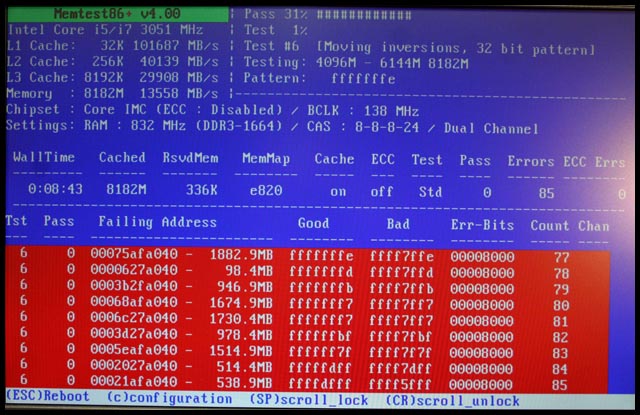
Исправить оперативную память при наличии ошибок в программе невозможно. Это не как в жестком диске затереть битые сектора. Я рекомендую вот что:
Самое распространённое — это выход из строя модуля оперативной памяти. Тестируем по одному модулю. Сначала этот модуль ставим в слот под оперативную память №1.
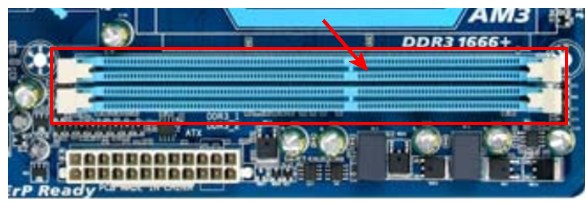
Тестируем,смотрим результат. Если ошибки есть как показано на рис. выше (там где выделено красным в программе Memtest), то ставим этот модуль слот под оперативную память №2. Тестируем,смотрим результат. Если ничего не изменилось,то модуль неисправен и подлежит замене. Меняем или ставим другой модуль памяти,тестируем. Если модуль памяти исправен,по окончанию теста в видим следующее:

Бывает что неисправен слот для оперативной памяти на мат. плате. В этом случае подключаем модуль в другой свободный слот, далее рассматриваем целесообразность работы компьютера в данной конфигурации с неисправным слотом под оперативную память, целесообразность замены материнской платы, а может вас и так всё устроит, и объёма памяти вам будет достаточно.
В программе — 9 тестов:
Test 0 — [Address test, walking ones, no cache] – тестирования для выяснения проблем в адресе памяти.
Test 1 — [Addresstest, ownaddress] – глубокий тест для выявления ошибок в адресационной прописки памяти
Test 2 — [Movinginversions, ones&zeros] – проверка на трудноуловимые и аппаратные ошибки.
Test 3 — [Movinginversions, 8 bitpat] – как и предыдущий тест, только в нем используется алгоритм в 8ми битном подходе от 0 до 1. Тестируется 20 различных методов.
Test 4 — [Moving inversions, random pattern] – Выявление ошибок связанных с data sensitive. В этом тесте 60 различных методов.
Test 5 — [Block move, 64 moves] – Поиск проблем в схемах оперативной памяти.
Test 6 — [Moving inversions, 32 bit pat] – Самый долгий тест для выявления data sensitive errors.
Test 7 — [Randomnumbersequence] – Проверка ошибок в записи памяти.
Test 8 — [Modulo 20, ones&zeros] – Выявление скрытых ошибок в оперативной памяти с помощью буферизации и кеша.
Test 9 — [Bit fade test, 90 min, 2 patterns] – Тест может быть включен вручную. Он записывает адреса в памяти, после чего уходит в сон на 1.5 часа. После выхода из сна, сверяет биты в адресах, на схожесть. Клавишей C для ручного запуска. Тест требует около 3х часов времени.
Теперь вы увидели как проводится тестирование оперативной памяти, как восстановить её работоспособность самостоятельно и проверить с помощью программы Memtest86 с приведенной инструкцией.

- Joined
- Feb 24, 2009
- Messages
- 3,516
(0.69/day)
| System Name | Money Hole |
|---|---|
| Processor | Core i7 970 |
| Motherboard | Asus P6T6 WS Revolution |
| Cooling | Noctua UH-D14 |
| Memory | 2133Mhz 12GB (3x4GB) Mushkin 998991 |
| Video Card(s) | Sapphire Tri-X OC R9 290X |
| Storage | Samsung 1TB 850 Evo |
| Display(s) | 3x Acer KG240A 144hz |
| Case | CM HAF 932 |
| Audio Device(s) | ADI (onboard) |
| Power Supply | Enermax Revolution 85+ 1050w |
| Mouse | Logitech G602 |
| Keyboard | Logitech G710+ |
| Software | Windows 10 Professional x64 |
-
#1
I’m certain the memory is not bad as they test by themselves ok. It’s just when I have all 6 of them in there I keep getting errors when I run memtest86 on test 6. All other tests pass without problems. When I only use 3 dimms, they can run up to 2133 no problems. It’s just when I try to run all 6 of them at 1866 that I get errors on test 6. I did find that upping my tFAW helped most of the errors that I was getting on test 6, but not all of them.
I’m just running a 133mhz bclk as I’m just messing around with memory overclocking. I’ve tried lowering the unclock from 3200 to 3066 without success. I’m down to 2800 (1.5) but have not been able to run it under memtest yet to see if that fixes errors. I’m running 1.35v vvt and 1.66 vdimm.
Any help would be great as I can’t seem to find anyone that has errors on test 6 on X58 that can tell me what’s causing it.

95Viper
Super Moderator
Staff member
- Joined
- Oct 12, 2008
- Messages
- 11,665
(2.23/day)
-
#2
Try re-seating the CPU and, of course replace TIM while in there.
While the Processor is out check the pins and pads.
And, make sure the cooler is mounting level.
And, don’t overtighten the cooler screws/bolts.
Edit:
I don’t OC at this time.
This is what I have now and it runs ok with the XMP profiles.
The x58 chipset seems finicky with certain memory and 6 DIMMs.

Last edited: Nov 16, 2012

- Joined
- Jan 29, 2012
- Messages
- 5,878
(1.46/day)
- Location
-
Florida
| System Name | natr0n-PC |
|---|---|
| Processor | Ryzen 5950x — smt off — max boost 5250 MHz |
| Motherboard | B450 AORUS M |
| Cooling | EK AIO — 6 fan action |
| Memory | TEAM VULCAN 32GB DDR4 4000 @ 3800 |
| Video Card(s) | EVGA 3070ti ftw |
| Storage | Various |
| Display(s) | PIXIO IPS 240Hz |
| Case | Thermaltake Level 20 VT |
| Audio Device(s) | LOXJIE D10 + Kinter Amp + 4 Bookshelf Speakers Sony+JVC |
| Power Supply | Super Flower Leadex III ARGB 80+ Gold 650W |
| Software | XP/7/8.1/10 |
| Benchmark Scores | http://valid.x86.fr/79kuh6 |
- Joined
- Feb 24, 2009
- Messages
- 3,516
(0.69/day)
| System Name | Money Hole |
|---|---|
| Processor | Core i7 970 |
| Motherboard | Asus P6T6 WS Revolution |
| Cooling | Noctua UH-D14 |
| Memory | 2133Mhz 12GB (3x4GB) Mushkin 998991 |
| Video Card(s) | Sapphire Tri-X OC R9 290X |
| Storage | Samsung 1TB 850 Evo |
| Display(s) | 3x Acer KG240A 144hz |
| Case | CM HAF 932 |
| Audio Device(s) | ADI (onboard) |
| Power Supply | Enermax Revolution 85+ 1050w |
| Mouse | Logitech G602 |
| Keyboard | Logitech G710+ |
| Software | Windows 10 Professional x64 |
-
#4
9-9-9-24
The dimms are not hypers but the ones that replaced them (I think). They’re the blue Corsair Domms with the removable fins, 2GB modules. I’ve ran then fine up to 9-9-9-24 @2133 without more then 1.64v. They take and keep running. Just the uncore can’t keep up.
My Asus board is finicky when running with the XMP profile. I have to set them manually. I’ve thought about reseting the CPU, but I don’t have the problem of getting all 6 dimms to register when booting (hot or cold).
I’m contemplating moving a couple dimms around but I’m not sure how the board assigns the address. The error keeps popping up in the 7100mb range, consistently.
- Joined
- Jan 29, 2012
- Messages
- 5,878
(1.46/day)
- Location
-
Florida
| System Name | natr0n-PC |
|---|---|
| Processor | Ryzen 5950x — smt off — max boost 5250 MHz |
| Motherboard | B450 AORUS M |
| Cooling | EK AIO — 6 fan action |
| Memory | TEAM VULCAN 32GB DDR4 4000 @ 3800 |
| Video Card(s) | EVGA 3070ti ftw |
| Storage | Various |
| Display(s) | PIXIO IPS 240Hz |
| Case | Thermaltake Level 20 VT |
| Audio Device(s) | LOXJIE D10 + Kinter Amp + 4 Bookshelf Speakers Sony+JVC |
| Power Supply | Super Flower Leadex III ARGB 80+ Gold 650W |
| Software | XP/7/8.1/10 |
| Benchmark Scores | http://valid.x86.fr/79kuh6 |
-
#5
9-9-9-24
The dimms are not hypers but the ones that replaced them (I think). They’re the blue Corsair Domms with the removable fins, 2GB modules. I’ve ran then fine up to 9-9-9-24 @2133 without more then 1.64v. They take and keep running. Just the uncore can’t keep up.
My Asus board is finicky when running with the XMP profile. I have to set them manually. I’ve thought about reseting the CPU, but I don’t have the problem of getting all 6 dimms to register when booting (hot or cold).
I’m contemplating moving a couple dimms around but I’m not sure how the board assigns the address. The error keeps popping up in the 7100mb range, consistently.
you know there are 2 versions of memtest. try another one perhaps. I remember different versions would show errors when others didn’t.
http://www.memtest.org/
http://memtest86.com/
- Joined
- Feb 24, 2009
- Messages
- 3,516
(0.69/day)
| System Name | Money Hole |
|---|---|
| Processor | Core i7 970 |
| Motherboard | Asus P6T6 WS Revolution |
| Cooling | Noctua UH-D14 |
| Memory | 2133Mhz 12GB (3x4GB) Mushkin 998991 |
| Video Card(s) | Sapphire Tri-X OC R9 290X |
| Storage | Samsung 1TB 850 Evo |
| Display(s) | 3x Acer KG240A 144hz |
| Case | CM HAF 932 |
| Audio Device(s) | ADI (onboard) |
| Power Supply | Enermax Revolution 85+ 1050w |
| Mouse | Logitech G602 |
| Keyboard | Logitech G710+ |
| Software | Windows 10 Professional x64 |
-
#1
I’m certain the memory is not bad as they test by themselves ok. It’s just when I have all 6 of them in there I keep getting errors when I run memtest86 on test 6. All other tests pass without problems. When I only use 3 dimms, they can run up to 2133 no problems. It’s just when I try to run all 6 of them at 1866 that I get errors on test 6. I did find that upping my tFAW helped most of the errors that I was getting on test 6, but not all of them.
I’m just running a 133mhz bclk as I’m just messing around with memory overclocking. I’ve tried lowering the unclock from 3200 to 3066 without success. I’m down to 2800 (1.5) but have not been able to run it under memtest yet to see if that fixes errors. I’m running 1.35v vvt and 1.66 vdimm.
Any help would be great as I can’t seem to find anyone that has errors on test 6 on X58 that can tell me what’s causing it.
95Viper
Super Moderator
Staff member
- Joined
- Oct 12, 2008
- Messages
- 11,665
(2.23/day)
-
#2
Try re-seating the CPU and, of course replace TIM while in there.
While the Processor is out check the pins and pads.
And, make sure the cooler is mounting level.
And, don’t overtighten the cooler screws/bolts.
Edit:
I don’t OC at this time.
This is what I have now and it runs ok with the XMP profiles.
The x58 chipset seems finicky with certain memory and 6 DIMMs.
Last edited: Nov 16, 2012
- Joined
- Jan 29, 2012
- Messages
- 5,878
(1.46/day)
- Location
-
Florida
| System Name | natr0n-PC |
|---|---|
| Processor | Ryzen 5950x — smt off — max boost 5250 MHz |
| Motherboard | B450 AORUS M |
| Cooling | EK AIO — 6 fan action |
| Memory | TEAM VULCAN 32GB DDR4 4000 @ 3800 |
| Video Card(s) | EVGA 3070ti ftw |
| Storage | Various |
| Display(s) | PIXIO IPS 240Hz |
| Case | Thermaltake Level 20 VT |
| Audio Device(s) | LOXJIE D10 + Kinter Amp + 4 Bookshelf Speakers Sony+JVC |
| Power Supply | Super Flower Leadex III ARGB 80+ Gold 650W |
| Software | XP/7/8.1/10 |
| Benchmark Scores | http://valid.x86.fr/79kuh6 |
- Joined
- Feb 24, 2009
- Messages
- 3,516
(0.69/day)
| System Name | Money Hole |
|---|---|
| Processor | Core i7 970 |
| Motherboard | Asus P6T6 WS Revolution |
| Cooling | Noctua UH-D14 |
| Memory | 2133Mhz 12GB (3x4GB) Mushkin 998991 |
| Video Card(s) | Sapphire Tri-X OC R9 290X |
| Storage | Samsung 1TB 850 Evo |
| Display(s) | 3x Acer KG240A 144hz |
| Case | CM HAF 932 |
| Audio Device(s) | ADI (onboard) |
| Power Supply | Enermax Revolution 85+ 1050w |
| Mouse | Logitech G602 |
| Keyboard | Logitech G710+ |
| Software | Windows 10 Professional x64 |
-
#4
9-9-9-24
The dimms are not hypers but the ones that replaced them (I think). They’re the blue Corsair Domms with the removable fins, 2GB modules. I’ve ran then fine up to 9-9-9-24 @2133 without more then 1.64v. They take and keep running. Just the uncore can’t keep up.
My Asus board is finicky when running with the XMP profile. I have to set them manually. I’ve thought about reseting the CPU, but I don’t have the problem of getting all 6 dimms to register when booting (hot or cold).
I’m contemplating moving a couple dimms around but I’m not sure how the board assigns the address. The error keeps popping up in the 7100mb range, consistently.
- Joined
- Jan 29, 2012
- Messages
- 5,878
(1.46/day)
- Location
-
Florida
| System Name | natr0n-PC |
|---|---|
| Processor | Ryzen 5950x — smt off — max boost 5250 MHz |
| Motherboard | B450 AORUS M |
| Cooling | EK AIO — 6 fan action |
| Memory | TEAM VULCAN 32GB DDR4 4000 @ 3800 |
| Video Card(s) | EVGA 3070ti ftw |
| Storage | Various |
| Display(s) | PIXIO IPS 240Hz |
| Case | Thermaltake Level 20 VT |
| Audio Device(s) | LOXJIE D10 + Kinter Amp + 4 Bookshelf Speakers Sony+JVC |
| Power Supply | Super Flower Leadex III ARGB 80+ Gold 650W |
| Software | XP/7/8.1/10 |
| Benchmark Scores | http://valid.x86.fr/79kuh6 |
-
#5
9-9-9-24
The dimms are not hypers but the ones that replaced them (I think). They’re the blue Corsair Domms with the removable fins, 2GB modules. I’ve ran then fine up to 9-9-9-24 @2133 without more then 1.64v. They take and keep running. Just the uncore can’t keep up.
My Asus board is finicky when running with the XMP profile. I have to set them manually. I’ve thought about reseting the CPU, but I don’t have the problem of getting all 6 dimms to register when booting (hot or cold).
I’m contemplating moving a couple dimms around but I’m not sure how the board assigns the address. The error keeps popping up in the 7100mb range, consistently.
you know there are 2 versions of memtest. try another one perhaps. I remember different versions would show errors when others didn’t.
http://www.memtest.org/
http://memtest86.com/