| Автор | Сообщение | ||
|---|---|---|---|
|
|||

Member Статус: Не в сети |
Проверил оперативу программой memtest86, она нашла несколько сотен ошибок, что делать? И из-за чего это произошло?(разгон сильный не делал, блок питания слабый(JNC 250W). Оператива: SpecTek(DDR SD RAM 2100) 256Мб S/N: 249A4D8Bh |
 Добавлено: 15.09.2005 19:07
 | Реклама | |
|
Партнер |
|
XRR |
|
|
Member Статус: Не в сети |
что делать? — убрать разгон вообще и посмотреть если ошибки … самому ведь можно догадаться ? |
|
Jak |
|
|
Member Статус: Не в сети |
Разгон я убрал еще перед проверкой!!! |
|
BloodyWerewolf |
|
|
Member Статус: Не в сети |
Jak |

|
user64 |
|
|
Member Статус: Не в сети |
Jak |
|
ИгРоман |
|
|
Заблокирован Статус: Не в сети |
Вина либо в оперативке, либо в проце! У меня такое было со старым процем, рад что избавился, но до этого поменял пар 6 модулей мамяти! |


|
Robis |
|
|
Member Статус: Не в сети |
Согласан со всеми. Однако если проблем при работе никаких (не виснет, экрана синего нет и т. д.) то оставь ее в покое. Хотя если тебя коробит, что твоя память ошибается, бери бабки и в магазин за нормальной памятью. Лучше если есть знакомые в магазине. Может дадут много планок на вечерок, погоняй, попробуй, вобщем эксперементируй. ИгРоман писал(а): Вина либо в оперативке, либо в проце! У меня такое было со старым процем
А у меня с новой памятью |

|
—Vel— |
|
|
Advanced member Статус: Не в сети |
А я прверял очень просто — берем каталог гигов на 8 с различными файлами (и кучей мелких и огромных) и архивируем |
|
Jak |
|
|
Member Статус: Не в сети |
Robis писал(а): если проблем при работе никаких (не виснет, экрана синего нет и т. д.) то оставь ее в покое. В этом и была проблема начали вылетать синие экраны, по номенру ошибок нашел в и-нете что может быть связано с памятью, вот и проверил. Кстати не могла ли она испортится из-за слабого блока питания? |
|
—Vel— |
|
|
Advanced member Статус: Не в сети |
Jak Jak писал(а): Кстати не могла ли она испортится из-за слабого блока питания? Нет, при плохом БП она просто будет глючить (точнее будет глючить все), при замене на нормальный БП, если за это время ничего не сгорело, то все должно стать нормально |
|
gloom_demon |
|
|
Member Статус: Не в сети |
Но блок питания лучше все-равно поменять JNC такое же гуано как и SpecTec |
—
| Вы не можете начинать темы Вы не можете отвечать на сообщения Вы не можете редактировать свои сообщения Вы не можете удалять свои сообщения Вы не можете добавлять вложения |
Лаборатория
Новости
|
0 / 0 / 0 Регистрация: 18.08.2009 Сообщений: 13 |
|
|
1 |
|
|
23.08.2009, 15:20. Показов 21245. Ответов 8
Протестил с помощью Memtest 86 оперативку OCZ DDR2 PC2-6400 Vista Upgrade 2GB Module/4GB Kit, одна планка выдаёт очень много ошибок! Вопрос такой можно как нибудь исправить эти ошибки или надо нести оперативку по гарантии?
__________________
0 |

|
Programming Эксперт 94731 / 64177 / 26122 Регистрация: 12.04.2006 Сообщений: 116,782 |
23.08.2009, 15:20 |
|
Ответы с готовыми решениями: Много ошибок friend ostream& operator <<(ostream& out, Planet&… Много ошибок)
Много ошибок #include <iostream> 8 |
 много ошибок
|
Почетный модератор 7388 / 2634 / 281 Регистрация: 29.07.2006 Сообщений: 13,696 |
|
|
23.08.2009, 15:31 |
2 |
|
наверное, нужно, для начала, узнать, что за ошибки, а потом куда-то нести.
0 |
|
0 / 0 / 0 Регистрация: 18.08.2009 Сообщений: 13 |
|
|
23.08.2009, 15:58 [ТС] |
3 |
|
наверное, нужно, для начала, узнать, что за ошибки, а потом куда-то нести. А как узнанать какие ошибки?
0 |


|
279 / 206 / 22 Регистрация: 24.04.2008 Сообщений: 1,398 |
|
|
24.08.2009, 13:24 |
4 |
|
1. Проверь она не разогнана? Если ошибки есть то гаранития
1 |
|
0 / 0 / 0 Регистрация: 18.08.2009 Сообщений: 13 |
|
|
24.08.2009, 23:15 [ТС] |
5 |
|
1. Проверь она не разогнана? Если ошибки есть то гаранития Спасибо за ответ!!! Контакты протирал… ставил в другие слоты… не помогло… придётся идти…
0 |
|
0 / 0 / 0 Регистрация: 21.03.2011 Сообщений: 3 |
|
|
21.03.2011, 17:45 |
6 |
|
не ты один такой! у меня компу 4 месяца, стоит 1 планка 2 гб. Было как : Не устанавливаются некоторые образы игр(репаки в основном), не распаковываются архивы более 1 гб и вылетает иногда «СИНИЙ ЭКРАН СМЕРТИ»!!!! протестил МЕМ тестом выдало 1822 ошибки ) я в ШОКЕ! гарантии 8 месяцев ещё! поменяют ли ???
0 |
|
6139 / 1897 / 14 Регистрация: 07.07.2008 Сообщений: 10,417 |
|
|
22.03.2011, 10:33 |
7 |
|
должны
0 |
|
0 / 0 / 0 Регистрация: 21.03.2011 Сообщений: 3 |
|
|
22.03.2011, 18:02 |
8 |
|
обнадёжил
0 |

|
0 / 0 / 0 Регистрация: 21.03.2011 Сообщений: 3 |
|
|
02.04.2011, 15:16 |
9 |
|
всё! заменили
0 |

|
IT_Exp Эксперт 87844 / 49110 / 22898 Регистрация: 17.06.2006 Сообщений: 92,604 |
02.04.2011, 15:16 |
|
Помогаю со студенческими работами здесь Много ошибок
#include <iostream> using namespace std;… CMake — много ошибок Много ошибок в коде Искать еще темы с ответами Или воспользуйтесь поиском по форуму: 9 |
[SOLVED] MemTest86 showing RAM errors ?
-
Thread starternoig
-
Start dateApr 4, 2022
-
- May 6, 2014
-
- 28
-
- 1
-
- 18,535
- 0
-
#1
For a while I seem to have an unstable OS and at random irregularities, nothing major.
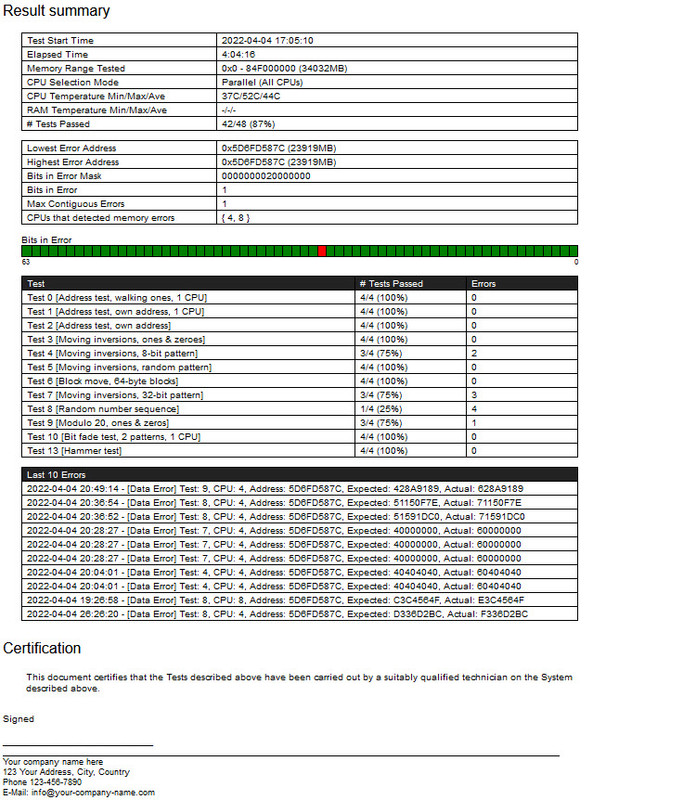
Remembering some years ago I did a memtest and so I tried with the free Passmark MemTest865. See here below.
Has anyone a suggestion other than replacing the RAM units(s)?
Thanks

-
- Apr 18, 2014
-
- 2,251
-
- 349
-
- 21,090
- 302
-
#8
If so and if the RAM modules’ part number is indeed CMK32GX4M2B3200C16 are actually in the RAM QVL list by the manufacturer(Asus) here page 22.
The correst slots for two sticks of RAM are slots A2 and B2. The lighter grey ones. Slots 2 and 4 counting from CPU socket. Like image below, taken from page 1-5 of manual here.
As said above, if they are in the correct slots any error in memtest86 would mean RAM is bad and should be replaced.

-
- May 29, 2018
-
- 6,599
-
- 1,190
-
- 14,940
-
- 372
-
#2

-
- Jun 12, 2015
-
- 61,160
-
- 5,187
-
- 166,290
- 10,453
-
#3
so if its not in wrong slots, ideal solution is rma ram and get new stick. I don’t have any other ideas
-
- Aug 22, 2019
-
- 101
-
- 12
-
- 4,595
- 1
-
#4
-
- May 6, 2014
-
- 28
-
- 1
-
- 18,535
- 0
-
#5
Is the RAM installed in correct slots?
thanks @drivinfast247
The RAM has been installed approx two years ago, assuming I had installed according a manual.
any error count higher than 0 is too many on memtest
so if its not in wrong slots, ideal solution is rma ram and get new stick. I don’t have any other ideas
thanks @Colif
As I said above, it’s been there for at least a year. Is there a way of checking if in the right slots?
Is your Ram overclocked XMP/manual tuned?
Thanks @IBeats
No overclocking or tuning done
Not sure if the Speccy insert tells anything?
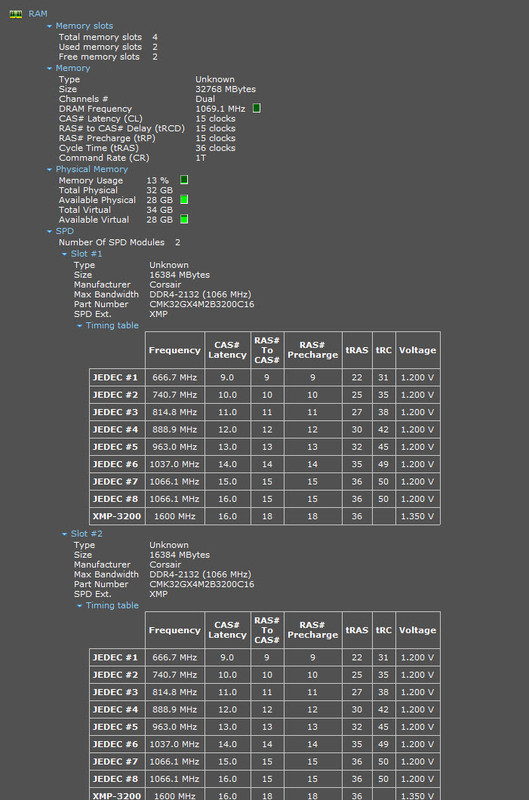
-
- May 29, 2018
-
- 6,599
-
- 1,190
-
- 14,940
- 372
-
#6
thanks @drivinfast247
The RAM has been installed approx two years ago, assuming I had installed according a manual.thanks @Colif
As I said above, it’s been there for at least a year. Is there a way of checking if in the right slots?Thanks @IBeats
No overclocking or tuning done
Not sure if the Speccy insert tells anything?
Says slots 1&2 that could(more than likely) be incorrect. What motherboard?
-
- May 6, 2014
-
- 28
-
- 1
-
- 18,535
- 0
-
#7
Says slots 1&2 that could(more than likely) be incorrect. What motherboard?
ASUS PRIME Z370-A II
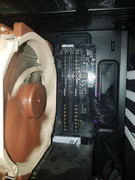
Update: I opened the case to see where the Mem sticks are located
see here:
-
- Apr 18, 2014
-
- 2,251
-
- 349
-
- 21,090
- 302
-
#8
If so and if the RAM modules’ part number is indeed CMK32GX4M2B3200C16 are actually in the RAM QVL list by the manufacturer(Asus) here page 22.
The correst slots for two sticks of RAM are slots A2 and B2. The lighter grey ones. Slots 2 and 4 counting from CPU socket. Like image below, taken from page 1-5 of manual here.
As said above, if they are in the correct slots any error in memtest86 would mean RAM is bad and should be replaced.
-
- May 29, 2018
-
- 6,599
-
- 1,190
-
- 14,940
- 372
-
#9
ASUS PRIME Z370-A IIUpdate: I opened the case to see where the Mem sticks are located
see here:
That’s correct. Make sure you’re on latest BIOS.
-
- May 6, 2014
-
- 28
-
- 1
-
- 18,535
- 0
-
#10
Please verify this is your motherboard here.
If so and if the RAM modules’ part number is indeed CMK32GX4M2B3200C16 are actually in the RAM QVL list by the manufacturer(Asus) here page 22.
The correst slots for two sticks of RAM are slots A2 and B2. The lighter grey ones. Slots 2 and 4 counting from CPU socket. Like image below, taken from page 1-5 of manual here.As said above, if they are in the correct slots any error in memtest86 would mean RAM is bad and should be replaced.
Thanks @Satan-IR
Very detailed input of yours and very much appreciated!
Yes to all of your points above. So it does not leave many options for me😞
I did read on the Corsair website about Memtest and RAM faults. Also I mentioned above that I haven’t changed anything from original settings by the supplier of this PC.
Would you have much hope on their suggestions?
-
- Apr 18, 2014
-
- 2,251
-
- 349
-
- 21,090
- 302
-
#11
Thanks @Satan-IR
Very detailed input of yours and very much appreciated!
Yes to all of your points above. So it does not leave many options for me😞
I did read on the Corsair website about Memtest and RAM faults. Also I mentioned above that I haven’t changed anything from original settings by the supplier of this PC.
Would you have much hope on their suggestions?
No problem. If you mean the RMA process I think any error in memtest86 should be proof enough RAM is bad.
-
- May 6, 2014
-
- 28
-
- 1
-
- 18,535
- 0
-
#12
That’s correct. Make sure you’re on latest BIOS.
Thanks @drivinfast247
Done that approx a couple of months ago.
-
- May 6, 2014
-
- 28
-
- 1
-
- 18,535
- 0
-
#13
Unfortunately I will have to bite the bullet and get new RAM.
-
- May 6, 2014
-
- 28
-
- 1
-
- 18,535
- 0
-
#14
After emailing the RAM test errors to the PC supplier they agreed to replace the RAM . Very generous of them as I bought this machine early 2019.
| Thread starter | Similar threads | Forum | Replies | Date |
|---|---|---|---|---|
|
|
Question MemTest86 errors / faulty ram? | Memory | 7 | Jan 21, 2023 |
|
K
|
Question Single bit in error, MemTest86 | Memory | 2 | Jan 6, 2023 |
|
R
|
Question Memory Latency result in MemTest86 a good measure of RAM performance? | Memory | 7 | Dec 4, 2022 |
|
|
[SOLVED] What Memtest86 PASS screen should look like. | Memory | 4 | Nov 27, 2022 |
|
|
[SOLVED] Laptop RAM Memtest86+ | Memory | 8 | Nov 26, 2022 |
|
V
|
Question Trouble with memtest86 | Memory | 10 | Oct 24, 2022 |
|
|
Question Ram memtest86 error | Memory | 10 | Aug 27, 2022 |
|
S
|
Question Memtest86 Result help CPU or Ram | Memory | 2 | Aug 8, 2022 |
|
H
|
[SOLVED] PC restarting itself — error during memtest | Memory | 2 | May 23, 2022 |
|
G
|
[SOLVED] Page fault type error while running memtest86+ | Memory | 2 | May 22, 2022 |


- Advertising
- Cookies Policies
- Privacy
- Term & Conditions
- Topics
[SOLVED] MemTest86 showing RAM errors ?
-
Thread starternoig
-
Start dateApr 4, 2022
-
- May 6, 2014
-
- 28
-
- 1
-
- 18,535
- 0
-
#1
For a while I seem to have an unstable OS and at random irregularities, nothing major.
Remembering some years ago I did a memtest and so I tried with the free Passmark MemTest865. See here below.
Has anyone a suggestion other than replacing the RAM units(s)?
Thanks
-
- Apr 18, 2014
-
- 2,251
-
- 349
-
- 21,090
- 302
-
#8
If so and if the RAM modules’ part number is indeed CMK32GX4M2B3200C16 are actually in the RAM QVL list by the manufacturer(Asus) here page 22.
The correst slots for two sticks of RAM are slots A2 and B2. The lighter grey ones. Slots 2 and 4 counting from CPU socket. Like image below, taken from page 1-5 of manual here.
As said above, if they are in the correct slots any error in memtest86 would mean RAM is bad and should be replaced.
-
- May 29, 2018
-
- 6,599
-
- 1,190
-
- 14,940
- 372
-
#2
-
- Jun 12, 2015
-
- 61,160
-
- 5,187
-
- 166,290
- 10,453
-
#3
so if its not in wrong slots, ideal solution is rma ram and get new stick. I don’t have any other ideas
-
- Aug 22, 2019
-
- 101
-
- 12
-
- 4,595
- 1
-
#4
-
- May 6, 2014
-
- 28
-
- 1
-
- 18,535
- 0
-
#5
Is the RAM installed in correct slots?
thanks @drivinfast247
The RAM has been installed approx two years ago, assuming I had installed according a manual.
any error count higher than 0 is too many on memtest
so if its not in wrong slots, ideal solution is rma ram and get new stick. I don’t have any other ideas
thanks @Colif
As I said above, it’s been there for at least a year. Is there a way of checking if in the right slots?
Is your Ram overclocked XMP/manual tuned?
Thanks @IBeats
No overclocking or tuning done
Not sure if the Speccy insert tells anything?
-
- May 29, 2018
-
- 6,599
-
- 1,190
-
- 14,940
- 372
-
#6
thanks @drivinfast247
The RAM has been installed approx two years ago, assuming I had installed according a manual.thanks @Colif
As I said above, it’s been there for at least a year. Is there a way of checking if in the right slots?Thanks @IBeats
No overclocking or tuning done
Not sure if the Speccy insert tells anything?
Says slots 1&2 that could(more than likely) be incorrect. What motherboard?
-
- May 6, 2014
-
- 28
-
- 1
-
- 18,535
- 0
-
#7
Says slots 1&2 that could(more than likely) be incorrect. What motherboard?
ASUS PRIME Z370-A II
Update: I opened the case to see where the Mem sticks are located
see here:
-
- Apr 18, 2014
-
- 2,251
-
- 349
-
- 21,090
- 302
-
#8
If so and if the RAM modules’ part number is indeed CMK32GX4M2B3200C16 are actually in the RAM QVL list by the manufacturer(Asus) here page 22.
The correst slots for two sticks of RAM are slots A2 and B2. The lighter grey ones. Slots 2 and 4 counting from CPU socket. Like image below, taken from page 1-5 of manual here.
As said above, if they are in the correct slots any error in memtest86 would mean RAM is bad and should be replaced.
-
- May 29, 2018
-
- 6,599
-
- 1,190
-
- 14,940
- 372
-
#9
ASUS PRIME Z370-A IIUpdate: I opened the case to see where the Mem sticks are located
see here:
That’s correct. Make sure you’re on latest BIOS.
-
- May 6, 2014
-
- 28
-
- 1
-
- 18,535
- 0
-
#10
Please verify this is your motherboard here.
If so and if the RAM modules’ part number is indeed CMK32GX4M2B3200C16 are actually in the RAM QVL list by the manufacturer(Asus) here page 22.
The correst slots for two sticks of RAM are slots A2 and B2. The lighter grey ones. Slots 2 and 4 counting from CPU socket. Like image below, taken from page 1-5 of manual here.As said above, if they are in the correct slots any error in memtest86 would mean RAM is bad and should be replaced.
Thanks @Satan-IR
Very detailed input of yours and very much appreciated!
Yes to all of your points above. So it does not leave many options for me😞
I did read on the Corsair website about Memtest and RAM faults. Also I mentioned above that I haven’t changed anything from original settings by the supplier of this PC.
Would you have much hope on their suggestions?
-
- Apr 18, 2014
-
- 2,251
-
- 349
-
- 21,090
- 302
-
#11
Thanks @Satan-IR
Very detailed input of yours and very much appreciated!
Yes to all of your points above. So it does not leave many options for me😞
I did read on the Corsair website about Memtest and RAM faults. Also I mentioned above that I haven’t changed anything from original settings by the supplier of this PC.
Would you have much hope on their suggestions?
No problem. If you mean the RMA process I think any error in memtest86 should be proof enough RAM is bad.
-
- May 6, 2014
-
- 28
-
- 1
-
- 18,535
- 0
-
#12
That’s correct. Make sure you’re on latest BIOS.
Thanks @drivinfast247
Done that approx a couple of months ago.
-
- May 6, 2014
-
- 28
-
- 1
-
- 18,535
- 0
-
#13
Unfortunately I will have to bite the bullet and get new RAM.
-
- May 6, 2014
-
- 28
-
- 1
-
- 18,535
- 0
-
#14
After emailing the RAM test errors to the PC supplier they agreed to replace the RAM . Very generous of them as I bought this machine early 2019.
| Thread starter | Similar threads | Forum | Replies | Date |
|---|---|---|---|---|
|
|
Question MemTest86 errors / faulty ram? | Memory | 7 | Jan 21, 2023 |
|
K
|
Question Single bit in error, MemTest86 | Memory | 2 | Jan 6, 2023 |
|
R
|
Question Memory Latency result in MemTest86 a good measure of RAM performance? | Memory | 7 | Dec 4, 2022 |
|
|
[SOLVED] What Memtest86 PASS screen should look like. | Memory | 4 | Nov 27, 2022 |
|
|
[SOLVED] Laptop RAM Memtest86+ | Memory | 8 | Nov 26, 2022 |
|
V
|
Question Trouble with memtest86 | Memory | 10 | Oct 24, 2022 |
|
|
Question Ram memtest86 error | Memory | 10 | Aug 27, 2022 |
|
S
|
Question Memtest86 Result help CPU or Ram | Memory | 2 | Aug 8, 2022 |
|
H
|
[SOLVED] PC restarting itself — error during memtest | Memory | 2 | May 23, 2022 |
|
G
|
[SOLVED] Page fault type error while running memtest86+ | Memory | 2 | May 22, 2022 |
- Advertising
- Cookies Policies
- Privacy
- Term & Conditions
- Topics