Оборудование оснащено функцией самодиагностики. При обнаружении проблемы, аппарат блокируется, на дисплее отображается код вида С#### с указанием характера проблемы. Также появляется сообщение необходимости обслуживания. После устранения проблемы, ошибку можно сбросить тумблером питания, выключив и включив аппарат.
При обнаружении неисправности дополнительного устройства (ошибки C8170, C8180, C8190, C8210)* производится частичная блокировка функциональности аппарата. После устранения неисправности ошибку можно сбросить в сервисном режиме U906.
Ошибки узла закрепления изображения (печные ошибки) C6###, после устранения неисправности и в целях безопасности, сбрасываются только в сервисном режиме U163.
Таблица кодов ошибок:
| Код |
Значение |
Описание |
Причина |
Решение |
| C0100 |
Backup memory (EEPROM) device problem (main) |
Reading from or writing to EEPROM cannot be performed. | Defective main/engine PWB. |
Replace the main/engine PWB and check for correct operation. |
| C0110 |
Backup memory data problem (main) |
Data in the specified area of the backup memory does not match the specified values. | Data damage of EEPROM. |
Contact the Service Administrative Division. |
| C0150 |
Backup memory device problem (engine EEPROM) |
Reading from or writing to EEPROM cannot be performed. | Defective main/engine PWB. |
Replace the main/engine PWB and check for correct operation. |
| Device damage of EEPROM. |
Contact the Service Administrative Division. | |||
| C0160 |
Backup memory data problem (engine EEPROM) |
Reading data from EEPROM is abnormal. | Data damage of EEPROM. |
Contact the Service Administrative Division. |
| C0170 |
Copy counts problem |
When the power is turned on, the total count and the scan count are abnormal both on the main and engine. | Data damage of EEPROM. |
Contact the Service Administrative Division. |
| Defective main/engine PWB. |
Replace the main/engine PWB and check for correct operation. | |||
| C0180 |
Machine number mismatch |
Machine number of main and engine does not match. | Data damage of EEPROM. |
Contact the Service Administrative Division. |
| C0210 |
Communication problem between the main and engine |
When the power is turned on, the machine does not detect the low level of SBSY and the high level of SDIR for 10 s. | Poor contact in the connector terminals. |
Reinsert the connector. Also check for continuity within the connector cable. If none, remedy or replace the cable. |
| Defective main/engine PWB. |
Replace the main/engine PWB and check for correct operation. | |||
| C0240 |
Printer PWB communication problem |
The printer PWB does not respond 120 s after the power is turned on. | Poor contact in the connector terminals. |
Reinsert the connector. Also check for continuity within the connector cable. If none, remedy or replace the cable. |
| Defective main/engine PWB. |
Replace the main/engine PWB and check for correct operation. | |||
| A0410 |
Document processor communication problem |
Communication fails five times successively. | Document processor installed incorrectly. |
Check the installation state of the document processor and adjust it if it is not properly installed. |
| Defective PWB. |
Replace the main/engine PWB or DP driver PWB and check for correct operation. | |||
| A0420 |
First paper feeder communication problem |
Communication fails five times successively. | First paper feeder installed incorrectly. |
Check the installation state of the first paper feeder and adjust it if it is not properly installed. |
| Defective PWB. |
Replace the main/engine PWB or cassette main PWB and check for correct operation. | |||
| C0440* |
Built-in finisher communication problem |
Communication fails five times successively. | Poor contact in the connector terminals. |
Check the connection of connector YC4 on the engine PWB and the connector of the built-in finisher, and the continuity across the connector terminals. Repair or replace if necessary. |
| Defective PWB. |
Replace the engine PWB or finisher main PWB and check for correct operation. | |||
| A0500 |
Second paper feeder communication problem |
Communication fails five times successively. | Second paper feeder installed incorrectly. |
Check the installation state of the second paper feeder and adjust it if it is not properly installed. |
| Defective PWB. |
Replace the main/engine PWB or cassette main PWB and check for correct operation. | |||
| A0510 |
Third paper feeder communication problem |
Communication fails five times successively. | Third paper feeder installed incorrectly. |
Check the installation state of the third paper feeder and adjust it if it is not properly installed. |
| Defective PWB. |
Replace the main/engine PWB or cassette main PWB and check for correct operation. | |||
| C0610 |
Bitmap (DIMM) problem |
There is a problem with the data or address bus of the bitmap DRAM. | Defective main/engine PWB. |
Replace the main/engine PWB and check for correct operation. |
| DIMM installed incorrectly. |
Check if the DIMM is inserted into the socket on the main/engine PWB correctly. | |||
| Defective DIMM. |
Replace the DIMM and check for correct operation. | |||
| C0620 |
Memory input interface problem |
Reading-in of an image does not complete within 10 s of the start of image transmission. | Defective main/engine PWB. |
Replace the main/engine PWB and check for correct operation. |
| C0630 |
DMA problem |
DMA transmission of compressed, decompressed, rotated, relocated or blanked-out image data does not complete within the specified period of time. | Defective main/engine PWB. |
Replace the main/engine PWB and check for correct operation. |
| C0800 |
Image processing problem |
JAM05 is detected twice. | Defective main/engine PWB. |
Replace the main/engine PWB and check for correct operation. |
| C2000 |
Drive motor problem |
A stable state does not continue for 1 s from 1 s after the drive motor is activated. | Poor contact in the connector terminals. |
Check the connection of connector YC6 on the main/engine PWB and the connector on the drive motor, and the continuity across the connector terminals. Repair or replace if necessary. |
| Defective drive transmission system. |
Check if the rollers and gears rotate smoothly. If not, grease the bushings and gears. Check for broken gears and replace if any. | |||
| Defective main/engine PWB. |
Replace the main/engine PWB and check for correct operation. | |||
| Defective drive motor. |
Replace the drive motor. | |||
| C2200 |
Drum motor problem |
A stable state does not continue for 1 s from 1 s after the drum motor is activated. | Poor contact in the connector terminals. |
Check the connection of connector YC6 on the main/engine PWB and the connector on the drum motor, and the continuity across the connector terminals. Repair or replace if necessary. |
| Defective drive transmission system. |
Check if the rollers and gears rotate smoothly. If not, grease the bushings and gears. Check for broken gears and replace if any. | |||
| Defective main/engine PWB. |
Replace the main/engine PWB and check for correct operation. | |||
| Defective drum motor. |
Replace the drum motor. | |||
| C3100 |
Scanner carriage problem |
The home position is not correct when the power is turned on or at the start of copying using the table. | Poor contact in the connector terminals. |
Check the connection of connector YC5 on the main/engine PWB and the connector on the home position switch, and the continuity across the connector terminals. Repair or replace if necessary. |
| Defective home position switch. |
Replace the home position switch. | |||
| Defective scanner motor. |
Replace the scanner motor. | |||
| The mirror frame, exposure lamp, or scanner wire is defective. |
Check if the mirror flames and exposure lamp are on the rail. And check the scanner wire winds correctly. | |||
| Defective main/engine PWB. |
Replace the main/engine PWB and check for correct operation. | |||
| C3200 |
Exposure lamp problem |
Non-lighting of the exposure lamp is detected at the beginning of copying. | Poor contact in the connector terminals. |
Check the connection of connector YC16 on the main/engine PWB and the connector on the inverter PWB, and the continuity across the connector terminals. Repair or replace if necessary. |
| Defective exposure lamp. |
Replace the exposure lamp. | |||
| Incorrect shading position. |
Adjust the position of the contact glass (shading plate). If the problem still occurs, replace the home position switch. | |||
| Defective PWB. |
Replace the main/engine PWB or inverter PWB and check for correct operation. | |||
| C3300 |
AGC problem |
After AGC, correct input is not obtained at CCD. | Poor contact in the connector terminals. |
Check the connection of connector YC27 on the main/engine PWB and the connector on the CCD PWB, and the continuity across the connector terminals. Repair or replace if necessary. |
| Defective exposure lamp. |
Replace the exposure lamp. | |||
| Defective PWB. |
Replace the main/engine PWB or CCD PWB and check for correct operation. | |||
| C4000 |
Polygon motor synchronization problem |
The polygon motor does not reach the stable speed within 20 s of the START signal turning on. | Poor contact in the connector terminals. |
Check the connection of connector YC3 on the main/engine PWB and laser scanner unit, and the continuity across the connector terminals. Repair or replace if necessary. |
| Defective polygon motor. |
Replace the laser scanner unit. | |||
| Defective main/engine PWB. |
Replace the main/engine PWB and check for correct operation. | |||
| C4010 |
Polygon motor steady-state problem |
Stable OFF is detected for 5 s continuously after polygon motor stability. | Poor contact in the connector terminals. |
Check the connection of connector YC3 on the main/engine PWB and laser scanner unit, and the continuity across the connector terminals. Repair or replace if necessary. |
| Defective polygon motor. |
Replace the laser scanner unit. | |||
| Defective main/engine PWB. |
Replace the main/engine PWB and check for correct operation. | |||
| C4200 |
BD steady-state problem |
ASIC detects a BD error for 600 ms after the polygon motor rotation has been stabilized. | Poor contact in the connector terminals. |
Check the connection of connector YC3 on the main/engine PWB and laser scanner unit, and the continuity across the connector terminals. Repair or replace if necessary. |
| Defective laser scanner unit. |
Replace the laser scanner unit. | |||
| Defective main/engine PWB. |
Replace the main/engine PWB and check for correct operation. | |||
| C6000 |
Fuser heater break |
The temperature does not reach 70 °C/ 158°F in 15 s before secondary stabilization. Temperature rise of 1°C/1.8°F does not occur in 5 s before secondary stabilization (except during printing). | Poor contact in the fuser thermistor connector terminals. |
Reinsert the connector. Also check for continuity within the connector cable. If none, remedy or replace the cable. |
| Fuser thermistor installed incorrectly. |
Check and reinstall if necessary. | |||
| Fuser thermostat triggered. |
Check for continuity. If none, replace the fuser thermostat. | |||
| Fuser heater installed incorrectly. |
Check and reinstall if necessary. | |||
| Broken fuser heater wire. |
Check for continuity. If none, replace the fuser heater. | |||
| C6020 |
Abnormally high fuser thermistor temperature |
Fuser thermistor is detected 230°C/ 446°F or more for 40 ms. | Shorted thermistor. |
Measure the resistance. If it is 0 Ω, replace the thermistor. |
| Broken heater control circuit on the power source PWB. |
Replace the power source PWB and check for correct operation. | |||
| C6050 |
Abnormally low fuser thermistor temperature |
Fuser thermistor remains below 90°C/ 194°F for 1 s. | Poor contact in the fuser thermistor connector terminals. |
Reinsert the connector. Also check for continuity within the connector cable. If none, remedy or replace the cable. |
| Broken fuser thermistor wire. |
Measure the resistance. If it is ∞ Ω, replace the fixing thermistor. | |||
| Fuser thermistor installed incorrectly. |
Check and reinstall if necessary. | |||
| Fuser thermostat triggered. |
Check for continuity. If none, replace the fuser thermostat. | |||
| Fuser heater installed incorrectly. |
Check and reinstall if necessary. | |||
| Broken fuser heater wire. |
Check for continuity. If none, replace the fuser heater. | |||
| C6400 |
Zero-cross signal error |
Interrupt of the zero-cross signal does not occur more than 1 s. | Poor contact in the connector terminals. |
Reinsert the connector. Also check for conti- nuity within the connector cable. If none, remedy or replace the cable. |
| Defective power source PWB. |
Check if the zero-crossing signal is output from YC2-2 on the power source PWB. If not, replace the power source PWB. | |||
| Defective main/engine PWB. |
Replace the main/engine PWB if C6400 is detected while YC2-2 on the power source PWB outputs the zero-crossing signal. | |||
| C7800 |
Broken external thermistor wire |
The thermistor output value is 0.5 V or less. | Poor contact in the connector terminals. |
Reinsert the connector. Also check for continuity within the connector cable. If none, remedy or replace the cable. |
| Defective humidity sensor. |
Replace the cassette PWB and check for correct operation. | |||
| C7810 |
Short-circuited external thermistor wire |
The thermistor output value is 4.5 V or more. | Poor contact in the connector terminals. |
Reinsert the connector. Also check for continuity within the connector cable. If none, remedy or replace the cable. |
| Defective humidity sensor. |
Replace the cassette PWB and check for correct operation. | |||
| C8170* |
Built-in finisher front side registration motor problem |
When the front-side registration home- position sensor is turned on during initialization, the sensor did not turn on while it has moved by 106 pulses. When the front-side registration home- position sensor is turned off during initialization, the sensor did not turn on in 3 s. | The front side registration motor connector makes poor contact. |
Reinsert the connector. Also check for continuity within the connector cable. If none, remedy or replace the cable. |
| Defective front side registration motor. |
Replace front side registration motor. | |||
| The front side registration home position sensor connector makes poor contact. |
Reinsert the connector. Also check for continuity within the connector cable. If none, remedy or replace the cable. | |||
| Defective front side registration home position sensor. |
Replace the front side registration home position sensor. | |||
| Defective finisher control PWB. |
Replace the finisher control PWB and check for correct operation. | |||
| C8180* |
Built-in finisher rear side registration motor problem |
When the rear-side registration home- position sensor is turned on during initialization, the sensor did not turn on while it has moved by 106 pulses. When the rear-side registration home- position sensor is turned off during initialization, the sensor did not turn on in 3 s. | The rear side registration motor connector makes poor contact. |
Reinsert the connector. Also check for continuity within the connector cable. If none, remedy or replace the cable. |
| Defective rear side registration motor. |
Replace rear side registration motor. | |||
| The rear side registration home position sensor connector makes poor contact. |
Reinsert the connector. Also check for continuity within the connector cable. If none, remedy or replace the cable. | |||
| Defective rear side registration home position sensor. |
Replace the rear side registration home position sensor. | |||
| Defective finisher control PWB. |
Replace the finisher control PWB and check for correct operation. | |||
| C8190* |
Built-in finisher trailing edge registration motor problem |
When the trailing edge registration home-position sensor is turned on during initialization, the sensor did not turn on while it has moved by 106 pulses. When the trailing edge registration home-position sensor is turned off during initialization, the sensor did not turn on in 3 s. | The trailing edge registration motor connector makes poor contact. |
Reinsert the connector. Also check for continuity within the connector cable. If none, remedy or replace the cable. |
| Defective trailing edge registration motor. |
Replace trailing edge registration motor. | |||
| The trailing edge registration home position sensor connector makes poor contact. |
Reinsert the connector. Also check for continuity within the connector cable. If none, remedy or replace the cable. | |||
| Defective trailing edge registration home position sensor. |
Replace the trailing edge registration home position sensor. | |||
| Defective finisher control PWB. |
Replace the finisher control PWB and check for correct operation. | |||
| C8210* |
Built-in finisher stapler problem |
The stapler home position sensor does not change state from nondetection to detection within 200 ms of the start of stapler motor counterclockwise (forward) rotation. During initialization, the stapler home position sensor does not change state from non-detection to detection within 600 ms of the start of stapler motor clockwise (reverse) rotation. | The stapler connector makes poor contact. |
Reinsert the connector. Also check for continuity within the connector cable. If none, remedy or replace the cable. |
| The stapler is blocked with a staple. |
Remove the stapler cartridge, and check the cartridge and the stapling section of the stapler. | |||
| The stapler is broken. |
Replace the front stapler and check for correct operation. | |||
| Defective finisher control PWB. |
Replace the finisher control PWB and check for correct operation. |
*) Kyocera TASKalfa 181/221
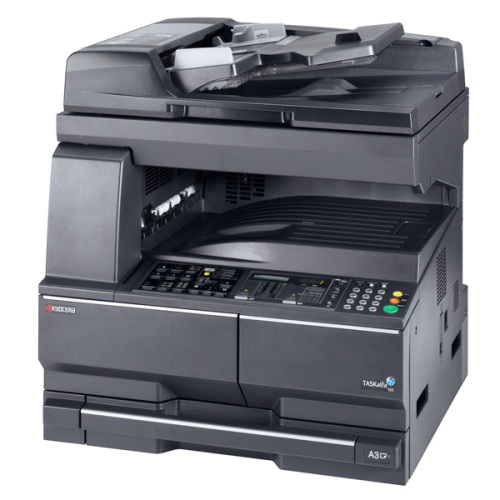
Аналогичные аппараты: Kyocera TASKalfa 180 / TASKalfa 220
Коды ошибок:
C0100 — Backup memory (EEPROM) device problem (main) (не может быть выполнено чтение или запись в EEPROM)
C0110 — Backup memory data problem (main) (проблема резервного копирования данных в память)
C0150 — Backup memory device problem (engine EEPROM) (проблема в двигателе EEPROM)
C0160 — Backup memory data problem (engine EEPROM) (проблема в двигателе EEPROM)
C0170 — Copy counts problem (проблема счетчика копий
C0180 — Machine number mismatch (не совпадает номер аппарата и главного двигателя)
C0210 — Communication problem between the main and engine (проблема связи между платой и двигателем)
C0240 — Printer PWB communication problem (проблема с питанием)
A0410 — Document processor communication problem (сбой связи процессора)
A0420 — First paper feeder communication problem (проблема с первым податчиком бумаги)
A0500 — Second paper feeder communication problem (проблема со вторым податчиком бумаги)
A0510 — Third paper feeder communication problem (проблема с третьем податчиком бумаги)
C0610 — Bitmap (DIMM) problem (проблемы с данными или адресной шиной растрового изображения DRAM)
C0620 — Memory input interface problem (проблема памяти интерфейса ввода)
C0630 — DMA problem (проблема DMA)
C0800 — Image processing problem (проблема обработки изображения)
C2000 — Drive motor problem (проблема двигателя привода)
C2200 — Drum motor problem (проблема двигателя драма)
C3100 — Scanner carriage problem (проблема каретки сканера)
C3200 — Exposure lamp problem (проблема лампы экспонирования)
C3300 — AGC problem (проблема AGC)
C4000 — Polygon motor synchronization problem (проблема синхронизации двигателя полигона)
C4010 — Polygon motor steady-state problem (проблема двигателя полигона)
C4200 — BD steady-state problem (проблема BD)
C6000 — Fuser heater break (неисправность нагревателя печки)
C6020 — Abnormally high fuser thermistor temperature (аномально высокая температура термистора в печке)
C6050 — Abnormally low fuser thermistor temperature (аномально низкая температура термистора в печке)
C6400 — Zero-cross signal error (ошибка нулевого сигнала)
C7800 — Broken external thermistor wire (поломка внешних проводов термистора)
C7810 — Short-circuited external thermistor wire (короткое замыкание термистора)
Ошибки Kyocera ECOSYS M2030dn
Ошибки Kyocera ECOSYS M2030pn
Ошибки Kyocera ECOSYS M2035dn
Ошибки Kyocera ECOSYS M2040dn
Ошибки Kyocera ECOSYS M2135dn
Ошибки Kyocera ECOSYS M2530dn
Ошибки Kyocera ECOSYS M2535dn
Ошибки Kyocera ECOSYS M2540dn
Ошибки Kyocera ECOSYS M2540dw
Ошибки Kyocera ECOSYS M2635dn
Ошибки Kyocera ECOSYS M2635dw
Ошибки Kyocera ECOSYS M2640idw
Ошибки Kyocera ECOSYS M3040dn
Ошибки Kyocera ECOSYS M3040idn
Ошибки Kyocera ECOSYS M3145dn
Ошибки Kyocera ECOSYS M3145idn
Ошибки Kyocera ECOSYS M2735dw
Ошибки Kyocera ECOSYS M3540dn
Ошибки Kyocera ECOSYS M3540idn
Ошибки Kyocera ECOSYS M3550idn
Ошибки Kyocera ECOSYS M3560idn
Ошибки Kyocera ECOSYS M3645dn
Ошибки Kyocera ECOSYS M3645idn
Ошибки Kyocera ECOSYS M3655idn
Ошибки Kyocera ECOSYS M3660idn
Ошибки Kyocera ECOSYS M3860idn
Ошибки Kyocera ECOSYS M3860idn
Ошибки Kyocera ECOSYS M4125idn
Ошибки Kyocera ECOSYS M4132idn
Ошибки Kyocera ECOSYS M5521cdn
Ошибки Kyocera ECOSYS M5521cdw
Ошибки Kyocera ECOSYS M5526cdn
Ошибки Kyocera ECOSYS M5526cdw
Ошибки Kyocera ECOSYS M6026cdn
Ошибки Kyocera ECOSYS M6026cidn
Ошибки Kyocera ECOSYS M6030cdn
Ошибки Kyocera ECOSYS M6035cidn
Ошибки Kyocera ECOSYS M6230cidn
Ошибки Kyocera ECOSYS M6235cidn
Ошибки Kyocera ECOSYS M6526cdn
Ошибки Kyocera ECOSYS M6526cidn
Ошибки Kyocera ECOSYS M6530cdn
Ошибки Kyocera ECOSYS M6535cidn
Ошибки Kyocera ECOSYS M6630cidn
Ошибки Kyocera ECOSYS M6635cidn
Ошибки Kyocera ECOSYS M8124cidn
Ошибки Kyocera ECOSYS M8130cidn
Ошибки Kyocera ECOSYS P2035d
Ошибки Kyocera ECOSYS P2040dn
Ошибки Kyocera ECOSYS P2040dw
Ошибки Kyocera ECOSYS P2135d
Ошибки Kyocera ECOSYS P2135dn
Ошибки Kyocera ECOSYS P2235dn
Ошибки Kyocera ECOSYS P2235dw
Ошибки Kyocera ECOSYS P3045dn
Ошибки Kyocera ECOSYS P3050dn
Ошибки Kyocera ECOSYS P3055dn
Ошибки Kyocera ECOSYS P3060dn
Ошибки Kyocera ECOSYS P3145dn
Ошибки Kyocera ECOSYS P3150dn
Ошибки Kyocera ECOSYS P3155dn
Ошибки Kyocera ECOSYS P3160dn
Ошибки Kyocera ECOSYS P3260dn
Ошибки Kyocera ECOSYS P4035dn
Ошибки Kyocera ECOSYS P4040dn
Ошибки Kyocera ECOSYS P5021cdn
Ошибки Kyocera ECOSYS P5021cdw
Ошибки Kyocera ECOSYS P5026cdn
Ошибки Kyocera ECOSYS P5026cdw
Ошибки Kyocera ECOSYS P6021cdn
Ошибки Kyocera ECOSYS P6026cdn
Ошибки Kyocera ECOSYS P6030cdn
Ошибки Kyocera ECOSYS P6035cdn
Ошибки Kyocera ECOSYS P6130cdn
Ошибки Kyocera ECOSYS P6230cdn
Ошибки Kyocera ECOSYS P6235cdn
Ошибки Kyocera ECOSYS P7035cdn
Ошибки Kyocera ECOSYS P7040cdn
Ошибки Kyocera ECOSYS P7240cdn
Ошибки Kyocera ECOSYS P8060cdn
Ошибки Kyocera FS-C8600DN
Ошибки Kyocera FS-C8650DN
Ошибки Kyocera FS1016MFP
Ошибки Kyocera FS1018MFP
Ошибки Kyocera FS1020MFP
Ошибки Kyocera FS1024MFP
Ошибки Kyocera FS1025MFP
Ошибки Kyocera FS1028MFP
Ошибки Kyocera FS1030MFP
Ошибки Kyocera FS1035MFP
Ошибки Kyocera FS1040
Ошибки Kyocera FS1050
Ошибки Kyocera FS1060DN
Ошибки Kyocera FS1100
Ошибки Kyocera FS1110
Ошибки Kyocera FS1116MFP
Ошибки Kyocera FS1118MFP
Ошибки Kyocera FS1120
Ошибки Kyocera FS1120MFP
Ошибки Kyocera FS1124MFP
Ошибки Kyocera FS1125MFP
Ошибки Kyocera FS1128MFP
Ошибки Kyocera FS1130MFP
Ошибки Kyocera FS1135MFP
Ошибки Kyocera FS1200
Ошибки Kyocera FS1220MFP
Ошибки Kyocera FS1300D
Ошибки Kyocera FS1320D
Ошибки Kyocera FS1320MFP
Ошибки Kyocera FS1325MFP
Ошибки Kyocera FS1350DN
Ошибки Kyocera FS1370DN
Ошибки Kyocera FS1500
Ошибки Kyocera FS6020
Ошибки Kyocera FS6025MFP
Ошибки Kyocera FS6025MFPB
Ошибки Kyocera FS6030MFP
Ошибки Kyocera FS6500
Ошибки Kyocera FS6525MFP
Ошибки Kyocera FS6530MFP
Ошибки Kyocera FS6700
Ошибки Kyocera FS6900
Ошибки Kyocera FS6950DN
Ошибки Kyocera FS8000CD
Ошибки Kyocera FS8000CN
Ошибки Kyocera FS8100DN
Ошибки Kyocera TASKalfa 180
Ошибки Kyocera TASKalfa 1800
Ошибки Kyocera TASKalfa 1801
Ошибки Kyocera TASKalfa 181
Ошибки Kyocera TASKalfa 205c
Ошибки Kyocera TASKalfa 220
Ошибки Kyocera TASKalfa 2200
Ошибки Kyocera TASKalfa 2201
Ошибки Kyocera TASKalfa 221
Ошибки Kyocera TASKalfa 2420w
Ошибки Kyocera TASKalfa 2460ci
Ошибки Kyocera TASKalfa 2470ci
Ошибки Kyocera TASKalfa 250ci
Ошибки Kyocera TASKalfa 2510i
Ошибки Kyocera TASKalfa 2520i
Ошибки Kyocera TASKalfa 255
Ошибки Kyocera TASKalfa 2550ci
Ошибки Kyocera TASKalfa 2551ci
Ошибки Kyocera TASKalfa 2552ci
Ошибки Kyocera TASKalfa 2553ci
Ошибки Kyocera TASKalfa 255b
Ошибки Kyocera TASKalfa 255c
Ошибки Kyocera TASKalfa 265ci
Ошибки Kyocera TASKalfa 300ci
Ошибки Kyocera TASKalfa 300i
Ошибки Kyocera TASKalfa 3010i
Ошибки Kyocera TASKalfa 3011i
Ошибки Kyocera TASKalfa 305
Ошибки Kyocera TASKalfa 3050ci
Ошибки Kyocera TASKalfa 3051ci
Ошибки Kyocera TASKalfa 306ci
Ошибки Kyocera TASKalfa 307ci
Ошибки Kyocera TASKalfa 308ci
Ошибки Kyocera TASKalfa 3212i
Ошибки Kyocera TASKalfa 3252ci
Ошибки Kyocera TASKalfa 3253ci
Ошибки Kyocera TASKalfa 3500i
Ошибки Kyocera TASKalfa 3501i
Ошибки Kyocera TASKalfa 350ci
Ошибки Kyocera TASKalfa 3510i
Ошибки Kyocera TASKalfa 3511i
Ошибки Kyocera TASKalfa 3550ci
Ошибки Kyocera TASKalfa 3551ci
Ошибки Kyocera TASKalfa 3552ci
Ошибки Kyocera TASKalfa 3553ci
Ошибки Kyocera TASKalfa 356ci
Ошибки Kyocera TASKalfa 358ci
Ошибки Kyocera TASKalfa 4002i
Ошибки Kyocera TASKalfa 4003i
Ошибки Kyocera TASKalfa 400ci
Ошибки Kyocera TASKalfa 4012i
Ошибки Kyocera TASKalfa 4052ci
Ошибки Kyocera TASKalfa 4053ci
Ошибки Kyocera TASKalfa 406ci
Ошибки Kyocera TASKalfa 408ci
Ошибки Kyocera TASKalfa 420i
Ошибки Kyocera TASKalfa 4500i
Ошибки Kyocera TASKalfa 4501i
Ошибки Kyocera TASKalfa 4550ci
Ошибки Kyocera TASKalfa 4551ci
Ошибки Kyocera TASKalfa 4820w
Ошибки Kyocera TASKalfa 5002i
Ошибки Kyocera TASKalfa 5003i
Ошибки Kyocera TASKalfa 500ci
Ошибки Kyocera TASKalfa 5052ci
Ошибки Kyocera TASKalfa 5053ci
Ошибки Kyocera TASKalfa 508ci
Ошибки Kyocera TASKalfa 520i
Ошибки Kyocera TASKalfa 5500i
Ошибки Kyocera TASKalfa 5501i
Ошибки Kyocera TASKalfa 550c
Ошибки Kyocera TASKalfa 552ci
Ошибки Kyocera TASKalfa 5550ci
Ошибки Kyocera TASKalfa 5551ci
Ошибки Kyocera TASKalfa 6002i
Ошибки Kyocera TASKalfa 6003i
Ошибки Kyocera TASKalfa 6052ci
Ошибки Kyocera TASKalfa 6053ci
Ошибки Kyocera TASKalfa 620
Ошибки Kyocera TASKalfa 6500i
Ошибки Kyocera TASKalfa 6501i
Ошибки Kyocera TASKalfa 650c
Ошибки Kyocera TASKalfa 6550ci
Ошибки Kyocera TASKalfa 6551ci
Ошибки Kyocera TASKalfa 7002i
Ошибки Kyocera TASKalfa 7003i
Ошибки Kyocera TASKalfa 7052ci
Ошибки Kyocera TASKalfa 7353ci
Ошибки Kyocera TASKalfa 750c
Ошибки Kyocera TASKalfa 7550ci
Ошибки Kyocera TASKalfa 7551ci
Ошибки Kyocera TASKalfa 8000i
Ошибки Kyocera TASKalfa 8001i
Ошибки Kyocera TASKalfa 8002i
Ошибки Kyocera TASKalfa 8003i
Ошибки Kyocera TASKalfa 8052ci
Ошибки Kyocera TASKalfa 820
Ошибки Kyocera TASKalfa 8353ci
Ошибки Kyocera TASKalfa 9002i
Ошибки Kyocera TASKalfa 9003i

Компоненты аппарата
Pуководство по эксплуатации
1-7
Дисплей сообщений
На дисплей сообщений в панели управления выводится следующая
информация:
• данные о текущем состоянии устройства, представленные в виде
перечисленных ниже сообщений, которые выводятся на дисплей
в процессе нормальной работы;
• коды ошибок, требующих вмешательства оператора.
Данные о состоянии устройства
Коды ошибок
См. раздел Возможные неисправности.
Системное меню (режим, включающийся после завершения прогрева
аппарата или нажатия на клавишу общего сброса)
В соответствии с заводскими настройками копировальный аппарат
автоматически задает следующие параметры копирования:
коэффициент масштабирования 1:1 для бумаги того же размера, что
и оригинал, количество копий равное “1” и качество изображения
.
ПРИМЕЧАНИЕ:
Системное меню позволяет изменять настройки по
умолчанию.
Если на аппарат установлена дополнительная кассета для бумаги,
выбор используемой кассеты также изменяется в системном меню
(см. раздел Приложение).
С помощью системного меню изменяется и выбранный режим
качества изображения (см. раздел Приложение).
Настройку параметра плотности печати, заданную по умолчанию,
можно изменить на «Автомат.» (см. раздел Приложение).
Сообщение
Описание
Самодиагностика
Копировальный аппарат производит самодиагностику после включения
питания.
Пожалуйста,
подождите.
Аппарат разогревается и пока не готов к работе.
При первом включении аппарата это сообщение остается на дисплее в
течение около 20 секунд.
Готовность к
копированию.
Аппарат готов к копированию.
 Thanks: 0
 Likes: 0
 Dislikes: 0
-
10-06-2015
#1

Junior Member

- Rep Power
- 0
 Kyocera Taskalfa 180
Dear Friends
I am facing error code J10/J11 in Kyocera Taskalfa 180 digital copier. The paper was not picking from both paper cassette and Bypass tray. After replacing Main/Engine PWB copier has started to work again. Any other alternate measures to rectify this code.
Thanks
Alphonsus A
-
10-06-2015
#2
Re: Kyocera Taskalfa 180
did you execute u906 from service mode? this resets machine disabled items. Should do this first before replacing boards. can’t recall at the moment, but a similar model has the reset from the system menu and not service menu.
THE ONLY THING FOR EVIL TO TRIUMPH IS FOR GOOD MEN TO DO NOTHING……….edmund burke
-
10-07-2015
#3
Re: Kyocera Taskalfa 180
 Originally Posted by Andrew Alphonsus

Dear Friends
I am facing error code J10/J11 in Kyocera Taskalfa 180 digital copier. The paper was not picking from both paper cassette and Bypass tray. After replacing Main/Engine PWB copier has started to work again. Any other alternate measures to rectify this code.
Thanks
Alphonsus AI don’t understand the question. You fixed the machine but are unsatisfied with the solution? =^..^=
If you’d like a serious answer to your request:
1) demonstrate that you’ve read the manual
2) demonstrate that you made some attempt to fix it.
3) if you’re going to ask about jams include the jam code.
4) if you’re going to ask about an error code include the error code.
5) You are the person onsite. Only you can make observations.
blackcat: Master Of The Obvious =^..^=
-
10-07-2015
#4
Re: Kyocera Taskalfa 180
Originally Posted by blackcat4866
I don’t understand the question. You fixed the machine but are unsatisfied with the solution? =^..^=
I think he wants to know if this happens again, what should be done or which part should be replaced or what steps to first check and take.
My question, is why would the main and engine pwb both need to be replaced. If anything, the engine board alone should be replace.
He did not say if he ran u906THE ONLY THING FOR EVIL TO TRIUMPH IS FOR GOOD MEN TO DO NOTHING……….edmund burke
-
10-07-2015
#5
Junior Member
- Rep Power
- 0
Re: Kyocera Taskalfa 180
Dear All
I have entered service mode, used simulation20 and initialized all the data of the machine. Still error code was not going .This machine doesn’t have a separate Engine PWB and so Main/Engine PWB has to be changed. My question is whether Main/Engine PWB can be repaired locally or any other solution in the PWB. The PWB is very costly and customers are bit unhappy.
Thanks
Alphonsus A
-
10-07-2015
#6
Re: Kyocera Taskalfa 180
Originally Posted by Andrew Alphonsus
Dear All
I have entered service mode, used simulation20 and initialized all the data of the machine. Still error code was not going .This machine doesn’t have a separate Engine PWB and so Main/Engine PWB has to be changed. My question is whether Main/Engine PWB can be repaired locally or any other solution in the PWB. The PWB is very costly and customers are bit unhappy.
Thanks
Alphonsus AYou are correct, in that the engine and main are one board. I did not have the TA-180 manuals but was looking at the TA-181 which i thought would be similar. TA-180 is not available here. the 181 has separate engine and main board, same looks.
These machines are old and the solution is to spend the money towards a new machine, or source another parts machine for cheap. customers has to be aware that nothing last forever and change is necessary when that time comes. just like my car, i want to keep it forever, butTHE ONLY THING FOR EVIL TO TRIUMPH IS FOR GOOD MEN TO DO NOTHING……….edmund burke
Bookmarks
Bookmarks

Posting Permissions
- You may not post new threads
- You may not post replies
- You may not post attachments
- You may not edit your posts
- BB code is On
- Smilies are On
- [IMG] code is On
- [VIDEO] code is On
- HTML code is Off
Forum Rules
Answer #1: Posted by techyagent on January 20th, 2015 10:49 PM
This answer was accepted by the poster of the original question.
techyagent

Member since:
June 17th, 2014
Points:
4,780,410

1,120
points
On most Kyocera copiers a J-11 code indicates a possible paper jam when paper is being fed from drawer
#1, but sometimes a J-11 will be indicated when the paper fails to feed from the drawer. Check the paper stops and paper guides in the drawer and make sure that they are flush against the paper, also cleaning the paper feed and pick-up rollers with a rag dampened with just plain water will help sometimes unless the rollers are completely worn out. If all this doesn’t help you may have a paper feed clutch or lift motor that has failed.
Thanks
KM-NET ADMIN Operation Guide for Ver 2.0 — Page 55
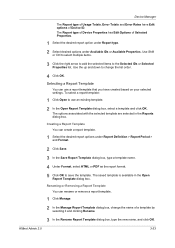
…Properties list.
Use the up and down to save the template. Device Manager
The Report type of Usage Totals, Error Totals and Error Rates have created based on your selected settings. The Report type of Device Properties has Edit Options of Selected Properties.
1 Select the desired…name.
4 Under Format, select HTML or PDF as the report format.
5 Click OK to change the name of Device ID.
KM-NET ADMIN Operation Guide for Ver 2.0 — Page 75
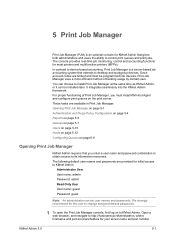
… and users the ability to control print queues and print jobs. It integrates seamlessly into devices, Print Job Manager uses a more efficient method of Print Job Manager, you enter a… We strongly recommend for most printers and multifunction printers (MFPs). The following default user names and passwords are limited and must install KM Host Agent and configure print queues on …
KM-NET ADMIN Operation Guide for Ver 2.0 — Page 98
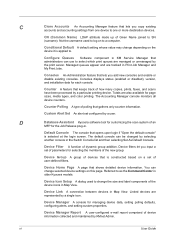
… (enabled or disabled), version, and installation date for managing device data, setting polling defaults, configuring alerts, and setting custom properties. Device Home Page A page that shows detailed device information. Device Link A connection between devices in older Kyocera models.
Not the username used to SN (surname).
Device filters let you add new consoles and enable or disable…
KM-NET ADMIN Operation Guide for Ver 2.0 — Page 99
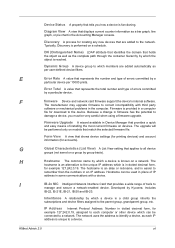
… selected firmware file. Form View A view that shows device settings (for printing devices) and account information (for locating any new devices that are added automatically as a bar graph, line graph, or pie chart in Device Manager that provides a quick and easy means of errors committed by Kyocera. Device Status A property that tells you must be very careful…
KM-NET ADMIN Operation Guide for Ver 2.0 — Page 100
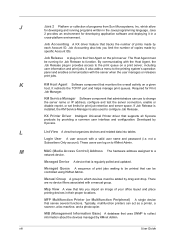
… Kyocera products by drag and drop. K
KM Host Agent Software component that is also used to change the server name or IP address, configure and test the server connection, enable or disable reprint, or set limits for Print
Job Manager.
These users can be running programs written in their proper locations. Managed Device A device…
KM-NET ADMIN Operation Guide for Ver 2.0 — Page 102
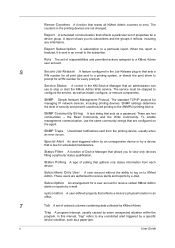
… error occurs.
When the report is finalized, it reflects, including any unsolicited alert triggered by a device that resets all print jobs sent to a printing system, or directs the print driver to
prompt for a PIN number for a device group. Role The set of Device Manager that acts as a paper jam. Service Status A control in the KM…
KM-NET Viewer Operation Guide Rev-5.2-2010.10 — Page 49
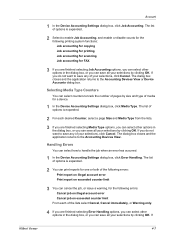
… in the dialog box, or you can select how to the Accounting Devices View. The dialog box closes and the application returns to handle the job when an error has occurred.
1 In the Device Accounting Settings dialog box, click Error Handling. Handling Errors
You can save all your selections by clicking OK. The list of…
PRESCRIBE Commands Command Reference Manual Rev 4.8 — Page 407
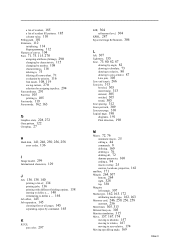
…G Graphics state, 228, 272 Gray pattern, 122 Grouping, 27
H Hard disk, 141, 246, 250, 256, 258
error codes, 136
I Image model, 299 International characters, 129
J Job, 136, 138, 140
printing a list of, 134 … separating copies by command, 145
K
KCGL
pen color, 297
KIR, 304 refinement level, 304
KPDL, 287 Kyocera Image Refinement, 304
L left, 307 Lightness, 155 Line, 73, 80, 82, 87
drawing by angle,…
KM-NET for Direct Printing Operation Guide Rev-3.2 — Page 6
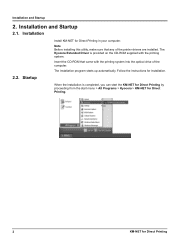
… for Direct Printing by proceeding from the start menu > All Programs > Kyocera > KM-NET for Direct Printing.
2
KM-NET for Direct Printing Insert the CD-ROM that any of the computer. Startup
Install KM-NET for installation.
Installation and Startup
2.1.
Installation
2.2.
Follow the instructions for Direct Printing in your computer. Note Before installing this…
KM-NET for Direct Printing Operation Guide Rev-3.2 — Page 12
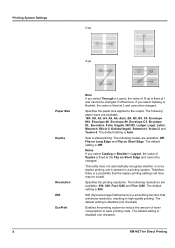
… the printing resolution. The default setting is disabled (not checked).
8
KM-NET for Direct Printing The default setting is 600. Furthermore, if you…you select Catalog or Booklet in Layout, the value of Duplex is fixed at 1 and cannot be invalid.
KIR (Kyocera Image Refinement) is Auto. The default setting is a smoothing function that the duplex printing settings set here may be…
PRESCRIBE Commands Technical Reference Manual — Rev. 4.7 — Page 3
… Pendaflex Corporation in the U.S., Letraset Canada Ltd.
Revue is a registered trademark of Kyocera Corporation.
This manual, the computer programs in the printing system referred to in this…manual. All rights are trademarks or registered trademarks of Kyocera Mita Corporation is asked to excuse any omissions or errors in the present edition.
Software shall mean the digitally …
PRESCRIBE Commands Technical Reference Manual — Rev. 4.7 — Page 145
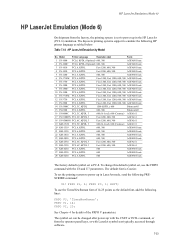
…details of 14.25 points as tabled below:
Table 7.14. The symbol set is Courier. The Kyocera printing systems support to power up in LaserJet mode, send the following lines:
FRPO V3, ‘TimesNewRoman’;… KM-1510 PCL 6, KPDL
600, 300
AGFA80 Fonts
21 KM-1530 PCL 6, KPDL
600, 300
AGFA80 Fonts
22 KM-1810 PCL 6, KPDL
600, 300
AGFA80 Fonts
23 KM-2030 PCL 6, KPDL
600, 300
AGFA80 Fonts
24 KM…
PRESCRIBE Commands Technical Reference Manual — Rev. 4.7 — Page 208
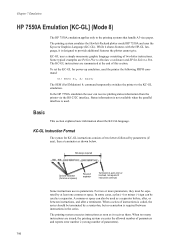
…-GL instructions are issued, the printing system executes the allowed number of parameters and reports error number 2 (wrong number of parameters).
7-96
The printing system executes instructions as soon… The printing system emulates the Hewlett-Packard plotter model HP 7550A and uses the Kyocera Graphics Language (KC-GL). Status information is not available when the parallel interface is…
KM-NET for Accounting Operation Guide Rev-1.4 — Page 3
…, regardless of the information herein. The information in this document are already using KM-NET for Accounting, ensure that the TCP/IP protocol is a trademark of Microsoft Corporation. Regarding Trademarks
KYOCERA and KYOCERA MITA are registered trademarks or trademarks of Kyocera Corporation.
It cannot be different depending on Microsoft Windows 98SE/ME/2000/XP…
KM-NET for Accounting Operation Guide Rev-1.4 — Page 5
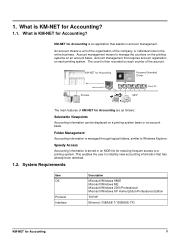
… information can be displayed on a printing system basis or an account basis. Folder Management
Accounting information is KM-NET for Accounting
Kyocera Extended Driver
Administrator PC
Printers
MFP
Client PC
The main features of the account. KM-NET for Accounting?
1.1.
System Requirements
Item OS
Protocol Interface
Description
Microsoft Windows 98SE Microsoft Windows ME…
KM-NET for Accounting Operation Guide Rev-1.4 — Page 6
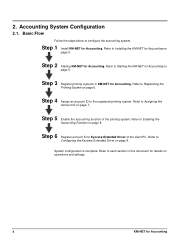
… Function on page 8. System configuration is complete. Step 2 Starting KM-NET for Accounting on
page 5. Refer to Kyocera Extended Driver of the printing system. Refer to Assigning the
Account ID on operations and settings.
4
KM-NET for details on page 7. Refer to
Configuring the Kyocera Extended Driver on page 8. Step 4 Assign an account ID…
KM-NET for Accounting Operation Guide Rev-1.4 — Page 7
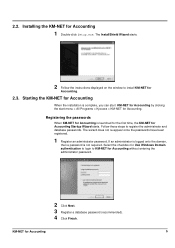
… for Accounting
When the installation is launched for the first time, the KM-NET for Accounting. Registering the passwords
When KM-NET for Accounting is complete, you can start KM-NET for Accounting by clicking the start menu > All Programs > Kyocera > KM-NET for Accounting Startup Wizard starts.
If an administrator is logged onto the…
KM-NET for Accounting Operation Guide Rev-1.4 — Page 10
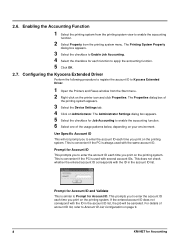
… Properties. The Administrator Settings dialog box appears. 5 Select the checkbox for Job Accounting to Kyocera Extended Driver.
1 Open the Printers and Faxes window from the printing system menu. This is… For details of
the printing system appears.
3 Select the Device Settings tab. 4 Click on page 9.
8
KM-NET for Account ID. 2.6. The Properties dialog box of account ID list, …
KM-NET for Accounting Operation Guide Rev-1.4 — Page 11
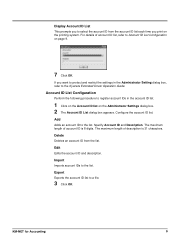
… on page 9.
7 Click OK. Edit
Edits the account ID and description.
The maximum length of description is 8 digits. KM-NET for Accounting
9 Specify Account ID and Description.
Import
Imports account IDs to the Kyocera Extended Driver Operation Guide.
Account ID List Configuration
Perform the following procedure to register account IDs in the…
KM-NET for Accounting Operation Guide Rev-1.4 — Page 20
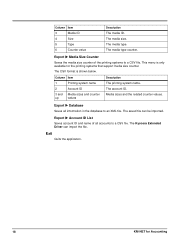
… CSV file.
The media size. The saved file can import the file. Exit
Quits the application.
18
KM-NET for the printing systems that support media size counter. The media type counter. The CSV format is only… and name of the printing systems to an XML file. The Kyocera Extended Driver can be imported. Column Item
3
Media ID
4
Size
5
Type
6
Counter value
Description The media…