- Code: 0030
- Description: FAX control PWB system error
Processing with the fax software was disabled due to a hardware problem. - Causes: Defective FAX control PWB.
- Remedy: Defective FAX control PWB. Replace the fax control PWB and check for correct operation..
- Code: 0070
- Description: FAX control PWB incompatible detection error
Abnormal detection of FAX control PWB incompatibility In the initial communication with the FAX control PWB, any normal communication command is not transmitted. - Causes: Defective FAX software.PWB. Defective FAX control PWB.
- Remedy: Defective FAX software. Install the fax software.
Defective FAX control PWB. Replace the fax control PWB and check for correct operation..
- Code: 0100
- Description: Backup memory device error
- Causes: Defective flash memory. Defective main PWB.
- Remedy: Defective flash memory. Replace the main PWB and check for correct operation.
Defective main PWB. Replace the main PWB and check for correct operation.
- Code: 0120
- Description: MAC address data error
For data in which the MAC address is invalid. - Causes: Defective flash memory. Defective engine PWB.
- Remedy: Defective flash memory. Replace the main PWB and check for correct operation.
Defective engine PWB. Replace the engine PWB and check for correct operation.
- Code: 0130
- Description: Backup memory read/write error (main PWB)
- Causes: Defective flash memory. Defective main PWB.
- Remedy: Defective flash memory. Replace the main PWB and check for correct operation.
Defective main PWB. Replace the main PWB and check for correct operation.
- Code: 0140
- Description: Backup memory data error (main PWB)
- Causes: Defective flash memory. Defective main PWB.
- Remedy: Defective flash memory. Replace the main PWB and check for correct operation.
Defective main PWB. Replace the main PWB and check for correct operation.
- Code: 0150
- Description: Engine PWB EEPROM error
Detecting engine PWB EEPROM communication error. - Causes: Improper installation engine PWB EEPROM. Defective engine PWB. Device damage of EEPROM.
- Remedy: Improper installation engine PWB EEPROM. Check the installation of the EEPROM and remedy if necessary.
Defective engine PWB. Replace the engine PWB and check for correct operation.
Device damage of EEPROM. Contact the Service Administrative Division.
- Code: 0170
- Description: Billing counting error
A checksum error is detected in the main and engine backup memories for the billing counters. - Causes: Data damage of EEPROM. Defective PWB.
- Remedy: Data damage of EEPROM. Contact the Service Administrative Division.
Defective PWB. Replace the main PWB or the engine PWB and check for correct operation.
- Code: 0180
- Description: Machine number mismatch
Machine number of main and engine does not match. - Causes: Data damage of EEPROM.
- Remedy: Data damage of EEPROM. Contact the Service Administrative Division.
- Code: 0600
- Description: Expanded memory (DIMM) installing error
The expansion memory modules (DIMM) are not correctly mounted. - Causes: Improper installation expanded memory (DIMM).
- Remedy: Improper installation expanded memory (DIMM). Check the installation of the expanded memory (DIMM).
- Code: 0610
- Description: Expanded memory (DIMM) error
The expansion memory modules (DIMM) mounted on the main PWB does not operate correctly. - Causes: Defective expanded memory (DIMM). Defective main PWB.
- Remedy: Defective expanded memory (DIMM). Replace the expanded memory (DIMM) and check for correct operation.
Defective main PWB. Replace the main PWB and check for correct operation.
- Code: 0640
- Description: Hard disk error
The hard disk cannot be accessed. - Causes: Defective hard disk. Defective main PWB.
- Remedy: Defective hard disk. Replace the hard disk and check for correct operation.
Defective main PWB. Replace the main PWB and check for correct operation.
- Code: 0830
- Description: FAX control PWB flash program area checksum error
A checksum error occurred with the program of the FAX control PWB. - Causes: Defective FAX software. Defective FAX control PWB.
- Remedy: Defective FAX software. Install the fax software.
Defective FAX control PWB. Replace the FAX control PWB.
- Code: 0840
- Description: Faults of RTC
The time is judged to go back based on the comparison of the RTC time and the current time or five years or more have passed. - Causes: The battery is disconnected from the main PWB. Defective main PWB.
- Remedy: The battery is disconnected from the main PWB. Check visually and remedy if necessary
Defective main PWB. Replace the main PWB and check for correct operation.
- Code: 0870
- Description: FAX control PWB to main PWB high capacity data transfer error
High-capacity data transfer between the FAX control PWB and the main PWB of the machine was not normally performed even if the data transfer was retried the specified times. - Causes: Improper installation FAX control PWB. Defective FAX control PWB or main PWB.
- Remedy: Improper installation FAX control PWB. Reinstall the FAX control PWB.
Defective FAX control PWB or main PWB. Replace the FAX control PWB or main PWB and check for correct operation.
- Code: 0920
- Description: Fax file system error
The backup data is not retained for file system abnormality of flash memory of the FAX control PWB. - Causes: Defective FAX control PWB.
- Remedy: Defective FAX control PWB. Replace the FAX control PWB and check for correct operation.
- Code: 0930
- Description: EEPROM bus error
- Causes: Defective drum PWB (EEPROM). Defective engine PWB (EEPROM). Defective engine PWB. Defective main PWB.
- Remedy: Defective drum PWB (EEPROM). Replace the drum unit.
Defective engine PWB (EEPROM). Replace the engine PWB and check for correct operation.
Defective engine PWB. Replace the engine PWB and check for correct operation.
Defective main PWB. Replace the main PWB and check for correct operation.
- Code: 1010
- Description: Lift motor error
When the lift motor is driven, the motor over-current detection signal is detected continuously for 50 times (5 s) at 100 ms intervals. After the lift motor is driven, the ON status of lift sensor cannot be detected for 8 s. The cassette installed confirmation message is displayed on the operation panel, and even if the cassette is opened and closed, the cassette installed confirmation message is displayed 5 times successively. - Causes: Defective bottom plate elevation mechanism in the cassette. Defective connector cable or poor contact in the connector. Defective drive transmission system of the lift motor. Defective lift motor. Defective engine PWB.
- Remedy: Defective bottom plate elevation mechanism in the cassette. Check to see if the bottom plate can move smoothly and repair it if any problem is found.
Defective connector cable or poor contact in the connector. Reinsert the connector. Also check for continuity within the connector cable. If none, replace the cable. Lift motor and engine PWB (YC27)
Defective drive transmission system of the lift motor. Check if the gears rotate smoothly. If not, grease the bushes and gears. Check for broken gears and replace if any.
Defective lift motor. Replace the lift motor
Defective engine PWB. Replace the engine PWB and check for correct operation.
- Code: 1020
- Description: PF lift motor error (paper feeder 1)
When the lift motor is driven, the motor over-current detection signal is detected continuously for 50 times (5 s) at 100 ms intervals. After the lift motor is driven, the ON status of lift sensor cannot be detected for 8 s. The cassette installed confirmation message is displayed on the operation panel, and even if the cassette is opened and closed, the cassette installed confirmation message is displayed 5 times successively. - Causes: Defective bottom plate elevation mechanism in the cassette. Defective connector cable or poor contact in the connector. Defective drive transmission system of the PF lift motor. Defective PF lift motor. Defective PF main PWB.
- Remedy: Defective bottom plate elevation mechanism in the cassette. Check to see if the bottom plate can move smoothly and repair it if any problem is found.
Defective connector cable or poor contact in the connector. Reinsert the connector. Also check for continuity within the connector cable. If none, replace the cable. PF lift motor and PF main PWB (YC7)
Defective drive transmission system of the PF lift motor. Check if the gears rotate smoothly. If not, grease the bushes and gears. Check for broken gears and replace if any.
Defective PF lift motor. Replace the PF lift motor
Defective PF main PWB. Replace the PF main PWB (Refer to the service manual for the paper feeder).
- Code: 1030
- Description: PF lift motor error (paper feeder 2)
When the lift motor is driven, the motor over-current detection signal is detected continuously for 50 times (5 s) at 100 ms intervals. After the lift motor is driven, the ON status of lift sensor cannot be detected for 8 s. The cassette installed confirmation message is displayed on the operation panel, and even if the cassette is opened and closed, the cassette installed confirmation message is displayed 5 times successively. - Causes: Defective bottom plate elevation mechanism in the cassette. Defective connector cable or poor contact in the connector. Defective drive transmission system of the PF lift motor. Defective PF lift motor. Defective PF main PWB.
- Remedy: Defective bottom plate elevation mechanism in the cassette. Check to see if the bottom plate can move smoothly and repair it if any problem is found.
Defective connector cable or poor contact in the connector. Reinsert the connector. Also check for continuity within the connector cable. If none, replace the cable. PF lift motor and PF main PWB (YC7)
Defective drive transmission system of the PF lift motor. Check if the gears rotate smoothly. If not, grease the bushes and gears. Check for broken gears and replace if any.
Defective PF lift motor. Replace the PF lift motor
Defective PF main PWB. Replace the PF main PWB (Refer to the service manual for the paper feeder).
- Code: 1500
- Description: PF heater 1 high temperature error (paper feeder 1)
A temperature higher than 75C/167F is detected. - Causes: Defective connector cable or poor contact in the connector. Shorted PF thermistor 1. Defective PF fan motor 1. Defective PF main PWB.
- Remedy: Defective connector cable or poor contact in the connector. Reinsert the connector. Also check for continuity within the connector cable. If none, replace the cable. PF fan motor 1 and PF main PWB (YC111)
Shorted PF thermistor 1. Replace the top heater unit (Refer to the service manual for the paper feeder).
Defective PF fan motor 1. Replace the top heater unit (Refer to the service manual for the paper feeder).
Defective PF main PWB. Replace the PF main PWB (Refer to the service manual for the paper feeder).
- Code: 1510
- Description: PF heater 2 high temperature error (paper feeder 1)
A temperature higher than 75C/167F is detected. - Causes: Defective connector cable or poor contact in the connector. Shorted PF thermistor 2. Defective PF fan motor 2. Defective PF main PWB.
- Remedy: Defective connector cable or poor contact in the connector. Reinsert the connector. Also check for continuity within the connector cable. If none, replace the cable. PF fan motor 2 and PF main PWB (YC111)
Shorted PF thermistor 2. Replace the side heater unit (Refer to the service manual for the paper feeder).
Defective PF fan motor 2. Replace the side heater unit (Refer to the service manual for the paper feeder).
Defective PF main PWB. Replace the PF main PWB (Refer to the service manual for the paper feeder).
- Code: 1520
- Description: PF heater 1 high temperature error (paper feeder 2)
A temperature higher than 75aC/167F is detected. - Causes: Defective connector cable or poor contact in the connector. Shorted PF thermistor 1. Defective PF fan motor 1. Defective PF main PWB.
- Remedy: Defective connector cable or poor contact in the connector. Reinsert the connector. Also check for continuity within the connector cable. If none, replace the cable. PF fan motor 1 and PF main PWB (YC111)
Shorted PF thermistor 1. Replace the top heater unit (Refer to the service manual for the paper feeder).
Defective PF fan motor 1. Replace the top heater unit (Refer to the service manual for the paper feeder).
Defective PF main PWB. Replace the PF main PWB (Refer to the service manual for the paper feeder).
- Code: 1530
- Description: PF heater 2 high temperature error (paper feeder 2)
A temperature higher than 75C/167F is detected. - Causes: Defective connector cable or poor contact in the connector. Shorted PF thermistor 2. Defective PF fan motor 2. Defective PF main PWB.
- Remedy: Defective connector cable or poor contact in the connector. Reinsert the connector. Also check for continuity within the connector cable. If none, replace the cable. PF fan motor 2 and PF main PWB (YC111)
Shorted PF thermistor 2. Replace the side heater unit (Refer to the service manual for the paper feeder).
Defective PF fan motor 2. Replace the side heater unit (Refer to the service manual for the paper feeder).
Defective PF main PWB. Replace the PF main PWB (Refer to the service manual for the paper feeder).
- Code: 1600
- Description: PF heater 1 low temperature error (paper feeder 1)
An external temperature higher than + 5C/+ 9F is not detected when one minute elapses after PF heater 1 is turned on. - Causes: Defective connector cable or poor contact in the connector. PF thermistor 1 installed incorrectly. Defective PF thermistor 1. Broken PF heater 1. Defective PF heater PWB or PF main PWB.
- Remedy: Defective connector cable or poor contact in the connector. Reinsert the connector. Also check for continuity within the connector cable. If none, replace the cable. PF heater 1 and PF heater PWB (YC1) PF heater PWB (YC3) and PF main PWB (YC113) PF thermistor 1 and PF main PWB (YC114)
PF thermistor 1 installed incorrectly. Check the installation of the PF thermistor 1.
Defective PF thermistor 1. Replace the top heater unit (Refer to the service manual for the paper feeder).
Broken PF heater 1. Replace the top heater unit (Refer to the service manual for the paper feeder).
Defective PF heater PWB or PF main PWB. Replace the PF heater PWB or PF main PWB (Refer to the service manual for the paper feeder).
- Code: 1610
- Description: PF heater 2 low temperature error (paper feeder 1)
An external temperature higher than + 5C/+ 9F is not detected when one minute elapses after PF heater 2 is turned on. - Causes: Defective connector cable or poor contact in the connector. PF thermistor 2 installed incorrectly. Defective PF thermistor 2. Broken PF heater 2. Defective PF heater PWB or PF main PWB.
- Remedy: Defective connector cable or poor contact in the connector. Reinsert the connector. Also check for continuity within the connector cable. If none, replace the cable. PF heater 2 and PF heater PWB (YC2) PF heater PWB (YC3) and PF main PWB (YC113) PF thermistor 2 and PF main PWB (YC115)
PF thermistor 2 installed incorrectly. Check the installation of the PF thermistor 2.
Defective PF thermistor 2. Replace the side heater unit (Refer to the service manual for the paper feeder).
Broken PF heater 2. Replace the side heater unit (Refer to the service manual for the paper feeder).
Defective PF heater PWB or PF main PWB. Replace the PF heater PWB or PF main PWB (Refer to the service manual for the paper feeder).
- Code: 1620
- Description: PF heater 1 low temperature error (paper feeder 2)
An external temperature higher than + 5C/+ 9F is not detected when one minute elapses after PF heater 1 is turned on. - Causes: Defective connector cable or poor contact in the connector. PF thermistor 1 installed incorrectly. Defective PF thermistor 1. Broken PF heater 1. Defective PF heater PWB or PF main PWB.
- Remedy: Defective connector cable or poor contact in the connector. Reinsert the connector. Also check for continuity within the connector cable. If none, replace the cable. PF heater 1 and PF heater PWB (YC1) PF heater PWB (YC3) and PF main PWB (YC113) PF thermistor 1 and PF main PWB (YC114)
PF thermistor 1 installed incorrectly. Check the installation of the PF thermistor 1.
Defective PF thermistor 1. Replace the top heater unit (Refer to the service manual for the paper feeder).
Broken PF heater 1. Replace the top heater unit (Refer to the service manual for the paper feeder).
Defective PF heater PWB or PF main PWB. Replace the PF heater PWB or PF main PWB (Refer to the service manual for the paper feeder).
- Code: 1630
- Description: PF heater 2 low temperature error (paper feeder 2)
An external temperature higher than + 5C/+ 9F is not detected when one minute elapses after PF heater 2 is turned on. - Causes: Defective connector cable or poor contact in the connector. PF thermistor 2 installed incorrectly. Defective PF thermistor 2. Broken PF heater 2. Defective PF heater PWB or PF main PWB.
- Remedy: Defective connector cable or poor contact in the connector. Reinsert the connector. Also check for continuity within the connector cable. If none, replace the cable. PF heater 2 and PF heater PWB (YC2) PF heater PWB (YC3) and PF main PWB (YC113) PF thermistor 2 and PF main PWB (YC115)
PF thermistor 2 installed incorrectly. Check the installation of the PF thermistor 2.
Defective PF thermistor 2. Replace the side heater unit (Refer to the service manual for the paper feeder).
Broken PF heater 2. Replace the side heater unit (Refer to the service manual for the paper feeder).
Defective PF heater PWB or PF main PWB. Replace the PF heater PWB or PF main PWB (Refer to the service manual for the paper feeder).
- Code: 1800
- Description: Paper feeder communication error
Communication error between engine PWB and optional paper feeder. - Causes: Improper installation paper feeder. Defective connector cable or poor contact in the connector. Defective engine PWB. Defective PF main PWB.
- Remedy: Improper installation paper feeder. Follow installation instruction carefully again.
Defective connector cable or poor contact in the connector. Reinsert the connector. Also check for continuity within the connector cable. If none, replace the cable. PF main PWB (YC3) and engine PWB (YC33)
Defective engine PWB. Replace the engine PWB and check for correct operation.
Defective PF main PWB. Replace the PF main PWB (Refer to the service manual for the paper feeder).
- Code: 2100
- Description: Developing motor error
The developing motor ready input is not given for 5 s during the main motor is ON. - Causes: Defective connector cable or poor contact in the connector. Defective drive transmission system of the developing motor. Defective developing motor. Defective engine PWB.
- Remedy: Defective connector cable or poor contact in the connector. Reinsert the connector. Also check for continuity within the connector cable. If none, replace the cable. Developing motor and engine PWB (YC14)
Defective drive transmission system of the developing motor. Check if the rollers and gears rotate smoothly. If not, grease the bushes and gears. Check for broken gears and replace if any.
Defective developing motor. Replace the developing motor.
Defective engine PWB. Replace the engine PWB and check for correct operation.
- Code: 2200
- Description: Drum motor error
The drum motor ready input is not given for 5 s during the drum motor is ON. - Causes: Defective connector cable or poor contact in the connector. Defective drive transmission system of the drum motor. Defective drum motor. Defective engine PWB.
- Remedy: Defective connector cable or poor contact in the connector. Reinsert the connector. Also check for continuity within the connector cable. If none, replace the cable. Drum motor and engine PWB (YC13)
Defective drive transmission system of the drum motor. Check if the rollers and gears rotate smoothly. If not, grease the bushes and gears. Check for broken gears and replace if any.
Defective drum motor. Replace the drum motor.
Defective engine PWB. Replace the engine PWB and check for correct operation.
- Code: 2330
- Description: Fuser pressure release motor error
When the fuser pressure release motor is driven, the motor over-current detection signal is detected continuously for 8 times (800 ms) at 100 ms intervals. - Causes: Defective connector cable or poor contact in the connector. Defective drive transmission system of the fuser pressure release motor. Defective fuser pressure release motor. Defective engine PWB.
- Remedy: Defective connector cable or poor contact in the connector. Reinsert the connector. Also check for continuity within the connector cable. If none, replace the cable. Fuser pressure release motor and engine PWB (YC38)
Defective drive transmission system of the fuser pressure release motor. Check if the rollers and gears rotate smoothly. If not, grease the bushes and gears. Check for broken gears and replace if any.
Defective fuser pressure release motor. Replace the fuser pressure release motor.
Defective engine PWB. Replace the engine PWB and check for correct operation.
- Code: 2340
- Description: Fuser pressure release motor time-out error
When the fuser pressure release motor is driven, the envelope switch (EVSW) is not detectable for 6 s. - Causes: Defective connector cable or poor contact in the connector. Defective drive transmission system of the fuser pressure release motor. Defective fuser pressure release motor. Defective engine PWB.
- Remedy: Defective connector cable or poor contact in the connector. Reinsert the connector. Also check for continuity within the connector cable. If none, replace the cable. Fuser pressure release motor and engine PWB (YC38)
Defective drive transmission system of the fuser pressure release motor. Check if the rollers and gears rotate smoothly. If not, grease the bushes and gears. Check for broken gears and replace if any.
Defective fuser pressure release motor. Replace the fuser pressure release motor.
Defective engine PWB. Replace the engine PWB and check for correct operation.
- Code: 2500
- Description: Paper feed motor error
The drum motor ready input is not given for 5 s during the paper feed motor is ON. - Causes: Defective connector cable or poor contact in the connector. Defective drive transmission system of the paper feed motor. Defective paper feed motor. Defective engine PWB.
- Remedy: Defective connector cable or poor contact in the connector. Reinsert the connector. Also check for continuity within the connector cable. If none, replace the cable. Paper feed motor and engine PWB (YC3)
Defective drive transmission system of the paper feed motor. Check if the rollers and gears rotate smoothly. If not, grease the bushes and gears. Check for broken gears and replace if any.
Defective paper feed motor. Replace the paper feed motor.
Defective engine PWB. Replace the engine PWB and check for correct operation.
- Code: 2600
- Description: PF paper feed motor error (paper feeder 1)
The drum motor ready input is not given for 2 s during the PF paper feed motor is ON. - Causes: Defective connector cable or poor contact in the connector. Defective drive transmission system of the PF paper feed motor. Defective PF paper feed motor. Defective PF main PWB.
- Remedy: Defective connector cable or poor contact in the connector. Reinsert the connector. Also check for continuity within the connector cable. If none, replace the cable. PF paper feed motor and PF main PWB (YC6)
Defective drive transmission system of the PF paper feed motor. Check if the rollers and gears rotate smoothly. If not, grease the bushes and gears. Check for broken gears and replace if any.
Defective PF paper feed motor. Replace the PF paper feed motor.
Defective PF main PWB. Replace the PF main PWB (Refer to the service manual for the paper feeder).
- Code: 2610
- Description: PF paper feed motor error (paper feeder 2)
The drum motor ready input is not given for 2 s during the PF paper feed motor is ON. - Causes: Defective connector cable or poor contact in the connector. Defective drive transmission system of the PF paper feed motor. Defective PF paper feed motor. Defective PF main PWB.
- Remedy: Defective connector cable or poor contact in the connector. Reinsert the connector. Also check for continuity within the connector cable. If none, replace the cable. PF paper feed motor and PF main PWB (YC6)
Defective drive transmission system of the PF paper feed motor. Check if the rollers and gears rotate smoothly. If not, grease the bushes and gears. Check for broken gears and replace if any.
Defective PF paper feed motor. Replace the PF paper feed motor.
Defective PF main PWB. Replace the PF main PWB (Refer to the service manual for the paper feeder).
- Code: 2730
- Description: Developing release motor error
When the developing release motor is driven, the motor over-current detection signal is detected continuously for 8 times (800 ms) at 100 ms intervals. - Causes: Defective connector cable or poor contact in the connector. Defective drive transmission system of the developing release motor. Defective developing release motor. Defective engine PWB.
- Remedy: Defective connector cable or poor contact in the connector. Reinsert the connector. Also check for continuity within the connector cable. If none, replace the cable. Developing release motor and engine PWB (YC35)
Defective drive transmission system of the developing release motor. Check if the rollers and gears rotate smoothly. If not, grease the bushes and gears. Check for broken gears and replace if any.
Defective developing release motor. Replace the developing release motor.
Defective engine PWB. Replace the engine PWB and check for correct operation.
- Code: 2740
- Description: Developing release motor time-out error
When the developing release motor is driven, the developing release switch (DEVRSW) is not detectable for 1 s. - Causes: Defective connector cable or poor contact in the connector. Defective drive transmission system of the developing release motor. Defective developing release motor. Defective engine PWB.
- Remedy: Defective connector cable or poor contact in the connector. Reinsert the connector. Also check for continuity within the connector cable. If none, replace the cable. Developing release motor and engine PWB (YC35)
Defective drive transmission system of the developing release motor. Check if the rollers and gears rotate smoothly. If not, grease the bushes and gears. Check for broken gears and replace if any.
Defective developing release motor. Replace the developing release motor.
Defective engine PWB. Replace the engine PWB and check for correct operation.
- Code: 2820
- Description: Fuser motor error
The fuser motor ready input is not given for 5 s during the fuser motor is ON. - Causes: Defective connector cable or poor contact in the connector. Defective drive transmission system of the fuser motor. Defective fuser motor. Defective engine PWB.
- Remedy: Defective connector cable or poor contact in the connector. Reinsert the connector. Also check for continuity within the connector cable. If none, replace the cable. Fuser motor and engine PWB (YC15)
Defective drive transmission system of the fuser motor. Check if the rollers and gears rotate smoothly. If not, grease the bushes and gears. Check for broken gears and replace if any.
Defective fuser motor. Replace the fuser motor.
Defective engine PWB. Replace the engine PWB and check for correct operation.
- Code: 3100
- Description: ISU home position error
The home position is not correct when the power is turned on or at the start of copying using the table. - Causes: Defective connector cable or poor contact in the connector. Defective home position sensor. Defective ISU motor. Defective CCD PWB. Defective main PWB.
- Remedy: Defective connector cable or poor contact in the connector. Reinsert the connector. Also check for continuity within the connector cable. If none, replace the cable. Home position sensor and CCD PWB (YC3) CCD PWB (YC1) and main PWB (YC8) ISU motor and main PWB (YC36)
Defective home position sensor. Replace the home position sensor.
Defective ISU motor. Replace the ISU motor.
Defective CCD PWB. Replace the scanner unit.
Defective main PWB. Replace the main PWB and check for correct operation.
- Code: 3200
- Description: Exposure lamp error
When input value at the time of exposure lamp illumination does not exceed the threshold value between 5 s. - Causes: Defective connector cable or poor contact in the connector. Defective exposure lamp. Defective inverter PWB or CCD PWB. Defective main PWB.
- Remedy: Defective connector cable or poor contact in the connector. Reinsert the connector. Also check for continuity within the connector cable. If none, replace the cable. Exposure lamp and inverter PWB (CN2) Inverter PWB (CN1) and CCD PWB (YC3) CCD PWB (YC1) and main PWB (YC8)
Defective exposure lamp. Replace the scanner unit.
Defective inverter PWB or CCD PWB. Replace the scanner unit.
Defective main PWB. Replace the main PWB and check for correct operation.
- Code: 3300
- Description: AGC error
After AGC, correct input is not obtained at CCD. - Causes: Defective connector cable or poor contact in the connector. Defective exposure lamp. Defective inverter PWB or CCD PWB. Defective main PWB.
- Remedy: Defective connector cable or poor contact in the connector. Reinsert the connector. Also check for continuity within the connector cable. If none, replace the cable. Inverter PWB (CN1) and CCD PWB (YC3) CCD PWB (YC1) and main PWB (YC8)
Defective exposure lamp. Replace the scanner unit.
Defective inverter PWB or CCD PWB. Replace the scanner unit.
Defective main PWB. Replace the main PWB and check for correct operation.
- Code: 3500
- Description: Communication error between scanner and ASIC
An error code is detected. - Causes: Defective connector cable or poor contact in the connector. Defective CCD PWB. Defective main PWB.
- Remedy: Defective connector cable or poor contact in the connector. Reinsert the connector. Also check for continuity within the connector cable. If none, replace the cable. CCD PWB (YC1) and main PWB (YC8)
Defective CCD PWB. Replace the scanner unit.
Defective main PWB. Replace the main PWB and check for correct operation.
- Code: 4001
- Description: Polygon motor KM error
The polygon motor KM ready input is not given for 10 s during the polygon motor is ON. - Causes: Defective connector cable or poor contact in the connector. Defective polygon motor KM. Defective engine PWB.
- Remedy: Defective connector cable or poor contact in the connector. Reinsert the connector. Also check for continuity within the connector cable. If none, replace the cable. Laser scanner unit KM and engine PWB (YC31)
Defective polygon motor KM. Replace the laser scanner unit KM.
Defective engine PWB. Replace the engine PWB and check for correct operation.
- Code: 4002
- Description: Polygon motor CY error
The polygon motor CY ready input is not given for 10 s during the polygon motor is ON. - Causes: Defective connector cable or poor contact in the connector. Defective polygon motor CY. Defective engine PWB.
- Remedy: Defective connector cable or poor contact in the connector. Reinsert the connector. Also check for continuity within the connector cable. If none, replace the cable. Laser scanner unit CY and engine PWB (YC31)
Defective polygon motor CY. Replace the laser scanner unit CY.
Defective engine PWB. Replace the engine PWB and check for correct operation.
- Code: 4201
- Description: Laser output error (black)
The pin photo signal is not output from PD PWB K for one second while laser is emitted. - Causes: Defective connector cable or poor contact in the connector. Defective APC PWB K. Defective PD PWB K. Defective engine PWB.
- Remedy: Defective connector cable or poor contact in the connector. Reinsert the connector. Also check for continuity within the connector cable. If none, replace the cable. APC PWB K and engine PWB (YC31)
Defective APC PWB K. Replace the laser scanner unit KM.
Defective PD PWB K. Replace the laser scanner unit KM.
Defective engine PWB. Replace the engine PWB and check for correct operation.
- Code: 4202
- Description: Laser output error (cyan)
The pin photo signal is not output from PD PWB C for one second while laser is emitted. - Causes: Defective connector cable or poor contact in the connector. Defective APC PWB C. Defective PD PWB C. Defective engine PWB.
- Remedy: Defective connector cable or poor contact in the connector. Reinsert the connector. Also check for continuity within the connector cable. If none, replace the cable. APC PWB C and engine PWB (YC32)
Defective APC PWB C. Replace the laser scanner unit CY.
Defective PD PWB C. Replace the laser scanner unit CY.
Defective engine PWB. Replace the engine PWB.
- Code: 4203
- Description: Laser output error (magenta)
The pin photo signal is not output from PD PWB M for one second while laser is emitted. - Causes: Defective connector cable or poor contact in the connector. Defective APC PWB M. Defective PD PWB M. Defective engine PWB.
- Remedy: Defective connector cable or poor contact in the connector. Reinsert the connector. Also check for continuity within the connector cable. If none, replace the cable. APC PWB M and engine PWB (YC31)
Defective APC PWB M. Replace the laser scanner unit KM.
Defective PD PWB M. Replace the laser scanner unit KM.
Defective engine PWB. Replace the engine PWB.
- Code: 4204
- Description: Laser output error (yellow)
The pin photo signal is not output from PD PWB Y for one second while laser is emitted. - Causes: Defective connector cable or poor contact in the connector. Defective APC PWB Y. Defective PD PWB Y. Defective engine PWB.
- Remedy: Defective connector cable or poor contact in the connector. Reinsert the connector. Also check for continuity within the connector cable. If none, replace the cable. APC PWB Y and engine PWB (YC32)
Defective APC PWB Y. Replace the laser scanner unit CY.
Defective PD PWB Y. Replace the laser scanner unit CY.
Defective engine PWB. Replace the engine PWB.
- Code: 4600
- Description: LSU cleaning motor error
When the LSU cleaning motor is driven, the motor over-current detection signal is detected continuously for 50 times (5 s) at 100 ms intervals. - Causes: Defective connector cable or poor contact in the connector. Defective drive transmission system of the LSU cleaning motor. Defective LSU cleaning motor. Defective engine PWB.
- Remedy: Defective connector cable or poor contact in the connector. Reinsert the connector. Also check for continuity within the connector cable. If none, replace the cable. LSU cleaning motor and engine PWB (YC36)
Defective drive transmission system of the LSU cleaning motor. Check if the rollers and gears rotate smoothly. If not, grease the bushes and gears. Check for broken gears and replace if any.
Defective LSU cleaning motor. Replace the LSU cleaning motor.
Defective engine PWB. Replace the engine PWB and check for correct operation.
- Code: 4700
- Description: VIDEO ASIC device error
- Causes: Defective connector cable or poor contact in the connector. Defective main PWB or engine PWB.
- Remedy: Defective connector cable or poor contact in the connector. Reinsert the connector. Also check for continuity within the connector cable. If none, replace the cable. Main PWB (YC39) and relay PWB (YC3) Relay PWB (YC2, 4) and engine PWB (YC8, 9)
Defective main PWB or engine PWB. Replace the main PWB or the engine PWB and check for correct operation.
- Code: 5301
- Description: Broken cleaning lamp K wire
When the cleaning lamp K is driven, the lamp over-current detection signal is detected continuously for 10 times (1 s) at 100 ms intervals. - Causes: Defective connector cable or poor contact in the connector. Defective cleaning lamp K. Defective engine PWB.
- Remedy: Defective connector cable or poor contact in the connector. Reinsert the connector. Also check for continuity within the connector cable. If none, replace the cable. Drum unit K and Drum relay PWB (YC2) Drum relay PWB (YC1) and engine PWB (YC34)
Defective cleaning lamp K. Replace the drum unit K..
Defective engine PWB. Replace the engine PWB and check for correct operation.
- Code: 5302
- Description: Broken cleaning lamp C wire
When the cleaning lamp C is driven, the lamp over-current detection signal is detected continuously for 10 times (1 s) at 100 ms intervals. - Causes: Defective connector cable or poor contact in the connector. Defective cleaning lamp C. Defective engine PWB.
- Remedy: Defective connector cable or poor contact in the connector. Reinsert the connector. Also check for continuity within the connector cable. If none, replace the cable. Drum unit C and Drum relay PWB (YC4) Drum relay PWB (YC1) and engine PWB (YC34)
Defective cleaning lamp C. Replace the drum unit C..
Defective engine PWB. Replace the engine PWB and check for correct operation.
- Code: 5303
- Description: Broken cleaning lamp M wire
When the cleaning lamp M is driven, the lamp over-current detection signal is detected continuously for 10 times (1 s) at 100 ms intervals. - Causes: Defective connector cable or poor contact in the connector. Defective cleaning lamp M. Defective engine PWB.
- Remedy: Defective connector cable or poor contact in the connector. Reinsert the connector. Also check for continuity within the connector cable. If none, replace the cable. Drum unit M and Drum relay PWB (YC3) Drum relay PWB (YC1) and engine PWB (YC34)
Defective cleaning lamp M. Replace the drum unit M..
Defective engine PWB. Replace the engine PWB and check for correct operation.
- Code: 5304
- Description: Broken cleaning lamp Y wire
When the cleaning lamp Y is driven, the lamp over-current detection signal is detected continuously for 10 times (1 s) at 100 ms intervals. - Causes: Defective connector cable or poor contact in the connector. Defective cleaning lamp Y. Defective engine PWB.
- Remedy: Defective connector cable or poor contact in the connector. Reinsert the connector. Also check for continuity within the connector cable. If none, replace the cable. Drum unit Y and Drum relay PWB (YC5) Drum relay PWB (YC1) and engine PWB (YC34)
Defective cleaning lamp Y. Replace the drum unit Y..
Defective engine PWB. Replace the engine PWB and check for correct operation.
- Code: 6000
- Description: Broken fuser heater wire
The detected temperature of fuser thermistor does not rise 1„aC/1.8„aF after the fuser heater has been turned on continuously for 10 s in warming up. The fuser temperature does not reach 100„aC/212„aF after the fuser heater has been turned on continuously for 30 s in warming up. The detected temperature of fuser thermistor does not reach the specified temperature (ready indication temperature) after the fuser heater has been turned on continuously for 60 s in warming up. The detected temperature of fuser thermistor does not rise 1„aC/1.8„aF after the fuser heater has been turned on continuously for 10 s during printing. - Causes: Defective connector cable or poor contact in the connector. Fuser thermostat triggered. Broken fuser heater wire. Defective engine PWB.
- Remedy: Defective connector cable or poor contact in the connector. Reinsert the connector. Also check for continuity within the connector cable. If none, replace the cable. Fuser heater and power source PWB (YC102) Fuser unit and eject PWB (YC3) Eject PWB (YC1) and engine PWB (YC19)
Fuser thermostat triggered. Reinsert the fuser unit.
Broken fuser heater wire. Replace the fuser unit.
Defective engine PWB. Replace the engine PWB and check for correct operation.
- Code: 6020
- Description: Abnormally high fuser thermistor temperature
The fuser thermistor detects a temperature higher than 240C/464F. By the activation of the high temperature error detection circuit (230C/446F or more) of fuser thermistor, the illumination of fuser heater was forcibly turned off and 10 s has elapsed. - Causes: Shorted fuser thermistor. Defective engine PWB.
- Remedy: Shorted fuser thermistor. Replace the fuser unit.
Defective engine PWB. Replace the engine PWB and check for correct operation.
- Code: 6030
- Description: Broken fuser thermistor wire
Input from fuser thermistor is 3 or less (A/D value) continuously for 1 s. - Causes: Defective connector cable or poor contact in the connector. Broken fuser thermistor wire. Fuser thermostat triggered. Broken fuser heater wire. Defective engine PWB.
- Remedy: Defective connector cable or poor contact in the connector. Reinsert the connector. Also check for continuity within the connector cable. If none, replace the cable. Fuser unit and eject PWB (YC3) Eject PWB (YC1) and engine PWB (YC19)
Broken fuser thermistor wire. Replace the fuser unit.
Fuser thermostat triggered. Reinsert the fuser unit.
Broken fuser heater wire. Replace the fuser unit.
Defective engine PWB. Replace the engine PWB and check for correct operation.
- Code: 6400
- Description: Zero-cross signal error
The zero-cross signal does not reach the engine PWB for more than 1 s. - Causes: Defective connector cable or poor contact in the connector. Defective power source PWB or engine PWB.
- Remedy: Defective connector cable or poor contact in the connector. Reinsert the connector. Also check for continuity within the connector cable. If none, replace the cable. Power source PWB (YC103) and relay PWB (YC1) Relay PWB (YC4) and engine PWB (YC9)
Defective power source PWB or engine PWB. Replace the power source PWB or the engine PWB and check for correct operation.
- Code: 7001
- Description: Toner motor K error
When the toner motor K is driven, the motor over-current detection signal is detected continuously for 50 times (5 s) at 100 ms intervals. - Causes: Defective connector cable or poor contact in the connector. Defective drive transmission system of the toner motor K. Defective toner motor K. Defective engine PWB.
- Remedy: Defective connector cable or poor contact in the connector. Reinsert the connector. Also check for continuity within the connector cable. If none, replace the cable. Toner motor K and engine PWB (YC23)
Defective drive transmission system of the toner motor K. Check if the rollers and gears rotate smoothly. If not, grease the bushes and gears. Check for broken gears and replace if any.
Defective toner motor K. Replace the toner motor K.
Defective engine PWB. Replace the engine PWB and check for correct operation.
- Code: 7002
- Description: Toner motor C error
When the toner motor C is driven, the motor over-current detection signal is detected continuously for 50 times (5 s) at 100 ms intervals. - Causes: Defective connector cable or poor contact in the connector. Defective drive transmission system of the toner motor C. Defective toner motor C. Defective engine PWB.
- Remedy: Defective connector cable or poor contact in the connector. Reinsert the connector. Also check for continuity within the connector cable. If none, replace the cable. Toner motor C and engine PWB (YC25)
Defective drive transmission system of the toner motor C. Check if the rollers and gears rotate smoothly. If not, grease the bushes and gears. Check for broken gears and replace if any.
Defective toner motor C. Replace the toner motor C.
Defective engine PWB. Replace the engine PWB and check for correct operation.
- Code: 7003
- Description: Toner motor M error
When the toner motor M is driven, the motor over-current detection signal is detected continuously for 50 times (5 s) at 100 ms intervals. - Causes: Defective connector cable or poor contact in the connector. Defective drive transmission system of the toner motor M. Defective toner motor M. Defective engine PWB.
- Remedy: Defective connector cable or poor contact in the connector. Reinsert the connector. Also check for continuity within the connector cable. If none, replace the cable. Toner motor M and engine PWB (YC24)
Defective drive transmission system of the toner motor M. Check if the rollers and gears rotate smoothly. If not, grease the bushes and gears. Check for broken gears and replace if any.
Defective toner motor M. Replace the toner motor M.
Defective engine PWB. Replace the engine PWB and check for correct operation.
- Code: 7004
- Description: Toner motor Y error
When the toner motor Y is driven, the motor over-current detection signal is detected continuously for 50 times (5 s) at 100 ms intervals. - Causes: Defective connector cable or poor contact in the connector. Defective drive transmission system of the toner motor Y. Defective toner motor Y. Defective engine PWB.
- Remedy: Defective connector cable or poor contact in the connector. Reinsert the connector. Also check for continuity within the connector cable. If none, replace the cable. Toner motor Y and engine PWB (YC26)
Defective drive transmission system of the toner motor Y. Check if the rollers and gears rotate smoothly. If not, grease the bushes and gears. Check for broken gears and replace if any.
Defective toner motor Y. Replace the toner motor Y.
Defective engine PWB. Replace the engine PWB and check for correct operation.
- Code: 7401
- Description: Developing unit K noninstalling error
No density detection signal is output from toner sensor K in developing unit K. - Causes: Defective connector cable or poor contact in the connector. Defective toner sensor K. Defective engine PWB.
- Remedy: Defective connector cable or poor contact in the connector. Reinsert the connector. Also check for continuity within the connector cable. If none, replace the cable. Developing unit K and Drum relay PWB (YC6) Drum relay PWB (YC1) and engine PWB (YC34)
Defective toner sensor K. Replace the developing unit K.
Defective engine PWB. Replace the engine PWB and check for correct operation.
- Code: 7402
- Description: Developing unit C noninstalling error
No density detection signal is output from toner sensor C in developing unit C. - Causes: Defective connector cable or poor contact in the connector. Defective toner sensor C. Defective engine PWB.
- Remedy: Defective connector cable or poor contact in the connector. Reinsert the connector. Also check for continuity within the connector cable. If none, replace the cable. Developing unit C and Drum relay PWB (YC10) Drum relay PWB (YC1) and engine PWB (YC34)
Defective toner sensor C. Replace the developing unit C.
Defective engine PWB. Replace the engine PWB and check for correct operation.
- Code: 7403
- Description: Developing unit M noninstalling error
No density detection signal is output from toner sensor M in developing unit M. - Causes: Defective connector cable or poor contact in the connector. Defective toner sensor M. Defective engine PWB.
- Remedy: Defective connector cable or poor contact in the connector. Reinsert the connector. Also check for continuity within the connector cable. If none, replace the cable. Developing unit M and Drum relay PWB (YC7) Drum relay PWB (YC1) and engine PWB (YC34)
Defective toner sensor M. Replace the developing unit M.
Defective engine PWB. Replace the engine PWB and check for correct operation.
- Code: 7404
- Description: Developing unit Y noninstalling error
No density detection signal is output from toner sensor Y in developing unit Y. - Causes: Defective connector cable or poor contact in the connector. Defective toner sensor Y. Defective engine PWB.
- Remedy: Defective connector cable or poor contact in the connector. Reinsert the connector. Also check for continuity within the connector cable. If none, replace the cable. Developing unit Y and Drum relay PWB (YC13) Drum relay PWB (YC1) and engine PWB (YC34)
Defective toner sensor Y. Replace the developing unit Y.
Defective engine PWB. Replace the engine PWB and check for correct operation.
- Code: 7411
- Description: Drum unit K non- installing error
The EEPROM of drum PWB K does not communicate normally. - Causes: Installation of incompatible drum unit K. Defective connector cable or poor contact in the connector. Defective drum PWB K. Defective engine PWB.
- Remedy: Installation of incompatible drum unit K. Install drum unit K compatible with the specifications to the machine.
Defective connector cable or poor contact in the connector. Reinsert the connector. Also check for continuity within the connector cable. If none, replace the cable. Drum unit K and Drum relay PWB (YC2) Drum relay PWB (YC1) and engine PWB (YC34)
Defective drum PWB K. Replace the drum unit K.
Defective engine PWB. Replace the engine PWB and check for correct operation.
- Code: 7412
- Description: Drum unit C non- installing error
The EEPROM of drum PWB C does not communicate normally. - Causes: Installation of incompatible drum unit C. Defective connector cable or poor contact in the connector. Defective drum PWB C. Defective engine PWB.
- Remedy: Installation of incompatible drum unit C. Install drum unit C compatible with the specifications to the machine.
Defective connector cable or poor contact in the connector. Reinsert the connector. Also check for continuity within the connector cable. If none, replace the cable. Drum unit C and Drum relay PWB (YC4) Drum relay PWB (YC1) and engine PWB (YC34)
Defective drum PWB C. Replace the drum unit C.
Defective engine PWB. Replace the engine PWB and check for correct operation.
- Code: 7413
- Description: Drum unit M non- installing error
The EEPROM of drum PWB M does not communicate normally. - Causes: Installation of incompatible drum unit M. Defective connector cable or poor contact in the connector. Defective drum PWB M. Defective engine PWB.
- Remedy: Installation of incompatible drum unit M. Install drum unit M compatible with the specifications to the machine.
Defective connector cable or poor contact in the connector. Reinsert the connector. Also check for continuity within the connector cable. If none, replace the cable. Drum unit M and Drum relay PWB (YC3) Drum relay PWB (YC1) and engine PWB (YC34)
Defective drum PWB M. Replace the drum unit M.
Defective engine PWB. Replace the engine PWB and check for correct operation.
- Code: 7414
- Description: Drum unit Y non- installing error
The EEPROM of drum PWB Y does not communicate normally. - Causes: Installation of incompatible drum unit Y. Defective connector cable or poor contact in the connector. Defective drum PWB Y. Defective engine PWB.
- Remedy: Installation of incompatible drum unit Y. Install drum unit Y compatible with the specifications to the machine.
Defective connector cable or poor contact in the connector. Reinsert the connector. Also check for continuity within the connector cable. If none, replace the cable. Drum unit Y and Drum relay PWB (YC5) Drum relay PWB (YC1) and engine PWB (YC34)
Defective drum PWB Y. Replace the drum unit Y.
Defective engine PWB. Replace the engine PWB and check for correct operation.
- Code: 9500 … 9520
- Description: Contact the Service Administrative Division.
- Causes:
- Remedy: Contact the Service Administrative Division.
- Code: 9530
- Description: Backup data error
The serial number of the machine written on the EEPROM of the engine PWB differs with that is written on both the flash memory of the engine PWB and the EEPROM of the drum PWB as a backup. - Causes: Replacing both the engine PWB and the drum unit at the same time.
- Remedy: Check that the machine operates properly by reverting the engine controller and the drum unit to the old ones. To replace the engine PWB and the drum unit at the same time, turn on the machine after replacing either one. Check that the machine operates properly and then turn off the machine. Replace the other and turn on the machine to check that the machine operates properly. Be sure to replace one by one.
- Code: F000
- Description: Main PWB — operation panel PWB communication error
- Causes: Defective main PWB. Defective operation panel PWB.
- Remedy: Defective main PWB. Turn the main power switch off/on to restart the machine. If the error is not resolved, replace main PWB.
Defective operation panel PWB. Replace the operation panel PWB and check for correct operation.
- Code: F010
- Description: Main PWB checksum error
- Causes: Defective main PWB
- Remedy: Defective main PWB. Turn the main power switch off/on to restart the machine. If the error is not resolved, replace main PWB.
- Code: F020
- Description: Main PWB RAM checksum errors
- Causes: Defective main memory (RAM) on the main PWB. Defective expanded memory (DIMM).
- Remedy: Defective main memory (RAM) on the main PWB. Turn the main power switch off/on to restart the machine. If the error is not resolved, replace main PWB.
Defective expanded memory (DIMM). Replace the expanded memory (DIMM).
- Code: F040
- Description: Main PWB — print engine communication error
- Causes: Defective main PWB. Defective engine PWB.
- Remedy: Defective main PWB. Turn the main power switch off/on to restart the machine. If the error is not resolved, replace main PWB.
Defective engine PWB. Replace the engine PWB and check for correct operation.
- Code: F041
- Description: Main PWB — scanner engine communication error
- Causes: Defective main PWB. Defective engine PWB.
- Remedy: Defective main PWB. Turn the main power switch off/on to restart the machine. If the error is not resolved, replace main PWB.
Defective engine PWB. Replace the engine PWB and check for correct operation.
- Code: F050
- Description: Print engine ROM checksum error
- Causes: Defective engine PWB.
- Remedy: Defective engine PWB. Turn the main power switch off/on to restart the machine. If the error is not resolved, replace engine PWB.
- Code: F051
- Description: Scanner engine ROM checksum error
- Causes: Defective engine PWB.
- Remedy: Defective engine PWB. Turn the main power switch off/on to restart the machine. If the error is not resolved, replace engine PWB.
- Code: F278
- Description: Power supply in drive system error
- Causes: Main power switch was turned off without using the power key, or a power failure has occurred.
- Remedy: Turn on power. (To switch off power, first press the power key until the main power indicator goes off, then turn the main power switch off.)
Все современные копировальные аппараты, мфу и принтеры Kyocera имеют возможность диагностировать все узлы устройства в режиме запуска и во время работы аппарата. По этому, если во время включения или во время работы произошел сбой, то техника Kyocera сможет сообщить о наличии ошибки.
В большинстве случаев у аппаратов Kyocera код ошибки отображается на дисплее, в остальных случаях тип ошибки зависит от последовательности и количества миганий индикаторов.
Если Ваш копировальный аппарат, МФУ или принтер Kyocera выдал на дисплее некий код, то узнать причину, описание возникновения ошибки, а так же в каком узле аппарата стоит искать проблему, Вы можете в этом разделе выбрав интересующую модель из списка.
Но диагностика не решит проблему сбоя аппарата, для этого лучше обратиться к профессиональным и опытным сервисным специалистам компании Kyomart! Позвоните нам по телефону
8 (343) 288-23-45 или отправьте запрос на электронную почту: sales@kyomart.ru , и мы обязательно свяжемся с Вами в кратчайшие сроки.
Processing with the fax software was disabled due to a hardware problem.
Abnormal detection of FAX control PWB incompatibility In the initial communication with the FAX control PWB, any normal communication command is not transmitted.
For data in which the MAC address is invalid.
Detecting engine PWB EEPROM communication error.
A checksum error is detected in the main and engine backup memories for the billing counters.
Machine number of control does not match.
The expansion memory modules (DIMM) are not correctly mounted.
The expansion memory modules (DIMM) mounted on the main PWB does not operate correctly.
The hard disk cannot be accessed.
A checksum error occurred with the program of the FAX control PWB.
The time is judged to go back based on the comparison of the RTC time and the current time or five years or more have passed.
High-capacity data transfer between the FAX control PWB and the main PWB of the machine was not normally performed even if the data transfer was retried the specified times.
The backup data is not retained for file system abnormality of flash memory of the FAX control PWB.
When the lift motor is driven, the motor over-current detection signal is detected continuously for 50 times (5 s) at 100 ms intervals. After the lift motor is driven, the ON status of lift sensor cannot be detected for 8 s. The cassette installed confirmation message is displayed on the operation panel, and even if the cassette is opened and closed, the cassette installed confirmation message is displayed 5 times successively.
When the lift motor is driven, the motor over-current detection signal is detected continuously for 50 times (5 s) at 100 ms intervals. After the lift motor is driven, the ON status of lift sensor cannot be detected for 8 s. The cassette installed confirmation message is displayed on the operation panel, and even if the cassette is opened and closed, the cassette installed confirmation message is displayed 5 times successively.
When the lift motor is driven, the motor over-current detection signal is detected continuously for 50 times (5 s) at 100 ms intervals. After the lift motor is driven, the ON status of lift sensor cannot be detected for 8 s. The cassette installed confirmation message is displayed on the operation panel, and even if the cassette is opened and closed, the cassette installed confirmation message is displayed 5 times successively.
A temperature higher than 75C/167F is detected.
A temperature higher than 75C/167F is detected.
A temperature higher than 75aC/167F is detected.
A temperature higher than 75C/167F is detected.
An external temperature higher than + 5C/+ 9F is not detected when one minute elapses after PF heater 1 is turned on.
An external temperature higher than + 5C/+ 9F is not detected when one minute elapses after PF heater 2 is turned on.
An external temperature higher than + 5C/+ 9F is not detected when one minute elapses after PF heater 1 is turned on.
An external temperature higher than + 5C/+ 9F is not detected when one minute elapses after PF heater 2 is turned on.
Communication error between engine PWB and optional paper feeder.
The developing motor ready input is not given for 5 s during the main motor is ON.
The drum motor ready input is not given for 5 s during the drum motor is ON.
When the fuser pressure release motor is driven, the motor over-current detection signal is detected continuously for 8 times (800 ms) at 100 ms intervals.
When the fuser pressure release motor is driven, the envelope switch (EVSW) is not detectable for 6 s.
The drum motor ready input is not given for 5 s during the paper feed motor is ON.
The drum motor ready input is not given for 2 s during the PF paper feed motor is ON.
The drum motor ready input is not given for 2 s during the PF paper feed motor is ON.
When the developing release motor is driven, the motor over-current detection signal is detected continuously for 8 times (800 ms) at 100 ms intervals.
When the developing release motor is driven, the developing release switch (DEVRSW) is not detectable for 1 s.
The fuser motor ready input is not given for 5 s during the fuser motor is ON.
The home position is not correct when the power is turned on or at the start of copying using the table.
When input value at the time of exposure lamp illumination does not exceed the threshold value between 5 s.
After AGC, correct input is not obtained at CCD.
An error code is detected.
The polygon motor KM ready input is not given for 10 s during the polygon motor is ON.
The polygon motor CY ready input is not given for 10 s during the polygon motor is ON.
The pin photo signal is not output from PD PWB K for one second while laser is emitted.
The pin photo signal is not output from PD PWB C for one second while laser is emitted.
The pin photo signal is not output from PD PWB M for one second while laser is emitted.
The pin photo signal is not output from PD PWB Y for one second while laser is emitted.
When the LSU cleaning motor is driven, the motor over-current detection signal is detected continuously for 50 times (5 s) at 100 ms intervals.
When the cleaning lamp K is driven, the lamp over-current detection signal is detected continuously for 10 times (1 s) at 100 ms intervals.
When the cleaning lamp C is driven, the lamp over-current detection signal is detected continuously for 10 times (1 s) at 100 ms intervals.
When the cleaning lamp M is driven, the lamp over-current detection signal is detected continuously for 10 times (1 s) at 100 ms intervals.
When the cleaning lamp Y is driven, the lamp over-current detection signal is detected continuously for 10 times (1 s) at 100 ms intervals.
The detected temperature of fuser thermistor does not rise 1„aC/1.8„aF after the fuser heater has been turned on continuously for 10 s in warming up. The fuser temperature does not reach 100„aC/212„aF after the fuser heater has been turned on continuously for 30 s in warming up. The detected temperature of fuser thermistor does not reach the specified temperature (ready indication temperature) after the fuser heater has been turned on continuously for 60 s in warming up. The detected temperature of fuser thermistor does not rise 1„aC/1.8„aF after the fuser heater has been turned on continuously for 10 s during printing.
The fuser thermistor detects a temperature higher than 240C/464F. By the activation of the high temperature error detection circuit (230C/446F or more) of fuser thermistor, the illumination of fuser heater was forcibly turned off and 10 s has elapsed.
Input from fuser thermistor is 3 or less (A/D value) continuously for 1 s.
The zero-cross signal does not reach the engine PWB for more than 1 s.
When the toner motor K is driven, the motor over-current detection signal is detected continuously for 50 times (5 s) at 100 ms intervals.
When the toner motor C is driven, the motor over-current detection signal is detected continuously for 50 times (5 s) at 100 ms intervals.
When the toner motor M is driven, the motor over-current detection signal is detected continuously for 50 times (5 s) at 100 ms intervals.
When the toner motor Y is driven, the motor over-current detection signal is detected continuously for 50 times (5 s) at 100 ms intervals.
No density detection signal is output from toner sensor K in developing unit K.
No density detection signal is output from toner sensor C in developing unit C.
No density detection signal is output from toner sensor M in developing unit M.
No density detection signal is output from toner sensor Y in developing unit Y.
The EEPROM of drum PWB K does not communicate normally.
The EEPROM of drum PWB C does not communicate normally.
The EEPROM of drum PWB M does not communicate normally.
The EEPROM of drum PWB Y does not communicate normally.
…
9520
The serial number of the machine written on the EEPROM of the engine PWB differs with that is written on both the flash memory of the engine PWB and the EEPROM of the drum PWB as a backup.

Добрый день,
помогите пожалуйста, я не сис админ, просто меня больше всех «заботит» наш принтер МФУ KYOCERA ECOSYS M6026cdn.
проблема такая:
заменили по мере окончания, цветные картриджи (Китай) из 3х только красный «встал» без нареканий, желтый был определен «как не оригинальный» и просто не считывает % остатка краски, но работает. а синий — в нем то и проблема: принтер выдает, что не правильно установлен картридж. и старый пустой картридж он теперь тоже не распознает.
наш сис админ, сказал что мфу прошить надо или купить новый картридж. а денег щас нет. принтер вообще не хочет ничего делать, ни печатать, ни сканировать, завис на этом уведомлении и все.
может кто сталкивался с этой проблемой, и знает как решить, чтоб принтер начал печатать и «съел» установленный картридж. так бы хоть в черно-белую печать поставили, благо на форуме нашла как это сделать.
Добавлено через 31 минуту
поиском по форуму пользовалась. скоро придет админ и попрошу настроить как описано черно-белую печать, может получиться. а пока жду нового картриджа…обещали выделить денег )))
__________________
Помощь в написании контрольных, курсовых и дипломных работ, диссертаций здесь

Устранение неисправностей
5-17
5
Код ошибки:4701,
5101, 5102, 5103, 5104,
7102, 720f
–
Выключите и затем включите
главный включатель питания. Если
эта ошибка возникнет повторно,
запишите код ошибки, который
отображается на дисплее
сообщений, и обратитесь к
специалисту по обслуживанию.
(См. процедуру в Сбой аппарата
Вызовите сервисный
персонал.)
—
Код ошибки:9181
Возможно, отсканированы
999 страниц оригиналов?
Если число страниц оригинала
превышает 999, передавайте
страницы отдельными пакетами.
—
Код ошибки при сканировании с отправкой по Email
Код ошибки:1101
Возможно, неправильное
имя сервера SMTP/POP3?
Установите правильное имя
сервера в COMMAND CENTER.
—
Код ошибки:1102
Возможно, вы указали
недопустимые имя
пользователя или пароль?
Введите правильные имя
пользователя и пароль.
—
Код ошибки:1104
Указали ли вы адрес
адресата?
Укажите адрес адресата.
—
Код ошибки:1105
Включен ли протокол
SMTP?
Включите протокол SMTP в
COMMAND CENTER.
—
Код ошибки:2101,
2102, 2103, 2201, 2202,
2203
Выбрано ли «Другая
аутентификация», когда
выполняется
аутентификация POP
перед SMTP?
Выберите действующего
пользователя POP3,
отличающегося от «Other».
—
Является ли указанный
сервер сервером SMTP?
Установите правильное имя
сервера в COMMAND CENTER.
—
Правильно ли выполнено
подключение к сети?
Убедитесь, что сетевой кабель
правильно подключен.
Убедитесь, что сетевая среда
(сервер, концентратор или другая
сеть LAN) работает правильно.
—
Код ошибки:2204
Не пытаетесь ли вы
передать слишком
большой объем данных?
Измените размер, который можно
передавать, в COMMAND
CENTER.
—
Сообщение об
ошибке
Контрольные вопросы
Меры по устранению
Страница
для
справки
На чтение 6 мин Просмотров 9к. Опубликовано 01.12.2020
Во всех новых печатающих устройствах Kyocera на тонер-картриджах установлены чипы. Данные чипы позволяют пользователю контролировать остаток тонера, а также стимулируют к покупке новых картриджей. В этой статье описаны способы, как обойти блокировку на принтерах и МФУ компании Kyocera после заправки картриджа.
После заправки тонер-картриджа Kyocera, Ваше печатающее устройство, скорее всего выдаст сообщение: «Установлен неоригинальный картридж с тонером» или «Тонер отсутствует«. И тут большинство пользователей впадают в ступор)))
 |
Поскольку не хотят прочитать, что же написано в Справке аппарата, которую он любезно показывает совместно с ошибкой. |
А ведь Ваш аппарат Kyocera пытается Вам рассказать, что же необходимо сделать для дальнейшей работы устройства.
Для того, чтобы продолжить использовать заправленные картриджи, в большинстве случаев, необходимо на панели аппарата зажать одновременно две клавиши [СТОП] и [ОК] и подержать 3-5секунд.

Но не все советы одинаково полезны )))
На некоторых аппаратах используется другая комбинация клавиш. Найдите в списке Ваше печатающее устройство и выполните соответствующие инструкции.
Зажать красную и зеленую кнопки на корпусе принтера на 3 секунды или дольше.
Если нужно использовать установленный в настоящее время контейнер с тонером, одновременно нажмите и удерживайте клавиши [OK] и [Стоп] в течение минимум 3 с.
Внимание!!! Если после установки заправленного картриджа, аппарат выдает сообщение: «Добавьте тонер», это означает, что ваш картридж заправлен неправильно !
Можете смело предъявлять претензии заправщику, либо, как вариант, положение спасет новый картридж Kyocera TK-1200.
Внимание: у цветных принтеров и мфу Kyocera нет возможности сброса сообщения при помощи кнопок. Необходимо обязательно при заправке картриджа менять чип!
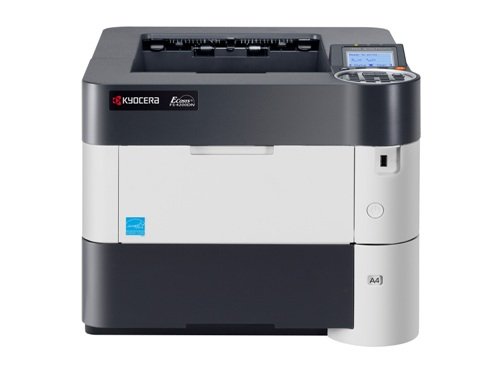
Столкнулся с бедой — принтер Kyocera FS-4200dn пишет — замените тонер. Клавиатура при этом не работает (не дает ничего нажать), только справка открывается, в которой описано, как заменить картридж. Пробовал поставить другой — ни помогло.
В поисковиках нашел варианты решений:
1. Очистить бункер отработанного тонера — не помогло
2. Заменить картридж — не помогло
Полез разбирать и смотреть, оказало датчик под узлом проявки засыпало тонером, и он как то не правильно себя вел. Очистил — все работает. Рассмотрим, что было сделано.
Исправляем ошибку Kyocera FS-4200 замените тонер
Выключаем принтер !
Внимание, разборку Вы осуществляете на свой страх и риск. Автор ответственности за испорченное имущество ответственности не несет. Статья носит ознакомительный характер и ни в коем случае не побуждает Вас лезть туда, куда вы не знаете. Если Вы не уверены в своих действиях — обратитесь в сертифицированный сервисный центр!
Открываем переднюю крышку и выкатываем DrumUnit
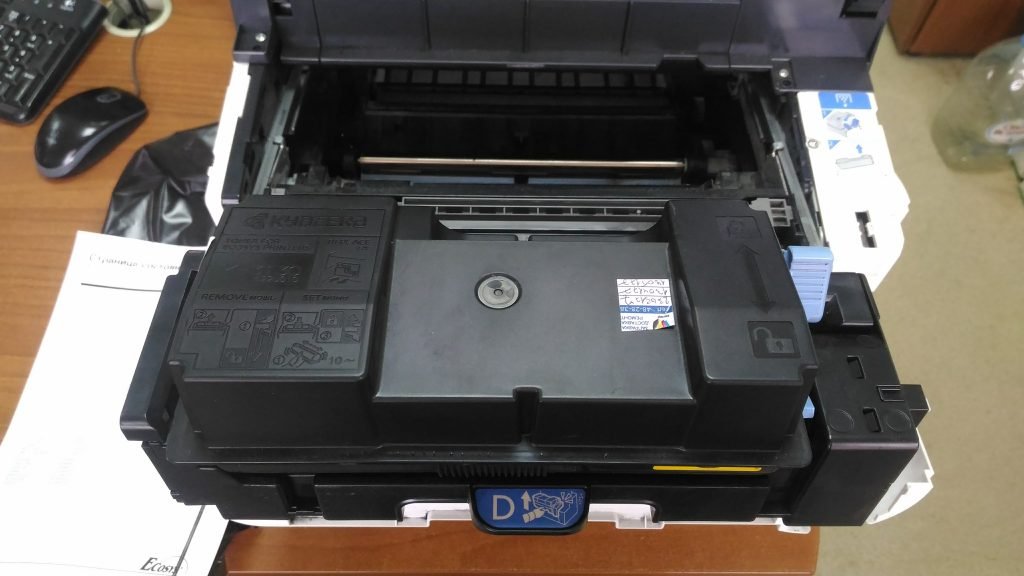
Далее необходимо снять защитную крышку слева, для этого поднимаем ее где указывает стрелочка и отодвигаем ее от себя:
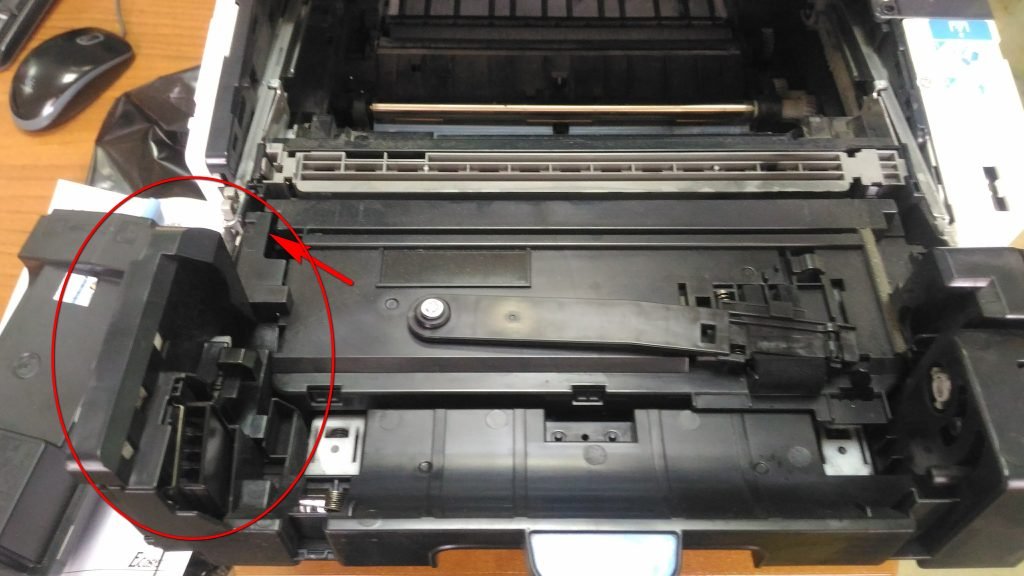
У Вас должно получиться вот так. Сразу можно отключить провод, идущий к узлу проявки, это самый ближний разъем к Вам:
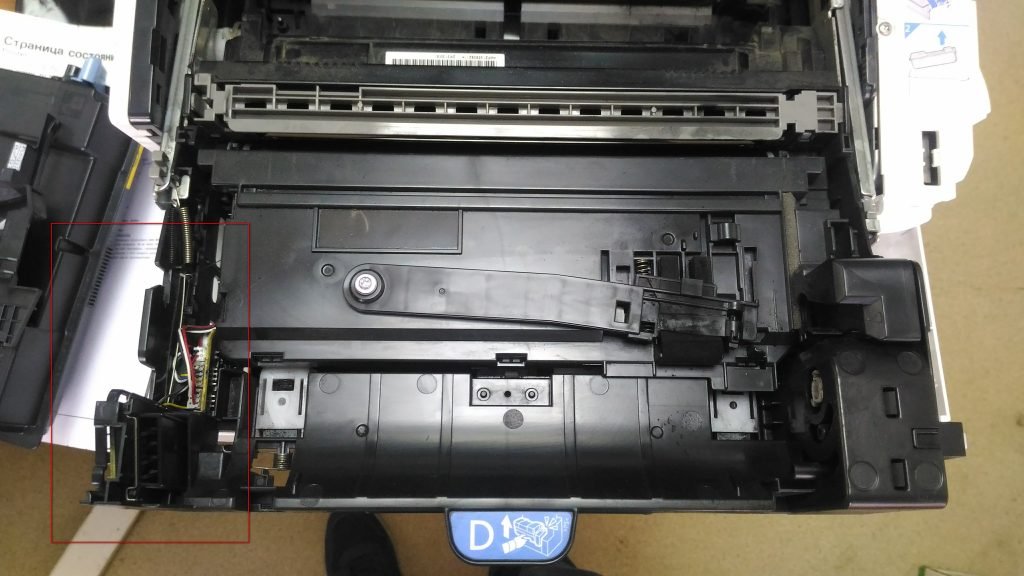
Теперь смотрим на правую сторону. Чтобы достать узел проявки из DrumUnit, необходимо надавить на защелку, которая отмечена стрелкой и потянуть его вверх.
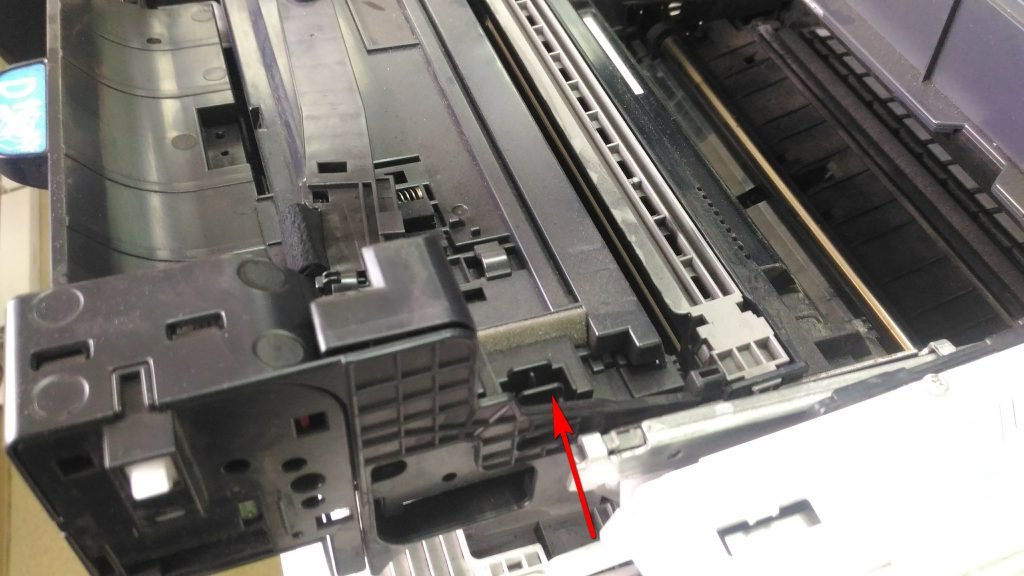
После снятия узла проявки я увидел вот такое. То ли пользователи так ставили картридж в него, то ли это минус конструкции, что он просыпается, но это совсем не порядок. Слева видим датчик тонера (как я понял), который тоже весь в нем (это я уже с него немного сдул, так он был такой же, как и справа.
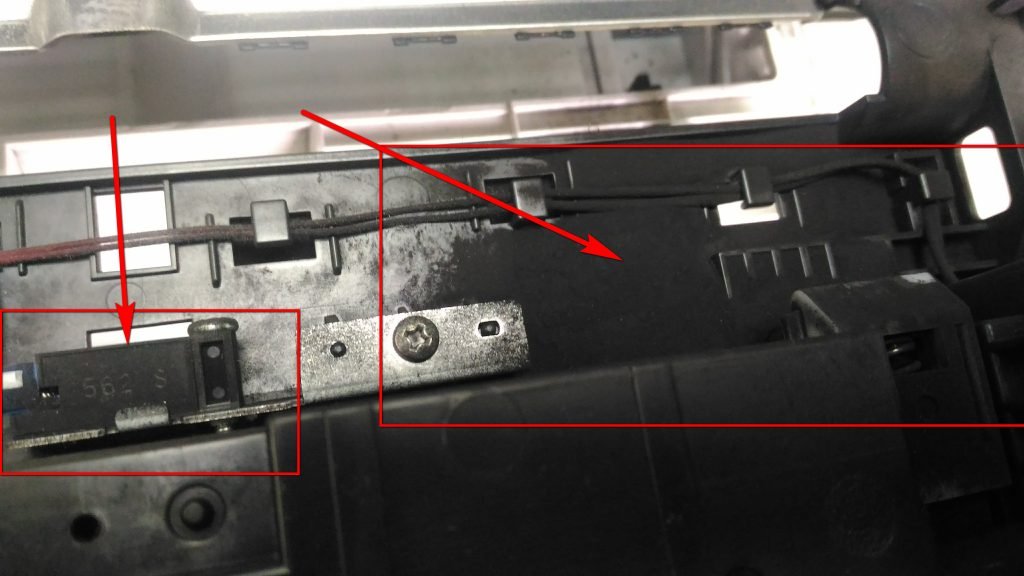
Чистим все это дело и собираем обратно (в обратной последовательности), ставим картридж на место и включаем принтер.
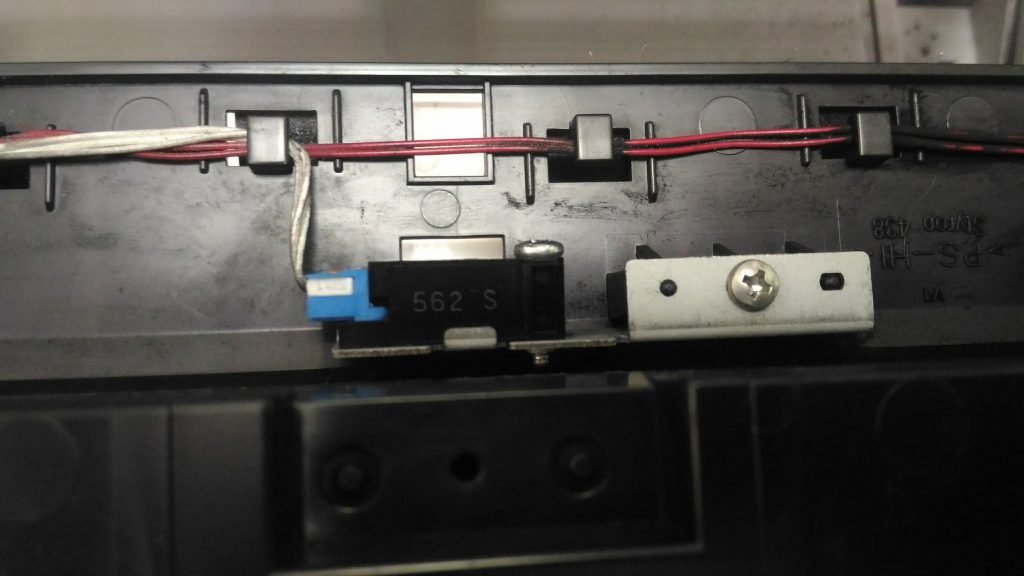
После сборки обратно, принтер добавил себе тонера и радостно сказал «Готов к печати«.
Новые модели принтеров и МФУ Kyocera (выпущенные после 2013 года) при использовании неоригинальных картриджей без чипа или заправке картриджей блокируются:
— блокируется функция печати
— появляется уведомление на дисплее об ошибке и/или красная световая индикация
Тем не менее производитель, компания Kyocera, допускает работу с устройством и информация о сбросе ошибки указана в инструкции по эксплуатации. Необходимо выполнить одновременное нажатие на две кнопки и удержание в течение 3-4 секунд — до момента исчезновения надписи предупреждающей надписи на устройствах с экраном и/или появления зеленой индикации предупреждающих диодов.
В большинстве случаев для сброса информации об ошибке необходимо нажать кнопки [Сброс] (оранжевая) и [Ок] за исключением моделей серии Aquarius:

Сброс информации в МФУ Kyocera FS-1020mfp — кнопка [Стоп/Сброс] и кнопка выбора

Сброс информации в МФУ Kyocera FS-1025mfp, Kyocera FS-1120mfp — кнопки [Стоп/Сброс] и [OK]

Сброс информации в МФУ Kyocera FS-118MFP

Сброс информации FS-2000D

Сброс информации в принтерах Kyocera FS-1040, Kyocera FS-1060DN — кнопки [GO] и [Отмена]
Расположение кнопок в зависимости от модели устройства Kyocera:

Сброс информации в МФУ Kyocera M3040DN, M3540DN

Сброс информации в МФУ Kyocera M2030DN, M2035DN, M2535DN

Сброс информации в принтерах Kyocera FS-2100DN, FS-4100DN, FS-4200DN

Сброс информации в Ecosys P2035d, FS-1120D, FS-1320dn, FS-1110

Сброс информации в FS-1370dn, P2135dn


Сброс информации в P3045dn /P3050dn /P3055dn /P3060dn/ P4040DN


Сброс информации в P5021cdn/P5021cdw
Сброс информации в P5026cdn/P5026cdw
Сброс информации в МФУ Kyocera M5521cdn/ M5521cdw

Сброс информации в МФУ Kyocera M6030cdn/M6530cdn

Сброс информации в TASKalfa 1800

Другие устройства Kyocera
В остальных устройствах: выпускавшихся ранее, новых цветных или серии TASKalfa информация носит предупреждающий характер, работа принтера или МФУ не блокируются.
| FS-1020MFP | Если вы хотите использовать картридж с тонером, установленный на данный момент, одновременно нажмите Клавиша выбора режима и [Стоп/Сброс] и удерживайте не менее 3 секунд. |
| Если вы хотите использовать картридж с тонером, установленный на данный момент, одновременно нажмите [Стоп/Сброс] и [OK] и удерживайте не менее 3 секунд. | |
| Если вы хотите использовать картридж с тонером, установленный на данный момент, одновременно нажмите клавиши [GO] и [Отмена] и удерживайте не менее 3 секунд. | |
| Если требуется использовать установленный сейчас картридж с тонером, нажмите клавишу [OK] и клавишу [Стоп] одновременно и удерживайте их 3 секунды или дольше. | |
| Если вы хотите использовать установленный контейнер с тонером, одновременно удерживайте кнопки [OK] и [Отмена] на протяжении как минимум 3 секунд. | |
| ECOSYS M2135dn ECOSYS M2040dn ECOSYS M2635dn ECOSYS M2635dw ECOSYS M2540dn ECOSYS M2540dw |
Если нужно использовать установленный в настоящее время контейнер с тонером, одновременно нажмите и удерживайте клавиши [OK] и [Стоп] в течение минимум 3 с. |
| Если требуется использовать установленный сейчас картридж с тонером, нажмите клавишу [OK] и клавишу [Стоп] одновременно и удерживайте их 3 секунды или дольше. | |
Содержание
- Куосера неправильно установлен картридж с тонером ошибка принтера
- Сброс сообщения «Неоригинальный картридж с тонером» в аппаратах Kyocera
- Инструкция по сбросу ошибки «Неоригинальный картридж с тонером» на Kyocera
- Устранение ошибки «Установлен неоригинальный картридж с тонером» для других моделей Kyocera.
- Сброс сообщения об ошибке установки заправленного или неоригинального картриджа в принтерах Kyocera
- Сброс ошибки установки совместимого или заправленного картриджа в принтере Kyocera: комбинации кнопок
Куосера неправильно установлен картридж с тонером ошибка принтера
КОНФЕРЕНЦИЯ СТАРТКОПИ
Принтеры, копировальные аппараты, МФУ, факсы и другая офисная техника:
вопросы ремонта, обслуживания, заправки, выбора
Рядом стоят два таких девайса. На одном время от времени после вкл. питания появляется сообщение «Неправильно установлен тонер». Со слов пользователей: «бывает пару-тройку раз вкл./выкл. питания и всё заработает», «иногда переставляем тонер-картриджи и заработает», иногда «стоит целый день с ошибкой — на след. день вкл. и работает». Тонер-картриджи лицензионные, уже отработаны 5-6 комплектов. На тонер-картриджах иногда есть чипы, иногда их нету. Чипы менял комплектом на новые — не в них дело. Датчика наличия/отсутствия тонер-картриджей нету, конструкция самих картриджей простая (бункер-шнек-крышка). http://s016.radikal.ru/i334/1711/c0/f7b5d89c4a0b.jpg
Что смотреть — датчики проявок?
demon (0): Тонер-картриджи лицензионные это как ? оригинал или китай ?
Турция IPM, без чипов.
обычно он так ругается когда не может в картридже открыть шторку высыпания тонера из картриджа. периодически заправщики криво собирают это место.
Не понятно: если вытащить все тонеры, то девайс начинает пытаться подмешивать тонеры в проявки. Если поставить картриджи сразу же пишет про неправильную установку, не понятно также на какой из цветов идет ругательства.
5. tehniks-it 21.11.17 16:13
(4) event log распечатайте
(4)так по одному картриджу вставляйте и закрывайте крышку , будет понятно на какой ругается
В 11:00 был у Заказчика — снял все картриджи и по очереди их устанавливал назад. вроде бы показал проблему в жёлтом и чёрном картриджах. поменял их с соседним девайсом местами — заработал, и второй работает с якобы «дефектными» картриджами тоже. уехал. к 17:00 позвонили — снова то же самое, второй работает стабильно. завтра надо снова ехать. не понятненько.
Выяснил, что «кривится» девайс на синий тонер-картридж. http://s019.radikal.ru/i626/1711/2f/c58acbed6567.jpg похоже, что проблема в черной пластиковой скобе, она выскакивает из защёлки, и перекашивается. зачем она вообще нужна — не понятно. я снял их на всех 4-х картриджах и девайс заработал. Примечательно, что на пред. партии картриджей этих скобок вообще не было. Что-то «мутят» или поставщики, или производители картриджей — отличается не только конструкция картриджей, но цвет боковых пластиковых крышек и самого бункера. проблем с качеством печати не наблюдается.
demon (8): Что-то «мутят» или поставщики, или производители картриджей — отличается не только конструкция картриджей, но цвет боковых пластиковых крышек и самого бункера. Да уж, от цвета деталей работоспособность аппаратов зависит очень сильно! 😉
(9) ну, конечно же — они напрямую участвуют в цветопередаче! 🙂
Источник
Сброс сообщения «Неоригинальный картридж с тонером» в аппаратах Kyocera
Бесплатно при заказе от 5000руб.
И так. Мы запустили новый сайт. Процесс обновления прошел успешно. Но есть некоторые нюансы.
Как Вы наверно уже заметили сайт Print master обновился !

После заправки тонер-картриджа Kyocera, Ваше печатающее устройство, скорее всего выдаст сообщение: «Установлен неоригинальный картридж с тонером» или «Тонер отсутствует«. И тут большинство пользователей впадают в ступор)))
 Поскольку не хотят прочитать, что же написано в Справке аппарата, которую он любезно показывает совместно с ошибкой.
А ведь Ваш аппарат Kyocera пытается Вам рассказать, что же необходимо сделать для дальнейшей работы устройства.
Для того, чтобы продолжить использовать заправленные картриджи, в большинстве случаев, необходимо на панели аппарата зажать одновременно две клавиши [СТОП] и [ОК] и подержать 3-5секунд.
Но не все советы одинаково полезны )))
На некоторых аппаратах используется другая комбинация клавиш. Найдите в списке Ваше печатающее устройство и выполните соответствующие инструкции.
FS-1025MFP
FS-1120MFP
FS-1125MFP
FS-1320MFP
FS-1325MFP
FS-1040
FS-1041
FS-1060DN
FS-1061DN
FS-1030MFP
FS-1130MFP
FS-1035MFP
FS-1135MFP
FS-1100
FS-1110
FS-1300D
FS-1120D
FS-1320D
Зажать красную и зеленую кнопки на корпусе принтера на 3 секунды или дольше.
FS-2100D
FS-2100DN
FS-4100DN
FS-4200DN
FS-4300DN
ECOSYS M2030dn
ECOSYS M2035dn
ECOSYS M2530dn
ECOSYS M2535dn
ECOSYS P2335d
ECOSYS M2835dw
Ecosys M2735dn
Ecosys M2235dn
Ecosys P2335dn
ECOSYS P2335dw
Если нужно использовать установленный в настоящее время контейнер с тонером, одновременно нажмите и удерживайте клавиши [OK] и [Стоп] в течение минимум 3 с.
Внимание!!! Если после установки заправленного картриджа, аппарат выдает сообщение: «Добавьте тонер», это означает, что ваш картридж заправлен неправильно!
Можете смело предъявлять претензии заправщику, либо, как вариант, положение спасет новый картридж Kyocera TK-1200.
Внимание: у цветных принтеров и МФУ Kyocera нет возможности сброса сообщения при помощи кнопок. Необходимо обязательно при заправке картриджа менять чип!
Немного видео )
Сброс сообщения «Неоригинальный картридж с тонером» на аппаратах Kyocera FS-1020/1120/1025/1125mfp
Сброс сообщения «Неоригинальный картридж с тонером» в аппаратах Kyocera FS-1028dn/1128dn/1030dn/1035dn/1130dn/1135dn/ Ecosys M2030dn/M2035dn/M2530dn/M2535dn
Источник
Инструкция по сбросу ошибки «Неоригинальный картридж с тонером» на Kyocera

Не секрет, что большинство лазерных картриджей Kyocera (Киосера ) имеют чип — специальную микросхему, позволяющую пользователю на дисплее принтера или МФУ (многофункционального устройства) контролировать остаток тонера.
Когда тонер заканчивается, принтер или МФУ выдаёт ошибку о недостаточном количестве для дальнейшей работы. Для возобновления работы устройства, владельцу необходимо принять решение: заправить картридж или приобрести новый.
Представим, что пользователь посетил сервисный цент и заправил картридж. Затем, принеся домой или в офис, вставил картридж в печатающее устройство. И, увы, увидел новую ошибку в работе принтера: «Неоригинальный картридж с тонером».

Ошибка появилась из-за чипа. Да-да, той самой микросхемы описанной выше. Ведь помимо контроля тонера, чип «запрещает » принтеру повторно использовать картридж. Сделано это производителями намеренно с одной целью — стимулировать владельца аппарата к приобретению нового картриджа.
К счастью, есть методы обхода блокировки для разных моделей Kyocera (Киосера ). Перезаправленным картриджем можно будет пользоваться. Причем, перезаправлять картриджи вы сможете многократно.
Чтобы МФУ Kyocera (Киосера ) снова могло распознать картридж, используйте сочетание клавиш [СТОП] и [ОК].
Зажмите клавиши одновременно и удерживайте от 3 до 5 секунд. После чего на дисплее увидите надпись: «Готов к копированию». Это хороший знак, ведь на принтере снова можно печатать.
Данный метод подходит большинству моделей печатающих устройств Киосера. Однако на некоторых моделях такая комбинация окажется неэффективной.
В табличке ниже, я прописал модели аппаратов, для которых требуется другое сочетание. Выберите модель аппарата из списка, а затем нажмите нужные клавиши на своём принтере. И ваш аппарат напишет долгожданное:» Готов к копированию», вместо» Неоригинальный картридж с тонером».
Устранение ошибки «Установлен неоригинальный картридж с тонером» для других моделей Kyocera.
Kyocera ECOSYS P2335d

Одновременно нажмите на кнопки [OK] и [Стоп] и подождите не менее 3 секунд.
Kyocera ECOSYS M2535dn/ M2530dn/ M2035dn/ M2030dn

Избавиться от ошибки «Установлен неоригинальный картридж с тонером» поможет одновременное зажатие [OK] и [Стоп] и удержание не менее 3 секунд.
Kyocera ECOSYS M2540dw/ M2540dn/ M2635dw/ M2635dn/ M2040dn/ M2135dn/ M3540DN/ M3040DN

Удерживайте не менее 3 секунд зажатые клавиши [OK] и [Стоп].
Kyocera FS-4300DN/ FS-4200DN/ FS-4100DN/ FS-2100DN/ FS-2100D

Устраните ошибку «Установлен неоригинальный картридж с тонером» самостоятельно: удержите [OK] + [Отмена] на время не менее 3 секунд.
Kyocera FS-1320D/ FS-1120D/ FS-1300D/ FS-1110/ FS-1100

А для этих моделей, следует на 3-4 секунды зажать красную и зеленую клавиши на панели принтера.
Kyocera FS-1135MFP/ FS-1035MFP/ FS-1130MFP/ FS-1030MFP

Удерживайте [OK] + [Стоп] одновременно чуть больше 3 секунд.
Kyocera FS-1061DN/ FS-1060DN/ FS-1041/ FS-1040

Комбинация [Отмена] и [GO], зажатая не менее 3 секунд, позволит устранить ошибку принтера «Установлен неоригинальный картридж с тонером».
Kyocera FS-1325MFP/ FS-1320MFP/ FS-1125MFP/ FS-1120MFP/ FS-1025MFP

Для устранения ошибки, воспользуйтесь клавишами [Стоп/Сброс] и [OK]. Зажмите их не менее чем за 3 секунды.
Kyocera FS-1020MFP

Удерживайте кнопку [Стоп/Сброс] и «Выбор режима» 3-5 секунд.
Источник
Сброс сообщения об ошибке установки заправленного или неоригинального картриджа в принтерах Kyocera
Когда в картридже Kyocera заканчивается тонер, то на дисплее принтера (или компьютера) незамедлительно всплывает соответствующее сообщение. Кроме того, полностью блокируется работа печатающего устройства. У некоторых МФУ даже сканер перестает нормально функционировать. Выйти из ситуации можно тремя способами:
- Купить оригинальный картридж для принтера Kyocera. Это самый правильный и простой вариант. Замените старый картридж новым, и ошибка сбросится автоматически после перезагрузки аппарата. Тем не менее, оригинальный картридж очень дорогой, поэтому этот способ не каждому придется по карману.
- Купить совместимый картридж для принтера Kyocera. Аналоговый расходник во много крат дешевле оригинальной версии. Его использование обойдется Вам значительно дешевле. Однако во время установки могут возникнуть трудности с определением неоригинального картриджа.
- Заправить картридж для принтера Kyocera. Это самый бюджетный вариант. К тому же пополнить расходник не только выгодно, но и практично. Ведь сделать это можно сразу же по окончанию тонера в картридже. Но установка перезаправленного картриджа в принтер не снимет его блокировку.
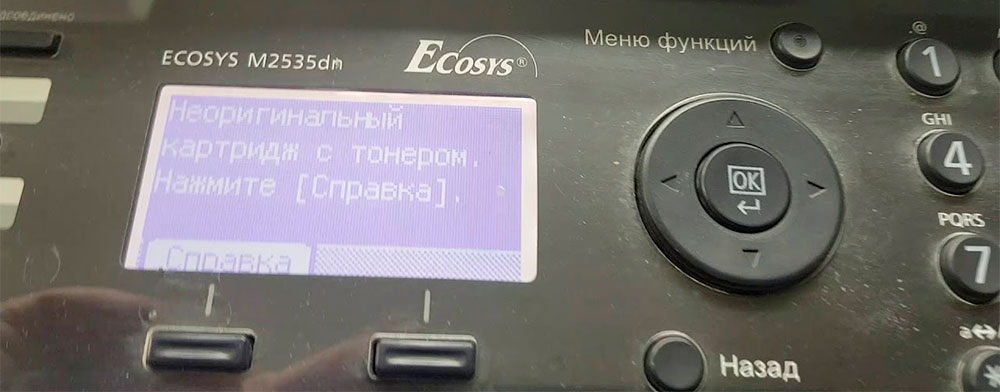
С первым пунктом все ясно. Заказали оригинальный картридж соответствующей модели, изъяли старый расходник, установили новое изделие, перезагрузили принтер и можно снова печатать. Со вторым и третьим пунктами все не так однозначно. Но сложностей минимум. Просто помимо тех действий, которые были указаны выше, после установки перезаправленного или неоригинального расходного материала нужно нажать определенную комбинацию клавиш на панели управления принтера.
Сброс ошибки установки совместимого или заправленного картриджа в принтере Kyocera: комбинации кнопок
Как уже было сказано, чтобы избавиться от ошибки «Установлен неоригинальный картридж», нужно нажать на определенные кнопки, расположенные на панели управления принтера. Как правило, следует одновременно зажать на 3 секунды кнопки выбора и сброса печати. Однако у некоторых моделей функциональное назначение клавиш может значительно отличаться. Поэтому мы добавили таблицу, в которой указано, какими клавишами нужно сбрасывать ошибку установки совместимых и перезаправленных картриджей для некоторых моделей оргтехники Kyocera:
Модели Kyocera
Кнопки для сброса ошибки (одновременно зажать на 3 секунды)
Изображение панели управления МФУ Kyocera
FS-118mfp
[Enter] и [Stop/Clear, красную]
FS-1020mfp
[Выбор режима печати] и [Стоп/Сброс, красную]
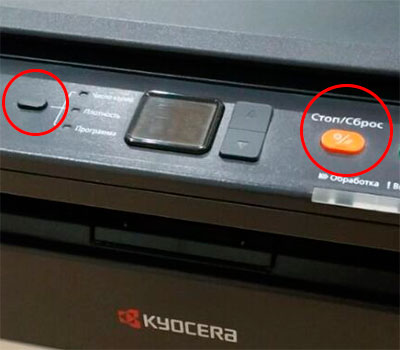
FS-1025mfp
FS-1120mfp
FS-1125mfp
FS-1320mfp
FS-1325mfp
[Ок] и [Stop/Reset, красную]
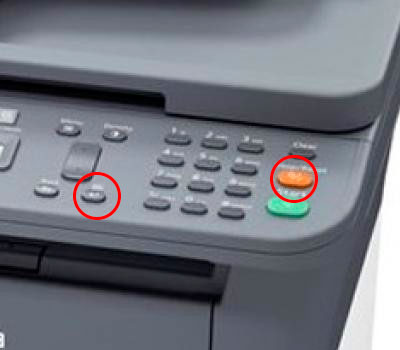
FS-1040
FS-1041
FS-1060dn
FS-1061dn
[GO, зеленую] и [Отмена, красную]
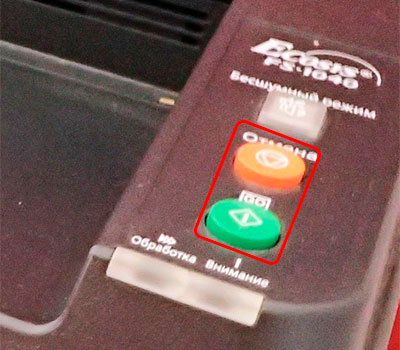
FS-1030mfp
FS-1130mfp
FS-1035mfp
FS-1135mfp
ECOSYS M2030dn
ECOSYS M2035dn
ECOSYS M2530dn
ECOSYS M2535dn
[Ok] и [Stop, красную]
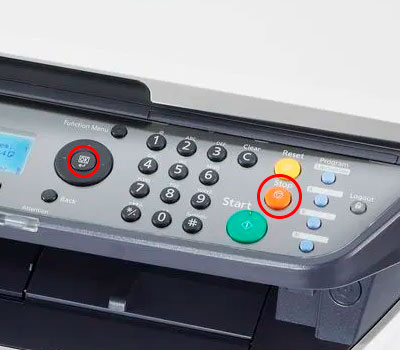
FS-1100
FS-1110
FS-1120d
FS-1300d
FS-1320d
FS-1320dn
ECOSYS P2035d
[Зеленую, с изображением неполного круга] и [Красную, с изображением треугольника в круге]
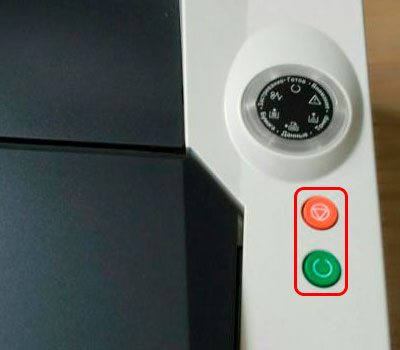
FS-1370dn
ECOSYS P2135dn
[Ok] и [Красную, с изображением треугольника в круге]
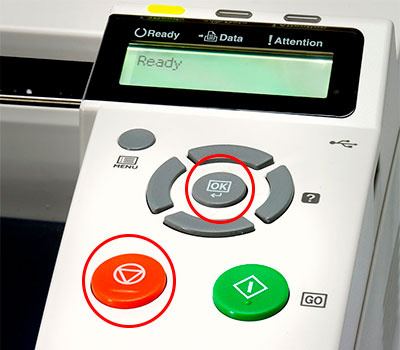
FS-2000d
[Ok] и [Красную, с изображением треугольника в круге]
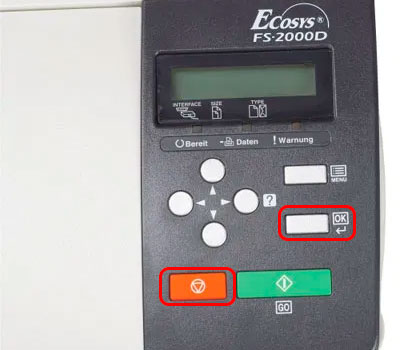
FS-2100d
FS-2100dn
FS-4100dn
FS-4200dn
FS-4300dn
ECOSYS P3045dn
ECOSYS P3050dn
ECOSYS P3055dn
ECOSYS P3060dn
ECOSYS P4040dn
[Ok] и [Cancel, красную]
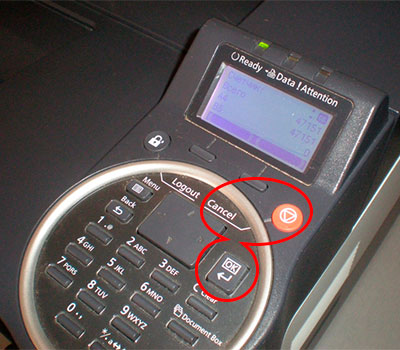
FS-C8600dn
FS-C8650dn
[Ок] и [Отмена, красную]
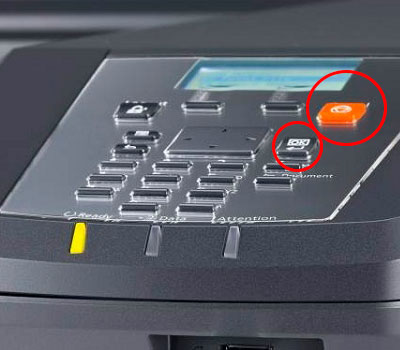
FS-9130dn
FS-9530dn
[Ok] и [Cancel, красную]
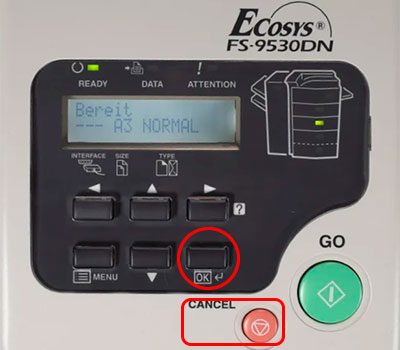
ECOSYS P2040dn
ECOSYS P2040dw
ECOSYS P5021cdn
ECOSYS P5021cdw
ECOSYS P5026cdn
ECOSYS P5026cdw
[Ok] и [Красную, с изображением треугольника в круге]
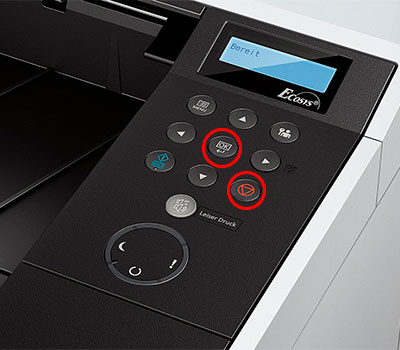
ECOSYS M2040dn
ECOSYS M2135dn
ECOSYS M2540dn
ECOSYS M2540dw
ECOSYS M2635dn
ECOSYS M2635dw
[Ок] и [Стоп, красную]
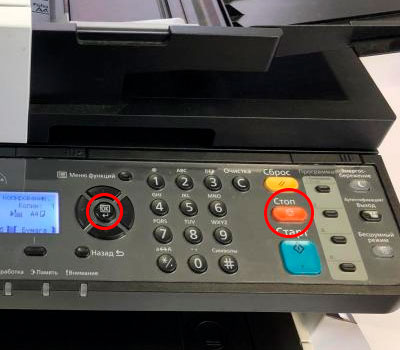
ECOSYS M2235dn
ECOSYS M2735dn
ECOSYS M2835dw
ECOSYS P2335d
ECOSYS P2335dn
ECOSYS P2335dw
[Ввод] и [Стоп] или на сенсорной панели нажать «Далее» -> «Продолжить» -> «Закрыть»
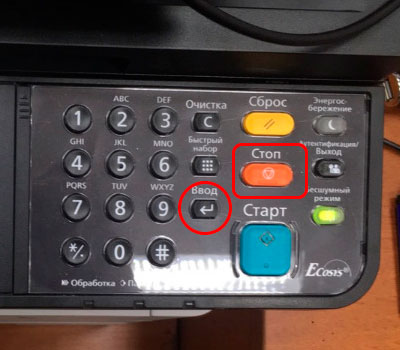
ECOSYS P2235dn
ECOSYS P2235dw
[GO, зеленую] и [Красную, с изображением треугольника в круге]
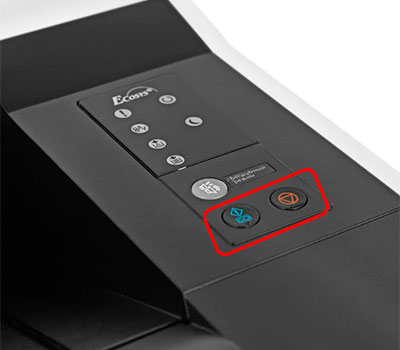
TASKalfa 1800
[Ок] и [Стоп, красную]
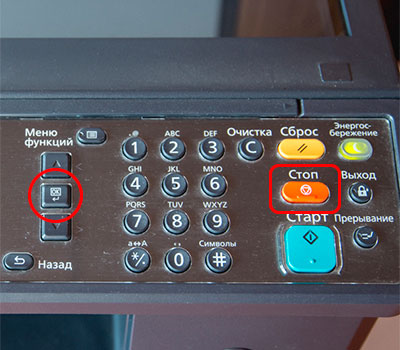
ECOSYS M3040dn
ECOSYS M3145dn
ECOSYS M3540dn
ECOSYS M3645dn
ECOSYS M5521cdn
ECOSYS M5521cdw
ECOSYS M6030cdn
ECOSYS M6530cdn
TASKalfa1801
TASKalfa 2201
[Ок] и [Стоп, красную]
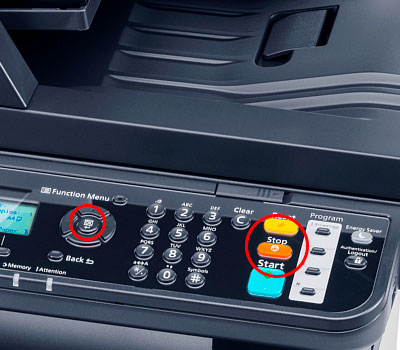
ECOSYS P6130cdn
ECOSYS P6230cdn
[Ok] и [Cancel, красную]
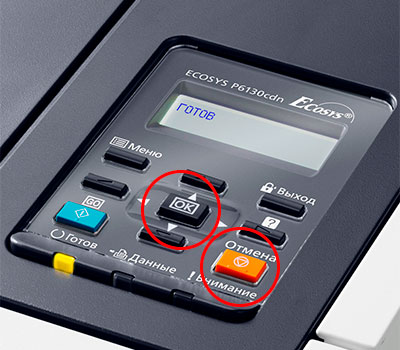
ECOSYS P6035cdn
ECOSYS P6235cdn
ECOSYS P7040cdn
ECOSYS P7240cdn
[Ok] и [Cancel, красную]
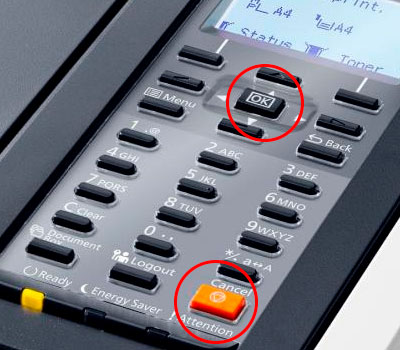
ECOSYS M2640idw
ECOSYS M2735dw
ECOSYS M3040idn
ECOSYS M3145idn
ECOSYS M3540idn
ECOSYS M3550idn
ECOSYS M3560idn
ECOSYS M3645idn
ECOSYS M3655idn
ECOSYS M3660idn
ECOSYS M4125idn
ECOSYS M4132idn
ECOSYS M6035cidn
ECOSYS M6230cidn
ECOSYS M6235cidn
ECOSYS M6535cidn
ECOSYS M6630cidn
ECOSYS M6635cidn
ECOSYS M8124cidn
ECOSYS M8130cidn
ECOSYS P8060cdn
FS-6525mfp
FS-6530mfp
FS-C8520mfp
FS-C8525mfp
TASKalfa 306ci
TASKalfa 307ci
TASKalfa 356ci
TASKalfa 406ci
TASKalfa 2552ci
TASKalfa 3011i
TASKalfa 3212i
TASKalfa 3511i
TASKalfa 4002i
TASKalfa 5002i
TASKalfa 5052ci
TASKalfa 6002i
TASKalfa 6052ci
TASKalfa 7002i
TASKalfa 7052ci
TASKalfa 8002i
TASKalfa 8052ci
TASKalfa 9002i
На сенсорной панели нажать «Далее» -> «Продолжить» -> «Закрыть»
Внимание:
- После выключения и обратного включения принтера ошибка снова появится, после чего произойдет блокировка устройства. Чтобы избавиться от нее, повторно осуществите процедуру с нажатием комбинации кнопок, соответствующей Вашей модели принтера.
- Установка перезаправленного картриджа в принтер Kyocera, и нажатие соответствующей комбинации кнопок, может не сбросить ошибку. Дело в том, что система посчитает чип старым (либо такое может быть в случае, если версия прошивки чипа не совпадает с версией прошивки принтера). В этом случае избавиться от проблемы поможет покупка и установка нового чипа Kyocera.
- Если Вы установили перезаправленный картридж в принтер Kyocera, ошибка не убралась, а переквалифицировалась в «Добавьте тонер» или «В картридже нет тонера», это указывает на то, что расходник был неправильно заправлен. Обратитесь в сервисный центр либо замените картридж новым изделием.
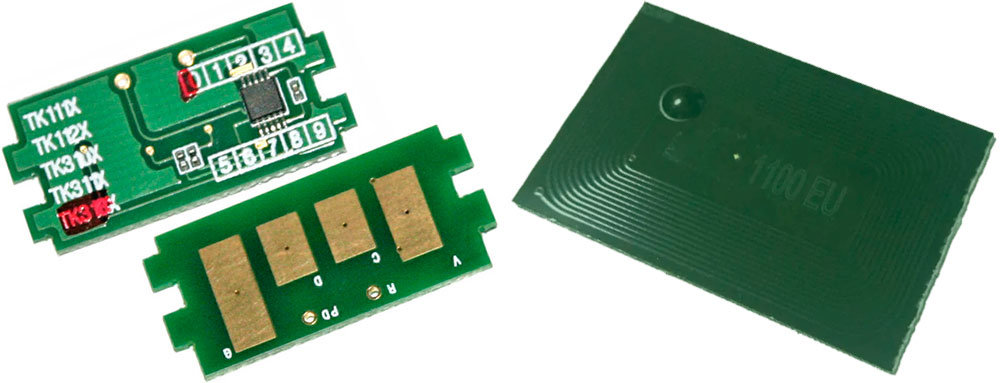
Заказать картриджи для принтеров Kyocera как оригинального, так и аналогового образца можно в нашем интернет-магазине. Здесь представлен огромный выбор расходников для оргтехники Kyocera по самым лояльным расценкам. Качество продукции соответствует всем международным нормам и стандартам качества. Решение заказать картридж для принтера Kyocera у нас является верным. Мы гарантируем это.
Источник
Adblock
detector
| FS-1020MFP | Если вы хотите использовать картридж с тонером, установленный на данный момент, одновременно нажмите Клавиша выбора режима и [Стоп/Сброс] и удерживайте не менее 3 секунд. |
| Если вы хотите использовать картридж с тонером, установленный на данный момент, одновременно нажмите [Стоп/Сброс] и [OK] и удерживайте не менее 3 секунд. | |
| Если вы хотите использовать картридж с тонером, установленный на данный момент, одновременно нажмите клавиши [GO] и [Отмена] и удерживайте не менее 3 секунд. | |
| Если требуется использовать установленный сейчас картридж с тонером, нажмите клавишу [OK] и клавишу [Стоп] одновременно и удерживайте их 3 секунды или дольше. | |
| Если вы хотите использовать установленный контейнер с тонером, одновременно удерживайте кнопки [OK] и [Отмена] на протяжении как минимум 3 секунд. | |
| ECOSYS M2135dn ECOSYS M2040dn ECOSYS M2635dn ECOSYS M2635dw ECOSYS M2540dn ECOSYS M2540dw |
Если нужно использовать установленный в настоящее время контейнер с тонером, одновременно нажмите и удерживайте клавиши [OK] и [Стоп] в течение минимум 3 с. |
| Если требуется использовать установленный сейчас картридж с тонером, нажмите клавишу [OK] и клавишу [Стоп] одновременно и удерживайте их 3 секунды или дольше. | |
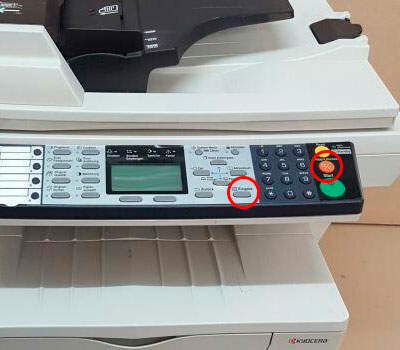 |
|