 Dislikes: 0
-
12-05-2014
#1

Trusted Tech
50+ Posts


- Rep Power
- 19
C-3721 (fuser over-temperature) — How is it related to door adjustment?
Bizhub C280, error code C-3721, [Service Manual drops the hyphen: C3721], one of three codes for «Fusing abnormally high temperature detection»:
- C3721 (Center of the heating side)
- C3722 (Edge of the heating side)
- C3723 (Pressurizing side)
Fusing unit appears normal, certainly not over-temperature. (After resetting the code, I set fuser temperature to its lowest limit. It still threw the error after restart.)
But the Service Manual’s 2nd troubleshooting step (after checking the fusing unit installation) is «Check the open/close operation of the right door.» What is that about? That is consistent with other problems the machine is having (duplex jams because duplex transport sensor fails to trip, because door is out of adjustment), but I don’t see the connection. How is fuser over-temperature related to the door?
Related question: getting the door closure adjusted properly seems impossible. On closer inspection, it appears that the door frame itself is out of plumb, as if the right rear corner took an impact causing geometry distortion (though I’m not sure how functionally significant it might be). Have you ever seen this?
-
12-05-2014
#2
Field Supervisor
500+ Posts

- Rep Power
- 27
Re: C-3721 (fuser over-temperature) — How is it related to door adjustment?
The operation of the right door has a role in actuatate the fusing lamp power after is closed.Usualy a door that is not fully closed or not actuatate that switch will throw warm up failure not abnormal high temperature.
After inspect parts manual i think that sw is the number 5 in attach.
switch.jpgDefects are simple, our mind is complicated
-
12-05-2014
#3
Re: C-3721 (fuser over-temperature) — How is it related to door adjustment?
On some machines there is a fusing mains power momentary switch for the right side door. Don’t remember if there is one on the C360 series.
The entire rhs door is available as a spare part if it is damaged — if chassis is bent machine should be disposed of, end of story.
Mains power fluctuations can cause fuser errors on this model — particularly if a momentary large inductive load is sharing the same power circuit / outlet / powerstrip. Such as a refrigerator, large AC motor paper shredder, or anything else with a large AC motor for that matter.
Additionally, the fuser may look good but still be faulty. If all above checks out ok and the machine is a repeat offender I replace the fusing unit and it usually never comes back in.
I’ve been everywhere, man.
-
12-05-2014
#4
Trusted Tech
50+ Posts
- Rep Power
- 19
Re: C-3721 (fuser over-temperature) — How is it related to door adjustment?
 Originally Posted by Blizzoo

The operation of the right door has a role in actuatate the fusing lamp power after is closed. … After inspect parts manual i think that sw is the number 5 in attach.
switch.jpgThanks, that makes sense. I really appreciate you taking the trouble to post that picture and point me to that switch.
-
12-05-2014
#5
Trusted Tech
50+ Posts
- Rep Power
- 19
Re: C-3721 (fuser over-temperature) — How is it related to door adjustment?
Originally Posted by EarthKmTech
On some machines there is a fusing mains power momentary switch for the right side door. Don’t remember if there is one on the C360 series.
Thanks. That’s consistent with what Blizzoo wrote.
Originally Posted by EarthKmTechThe entire rhs door is available as a spare part if it is damaged
Nothing damaged about the door. Tried a replacement IAC, but no change in fit.
Originally Posted by EarthKmTech— if chassis is bent machine should be disposed of, end of story.
Do you see that often? Any idea how the chassis gets bent? I think this is related, because the jam history has a lot of duplex transport errors, also suggesting door out of adjustment. From the history, that has apparently been going on for over a year before throwing the fuser error.
Originally Posted by EarthKmTechMains power fluctuations can cause fuser errors on this model — particularly if a momentary large inductive load is sharing the same power circuit / outlet / powerstrip. Such as a refrigerator, large AC motor paper shredder, or anything else with a large AC motor for that matter.
Thanks for the suggestion, but this machine has its own office circuit, and still has an expensive surge suppressor. I think I can rule out power fluctuations.
Originally Posted by EarthKmTechAdditionally, the fuser may look good but still be faulty. If all above checks out ok and the machine is a repeat offender I replace the fusing unit and it usually never comes back in.
Ah, but that’s not when the chassis shows some sign of being bent? [Still trying to figure out how that happened, or how long it may have worked in that condition.]
-
12-05-2014
#6
Re: C-3721 (fuser over-temperature) — How is it related to door adjustment?
If this is a recent install the frame gets bent when the delivery guys use ratchet straps the secure the machine in transit & they pull the strap too tight, this can crush the frame etc seen it a few times
-
12-05-2014
#7
Trusted Tech
50+ Posts
- Rep Power
- 19
Re: C-3721 (fuser over-temperature) — How is it related to door adjustment?
Originally Posted by copier tech
If this is a recent install the frame gets bent when the delivery guys use ratchet straps the secure the machine in transit & they pull the strap too tight, this can crush the frame etc seen it a few times
Iinteresting. It is not a recent install (been there almost three years), but the jam history indicates that problems with the door (and so, perhaps, the frame) go back a long way, perhaps to the installation. Can handling within the office aggravate that kind of problem, to the point of throwing the fuser temperature error? The machine should not bend when moved, should it?
-
12-08-2014
#8
Trusted Tech
50+ Posts
- Rep Power
- 19
Re: C-3721 (fuser over-temperature) — How is it related to door adjustment?
Originally Posted by EarthKmTech
On some machines there is a fusing mains power momentary switch for the right side door. …
Originally Posted by Blizzoo
The operation of the right door has a role in actuatate the fusing lamp power after is closed.Usualy a door that is not fully closed or not actuatate that switch will throw warm up failure not abnormal high temperature.
After inspect parts manual i think that sw is the number 5 in attach.
switch.jpgInteresting: I’m sorry it took me a couple days of thinking about it to recognize this question, but isn’t that switch the one that provides the general ‘right door not closed’ warning, as opposed to a specific cut-off of fuser power? (The switch wiring goes to the PRCB (Printer Control Board) as opposed to the DCPU (DC Power Supply) that supplies the fuser power.) That general ‘door not closed’ signal may also be relayed from the PRCB to DCPU to cut off fuser power — it would make sense, and there is a lot of communication between PRCB and DCPU — but why wouldn’t the error then be simply ‘right door not closed’, as opposed to ‘fuser over-temperature’?
Tags for this Thread
Bookmarks
Bookmarks

Posting Permissions
- You may not post new threads
- You may not post replies
- You may not post attachments
- You may not edit your posts
- BB code is On
- Smilies are On
- [IMG] code is On
- [VIDEO] code is On
- HTML code is Off
Forum Rules
Answer #1: Posted by ruksha on August 31st, 2016 11:30 PM
This answer was accepted by the poster of the original question.
ruksha

Member since:
August 30th, 2016
Points:
36,570

1,130
points
Re: C-3721 (fuser over-temperature) — How is it related to door adjustment? On some machines there is a fusing mains power momentary switch for the right side door. Don’t remember if there is one on the C360 series.
The entire rhs door is available as a spare part if it is damaged — if chassis is bent machine should be disposed of, end of story.
Mains power fluctuations can cause fuser errors on this model — particularly if a momentary large inductive load is sharing the same power circuit / outlet / powerstrip. Such as a refrigerator, large AC motor paper shredder, or anything else with a large AC motor for that matter.
Additionally, the fuser may look good but still be faulty. If all above checks out ok and the machine is a repeat offender I replace the fusing unit and it usually never comes back in.
I try my level best to answer your question.if you got little bit information please rate my answer.
Thank you so much
bizhub C220/C280/C360 Security Operations User Guide — Page 173
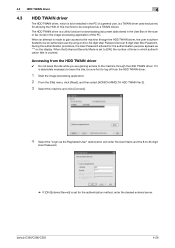
…device.
The HDD TWAIN driver is authenticated to be an authorized user by using an 8-to leave the site, be recognized as «*» on the display.
Accessing from the HDD TWAIN driver.
1 Start the image processing application. 2 From the [File] menu, click [Read], and then select [KONICA MINOLTA…access to [ON], the number of the PC. bizhub C360/C280/C220
4-26 4.3 HDD TWAIN driver
4
4.3
HDD…
bizhub C220/C280/C360 Box Operations User Guide — Page 250
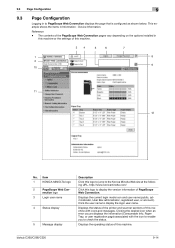
….
34
5
6
7
1
8
2
9 10
11 12
No. Item
1
KONICA MINOLTA logo
2
PageScope Web Con-
Clicking the desired icon when an error occurs displays the information (Consumable Info, Paper Tray, or user registration page) associated with… the items in Information — Device Information.
Click the user name to the Konica Minolta Web site at the following URL.
bizhub C360/C280/C220
9-14
bizhub C220/C280/C360 Network Administrator User Guide — Page 350
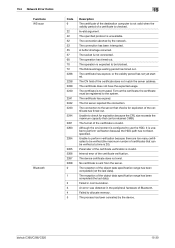
…has been completed (the last data). The certificate has expired. The device certificate does not exist. 15.4 Network Error Codes Functions WS scan
Bluetooth
15
Code 6
22 42 52 53… not have the expected usage. bizhub C360/C280/C220
15-30 Parameter of the object data specification range has been completed (not the last data). An error was detected in communication.
The …
bizhub C220/C280/C360 Network Scan/Fax/Network Fax Operations User Guide — Page 253
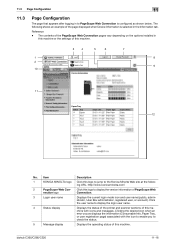
…installed in the Information tab. Item
Description
1
KONICA MINOLTA logo Click this machine.
3
4
5
6
7
1
8
2
9 10
11
12
No. Click this machine. Clicking the desired icon when an error occurs displays the information (Consumable Info, Paper… an example of the page displayed when Device Information is configured as shown below. ing URL. bizhub C360/C280/C220
11-16
bizhub C220/C280/C360 Network Scan/Fax/Network Fax Operations User Guide — Page 260
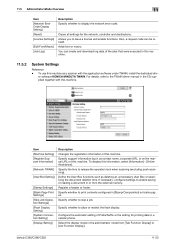
…Error Code Display Setting] [Reset] [License Settings]
[Edit Font/Macro] [Job Log]
Description Specify whether to enable saving or reading a document in or from [Tab Function Display] or [List Function Display]. er software KONICA MINOLTA…destinations. If necessary, configure settings to display the network error code. bizhub C360/C280/C220
11-23
Specify whether to skip a job. …
bizhub C220/C280/C360 Print Operations User Guide — Page 163
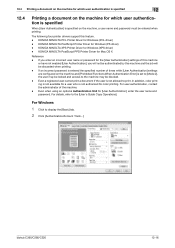
… [User’s Guide Copy Operations]. KONICA MINOLTA PostScript Printer Driver for [User Authentication], enter the user name and password. If an incorrect password is entered the specified number of times while [User Authentication] settings are configured on the machine, a user name and password must be entered when printing.
bizhub C360/C280/C220
12-16 Even…
bizhub C220/C280/C360 Print Operations User Guide — Page 166
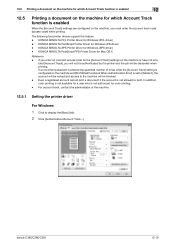
… account will be locked and access to print. bizhub C360/C280/C220
12-19 KONICA MINOLTA PCL Printer Driver for Windows (XPS driver) — KONICA MINOLTA XPS Printer Driver for Windows (PCL driver) -… Error] is entered the specified number of the machine.
12.5.1 Setting the printer driver
For Windows
1 Click to display the [Basic] tab. 2 Click [Authentication/Account Track…].
KONICA MINOLTA …
bizhub C220/C280/C360 Print Operations User Guide — Page 181
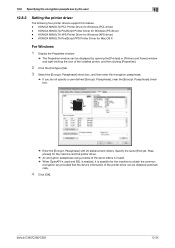
…. — Passphrase] check box.
% Enter the [Encrypt. KONICA MINOLTA PostScript Printer Driver for Windows (XPS driver) — Specify the same [Encrypt. bizhub C360/C280/C220
12-34 KONICA MINOLTA XPS Printer Driver for Windows (PS driver) — KONICA MINOLTA PCL Printer Driver for the machine to obtain the common
encryption key provided that the device information of the installed printer, and then…
bizhub C220/C280/C360 Print Operations User Guide — Page 266
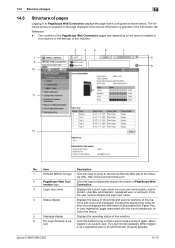
… or account). ing URL. bizhub C360/C280/C220
14-13 The following shows an example of the page displayed when Device Information is configured as shown …error occurs displays the information (Consumable Info, Paper Tray, or user registration page) associated with icons and messages. When logged
in again.
Item
Description
1
KONICA MINOLTA logo Click this button to the Konica Minolta…
bizhub C220/C280/C360 Print Operations User Guide — Page 274
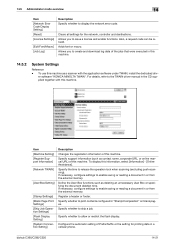
…memory. Allows you to skip a job.
er software «KONICA MINOLTA TWAIN». To display this machine as a scanner with this…of this machine.
Also, a request code can be issued.
bizhub C360/C280/C220
14-21 Item [Machine Setting] [Register Support Information]
… time.
14.5 Administrator mode overview
14
Item [Network Error Code Display Setting] [Reset] [License Settings]
[Edit…
bizhub C220/C280/C360 Print Operations User Guide — Page 298
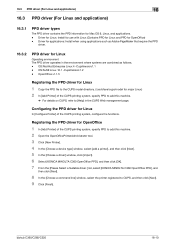
… operates in the CUPS Web management page. bizhub C360/C280/C220
16-10
OS:SuSE Linux 10.1 …Choose a device type] window, select [add a printer], and then click [Next]. 5 In the [Choose a driver] window, click [import]. 6 Select [KONICA MINOLTA C360 …KONICA MINOLTA C360 OpenOffice PPD], and
then click [Next].
8 In the [Choose a command line] window, select the printer registered to [Help…
bizhub C220/C280/C360 Trademarks/Copytrights User Guide — Page 11
… permanent transfer of all of Licensee’s right and interest to the following materials provided by KONICA MINOLTA BUSINESS TECHNOLOGIES, INC. (KMBT): software included as part of the printing system («Printing … CLAIM BY ANY THIRD PARTY. You agree that trademark.
9. bizhub C360/C280/C220
10 In addition to the licensed output device(s), solely for use of any trademark does not give you any…
bizhub C220/C280/C360 Security Operations User Guide — Page 171
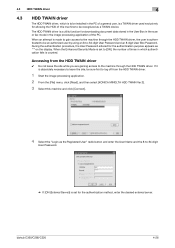
… Start the image processing application. 2 From the [File] menu, click [Read], and then select [KONICA MINOLTA HDD TWAIN Ver.3]. 3 Select this machine to be an authorized user by using an 8-to -64-digit… to be recognized as a TWAIN device.
During the authentication procedure, the User Password entered for allowing the HDD of the PC. bizhub C360/C280/C220
4-26
If it is absolutely…
bizhub C360/C280/C220 Pocket Guide — Page 1
…print, use of recyclable plastics from packaging materials to our devices, Konica Minolta truly shows its loyalty and responsibility to look for more information. KONICA MINOLTA BUSINESS SOLUTIONS U.S.A., INC. 100 Williams Drive, Ramsey, NJ 07446 www.CountOnKonicaMinolta.com www.kmbs.konicaminolta.us Item #: C360PG 9/09
bizhub C360/C280/C220 pocket guide
full color printer/copier/scanner/fax…
bizhub C360/C280/C220 Pocket Guide — Page 2
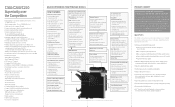
…Konica Minolta‘s flagship MFP’s with no finishing options attached.
This new series strives for an even higher level of perfection by supporting a variety of networking needs…models to 100 lb. Appeal Points
This bizhub series achieves an uncompromising level of reliability…Energy Saving • C360/C280/C220 are industry
leading energy-saving devices • Typical Energy …
Product Guide — Page 5
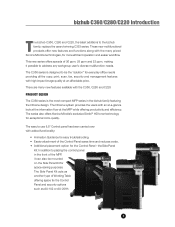
… AU-201H.
1 the Side Panel
Kit. These new multifunctional products offer new features and functions along with high impact image quality at the MFP while offering productivity and efficiency. There are many prized Konica Minolta technologies, for exceptional color-quality. In addition to the bizhub family, replace the award-winning C353 series.
Product Guide — Page 20
… with the Konica Minolta bizhub C450 and carried through with an advanced look — bizhub C360/C280/C220 Design
The «bizhub»
KONICA MINOLTA‘S bizhub BRANDING —
The bizhub brand has enabled Konica Minolta to easily identify the status of lights that determines how brands rank in customer loyalty. We’ve designed a bizhub that traverses its length and width, this line helps maintain ef…
Product Guide — Page 98
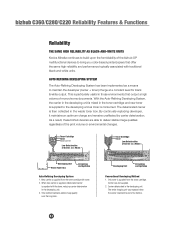
… typically associated with the toner, reducing carrier deterioration in the developing unit.
bizhub C360/C280/C220 Reliability Features & Functions
Reliability
THE SAME HIGH RELIABILITY AS BLACK-AND-WHITE UNITS
Konica Minolta continues to build upon the formidability of the bizhub OP multifunctional devices to bring you color-based printer/copiers that output a high volume of monochrome…
Product Guide — Page 150
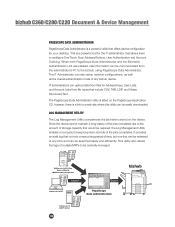
… User Lists, and Account Lists from the administrator’s PC to be easily downloaded. Addresses in Existing Konica Minolta
Multifunctional Peripheral
Addresses in PC
Addresses in LDAP Server
146
PageScope Data Administration
bizhub bizhub C360/C280/C220 Document & Device Management
PAGESCOPE DATA ADMINISTRATOR
PageScope Data Administrator is a powerful utility that include CSV, TAB, LDIF, and…
Product Guide — Page 161
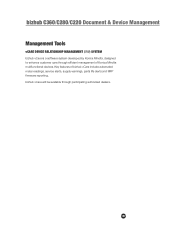
… alerts, supply warnings, parts life alerts and MFP firmware reporting. bizhub C360/C280/C220 Document & Device Management
Management Tools
vCARE DEVICE RELATIONSHIP MANAGEMENT (DRM) SYSTEM bizhub vCare is a software system developed by Konica Minolta, designed to enhance customer care through participating authorized dealers.
157 Key features of Konica Minolta multifunctional devices.


С0000
Main Motor malfunction
Ошибка главного двигателя
162/210/163/211
C0070
Toner Replenishing Motor malfunction
Проблема с вращением банки тонера
162/210/163/211
223/283/363/423
224Е/284Е/364Е/454Е/554Е
Решение
C0202
C0204
C0206
C0208
Elevator Failure Tray 1/2/3/4
Проблема с подъемом бумаги лоток 1/2/3/4
162/210/163/211
Решение
C0211
C0204
C0206
C0208
Bypass Lifting Motion Failure
Проблема с подъемом бумаги лотка ручной подачи
165/185/195/215
222/282/362/223/283/363/423
224Е/284Е/364Е/454Е/554Е
227/287/367
С220/С280/С360
С224/С284/С364/С454/С554
С224Е/С284Е/С364Е/С454Е/С554Е
C227/C287/C367
C258/C308/C368/C458/C558/C658
C0320
LU-202m, LU-202XL fan abnormalitye
Ошибка вентилятора кассеты LU-202m, LU-202XL
AccurioPress C2060/C2070/C2070P
C3070/C3080/C3080P
C05хх
Fusing temperature failure
Проблема с температурой узла закрепления
162/210/163/211
Решение
C0F32
Faulty ATDC Sensor
Ошибка концентрации тонера
162/210/163/211
Решение
C133D
ROM check error
Проблема с платой EEPROM
162/210/163/211
C2152
Transfer belt pressure welding alienation
Проблема с узлом ленты переноса
С220/С280/С360
С224/С284/С364/С454/С554
С224Е/С284Е/С364Е/С454Е/С554Е
C227/C287/C367
C258/C308/C368/C458/C558/C658
C2241
C2242
C2243
C2244
Drum motor abnormality Y/M/C/K
Ошибка мотора барабана Y/M/C/K
PRO/PRESS
C6000L/C6000/C7000/C7000P/C70hc
C1060L/C1060/C1070/C1070P
Accurio Press C2060/C2070/C2070P
C3070/C3080/C3080P
Решение
C2253
C2254
Color PC motor`s failure
Ошибка привода барабанов
227/287/367
С220/С280/С360
С224/С284/С364/С454/С554
С224Е/С284Е/С364Е/С454Е/С554Е
C227/C287/C367
C258/C308/C368/C458/C558/C658
Решение
C2351
Fusing cooling fan motor malfunction
Ошибка главного вентилятора охлаждения
164/165/185/195
215/222/282/362
C2411
C2412
C2413
C2414
Developing unit C/M/Y/K new article release
Ошибка определения нового блока проявки
227/287/367
С220/С280/С360
С224/С284/С364/С454/С554
С224Е/С284Е/С364Е/С454Е/С554Е
C227/C287/C367
C258/C308/C368/C458/C558/C658
C2551
C2552
C2553
C2554
C2555
C2556
C2557
C2558
Abnormally low toner density C/M/Y/K
Ошибка концентрации тонера в блоке проявки
165/185/195/215
227/287/367
С220/С280/С360
С224/С284/С364/С454/С554
С224Е/С284Е/С364Е/С454Е/С554Е
C227/C287/C367
C258/C308/C368/C458/C558/C658
C2654
EEPROM Failure
Проблема с платой EEPROM
222/282/362
C2A11
C2A12
C2A13
C2A1
Drum unit C/M/Y/K new release failure
Ошибка определения нового блока барабана
С220/С280/С360
С224/С284/С364/С454/С554
С224Е/С284Е/С364Е/С454Е/С554Е
C227/C287/C367
C258/C308/C368/C458/C558/C658
C3201
C3202
Fusing motor failure
Ошибка мотора привода узла закрепления
224Е/284Е/364Е/454Е/554Е
С220/С280/С360
С224/С284/С364/С454/С554
С224Е/С284Е/С364Е/С454Е/С554Е
C258/C308/C368/C458/C558/C658
C34хх
C37хх
C38хх
C39хх
Fusing temperature failure
Проблема с температурой узла закрепления
164/165/185/195/215
221/282/362/223/283/363/423
224Е/284Е/364Е/454Е/554Е
227/287/367
С220/С280/С360
С224/С284/С364/С454/С554
С224Е/С284Е/С364Е/С454Е/С554Е
C227/C287/C367
C258/C308/C368/C458/C558/C658
Решение
C3508
Fusing high temperature abnormality
Повышенная температура узла фиксации
PRO/PRESS C6000L/C6000/C7000/C7000P/C70hc
C1060L/C1060/C1070/C1070P
Accurio Press C2060/C2070/C2070P
C3070/C3080/C3080P
Решение
C3924
Fusing sensor wire breaks detection
Проблема с термистором узла фиксации
C452/C552/C652
C451/C550/C650
C4101
Polygon Motor Failure
Проблема с блоком лазера
164/185/195/215
222/282/362/223/283/363/423
224Е/284Е/364Е/454Е/554Е
227/287/367
С220/С280/С360
С224/С284/С364/С454/С554
С224Е/С284Е/С364Е/С454Е/С554Е
C227/C287/C367
C258/C308/C368/C458/C558/C658
C4661
C4662
C4663
Color registration correction abnormality Y/M/C
Ошибка регистрации цветов Y/M/C
PRO C6000L/C6000/C7000/C7000P/C70hc
C1060L/C1060/C1070/C1070P
Решение
C5102
C5103
Main Motor malfunction
Ошибка главного двигателя
164/165/185/195/2
222/282/362/223/283/363/4
224Е/284Е/364Е/454Е/55
С220/С280/С3
С224/С284/С364/С454/С5
С224Е/С284Е/С364Е/С454Е/С554Е
C5370
MFP control board cooling fan motor`s failure to turn
Ошибка включения вентилятора платы MFP
223/283/363/423
224E/284E/364E/454E/554E
227/287/367
С220/С280/С360
С224/С284/С364/С454/С554
С224Е/С284Е/С364Е/С454Е/С554Е
C258/C308/C368/C458/C558/C658
C6755
CIS Gain adjustment abnormality
Ошибка настройки модуля CIS
AccurioPress C2060/C2070
C3070/C3080
C8001
DF communication error
Ошибка коммуникации с автоподатчиком
AccurioPress C2060/C2070
C3070/C3080
C9401
C9402
IR exposure lump malfunction
Проблема с узлом сканера
164/165/185/195/215
222/282/362/223/283/363/423
224Е/284Е/364Е/454Е/554Е
227/287/367
C227/C287/C367
C258/C308/C368/C458/C558/C658
CC151
Flash ROM error
Проблема с платой EEPROM
164/165/185/195/215
226/287/367
C227/C287/C367
C258/C308/C368/C458/C558/C658
CC163
CC164
CC165
ROM contents error
Ошибка программного обеспечения аппарата
С220/С280/С360
С224/С284/С364/С454/С554
С224Е/С284Е/С364Е/С454Е/С554Е
CD004
HDD error
Ошибка жесткого диска
222/282/362
227/287/367
C227/C287/C367
C258/C308/C368/C458/C558/C658
CD0xx
Hard disk error
Проблема с жестким диском
223/283/363/423
224Е/284Е/364Е/454Е/554Е
227/287/367
С220/С280/С360
С224/С284/С364/С454/С554
С224Е/С284Е/С364Е/С454Е/С554Е
C227/C287/C367
C258/C308/C368/C458/C558/C658
Решение
CD3xx
NVRAM data error
Проблема с платой NVRAM
165/185/195/215
222/282/362/223/283/363/423
224Е/284Е/364Е/454Е/554Е
С220/С280/С360
С224/С284/С364/С454/С554
С224Е/С284Е/С364Е/С454Е/С554Е
C227/C287/C367
C258/C308/C368/C458/C558/C658
CE020
Browser abnormality detection
Внезапное выключение браузера
AccurioPress C2060/C2070/C2070P
C3070/C3080/C3080P
CE301
Referring incorrect memory
Ошибка обработки данных (ошибка памяти)
224E/284E/364E/454E/554E
227/287/367
С224/С284/С364/С454/С554
С224Е/С284Е/С364Е/С454Е/С554Е
C258/C308/C368/C458/C558/C658
P-5
PRT/IR ERROR
C200/C203/C220/C224/C250
C252/C253/C258/C284
C277/C287/C257i
C300/C308/C352/C350/C353
C360/C364/C368
C450/C451/C452/C454/C458
C550/C552/C554/C558
C650/C652/C654/C658/C659/C754/C759
C224E/C284E/C364E/C454E
C554E/C654E/C754E
C250P/C252P/C352P
C353P/C450P
C250i/C300i/C360i
C450i/C550i/C650i
C3300i/C3320i/C3350i
C4000i/C4050i
Решение
P-6
P-7
P-8
P-9
C/M/Y/K Imaging Unit failure
C200/C203/C220/C224/C250
C252/C253/C258/C284
C277/C287/C257i
C300/C308/C352/C350/C353
C360/C364/C368
C450/C451/C452/C454/C458
C550/C552/C554/C558
C650/C652/C654/C658/C659
C754/C759
C224E/C284E/C364E/C454E
C554E/C654E/C754E
C250P/C252P/C352P
C353P/C450P
C250i/C300i/C360i
C450i/C550i/C650i
C3300i/C3320i/C3350i
C4000i/C4050i
Решение
P-21
C224e/C224/C220/C652/C200/C203/C227/C250/C250i/C257i/C250P
C252/C252P/C253/C258/C280/C284/C284e/C287/C300/C300i/C308 C352/C350/C352P/C353/C353P/C360/C360i/C364/C364e/C368
C450/C450P/C450i/C451/C452/C454/C454e/C458/C550/C550i/C552 C554/C554e/C558/C650/C650i/C654/C654e/C658/C659/C754 C754e/C759
C3300i/C3320i/C3350i/C4000i/C4050i
Решение
P-28
C224e/C224/C220/C652/C200/C203/C227/C250/C250i/C257i/C250P
C252/C252P/C253/C258/C280/C284/C284e/C287/C300/C300i/C308 C352/C350/C352P/C353/C353P/C360/C360i/C364/C364e/C368
C450/C450P/C450i/C451/C452/C454/C454e/C458/C550/C550i/C552 C554/C554e/C558/C650/C650i/C654/C654e/C658/C659/C754 C754e/C759
Решение
Если вы не нашли на этой странице ваш код ошибки, то нажмите на кнопку «Запросить код ошибки», которая находится под этим текстом, заполните данные, после этого мы отправим информацию на указанную вами электронную почту, а также возможно, что мы добавим вашу ошибку в наш список.
Инфа сотка
-

Bizhub hack
Серия подсказок «bizhub hack» сделает ваше общение с техникой Konica Minolta …
-

5партнер на связи
Компания Пятый партнер не ушла с Российского рынка и продолжает работать. …
-

5partner награды в 2022
Очередной год подряд самый большой объем продаж оборудования Konica Minolta …
-
C4065 vs C7090
В этой статье мы наглядно покажем чем отличается профессиональная модель …
-
-
-
C257i офис в цвете
Konica Minolta в 2021 году выпустила очередной хит цветной офисной бюджетной …
-

-
-
-
C3070L vs C6085
В этой статье мы наглядно покажем чем отличается профессиональная модель …
-
-
-
-

-

-
-
-
-
-
-
-

-
-
-

-
-

Konica Minolta Bizhub/ineo/develop machines display an error code when a problem occurs in the machine. It is alway a good practice to call a certified technician to fix the problem. The following information has carefully been collected from various sources without any guarantee.
The most common error code in bizhub/konica minolta/ineo machines is C 2557. This code indicates a problem in toner density measurement. Either toner density sensor is faulty or toner/developer quantity is low in the developing unit.
| Code | Cause |
| C0000 | Main Motor malfunction |
| C0044 | ADF cooling fan failure |
| C0045 | Fusing cooling fan motor malfunction |
| C004E | Power supply cooling fan motor malfunction |
| C0070 | Toner replenishing motor malfunction |
| C0210 | Abnormal image transfer voltage |
| C03FF | Faulty model setting |
| C0500, C0501, C0510 | Fuser Roller low temperature/ Warm-up Failure |
| C0520, C0521 | Hight Fusing Temperature |
| C0650 | Faulty scanner home position sensor |
| C0F32 | Faulty TCR sensor |
| C1300 | Polygon motor malfunction |
| C133B | Communication with option error |
Konica Minolta 250/350 Errors.
| C0001 | LCT Communication failure |
| C0701 | Manual Paper Size Detection adjustment failure |
| C11B0 | Staple Unit CD Drive problem |
| C11D0 | Crease motor drive failure |
| C2557 | Toner Density sensor problem |
| C2654 | EEPROM with no data is detected |
| C3451, C3452 | Fusing warm-up failure |
| C3751, C3752, | High Fuser Temperature |
| C3851, C3852 | Low Fuser Temperature |
Bizhub C250 Error List
| C2151 | 2nd Image Transfer Roller Separation |
| C2253 | Color PC Drum Motor failure to turn |
| C2254 | Color PC Drum motor’s turning at abnormal timing |
| C255A | Magenta TCR sensor adjustment failure |
| C3452 | Pressure Roller Thermistor problem |
| C4705 | Image Output time out |
| C4761 | Compression hardware timeout |
| C9402 | Exposure Lamp turning ON at abnormal timing |
| CB113 | FAX Driver Error |
| CC152 | ROM content error upon startup |