Коды ошибок струйных принтеров HP Ink Tank и Smart Tank
Данную страницу мы посветим ошибкам, которые отображаются на передней панели. Рассмотрим по отдельности ошибки Ink Tank и Smart Tank.
Данное описание относится к принтерам моделей HP Ink Tank 310 | 311 | 315 | 316 | 318 | 319 | 410 | 411 | 412 | 415 | 416 | 418 | 419.
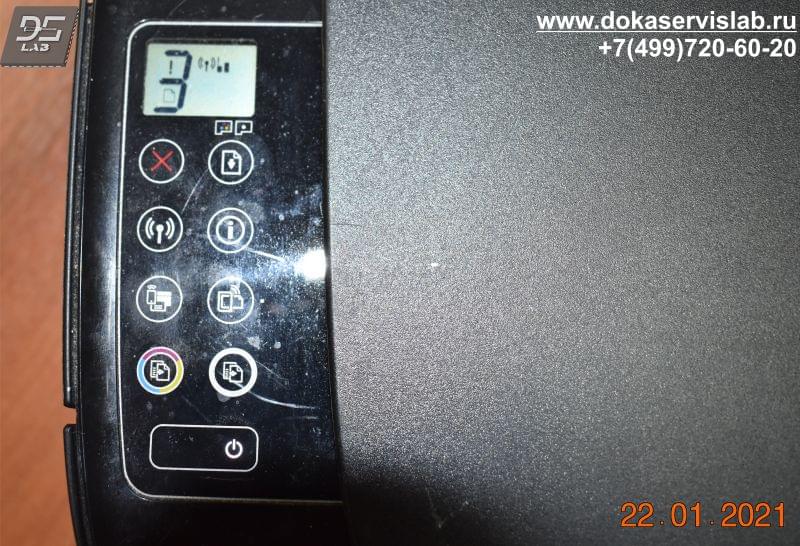
От того, какие индикаторы мигают и что отображается на самой панели, можно определить причину неисправности. Ниже рассмотрим только варианты буквенного и цифрового значения. Остальные индикаторы и так понятны любому пользователю. К примеру, если мигает индикатор беспроводной связи, значит принтер пытается установить соединение с Вашим маршрутизатором. Если мигает индикатор над одной из головок, то соответственно требуется обслуживание или замена данной головки. Поэтому приведем только таблицу самих ошибок на передней панели.
|
Ошибка |
Описание ошибки |
|
A |
Принтер ожидает загрузки страницы выравнивания. После распечатки тестовой страницы, следует разместить данный лист на стекло сканера и нажать кнопку цветного сканирования |
|
P |
После установки печатающих головок произошел сбой прокачки чернил. Нажмите кнопку возобновления печати |
|
E1 |
Загруженная бумага в принтере не соответствует формату, указанному в драйвере печати |
|
E2 |
Загруженная бумага в принтере не соответствует по длине, указанному в драйвере печати |
|
E3 |
Застряла каретка. Проверьте путь движения узла каретки |
|
E4 |
Замятие бумаги. откройте крышку принтера и извлеките бумагу. Перезапустите принтер |
|
E5 |
Ошибка узла сканирования. Перезапустите принтер. |
|
E6 |
Общая ошибка принтера. Перезапустите принтер. При повторном возникновении проведите сброс устройства до заводских настроек |
|
E7 |
Ошибка заправки системы. Проверьте наличие чернил в ёмкостях. |
|
E9 |
Требуется обслуживание системы подачи чернил. Следуйте инструкциям на странице обслуживания, распечатанный принтером |
Ошибки принтеров HP Smart tank
Данное описание относится к принтерам моделей HP Smart Tank 500 | 508 | 511 | 514 | 515 | 516 | 517 | 518 | 519 | 551 | 555 | 559
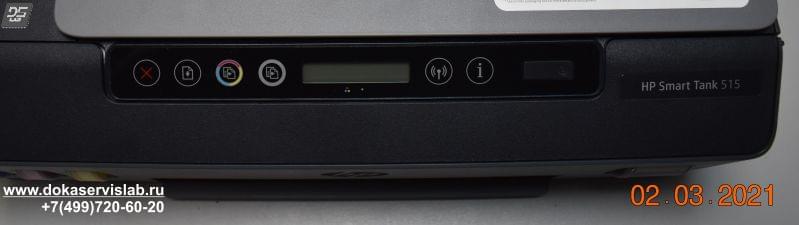
Так же, как и с принтерами Ink Tank рассмотрим только сами ошибки, так как мигающие индикаторы и так говорят сами за себя.
|
Ошибка |
Описание ошибки |
|
A |
Ошибка выравнивания печатающей головки. Повторите попытку, нажав кнопку возобновления печати, после чего следуйте инструкциям по странице |
|
P |
После установки печатающих головок произошел сбой прокачки чернил. Нажмите кнопку возобновления печати |
|
E1 E2 |
Загруженная бумага в принтере не соответствует формату, указанному в драйвере печати. Загрузите соответствующего размера бумагу |
|
E3 |
Застряла каретка. Проверьте путь движения узла каретки |
|
E4 |
Замятие бумаги. откройте крышку принтера и извлеките бумагу. Перезапустите принтер |
|
E5 |
Ошибка узла сканирования. Перезапустите принтер. |
|
E6 |
Общая ошибка принтера. Перезапустите принтер. При повторном возникновении проведите сброс устройства до заводских настроек |
|
E7 |
Один или несколько резервуаров пусты. Заправьте резервуары с мигающим индикатором |
Гарантия на ремонт струйных принтеров HP
Гарантийный срок обслуживания зависит от использования техники и характера повреждений. В зависимости от работы и запасных частей мы даём гарантию от 1 до 3 месяцев.
-
Производите ли вы ремонт на выезде?
Нет, ремонт струйной техники мы проводим только в нашем сервисном центре.
|
Обращайтесь в наш сервисный центр, будем рады Вам помочь! |
|
Ответим на интересующие Вас вопросы ( в чатах моментальные ответы / Будние дни). |
|
Дадим профессиональную консультацию. |
|
Примем меры по устранению неполадок! |
|
Связаться с нами можно по телефонам: |
Остались вопросы? Закажите звонок
Дата статьи 26.05.2021. Пишите любые замечания и рекомендации для улушения сайта и компании. Будем признательны за работу. При регистрации на сайте Вы получаете 10% скидку на все виды работ и покупку деталей для плоттеров серии HP DesignJet
Информация на сайте компании Дока-Сервис не является публичной офертой и носит информационный характер. Окончательные условия предоставления услуг определяются компанией по итогам проведения диагностики и согласовываются с владельцами техники по телефону.
@James1v
You are welcome.
Understood. If the error cannot be cleared and the unit is within the «purchase return» window, then returning the printer is an option.
«We» cannot help with returns — we are not a business branch of HP.
Returns are handled by the HP Store (assuming you purchased the device from HP).
New Product? Need Help? HP Online Store – USA – Customer Service
- Store/HP.com USA Sales
Not your HP store? Scroll to the bottom of the website and click the Flag to change regions.
Customer Service — Examples
- HP Store Customer Service — USA
For example: Self-Help Service, Account, Security and Privacy, Tracking, Change Order, Returns and Cancellations, FAQ, Shopping, Shipping and delivery, Rebates / Coupons, Product Support, Parts and services
OR
- HP Store — UK — Customer Service — Contact the Store
Under “I’m looking to buy…” > Select Home Products
Under “I would like to…” > Select Contact a product specialist before I buy *
Contact Information is provided after these two selections have been made.
* In the case of your return, you might instead select «Get help with an order I already placed«
======================================================================
What else?
If «return» is not an option for any reason,
Contact HP Technical Support in your region and submit a case to HP.
HP Support — Technical Support for Devices in Warranty
Case submission to HP Support is available to those whose devices are registered and still in Warranty.
For the rest of us, this is not an option.
HP Support does not generally provide free service for out-of-warranty devices.
Our Community is not HP Support; we do offer help free of charge.
Scroll to bottom > Ask the Community
Post New Question
+++++++++++++++++++++++++++++++++++++++++++++++++++++++++++
Submit a case for Warranty Support / Repair to HP Support.
Reminders
- Case submission to HP Support is available to those whose devices are still in Warranty.
- Not every issue is covered under the standard Hardware Warranty. Purchased Care Pack Warranties differ by contract.
- HP is not a «general» repair facility: Requests for out-of-warranty repairs are generally not accepted.
- If the problem is hardware, if your device is in Warranty, if your device is Registered, and you cannot submit your case to Support, let us know and we will forward a request.
- HP Phone numbers you find on the Internet have likely been hijacked.
HP Technical Support – Contact Information
- Submit information / case online
- Sign in or continue as a guest
- Certain regions provide phone / chat contact after the case is submitted online
Select a method and contact HP Support…
Open website HP World-Wide Support
Select your region and follow the prompts
Regional Links
USA / Canada > HP® Customer Support — USA
UK > HP® Customer Support — UK
—————————————————
>>> HP Support on Facebook >>> HP on Facebook
—————————————————
Some regions offer WhatsApp
NOTE: Submission Checks the device warranty status
Covered regions –Check video at minute 2:08
Video: WhatsApp — HP Support
WhatsApp Help Center
—————————————————
In Windows > Settings > System > About > (Support) Online support > Contact an HP Agent
—————————————————
Open homepage for HP Community > Hover mouse over Support
Beneath Support Resources > Contact Us
+++++++++++++++++++++++++++++++++++++++++++++++++++++++++++
Product Registration
Register your product during first setup or soon afterwards
READ >> Register HP Product and Registration FAQ
Have a Care Pack Warranty that needs to be Registered?
HP Care Pack Registration Page
Warranty Check
Check the Warranty on your product
Warranty Check – Single or Multiple Devices
NOTE: Warranty date is updated after purchase and registration of the device.
If the device is not registered, or if there are other issues, submit a Warranty Dispute form.
NOTE 2: If the single-system-check fails to find your device, use the «multiple devices» method to
check single or multiple devices.
- If necessary, Select your Country on the main website page or at the bottom (click Flag)
- Scroll down > To the right of Check multiple warranties, Click Continue
- Enter the Serial Number and Country for one or more devices / systems to be checked
- Check the box to verify you are «Not a robot«
- Click Submit (at bottom of list entries)
- When the page opens, Click View Details
Reminder: Online database results do not impact the actual contract.
Warranty Dispute
Excerpted: If you think the warranty details of your product are incorrect, submit a dispute through the HP warranty validation website.
- If necessary, select your Region / Country: Scroll to bottom of page and click the Flag
- HP Computers and Printers — How to Submit a Dispute to Validate Your Warranty
HP Limited Warranty Statements (General Information)
Standard Warranty, that is, the warranty included with the device, typically covers hardware as explained in the Warranty document. Optional Care Pack warranties differ by contract.
- HP Limited Warranty Statements | HP® Official Site
- HP PCs — Damage Not Covered by the HP Standard Limited Warranty
+++++++++++++++++++++++++++++++++++++++++++++++++++++++++++
Thank you for participating in the HP Community.
The Community is a separate wing of the HP website — We are not an HP business group.
Our Community is comprised of volunteers — people who own and use HP devices.
Click Thumbs Up to say Thank You.
Question Resolved / Answered, Click «Accept as Solution»
@James1v
You are welcome.
Understood. If the error cannot be cleared and the unit is within the «purchase return» window, then returning the printer is an option.
«We» cannot help with returns — we are not a business branch of HP.
Returns are handled by the HP Store (assuming you purchased the device from HP).
New Product? Need Help? HP Online Store – USA – Customer Service
- Store/HP.com USA Sales
Not your HP store? Scroll to the bottom of the website and click the Flag to change regions.
Customer Service — Examples
- HP Store Customer Service — USA
For example: Self-Help Service, Account, Security and Privacy, Tracking, Change Order, Returns and Cancellations, FAQ, Shopping, Shipping and delivery, Rebates / Coupons, Product Support, Parts and services
OR
- HP Store — UK — Customer Service — Contact the Store
Under “I’m looking to buy…” > Select Home Products
Under “I would like to…” > Select Contact a product specialist before I buy *
Contact Information is provided after these two selections have been made.
* In the case of your return, you might instead select «Get help with an order I already placed«
======================================================================
What else?
If «return» is not an option for any reason,
Contact HP Technical Support in your region and submit a case to HP.
HP Support — Technical Support for Devices in Warranty
Case submission to HP Support is available to those whose devices are registered and still in Warranty.
For the rest of us, this is not an option.
HP Support does not generally provide free service for out-of-warranty devices.
Our Community is not HP Support; we do offer help free of charge.
Scroll to bottom > Ask the Community
Post New Question
+++++++++++++++++++++++++++++++++++++++++++++++++++++++++++
Submit a case for Warranty Support / Repair to HP Support.
Reminders
- Case submission to HP Support is available to those whose devices are still in Warranty.
- Not every issue is covered under the standard Hardware Warranty. Purchased Care Pack Warranties differ by contract.
- HP is not a «general» repair facility: Requests for out-of-warranty repairs are generally not accepted.
- If the problem is hardware, if your device is in Warranty, if your device is Registered, and you cannot submit your case to Support, let us know and we will forward a request.
- HP Phone numbers you find on the Internet have likely been hijacked.
HP Technical Support – Contact Information
- Submit information / case online
- Sign in or continue as a guest
- Certain regions provide phone / chat contact after the case is submitted online
Select a method and contact HP Support…
Open website HP World-Wide Support
Select your region and follow the prompts
Regional Links
USA / Canada > HP® Customer Support — USA
UK > HP® Customer Support — UK
—————————————————
>>> HP Support on Facebook >>> HP on Facebook
—————————————————
Some regions offer WhatsApp
NOTE: Submission Checks the device warranty status
Covered regions –Check video at minute 2:08
Video: WhatsApp — HP Support
WhatsApp Help Center
—————————————————
In Windows > Settings > System > About > (Support) Online support > Contact an HP Agent
—————————————————
Open homepage for HP Community > Hover mouse over Support
Beneath Support Resources > Contact Us
+++++++++++++++++++++++++++++++++++++++++++++++++++++++++++
Product Registration
Register your product during first setup or soon afterwards
READ >> Register HP Product and Registration FAQ
Have a Care Pack Warranty that needs to be Registered?
HP Care Pack Registration Page
Warranty Check
Check the Warranty on your product
Warranty Check – Single or Multiple Devices
NOTE: Warranty date is updated after purchase and registration of the device.
If the device is not registered, or if there are other issues, submit a Warranty Dispute form.
NOTE 2: If the single-system-check fails to find your device, use the «multiple devices» method to
check single or multiple devices.
- If necessary, Select your Country on the main website page or at the bottom (click Flag)
- Scroll down > To the right of Check multiple warranties, Click Continue
- Enter the Serial Number and Country for one or more devices / systems to be checked
- Check the box to verify you are «Not a robot«
- Click Submit (at bottom of list entries)
- When the page opens, Click View Details
Reminder: Online database results do not impact the actual contract.
Warranty Dispute
Excerpted: If you think the warranty details of your product are incorrect, submit a dispute through the HP warranty validation website.
- If necessary, select your Region / Country: Scroll to bottom of page and click the Flag
- HP Computers and Printers — How to Submit a Dispute to Validate Your Warranty
HP Limited Warranty Statements (General Information)
Standard Warranty, that is, the warranty included with the device, typically covers hardware as explained in the Warranty document. Optional Care Pack warranties differ by contract.
- HP Limited Warranty Statements | HP® Official Site
- HP PCs — Damage Not Covered by the HP Standard Limited Warranty
+++++++++++++++++++++++++++++++++++++++++++++++++++++++++++
Thank you for participating in the HP Community.
The Community is a separate wing of the HP website — We are not an HP business group.
Our Community is comprised of volunteers — people who own and use HP devices.
Click Thumbs Up to say Thank You.
Question Resolved / Answered, Click «Accept as Solution»