- Remove From My Forums

Попытки подбора логина и пароля
-
Вопрос
-
Добрый день. Сегодня на контроллере домена в журнале аудита стали фиксироваться следующие события:
Имя журнала: Security
Источник: Microsoft-Windows-Security-Auditing
Дата: 10.04.2018 22:24:36
Код события: 4776
Категория задачи:Проверка учетных данных
Уровень: Сведения
Ключевые слова:Аудит отказа
Пользователь: Н/Д
Компьютер: DC.Z.RU
Описание:
Компьютер попытался проверить учетные данные учетной записи.Пакет проверки подлинности: MICROSOFT_AUTHENTICATION_PACKAGE_V1_0
Учетная запись входа: JACK
Исходная рабочая станция:
Код ошибки: 0xC0000064
Xml события:
<Event xmlns=»http://schemas.microsoft.com/win/2004/08/events/event»>
<System>
<Provider Name=»Microsoft-Windows-Security-Auditing» Guid=»{54849625-5478-4994-A5BA-3E3B0328C30D}» />
<EventID>4776</EventID>
<Version>0</Version>
<Level>0</Level>
<Task>14336</Task>
<Opcode>0</Opcode>
<Keywords>0x8010000000000000</Keywords>
<TimeCreated SystemTime=»2018-04-10T19:24:36.605323700Z» />
<EventRecordID>479489427</EventRecordID>
<Correlation />
<Execution ProcessID=»592″ ThreadID=»7900″ />
<Channel>Security</Channel>
<Computer>DC.DOMAIN.METIZ.RU</Computer>
<Security />
</System>
<EventData>
<Data Name=»PackageName»>MICROSOFT_AUTHENTICATION_PACKAGE_V1_0</Data>
<Data Name=»TargetUserName»>JACK</Data>
<Data Name=»Workstation»>
</Data>
<Data Name=»Status»>0xc0000064</Data>
</EventData>
</Event>————————
Имя журнала: Security
Источник: Microsoft-Windows-Security-Auditing
Дата: 10.04.2018 22:38:19
Код события: 4776
Категория задачи:Проверка учетных данных
Уровень: Сведения
Ключевые слова:Аудит отказа
Пользователь: Н/Д
Компьютер: DC.Z.RU
Описание:
Компьютер попытался проверить учетные данные учетной записи.Пакет проверки подлинности: MICROSOFT_AUTHENTICATION_PACKAGE_V1_0
Учетная запись входа: ZAKAZ
Исходная рабочая станция:
Код ошибки: 0xC0000064
Xml события:
<Event xmlns=»http://schemas.microsoft.com/win/2004/08/events/event»>
<System>
<Provider Name=»Microsoft-Windows-Security-Auditing» Guid=»{54849625-5478-4994-A5BA-3E3B0328C30D}» />
<EventID>4776</EventID>
<Version>0</Version>
<Level>0</Level>
<Task>14336</Task>
<Opcode>0</Opcode>
<Keywords>0x8010000000000000</Keywords>
<TimeCreated SystemTime=»2018-04-10T19:38:19.003749900Z» />
<EventRecordID>479490763</EventRecordID>
<Correlation />
<Execution ProcessID=»592″ ThreadID=»11772″ />
<Channel>Security</Channel>
<Computer>DC.DOMAIN.METIZ.RU</Computer>
<Security />
</System>
<EventData>
<Data Name=»PackageName»>MICROSOFT_AUTHENTICATION_PACKAGE_V1_0</Data>
<Data Name=»TargetUserName»>ZAKAZ</Data>
<Data Name=»Workstation»>
</Data>
<Data Name=»Status»>0xc0000064</Data>
</EventData>
</Event>И так постоянно идет перебор разных несуществующих учеток. Что идет перебор не из вне уверен на 100%. Как определить компьютер, с которого происходит подбор?
Заметил…Подбор имен идет строго по алфавиту.
-
Изменено
10 апреля 2018 г. 19:50
-
Изменено
Ответы
-
https://social.technet.microsoft.com/Forums/ru-RU/ccb8ae12-72ad-4d9f-b0da-d4fde98cf526/-ad-win2008r2-?forum=ws2008r2ru
Вроде как последний ответ помог. Отображает в логах компьютер. Но ни чего не обычного в процессах того компьютера найти не могу.
-
Изменено
ivldenis1
11 апреля 2018 г. 4:38 -
Помечено в качестве ответа
Vector BCOModerator
19 апреля 2018 г. 15:37
-
Изменено
| title | description | ms.pagetype | ms.prod | ms.mktglfcycl | ms.sitesec | ms.localizationpriority | author | ms.date | ms.reviewer | manager | ms.author | ms.technology | ms.collection | ms.topic |
|---|---|---|---|---|---|---|---|---|---|---|---|---|---|---|
|
4776(S, F) The computer attempted to validate the credentials for an account. (Windows 10) |
Describes security event 4776(S, F) The computer attempted to validate the credentials for an account. |
security |
windows-client |
deploy |
library |
none |
vinaypamnani-msft |
09/13/2021 |
aaroncz |
vinpa |
itpro-security |
highpri |
reference |
4776(S, F): The computer attempted to validate the credentials for an account.

Subcategory: Audit Credential Validation
Event Description:
This event generates every time that a credential validation occurs using NTLM authentication.
This event occurs only on the computer that is authoritative for the provided credentials. For domain accounts, the domain controller is authoritative. For local accounts, the local computer is authoritative.
It shows successful and unsuccessful credential validation attempts.
It shows only the computer name (Source Workstation) from which the authentication attempt was performed (authentication source). For example, if you authenticate from CLIENT-1 to SERVER-1 using a domain account you’ll see CLIENT-1 in the Source Workstation field. Information about the destination computer (SERVER-1) isn’t presented in this event.
If a credential validation attempt fails, you’ll see a Failure event with Error Code parameter value not equal to “0x0”.
The main advantage of this event is that on domain controllers you can see all authentication attempts for domain accounts when NTLM authentication was used.
For monitoring local account logon attempts, it’s better to use event “4624: An account was successfully logged on” because it contains more details and is more informative.
This event also generates when a workstation unlock event occurs.
This event does not generate when a domain account logs on locally to a domain controller.
Note For recommendations, see Security Monitoring Recommendations for this event.
Event XML:
- <Event xmlns="http://schemas.microsoft.com/win/2004/08/events/event">
- <System>
 <Provider Name="Microsoft-Windows-Security-Auditing" Guid="{54849625-5478-4994-A5BA-3E3B0328C30D}" />
 <EventID>4776</EventID>
 <Version>0</Version>
 <Level>0</Level>
 <Task>14336</Task>
 <Opcode>0</Opcode>
 <Keywords>0x8010000000000000</Keywords>
 <TimeCreated SystemTime="2015-07-25T04:38:11.003163100Z" />
 <EventRecordID>165437</EventRecordID>
 <Correlation />
 <Execution ProcessID="500" ThreadID="532" />
 <Channel>Security</Channel>
 <Computer>DC01.contoso.local</Computer>
 <Security />
 </System>
- <EventData>
 <Data Name="PackageName">MICROSOFT_AUTHENTICATION_PACKAGE_V1_0</Data>
 <Data Name="TargetUserName">dadmin</Data>
 <Data Name="Workstation">WIN81</Data>
 <Data Name="Status">0xc0000234</Data>
 </EventData>
 </Event>
Required Server Roles: no specific requirements.
Minimum OS Version: Windows Server 2008, Windows Vista.
Event Versions: 0.
Field Descriptions:
- Authentication Package [Type = UnicodeString]: the name of Authentication Package that was used for credential validation. It’s always “MICROSOFT_AUTHENTICATION_PACKAGE_V1_0” for 4776 event.
Note Authentication package is a DLL that encapsulates the authentication logic used to determine whether to permit a user to log on. Local Security Authority (LSA) authenticates a user logon by sending the request to an authentication package. The authentication package then examines the logon information and either authenticates or rejects the user logon attempt.
-
Logon Account [Type = UnicodeString]: the name of the account that had its credentials validated by the Authentication Package. Can be user name, computer account name or well-known security principal account name. Examples:
-
User example: dadmin
-
Computer account example: WIN81$
-
Local System account example: Local
-
Local Service account example: Local Service
-
-
Source Workstation [Type = UnicodeString]: the name of the computer from which the logon attempt originated.
-
Error Code [Type = HexInt32]: contains error code for Failure events. For Success events this parameter has “0x0” value. The table below contains most common error codes for this event:
| Error Code | Description |
|---|---|
| 0xC0000064 | The username you typed does not exist. Bad username. |
| 0xC000006A | Account logon with misspelled or bad password. |
| 0xC000006D | — Generic logon failure. Some of the potential causes for this: An invalid username and/or password was used LAN Manager Authentication Level mismatch between the source and target computers. |
| 0xC000006F | Account logon outside authorized hours. |
| 0xC0000070 | Account logon from unauthorized workstation. |
| 0xC0000071 | Account logon with expired password. |
| 0xC0000072 | Account logon to account disabled by administrator. |
| 0xC0000193 | Account logon with expired account. |
| 0xC0000224 | Account logon with «Change Password at Next Logon» flagged. |
| 0xC0000234 | Account logon with account locked. |
| 0xC0000371 | The local account store does not contain secret material for the specified account. |
| 0x0 | No errors. |
Table 1. Winlogon Error Codes.
Security Monitoring Recommendations
For 4776(S, F): The computer attempted to validate the credentials for an account.
| Type of monitoring required | Recommendation |
|---|---|
| High-value accounts: You might have high-value domain or local accounts for which you need to monitor each action. Examples of high-value accounts are database administrators, built-in local administrator account, domain administrators, service accounts, domain controller accounts and so on. |
Monitor this event with the “Logon Account” that corresponds to the high-value account or accounts. |
| Anomalies or malicious actions: You might have specific requirements for detecting anomalies or monitoring potential malicious actions. For example, you might need to monitor for use of an account outside of working hours. | When you monitor for anomalies or malicious actions, use the “Logon Account” value (with other information) to monitor how or when a particular account is being used. To monitor activity of specific user accounts outside of working hours, monitor the appropriate Logon Account + Source Workstation pairs. |
| Non-active accounts: You might have non-active, disabled, or guest accounts, or other accounts that should never be used. | Monitor this event with the “Logon Account” that should never be used. |
| Account allow list: You might have a specific allow list of accounts that are the only ones allowed to perform actions corresponding to particular events. | If this event corresponds to a “allow list-only” action, review the “Logon Account” for accounts that are outside the allow list. |
| Restricted-use computers: You might have certain computers from which certain people (accounts) shouldn’t log on. | Monitor the target Source Workstation for credential validation requests from the “Logon Account” that you’re concerned about. |
| Account naming conventions: Your organization might have specific naming conventions for account names. | Monitor “Logon Account” for names that don’t comply with naming conventions. |
-
If NTLM authentication shouldn’t be used for a specific account, monitor for that account. Don’t forget that local logon will always use NTLM authentication if an account logs on to a device where its user account is stored.
-
You can use this event to collect all NTLM authentication attempts in the domain, if needed. Don’t forget that local logon will always use NTLM authentication if the account logs on to a device where its user account is stored.
-
If a local account should be used only locally (for example, network logon or terminal services logon isn’t allowed), you need to monitor for all events where Source Workstation and Computer (where the event was generated and where the credentials are stored) have different values.
-
Consider tracking the following errors for the reasons listed:
| Error to track | What the error might indicate |
|---|---|
| User logon with misspelled or bad user account | For example, N events in the last N minutes can be an indicator of an account enumeration attack, especially relevant for highly critical accounts. |
| User logon with misspelled or bad password | For example, N events in the last N minutes can be an indicator of a brute-force password attack, especially relevant for highly critical accounts. |
| User logon outside authorized hours | Can indicate a compromised account; especially relevant for highly critical accounts. |
| User logon from unauthorized workstation | Can indicate a compromised account; especially relevant for highly critical accounts. |
| User logon to account disabled by administrator | For example, N events in last N minutes can be an indicator of an account compromise attempt, especially relevant for highly critical accounts. |
| User logon with expired account | Can indicate an account compromise attempt; especially relevant for highly critical accounts. |
| User logon with account locked | Can indicate a brute-force password attack; especially relevant for highly critical accounts. |
| title | description | ms.pagetype | ms.prod | ms.mktglfcycl | ms.sitesec | ms.localizationpriority | author | ms.date | ms.reviewer | manager | ms.author | ms.technology | ms.collection | ms.topic |
|---|---|---|---|---|---|---|---|---|---|---|---|---|---|---|
|
4776(S, F) The computer attempted to validate the credentials for an account. (Windows 10) |
Describes security event 4776(S, F) The computer attempted to validate the credentials for an account. |
security |
windows-client |
deploy |
library |
none |
vinaypamnani-msft |
09/13/2021 |
aaroncz |
vinpa |
itpro-security |
highpri |
reference |
4776(S, F): The computer attempted to validate the credentials for an account.
Subcategory: Audit Credential Validation
Event Description:
This event generates every time that a credential validation occurs using NTLM authentication.
This event occurs only on the computer that is authoritative for the provided credentials. For domain accounts, the domain controller is authoritative. For local accounts, the local computer is authoritative.
It shows successful and unsuccessful credential validation attempts.
It shows only the computer name (Source Workstation) from which the authentication attempt was performed (authentication source). For example, if you authenticate from CLIENT-1 to SERVER-1 using a domain account you’ll see CLIENT-1 in the Source Workstation field. Information about the destination computer (SERVER-1) isn’t presented in this event.
If a credential validation attempt fails, you’ll see a Failure event with Error Code parameter value not equal to “0x0”.
The main advantage of this event is that on domain controllers you can see all authentication attempts for domain accounts when NTLM authentication was used.
For monitoring local account logon attempts, it’s better to use event “4624: An account was successfully logged on” because it contains more details and is more informative.
This event also generates when a workstation unlock event occurs.
This event does not generate when a domain account logs on locally to a domain controller.
Note For recommendations, see Security Monitoring Recommendations for this event.
Event XML:
- <Event xmlns="http://schemas.microsoft.com/win/2004/08/events/event">
- <System>
 <Provider Name="Microsoft-Windows-Security-Auditing" Guid="{54849625-5478-4994-A5BA-3E3B0328C30D}" />
 <EventID>4776</EventID>
 <Version>0</Version>
 <Level>0</Level>
 <Task>14336</Task>
 <Opcode>0</Opcode>
 <Keywords>0x8010000000000000</Keywords>
 <TimeCreated SystemTime="2015-07-25T04:38:11.003163100Z" />
 <EventRecordID>165437</EventRecordID>
 <Correlation />
 <Execution ProcessID="500" ThreadID="532" />
 <Channel>Security</Channel>
 <Computer>DC01.contoso.local</Computer>
 <Security />
 </System>
- <EventData>
 <Data Name="PackageName">MICROSOFT_AUTHENTICATION_PACKAGE_V1_0</Data>
 <Data Name="TargetUserName">dadmin</Data>
 <Data Name="Workstation">WIN81</Data>
 <Data Name="Status">0xc0000234</Data>
 </EventData>
 </Event>
Required Server Roles: no specific requirements.
Minimum OS Version: Windows Server 2008, Windows Vista.
Event Versions: 0.
Field Descriptions:
- Authentication Package [Type = UnicodeString]: the name of Authentication Package that was used for credential validation. It’s always “MICROSOFT_AUTHENTICATION_PACKAGE_V1_0” for 4776 event.
Note Authentication package is a DLL that encapsulates the authentication logic used to determine whether to permit a user to log on. Local Security Authority (LSA) authenticates a user logon by sending the request to an authentication package. The authentication package then examines the logon information and either authenticates or rejects the user logon attempt.
-
Logon Account [Type = UnicodeString]: the name of the account that had its credentials validated by the Authentication Package. Can be user name, computer account name or well-known security principal account name. Examples:
-
User example: dadmin
-
Computer account example: WIN81$
-
Local System account example: Local
-
Local Service account example: Local Service
-
-
Source Workstation [Type = UnicodeString]: the name of the computer from which the logon attempt originated.
-
Error Code [Type = HexInt32]: contains error code for Failure events. For Success events this parameter has “0x0” value. The table below contains most common error codes for this event:
| Error Code | Description |
|---|---|
| 0xC0000064 | The username you typed does not exist. Bad username. |
| 0xC000006A | Account logon with misspelled or bad password. |
| 0xC000006D | — Generic logon failure. Some of the potential causes for this: An invalid username and/or password was used LAN Manager Authentication Level mismatch between the source and target computers. |
| 0xC000006F | Account logon outside authorized hours. |
| 0xC0000070 | Account logon from unauthorized workstation. |
| 0xC0000071 | Account logon with expired password. |
| 0xC0000072 | Account logon to account disabled by administrator. |
| 0xC0000193 | Account logon with expired account. |
| 0xC0000224 | Account logon with «Change Password at Next Logon» flagged. |
| 0xC0000234 | Account logon with account locked. |
| 0xC0000371 | The local account store does not contain secret material for the specified account. |
| 0x0 | No errors. |
Table 1. Winlogon Error Codes.
Security Monitoring Recommendations
For 4776(S, F): The computer attempted to validate the credentials for an account.
| Type of monitoring required | Recommendation |
|---|---|
| High-value accounts: You might have high-value domain or local accounts for which you need to monitor each action. Examples of high-value accounts are database administrators, built-in local administrator account, domain administrators, service accounts, domain controller accounts and so on. |
Monitor this event with the “Logon Account” that corresponds to the high-value account or accounts. |
| Anomalies or malicious actions: You might have specific requirements for detecting anomalies or monitoring potential malicious actions. For example, you might need to monitor for use of an account outside of working hours. | When you monitor for anomalies or malicious actions, use the “Logon Account” value (with other information) to monitor how or when a particular account is being used. To monitor activity of specific user accounts outside of working hours, monitor the appropriate Logon Account + Source Workstation pairs. |
| Non-active accounts: You might have non-active, disabled, or guest accounts, or other accounts that should never be used. | Monitor this event with the “Logon Account” that should never be used. |
| Account allow list: You might have a specific allow list of accounts that are the only ones allowed to perform actions corresponding to particular events. | If this event corresponds to a “allow list-only” action, review the “Logon Account” for accounts that are outside the allow list. |
| Restricted-use computers: You might have certain computers from which certain people (accounts) shouldn’t log on. | Monitor the target Source Workstation for credential validation requests from the “Logon Account” that you’re concerned about. |
| Account naming conventions: Your organization might have specific naming conventions for account names. | Monitor “Logon Account” for names that don’t comply with naming conventions. |
-
If NTLM authentication shouldn’t be used for a specific account, monitor for that account. Don’t forget that local logon will always use NTLM authentication if an account logs on to a device where its user account is stored.
-
You can use this event to collect all NTLM authentication attempts in the domain, if needed. Don’t forget that local logon will always use NTLM authentication if the account logs on to a device where its user account is stored.
-
If a local account should be used only locally (for example, network logon or terminal services logon isn’t allowed), you need to monitor for all events where Source Workstation and Computer (where the event was generated and where the credentials are stored) have different values.
-
Consider tracking the following errors for the reasons listed:
| Error to track | What the error might indicate |
|---|---|
| User logon with misspelled or bad user account | For example, N events in the last N minutes can be an indicator of an account enumeration attack, especially relevant for highly critical accounts. |
| User logon with misspelled or bad password | For example, N events in the last N minutes can be an indicator of a brute-force password attack, especially relevant for highly critical accounts. |
| User logon outside authorized hours | Can indicate a compromised account; especially relevant for highly critical accounts. |
| User logon from unauthorized workstation | Can indicate a compromised account; especially relevant for highly critical accounts. |
| User logon to account disabled by administrator | For example, N events in last N minutes can be an indicator of an account compromise attempt, especially relevant for highly critical accounts. |
| User logon with expired account | Can indicate an account compromise attempt; especially relevant for highly critical accounts. |
| User logon with account locked | Can indicate a brute-force password attack; especially relevant for highly critical accounts. |
Check out this guide to know about this credential validation event
by Vladimir Popescu
Being an artist his entire life while also playing handball at a professional level, Vladimir has also developed a passion for all things computer-related. With an innate fascination… read more
Published on December 16, 2022
Reviewed by
Alex Serban

After moving away from the corporate work-style, Alex has found rewards in a lifestyle of constant analysis, team coordination and pestering his colleagues. Holding an MCSA Windows Server… read more
- Every login attempt on a domain controller is recorded, and the DC logs the event ID 4776 for every successful or unsuccessful attempt.
- This guide will discuss this event ID and how to get rid of the error code if authentication fails.
XINSTALL BY CLICKING THE DOWNLOAD FILE
This software will repair common computer errors, protect you from file loss, malware, hardware failure and optimize your PC for maximum performance. Fix PC issues and remove viruses now in 3 easy steps:
- Download Restoro PC Repair Tool that comes with Patented Technologies (patent available here).
- Click Start Scan to find Windows issues that could be causing PC problems.
- Click Repair All to fix issues affecting your computer’s security and performance
- Restoro has been downloaded by 0 readers this month.
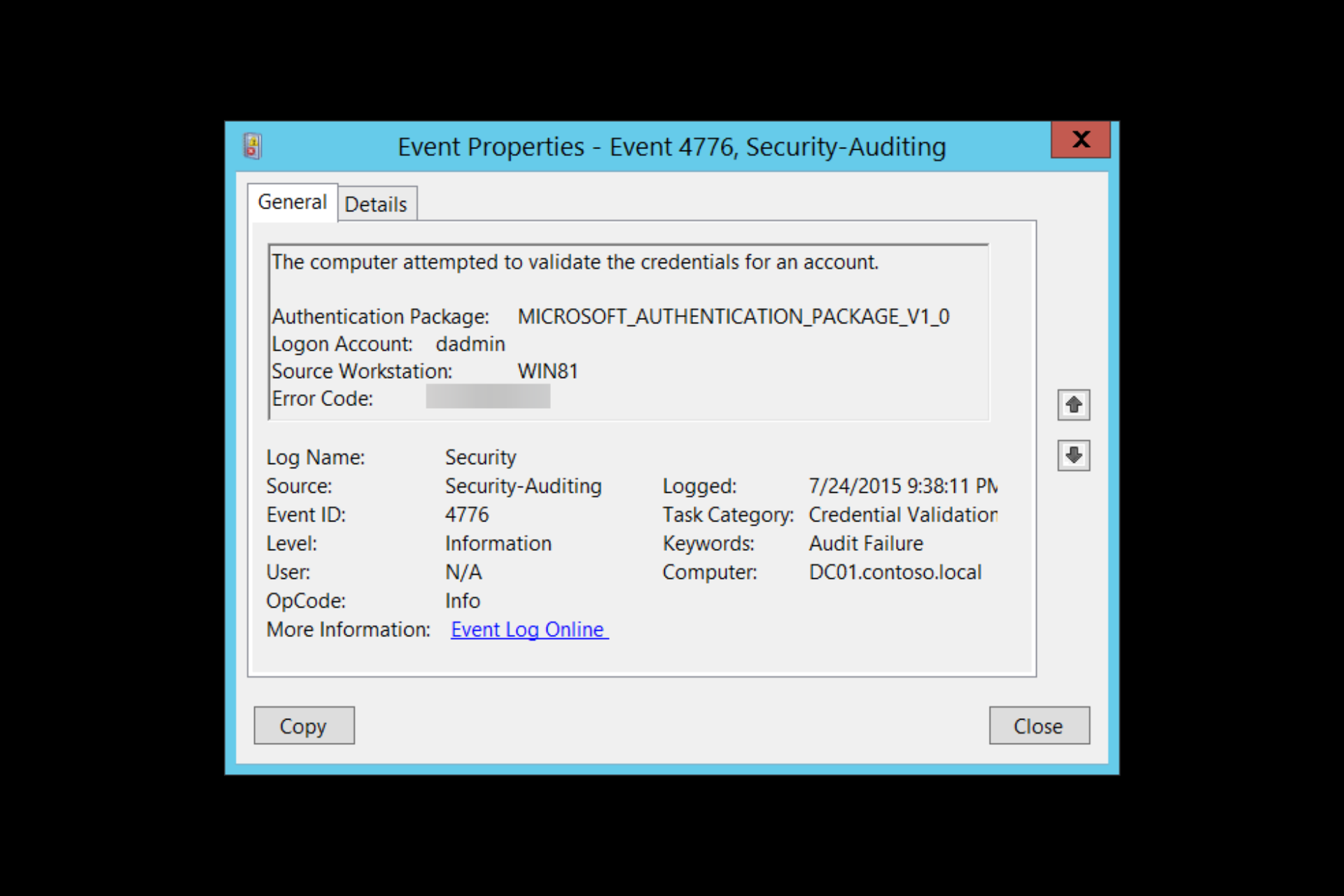
Event ID 4776: the computer attempted to validate the credentials for an account gives you essential information which helps you identify the sources of the login attempts.
Here we will discuss what Event ID 4776 means and how to fix error code 0xc0000064. Let’s get started!
What does the Event ID 4776 computer attempted to validate credentials mean?
Event ID 4776 is a security-related event. It is generated every time a computer tries to validate credentials using NTLM authentication. It occurs only on the computer with authority for the provided credentials.
The event contains detailed information about the user account used for authentication, the destination and the source of the authentication request, along with the status of the attempt.
If Windows Event ID 4776 is successful, there is no need to worry. However, seeing multiple failed instances might indicate the relay, cracking attacks, and reverse brute force attacks. Therefore keeping an eye on this event ID is important.
What causes Event ID 4776 error code 0xc0000064?
A few reasons for the error to occur are mentioned below:
- User name doesn’t exist – This error comes up when the username you typed does not exist or is incorrect.
- Third-party programs cache – If any third-party programs cache the user’s wrong password, this error code may come up.
- Incorrect status by Net Logon service – When the Netlogon.dll manages the returned status incorrectly, the issue occurs.
- Kerberos fails while authenticating RDP – If you connect to the network using a Remote desk protocol, it uses Kerberos to authenticate. But, if it fails, then it has to use NTLM. Hence the error
What can I do to fix Event ID 4776 error code 0xc0000064?
1. Identifying the Logon account and the source workstation when blank or unknown
1.1 Enable Netlogon to find the source
- Press the Windows key, type CMD and click Run as administrator.
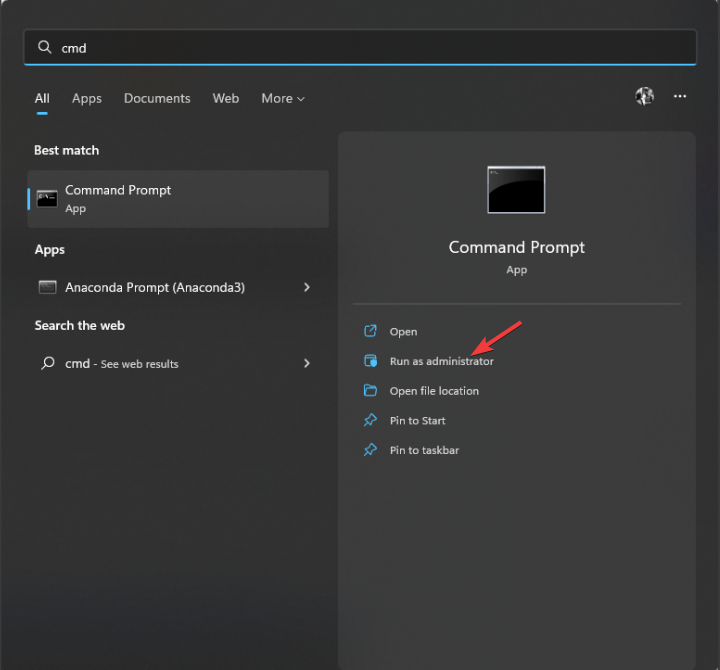
- Type the following command and press Enter:
nltest /dbflag:0x2080ffff - Close the CMD window.
- To access your Netlogon files, press Windows + R to open the Run window.
- Type the following command and press Enter:
%SYSTEMROOT%debugnetlogon.log - Now check the username and other details to identify the login attempt.
1.2 Use a Packet Analyzer
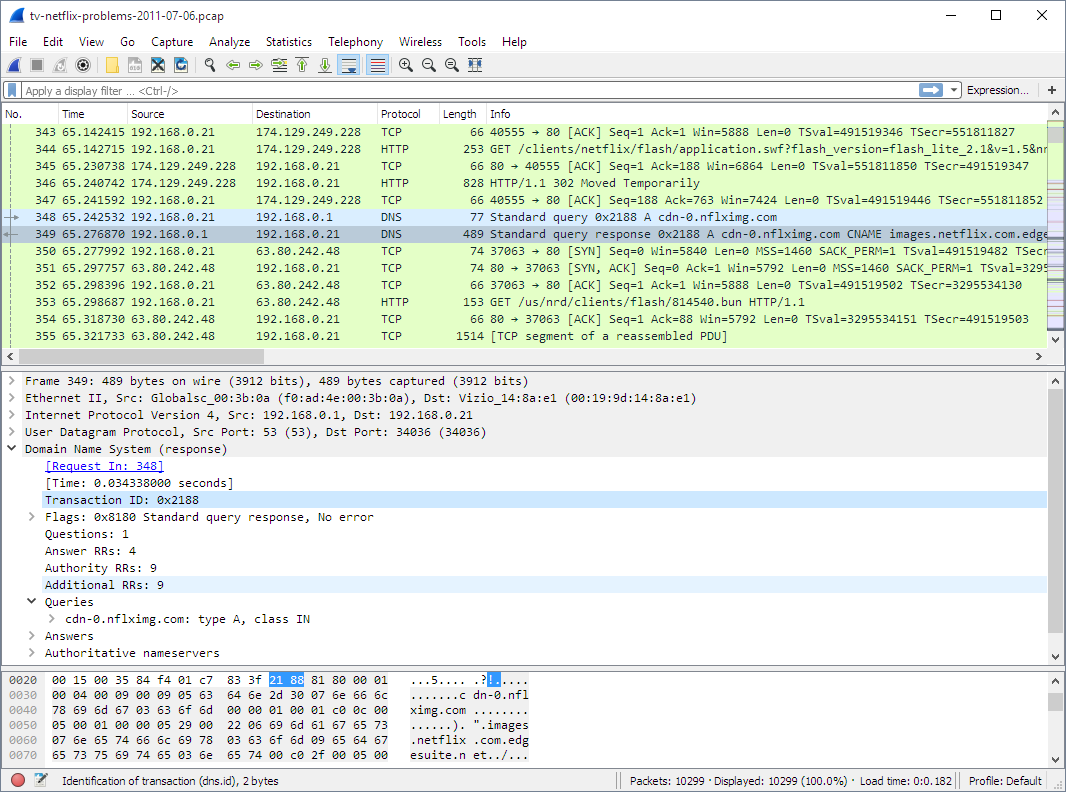
Tools like Wireshark can be used to keep an eye on your network on a microscopic level. It can capture the traffic simultaneously when someone tries to log in and helps you find the source. The tool can identify IP addresses so that you can easily locate the logons.
2. Identifying the Logon account and the source workstation if there is a remote client
2.1 Use firewall
You can use your firewall to protect your server or computer from unknown login attempts. Follow the whitelists approach (block all, allow some) instead of denylists (allow all, block some). This will ensure that only authorized attempts are initiated outside the network.
2.2 Use VPN
Using a reliable VPN can also help you safe-keep your network. It will let remote users connect to the local server and then authenticate normally.
A great VPN option that we recommend is Private Internet Access (PIA) because it is fast and highly customizable and has unbreakable security thanks to its numerous privacy features that will keep your activity always safe.

Private Internet Access
Keep your data protected and secure all the time with the most privacy-focused VPN service.
Well, that’s all from our side on how to fix the event id 4776 error code 0xc0000064, and we hope that our solutions helped you solve this issue.
If you still have any issues, feel free to drop a comment below. We’re eager to hear from you.
Still having issues? Fix them with this tool:
SPONSORED
If the advices above haven’t solved your issue, your PC may experience deeper Windows problems. We recommend downloading this PC Repair tool (rated Great on TrustPilot.com) to easily address them. After installation, simply click the Start Scan button and then press on Repair All.

Newsletter
| Operating Systems |
Windows 2008 R2 and 7
Windows 2012 R2 and 8.1 Windows 2016 and 10 Windows Server 2019 and 2022 |
|
Category • Subcategory |
Account Logon • Credential Validation |
| Type |
Success
Failure |
|
Corresponding events in Windows 2003 and before |
680 , 681
|
4776: The domain controller attempted to validate the credentials for an account
On this page
- Description of this event
- Field level details
- Examples
- Discuss this event
- Mini-seminars on this event
Despite what this event says, the computer is not necessarily a domain controller; member servers and workstations also log this event for logon attempts with local SAM accounts.
When a domain controller successfully authenticates a user via NTLM (instead of Kerberos), the DC logs this event. This specifies which user account who logged on (Account Name) as well as the client computer’s name from which the user initiated the logon in the Workstation field.
For Kerberos authentication see event 4768, 4769 and 4771.
This event is also logged on member servers and workstations when someone attempts to logon with a local account.
Authentication Package: Always «MICROSOFT_AUTHENTICATION_PACKAGE_V1_0»
Logon Account: name of the account
Source Workstation: computer name where logon attempt originated
Free Security Log Resources by Randy
- Free Security Log Quick Reference Chart
- Windows Event Collection: Supercharger Free Edtion
- Free Active Directory Change Auditing Solution
- Free Course: Security Log Secrets
Description Fields in
4776
Error Code:
| C0000064 | user name does not exist |
| C000006A | user name is correct but the password is wrong |
| C0000234 | user is currently locked out |
| C0000072 | account is currently disabled |
| C000006F | user tried to logon outside his day of week or time of day restrictions |
| C0000070 | workstation restriction |
| C0000193 | account expiration |
| C0000071 | expired password |
| C0000224 | user is required to change password at next logon |
| C0000225 | evidently a bug in Windows and not a risk |
Supercharger Free Edition
Centrally manage WEC subscriptions.
Free.
Examples of 4776
The domain controller attempted to validate the credentials for an account.
Authentication Package: MICROSOFT_AUTHENTICATION_PACKAGE_V1_0
Logon Account: administrator
Source Workstation: WIN-R9H529RIO4Y
Error Code: 0xc0000064
Top 10 Windows Security Events to Monitor
Free Tool for Windows Event Collection
Mini-Seminars Covering Event ID 4776
- Security Log Exposed: What is the Difference Between “Account Logon” and “Logon/Logoff” Events?
- Insider Gone Bad: Tracking Their Steps and Building Your Case with the Security Log
- 27 Most Important Windows Security Events
- Daily Security Log Check for the SMB IT Admin
- How to do Logon Session Auditing with the Windows Security Log
- Anatomy of an Attack: How Password Spraying Exploits Weak Passwords So Effectively
- 4 Threat Detections using Active Directory Authentication Events from the Windows Security Log
- Understanding Active Directory Authentication Events in the Windows Security Log and Beyond
- Security Log Deep Dive: Mapping Active Directory Authentication and Account Management Events to MITRE ATT&CK TTPs
- Detecting and Preventing AD Authentication Risks: Golden Tickets, NTLM, Pass-the-Hash and Beyond
- Top 10 Windows Security Log Events to Monitor to Detect Lateral Movement
- Top 6 Security Events You Only Detect by Monitoring Workstation Security Logs
|
Upcoming Webinars
|
Additional Resources |
- Remove From My Forums
-
Question
-
I have a user who gets locked out occasionally (been a few weeks since the last time). The bad password attempts show as a time where he was successfully logged into his computer and working. I looked in the event logs on the DC and see some
4776 Audit failures for this user, with the error code 0xc000006a, which I believe means bad password. However, the «Source Workstation» field is blank. How can I track down where these bad attempts are coming from?
All replies
-
I have that package, and I used the EventComb tool to find the entries in the event log. But I’m still showing the source workstation as blank, and it’s not giving me any more info…
It’s my understanding that Alockout.dll finds the process/application, but you have to install it on the trouble workstation (and I don’t know which computer is causing the problem, which is the issue in the first place).
Beyond that, I’m not sure how to collect more information.
-
Allison,
Could you us the hole event id (Unedited)
Event ID: 4776 : The domain controller attempted to validate the credentials for an account.
in the event log : u can find: Logon Account : please check do you have that account in ur domain.
and also post us some more info on DC(2003/2008) workstation: win7/win xp ?
Gopi Kiran |Facebook| This posting is provided AS IS with no warranties,and confers no rights.
-
The Logon Account does exist, and it’s the user in question (the one who’s locked out — see original post). The DC is 2008 R2, and the user’s workstation is Windows 7. But again, I have absolutely no idea if it’s his workstation that the logon
attemps are coming from, or a VM, or a server, or… -
Could you us the hole event id (Unedited)
Gopi Kiran |Facebook| This posting is provided AS IS with no warranties,and confers no rights.
-
I don’t think there’s any additional info here, but sure:
4776,AUDIT FAILURE,Microsoft-Windows-Security-Auditing,Mon Jan 23 14:08:17 2012,No User,The computer attempted to validate the credentials for an account. Authentication Package: MICROSOFT_AUTHENTICATION_PACKAGE_V1_0 Logon Account:
john Source Workstation: Error Code: 0xc000006a -
I believe that the Source Workstation is left blank because the name of the workstation or device cannot be verified, and therefore has the potential to have been spoofed.
I found that turning on NTLM auditing helped me track down the source of these events.
On the domain controller that is logging these events go into —
Local Security PolicyLocal PoliciesSecurity Options
I set the following:
«Network Security: Restrict NTLM: Audit Incoming NTLM Traffic» — Enable Auditing for all accounts
«Network Security: Restrict NTLM: Audit Incoming NTLM in this domain.» — Enable all
In the Event Viewer you can view these events under:
Applications and Services LogsMicrosoftWindowsNTLMOperational
I look for events that match the time and username of the 4776 event.
Often I find that the NTLM event shows me something like this:
————————————————————————————————————————————
Log Name: Microsoft-Windows-NTLM/Operational
Source: Microsoft-Windows-Security-Netlogon
Date: 25/01/2012 2:03:24 PM
Event ID: 8004
Task Category: Auditing NTLM
Level: Information
Keywords:
User: SYSTEM
Computer: MYDOMAINCONTROLLER.mydomain.local
Description:
Domain Controller Blocked Audit: Audit NTLM authentication to this domain controller.
Secure Channel name: MYSERVER14
User name: john
Domain name: MYDOMAIN
Workstation name: (NULL)
Secure Channel type: 2Audit NTLM authentication requests within the domain MYDOMAIN that would be blocked if the security policy Network Security: Restrict NTLM: NTLM authentication in this domain is set to any of the Deny options.
If you want to allow NTLM authentication requests in the domain MYDOMAIN, set the security policy Network Security: Restrict NTLM: NTLM authentication in this domain to Disabled.
If you want to allow NTLM authentication requests to specific servers in the domain MYDOMAIN, set the security policy Network Security: Restrict NTLM: NTLM authentication in this domain to Deny for domain servers or Deny domain accounts to domain servers,
and then set the security policy Network Security: Restrict NTLM: Add server exceptions in this domain to define a list of servers in the domain MYDOMAIN to which clients are allowed to use NTLM authentication.
————————————————————————————————————————————I can see the Workstation name is still (NULL) .. but the secure channel name points me to our NPS/Radius server (MYSERVER14) which is used for authentication of wireless devices … usually it turns out to be an iPhone 🙂
-
Proposed as answer by
Wednesday, January 25, 2012 4:05 AM
-
Unproposed as answer by
Teleute00
Monday, March 5, 2012 4:28 PM -
Proposed as answer by
PJ Champion
Thursday, January 19, 2017 4:59 PM
-
Proposed as answer by
-
It is a brand new DC that is completely up to date. I did review the text of the two articles you posted, though, to be sure — they definitely don’t apply in the current situation. Thanks, though! Definitely something I’ll keep in mind
if that scenario does come up. -
Oooh….very interesting. I’ve just turned that on, and I’ll see what comes back. Problem is, it could be days or weeks before the issue arises again, which makes instant gratification somewhat difficult. 🙂
-
Hi,
I just want to touch base and check if there is anything that I can do for you on this thread. If so, please do not hesitate to let me know
and I will be happy to help.Regards,
Arthur Li
TechNet Community Support

-
No, thank you — I’ve put the above suggestions into place, but the lockout hasn’t happened again yet so I don’t know if this is a solution for me or not. When I know, I’ll post back. Thanks!
-
He was finally locked out again today. I looked at the NTLM logging as implemented above, and there’s no information for him. Lots of events, but nothing with his logon name. So sadly, I still have no solution.
-
Proposed as answer by
ZaxLofful
Thursday, August 31, 2017 11:46 PM
-
Proposed as answer by
-
Hi Teleute00,
Can you check the event id 4740 on the DC,will occur if the account is getting locked.If it is logged open the event and check the
caller Machine name.If the event id 4740 has not occured then this mean that in audit policy user account management policy is not configured.Configure the same and check if the events are occuring.
Also refer below link for more step on trroubleshooting accout lockout.
Best Regards,
Sandesh Dubey.
MCSE|MCSA:Messaging|MCTS|MCITP:Enterprise Adminitrator |
My BlogDisclaimer: This posting is provided «AS IS» with no warranties or guarantees , and confers no rights.
-
You’re correct — there were no 4740 events, and account management policy was undefined. I set it to log failures, so I’ll see what happens next time. Thanks!
-
I am having the same issue, did you ever get to the bottom of this?
Dave M dindenver@yahoo.com
-
Please check from the handled device perspective also.
Devaraj G | Technical solution architect
-
Did you ever find a solution?
-
In my case it was a Linux server with a CIFS Mount point to a Windows File Server, which was kinda of stuck and connected using the user account. We managed to forcibly umount the share ( umount -f) and the lockouts on the AD account stopped.
Diego de Azevedo IT Analyst — MCSE, MCITP
-
EventComb does not work well with Windows 2008 R2 because the structure of events has changed.
For troubleshooting failed logons you should monitor events 4740 (lockout) and
4625 (An account failed to log on) . 4776 can appear in normal operations and is not an indication of bad logons.You can use these queries as an XML filter in your security logs if you want to find only the above events for a particular user («myusername»):
For 4625:
——
<Query Id=»0″ Path=»Security»>
<Select Path=»Security»>
*[EventData[Data[@Name=’TargetUserName’]=’myusername’]
]
and
*[System[
(EventID=4625)
]
]
< /Select>
</Query>
< /QueryList>For 4740:
——
<Query Id=»0″ Path=»Security»>
<Select Path=»Security»>
*[EventData[Data[@Name=’TargetUserName’]=’myusername’]
]
and
*[System[
(EventID=4740)
]
]
< /Select>
</Query>
< /QueryList> -
The account lockout tools are what provided this, there are no logs that come back from EventCombMT or from the DC’s.
William Lee
-
Excellent, Thaks RobH_AU, this helped us also identify blank workstations lockouts and those with MSTSC.EXE or MSTSC workstation names.
-
Edited by
KingofTheNorth20
Friday, February 14, 2020 12:16 AM
mentioned The author of the solution
-
Edited by
-
This worked for me.
Although the operational event log returned a WorkstationName value of Null, it showed the workstation name under the SChannelName value. This information was enough to bread crumb my way back to the source via wireshark, which in this case was a poorly
configured forwarding rule at the firewall. All good!Thanks for the post RobH_AU much appreciated!
- Remove From My Forums
-
Question
-
I have a user who gets locked out occasionally (been a few weeks since the last time). The bad password attempts show as a time where he was successfully logged into his computer and working. I looked in the event logs on the DC and see some
4776 Audit failures for this user, with the error code 0xc000006a, which I believe means bad password. However, the «Source Workstation» field is blank. How can I track down where these bad attempts are coming from?
All replies
-
I have that package, and I used the EventComb tool to find the entries in the event log. But I’m still showing the source workstation as blank, and it’s not giving me any more info…
It’s my understanding that Alockout.dll finds the process/application, but you have to install it on the trouble workstation (and I don’t know which computer is causing the problem, which is the issue in the first place).
Beyond that, I’m not sure how to collect more information.
-
Allison,
Could you us the hole event id (Unedited)
Event ID: 4776 : The domain controller attempted to validate the credentials for an account.
in the event log : u can find: Logon Account : please check do you have that account in ur domain.
and also post us some more info on DC(2003/2008) workstation: win7/win xp ?
Gopi Kiran |Facebook| This posting is provided AS IS with no warranties,and confers no rights.
-
The Logon Account does exist, and it’s the user in question (the one who’s locked out — see original post). The DC is 2008 R2, and the user’s workstation is Windows 7. But again, I have absolutely no idea if it’s his workstation that the logon
attemps are coming from, or a VM, or a server, or… -
Could you us the hole event id (Unedited)
Gopi Kiran |Facebook| This posting is provided AS IS with no warranties,and confers no rights.
-
I don’t think there’s any additional info here, but sure:
4776,AUDIT FAILURE,Microsoft-Windows-Security-Auditing,Mon Jan 23 14:08:17 2012,No User,The computer attempted to validate the credentials for an account. Authentication Package: MICROSOFT_AUTHENTICATION_PACKAGE_V1_0 Logon Account:
john Source Workstation: Error Code: 0xc000006a -
I believe that the Source Workstation is left blank because the name of the workstation or device cannot be verified, and therefore has the potential to have been spoofed.
I found that turning on NTLM auditing helped me track down the source of these events.
On the domain controller that is logging these events go into —
Local Security PolicyLocal PoliciesSecurity Options
I set the following:
«Network Security: Restrict NTLM: Audit Incoming NTLM Traffic» — Enable Auditing for all accounts
«Network Security: Restrict NTLM: Audit Incoming NTLM in this domain.» — Enable all
In the Event Viewer you can view these events under:
Applications and Services LogsMicrosoftWindowsNTLMOperational
I look for events that match the time and username of the 4776 event.
Often I find that the NTLM event shows me something like this:
————————————————————————————————————————————
Log Name: Microsoft-Windows-NTLM/Operational
Source: Microsoft-Windows-Security-Netlogon
Date: 25/01/2012 2:03:24 PM
Event ID: 8004
Task Category: Auditing NTLM
Level: Information
Keywords:
User: SYSTEM
Computer: MYDOMAINCONTROLLER.mydomain.local
Description:
Domain Controller Blocked Audit: Audit NTLM authentication to this domain controller.
Secure Channel name: MYSERVER14
User name: john
Domain name: MYDOMAIN
Workstation name: (NULL)
Secure Channel type: 2Audit NTLM authentication requests within the domain MYDOMAIN that would be blocked if the security policy Network Security: Restrict NTLM: NTLM authentication in this domain is set to any of the Deny options.
If you want to allow NTLM authentication requests in the domain MYDOMAIN, set the security policy Network Security: Restrict NTLM: NTLM authentication in this domain to Disabled.
If you want to allow NTLM authentication requests to specific servers in the domain MYDOMAIN, set the security policy Network Security: Restrict NTLM: NTLM authentication in this domain to Deny for domain servers or Deny domain accounts to domain servers,
and then set the security policy Network Security: Restrict NTLM: Add server exceptions in this domain to define a list of servers in the domain MYDOMAIN to which clients are allowed to use NTLM authentication.
————————————————————————————————————————————I can see the Workstation name is still (NULL) .. but the secure channel name points me to our NPS/Radius server (MYSERVER14) which is used for authentication of wireless devices … usually it turns out to be an iPhone 🙂
-
Proposed as answer by
Wednesday, January 25, 2012 4:05 AM
-
Unproposed as answer by
Teleute00
Monday, March 5, 2012 4:28 PM -
Proposed as answer by
PJ Champion
Thursday, January 19, 2017 4:59 PM
-
Proposed as answer by
-
It is a brand new DC that is completely up to date. I did review the text of the two articles you posted, though, to be sure — they definitely don’t apply in the current situation. Thanks, though! Definitely something I’ll keep in mind
if that scenario does come up. -
Oooh….very interesting. I’ve just turned that on, and I’ll see what comes back. Problem is, it could be days or weeks before the issue arises again, which makes instant gratification somewhat difficult. 🙂
-
Hi,
I just want to touch base and check if there is anything that I can do for you on this thread. If so, please do not hesitate to let me know
and I will be happy to help.Regards,
Arthur Li
TechNet Community Support
-
No, thank you — I’ve put the above suggestions into place, but the lockout hasn’t happened again yet so I don’t know if this is a solution for me or not. When I know, I’ll post back. Thanks!
-
He was finally locked out again today. I looked at the NTLM logging as implemented above, and there’s no information for him. Lots of events, but nothing with his logon name. So sadly, I still have no solution.
-
Proposed as answer by
ZaxLofful
Thursday, August 31, 2017 11:46 PM
-
Proposed as answer by
-
Hi Teleute00,
Can you check the event id 4740 on the DC,will occur if the account is getting locked.If it is logged open the event and check the
caller Machine name.If the event id 4740 has not occured then this mean that in audit policy user account management policy is not configured.Configure the same and check if the events are occuring.
Also refer below link for more step on trroubleshooting accout lockout.
Best Regards,
Sandesh Dubey.
MCSE|MCSA:Messaging|MCTS|MCITP:Enterprise Adminitrator |
My BlogDisclaimer: This posting is provided «AS IS» with no warranties or guarantees , and confers no rights.
-
You’re correct — there were no 4740 events, and account management policy was undefined. I set it to log failures, so I’ll see what happens next time. Thanks!
-
I am having the same issue, did you ever get to the bottom of this?
Dave M dindenver@yahoo.com
-
Please check from the handled device perspective also.
Devaraj G | Technical solution architect
-
Did you ever find a solution?
-
In my case it was a Linux server with a CIFS Mount point to a Windows File Server, which was kinda of stuck and connected using the user account. We managed to forcibly umount the share ( umount -f) and the lockouts on the AD account stopped.
Diego de Azevedo IT Analyst — MCSE, MCITP
-
EventComb does not work well with Windows 2008 R2 because the structure of events has changed.
For troubleshooting failed logons you should monitor events 4740 (lockout) and
4625 (An account failed to log on) . 4776 can appear in normal operations and is not an indication of bad logons.You can use these queries as an XML filter in your security logs if you want to find only the above events for a particular user («myusername»):
For 4625:
——
<Query Id=»0″ Path=»Security»>
<Select Path=»Security»>
*[EventData[Data[@Name=’TargetUserName’]=’myusername’]
]
and
*[System[
(EventID=4625)
]
]
< /Select>
</Query>
< /QueryList>For 4740:
——
<Query Id=»0″ Path=»Security»>
<Select Path=»Security»>
*[EventData[Data[@Name=’TargetUserName’]=’myusername’]
]
and
*[System[
(EventID=4740)
]
]
< /Select>
</Query>
< /QueryList> -
The account lockout tools are what provided this, there are no logs that come back from EventCombMT or from the DC’s.
William Lee
-
Excellent, Thaks RobH_AU, this helped us also identify blank workstations lockouts and those with MSTSC.EXE or MSTSC workstation names.
-
Edited by
KingofTheNorth20
Friday, February 14, 2020 12:16 AM
mentioned The author of the solution
-
Edited by
-
This worked for me.
Although the operational event log returned a WorkstationName value of Null, it showed the workstation name under the SChannelName value. This information was enough to bread crumb my way back to the source via wireshark, which in this case was a poorly
configured forwarding rule at the firewall. All good!Thanks for the post RobH_AU much appreciated!