Содержание
- Как устранить ошибку при переходе на защищенный сайт?
- Причина 1: Сертификат не будет действителен до даты [дата]
- Причина 2: Сертификат истек [дата]
- Причина 3: к сертификату нет доверия, так как сертификат его издателя неизвестен
- Причина 4: к сертификату нет доверия, т.к. отсутствует цепочка сертификатов
- Как устранить ошибку при переходе на незащищенный сайт?
- Обход ошибки
- Видео-урок:
- Вопросы и ответы

И хотя Mozilla Firefox считается наиболее стабильным браузером, в процессе использования некоторые пользователи могут сталкиваться с различными ошибками. В данной статье пойдет речь об ошибке «Ошибка при установлении защищенного соединения», а именно о способах ее устранения.
Сообщение «Ошибка при установлении защищенного подключения» может появляться в двух случаях: когда вы переходите на защищенный сайт и, соответственно, при переходе на незащищенный сайт. Оба типа проблемы мы и рассмотрим ниже.
Как устранить ошибку при переходе на защищенный сайт?
В большинстве случаев пользователь сталкивается с ошибкой при установлении защищенного подключения при переходе на защищенный сайт.
О том, что сайт защищен, пользователю может говорить «https» в адресной строке перед названием самого сайта.
Если вы столкнулись с сообщением «Ошибка при установлении защищенного соединения», то под ним вы сможете увидеть разъяснение причины возникновения проблемы.
Причина 1: Сертификат не будет действителен до даты [дата]
При переходе на защищенный веб-сайт Mozilla Firefox в обязательном порядке проверяет у сайта наличие сертификатов, которые позволят быть уверенным в том, что ваши данные будут передаваться только туда, куда они были предназначены.
Как правило, подобного типа ошибка говорит о том, что на вашем компьютере установлены неправильные дата и время.
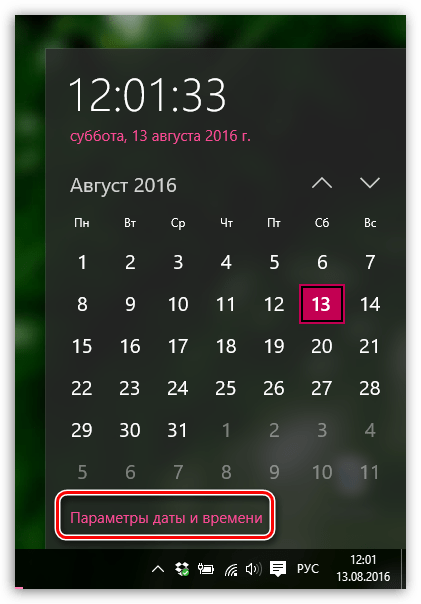
В данном случае вам потребуется изменить дату и время. Для этого щелкните в правом нижнем углу по иконке даты и в отобразившемся окне выберите пункт «Параметры даты и времени».
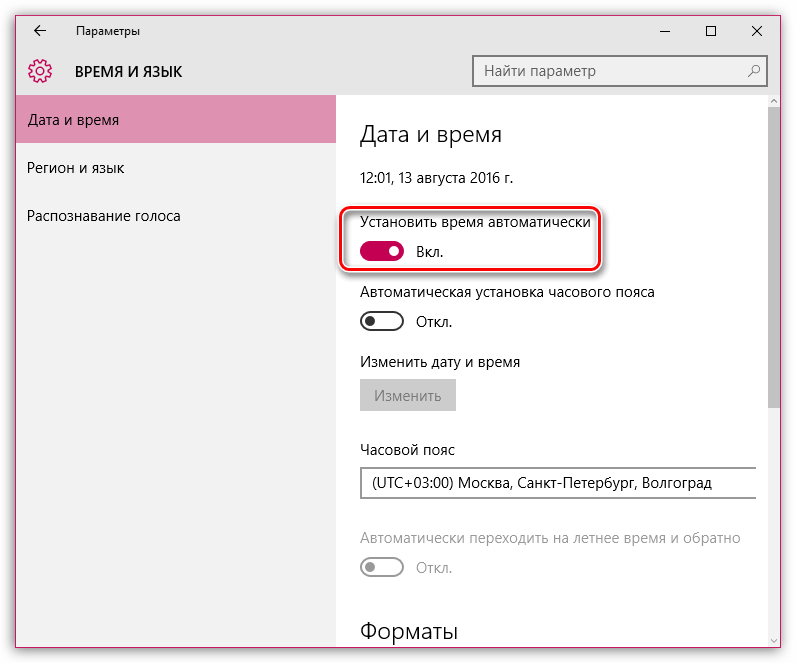
На экране отобразится окно, в котором рекомендуется активировать пункт «Установить время автоматически», тогда система самостоятельно установит верные дату и время.
Причина 2: Сертификат истек [дата]
Эта ошибка как также может говорить о неправильно установленном времени, так и может являться верным знаком того, что сайт все-таки вовремя не обновил свои сертификаты.
Если дата и время установлены на вашем компьютере, то, вероятно, проблема в сайте, и пока он не обновит сертификаты, доступ к сайту может быть получен только путем добавления в исключения, который описан ближе к концу статьи.
Причина 3: к сертификату нет доверия, так как сертификат его издателя неизвестен
Подобная ошибка может возникнуть в двух случаях: сайту действительно не стоит доверять, или же проблема заключается в файле cert8.db, расположенном в папке профиля Firefox, который был поврежден.
Если вы уверены в безопасности сайта, то, вероятно, проблема все же заключается в поврежденном файле. И чтобы решить проблему, потребуется, чтобы Mozilla Firefox создала новый такой файл, а значит, необходимо удалить старую версию.

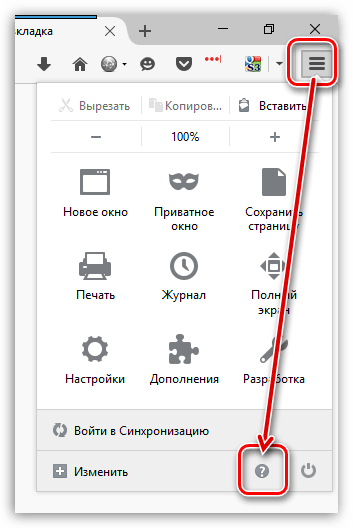
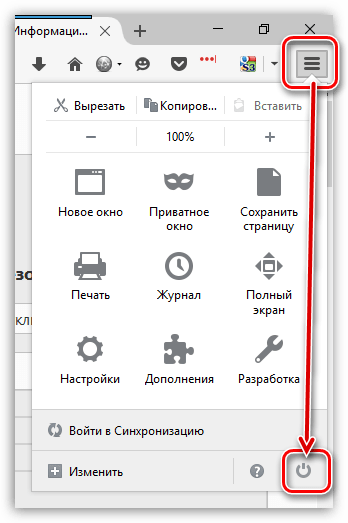
Чтобы попасть в папку профиля, щелкните по кнопке меню Firefox и в отобразившемся окне щелкните по иконке со знаком вопроса.
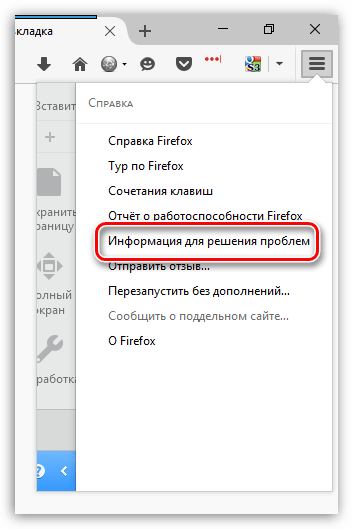
В той же области окна отобразится дополнительное меню, в котором потребуется щелкнуть по пункту «Информация для решения проблем».
В открывшемся окне щелкните по кнопке «Показать папку».
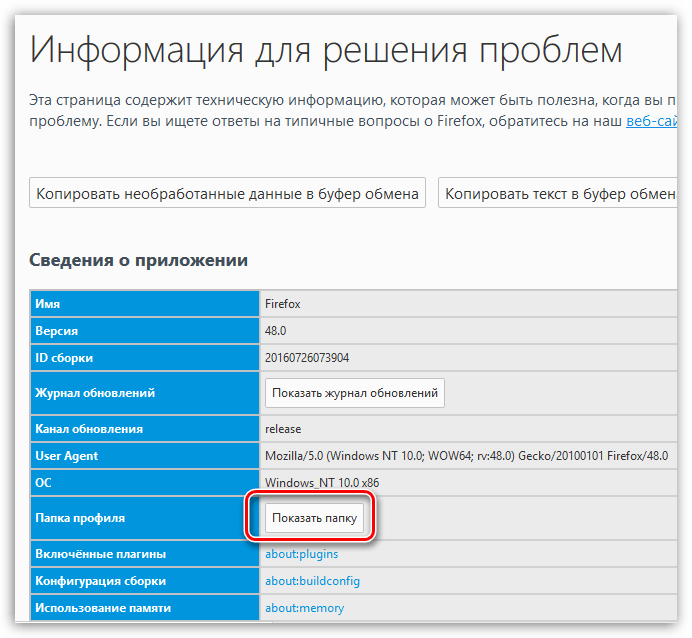
После того, как на экране появится папка профиля, необходимо закрыть Mozilla Firefox. Для этого щелкните по кнопке меню браузера и в отобразившемся окне кликните по кнопке «Выход».
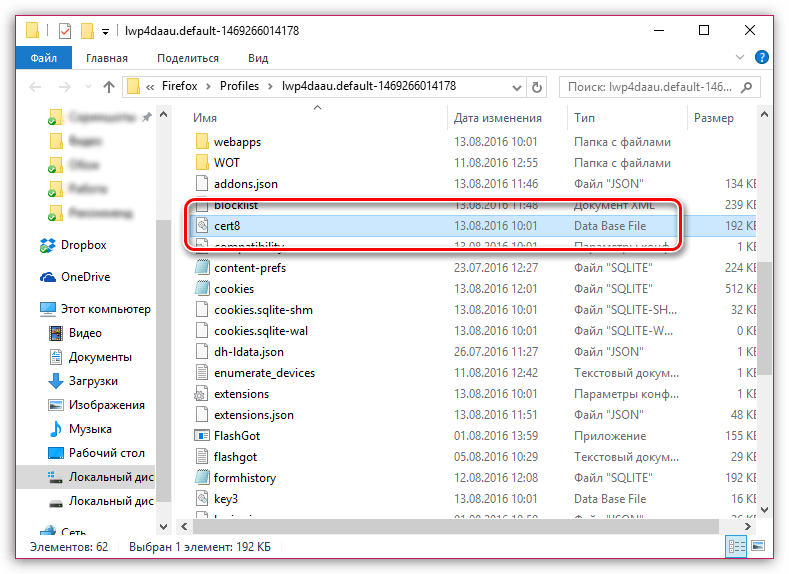
Теперь вернемся к папке профиля. Найдите в ней файл cert8.db, щелкните по нему правой кнопкой мыши и выберите пункт «Удалить».
Как только файл будет удален, можете закрыть папку профиля и снова запустить Firefox.
Причина 4: к сертификату нет доверия, т.к. отсутствует цепочка сертификатов
Подобная ошибка возникает, как привило, из-за антивирусов, в которых активирована функция SSL-сканирования. Перейдите в настройки антивируса и отключите функцию сетевого (SSL) сканирования.
Как устранить ошибку при переходе на незащищенный сайт?
Если сообщение «Ошибка при переходе на защищенное соединение» появляется, если вы переходите на незащищенный сайт, это может говорить о конфликте настроек, дополнений и тем.
Прежде всего, откройте меню браузера и перейдите к разделу «Дополнения». В левой области окна, открыв вкладку «Расширения», отключите максимальное количество расширений, установленных для вашего браузера.
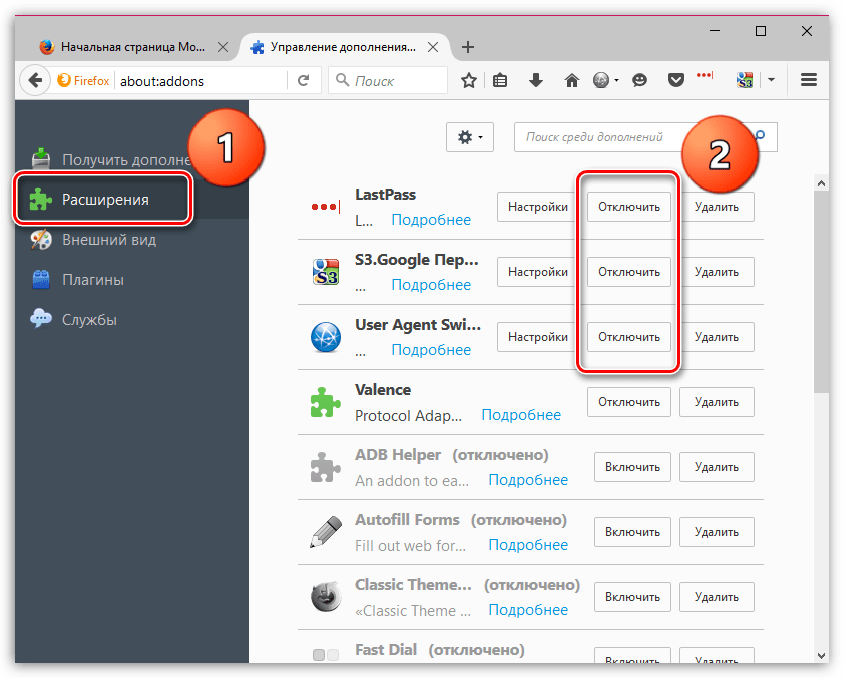
Следом перейдите ко вкладке «Внешний вид» и удалите все сторонние темы, оставив и применив для Firefox стандартную.
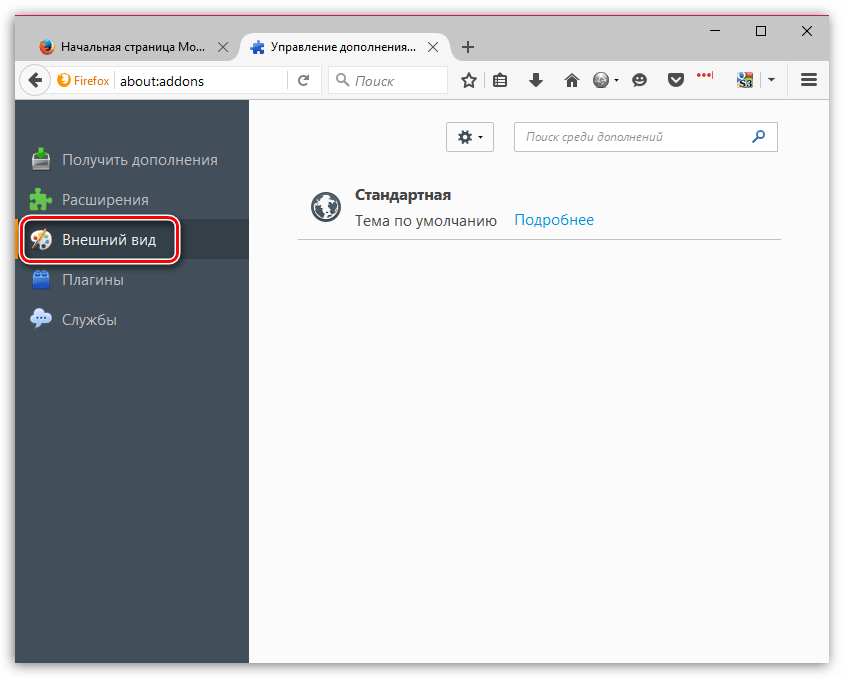
После выполнения данных действий проверьте наличие ошибки. Если она осталась, попробуйте отключить аппаратное ускорение.
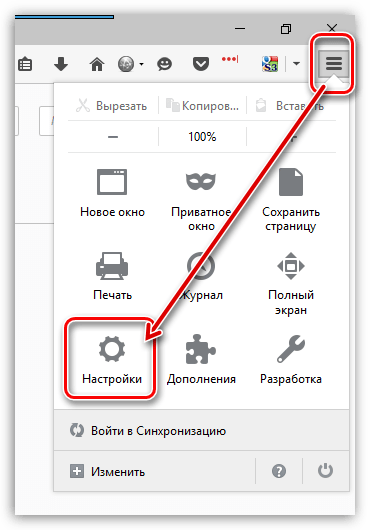
Для этого щелкните по кнопке меню браузера и перейдите к разделу «Настройки».
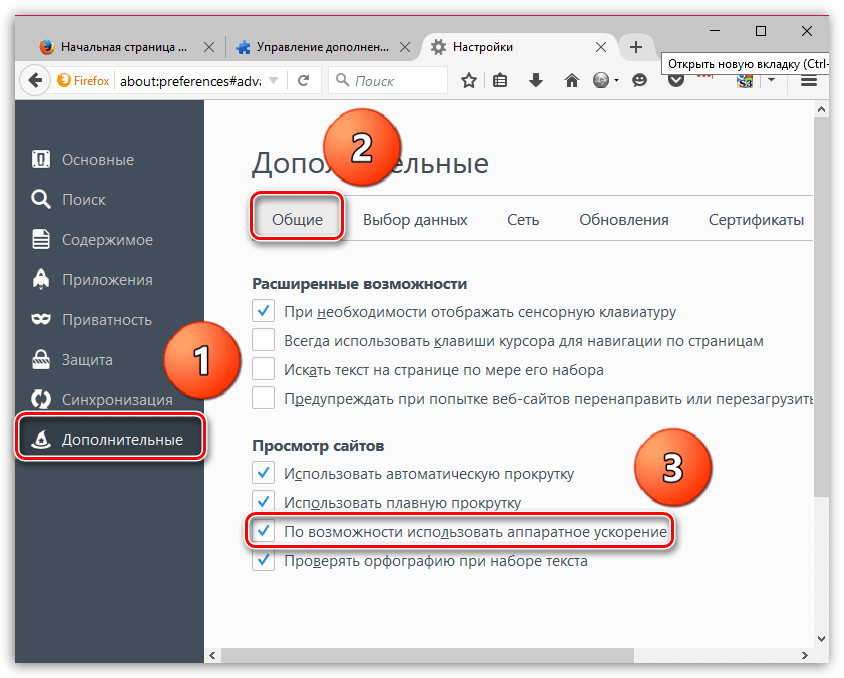
В левой области окна перейдите ко вкладке «Дополнительные», а в верхней откройте подвкладку «Общие». В данном окне вам потребуется снять галочку с пункта «По возможности использовать аппаратное ускорение».
Обход ошибки
Если вы так и не смогли устранить сообщение «Ошибка при установлении защищенного соединения», но при этом уверены в безопасности сайта, устранить проблему можно, обойдя настойчивое предупреждение Firefox.
Для этого в окне с ошибкой щелкните по кнопке «Или же вы можете добавить исключение», после чего кликните по появившейся кнопке «Добавить исключение».
На экране отобразится окно, в котором щелкните по кнопке «Получить сертификат», а затем кликните по кнопке «Подтвердить исключение безопасности».
Видео-урок:
Надеемся данная статья помогла вам устранить проблемы в работе Mozilla Firefox.
I have the same issue.
I don’t suggest to edit Firefox tags as the edit can create security issues if you don’t know what you are doing. As Firefox say when you enter on about config, editing tag can be a risk.
If you choose to edit Firefox tag, you should know deep every tag you edit what means and what can be the consequence. Editing tags that regards SSL can be, on my point of view, dangerous and… I truly believe the issue is not Firefox but Kaspersky.
To me looks like s Kaspersky that create issue, for me this is a BUG of the version 21.3.10.391 g
Deactivating Kaspersky certificate check resolve the issue than if you reactivate the monitor the issue will happen again some days or week.
I discussed this here and also alerted a Kaspersky forum member about this strong and frequent issue, that I had again today.
Contacting Kaspersky by ticket will be not helpful if you have not a paid plan, this is my experience on more ticket opened with them.
The ticket support always sent to me a saved email reply where they say that support are not provided on the free version. (This even if I was reporting a bug, I get always this reply and ticket closed).
- This topic has been flagged as replied with a reply that doesn’t help, on my opinion or, if resolve to me looks like a dangerous suggestion edit Firefox hidden tags related to SSL.
- This issue is something caused by Kaspersky, once disabled the SSL control this issue simply is resolved but you have not SSL monitor from the Kaspersky security so disable is something I want to avoid.
At the moment there is no solution for fix this. This is my opinion, considering editing Firefox tags is not a solution that I trust.
Deactivating Kaspersky SSL check resolve the issue so, the issue is caused by Kaspersky.
You get also errors if you update Thunderbird, Kaspersky will start to say that Windows traffic are not monitored.
It’s all Kaspersky issue caused; this need someone of the team take care about that or will stay unresolved.
→ Do you use a VPN or proxy in the browser?
→ Have you made any recent changes to your Kaspersky network settings?
→ When did all this trouble start?
→ Are you using more than one antivirus software simultaneously? As I understand it, this problem occurs when there is more than one antivirus software installed on the machine.
I’m not using any proxy or VPN even in the browser.
I never touched Kaspersky network settings
The issue is present since I use Kaspersky
I’m using only Kaspersky, no other antivirus.
Note that:
I can surf as today without problem YouTube video or YouTube Music than after a while, randomly… never know the day and the week Kaspersky decide to broken for some minutes the issue start to exist. May be 5 or 10 minutes long and after that time, even not changing any settings, the issue is resolved.
This broke YouTube videos, reproduction of music and broke YouTube embed video on websites, even Youtube website cannot be opened during the issue.
- This page is part of the SSL Reference that we are migrating into the format described in the MDN Style Guide. If you are inclined to help with this migration, your help would be very much appreciated.
- Upgraded documentation may be found in the Current NSS Reference
NSS and SSL Error Codes
Chapter 8
NSS and SSL Error Codes
NSS error codes are retrieved using the NSPR function PR_GetError. In addition to the error codes defined by NSPR, PR_GetError retrieves the error codes described in this chapter.
SSL Error Codes
SEC Error Codes
SSL Error Codes
Table 8.1 Error codes defined in sslerr.h
| Constant | Value | Description |
|---|---|---|
| SSL_ERROR_EXPORT_ONLY_SERVER | -12288 | «Unable to communicate securely. Peer does not support high-grade encryption.»
The local system was configured to support the cipher suites permitted for domestic use. The remote system was configured to support only the cipher suites permitted for export use. |
| SSL_ERROR_US_ONLY_SERVER | -12287 | «Unable to communicate securely. Peer requires high-grade encryption which is not supported.»
The remote system was configured to support the cipher suites permitted for domestic use. The local system was configured to support only the cipher suites permitted for export use. |
| SSL_ERROR_NO_CYPHER_OVERLAP | -12286 | «Cannot communicate securely with peer: no common encryption algorithm(s).»
The local and remote systems share no cipher suites in common. This can be due to a misconfiguration at either end. It can be due to a server being misconfigured to use a non-RSA certificate with the RSA key exchange algorithm. |
| SSL_ERROR_NO_CERTIFICATE | -12285 | «Unable to find the certificate or key necessary for authentication.»
This error has many potential causes; for example: Certificate or key not found in database. Certificate not marked trusted in database and Certificate’s issuer not marked trusted in database. Wrong password for key database. Missing database. |
| SSL_ERROR_BAD_CERTIFICATE | -12284 | «Unable to communicate securely with peer: peers’s certificate was rejected.»
A certificate was received from the remote system and was passed to the certificate authentication callback function provided by the local application. That callback function returned SECFailure, and the bad certificate callback function either was not configured or did not choose to override the error code returned by the certificate authentication callback function. |
| -12283 | (unused) | |
| SSL_ERROR_BAD_CLIENT | -12282 | «The server has encountered bad data from the client.»
This error code should occur only on sockets that are acting as servers. It is a generic error, used when none of the other more specific error codes defined in this file applies. |
| SSL_ERROR_BAD_SERVER | -12281 | «The client has encountered bad data from the server.»
This error code should occur only on sockets that are acting as clients. It is a generic error, used when none of the other more specific error codes defined in this file applies. |
| SSL_ERROR_UNSUPPORTED_CERTIFICATE_TYPE | -12280 | «Unsupported certificate type.»
The operation encountered a certificate that was not one of the well known certificate types handled by the certificate library. |
| SSL_ERROR_UNSUPPORTED_VERSION | -12279 | «Peer using unsupported version of security protocol.»
On a client socket, this means the remote server has attempted to negotiate the use of a version of SSL that is not supported by the NSS library, probably an invalid version number. On a server socket, this means the remote client has requested the use of a version of SSL older than version 2. |
| -12278 | (unused) | |
| SSL_ERROR_WRONG_CERTIFICATE | -12277 | «Client authentication failed: private key in key database does not correspond to public key in certificate database.» |
| SSL_ERROR_BAD_CERT_DOMAIN | -12276 | «Unable to communicate securely with peer: requested domain name does not match the server’s certificate.»
This error code should be returned by the certificate authentication callback function when it detects that the Common Name in the remote server’s certificate does not match the hostname sought by the local client, according to the matching rules specified for CERT_VerifyCertName. |
| SSL_ERROR_POST_WARNING | -12275 | (unused) |
| SSL_ERROR_SSL2_DISABLED | -12274 | «Peer only supports SSL version 2, which is locally disabled.»
The remote server has asked to use SSL version 2, and SSL version 2 is disabled in the local client’s configuration. |
| SSL_ERROR_BAD_MAC_READ | -12273 | «SSL received a record with an incorrect Message Authentication Code.»
This usually indicates that the client and server have failed to come to agreement on the set of keys used to encrypt the application data and to check message integrity. If this occurs frequently on a server, an active attack (such as the «million question» attack) may be underway against the server. |
| SSL_ERROR_BAD_MAC_ALERT | -12272 | «SSL peer reports incorrect Message Authentication Code.»
The remote system has reported that it received a message with a bad Message Authentication Code from the local system. This may indicate that an attack on that server is underway. |
| SSL_ERROR_BAD_CERT_ALERT | -12271 | «SSL peer cannot verify your certificate.»
The remote system has received a certificate from the local system, and has rejected it for some reason. |
| SSL_ERROR_REVOKED_CERT_ALERT | -12270 | «SSL peer rejected your certificate as revoked.»
The remote system has received a certificate from the local system, and has determined that the certificate has been revoked. |
| SSL_ERROR_EXPIRED_CERT_ALERT | -12269 | «SSL peer rejected your certificate as expired.»
The remote system has received a certificate from the local system, and has determined that the certificate has expired. |
| SSL_ERROR_SSL_DISABLED | -12268 | «Cannot connect: SSL is disabled.»
The local socket is configured in such a way that it cannot use any of the SSL cipher suites. Possible causes include: (a) both SSL2 and SSL3 are disabled, (b) All the individual SSL cipher suites are disabled, or (c) the socket is configured to handshake as a server, but the certificate associated with that socket is inappropriate for the Key Exchange Algorithm selected. |
| SSL_ERROR_FORTEZZA_PQG | -12267 | «Cannot connect: SSL peer is in another FORTEZZA domain.»
The local system and the remote system are in different FORTEZZA domains. They must be in the same domain to communicate. |
| SSL_ERROR_UNKNOWN_CIPHER_SUITE | -12266 | «An unknown SSL cipher suite has been requested.»
The application has attempted to configure SSL to use an unknown cipher suite. |
| SSL_ERROR_NO_CIPHERS_SUPPORTED | -12265 | «No cipher suites are present and enabled in this program.»
Possible causes: (a) all cipher suites have been configured to be disabled, (b) the only cipher suites that are configured to be enabled are those that are disallowed by cipher export policy, (c) the socket is configured to handshake as a server, but the certificate associated with that socket is inappropriate for the Key Exchange Algorithm selected. |
| SSL_ERROR_BAD_BLOCK_PADDING | -12264 | «SSL received a record with bad block padding.»
SSL was using a Block cipher, and the last block in an SSL record had incorrect padding information in it. This usually indicates that the client and server have failed to come to agreement on the set of keys used to encrypt the application data and to check message integrity. If this occurs frequently on a server, an active attack (such as the «million question» attack) may be underway against the server. |
| SSL_ERROR_RX_RECORD_TOO_LONG | -12263 | «SSL received a record that exceeded the maximum permissible length.»
This generally indicates that the remote peer system has a flawed implementation of SSL, and is violating the SSL specification. |
| SSL_ERROR_TX_RECORD_TOO_LONG | -12262 | «SSL attempted to send a record that exceeded the maximum permissible length.»
This error should never occur. If it does, it indicates a flaw in the NSS SSL library. |
| SSL_ERROR_CLOSE_NOTIFY_ALERT | -12230 | «SSL peer has closed this connection.»
The local socket received an SSL3 alert record from the remote peer, reporting that the remote peer has chosen to end the connection. The receipt of this alert is an error only if it occurs while a handshake is in progress. |
| SSL_ERROR_PUB_KEY_SIZE_LIMIT_EXCEEDED | -12210 | «SSL Server attempted to use domestic-grade public key with export cipher suite.»
On a client socket, this error reports that the remote server has failed to perform an «SSL Step down» for an export cipher. It has sent a certificate bearing a domestic-grade public key, but has not sent a ServerKeyExchange message containing an export-grade public key for the key exchange algorithm. Such a connection cannot be permitted without violating U.S. export policies. On a server socket, this indicates a failure of the local library. |
| SSL_ERROR_NO_SERVER_KEY_FOR_ALG | -12206 | «Server has no key for the attempted key exchange algorithm.»
An SSL client has requested an SSL cipher suite that uses a Key Exchange Algorithm for which the local server has no appropriate public key. This indicates a configuration error on the local server. |
| SSL_ERROR_TOKEN_INSERTION_REMOVAL | -12205 | «PKCS #11 token was inserted or removed while operation was in progress.»
A cryptographic operation required to complete the handshake failed because the token that was performing it was removed while the handshake was underway. Another token may also have been inserted into the same slot. |
| SSL_ERROR_TOKEN_SLOT_NOT_FOUND | -12204 | «No PKCS#11 token could be found to do a required operation.»
A cryptographic operation required a PKCS#11 token with specific abilities, and no token could be found in any slot, including the «soft token» in the internal virtual slot, that could do the job. May indicate a server configuration error, such as having a certificate that is inappropriate for the Key Exchange Algorithm selected. |
| SSL_ERROR_NO_COMPRESSION_OVERLAP | -12203 | «Cannot communicate securely with peer: no common compression algorithm(s).» |
| SSL_ERROR_HANDSHAKE_NOT_COMPLETED | -12202 | «Cannot initiate another SSL handshake until current handshake is complete.» |
| SSL_ERROR_BAD_HANDSHAKE_HASH_VALUE | -12201 | «Received incorrect handshakes hash values from peer.» |
| SSL_ERROR_CERT_KEA_MISMATCH | -12200 | «The certificate provided cannot be used with the selected key exchange algorithm.» |
| SSL_ERROR_NO_TRUSTED_SSL_CLIENT_CA | -12199 | «No certificate authority is trusted for SSL client authentication.» |
| SSL_ERROR_SESSION_NOT_FOUND | -12198 | «Client’s SSL session ID not found in server’s session cache.» |
| SSL_ERROR_SERVER_CACHE_NOT_CONFIGURED | -12185 | «SSL server cache not configured and not disabled for this socket.» |
| SSL_ERROR_RENEGOTIATION_NOT_ALLOWED | -12176 | «Renegotiation is not allowed on this SSL socket.» |
|
Received a malformed (too long or short or invalid content) SSL handshake: All the error codes in the following block indicate that the local socket received an improperly formatted SSL3 handshake message from the remote peer. This probably indicates a flaw in the remote peer’s implementation. |
||
| SSL_ERROR_RX_MALFORMED_HELLO_REQUEST | -12261 | «SSL received a malformed Hello Request handshake message.» |
| SSL_ERROR_RX_MALFORMED_CLIENT_HELLO | -12260 | «SSL received a malformed Client Hello handshake message.» |
| SSL_ERROR_RX_MALFORMED_SERVER_HELLO | -12259 | «SSL received a malformed Server Hello handshake message.» |
| SSL_ERROR_RX_MALFORMED_CERTIFICATE | -12258 | «SSL received a malformed Certificate handshake message.» |
| SSL_ERROR_RX_MALFORMED_SERVER_KEY_EXCH | -12257 | «SSL received a malformed Server Key Exchange handshake message.» |
| SSL_ERROR_RX_MALFORMED_CERT_REQUEST | -12256 | «SSL received a malformed Certificate Request handshake message.» |
| SSL_ERROR_RX_MALFORMED_HELLO_DONE | -12255 | «SSL received a malformed Server Hello Done handshake message.» |
| SSL_ERROR_RX_MALFORMED_CERT_VERIFY | -12254 | «SSL received a malformed Certificate Verify handshake message.» |
| SSL_ERROR_RX_MALFORMED_CLIENT_KEY_EXCH | -12253 | «SSL received a malformed Client Key Exchange handshake message.» |
| SSL_ERROR_RX_MALFORMED_FINISHED | -12252 | «SSL received a malformed Finished handshake message.» |
| SSL_ERROR_RX_MALFORMED_NEW_SESSION_TICKET | -12178 | «SSL received a malformed New Session Ticket handshake message.» |
|
Received a malformed (too long or short) SSL record: All the error codes in the following block indicate that the local socket received an improperly formatted SSL3 record from the remote peer. This probably indicates a flaw in the remote peer’s implementation. |
||
| SSL_ERROR_RX_MALFORMED_CHANGE_CIPHER | -12251 | «SSL received a malformed Change Cipher Spec record.» |
| SSL_ERROR_RX_MALFORMED_ALERT | -12250 | «SSL received a malformed Alert record.» |
| SSL_ERROR_RX_MALFORMED_HANDSHAKE | -12249 | «SSL received a malformed Handshake record.» |
| SSL_ERROR_RX_MALFORMED_APPLICATION_DATA | -12248 | «SSL received a malformed Application Data record.» |
|
Received an SSL handshake that was inappropriate for the current state: All the error codes in the following block indicate that the local socket received an SSL3 handshake message from the remote peer at a time when it was inappropriate for the peer to have sent this message. For example, a server received a message from another server. This probably indicates a flaw in the remote peer’s implementation. |
||
| SSL_ERROR_RX_UNEXPECTED_HELLO_REQUEST | -12247 | «SSL received an unexpected Hello Request handshake message.» |
| SSL_ERROR_RX_UNEXPECTED_CLIENT_HELLO | -12246 | «SSL received an unexpected Client Hello handshake message.» |
| SSL_ERROR_RX_UNEXPECTED_SERVER_HELLO | -12245 | «SSL received an unexpected Server Hello handshake message.» |
| SSL_ERROR_RX_UNEXPECTED_CERTIFICATE | -12244 | «SSL received an unexpected Certificate handshake message.» |
| SSL_ERROR_RX_UNEXPECTED_SERVER_KEY_EXCH | -12243 | «SSL received an unexpected Server Key Exchange handshake message.» |
| SSL_ERROR_RX_UNEXPECTED_CERT_REQUEST | -12242 | «SSL received an unexpected Certificate Request handshake message.» |
| SSL_ERROR_RX_UNEXPECTED_HELLO_DONE | -12241 | «SSL received an unexpected Server Hello Done handshake message.» |
| SSL_ERROR_RX_UNEXPECTED_CERT_VERIFY | -12240 | «SSL received an unexpected Certificate Verify handshake message.» |
| SSL_ERROR_RX_UNEXPECTED_CLIENT_KEY_EXCH | -12239 | «SSL received an unexpected Client Key Exchange handshake message.» |
| SSL_ERROR_RX_UNEXPECTED_FINISHED | -12238 | «SSL received an unexpected Finished handshake message.» |
| SSL_ERROR_RX_UNEXPECTED_NEW_SESSION_TICKET | -12179 | «SSL received an unexpected New Session Ticket handshake message.» |
|
Received an SSL record that was inappropriate for the current state: All the error codes in the following block indicate that the local socket received an SSL3 record from the remote peer at a time when it was inappropriate for the peer to have sent this message. This probably indicates a flaw in the remote peer’s implementation. |
||
| SSL_ERROR_RX_UNEXPECTED_CHANGE_CIPHER | -12237 | «SSL received an unexpected Change Cipher Spec record.» |
| SSL_ERROR_RX_UNEXPECTED_ALERT | -12236 | «SSL received an unexpected Alert record.» |
| SSL_ERROR_RX_UNEXPECTED_HANDSHAKE | -12235 | «SSL received an unexpected Handshake record.» |
| SSL_ERROR_RX_UNEXPECTED_APPLICATION_DATA | -12234 | «SSL received an unexpected Application Data record.» |
|
Received record/message with unknown discriminant: All the error codes in the following block indicate that the local socket received an SSL3 record or handshake message from the remote peer that it was unable to interpret because the byte that identifies the type of record or message contained an unrecognized value. This probably indicates a flaw in the remote peer’s implementation. |
||
| SSL_ERROR_RX_UNKNOWN_RECORD_TYPE | -12233 | «SSL received a record with an unknown content type.» |
| SSL_ERROR_RX_UNKNOWN_HANDSHAKE | -12232 | «SSL received a handshake message with an unknown message type.» |
| SSL_ERROR_RX_UNKNOWN_ALERT | -12231 | «SSL received an alert record with an unknown alert description.» |
|
Received an alert report: All the error codes in the following block indicate that the local socket received an SSL3 or TLS alert record from the remote peer, reporting some issue that it had with an SSL record or handshake message it received. (Some _Alert codes are listed in other blocks.) |
||
| SSL_ERROR_HANDSHAKE_UNEXPECTED_ALERT | -12229 | «SSL peer was not expecting a handshake message it received.» |
| SSL_ERROR_DECOMPRESSION_FAILURE_ALERT | -12228 | «SSL peer was unable to successfully decompress an SSL record it received.» |
| SSL_ERROR_HANDSHAKE_FAILURE_ALERT | -12227 | «SSL peer was unable to negotiate an acceptable set of security parameters.» |
| SSL_ERROR_ILLEGAL_PARAMETER_ALERT | -12226 | «SSL peer rejected a handshake message for unacceptable content.» |
| SSL_ERROR_UNSUPPORTED_CERT_ALERT | -12225 | «SSL peer does not support certificates of the type it received.» |
| SSL_ERROR_CERTIFICATE_UNKNOWN_ALERT | -12224 | «SSL peer had some unspecified issue with the certificate it received.» |
| SSL_ERROR_DECRYPTION_FAILED_ALERT | -12197 | «Peer was unable to decrypt an SSL record it received.» |
| SSL_ERROR_RECORD_OVERFLOW_ALERT | -12196 | «Peer received an SSL record that was longer than is permitted.» |
| SSL_ERROR_UNKNOWN_CA_ALERT | -12195 | «Peer does not recognize and trust the CA that issued your certificate.» |
| SSL_ERROR_ACCESS_DENIED_ALERT | -12194 | «Peer received a valid certificate, but access was denied.» |
| SSL_ERROR_DECODE_ERROR_ALERT | -12193 | «Peer could not decode an SSL handshake message.» |
| SSL_ERROR_DECRYPT_ERROR_ALERT | -12192 | «Peer reports failure of signature verification or key exchange.» |
| SSL_ERROR_EXPORT_RESTRICTION_ALERT | -12191 | «Peer reports negotiation not in compliance with export regulations.» |
| SSL_ERROR_PROTOCOL_VERSION_ALERT | -12190 | «Peer reports incompatible or unsupported protocol version.» |
| SSL_ERROR_INSUFFICIENT_SECURITY_ALERT | -12189 | «Server requires ciphers more secure than those supported by client.» |
| SSL_ERROR_INTERNAL_ERROR_ALERT | -12188 | «Peer reports it experienced an internal error.» |
| SSL_ERROR_USER_CANCELED_ALERT | -12187 | «Peer user canceled handshake.» |
| SSL_ERROR_NO_RENEGOTIATION_ALERT | -12186 | «Peer does not permit renegotiation of SSL security parameters.» |
| SSL_ERROR_UNSUPPORTED_EXTENSION_ALERT | -12184 | «SSL peer does not support requested TLS hello extension.» |
| SSL_ERROR_CERTIFICATE_UNOBTAINABLE_ALERT | -12183 | «SSL peer could not obtain your certificate from the supplied URL.» |
| SSL_ERROR_UNRECOGNIZED_NAME_ALERT | -12182 | «SSL peer has no certificate for the requested DNS name.» |
| SSL_ERROR_BAD_CERT_STATUS_RESPONSE_ALERT | -12181 | «SSL peer was unable to get an OCSP response for its certificate.» |
| SSL_ERROR_BAD_CERT_HASH_VALUE_ALERT | -12180 | «SSL peer reported bad certificate hash value.» |
|
Unspecified errors that occurred while attempting some operation: All the error codes in the following block describe the operation that was being attempted at the time of the unspecified failure. These failures may be caused by the system running out of memory, or errors returned by PKCS#11 routines that did not provide meaningful error codes of their own. These should rarely be seen. (Certain of these error codes have more specific meanings, as described.) |
||
| SSL_ERROR_GENERATE_RANDOM_FAILURE | -12223 | «SSL experienced a failure of its random number generator.» |
| SSL_ERROR_SIGN_HASHES_FAILURE | -12222 | «Unable to digitally sign data required to verify your certificate.» |
| SSL_ERROR_EXTRACT_PUBLIC_KEY_FAILURE | -12221 | «SSL was unable to extract the public key from the peer’s certificate.» |
| SSL_ERROR_SERVER_KEY_EXCHANGE_FAILURE | -12220 | «Unspecified failure while processing SSL Server Key Exchange handshake.» |
| SSL_ERROR_CLIENT_KEY_EXCHANGE_FAILURE | -12219 | «Unspecified failure while processing SSL Client Key Exchange handshake.» |
| SSL_ERROR_ENCRYPTION_FAILURE | -12218 | «Bulk data encryption algorithm failed in selected cipher suite.» |
| SSL_ERROR_DECRYPTION_FAILURE | -12217 | «Bulk data decryption algorithm failed in selected cipher suite.» |
| SSL_ERROR_SOCKET_WRITE_FAILURE | -12216 | «Attempt to write encrypted data to underlying socket failed.»
After the data to be sent was encrypted, the attempt to send it out the socket failed. Likely causes include that the peer has closed the connection. |
| SSL_ERROR_MD5_DIGEST_FAILURE | -12215 | «MD5 digest function failed.» |
| SSL_ERROR_SHA_DIGEST_FAILURE | -12214 | «SHA-1 digest function failed.» |
| SSL_ERROR_MAC_COMPUTATION_FAILURE | -12213 | «Message Authentication Code computation failed.» |
| SSL_ERROR_SYM_KEY_CONTEXT_FAILURE | -12212 | «Failure to create Symmetric Key context.» |
| SSL_ERROR_SYM_KEY_UNWRAP_FAILURE | -12211 | «Failure to unwrap the Symmetric key in Client Key Exchange message.» |
| SSL_ERROR_IV_PARAM_FAILURE | -12209 | «PKCS11 code failed to translate an IV into a param.» |
| SSL_ERROR_INIT_CIPHER_SUITE_FAILURE | -12208 | «Failed to initialize the selected cipher suite.» |
| SSL_ERROR_SESSION_KEY_GEN_FAILURE | -12207 | «Failed to generate session keys for SSL session.»
On a client socket, indicates a failure of the PKCS11 key generation function. On a server socket, indicates a failure of one of the following: (a) to unwrap the pre-master secret from the ClientKeyExchange message, (b) to derive the master secret from the premaster secret, (c) to derive the MAC secrets, cryptographic keys, and initialization vectors from the master secret. If encountered repeatedly on a server socket, this can indicate that the server is actively under a «million question» attack. |
| SSL_ERROR_DECOMPRESSION_FAILURE | -12177 | «SSL received a compressed record that could not be decompressed.» |
SEC Error Codes
Table 8.2 Security error codes defined in secerr.h
| Constant | Value | Description |
|---|---|---|
| SEC_ERROR_IO | -8192 | An I/O error occurred during authentication; or an error occurred during crypto operation (other than signature verification). |
| SEC_ERROR_LIBRARY_FAILURE | -8191 | Security library failure. |
| SEC_ERROR_BAD_DATA | -8190 | Security library: received bad data. |
| SEC_ERROR_OUTPUT_LEN | -8189 | Security library: output length error. |
| SEC_ERROR_INPUT_LEN | -8188 | Security library: input length error. |
| SEC_ERROR_INVALID_ARGS | -8187 | Security library: invalid arguments. |
| SEC_ERROR_INVALID_ALGORITHM | -8186 | Security library: invalid algorithm. |
| SEC_ERROR_INVALID_AVA | -8185 | Security library: invalid AVA. |
| SEC_ERROR_INVALID_TIME | -8184 | Security library: invalid time. |
| SEC_ERROR_BAD_DER | -8183 | Security library: improperly formatted DER-encoded message. |
| SEC_ERROR_BAD_SIGNATURE | -8182 | Peer’s certificate has an invalid signature. |
| SEC_ERROR_EXPIRED_CERTIFICATE | -8181 | Peer’s certificate has expired. |
| SEC_ERROR_REVOKED_CERTIFICATE | -8180 | Peer’s certificate has been revoked. |
| SEC_ERROR_UNKNOWN_ISSUER | -8179 | Peer’s certificate issuer is not recognized. |
| SEC_ERROR_BAD_KEY | -8178 | Peer’s public key is invalid |
| SEC_ERROR_BAD_PASSWORD | -8177 | The password entered is incorrect. |
| SEC_ERROR_RETRY_PASSWORD | -8176 | New password entered incorrectly. |
| SEC_ERROR_NO_NODELOCK | -8175 | Security library: no nodelock. |
| SEC_ERROR_BAD_DATABASE | -8174 | Security library: bad database. |
| SEC_ERROR_NO_MEMORY | -8173 | Security library: memory allocation failure. |
| SEC_ERROR_UNTRUSTED_ISSUER | -8172 | Peer’s certificate issuer has been marked as not trusted by the user. |
| SEC_ERROR_UNTRUSTED_CERT | -8171 | Peer’s certificate has been marked as not trusted by the user. |
| SEC_ERROR_DUPLICATE_CERT | -8170 | Certificate already exists in your database. |
| SEC_ERROR_DUPLICATE_CERT_NAME | -8169 | Downloaded certificate’s name duplicates one already in your database. |
| SEC_ERROR_ADDING_CERT | -8168 | Error adding certificate to database. |
| SEC_ERROR_FILING_KEY | -8167 | Error refiling the key for this certificate. |
| SEC_ERROR_NO_KEY | -8166 | The private key for this certificate cannot be found in key database. |
| SEC_ERROR_CERT_VALID | -8165 | This certificate is valid. |
| SEC_ERROR_CERT_NOT_VALID | -8164 | This certificate is not valid. |
| SEC_ERROR_CERT_NO_RESPONSE | -8163 | Certificate library: no response. |
| SEC_ERROR_EXPIRED_ISSUER_CERTIFICATE | -8162 | The certificate issuer’s certificate has expired. |
| SEC_ERROR_CRL_EXPIRED | -8161 | The CRL for the certificate’s issuer has expired. |
| SEC_ERROR_CRL_BAD_SIGNATURE | -8160 | The CRL for the certificate’s issuer has an invalid signature. |
| SEC_ERROR_CRL_INVALID | -8159 | New CRL has an invalid format. |
| SEC_ERROR_EXTENSION_VALUE_INVALID | -8158 | Certificate extension value is invalid. |
| SEC_ERROR_EXTENSION_NOT_FOUND | -8157 | Certificate extension not found. |
| SEC_ERROR_CA_CERT_INVALID | -8156 | Issuer certificate is invalid. |
| SEC_ERROR_PATH_LEN_CONSTRAINT_INVALID | -8155 | Certificate path length constraint is invalid. |
| SEC_ERROR_CERT_USAGES_INVALID | -8154 | Certificate usages field is invalid. |
| SEC_INTERNAL_ONLY | -8153 | Internal-only module. |
| SEC_ERROR_INVALID_KEY | -8152 | The key does not support the requested operation. |
| SEC_ERROR_UNKNOWN_CRITICAL_EXTENSION | -8151 | Certificate contains unknown critical extension. |
| SEC_ERROR_OLD_CRL | -8150 | New CRL is not later than the current one. |
| SEC_ERROR_NO_EMAIL_CERT | -8149 | Not encrypted or signed: you do not yet have an email certificate. |
| SEC_ERROR_NO_RECIPIENT_CERTS_QUERY | -8148 | Not encrypted: you do not have certificates for each of the recipients. |
| SEC_ERROR_NOT_A_RECIPIENT | -8147 | Cannot decrypt: you are not a recipient, or matching certificate and private key not found. |
| SEC_ERROR_PKCS7_KEYALG_MISMATCH | -8146 | Cannot decrypt: key encryption algorithm does not match your certificate. |
| SEC_ERROR_PKCS7_BAD_SIGNATURE | -8145 | Signature verification failed: no signer found, too many signers found,
or improper or corrupted data. |
| SEC_ERROR_UNSUPPORTED_KEYALG | -8144 | Unsupported or unknown key algorithm. |
| SEC_ERROR_DECRYPTION_DISALLOWED | -8143 | Cannot decrypt: encrypted using a disallowed algorithm or key size. |
| XP_SEC_FORTEZZA_BAD_CARD | -8142 | FORTEZZA card has not been properly initialized. |
| XP_SEC_FORTEZZA_NO_CARD | -8141 | No FORTEZZA cards found. |
| XP_SEC_FORTEZZA_NONE_SELECTED | -8140 | No FORTEZZA card selected. |
| XP_SEC_FORTEZZA_MORE_INFO | -8139 | Please select a personality to get more info on. |
| XP_SEC_FORTEZZA_PERSON_NOT_FOUND | -8138 | Personality not found |
| XP_SEC_FORTEZZA_NO_MORE_INFO | -8137 | No more information on that personality. |
| XP_SEC_FORTEZZA_BAD_PIN | -8136 | Invalid PIN. |
| XP_SEC_FORTEZZA_PERSON_ERROR | -8135 | Couldn’t initialize FORTEZZA personalities. |
| SEC_ERROR_NO_KRL | -8134 | No KRL for this site’s certificate has been found. |
| SEC_ERROR_KRL_EXPIRED | -8133 | The KRL for this site’s certificate has expired. |
| SEC_ERROR_KRL_BAD_SIGNATURE | -8132 | The KRL for this site’s certificate has an invalid signature. |
| SEC_ERROR_REVOKED_KEY | -8131 | The key for this site’s certificate has been revoked. |
| SEC_ERROR_KRL_INVALID | -8130 | New KRL has an invalid format. |
| SEC_ERROR_NEED_RANDOM | -8129 | Security library: need random data. |
| SEC_ERROR_NO_MODULE | -8128 | Security library: no security module can perform the requested operation. |
| SEC_ERROR_NO_TOKEN | -8127 | The security card or token does not exist, needs to be initialized, or has been removed. |
| SEC_ERROR_READ_ONLY | -8126 | Security library: read-only database. |
| SEC_ERROR_NO_SLOT_SELECTED | -8125 | No slot or token was selected. |
| SEC_ERROR_CERT_NICKNAME_COLLISION | -8124 | A certificate with the same nickname already exists. |
| SEC_ERROR_KEY_NICKNAME_COLLISION | -8123 | A key with the same nickname already exists. |
| SEC_ERROR_SAFE_NOT_CREATED | -8122 | Error while creating safe object. |
| SEC_ERROR_BAGGAGE_NOT_CREATED | -8121 | Error while creating baggage object. |
| XP_JAVA_REMOVE_PRINCIPAL_ERROR | -8120 | Couldn’t remove the principal. |
| XP_JAVA_DELETE_PRIVILEGE_ERROR | -8119 | Couldn’t delete the privilege |
| XP_JAVA_CERT_NOT_EXISTS_ERROR | -8118 | This principal doesn’t have a certificate. |
| SEC_ERROR_BAD_EXPORT_ALGORITHM | -8117 | Required algorithm is not allowed. |
| SEC_ERROR_EXPORTING_CERTIFICATES | -8116 | Error attempting to export certificates. |
| SEC_ERROR_IMPORTING_CERTIFICATES | -8115 | Error attempting to import certificates. |
| SEC_ERROR_PKCS12_DECODING_PFX | -8114 | Unable to import. Decoding error. File not valid. |
| SEC_ERROR_PKCS12_INVALID_MAC | -8113 | Unable to import. Invalid MAC. Incorrect password or corrupt file. |
| SEC_ERROR_PKCS12_UNSUPPORTED_MAC_ALGORITHM | -8112 | Unable to import. MAC algorithm not supported. |
| SEC_ERROR_PKCS12_UNSUPPORTED_TRANSPORT_MODE | -8111 | Unable to import. Only password integrity and privacy modes supported. |
| SEC_ERROR_PKCS12_CORRUPT_PFX_STRUCTURE | -8110 | Unable to import. File structure is corrupt. |
| SEC_ERROR_PKCS12_UNSUPPORTED_PBE_ALGORITHM | -8109 | Unable to import. Encryption algorithm not supported. |
| SEC_ERROR_PKCS12_UNSUPPORTED_VERSION | -8108 | Unable to import. File version not supported. |
| SEC_ERROR_PKCS12_PRIVACY_PASSWORD_INCORRECT | -8107 | Unable to import. Incorrect privacy password. |
| SEC_ERROR_PKCS12_CERT_COLLISION | -8106 | Unable to import. Same nickname already exists in database. |
| SEC_ERROR_USER_CANCELLED | -8105 | The user clicked cancel. |
| SEC_ERROR_PKCS12_DUPLICATE_DATA | -8104 | Not imported, already in database. |
| SEC_ERROR_MESSAGE_SEND_ABORTED | -8103 | Message not sent. |
| SEC_ERROR_INADEQUATE_KEY_USAGE | -8102 | Certificate key usage inadequate for attempted operation. |
| SEC_ERROR_INADEQUATE_CERT_TYPE | -8101 | Certificate type not approved for application. |
| SEC_ERROR_CERT_ADDR_MISMATCH | -8100 | Address in signing certificate does not match address in message headers. |
| SEC_ERROR_PKCS12_UNABLE_TO_IMPORT_KEY | -8099 | Unable to import. Error attempting to import private key. |
| SEC_ERROR_PKCS12_IMPORTING_CERT_CHAIN | -8098 | Unable to import. Error attempting to import certificate chain. |
| SEC_ERROR_PKCS12_UNABLE_TO_LOCATE_OBJECT_BY_NAME | -8097 | Unable to export. Unable to locate certificate or key by nickname. |
| SEC_ERROR_PKCS12_UNABLE_TO_EXPORT_KEY | -8096 | Unable to export. Private key could not be located and exported. |
| SEC_ERROR_PKCS12_UNABLE_TO_WRITE | -8095 | Unable to export. Unable to write the export file. |
| SEC_ERROR_PKCS12_UNABLE_TO_READ | -8094 | Unable to import. Unable to read the import file. |
| SEC_ERROR_PKCS12_KEY_DATABASE_NOT_INITIALIZED | -8093 | Unable to export. Key database corrupt or deleted. |
| SEC_ERROR_KEYGEN_FAIL | -8092 | Unable to generate public-private key pair. |
| SEC_ERROR_INVALID_PASSWORD | -8091 | Password entered is invalid. |
| SEC_ERROR_RETRY_OLD_PASSWORD | -8090 | Old password entered incorrectly. |
| SEC_ERROR_BAD_NICKNAME | -8089 | Certificate nickname already in use. |
| SEC_ERROR_NOT_FORTEZZA_ISSUER | -8088 | Peer FORTEZZA chain has a non-FORTEZZA Certificate. |
| SEC_ERROR_CANNOT_MOVE_SENSITIVE_KEY | -8087 | «A sensitive key cannot be moved to the slot where it is needed.» |
| SEC_ERROR_JS_INVALID_MODULE_NAME | -8086 | Invalid module name. |
| SEC_ERROR_JS_INVALID_DLL | -8085 | Invalid module path/filename. |
| SEC_ERROR_JS_ADD_MOD_FAILURE | -8084 | Unable to add module. |
| SEC_ERROR_JS_DEL_MOD_FAILURE | -8083 | Unable to delete module. |
| SEC_ERROR_OLD_KRL | -8082 | New KRL is not later than the current one. |
| SEC_ERROR_CKL_CONFLICT | -8081 | New CKL has different issuer than current CKL. |
| SEC_ERROR_CERT_NOT_IN_NAME_SPACE | -8080 | Certificate issuer is not permitted to issue a certificate with this name. |
| SEC_ERROR_KRL_NOT_YET_VALID | -8079 | «The key revocation list for this certificate is not yet valid.» |
| SEC_ERROR_CRL_NOT_YET_VALID | -8078 | «The certificate revocation list for this certificate is not yet valid.» |
| SEC_ERROR_UNKNOWN_CERT | -8077 | «The requested certificate could not be found.» |
| SEC_ERROR_UNKNOWN_SIGNER | -8076 | «The signer’s certificate could not be found.» |
| SEC_ERROR_CERT_BAD_ACCESS_LOCATION | -8075 | «The location for the certificate status server has invalid format.» |
| SEC_ERROR_OCSP_UNKNOWN_RESPONSE_TYPE | -8074 | «The OCSP response cannot be fully decoded; it is of an unknown type.» |
| SEC_ERROR_OCSP_BAD_HTTP_RESPONSE | -8073 | «The OCSP server returned unexpected/invalid HTTP data.» |
| SEC_ERROR_OCSP_MALFORMED_REQUEST | -8072 | «The OCSP server found the request to be corrupted or improperly formed.» |
| SEC_ERROR_OCSP_SERVER_ERROR | -8071 | «The OCSP server experienced an internal error.» |
| SEC_ERROR_OCSP_TRY_SERVER_LATER | -8070 | «The OCSP server suggests trying again later.» |
| SEC_ERROR_OCSP_REQUEST_NEEDS_SIG | -8069 | «The OCSP server requires a signature on this request.» |
| SEC_ERROR_OCSP_UNAUTHORIZED_REQUEST | -8068 | «The OCSP server has refused this request as unauthorized.» |
| SEC_ERROR_OCSP_UNKNOWN_RESPONSE_STATUS | -8067 | «The OCSP server returned an unrecognizable status.» |
| SEC_ERROR_OCSP_UNKNOWN_CERT | -8066 | «The OCSP server has no status for the certificate.» |
| SEC_ERROR_OCSP_NOT_ENABLED | -8065 | «You must enable OCSP before performing this operation.» |
| SEC_ERROR_OCSP_NO_DEFAULT_RESPONDER | -8064 | «You must set the OCSP default responder before performing this operation.» |
| SEC_ERROR_OCSP_MALFORMED_RESPONSE | -8063 | «The response from the OCSP server was corrupted or improperly formed.» |
| SEC_ERROR_OCSP_UNAUTHORIZED_RESPONSE | -8062 | «The signer of the OCSP response is not authorized to give status for this certificate.» |
| SEC_ERROR_OCSP_FUTURE_RESPONSE | -8061 | «The OCSP response is not yet valid (contains a date in the future).» |
| SEC_ERROR_OCSP_OLD_RESPONSE | -8060 | «The OCSP response contains out-of-date information.» |
| SEC_ERROR_DIGEST_NOT_FOUND | -8059 | «The CMS or PKCS #7 Digest was not found in signed message.» |
| SEC_ERROR_UNSUPPORTED_MESSAGE_TYPE | -8058 | «The CMS or PKCS #7 Message type is unsupported.» |
| SEC_ERROR_MODULE_STUCK | -8057 | «PKCS #11 module could not be removed because it is still in use.» |
| SEC_ERROR_BAD_TEMPLATE | -8056 | «Could not decode ASN.1 data. Specified template was invalid.» |
| SEC_ERROR_CRL_NOT_FOUND | -8055 | «No matching CRL was found.» |
| SEC_ERROR_REUSED_ISSUER_AND_SERIAL | -8054 | «You are attempting to import a cert with the same issuer/serial as an existing cert, but that is not the same cert.» |
| SEC_ERROR_BUSY | -8053 | «NSS could not shutdown. Objects are still in use.» |
| SEC_ERROR_EXTRA_INPUT | -8052 | «DER-encoded message contained extra unused data.» |
| SEC_ERROR_UNSUPPORTED_ELLIPTIC_CURVE | -8051 | «Unsupported elliptic curve.» |
| SEC_ERROR_UNSUPPORTED_EC_POINT_FORM | -8050 | «Unsupported elliptic curve point form.» |
| SEC_ERROR_UNRECOGNIZED_OID | -8049 | «Unrecognized Object IDentifier.» |
| SEC_ERROR_OCSP_INVALID_SIGNING_CERT | -8048 | «Invalid OCSP signing certificate in OCSP response.» |
| SEC_ERROR_REVOKED_CERTIFICATE_CRL | -8047 | «Certificate is revoked in issuer’s certificate revocation list.» |
| SEC_ERROR_REVOKED_CERTIFICATE_OCSP | -8046 | «Issuer’s OCSP responder reports certificate is revoked.» |
| SEC_ERROR_CRL_INVALID_VERSION | -8045 | «Issuer’s Certificate Revocation List has an unknown version number.» |
| SEC_ERROR_CRL_V1_CRITICAL_EXTENSION | -8044 | «Issuer’s V1 Certificate Revocation List has a critical extension.» |
| SEC_ERROR_CRL_UNKNOWN_CRITICAL_EXTENSION | -8043 | «Issuer’s V2 Certificate Revocation List has an unknown critical extension.» |
| SEC_ERROR_UNKNOWN_OBJECT_TYPE | -8042 | «Unknown object type specified.» |
| SEC_ERROR_INCOMPATIBLE_PKCS11 | -8041 | «PKCS #11 driver violates the spec in an incompatible way.» |
| SEC_ERROR_NO_EVENT | -8040 | «No new slot event is available at this time.» |
| SEC_ERROR_CRL_ALREADY_EXISTS | -8039 | «CRL already exists.» |
| SEC_ERROR_NOT_INITIALIZED | -8038 | «NSS is not initialized.» |
| SEC_ERROR_TOKEN_NOT_LOGGED_IN | -8037 | «The operation failed because the PKCS#11 token is not logged in.» |
| SEC_ERROR_OCSP_RESPONDER_CERT_INVALID | -8036 | «The configured OCSP responder’s certificate is invalid.» |
| SEC_ERROR_OCSP_BAD_SIGNATURE | -8035 | «OCSP response has an invalid signature.» |
| SEC_ERROR_OUT_OF_SEARCH_LIMITS | -8034 | «Certification validation search is out of search limits.» |
| SEC_ERROR_INVALID_POLICY_MAPPING | -8033 | «Policy mapping contains any-policy.» |
| SEC_ERROR_POLICY_VALIDATION_FAILED | -8032 | «Certificate chain fails policy validation.» |
| SEC_ERROR_UNKNOWN_AIA_LOCATION_TYPE | -8031 | «Unknown location type in certificate AIA extension.» |
| SEC_ERROR_BAD_HTTP_RESPONSE | -8030 | «Server returned a bad HTTP response.» |
| SEC_ERROR_BAD_LDAP_RESPONSE | -8029 | «Server returned a bad LDAP response.» |
| SEC_ERROR_FAILED_TO_ENCODE_DATA | -8028 | «Failed to encode data with ASN.1 encoder.» |
| SEC_ERROR_BAD_INFO_ACCESS_LOCATION | -8027 | «Bad information access location in certificate extension.» |
| SEC_ERROR_LIBPKIX_INTERNAL | -8026 | «Libpkix internal error occurred during cert validation.» |
| SEC_ERROR_PKCS11_GENERAL_ERROR | -8025 | «A PKCS #11 module returned CKR_GENERAL_ERROR, indicating that an unrecoverable error has occurred.» |
| SEC_ERROR_PKCS11_FUNCTION_FAILED | -8024 | «A PKCS #11 module returned CKR_FUNCTION_FAILED, indicating that the requested function could not be performed. Trying the same operation again might succeed.» |
| SEC_ERROR_PKCS11_DEVICE_ERROR | -8023 | «A PKCS #11 module returned CKR_DEVICE_ERROR, indicating that a problem has occurred with the token or slot.» |
| SEC_ERROR_BAD_INFO_ACCESS_METHOD | -8022 | «Unknown information access method in certificate extension.» |
| SEC_ERROR_CRL_IMPORT_FAILED | -8021 | «Error attempting to import a CRL.» |

Статус: Участник
Группы: Участники
Зарегистрирован: 07.05.2009(UTC)
Сообщений: 16
Откуда: Санкт-Петербург
Здравствуйте. С недавних пор на одном из наших проектов начала всплывать странная ошибка ssl_error_rx_malformed_server_hello («SSL получило повреждённый запрос на установление соединения Server Hello»). Поиск в сети ничего не дал, кроме похожей темы на этом форуме и форума ФНС. Решений нигде нет.
Сервер работает под управлением Apache Tomcat 5.5.31, Java 1.6u23, JCP и JTLS 1.0.47. Включена клиентская аутентификация. До недавнего времени всё работало, около года. Но на прошлой неделе пришёл багрепорт, и после непродолжительного расследования у нас закончились идеи по решению проблемы.
Суть в том, что Internet Explorer либо сразу не подключается, либо подключается, показывает несколько страниц, и лишь затем выводит ошибку подключения. Понятно, никаких осмысленных сообщений он не выдаёт. На сервере включен debug для JTLS, и вот как проходит ошибочная сессия:
Код:
02.04.2012 9:26:37 ru.CryptoPro.ssl.P a
FINE: %% ClientHello, TLSv1; Cipher Suites: [TLS_CIPHER_2001, TLS_CIPHER_94, SSL3_CK_GVO_KB2, Unknown 0x0:0x4, Unknown 0x0:0x5, Unknown 0x0:0xa, Unknown 0x0:0x9, Unknown 0x0:0x64, Unknown 0x0:0x62, Unknown 0x0:0x3, Unknown 0x0:0x6, Unknown 0x0:0x13, Unknown 0x0:0x12, Unknown 0x0:0x63, Unknown 0x0:0xff]; Compression Methods: 0
02.04.2012 9:26:37 ru.CryptoPro.ssl.d a
FINE: %% getting aliases for Server
02.04.2012 9:26:37 ru.CryptoPro.ssl.d a
FINE: %% matching alias: ucabinet
02.04.2012 9:26:37 ru.CryptoPro.ssl.P b
FINE: %%Choosen server alias: ucabinet
02.04.2012 9:26:37 ru.CryptoPro.ssl.P a
FINE: %% ServerHello, TLSv1; Cipher Suite: TLS_CIPHER_2001; Compression Method: 0
02.04.2012 9:26:37 ru.CryptoPro.ssl.P a
FINE: %% Cipher suite:  TLS_CIPHER_2001
02.04.2012 9:26:37 ru.CryptoPro.ssl.P a
FINE: %% Certificate message:
------
  Subject: CN=****, O=****, L=Санкт-Петербург, C=RU
  Valid from Fri Dec 23 17:18:00 GMT+04:00 2011 until Sun Dec 23 17:27:00 GMT+04:00 2012
------
02.04.2012 9:26:37 ru.CryptoPro.ssl.P a
FINE: %% CertificateRequest
02.04.2012 9:26:37 ru.CryptoPro.ssl.P a
FINE: %% ServerHelloDone (empty)
02.04.2012 9:26:37 ru.CryptoPro.ssl.P a
FINE: %% Certificate message:
------
Обратите внимание на последние отчёркивания. При успешном подключении есть продолжение:
Код:
  Subject: T=****, CN=****, O=****, L=Санкт-Петербург, C=RU, EMAILADDRESS=****
  Valid from Wed Apr 27 15:21:00 GMT+04:00 2011 until Fri Apr 27 15:30:00 GMT+04:00 2012
------
02.04.2012 1:00:13 ru.CryptoPro.ssl.P a
FINE: %% ClientKeyExchange...
02.04.2012 1:00:13 ru.CryptoPro.ssl.P a
FINE: %% Finished.
02.04.2012 1:00:13 ru.CryptoPro.ssl.K a
FINE: ChangeCipherSpec %% Finished.
02.04.2012 1:00:13 ru.CryptoPro.ssl.P a
FINE: %% Cached server session: [Session-933, TLS_CIPHER_2001]
Все строки до этого абсолютно идентичны, кроме ClientHello, в котором отсутствуют все Unknown:
Код:
FINE: %% ClientHello, TLSv1; Cipher Suites: [TLS_CIPHER_2001, TLS_CIPHER_94, SSL3_CK_GVO_KB2, SSL3_CK_GVO]; Compression Methods: 0Но, как я написал в начале, после нескольких успешных сессий на случайном месте случается затык, и подключения отваливаются.
При этом, если отключить клиентскую аутентификацию и оставить только серверную, всё замечательно работает. Но.
Мы установили «Crypto Pro Fox» (Firefox с возможностью работы с ГОСТ-шифрованием). Сайт https://www.cryptopro.ru:9443/ в нём открывается без проблем. При попытке входа на наш сервер вне зависимости от типа аутентификации (то есть, даже с серверной, когда IE подключается) выдаётся ошибка:
Цитата:
Ошибка при установлении защищённого соединения
При соединении с ****:8443 произошла ошибка.
SSL получило повреждённый запрос на установление соединения Server Hello.
(Код ошибки: ssl_error_rx_malformed_server_hello)
В логе при этом следующее:
Код:
04.04.2012 18:45:11 ru.CryptoPro.ssl.P a
FINE: %% ClientHello, SSLv3; Cipher Suites: [TLS_CIPHER_2001, Unknown 0x0:0x88, Unknown 0x0:0x87, Unknown 0x0:0x38, Unknown 0x0:0x84, Unknown 0x0:0x35, Unknown 0x0:0x39, Unknown 0x0:0x45, Unknown 0x0:0x44, Unknown 0x0:0x33, Unknown 0x0:0x96, Unknown 0x0:0x41, Unknown 0x0:0x4, Unknown 0x0:0x5, Unknown 0x0:0x2f, Unknown 0x0:0x16, Unknown 0x0:0x13, Unknown 0xfe:0xff, Unknown 0x0:0xa, Unknown 0x0:0xff]; Compression Methods: 0
04.04.2012 18:45:11 ru.CryptoPro.ssl.d a
FINE: %% getting aliases for Server
04.04.2012 18:45:11 ru.CryptoPro.ssl.d a
FINE: %% matching alias: ucabinet
04.04.2012 18:45:11 ru.CryptoPro.ssl.P b
FINE: %%Choosen server alias: ucabinet
04.04.2012 18:45:11 ru.CryptoPro.ssl.P a
FINE: %% ServerHello, TLSv1; Cipher Suite: TLS_CIPHER_2001; Compression Method: 0
04.04.2012 18:45:11 ru.CryptoPro.ssl.P a
FINE: %% Cipher suite:  TLS_CIPHER_2001
04.04.2012 18:45:11 ru.CryptoPro.ssl.P a
FINE: %% Certificate message:
------
  Subject: CN=****, O=****, L=Санкт-Петербург, C=RU
  Valid from Fri Dec 23 17:18:00 GMT+04:00 2011 until Sun Dec 23 17:27:00 GMT+04:00 2012
------
04.04.2012 18:45:11 ru.CryptoPro.ssl.P a
FINE: %% ServerHelloDone (empty)
Это почти идентично протоколу неудачного входа через Internet Explorer, за исключением последней строки, где отсутствует линия из дефисов, и строки ClientHello.
Также замечу, что программа на Java и JCP, запрашивающая некоторые данные с сервера (которая входит по клиентскому сертификату), работает без сбоев, и выдаёт в логах сервера такую строку ClientHello (всё остальное не отличается от успешного входа через Internet Explorer):
Код:
FINE: %% ClientHello, TLSv1; Cipher Suites: [TLS_CIPHER_2001, TLS_CIPHER_94, SSL3_CK_GVO_KB2]; Compression Methods: 0Подскажите, пожалуйста, что ещё можно попробовать, куда посмотреть? Спасибо.
Отредактировано пользователем 5 апреля 2012 г. 15:08:56(UTC)
| Причина: Не указана
-
#1
через Firefox. Пишет:
Ошибка при установлении защищённого соединения
При соединении с www.livecoin.net произошла ошибка. SSL получило искажённое сообщение рукопожатия «Приветствие сервера». Код ошибки: SSL_ERROR_RX_MALFORMED_SERVER_HELLO
Страница, которую вы пытаетесь просмотреть, не может быть отображена, так как достоверность полученных данных не может быть проверена.
Пожалуйста, свяжитесь с владельцами веб-сайта и проинформируйте их об этой проблеме.
Через Хром на теле нормально. Это началось сегодня, как они закрылись на обслуживание.
Подскажите, что можно сделать?
-
#2
Возможно стоит подождать? Биржа слабенькая судя по всему, там через день тех.работы.
-
#3
это у них обычное явление. ждите.
-
#5
livecoin.net ВСЕ БИРЖА ПРОПАЛА! УКРАЛИ ОДИН ЭФИР, ЧЕРТИ
-
#6
Не думаю. Dear customer we’re experiencing hosting issues, sorry for inconvenience. We’re working on this problem.
8 то же самое было.
-
#7
Не думаю. Dear customer we’re experiencing hosting issues, sorry for inconvenience. We’re working on this problem.
8 то же самое было.
думаете средства сохраняться и с биржей будет все хорошо?
-
#8
Надеюсь, но репутацию они себе попортят. Народ ломанётся монеты выводить.