| Автор |
|
|||
|---|---|---|---|---|
|
[ТС] |
Заголовок сообщения: принтер Canon LBP 6020 ошибка E747000 (с уточнением: отнесите принтер в магазин в котором вы его купили)
|
|||
Сообщения: 14 |
Принтер включается выходит в готовность, матроску печатает идеальную. Прошивка в норме, совпадает с присутствующим на сайте дампом. Драйвера устанавливаются, пк видит принтер. При отправки на печать сразу выдает ошибку E747000 ошибка техобслуживания. Предысторию принтера не знаю. Говорят просто раз и перестал печатать. |
|||
|
|
|
|||
 |
 Добавлено: 13 июн 2017, 10:27



|
Mishel01 |
Заголовок сообщения: Re: принтер Canon LBP 6020 ошибка E747000 (с уточнением: отнесите принтер в магазин в котором вы его купили)
|
|
Сообщения: 1121 |
Закон №1 — «Клиент ВСЕГДА врёт!». |
|
|
|
|
|
radi |
Заголовок сообщения: Re: принтер Canon LBP 6020 ошибка E747000 (с уточнением: отнесите принтер в магазин в котором вы его купили)
|
|
Сообщения: 14 |
1. по счет прошивки, так решили перестраховаться вдруг она виновата. 2. по поводу ошибки нет никакой информации — серфинг в яндексе и гугле ответов не дает |
|
|
|
|
|
Mishel01 |
Заголовок сообщения: Re: принтер Canon LBP 6020 ошибка E747000 (с уточнением: отнесите принтер в магазин в котором вы его купили)
|
|
Сообщения: 1121 |
Так уж страхуйтесь по полной — возьмите донора и переберите весь принтер 🙂 |
|
|
|
|
|
radi |
Заголовок сообщения: Re: принтер Canon LBP 6020 ошибка E747000 (с уточнением: отнесите принтер в магазин в котором вы его купили)
|
|
Сообщения: 14 |
К сожалению донора нет. Есть копия HP 1102, но у него другая плата форматера. Да и матроску то он печатает. Остается рыть в сторону форматера. Просто ни схемы ни дешевых плат форматеров нет. |
|
|
|
|
|
Mishel01 |
Заголовок сообщения: Re: принтер Canon LBP 6020 ошибка E747000 (с уточнением: отнесите принтер в магазин в котором вы его купили)
|
|
Сообщения: 1121 |
«Шеф, всё пропало, гипс снимают, клиент уезжает, донора нет, схемы нет, форматтеров в продаже по доступной цене нет, остается РЫТЬ!»))) |
|
|
|
|
|
Алексей Новой |
Заголовок сообщения: Re: принтер Canon LBP 6020 ошибка E747000 (с уточнением: отнесите принтер в магазин в котором вы его купили)
|
|
Сообщения: 187 |
radi, если вы не нашли service manual для LBP6020, то загляните в документацию для какого-нибудь соседнего аппарата, например, LBP6000. Ответ: Measures — Replace the main controller PCB P.S. |
|
|
|
|
|
Mishel01 |
Заголовок сообщения: Re: принтер Canon LBP 6020 ошибка E747000 (с уточнением: отнесите принтер в магазин в котором вы его купили)
|
|
Сообщения: 1121 |
Алексей Новой писал(а): Ответ: Только не «and/or», а «Error in main controller memory» ОЗНАЧАЕТ, что «Data of EEPROM on the main controller cannot be read/written». |
|
|
|
|
Содержание
- 3 Answers
- Durgesh
- John Smith
- vamsikrishna
- 2 Suggested Answers
- 6ya staff
- Gunter
- Add Your Answer
- Draw a box over the problem!!
- Attachments: Added items
- Related Questions:
- Laser scanner unit error. Turn off the printer,then contact the store you purchased the printer inform them of the error code displayed and symptoms. Error Code: E100 0000
- My cannon LBP2900B laser printer shows error E1000000 and not printing at all please help.
- Show error 52.00
- Description
- Action
- Error Code: E100 0000
- Cannon printer error 100000
- Laser scanner unit error. Turn off the printer, and then turn it on again. If the same error occurs, turn off the printer, then contact the store you purchased the printer, or a service representative.
- Error Code: E100 0000
- Возможные причины ограничения доступа:
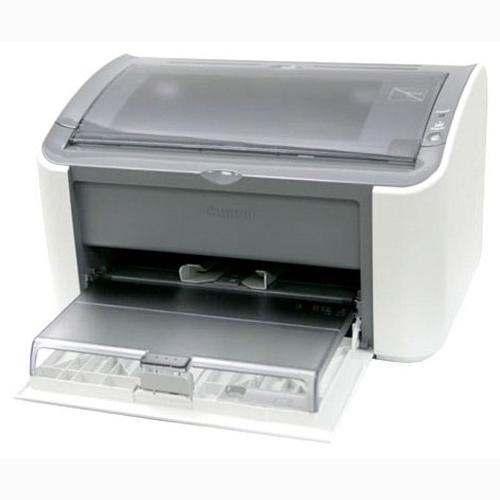
Принтер не оснащен дисплеем для индикации состояния, поэтому все сообщения будут отображаться на мониторе компьютера в окне состояния.
Коды ошибок:
E000 – короткое замыкание на термисторе,либо проблема с тепловым предохранителем
E100 – проблема блока лазерного сканера
E197 – ошибка связи с двигателем (engine controller PCB)
E747 – ошибка памяти видео контроллера (video controller PCB)
Posted by Anonymous on Mar 26, 2012
3 Answers
Durgesh
An expert who has achieved level 1.
An expert that has 1 follower.
An expert whose answer got voted for 2 times.
Aser scanner unit error.
Turn off the printer, and then turn it on again. If the same error occurs, turn off the printer, then contact the store you purchased the printer, or a service representative. When contacting the service representative, inform them of the error code displayed and symptoms.
Error Code: E100 0000
Posted on Sep 13, 2013
John Smith
An expert who has achieved level 2 by getting 100 points
An expert that got 5 achievements.
Visited the website for 3 consecutive days.
An expert that has 1 follower.
Hi, you need to contact printer Experts. you can call toll free phone number – 877-690-9305
Posted on Mar 28, 2018
vamsikrishna
An expert who has achieved level 1.
An expert that has 1 follower.
Aser scanner unit error.
Turn off the printer, and then turn it on again. If the same error occurs, turn off the printer, then contact the store you purchased the printer, or a service representative. When contacting the service representative, inform them of the error code displayed and symptoms.
Error Code: E100 0000
Posted on May 15, 2014
2 Suggested Answers
6ya staff
- 2 Answers
Hi there,
Save hours of searching online or wasting money on unnecessary repairs by talking to a 6YA Expert who can help you resolve this issue over the phone in a minute or two.
Best thing about this new service is that you are never placed on hold and get to talk to real repairmen in the US.

Instant Repair Help over the Phone
Save Time & Money by instantly connecting to.
Posted on Jan 02, 2017
Gunter
- 112 Answers
Hi, Your laser unit is faulty. Its more cost-effective to buy new printer. Having it repaired will cost about same as a new one. If still under warranty then just return and have it replaced.
Regards,
Posted on Jul 29, 2011
Add Your Answer
Tips for a great answer:
- – Answer the question.
- – If you need clarification, ask it in the comment box above.
- – Better answers use proper spelling and grammar.
- – Provide details, support with references or personal experience.
Draw a box over the problem!!
Attachments: Added items
Complete. Click «Add» to insert your video. Add

Laser scanner unit error. Turn off the printer,then contact the store you purchased the printer inform them of the error code displayed and symptoms. Error Code: E100 0000
My cannon LBP2900B laser printer shows error E1000000 and not printing at all please help.
Show error 52.00
Note this a not something users can repair themselves. It is a fault with scanning motor. may need motor or whole scanning assembly to be replaced. Only service centre can perform this.
52.XY PRINTER ERROR For help press? alternates with 52.XY PRINTER ERROR To continue turn off then on
Description
Action
- Press the (Select) button to continue.
- Turn the printer off and then turn the printer power on.
- If the message persists, contact HP Customer Support.
The laser scanner speed is incorrect. X description: 1 = Scanner startup error 2 = Scanner rotation error.
1. Press GO. The page containing the error will automatically be reprinted. 2. Turn the printer off and then on. 3. Reseat cables to the laser/ scanner and engine controller. 4. Replace the laser/scanner. HP LaserJet 4200 and 4300 Series Printers Numerical Error Messages
Error Code: E100 0000
Cannon printer error 100000
Error code E#100, ERR 100 or E100-0000 is a laser scanner unit error.
Solution 1:
- Turn off the printer, wait 10 minutes, and then turn it on again.
Solution 2:
- Flip open the top of the printer.
- Look for a small shutter that holds the laser: carefully force this open with your hands and force the laser out into the center of the tracking cradle.
- After you move the laser, unplug the printer for a few minutes.
- Plug the printer back in.
Solution 3:
- If the same error occurs, it’s necessary to contact a service representative.
Fix your printer
Laser scanner unit error. Turn off the printer, and then turn it on again. If the same error occurs, turn off the printer, then contact the store you purchased the printer, or a service representative.
Solution 1:
- Turn off the printer, wait 10 minutes, and then turn it on again.
Solution 2:
- Flip open the top of the printer.
- Look for a small shutter that holds the laser: carefully force this open with your hands and force the laser out into the center of the tracking cradle.
- After you move the laser, unplug the printer for a few minutes.
- Plug the printer back in.
Solution 3:
If the same error occurs, it’s necessary to contact a service representative
Error Code: E100 0000
Error code E#100, ERR 100 or E100-0000 is a laser scanner unit error.
Solution 1:
Turn off the printer, wait 10 minutes, and then turn it on again.
Solution 2:
Flip open the top of the printer.
Look for a small shutter that holds the laser: carefully force this open with your hands and force the laser out into the center of the tracking cradle.
After you move the laser, unplug the printer for a few minutes.
Plug the printer back in.
Solution 3:
If the same error occurs, it’s necessary to contact a service representative.
Возможные причины ограничения доступа:
Доступ ограничен по решению суда или по иным основаниям, установленным законодательством Российской Федерации.
Сетевой адрес, позволяющий идентифицировать сайт в сети «Интернет», включен в Единый Реестр доменных имен, указателей страниц сайтов сети «Интернет» и сетевых адресов, позволяющих идентифицировать сайты в сети «Интернет», содержащие информацию, распространение которой в Российской Федерации запрещено.
Сетевой адрес, позволяющий идентифицировать сайт в сети «Интернет», включен в Реестр доменных имен, указателей страниц сайтов в сети «Интернет» и сетевых адресов, позволяющих идентифицировать сайты в сети «Интернет», содержащие информацию, распространяемую с нарушением исключительных прав.
Современные компьютеры, а также периферийные устройства оснащены средствами для самодиагностики. В случае появления неисправности на одном из узлов устройства (в нашем случае принтера), пользователь получит ошибку с определенным кодом. В этой статье не приведены все ошибки, которые могут возникать у пользователей при работе с принтерами Canon.
Рассмотрим только основные ошибки и способы их устранения. Большинство других ошибок (которых здесь нет) указывают на неисправность самой платы. Поэтому дополнительную информацию следует искать на сайте производителя или в сервисном центре.

Ошибки принтеров Canon и их решение
В следующей таблице представлены два кода каждой ошибки: первый появляется на мини-дисплее принтера, второй — на экране монитора. Если приведенное решение неэффективно, следует обратиться в сервисный центр для дальнейшей диагностики. Не пытайтесь самостоятельно отремонтировать принтер при серьезной поломке, если вы не имеете опыта и не уверены в своих силах. Гораздо дешевле будет обратиться в сервис.

Приведенная ниже информация актуальна для принтеров Canon MP240, MP250, MP260, MP270, MP280, MG2140, MG2240, MG3140, MG3240.
|
Ошибка на мини-дисплее |
Ошибка драйвера |
Значение |
||
|
E02 |
1000 |
Лоток для бумаги пуст. В некоторых случаях появляется даже когда бумага есть в лотке. Решается добавлением дополнительного количества бумаги. Ошибка также может появиться при использовании слишком тонкой бумаги. |
||
|
E03 |
1300 |
Бумага была замята. Необходимо открыть принтер и извлечь замятый лист. |
||
|
E04 |
1687 |
Установлен неизвестный картридж или невозможно распознать установленный картридж по неизвестным причинам. Ошибка может быть связана с неисправностью картриджа, а также может появляться при установке неоригинального некачественного аналога. |
||
|
E05 |
1485, 1401, 1403 |
Картридж не установлен, картридж перегревается, неисправность картриджа. Проверьте наличие картриджа в принтере и наличие в нем чернил. В случае неисправности картриджа замените его на новый. |
||
|
E08 |
1700 |
Переполнен памперс устройства. Необходимо произвести замену памперса. Решается сливом отсека для отработанных чернил и сбросом счетчика. Как сбросить памперс устройства читайте ниже. |
||
|
P22 |
5010 |
Сбои в работе сканера. |
||
|
P20 |
6500 |
Ошибка в аппаратном обеспечении. Не удалось определить причину неисправности. |
||
|
P15 |
9000 |
Перезагрузка по току USB-порта. |
||
|
P10 |
B200 |
Невозможно контролировать питание картриджа. Может быть связано с неисправностью картриджа или его шлейфа. |
||
|
P09 |
6800, 6801 |
Ошибка EEPROM |
||
|
P08 |
5200 |
Картридж перегревается во время работы. Так как черно-белая печать в большинстве принтеров Canon осуществляется с использованием и черно-белого, и цветного картриджа, в случае отсутствия чернил в одном из них, печать будет невозможно. Чаще всего подвержены аппараты, которые используются в качестве ксерокса. Ошибка появляется при отсутствии чернил в цветном (реже в черно-белом) картридже. |
||
|
P07 |
5B00, 5B01 |
Переполнен памперс устройства. Необходимо произвести замену памперса. Решается сливом отсека для отработки и сбросом счетчика. Как сбросить памперс устройства читайте ниже. |
||
|
P06 |
5400 |
Перегрев принтера во время работы. Появляется в случае использования принтера на протяжении длительного времени, реже в случае его неисправности. Отключите принтер на некоторое время. В случае многократного появления ошибки даже после отключения принтера, отнесите устройство в сервисный центр. |
||
|
P03 |
6000 |
Невозможно захватить бумагу. Возможно лоток пуст или используется слишком тонкая бумага. Для устранения неисправности добавьте в лоток больше бумаги. |
||
|
P02 |
5100 |
Не перемещается каретка устройства. Может быть связана с преградой на пути каретки или с ее неисправностью. |
||
|
E16 |
Появляется в принтерах и МФУ после замены картриджа на новый, а также после покупки нового устройства. Ошибка связана с тем, что контроллер не может определить количество краски в картридже. Для решения проблемы просто отключите контроллер (слежение за количеством краски в картридже будет отключено). Для этого, нажмите и удерживайте кнопку «STOP» в течение 5-10 сек. |
Сброс памперса на принтерах Canon
При появлении ошибок 5200, 5B00, 5B01 и 1700 может понадобиться сброс памперса. Для сброса необходимо выполнить следующую последовательность действий:
- Отключите принтер.
- Нажмите кнопку «STOP/RESET» и удерживайте ее.
- Не отпуская кнопку «STOP/RESET», включите принтер кнопкой «POWER».
- Не отпуская кнопку «POWER» дождитесь активации светодиодного индикатора и дважды нажмите кнопку «STOP/RESET».
- Отпустите кнопку «POWER».
- Отпустите кнопку «STOP/RESET». То, что диод горит зеленым, свидетельствует о том, что принтер перешел в режим сервисного обслуживания.
- Нажмите кнопку «STOP/RESET» четыре раза.
- Отключите принтер.

Этот метод позволяет устранить ошибки 5200, 5B00, 5B01 и 1700. После осуществления вышеуказанных действий ошибки не должны появляться вновь. Способ действенен также на принтере Canon MP490, но не подходит для Canon Pixma IP2700.
Более радикальный метод
Подойдет для тех, кто использует принтер только для черно-белой печати. Если проблема перенагрева связана с постоянной выработкой чернил в цветном картридже, сделайте следующее:
- Отключите принтер и извлеките цветной картридж.
- Отклейте наклейку на его верхней части.
- Если круглые отверстия запаяны, просверлите их.
- Наберите в шприц дистиллированной воды.
- Используя шприц, заправьте водой каждое из трех отверстий.
- О том, что картридж полностью заправлен будет свидетельствовать, что вода начнет просачиваться через сопла. Протрите сопла при помощи салфетки.
- Вставьте картридж на место.
- Выполните сброс памперса, как было описано выше.
- Теперь картридж не будет перегреваться, а принтер можно будет использовать только для черно-белой печати.
- Если ошибка появляется даже после этой процедуры, придется заменить картридж или даже само устройство на новые.

Устранение ошибки 5100
Как уже упоминалось выше, данная ошибка связана с тем, что каретка не может свободно перемещаться по направляющим. Для устранения проблемы сделайте следующее:
- Отключите принтер и откройте его.
- При хорошем освещении проверьте нет ли каких-то явных препятствий на пути каретки (шлейф СНПЧ, скрепки или бумага).
- Если каретка не может перемещаться из-за засохших чернил, используя мягкую тряпочку и мыльную воду, устраните их. Ни в коем случае не применяйте спирт или что-то подобное.
- Попробуйте переместить каретку рукой сначала в одну сторону, а потом в другую. Обращайте внимание на те места, где каретка не двигается или двигается неравномерно.
Еще одна причина возникновения этой ошибки — загрязнения или дефект ленты энкодера, которая отвечает за правильность позиционирования каретки. В случае необходимости протрите ленту от остатков чернил. Если лента неисправна, замените ее.

Кроме того, если смазка в парковочном узле загрязнена чернилами, пылью и грязью, каретка не сможет стать в крайнее положение. Это одна из причин почему может появляться ошибка 5100. Для устранение неисправности замените смазку.
Устранение ошибки B200
Данная ошибка появляется только в принтерах, которые имеют печатающую головку. Вот лишь несколько причин, которые приводят к появлению ошибки B200:
- Неисправность блока питания. Проверьте, исправен ли блок питания принтера. Если при осмотре увидите вздутые конденсаторы его следует заменить. Также проверьте напряжение на выходе. Для этого:
- отключите принтер;
- извлеките печатающую головку;
- включите принтер;
- в этот момент (пол секунды) напряжение должно быть 24-32 В.
- Неисправность платы управления. Если блок питания исправен, необходимо проверить работу платы управления. Удалите печатающую головку и включите принтер. Появляется ли ошибка B200? Если ответ утвердительный, неисправна плата управления, а возможно также и головка. Ремонтировать принтер в таких случаях нерентабельно. Будет дешевле приобрести новое устройство.

- Неисправность печатающей головки. Как и в предыдущем случае, извлеките головку из принтера. Исчезла ли ошибка B200? Если ошибка не появляется, попробуйте произвести очистку печатающей головки:
- Дождитесь появления ошибки B200.
- Отключите принтер и откройте крышку.
- Передвиньте каретку в крайнее левое положение.
- Нажмите кнопку включения 5 раз (при этом не ждите пока устройство полностью включится).
- После последнего нажатия, закройте крышку.
- Дождитесь окончания очистки печатающей головки.
Если очистка не помогла, МФУ можно будет использовать как сканер или печатать каким-то одним цветом. Это может быть черно-белая печать.
Chapter 15
[ Inspected by Canon Inc. ]
Description
Since the error code «E674-0001» was indicated and the FAX function did not work, the main controller PCB (main) was replaced with a new one for solution.
— E674-0001 can be displayed when a communication error between FAX PCB and the main controller PCB (main) is detected in the prescribed number of
times.
Cause
Since the main controller PCB (main) was faulty, it failed to communicate with the FAX PCB, causing the error code.
Field Remedy
1. Re-fit all the connectors of the FAX board.
2. Re-fit all the connectors of the main controller PCB (main)
3. If the symptom still occurs, replace the main controller PCB (main) with a new one.
4. If the symptom still occurs, replace the FAX PCB with a new one.
FM2-9163 Main Controller PCB Assembly
Color iR C3380G / Color iR C2880G / Color iR C3380i / Color iR C3380 / Color iR C2880i / Color iR C2880 / iR C3480 / iR C3480i / iR C3080i / iR C2550
[ Inspected by Canon Inc. ]
Description
Since the error code «E350/0000/E732-0001/E747-051B/E747-DF00/E748-4000» was displayed at start-up, the SJ-A board was re-fitted for solution.
— E732-0001 can be displayed when the DDI-S communication error occurs.
— E747-051B can be displayed when an error occurred within the Main Controller PCB (main).
— E747-DF00 can be displayed when unmounting of the Main Controller PCB (sub SJ-A) is detected.
— E748-4000 can be displayed when any ASIC of the Main Controller PCB (Sub SJ/PE/R) or ASIC of the open interface PCB is not detected.
Field Remedy
1. Re-fit the Sub SJ-A board.
2. Wipe the connector of the Sub SJ-A board with lint-free paper impregnated with alcohol, and then re-fit the board.
Note: When refitting the board, insert it as far as it will go and then tighten the screw further away from the Main Controller PCB, first.
15.3.7.33 E732-0001/E811-0001 occurs upon installation: Connector J254 hs poor contact
Color iR C3380G / Color iR C2880G / Color iR C3380i / Color iR C3380 / Color iR C2880i / Color iR C2880 / iR C3480 / iR C3480i / iR C3080i / iR C2550
[ Inspected by Canon Inc. ]
Description
Since J254 connector of the Controller Power Supply PCB had poor contact, the error code «E732-0001/E811-0001» was displayed.
— E732-0001 can be displayed when the DDI-S communication error occurs.
— E811-0001 can be displayed when an error in blowout of the fuse for detection of a new drum unit (process cartridge) is detected.
Field Remedy
Re-fit J254 connector of the Controller Power Supply PCB.
15.3.7.34 E732-9999 is displayed after mounting scanner
Color iR C3380G / Color iR C2880G / Color iR C3380i / Color iR C3380 / Color iR C2880i / Color iR C2880 / iR C3480 / iR C3480i / iR C3080i / iR C2550
[ Manual-related ]
Description
The code «E732-9999» is not an error code. This is displayed when a printer model first detects a scanner.
Field Remedy
When this code is displayed, turn the main power switch OFF/ON.
15.3.7.35 E747/E748: Procedure for mounting Sub when poor contact occurs
Color iR C3380G / Color iR C2880G / Color iR C3380i / Color iR C3380 / Color iR C2880i / Color iR C2880 / iR C3480 / iR C3480i / iR C3080i / iR C2550
[ Manual-related ]
Description
Depending on the mounting condition of a Sub PCB to the Controller PCB, the terminal of the Sub PCB has poor contact, causing the error code «E747» or
«E748.»
Field Remedy
When re-fitting a Sub PCB to the Controller PCB, or when replacing a Sub PCB, perform the work by referring to the attached «E747/748: How to Modify
Connection of the Sub PCBs to the Controller Box.»
15.3.7.36 E747-C000 is displayed at copying because paper jam occurs in front of registration area: DDI-S cable is faulty
Color iR C3380G / Color iR C2880G / Color iR C3380i / Color iR C3380 / Color iR C2880i / Color iR C2880 / iR C3480 / iR C3480i / iR C3080i / iR C2550
[ Inspected by Canon Inc. ]
Description
At time of copying, a paper jam occurred in front of the registration area, consequently causing the error code «E747-C000.» To solve this, the DDI-S cable
was replaced with a new one.
— E747-C000 can be displayed when an error occurs in communication with the main controller PCB (sub SJ).
Cause
Since the DDI-S cable was faulty, the image data scanned by the reader was input to the printer in a state in which it was corrupted. This prevented this
machine from processing the data correctly, making the paper stop in front of the registration area.
Field Remedy
1. Re-fit the DDI-S cable.
2. If the symptom still occurs, re-fit the main controller PCB (sub SJ-A).
3. If the symptom still occurs, re-fit J502 connector of the reader controller PCB.
4. If the symptom still occurs, replace the DDI-S cable with a new one.
15-52
0016-3308
0016-3883
0016-3958
0016-2980
0018-0628
 Likes: 0
 Dislikes: 0
-
05-10-2010
#1

Senior Tech
100+ Posts


- Rep Power
- 0


 Error Code E747 on IRC2380i
Hi All,
Bit of a wierd one.
Getting E747 with loads of different sub codes. 4214, 221D, 2219, 4215, 4219, 221D, 2219, 0E08
Very annoying as the errors are a almost month apart. I have tried changing the 2 SUB boards and the main controller but they keep coming back!!!!! GRRRR!!!
Thinking of trying a new hard drive but can’t see how that would be connected. It has been doing this since install?? Have raised with Canon but as per they are as useful as a concrete dinghy.
It doesn’t seem to be when they are doing anything in particular i.e. scanning or faxing or whatever…..
Anyone seen this before?
Ta.
-
05-10-2010
#2
Check all boards on the main controller make sure that they are seated well.
-
05-10-2010
#3
Senior Tech
100+ Posts
- Rep Power
- 0
Thanks Screwtape. This was the first port of call. Also found a UFO on the Canon site relating to this error being something to do with the fixing wiring loom. Checked this out though and its ok.
It’s more an annoyance than anything. When the error occurs, if you re-boot the machine it will then be fine for another month or so. It’s totally random. Was just wondering if anyone else has seen this before….
-
05-10-2010
#4
Those subcodes all point to your RAM being maxed out. I would replace the factory DIMM and see what kind of results you get and possibly put the extra stick of RAM in. It is a 512 MB expansion RAM C1
Accidents don’t just happen. They must be carelessly planned.
-
05-10-2010
#5
 Originally Posted by Iommanxman

Hi All,
Bit of a wierd one.
Getting E747 with loads of different sub codes. 4214, 221D, 2219, 4215, 4219, 221D, 2219, 0E08
Very annoying as the errors are a almost month apart. I have tried changing the 2 SUB boards and the main controller but they keep coming back!!!!! GRRRR!!!
Thinking of trying a new hard drive but can’t see how that would be connected. It has been doing this since install?? Have raised with Canon but as per they are as useful as a concrete dinghy.
It doesn’t seem to be when they are doing anything in particular i.e. scanning or faxing or whatever…..
Anyone seen this before?
Ta.
iRC2380I- standard 1.5Gb
memory
u can update printer kit from 256MB to 512MB
numerous/various = E747 Codes = memory issue/ examine-replace or upgrade.what type of jobs are u running on it ???
**Knowledge is time consuming, exhausting and costly for a trained Tech.**

-
05-11-2010
#6
Part# for dimms
FM2-6209-000-DIMM, SMD-1G48NP-D, 1GB SDRAM
FM2-6208-000-DIMM,DD4333-S512MDJ-CA,SD-RAM
-
05-11-2010
#7
Senior Tech
100+ Posts
- Rep Power
- 0
Thanks Guys,
Had not thought about RAM being the cause I will look at upgrading the RAM from 256MB to 512MB on the printer kit.
And Teckat it is just a standard office printer so Word, Outlook, Excel documents, the odd PDF etc, nothing special.
Thanks again guys. Will let you know the outcome.
-
05-11-2010
#8
I fought 747’s on a iRC5185, that only occurred when the ecopy SSOP was being used. You could scan to copy, mailbox all day long with no problems. I tried every board imaginable, as well as the hard drive. Final resolution was to set scanning mode on server to 200 d.p.i. B/W. No problems since then…
-
05-11-2010
#9
depending on some companies network setups eCopy on 5180’s, can be a nightmare
**Knowledge is time consuming, exhausting and costly for a trained Tech.**
Tags for this Thread
2380i,
747,
annoying,
b/w,
back,
canon,
changing,
code,
codes,
connected,
controller,
drive,
error,
errors,
faxing,
hard drive,
hi all,
install,
irc,
main,
nec,
occurred,
replace,
roller,
scan,
scanning,
sea,
setups,
stall,
wierd

View Tag Cloud
Bookmarks
Bookmarks

Posting Permissions
- You may not post new threads
- You may not post replies
- You may not post attachments
- You may not edit your posts
- BB code is On
- Smilies are On
- [IMG] code is On
- [VIDEO] code is On
- HTML code is Off
Forum Rules