Ошибка 404, либо Error 404 Not Found — ошибка, которая появляется, если браузеру не удалось обнаружить на сервере указанный URL.
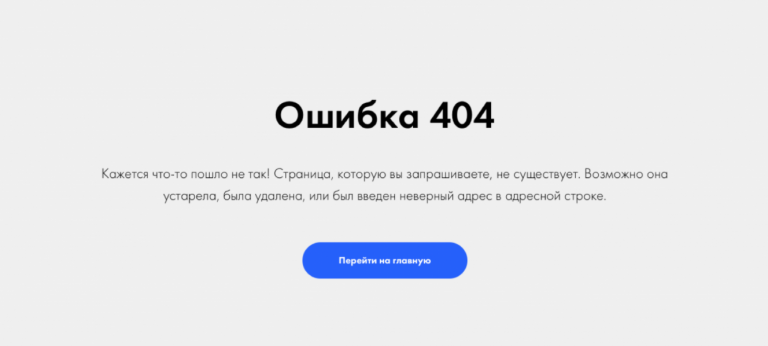
Сообщение об ошибке 404
Что означает ответ 404
Error 404 Not Found отображается по-разному: «HTTP 404 не найден», «Ошибка 404 Not Found», «404 Страница не найдена». Смысл надписи всегда остаётся тем же: страница отсутствует либо просто не работает. Not Found в переводе означает «не найдено».
Ошибка 404 — классический код ответа по протоколу HTTP. Он свидетельствует, что связь с сервером установлена, но информации по заданному запросу нет.
Однако если просто ввести в поисковую строку произвольный набор символов, то браузер не покажет ошибку 404 Not Found — появится сообщение, что установить соединение с конкретным сервером невозможно.
Разберёмся в техническом формировании ответа Error 404 Not Found.
Техническая сторона вопроса. При связи по HTTP браузер запрашивает указанный URL и ждёт цифрового ответа. То есть любой запрос пользователя направляется на сервер размещения искомого сайта. Когда браузеру удаётся связаться с сервером, он получает кодированный ответ. Если запрос корректный и страница найдена, отправляется ответ с кодом 200 OK, что соответствует благополучной загрузке. При отсутствии страницы отправляется ответ об ошибке.
Что значит код «404». В ответе 404 первая четвёрка указывает на то, что запрос был чрезмерно длительным или в самом адресе была ошибка. Ноль предполагает синтаксическую неточность. Завершающая цифра кода отображает конкретную причину ошибки — «4» означает отсутствие данной ссылки.
Какие ещё ошибки бывают. Ошибку 404 не нужно путать с другими ответами, которые указывают на невозможность связи с сервером. Например, ошибка 403 сообщает, что доступ к URL ограничен, а ответ «Сервер не найден» свидетельствует, что браузер не смог обнаружить место размещения сайта.
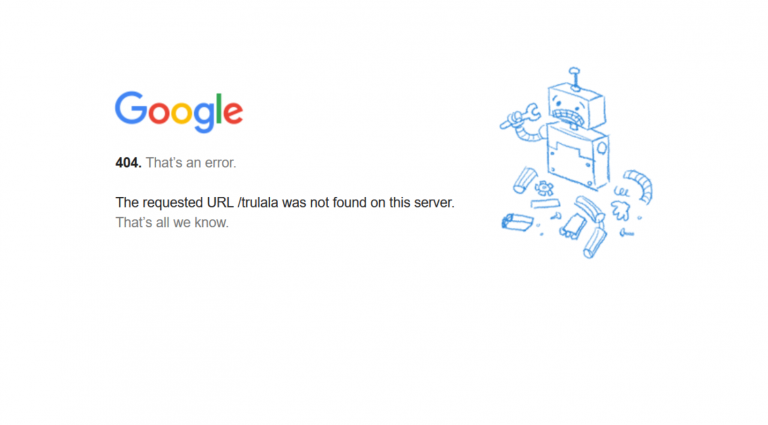
Google на 404 странице сообщает о возможных причинах ошибки
Причины ошибки
Причины, по которым HTTP возвращает ответ 404 Not Found:
- Неверный адрес. К примеру, при ручном наборе пользователь допустил опечатку в URL либо ссылка ведёт на несуществующую страницу.
- Битая ссылка. Это нерабочий URL, который никуда не ведёт. Данный вариант иногда возникает при внутренней перелинковке. К примеру, раньше страница существовала, а потом её удалили и забыли убрать ссылку.
- Удалённая страница. Когда пользователь попытается перейти на удалённую с сервера страницу, он также увидит ошибку 404. Ссылка для перехода может сохраниться в браузерных закладках или на сторонних ресурсах.
- Неправильный редирект на страницу с изменённым адресом. Допустим, в процессе редизайна URL изменили, но оставили без внимания связанные ссылки.
- Неполадки на сервере. Это самый редкий вариант.
В большинстве ситуаций ошибка 404 отображается, когда не удаётся обнаружить нужную страницу на доступном сервере.
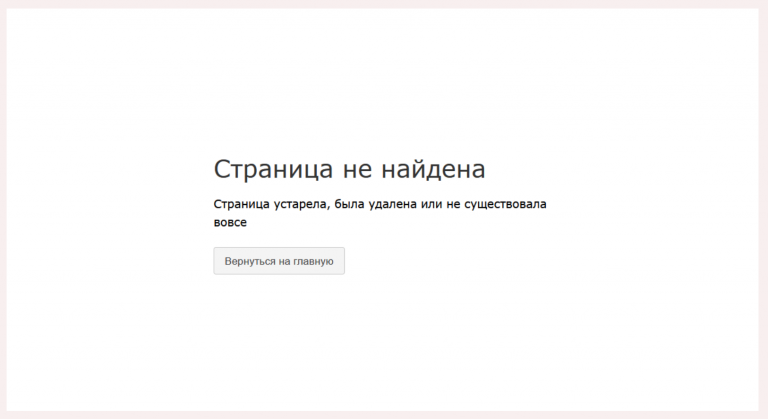
Причины отсутствия страницы на сайте бывают разными
Возможные последствия для сайта
Нужно ли считать 404 ошибку опасной для сайтов? Кажется, что нет ничего плохого в том, что пользователь не смог открыть одну веб-страницу. Однако если такая ситуация будет повторяться регулярно, это чревато оттоком аудитории. Одни пользователи решат, что сайт вовсе не существует. Другие подумают, что лучше не заходить на сайт, который работает с ошибками. Третьи будут игнорировать ресурс, на котором не смогли получить обещанную информацию.
Поисковые системы относятся к Not Found более лояльно. Например, Google отмечает, что 404 страницы не влияют на рейтинг. Но если при индексации роботы будут находить все больше ошибочных страниц, вряд ли это приведёт к более высокому ранжированию.
Если вы хотите улучшить взаимодействие с посетителями, важно найти и исправить все ошибки 404 на сайте.
Как выявить ошибку
На небольшом ресурсе легко проверить работоспособность ссылок вручную. Но если на сайте сотни и тысячи страниц, без дополнительного софта не обойтись. Есть немало сервисов и программ, позволяющих находить битые ссылки. Рассмотрим некоторые из них.
Search Console Google
Консоль поиска Google позволяет находить страницы с ошибкой 404 за несколько кликов:
- Войдите в учётную запись Google и перейдите в Search Console.
- Откройте раздел «Ошибки сканирования» → «Диагностика».
- Кликните на «Not Found».
Чтобы получить список страниц с ошибками, подтвердите права на ресурс — добавьте проверочную запись TXT в записи DNS регистратора домена. Такая запись не повлияет на работу сайта. Подробнее о процедуре подтверждения, читайте в справке Google.
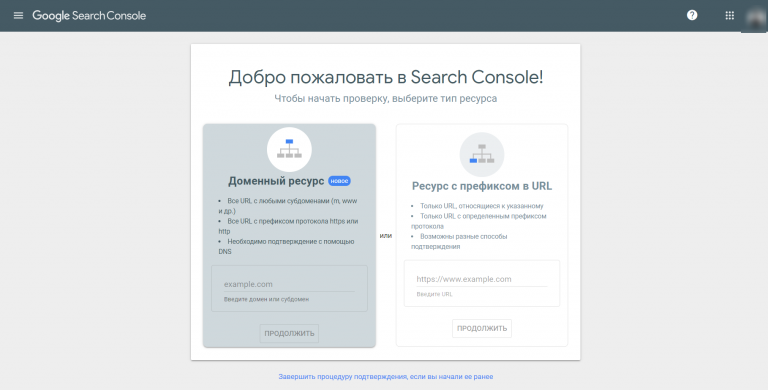
Для использования Search Console Google нужно подтвердить свои права на сайт
Яндекс Вебмастер
Сервис для вебмастеров от Яндекса поможет быстро найти все ошибки 404:
- Откройте Вебмастер после авторизации в Яндекс-аккаунте.
- Выберите «Индексирование» → «Доступные для поиска страницы» → «Исключённые страницы».
- В выданном списке выберите фильтр «Ошибка HTTP: 404».
Чтобы использовать Яндекс.Вебмастер, также нужно подтвердить право владения сайтом — добавить метатег в HTML-код главной страницы.
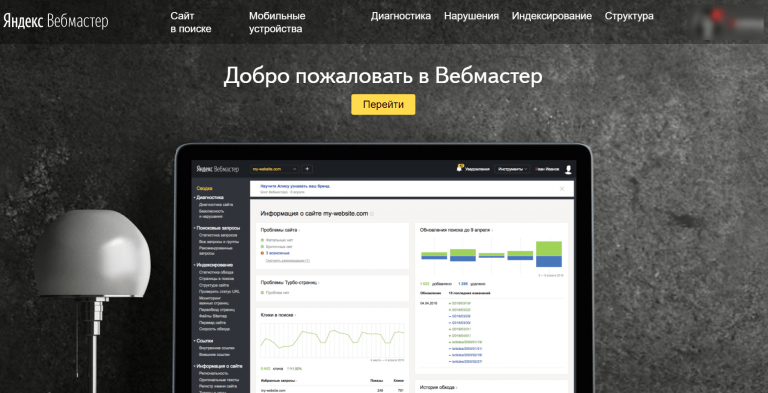
Для входа в Вебмастер авторизуйтесь в Яндексе
Screaming Frog
Для начала загрузите и установите программу на компьютер. После запуска добавьте URL проверяемого сайта и начните поиск проблем. Неработающие ссылки можно искать даже в бесплатной версии.
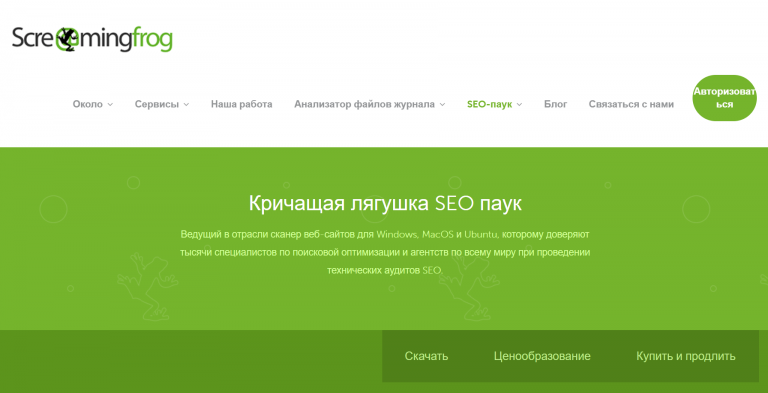
Инструмент SEO-паук в Screaming Frog помогает найти технические неисправности сайта
SiteAnalyzer
Эта бесплатная десктопная программа позволяет обнаружить технические погрешности на сайте. SiteAnalyzer быстро отыщет нерабочие и несуществующие ссылки.
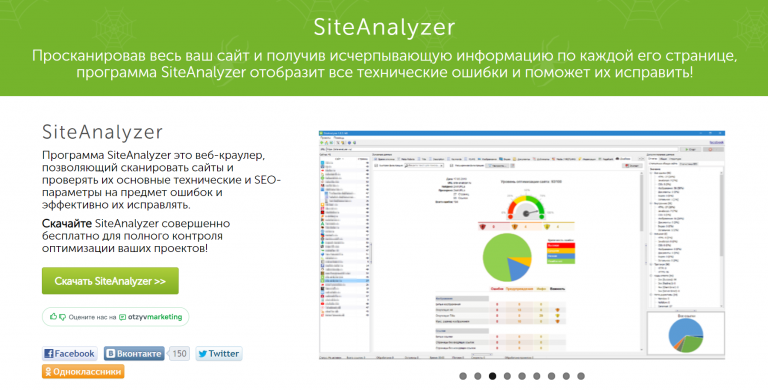
SiteAnalyzer бесплатно найдёт неработающие URL
Как исправить ошибку Not Found
Выбор конкретного решения зависит от причины ошибки:
- Ссылка ведёт в никуда из-за неверного URL. Для решения проблемы замените ошибочную ссылку на правильный адрес, чтобы сервер отдавал код 200 OK.
- Битая ссылка. Подобная ситуация не редкость при внутренней перелинковке страниц. К примеру, ссылка есть, а саму страницу давно удалили. Решений два: удалить ссылку или заменить её на другую.
Удалять и менять ссылки вручную удобно только на небольших сайтах. Исправление ошибок на крупных порталах лучше автоматизировать. Например, с помощью специальных плагинов для внутренней перелинковки (Terms Description, Dagon Design Sitemap Generator) и для автоматического формирования адресов страниц (Cyr-To-Lat).
Чтобы ошибки 404 появлялись как можно реже, достаточно соблюдать простые рекомендации:
- Не присваивайте сложные адреса основным разделам сайта. Это снизит число ошибок, связанных с опечатками в URL.
- Не меняйте адреса страниц слишком часто. Это неудобно для пользователей и вводит в заблуждение поисковых роботов.
- Размещайте сайт на надёжном сервере. Это предотвратит ошибки, возникающие из-за неработоспособности сервера.
Мы разобрались, как найти и исправить ошибки Not Found внутри сайта. Но неработающая ссылка может быть расположена и на стороннем ресурсе. Допустим, когда-то на другом сайте разместили рекламную публикацию со ссылкой на определённую страницу. Спустя какое-то время страницу удалили. В этом случае появится ошибка 404. Устранить её можно, связавшись с администрацией ссылающегося сайта. Если же удалить/исправить ссылку нельзя, постарайтесь использовать ошибку с выгодой.
Как сделать страницу 404 полезной
Грамотно оформленная страница с ошибкой Error 404 Not Found — действенный инструмент конвертации посетителей. Ограничений по использованию страницы с ошибкой 404 нет. При этом практически все CMS позволяют настраивать дизайн этой страницы.
Что публиковать на странице 404:
- меню с кликабельными ссылками;
- ссылку на главную страницу;
- анонс последних публикаций;
- контакты для обратной связи.
При оформлении страницы-ошибки желательно опираться на рекомендации поисковиков:
- Яндекс настоятельно рекомендует, чтобы страница контрастировала с основным содержанием сайта — иные цвета, другие графические приёмы либо их отсутствие. Необходимо чётко и понятно объяснить пользователю, что запрошенной страницы не существует и предложить другое решение.
- Google советует придерживаться единого стиля оформления. Но также рекомендует понятно рассказать об ошибке и предложить полезные материалы.
Главное — по возможности отказаться от стандартной страницы 404. Подумайте, как привлечь внимание пользователя. Расскажите ему об отсутствии искомой страницы и предложите взамен что-то полезное или интересное.
Примеры оформления страниц 404
Designzillas
Мультяшная страница креативной студии привлекает внимание и её хочется досмотреть до конца. Если прокрутить страницу, можно увидеть, как из яйца вылупится дракон. При этом на странице есть ссылки на все основные разделы сайта.

Меню на сайте Designzillas есть и на 404 странице
Domenart Studio
Веб-студия «Домен АРТ» использует красочную страницу 404, оформленную в единой стилистике ресурса. Заблудившимся пользователям предлагают попробовать ещё раз ввести адрес или перейти в нужный раздел.
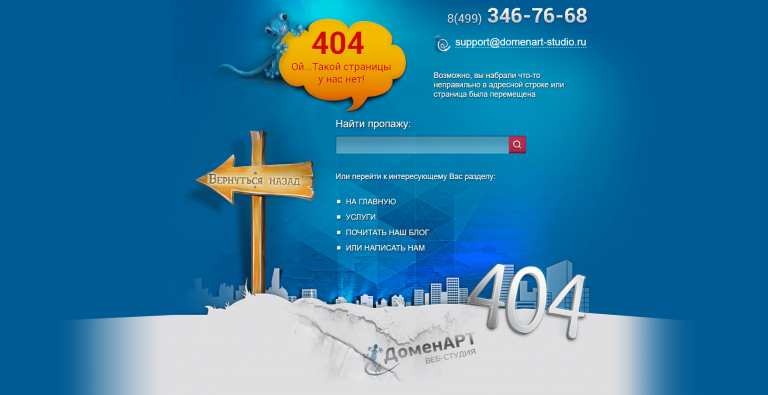
Контакты, поиск, меню — и всё это на 404 странице Domenart Studio
E-co
«Эко Пауэр», дистрибьютор производителя источников питания, демонстрирует короткое замыкание как символ ошибки. Посетителям предлагают перейти на главную.

Ошибка 404 «Эко Пауэр» выглядит как страница входа
Дом со всем
Компания «Дом со всем», занимающаяся бурением скважин, разместила на странице 404 свои контакты и перечень услуг. Со страницы можно перейти в любой раздел сайта или заказать обратный звонок. С таким наполнением посетителю не нужно искать дополнительную информацию где-то ещё.
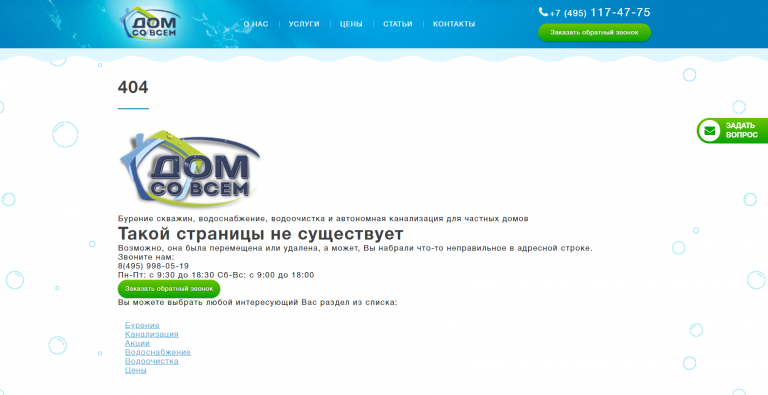
Компания «Дом со всем» предлагает заказать обратный звонок
Kualo
Страница 404 на веб-хостинге Kualo может заставить пользователя забыть, зачем он сюда пришёл. Увлекательная игра притягивает внимание. В конце игры посетителю предлагают посмотреть сайт хостинга.
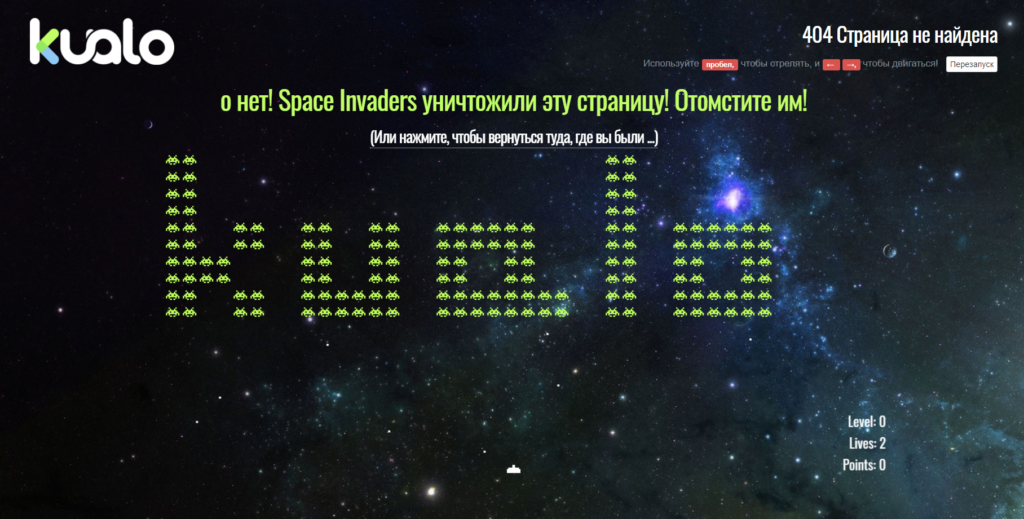
На странице Kualo можно просто поиграть и заработать скидки
Рано или поздно с ошибкой 404 сталкивается большинство сайтов. При регулярной проверке можно своевременно исправить неработающие ссылки, чтобы в ответ пользователи получали код 200 OK. Но для крупного ресурса лучше настроить оригинальную страницу, которая будет отображаться при появлении ошибки Not Found и подскажет посетителям, что делать дальше.
Главные мысли

From Wikipedia, the free encyclopedia
In computer network communications, the HTTP 404, 404 not found, 404, 404 error, page not found or file not found error message is a hypertext transfer protocol (HTTP) standard response code, to indicate that the browser was able to communicate with a given server, but the server could not find what was requested. The error may also be used when a server does not wish to disclose whether it has the requested information.[1]
The website hosting server will typically generate a «404 Not Found» web page when a user attempts to follow a broken or dead link; hence the 404 error is one of the most recognizable errors encountered on the World Wide Web.

English Wikipedia’s 404 Page
Overview
When communicating via HTTP, a server is required to respond to a request, such as a web browser request for a web page, with a numeric response code and an optional, mandatory, or disallowed (based upon the status code) message. In code 404, the first digit indicates a client error, such as a mistyped Uniform Resource Locator (URL). The following two digits indicate the specific error encountered. HTTP’s use of three-digit codes is similar to the use of such codes in earlier protocols such as FTP and NNTP. At the HTTP level, a 404 response code is followed by a human-readable «reason phrase». The HTTP specification suggests the phrase «Not Found»[1] and many web servers by default issue an HTML page that includes both the 404 code and the «Not Found» phrase.
A 404 error is often returned when pages have been moved or deleted. In the first case, it is better to employ URL mapping or URL redirection by returning a 301 Moved Permanently response, which can be configured in most server configuration files, or through URL rewriting; in the second case, a 410 Gone should be returned. Because these two options require special server configuration, most websites do not make use of them.
404 errors should not be confused with DNS errors, which appear when the given URL refers to a server name that does not exist. A 404 error indicates that the server itself was found, but that the server was not able to retrieve the requested page.
Soft 404 errors
Some websites report a «not found» error by returning a standard web page with a «200 OK» response code, falsely reporting that the page loaded properly; this is known as a soft 404. The term «soft 404» was introduced in 2004 by Ziv Bar-Yossef et al.[2]
Soft 404s are problematic for automated methods of discovering whether a link is broken. Some search engines, like Yahoo and Google, use automated processes to detect soft 404s.[3] Soft 404s can occur as a result of configuration errors when using certain HTTP server software, for example with the Apache software, when an Error Document 404 (specified in a .htaccess file) is specified as an absolute path (e.g. http://example.com/error.html) rather than a relative path (/error.html).[4] This can also be done on purpose to force some browsers (like Internet Explorer) to display a customized 404 error message rather than replacing what is served with a browser-specific «friendly» error message (in Internet Explorer, this behavior is triggered when a 404 is served and the received HTML is shorter than a certain length, and can be manually disabled by the user).
There are also «soft 3XX» errors where content is returned with a status 200 but comes from a redirected page, such as when missing pages are redirected to the domain root/home page.
Proxy servers
Some proxy servers generate a 404 error when a 500-range error code would be more correct. If the proxy server is unable to satisfy a request for a page because of a problem with the remote host (such as hostname resolution failures or refused TCP connections), this should be described as a 5xx Internal Server Error, but might deliver a 404 instead. This can confuse programs that expect and act on specific responses, as they can no longer easily distinguish between an absent web server and a missing web page on a web server that is present.
Intentional 404s
In July 2004, the UK telecom provider BT Group deployed the Cleanfeed content blocking system, which returns a 404 error to any request for content identified as potentially illegal by the Internet Watch Foundation.[5] Other ISPs return a HTTP 403 «forbidden» error in the same circumstances.[6] The practice of employing fake 404 errors as a means to conceal censorship has also been reported in Thailand[7] and Tunisia.[8] In Tunisia, where censorship was severe before the 2011 revolution, people became aware of the nature of the fake 404 errors and created an imaginary character named «Ammar 404» who represents «the invisible censor».[9]
Microsoft Internet Server 404 substatus error codes
The webserver software developed by Microsoft, Microsoft’s Internet Information Services (IIS), returns a set of substatus codes with its 404 responses. The substatus codes take the form of decimal numbers appended to the 404 status code. The substatus codes are not officially recognized by IANA and are not returned by non-Microsoft servers.
Substatus codes
Microsoft’s IIS 7.0, IIS 7.5, and IIS 8.0 servers define the following HTTP substatus codes to indicate a more specific cause of a 404 error:
- 404.0 – Not found.
- 404.1 – Site Not Found.
- 404.2 – ISAPI or CGI restriction.
- 404.3 – MIME type restriction.
- 404.4 – No handler configured.
- 404.5 – Denied by request filtering configuration.
- 404.6 – Verb denied.
- 404.7 – File extension denied.
- 404.8 – Hidden namespace.
- 404.9 – File attribute hidden.
- 404.10 – Request header too long.
- 404.11 – Request contains double escape sequence.
- 404.12 – Request contains high-bit characters.
- 404.13 – Content length too large.
- 404.14 – Request URL too long.
- 404.15 – Query string too long.
- 404.16 – DAV request sent to the static file handler.
- 404.17 – Dynamic content mapped to the static file handler via a wildcard MIME mapping.
- 404.18 – Query string sequence denied.
- 404.19 – Denied by filtering rule.
- 404.20 – Too Many URL Segments.
Custom error pages
The Wikimedia 404 message
Web servers can typically be configured to display a customised 404 error page, including a more natural description, the parent site’s branding, and sometimes a site map, a search form or 404-page widget. The protocol level phrase, which is hidden from the user, is rarely customized. Internet Explorer, however, will not display custom pages unless they are larger than 512 bytes, opting instead to display a «friendly» error page.[10] Google Chrome included similar functionality, where the 404 is replaced with alternative suggestions generated by Google algorithms, if the page is under 512 bytes in size.[11] Another problem is that if the page does not provide a favicon, and a separate custom 404-page exists, extra traffic and longer loading times will be generated on every page view.[12][13]
Many organizations use 404 error pages as an opportunity to inject humor into what may otherwise be a serious website. For example, Metro UK shows a polar bear on a skateboard, and the web development agency Left Logic has a simple drawing program.[14] During the 2015 UK general election campaign the main political parties all used their 404 pages to either take aim at political opponents or show relevant policies to potential supporters.[15] In Europe, the NotFound project, created by multiple European organizations including Missing Children Europe and Child Focus, encourages site operators to add a snippet of code to serve customized 404 error pages[16] which provide data about missing children.[17]
While many websites send additional information in a 404 error message—such as a link to the homepage of a website or a search box—some also endeavor to find the correct web page the user wanted. Extensions are available for some content management systems (CMSs) to do this.[18]
Tracking 404 errors
A number of tools exist that crawl through a website to find pages that return 404 status codes. These tools can be helpful in finding links that exist within a particular website. The limitation of these tools is that they only find links within one particular website, and ignore 404s resulting from links on other websites. As a result, these tools miss out on 83% of the 404s on websites.[19] One way around this is to find 404 errors by analyzing external links.[20]
One of the most effective ways to discover 404 errors is by using Google Search Console, Google Analytics or crawling software.
Another common method is tracking traffic to 404 pages using log file analysis.[21] This can be useful to understand more about what 404s users reached on the site. Another method of tracking traffic to 404 pages is using JavaScript-based traffic tracking tools.[22]
See also
- Blue screen of death
- Funky caching
- Link rot
- List of HTTP status codes
References
- ^ a b Fielding, R.; Reschke, J. (June 2014). Fielding, R; Reschke, J (eds.). «RFC 7231, HTTP/1.1 Semantics and Content, Section 6.5.4 404 Not Found». ietf.org. doi:10.17487/RFC7231. S2CID 14399078. Retrieved 13 December 2018.
- ^ Ziv Bar-Yossef; Andrei Z. Broder; Ravi Kumar; Andrew Tompkins (2004). Sic Transit Gloria Telae: Towards an Understanding of the Web’s Decay. Proceedings of the 13th International Conference on World Wide Web (WWW). pp. 328–337. doi:10.1145/988672.988716. ISBN 978-1581138443. S2CID 587547.
- ^ «Why is your crawler asking for strange URLs that have never existed on my site?». Yahoo Ysearch Help page. Archived from the original on 15 July 2014. Retrieved 4 September 2013.
- ^ «Farewell to soft 404s». Google Official Blog. Retrieved 20 September 2008.
- ^ «LINX Public Affairs » Cleanfeed: the facts». Publicaffairs.linx.net. 10 September 2004. Archived from the original on 13 May 2011. Retrieved 6 March 2011.
- ^ «DEMON – Error 403». Retrieved 14 June 2012.
- ^ Sambandaraksa, Don (18 February 2009). «The old fake ‘404 Not Found’ routine — Dead link». Bangkok Post. Retrieved 12 September 2010.
- ^ Noman, Helmi (12 September 2008). «Tunisian journalist sues government agency for blocking Facebook, claims damage for the use of 404 error message instead of 403». Open Net Initiative. Retrieved 21 November 2010.
- ^ «Anti-censorship movement in Tunisia: creativity, courage and hope!». Global Voices Advocacy. 27 May 2010. Retrieved 28 August 2010.
- ^ «Friendly HTTP Error Pages». msdn.com. 18 August 2010. Archived from the original on 2 December 2010. Retrieved 14 June 2012.
- ^ «Issue 1695: Chrome needs option to turn off «Friendly 404″ displays». bugs.chromium.org. Retrieved 25 December 2021.
- ^ Heng, Christopher (7 September 2008). «What is Favicon.ico and How to Create a Favicon Icon for Your Website». The Site Wizard. Retrieved 23 February 2011.
- ^ «The Dastardly «favicon.ico not found» Error». Internet Folks. 3 August 1999.
- ^ «From skateboarding bears to missing children: The power of the 404 Not Found error page». Metro. 6 June 2011. Retrieved 16 April 2013.
- ^ «The political Page 404 war». BBC Newsbeat. 27 April 2015. Retrieved 18 May 2018.
- ^ «Notfound.org». notfound. notfound. Archived from the original on 2 September 2014.
- ^ «Missing children messages go on 404 error pages». BBC News. 27 September 2012. Retrieved 20 September 2014.
- ^ Swenson, Sahala (19 August 2008). «Make your 404 pages more useful». Official Google Webmaster Central Blog. Google, Inc. Retrieved 28 August 2009.
- ^ «Sources Leading To 404s». SpringTrax. Retrieved 11 February 2013.
- ^ Cushing, Anne (2 April 2013). «A Data-Centric Approach To Identifying 404 Pages Worth Saving». Search Engine Land. Retrieved 7 June 2013.
- ^ «Tracking and Preventing 404 Errors». 404errorpages.com. Retrieved 7 June 2013.
- ^ «Understand 404 Errors». SpringTrax.com. Retrieved 7 June 2013.
External links
- A More Useful 404
- 404 Not Found of the Hypertext Transfer Protocol (HTTP/1.1): Semantics and Content specification, at the Internet Engineering Task Force
- ErrorDocument Directive – instructions on custom error pages for the Apache 2.0 web server
- 404: Not Found – an award-winning song about the error code
From Wikipedia, the free encyclopedia
In computer network communications, the HTTP 404, 404 not found, 404, 404 error, page not found or file not found error message is a hypertext transfer protocol (HTTP) standard response code, to indicate that the browser was able to communicate with a given server, but the server could not find what was requested. The error may also be used when a server does not wish to disclose whether it has the requested information.[1]
The website hosting server will typically generate a «404 Not Found» web page when a user attempts to follow a broken or dead link; hence the 404 error is one of the most recognizable errors encountered on the World Wide Web.
English Wikipedia’s 404 Page
Overview
When communicating via HTTP, a server is required to respond to a request, such as a web browser request for a web page, with a numeric response code and an optional, mandatory, or disallowed (based upon the status code) message. In code 404, the first digit indicates a client error, such as a mistyped Uniform Resource Locator (URL). The following two digits indicate the specific error encountered. HTTP’s use of three-digit codes is similar to the use of such codes in earlier protocols such as FTP and NNTP. At the HTTP level, a 404 response code is followed by a human-readable «reason phrase». The HTTP specification suggests the phrase «Not Found»[1] and many web servers by default issue an HTML page that includes both the 404 code and the «Not Found» phrase.
A 404 error is often returned when pages have been moved or deleted. In the first case, it is better to employ URL mapping or URL redirection by returning a 301 Moved Permanently response, which can be configured in most server configuration files, or through URL rewriting; in the second case, a 410 Gone should be returned. Because these two options require special server configuration, most websites do not make use of them.
404 errors should not be confused with DNS errors, which appear when the given URL refers to a server name that does not exist. A 404 error indicates that the server itself was found, but that the server was not able to retrieve the requested page.
Soft 404 errors
Some websites report a «not found» error by returning a standard web page with a «200 OK» response code, falsely reporting that the page loaded properly; this is known as a soft 404. The term «soft 404» was introduced in 2004 by Ziv Bar-Yossef et al.[2]
Soft 404s are problematic for automated methods of discovering whether a link is broken. Some search engines, like Yahoo and Google, use automated processes to detect soft 404s.[3] Soft 404s can occur as a result of configuration errors when using certain HTTP server software, for example with the Apache software, when an Error Document 404 (specified in a .htaccess file) is specified as an absolute path (e.g. http://example.com/error.html) rather than a relative path (/error.html).[4] This can also be done on purpose to force some browsers (like Internet Explorer) to display a customized 404 error message rather than replacing what is served with a browser-specific «friendly» error message (in Internet Explorer, this behavior is triggered when a 404 is served and the received HTML is shorter than a certain length, and can be manually disabled by the user).
There are also «soft 3XX» errors where content is returned with a status 200 but comes from a redirected page, such as when missing pages are redirected to the domain root/home page.
Proxy servers
Some proxy servers generate a 404 error when a 500-range error code would be more correct. If the proxy server is unable to satisfy a request for a page because of a problem with the remote host (such as hostname resolution failures or refused TCP connections), this should be described as a 5xx Internal Server Error, but might deliver a 404 instead. This can confuse programs that expect and act on specific responses, as they can no longer easily distinguish between an absent web server and a missing web page on a web server that is present.
Intentional 404s
In July 2004, the UK telecom provider BT Group deployed the Cleanfeed content blocking system, which returns a 404 error to any request for content identified as potentially illegal by the Internet Watch Foundation.[5] Other ISPs return a HTTP 403 «forbidden» error in the same circumstances.[6] The practice of employing fake 404 errors as a means to conceal censorship has also been reported in Thailand[7] and Tunisia.[8] In Tunisia, where censorship was severe before the 2011 revolution, people became aware of the nature of the fake 404 errors and created an imaginary character named «Ammar 404» who represents «the invisible censor».[9]
Microsoft Internet Server 404 substatus error codes
The webserver software developed by Microsoft, Microsoft’s Internet Information Services (IIS), returns a set of substatus codes with its 404 responses. The substatus codes take the form of decimal numbers appended to the 404 status code. The substatus codes are not officially recognized by IANA and are not returned by non-Microsoft servers.
Substatus codes
Microsoft’s IIS 7.0, IIS 7.5, and IIS 8.0 servers define the following HTTP substatus codes to indicate a more specific cause of a 404 error:
- 404.0 – Not found.
- 404.1 – Site Not Found.
- 404.2 – ISAPI or CGI restriction.
- 404.3 – MIME type restriction.
- 404.4 – No handler configured.
- 404.5 – Denied by request filtering configuration.
- 404.6 – Verb denied.
- 404.7 – File extension denied.
- 404.8 – Hidden namespace.
- 404.9 – File attribute hidden.
- 404.10 – Request header too long.
- 404.11 – Request contains double escape sequence.
- 404.12 – Request contains high-bit characters.
- 404.13 – Content length too large.
- 404.14 – Request URL too long.
- 404.15 – Query string too long.
- 404.16 – DAV request sent to the static file handler.
- 404.17 – Dynamic content mapped to the static file handler via a wildcard MIME mapping.
- 404.18 – Query string sequence denied.
- 404.19 – Denied by filtering rule.
- 404.20 – Too Many URL Segments.
Custom error pages
The Wikimedia 404 message
Web servers can typically be configured to display a customised 404 error page, including a more natural description, the parent site’s branding, and sometimes a site map, a search form or 404-page widget. The protocol level phrase, which is hidden from the user, is rarely customized. Internet Explorer, however, will not display custom pages unless they are larger than 512 bytes, opting instead to display a «friendly» error page.[10] Google Chrome included similar functionality, where the 404 is replaced with alternative suggestions generated by Google algorithms, if the page is under 512 bytes in size.[11] Another problem is that if the page does not provide a favicon, and a separate custom 404-page exists, extra traffic and longer loading times will be generated on every page view.[12][13]
Many organizations use 404 error pages as an opportunity to inject humor into what may otherwise be a serious website. For example, Metro UK shows a polar bear on a skateboard, and the web development agency Left Logic has a simple drawing program.[14] During the 2015 UK general election campaign the main political parties all used their 404 pages to either take aim at political opponents or show relevant policies to potential supporters.[15] In Europe, the NotFound project, created by multiple European organizations including Missing Children Europe and Child Focus, encourages site operators to add a snippet of code to serve customized 404 error pages[16] which provide data about missing children.[17]
While many websites send additional information in a 404 error message—such as a link to the homepage of a website or a search box—some also endeavor to find the correct web page the user wanted. Extensions are available for some content management systems (CMSs) to do this.[18]
Tracking 404 errors
A number of tools exist that crawl through a website to find pages that return 404 status codes. These tools can be helpful in finding links that exist within a particular website. The limitation of these tools is that they only find links within one particular website, and ignore 404s resulting from links on other websites. As a result, these tools miss out on 83% of the 404s on websites.[19] One way around this is to find 404 errors by analyzing external links.[20]
One of the most effective ways to discover 404 errors is by using Google Search Console, Google Analytics or crawling software.
Another common method is tracking traffic to 404 pages using log file analysis.[21] This can be useful to understand more about what 404s users reached on the site. Another method of tracking traffic to 404 pages is using JavaScript-based traffic tracking tools.[22]
See also
- Blue screen of death
- Funky caching
- Link rot
- List of HTTP status codes
References
- ^ a b Fielding, R.; Reschke, J. (June 2014). Fielding, R; Reschke, J (eds.). «RFC 7231, HTTP/1.1 Semantics and Content, Section 6.5.4 404 Not Found». ietf.org. doi:10.17487/RFC7231. S2CID 14399078. Retrieved 13 December 2018.
- ^ Ziv Bar-Yossef; Andrei Z. Broder; Ravi Kumar; Andrew Tompkins (2004). Sic Transit Gloria Telae: Towards an Understanding of the Web’s Decay. Proceedings of the 13th International Conference on World Wide Web (WWW). pp. 328–337. doi:10.1145/988672.988716. ISBN 978-1581138443. S2CID 587547.
- ^ «Why is your crawler asking for strange URLs that have never existed on my site?». Yahoo Ysearch Help page. Archived from the original on 15 July 2014. Retrieved 4 September 2013.
- ^ «Farewell to soft 404s». Google Official Blog. Retrieved 20 September 2008.
- ^ «LINX Public Affairs » Cleanfeed: the facts». Publicaffairs.linx.net. 10 September 2004. Archived from the original on 13 May 2011. Retrieved 6 March 2011.
- ^ «DEMON – Error 403». Retrieved 14 June 2012.
- ^ Sambandaraksa, Don (18 February 2009). «The old fake ‘404 Not Found’ routine — Dead link». Bangkok Post. Retrieved 12 September 2010.
- ^ Noman, Helmi (12 September 2008). «Tunisian journalist sues government agency for blocking Facebook, claims damage for the use of 404 error message instead of 403». Open Net Initiative. Retrieved 21 November 2010.
- ^ «Anti-censorship movement in Tunisia: creativity, courage and hope!». Global Voices Advocacy. 27 May 2010. Retrieved 28 August 2010.
- ^ «Friendly HTTP Error Pages». msdn.com. 18 August 2010. Archived from the original on 2 December 2010. Retrieved 14 June 2012.
- ^ «Issue 1695: Chrome needs option to turn off «Friendly 404″ displays». bugs.chromium.org. Retrieved 25 December 2021.
- ^ Heng, Christopher (7 September 2008). «What is Favicon.ico and How to Create a Favicon Icon for Your Website». The Site Wizard. Retrieved 23 February 2011.
- ^ «The Dastardly «favicon.ico not found» Error». Internet Folks. 3 August 1999.
- ^ «From skateboarding bears to missing children: The power of the 404 Not Found error page». Metro. 6 June 2011. Retrieved 16 April 2013.
- ^ «The political Page 404 war». BBC Newsbeat. 27 April 2015. Retrieved 18 May 2018.
- ^ «Notfound.org». notfound. notfound. Archived from the original on 2 September 2014.
- ^ «Missing children messages go on 404 error pages». BBC News. 27 September 2012. Retrieved 20 September 2014.
- ^ Swenson, Sahala (19 August 2008). «Make your 404 pages more useful». Official Google Webmaster Central Blog. Google, Inc. Retrieved 28 August 2009.
- ^ «Sources Leading To 404s». SpringTrax. Retrieved 11 February 2013.
- ^ Cushing, Anne (2 April 2013). «A Data-Centric Approach To Identifying 404 Pages Worth Saving». Search Engine Land. Retrieved 7 June 2013.
- ^ «Tracking and Preventing 404 Errors». 404errorpages.com. Retrieved 7 June 2013.
- ^ «Understand 404 Errors». SpringTrax.com. Retrieved 7 June 2013.
External links
- A More Useful 404
- 404 Not Found of the Hypertext Transfer Protocol (HTTP/1.1): Semantics and Content specification, at the Internet Engineering Task Force
- ErrorDocument Directive – instructions on custom error pages for the Apache 2.0 web server
- 404: Not Found – an award-winning song about the error code
принят и клиент может продолжать присылать запросы либо проигнорировать
этот ответ, если запрос был завершён.
клиента, содержащий заголовок
Upgrade:, и указывает, чтосервер переключился на протокол, который был указан в заголовке. Эта
возможность позволяет перейти на несовместимую версию протокола и обычно
не используется.
обрабатывает его, но обработка ещё не завершена.
загружены заранее, пока сервер будет подготавливать основной ответ.
RFC 8297 (Experimental).
OK
метода HTTP, который был запрошен:
-
GET: «ПОЛУЧИТЬ». Запрошенный ресурс был найден и передан в теле
ответа. - HEAD: «ЗАГОЛОВОК». Заголовки переданы в ответе.
-
POST: «ПОСЫЛКА». Ресурс, описывающий результат действия сервера на
запрос, передан в теле ответа. -
TRACE: «ОТСЛЕЖИВАТЬ». Тело ответа содержит тело запроса полученного
сервером.
Этот код обычно присылается в ответ на запрос PUT «ПОМЕСТИТЬ».
нет способа с помощью HTTP отправить асинхронный ответ позже, который
будет показывать итог обработки запроса. Это предназначено для случаев,
когда запрос обрабатывается другим процессом или сервером, либо для
пакетной обработки.
которая возвращена, была предоставлена не от исходного сервера, а из
какого-нибудь другого источника. Во всех остальных ситуациях более
предпочтителен код ответа 200 OK.
ответа, которые могут быть полезны, присылаются. Клиент может
использовать их для обновления кешированных заголовков полученных ранее
для этого ресурса.
чтобы сообщить клиенту, что необходимо сбросить отображение документа,
который прислал этот запрос.
присылает заголовок диапазона, чтобы выполнить загрузку отдельно, в
несколько потоков.
«Множественный выбор». Этот код ответа присылается, когда запрос имеет
более чем один из возможных ответов. И User-agent или пользователь
должен выбрать один из ответов. Не существует стандартизированного
способа выбора одного из полученных ответов.
«Перемещён на постоянной основе». Этот код ответа значит, что URI
запрашиваемого ресурса был изменён. Возможно, новый URI будет
предоставлен в ответе.
«Найдено». Этот код ответа значит, что запрошенный ресурс
временно изменён. Новые изменения в URI могут быть доступны в
будущем. Таким образом, этот URI, должен быть использован клиентом в
будущих запросах.
направлять клиента для получения запрашиваемого ресурса в другой URI с
запросом GET.
значит, что запрошенный ресурс не был изменён. Таким образом, клиент
может продолжать использовать кешированную версию ответа.
доступен через прокси. Этот код ответа в основном не поддерживается из
соображений безопасности.
запросы должны использовать указанный прокси.»
получил запрошенный ресурс на другой URL-адрес с тем же методом, который
использовал предыдущий запрос. Данный код имеет ту же семантику, что код
ответа
302 Found, за исключением того, что агентпользователя не должен изменять используемый метод HTTP: если в первом
запросе использовался
POST, то во втором запросе такжедолжен использоваться
POST.
«Перенаправление на постоянной основе». Это означает, что ресурс
теперь постоянно находится в другом URI, указанном в заголовке
Location: HTTP Response. Данный код ответа имеет ту же
семантику, что и код ответа 301 Moved Permanently, за
исключением того, что агент пользователя не должен изменять
используемый метод HTTP: если POST использовался в первом
запросе, POST должен использоваться и во втором запросе.
Примечание: Это экспериментальный код ответа,
Спецификация которого в настоящее время находится в черновом виде.
из-за неверного синтаксиса.
аутентификация. Статус похож на статус 403, но,в этом случае,
аутентификация возможна.
использования. Первоначальная цель для создания этого кода была в
использовании его для цифровых платёжных систем(на данный момент не
используется).
отказывается дать надлежащий ответ.
ответа, наверно, самый известный из-за частоты его появления в вебе.
деактивирован и не может быть использован. Два обязательных метода,
GET и HEAD, никогда не должны бытьдеактивированы и не должны возвращать этот код ошибки.
Этот ответ отсылается, когда веб сервер после выполнения
server-driven content negotiation, не нашёл контента, отвечающего критериям, полученным из user agent.
прокси сервера.
означает, что сервер хотел бы отключить это неиспользуемое соединение.
Этот метод используется все чаще с тех пор, как некоторые браузеры,
вроде Chrome и IE9, стали использовать
HTTP механизмы предварительного соединения
для ускорения сёрфинга (смотрите баг 634278, будущей
реализации этого механизма в Firefox). Также учитывайте, что некоторые
серверы прерывают соединения не отправляя подобных сообщений.
Этот ответ отсылается, когда запрос конфликтует с текущим состоянием
сервера.
Этот ответ отсылается, когда запрашиваемый контент удалён с сервера.
Запрос отклонён, потому что сервер требует указание заголовка
Content-Length, но он не указан.
выполнить
Размер запроса превышает лимит, объявленный сервером. Сервер может
закрыть соединение, вернув заголовок Retry-After
его обработать
запрос отклонён
Range не может бытьвыполнен; возможно, он выходит за пределы переданного URI
Expect, не может быть выполнено сервером.
не знает как обработать.
обработан. Единственные методы, которые сервера должны поддерживать (и,
соответственно, не должны возвращать этот код) —
GET иHEAD.
качестве шлюза для получения ответа, нужного для обработки запроса,
получил недействительный (недопустимый) ответ.
причинами являются отключение сервера или то, что он перегружен.
Обратите внимание, что вместе с этим ответом удобная для
пользователей(user-friendly) страница должна отправлять объяснение
проблемы. Этот ответ должен использоваться для временных условий и
Retry-After: HTTP-заголовок должен, если возможно,содержать предполагаемое время до восстановления сервиса. Веб-мастер
также должен позаботиться о заголовках, связанных с кешем, которые
отправляются вместе с этим ответом, так как эти ответы, связанные с
временными условиями, обычно не должны кешироваться.
не может получить ответ вовремя.
поддерживается сервером.
Содержание
Составили подробный классификатор кодов состояния HTTP. Добавляйте в закладки, чтобы был под рукой, когда понадобится.
Что такое код ответа HTTP
Когда посетитель переходит по ссылке на сайт или вбивает её в поисковую строку вручную, отправляется запрос на сервер. Сервер обрабатывает этот запрос и выдаёт ответ — трехзначный цифровой код HTTP от 100 до 510. По коду ответа можно понять реакцию сервера на запрос.
Первая цифра в ответе обозначает класс состояния, другие две — причину, по которой мог появиться такой ответ.
Как проверить код состояния страницы
Проверить коды ответа сервера можно вручную с помощью браузера и в панелях веб‑мастеров: Яндекс.Вебмастер и Google Search Console.
В браузере
Для примера возьмём Google Chrome.
-
Откройте панель разработчика в браузере клавишей F12, комбинацией клавиш Ctrl + Shift + I или в меню браузера → «Дополнительные инструменты» → «Инструменты разработчика». Подробнее об этом рассказывали в статье «Как открыть исходный код страницы».
-
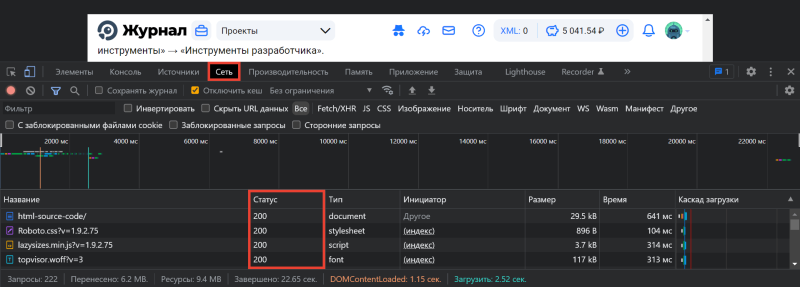
Переключитесь на вкладку «Сеть» в Инструментах разработчика и обновите страницу:
В Яндекс.Вебмастере
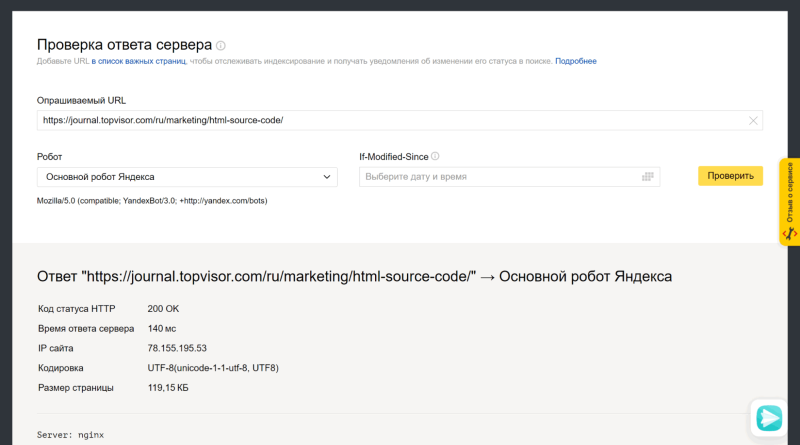
Откройте инструмент «Проверка ответа сервера» в Вебмастере. Введите URL в специальное поле и нажмите кнопку «Проверить»:
Как добавить сайт в Яндекс.Вебмастер и другие сервисы Яндекса
В Google Search Console
Чтобы посмотреть код ответа сервера в GSC, перейдите в инструмент проверки URL — он находится в самом верху панели:

Введите ссылку на страницу, которую хотите проверить, и нажмите Enter. В результатах проверки нажмите на «Изучить просканированную страницу» в блоке «URL есть в индексе Google».
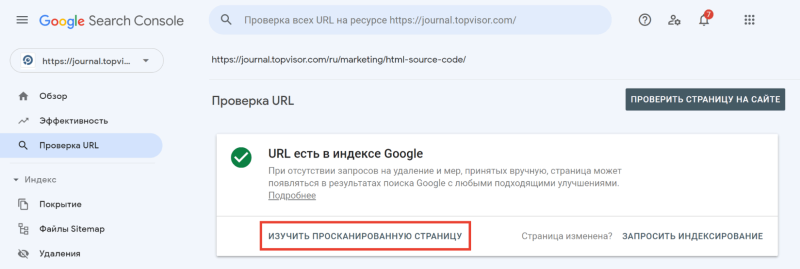
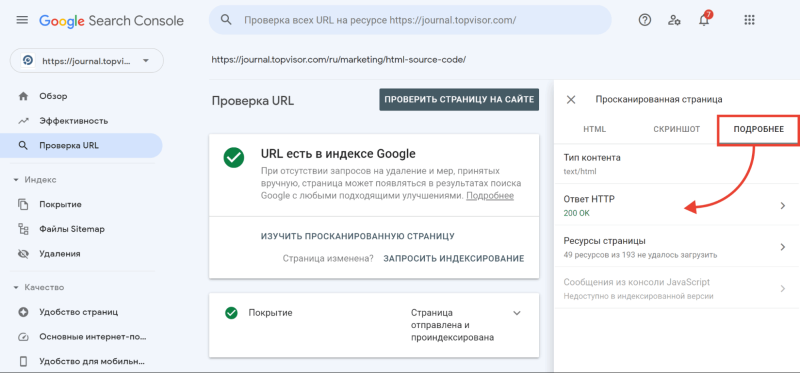
А затем в открывшемся окне перейдите на вкладку «Подробнее»:
Теперь расскажем подробнее про все классы кодов состояния HTTP.
1* класс кодов (информационные сообщения)
Это системный класс кодов, который только информирует о процессе передачи запроса. Такие ответы не являются ошибкой, хотя и могут отображаться в браузере как Error Code.
100 Continue
Этот ответ сообщает, что полученные сведения о запросе устраивают сервер и клиент может продолжать отправлять данные. Такой ответ может требоваться клиенту, если на сервер отправляется большой объём данных.
101 Switching Protocols
Сервер одобрил переключение типа протокола, которое запросил пользователь, и в настоящий момент выполняет действие.
102 Processing
Запрос принят — он находится в обработке, и на это понадобится чуть больше времени.
103 Checkpoint
Контрольная точка — используется в запросах для возобновления после прерывания запросов POST или PUT.
POST отправляет данные на сервер, PUT создает новый ресурс или заменяет существующий данными, представленными в теле запроса.
Разница между ними в том, что PUT работает без изменений: повторное его применение даёт такой же результат, что и в первый раз, а вот повторный вызов одного и того же метода POST часто меняет данные.
Пример — оформленный несколько раз интернет‑заказ. Такое часто происходит как раз по причине неоднократного использования запроса PUT.
105 Name Not Resolved
Не удается преобразовать DNS‑адрес сервера — это означает ошибку в службе DNS. Эта служба преобразует IP‑адреса в знакомые нам доменные имена.
2* класс кодов (успешно обработанные запросы)
Эти коды информируют об успешности принятия и обработки запроса. Также сервер может передать заголовки или тело сообщений.
200 ОК
Все хорошо — HTTP‑запрос успешно обработан (не ошибка).
201 Created
Создано — транзакция успешна, сформирован новый ресурс или документ.
202 Accepted
Принято — запрос принят, но ещё не обработан.
203 Non‑Authoritative Information
Информация не авторитетна — запрос успешно обработан, но передаваемая информация была взята не из первичного источника (данные могут быть устаревшими).
204 No Content
Нет содержимого — запрос успешно обработан, однако в ответе только заголовки без контента сообщения. Не нужно обновлять содержимое документа, но можно применить к нему полученные метаданные.
205 Reset Content
Сбросить содержимое. Запрос успешно обработан — но нужно сбросить введенные данные. Страницу можно не обновлять.
206 Partial Content
Частичное содержимое. Сервер успешно обработал часть GET‑запроса, а другую часть вернул.
GET — метод для чтения данных с сайта. Он говорит серверу, что клиент хочет прочитать какой‑то документ.
Представим интернет‑магазин и страницы каталога. Фильтры, которые выбирает пользователь, передаются благодаря методу GET. GET‑запрос работает с получением данных, а POST‑запрос нужен для отправки данных.
При работе с подобными ответами следует уделить внимание кэшированию.
207 Multi‑Status
Успешно выполнено несколько операций — сервер передал результаты выполнения нескольких независимых операций. Они появятся в виде XML‑документа с объектом multistatus.
226 IM Used
Успешно обработан IM‑заголовок (специальный заголовок, который отправляется клиентом и используется для передачи состояния HTTP).
3* класс кодов (перенаправление на другой адрес)
Эти коды информируют, что для достижения успешной операции нужно будет сделать другой запрос, возможно, по другому URL.
300 Multiple Choices
Множественный выбор — сервер выдает список нескольких возможных вариантов перенаправления (максимум — 5). Можно выбрать один из них.
301 Moved Permanently
Окончательно перемещено — страница перемещена на другой URL, который указан в поле Location.
302 Found/Moved
Временно перемещено — страница временно перенесена на другой URL, который указан в поле Location.
303 See Other
Ищите другую страницу — страница не найдена по данному URL, поэтому смотрите страницу по другому URL, используя метод GET.
304 Not Modified
Модификаций не было — с момента последнего визита клиента изменений не было.
305 Use Proxy
Используйте прокси — запрос к нужному ресурсу можно сделать только через прокси‑сервер, URL которого указан в поле Location заголовка.
306 Unused
Зарезервировано. Код в настоящий момент не используется.
307 Temporary Redirect
Временное перенаправление — запрашиваемый ресурс временно доступен по другому URL.
Этот код имеет ту же семантику, что код ответа 302 Found, за исключением того, что агент пользователя не должен изменять используемый метод HTTP: если в первом запросе использовался POST, то во втором запросе также должен использоваться POST.
308 Resume Incomplete
Перемещено полностью (навсегда) — запрашиваемая страница была перенесена на новый URL, указанный в поле Location заголовка. Метод запроса (GET/POST) менять не разрешается.
4* класс кодов (ошибки на стороне клиента)
Эти коды указывают на ошибки со стороны клиентов.

400 Bad Request
Неверный запрос — запрос клиента не может быть обработан, так как есть синтаксическая ошибка (возможно, опечатка).
401 Unauthorized
Не пройдена авторизация — запрос ещё в обработке, но доступа нет, так как пользователь не авторизован.
Для доступа к запрашиваемому ресурсу клиент должен представиться, послав запрос, включив при этом в заголовок сообщения поле Authorization.
402 Payment Required
Требуется оплата — зарезервировано для использования в будущем. Код предусмотрен для платных пользовательских сервисов, а не для хостинговых компаний.
403 Forbidden
Запрещено — запрос принят, но не будет обработан, так как у клиента недостаточно прав. Может возникнуть, когда пользователь хочет открыть системные файлы (robots, htaccess) или не прошёл авторизацию.
404 Not Found
Не найдено — запрашиваемая страница не обнаружена. Сервер принял запрос, но не нашёл ресурса по указанному URL (возможно, была ошибка в URL или страница была перемещена).
405 Method Not Allowed
Метод не разрешён — запрос был сделан методом, который не поддерживается данным ресурсом. Сервер должен предложить доступные методы решения в заголовке Allow.
406 Not Acceptable
Некорректный запрос — неподдерживаемый поисковиком формат запроса (поисковый робот не поддерживает кодировку или язык).
407 Proxy Authentication Required
Нужно пройти аутентификацию прокси — ответ аналогичен коду 401, только нужно аутентифицировать прокси‑сервер.
408 Request Timeout
Тайм‑аут запроса — запрос клиента занял слишком много времени. На каждом сайте существует свое время тайм‑аута — проверьте интернет‑соединение и просто обновите страницу.
409 Conflict
Конфликт (что‑то пошло не так) — запрос не может быть выполнен из‑за конфликтного обращения к ресурсу (несовместимость двух запросов).
410 Gone
Недоступно — ресурс раньше был размещён по указанному URL, но сейчас удалён и недоступен (серверу неизвестно месторасположение).
411 Length Required
Добавьте длины — сервер отклоняет отправляемый запрос, так как длина заголовка не определена, и он не находит значение Content‑Length.
Нужно исправить заголовки на сервере, и в следующий раз робот сможет проиндексировать страницу.
412 Precondition Failed
Предварительное условие не выполнено — стоит проверить правильность HTTP‑заголовков данного запроса.
413 Request Entity Too Large
Превышен размер запроса — перелимит максимального размера запроса, принимаемого сервером. Браузеры поддерживают запросы от 2 до 8 килобайт.
414 Request‑URI Too Long
Превышена длина запроса — сервер не может обработать запрос из‑за длинного URL. Такая ошибка может возникнуть, например, когда клиент пытается передать чересчур длинные параметры через метод GET, а не POST.
415 Unsupported Media Type
Формат не поддерживается — сервер не может принять запрос, так как данные подгружаются в некорректном формате, и сервер разрывает соединение.
416 Requested Range Not Satisfiable
Диапазон не поддерживается — ошибка возникает в случаях, когда в самом HTTP‑заголовке прописывается некорректный байтовый диапазон.
Корректного диапазона в необходимом документе может просто не быть, или есть опечатка в синтаксисе.
417 Expectation Failed
Ожидания не оправдались — прокси некорректно идентифицировал содержимое поля «Expect: 100‑Continue».
418 I’m a teapot
Первоапрельская шутка разработчиков в 1998 году. В расшифровке звучит как «я не приготовлю вам кофе, потому что я чайник». Не используется в работе.
422 Unprocessable Entity
Объект не обработан — сервер принял запрос, но в нём есть логическая ошибка. Стоит посмотреть в сторону семантики сайта.
423 Locked
Закрыто — ресурс заблокирован для выбранного HTTP‑метода. Можно перезагрузить роутер и компьютер. А также использовать только статистический IP.
424 Failed Dependency
Неуспешная зависимость — сервер не может обработать запрос, так как один из зависимых ресурсов заблокирован.
Выполнение запроса напрямую зависит от успешности выполнения другой операции, и если она не будет успешно завершена, то вся обработка запроса будет прервана.
425 Unordered Collection
Неверный порядок в коллекции — ошибка возникает, если клиент указал номер элемента в неупорядоченном списке или запросил несколько элементов в порядке, отличном от серверного.
426 Upgrade Required
Нужно обновление — в заголовке ответа нужно корректно сформировать поля Upgrade и Connection.
Этот ответ возникает, когда серверу требуется обновление до SSL‑протокола, но клиент не имеет его поддержки.
428 Precondition Required
Нужно предварительное условие — сервер просит внести в запрос информацию о предварительных условиях обработки данных, чтобы выдавать корректную информацию по итогу.
429 Too Many Requests
Слишком много запросов — отправлено слишком много запросов за короткое время. Это может указывать, например, на попытку DDoS‑атаки, для защиты от которой запросы блокируются.
431 Request Header Fields Too Large
Превышена длина заголовков — сервер может и не отвечать этим кодом, вместо этого он может просто сбросить соединение.
Исправляется это с помощью сокращения заголовков и повторной отправки запроса.
434 Requested Host Unavailable
Адрес запрашиваемой страницы недоступен.
444 No Response
Нет ответа — код отображается в лог‑файлах, чтобы подтвердить, что сервер никак не отреагировал на запрос пользователя и прервал соединение. Возвращается только сервером nginx.
Nginx — программное обеспечение с открытым исходным кодом. Его используют для создания веб‑серверов, а также в качестве почтового или обратного прокси‑сервера. Nginx решает проблему падения производительности из‑за роста трафика.
449 Retry With
Повторите попытку — ошибка говорит о необходимости скорректировать запрос и повторить его снова. Причиной становятся неверно указанные параметры (возможно, недостаточно данных).
450 Blocked by Windows Parental Controls
Заблокировано родительским контролем — говорит о том, что с компьютера попытались зайти на заблокированный ресурс. Избежать этой ошибки можно изменением параметров системы родительского контроля.
451 Unavailable For Legal Reasons
Недоступно по юридическим причинам — доступ к ресурсу закрыт, например, по требованию органов государственной власти или по требованию правообладателя в случае нарушения авторских прав.
456 Unrecoverable Error
Неустранимая ошибка — при обработке запроса возникла ошибка, которая вызывает некорректируемые сбои в таблицах баз данных.
499 Client Closed Request
Запрос закрыт клиентом — нестандартный код, используемый nginx в ситуациях, когда клиент закрыл соединение, пока nginx обрабатывал запрос.
5* класс кодов (ошибки на стороне сервера)
Эти коды указывают на ошибки со стороны серверов.
При использовании всех методов, кроме HEAD, сервер должен вернуть в теле сообщения гипертекстовое пояснение для пользователя. И его можно использовать в работе.
500 Internal Server Error
Внутренняя ошибка сервера — сервер столкнулся с неким условием, из‑за которого не может выполнить запрос.
Проверяйте, корректно ли указаны директивы в системных файлах (особенно htaccess) и нет ли ошибки прав доступа к файлам. Обратите внимание на ошибки внутри скриптов и их медленную работу.
501 Not Implemented
Не выполнено — код отдается, когда сам сервер не может идентифицировать метод запроса.
Сами вы эту ошибку не исправите. Устранить её может только сервер.
502 Bad Gateway
Ошибка шлюза — появляется, когда сервер, выступая в роли шлюза или прокси‑сервера, получил ответное сообщение от вышестоящего сервера о несоответствии протоколов.
Актуально исключительно для прокси и шлюзовых конфигураций.
503 Service Unavailable
Временно не доступен — сервер временно не имеет возможности обрабатывать запросы по техническим причинам (обслуживание, перегрузка и прочее).
В поле Retry‑After заголовка сервер укажет время, через которое можно повторить запрос.
504 Gateway Timeout
Тайм‑аут шлюза — сервер, выступая в роли шлюза или прокси‑сервера, не получил ответа от вышестоящего сервера в нужное время.
Исправить эту ошибку самостоятельно не получится. Здесь дело в прокси, часто — в веб‑сервере.
Первым делом просто обновите веб‑страницу. Если это не помогло, нужно почистить DNS‑кэш. Для этого нажмите горячие клавиши Windows+R и введите команду cmd (Control+пробел). В открывшемся окне укажите команду ipconfig / flushdns и подтвердите её нажатием Enter.
505 HTTP Version Not Supported
Сервер не поддерживает версию протокола — отсутствует поддержка текущей версии HTTP‑протокола. Нужно обеспечить клиента и сервер одинаковой версией.
506 Variant Also Negotiates
Неуспешные переговоры — с такой ошибкой сталкиваются, если сервер изначально настроен неправильно. По причине ошибочной конфигурации выбранный вариант указывает сам на себя, из‑за чего процесс и прерывается.
507 Insufficient Storage
Не хватает места для хранения — серверу недостаточно места в хранилище. Нужно либо расчистить место, либо увеличить доступное пространство.
508 Loop Detected
Обнаружен цикл — ошибка означает провал запроса и выполняемой операции в целом.
509 Bandwidth Limit Exceeded
Превышена пропускная способность — используется при чрезмерном потреблении трафика. Владельцу площадки следует обратиться к своему хостинг‑провайдеру.
510 Not Extended
Не продлён — ошибка говорит, что на сервере отсутствует нужное для клиента расширение. Чтобы исправить проблему, надо убрать часть неподдерживаемого расширения из запроса или добавить поддержку на сервер.
511 Network Authentication Required
Требуется аутентификация — ошибка генерируется сервером‑посредником, к примеру, сервером интернет‑провайдера, если нужно ввести пароль для получения доступа к сети через платную точку доступа.
From Wikipedia, the free encyclopedia
This is a list of Hypertext Transfer Protocol (HTTP) response status codes. Status codes are issued by a server in response to a client’s request made to the server. It includes codes from IETF Request for Comments (RFCs), other specifications, and some additional codes used in some common applications of the HTTP. The first digit of the status code specifies one of five standard classes of responses. The optional message phrases shown are typical, but any human-readable alternative may be provided, or none at all.
Unless otherwise stated, the status code is part of the HTTP standard (RFC 9110).
The Internet Assigned Numbers Authority (IANA) maintains the official registry of HTTP status codes.[1]
All HTTP response status codes are separated into five classes or categories. The first digit of the status code defines the class of response, while the last two digits do not have any classifying or categorization role. There are five classes defined by the standard:
- 1xx informational response – the request was received, continuing process
- 2xx successful – the request was successfully received, understood, and accepted
- 3xx redirection – further action needs to be taken in order to complete the request
- 4xx client error – the request contains bad syntax or cannot be fulfilled
- 5xx server error – the server failed to fulfil an apparently valid request
1xx informational response
An informational response indicates that the request was received and understood. It is issued on a provisional basis while request processing continues. It alerts the client to wait for a final response. The message consists only of the status line and optional header fields, and is terminated by an empty line. As the HTTP/1.0 standard did not define any 1xx status codes, servers must not[note 1] send a 1xx response to an HTTP/1.0 compliant client except under experimental conditions.
- 100 Continue
- The server has received the request headers and the client should proceed to send the request body (in the case of a request for which a body needs to be sent; for example, a POST request). Sending a large request body to a server after a request has been rejected for inappropriate headers would be inefficient. To have a server check the request’s headers, a client must send
Expect: 100-continueas a header in its initial request and receive a100 Continuestatus code in response before sending the body. If the client receives an error code such as 403 (Forbidden) or 405 (Method Not Allowed) then it should not send the request’s body. The response417 Expectation Failedindicates that the request should be repeated without theExpectheader as it indicates that the server does not support expectations (this is the case, for example, of HTTP/1.0 servers).[2] - 101 Switching Protocols
- The requester has asked the server to switch protocols and the server has agreed to do so.
- 102 Processing (WebDAV; RFC 2518)
- A WebDAV request may contain many sub-requests involving file operations, requiring a long time to complete the request. This code indicates that the server has received and is processing the request, but no response is available yet.[3] This prevents the client from timing out and assuming the request was lost.
- 103 Early Hints (RFC 8297)
- Used to return some response headers before final HTTP message.[4]
2xx success
This class of status codes indicates the action requested by the client was received, understood, and accepted.[1]
- 200 OK
- Standard response for successful HTTP requests. The actual response will depend on the request method used. In a GET request, the response will contain an entity corresponding to the requested resource. In a POST request, the response will contain an entity describing or containing the result of the action.
- 201 Created
- The request has been fulfilled, resulting in the creation of a new resource.[5]
- 202 Accepted
- The request has been accepted for processing, but the processing has not been completed. The request might or might not be eventually acted upon, and may be disallowed when processing occurs.
- 203 Non-Authoritative Information (since HTTP/1.1)
- The server is a transforming proxy (e.g. a Web accelerator) that received a 200 OK from its origin, but is returning a modified version of the origin’s response.[6][7]
- 204 No Content
- The server successfully processed the request, and is not returning any content.
- 205 Reset Content
- The server successfully processed the request, asks that the requester reset its document view, and is not returning any content.
- 206 Partial Content
- The server is delivering only part of the resource (byte serving) due to a range header sent by the client. The range header is used by HTTP clients to enable resuming of interrupted downloads, or split a download into multiple simultaneous streams.
- 207 Multi-Status (WebDAV; RFC 4918)
- The message body that follows is by default an XML message and can contain a number of separate response codes, depending on how many sub-requests were made.[8]
- 208 Already Reported (WebDAV; RFC 5842)
- The members of a DAV binding have already been enumerated in a preceding part of the (multistatus) response, and are not being included again.
- 226 IM Used (RFC 3229)
- The server has fulfilled a request for the resource, and the response is a representation of the result of one or more instance-manipulations applied to the current instance.[9]
3xx redirection
This class of status code indicates the client must take additional action to complete the request. Many of these status codes are used in URL redirection.[1]
A user agent may carry out the additional action with no user interaction only if the method used in the second request is GET or HEAD. A user agent may automatically redirect a request. A user agent should detect and intervene to prevent cyclical redirects.[10]
- 300 Multiple Choices
- Indicates multiple options for the resource from which the client may choose (via agent-driven content negotiation). For example, this code could be used to present multiple video format options, to list files with different filename extensions, or to suggest word-sense disambiguation.
- 301 Moved Permanently
- This and all future requests should be directed to the given URI.
- 302 Found (Previously «Moved temporarily»)
- Tells the client to look at (browse to) another URL. The HTTP/1.0 specification (RFC 1945) required the client to perform a temporary redirect with the same method (the original describing phrase was «Moved Temporarily»),[11] but popular browsers implemented 302 redirects by changing the method to GET. Therefore, HTTP/1.1 added status codes 303 and 307 to distinguish between the two behaviours.[10]
- 303 See Other (since HTTP/1.1)
- The response to the request can be found under another URI using the GET method. When received in response to a POST (or PUT/DELETE), the client should presume that the server has received the data and should issue a new GET request to the given URI.
- 304 Not Modified
- Indicates that the resource has not been modified since the version specified by the request headers If-Modified-Since or If-None-Match. In such case, there is no need to retransmit the resource since the client still has a previously-downloaded copy.
- 305 Use Proxy (since HTTP/1.1)
- The requested resource is available only through a proxy, the address for which is provided in the response. For security reasons, many HTTP clients (such as Mozilla Firefox and Internet Explorer) do not obey this status code.
- 306 Switch Proxy
- No longer used. Originally meant «Subsequent requests should use the specified proxy.»
- 307 Temporary Redirect (since HTTP/1.1)
- In this case, the request should be repeated with another URI; however, future requests should still use the original URI. In contrast to how 302 was historically implemented, the request method is not allowed to be changed when reissuing the original request. For example, a POST request should be repeated using another POST request.
- 308 Permanent Redirect
- This and all future requests should be directed to the given URI. 308 parallel the behaviour of 301, but does not allow the HTTP method to change. So, for example, submitting a form to a permanently redirected resource may continue smoothly.
4xx client errors
This class of status code is intended for situations in which the error seems to have been caused by the client. Except when responding to a HEAD request, the server should include an entity containing an explanation of the error situation, and whether it is a temporary or permanent condition. These status codes are applicable to any request method. User agents should display any included entity to the user.
- 400 Bad Request
- The server cannot or will not process the request due to an apparent client error (e.g., malformed request syntax, size too large, invalid request message framing, or deceptive request routing).
- 401 Unauthorized
- Similar to 403 Forbidden, but specifically for use when authentication is required and has failed or has not yet been provided. The response must include a WWW-Authenticate header field containing a challenge applicable to the requested resource. See Basic access authentication and Digest access authentication. 401 semantically means «unauthorised», the user does not have valid authentication credentials for the target resource.
- Some sites incorrectly issue HTTP 401 when an IP address is banned from the website (usually the website domain) and that specific address is refused permission to access a website.[citation needed]
- 402 Payment Required
- Reserved for future use. The original intention was that this code might be used as part of some form of digital cash or micropayment scheme, as proposed, for example, by GNU Taler,[13] but that has not yet happened, and this code is not widely used. Google Developers API uses this status if a particular developer has exceeded the daily limit on requests.[14] Sipgate uses this code if an account does not have sufficient funds to start a call.[15] Shopify uses this code when the store has not paid their fees and is temporarily disabled.[16] Stripe uses this code for failed payments where parameters were correct, for example blocked fraudulent payments.[17]
- 403 Forbidden
- The request contained valid data and was understood by the server, but the server is refusing action. This may be due to the user not having the necessary permissions for a resource or needing an account of some sort, or attempting a prohibited action (e.g. creating a duplicate record where only one is allowed). This code is also typically used if the request provided authentication by answering the WWW-Authenticate header field challenge, but the server did not accept that authentication. The request should not be repeated.
- 404 Not Found
- The requested resource could not be found but may be available in the future. Subsequent requests by the client are permissible.
- 405 Method Not Allowed
- A request method is not supported for the requested resource; for example, a GET request on a form that requires data to be presented via POST, or a PUT request on a read-only resource.
- 406 Not Acceptable
- The requested resource is capable of generating only content not acceptable according to the Accept headers sent in the request. See Content negotiation.
- 407 Proxy Authentication Required
- The client must first authenticate itself with the proxy.
- 408 Request Timeout
- The server timed out waiting for the request. According to HTTP specifications: «The client did not produce a request within the time that the server was prepared to wait. The client MAY repeat the request without modifications at any later time.»
- 409 Conflict
- Indicates that the request could not be processed because of conflict in the current state of the resource, such as an edit conflict between multiple simultaneous updates.
- 410 Gone
- Indicates that the resource requested was previously in use but is no longer available and will not be available again. This should be used when a resource has been intentionally removed and the resource should be purged. Upon receiving a 410 status code, the client should not request the resource in the future. Clients such as search engines should remove the resource from their indices. Most use cases do not require clients and search engines to purge the resource, and a «404 Not Found» may be used instead.
- 411 Length Required
- The request did not specify the length of its content, which is required by the requested resource.
- 412 Precondition Failed
- The server does not meet one of the preconditions that the requester put on the request header fields.
- 413 Payload Too Large
- The request is larger than the server is willing or able to process. Previously called «Request Entity Too Large» in RFC 2616.[18]
- 414 URI Too Long
- The URI provided was too long for the server to process. Often the result of too much data being encoded as a query-string of a GET request, in which case it should be converted to a POST request. Called «Request-URI Too Long» previously in RFC 2616.[19]
- 415 Unsupported Media Type
- The request entity has a media type which the server or resource does not support. For example, the client uploads an image as image/svg+xml, but the server requires that images use a different format.
- 416 Range Not Satisfiable
- The client has asked for a portion of the file (byte serving), but the server cannot supply that portion. For example, if the client asked for a part of the file that lies beyond the end of the file. Called «Requested Range Not Satisfiable» previously RFC 2616.[20]
- 417 Expectation Failed
- The server cannot meet the requirements of the Expect request-header field.[21]
- 418 I’m a teapot (RFC 2324, RFC 7168)
- This code was defined in 1998 as one of the traditional IETF April Fools’ jokes, in RFC 2324, Hyper Text Coffee Pot Control Protocol, and is not expected to be implemented by actual HTTP servers. The RFC specifies this code should be returned by teapots requested to brew coffee.[22] This HTTP status is used as an Easter egg in some websites, such as Google.com’s «I’m a teapot» easter egg.[23][24][25] Sometimes, this status code is also used as a response to a blocked request, instead of the more appropriate 403 Forbidden.[26][27]
- 421 Misdirected Request
- The request was directed at a server that is not able to produce a response (for example because of connection reuse).
- 422 Unprocessable Entity
- The request was well-formed but was unable to be followed due to semantic errors.[8]
- 423 Locked (WebDAV; RFC 4918)
- The resource that is being accessed is locked.[8]
- 424 Failed Dependency (WebDAV; RFC 4918)
- The request failed because it depended on another request and that request failed (e.g., a PROPPATCH).[8]
- 425 Too Early (RFC 8470)
- Indicates that the server is unwilling to risk processing a request that might be replayed.
- 426 Upgrade Required
- The client should switch to a different protocol such as TLS/1.3, given in the Upgrade header field.
- 428 Precondition Required (RFC 6585)
- The origin server requires the request to be conditional. Intended to prevent the ‘lost update’ problem, where a client GETs a resource’s state, modifies it, and PUTs it back to the server, when meanwhile a third party has modified the state on the server, leading to a conflict.[28]
- 429 Too Many Requests (RFC 6585)
- The user has sent too many requests in a given amount of time. Intended for use with rate-limiting schemes.[28]
- 431 Request Header Fields Too Large (RFC 6585)
- The server is unwilling to process the request because either an individual header field, or all the header fields collectively, are too large.[28]
- 451 Unavailable For Legal Reasons (RFC 7725)
- A server operator has received a legal demand to deny access to a resource or to a set of resources that includes the requested resource.[29] The code 451 was chosen as a reference to the novel Fahrenheit 451 (see the Acknowledgements in the RFC).
5xx server errors
The server failed to fulfil a request.
Response status codes beginning with the digit «5» indicate cases in which the server is aware that it has encountered an error or is otherwise incapable of performing the request. Except when responding to a HEAD request, the server should include an entity containing an explanation of the error situation, and indicate whether it is a temporary or permanent condition. Likewise, user agents should display any included entity to the user. These response codes are applicable to any request method.
- 500 Internal Server Error
- A generic error message, given when an unexpected condition was encountered and no more specific message is suitable.
- 501 Not Implemented
- The server either does not recognize the request method, or it lacks the ability to fulfil the request. Usually this implies future availability (e.g., a new feature of a web-service API).
- 502 Bad Gateway
- The server was acting as a gateway or proxy and received an invalid response from the upstream server.
- 503 Service Unavailable
- The server cannot handle the request (because it is overloaded or down for maintenance). Generally, this is a temporary state.[30]
- 504 Gateway Timeout
- The server was acting as a gateway or proxy and did not receive a timely response from the upstream server.
- 505 HTTP Version Not Supported
- The server does not support the HTTP version used in the request.
- 506 Variant Also Negotiates (RFC 2295)
- Transparent content negotiation for the request results in a circular reference.[31]
- 507 Insufficient Storage (WebDAV; RFC 4918)
- The server is unable to store the representation needed to complete the request.[8]
- 508 Loop Detected (WebDAV; RFC 5842)
- The server detected an infinite loop while processing the request (sent instead of 208 Already Reported).
- 510 Not Extended (RFC 2774)
- Further extensions to the request are required for the server to fulfill it.[32]
- 511 Network Authentication Required (RFC 6585)
- The client needs to authenticate to gain network access. Intended for use by intercepting proxies used to control access to the network (e.g., «captive portals» used to require agreement to Terms of Service before granting full Internet access via a Wi-Fi hotspot).[28]
Unofficial codes
The following codes are not specified by any standard.
- 419 Page Expired (Laravel Framework)
- Used by the Laravel Framework when a CSRF Token is missing or expired.
- 420 Method Failure (Spring Framework)
- A deprecated response used by the Spring Framework when a method has failed.[33]
- 420 Enhance Your Calm (Twitter)
- Returned by version 1 of the Twitter Search and Trends API when the client is being rate limited; versions 1.1 and later use the 429 Too Many Requests response code instead.[34] The phrase «Enhance your calm» comes from the 1993 movie Demolition Man, and its association with this number is likely a reference to cannabis.[citation needed]
- 430 Request Header Fields Too Large (Shopify)
- Used by Shopify, instead of the 429 Too Many Requests response code, when too many URLs are requested within a certain time frame.[35]
- 450 Blocked by Windows Parental Controls (Microsoft)
- The Microsoft extension code indicated when Windows Parental Controls are turned on and are blocking access to the requested webpage.[36]
- 498 Invalid Token (Esri)
- Returned by ArcGIS for Server. Code 498 indicates an expired or otherwise invalid token.[37]
- 499 Token Required (Esri)
- Returned by ArcGIS for Server. Code 499 indicates that a token is required but was not submitted.[37]
- 509 Bandwidth Limit Exceeded (Apache Web Server/cPanel)
- The server has exceeded the bandwidth specified by the server administrator; this is often used by shared hosting providers to limit the bandwidth of customers.[38]
- 529 Site is overloaded
- Used by Qualys in the SSLLabs server testing API to signal that the site can’t process the request.[39]
- 530 Site is frozen
- Used by the Pantheon web platform to indicate a site that has been frozen due to inactivity.[40]
- 598 (Informal convention) Network read timeout error
- Used by some HTTP proxies to signal a network read timeout behind the proxy to a client in front of the proxy.[41]
- 599 Network Connect Timeout Error
- An error used by some HTTP proxies to signal a network connect timeout behind the proxy to a client in front of the proxy.
Internet Information Services
Microsoft’s Internet Information Services (IIS) web server expands the 4xx error space to signal errors with the client’s request.
- 440 Login Time-out
- The client’s session has expired and must log in again.[42]
- 449 Retry With
- The server cannot honour the request because the user has not provided the required information.[43]
- 451 Redirect
- Used in Exchange ActiveSync when either a more efficient server is available or the server cannot access the users’ mailbox.[44] The client is expected to re-run the HTTP AutoDiscover operation to find a more appropriate server.[45]
IIS sometimes uses additional decimal sub-codes for more specific information,[46] however these sub-codes only appear in the response payload and in documentation, not in the place of an actual HTTP status code.
nginx
The nginx web server software expands the 4xx error space to signal issues with the client’s request.[47][48]
- 444 No Response
- Used internally[49] to instruct the server to return no information to the client and close the connection immediately.
- 494 Request header too large
- Client sent too large request or too long header line.
- 495 SSL Certificate Error
- An expansion of the 400 Bad Request response code, used when the client has provided an invalid client certificate.
- 496 SSL Certificate Required
- An expansion of the 400 Bad Request response code, used when a client certificate is required but not provided.
- 497 HTTP Request Sent to HTTPS Port
- An expansion of the 400 Bad Request response code, used when the client has made a HTTP request to a port listening for HTTPS requests.
- 499 Client Closed Request
- Used when the client has closed the request before the server could send a response.
Cloudflare
Cloudflare’s reverse proxy service expands the 5xx series of errors space to signal issues with the origin server.[50]
- 520 Web Server Returned an Unknown Error
- The origin server returned an empty, unknown, or unexpected response to Cloudflare.[51]
- 521 Web Server Is Down
- The origin server refused connections from Cloudflare. Security solutions at the origin may be blocking legitimate connections from certain Cloudflare IP addresses.
- 522 Connection Timed Out
- Cloudflare timed out contacting the origin server.
- 523 Origin Is Unreachable
- Cloudflare could not reach the origin server; for example, if the DNS records for the origin server are incorrect or missing.
- 524 A Timeout Occurred
- Cloudflare was able to complete a TCP connection to the origin server, but did not receive a timely HTTP response.
- 525 SSL Handshake Failed
- Cloudflare could not negotiate a SSL/TLS handshake with the origin server.
- 526 Invalid SSL Certificate
- Cloudflare could not validate the SSL certificate on the origin web server. Also used by Cloud Foundry’s gorouter.
- 527 Railgun Error
- Error 527 indicates an interrupted connection between Cloudflare and the origin server’s Railgun server.[52]
- 530
- Error 530 is returned along with a 1xxx error.[53]
AWS Elastic Load Balancer
Amazon’s Elastic Load Balancing adds a few custom return codes
- 460
- Client closed the connection with the load balancer before the idle timeout period elapsed. Typically when client timeout is sooner than the Elastic Load Balancer’s timeout.[54]
- 463
- The load balancer received an X-Forwarded-For request header with more than 30 IP addresses.[54]
- 561 Unauthorized
- An error around authentication returned by a server registered with a load balancer. You configured a listener rule to authenticate users, but the identity provider (IdP) returned an error code when authenticating the user.[55]
Caching warning codes (obsoleted)
The following caching related warning codes were specified under RFC 7234. Unlike the other status codes above, these were not sent as the response status in the HTTP protocol, but as part of the «Warning» HTTP header.[56][57]
Since this «Warning» header is often neither sent by servers nor acknowledged by clients, this header and its codes were obsoleted by the HTTP Working Group in 2022 with RFC 9111.[58]
- 110 Response is Stale
- The response provided by a cache is stale (the content’s age exceeds a maximum age set by a Cache-Control header or heuristically chosen lifetime).
- 111 Revalidation Failed
- The cache was unable to validate the response, due to an inability to reach the origin server.
- 112 Disconnected Operation
- The cache is intentionally disconnected from the rest of the network.
- 113 Heuristic Expiration
- The cache heuristically chose a freshness lifetime greater than 24 hours and the response’s age is greater than 24 hours.
- 199 Miscellaneous Warning
- Arbitrary, non-specific warning. The warning text may be logged or presented to the user.
- 214 Transformation Applied
- Added by a proxy if it applies any transformation to the representation, such as changing the content encoding, media type or the like.
- 299 Miscellaneous Persistent Warning
- Same as 199, but indicating a persistent warning.
See also
- Custom error pages
- List of FTP server return codes
- List of HTTP header fields
- List of SMTP server return codes
- Common Log Format
Explanatory notes
- ^ Emphasised words and phrases such as must and should represent interpretation guidelines as given by RFC 2119
References
- ^ a b c «Hypertext Transfer Protocol (HTTP) Status Code Registry». Iana.org. Archived from the original on December 11, 2011. Retrieved January 8, 2015.
- ^ «RFC 9110: HTTP Semantics and Content, Section 10.1.1 «Expect»«.
- ^ Goland, Yaronn; Whitehead, Jim; Faizi, Asad; Carter, Steve R.; Jensen, Del (February 1999). HTTP Extensions for Distributed Authoring – WEBDAV. IETF. doi:10.17487/RFC2518. RFC 2518. Retrieved October 24, 2009.
- ^ Oku, Kazuho (December 2017). An HTTP Status Code for Indicating Hints. IETF. doi:10.17487/RFC8297. RFC 8297. Retrieved December 20, 2017.
- ^ Stewart, Mark; djna. «Create request with POST, which response codes 200 or 201 and content». Stack Overflow. Archived from the original on October 11, 2016. Retrieved October 16, 2015.
- ^ «RFC 9110: HTTP Semantics and Content, Section 15.3.4».
- ^ «RFC 9110: HTTP Semantics and Content, Section 7.7».
- ^ a b c d e Dusseault, Lisa, ed. (June 2007). HTTP Extensions for Web Distributed Authoring and Versioning (WebDAV). IETF. doi:10.17487/RFC4918. RFC 4918. Retrieved October 24, 2009.
- ^ Delta encoding in HTTP. IETF. January 2002. doi:10.17487/RFC3229. RFC 3229. Retrieved February 25, 2011.
- ^ a b «RFC 9110: HTTP Semantics and Content, Section 15.4 «Redirection 3xx»«.
- ^ Berners-Lee, Tim; Fielding, Roy T.; Nielsen, Henrik Frystyk (May 1996). Hypertext Transfer Protocol – HTTP/1.0. IETF. doi:10.17487/RFC1945. RFC 1945. Retrieved October 24, 2009.
- ^ «The GNU Taler tutorial for PHP Web shop developers 0.4.0». docs.taler.net. Archived from the original on November 8, 2017. Retrieved October 29, 2017.
- ^ «Google API Standard Error Responses». 2016. Archived from the original on May 25, 2017. Retrieved June 21, 2017.
- ^ «Sipgate API Documentation». Archived from the original on July 10, 2018. Retrieved July 10, 2018.
- ^ «Shopify Documentation». Archived from the original on July 25, 2018. Retrieved July 25, 2018.
- ^ «Stripe API Reference – Errors». stripe.com. Retrieved October 28, 2019.
- ^ «RFC2616 on status 413». Tools.ietf.org. Archived from the original on March 7, 2011. Retrieved November 11, 2015.
- ^ «RFC2616 on status 414». Tools.ietf.org. Archived from the original on March 7, 2011. Retrieved November 11, 2015.
- ^ «RFC2616 on status 416». Tools.ietf.org. Archived from the original on March 7, 2011. Retrieved November 11, 2015.
- ^ TheDeadLike. «HTTP/1.1 Status Codes 400 and 417, cannot choose which». serverFault. Archived from the original on October 10, 2015. Retrieved October 16, 2015.
- ^ Larry Masinter (April 1, 1998). Hyper Text Coffee Pot Control Protocol (HTCPCP/1.0). doi:10.17487/RFC2324. RFC 2324.
Any attempt to brew coffee with a teapot should result in the error code «418 I’m a teapot». The resulting entity body MAY be short and stout.
- ^ I’m a teapot
- ^ Barry Schwartz (August 26, 2014). «New Google Easter Egg For SEO Geeks: Server Status 418, I’m A Teapot». Search Engine Land. Archived from the original on November 15, 2015. Retrieved November 4, 2015.
- ^ «Google’s Teapot». Retrieved October 23, 2017.[dead link]
- ^ «Enable extra web security on a website». DreamHost. Retrieved December 18, 2022.
- ^ «I Went to a Russian Website and All I Got Was This Lousy Teapot». PCMag. Retrieved December 18, 2022.
- ^ a b c d Nottingham, M.; Fielding, R. (April 2012). «RFC 6585 – Additional HTTP Status Codes». Request for Comments. Internet Engineering Task Force. Archived from the original on May 4, 2012. Retrieved May 1, 2012.
- ^ Bray, T. (February 2016). «An HTTP Status Code to Report Legal Obstacles». ietf.org. Archived from the original on March 4, 2016. Retrieved March 7, 2015.
- ^ alex. «What is the correct HTTP status code to send when a site is down for maintenance?». Stack Overflow. Archived from the original on October 11, 2016. Retrieved October 16, 2015.
- ^ Holtman, Koen; Mutz, Andrew H. (March 1998). Transparent Content Negotiation in HTTP. IETF. doi:10.17487/RFC2295. RFC 2295. Retrieved October 24, 2009.
- ^ Nielsen, Henrik Frystyk; Leach, Paul; Lawrence, Scott (February 2000). An HTTP Extension Framework. IETF. doi:10.17487/RFC2774. RFC 2774. Retrieved October 24, 2009.
- ^ «Enum HttpStatus». Spring Framework. org.springframework.http. Archived from the original on October 25, 2015. Retrieved October 16, 2015.
- ^ «Twitter Error Codes & Responses». Twitter. 2014. Archived from the original on September 27, 2017. Retrieved January 20, 2014.
- ^ «HTTP Status Codes and SEO: what you need to know». ContentKing. Retrieved August 9, 2019.
- ^ «Screenshot of error page». Archived from the original (bmp) on May 11, 2013. Retrieved October 11, 2009.
- ^ a b «Using token-based authentication». ArcGIS Server SOAP SDK. Archived from the original on September 26, 2014. Retrieved September 8, 2014.
- ^ «HTTP Error Codes and Quick Fixes». Docs.cpanel.net. Archived from the original on November 23, 2015. Retrieved October 15, 2015.
- ^ «SSL Labs API v3 Documentation». github.com.
- ^ «Platform Considerations | Pantheon Docs». pantheon.io. Archived from the original on January 6, 2017. Retrieved January 5, 2017.
- ^ «HTTP status codes — ascii-code.com». www.ascii-code.com. Archived from the original on January 7, 2017. Retrieved December 23, 2016.
- ^
«Error message when you try to log on to Exchange 2007 by using Outlook Web Access: «440 Login Time-out»«. Microsoft. 2010. Retrieved November 13, 2013. - ^ «2.2.6 449 Retry With Status Code». Microsoft. 2009. Archived from the original on October 5, 2009. Retrieved October 26, 2009.
- ^ «MS-ASCMD, Section 3.1.5.2.2». Msdn.microsoft.com. Archived from the original on March 26, 2015. Retrieved January 8, 2015.
- ^ «Ms-oxdisco». Msdn.microsoft.com. Archived from the original on July 31, 2014. Retrieved January 8, 2015.
- ^ «The HTTP status codes in IIS 7.0». Microsoft. July 14, 2009. Archived from the original on April 9, 2009. Retrieved April 1, 2009.
- ^ «ngx_http_request.h». nginx 1.9.5 source code. nginx inc. Archived from the original on September 19, 2017. Retrieved January 9, 2016.
- ^ «ngx_http_special_response.c». nginx 1.9.5 source code. nginx inc. Archived from the original on May 8, 2018. Retrieved January 9, 2016.
- ^ «return» directive Archived March 1, 2018, at the Wayback Machine (http_rewrite module) documentation.
- ^ «Troubleshooting: Error Pages». Cloudflare. Archived from the original on March 4, 2016. Retrieved January 9, 2016.
- ^ «Error 520: web server returns an unknown error». Cloudflare. Retrieved November 1, 2019.
- ^ «527 Error: Railgun Listener to origin error». Cloudflare. Archived from the original on October 13, 2016. Retrieved October 12, 2016.
- ^ «Error 530». Cloudflare. Retrieved November 1, 2019.
- ^ a b «Troubleshoot Your Application Load Balancers – Elastic Load Balancing». docs.aws.amazon.com. Retrieved August 27, 2019.
- ^ «Troubleshoot your Application Load Balancers — Elastic Load Balancing». docs.aws.amazon.com. Retrieved January 24, 2021.
- ^ «Hypertext Transfer Protocol (HTTP/1.1): Caching». datatracker.ietf.org. Retrieved September 25, 2021.
- ^ «Warning — HTTP | MDN». developer.mozilla.org. Retrieved August 15, 2021.
 Some text was copied from this source, which is available under a Creative Commons Attribution-ShareAlike 2.5 Generic (CC BY-SA 2.5) license.
- ^ «RFC 9111: HTTP Caching, Section 5.5 «Warning»«. June 2022.
External links
- «RFC 9110: HTTP Semantics and Content, Section 15 «Status Codes»«.
- Hypertext Transfer Protocol (HTTP) Status Code Registry
В статье мы расскажем, что означает ошибка 404 на сайте. Также она может называться:
- 404 page not found,
- http error 404,
- error 404.
Ниже мы опишем, почему возникает ошибка 404, а также как её отследить и исправить.
404 ошибка (http error 404) — что это значит?
Ошибка 404 page not found — это код ответа сервера. Что это значит?
Когда вы вводите адрес сайта, браузер запрашивает его стартовую страницу у сервера. Если сервер не может найти страницу, он сообщает об этом браузеру с помощью кода 404. Это сообщение отображается на экране пользователя в браузере.
Почему такое может произойти? Есть несколько возможных причин:
- Вы допустили ошибку при вводе адреса страницы или при открытии файла в браузере. Или браузеру не удалось найти IP-адрес сервера. Сервер не может найти и выдать данные потому, что вы дали ему неправильные «координаты». В таком случае вам достаточно просто исправить ошибку в URL-адресе, и вместо страницы с ошибкой 404 появятся искомые страница/файл.
- Данные (страница или файл) не размещены на сервере, или CMS неверно отвечает на запрос пользователя. В этом случае дело обстоит сложнее и быстро справиться с проблемой не получится. Чтобы устранить ошибку 404, определите, как создавался сайт, на котором обнаружена ошибка (на CMS или без использования CMS). От этого будет зависеть способ решения проблемы.
Мы рассмотрим, что делать с ошибкой 404 и как исправить.
Как убрать ошибку 404 на сайте, созданном на CMS (WordPress, Joomla, 1С-Битрикс и т.д.)
На сайтах, созданных с использованием CMS, встречаются различные страницы с ошибкой 404 (http status 404). В зависимости от типа страницы с ошибкой различаются причины возникновения и пути решения проблемы:
- Если вы видите на своём сайте стандартную ошибку 404 REG.RU:
В большинстве случаев проблема связана с отсутствием конфигурационного файла .htaccess. Как избавиться от ошибки 404? Создайте в корневой папке сайта пустой текстовый файл с расширением .htaccess и добавьте в него стандартные директивы для используемой CMS. Стандартные директивы приведены в статье: Файлы .htaccess для популярных CMS.
Важно: в панели управления cPanel файл .htaccess по умолчанию скрыт (т.е. он существует, но не виден). Следуйте инструкции, чтобы включить отображение файла. Затем сверьте его содержимое со стандартным.
Если файл .htaccess существует и его содержимое корректно, а ошибка 404 not found сохраняется, обратитесь в техническую поддержку.
- Если вы видите иную страницу ошибки, которую отдает CMS сайта. Например:
Ошибка на WordPress
Пользовательская ошибка 404 not found
Возможно, страница не создана или не опубликована на этапе размещения сайта в админке CMS. Также ошибка может быть связана с формированием «человекопонятных» ЧПУ-ссылок с помощью SEO-плагинов. Чтобы избавиться от проблемы, необходимо обратиться к веб-разработчикам сайта или на тематические форумы, на которых представлена необходимая техническая информация (ошибка http 404).
Как быстро устранить ошибку 404 на сайте, созданном без использования CMS
На сайтах, созданных без использования CMS, код ошибки 404 отображается следующим образом:
Что означает это сообщение? Запрашиваемые страница/файл отсутствуют или размещены в неправильной папке (не в корневой папке сайта).
Что делать? Откройте корневую папку сайта в панели управления хостингом и проверьте, находятся ли в ней файлы вашего сайта.
- Если искомые файлы отсутствуют, следуйте инструкции: Как загрузить файл в корневой каталог сайта? После размещения файлов в корневой папке ошибка 404 должна исчезнуть.
- Если файлы существуют и находятся в корневой папке, обратитесь в техническую поддержку.
Как находить и мониторить код ошибки 404?
Если вы владелец сайта, вы можете найти страницы с ошибкой с помощью специальных сервисов. Самые популярные сервисы:
- Яндекс.Вебмастер,
- Google Search Console,
- Screaming Frog.
Ниже мы описали, как работать с каждым из них.
Яндекс.Вебмастер
-
Авторизуйтесь в Яндекс.Вебмастер.
-
Перейдите в раздел Индексирование — Страницы в поиске:
HTTP status 404 — что это
- Выберите Исключенные страницы:
- Добавьте фильтр, при котором отобразятся результаты с ошибкой «404 page not found»:
Google Search Console
-
Авторизуйтесь в Google Search Console.
-
Разверните блок Индекс и выберите Покрытие:
404 ошибка: что это
- Используйте фильтр, который покажет код ошибки 404. Для этого перейдите в раздел Сведения и кликните Отправленный URL не найден (ошибка 404):
Ошибка 404: что значит и как исправить
Screaming Frog
-
Загрузите программу с официального сайта.
-
Установите её на компьютер.
-
Откройте программу, введите ссылку на сайт и нажмите Start:
- Перейдите во вкладку Response Code. Из выпадающего списка выберите фильтр Client Error (4xx):
Открывается только главная страница сайта, на внутренних страницах ошибка 404 или 500
Рассмотрим, что значит и как исправить ошибку отображения внутренних страниц сайта (error 404 или 500). Причиной проблемы является отсутствие файла .htaccess (либо он пустой, либо в нем не хватает необходимых директив для работы CMS). Решить проблему может замена текущего файла .htaccess стандартным для данной CMS.
На хостинге Linux
Если у вас ISPmanager, проверьте, не включены ли Автоподдомены. Если они включены, отключите их, проверьте актуальность проблемы.
В остальных случаях для устранения внутренней ошибки 404 или 500, перейдите в корневую папку сайта: Как узнать корневую папку сайта
Создайте файл .htaccess (или замените его) со следующим содержимым:
Файл .htaccess для Joomla
##

# @version $Id: htaccess.txt 14401 2010-01-26 14:10:00Z louis $
# @package Joomla
# @copyright Copyright (C) 2005 - 2010 Open Source Matters. All rights reserved.
# @license http://www.gnu.org/copyleft/gpl.html GNU/GPL
# Joomla! is Free Software
##
#####################################################
#  READ THIS COMPLETELY IF YOU CHOOSE TO USE THIS FILE
#
# The line just below this section: 'Options +FollowSymLinks' may cause problems
# with some server configurations.  It is required for use of mod_rewrite, but may already
# be set by your server administrator in a way that dissallows changing it in
# your .htaccess file.  If using it causes your server to error out, comment it out (add # to
# beginning of line), reload your site in your browser and test your sef url's.  If they work,
# it has been set by your server administrator and you do not need it set here.
#
#####################################################

##  Can be commented out if causes errors, see notes above.
Options +FollowSymLinks

#
#  mod_rewrite in use

RewriteEngine On

########## Begin - Rewrite rules to block out some common exploits
## If you experience problems on your site block out the operations listed below
## This attempts to block the most common type of exploit `attempts` to Joomla!
#
## Deny access to extension xml files (uncomment out to activate)
#<Files ~ ".xml$">
#Order allow,deny
#Deny from all
#Satisfy all
#</Files>
## End of deny access to extension xml files
RewriteCond %{QUERY_STRING} mosConfig_[a-zA-Z_]{1,21}(=|%3D) [OR]
# Block out any script trying to base64_encode crap to send via URL
RewriteCond %{QUERY_STRING} base64_encode.*(.*) [OR]
# Block out any script that includes a <script> tag in URL
RewriteCond %{QUERY_STRING} (<|%3C).*script.*(>|%3E) [NC,OR]
# Block out any script trying to set a PHP GLOBALS variable via URL
RewriteCond %{QUERY_STRING} GLOBALS(=|[|%[0-9A-Z]{0,2}) [OR]
# Block out any script trying to modify a _REQUEST variable via URL
RewriteCond %{QUERY_STRING} _REQUEST(=|[|%[0-9A-Z]{0,2})
# Send all blocked request to homepage with 403 Forbidden error!
RewriteRule ^(.*)$ index.php [F,L]
#
########## End - Rewrite rules to block out some common exploits

#  Uncomment following line if your webserver's URL
#  is not directly related to physical file paths.
#  Update Your Joomla! Directory (just / for root)

# RewriteBase /


########## Begin - Joomla! core SEF Section
#
RewriteCond %{REQUEST_FILENAME} !-f
RewriteCond %{REQUEST_FILENAME} !-d
RewriteCond %{REQUEST_URI} !^/index.php
RewriteCond %{REQUEST_URI} (/|.php|.html|.htm|.feed|.pdf|.raw|/[^.]*)$  [NC]
RewriteRule (.*) index.php
RewriteRule .* - [E=HTTP_AUTHORIZATION:%{HTTP:Authorization},L]
#
########## End - Joomla! core SEF Section
Файл .htaccess для WordPress
# BEGIN WordPress
<IfModule mod_rewrite.c>
RewriteEngine On
RewriteBase /
RewriteCond %{REQUEST_FILENAME} !-f
RewriteCond %{REQUEST_FILENAME} !-d
RewriteRule . /index.php [L]
</IfModule>
# END WordPress
Файл .htaccess для HostCMS
Options +FollowSymlinks
AddDefaultCharset Off

<IfModule mod_php4.c>

 php_flag magic_quotes_gpc off

 php_flag magic_quotes_runtime off

 php_flag register_globals off

</IfModule>

<IfModule mod_php5.c>

 php_flag magic_quotes_gpc off

 php_flag magic_quotes_runtime off
 php_flag register_globals off
</IfModule>
<IfModule mod_dir.c>
 DirectoryIndex index.php index.htm index.html
</IfModule>
<IfModule mod_rewrite.c>
 RewriteEngine On
 RewriteBase /
 RewriteCond %{REQUEST_FILENAME} !-f
 RewriteCond %{REQUEST_FILENAME} !-d
 RewriteRule ^(.*)$ /index.php
</IfModule>
Файл .htaccess для Bitrix
Options -Indexes

ErrorDocument 404 /404.php


<IfModule mod_php5.c>

  php_flag allow_call_time_pass_reference 1

  php_flag session.use_trans_sid off

  #php_value display_errors 1

  #php_value mbstring.func_overload 2
  #php_value mbstring.internal_encoding UTF-8
</IfModule>

<IfModule mod_rewrite.c>
  Options +FollowSymLinks
  RewriteEngine On
  RewriteCond %{REQUEST_FILENAME} !-f
  RewriteCond %{REQUEST_FILENAME} !-l
  RewriteCond %{REQUEST_FILENAME} !-d
  RewriteCond %{REQUEST_FILENAME} !/bitrix/urlrewrite.php$
  RewriteRule ^(.*)$ /bitrix/urlrewrite.php [L]
  RewriteRule .* - [E=REMOTE_USER:%{HTTP:Authorization}]
</IfModule>

<IfModule mod_dir.c>
  DirectoryIndex index.php index.html
</IfModule>

<IfModule mod_expires.c>
  ExpiresActive on
  ExpiresByType image/jpeg "access plus 3 day"
  ExpiresByType image/gif "access plus 3 day"
</IfModule>
Файл .htaccess для ModX
# MODx supports Friendly URLs via this .htaccess file. You must serve web

# pages via Apache with mod_rewrite to use this functionality, and you must

# change the file name from ht.access to .htaccess.

#

# Make sure RewriteBase points to the directory where you installed MODx.

# E.g., "/modx" if your installation is in a "modx" subdirectory.

#

# You may choose to make your URLs non-case-sensitive by adding a NC directive

# to your rule: RewriteRule ^(.*)$ index.php?q=$1 [L,QSA,NC]

RewriteEngine On
RewriteBase /

# Rewrite www.domain.com -> domain.com -- used with SEO Strict URLs plugin
#RewriteCond %{HTTP_HOST} .
#RewriteCond %{HTTP_HOST} !^example-domain-please-change.com [NC]
#RewriteRule (.*) http://example-domain-please-change.com/$1 [R=301,L]
#
# or for the opposite domain.com -> www.domain.com use the following
# DO NOT USE BOTH
#
#RewriteCond %{HTTP_HOST} .
#RewriteCond %{HTTP_HOST} !^www.example-domain-please-change.com [NC]
#RewriteRule (.*) http://www.example-domain-please-change.com/$1 [R=301,L]
#
# Rewrite secure requests properly to prevent SSL cert warnings, e.g. prevent
# https://www.domain.com when your cert only allows https://secure.domain.com
#RewriteCond %{SERVER_PORT} !^443
#RewriteRule (.*) https://example-domain-please-change.com.com/$1 [R=301,L]
#
# The Friendly URLs part
RewriteCond %{REQUEST_FILENAME} !-f
RewriteCond %{REQUEST_FILENAME} !-d
RewriteRule ^(.*)$ index.php?q=$1 [L,QSA]
#
# Make sure .htc files are served with the proper MIME type, which is critical # for XP SP2. Un-comment if your host allows htaccess MIME type overrides.
#AddType text/x-component .htc
#
# If your server is not already configured as such, the following directive
# should be uncommented in order to set PHP's register_globals option to OFF.
# This closes a major security hole that is abused by most XSS (cross-site
# scripting) attacks. For more information: http://php.net/register_globals
#
# To verify that this option has been set to OFF, open the Manager and choose
# Reports -> System Info and then click the phpinfo() link. Do a Find on Page
# for "register_globals". The Local Value should be OFF. If the Master Value
# is OFF then you do not need this directive here.
#
# IF REGISTER_GLOBALS DIRECTIVE CAUSES 500 INTERNAL SERVER ERRORS :
#
# Your server does not allow PHP directives to be set via .htaccess. In that
# case you must make this change in your php.ini file instead. If you are
# using a commercial web host, contact the administrators for assistance in
# doing this. Not all servers allow local php.ini files, and they should
# include all PHP configurations (not just this one), or you will effectively
# reset everything to PHP defaults. Consult www.php.net for more detailed
# information about setting PHP directives.
#
#php_flag register_globals Off
#
# For servers that support output compression, you should pick up a bit of
# speed by un-commenting the following lines.
#
#php_flag zlib.output_compression On
#php_value zlib.output_compression_level 5
#
# The following directives stop screen flicker in IE on CSS rollovers. If
# needed, un-comment the following rules. When they're in place, you may have
# to do a force-refresh in order to see changes in your designs.
#
#ExpiresActive On
#ExpiresByType image/gif A2592000
#ExpiresByType image/jpeg A2592000
#ExpiresByType image/png A2592000
#BrowserMatch "MSIE" brokenvary=1
#BrowserMatch "Mozilla/4.[0-9]{2}" brokenvary=1
#BrowserMatch "Opera" !brokenvary
#SetEnvIf brokenvary 1 force-no-vary
Файл .htaccess для Drupal
#

# Apache/PHP/Drupal settings:

#


# Protect files and directories from prying eyes.

<FilesMatch ".(engine|inc|info|install|make|module|profile|test|po|sh|.*sql|theme|tpl(.php)?|xtmpl)$|^(..*|Entries.*|Repository|Root|Tag|Template)$">

  Order allow,deny

</FilesMatch>

# Don't show directory listings for URLs which map to a directory.
Options -Indexes

# Follow symbolic links in this directory.
Options +FollowSymLinks

# Make Drupal handle any 404 errors.
ErrorDocument 404 /index.php

# Force simple error message for requests for non-existent favicon.ico.
<Files favicon.ico>
  # There is no end quote below, for compatibility with Apache 1.3.
  ErrorDocument 404 "The requested file favicon.ico was not found.
</Files>

# Set the default handler.
DirectoryIndex index.php index.html index.htm

# Override PHP settings that cannot be changed at runtime. See
# sites/default/default.settings.php and drupal_initialize_variables() in
# includes/bootstrap.inc for settings that can be changed at runtime.

# PHP 5, Apache 1 and 2.
<IfModule mod_php5.c>
  php_flag magic_quotes_gpc                 off
  php_flag magic_quotes_sybase              off
  php_flag register_globals                 off
  php_flag session.auto_start               off
  php_value mbstring.http_input             pass
  php_value mbstring.http_output            pass
  php_flag mbstring.encoding_translation    off
</IfModule>

# Requires mod_expires to be enabled.
<IfModule mod_expires.c>
  # Enable expirations.
  ExpiresActive On

  # Cache all files for 2 weeks after access (A).
  ExpiresDefault A1209600

  <FilesMatch .php$>
    # Do not allow PHP scripts to be cached unless they explicitly send cache
    # headers themselves. Otherwise all scripts would have to overwrite the
    # headers set by mod_expires if they want another caching behavior. This may
    # fail if an error occurs early in the bootstrap process, and it may cause
    # problems if a non-Drupal PHP file is installed in a subdirectory.
    ExpiresActive Off
  </FilesMatch>
</IfModule>

# Various rewrite rules.
<IfModule mod_rewrite.c>
  RewriteEngine on

  # Block access to "hidden" directories whose names begin with a period. This
  # includes directories used by version control systems such as Subversion or
  # Git to store control files. Files whose names begin with a period, as well
  # as the control files used by CVS, are protected by the FilesMatch directive
  # above.
  #
  # NOTE: This only works when mod_rewrite is loaded. Without mod_rewrite, it is
  # not possible to block access to entire directories from .htaccess, because
  # <DirectoryMatch> is not allowed here.
  #
  # If you do not have mod_rewrite installed, you should remove these
  # directories from your webroot or otherwise protect them from being
  # downloaded.
  RewriteRule "(^|/)." - [F]

  # If your site can be accessed both with and without the 'www.' prefix, you
  # can use one of the following settings to redirect users to your preferred
  # URL, either WITH or WITHOUT the 'www.' prefix. Choose ONLY one option:
  #
  # To redirect all users to access the site WITH the 'www.' prefix,
  # (http://example.com/... will be redirected to http://www.example.com/...)
  # uncomment the following:
  # RewriteCond %{HTTP_HOST} !^www. [NC]
  # RewriteRule ^ http://www.%{HTTP_HOST}%{REQUEST_URI} [L,R=301]
  #
  # To redirect all users to access the site WITHOUT the 'www.' prefix,
  # (http://www.example.com/... will be redirected to http://example.com/...)
  # uncomment the following:
  # RewriteCond %{HTTP_HOST} ^www.(.+)$ [NC]
  # RewriteRule ^ http://%1%{REQUEST_URI} [L,R=301]

  # Modify the RewriteBase if you are using Drupal in a subdirectory or in a
  # VirtualDocumentRoot and the rewrite rules are not working properly.
  # For example if your site is at http://example.com/drupal uncomment and
  # modify the following line:
  # RewriteBase /drupal
  #
  # If your site is running in a VirtualDocumentRoot at http://example.com/,
  # uncomment the following line:
  # RewriteBase /

  # Pass all requests not referring directly to files in the filesystem to
  # index.php. Clean URLs are handled in drupal_environment_initialize().
  RewriteCond %{REQUEST_FILENAME} !-f
  RewriteCond %{REQUEST_FILENAME} !-d
  RewriteCond %{REQUEST_URI} !=/favicon.ico
  RewriteRule ^ index.php [L]

  # Rules to correctly serve gzip compressed CSS and JS files.
  # Requires both mod_rewrite and mod_headers to be enabled.
  <IfModule mod_headers.c>
    # Serve gzip compressed CSS files if they exist and the client accepts gzip.
    RewriteCond %{HTTP:Accept-encoding} gzip
    RewriteCond %{REQUEST_FILENAME}.gz -s
    RewriteRule ^(.*).css $1.css.gz [QSA]

    # Serve gzip compressed JS files if they exist and the client accepts gzip.
    RewriteCond %{HTTP:Accept-encoding} gzip
    RewriteCond %{REQUEST_FILENAME}.gz -s
    RewriteRule ^(.*).js $1.js.gz [QSA]

    # Serve correct content types, and prevent mod_deflate double gzip.
    RewriteRule .css.gz$ - [T=text/css,E=no-gzip:1]
    RewriteRule .js.gz$ - [T=text/javascript,E=no-gzip:1]

    <FilesMatch "(.js.gz|.css.gz)$">
      # Serve correct encoding type.
      Header append Content-Encoding gzip
      # Force proxies to cache gzipped & non-gzipped css/js files separately.
      Header append Vary Accept-Encoding
    </FilesMatch>
  </IfModule>
</IfModule>
Файл .htaccess для NetCat
AddDefaultCharset windows-1251
ErrorDocument 404 /netcat/require/e404.php
<ifModule mod_rewrite.c>
RewriteEngine On
RewriteCond %{REQUEST_FILENAME} !-f
RewriteCond %{REQUEST_FILENAME} !-d
RewriteCond %{REQUEST_FILENAME} !-l
RewriteRule ^(.+)$ /netcat/require/e404.php?REQUEST_URI=$1 [L,QSA]
</ifModule>
Файл .htaccess для DLE
DirectoryIndex index.php
RewriteEngine On
RewriteBase /
# Редиректы
RewriteRule ^page/(.*)$ index.php?cstart=$1 [L]
# Сам пост
RewriteRule ^([0-9]{4})/([0-9]{2})/([0-9]{2})/page,([0-9]+),([0-9]+),(.*).html(/?)+$ index.php?subaction=showfull&year=$1&month=$2&day=$3&news_page=$4&cstart=$5&news_name=$6 [L]
RewriteRule ^([0-9]{4})/([0-9]{2})/([0-9]{2})/page,([0-9]+),(.*).html(/?)+$ index.php?subaction=showfull&year=$1&month=$2&day=$3&news_page=$4&news_name=$5 [L]
RewriteRule ^([0-9]{4})/([0-9]{2})/([0-9]{2})/print:page,([0-9]+),(.*).html(/?)+$ engine/print.php?subaction=showfull&year=$1&month=$2&day=$3&news_page=$4&news_name=$5 [L]
RewriteRule ^([0-9]{4})/([0-9]{2})/([0-9]{2})/(.*).html(/?)+$ index.php?subaction=showfull&year=$1&month=$2&day=$3&news_name=$4 [L]
RewriteRule ^([^.]+)/page,([0-9]+),([0-9]+),([0-9]+)-(.*).html(/?)+$ index.php?newsid=$4&news_page=$2&cstart=$3&seourl=$5&seocat=$1 [L]
RewriteRule ^([^.]+)/page,([0-9]+),([0-9]+)-(.*).html(/?)+$ index.php?newsid=$3&news_page=$2&seourl=$4&seocat=$1 [L]
RewriteRule ^([^.]+)/print:page,([0-9]+),([0-9]+)-(.*).html(/?)+$ engine/print.php?news_page=$2&newsid=$3&seourl=$4&seocat=$1 [L]
RewriteRule ^([^.]+)/([0-9]+)-(.*).html(/?)+$ index.php?newsid=$2&seourl=$3&seocat=$1 [L]
RewriteRule ^page,([0-9]+),([0-9]+),([0-9]+)-(.*).html(/?)+$ index.php?newsid=$3&news_page=$1&cstart=$2&seourl=$4 [L]
RewriteRule ^page,([0-9]+),([0-9]+)-(.*).html(/?)+$ index.php?newsid=$2&news_page=$1&seourl=$3 [L]
RewriteRule ^print:page,([0-9]+),([0-9]+)-(.*).html(/?)+$ engine/print.php?news_page=$1&newsid=$2&seourl=$3 [L]
RewriteRule ^([0-9]+)-(.*).html(/?)+$ index.php?newsid=$1&seourl=$2 [L]

# За день
RewriteRule ^([0-9]{4})/([0-9]{2})/([0-9]{2})(/?)+$ index.php?year=$1&month=$2&day=$3 [L]
RewriteRule ^([0-9]{4})/([0-9]{2})/([0-9]{2})/page/([0-9]+)(/?)+$ index.php?year=$1&month=$2&day=$3&cstart=$4 [L]
# За весь месяц
RewriteRule ^([0-9]{4})/([0-9]{2})(/?)+$ index.php?year=$1&month=$2 [L]
RewriteRule ^([0-9]{4})/([0-9]{2})/page/([0-9]+)(/?)+$ index.php?year=$1&month=$2&cstart=$3 [L]
# Вывод за весь год
RewriteRule ^([0-9]{4})(/?)+$ index.php?year=$1 [L]
RewriteRule ^([0-9]{4})/page/([0-9]+)(/?)+$ index.php?year=$1&cstart=$2 [L]
# вывод отдельному тегу
RewriteRule ^tags/([^/]*)(/?)+$ index.php?do=tags&tag=$1 [L]
RewriteRule ^tags/([^/]*)/page/([0-9]+)(/?)+$ index.php?do=tags&tag=$1&cstart=$2 [L]
# вывод для отдельного юзера
RewriteRule ^user/([^/]*)/rss.xml$ engine/rss.php?subaction=allnews&user=$1 [L]
RewriteRule ^user/([^/]*)(/?)+$ index.php?subaction=userinfo&user=$1 [L]
RewriteRule ^user/([^/]*)/page/([0-9]+)(/?)+$ index.php?subaction=userinfo&user=$1&cstart=$2 [L]
RewriteRule ^user/([^/]*)/news(/?)+$ index.php?subaction=allnews&user=$1 [L]
RewriteRule ^user/([^/]*)/news/page/([0-9]+)(/?)+$ index.php?subaction=allnews&user=$1&cstart=$2 [L]
RewriteRule ^user/([^/]*)/news/rss.xml(/?)+$ engine/rss.php?subaction=allnews&user=$1 [L]
# вывод всех последних новостей
RewriteRule ^lastnews/(/?)+$ index.php?do=lastnews [L]
RewriteRule ^lastnews/page/([0-9]+)(/?)+$ index.php?do=lastnews&cstart=$1 [L]
# вывод в виде каталога
RewriteRule ^catalog/([^/]*)/rss.xml$ engine/rss.php?catalog=$1 [L]
RewriteRule ^catalog/([^/]*)(/?)+$ index.php?catalog=$1 [L]
RewriteRule ^catalog/([^/]*)/page/([0-9]+)(/?)+$ index.php?catalog=$1&cstart=$2 [L]
# вывод непрочитанных статей
RewriteRule ^newposts(/?)+$ index.php?subaction=newposts [L]
RewriteRule ^newposts/page/([0-9]+)(/?)+$ index.php?subaction=newposts&cstart=$1 [L]
# вывод избранных статей
RewriteRule ^favorites(/?)+$ index.php?do=favorites [L]
RewriteRule ^favorites/page/([0-9]+)(/?)+$ index.php?do=favorites&cstart=$1 [L]
RewriteRule ^rules.html$ index.php?do=rules [L]
RewriteRule ^statistics.html$ index.php?do=stats [L]
RewriteRule ^addnews.html$ index.php?do=addnews [L]
RewriteRule ^rss.xml$ engine/rss.php [L]
RewriteRule ^sitemap.xml$ uploads/sitemap.xml [L]
RewriteCond %{REQUEST_FILENAME} !-d
RewriteRule ^([^.]+)/page/([0-9]+)/$ index.php?do=cat&category=$1&cstart=$2 [L]
RewriteRule ^([^.]+)/$ index.php?do=cat&category=$1 [L]
RewriteCond %{REQUEST_FILENAME} !-f
RewriteRule ^([^.]+)/rss.xml$ engine/rss.php?do=cat&category=$1 [L]
RewriteRule ^page,([0-9]+),([^/]+).html$ index.php?do=static&page=$2&news_page=$1 [L]
RewriteRule ^print:([^/]+).html$ engine/print.php?do=static&page=$1 [L]
RewriteCond %{REQUEST_FILENAME} !-f
RewriteRule ^([^/]+).html$ index.php?do=static&page=$1 [L]
Файл .htaccess для Opencart
Options +FollowSymlinks
RewriteEngine On
RewriteBase /
RewriteCond %{REQUEST_FILENAME} !-f
RewriteCond %{REQUEST_FILENAME} !-d
RewriteRule ^([^?]*) index.php?_route_=$1 [L,QSA]
Файл .htaccess для Webasyst
<FilesMatch ".md5$">
Deny from all
</FilesMatch>
DirectoryIndex index.php
Options -Indexes
# Comment the following line, if option Multiviews not allowed here
Options -MultiViews
AddDefaultCharset utf-8
<ifModule mod_rewrite.c>
RewriteEngine On
# Uncomment the following line, if you are having trouble
RewriteBase /
RewriteCond %{REQUEST_URI} !.(js|css|jpg|jpeg|gif|png|svg|ttf|eot|otf|woff|woff2)$ [or]
RewriteCond %{REQUEST_URI} apple-touch-icon.png$ [or]
RewriteCond %{REQUEST_METHOD} ^(POST|PUT|COPY|MOVE|DELETE|PROPFIND|OPTIONS|MKCOL)$ [or]
RewriteCond %{HTTP:Translate} ^.+$ [or]
RewriteCond %{HTTP_USER_AGENT} ^(DavClnt|litmus|gvfs|davfs|wdfs|WebDAV|cadaver|Cyberduck)
RewriteCond %{REQUEST_FILENAME} !-f
RewriteCond %{REQUEST_FILENAME} !-d
RewriteRule ^(.*)$ index.php [L,QSA]
</ifModule>
<ifModule mod_headers.c>
<FilesMatch ".(jpg|jpeg|png|gif|js|css|svg|ttf|eot|otf|woff|woff2)$">
Header set Cache-Control "max-age=3153600, public"
</FilesMatch>
</ifModule>
Если у вас хостинг Windows
На хостинге Windows файл .htaccess не поддерживается. Его функцию выполняет файл web.config. Если вы наблюдаете внутреннюю ошибку 404 или 500 на хостинге Windows, рекомендуем обратиться к разработчикам сайта или на тематические форумы с вопросом, как убрать 404, заменив файл web.config.
Что будет, если не исправлять ошибку 404
Во-первых, есть риск потерять потенциальных клиентов. Когда пользователь не получает информацию, которую искал, он уходит на другой сайт, который ему предложил браузер. Если ошибка встречается на веб-ресурсе часто, можно потерять и уже имеющихся пользователей, так как они решат, что использование такого сайта небезопасно.
Во-вторых, есть риск потерять хорошую позицию в поисковой выдаче. Сама по себе страница с ошибкой 404 не вызывает у поисковой системы недоверия. Она просто удаляется из индексации. Однако там могли находиться ключевые слова, которые могли повлиять положительно на поисковую выдачу. Если на сайте много страниц с ошибкой, тогда поисковые роботы действительно могут отнестись с недоверием ко всему веб-ресурсу и сайт может потерять высокий рейтинг.
Сделайте страницу 404 полезной
Ошибка 404 (страница не найдена) может появиться в любое время. Важно, чтобы пользователь при входе на эту страницу не потерял доверия к сайту. Страницы с ошибкой 404 можно создавать самостоятельно. Например, если у вас сайт на WordPress или вы пользуетесь услугой REG.Site, страницу с ошибкой можно легко создать с помощью плагина 404page.
Вот несколько советов по созданию страницы:
- дизайн этой страницы должен соответствовать всему ресурсу (цвет, шрифт, иллюстрации),
- поместите ссылку на главную страницу,
- добавьте дайджесты последних публикаций на сайте,
- поместите контакты организации (номер телефона, адрес) и службы поддержки,
- можно предложить действия для решения проблемы доступа к странице.
После посещения такой страницы посетитель хоть и не получит нужную информацию, однако у него останется положительное впечатление от посещения сайта, и в следующий раз он не откажется зайти на него снова.
Если перечисленные способы не помогли исправить ошибку, обратитесь в службу поддержки REG.RU.
Видеосправка. Об ошибке 404 и как создать страницу для неё
Коды ответов и ошибок сервера 100 … 403, 404 … 511

Удобный справочник кодов состояния соединения…
Код состояния HTTP — это часть первой строки ответа сервера при запросах по протоколу…

Содержание…
100…
200…
300…
400…
500…
Информационные
100
100 Continue — сервер удовлетворён начальными сведениями о запросе, клиент может продолжать пересылать заголовки.
Наверх к содержанию…
101
101 Switching Protocols — сервер предлагает перейти на более подходящий для указанного ресурса протокол. Список предлагаемых протоколов сервер обязательно указывает в поле заголовка Update. Если клиента это заинтересует, то он посылает новый запрос с указанием другого протокола.
Наверх к содержанию…
102
102 Processing — запрос принят, но на его обработку понадобится длительное время. Используется сервером, чтобы клиент не разорвал соединение из-за превышения времени ожидания. Клиент при получении такого ответа должен сбросить таймер и дожидаться следующей команды в обычном режиме.
Наверх к содержанию…
105
105 Name Not Resolved — возникла ошибка в связи с неверным или отсутствующем IP-адресом DNS-сервера.
Наверх к содержанию…
Успешные
200
200 OK — успешный запрос. Клиенту отправлены запрошенные данные.
Наверх к содержанию…
201
201 Created — в результате успешного выполнения запроса был создан новый ресурс. Если ресурс не может быть создан в данный момент, то сервер вместо этого должен отобразить код 202.
Наверх к содержанию…
202
202 Accepted — запрос был принят на обработку, но она не завершена. Клиенту не обязательно дожидаться окончательной передачи сообщения, так как процесс может занять много времени.
Наверх к содержанию…
203
203 Non-Authoritative Information — аналогично ответу 200, но в этом случае передаваемая информация была взята не из первичного источника, а из резервной копии, с другого сервера и т.д… Поэтому инфа может быть неактуальной.
Наверх к содержанию…
204
204 No Content — сервер успешно обработал запрос, но в ответе были переданы только заголовки без тела сообщения. Клиент не должен обновлять содержимое документа, но может применить к нему полученные метаданные.
Используется для того, чтобы позволить осуществить ввод или какие-либо действия без необходимости обновлять документ (страницу).
Наверх к содержанию…
205
205 Reset Content — сервер обязывает клиента сбросить введённые пользователем данные, при этом тело сообщения не передаётся, поэтому страницу обновлять не обязательно.
Используется когда пользователь заполняет форму, а сервер посылает браузеру запрос на очистку формы.
Наверх к содержанию…
206
206 Partial Content — сервер удачно выполнил частичный GET-запрос, возвратив только часть сообщения. В заголовке Content-Range сервер указывает байтовые диапазоны содержимого.
Наверх к содержанию…
207
207 Multi-Status — сервер передаёт результаты выполнения сразу нескольких независимых операций. Они помещаются в само тело сообщения в виде XML-документа с объектом multistatus.
Наверх к содержанию…
226
226 IM Used — заголовок A-IM от клиента был успешно принят и сервер возвращает содержимое с учётом указанных параметров. Введено в RFC 3229 для дополнения протокола HTTP поддержкой дельта-кодирования.
Наверх к содержанию…
Перенаправление
300
300 Multiple Choices — по указанному URI существует несколько вариантов предоставления ресурса по типу MIME, по языку или по другим характеристикам. Сервер передаёт с сообщением список вариантов, давая клиенту сделать выбор.
Такое происходит, когда пользователь использует URL на директорию не самого последнего уровня, и сервер предлагает ему выбор имеющихся файлов или директорий последующего уровня.
Наверх к содержанию…
301
301 Moved Permanently — запрошенный документ был перенесен на новый URI адрес которого указанный в поле Location.
Некоторые клиенты некорректно ведут себя при обработке данного кода.
Наверх к содержанию…
302
302 Found, 302 Moved Temporarily — запрошенный документ временно доступен по другому URI, указанному в заголовке в поле Location.
Изначально представлял собой основной способ создания временного перенаправления. Тем не менее, сегодня существуют и другие – этичные, и неэтичные – способы его применения.
Наверх к содержанию…
303
303 See Other — код указывает пользователю на то, что запрашиваемый ресурс можно найти по URL, который отличается от указанного в запросе. Это не обязательно означает, что что-то было перемещено, этот код лишь предоставляет адрес, по которому следует запрашивать подобный ответ.
Этот метод главным образом существует для того, чтобы позволить выводу данных POST-активированного скрипта перенаправить агента пользователя к выбранному ресурсу.
Наверх к содержанию…
304
304 Not Modified — сервер возвращает такой код, если документ не изменился с момента последнего посещения сервера клиентом.
В этом коде сообщается о том, что параметры документа If-Modified-Since или If-Match не менялись с момента создания последнего кэша, и нет необходимости в повторной отправке ресурса.
Наверх к содержанию…
305
305 Use Proxy — запрос к запрашиваемому ресурсу должен осуществляться через прокси-сервер, URI которого указан в поле Location заголовка. Данный код ответа могут использовать только исходные HTTP-сервера (не прокси).
Наверх к содержанию…
306
306 — использовался раньше, в настоящий момент зарезервирован.
Наверх к содержанию…
307
307 Temporary Redirect — запрашиваемый ресурс, на короткое время, доступен по другому URI указанному в поле Location. Этот код был введён вместе с 303 вместо 302-го для избежания неоднозначности.
Наверх к содержанию…
Ошибки клиента
400
400 Bad Request — сервер обнаружил в запросе клиента синтаксическую ошибку.
Наверх к содержанию…
401
401 Unauthorized — для доступа к запрашиваемому ресурсу требуется аутентификация.
Ответ сервера должен содержать поле WWW-Authenticate с перечнем условий аутентификации. Клиент может повторить запрос, включив в сообщение требуемые для аутентификации данные.
Наверх к содержанию…
402
402 Payment Required — предполагается использовать в будущем, сейчас не используется.
Код предусмотрен для платных пользовательских сервисов, а не для хостинговых компаний. Имеется в виду, что эта ошибка не будет выдана хостинговым провайдером в случае просроченной оплаты его услуг.
Наверх к содержанию…
403
403 Forbidden — сервер понял запрос, но отказался его выполнять из-за ограничений в доступе к указанному ресурсу. Если для доступа к ресурсу требуется аутентификация средствами HTTP, то сервер вернёт ответ 401 или 407 при использовании прокси. В противном случае ограничения были заданы администратором сервера или разработчиком веб-приложения и могут быть любыми в зависимости от возможностей используемого программного обеспечения.
Наиболее вероятными причинами ограничения, может послужить попытка доступа к системным ресурсам веб-сервера (например, файлам .htaccess или .htpasswd) или сервер не удовлетворён IP-адресом клиента, например, при блокировках.
Наверх к содержанию…
404
404 Not Found — самая распространенная ошибка в интернете, основная причина — ошибка в написании адреса Web-страницы.
Сервер понял запрос, но не нашёл соответствующего ресурса по указанному URI.
Наверх к содержанию…
405
405 Method Not Allowed — указанный клиентом метод нельзя применить к текущему ресурсу.
В ответе сервер должен указать доступные методы в заголовке Allow, разделив их запятой. Эту ошибку сервер должен возвращать, если метод ему известен, но он не применим именно к указанному в запросе ресурсу, если же указанный метод не применим на всём сервере, то клиенту нужно вернуть код 501 (Not Implemented).
Наверх к содержанию…
406
406 Not Acceptable — запрошенный URI не может удовлетворить переданным в заголовке характеристикам. Если метод был не HEAD, то сервер должен вернуть список допустимых характеристик для данного ресурса.
Наверх к содержанию…
407
407 Proxy Authentication Required — ответ аналогичен коду 401 за исключением того, что аутентификация производится для прокси-сервера. Механизм аналогичен идентификации на исходном сервере.
Наверх к содержанию…
408
408 Request Timeout — время ожидания сервером передачи от клиента истекло. Клиент может повторить запрос в любое время. Например, такая ситуация может возникнуть при загрузке на сервер объёмного файла методом POST или PUT.
Наверх к содержанию…
409
409 Conflict — запрос не может быть выполнен из-за конфликтного обращения к ресурсу. Такое возможно, например, когда два клиента пытаются изменить ресурс с помощью метода PUT.
Наверх к содержанию…
410
410 Gone — сервер посылает такой код если ресурс раньше был по указанному URL, но был удалён и теперь недоступен.
Серверу в этом случае неизвестно и местоположение альтернативного документа, например, копии. Если у сервера есть подозрение, что документ в ближайшее время может быть восстановлен, то лучше клиенту передать код 404.
Наверх к содержанию…
411
411 Length Required — сервер сообщает, что клиент должен указать Content-Length в заголовке запроса. Без указания этого поля не стоит делать повторную попытку запроса к серверу по данному URI. Такой ответ естественен для запросов типа POST и PUT. Например, если по указанному URI производится загрузка файлов, а на сервере стоит ограничение на их объём.
Наверх к содержанию…
412
412 Precondition Failed — возвращается, если ни одно из полей запроса не было выполнено.
Иными словами, один или более заголовок запроса был возвращен с атрибутом false.
Наверх к содержанию…
413
413 Request Entity Too Large — возвращается в случае, если сервер отказывается обработать запрос по причине слишком большого размера тела запроса.
Сервер может закрыть соединение, чтобы прекратить дальнейшую передачу запроса. Если проблема временная, то рекомендуется в ответ сервера включить заголовок Retry-After с указанием времени, по истечении которого можно повторить аналогичный запрос.
Наверх к содержанию…
414
414 Request-URL Too Long — сервер не может обработать запрос из-за слишком длинного указанного URL. Такую ошибку можно спровоцировать, например, когда клиент пытается передать длинные параметры через метод GET, а не POST.
Наверх к содержанию…
415
415 Unsupported Media Type — сервер заметил, что часть запроса была сделана в неподдерживаемом формате.
В запросе не указываются какие-либо типы медиа, которые поддерживаются ресурсом или сервером. Например, пользователь запрашивает изображение с расширением файла, которое не поддерживается сервером.
Наверх к содержанию…
416
416 Requested Range Not Satisfiable — в поле Range заголовка запроса был указан диапазон за пределами ресурса и отсутствует поле If-Range. Если клиент передал байтовый диапазон, то сервер может вернуть реальный размер в поле Content-Range заголовка.
Наверх к содержанию…
417
417 Expectation Failed — по каким-то причинам сервер не может удовлетворить значению поля Expect заголовка запроса
Наверх к содержанию…
418
418 I’m a teapot — код был введен в 1998 году как одна из традиционных первоапрельских шуток IETF в RFC 2324, Hyper Text Coffee Pot Control Protocol.
Не ожидается, что данный код будет поддерживаться реальными серверами.
Наверх к содержанию…
422
422 Unprocessable Entity — сервер успешно принял запрос, может работать с указанным видом данных, в теле запроса XML-документ имеет верный синтаксис, но имеется какая-то логическая ошибка, из-за которой невозможно произвести операцию над ресурсом.
Наверх к содержанию…
423
423 Locked — целевой ресурс заблокирован от применения к нему указанного метода.
Наверх к содержанию…
424
424 Failed Dependency — указывает на то, что реализация текущего запроса может зависеть от успешности выполнения другой операции, и если она не будет успешно проведена, то вся обработка запроса будет прервана.
Наверх к содержанию…
425
425 Unordered Collection — используется в расширении WebDAV Advanced Collections Protocol. Посылается, если клиент указал номер элемента в неупорядоченном списке, или запросил несколько элементов в порядке, отличающемся от серверного.
Наверх к содержанию…
426
426 Upgrade Required — сервер указывает клиенту на необходимость обновить протокол. Заголовок ответа должен содержать правильно сформированные поля Upgrade и Connection. Введено в RFC 2817 для возможности перехода к TLS посредством HTTP.
Наверх к содержанию…
428
428 Precondition Required — сервер указывает клиенту на необходимость использования в запросе заголовков условий, наподобие If-Match. Введено в черновике стандарта RFC 6585.
Наверх к содержанию…
429
429 Too Many Requests — клиент попытался отправить слишком много запросов за короткое время, что может указывать, например, на попытку DoS-атаки. Может сопровождаться заголовком Retry-After, указывающим, через какое время можно повторить запрос. Введено в черновике стандарта RFC 6585.
Наверх к содержанию…
431
431 Request Header Fields Too Large — превышена допустимая длина заголовков. Сервер не обязан отвечать этим кодом, вместо этого он может просто сбросить соединение. Введено в черновике стандарта RFC 6585.
Наверх к содержанию…
434
434 Requested host unavailable — запрашиваемый адрес недоступен.
Наверх к содержанию…
444
444 — возвращается только сервером nginx. Бывают случаи, когда вы можете распознать по неким признакам бота, сканер или хакера. В таких случаях хорошо бы просто закрывать соединение. Вот для таких случаев и создан ответ 444. Собственно NGINX просто посылает в ответ пустой пакет (без заголовков) TCP RST и закрывает соединение.
Наверх к содержанию…
449
449 Retry With — возвращается сервером, если для обработки запроса от клиента поступило недостаточно информации. При этом в заголовок ответа помещается поле Ms-Echo-Request. Введено корпорацией Microsoft для WebDAV. В настоящий момент как минимум используется программой Microsoft Money.
Наверх к содержанию…
451
451 Unavailable For Legal Reasons — доступ к ресурсу закрыт по юридическим причинам, например, по требованию органов государственной власти или по требованию правообладателя в случае нарушения авторских прав. Введено в черновике IETF за авторством Google, код ошибки является отсылкой к роману Рэя Брэдбери «451 градус по Фаренгейту».
Наверх к содержанию…
456
456 Unrecoverable Error — возвращается сервером, если обработка запроса вызывает некорректируемые сбои в таблицах баз данных. Введено корпорацией Microsoft для WebDAV.
Наверх к содержанию…
499
499 — используется Nginx, когда клиент закрывает соединение до получения ответа.
Наверх к содержанию…
Ошибка сервера
500
500 Internal Server Error — любая внутренняя ошибка сервера, которая не входит в рамки остальных ошибок класса.
Наверх к содержанию…
501
501 Not Implemented — сервер не поддерживает возможностей, необходимых для обработки запроса. Типичный ответ для случаев, когда сервер не понимает указанный в запросе метод. Если же метод серверу известен, но он не применим к данному ресурсу, то нужно вернуть ответ 405.
Наверх к содержанию…
502
502 Bad Gateway — сервер, выступая в роли шлюза или прокси-сервера, получил недействительное ответное сообщение от вышестоящего сервера.
Наверх к содержанию…
503
503 Service Unavailable — сервер временно не имеет возможности обрабатывать запросы по техническим причинам (обслуживание, перегрузка и прочее). В поле Retry-After заголовка сервер может указать время, через которое клиенту рекомендуется повторить запрос. Хотя во время перегрузки очевидным кажется сразу разрывать соединение, эффективней может оказаться установка большого значения поля Retry-After для уменьшения частоты избыточных запросов.
Наверх к содержанию…
504
504 Gateway Timeout — сервер в роли шлюза или прокси-сервера не дождался ответа от вышестоящего сервера для завершения текущего запроса.
Наверх к содержанию…
505
505 HTTP Version Not Supported — сервер не поддерживает или отказывается поддерживать указанную в запросе версию протокола HTTP.
Наверх к содержанию…
506
506 Variant Also Negotiates — в результате ошибочной конфигурации выбранный вариант указывает сам на себя, из-за чего процесс связывания прерывается.
Наверх к содержанию…
507
507 Insufficient Storage — не хватает места для выполнения текущего запроса. Проблема может быть временной. Введено в WebDAV.
Наверх к содержанию…
509
509 Bandwidth Limit Exceeded — используется при превышении веб-площадкой отведённого ей ограничения на потребление трафика. В данном случае владельцу площадки следует обратиться к своему хостинг-провайдеру. В настоящий момент данный код не описан ни в одном RFC и используется только модулем «bw/limited», входящим в панель управления хостингом cPanel, где и был введён.
Наверх к содержанию…
510
510 Not Extended — на сервере отсутствует расширение, которое запрашивает клиент. Сервер может дополнительно передать информацию о доступных ему расширениях. Введено в RFC 2774 для дополнения протокола HTTP поддержкой расширений.
Наверх к содержанию…
511
511 Network Authentication Required — этот ответ посылается не сервером, которому был предназначен запрос, а сервером-посредником, например сервером провайдера — если клиент должен сначала авторизоваться в сети. Предполагается, что в теле ответа будет возвращена Web-форма авторизации или перенаправление на неё. Введено в черновике стандарта RFC 6585.
Наверх к содержанию…
-
+608
-
6 апреля 2015, 10:53
 19878
19878
Только зарегистрированные и авторизованные пользователи могут оставлять комментарии.