Одна из частых проблем с подключением, с которыми мы сталкиваемся на Nintendo Switch, — это код ошибки 2110-1100. В этой статье мы объясним вам, что означает эта ошибка, почему она возникает и как ее лучше исправить.
Что такое код ошибки Nintendo Switch 2110-1100?
2110-1100 — это общая сетевая ошибка на Nintendo Switch. Обычно это означает, что ваша консоль не может подключиться к сети Wi-Fi или к ранее подключенной проводной сети. Некоторые пользователи могут случайно получить ошибку при просмотре Nintendo eShop или в процессе игры.
В других случаях ошибка Nintendo Switch 2110-1100 может возникать, когда кто-то пытается подключиться к новой сети Wi-Fi, а настройки Интернета неверны.
Причины появления кода ошибки 2110-1100 на Nintendo Switch
Существует несколько возможных причин кода ошибки Nintendo Switch 2110-1100. Давайте посмотрим на каждый из них ниже.
Случайная ошибка.
Некоторые люди могут иногда сталкиваться с кодом ошибки 2110-1100 из-за незначительных или временных сетевых ошибок. К счастью, проблемы такого типа довольно легко устранить, поскольку об этом может позаботиться быстрая перезагрузка консоли или цикл включения питания маршрутизатора.
Проблема с настройками DNS.
Наличие неправильных настроек DNS также может привести к этому типу кода сетевой ошибки. При настройке соединения в первый раз убедитесь, что вы ввели правильные DNS-серверы.
В других случаях этот код ошибки может быть результатом постоянных проблем DNS с DNS вашего интернет-провайдера.
Беспроводной маршрутизатор, предоставляемый вашим интернет-провайдером, обычно использует собственную систему доменных имен или DNS. Если этот DNS-сервер выйдет из строя, это может повлиять на подключение к вашей домашней сети.
Плохое соединение Wi-Fi.
Если код ошибки 2110-1100 возникает, когда Nintendo Switch находится в портативном режиме или когда вы используете Wi-Fi в режиме док-станции, основной причиной может быть ваша собственная сеть Wi-Fi. Убедитесь, что ваша консоль получает сильный сигнал и что ваша сеть Wi-Fi работает нормально.
Помехи сигнала Wi-Fi.
Маршрутизаторы Wi-Fi вещают на частоте 2,4 ГГц и поэтому чувствительны к помехам. Многие другие беспроводные устройства, включая другие маршрутизаторы, используют ту же самую радиочастоту, поэтому вы должны учитывать помехи сигнала, если код ошибки 2110-1100 не исчезнет.
Проблема с кабелем Ethernet, адаптером LAN или портом USB.
Если код ошибки 2110-1100 появляется, когда консоль находится в режиме стыковки, и вы используете проводную настройку, это может быть вызвано одной из вещей, которые вы используете, например адаптером локальной сети, кабелем Ethernet или USB. порт в доке.
Режим полета активен.
Удивительно, но некоторые люди сообщили нам, что они также получили код ошибки 2110-1100 Nintendo Switch, когда консоль находится в режиме полета. Убедитесь, что вы выключили режим полета и убедитесь, что это решит вашу проблему.
Как исправить ошибку Nintendo Switch 2110-1100?
Исправить код ошибки Nintendo Switch 2110-1100 обычно несложно. В большинстве случаев причиной является незначительная ошибка, поэтому все, что вам нужно сделать, это перезагрузить устройства или изменить некоторые настройки. Вот возможные решения, которые вы можете попробовать.
Исправление №1: перезагрузите консоль.
Перезагрузки Nintendo Switch часто бывает достаточно, чтобы исправить ошибку 2110-1100. Просто нажмите и удерживайте кнопку питания около 3 секунд, перейдите в Параметры питания и выберите Перезагрузить .
Исправление №2: отключите режим полета.
Для некоторых людей отключение режима полета — простое решение. Находясь в портативном режиме, просто нажмите и удерживайте кнопку Быстрые настройки (кнопка «Домой» на правом контроллере) и переключите параметр «Режим полета». Кроме того, вы можете перейти в настройки системы и переключить оттуда режим полета.
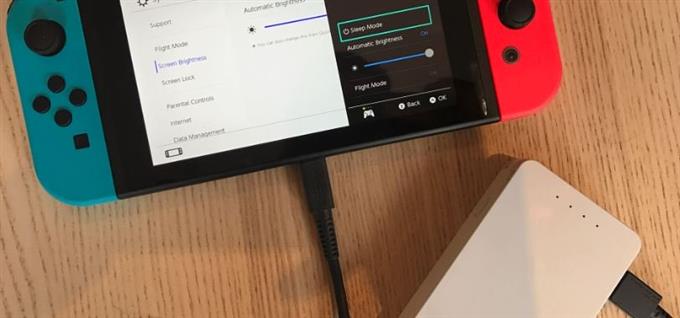
ПРИМЕЧАНИЕ . Помните, что вы не можете активировать режим полета, когда консоль находится в док-станции.
Отключите и снова подключитесь к Wi-Fi.
Еще один простой трюк, который вы можете сделать, — это обновить соединение Wi-Fi, отключившись и снова подключившись к вашей сети. Чтобы отключиться от Wi-Fi, выполните следующие действия:
- Перейдите на главный экран Nintendo Switch .
- Выберите Системные настройки .
- Выберите Интернет .
- Выберите Настройки Интернета .
- Выберите сеть Wi-Fi , к которой вы в данный момент подключены.
- Выберите Удалить настройки .
- Вернитесь к экрану настроек Интернета и снова выберите свою беспроводную сеть.
- Введите свой пароль Wi-Fi для подключения.
Исправление №3: Убедитесь, что сигнал Wi-Fi сильный.
Если ваш Nintendo Switch находится далеко от беспроводного маршрутизатора, попробуйте переместить его ближе и посмотрите, решит ли это проблему. Чем дальше ваша консоль от маршрутизатора, тем слабее становится сигнал. Попробуйте разместить коммутатор в пределах 10–15 футов от беспроводного маршрутизатора.
Исправление №4: проверьте наличие помех сигнала Wi-Fi.
Плохое интернет-соединение на вашем Nintendo Switch может быть вызвано другими источниками беспроводных сигналов. Если вы живете в многоквартирном доме с несколькими другими маршрутизаторами в пределах досягаемости вашего собственного маршрутизатора, существует реальная вероятность возникновения помех сигнала.
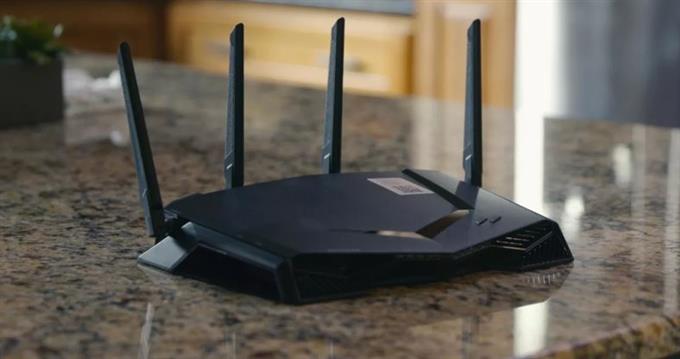
Другие беспроводные устройства, такие как беспроводные телефоны, микроволновая печь, устройства Bluetooth, беспроводные системы видеонаблюдения и т. Д., Могут быть потенциальными источниками помех сигнала.
Металлические предметы или толстые укрепленные стены между маршрутизатором и Nintendo Switch также могут существенно повлиять на сигнал Wi-Fi.
Исправление № 5: Выключите и снова включите маршрутизатор.
В некоторых случаях может помочь обновление вашего беспроводного маршрутизатора дома. Чтобы полностью выключить и снова включить устройство, сначала выключите его как обычно. Обычно это делается нажатием кнопки питания на несколько секунд, пока маршрутизатор не выключится. Когда он выключится, отключите его от источника питания на 30 секунд и подождите. Затем снова подключите все и снова проверьте наличие проблемы.
Исправление №6: Используйте проводное соединение.
Если вы заметили, что ошибка 2110-1100 появляется только при использовании беспроводного соединения или Wi-Fi, попробуйте использовать проводную настройку, если это возможно.
Также прочтите: Как настроить проводное соединение Nintendo Switch (кабель LAN)
При использовании проводного подключения убедитесь, что кабель Ethernet и адаптер LAN работают.
Другие интересные статьи:
- Простые решения, чтобы исправить ошибку сбоя подключения Hitman 3 | 2021 г.
- Как найти QR-код учетной записи Nintendo | Новое и обновленное 2021 г.
- Как исправить ошибку Hitman 3 CE-108255-1 | PS5 | НОВИНКА 2021 г.
- Как исправить ошибку Hitman 3 CE-34878-0 | PS4 | НОВИНКА 2021 г.
Посетите наш канал androidhow на Youtube, чтобы увидеть больше видео и руководств по устранению неполадок.
Игровая консоль Nintendo Switch в продаже уже больше 5 лет (с 2017-го) и, очевидно, пользуется стабильной популярностью.
Девайс как минимум очень удобный — играть на Switch-е можно и дома (на большом экране), и в мобильном режиме вообще где угодно.
Но всякие сбои, баги, ошибки и прочие неприятности у Switch-а, как известно, тоже случаются. О чем мы повествуем регулярно и, есть такое подозрение, повествовать будем еще не раз.
И в продолжение темы — вот наш большой справочник по кодам ошибок Nintendo Switch, в котором мы постарались собрать все самые распространенные из них. С кратким описанием по каждой из проблем и, разумеется, с предложениями относительно того, что и как в каждом отдельном случае надо делать.
Пост этот мы наверняка будем дополнять (по мере сил и возможностей), но пока получается примерно следующее. Итак, по порядку:
#1 — Проблемы с аппаратной частью консоли
| Код | Описание проблемы | Что делать |
| 2153-0321 | Сбой системы воспроизведения аудио | • пробуем просто включить/выключить опцию «Отключать звук при отсоединенных наушниках«; • если это не помогает, то везем Switch в сервис-центр (СЦ). |
| 2168-0002 | Повреждение консоли или пиратский контент | • проверяем и удаляем любой нелегальный контент, и перезагружаем Switch; • проверяем и устанавливаем последнюю версию прошивки; • если ничего не помогает, везем Switch в СЦ. |
| 2115-0096 | Switch не принимает фигурку Amiibo | • проверяем и устанавливаем последнюю версию прошивки; • проверяем правый джойкон; • выполняем сброс данных Amiibo — [ИНСТРУКЦИЯ] |
| 2153-1540 | Switch не работает | • перезагружаем Switch; • проверяем и устанавливаем последнюю версию прошивки; • если ничего не помогает, везем Switch в СЦ. |
| 2139-0006 | Switch сбоит или не работает | Звоним в СЦ. |
Не пропустите: ОШИБКА 2002-3537 У SWITCH: ЧТО НАДО СДЕЛАТЬ
#2 — Общие проблемы Switch
| Код | Описание проблемы | Что делать |
| 2162-0002 | Switch вылетает | • перезагружаем Switch; • заряжаем джойконы; • проверяем и устанавливаем последнюю версию прошивки; • если ничего не помогает, везем Switch в СЦ. |
| 2813-6838 / 2813-6561 | Код карты eShop не срабатывает | • проверяем и вводим код еще раз (код также должен соответствовать региону); • пишем запрос в службу поддержки. |
| 2801-7199 | Не получается выгрузить контент в Facebook | • проверяем подключение консоли и перезаходим в аккаунт Facebook; • проверяем разрешения на загрузку файлов в настройках аккаунта Facebook; • пробуем выложить контент через некоторое время. |
| 2124-4009 | Не получается зайти на сайт (проблема с подключением к сервису) | • перезагружаем Switch; • проверяем подключение консоли и статус серверов сервиса; • пробуем зайти на сайт через некоторое время. |
| 2124-4517 /2181-4017 | Не получается зайти на сайт (проблема с подключением к сервису) | Пробуем зайти на сайт через некоторое время. |
| 2124-3080 | Не получается зайти в сетевую игру (не работает мультиплеер) | • вероятнее всего сетевая версия игры не доступна в вашем регионе. |
| 2124-4007 | Доступ к онлайн-сервисам заблокирован Nintendo (БАН!) | • пишем запрос в службу поддержки Nintendo [ПОДРОБНЕЕ] |
| 2813-0055 | Switch не принимаем код, поскольку ПО еще не вышло официально | Ждем релиз |
| 2813-1470 | Кредитная карта отклонена | Удаляем карты и затем регистрируем её в eShop заново |
| 2813-0040 | Этот код уже погашен (был введен ранее) | Проверяем код |
| 2005-0005 / 2005-0004 | Проблема сервиса Nintendo | • выключаем Switch полностью (ничего удалять пока не нужно); • включаем Switch, проверяем и обновляем прошивку (если доступна свежая версия); • удаляем любые свежеустановленные дополнения и весь пиратский контент; • пробуем другую (новую) карту MicroSD или форматируем имеющуюся. |
| 2124-0291 | Не получается перенести учетную запись на другой Switch | • проверяем, чтобы учетная запись не была привязана к другой (еще одной консоли); • отвязываем учетку и выполняем перенос еще раз. |
Не пропустите: ОШИБКА 2123-1502 У SWITCH-А ПОСЛЕ ОБНОВЫ: ЧТО МОЖНО СДЕЛАТЬ САМОМУ
#3 — Проблемы с ПО Switch
| Код | Описание проблемы | Что делать |
| 2164-0020 / 2122-0082 | Игра не запускается или вылетает | • меню HOME > выбираем проблемную игру > открываем настройки игры (кнопкой +/-) > Управление данными > Удалить программу; • перезагружаем Switch; • устанавливаем игру заново. |
| 2162-0101 | Игра не запускается | Проверяем версию и обновляем игру |
| 2306-0819 | Онлайн-игры не запускаются | • перезагружаем Switch;• проверяем подключение; • проверяем и обновляем прошивку консоли. |
| 2021-0003 / 2000-0000 / 2101-0002 /2107-0427 | Устаревшее ПО | Проверяем и обновляем |
| 2124-3000 / 2137-1508 | Switch не подключается к онлайн-сервисам из-за устаревшей версии прошивки | Обновляем прошивку консоли |
| 2813-0071 | Switch не подключается к eShop. | Проверяем подключение, перезагружаем консоль и подключаемся по-новой. |
| 2142-1099 / 2155-0400 | Приложение «Родительский контроль» не может подключиться к Интернету | Обновляем прошивку консоли |
Не пропустите: ЕСЛИ MORTAL KOMBAT 11 НА SWITCH ВЫЛЕТАЕТ: ЧТО ДЕЛАТЬ? [АРХИВЪ]
#4 — Проблемы с подключением Switch
| Код | Описание проблемы | Что делать |
| 2110-1100 | Switch не определяет сеть Wi-Fi | • проверяем подключение, перезагружаем консоль и маршрутизатор; • проверяем корректность пароля; • переносим Switch в другое место (где нет помех для подключения и/или поближе к роутеру) и подключаем к Wi-Fi заново; • звоним в СЦ. |
| 2811-7001 | Ошибка онлайн-сервиса (eShop) | • проверяем подключение, перезагружаем консоль и маршрутизатор; • проверяем статус серверов Nintendo. |
| 2110-2004 | Switch не определяет сеть Wi-Fi | • проверяем подключение, перезагружаем консоль и маршрутизатор; • проверяем корректность пароля; • переносим Switch в другое место (где нет помех для подключения и/или поближе к роутеру) и подключаем к Wi-Fi заново; • проверяем и обновляем прошивку маршрутизатора; • звоним в СЦ. |
| 2110-2091 | Сетевой адаптер обнаружен, но Switch не подключается к роутеру | • проверяем качество подключения кабеля Ethernet; • перезагружаем маршрутизатор; • подключаем кабель к другому порту маршрутизатора; • пробуем другой кабель. |
| 2110-2201 / 2110-2214 | Неправильный пароль | • проверяем корректность пароля; • проверяем подключение, перезагружаем консоль и маршрутизатор. |
| 2110-1100 | Switch не видит сеть Wi-Fi (или не настроен USB LAN) | • проверяем подключение, перезагружаем консоль и маршрутизатор; • настраиваем новое беспроводное подключение — [ИНСТРУКЦИЯ]; • переносим Switch в другое место (где нет помех для подключения и/или поближе к роутеру) и подключаем к Wi-Fi заново; |
| 2110-2091 | Switch не подключается к Сети через кабель | • проверяем связь (подключение к Интернету); • перезагружаем маршрутизатор; • проверяем настройки DNS. |
| 2110-2003 | Switch не видит сетевой адаптер | • проверяем связь (подключение к Интернету); • проверяем качество подключения кабеля Ethernet; • перезагружаем маршрутизатор; • подключаем кабель к другому порту маршрутизатора; • пробуем другой кабель. |
| 2110-2004 / 2110-2220 / 2110-2201 / 2110-2214 | Не получается подключиться к определенной сети Wi-Fi | • проверяем подключение, перезагружаем консоль и маршрутизатор; • проверяем корректность пароля; • переносим Switch в другое место (где нет помех для подключения и/или поближе к роутеру) и подключаем к Wi-Fi заново; • проверяем настройки сети. |
| 2110-3127 | Не получается подключиться к определенной сети (Wi-Fi или проводной) | Проверяем настройки DNS |
| 2110-3400 | Не получается подключиться к определенной сети (Wi-Fi или проводной) | Требуется проверка подлинности через браузер (например, согласие с условиями обслуживания или ввод имени пользователя и пароля) |
| 2122-2403 / 2211-0524 | Switch не подключается к интернету | • проверяем подключение, перезагружаем консоль и маршрутизатор; • обновляем прошивку консоли; • перезагружаем Switch. |
| 2811-1006 | Switch не подключается к учетной записи Nintendo | • проверяем подключение, перезагружаем консоль и маршрутизатор; • проверяем корректность пароля; • переносим Switch в другое место (где нет помех для подключения и/или поближе к роутеру) и подключаем к Wi-Fi заново. |
| 2811-5001 / 2811-1028 | Switch не подключается к eShop или другим сервисам | см. выше |
| 2155-8006 | Switch не подключается к учетной записи Nintendo (из-за некорректных настроек DNS) | см. выше |
| 2618-0513 | Сбой подбора игроков в игре | • пробуем еще раз; • проверяем связь; • перезагружаем консоль и маршрутизатор; • проверяем статус серверов игры и Nintendo; • пишем запрос в службу поддержки. |
| 2160-0103 / 2306-0520 / 2618-0006 / 2618-0201 / 2618-0516 | Сбой подключения в игре | • проверяем связь; • перезагружаем консоль и маршрутизатор; • проверяем статус серверов игры и Nintendo; • проверяем настройки DNS; • перезаходим в игру через некоторое время. |
| 2160-0202 | Сбой подключения | • проверяем подключение, перезагружаем консоль и маршрутизатор; • проверяем корректность пароля; • переносим Switch в другое место (где нет помех для подключения и/или поближе к роутеру) и подключаем к Wi-Fi заново; • подключаемся к другой сети Wi-Fi |
| 2155-8006 | Switch не подключается к учетной записи Nintendo (из-за некорректных настроек DNS) | см. выше |
| 2124-8006 / 2137-8006 | Не удается завершить загрузку | см. выше |
| 2810-1224 | Не получается залогиниться | см. выше |
| 2137-0240 | Не удается завершить загрузку | см. выше |
| 2124-8028 | Не получается залогиниться | см. выше |
| 2124-8006-2124-8007 | Сбой подключения | см. выше |
| 2160-8006-2160-8007 | Не удается завершить тес сети | см. выше |
| 2618-0203 | Switch не подключается к учетной записи Nintendo | см. выше |
| 2142-0507 | Приложение «Родительский контроль» не может подключиться к Интернету | см. выше |
Не пропустите: ОШИБКА 2137-8056 В SWITCH: ЧТО ОЗНАЧАЕТ И КАК УСТРАНИТЬ [АРХИВЪ]
#5 — Проблемы на стороне сервера
| Код | Описание | Что делать |
| 2813-0002 | Не получается зайти в eShop — сбой сервиса | Заходим через время |
| 2618-0542 | Не получается зайти в сетевую игру — слишком много игроков | Заходим через время |
| 2613-1400 | Оплата картой не проходит — сбой сервиса | Ждем и потом пробуем еще раз |
| 2306-0811 | Switch не подключается к онлайн-сервису — сбой на стороне сервера | Заходим через время |
| 2801-7002 | Не получается загрузить контент в Twitter — сбой на стороне сервера | Заходим через время |
| 2124-5119 / 2124-5249 | Сбой на стороне серверов Nintendo | Заходим через время |
| 902-5998 | Сервер Nintendo eShop остановлен на ТО | Заходим через время |
| 2810-1500 | Не получается зайти в Facebook | • перезагружаем консоль • перезаходим позже |
| 2124-5002 / 2124-5200 | Не получается зайти в учетную запись Nintendo | Заходим позже |
| 2813-0009 / 2813-1400 / 2813-6835 / 2813-9804 /2813-9712 | Сбой на стороне сервера Nintendo eShop | перезагружаем магазин и/или заходим позже |
| 2811-7503, 2811-7504 | Сбой на стороне сервера Nintendo eShop | Заходим позже |
| 2816-0700 / 2817-0700 | Сбой на стороне сервера | Заходим позже |
Не пропустите: КОГДА ДОК-СТАНЦИЯ SWITCH МИГАЕТ ЗЕЛЕНЫМ И НЕ РАБОТАЕТ: ЧТО ДЕЛАТЬ?
#6 — Проблемы с картой памяти MicroSD
| Код | Описание | Что делать |
| 2002-2049-2002-2064 2002-4690 / 2002-6201 / 2016-0247 / 2016-0602 / 2016-0641 | Ошибка карты памяти на этапе загрузки или обновления игры | • вынимаем карту из слота и затем вставляем снова ставим её на место; • перезагружаем Switch, проверяем версию прошивки и обновляем (если доступна свежая); • выполняем проверку файлов игры — [ИНСТРУКЦИЯ] • форматируем карту (НО учитываем, что при этом все данные с карты будут стёрты без возможности восстановления!); • берем другую/новую MicroSD или ставим игру в память Switch. |
| 2002-2001 /2016-0390 / 2205-0123 | Нет доступа к карте памяти microSD | см. выше |
| 2002-4517 / 2002-4641-2002-4660 /2002-4741-2002-4760 / 2002-0007-2002-0008 /2002-4683 | Не получается скачать игру или прогу из eShop — сбой карты памяти | см. выше |
| 2002-4301-2002-4463 / 2002-3005 /2002-3500-2002-3999 / 2002-0001 /2016-0601 / 2101-0001 / 2107-0445 | Ошибка карты памяти в игре и/или после включения Switch | см. выше |
| 2002-1002 / 2002-2629-2002-2669 | Игра не загружается или не запускается — сбой карты памяти | см. выше |
| 2002-2085 | Switch не распознает карту памяти microSD | см. выше |
| 2005-0003 | Игра не загружается или не запускается — сбой карты памяти | см. выше |
Не пропустите: ЕСЛИ ЛАГАЕТ ЗВУК У SWITCH ПОСЛЕ ПОДКЛЮЧЕНИЯ К ТЕЛЕКУ: ЧТО МОЖНО СДЕЛАТЬ?
#7 — Проблемы Switch в некоторых играх
| Код | Описание | Что делать |
| 2306-0820 | Не запускается Splatoon 2 Global Testfire | Эта «демка» уже недоступна |
| 2-ARVHA-0000 |
Не работает YouTube | ПОДРОБНЕЕ >>> |
| 2-AABQA-1021 | Не получается зайти в сетевую игру в Arms | Проверяем подключение, перезагружаем Switch и перезаходим в игру |
| 2-BABBE-1000 | Не получается зайти в сетевую игру в Ultra Street Fighter 2 | Обновляем игру, проверяем подключение, перезагружаем Switch и перезаходим в игру |
| 2306-0112 | Сбой подключения к серверу в Pokemon Sword and Shield | ПОДРОБНЕЕ >>> |
| 1618-0521 |
Консоль не отвечает в Animal Crossing: New Horizons | ПОДРОБНЕЕ >>> |
Error code 2110-1100 on the Nintendo Switch is a general network error that occurs when the console is unable to connect to a WiFi network or a previously connected wired network. This error may appear randomly while browsing the Nintendo eShop or during gameplay.
JOIN @mrhack membership! Tap JOIN b…
Please enable JavaScript
Here one of the Nintendo Switch Users is sharing their experience on Reddit:
Don’t worry about it!
The CPU Guide brings you the best working solution to solve Nintendo Switch Error Code 2110-1100.
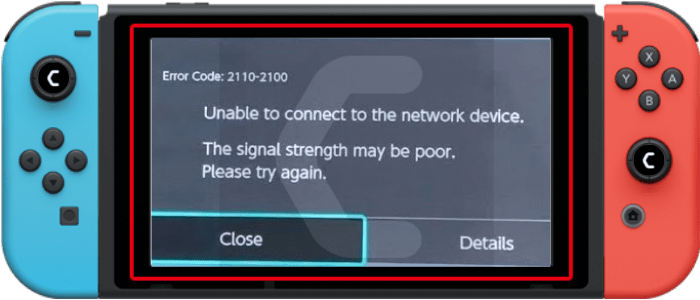
Solution 1: Check For Active Internet Connection
Make sure your console is connected to an actual and active internet connection or else you won’t be able to download any game.
Here’s what you need to do to fix Nintendo Switch Error Code 2110-1100:
- Make sure your Nintendo Switch is placed only 10ft apart from your Wi-Fi router.
- In the Home, menu selects the gear icon to go to System Settings.
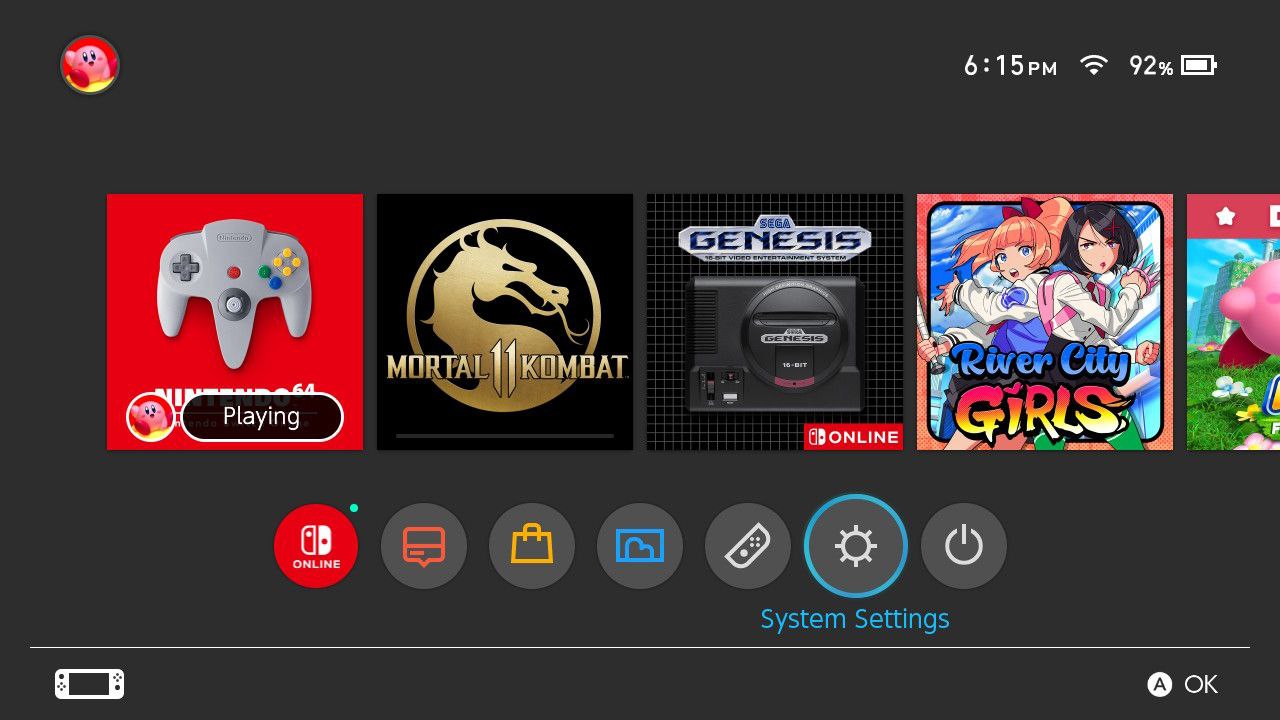
- Now select Internet > Internet Settings and the switch will search for nearby WiFi Signals.
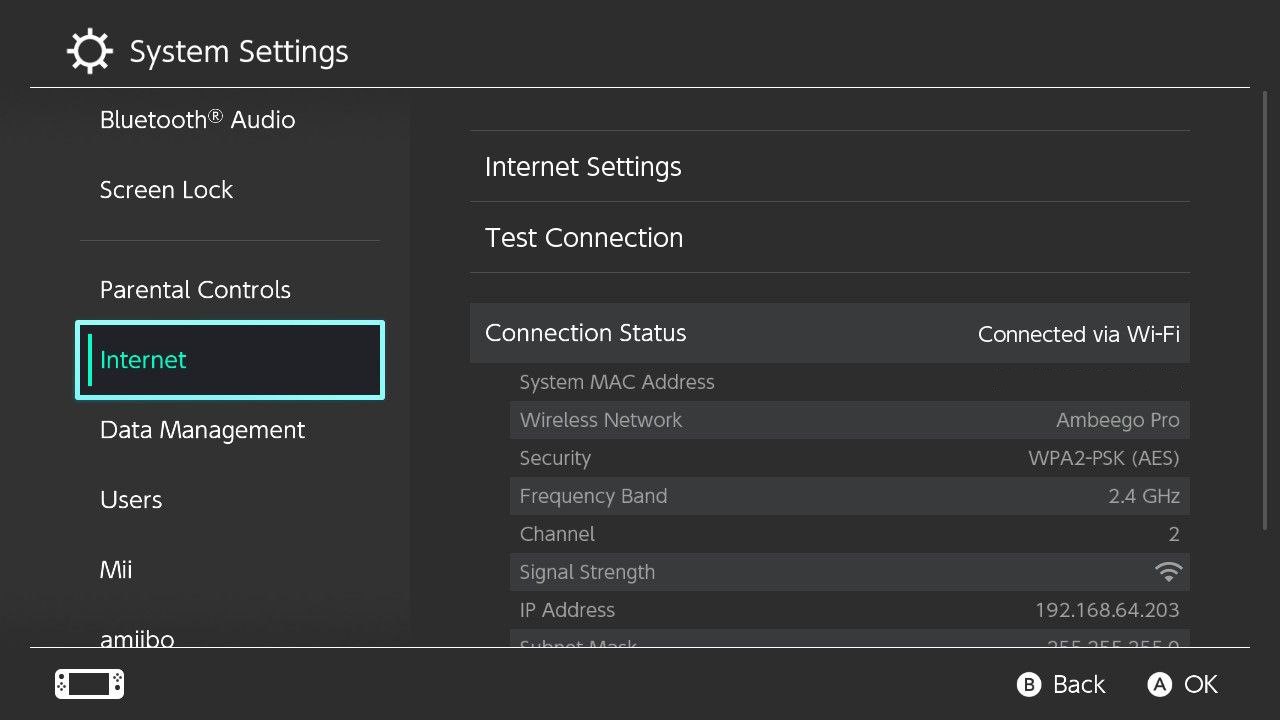
- Next, choose your network name from the Wi-Fi list and connect to the internet.
- If your network name/Wi-Fi router name is not showing then move a bit closer to the router and search again by pressing the Y button on your Switch.
- Or you can re-enter the Wi-Fi password again.
After this
- Go to the Home Menu and select User Settings.
- And scroll down to click Update Download Progress.
If the error persists then proceed to the next solution to solve Nintendo Switch Error Code 2110-1100
Read Also: How To Fix Nintendo Switch Error 2811-7503
Solution 2: Check Nintendo Server Down
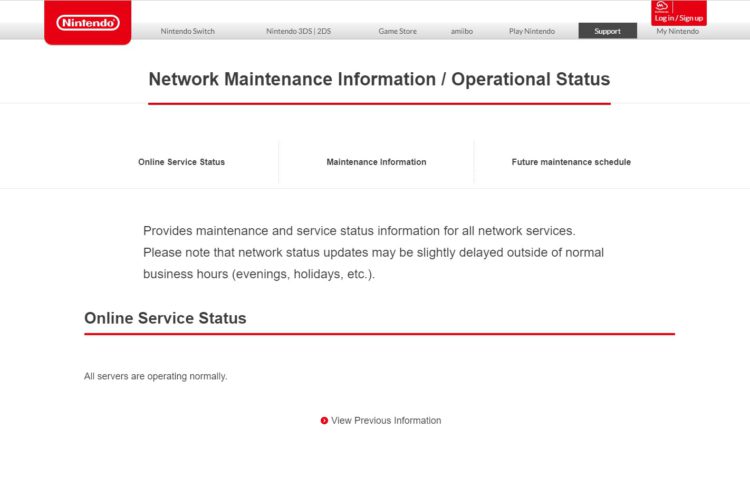
Sometimes the Nintendo server is down due to maintenance or some technical issue. If you are not aware of such any maintenance activity you can confirm it by visiting Nintendo’s official website where you can see the servers are down or not.
Read Also: Nintendo Switch Overheated
Solution 3: Turn Off the Airplane Mode
Make sure you disable Airplane mode on your Nintendo Switch:
- Open the System setting
- Select the Airplane mode
- Now select the Airplane mode from the left side and press A to turn off
Solution 4: Hard Reset Your Nintendo Switch to Fix Nintendo Switch Error Code 2110-1100
What you need to do is hard reset or force reboot to overcome the Nintendo Switch Error Code 2110-1100
Just follow these steps to fix the Nintendo Switch Error Code 2110-1100
- Connect your AC adapter to your Nintendo Switch and wait for 15 to 20 minutes until the battery charges.
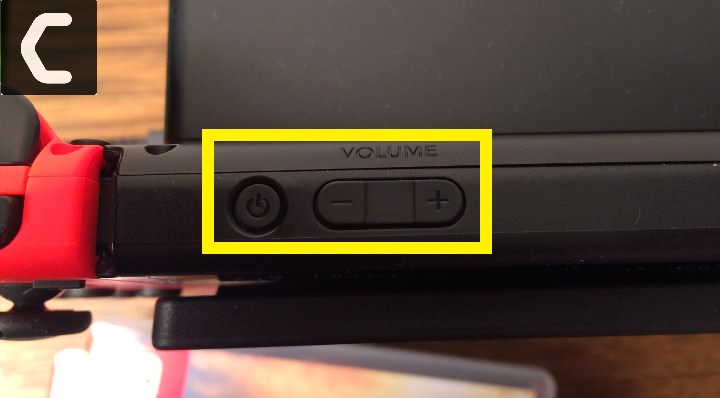
- Press and hold the Power button for at least 12 seconds
- Press the power button once to turn the console back on
- Now connect your Switch to the internet and the games will start to download.
- Just be sure that you don’t run any other software on your console after the restart
Read Also: How To Update Nintendo Switch From Recovery Mode
Solution 5: Change to a Different Network
Some users reported facing Error code 2110-1100 when connecting to a particular network, such as their home Wi-Fi, but it goes away when they switch to a different network.
If you’re using your home or office network to play games, try switching to mobile data hotspot to see if not downloading games is solved.
If so, you may need to reconfigure your router’s ports.
Solution 6: Power Cycling Internet Router

Sometimes, a corrupted DNS cache may accumulate or other startup configurations in the router leading to Nintendo Switch Error Code 2110-1100
Therefore, at this step, you will completely clear this cache by turning the router off and on. Here is how you can do it:
- Disconnect power from the router.
- Press and hold the power button of the router for at least 10 seconds.
- Connect the power and wait for the router to start.
- Try connecting to the game and see if the Nintendo Error code 2110-1100 is fixed.
Read Also: Nintendo Switch Overheated
Solution 7: Call Your ISP
The least you can do to solve the Nintendo Switch Error Code 2110-1100
is contact your Internet Service Provider (ISP).
They will access that data which you can’t and will know what’s going wrong with your internet connection.
Moreover, tell your ISP to open the following ports:
- TCP: 80, 443, 3478, 3479
- UDP: 3478, 3479, 49152 ~ 65535
Solution 8: Contact with Support
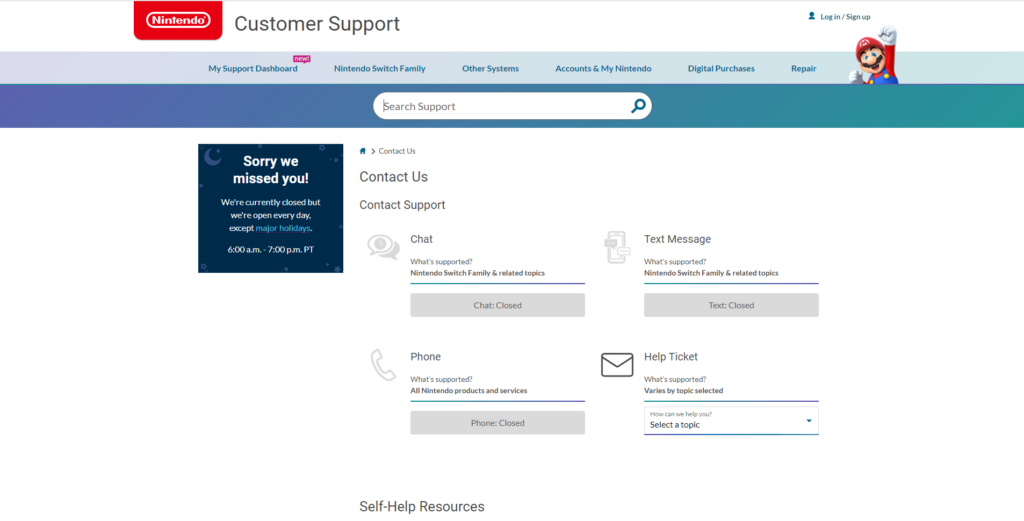
If none of the above solutions worked for you then there is only one way is left. Now you have to contact Nintendo customer support in order to solve Nintendo Switch Error Code. Explain to them what issue is bothering you and they will assist you in the best manner to solve your matter.
Hope all of the above solutions help you to solve Nintendo Switch Error Code 2110-1100.
Share your experience in the comment section down below.
FAQ
How do you fix a corrupted Nintendo switch?
To fix corrupted Nintendo Switch you have to follow this solution:
1. Update the Nintendo Switch
2. Check for the corrupted data
3. Power cycle your router
4. Call your ISP
5. Contact with Nintendo Switch support
Does SanDisk work with switch?
Yes, Sandisk is one of the finest SD card makers which provides high-quality cards to enhance the user experience. SanDisk cards work excellently on the Nintendo Switch.
What does Maintenance Mode do on switch?
The Maintenance Mode allows the user to update and reset the device without losing any data on the console.

If you’re getting error 2120 on Nintendo Switch, there is no need to panic. Although this error code is quite an annoying one since it blocks your console from connecting to a wired or WiFi Internet connection, the good news is that you can fix it. And BestGamingTips will show you exactly how you can do that.
You can use this guide to fix the following errors:В 2110-2003, 2110-3127, and 2110-1100.
Potential Fixes for Nintendo Switch Error 2110
Fix 1 – Restart your console and modem
When something fails to work, the first thing that you should do is perform a restart. Restart and unplug your console, as well as your modem/router.
To restart the Switch, press the Power Button for about four seconds and select Power Options > Restart.
Fix 2 – Change network password
We know that you don’t want to change your network password too often but bear with us for this one. So, first things first, make sure that you enter the correct password in your console’s Internet settings.
If error 2110 persists even when entering the correct password, try changing your Internet access password from your modem’s settings page, enter the new password on your console and check if the issue persists.
For more information on the steps to follow, go to your ISP’s support page or your modem manufacturer’s support guides.
Fix 3 – Move the console closer to your modem and remove interferences
Nintendo Switch error 2110 may also be caused by Wi-Fi signal strength issues, so make sure to reduce the distance between your console and your modem/router in order to improve the WiFi signal.
At the same time, make sure there are no devices that may be interfering with your WiFi signal such as speakers, power cords, phones, metallic objects, and so on.
Fix 4 – Update your modem/router firmware
If the error persists, try installing the latest firmware updates on your modem/router. For more information on how to update router firmware, go to your device’s manufacturer website.
Fix 5 – Check your LAN cable
If this error occurs when using an Ethernet connection, make sure that the cable is well connected and there are no visible faults affecting it. You may also want to try using a different Ethernet cable.
Fix 6 – Restore modem to factory default settings
Many WiFi or Ethernet errors can be solved by reverting your modem/router to factory default settings.
Most network devices have a tiny button usually located on the side which allows you to restore default settings. Press and hold the respective button until the lights on your modem/router turn off.
For more information, go to your modem/router’s manufacturer website.
We hope that these workarounds helped you fix error 2110 onВ Nintendo Switch.
The Nintendo Switch error code ‘2110-3127’ occurs when your Switch cannot connect to a wired or wireless network. Whenever you connect to a network, a series of checks are performed in the background such as checking the DNS, internet connectivity, etc. If any of these are not fulfilled, you will receive the error message.

Nintendo Switch Error Code 2110-3127
The reasons for the error code ‘2110-3127’ are mostly related to internet connectivity problems where the DNS entered might not be working or the encryption type is not working with the specified wireless network. The full error message includes the messages “Connection test failed. Could not perform DNS name resolution. Please try again later”.
What causes Nintendo Switch Error Code 2110-3127?
Like mentioned, the error code is mostly associated but not limited to connectivity problems. Some of the reasons are:
Before proceeding with the solutions, make sure that you have an active internet connection. You should check the network from other devices such as smartphones or your computer. If you can access the internet normally, it will cross out the possibility of limited connectivity and we can move on with the solutions specific to Nintendo Switch. Also, make sure that you are not using any institution internet. These networks have a firewall that blocks some requests.
Solution 1: Disconnect All Other Devices Using the WiFi
The first step in troubleshooting this particular error should be to disconnect all the devices (a reported solution by many users) that are using the same network as your Nintendo switch except the switch. As this would cut out any issues/interferences raised by these devices. After disconnecting all other devices, restart your router and Nintendo switch and then check if the problem is solved.
Solution 2: Power Cycling Nintendo Switch
The solution which works for a majority of the people was power cycling the Nintendo Switch. As discussed before, there are numerous cases where your Switch might contain bad network configurations. Reconnecting to the network will not erase them, instead, you need to completely power cycle your device.
Solution 3: Manually Entering DNS Settings
Domain Name System is a naming system for all the devices trying to access the internet. Whenever you type ‘google. com’ in the address bar, the name gets ‘resolved’ into an IP address by the DNS and then the internet communication begins. This is more or less the core in connecting devices to the internet. If the DNS is not working automatically, we can try entering it manually and see if the issue is resolved. We will use Google’s DNS.
DNS Settings: Manual
Primary DNS-Server: 8.8.8.8
Secondary DNS-Server: 8.8.4.4
Solution 4: Manipulating Security Settings
Another workaround to fix the issue under discussion is to manipulate the security settings of your network. Several users reported that switching from WPA2-PSK to WPA-PSK and back again solved the issue. This is weird behavior which signifies that there is some bug in the Switch which gets resolved when the configurations are reset.
Solution 5: Use “Guest WiFi”
If going through all the solutions above, nothing has helped you (especially if you are using FIOS Quantum Gateway router), then using the Guest WiFi (not supported by many old routers though) may solve the problem. Keep in mind that a guest Wi-Fi is basically your router’s separate network access point for guests (as the name suggests) whereas your devices are connected to another network access point. The user of a guest network will be able to use the internet but will not be able to access your home network. For illustration purposes, we will discuss instructions for the FIOS Quantum Gateway router. You may follow instructions specific to your router.
Solution 6: Troubleshooting the Network
If the error code 2110-3127 persists even after performing all the above steps, it probably means that there is an issue with the network you are trying to connect. You should try connecting to the internet through the network using another device and verify if it is indeed operational. If it isn’t, you need to do further troubleshooting.

Cisco router configuration page
You can even try connecting to another network/router with your Switch and see if the issue persists. If it doesn’t, it will mean that there is an issue with your router and you need to reset the settings. There can be issues with your ISP or even Firewalls might be set which might cause the issue. Make sure that you troubleshoot thoroughly and try connecting Switch only when you are sure that your network is working perfectly.
If nothing has worked for you so far, then either update your router’s firmware to the latest build or reset it to its factory defaults.
Источники:
https://bestgamingtips. com/fix-nintendo-switch-error-2110/
https://appuals. com/fix-nintendo-switch-error-code-2110-3127/
It is amazing how the internet is taking all over the world. The same goes for gaming. Online co-op is the norm now, and that also includes the use of the Internet.
Couch co-op was pretty much dead, and then Hazelight studios came with It takes two and a way out and saved this old genre from the ashes. But all games are pretty much Internet-based.
And games like Animal crossing, pokemon require the internet to play with your friends. So it is going to be a big hassle if you don’t have a stable internet connection.
Does any USB Ethernet adapter work with Nintendo Switch?
There are certain LAN adapters that are incompatible with the Nintendo Switch, although the vast majority of LAN adapters are compatible with the system. However, getting the official LAN adapter for the Nintendo switch is advised.
Many Nintendo Switch users are facing issues going online with their consoles. This has been a big issue lately as people are staying home and trying to have fun with their folks online.
It hurts a lot when you cannot go online and play with your friends. I have been in that situation, and I know how bad it feels; I will be describing how you can get rid of this issue, so you don’t have to play alone the next time.
So keep reading till the end to get your desired fix.
Follow our guide on Can a Nintendo Switch Be Blacklisted.
Why won’t my Nintendo Switch connect to Internet?
Many Nintendo Switch users have reported getting an error message Unable to connect to the network while attempting to connect their device to the internet. Or have gotten the error code 2110-1100.
This issue prevents you from playing multiplayer games, using voice chat, or doing any other online activity. The Nintendo Switch may lose or fail to establish an internet connection for many reasons. Among the causes are Switch Online or other services down. Probably your home Wi-Fi is down. The router can’t reach your switch since it’s too far away. Your network’s security key is incompatible. A firewall prevents the Switch from connecting to your network.
Nintendo Switch consoles are well-known for struggling with a software bug that results in some consumers being unable to connect to their home WI-FI network on occasion. In the great majority of cases, a simple console reset will resolve any issues you are experiencing.
Make sure that your firewall settings are correct. The Switch may be unable to access services because of a firewall on your network. You may isolate it from the rest of the network by putting it in a DMZ and bypassing the firewall. There are instructions for configuring a DMZ on the Nintendo support site.
A small number of affected gamers have discovered that this issue happens as a result of the inability to connect to your particular DNS server, or that the DNS address is part of a problematic range that is disallowed by the Internet service provider. In order to resolve this, you will need to utilize a 3rd party DNS server operated by a separate organization.
All you have to do is go through our latest Long Do Nintendo Switch Charge Last.
There’s a possibility Nintendo’s internet services are down. Check Nintendo’s Network Maintenance Information page for updates.
If the online services perform successfully, the page displays the message All servers are running normally. The Maintenance Information and Future Maintenance Schedule sections further down the page inform you when online access may be limited.
It’s possible that your router is experiencing problems caused by temporary files that are preventing your Nintendo Switch from connecting to the internet. Fortunately, rebooting your router will solve the problem.
You should check to see whether your wifi network is compatible with the Nintendo Switch, even if it’s not the core source of your issues. A separate router or a combined modem-router is required to determine whether your house is compatible with the 802.11ac, 802.11n, 802.11g, or 802.11b standards, and you’ll need a separate router to do this.
Make sure your router supports 5GHz Wi-Fi by running this test. Speeds will be increased, and any sluggishness may be due to the fact that the 2.4GHz channel is picked instead of 5GHz.
Your Switch may not be able to connect if it is too far away from the router or is receiving a poor wifi signal. If the issue persists, try moving closer to the router.
The router’s ability to communicate with your console may also be affected by signal interference. If you have any metal items or electrical gadgets in your house, they may interfere with your wireless signals. Attempt to alleviate the problem by removing clutter such as file cabinets, microwave, Bluetooth adapters, cordless phones, power strips, and other wireless gadgets. Disconnect your wireless devices from your network and turn them off if you can.
Here’s a complete guide on how to solve Nintendo Switch Error Code 2137-8056.
Almost every Nintendo Switch user has had difficulties connecting to the internet. When using this gaming system, you will often have difficulties connecting to the internet. I’m especially referring to this particular one. You will be unable to play video games online or on your digitally-owned gaming console as a result of this. That’s a tremendous shame, to say the least!
There are a variety of measures that may be taken to fix this issue. Nintendo identified a few of them in their official patch release about error code 2110-1100. On the contrary, it could be a little tough to understand for a beginner.
I’ll go through them briefly in order to be able to assist you in getting out of this situation. Before beginning any troubleshooting, it is recommended that you restart your router and thoroughly analyze your network. Another possibility is that restarting your switch will resolve the problem.
So let’s get into the troubleshooting steps.
Check our separate post for Is Nintendo Switch Worth It.
Here are the steps to fix Nintendo switch error code 2110-1100:
1. Restart Nintendo Switch
Restarting your Nintendo Switch is often capable of resolving the 2110-1100 problem.
Here are the steps to restart the Nintendo switch:
- Hold the power button for 3 secs.
- Click on power options.
- Select restart.
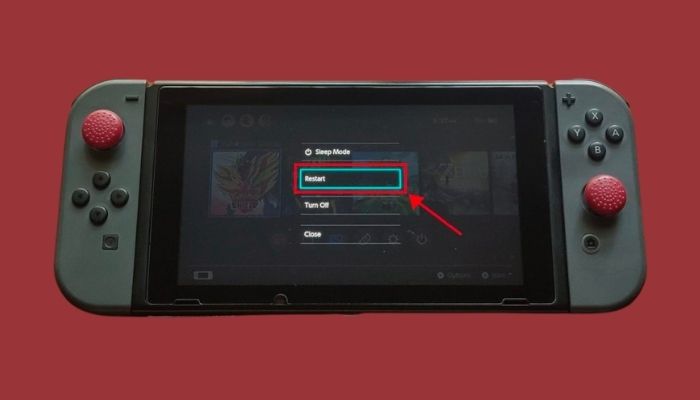
After the restart, connect to your wifi again. It should work; if you still cannot use the Internet on your Nintendo switch, follow the next method.
Check our separate post on how you can fix the Nintendo Switch Controller Not Charging.
2. Check Nintendo server status
There are occasions when the Nintendo server is unavailable due to maintenance or a technical problem. It is possible to check whether Nintendo’s servers are down by visiting their official website, where you can see if the servers are up and working or not.
Here are steps check to the server status of Nintendo:
- open your web browser.
- Initiate a network status check on Nintendo.
- Search for server status Nintendo on your browser.
- Choose your region or state.
If the online services are working properly, the Online Service Status tab will show that all servers are working regularly.
In the case of a local or global outage, all Switches will be disconnected. Ensure the problem isn’t with Nintendo before moving on to other solutions.
Have some time to spare? Quickly check out our epic guide on how to Fix a Water Damaged Nintendo Switch
3. Change DNS settings
It is possible that you have entered an inaccurate DNS configuration on your console that does not correlate to the settings on your Wifi network. This is why you cannot use the internet on your Nintendo Switch.
Here are the steps to change DNS settings on Nintendo:
- Navigate to the settings.
- Scroll down until you find the Internet.
- Select Internet options.
- Pick the network on which you are connected.
- Configure DNS with a tap.
- Press A on Manual settings.
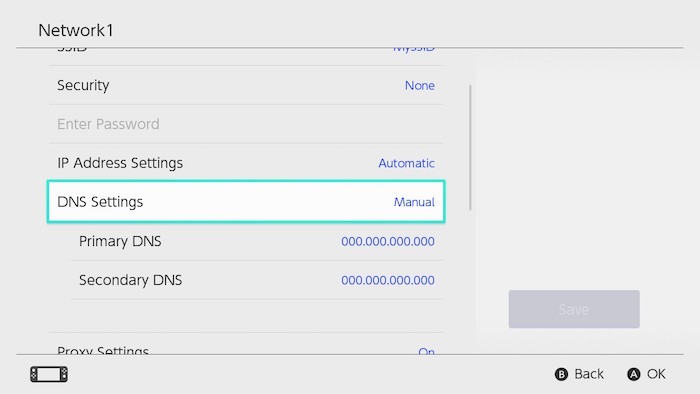
- Enter the Google DNS address (8.8.8.8 and 8.8.4.4).
- Save the configuration.
You should be able to browse the internet now. If you are still getting a network error, follow the next solution.
So, let’s get started by getting the latest problem fixing Nintendo Switch Not Reading SD Card
4. Get a LAN connection
Use a cable connection if feasible if you get the 2110-1100 problem while accessing a wireless connection or wifi. You will need a LAN adapter before setting up a wired connection in Nintendo Switch.
Here are the steps to set up a LAN connection in Nintendo Switch:
- Open the backplate on your Switch dock.
- Connect the LAN adapter via USB Port.
- Insert the ethernet port in the adapter.
- Go to internet settings on your switch.
- Select the wired connection.
- Test the internet connection.
- Save the settings.
Wired connections are recommended for frequent online gaming on the Nintendo Switch. If you have a lot of devices linked to your wifi network, a wired connection may actually be quicker than a wireless one. The speed of downloads also improves quite significantly on a wired connection.
Final Thoughts
Nintendo Switch has been the go-to handheld console for some time now. With some little software glitch, it is still the best portable console out there.
Hopefully, you can solve your error code with this guideline.
And for future queries, you can always reach out to us.
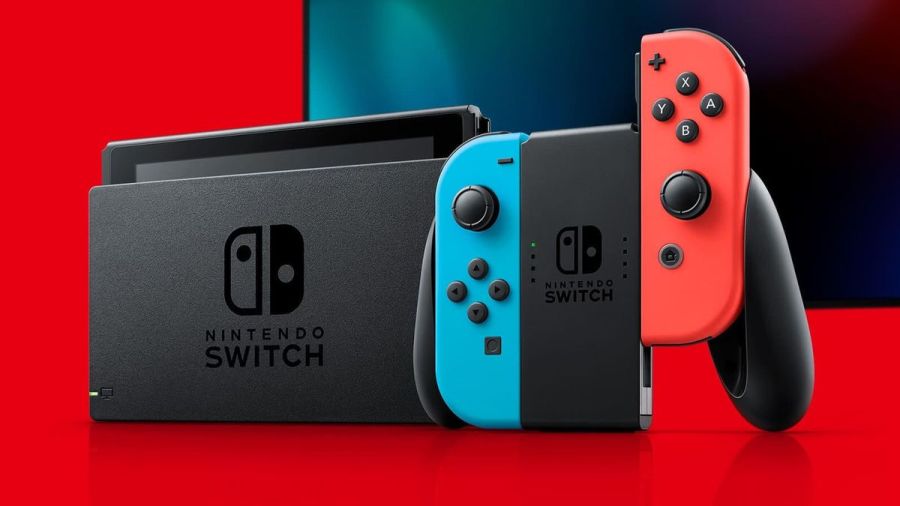
Image via Nintendo
The Nintendo Switch is an innovative console that has taken the world by storm. It has amazing capabilities that continue to wow users. Functionality is top-rate and usually pretty reliable. But what happens when that console isn’t working and is throwing up error codes?
It’s time to diagnose issues on the Nintendo Switch and fix it!
Note: To find the specific error code needed, hit ctrl+f on the keyboard.
Hardware
2153-0321
- This code means there is a serious audio-hardware issue
- The console will need to be physically repaired. Call Nintendo support for more info.
- A temporary workaround that works for some, but not all: turn off the «mute volume when headphones are unplugged» setting.
2168-0002
- This is a console crash error. It could be caused by either corrupted hardware or pirated content.
- If there is any pirated content on the Switch, delete the files immediately.
- Try rebooting the console.
- If rebooting doesn’t work, try making sure the system is up to date.
- If the above fails, the Switch may need to be physically repaired.
2115-0096
- Amiibo figure is not being accepted on the Switch.
- Check for system updates.
- Check the right Joy-Con to make sure it is working properly.
- Reset Amiibo data.
2153-1540
- This error code indicates the Switch is not functional.
- Restart the Switch.
- Check for updates.
- If this doesn’t work, call Nintendo Support. The Switch may need repairing.
2139-0006
- There is something wrong with the hardware.
- Call Nintendo Support. The console will need to be prepared.
General
2162-0002
- This is a crash error with multiple causes.
- Try restarting the console.
- Making sure Joy-Cons are charged.
- Once rebooted, make sure all parts of the Switch are up to date.
- If the crash error persists, contact Nintendo Support.
2813-6838 / 2813-6561
- The Nintendo eShop Card code attempting to be used is unable to be processed.
- Try the code again, checking the numbers carefully.
- Make sure the code isn’t intended for a different region.
- If the above doesn’t work, contact Nintendo Support.
2801-7199
- Facebook upload is not working.
- Try unlinking, then relinking the Facebook account.
- If this fails, check Facebook permissions on the Facebook site/app.
- If the error code persists, wait and try again later.
2124-4009
- This is a general functionality error code.
- Restart the Switch.
- If problems persist, there may be maintenance or an outage. Try again later.
2124-4517 /2181-4017
- Usually, there flagged unusual behavior on the Switch, preventing online service access.
- Wait and try again later.
- If the problem persists, contact Nintendo Support.
2124-3080
- The Switch cannot connect to online match-making.
- Online multiplayer is likely not available in your region.
2124-4007
- The Switch console being used has been permanently banned from connecting online, likely due to a breach of Terms of Service.
- Contact Nintendo Support.
2813-0055
- The Switch cannot redeem a download code because the software is not released to the public yet.
- Wait until the release date.
2813-1470
- The credit card being used in the eShop has been rejected.
- Delete and set up the card again.
2813-0040
- The download code attempting to be used has already been redeemed.
- Double-check the download code.
2005-0005 / 2005-0004
- This error means something in the Nintendo is likely corrupted.
- Turn off the Switch. Do not delete any data yet.
- Turn it back on and make sure the system is up to date.
- If this does not work, delete any offending DLC or pirated content.
- If the above doesn’t work, try a new MicroSD or format the current one.
2124-0291
- Transfer of user account to another Switch cannot be finished.
- Check that the user account isn’t already linked in some way to the second console.
- If so, delete that data and try the transfer again.
Software
2164-0020 / 2122-0082
- There is software on the Switch causing an error.
- Go to manage software.
- Delete the software causing this issue (likely the game that caused the crash).
- Restart the Switch. Put the game card back in, if it is not digital.
- Reinstall the software.
2162-0101
- A game cannot start because an update is required.
- Check for software updates.
2306-0819
- The Switch is unable to connect to online games.
- Make sure the Switch software is up to date.
2021-0003 / 2000-0000 / 2101-0002 /2107-0427
- The latest software is not being used.
- Check for software updates.
- Check for corrupted data.
2124-3000 / 2137-1508
- The Switch is unable to connect to an online service because it is not up to date.
- Update the console.
2813-0071
- The software is having a general issue with downloading on the eShop.
- Restart the console and try again.
2142-1099 / 2155-0400
- The Parental Controls app cannot connect to the internet. The console needs to be up to date.
- Update the console.
Internet Connection
2110-1100
- The Switch is unable to determine a network.
- Run through all internet troubleshooting settings:
- Make sure no objects are blocking the Switch.
- Check the network password again and retry.
- If failure, try either power cycling the home network or moving closer to the router.
- If the connection fails again, try turning off password requirements for the network.
- If all steps fail, check network settings for the home network.
- If this still fails, call Nintendo Support as there may be additional solutions. In some cases, the Switch may need repair.
- Run through all internet troubleshooting settings:
2811-7001
- An error in using an online service like eShop has occurred.
- Restart the console.
- Check internet connection.
- Restart network devices.
2110-2004
- The Switch is unable to determine a network.
- Run through all internet troubleshooting settings:
- Make sure no objects are blocking the Switch.
- Check the network password again and retry.
- If failure, try either power cycling the home network or moving closer to the router.
- If the connection fails again, try turning off password requirements for the network.
- If all steps fail, check network settings for the home network.
- Update the Router’s firmware.
- If the above doesn’t work, factory reset the router.
- If this still fails, call Nintendo Support as there may be additional solutions. In some cases, the Switch may need repair.
- Run through all internet troubleshooting settings:
2110-2091
- LAN Adapter is detected, but the Switch could not make a connection with the router or modem.
- Check to make sure the ethernet cable is secure.
- Try power cycling your home network.
- Use a different port on the router.
- Try a different ethernet cable.
2110-2201 / 2110-2214
- The router or access point alerted the Switch that an incorrect password was used.
- Confirm the connection password.
- Troubleshoot internet connection:
- Move the Switch closer to the router.
- Create a wireless internet connection file.
- Power cycle your network.
2110-1100
- A wireless network connection cannot be made. This is due to the Switch not detecting a network. (This can also sometimes mean, for those that have USB LAN, that the USB LAN is not properly set up)
- Create a new internet connection file.
- Move the Switch closer to the router.
- Power cycle the home network.
- Move anything blocking the Switch or router.
2110-2091
- The Switch cannot connect to a wired network.
- Check internet connection.
- Restart the Switch.
- Check DNS settings.
2110-2003
- There are connection issues related to failure to detect the LAN Adapter.
- Make sure the ethernet is attached.
- Power cycle the home network.
- Try a different router port.
- Try a different ethernet cable.
2110-2004 / 2110-2220 / 2110-2201 / 2110-2214
- Cannot connect to a specific wireless network. Usually, this is due to incorrect password use.
- Make sure no objects are blocking the Switch.
- Check the network password again and retry.
- If this does not work, try either power cycling the home network or moving closer to the router.
- If the connection fails again, try turning off password requirements for the network.
- If all steps fail, check network settings for the home network.
2110-3127
- Cannot connect to a specific wireless or wired network.
- Check DNS settings and make sure they are correct.
2110-3400
- Cannot connect to a specific wireless or wired network.
- Check web authentication permissions.
2122-2403 / 2211-0524
- This is a general error, usually caused by a needed software update or connection issues.
- Make sure your Switch is up to date.
- Check internet connection.
- Restart the console.
2811-1006
- The Switch is unable to connect to the Nintendo Account
- Make sure no objects are blocking the Switch.
- Check the network password again and retry.
- If failure, try either power cycling the home network or moving closer to the router.
- If the connection fails again, try turning off password requirements for the network.
- If all steps fail, check network settings for the home network.
2811-5001 / 2811-1028
- The Switch is unable to connect to the eShop or other online features.
- Make sure no objects are blocking the Switch.
- Check the network password again and retry.
- If failure, try either power cycling the home network or moving closer to the router.
- If the connection fails again, try turning off password requirements for the network.
- If all steps fail, check network settings for the home network.
2155-8006
- The Switch is unable to link a new Nintendo account to the console. This is usually due to a DNS error or general connection timeout.
- Make sure no objects are blocking the Switch.
- Check the network password again and retry.
- If failure, try either power cycling the home network or moving closer to the router.
- If the connection fails again, try turning off password requirements for the network.
- If all steps fail, check network settings for the home network.
2618-0513
- The Switch is unable to complete a match-making process.
- Try again.
- Test your internet connection.
- Power cycle your gateway.
- If this does not work, try updating your gateway’s firmware.
- If the above fails, contact Nintendo Support.
2160-0103 / 2306-0520 / 2618-0006 / 2618-0201 / 2618-0516
- Joining an online match, starting/completing the match-making process, or completing a match has failed. This is very likely a connection issue.
- Restart the console.
- Check the connection.
- Try a manual DNS alternate.
- Try power cycling your home network.
2160-0202
- Connecting to an online service has failed. This is likely a connection timeout issue.
- Make sure no objects are blocking the Switch.
- Check the network password again and retry.
- Try either power cycling the home network or moving closer to the router.
- If the connection fails again, try turning off password requirements for the network.
- If all steps fail, check network settings for the home network.
2155-8006
- The Switch is unable to link a new Nintendo account to the console. This is usually due to a DNS error or general connection timeout.
- Make sure no objects are blocking the Switch.
- Check the network password again and retry.
- If failure, try either power cycling the home network or moving closer to the router.
- If the connection fails again, try turning off password requirements for the network.
- If all steps fail, check network settings for the home network.
2124-8006 / 2137-8006
- A download cannot be completed. Usually, this is caused by connection timeout.
- Check DNS settings.
- Restart the console.
- Run through internet troubleshooting:
- If this does not work, manually enter an alternate DNS.
- If the above does not work, try either power cycling the home network or moving closer to the router.
- If the connection fails again, try turning off password requirements for the network.
- Try connecting to an alternate wireless band as the last step.
- Contact Nintendo Support if problems persist.
2810-1224
- Sign-in to either the Account or eShop has failed. The connection may also be an issue.
- Restart the console.
- Check connection signal. Then attempt regular activity again.
- If the above fails, contact Nintendo Support.
2137-0240
- Downloads cannot be completed. This is because of an internet issue, likely a timeout.
- Check internet connection.
- Troubleshoot internet issues:
- Power cycle the home network.
- Move any objects blocking the Switch or router.
- If able, connect to another wireless band.
- For wired connection troubleshooting:
- Restart network devices.
- If all the above fails, try updating the router’s firmware.
2124-8028
- Nintendo sign-in has failed. This is due to poor internet speeds or wireless issues.
- Check internet speed.
- Troubleshoot internet issues:
- Power cycle the home network.
- Move any objects blocking the Switch or router.
- If able, connect to another wireless band.
2124-8006-2124-8007
- This is an error code associated with a connection timeout or DNS error. It could also be a weak signal or slow internet.
- Check internet connection.
- Restart the Switch.
- Enter a different DNS.
- Run through internet troubleshooting:
- Move any objects blocking the Switch (if wireless).
- If the above does not work, try either power cycling the home network or moving closer to the wireless router.
- If the connection fails again, try turning off password requirements for the network.
- Try connecting to an alternate wireless band as the last step.
2160-8006-2160-8007
- A connection test cannot be completed.
- Check internet connection.
- Make sure you are connecting to the right network.
2618-0203
- Nintendo Switch cannot connect to an online service. This is possible due to issues with the DNS.
- Restart the console.
- Check the DNS settings.
- Try power cycling your home network.
- Manually enter an alternate DNS.
- Test the internet connection.
2142-0507
- The Parental Controls app cannot connect to the internet. The internet is not detected, likely due to a timeout.
- Restart the Switch.
- Check internet connection.
- Power cycle home network.
- Use a different network.
Related: 8 Best JRPGs on Nintendo Switch 2020
Maintenance and Server Issues
2813-0002
- There is a service outage preventing connection to the Nintendo eShop.
- Wait and try again later.
2618-0542
- The Switch is unable to join an online match. This is due to too many players.
- Wait and try and join a match later.
2613-1400
- The Switch will not create a credit card purchase. This is likely due to maintenance or server issues.
- Wait and try again later.
2306-0811
- The Switch will not connect to an online service. This is likely due to maintenance or server issues.
- Wait and try again later.
2801-7002
- Twitter uploads cannot be completed. This is likely due to maintenance or server issues.
- Wait and try again later.
2124-5119 / 2124-5249
- Nintendo Account Services is experiencing server issues or undergoing maintenance.
- Wait and try again later.
902-5998
- The Nintendo eShop is experiencing maintenance.
- Wait and try again later.
2810-1500
- Facebook sign-in cannot be completed.
- Restart the console.
- If the problem persists, it may be may server issues. Try again later.
2124-5002 / 2124-5200
- Sign-in to a pre-existing Nintendo Account has failed. This specific code determines this is an outage on Nintendo’s side.
- Wait and try again later.
2813-0009 / 2813-1400 / 2813-6835 / 2813-9804 /2813-9712
- There is a temporary service issue with the Nintendo eShop. It may have also timed out due to inactivity.
- If inactivity, relaunch the store.
- Wait and try again later.
2811-7503, 2811-7504
- There is a network outage to the Nintendo eShop.
- Wait and try again later.
2816-0700 / 2817-0700
- A maintenance error is popping up on general application use.
- Wait again and try later.
MicroSD
2002-2049-2002-2064 /2002-4690 / 2002-6201 / 2016-0247 / 2016-0602 / 2016-0641
- An error code while downloading software or updating a game has occurred. The MicroSD is likely at fault.
- Reset and check the MicroSD.
- Make sure data isn’t corrupted.
- Remove and reinsert MicroSD
- If the above doesn’t work, format the MicroSD.
- If all of the tips above do not work, try getting a new MicroSD or downloading directly to the Switch.
2002-2001 /2016-0390 / 2205-0123
- The MicroSD card cannot be accessed.
- Reset and check the MicroSD.
- Remove and reinsert MicroSD
- If the above doesn’t work, format the MicroSD.
- If all of the tips above do not work, try getting a new MicroSD or downloading directly to the Switch.
2002-4517 / 2002-4641-2002-4660 /2002-4741-2002-4760 / 2002-0007-2002-0008 /2002-4683
- Software for or from the eShop cannot be downloaded. This is a MicroSD issue.
- If a MicroSD is not being used, restart the console.
- Check for software updates.
- Remove and reinsert MicroSD
- If the above doesn’t work, format the MicroSD.
- If all of the tips above do not work, try getting a new MicroSD or downloading directly to the Switch.
2002-4301-2002-4463 / 2002-3005 /2002-3500-2002-3999 / 2002-0001 /2016-0601 / 2101-0001 / 2107-0445
- A MicroSD error has occurred while playing a game powering the Switch on (or waking from sleep mode).
- Restart the Switch.
- Check for software updates.
- Remove and reinsert MicroSD
- If the above doesn’t work, format the MicroSD.
- If all of the tips above do not work, try getting a new MicroSD or downloading directly to the Switch.
2002-1002 / 2002-2629-2002-2669
- A game cannot download or start. This will happen with a MicroSD.
- Check for software updates.
- Remove and reinsert MicroSD
- If the above doesn’t work, format the MicroSD.
- If all of the tips above do not work, try getting a new MicroSD or downloading directly to the Switch.
2002-2085
- The MicroSD cannot be recognized.
- Check for software updates.
- Remove and reinsert MicroSD
- If the above doesn’t work, format the MicroSD.
- If all do not work, try getting a new MicroSD or downloading directly to the Switch.
2005-0003
- There is an issue with the MicroSD and it is preventing downloads.
- Make sure the system is up to date.
- Find a new MicroSD or Repair the current MicroSD.
- If repairs fail and there is no other MicroSD for use, try downloading the software on the Switch system for later use.
Ranges
These sets of ranges tend to have the same meaning within their group. Make sure to search the specific code if these general tips do not help.
2110-1000 — 2110-1999
- An error code within this range means the Switch cannot connect to the wireless or wired network. Usually, the error occurred before, not as a timeout.
- Try power cycling your gateway.
- Place the Switch in a DMZ in gateway settings. Within those settings, forward ports to the Switch.
- Restart the console.
2110-2000 — 2110-2899 / 2110-2900 — 2110-2999 / 2110-3000 — 2110-3999
- An error code in this range means a connection was not made to a wireless or wired network. This error usually occurs during the action, such as a connection loss. The connection loss also could have occurred while obtaining the IP address.
- Make sure no objects are blocking the Switch.
- Check the network password again and retry.
- If failure, try either power cycling the home network or moving closer to the router.
- If the connection fails again, try turning off password requirements for the network.
- If all steps fail, check network settings for the home network.
2618-0501, 2618-0502 / 2306-0501, 2306-0502
- This error occurs when the Switch fails to join an online match.
- Make sure no objects are blocking the Switch.
- Check the network password again and retry.
- If the above doesn’t work, try either power cycling the home network or moving closer to the router.
- If the connection fails again, try turning off password requirements for the network.
- If all steps fail, check network settings for the home network.
2124-0200 — 2124-0269
- The user is attempting to use an online game feature while not logged in.
- Log in to the intended Nintendo account.
Games
These error codes are for specific video game titles.
2306-0820
- The Splatoon 2 Global Testfire demo will not launch.
- The demo sessions for this game are no longer available.
2-AABQA-1021
- An online match in Arms will not connect.
- Check your internet connection and try again.
2-BABBE-1000
- Ultra Street Fighter 2 Online will not connect.
- Check for a software update on the game.
- If this doesn’t work, check the internet connection.
Want to read more about Nintendo? Read Best Switch Multiplayer Games on Pro Game Guides.
Follow us on Twitter and Facebook to get updates on your favorite games!
Image via Nintendo
The Nintendo Switch is an innovative console that has taken the world by storm. It has amazing capabilities that continue to wow users. Functionality is top-rate and usually pretty reliable. But what happens when that console isn’t working and is throwing up error codes?
It’s time to diagnose issues on the Nintendo Switch and fix it!
Note: To find the specific error code needed, hit ctrl+f on the keyboard.
Hardware
2153-0321
- This code means there is a serious audio-hardware issue
- The console will need to be physically repaired. Call Nintendo support for more info.
- A temporary workaround that works for some, but not all: turn off the «mute volume when headphones are unplugged» setting.
2168-0002
- This is a console crash error. It could be caused by either corrupted hardware or pirated content.
- If there is any pirated content on the Switch, delete the files immediately.
- Try rebooting the console.
- If rebooting doesn’t work, try making sure the system is up to date.
- If the above fails, the Switch may need to be physically repaired.
2115-0096
- Amiibo figure is not being accepted on the Switch.
- Check for system updates.
- Check the right Joy-Con to make sure it is working properly.
- Reset Amiibo data.
2153-1540
- This error code indicates the Switch is not functional.
- Restart the Switch.
- Check for updates.
- If this doesn’t work, call Nintendo Support. The Switch may need repairing.
2139-0006
- There is something wrong with the hardware.
- Call Nintendo Support. The console will need to be prepared.
General
2162-0002
- This is a crash error with multiple causes.
- Try restarting the console.
- Making sure Joy-Cons are charged.
- Once rebooted, make sure all parts of the Switch are up to date.
- If the crash error persists, contact Nintendo Support.
2813-6838 / 2813-6561
- The Nintendo eShop Card code attempting to be used is unable to be processed.
- Try the code again, checking the numbers carefully.
- Make sure the code isn’t intended for a different region.
- If the above doesn’t work, contact Nintendo Support.
2801-7199
- Facebook upload is not working.
- Try unlinking, then relinking the Facebook account.
- If this fails, check Facebook permissions on the Facebook site/app.
- If the error code persists, wait and try again later.
2124-4009
- This is a general functionality error code.
- Restart the Switch.
- If problems persist, there may be maintenance or an outage. Try again later.
2124-4517 /2181-4017
- Usually, there flagged unusual behavior on the Switch, preventing online service access.
- Wait and try again later.
- If the problem persists, contact Nintendo Support.
2124-3080
- The Switch cannot connect to online match-making.
- Online multiplayer is likely not available in your region.
2124-4007
- The Switch console being used has been permanently banned from connecting online, likely due to a breach of Terms of Service.
- Contact Nintendo Support.
2813-0055
- The Switch cannot redeem a download code because the software is not released to the public yet.
- Wait until the release date.
2813-1470
- The credit card being used in the eShop has been rejected.
- Delete and set up the card again.
2813-0040
- The download code attempting to be used has already been redeemed.
- Double-check the download code.
2005-0005 / 2005-0004
- This error means something in the Nintendo is likely corrupted.
- Turn off the Switch. Do not delete any data yet.
- Turn it back on and make sure the system is up to date.
- If this does not work, delete any offending DLC or pirated content.
- If the above doesn’t work, try a new MicroSD or format the current one.
2124-0291
- Transfer of user account to another Switch cannot be finished.
- Check that the user account isn’t already linked in some way to the second console.
- If so, delete that data and try the transfer again.
Software
2164-0020 / 2122-0082
- There is software on the Switch causing an error.
- Go to manage software.
- Delete the software causing this issue (likely the game that caused the crash).
- Restart the Switch. Put the game card back in, if it is not digital.
- Reinstall the software.
2162-0101
- A game cannot start because an update is required.
- Check for software updates.
2306-0819
- The Switch is unable to connect to online games.
- Make sure the Switch software is up to date.
2021-0003 / 2000-0000 / 2101-0002 /2107-0427
- The latest software is not being used.
- Check for software updates.
- Check for corrupted data.
2124-3000 / 2137-1508
- The Switch is unable to connect to an online service because it is not up to date.
- Update the console.
2813-0071
- The software is having a general issue with downloading on the eShop.
- Restart the console and try again.
2142-1099 / 2155-0400
- The Parental Controls app cannot connect to the internet. The console needs to be up to date.
- Update the console.
Internet Connection
2110-1100
- The Switch is unable to determine a network.
- Run through all internet troubleshooting settings:
- Make sure no objects are blocking the Switch.
- Check the network password again and retry.
- If failure, try either power cycling the home network or moving closer to the router.
- If the connection fails again, try turning off password requirements for the network.
- If all steps fail, check network settings for the home network.
- If this still fails, call Nintendo Support as there may be additional solutions. In some cases, the Switch may need repair.
- Run through all internet troubleshooting settings:
2811-7001
- An error in using an online service like eShop has occurred.
- Restart the console.
- Check internet connection.
- Restart network devices.
2110-2004
- The Switch is unable to determine a network.
- Run through all internet troubleshooting settings:
- Make sure no objects are blocking the Switch.
- Check the network password again and retry.
- If failure, try either power cycling the home network or moving closer to the router.
- If the connection fails again, try turning off password requirements for the network.
- If all steps fail, check network settings for the home network.
- Update the Router’s firmware.
- If the above doesn’t work, factory reset the router.
- If this still fails, call Nintendo Support as there may be additional solutions. In some cases, the Switch may need repair.
- Run through all internet troubleshooting settings:
2110-2091
- LAN Adapter is detected, but the Switch could not make a connection with the router or modem.
- Check to make sure the ethernet cable is secure.
- Try power cycling your home network.
- Use a different port on the router.
- Try a different ethernet cable.
2110-2201 / 2110-2214
- The router or access point alerted the Switch that an incorrect password was used.
- Confirm the connection password.
- Troubleshoot internet connection:
- Move the Switch closer to the router.
- Create a wireless internet connection file.
- Power cycle your network.
2110-1100
- A wireless network connection cannot be made. This is due to the Switch not detecting a network. (This can also sometimes mean, for those that have USB LAN, that the USB LAN is not properly set up)
- Create a new internet connection file.
- Move the Switch closer to the router.
- Power cycle the home network.
- Move anything blocking the Switch or router.
2110-2091
- The Switch cannot connect to a wired network.
- Check internet connection.
- Restart the Switch.
- Check DNS settings.
2110-2003
- There are connection issues related to failure to detect the LAN Adapter.
- Make sure the ethernet is attached.
- Power cycle the home network.
- Try a different router port.
- Try a different ethernet cable.
2110-2004 / 2110-2220 / 2110-2201 / 2110-2214
- Cannot connect to a specific wireless network. Usually, this is due to incorrect password use.
- Make sure no objects are blocking the Switch.
- Check the network password again and retry.
- If this does not work, try either power cycling the home network or moving closer to the router.
- If the connection fails again, try turning off password requirements for the network.
- If all steps fail, check network settings for the home network.
2110-3127
- Cannot connect to a specific wireless or wired network.
- Check DNS settings and make sure they are correct.
2110-3400
- Cannot connect to a specific wireless or wired network.
- Check web authentication permissions.
2122-2403 / 2211-0524
- This is a general error, usually caused by a needed software update or connection issues.
- Make sure your Switch is up to date.
- Check internet connection.
- Restart the console.
2811-1006
- The Switch is unable to connect to the Nintendo Account
- Make sure no objects are blocking the Switch.
- Check the network password again and retry.
- If failure, try either power cycling the home network or moving closer to the router.
- If the connection fails again, try turning off password requirements for the network.
- If all steps fail, check network settings for the home network.
2811-5001 / 2811-1028
- The Switch is unable to connect to the eShop or other online features.
- Make sure no objects are blocking the Switch.
- Check the network password again and retry.
- If failure, try either power cycling the home network or moving closer to the router.
- If the connection fails again, try turning off password requirements for the network.
- If all steps fail, check network settings for the home network.
2155-8006
- The Switch is unable to link a new Nintendo account to the console. This is usually due to a DNS error or general connection timeout.
- Make sure no objects are blocking the Switch.
- Check the network password again and retry.
- If failure, try either power cycling the home network or moving closer to the router.
- If the connection fails again, try turning off password requirements for the network.
- If all steps fail, check network settings for the home network.
2618-0513
- The Switch is unable to complete a match-making process.
- Try again.
- Test your internet connection.
- Power cycle your gateway.
- If this does not work, try updating your gateway’s firmware.
- If the above fails, contact Nintendo Support.
2160-0103 / 2306-0520 / 2618-0006 / 2618-0201 / 2618-0516
- Joining an online match, starting/completing the match-making process, or completing a match has failed. This is very likely a connection issue.
- Restart the console.
- Check the connection.
- Try a manual DNS alternate.
- Try power cycling your home network.
2160-0202
- Connecting to an online service has failed. This is likely a connection timeout issue.
- Make sure no objects are blocking the Switch.
- Check the network password again and retry.
- Try either power cycling the home network or moving closer to the router.
- If the connection fails again, try turning off password requirements for the network.
- If all steps fail, check network settings for the home network.
2155-8006
- The Switch is unable to link a new Nintendo account to the console. This is usually due to a DNS error or general connection timeout.
- Make sure no objects are blocking the Switch.
- Check the network password again and retry.
- If failure, try either power cycling the home network or moving closer to the router.
- If the connection fails again, try turning off password requirements for the network.
- If all steps fail, check network settings for the home network.
2124-8006 / 2137-8006
- A download cannot be completed. Usually, this is caused by connection timeout.
- Check DNS settings.
- Restart the console.
- Run through internet troubleshooting:
- If this does not work, manually enter an alternate DNS.
- If the above does not work, try either power cycling the home network or moving closer to the router.
- If the connection fails again, try turning off password requirements for the network.
- Try connecting to an alternate wireless band as the last step.
- Contact Nintendo Support if problems persist.
2810-1224
- Sign-in to either the Account or eShop has failed. The connection may also be an issue.
- Restart the console.
- Check connection signal. Then attempt regular activity again.
- If the above fails, contact Nintendo Support.
2137-0240
- Downloads cannot be completed. This is because of an internet issue, likely a timeout.
- Check internet connection.
- Troubleshoot internet issues:
- Power cycle the home network.
- Move any objects blocking the Switch or router.
- If able, connect to another wireless band.
- For wired connection troubleshooting:
- Restart network devices.
- If all the above fails, try updating the router’s firmware.
2124-8028
- Nintendo sign-in has failed. This is due to poor internet speeds or wireless issues.
- Check internet speed.
- Troubleshoot internet issues:
- Power cycle the home network.
- Move any objects blocking the Switch or router.
- If able, connect to another wireless band.
2124-8006-2124-8007
- This is an error code associated with a connection timeout or DNS error. It could also be a weak signal or slow internet.
- Check internet connection.
- Restart the Switch.
- Enter a different DNS.
- Run through internet troubleshooting:
- Move any objects blocking the Switch (if wireless).
- If the above does not work, try either power cycling the home network or moving closer to the wireless router.
- If the connection fails again, try turning off password requirements for the network.
- Try connecting to an alternate wireless band as the last step.
2160-8006-2160-8007
- A connection test cannot be completed.
- Check internet connection.
- Make sure you are connecting to the right network.
2618-0203
- Nintendo Switch cannot connect to an online service. This is possible due to issues with the DNS.
- Restart the console.
- Check the DNS settings.
- Try power cycling your home network.
- Manually enter an alternate DNS.
- Test the internet connection.
2142-0507
- The Parental Controls app cannot connect to the internet. The internet is not detected, likely due to a timeout.
- Restart the Switch.
- Check internet connection.
- Power cycle home network.
- Use a different network.
Related: 8 Best JRPGs on Nintendo Switch 2020
Maintenance and Server Issues
2813-0002
- There is a service outage preventing connection to the Nintendo eShop.
- Wait and try again later.
2618-0542
- The Switch is unable to join an online match. This is due to too many players.
- Wait and try and join a match later.
2613-1400
- The Switch will not create a credit card purchase. This is likely due to maintenance or server issues.
- Wait and try again later.
2306-0811
- The Switch will not connect to an online service. This is likely due to maintenance or server issues.
- Wait and try again later.
2801-7002
- Twitter uploads cannot be completed. This is likely due to maintenance or server issues.
- Wait and try again later.
2124-5119 / 2124-5249
- Nintendo Account Services is experiencing server issues or undergoing maintenance.
- Wait and try again later.
902-5998
- The Nintendo eShop is experiencing maintenance.
- Wait and try again later.
2810-1500
- Facebook sign-in cannot be completed.
- Restart the console.
- If the problem persists, it may be may server issues. Try again later.
2124-5002 / 2124-5200
- Sign-in to a pre-existing Nintendo Account has failed. This specific code determines this is an outage on Nintendo’s side.
- Wait and try again later.
2813-0009 / 2813-1400 / 2813-6835 / 2813-9804 /2813-9712
- There is a temporary service issue with the Nintendo eShop. It may have also timed out due to inactivity.
- If inactivity, relaunch the store.
- Wait and try again later.
2811-7503, 2811-7504
- There is a network outage to the Nintendo eShop.
- Wait and try again later.
2816-0700 / 2817-0700
- A maintenance error is popping up on general application use.
- Wait again and try later.
MicroSD
2002-2049-2002-2064 /2002-4690 / 2002-6201 / 2016-0247 / 2016-0602 / 2016-0641
- An error code while downloading software or updating a game has occurred. The MicroSD is likely at fault.
- Reset and check the MicroSD.
- Make sure data isn’t corrupted.
- Remove and reinsert MicroSD
- If the above doesn’t work, format the MicroSD.
- If all of the tips above do not work, try getting a new MicroSD or downloading directly to the Switch.
2002-2001 /2016-0390 / 2205-0123
- The MicroSD card cannot be accessed.
- Reset and check the MicroSD.
- Remove and reinsert MicroSD
- If the above doesn’t work, format the MicroSD.
- If all of the tips above do not work, try getting a new MicroSD or downloading directly to the Switch.
2002-4517 / 2002-4641-2002-4660 /2002-4741-2002-4760 / 2002-0007-2002-0008 /2002-4683
- Software for or from the eShop cannot be downloaded. This is a MicroSD issue.
- If a MicroSD is not being used, restart the console.
- Check for software updates.
- Remove and reinsert MicroSD
- If the above doesn’t work, format the MicroSD.
- If all of the tips above do not work, try getting a new MicroSD or downloading directly to the Switch.
2002-4301-2002-4463 / 2002-3005 /2002-3500-2002-3999 / 2002-0001 /2016-0601 / 2101-0001 / 2107-0445
- A MicroSD error has occurred while playing a game powering the Switch on (or waking from sleep mode).
- Restart the Switch.
- Check for software updates.
- Remove and reinsert MicroSD
- If the above doesn’t work, format the MicroSD.
- If all of the tips above do not work, try getting a new MicroSD or downloading directly to the Switch.
2002-1002 / 2002-2629-2002-2669
- A game cannot download or start. This will happen with a MicroSD.
- Check for software updates.
- Remove and reinsert MicroSD
- If the above doesn’t work, format the MicroSD.
- If all of the tips above do not work, try getting a new MicroSD or downloading directly to the Switch.
2002-2085
- The MicroSD cannot be recognized.
- Check for software updates.
- Remove and reinsert MicroSD
- If the above doesn’t work, format the MicroSD.
- If all do not work, try getting a new MicroSD or downloading directly to the Switch.
2005-0003
- There is an issue with the MicroSD and it is preventing downloads.
- Make sure the system is up to date.
- Find a new MicroSD or Repair the current MicroSD.
- If repairs fail and there is no other MicroSD for use, try downloading the software on the Switch system for later use.
Ranges
These sets of ranges tend to have the same meaning within their group. Make sure to search the specific code if these general tips do not help.
2110-1000 — 2110-1999
- An error code within this range means the Switch cannot connect to the wireless or wired network. Usually, the error occurred before, not as a timeout.
- Try power cycling your gateway.
- Place the Switch in a DMZ in gateway settings. Within those settings, forward ports to the Switch.
- Restart the console.
2110-2000 — 2110-2899 / 2110-2900 — 2110-2999 / 2110-3000 — 2110-3999
- An error code in this range means a connection was not made to a wireless or wired network. This error usually occurs during the action, such as a connection loss. The connection loss also could have occurred while obtaining the IP address.
- Make sure no objects are blocking the Switch.
- Check the network password again and retry.
- If failure, try either power cycling the home network or moving closer to the router.
- If the connection fails again, try turning off password requirements for the network.
- If all steps fail, check network settings for the home network.
2618-0501, 2618-0502 / 2306-0501, 2306-0502
- This error occurs when the Switch fails to join an online match.
- Make sure no objects are blocking the Switch.
- Check the network password again and retry.
- If the above doesn’t work, try either power cycling the home network or moving closer to the router.
- If the connection fails again, try turning off password requirements for the network.
- If all steps fail, check network settings for the home network.
2124-0200 — 2124-0269
- The user is attempting to use an online game feature while not logged in.
- Log in to the intended Nintendo account.
Games
These error codes are for specific video game titles.
2306-0820
- The Splatoon 2 Global Testfire demo will not launch.
- The demo sessions for this game are no longer available.
2-AABQA-1021
- An online match in Arms will not connect.
- Check your internet connection and try again.
2-BABBE-1000
- Ultra Street Fighter 2 Online will not connect.
- Check for a software update on the game.
- If this doesn’t work, check the internet connection.
Want to read more about Nintendo? Read Best Switch Multiplayer Games on Pro Game Guides.
Follow us on Twitter and Facebook to get updates on your favorite games!