Table of Contents
- Event Details
- Summary
- Causes
- Resolutions
- Test basic network connectivity
- Check Firewall settings
- Verification
- See Also
Event Details
| Product: | Windows Operating System |
| Event ID: | 1202 |
| Source: | DFSR |
| Version: | Windows Server 2008 R2, Windows Server 2008, Windows Server 2003 R2 |
| Message: | Service could not contact domain controller to access configuration objects |
Summary
The DFS Replication service failed to contact a domain controller to access configuration information. The service will try again during the next configuration polling cycle. This event can be caused by TCP/IP connectivity, firewall, Active Directory Domain
Services, or DNS issues.
Causes
DFS Replication failed to contact a domain controller to retrieve configuration information. If replication was working previously, the service will use cached configuration stored locally but will not respond to any configuration changes until the issue
is resolved.
This issue can be caused by the following factors:
- Basic network connectivity issues
- Firewall settings
- Active Directory Domain Services (AD DS) issues
Resolutions
- Test basic network connectivity
- Check Firewall settings
Test basic network connectivity
To test network connectivity with the affected server, use the following procedure:
- Open a command prompt window and then use the ping command to check basic network connectivity.
If the ping command fails, it is likely that the server is not running, or has network problems that require local access to resolve. If ping is blocked in your network environment, skip this step. - If the ping command is successful, test the server’s registration in DNS by using the
nslookup command.
If the nslookup command fails, there is a problem with DNS. Check the DNS server health or contact the DNS server administrator. - If the nslookup command succeeds, DNS is working properly.
Note: For more information about troubleshooting network issues, see
article 325487 in the Microsoft Knowledge Base (http://go.microsoft.com/fwlink/?linkid=46059).
Check Firewall settings
If a firewall has been configured between replication partners, ensure that it is not blocking RPC communication. DFS Replication depends on RPC for communication. DFS Replication uses the RPC Endpoint Mapper (port 135) and a randomly assigned
dynamic port in the range of 49152 through 65535 for Windows Server 2008 R2 and Windows Server 2008, or in the range of 1025 through 5000 for Windows Server 2003 R2.
You can use the Dfsrdiag command-line tool to specify a static port instead of the dynamic port. For more information about how to specify the RPC Endpoint Mapper, see
article 154596 in the Microsoft Knowledge Base (http://go.microsoft.com/fwlink/?LinkId=73991). For more information about dynamic port usage in Windows Server 2008, see
article 929851 in the Microsoft Knowledge Base (http://go.microsoft.com/fwlink/?LinkId=187092).
Verification
To test DFS Replication’s ability to communicate with AD DS, open a command prompt window and then type the following command:
Dfsrdiag pollad /verbose. The command should report Operation Succeeded. If not, there is a problem communicating with AD DS.
See Also
- DFS Replication Event 1202 (for Windows Server 2003 R2)
- Remove From My Forums
-
Question
-
I have set up a replication group and folder between two 2012R2 servers. Replication works fine until I reboot one of them. Then I get Error 1202 in the Events log with this message:
The DFS Replication service failed to contact domain controller to access configuration information. Replication is stopped. The service will try again during the next configuration polling cycle, which will occur in 60 minutes. This event can be caused
by TCP/IP connectivity, firewall, Active Directory Domain Services, or DNS issues.
Additional Information:
Error: 160 (One or more arguments are not correct.)I cannot tell which argument is not correct.
I am also puzzled why I was able to set up the replication initially, and it works fine, if the two systems can’t talk to the domain controller.
I am not sure there is a shutdown timeout and that I am falling in to the ‘Dirty shutdown’ scenario because I can’t find the events 1006 or 1008 indicating DFS stopping/stopped events. This is Windows Server 2012, so the hotfix for 2008 to change the
DFS recovery should be applied. And, this is NOT a very active folder so, I expect there is nothing replicating at the time I issue a reboot.And, when I try the wmic command to resume replication I get an error.
And, I get these messages after reboot.
20180806 16:09:10.500 2572 SYSM 3830 Migration::SysVolMigration::Connect [MIG] Trying to connect to Local or any writable Dc AD
20180806 16:09:10.500 2572 CFAD 311 Config::AdConnection::Connect Binding to dcAddr:\my.dc.ip.address dcDnsName:\my.dc.dns.name
20180806 16:09:10.500 2572 CFAD 143 Config::AdConnection::BindToAd Trying to connect. hostName:my.dc.dns.name
20180806 16:09:10.500 2572 CFAD 162 Config::AdConnection::BindToAd Bound. hostName:my.dns.host.name
20180806 16:09:10.500 2572 CFAD 199 Config::AdConnection::BindToDc Try to bind. hostName:\my.dc.domain.name domainName:<null>
20180806 16:09:10.500 2572 CFAD 3373 [ERROR] Config::DsSession::Bind Failed to DsBind(). dc:\my.dc.domain.name domainName:<null> Error:5
20180806 16:09:10.500 2572 CFAD 215 Config::AdConnection::BindToDc (Ignored) Failed to bind. hostName:\my.dc.domain.name domainName:<null> Error:[Error:5(0x5) Config::DsSession::Bind ad.cpp:streetAddress Access is denied.]
20180806 16:09:10.500 2572 CFAD 199 Config::AdConnection::BindToDc Try to bind. hostName:\my.dc.IP.address domainName:<null>
20180806 16:09:10.500 2572 CFAD 3373 [ERROR] Config::DsSession::Bind Failed to DsBind(). dc:\my.dc.IP.address domainName:<null> Error:87
20180806 16:09:10.500 2572 CFAD 215 Config::AdConnection::BindToDc (Ignored) Failed to bind. hostName:\my.dc.IP.address domainName:<null> Error:[Error:87(0x57) Config::DsSession::Bind ad.cpp:street address The parameter is incorrect.]
20180806 16:09:10.500 2572 W2CH 779 [WARN] ConfigurationHelper::PollAdConfigNow Failed to get migration status. Error:
+ [Error:160(0xa0) Migration::SysVolMigration::IsLocalComputerLongHornLevelDc migration.cpp:StreetAddress One or more arguments are not correct.]
+ [Error:160(0xa0) Migration::SysVolMigration::Connect migration.cpp:StreetAddress One or more arguments are not correct.]
+ [Error:160(0xa0) Config::AdConfig::ConnectToLocalDc ad.cpp:StreetAddress One or more arguments are not correct.]So, Why am I able to create the DFSR group, and it works until reboot, then it breaks? If there is an AD parameter wrong, which is it, and why does it not find that when I create the replication group?
Answers
-
Hi,
Based on my knowledge, in general, after reboot dfs server, the server will contact the DC to find the dfs database and it should establish the dfs replication with other dfs servers again.
In your scenario, it seems blocked after reboot. Now you have already disable firewall, it shouldn’t be blocked then.
I’m afraid for dedicated Support about such performance analysis you might need to contact Microsoft Customer Support Services (CSS).
It is also appreciated that the other members in our forum can share their experience with us about this scenario.
To obtain the phone numbers for specific technology request, please refer to the website listed below:
https://www.microsoft.com/en-us/worldwide.aspx
Appreciate your support and understanding.
Best Regards,
Mary
Please remember to mark the replies as answers if they help.
If you have feedback for TechNet Subscriber Support, contact
tnmff@microsoft.com.-
Marked as answer by
Thursday, August 16, 2018 2:42 PM
-
Marked as answer by
- Remove From My Forums
-
Question
-
I have set up a replication group and folder between two 2012R2 servers. Replication works fine until I reboot one of them. Then I get Error 1202 in the Events log with this message:
The DFS Replication service failed to contact domain controller to access configuration information. Replication is stopped. The service will try again during the next configuration polling cycle, which will occur in 60 minutes. This event can be caused
by TCP/IP connectivity, firewall, Active Directory Domain Services, or DNS issues.
Additional Information:
Error: 160 (One or more arguments are not correct.)I cannot tell which argument is not correct.
I am also puzzled why I was able to set up the replication initially, and it works fine, if the two systems can’t talk to the domain controller.
I am not sure there is a shutdown timeout and that I am falling in to the ‘Dirty shutdown’ scenario because I can’t find the events 1006 or 1008 indicating DFS stopping/stopped events. This is Windows Server 2012, so the hotfix for 2008 to change the
DFS recovery should be applied. And, this is NOT a very active folder so, I expect there is nothing replicating at the time I issue a reboot.And, when I try the wmic command to resume replication I get an error.
And, I get these messages after reboot.
20180806 16:09:10.500 2572 SYSM 3830 Migration::SysVolMigration::Connect [MIG] Trying to connect to Local or any writable Dc AD
20180806 16:09:10.500 2572 CFAD 311 Config::AdConnection::Connect Binding to dcAddr:\my.dc.ip.address dcDnsName:\my.dc.dns.name
20180806 16:09:10.500 2572 CFAD 143 Config::AdConnection::BindToAd Trying to connect. hostName:my.dc.dns.name
20180806 16:09:10.500 2572 CFAD 162 Config::AdConnection::BindToAd Bound. hostName:my.dns.host.name
20180806 16:09:10.500 2572 CFAD 199 Config::AdConnection::BindToDc Try to bind. hostName:\my.dc.domain.name domainName:<null>
20180806 16:09:10.500 2572 CFAD 3373 [ERROR] Config::DsSession::Bind Failed to DsBind(). dc:\my.dc.domain.name domainName:<null> Error:5
20180806 16:09:10.500 2572 CFAD 215 Config::AdConnection::BindToDc (Ignored) Failed to bind. hostName:\my.dc.domain.name domainName:<null> Error:[Error:5(0x5) Config::DsSession::Bind ad.cpp:streetAddress Access is denied.]
20180806 16:09:10.500 2572 CFAD 199 Config::AdConnection::BindToDc Try to bind. hostName:\my.dc.IP.address domainName:<null>
20180806 16:09:10.500 2572 CFAD 3373 [ERROR] Config::DsSession::Bind Failed to DsBind(). dc:\my.dc.IP.address domainName:<null> Error:87
20180806 16:09:10.500 2572 CFAD 215 Config::AdConnection::BindToDc (Ignored) Failed to bind. hostName:\my.dc.IP.address domainName:<null> Error:[Error:87(0x57) Config::DsSession::Bind ad.cpp:street address The parameter is incorrect.]
20180806 16:09:10.500 2572 W2CH 779 [WARN] ConfigurationHelper::PollAdConfigNow Failed to get migration status. Error:
+ [Error:160(0xa0) Migration::SysVolMigration::IsLocalComputerLongHornLevelDc migration.cpp:StreetAddress One or more arguments are not correct.]
+ [Error:160(0xa0) Migration::SysVolMigration::Connect migration.cpp:StreetAddress One or more arguments are not correct.]
+ [Error:160(0xa0) Config::AdConfig::ConnectToLocalDc ad.cpp:StreetAddress One or more arguments are not correct.]So, Why am I able to create the DFSR group, and it works until reboot, then it breaks? If there is an AD parameter wrong, which is it, and why does it not find that when I create the replication group?
Answers
-
Hi,
Based on my knowledge, in general, after reboot dfs server, the server will contact the DC to find the dfs database and it should establish the dfs replication with other dfs servers again.
In your scenario, it seems blocked after reboot. Now you have already disable firewall, it shouldn’t be blocked then.
I’m afraid for dedicated Support about such performance analysis you might need to contact Microsoft Customer Support Services (CSS).
It is also appreciated that the other members in our forum can share their experience with us about this scenario.
To obtain the phone numbers for specific technology request, please refer to the website listed below:
https://www.microsoft.com/en-us/worldwide.aspx
Appreciate your support and understanding.
Best Regards,
Mary
Please remember to mark the replies as answers if they help.
If you have feedback for TechNet Subscriber Support, contact
tnmff@microsoft.com.-
Marked as answer by
Thursday, August 16, 2018 2:42 PM
-
Marked as answer by
-
#1
Доброго времени суток! Как узнать какой тип репликации используется в домене DFS или NTFRS ?
В журналах домен контроллера есть и такие события
Источник DFSR event id 1202
Службе репликации DFS не удалось связаться с контроллером домена , чтобы получить сведения о конфигурации. Репликация остановлена. Служба вновь попытается это сделать во время следующего цикла опроса, который произойдет через 60 мин. Это событие может быть вызвано проблемами с подключением TCP/IP, брандмауэром, доменными службами Active Directory или DNS.
Дополнительные сведения:
Ошибка: 160 (Неверны один или несколько аргументов.)
и так же
Источник NTFRS код 13508
Служба репликации файлов столкнулась с проблемами при включении репликации с «SDC» на «PDC» для «c:windowssysvoldomain», использующего DNS-имя «SDC.DOMAIN.Local». Служба репликации файлов (FRS) продолжит повторные попытки.
Ниже указаны причины, по которым может выдаваться это предупреждение.[1] FRS не может разрешить DNS-имя «SDC.DOMAIN.Local» с этого компьютера.
[2] FRS не запущена на «SDC.DOMAIN.Local».
[3] Сведения о топологии в доменных службах Active Directory для этой реплики реплицированы еще не на все контроллеры домена.Это сообщение об ошибке записывается в журнал для каждого подключения один раз. После исправления ошибки в журнал будет записано другое сообщение, означающее, что соединение установлено.
Как можно наверняка узнать что используется ??
-
#2
Воспользуйтесь поиском — тут кто то недавно совсем спрашивал. Можно через adsiedit оснастку

-
#3
[h=3]Переход на репликацию SYSVOL по DFS[/h] Предварительные требования
- Все контроллеры домена должны быть обновлены до функционального уровня Windows Server 2008 или выше
- Перед процедурой миграции необходимо выполнить принудительную полную миграцию разделов Active Directory на каждом из контроллеров домена, выполнив:
Repadmin /syncall /force /APed
Убедится что репликация работает имеется множество способов один из которых:
Active Directory Replication Status Tool
repadmin /showrepl
Проверяем состояние sysvol
Dcdiag /e /test:sysvolcheck /test:advertising
Проверим состояние службы DFS, выполнив команды:
dfsrmig /getGlobalState
dfsrmig /getmigrationstate
Начало миграции.
1. Установим флаг подготовки к миграции (global state:
Prepared), выполнив команду:
dfsrmig /setGlobalState 1
2. Текущее состояние контроллеров проверим командой: dfsrmig /getmigrationstate,
Перенаправление продуктивной папки
- Прежде чем перейди к следующему этапу миграции (состояние Redirected), необходимо убедиться что:
- Все контроллеры домена находятся в состоянии Prepared. Удостоверьтесь, что шара SYSVOL еще доступна.
1. Перейдем к следующему этапу миграции, набрав
dfsrmig /setGlobalState 2 2. Убедимся, что все контроллеры домена находятся в статусе Redirected:
dfsrmig /getmigrationstate
Удаляем каталог SYSVOL Примечание! Процесс удаления («Eliminated«) не может быть отменен!
Прежде чем перейди в режим Elminated, необходимо убедиться что:
- Все контроллеры домена находятся в статусе Redirected
- Шара SYSVOL все еще доступна
1. Набираем команду:
dfsrmig /setGlobalState 3
2. Проверяем статус командой:
dfsrmig /getmigrationstate
В результате каталог SYSVOL будет мигрирован в папку SYSVOL_DFSR. Теперь для репликации SYSVOL применяется механизм DFS.
I ran across an interesting issue I wanted to share. I had a customer that recently had a migration performed. Previously he was running SBS (Small Business Server) 2011 and is now running Windows Server Essentials 2016. After demoting and removing the SBS 2011 server, he started receiving the following error on every boot.
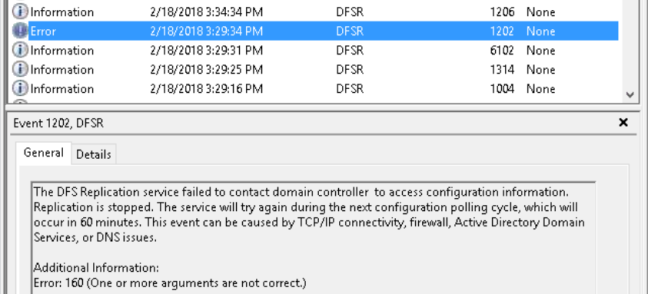
The error is quickly followed by an informational message indicating that DFSR (Domain File System Replication) successfully connected to a domain controller.
Based on my previous experience with similar issues I posited that the problem was due to the DFSR service starting before either the network stack was fully initialized or before the DNS (Domain Name System) service was running.
I explained that based on the behavior this could safely be ignored. This did not go over very well as the error also shows up in the Windows Essentials health report. This brings us to the solution. And this solution will work for just about any service that needs a little more time at boot. We set the startup type for the DFSR service to Automatic (Delayed Start). We restarted the server and this eliminated the 1202 error.
I hope that you found this article informative. If you have anything to add, please feel free to leave a comment below.