

-
#1
Принесли, висел на шнурке. Пробую шить 3uTools в разных режимах, один и тот же результат. После Sending Kernel Cache висит на яблоке, 19%, Restoring и в итоге по таймауту Error: Unable to restore iDevice(-2). Дальше апп висит на яблоке. Апп уже где-то вскрывали, нет защитных экранов. Следов пайки не увидел. В какую сторону стоит смотреть? Может ли быть проблема в кнопке touchID? Память, тристар?
-
#2
А какая ошибка при прошивке через itiunes, и логи при прошивке 3u Tools


-
#3
для начала вскрытие проверка всех питаний а дальше анализ полученных данных и принятие решения
-
#4
А какая ошибка при прошивке через itiunes, и логи при прошивке 3u Tools
Вот логи
-
1,3 КБ
Просмотры: 10 -
21,6 КБ
Просмотры: 2
-
#5
для начала вскрытие проверка всех питаний а дальше анализ полученных данных и принятие решения
Какие именно напряжения вас интересуют?
-
#6
все согласно схемы электрической принципиальной
з.ы. мне ваши напряжения нужны как рыбке зонтик….
-
23.01.2021, 15:44
#13
Без нанда при прошивке на этом месте ( 11% ) должно загореться яблоко на дисплее и появиться сообщение в 3u-tools о посылке RAM-loader-a . Если этого не происходит — значит дело вообще не в нанде , тут только измерения всех питаний помогут и общего потребления аппарата , ну и батарея должна быть исправна — заряжена хотя бы до 4 вольт с исправным контроллером . Вариант с отвалом озу тоже возможен — они так и дохли сами по себе …
-
Спасибо сказали:
-
23.01.2021, 16:04
#14
 Сообщение от max_qqq

Без нанда при прошивке на этом месте ( 11% ) должно загореться яблоко на дисплее и появиться сообщение в 3u-tools о посылке RAM-loader-a . Если этого не происходит — значит дело вообще не в нанде , тут только измерения всех питаний помогут и общего потребления аппарата , ну и батарея должна быть исправна — заряжена хотя бы до 4 вольт с исправным контроллером . Вариант с отвалом озу тоже возможен — они так и дохли сами по себе …
Без nand «яблоко» не загорится. itunes даст «4014»
-
23.01.2021, 17:19
#15
Сообщение от alexece
Без nand «яблоко» не загорится. itunes даст «4014»
Специально вкинул тестовую плату 6S без нанда в тестовое корыто . На 11% появляется яблоко , затем на 16% — Sending Ramdisk , 18% — Sending Kernel Cache , 19% — Restoring , на этом месте яблоко пропадает и аппарат перегружается .
-
5 участника(ов) поблагодарили max_qqq за его сообщение:
alexece (25.01.2021),
asap82 (04.04.2022),
forket (25.11.2021),
roninza (23.01.2021),
Yankee (25.01.2021)
-
23.01.2021, 19:44
#16

Newbie
 Сообщение от max_qqq
Специально вкинул тестовую плату 6S без нанда в тестовое корыто . На 11% появляется яблоко , затем на 16% — Sending Ramdisk , 18% — Sending Kernel Cache , 19% — Restoring , на этом месте яблоко пропадает и аппарат перегружается .
спасибо за информацию
-
23.01.2021, 23:15
#17
Сообщение от roninza
спасибо за информацию
Нанд нормально старый считался и программатором в новую мс всё нормально зашилось до перепайки?
-
24.01.2021, 14:26
#18
Сообщение от max_qqq
Специально вкинул тестовую плату 6S без нанда в тестовое корыто . На 11% появляется яблоко , затем на 16% — Sending Ramdisk , 18% — Sending Kernel Cache , 19% — Restoring , на этом месте яблоко пропадает и аппарат перегружается .
все верно, nand не имеет отношения к яблоку и тому, что грузится в оператос
-
25.01.2021, 11:27
#19
Сообщение от max_qqq
Специально вкинул тестовую плату 6S без нанда в тестовое корыто . На 11% появляется яблоко , затем на 16% — Sending Ramdisk , 18% — Sending Kernel Cache , 19% — Restoring , на этом месте яблоко пропадает и аппарат перегружается .
Значит что то изменилось. Была 6s без nand 4014
-
#1
Hello,
I am having some issues getting the OS X installer to boot on my Fujitsu Lifebook Laptop.
I followed this guide to get where I am:
https://www.tonymacx86.com/threads/guide-booting-the-os-x-installer-on-laptops-with-clover.148093/
When I run “install_osx” from the Clover boot menu with “verbose”, I get the following:

Final few lines of the log:
Code:
Error allocating 0x99 pages at 0x0000000000100000 alloc type 2
End LoadKernelFromStream
ERROR!!! Load prelinked kernel with status 0x8000000000000009
Error loading kernel cache (0x9)
I searched the forums for these errors but couldn’t find much that seemed to pertain to my situation (or maybe I just didn’t see how it pertained). My one hunch is the errors might relate to DVMT-prealloc. Not sure though.
I apologize for my noobieness with all of this. I attached the zip from EFI as well as some pictures of my bios settings so hopefully some wonderful person can point out what I am doing wrong.
Thank you!
-
biosSettings.zip
6.9 MB
· Views: 389
-
CLOVER.zip
1.4 MB
· Views: 326
-
#3
Thank you for the reply. I believe I am currently using Rehabman’s version (v2.4 r4444).
I tried booting with -f UseKernelCache=No

And that seems to have gotten me past the loading kernel cache error, but now it hangs here:

-
#4
Hello,
I am having some issues getting the OS X installer to boot on my Fujitsu Lifebook Laptop.
I followed this guide to get where I am:
https://www.tonymacx86.com/threads/guide-booting-the-os-x-installer-on-laptops-with-clover.148093/When I run “install_osx” from the Clover boot menu with “verbose”, I get the following:
Final few lines of the log:
Code:
Error allocating 0x99 pages at 0x0000000000100000 alloc type 2
End LoadKernelFromStream
ERROR!!! Load prelinked kernel with status 0x8000000000000009
Error loading kernel cache (0x9)
I searched the forums for these errors but couldn’t find much that seemed to pertain to my situation (or maybe I just didn’t see how it pertained). My one hunch is the errors might relate to DVMT-prealloc. Not sure though.
I apologize for my noobieness with all of this. I attached the zip from EFI as well as some pictures of my bios settings so hopefully some wonderful person can point out what I am doing wrong.
Thank you!
You should not have both AptioMemoryFix.efi and OsxAptioFixDrv-64.efi.
Try each independently.
-
#5
Yes, it appears I missed the «or» while reading that part of the guide…
Should I boot using the default args (kext-dev-mode=1 dart=0 slide=0 nv_disable=1) or should I still boot with «-f UseKernelCache=No» as P1LGRIM suggested?
-
#6
I booted using the default args and tried the two files.
AptioMemoryFix.efi: same as earlier (Error loading kernel cache).
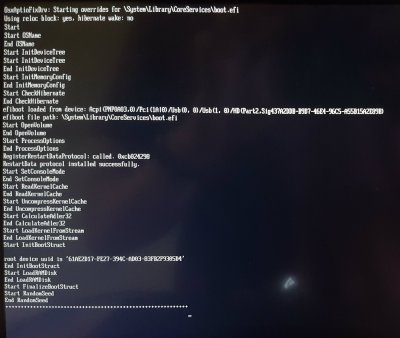
OsxAptioFixDrv-64.efi: Got past the kernel cache error, but still got stuck. Final few lines (log also attached):
Start LoadRAMDisk
End LoadRAMDisk
Start FinalizeBootStruct
Start RandomSeed
End RandomSeed
++++++++++++++++++++++++++++++++++++++++++++++++++++++++++++
Since the second one got farther, I assume that is the correct file to use. No idea what is causing this new problem though. 
-
log.jpg
265.4 KB
· Views: 1,103
-
#7
I booted using the default args and tried the two files.
AptioMemoryFix.efi: same as earlier (Error loading kernel cache).
OsxAptioFixDrv-64.efi: Got past the kernel cache error, but still got stuck. Final few lines (log also attached):Since the second one got farther, I assume that is the correct file to use. No idea what is causing this new problem though.
«Problem Reporting» files are incomplete.
Read FAQ, «Problem Reporting» again. Carefully. Attach all requested files/output.
https://www.tonymacx86.com/threads/faq-read-first-laptop-frequent-questions.164990/
-
#8
Sorry about that. I only changed the one file, so I didn’t think I needed to upload the EFI again. Here it is.
Edit: Guess I also forgot to press F2 + F4 at Clover boot screen. Reading is hard. Hopefully this is what you need.
-
CLOVER-afterEdit.zip
1.4 MB
· Views: 256
Last edited: Aug 2, 2018
-
#9
I did quite a bit of searching for this error and found a few suggestions. I’ve tried:
- Putting RAM in different slots and using just one stick
- Different USB ports
- Different OsxAptioFix files (OsxAptioFix2Drv-64.efi and OsxAptioFix3Drv-64.efi)
- Double-checking and fiddling with bios settings
But none of that helped. Any ideas? Still stuck at where I was in post #6 with the same EFI/Clover folder as in the previous post.
-
CLOVER-afterEdit.zip
1.4 MB
· Views: 283
-

log.jpg
265.4 KB
· Views: 455
-
#10
Sorry about that. I only changed the one file, so I didn’t think I needed to upload the EFI again. Here it is.
Edit: Guess I also forgot to press F2 + F4 at Clover boot screen. Reading is hard. Hopefully this is what you need.
I did quite a bit of searching for this error and found a few suggestions. I’ve tried:
- Putting RAM in different slots and using just one stick
- Different USB ports
- Different OsxAptioFix files (OsxAptioFix2Drv-64.efi and OsxAptioFix3Drv-64.efi)
- Double-checking and fiddling with bios settings
But none of that helped. Any ideas? Still stuck at where I was in post #6 with the same EFI/Clover folder as in the previous post.
You should try AptioMemoryFix.efi.
Also, make sure you’re using a USB2 stick (and try all USB ports).
Clearing the HDD of all partitions (start clean) is also not a bad idea.
int recovery_send_kernelcache(struct idevicerestore_client_t* client, plist_t build_identity)
{
const char* component = «RestoreKernelCache»;
irecv_error_t recovery_error = IRECV_E_SUCCESS;
if (client->recovery == NULL) {
	if (recovery_client_new(client) < 0) {
		return -1;
	}
}

if (recovery_send_component(client, build_identity, component) < 0) {
	error("ERROR: Unable to send %s to device.n", component);
	return -1;
}

int ioctl_error = irecv_usb_control_transfer(client->recovery->client, 0x21, 1, 0, 0, 0, 0, 5000);
#if defined(_WIN32)
if(ioctl_error < 0)
{
// Xanadu:修复某些设备无法进入刷机模式的BUG
irecv_usb_control_transfer(client->recovery->client, 0xA1, 3, 0, 0, 0, 0, 5000);
irecv_usb_control_transfer(client->recovery->client, 0x41, 3, 0, 0, 0, 0, 5000);
}
#endif
if (client->restore_boot_args) {
	char setba[256];
	strcpy(setba, "setenv boot-args ");
	strcat(setba, client->restore_boot_args);
	recovery_error = irecv_send_command(client->recovery->client, setba);
}

recovery_error = irecv_send_command(client->recovery->client, "bootx");
if (recovery_error != IRECV_E_SUCCESS) {
	error("ERROR: Unable to execute %sn", component);
	return -1;
}

return 0;
}
These two sentences can increase the success rate.
irecv_usb_control_transfer(client->recovery->client, 0xA1, 3, 0, 0, 0, 0, 5000);
irecv_usb_control_transfer(client->recovery->client, 0x41, 3, 0, 0, 0, 0, 5000);
Пользователи Twitter активно жалуются на проблемы с обновлением и восстановлением прошивки iPhone и iPad.
Кажется, у Apple проблемы с TSS-серверами. Во время установки прошивки происходит сбой и выводится ошибка 3503.
UPD: по последним данным, проблема затронула только владельцев Windows-ПК. И только во время установки обновления через iTunes.
UPD 2: временное решение заключается в установке бесплатной утилиты 3uTools. Это аналог iTunes, через который можно установить прошивку.
Повезёт, если установка не начнётся. Некоторые уже «словили кирпич».
@AppleSupport cannot restore iPhone error 3503.Please check your signature server
— Peerasak Longchit (@assert55150) September 25, 2017
@AppleSupport my iphone is always in UMD mode and I can´t restore it because there is an 3503 error. That happens since iOS 11. Help please.
— Fernando Guil (@fernandoguil98) September 25, 2017
trying to restore iPhone7 to 10.3.3 but getting (ERROR 3503) >?
— muzzy (@muzzy2022) September 25, 2017
#ICYMI the #iTunes error 3503 is not your fault. Wait until #Apple fix it pic.twitter.com/bdfQ1jChjV
— Jairo Serrano (@jairodsl) September 25, 2017
Ошибка 3503 в тунце при откате, да что за черт блэт
— Иван Наймушин (@uselesstech1) September 25, 2017
Что интересно, на сайте Apple не указано, что какие-то сервисы дают сбой. «Всё работает в штатном режиме».

Проблема актуальна по всему миру и четкого решения пока нет. Рекомендуем не перестанавливать прошивку до тех пор, пока Apple не исправит проблему.
P.S. Спасибо читателю Lexonaft за наводку.
 (1 голосов, общий рейтинг: 5.00 из 5)
🤓 Хочешь больше? Подпишись на наш Telegram.

iPhones.ru
У Apple упали сервера подписки прошивки.
- Apple,
- iOS,
- это печально

Артём Баусов
@Dralker
Главный по новостям, кликбейту и опечаткам. Люблю электротехнику и занимаюсь огненной магией.
Telegram: @TemaBausov
Hello frustrated, what the below quoted code says is that #1, created a valid cache (that’s good) #2 when it tried to update the symlink to point to it that process failed.
to resolve that error, from ether single user mode ( -s boot mode) or the recovery partition run this list of commands.
(CAUTION: both of these modes by default will give you SUDO access to the system be very carful what you type.)
Hi!
Thanks, the links was useful. But I am not getting any solution. The tutorial there does not account for the fact that the user needs SUDO permissions.
I ran with sudo and here is what I get…(not what the OP of that tutorial gets)
This is so frustrating!!!
KernelCache ID: C79B2CECB584A805F14556B0A116AE60
symlink("../../../PrelinkedKernels/prelinkedkernel", "/Volumes/MAC SSD/System/Library/Caches/com.apple.kext.caches/Startup/kernelcache") failed 2 (No such file or directory)
iMac:~ b$
Help Please!
Thank you so much
P.S. I even re-ran without sudo code and I followed the steps and still had no luck.
<code>
fsck
mount —uw /
rm —rf «/Volumes/MAC SSD/System/Library/Prelinkedkernel/prelinkedkernel»
touch «/Volumes/MAC SSD/System/Library/Extensions» && kextcache -system-caches «/Volumes/MAC SSD/»
kextcache -u «/Volumes/MAC SSD/»
</code>
this list of commands is slightly different from the ones in the aforementioned guide, but they do basically the same thing.
the differences are that I took your Volume name to customize them, and that I forced the rebuild of your system cache after deleting the prelinkedcache. this has the effect of having the kext cache manager look for where these files are missing from and rebuilding them in my experience.
HBP
Moderators: Lily Lee, jc_3u, Moderators
-
compu829
- Posts: 4
- Joined: 18 Jan 2018 03:58
- like: 1
 iPhone 7 Stuck In Recovery Mode
Hello,
I have an iPhone 7 that is stuck in recovery mode. When I take it out of recovery mode, it boot loops. when I try DFU restore in iTunes, it never kicks to the «RestoreOS» phase. I see an empty progress bar, and it instantly reboots back into recovery mode. I see the same thing using «Easy Flash». I have tried 3 different computers, 3 different USB cables, and 3 different OSes (macOS, Win7, Win10). When I use Pro Flash mode, I never get to the restore screen with the apple logo. I get the following log:
Code: Select all
14:52:34   Please connect USB cable to iDevice, make sure your iDevice in DFU Mode
14:53:19   Reading information from iDevice
14:53:19   Product Type: iPhone9,1
14:53:19   MAIN CPU ID: 8010
14:53:19   Filename of firmware : iPhone_4.7_P3_11.0_11.2.2_15C202_Restore
14:53:19   Firmware Version: 11.2.2
14:53:19   Product Build: 15C202, 15
14:53:19   Image4 supported: TRUE
14:53:19   Extracting FileSystem from firmware
14:53:19   Reading ECID
14:53:19   iDevice ECID: 0012545A28458526
14:53:19   Reading random NONCE
14:53:19   Querying for SHSH file on Apple Server
14:53:20   Saving SHSH file to our server
14:53:20   iDevice will connect to DFU Mode automatically (5 minutes in Win7)
14:53:20   Loading iBSS component
14:53:32   Reading random NONCE (this is red)
14:53:32   Product Type: iPhone9,1
14:53:32   Product Name: iPhone7
14:53:32   Flash is failed! (This is red)
14:53:32   Flash and jailbreak of apple device, please visit official website of 3uTools
14:53:32   Elapsed Time: 00:00:57
Anyone have any ideas? I have been reading things like «Replace the NAND», but I don’t know if that is the problem before I open it up. When it is in recovery mode, the «iDevice» tab reads all of the correct info, except nothing is reported for the device size.
-
Grace Liu
- Posts: 537
- Joined: 20 Oct 2016 09:33
- like: 65
Re: iPhone 7 Stuck In Recovery Mode
Postby Grace Liu » 18 Jan 2018 08:54
Hello,
And what is the error on Easy Flash?
For your information, there is no 3uTools for mac at present.
-
compu829
- Posts: 4
- Joined: 18 Jan 2018 03:58
- like: 1
Re: iPhone 7 Stuck In Recovery Mode
Postby compu829 » 18 Jan 2018 09:05
Grace Liu wrote:Hello,
And what is the error on Easy Flash?
For your information, there is no 3uTools for mac at present.
Hello, I understand that. I was trying to say that I tested with multiple devices with and without using 3uTools.
Easy Flash hangs at 19% with the word «Restoring» in regular flash mode. IT eventually returns «Error Unable to Restore iDevice (-2).
Easy Flash says «Sending Ramdisk», then «Sending KernelCache», and lastly «Restoring». As soon as it says «Restoring» the phone immediately reboots away from the screen with the progress bar. When I am in DFU mode, Easy Flash says that it cannot switch to Recovery Mode even though it eventually switches. When I used «Pro Flash» I got the log that I posted above.
Let me know if you need any more info.
-
Grace Liu
- Posts: 537
- Joined: 20 Oct 2016 09:33
- like: 65
Re: iPhone 7 Stuck In Recovery Mode
Postby Grace Liu » 18 Jan 2018 10:12
Hello, I think it is about hardware problem. Did you try to restore to another iOS version?
-
compu829
- Posts: 4
- Joined: 18 Jan 2018 03:58
- like: 1
Re: iPhone 7 Stuck In Recovery Mode
Postby compu829 » 18 Jan 2018 10:18
I did. I tried the latest 11.2.5 beta as well as iOS 11.2.0. I noticed that the baseband changed between 11.1 and 11.2, and I am wondering if maybe the update failed.
What is strange is that the main device page in 3uTools reports all of the information about the phone without fail. so I don’t think it is a NAND issue. I wish there was a way to see exactly what is failing!
-
Grace Liu
- Posts: 537
- Joined: 20 Oct 2016 09:33
- like: 65
Re: iPhone 7 Stuck In Recovery Mode
Postby Grace Liu » 18 Jan 2018 10:32
Normally, error -2 would be caused by hareware problem. But not sure which part of hardware, you are suggested to get a repairman to check your device.
-
Xanscer
- Posts: 8
- Joined: 30 Jan 2018 16:31
- like: 0
Re: iPhone 7 Stuck In Recovery Mode
Postby Xanscer » 01 Feb 2018 17:39
Greca Liu wrote:Normally, error -2 would be caused by hareware problem. But not sure which part of hardware, you are suggested to get a repairman to check your device.
Try my method, this is recommended by my colleague, I don’t know whether it is useful or not.
-
compu829
- Posts: 4
- Joined: 18 Jan 2018 03:58
- like: 1
Re: iPhone 7 Stuck In Recovery Mode
Postby compu829 » 01 Feb 2018 18:11
Xanscer wrote:Try my method, this is recommended by my colleague, I don’t know whether it is useful or not.
I tied flashing it via iTunes, and I noticed that an error about not being able to read the baseband keeps coming up. This error appears more times than on a phone that will flash. I think the kernel can’t talk to the baseband chips, causing it to panic. I am going to try and reflow the chip and the PMIC to see if that fixes it.
-
virtuosity
- Posts: 3
- Joined: 22 Aug 2018 09:13
- like: 0
Re: iPhone 7 Stuck In Recovery Mode
Postby virtuosity » 26 Sep 2018 05:54
compu829 wrote:
Xanscer wrote:Try my method, this is recommended by my colleague, I don’t know whether it is useful or not.
I tied flashing it via iTunes, and I noticed that an error about not being able to read the baseband keeps coming up. This error appears more times than on a phone that will flash. I think the kernel can’t talk to the baseband chips, causing it to panic. I am going to try and reflow the chip and the PMIC to see if that fixes it.
did you had a successful attempt on repairing it? i’m stuck at this condition also
-
blackshady
- Posts: 18
- Joined: 09 Sep 2019 16:53
- like: 0
Re: iPhone 7 Stuck In Recovery Mode
Postby blackshady » 09 Sep 2019 17:02
From your description, I think the problems is a combination of stuck in recovery mode and boot loop.
You can surely see that the system on your iPhone is damaged, and the easiest way to fix this is to use TunesKit iOS System Recovery to do a complete restore.
Otherwise, just go to Apple Support Center.
Return to “Help & Support”