The JAXB APIs are considered to be Java EE APIs and therefore are no longer contained on the default classpath in Java SE 9. In Java 11, they are completely removed from the JDK.
Java 9 introduces the concepts of modules, and by default, the java.se aggregate module is available on the classpath (or rather, module-path). As the name implies, the java.se aggregate module does not include the Java EE APIs that have been traditionally bundled with Java 6/7/8.
Fortunately, these Java EE APIs that were provided in JDK 6/7/8 are still in the JDK, but they just aren’t on the classpath by default. The extra Java EE APIs are provided in the following modules:
java.activation
java.corba
java.transaction
java.xml.bind  << This one contains the JAXB APIs
java.xml.ws
java.xml.ws.annotation
Quick and dirty solution: (JDK 9/10 only)
To make the JAXB APIs available at runtime, specify the following command-line option:
--add-modules java.xml.bind
But I still need this to work with Java 8!!!
If you try specifying --add-modules with an older JDK, it will blow up because it’s an unrecognized option. I suggest one of two options:
- You can set any Java 9+ only options using the
JDK_JAVA_OPTIONSenvironment variable. This environment variable is automatically read by thejavalauncher for Java 9+. - You can add the
-XX:+IgnoreUnrecognizedVMOptionsto make the JVM silently ignore unrecognized options, instead of blowing up. But beware! Any other command-line arguments you use will no longer be validated for you by the JVM. This option works with Oracle/OpenJDK as well as IBM JDK (as of JDK 8sr4).
Alternate quick solution: (JDK 9/10 only)
Note that you can make all of the above Java EE modules available at run time by specifying the --add-modules java.se.ee option. The java.se.ee module is an aggregate module that includes java.se.ee as well as the above Java EE API modules. Note, this doesn’t work on Java 11 because java.se.ee was removed in Java 11.
Proper long-term solution: (JDK 9 and beyond)
The Java EE API modules listed above are all marked @Deprecated(forRemoval=true) because they are scheduled for removal in Java 11. So the --add-module approach will no longer work in Java 11 out-of-the-box.
What you will need to do in Java 11 and forward is include your own copy of the Java EE APIs on the classpath or module path. For example, you can add the JAX-B APIs as a Maven dependency like this:
<!-- API, java.xml.bind module -->
<dependency>
    <groupId>jakarta.xml.bind</groupId>
    <artifactId>jakarta.xml.bind-api</artifactId>
    <version>2.3.2</version>
</dependency>

<!-- Runtime, com.sun.xml.bind module -->
<dependency>
    <groupId>org.glassfish.jaxb</groupId>
    <artifactId>jaxb-runtime</artifactId>
    <version>2.3.2</version>
</dependency>
See the JAXB Reference Implementation page for more details on JAXB.
For full details on Java modularity, see JEP 261: Module System
As of July 2022, the latest version of the bind-api and jaxb-runtime is 4.0.0. So you can also use
<version>4.0.0</version>
…within those dependency clauses. But if you do so, the package names have changed from javax.xml.bind... to jakarta.xml.bind.... You will need to modify your source code to use these later versions of the JARs.
For Gradle or Android Studio developer: (JDK 9 and beyond)
Add the following dependencies to your build.gradle file:
dependencies {
    // JAX-B dependencies for JDK 9+
    implementation "jakarta.xml.bind:jakarta.xml.bind-api:2.3.2"
    implementation "org.glassfish.jaxb:jaxb-runtime:2.3.2"
}
If you are upgrading your Java application from a lower version to Java 11, you may get the following error:
java.lang.NoClassDefFoundError: javax/xml/bind/JAXBException
...
...
Caused by: java.lang.ClassNotFoundException: javax.xml.bind.JAXBException
...
...
...
The JAXB APIs are considered to be Java EE APIs, and therefore are no longer contained on the default class path in Java SE 9. In Java 11 they are completely removed from the JDK. If you are using Java 9, then the JAVA SE module named java.se is in the classpath but this module doesn’t contain the JAVA EE APIs. While from Java 11 onwards, the jaxb apis, namely:
-
jaxb-api
-
jaxb-core
-
jaxb-impl
-
activation, etc
are completely removed from the Java installation. Hence, to resolve the above error, you must include the jaxb-api jar file in the classpath of your project/application.
For Maven Projects:
If you are using Maven for handling dependencies in your Java project, you will have to add the following additional dependency in your pom.xml file.
<dependency>
    <groupId>javax.xml.bind</groupId>
    <artifactId>jaxb-api</artifactId>
    <version>2.3.0</version>
</dependency>
This will include the jaxb-api Jar file in your project when you will build your maven java project.
For Gradle Projects:
If you use Gradle to build your project, then add the following line to your build.gradle file,
compile group: 'javax.xml.bind', name: 'jaxb-api', version: '2.3.0'
For SBT Projects:
If you use SBT build tool to compile and build your java project, then add the following line to your build file,
libraryDependencies += "javax.xml.bind" % "jaxb-api" % "2.3.0"For IVY Projects:
If you use ivy for building your java project, then add the following code line to your ivy.xml file:
<dependency org="javax.xml.bind" name="jaxb-api" rev="2.3.0"/>If you don’t use any build tool
If you are not using any build tool, then you can download the jar file from the following link: JAXB-API 2.3.0 MVN Repository and add it to your project’s classpath
Once you have made the following changes, restart your Java application and the error should be resolved. So this was the solution for the java.lang.NoClassDefFoundError: javax/xml/bind/JAXBException Error. If you are not able to understand anything, feel free to comment and we will help you resolve your error.
You Might Also Like
-
[SOLVED] No compiler is provided in this environment. Perhaps you are running on a JRE rather than a JDK?
-
[SOLVED] Caused by: java.lang.ClassNotFoundException: javax.xml.ws.WebServiceFeature in Java 11
-
How to convert ZonedDateTime to Date in Java?
-
Log4j2 Programmatic Configuration in Java Class
New issue
Have a question about this project? Sign up for a free GitHub account to open an issue and contact its maintainers and the community.
By clicking “Sign up for GitHub”, you agree to our terms of service and
privacy statement. We’ll occasionally send you account related emails.
Already on GitHub?
Sign in
to your account
Comments

Good morning.
If you build after receiving the clone for testing,
An error occurs.
Unable to load class ‘javax.xml.bind.JAXBException’.
This is an unexpected error. Please file a bug containing the idea.log file.

Good morning.
If you build after receiving the clone for testing,
An error occurs.
Unable to load class ‘javax.xml.bind.JAXBException’.
This is an unexpected error. Please file a bug containing the idea.log file.
Yes,I got the same error too.

Good morning.
If you build after receiving the clone for testing,
An error occurs.
Unable to load class ‘javax.xml.bind.JAXBException’.
This is an unexpected error. Please file a bug containing the idea.log file.
I got the same error,and I found the solution in stackvoerflow:https://stackoverflow.com/questions/51960049/android-build-error-unable-to-load-javax-xml-bind-jaxbexception.
Just update the version of build tool gradle to 4.2.2:
dependencies {
        classpath 'com.android.tools.build:gradle:4.2.2'
        classpath "androidx.navigation:navigation-safe-args-gradle-plugin:$navigationVersion"
        classpath "org.jetbrains.kotlin:kotlin-gradle-plugin:$kotlinVersion"

        // NOTE: Do not place your application dependencies here; they belong
        // in the individual module build.gradle files
    }
Hi, I am creating application using Spring and Hibernate. I am using Java 9 and Spring 5.0.1. While starting server, there is following error in console.
Caused by: java.lang.NoClassDefFoundError: javax/xml/bind/JAXBException
at org.hibernate.boot.spi.XmlMappingBinderAccess.<init>(XmlMappingBinderAccess.java:43)
at org.hibernate.boot.MetadataSources.<init>(MetadataSources.java:87)
at org.hibernate.jpa.boot.internal.EntityManagerFactoryBuilderImpl.<init>(EntityManagerFactoryBuilderImpl.java:208)
at org.hibernate.jpa.boot.internal.EntityManagerFactoryBuilderImpl.<init>(EntityManagerFactoryBuilderImpl.java:163)
at org.springframework.orm.jpa.vendor.SpringHibernateJpaPersistenceProvider.createContainerEntityManagerFactory(SpringHibernateJpaPersistenceProvider.java:51)
at org.springframework.orm.jpa.LocalContainerEntityManagerFactoryBean.createNativeEntityManagerFactory(LocalContainerEntityManagerFactoryBean.java:358)
at org.springframework.orm.jpa.AbstractEntityManagerFactoryBean.buildNativeEntityManagerFactory(AbstractEntityManagerFactoryBean.java:384)
at org.springframework.orm.jpa.AbstractEntityManagerFactoryBean.afterPropertiesSet(AbstractEntityManagerFactoryBean.java:373)
at org.springframework.beans.factory.support.AbstractAutowireCapableBeanFactory.invokeInitMethods(AbstractAutowireCapableBeanFactory.java:1763)
at org.springframework.beans.factory.support.AbstractAutowireCapableBeanFactory.initializeBean(AbstractAutowireCapableBeanFactory.java:1700)
… 25 common frames omitted

Mohit
Replied on November 11, 2017
JDK 9 has done some changes for java.xml.bind and other java EE modules. Let us understand.
1.
JDK 9 has deprecated java.xml.bind module and has removed from default classpath.
@Deprecated(since=»9″, forRemoval=true)
Module java.xml.bind
Deprecated, for removal: This API element is subject to removal in a future version.
https://docs.oracle.com/javase/9/docs/api/java.xml.bind-summary.html
Java has made plan to remove the Java EE and CORBA modules from Java SE and the JDK after JDK 9 versions. In Java 9 they have only deprecated and have removed it from classpath.
2.
javax.xml.bind is sub package of Module java.xml.bind
So Module javax.xml.bind will not be available on classpath by default in JAVA 9.
Solution:
1. Use —add-modules to add module in classpath.
As Java has not yet removed from module from java 9. Java has only deprecated and does not add javax.xml.bind module on classpath by default.
So if we want to add javax.xml.bind on classpath we can add using following command.
—add-modules java.xml.bind
2. We can use Maven and Gradle to include javax.xml.bind in our project.
Maven
<dependency>
<groupId>javax.xml.bind</groupId>
<artifactId>jaxb-api</artifactId>
<version>2.3.0</version>
</dependency>
Gradle
compile ‘javax.xml.bind:jaxb-api:2.3.0’
Find the reference link
http://openjdk.java.net/jeps/8189188
Содержание
- Как разрешить java.lang.NoClassDefFoundError: javax / xml / bind / JAXBException в Java 9
- 20 ответов
- [Solved] java.lang.NoClassDefFoundError: javax/xml/bind/JAXBException
- About the Author:
- [SOLVED] java.lang.NoClassDefFoundError: javax/xml/bind/JAXBException in Java 11
- For Maven Projects:
- For Gradle Projects:
- For SBT Projects:
- For IVY Projects:
- If you don’t use any build tool
- Deprecated Java 9 Javax Dependencies #1092
- Comments
- Как исправить ошибку java.lang.NoClassDefFoundError в Java J2EE
- Разбираемся с причинами noclassdeffounderror в Java
- Разница между java.lang.NoClassDefFoundError и ClassNotFoundException в Java
- Примеры
- NoClassDefFoundError в Java из-за исключения в блоке инициализатора
Как разрешить java.lang.NoClassDefFoundError: javax / xml / bind / JAXBException в Java 9
У меня есть код, который использует классы API JAXB, которые были предоставлены как часть JDK в Java 6/7/8. Когда я запускаю тот же код с Java 9, во время выполнения я получаю ошибки, указывающие, что классы JAXB не могут быть найдены.
Классы JAXB были предоставлены как часть JDK с Java 6, так почему Java 9 больше не может найти эти классы?
20 ответов
API-интерфейсы JAXB считаются API-интерфейсами Java EE и поэтому больше не содержатся в пути класса по умолчанию в Java SE 9. В Java 11 они полностью удалены из JDK.
В Java 9 представлены концепции модулей, и по умолчанию java.se агрегата java.se доступен по пути к классу (или, скорее, по пути к модулю). Как следует из названия, java.se агрегации java.se не включает API Java EE, которые традиционно были связаны с Java 6/7/8.
К счастью, эти API Java EE, которые были предоставлены в JDK 6/7/8, все еще находятся в JDK, но по умолчанию они просто не находятся на пути к классу. Дополнительные API Java EE предоставляются в следующих модулях:
Быстрое и грязное решение: (только JDK 9/10)
Чтобы API-интерфейсы JAXB были доступны во время выполнения, укажите следующий параметр командной строки:
—add-modules java.xml.bind
Но мне все еще нужно это для работы с Java 8 .
Если вы попробуете указать —add-modules со старым JDK, он взорвется, потому что это непризнанный вариант. Я предлагаю один из двух вариантов:
- Вы можете условно применить аргумент в сценарии запуска (если он есть), проверив версию JDK, JAVA_VERSION $JAVA_HOME/release для свойства JAVA_VERSION .
- Вы можете добавить -XX:+IgnoreUnrecognizedVMOptions чтобы JVM молча игнорировал непризнанные параметры вместо того, чтобы взорваться. Но будьте осторожны! Любые другие аргументы командной строки, которые вы используете, больше не будут проверяться JVM. Эта опция работает с Oracle/OpenJDK, а также с IBM JDK (с JDK 8sr4)
Альтернативное быстрое решение: (только JDK 9/10)
Обратите внимание, что вы можете сделать все вышеперечисленные модули Java EE доступными во время выполнения, указав параметр —add-modules java.se.ee Модуль java.se.ee является агрегатным модулем, который включает в себя java.se.ee а также вышеупомянутые модули API Java EE.
Правильное долгосрочное решение: (все версии JDK)
Модули API Java EE, перечисленные выше, отмечены как @Deprecated(forRemoval=true) , поскольку они запланированы для удаления в Java 11. Таким —add-module подход —add-module больше не будет работать в Java 11 из коробки.
То, что вам нужно сделать в Java 11 и forward, включает вашу собственную копию API Java EE на пути к пути или пути к модулю. Например, вы можете добавить API JAX-B в качестве зависимости от maven следующим образом:
Полную информацию о модульности Java см. В JEP 261: Система модулей
Источник
[Solved] java.lang.NoClassDefFoundError: javax/xml/bind/JAXBException
This error would look something like this in Eclipse IDE:
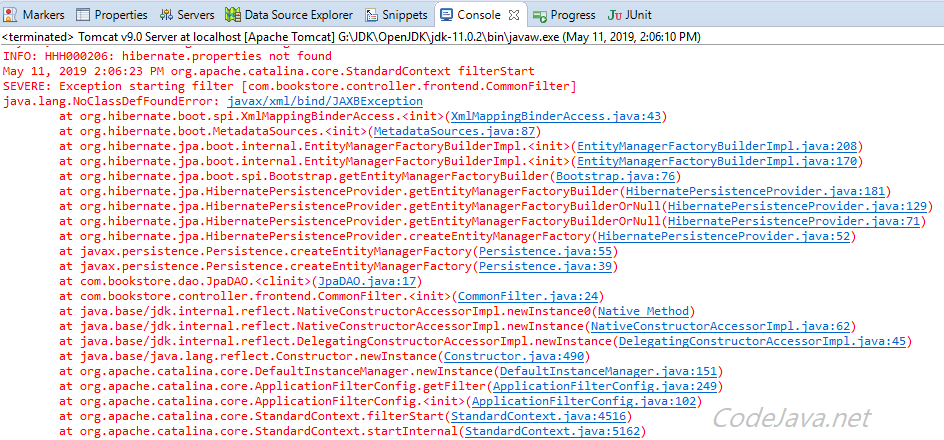
It is because the JAXB library (Java Architecture for XML Binding) is missing in the classpath. JAXB is included in Java SE 10 or older, but it is removed from Java SE from Java 11 or newer –moved to Java EE under Jakarta EE project.
That means if you encounter JAXBException error, it’s very much likely that you are using Java 11 or newer for your project – or at least the server is running under on that Java version. So to fix this error, you have to options:
1. Use older Java version like JDK 8, 9 or 10 which still include the JAXB library by default. Or:
2. Specify an additional dependency in your project’s pom.xml file as follows:
In case you don’t use Maven, you can manually download the JAXB JAR file from Maven repository, and add it to the project’s classpath:
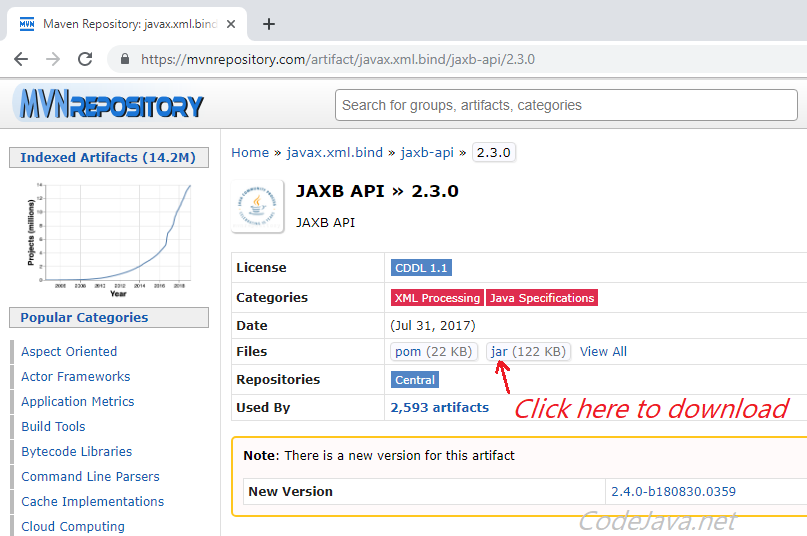
That’s the solution to fix the error java.lang.NoClassDefFoundError: javax/xml/bind/JAXBException .
 Nam Ha Minh is certified Java programmer (SCJP and SCWCD). He started programming with Java in the time of Java 1.4 and has been falling in love with Java since then. Make friend with him on Facebook and watch his Java videos you YouTube.
Источник
[SOLVED] java.lang.NoClassDefFoundError: javax/xml/bind/JAXBException in Java 11
LAST UPDATED: AUGUST 6, 2021
Table of Contents
If you are upgrading your Java application from a lower version to Java 11, you may get the following error:
The JAXB APIs are considered to be Java EE APIs, and therefore are no longer contained on the default class path in Java SE 9. In Java 11 they are completely removed from the JDK. If you are using Java 9, then the JAVA SE module named java.se is in the classpath but this module doesn’t contain the JAVA EE APIs. While from Java 11 onwards, the jaxb apis, namely:
are completely removed from the Java installation. Hence, to resolve the above error, you must include the jaxb-api jar file in the classpath of your project/application.
For Maven Projects:
If you are using Maven for handling dependencies in your Java project, you will have to add the following additional dependency in your pom.xml file.
This will include the jaxb-api Jar file in your project when you will build your maven java project.
For Gradle Projects:
If you use Gradle to build your project, then add the following line to your build.gradle file,
For SBT Projects:
If you use SBT build tool to compile and build your java project, then add the following line to your build file,
For IVY Projects:
If you use ivy for building your java project, then add the following code line to your ivy.xml file:
If you don’t use any build tool
If you are not using any build tool, then you can download the jar file from the following link: JAXB-API 2.3.0 MVN Repository and add it to your project’s classpath
Источник
Deprecated Java 9 Javax Dependencies #1092
I’m using the S3 client and I get runtime exceptions on Java 9 regarding the deprecated usage of javax bind and activation classes. After adding the following API and implementation dependencies everything is working, but it would be nice to know exactly what versions should be used going forward.
The text was updated successfully, but these errors were encountered:
@jamespedwards42 can you post the details of the RuntimeException you’re getting? I’m not sure what you mean when you say you’re adding the following implementations — I can’t find any reference to com.sun.xml.bind or javax.activation in the codebase ..
@kiiadi Sorry, that was pretty vague of me. I’m adding those libraries as runtime dependencies so that those deprecated javax class files are available on the classpath. Here is the exception I get when calling AmazonS3#putObject . After adding those dependencies everything seems to be working fine.
And here is the java version I ran it with:
@jamespedwards42 how are you resolving the dependencies? Are you using maven or something? What version of the SDK are you using?
I’ve had a bit of a look through the java 9 docs and it doesn’t appear that these are deprecated:
http://download.java.net/java/jdk9/docs/api/javax/xml/bind/JAXBException.html
However you may need to add the java.xml.bind module
The entire java.xml.bind module is deprecated and marked as ‘to be removed’. It is weird that they don’t mark the individual classes within that module as deprecated. Not sure, maybe I’m misinterpreting it.
You also have to have the javax.activation dependency, without it I get the following exception. But it looks like the same issue with using the Base64 encoder.
For anyone wanting to get this working, they can add the dependencies I have listed above, and use the java.util.Base64.Encoder to provide the Base64 encoded MD5 checksum ( ObjectMetadata#setContentMD5 ).
Yeah looks like the same issue re: Base64, sounds good about using java.util.Base64.Encoder — and we’ll definitely look to do this for our next major-version. However this only came in with Java 8 and the 1.11.x family of the SDK needs to support Java 6.
Thank you for your investigation and as I say, we’ll remove the custom Base64 encoder in our next major version bump which will target Java 8 as the minimum version.
Источник
Как исправить ошибку java.lang.NoClassDefFoundError в Java J2EE
Я потратил довольно много времени, чтобы выяснить как исправить ошибку java.lang.NoClassDefFoundError в Java.
В этой инструкции я покажу как исправить эти ошибки, раскрою некоторые секреты NoClassDefFoundError и поделюсь своим опытом в этой области.
NoClassDefFoundError – это самая распространенная ошибка в разработке Java. В любом случае, давайте посмотрим, почему это происходит и что нужно сделать для разрешения проблемы. 
Разбираемся с причинами noclassdeffounderror в Java
NoClassDefFoundError в Java возникает, когда виртуальная машина Java не может найти определенный класс во время выполнения, который был доступен во время компиляции.
Например, если у нас есть вызов метода из класса или доступ к любому статическому члену класса, и этот класс недоступен во время выполнения, JVM сгенерирует NoClassDefFoundError.
Важно понимать, что это отличается от ClassNotFoundException, который появляется при попытке загрузить класс только во время выполнения, а имя было предоставлено во время выполнения, а не во время компиляции. Многие Java-разработчики смешивают эти две ошибки и запутываются.
NoClassDefFoundError возникнет, если класс присутствовал во время компиляции, но не был доступен в java classpath во время выполнения. Обычно появляется такая ошибка:
Разница между java.lang.NoClassDefFoundError и ClassNotFoundException в Java
[ads-pc-3]
java.lang.ClassNotFoundException и java.lang.NoClassDefFoundError оба связаны с Java Classpath, и они полностью отличаются друг от друга.
ClassNotFoundException возникает, когда JVM пытается загрузить класс во время выполнения, т.е. вы даете имя класса во время выполнения, а затем JVM пытается загрузить его, и если этот класс не найден, он генерирует исключение java.lang.ClassNotFoundException.
Тогда как в случае NoClassDefFoundError проблемный класс присутствовал во время компиляции, и поэтому программа успешно скомпилирована, но не доступна во время выполнения по любой причине.
Приступим к решению ошибки java.lang.NoClassDefFoundError.
Нам нужно добавить NoClassDefFoundError в Classpath или проверить, почему он не доступен в Classpath. Там может быть несколько причин, таких как:
- Класс недоступен в Java Classpath.
- Возможно, вы запускаете вашу программу с помощью jar, а класс не определен в атрибуте ClassPath.
- Любой сценарий запуска переопределяет переменную среды Classpath.
Поскольку NoClassDefFoundError является подклассом java.lang.LinkageError, он также может появиться, если библиотека может быть недоступна. - Проверьте наличие java.lang.ExceptionInInitializerError в файле журнала. NoClassDefFoundError из-за сбоя инициализации встречается довольно часто.
- Если вы работаете в среде J2EE, то видимость Class среди нескольких Classloader также может вызвать java.lang.NoClassDefFoundError.
Примеры
- Простой пример NoClassDefFoundError – класс принадлежит отсутствующему файлу JAR, или JAR не был добавлен в путь к классам, или имя jar было изменено кем-то.
- Класс не находится в Classpath, нет способа узнать это, но вы можете просто посмотреть в System.getproperty (“java.classpath”), и он напечатает classpath оттуда, где можно получить представление о фактическом пути к классам во время выполнения.
- Просто попробуйте запустить явно -classpath с тем классом, который, по вашему мнению, будет работать, и если он работает, это верный признак того – что-то переопределяет java classpath.
NoClassDefFoundError в Java из-за исключения в блоке инициализатора
Это еще одна распространенная причина java.lang.NoClassDefFoundError, когда ваш класс выполняет некоторую инициализацию в статическом блоке и если статический блок генерирует исключение, класс, который ссылается на этот класс, получит NoclassDefFoundError.
Смотрите в журнале java.lang.ExceptionInInitializerError, потому что это может вызвать java.lang.NoClassDefFoundError: Could not initialize class.
Как и в следующем примере кода, во время загрузки и инициализации класса, пользовательский класс генерирует Exception из статического блока инициализатора, который вызывает ExceptionInInitializerError при первой загрузке пользовательского класса в ответ на новый вызов User ().
[ads-pc-3]
- Поскольку NoClassDefFoundError также является LinkageError, который возникает из-за зависимости от какого-либо другого класса, вы также можете получить java.lang.NoClassDefFoundError, если ваша программа зависит от собственной библиотеки, а соответствующая DLL отсутствует. Помните, что это может также вызвать java.lang.UnsatisfiedLinkError: no dll in java.library.path. Чтобы решить эту проблему, держите dll вместе с JAR.
- Если вы используете файл ANT, создайте JAR, стоит отметить отладку до этого уровня, чтобы убедиться, что скрипт компоновки ANT получает правильное значение classpath и добавляет его в файл manifest.mf.
- Проблема с правами доступа к файлу JAR. Если вы работаете с Java-программой в многопользовательской операционной системе, такой как Linux, вам следует использовать идентификатор пользователя приложения для всех ресурсов приложения, таких как файлы JAR, библиотеки и конфигурации. Если вы используете разделяемую библиотеку, которая используется несколькими приложениями, работающими под разными пользователями, вы можете столкнуться с проблемой прав доступа, например, файл JAR принадлежит другому пользователю и недоступен для вашего приложения.
- Опечатка в конфигурации XML также может вызвать NoClassDefFoundError в Java. Как и большинство Java-фреймворков, таких как Spring, Struts все они используют конфигурацию XML для определения bean-компонентов. В любом случае, если вы неправильно указали имя компонента, он может вызвать ошибку при загрузке другого класса. Это довольно часто встречается в среде Spring MVC и в Apache Struts, где вы получаете множество исключений при развертывании файла WAR или EAR.
- Когда ваш скомпилированный класс, который определен в пакете, не присутствует в том же пакете во время загрузки, как в случае с JApplet.
- Еще одна причина- это нескольких загрузчиков классов в средах J2EE. Поскольку J2EE не использует стандартную структуру загрузчика классов, а зависит от Tomcat, WebLogic, WebSphere и т.д., от того, как они загружают различные компоненты J2EE, такие как WAR-файл или EJB-JAR-файл. Кроме того, если класс присутствует в обоих файлах JAR и вы вызовете метод equals для сравнения этих двух объектов, это приведет к исключению ClassCastException, поскольку объект, загруженный двумя различными загрузчиками классов, не может быть равным.
- Очень редко может происходить Exception in thread “main” java.lang.NoClassDefFoundError: com/sun/tools/javac/Main. Эта ошибка означает, что либо ваш Classpath, PATH или JAVA_HOME не настроен должным образом, либо JDK установка не правильная. Попробуйте переустановить JDK. Замечено, что проблема возникала после установки jdk1.6.0_33 и последующей переустановки JDK1.6.0_25.
Средняя оценка 2.5 / 5. Количество голосов: 36
Источник