-
Офисная техника Brother
Brother -
Обслуживание и поддержка
-
MFCL2700DN
-
Настройка / Параметры
- FAQ00002947_000
Часто задаваемые вопросы по категориям

Драйверы и загрузки
Последние версии драйверов и программного обеспечения для ваших устройств Brother
Просмотреть файлы

Руководства
Последние версии руководств для ваших устройств Brother
Просмотреть руководства
Расходные материалы
Широкий ассортимент оригинальных расходных материалов Brother для ваших устройст
Подобрать расходные материалы
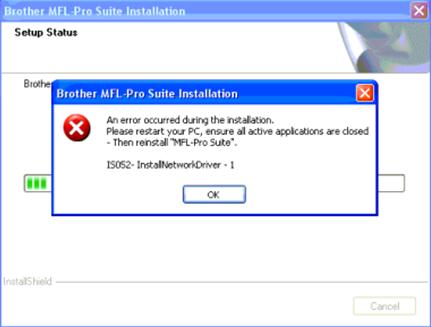
Данное сообщение об ошибке появляется во время установки драйвера сетевого сканера из пакета MFL-Pro Suite или «Полного пакета драйверов и программного обеспечения». Данная проблема может быть связана с использованием сторонних антивирусных программ и брандмауэров или с настройками реестра компьютера.
Во время установки драйвера все антивирусные программы (Kaspersky, McAfee, Norton, AVG и т.д.) и брандмауэры необходимо временно отключить.
Следуйте инструкциям ниже:
- Если выполняется установка и в процессе на экране появилась ошибка «IS052 InstallNetworkDriver«, отмените установку.
- Временно отключите все сторонние антивирусные программы и брандмауэры.
- Если вы не знаете, как временно отключить стороннюю антивирусную программу или брандмауэр, обратитесь за помощью к производителю данной программы.
- Если вы успешно отключили антивирусную программу или брандмауэр, перейдите к шагу 3.
- Попробуйте переустановить пакет MFL-Pro Suite с компакт-диска или загруженный «Полный пакет драйверов и программного обеспечения», когда отключена антивирусная программа или брандмауэр.
- После переустановки необходимо обратно включить антивирусную программу или брандмауэр.
Даже если ошибка «IS052 InstallNetworkDriver» продолжает появляться, устройство Brother может выполнять печать. Данная проблема влияет только на установку драйвера сканера.
Связанные модели
DCP-110C, DCP-115C, DCP-120C, DCP-130C, DCP-135C, DCP-145C, DCP-150C, DCP-1610WR, DCP-1612WR, DCP-1623WR, DCP-165C, DCP-195C, DCP-330C, DCP-350C, DCP-375CW, DCP-385C, DCP-540CN, DCP-6690CW, DCP-7010R, DCP-7025R, DCP-7030R, DCP-7040R, DCP-7045NR, DCP-7055R, DCP-7055WR, DCP-7057R, DCP-7057WR, DCP-7060DR, DCP-7065DNR, DCP-7070DWR, DCP-8065DN, DCP-8070D, DCP-8085DN, DCP-8110DN, DCP-8250DN, DCP-9010CN, DCP-9020CDW, DCP-9040CN, DCP-9042CDN, DCP-J105, DCP-J315W, DCP-J515W, DCP-J525W, DCP-J715W, DCP-L2520DWR, DCP-L2540DNR, DCP-L2560DWR, DCP-T500W, DCP-T700W, HL-1210WR, HL-1212WR, HL-1223WR, MFC-1912WR, MFC-210C, MFC-215C, MFC-235C, MFC-240C, MFC-250C, MFC-260C, MFC-425CN, MFC-465CN, MFC-5460CN, MFC-7320R, MFC-7360NR, MFC-7420R, MFC-7440NR, MFC-7820NR, MFC-7840WR, MFC-7860DWR, MFC-8370DN, MFC-8520DN, MFC-885CW, MFC-8860DN, MFC-8880DN, MFC-8950DW, MFC-9120CN, MFC-9330CDW, MFC-9420CN, MFC-9440CN, MFC-9450CDN, MFC-9465CDN, MFC-990CW, MFC-J200, MFC-J2310, MFC-J2320, MFC-J2510, MFC-J265W, MFC-J2720, MFC-J3520, MFC-J3720, MFC-J430W, MFC-J5910DW, MFC-J6510DW, MFC-J6910DW, MFC-J825DW, MFC-L2700DNR, MFC-L2700DWR, MFC-L2720DWR, MFC-L2740DWR, MFC-L8650CDW, MFC-L9550CDW(T)
Отзывы о материалах
Чтобы помочь нам улучшить поддержку пользователей, просим вас поделиться своим мнением, ответив на вопросы ниже.
Я не уверен, на каком сайте задать этот вопрос, поэтому я был бы рад, если бы вы указали мне правильное направление, если это совершенно неправильное место.
Я пытаюсь установить принтер Brother MFC-L2700DW на свой компьютер под управлением Windows 7 64bit. Это всегда терпит неудачу с «IS052 — InstallNetworkDriver — 1», я искал везде, где мог придумать, и работал с поддержкой до того момента, когда мне сказали, что переустановка ОС может работать.
Я имею:
-установил пакет драйверов несколько раз, каждый раз очищал реестр с помощью CCleaner и пытался переустановить отдельные компоненты. Это всегда терпит неудачу с сетевым драйвером сканера
-Я удалил файлы twain вручную и с помощью предоставленного ими инструмента (twain.log twain001.mtx twunk001.mtx twunk002.mtx)
-Я пробовал USB-установщик, но не удалось с другой неопределенной ошибкой
При подключении после установки всего пакета программ подключение к сканеру завершается неудачно с помощью CC4-202-00000008 или WA003-0100.
Где-то на одном форуме я нашел пользователя, который сказал, что ее технически подкованный сын выяснил, что какой-то файл отсутствует. Когда я попытался установить драйвер вручную через консоль, это произошло вместо IS052.
ИНФОРМАЦИЯ: Предварительная установка ‘f:brothery14b_c1-hostm-d1brimm13a.inf’ …
ИНФОРМАЦИЯ: ВВОД: DriverPackagePreinstallW
ОШИБКА: один или несколько файлов, на которые ссылается ‘f:brothery14b_c1-hostm-d1brimm13a.inf’, не найдены в пакете.
ИНФОРМАЦИЯ: ВОЗВРАТ: DriverPackagePreinstallW (0xE0000303)
Согласно поддержке, ошибка вызвана системной средой Windows 7, потому что невозможно внести изменения в реестр. Microsoft только упоминает, что они ничего не могут с этим поделать.
Я надеюсь, что кто-то сможет мне помочь
ОС: Win 7 Professional 64 бит, SP1
AMD Phenom II, X4
Принтер: Brother MFC-L2700DW
подключение через FritzBox 7490 и 100 Мбит Ethernet-кабель (и USB, когда был опробован другой вариант установки)
Я использовал sandboxie, spybot S & D и 60-секундный сканер от BitDefender, но все они были отключены или иным образом отключены.
I recently had to set up a Brother DCP-L2540DW. For whatever reason, on one Windows 7 Pro machine, the installer would not complete. I got various error messages, all with InstallNetworkDriver in the description, some coded IS034 and IS052.
The printer worked out of the box with a USB cable. But I wanted to move it to a networked connection. This required the proprietary Brother software to get the network scanning to work.
The official Brother support page, The error message “IS052 InstallNetworkDriver” appears when installing the MFL-Pro Suite from the CD-ROM or the Full Driver & Software Package is downloaded from the “Download” section. didn’t help. Neither did random results from Google.
In the end, I ended up installing under a different administrative account!
The user account I had been using had full administrative permissions… but it just didn’t work. I suspect it’s my use of EFS encryption on multiple of my user folders, or maybe some weird conflict with the networking setup in my day to day user account, or something weird involving the virtual machines that I sometimes run, or maybe with the multitude of programs and devices that I end up installing or uninstalling via my account.
Tags: brother, DCP-L2540DW, InstallNetworkDriver, multifunction, scanning
This entry was posted on Sunday, February 19th, 2017 at 5:40 pm and is filed under scanner, Uncategorized, win7. You can follow any responses to this entry through the RSS 2.0 feed.
You can leave a response, or trackback from your own site.
I am not sure on which site to ask this question, so I would be glad if you were to point me in the right direction, in case this is the entirely wrong place.
I am trying to install a Brother MFC-L2700DW printer on my computer running Windows 7 64bit. It always fails with «IS052 — InstallNetworkDriver — 1», I have looked everywhere I could think of and have worked with the support to the point where they told me, that a reinstallation of the OS might work.
I have:
-reinstalled the driver package multiple times, cleaned out the Registry with CCleaner every time and tried reinstalling single components. It always fails with the scanner network driver
-I have deleted the twain files, manually, and with a tool they provided (twain.log
twain001.mtx
twunk001.mtx
twunk002.mtx
)
-I have tried the USB installer, but it failed with another unspecified error
When connecting after having installed the entire Software Suite, a connection to the scanner fails with CC4-202-00000008 or WA003-0100.
Somewhere in one forum I found a user, who said her tech-savy son figured out that some file was missing. When I tried to install the driver manually via console, this what happened instead of IS052.
INFO: Preinstalling ‘f:brothery14b_c1-hostm-d1brimm13a.inf’ …
INFO: ENTER: DriverPackagePreinstallW
ERROR: One or more files referenced by ‘f:brothery14b_c1-hostm-d1brimm13a.inf’ cannot be found in the package.
INFO: RETURN: DriverPackagePreinstallW (0xE0000303)
According to the support, the error is caused by the Windows 7 system environment because it is not possible to make a change to the registry. Microsoft only mentions, that they can not do anything about it.
I hope someone might be able to help me
OS: Win 7 Professional 64 bit, SP1
AMD Phenom II, X4
Printer: Brother MFC-L2700DW
connection via FritzBox 7490 and 100MBit ethernet cable (and USB, when the other installation option was tried)
I was using sandboxie, spybot S&D and a 60-sec scanner from BitDefender, but all of them were disabled or otherwise switched off.
The “IS052 InstallNetworkDriver” error appears while installation of the MFL-Pro Suite from the CD-ROM or from the Full Driver & Software Package is attempting to be downloaded by the user from the “Download” section. One can come across this error message when installation of the network scanner is preceded. This can even be caused by the interference with third party anti-virus or firewall programs issues or even or problems within the computer’s registry settings. This calls for an immediate task to fix the issues. Read all the below steps to know how to Fix Brother Printer IS052 InstallNetworkDriver error .
Related Articles
Following steps to troubleshoot Brother Printer IS052 InstallNetworkDriver error

Step 1: Cancel the installation first
- Users are recommended to cancel the installation first if they are in the process of installation and getting an “IS052 InstallNetworkDriver” error message on the screen.
- Now, temporarily disable any type of third party anti-virus or firewall programs.
Step 2: Reinstall MFL-Pro Suite
- If users are not at all sure about how to temporarily disable the third party anti-virus or any firewall programs then, they need to contact a professional guidance.
- If they are successful in disabling the process then, reinstall the MFL-Pro Suite from the CD-ROM.
Step 3: Re-enable the antivirus
- One can also re-install it from the downloaded Full Driver & Software Package with the third party anti-virus or firewall program disabled.
- At last, users are advised to re-enable the anti-virus or any other firewall programs after the reinstallation has completely been done.
If you still have issue in fixing up this error then we recommend users to contact the below mentioned details.

Call to Brother Printer support for instant solution for Printer Queries!
To solve your Brother Printer issues, we recommend users to call our Brother Printer Support Number to connect with our technicians who hold deep know-how in resolving complex issues faced by users while working with the printer. Our services are highly comprehensive for users that are easily understood. Get access to our 24*7 hours world-class support service solutions to resolve issues. Call us anytime to get the faster results for your issues.
The post How To Fix Brother Printer IS052 InstallNetworkDriver Error ? appeared first on Brother Printer Support NUMBER.