Welcome to this guide, where we will see how to fix the internal json-rpc error that you may have encountered sometime using Metamask and you can’t fix the problem.
Let’s take a look at the solution we have found, and you can use to bypass this problem.
To do this:
If you see the error “Internal JSON-RPC error” when trying to interact with another network, I recommend you try the following:
- Make sure that the network you are using has been added correctly. You can use Chainlist to add custom networks/tokens.
- Make sure you have enough tokens native to that network (e.g. Etheruem on the Ethereum network, BNB on the BSC, etc.) to pay the gas transaction fee.
- Make sure you have the Metamask extension or mobile app updated.
The problem usually comes from the network configuration. To do this, I recommend you check that you have the correct information, and try to add the network again with other information. Because many times, there are different RPC points, or what we indicate in the second box of new rpc url. Sometimes, the network is congested and some RPC points work worse than others, and adding the network with a different url in new RPC URL can solve this problem. To find out about the different RPCs, search for the network and RPC in Google or you can search this list to find the documentation listing all the urls you can use for that network. For example, in the case of polygon, we have: https://polygon-rpc.com/, https://rpc-mainnet.matic.network, https://rpc-mainnet.maticvigil.com and many more.
In the list, simply enter the network name with control+f and you will see the RPCs for each network that are listed in Chainlist and can be used in your metamask.
Another solution that sometimes works is to restart the app or uninstall the app or extension and reinstall it. But always do this if you have the recovery phrase and can import your Metamask account again.
I hope this has helped you to find out how you can fix this annoying metamask problem. Remember, if you don’t have an account with Binance, you can create one just below.
I am getting this error when i trying to use metamask on my local for a simple transaction from one account(say A) to another (say B).
code: -32603
data: {originalError: {…}}
message: «Internal JSON-RPC error.»
stack: «Error: WalletMiddleware — Invalid «from» address.↵ at h (chrome-extension://nkbihfbeogaeaoehlefnkodbefgpgknn/background.js:1:1226252)↵ at async chrome-extension://nkbihfbeogaeaoehlefnkodbefgpgknn/background.js:1:1224243″
proto: Object

Solutions I tried on my own(which didn’t work ofc):
1. Downgrading my web3.js to beta 33,35 and 37 release. Currently, I am using 1.2.0 version.
2. Changing my metamask to mainnet and then back to local test net, which I am running on port:9545
Below is my smart contract:
contract ApprovalContract {
    address payable public sender;
    address payable public receiver;
    address public constant approver = <some account address>;

    function deposit (address payable _receiver) external payable {
        require(msg.value > 0);
        sender = msg.sender;
        receiver = _receiver;
    }

}
And below is my custom js (using web3.js)
var web3 = new Web3(Web3.givenProvider || "ws://localhost:9545");

var contractAddress = <contractAddress>;

var ApprovalContract = new web3.eth.Contract(ABI, contractAddress);

$('#contract-form').submit(function() {
  event.preventDefault();
  var fromAddress = $('#fromAddress').val();
  var toAddress = $('#toAddress').val();
  var amount = $('#amount').val();

  ApprovalContract.methods.deposit(toAddress).send({"from": fromAddress, "value": web3.utils.toWei(amount,'ether')},
    function(error, result) {
      if (error) {
        console.log('error: ' + error);
          $('#deposit-result').html('Error: ' + error);
      } else {
        $('#deposit-result').html('Success TX: <b>' + result + '</b>');
      }
    });
});
The flow is going into the last function and displaying the error as below:
error: Error: Internal JSON-RPC error.
{
  "originalError": {}
}
Expectation: Since my account A, is the account[0] of Metamask where is logging in to, I am expecting the Metamask pop up to show to confirm the transaction but instead I am getting this «Internal JSON RPC errror.»
Any ideas ???
Thanks in advance!!!
I am getting this error when i trying to use metamask on my local for a simple transaction from one account(say A) to another (say B).
code: -32603
data: {originalError: {…}}
message: «Internal JSON-RPC error.»
stack: «Error: WalletMiddleware — Invalid «from» address.↵ at h (chrome-extension://nkbihfbeogaeaoehlefnkodbefgpgknn/background.js:1:1226252)↵ at async chrome-extension://nkbihfbeogaeaoehlefnkodbefgpgknn/background.js:1:1224243″
proto: Object
Solutions I tried on my own(which didn’t work ofc):
1. Downgrading my web3.js to beta 33,35 and 37 release. Currently, I am using 1.2.0 version.
2. Changing my metamask to mainnet and then back to local test net, which I am running on port:9545
Below is my smart contract:
contract ApprovalContract {
    address payable public sender;
    address payable public receiver;
    address public constant approver = <some account address>;

    function deposit (address payable _receiver) external payable {
        require(msg.value > 0);
        sender = msg.sender;
        receiver = _receiver;
    }

}
And below is my custom js (using web3.js)
var web3 = new Web3(Web3.givenProvider || "ws://localhost:9545");

var contractAddress = <contractAddress>;

var ApprovalContract = new web3.eth.Contract(ABI, contractAddress);

$('#contract-form').submit(function() {
  event.preventDefault();
  var fromAddress = $('#fromAddress').val();
  var toAddress = $('#toAddress').val();
  var amount = $('#amount').val();

  ApprovalContract.methods.deposit(toAddress).send({"from": fromAddress, "value": web3.utils.toWei(amount,'ether')},
    function(error, result) {
      if (error) {
        console.log('error: ' + error);
          $('#deposit-result').html('Error: ' + error);
      } else {
        $('#deposit-result').html('Success TX: <b>' + result + '</b>');
      }
    });
});
The flow is going into the last function and displaying the error as below:
error: Error: Internal JSON-RPC error.
{
  "originalError": {}
}
Expectation: Since my account A, is the account[0] of Metamask where is logging in to, I am expecting the Metamask pop up to show to confirm the transaction but instead I am getting this «Internal JSON RPC errror.»
Any ideas ???
Thanks in advance!!!
Create an account to follow your favorite communities and start taking part in conversations.
r/Metamask
Posted by2 years ago


Hey can anyone help me out a little. I.m having Trouble with metamask on my mobile. IT says
Internal JSON-RPC error. I can receive, but not send anything. On the GO Chain.
level 1
Do it on desktop instead apparently it solves the problem
level 2
comments
Nuh uh. Does this work? I would have to delete the one I have on PC to try it, and re-install later, but don’t want to bother with unless it works.
level 2
My same error issue is with a Binance Smart Chain RPC URL I added to Metamask, but in that wallet I only have one token and thought it might have been on account of the token having gone rug
level 2
I tried this but it still won’t work :/
level 1
I get this issue if I’m still logged in on desktop and try to excute on smart phone without disconnecting wallet and logging out on PC.
level 2
Did that fix it for you? As mine worked before I even used a desktop.. really frustrating me lol
level 1
Reddit is completely useless when it comes to stuff like this because nobody explains how they got anything fixed, in detail.
level 1
this error means that the RPC server giving you an error. have you tried using a alternative rpc ? I don’t know go chain but some rpc servers throw a error if you set a to low gas price 🤷
level 2
Dont. Know how to use alternative Rpc. I can trade crypto. But this stuff. I don.t get It. I Will try higher gas fee. Maybe you could explain how to use . An alternative rpc
level 1
Ah ok i.m gonna look for that URL. Thanks for the info 👍
level 1
Change gas fee to 2000 gwei. Problem solved.
level 1
Omi investor?! Got the same issue will try 🤟🏻
level 2
There is a bug in the app. But if you set Your gas price to 2000 gwei. You Will have no issues. 👍👍👍
level 1
Someone else said this but I cant find their comment however they are a hero,
Simply under gas setting up it to 200 gwe and it works
level 2
If error issue is with a binance smart chain coin, and enough bnb in wallet, gwei would obviously not be the issue, right? As that is for ERC tokens.
level 1
I’m having this issue as well and it seems like you guys have found the problem… my question is what is gwei?
About Community

SUPPORT WILL NEVER DM you!
For help ONLY use: https://support.metamask.io
MetaMask is a bridge that allows you to visit the distributed web of tomorrow in your browser today. It allows you to access Ethereum dapps right in your browser without running a full Ethereum node.
You can post news or questions here, just be kind!
DO NOT DM ANYONE OFFERING HELP.
Please, no spamming about tokens or projects.
NEVER SHARE YOUR SEED PHRASE ANYWHERE! NO MATTER WHO ASKS.
Hello, i’m working with metamask and was testing a transaction that should trigger a revert statement inside my contract. When the error is thrown metamask gives the following output:
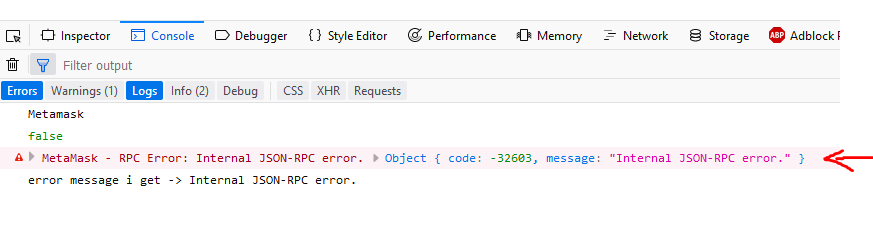
this was while using Firefox with Metamask extension installed
the following is the result of using on Chrome without the metamask extension
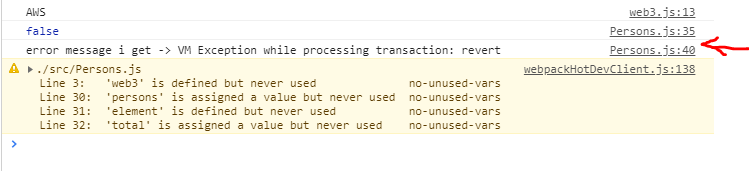
So as you can see i suppose the error message the extension gets its the same as the one on screenshot #2
and here is the code that produces the throw

OS: Windows 10
Browser with metamask: Firefox 60.0.2 (64-bit)
Browser without metamask: Chrome Versión 67.0.3396.79 (Build oficial) (64 bits)
working with Ganache CLI v6.1.0 (ganache-core: 2.1.0)
the command i use to launch ganache is the following ganache-cli --noVMErrorsOnRPCResponse --port 9494 -m "main wing tag lumber seat image defy sign pair cat frost music"
my question is, if metamask knows what error was thrown, could you propagate it to the developers since the error we get is kind of cryptic. So we could adjust our frontend for it
I’m developing the front-end to an application that I’m trying to test. However, MetaMask keeps giving me this error? I tried changing the gas limit like previously suggested and nothing. Any ideas?
Error:
MetaMask — RPC Error: Internal JSON-RPC error.
code: -32603
data: {code: -32000, message: «gas required exceeds allowance (30000000) or always failing transaction»}
message: «Internal JSON-RPC error.»
asked Apr 2, 2021 at 20:18

4
Without seeing the code, it’s hard to say for sure but you could try:
- Check any code you changed in the front end, specifically in your code you may have something like this:
const contractInstance = new state.web3.eth.Contract(
    MyContract.abi,
    "0x.....",            // contract address
    {
        from: state.accounts[0],
        gasPrice: 1000,
        gas: 100000
    }
);
Make sure the gas prices are similar to those, you may have to adjust for your case.
-
Re-compile and redeploy —> for truffle, run
truffle developfirst, thencompilethenmigrate --resetfor local deployment. -
In Metamask, reset your test account. Metamask > Select Account > Settings > Advanced > Reset account. Only do this for testing accounts
answered Apr 5, 2021 at 22:36

Previously it used to happen in older versions due to a gas specification issue which was fixed. rpcErrors.internal` expects a string as the first argument, with arbitrary data being the optional second argument. Passing in a non-
string first argument results in the error being shadowed by an error
from eth-json-rpc-errors.
Please check what you are passing to Metamask.
answered Aug 11, 2021 at 10:50

In my case, after trying so many options I have restarted Ganache and re-imported new account from Ganache to Metamask.
I connected this new account with localhost application.
This resoles my issue.

Dharman♦
29.2k21 gold badges79 silver badges131 bronze badges
answered Mar 20, 2022 at 18:43

Before performing any transaction the sending ETH address must be connected to your own site or UI. So it can get the address of sending account and goes towards the further transaction in the metamask.
Make sure Your sending account address must be connected to your UI.
answered Jun 27, 2022 at 15:48

1