Common error messages. Use the sidebar ➡️to jump to the error you’re seeing.

Sometimes you may find yourself facing a problem that doesn’t have a clear solution. These troubleshooting tips may help you solve problems you run into.
INSUFFICIENT_OUTPUT_AMOUNT
INSUFFICIENT_OUTPUT_AMOUNT
The transaction cannot succeed due to error: PancakeRouter: INSUFFICIENT_OUTPUT_AMOUNT. This is probably an issue with one of the tokens you are swapping.
the transaction cannot succeed due to error: execution reverted: pancakerouter: insufficient_output_amount.
You’re trying to swap tokens, but your slippage tolerance is too low or liquidity is too low.
-
1.
Refresh your page and try again later.
-
2.
Try trading a smaller amount at one time.
-
3.
Increase your slippage tolerance:
-
1.
Tap the settings icon on the liquidity page.
-
2.
Increase your slippage tolerance a little and try again.

-
-
4.
Lastly, try inputting an amount with fewer decimal places.
This usually happens when trading tokens with low liquidity.
That means there isn’t enough of one of the tokens you’re trying to swap in the Liquidity Pool: it’s probably a small-cap token that few people are trading.
However, there’s also the chance that you’re trying to trade a scam token which cannot be sold. In this case, PancakeSwap isn’t able to block a token or return funds.
INSUFFICIENT_A_AMOUNT or INSUFFICIENT_B_AMOUNT
INSUFFICIENT_A_AMOUNT or INSUFFICIENT_B_AMOUNT
Fail with error ‘PancakeRouter: INSUFFICIENT_A_AMOUNT’
or
Fail with error ‘PancakeRouter: INSUFFICIENT_B_AMOUNT’
You’re trying to add/remove liquidity from a liquidity pool (LP), but there isn’t enough of one of the two tokens in the pair.
Refresh your page and try again, or try again later.
-
1.
Tap the settings icon on the liquidity page.
-
2.
Increase your slippage tolerance a little and try again.
The error is caused by trying to add or remove liquidity for a liquidity pool (LP) with an insufficient amount of token A or token B (one of the tokens in the pair).
It might be the case that prices are updating too fast when and your slippage tolerance is too low.


OK, so you’re really determined to fix this. We really don’t recommend doing this unless you know what you’re doing.
There currently isn’t a simple way to solve this issue from the PancakeSwap website: you’ll need to interact with the contract directly. You can add liquidity directly via the Router contract, while setting amountAMin to a small amount, then withdrawing all liquidity.
-
1.
Select Write Contract, then Connect to Web3 and connect your wallet.
-
2.
In section «1. approve», approve the LP token for the router by entering
-
1.
spender (address): enter the contract address of the LP token you’re trying to interact with
-
-
2.
In 5. balanceOf, input your wallet address and hit Query.
-
3.
Keep track of the number that’s exported. It shows your balance within the LP in the uint256 format, which you’ll need in the next step.

-
1.
Select Write Contract and Connect to Web3 as above.
-
2.
Find addLiquidity or removeLiquidity (whichever one you’re trying to do)
-
3.
Enter the token addresses of both of the tokens in the LP.
-
4.
In liquidity (uint256), enter the uint256 number which you got from «balanceOf» above.
-
5.
Set a low amountAMin or amountBMin: try 1 for both.
-
6.
Add your wallet address in to (address).
-
7.
Deadline must be an epoch time greater than the time the tx is executed.

This can cause very high slippage, and can cause the user to lose some funds if frontrun
The transaction cannot succeed due to error: PancakeRouter: EXPIRED. This is probably an issue with one of the tokens you are swapping.
Try again, but confirm (sign and broadcast) the transaction as soon as you generate it.
This happened because you started making a transaction, but you didn’t sign and broadcast it until it was past the deadline. That means you didn’t hit «Confirm» quickly enough.
The transaction cannot succeed due to error: Pancake: K. This is probably an issue with one of the tokens you are swapping.
Try modifying the amount on “To” field. Therefore putting «(estimated)» symbol on “From”. Then initiate the swap immediately.

This usually happen when you are trying to swap a token with its own fee.
The transaction cannot succeed due to error: execution reverted: Pancake: TRANSFER_FAILED.
Make sure you have 30% more tokens in your wallet than you intend to trade, or try to trade a lower amount. If you want to sell the maximum possible, try 70% or 69% instead of 100%.
Caused by the design of Restorative Rebase tokens like tDoge or tBTC.
Understand how restorative rebase tokens work
.
Another possible cause of this issue is the malicious token issuer just suspended the trading for their token. Or they made selling action only possible for selected wallet addresses. Please always do your own research to avoid any potential fraud. If the token you are trying to swap but failed with this error code is coming from an airdrop, that is most likely a scam. Please do not perform any token approval or follow any links, your fund may be at risk if you try to do so.
Transaction cannot succeed
Transaction cannot succeed
Try trading a smaller amount, or increase slippage tolerance via the settings icon and try again. This is caused by low liquidity.
Try trading a smaller amount, or increase slippage tolerance via the settings icon and try again. This is caused by low liquidity.
This transaction would fail. Please contact support
If you got this error while removing liquidity from a BNB pair:
Please select «Receive WBNB» and retry.
If you got this error while trying to swap:
Please contact the project team of the token you’re trying to swap. **** This issue must be resolved by the project team.
This issue (while swapping) is caused by tokens which have hard-coded the V1 PancakeSwap router into their contract.
While this practice is ill-advised at best, the reason for these projects having done this appears to be due to their tokenomics, in which each purchase sends a % of the token to LPs.
The projects affected will likely not work with the V2 router: they will most likely need to create new versions of their tokens pointing to our new router address, and migrate any existing token holders to their new token.
We recommend that any projects which created such tokens should also make efforts to prevent their users from adding them to V2 LP.
Cannot read property ‘toHexString’ of undefined
Cannot read property ‘toHexString’ of undefined
«Unknown error: «Cannot read property ‘toHexString’ of undefined»
When trying to swap tokens, the transaction fails and this error message is displayed. This error has been reported on mobile devices using Trust Wallet.
-
1.
Attempt the transaction again with increased slippage allowance.
-
2.
If 1. does not resolve your problem, consider using another wallet such as SafePal for your transaction.
This usually happens when trading tokens with insufficient slippage allowance on Trust Wallet.
The exact details of the problem are still being investigated.
Execution reverted: TransferHelper: TRANSFER_FROM_FAILED.
Execution reverted: TransferHelper: TRANSFER_FROM_FAILED.
The transaction cannot succeed due to error: execution reverted: TransferHelper: TRANSFER_FROM_FAILED.
When trying to swap tokens, the transaction fails and this error message is displayed. This error has been reported across platforms.
-
1.
Check to make sure you have sufficient funds available.
-
2.
Ensure you have given the contract allowance to spend the amount of funds you’re attempting to trade with.
This error happens when trading tokens with insufficient allowance, or when a wallet has insufficient funds.
If you’re trading tokens with Restorative Rebase like tau assets tDoge or tBTC, make sure you understand how they work first with this
guide to Rebase tokens
.
Fail with error ‘ds-math-sub-underflow’
Fail with error ‘ds-math-sub-underflow’
You’ve run out of allowance of your LP token allowance to the MasterChef contract.
Use token approval manager like unrekt or BscScan to
BEP20: burn amount exceeds balance
BEP20: burn amount exceeds balance
Fail with error ‘BEP20: burn amount exceeds balance’
You don’t have enough SYRUP in your wallet to unstake from the CAKE-CAKE pool.
Get at least as much SYRUP as the amount of CAKE that you’re trying to unstake.
-
1.
Buy SYRUP on the exchange. If you want to unstake 100 CAKE, you need at least 100 SYRUP.
If that still fails, you can perform an “emergencyWithdraw” from the contract directly to unstake your staked tokens.
-
2.
Click “Connect to Web3” and connect your wallet.
-
3.
In section “4. emergencyWithdraw”, enter «0» and click “Write”.
This will unstake your staked tokens and lose any uncollected CAKE yield.
This will lose any yield that you haven’t harvested yet.
To stop this happening again, don’t sell your SYRUP. You still need it to unstake from the “Stake CAKE Earn CAKE” pool.
This error has happened because you have sold or transferred SYRUP tokens. SYRUP is minted in a 1:1 ratio to CAKE when you stake in the CAKE-CAKE Syrup Pool. SYRUP must be burned at a 1:1 ratio to CAKE when calling leaveStaking (unstaking your CAKE from the pool), so if you don’t have enough, you can’t unstake from the pool.
Warning! Error encountered during contract execution [out of gas]
You have set a low gas limit when trying to make a transaction.
Try manually increasing the gas limit (not gas price!) in your wallet before signing the transaction.
A limit of 200000 is usually enough.

The above example is from Metamask; check your wallet’s documentation if you aren’t sure how to adjust the gas limit.
Basically, your wallet (Metamask, Trust Wallet, etc.) can’t finish what it’s trying to do.
Your wallet estimates that the gas limit is too low, so the function call runs out of gas before the function call is finished.
BEP20: transfer amount exceeds allowance
BEP20: transfer amount exceeds allowance
Fail with error ‘BEP20: transfer amount exceeds allowance’
-
1.
Use Unrekt.net to revoke approval for the smart contract you’re trying to interact with
-
2.
Approve the contract again, without setting a limit on spend allowance
-
3.
Try interacting with the contract again.
This happens when you set a limit on your spend allowance when you first approved the contract, then try to swap more than the limit.
BEP20: transfer amount exceeds balance
BEP20: transfer amount exceeds balance
Fail with error ‘BEP20: transfer amount exceeds balance’
You’re probably trying to unstake from a Syrup Pool with low rewards in it. Solution below.
If not, you may be trying to send tokens that you don’t have in your wallet (for example, trying to send a token that is already assigned to a pending transaction). In this case, just make sure you have the tokens you’re trying to use.
Firstly,
let the team know
which pool you’re trying to unstake from, so they can top up the rewards. If you’re in a hurry to unstake and you don’t mind losing your pending yield, try an emergencyWithdraw:
You can perform an “emergencyWithdraw” from the contract directly to unstake your staked tokens.
-
1.
Find the contract address of the Syrup Pool you’re trying to unstake from. You can find it in your wallet’s transaction log.
-
4.
Click “Connect to Web3” and connect your wallet.
-
5.
In section “3. emergencyWithdraw”, and click “Write”.
This will unstake your staked tokens and lose any uncollected yield.
This will lose any yield that you haven’t harvested yet.
This error tends to appear when you’re trying to unstake from an old Syrup Pool, but there aren’t enough rewards in the pool left for you to harvest when withdrawing. This causes the transaction to fail.
Provider Error
No provider was found
This happens when you try to connect via a browser extension like MetaMask or Binance Chain Wallet, but you haven’t installed the extension.
Switch your chain to BNB Smart Chain. Check your wallet’s documentation for a guide if you need help.
Already processing eth_requestAccounts. Please wait.
Already processing eth_requestAccounts. Please wait.
Make sure you are signed in to your wallet app and it’s connected to BNB Smart Chain.
Issues buying SAFEMOON and similar tokens
Issues buying SAFEMOON and similar tokens
To trade SAFEMOON, you must click on the settings icon and set your slippage tolerance to 12% or more.
This is because SafeMoon taxes a 10% fee on each transaction:
-
5% fee = redistributed to all existing holders
-
5% fee = used to add liquidity
This is also why you might not receive as much of the token as you expect when you purchase.
Read more on
How to Buy Safe Moon
.
«MetaMask — RPC Error: Internal JSON-RPC error. estimateGas failed removeLiquidityETHWithPermitSupportingFeeOnTransferTokens estimateGas failed removeLiquidityETHWithPermit «
Happens when trying to remove liquidity on some tokens via Metamask. Root cause is still unknown. Try using an alternative wallet.
Internal JSON-RPC error. { «code»: -32000, «message»: «insufficient funds for transfer» } — Please try again.
You don’t have enough BNB to pay for the transaction fees. You need more BEP-20 network BNB in your wallet.
Error: [ethjs-query] while formatting outputs from RPC ‘{«value»:{«code»:-32603,»data»:{«code»:-32000,»message»:»transaction underpriced»}}}»
Increase the gas limit for the transaction in your wallet. Check your wallet’s documentation to learn how to increase gas limit.
Swap failed: Error: [ethjs-query] while formatting outputs from RPC ‘{«value»:{«code»:-32603,»data»:{«code»:-32603,»message»:»handle request error»}}}’
Cause unclear. Try these steps before trying again:
Oops! We couldn’t find any Pancake Collectibles in your wallet.
Oops! We couldn’t find any Pancake Collectibles in your wallet.
We’re investigating the logic behind this issue. Meanwhile please try the workaround.
-
Clear the cache and retry.
-
Retry on different browser.
-
Retry on different wallet apps.
-
Retry on the different network (switch between Wi-Fi and cellular)
Checking username keeps spinning
Checking username keeps spinning
There are two possible causes.
-
1.
You have multiple wallets installed on the browser.
Root cause: You have multiple wallets installed on the browser.
It may make a conflict between wallets. This is out of PancakeSwap’s control and we can do nothing.
-
1.
Have only single wallet installed on browser, remove the others.
-
2.
Reconnect the wallet and retry setting username again.
Root cause: Network is unstable.
-
1.
Delete whatever has been entered in the text field completely.
-
2.
Re-type username, then please wait for seconds.
-
3.
If it doesn’t work, reload the page and retry again.
Are you getting an “Insufficient Output Amount” error on PancakeSwap?
Here’s the full error message, “The transaction cannot succeed due to error: PancakeRouter: INSUFFICIENT_OUTPUT_AMOUNT”.
Followed by, “This is probably an issue with one of the tokens you are swapping”.
Many users have faced this issue before when they’re swapping a token on PancakeSwap.
As a result, they are unable to swap the token until the error is resolved.
Fortunately, the error can be fixed in two easy steps.
In this guide, you’ll learn why you’re getting an “Insufficient Output Amount” error on PancakeSwap and how to fix it.
- Why am I getting an “Insufficient Output Amount” error on PancakeSwap?
- How to fix “Insufficient Output Amount” on PancakeSwap
Why am I getting an “Insufficient Output Amount” error on PancakeSwap?

You’re getting an “Insufficient Output Amount” error on PancakeSwap because your slippage tolerance is too low.
When your slippage tolerance is too low, your order may fail to execute because the price movement is too high.
Slippage tolerance allows you to set the maximum percentage of price movement you’re willing to take.
For example, if your slippage tolerance is 5%, it means that your order will not execute if the price movement is more than 5%.
Cryptocurrencies are extremely volatile, and slippage tolerance counters them.
Without slippage tolerance, you’d be swapping tokens at market order.
However, setting a low slippage tolerance may prevent your order from getting executed.
By default, the slippage tolerance on PancakeSwap is 0.8%, which is very low.
PancakeSwap states that the “Insufficient Output Amount” error is caused by one of the tokens that you’re swapping.
In most cases, the slippage tolerance is the cause of the error.
To fix “Insufficient Output Amount” on PancakeSwap, you need to increase your slippage tolerance to 12%.
After you’ve increased your slippage tolerance to 12%, you’ll be able to successfully swap your tokens.
Keep in mind that “12%” is just a benchmark that you can follow.
When you face the “Insufficient Output Amount” on PancakeSwap, it’s highly recommended that you increase your slippage tolerance by increments of 1%.
For example, every time you receive the “Insufficient Output Amount” error, increase your slippage tolerance by 1%.
Repeat the process until you’re able to successfully swap your tokens.
By doing this, you’ll be swapping your tokens at the best rate.
Here’s how you can fix the “Insufficient Output Amount” error on PancakeSwap in 2 steps:
1. Tap on the Settings icon on PancakeSwap

Firstly, open PancakeSwap on your device.
Then, select the tokens that you want to swap on the exchange.
On the “From” field, select the token that you want to use to swap.
On the “To” field, select the token that you want to swap to.
Next to the “Exchange” header, you’ll see a Settings icon.
Tap on the Settings icon to open the PancakeSwap settings.
2. Increase the slippage tolerance to 12%

After you’ve tapped on the Settings icon, the “Settings” pop-up will open.
On the settings pop-up, you’ll see three headers including “Slippage tolerance”, “Transaction deadline”, and “Audio”.
Under “Slippage tolerance”, you’ll see three percentages that you can choose from, including “0.1%”, “0.5%”, and “1%”.
By default, the slippage tolerance on PancakeSwap is 0.8%.
In most cases, a 0.8% slippage tolerance is too low and will cause your order to fail.
To fix this, you can increase your slippage tolerance to 12% on the “%” field.
After you’ve done so, you may get a “Your transaction may be frontrun” error.
Ignore the error message, close the pop-up, and try swapping the tokens again.
This time, you should be able to swap your tokens on PancakeSwap without getting an error.
Alternatively, you can increase your slippage tolerance by increments of 1% each time you get the “Insufficient Output Amount”.
By doing this, you’ll be swapping your tokens at the best rate.
You’ve successfully fixed the “Insufficient Output Amount” on PancakeSwap!
Conclusion
The “Insufficient Output Amount” is a very common issue on the PancakeSwap exchange.
As mentioned in the article, the error is mainly caused by a low slippage tolerance.
However, there isn’t a hard-and-fast rule to deal with slippage as there are multiple factors that you need to consider.
For example, you need to consider the volatility of the prices, liquidity, and more before making a decision.
However, if you don’t mind swapping your tokens at a large price difference, then you can increase your slippage as much as you want.
Further Reading
How to Buy Spore Finance (SPORE)
How to Transfer Crypto from Coinbase to Binance
3 Ways to Contact Coinbase
| description |
|---|
|
Common error messages. Use the sidebar ➡️ to jump to the error you’re seeing. |
Troubleshooting Errors

Sometimes you may find yourself facing a problem that doesn’t have a clear solution. These troubleshooting tips may help you solve problems you run into.
Issues on the Exchange
INSUFFICIENT_OUTPUT_AMOUNT
The transaction cannot succeed due to error: PancakeRouter: INSUFFICIENT_OUTPUT_AMOUNT. This is probably an issue with one of the tokens you are swapping.
the transaction cannot succeed due to error: execution reverted: pancakerouter: insufficient_output_amount.
You’re trying to swap tokens, but your slippage tolerance is too low or liquidity is too low.
{% tabs %}
{% tab title=»Solution» %}
- Refresh your page and try again later.
- Try trading a smaller amount at one time.
- Increase your slippage tolerance:
- Tap the settings icon on the liquidity page.
- Increase your slippage tolerance a little and try again.
%20(4)%20(2)%20(1)%20(1)%20(1)%20(1)%20(1)%20(1)%20(1)%20(3).png)
- Lastly, try inputting an amount with fewer decimal places.
{% endtab %}
{% tab title=»Reason» %}
This usually happens when trading tokens with low liquidity.
That means there isn’t enough of one of the tokens you’re trying to swap in the Liquidity Pool: it’s probably a small-cap token that few people are trading.
However, there’s also the chance that you’re trying to trade a scam token which cannot be sold. In this case, PancakeSwap isn’t able to block a token or return funds.
{% endtab %}
{% endtabs %}
INSUFFICIENT_A_AMOUNT or INSUFFICIENT_B_AMOUNT
Fail with error ‘PancakeRouter: INSUFFICIENT_A_AMOUNT’
or
Fail with error ‘PancakeRouter: INSUFFICIENT_B_AMOUNT’
You’re trying to add/remove liquidity from a liquidity pool (LP), but there isn’t enough of one of the two tokens in the pair.
{% tabs %}
{% tab title=»Solution» %}
Refresh your page and try again, or try again later.
Still doesn’t work?
- Tap the settings icon on the liquidity page.
- Increase your slippage tolerance a little and try again.
%20(4)%20(2)%20(1)%20(1)%20(1)%20(1)%20(1)%20(1)%20(1)%20(4).png)
{% endtab %}
{% tab title=»Reason» %}
The error is caused by trying to add or remove liquidity for a liquidity pool (LP) with an insufficient amount of token A or token B (one of the tokens in the pair).
It might be the case that prices are updating too fast when and your slippage tolerance is too low.
{% endtab %}
{% tab title=»Solution for nerds» %}
OK, so you’re really determined to fix this. We really don’t recommend doing this unless you know what you’re doing.
There currently isn’t a simple way to solve this issue from the PancakeSwap website: you’ll need to interact with the contract directly. You can add liquidity directly via the Router contract, while setting amountAMin to a small amount, then withdrawing all liquidity.
Approve the LP contract
Head to the contract of the LP token you’re trying to approve.
For example, here’s the ETH/WBNB pair: https://bscscan.com/address/0x70d8929d04b60af4fb9b58713ebcf18765ade422
- Select Write Contract, then Connect to Web3 and connect your wallet.
- In section «1. approve», approve the LP token for the router by entering
- spender (address): enter the contract address of the LP token you’re trying to interact with
- value (uint256): -1
Query «balanceOf»
- Switch to Read Contract.
- In 5. balanceOf, input your wallet address and hit Query.
- Keep track of the number that’s exported. It shows your balance within the LP in the uint256 format, which you’ll need in the next step.
%20(1)%20(1).png)
Add or Remove Liquidity
Head to the router contract: https://bscscan.com/address/0x05ff2b0db69458a0750badebc4f9e13add608c7f#writeContract
- Select Write Contract and Connect to Web3 as above.
- Find addLiquidity or removeLiquidity (whichever one you’re trying to do)
- Enter the token addresses of both of the tokens in the LP.
- In liquidity (uint256), enter the uint256 number which you got from «balanceOf» above.
- Set a low amountAMin or amountBMin: try 1 for both.
- Add your wallet address in to (address).
- Deadline must be an epoch time greater than the time the tx is executed.
%20(1)%20(1).png)
{% hint style=»warning» %}
This can cause very high slippage, and can cause the user to lose some funds if frontrun
{% endhint %}
{% endtab %}
{% endtabs %}
PancakeRouter: EXPIRED
The transaction cannot succeed due to error: PancakeRouter: EXPIRED. This is probably an issue with one of the tokens you are swapping.
Try again, but confirm (sign and broadcast) the transaction as soon as you generate it.
This happened because you started making a transaction, but you didn’t sign and broadcast it until it was past the deadline. That means you didn’t hit «Confirm» quickly enough.
Pancake: K
The transaction cannot succeed due to error: Pancake: K. This is probably an issue with one of the tokens you are swapping.
Try modifying the amount on “To” field. Therefore putting «(estimated)» symbol on “From”. Then initiate the swap immediately.
.png)
This usually happen when you are trying to swap a token with its own fee.
Pancake: TRANSFER_FAILED
The transaction cannot succeed due to error: execution reverted: Pancake: TRANSFER_FAILED.
Make sure you have 30% more tokens in your wallet than you intend to trade, or try to trade a lower amount. If you want to sell the maximum possible, try 70% or 69% instead of 100%.
Caused by the design of Restorative Rebase tokens like tDoge or tBTC.
Understand how restorative rebase tokens work.
Another possible cause of this issue is the malicious token issuer just suspended the trading for their token. Or they made selling action only possible for selected wallet addresses. Please always do your own research to avoid any potential fraud. If the token you are trying to swap but failed with this error code is coming from an airdrop, that is most likely a scam. Please do not perform any token approval or follow any links, your fund may be at risk if you try to do so.
Transaction cannot succeed
Try trading a smaller amount, or increase slippage tolerance via the settings icon and try again. This is caused by low liquidity.
Price Impact too High
Try trading a smaller amount, or increase slippage tolerance via the settings icon and try again. This is caused by low liquidity.
estimateGas failed
This transaction would fail. Please contact support
{% tabs %}
{% tab title=»Solution» %}
If you got this error while removing liquidity from a BNB pair:
Please select «Receive WBNB» and retry.
If you got this error while trying to swap:
Please contact the project team of the token you’re trying to swap. **** This issue must be resolved by the project team.
{% endtab %}
{% tab title=»Reason» %}
This issue (while swapping) is caused by tokens which have hard-coded the V1 PancakeSwap router into their contract.
While this practice is ill-advised at best, the reason for these projects having done this appears to be due to their tokenomics, in which each purchase sends a % of the token to LPs.
The projects affected will likely not work with the V2 router: they will most likely need to create new versions of their tokens pointing to our new router address, and migrate any existing token holders to their new token.
We recommend that any projects which created such tokens should also make efforts to prevent their users from adding them to V2 LP.
The up-to-date router address is https://bscscan.com/address/0x10ED43C718714eb63d5aA57B78B54704E256024E
{% endtab %}
{% endtabs %}
Cannot read property ‘toHexString’ of undefined
«Unknown error: «Cannot read property ‘toHexString’ of undefined»
When trying to swap tokens, the transaction fails and this error message is displayed. This error has been reported on mobile devices using Trust Wallet.
{% tabs %}
{% tab title=»Solution» %}
- Attempt the transaction again with increased slippage allowance.
- If 1. does not resolve your problem, consider using another wallet such as SafePal for your transaction.
{% endtab %}
{% tab title=»Reason» %}
This usually happens when trading tokens with insufficient slippage allowance on Trust Wallet.
The exact details of the problem are still being investigated.
{% endtab %}
{% endtabs %}
Execution reverted: TransferHelper: TRANSFER_FROM_FAILED.
The transaction cannot succeed due to error: execution reverted: TransferHelper: TRANSFER_FROM_FAILED.
When trying to swap tokens, the transaction fails and this error message is displayed. This error has been reported across platforms.
{% tabs %}
{% tab title=»Solution» %}
- Check to make sure you have sufficient funds available.
- Ensure you have given the contract allowance to spend the amount of funds you’re attempting to trade with.
{% endtab %}
{% tab title=»Reason» %}
This error happens when trading tokens with insufficient allowance, or when a wallet has insufficient funds.
If you’re trading tokens with Restorative Rebase like tau assets tDoge or tBTC, make sure you understand how they work first with this guide to Rebase tokens.
{% endtab %}
{% endtabs %}
Issues with Farms
Fail with error ‘ds-math-sub-underflow’
You’ve run out of allowance of your LP token allowance to the MasterChef contract.
Use token approval manager like unrekt or BscScan to
Issues with Syrup Pools
BEP20: burn amount exceeds balance
Fail with error ‘BEP20: burn amount exceeds balance’
You don’t have enough SYRUP in your wallet to unstake from the CAKE-CAKE pool.
Get at least as much SYRUP as the amount of CAKE that you’re trying to unstake.
- Buy SYRUP on the exchange. If you want to unstake 100 CAKE, you need at least 100 SYRUP.
- Try unstaking again.
If that still fails, you can perform an “emergencyWithdraw” from the contract directly to unstake your staked tokens.
- Go to: https://bscscan.com/address/0x73feaa1eE314F8c655E354234017bE2193C9E24E#writeContract
- Click “Connect to Web3” and connect your wallet.
- In section “4. emergencyWithdraw”, enter «0» and click “Write”.
This will unstake your staked tokens and lose any uncollected CAKE yield.
{% hint style=»warning» %}
This will lose any yield that you haven’t harvested yet.
{% endhint %}
To stop this happening again, don’t sell your SYRUP. You still need it to unstake from the “Stake CAKE Earn CAKE” pool.
This error has happened because you have sold or transferred SYRUP tokens. SYRUP is minted in a 1:1 ratio to CAKE when you stake in the CAKE-CAKE Syrup Pool. SYRUP must be burned at a 1:1 ratio to CAKE when calling leaveStaking (unstaking your CAKE from the pool), so if you don’t have enough, you can’t unstake from the pool.
{% embed url=»https://dashboard.tenderly.co/tx/binance/0x754e18ceea82acac256b49c2b7a81260f7f86dd5e56ee2e3cc1b6ac864c29a8e» %}
Out of Gas error
Warning! Error encountered during contract execution [out of gas]
You have set a low gas limit when trying to make a transaction.
{% tabs %}
{% tab title=»Solution» %}
Try manually increasing the gas limit (not gas price!) in your wallet before signing the transaction.
A limit of 200000 is usually enough.
%20(1)%20(1)%20(1).png)
The above example is from Metamask; check your wallet’s documentation if you aren’t sure how to adjust the gas limit.
{% endtab %}
{% tab title=»Reason» %}
Basically, your wallet (Metamask, Trust Wallet, etc.) can’t finish what it’s trying to do.
Your wallet estimates that the gas limit is too low, so the function call runs out of gas before the function call is finished.
{% endtab %}
{% endtabs %}
BEP20: transfer amount exceeds allowance
Fail with error ‘BEP20: transfer amount exceeds allowance’
{% tabs %}
{% tab title=»Solution» %}
- Use Unrekt.net to revoke approval for the smart contract you’re trying to interact with
- Approve the contract again, without setting a limit on spend allowance
- Try interacting with the contract again.
{% endtab %}
{% tab title=»Reason» %}
This happens when you set a limit on your spend allowance when you first approved the contract, then try to swap more than the limit.
{% endtab %}
{% endtabs %}
BEP20: transfer amount exceeds balance
Fail with error ‘BEP20: transfer amount exceeds balance’
You’re probably trying to unstake from a Syrup Pool with low rewards in it. Solution below.
If not, you may be trying to send tokens that you don’t have in your wallet (for example, trying to send a token that is already assigned to a pending transaction). In this case, just make sure you have the tokens you’re trying to use.
{% tabs %}
{% tab title=»Solution» %}
Firstly, let the team know which pool you’re trying to unstake from, so they can top up the rewards. If you’re in a hurry to unstake and you don’t mind losing your pending yield, try an emergencyWithdraw:
You can perform an “emergencyWithdraw” from the contract directly to unstake your staked tokens.
- Find the contract address of the Syrup Pool you’re trying to unstake from. You can find it in your wallet’s transaction log.
- Go to https://bscscan.com/ and in the search bar, enter the contract address.
- Select Write Contract.
- Click “Connect to Web3” and connect your wallet.
- In section “3. emergencyWithdraw”, and click “Write”.
This will unstake your staked tokens and lose any uncollected yield.
{% hint style=»warning» %}
This will lose any yield that you haven’t harvested yet.
{% endhint %}
{% endtab %}
{% tab title=»Reason» %}
This error tends to appear when you’re trying to unstake from an old Syrup Pool, but there aren’t enough rewards in the pool left for you to harvest when withdrawing. This causes the transaction to fail.
{% endtab %}
{% endtabs %}
Issues with Prediction
Check prediction-troubleshooting.md
Other issues
Provider Error
Provider Error
No provider was found
This happens when you try to connect via a browser extension like MetaMask or Binance Chain Wallet, but you haven’t installed the extension.
{% tabs %}
{% tab title=»Solution» %}
Install the official browser extension to connect, or read our guide on how to connect a wallet to PancakeSwap.
{% endtab %}
{% endtabs %}
Unsupported Chain ID
Switch your chain to BNB Smart Chain. Check your wallet’s documentation for a guide if you need help.
Already processing eth_requestAccounts. Please wait.
Make sure you are signed in to your wallet app and it’s connected to BNB Smart Chain.
Issues buying SAFEMOON and similar tokens
To trade SAFEMOON, you must click on the settings icon and set your slippage tolerance to 12% or more.
This is because SafeMoon taxes a 10% fee on each transaction:
- 5% fee = redistributed to all existing holders
- 5% fee = used to add liquidity
This is also why you might not receive as much of the token as you expect when you purchase.
Read more on How to Buy Safe Moon.
Internal JSON-RPC errors
«MetaMask — RPC Error: Internal JSON-RPC error. estimateGas failed removeLiquidityETHWithPermitSupportingFeeOnTransferTokens estimateGas failed removeLiquidityETHWithPermit «
Happens when trying to remove liquidity on some tokens via Metamask. Root cause is still unknown. Try using an alternative wallet.
Internal JSON-RPC error. { «code»: -32000, «message»: «insufficient funds for transfer» } — Please try again.
You don’t have enough BNB to pay for the transaction fees. You need more BEP-20 network BNB in your wallet.
Error: [ethjs-query]
Error: [ethjs-query] while formatting outputs from RPC ‘{«value»:{«code»:-32603,»data»:{«code»:-32000,»message»:»transaction underpriced»}}}»
Increase the gas limit for the transaction in your wallet. Check your wallet’s documentation to learn how to increase gas limit.
Swap failed: Error: [ethjs-query] while formatting outputs from RPC ‘{«value»:{«code»:-32603,»data»:{«code»:-32603,»message»:»handle request error»}}}’
Cause unclear. Try these steps before trying again:
- Increase gas limit
- Increase slippage
- Clear cache
Issues with Profile
Oops! We couldn’t find any Pancake Collectibles in your wallet.
We’re investigating the logic behind this issue. Meanwhile please try the workaround.
{% tabs %}
{% tab title=»Workaround 1″ %}
- Go to “Collectible” page, then come back to profile page.
If you can’t find the link, go to https://pancakeswap.finance/collectibles directly. - Retry profile creation.
{% endtab %}
{% tab title=»Workaround 2″ %}
Change the environment.
- Clear the cache and retry.
- Retry on different browser.
- Retry on different wallet apps.
- Retry on the different network (switch between Wi-Fi and cellular)
{% endtab %}
{% endtabs %}
Checking username keeps spinning
There are two possible causes.
- You have multiple wallets installed on the browser.
- Network issue.
{% tabs %}
{% tab title=»Solution 1″ %}
Root cause: You have multiple wallets installed on the browser.
It may make a conflict between wallets. This is out of PancakeSwap’s control and we can do nothing.
- Have only single wallet installed on browser, remove the others.
- Reconnect the wallet and retry setting username again.
{% endtab %}
{% tab title=»Solution 2″ %}
Root cause: Network is unstable.
You have to retry.
- Delete whatever has been entered in the text field completely.
- Re-type username, then please wait for seconds.
- If it doesn’t work, reload the page and retry again.
{% endtab %}
{% endtabs %}
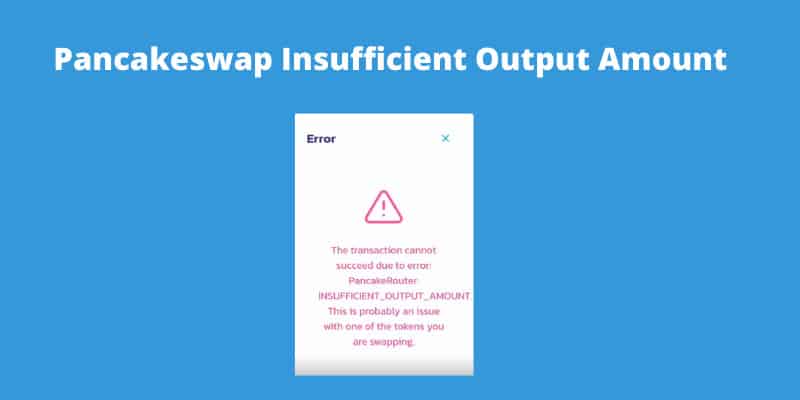
In this post, I share the guide by which you can fix Pancakeswap Insufficient output amount Error. You can easily resolve pancake router errors by following this article.
Pancakeswap is a Decentralized Exchange where users can exchange different tokens on the Binance Smart Chain. The users can earn CAKE tokens by supplying liquidity to the platform. Moreover, users can also get a chance to attain some CAKE tokens through a lottery.
When you try to exchange tokens on Pancakeswap, it says “the transaction cannot succeed due to error: PancakeRouter: insufficient_output_amount” then you have to follow the simple steps below in order to fix this error.
1. In the Pancakeswap, you have to select a token that you want to buy. In this tutorial, I am buying Safemars with Safemoon.
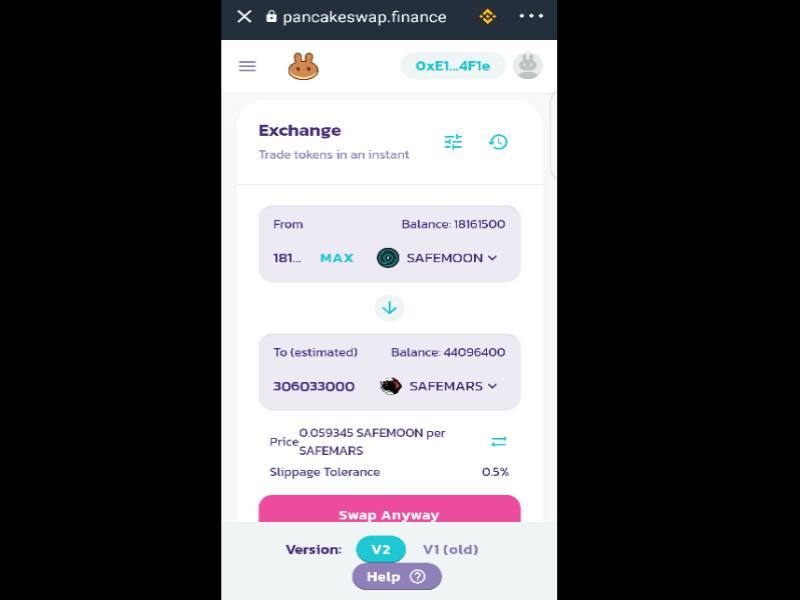
2. When you tap Swap, it shows Pancakeswap insufficient output amount error.
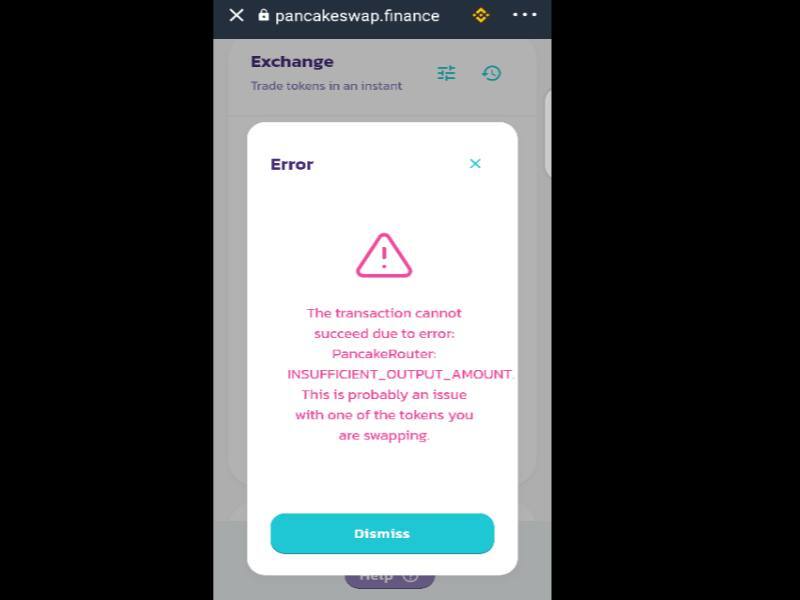
3. Now You have to click the three horizontal lines option next to Exchange then increase the Slippage tolerance rate from 0.5% to 1%.
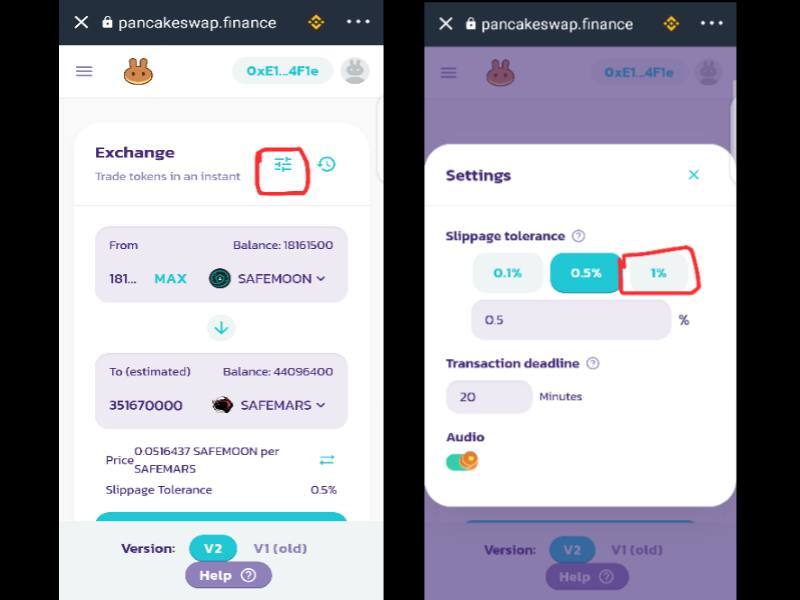
4. If the error still appears then increase the Slippage tolerance rate from 1% to 15%.
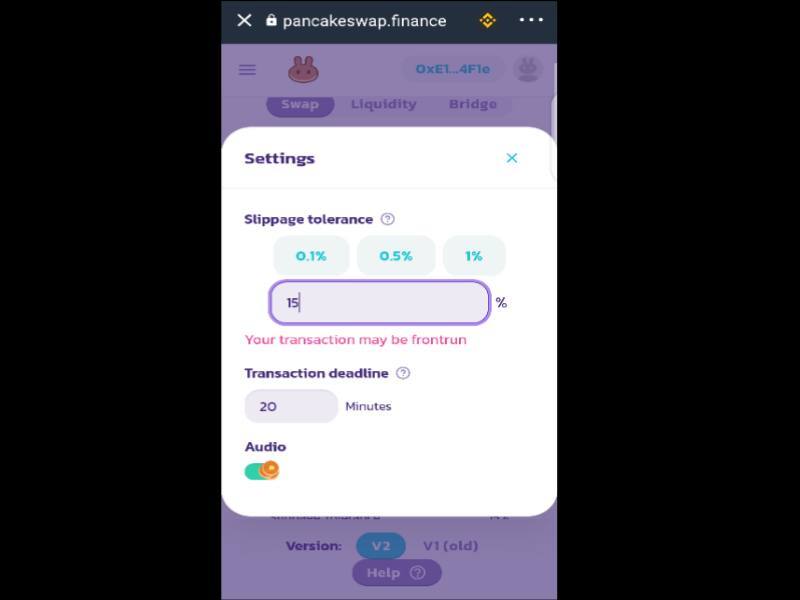
5. According to the Reddit thread, slippage rates from 1% to 15% have worked for most investors while few users still experience this error.
6. If you still experiencing this issue then increase the slippage rate to 18 0r 21% then Click Confirm Swap.
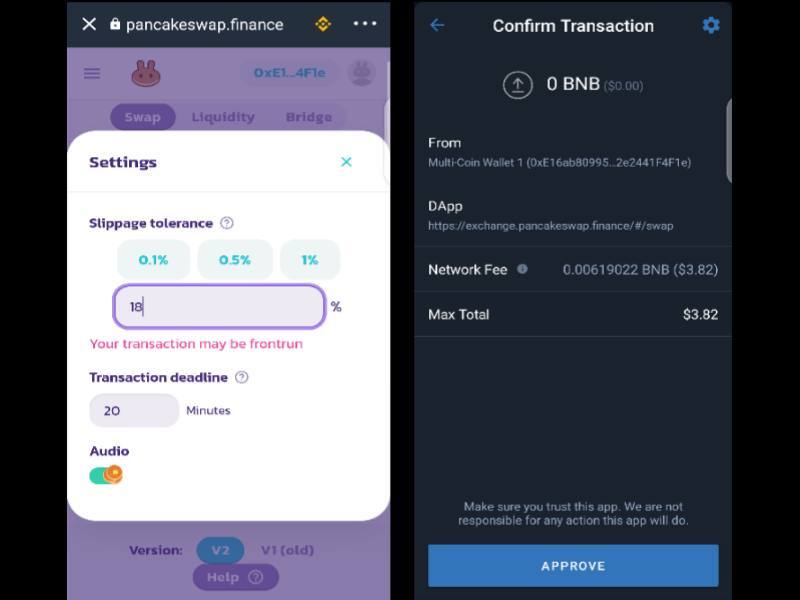
Conclusion
I hope this guide helped you to fix the Pancakeswap insufficient output error on your Trust Wallet account. Share this useful guide with other Trust Wallet users because every user experiencing this error.
I also shared the video tutorial on my YouTube Channel, you can watch that out. You may also find us on Facebook and Twitter.

Fazeel Usmani is a Blogger, Writer, SEO Expert, YouTuber, and Digital Content Creator who is helping people by solving their problems and helping them live online.
У вас возникли проблемы с покупкой и продажей криптовалюты? Хотя платформы для торговли криптовалютой, такие как PancakeSwap и Uniswap, все еще являются относительно новым явлением, устранение всех недостатков займет некоторое время. “insufficient_output_amount” ошибка может помешать вам завершить транзакцию, но, к счастью, есть способ обойти эту проблему.
В этом руководстве рассказывается, как исправить “insufficient_output_amount” ошибка на криптобиржах PancakeSwap и Uniswap, чтобы вы могли продолжать успешно торговать токенами.
Что такое “Недостаточная сумма вывода” Ошибка
Если ваша транзакция была заблокирована и вы получили сообщение “Недостаточная сумма вывода” сообщения, это, вероятно, произошло из-за низкой устойчивости к проскальзыванию.
Проскальзывание представляет собой разницу между ожидаемой ценой обмена токенов и ценой, по которой происходит обмен. Например, предположим, что вы хотите обменять свои токены BinaryX (BNX) на некоторые токены Metahero (HERO). Когда вы начнете торговлю, вы увидите, что получите 1 ГЕРОЯ. Но как только транзакция завершится, у вас останется 0,9 HERO. Это означает, что проскальзывание составило 10%.
Проскальзывание происходит из-за внезапных колебаний рынка. Стоимость токена постоянно меняется, потому что пользователи постоянно инициируют транзакции, повышая и понижая стоимость многих криптовалют. Если изменение произойдет между моментом начала транзакции и ее завершением, проскальзывание повлияет на стоимость полученной криптовалюты.
Еще одна причина проскальзывания — ликвидность. Он измеряет, насколько легко один токен можно превратить в другой посредством торговли. Низкая ликвидность указывает на неожиданное поведение рынка, что приводит к скачкам стоимости криптовалюты.
Если значение проскальзывания установлено слишком низким, вам, скорее всего, будет трудно завершить транзакцию. Криптовалютные платформы воспринимают это как знак того, что вы не желаете продолжать торговлю, если фактическая стоимость окажется ниже ожидаемой.
Большинство криптообменных платформ имеют крайне низкую устойчивость к проскальзыванию, поэтому вероятность того, что ваши транзакции неудачи высоки. Регулировка допустимого уровня проскальзывания сводит к минимуму риск неудачной транзакции.
Если ваши токены имеют низкую устойчивость к проскальзыванию или низкую ликвидность, есть три способа решить эту проблему.
Обновите страницу
Во-первых, попробуйте обновить страницу PancakeSwap. Возможно, вы сможете завершить транзакцию позже. Если нет, то можно использовать второй метод.
Постепенное увеличение проскальзывания
Если ваши торговые попытки продолжают прерываться, вам придется изменить уровень допустимого проскальзывания. Допуск проскальзывания по умолчанию на PancakeSwap составляет 0,8%, поэтому важно настроить его, чтобы максимально использовать возможности платформы. Увеличивайте проскальзывание с небольшим шагом в 1%. В конце концов, вы найдете оптимальный уровень, который позволит вам продолжать торговлю и принесет вам наибольшую выгоду от ваших токенов. Для этого:
- Используйте свое устройство для входа на биржу PancakeSwap.

- Выберите токены, которые хотите обменять, в “From” поле.

- Выберите токены, которые хотите получить, в разделе “Кому” поле.

- Нажмите “Настройки” возможность открыть «Настройки» PancakeSwap.”


- В разделе “Допуск проскальзывания” введите “1.8” в “%” поле.

Если транзакция не удалась, попробуйте еще раз, на этот раз увеличив значение проскальзывания до 2,8%. Продолжайте увеличивать величину проскальзывания на 1%, пока вам не удастся завершить сделку. Этот метод требует терпения, но он гарантирует, что вы получите наилучшую возможную цену за свои токены.
Увеличить проскальзывание до 12% или 15%
Последний метод включает резкое увеличение проскальзывания. Большинство пользователей обнаружили, что увеличение его до 12% или 15% позволяет им продолжать торговать. Вот как это сделать:
- Войдите в PancakeSwap на своем устройстве и выберите токены, которые хотите обменять.

- В “От” выберите токены, которые хотите обменять.

- В &ldquo ;Кому” выберите токены, которые хотите получить.

- Нажмите кнопку &ldquo ;Настройки” кнопку, чтобы открыть меню PancakeSwap “Настройки”

- Отобразится всплывающее окно: “Global,” и “Допуск проскальзывания”

- Перейдите к “ %” область под “Допуск проскальзывания” и увеличьте его до 12%.

Пользователи иногда получают сообщение “Ваша транзакция может быть запущена заранее” сообщение. В этом случае закройте сообщение и снова инициируйте транзакцию. На этот раз вы не должны увидеть никакого сообщения об ошибке, и обмен будет успешным.
Этот метод быстрее, чем увеличение проскальзывания на 1% каждый раз, когда возникает ошибка. Однако имейте в виду, что это связано с более высокой разницей в цене.
Как решить проблему “Недостаточная сумма вывода” Ошибка в Uniswap
Платформа Uniswap работает аналогично PancakeSwap, поэтому способы регулировки проскальзывания аналогичны.
Обновить страницу
Попробуйте обновить страницу Uniswap и посмотрите, устранена ли ошибка, попробовав для обмена токенов.
Постепенное увеличение проскальзывания
Если у вас все еще есть проблемы, увеличьте торговое проскальзывание. Перед вводом настроек проскальзывания убедитесь, что вы выбрали токены, которые хотите обменять.
Начните с увеличения значения с шагом 1 %:
- Перейдите на страницу Uniswap и коснитесь значка “шестеренка” значок в верхней части экрана для входа в настройки транзакции.

- В опции проскальзывания есть “%” поле, в которое можно ввести пользовательское значение.

- Измените его на &ldquo ;1%” и выберите “Подтвердить замену».

Если вы снова столкнетесь с “insufficient_output_amount” ошибка, продолжайте увеличивать проскальзывание на 1%, пока не достигнете уровня, при котором вы можете торговать без перерыва.
Увеличить проскальзывание до 12% или 15%
Быстрее способ обойти ошибку — поднять процент до 12 или 15. Этого уровня достаточно для борьбы с колебаниями рынка и низкой ликвидностью. Вот как это сделать:
- Войдите на страницу Uniswap и нажмите “шестеренка” значок , чтобы просмотреть настройки транзакции.

- Введите “12” в допуск проскальзывания “%”

- Нажмите “Подтвердить обмен” чтобы сохранить изменения.

Дополнительные часто задаваемые вопросы
Есть ли другие причины, по которым я вижу “недостаточный объем вывода” ошибка?
Иногда низкая устойчивость к проскальзыванию и низкая ликвидность не мешают вашей транзакции. Если приведенные выше решения не работают для вас, проблема может быть связана с вашим криптовалютным кошельком. Двумя самыми популярными онлайн-кошельками являются TrustWallet и MetaMask Wallet. Из-за большого количества пользователей они также могут повлиять на успешность вашей транзакции.
Чтобы решить эту проблему:
● Попробуйте переустановить онлайн-кошелек. Это должно решить все внутренние проблемы в кошельке и предотвратить блокировку обмена токенов.
● Повторно подключите свой кошелек к торговой платформе криптовалюты. Возможно, вы видите ошибку из-за того, что соединение между кошельком и платформой неисправно.
Слабое подключение к Интернету также может остановить транзакцию, поэтому убедитесь, что вы используете надежную и безопасную сеть. Покупка и продажа токенов на другом устройстве — еще одно решение. Даже переключение на другой веб-браузер может позволить провести транзакцию.
Какие токены вызывают “недостаточную сумму вывода” ошибка?
Вы можете столкнуться с этой проблемой независимо от того, покупаете вы или продаете токены. Однако популярные токены с большей вероятностью приведут к неудачной транзакции, поскольку они часто колеблются. Популярные варианты включают токен Ethereum (ETH), токен PancakeSwap (Cake), Dinoland Metaverse (DINO), Space Genesis (SPG) и другие.
Обход ошибки и продолжение торговли
Каждый раз, когда появляется новый прибыльный рынок, обязательно возникают проблемы. Пока такие платформы, как PancakeSwap и Uniswap, не найдут эффективный способ регулирования рыночных колебаний, пользователям придется страдать от таких ошибок, как “недостаточная сумма вывода” Однако методы, которые мы обсуждали, значительно упростят торговлю на этих платформах.
Надеемся, это руководство помогло вам понять, как бороться с “недостаточной суммой вывода” ошибка и успешно бороться с низкой устойчивостью к проскальзыванию и ликвидностью.
Сталкивались ли вы с этой ошибкой раньше? Какой метод вы использовали для ее решения? Дайте нам знать в разделе комментариев ниже.

Create an account to follow your favorite communities and start taking part in conversations.
r/pancakeswap

RESOLVED: place order by inputting amount of tokens you wish to receive, that is lower than the MAX you could purchase. I tried half and it went through in successive transactions
PancakeRouter: INSUFFICIENT_OUTPUT_AMOUNT.
How do I fix this?
level 1
The issue is not the number of tokens you wish to sell but the slippage percentage you set. Try increasing it gradually (2% could work, otherwise 5% will do the job)
level 2
I tried to do this thing you said but it still gives the error. Do you know how to solve?
level 2
it worked with 15% but it says you dont have enough BNB to cover network fees. I swap it all to cake i didnt know i should’ve left some
level 2
tried that, worked perfectly at 15%, price didn’t even change much during that time, absolute life saver 🙂
level 2
Thanks man. I was losing my mind.
level 2
started at 11% incremented up to 16%. worked for me.
level 1
I had to set my spillage up to 15% before it worked.
level 2
This guy is Right… I was doing it for a whole day price movies up so much and finally i searched and yes this solve my problem.
level 1
It worked when I set slippage to 15%
level 2
That’s what I had to do just now and it gave me 600 million for $240
level 2
But it says «transaction can be front run» when you set the slippage at 5% or more. Is that a concern?
level 1
15% seems to be the number🚀
level 1
15% it is. Gas Fees were enormous though!
level 2
But it says «transaction can be front run» when you set the slippage at 5% or more. Is that a concern?
Also, what were the gas fees? Do you remember?
About Community

Trying to swap BNB to your favorite BEP20 token using Pancake Swap but always getting this following error message upon pressing the swap button?
The transaction cannot succeed due to error: PancakeRouter: INSUFFICIENT_OUTPUT_AMOUNT. This is probably an issue with one of the tokens you are swapping.
Looks like a lot of people are facing this error when trying to swap BNB to SAFEMOON. Not just Safe Moon but every single transaction that you attempt with any pair will give you this error.
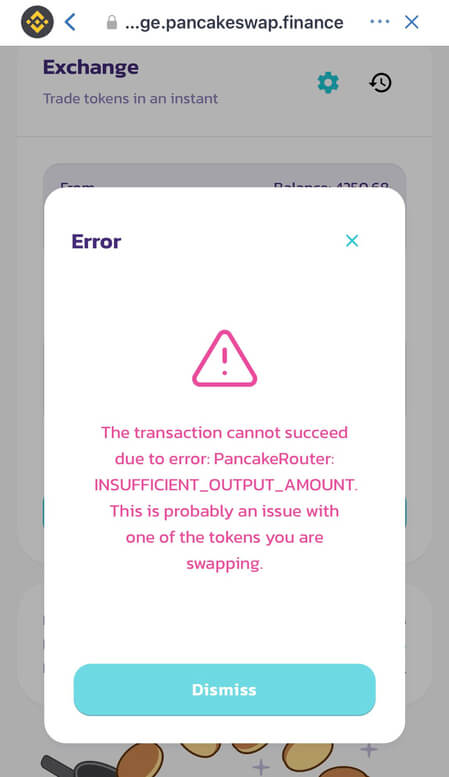
This is a basic tutorial that explains how to fix this error popup on pancake swap finance.
Transaction cannot succeed is a common error
This is not a problem with the Pancake Swap DEX or the Safe Moon token. This error can occur when you are swapping any token and on any decentralized trading protocol. Not only Pancake Swap but is one of the common error faced by the users of Uniswap when swapping ERC20 tokens on Uniswap.
The transaction cannot succeed due to error: UniswapV2Router: EXPIRED. This is probably an issue with one of the tokens you are swapping.
Another one: The transaction cannot succeed due to error: TransferHelper: TRANSFER_FROM_FAILED. This is probably an issue with one of the tokens you are swapping.
Until you fix this; the platform won’t allow you to swap tokens and so you cannot buy or sell a coin or a token. Well the fix is simple.
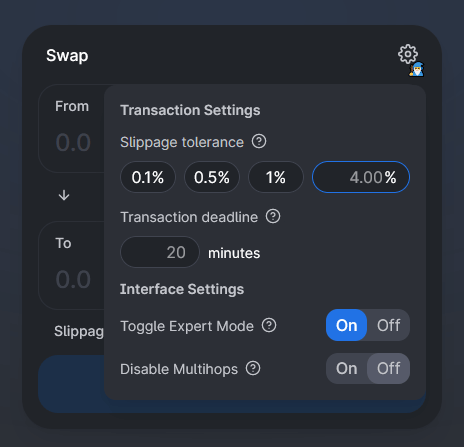
On Uniswap swap page click the settings gear icon wheel on the top right. Click “Toggle Expert Mode”, then turn on export mode by entering the word “confirm” in the popup dialog box. Click the gear icon again and slightly increase the slippage tolerance. Keep increasing it until the transaction succeeds.
Also make sue you have enough ETH on Uniswap to cover the transaction fees.
The fix is same for Pancake swap finance as well. All you need to do is increase your slippage by clicking on the gear icon. Try 2-3%. If that doesn’t work then keep increasing gradually. To swap tokens like Safe Moon you need to set the slippage to 11%.
On Pancakeswap.finance make sure you have enough BNB to cover the gas fees.
Please follow step by step instructions below to fix this error.
Troubleshooting Error: PancakeRouter: INSUFFICIENT_OUTPUT_AMOUNT
Why INSUFFICIENT_OUTPUT_AMOUNT error?
INSUFFICIENT_OUTPUT_AMOUNT is an error that you’ll encounter when you are trying to trade tokens with low liquidity. It could probably be a small cap token and there might not be enough tokens in the liquidity pool for you to swap. Or it could be a scam token which cannot be sold.
In case of SAFEMOON its not a scam token and the error occurs not because there is not enough tokens in the liquidity pool but because your slippage tolerance is too low.
Here is how to fix that.
Increase Slippage tolerance:
To swap SAFEMOON the slippage needs to be at least 11% and here is how to increase your slippage tolerance.
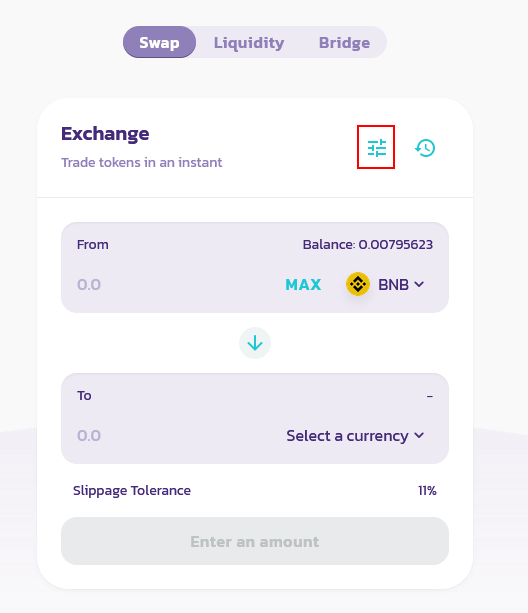
- Tap the settings icon on the exchange / liquidity page
- Now increase the slippage tolerance gradually. For Safe Moon it should be 11%. Also make sure the transaction deadline in the settings dialog is set to 20 Minutes.
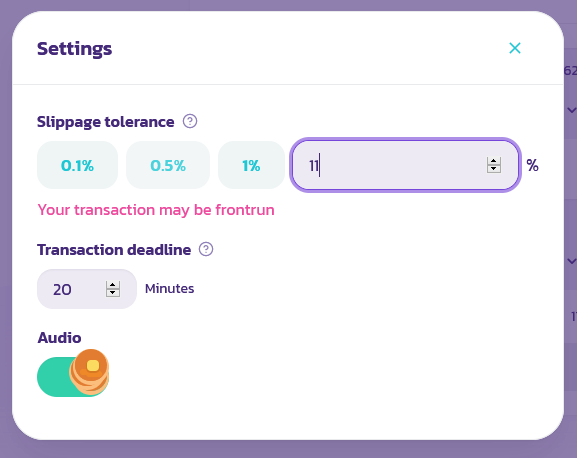
After changing this settings click swap. It’ll go through. Lower BNB slightly to cover fees or just click on the max button and that should work.
Note: Make sure you have enough BNB for the fees or your transaction won’t go through. Set slippage to 11% and keep trying and if that doesn’t worry then try 12%. After several attemps your transaction should finally go through.
Upon setting 11% as slippage tolerance you’ll get the following warning:
Your transaction may be frontrun.
Its nothing to worry about.
By increasing slippage what you are doing is you’re pretty much making a market order. The slippage percentage is the amount up the price you pay from what you have been quoted. As a result when you swap buy / sell you’ll get less tokens that what you actually see.
So other than increasing slippage there is no way you can purchase safe moon using BNB. Currently tokens like SafeMoon is not available on CEX like Binance yet.
Still having issues trying to swap SAFEMOON or any other tokens on Pancake Swap?
Other solutions:
Increasing slippage tolerance and transaction deadline should fix common transaction errors like:
INSUFFICIENT_OUTPUT_AMOUNT, INSUFFICIENT_A_AMOUNT, INSUFFICIENT_B_AMOUNT and PancakeRouter: EXPIRED
Even after changing that if the issue still persist then try the following solution.
Some users have reported that restarting computer and resetting Internet have fixed the issue. If you are trying from Ledger then unplug the device, plug it back and try again. Finally on PC or Mobile check your date and time settings. Few users have reported that the system time on their device was incorrect. Fixing that seem to have resolved this issue.
If you are unsuccessful in making a transaction using Trust wallet then try from MetaMask. Here is how you can connect your MetaMask wallet to Binance Smart Chain. And here is how to add custom tokens to MetaMask.
Hope it helps. If you are still facing trouble then please let us know in the comments below.

We are crypto enthusiasts and our main intention with Coin Guides is to educate people about Cryptocurrency and Blockchain technology. We regularly publish content about Bitcoin, Ethereum, Altcoins, wallet guides, mining tutorials and trading tips.