Обработка ошибок увеличивает отказоустойчивость кода, защищая его от потенциальных сбоев, которые могут привести к преждевременному завершению работы.
Прежде чем переходить к обсуждению того, почему обработка исключений так важна, и рассматривать встроенные в Python исключения, важно понять, что есть тонкая грань между понятиями ошибки и исключения.
Ошибку нельзя обработать, а исключения Python обрабатываются при выполнении программы. Ошибка может быть синтаксической, но существует и много видов исключений, которые возникают при выполнении и не останавливают программу сразу же. Ошибка может указывать на критические проблемы, которые приложение и не должно перехватывать, а исключения — состояния, которые стоит попробовать перехватить. Ошибки — вид непроверяемых и невозвратимых ошибок, таких как OutOfMemoryError, которые не стоит пытаться обработать.
Обработка исключений делает код более отказоустойчивым и помогает предотвращать потенциальные проблемы, которые могут привести к преждевременной остановке выполнения. Представьте код, который готов к развертыванию, но все равно прекращает работу из-за исключения. Клиент такой не примет, поэтому стоит заранее обработать конкретные исключения, чтобы избежать неразберихи.
Ошибки могут быть разных видов:
- Синтаксические
- Недостаточно памяти
- Ошибки рекурсии
- Исключения
Разберем их по очереди.
Синтаксические ошибки (SyntaxError)
Синтаксические ошибки часто называют ошибками разбора. Они возникают, когда интерпретатор обнаруживает синтаксическую проблему в коде.
Рассмотрим на примере.
a = 8
b = 10
c = a b
File "", line 3
 c = a b
       ^
SyntaxError: invalid syntax
Стрелка вверху указывает на место, где интерпретатор получил ошибку при попытке исполнения. Знак перед стрелкой указывает на причину проблемы. Для устранения таких фундаментальных ошибок Python будет делать большую часть работы за программиста, выводя название файла и номер строки, где была обнаружена ошибка.
Недостаточно памяти (OutofMemoryError)
Ошибки памяти чаще всего связаны с оперативной памятью компьютера и относятся к структуре данных под названием “Куча” (heap). Если есть крупные объекты (или) ссылки на подобные, то с большой долей вероятности возникнет ошибка OutofMemory. Она может появиться по нескольким причинам:
- Использование 32-битной архитектуры Python (максимальный объем выделенной памяти невысокий, между 2 и 4 ГБ);
- Загрузка файла большого размера;
- Запуск модели машинного обучения/глубокого обучения и много другое;
Обработать ошибку памяти можно с помощью обработки исключений — резервного исключения. Оно используется, когда у интерпретатора заканчивается память и он должен немедленно остановить текущее исполнение. В редких случаях Python вызывает OutofMemoryError, позволяя скрипту каким-то образом перехватить самого себя, остановить ошибку памяти и восстановиться.
Но поскольку Python использует архитектуру управления памятью из языка C (функция malloc()), не факт, что все процессы восстановятся — в некоторых случаях MemoryError приведет к остановке. Следовательно, обрабатывать такие ошибки не рекомендуется, и это не считается хорошей практикой.
Ошибка рекурсии (RecursionError)
Эта ошибка связана со стеком и происходит при вызове функций. Как и предполагает название, ошибка рекурсии возникает, когда внутри друг друга исполняется много методов (один из которых — с бесконечной рекурсией), но это ограничено размером стека.
Все локальные переменные и методы размещаются в стеке. Для каждого вызова метода создается стековый кадр (фрейм), внутрь которого помещаются данные переменной или результат вызова метода. Когда исполнение метода завершается, его элемент удаляется.
Чтобы воспроизвести эту ошибку, определим функцию recursion, которая будет рекурсивной — вызывать сама себя в бесконечном цикле. В результате появится ошибка StackOverflow или ошибка рекурсии, потому что стековый кадр будет заполняться данными метода из каждого вызова, но они не будут освобождаться.
def recursion():
    return recursion()

recursion()
---------------------------------------------------------------------------

RecursionError                            Traceback (most recent call last)

 in
----> 1 recursion()


 in recursion()
      1 def recursion():
----> 2     return recursion()


... last 1 frames repeated, from the frame below ...


 in recursion()
      1 def recursion():
----> 2     return recursion()


RecursionError: maximum recursion depth exceeded
Ошибка отступа (IndentationError)
Эта ошибка похожа по духу на синтаксическую и является ее подвидом. Тем не менее она возникает только в случае проблем с отступами.
Пример:
for i in range(10):
    print('Привет Мир!')
  File "", line 2
    print('Привет Мир!')
        ^
IndentationError: expected an indented block
Исключения
Даже если синтаксис в инструкции или само выражение верны, они все равно могут вызывать ошибки при исполнении. Исключения Python — это ошибки, обнаруживаемые при исполнении, но не являющиеся критическими. Скоро вы узнаете, как справляться с ними в программах Python. Объект исключения создается при вызове исключения Python. Если скрипт не обрабатывает исключение явно, программа будет остановлена принудительно.
Программы обычно не обрабатывают исключения, что приводит к подобным сообщениям об ошибке:
Ошибка типа (TypeError)
a = 2
b = 'PythonRu'
a + b
---------------------------------------------------------------------------

TypeError                                 Traceback (most recent call last)

 in
      1 a = 2
      2 b = 'PythonRu'
----> 3 a + b


TypeError: unsupported operand type(s) for +: 'int' and 'str'
Ошибка деления на ноль (ZeroDivisionError)
10 / 0
---------------------------------------------------------------------------

ZeroDivisionError                         Traceback (most recent call last)

 in
----> 1 10 / 0


ZeroDivisionError: division by zero
Есть разные типы исключений в Python и их тип выводится в сообщении: вверху примеры TypeError и ZeroDivisionError. Обе строки в сообщениях об ошибке представляют собой имена встроенных исключений Python.
Оставшаяся часть строки с ошибкой предлагает подробности о причине ошибки на основе ее типа.
Теперь рассмотрим встроенные исключения Python.
Встроенные исключения
BaseException
 +-- SystemExit
 +-- KeyboardInterrupt
 +-- GeneratorExit
 +-- Exception
      +-- StopIteration
      +-- StopAsyncIteration
      +-- ArithmeticError
      |    +-- FloatingPointError
      |    +-- OverflowError
      |    +-- ZeroDivisionError
      +-- AssertionError
      +-- AttributeError
      +-- BufferError
      +-- EOFError
      +-- ImportError
      |    +-- ModuleNotFoundError
      +-- LookupError
      |    +-- IndexError
      |    +-- KeyError
      +-- MemoryError
      +-- NameError
      |    +-- UnboundLocalError
      +-- OSError
      |    +-- BlockingIOError
      |    +-- ChildProcessError
      |    +-- ConnectionError
      |    |    +-- BrokenPipeError
      |    |    +-- ConnectionAbortedError
      |    |    +-- ConnectionRefusedError
      |    |    +-- ConnectionResetError
      |    +-- FileExistsError
      |    +-- FileNotFoundError
      |    +-- InterruptedError
      |    +-- IsADirectoryError
      |    +-- NotADirectoryError
      |    +-- PermissionError
      |    +-- ProcessLookupError
      |    +-- TimeoutError
      +-- ReferenceError
      +-- RuntimeError
      |    +-- NotImplementedError
      |    +-- RecursionError
      +-- SyntaxError
      |    +-- IndentationError
      |         +-- TabError
      +-- SystemError
      +-- TypeError
      +-- ValueError
      |    +-- UnicodeError
      |         +-- UnicodeDecodeError
      |         +-- UnicodeEncodeError
      |         +-- UnicodeTranslateError
      +-- Warning
           +-- DeprecationWarning
           +-- PendingDeprecationWarning
           +-- RuntimeWarning
           +-- SyntaxWarning
           +-- UserWarning
           +-- FutureWarning
           +-- ImportWarning
           +-- UnicodeWarning
           +-- BytesWarning
           +-- ResourceWarning
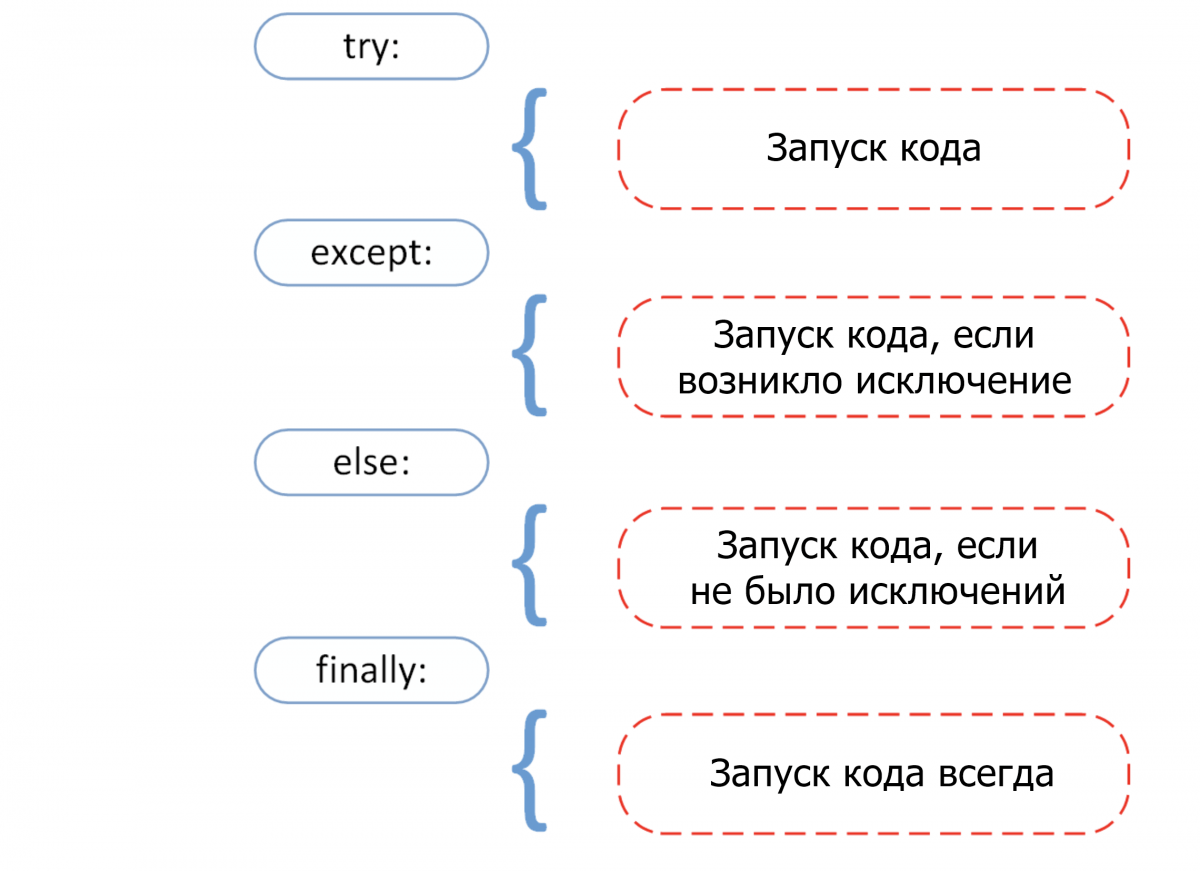
Прежде чем переходить к разбору встроенных исключений быстро вспомним 4 основных компонента обработки исключения, как показано на этой схеме.
Try: он запускает блок кода, в котором ожидается ошибка.Except: здесь определяется тип исключения, который ожидается в блокеtry(встроенный или созданный).Else: если исключений нет, тогда исполняется этот блок (его можно воспринимать как средство для запуска кода в том случае, если ожидается, что часть кода приведет к исключению).Finally: вне зависимости от того, будет ли исключение или нет, этот блок кода исполняется всегда.
В следующем разделе руководства больше узнаете об общих типах исключений и научитесь обрабатывать их с помощью инструмента обработки исключения.
Ошибка прерывания с клавиатуры (KeyboardInterrupt)
Исключение KeyboardInterrupt вызывается при попытке остановить программу с помощью сочетания Ctrl + C или Ctrl + Z в командной строке или ядре в Jupyter Notebook. Иногда это происходит неумышленно и подобная обработка поможет избежать подобных ситуаций.
В примере ниже если запустить ячейку и прервать ядро, программа вызовет исключение KeyboardInterrupt. Теперь обработаем исключение KeyboardInterrupt.
try:
    inp = input()
    print('Нажмите Ctrl+C и прервите Kernel:')
except KeyboardInterrupt:
    print('Исключение KeyboardInterrupt')
else:
    print('Исключений не произошло')
Исключение KeyboardInterrupt
Стандартные ошибки (StandardError)
Рассмотрим некоторые базовые ошибки в программировании.
Арифметические ошибки (ArithmeticError)
- Ошибка деления на ноль (Zero Division);
- Ошибка переполнения (OverFlow);
- Ошибка плавающей точки (Floating Point);
Все перечисленные выше исключения относятся к классу Arithmetic и вызываются при ошибках в арифметических операциях.
Деление на ноль (ZeroDivisionError)
Когда делитель (второй аргумент операции деления) или знаменатель равны нулю, тогда результатом будет ошибка деления на ноль.
try:
    a = 100 / 0
    print(a)
except ZeroDivisionError:
    print("Исключение ZeroDivisionError." )
else:
    print("Успех, нет ошибок!")
Исключение ZeroDivisionError.
Переполнение (OverflowError)
Ошибка переполнение вызывается, когда результат операции выходил за пределы диапазона. Она характерна для целых чисел вне диапазона.
try:
    import math
    print(math.exp(1000))
except OverflowError:
    print("Исключение OverFlow.")
else:
    print("Успех, нет ошибок!")
Исключение OverFlow.
Ошибка утверждения (AssertionError)
Когда инструкция утверждения не верна, вызывается ошибка утверждения.
Рассмотрим пример. Предположим, есть две переменные: a и b. Их нужно сравнить. Чтобы проверить, равны ли они, необходимо использовать ключевое слово assert, что приведет к вызову исключения Assertion в том случае, если выражение будет ложным.
try:
    a = 100
    b = "PythonRu"
    assert a == b
except AssertionError:
    print("Исключение AssertionError.")
else:
    print("Успех, нет ошибок!")
Исключение AssertionError.
Ошибка атрибута (AttributeError)
При попытке сослаться на несуществующий атрибут программа вернет ошибку атрибута. В следующем примере можно увидеть, что у объекта класса Attributes нет атрибута с именем attribute.
class Attributes(obj):
    a = 2
    print(a)

try:
    obj = Attributes()
    print(obj.attribute)
except AttributeError:
    print("Исключение AttributeError.")
2
Исключение AttributeError.
Ошибка импорта (ModuleNotFoundError)
Ошибка импорта вызывается при попытке импортировать несуществующий (или неспособный загрузиться) модуль в стандартном пути или даже при допущенной ошибке в имени.
import nibabel
---------------------------------------------------------------------------

ModuleNotFoundError                       Traceback (most recent call last)

 in
----> 1 import nibabel


ModuleNotFoundError: No module named 'nibabel'
Ошибка поиска (LookupError)
LockupError выступает базовым классом для исключений, которые происходят, когда key или index используются для связывания или последовательность списка/словаря неверна или не существует.
Здесь есть два вида исключений:
- Ошибка индекса (
IndexError); - Ошибка ключа (
KeyError);
Ошибка ключа
Если ключа, к которому нужно получить доступ, не оказывается в словаре, вызывается исключение KeyError.
try:
    a = {1:'a', 2:'b', 3:'c'}
    print(a[4])
except LookupError:
    print("Исключение KeyError.")
else:
    print("Успех, нет ошибок!")
Исключение KeyError.
Ошибка индекса
Если пытаться получить доступ к индексу (последовательности) списка, которого не существует в этом списке или находится вне его диапазона, будет вызвана ошибка индекса (IndexError: list index out of range python).
try:
    a = ['a', 'b', 'c']
    print(a[4])
except LookupError:
    print("Исключение IndexError, индекс списка вне диапазона.")
else:
    print("Успех, нет ошибок!")
Исключение IndexError, индекс списка вне диапазона.
Ошибка памяти (MemoryError)
Как уже упоминалось, ошибка памяти вызывается, когда операции не хватает памяти для выполнения.
Ошибка имени (NameError)
Ошибка имени возникает, когда локальное или глобальное имя не находится.
В следующем примере переменная ans не определена. Результатом будет ошибка NameError.
try:
    print(ans)
except NameError:
    print("NameError: переменная 'ans' не определена")
else:
    print("Успех, нет ошибок!")
NameError: переменная 'ans' не определена
Ошибка выполнения (Runtime Error)
Ошибка «NotImplementedError»
Ошибка выполнения служит базовым классом для ошибки NotImplemented. Абстрактные методы определенного пользователем класса вызывают это исключение, когда производные методы перезаписывают оригинальный.
class BaseClass(object):
    """Опередляем класс"""
    def __init__(self):
        super(BaseClass, self).__init__()
    def do_something(self):
	# функция ничего не делает
        raise NotImplementedError(self.__class__.__name__ + '.do_something')

class SubClass(BaseClass):
    """Реализует функцию"""
    def do_something(self):
        # действительно что-то делает
        print(self.__class__.__name__ + ' что-то делает!')

SubClass().do_something()
BaseClass().do_something()
SubClass что-то делает!


---------------------------------------------------------------------------

NotImplementedError                       Traceback (most recent call last)

 in
     14
     15 SubClass().do_something()
---> 16 BaseClass().do_something()


 in do_something(self)
      5     def do_something(self):
      6         # функция ничего не делает
----> 7         raise NotImplementedError(self.__class__.__name__ + '.do_something')
      8
      9 class SubClass(BaseClass):


NotImplementedError: BaseClass.do_something
Ошибка типа (TypeError)
Ошибка типа вызывается при попытке объединить два несовместимых операнда или объекта.
В примере ниже целое число пытаются добавить к строке, что приводит к ошибке типа.
try:
    a = 5
    b = "PythonRu"
    c = a + b
except TypeError:
    print('Исключение TypeError')
else:
    print('Успех, нет ошибок!')
Исключение TypeError
Ошибка значения (ValueError)
Ошибка значения вызывается, когда встроенная операция или функция получают аргумент с корректным типом, но недопустимым значением.
В этом примере встроенная операция float получат аргумент, представляющий собой последовательность символов (значение), что является недопустимым значением для типа: число с плавающей точкой.
try:
    print(float('PythonRu'))
except ValueError:
    print('ValueError: не удалось преобразовать строку в float: 'PythonRu'')
else:
    print('Успех, нет ошибок!')
ValueError: не удалось преобразовать строку в float: 'PythonRu'
Пользовательские исключения в Python
В Python есть много встроенных исключений для использования в программе. Но иногда нужно создавать собственные со своими сообщениями для конкретных целей.
Это можно сделать, создав новый класс, который будет наследовать из класса Exception в Python.
class UnAcceptedValueError(Exception):
    def __init__(self, data):
        self.data = data
    def __str__(self):
        return repr(self.data)

Total_Marks = int(input("Введите общее количество баллов: "))
try:
    Num_of_Sections = int(input("Введите количество разделов: "))
    if(Num_of_Sections < 1):
        raise UnAcceptedValueError("Количество секций не может быть меньше 1")
except UnAcceptedValueError as e:
    print("Полученная ошибка:", e.data)
Введите общее количество баллов: 10
Введите количество разделов: 0
Полученная ошибка: Количество секций не может быть меньше 1
В предыдущем примере если ввести что-либо меньше 1, будет вызвано исключение. Многие стандартные исключения имеют собственные исключения, которые вызываются при возникновении проблем в работе их функций.
Недостатки обработки исключений в Python
У использования исключений есть свои побочные эффекты, как, например, то, что программы с блоками try-except работают медленнее, а количество кода возрастает.
Дальше пример, где модуль Python timeit используется для проверки времени исполнения 2 разных инструкций. В stmt1 для обработки ZeroDivisionError используется try-except, а в stmt2 — if. Затем они выполняются 10000 раз с переменной a=0. Суть в том, чтобы показать разницу во времени исполнения инструкций. Так, stmt1 с обработкой исключений занимает больше времени чем stmt2, который просто проверяет значение и не делает ничего, если условие не выполнено.
Поэтому стоит ограничить использование обработки исключений в Python и применять его в редких случаях. Например, когда вы не уверены, что будет вводом: целое или число с плавающей точкой, или не уверены, существует ли файл, который нужно открыть.
import timeit
setup="a=0"
stmt1 = '''
try:
    b=10/a
except ZeroDivisionError:
    pass'''

stmt2 = '''
if a!=0:
    b=10/a'''

print("time=",timeit.timeit(stmt1,setup,number=10000))
print("time=",timeit.timeit(stmt2,setup,number=10000))
time= 0.003897680000136461
time= 0.0002797570000439009
Выводы!
Как вы могли увидеть, обработка исключений помогает прервать типичный поток программы с помощью специального механизма, который делает код более отказоустойчивым.
Обработка исключений — один из основных факторов, который делает код готовым к развертыванию. Это простая концепция, построенная всего на 4 блоках: try выискивает исключения, а except их обрабатывает.
Очень важно поупражняться в их использовании, чтобы сделать свой код более отказоустойчивым.
Objects in Python do not automatically support slice notation just because they support indexing. That has to be programmed in. There may be syntax more convenient than what you’re using though.
If it’s iterable, you can convert to a list first, and then slice it, like
a = [*x][1:]
For especially large iterables (does not seem to be the case here), this may be inefficient. In that case, islice it before you unpack into the list.
from itertools import islice
a = [*islice(x, 1, None)]
But objects do not automatically support iteration just because they support indexing either. If that’s the case, you can still iterate manually with range() and a comprehension,
a = [x[i] for i in range(1, len(x))]
Though this isn’t really shorter until you have a few more elements to deal with. If you need this pattern a lot you could abstract it into a function.
And finally, objects do not necessarily support len just because they support indexing. If you don’t know the length in advance, about all you can do is loop through and catch the LookupError at that point.
Jan 12, 2018 10:00:10 AM |
Python Exception Handling: IndexError
A look at the IndexError in Python, with code samples illustrating the basic use of lists, and how invalid indices can raise IndexErrors.
Moving right along through our in-depth Python Exception Handling series, today we’ll be going over the IndexError, in all its glory. The IndexError is one of the more basic and common exceptions found in Python, as it is raised whenever attempting to access an index that is outside the bounds of a list.
In today’s article we’ll examine the IndexError in more detail, starting with where it resides in the larger Python Exception Class Hierarchy. We’ll also look into some functional Python sample code that will illustrate how basic lists are used and improper indexing can lead to IndexErrors. Let’s get into it!
The Technical Rundown
All Python exceptions inherit from the BaseException class, or extend from an inherited class therein. The full exception hierarchy of this error is:
BaseExceptionExceptionLookupErrorIndexError
Full Code Sample
Below is the full code sample we’ll be using in this article. It can be copied and pasted if you’d like to play with the code yourself and see how everything works.
# main.py

import datetime
from gw_utility.book import Book
 from gw_utility.logging import Logging
def main():
 try:
 # Create list and populate with Books.
 books = list()
 books.append(Book("Shadow of a Dark Queen", "Raymond E. Feist", 497, datetime.date(1994, 1, 1)))
 books.append(Book("Rise of a Merchant Prince", "Raymond E. Feist", 479, datetime.date(1995, 5, 1)))
 books.append(Book("Rage of a Demon King", "Raymond E. Feist", 436, datetime.date(1997, 4, 1)))
 # Output Books in list, with and without index.
 Logging.line_separator('Books')
 log_list(books)
 Logging.line_separator('Books w/ index')
 log_list(books, True)
 # Output list element outside bounds.
 Logging.line_separator('books[len(books)]')
 Logging.log(f'books[{len(books)}]: {books[len(books)]}')
 except IndexError as error:
 # Output expected IndexErrors.
 Logging.log_exception(error)
 except Exception as exception:
 # Output unexpected Exceptions.
 Logging.log_exception(exception, False)
def log_list(collection, include_index=False):
 """Logs the each element in collection to the console.
 :param collection: Collection to be iterated and output.
 :param include_index: Determines if index is also output.
 :return: None
 """
 try:
 # Iterate by converting to enumeration.
 for index, item in enumerate(collection):
 if include_index:
 Logging.log(f'collection[{index}]: {item}')
 else:
 Logging.log(item)
 except IndexError as error:
 # Output expected IndexErrors.
 Logging.log_exception(error)
 except Exception as exception:
 # Output unexpected Exceptions.
 Logging.log_exception(exception, False)
if __name__ == "__main__":
 main()
# book.py
import datetime
class Book:
author: str
page_count: int
publication_date: datetime.date
title: str
def __eq__(self, other):
"""Determines if passed object is equivalent to current object."""
return self.__dict__ == other.__dict__
def __init__(self,
title: str = None,
author: str = None,
page_count: int = None,
publication_date: datetime.date = None):
"""Initializes Book instance.
:param title: Title of Book.
:param author: Author of Book.
:param page_count: Page Count of Book.
:param publication_date: Publication Date of Book.
"""
self.author = author
self.page_count = page_count
self.publication_date = publication_date
self.title = title
def __getattr__(self, name: str):
"""Returns the attribute matching passed name."""
# Get internal dict value matching name.
value = self.__dict__.get(name)
if not value:
# Raise AttributeError if attribute value not found.
raise AttributeError(f'{self.__class__.__name__}.{name} is invalid.')
# Return attribute value.
return value
def __len__(self):
"""Returns the length of title."""
return len(self.title)
def __str__(self):
"""Returns a formatted string representation of Book."""
date = '' if self.publication_date is None else f', published on {self.publication_date.__format__("%B %d, %Y")}'
return f''{self.title}' by {self.author} at {self.page_count} pages{date}.'
# logging.py
import math
import sys
import traceback
class Logging:
separator_character_default = '-'
separator_length_default = 40
@classmethod
def __output(cls, *args, sep: str = ' ', end: str = 'n', file=None):
"""Prints the passed value(s) to the console.
:param args: Values to output.
:param sep: String inserted between values, default a space.
:param end: String appended after the last value, default a newline.
:param file: A file-like object (stream); defaults to the current sys.stdout.
:return: None
"""
print(*args, sep=sep, end=end, file=file)
@classmethod
def line_separator(cls, value: str = None, length: int = separator_length_default,
char: str = separator_character_default):
"""Print a line separator with inserted text centered in the middle.
:param value: Inserted text to be centered.
:param length: Total separator length.
:param char: Separator character.
"""
output = value
# If no value passed, output separator of length.
if value == None or len(value) == 0:
output = f'{char * length}'
elif len(value) < length:
# Update length based on insert length, less a space for margin.
length -= len(value) + 2
# Halve the length and floor left side.
left = math.floor(length / 2)
right = left
# If odd number, add dropped remainder to right side.
if length % 2 != 0:
right += 1
# Surround insert with separators.
output = f'{char * left} {value} {char * right}'
cls.__output(output)
@classmethod
def log(cls, *args, sep: str = ' ', end: str = 'n', file=None):
"""Prints the passed value(s) to the console.
:param args: Values to output.
:param sep: String inserted between values, default a space.
:param end: String appended after the last value, default a newline.
:param file: A file-like object (stream); defaults to the current sys.stdout.
"""
cls.__output(*args, sep=sep, end=end, file=file)
@classmethod
def log_exception(cls, exception: BaseException, expected: bool = True):
"""Prints the passed BaseException to the console, including traceback.
:param exception: The BaseException to output.
:param expected: Determines if BaseException was expected.
"""
output = "[{}] {}: {}".format('EXPECTED' if expected else 'UNEXPECTED', type(exception).__name__, exception)
cls.__output(output)
exc_type, exc_value, exc_traceback = sys.exc_info()
traceback.print_tb(exc_traceback)
When Should You Use It?
Since the IndexError is raised when dealing with lists, our code sample is setup to handle the basic creation and iteration of a list of Books. The log_list(collection, include_index=False) method iterates through the passed collection list by converting to an enumeration, then outputting each item (with or without the index):
def log_list(collection, include_index=False):

    """Logs the each element in collection to the console.
 :param collection: Collection to be iterated and output.
 :param include_index: Determines if index is also output.
 :return: None
 """
 try:
 # Iterate by converting to enumeration.
 for index, item in enumerate(collection):
 if include_index:
 Logging.log(f'collection[{index}]: {item}')
 else:
 Logging.log(item)
 except IndexError as error:
 # Output expected IndexErrors.
 Logging.log_exception(error)
 except Exception as exception:
 # Output unexpected Exceptions.
 Logging.log_exception(exception, False)
To test this out we start by creating a new list and appending a handful of books (from a great fantasy series, by the way) onto it:
# Create list and populate with Books.

books = list()

books.append(Book("Shadow of a Dark Queen", "Raymond E. Feist", 497, datetime.date(1994, 1, 1)))

books.append(Book("Rise of a Merchant Prince", "Raymond E. Feist", 479, datetime.date(1995, 5, 1)))

books.append(Book("Rage of a Demon King", "Raymond E. Feist", 436, datetime.date(1997, 4, 1)))
Now, we need to pass our books list to the log_list(...) method, so we’ll confirm that both the basic and index-included outputs work:
# Output Books in list, with and without index.

Logging.line_separator('Books')

log_list(books)

Logging.line_separator('Books w/ index')

log_list(books, True)
As expected, this code works as it should and outputs the following Book details to the console:
---------------- Books -----------------

'Shadow of a Dark Queen' by Raymond E. Feist at 497 pages, published on January 01, 1994.

'Rise of a Merchant Prince' by Raymond E. Feist at 479 pages, published on May 01, 1995.

'Rage of a Demon King' by Raymond E. Feist at 436 pages, published on April 01, 1997.

------------ Books w/ index ------------

collection[0]: 'Shadow of a Dark Queen' by Raymond E. Feist at 497 pages, published on January 01, 1994.

collection[1]: 'Rise of a Merchant Prince' by Raymond E. Feist at 479 pages, published on May 01, 1995.

collection[2]: 'Rage of a Demon King' by Raymond E. Feist at 436 pages, published on April 01, 1997.
Just like arrays and other common collections in programming, Python lists are zero-indexed, so our three elements are only indexed up to a maximum of 2. However, let’s see what happens if we try to access index 3 of the books list:
# Output list element outside bounds.

Logging.line_separator('books[len(books)]')

Logging.log(f'books[{len(books)}]: {books[len(books)]}')
As you probably suspect, this raises an IndexError, indicating that the list index is out of range:
---------- books[len(books)] -----------

[EXPECTED] IndexError: list index out of range

  File "D:workAirbrake.ioExceptionsPythonBaseExceptionExceptionLookupErrorIndexErrormain.py", line 23, in main

    Logging.log(f'books[{len(books)}]: {books[len(books)]}')
Airbrake’s robust error monitoring software provides real-time error monitoring and automatic exception reporting for all your development projects. Airbrake’s state of the art web dashboard ensures you receive round-the-clock status updates on your application’s health and error rates. No matter what you’re working on, Airbrake easily integrates with all the most popular languages and frameworks. Plus, Airbrake makes it easy to customize exception parameters, while giving you complete control of the active error filter system, so you only gather the errors that matter most.
Check out Airbrake’s error monitoring software today and see for yourself why so many of the world’s best engineering teams use Airbrake to revolutionize their exception handling practices! Try Airbrake for free with a 14-day trial.
In the example below, how do I list all (index numbers) of the existing elements of the array because using the index () without passing one or more arguments generates an error: TypeError: index expected at least 1 argument, got 0. Remembering that I need to list all indexes !
letter = ['a', 'e', 'i', 'o', 'i', 'u']
output = letter.index()
print(output)
Posts: 7,834
Threads: 148
Joined: Sep 2016
Reputation:
571
spam = ['a', 'e', 'i', 'o', 'i', 'u']
for idx, char in enumerate(spam):
    print(f'{idx} --> {char}')
Output:
0 --> a
1 --> e
2 --> i
3 --> o
4 --> i
5 --> uNow the question is do you really need the indexes.
JohnnyCoffee likes this post
Posts: 138
Threads: 62
Joined: Aug 2019
Reputation:
0
(Feb-26-2021, 05:53 AM)buran Wrote:
spam = ['a', 'e', 'i', 'o', 'i', 'u']
for idx, char in enumerate(spam):
    print(f'{idx} --> {char}')
Output:
0 --> a 1 --> e 2 --> i 3 --> o 4 --> i 5 --> uNow the question is do you really need the indexes.
Yes, I thank buran and within the context how do I access a certain value from within the array by idx?
Posts: 1,807
Threads: 2
Joined: Apr 2017
Reputation:
85
This is a really basic thing and it’s surprising you’re having to ask. It’s easily found in any introductory materials on the language, e.g the Python tutorial.
JohnnyCoffee likes this post
![List Index Out of Range – Python Error [Solved]](https://www.freecodecamp.org/news/content/images/size/w2000/2022/08/kelly-sikkema--1_RZL8BGBM-unsplash--3-.jpg)
In this article, we’ll talk about the IndexError: list index out of range error in Python.
In each section of the article, I’ll highlight a possible cause for the error and how to fix it.
You may get the IndexError: list index out of range error for the following reasons:
- Trying to access an index that doesn’t exist in a list.
- Using invalid indexes in your loops.
- Specifying a range that exceeds the indexes in a list when using the
range()function.
Before we proceed to fixing the error, let’s discuss how indexing work in Python lists. You can skip the next section if you already know how indexing works.
How Does Indexing Work in Python Lists?
Each item in a Python list can be assessed using its index number. The first item in a list has an index of zero.
Consider the list below:
languages = ['Python', 'JavaScript', 'Java']

print(languages[1])
# JavaScript
In the example above, we have a list called languages. The list has three items — ‘Python’, ‘JavaScript’, and ‘Java’.
To access the second item, we used its index: languages[1]. This printed out JavaScript.
Some beginners might misunderstand this. They may assume that since the index is 1, it should be the first item.
To make it easier to understand, here’s a breakdown of the items in the list according to their indexes:
Python (item 1) => Index 0
JavaScript (item 2) => Index 1
Java (item 3) => Index 2
As you can see above, the first item has an index of 0 (because Python is «zero-indexed»). To access items in a list, you make use of their indexes.
What Will Happen If You Try to Use an Index That Is Out of Range in a Python List?
If you try to access an item in a list using an index that is out of range, you’ll get the IndexError: list index out of range error.
Here’s an example:
languages = ['Python', 'JavaScript', 'Java']

print(languages[3])
# IndexError: list index out of range
In the example above, we tried to access a fourth item using its index: languages[3]. We got the IndexError: list index out of range error because the list has no fourth item – it has only three items.
The easy fix is to always use an index that exists in a list when trying to access items in the list.
How to Fix the IndexError: list index out of range Error in Python Loops
Loops work with conditions. So, until a certain condition is met, they’ll keep running.
In the example below, we’ll try to print all the items in a list using a while loop.
languages = ['Python', 'JavaScript', 'Java']

i = 0

while i <= len(languages):
    print(languages[i])
    i += 1

# IndexError: list index out of range
The code above returns the IndexError: list index out of range error. Let’s break down the code to understand why this happened.
First, we initialized a variable i and gave it a value of 0: i = 0.
We then gave a condition for a while loop (this is what causes the error): while i <= len(languages).
From the condition given, we’re saying, «this loop should keep running as long as i is less than or equal to the length of the language list».
The len() function returns the length of the list. In our case, 3 will be returned. So the condition will be this: while i <= 3. The loop will stop when i is equal to 3.
Let’s pretend to be the Python compiler. Here’s what happens as the loop runs.
Here’s the list: languages = ['Python', 'JavaScript', 'Java']. It has three indexes — 0, 1, and 2.
When i is 0 => Python
When i is 1 => JavaScript
When i is 2 => Java
When i is 3 => Index not found in the list. IndexError: list index out of range error thrown.
So the error is thrown when i is equal to 3 because there is no item with an index of 3 in the list.
To fix this problem, we can modify the condition of the loop by removing the equal to sign. This will stop the loop once it gets to the last index.
Here’s how:
languages = ['Python', 'JavaScript', 'Java']

i = 0

while i < len(languages):
    print(languages[i])
    i += 1

    # Python
    # JavaScript
    # Java
The condition now looks like this: while i < 3.
The loop will stop at 2 because the condition doesn’t allow it to equate to the value returned by the len() function.
How to Fix the IndexError: list index out of range Error in When Using the range() Function in Python
By default, the range() function returns a «range» of specified numbers starting from zero.
Here’s an example of the range() function in use:
for num in range(5):
  print(num)
    # 0
    # 1
    # 2
    # 3
    # 4
As you can see in the example above, range(5) returns 0, 1, 2, 3, 4.
You can use the range() function with a loop to print the items in a list.
The first example will show a code block that throws the IndexError: list index out of range error. After pointing out why the error occurred, we’ll fix it.
languages = ['Python', 'JavaScript', 'Java']


for language in range(4):
  print(languages[language])
    # Python
    # JavaScript
    # Java
    # Traceback (most recent call last):
    #   File "<string>", line 5, in <module>
    # IndexError: list index out of range
The example above prints all the items in the list along with the IndexError: list index out of range error.
We got the error because range(4) returns 0, 1, 2, 3. Our list has no index with the value of 3.
To fix this, you can modify the parameter in the range() function. A better solution is to use the length of the list as the range() function’s parameter.
That is:
languages = ['Python', 'JavaScript', 'Java']


for language in range(len(languages)):
  print(languages[language])
    # Python
    # JavaScript
    # Java
The code above runs without any error because the len() function returns 3. Using that with range(3) returns 0, 1, 2 which matches the number of items in a list.
Summary
In this article, we talked about the IndexError: list index out of range error in Python.
This error generally occurs when we try to access an item in a list by using an index that doesn’t exist within the list.
We saw some examples that showed how we may get the error when working with loops, the len() function, and the range() function.
We also saw how to fix the IndexError: list index out of range error for each case.
Happy coding!
Learn to code for free. freeCodeCamp’s open source curriculum has helped more than 40,000 people get jobs as developers. Get started
The IndexError: list index out of range error occurs in Python when an item from a list is attempted to be accessed that is outside the index range of the list.
Install the Python SDK to identify and fix exceptions
What Causes IndexError
This error occurs when an attempt is made to access an item in a list at an index which is out of bounds. The range of a list in Python is [0, n-1], where n is the number of elements in the list. When an attempt is made to access an item at an index outside this range, an IndexError: list index out of range error is thrown.
Python IndexError Example
Here’s an example of a Python IndexError: list index out of range thrown when trying to access an out of range list item:
test_list = [1, 2, 3, 4]
print(test_list[4])
In the above example, since the list test_list contains 4 elements, its last index is 3. Trying to access an element an index 4 throws an IndexError: list index out of range:
Traceback (most recent call last):
  File "test.py", line 2, in <module>
    print(test_list[4])
IndexError: list index out of range
How to Fix IndexError in Python
The Python IndexError: list index out of range can be fixed by making sure any elements accessed in a list are within the index range of the list. This can be done by using the range() function along with the len() function.
The range() function returns a sequence of numbers starting from 0 ending at the integer passed as a parameter. The len() function returns the length of the parameter passed. Using these two methods together for a list can help iterate over it until the item at its last index and helps avoid the error.
The above approach can be used in the earlier example to fix the error:
test_list = [1, 2, 3, 4]

for i in range(len(test_list)):
    print(test_list[i])
The above code runs successfully and produces the correct output as expected:
1
2
3
4
Track, Analyze and Manage Errors With Rollbar
Managing errors and exceptions in your code is challenging. It can make deploying production code an unnerving experience. Being able to track, analyze, and manage errors in real-time can help you to proceed with more confidence. Rollbar automates error monitoring and triaging, making fixing Python errors easier than ever. Sign Up Today!
Программирование, Python, Учебный процесс в IT, Блог компании SkillFactory
Рекомендация: подборка платных и бесплатных курсов PR-менеджеров — https://katalog-kursov.ru/

Выяснить, что означают сообщения об ошибках Python, может быть довольно сложно, когда вы впервые изучаете язык. Вот список распространенных ошибок, которые приводят к сообщениям об ошибках во время выполнения, которые могут привести к сбою вашей программы.
1) Пропуск “:” после оператора if, elif, else, for, while, class или def. (Сообщение об ошибке: “SyntaxError: invalid syntax”)
Пример кода с ошибкой:
if spam == 42

    print('Hello!')
2) Использование = вместо ==. (Сообщение об ошибке: “SyntaxError: invalid syntax”)
= является оператором присваивания, а == является оператором сравнения «равно». Пример кода с ошибкой:
if spam = 42:

    print('Hello!')
3) Использование неправильного количества отступов. (Сообщение об ошибке: «IndentationError: unexpected indent» и «IndentationError: unindent does not match any outer indentation level» и «IndentationError: expected an indented block»)
Помните, что отступ увеличивается только после оператора, оканчивающегося на “:” двоеточие, и впоследствии должен вернуться к предыдущему отступу.
Пример кода с ошибкой:
print('Hello!')

    print('Howdy!')
… еще:
if spam == 42:

    print('Hello!')

  print('Howdy!')
… еще:
if spam == 42:

print('Hello!')
4) Забыть вызвать len() в операторе цикла for. (Сообщение об ошибке: “TypeError: 'list' object cannot be interpreted as an integer”)
Обычно вы хотите перебирать индексы элементов в списке или строке, что требует вызова функции range(). Просто не забудьте передать возвращаемое значение len(someList) вместо передачи только someList.
Пример кода с ошикой:
spam = ['cat', 'dog', 'mouse']

for i in range(spam):

    print(spam[i])
(UPD: как некоторые указали, вам может понадобиться только for i in spam: вместо приведенного выше кода. Но вышесказанное относится к очень законному случаю, когда вам нужен индекс в теле цикла, а не только само значение.)
5) Попытка изменить строковое значение. (Сообщение об ошибке: “TypeError: 'str' object does not support item assignment”)
Строки являются неизменным типом данных. Пример кода с ошибкой:
spam = 'I have a pet cat.'

spam[13] = 'r'

print(spam)
Пример правильного варианта:
spam = 'I have a pet cat.'

spam = spam[:13] + 'r' + spam[14:]

print(spam)
6) Попытка объединить не строковое значение в строковое значение. (Сообщение об ошибке: “TypeError: Can't convert 'int' object to str implicitly”)
Пример кода с ошибкой:
numEggs = 12
print('I have ' + numEggs + ' eggs.')
Правильный вариант:
numEggs = 12
print('I have ' + str(numEggs) + ' eggs.')
… или:
numEggs = 12
print('I have %s eggs.' % (numEggs))
7) Пропуск кавычки, в начале или конце строкового значения. (Сообщение об ошибке: “SyntaxError: EOL while scanning string literal”)
Пример кода с ошикой:
print(Hello!')
… еще:
print('Hello!)
...еще:
myName = 'Al'
print('My name is ' + myName + . How are you?')
8) Опечатка в переменной или имени функции. (Сообщение об ошибке: “NameError: name 'fooba' is not defined”)
Пример кода с ошибкой:
foobar = 'Al'
print('My name is ' + fooba)
...еще:
spam = ruond(4.2)
...еще:
spam = Round(4.2)
9) Опечатка в названии метода. (Сообщение об ошибке: “AttributeError: 'str' object has no attribute 'lowerr'”)
Пример кода с ошибкой:
spam = 'THIS IS IN LOWERCASE.'
spam = spam.lowerr()
10) Выход за пределы массива. (Сообщение об ошибке: “IndexError: list index out of range”)
Пример кода с ошибкой:
spam = ['cat', 'dog', 'mouse']
print(spam[6])
11) Использование несуществующего ключа словаря. (Сообщение об ошибке: “KeyError: 'spam'”)
Пример кода с ошибкой:
spam = {'cat': 'Zophie', 'dog': 'Basil', 'mouse': 'Whiskers'}
print('The name of my pet zebra is ' + spam['zebra'])
12) Попытка использовать ключевые слова Python в качестве переменной (Сообщение об ошибке: “SyntaxError: invalid syntax”)
Ключевые слова Python (также называются зарезервированные слова) не могут быть использованы для названия переменных. Ошибка будет со следующим кодом:
class = 'algebra'
Ключевые слова Python 3: and, as, assert, break, class, continue, def, del, elif, else, except, False, finally, for, from, global, if, import, in, is, lambda, None, nonlocal, not, or, pass, raise, return, True, try, while, with, yield
13) Использование расширенного оператора присваивания для новой переменной. (Сообщение об ошибке: “NameError: name 'foobar' is not defined”)
Не думайте, что переменные начинаются со значения, такого как 0 или пустая строка. Выражение с расширенным оператором как spam += 1 эквивалентно spam = spam + 1. Это означает, что для начала в spam должно быть какое-то значение.
Пример кода с ошибкой:
spam = 0
spam += 42
eggs += 42
14) Использование локальных переменных (с таким же именем как и у глобальной переменной) в функции до назначения локальной переменной. (Сообщение об ошибке: “UnboundLocalError: local variable 'foobar' referenced before assignment”)
Использовать локальную переменную в функции, имя которой совпадает с именем глобальной переменной, довольно сложно. Правило таково: если переменной в функции когда-либо назначается что-то, она всегда является локальной переменной, когда используется внутри этой функции. В противном случае, это глобальная переменная внутри этой функции.
Это означает, что вы не можете использовать ее как глобальную переменную в функции до ее назначения.
Пример кода с ошибкой:
someVar = 42
def myFunction():
    print(someVar)
    someVar = 100
myFunction()
15) Попытка использовать range() для создания списка целых чисел. (Сообщение об ошибке: “TypeError: 'range' object does not support item assignment”)
Иногда вам нужен список целочисленных значений по порядку, поэтому range() кажется хорошим способом создать этот список. Однако вы должны помнить, что range() возвращает «объект диапазона», а не фактическое значение списка.
Пример кода с ошибкой:
spam = range(10)
spam[4] = -1
То что вы хотите сделать, выглядит так:
spam = list(range(10))
spam[4] = -1
(UPD: Это работает в Python 2, потому что Python 2’s range() возвращает список значений. Но, попробовав сделать это в Python 3, вы увидите ошибку.)
16) Нет оператора ++ инкремента или -- декремента. (Сообщение об ошибке: “SyntaxError: invalid syntax”)
Если вы пришли из другого языка программирования, такого как C++, Java или PHP, вы можете попытаться увеличить или уменьшить переменную с помощью ++ или --. В Python таких операторов нет.
Пример кода с ошибкой:
spam = 0
spam++
То что вы хотите сделать, выглядит так:
spam = 0
spam += 1
17) UPD: как указывает Luchano в комментариях, также часто забывают добавить self в качестве первого параметра для метода. (Сообщение об ошибке: «TypeError: TypeError: myMethod() takes no arguments (1 given)»)
Пример кода с ошибкой:
class Foo():
    def myMethod():
        print('Hello!')
a = Foo()
a.myMethod()
Краткое объяснение различных сообщений об ошибках приведено в Приложении D книги «Invent with Python».

Узнайте подробности, как получить востребованную профессию с нуля или Level Up по навыкам и зарплате, пройдя онлайн-курсы SkillFactory:
- Курс «Профессия Data Scientist» (24 месяца)
- Курс «Профессия Data Analyst» (18 месяцев)
- Курс «Python для веб-разработки» (9 месяцев)
Читать еще
- 450 бесплатных курсов от Лиги Плюща
- Бесплатные курсы по Data Science от Harvard University
- 30 лайфхаков чтобы пройти онлайн-курс до конца
- Самый успешный и самый скандальный Data Science проект: Cambridge Analytica
Python IndexError
You may sometimes get an IndexError such as the following when running your
code:
IndexError: list index out of range
What does it mean?
An IndexError means that your code is trying to access an index that is
invalid. This is usually because the index goes
out of bounds by being too large.
For example, if you have a list with three items and you try to access the
fourth item, you will get an IndexError.
This can happen with strings, tuples, lists, and generally any object that is
indexable.
Which line causes it?
Typically, Python will tell you which line is causing the error. For example:
Traceback (most recent call last):
  File "/tmp/pyrunnerj1Bs76Cx/code.py", line 3, in
    print(xs[2])
IndexError: list index out of range
It can be helpful to read the error message carefully, paying special
attention to the highlighted line.
Common causes
Typically the cause of an IndexError is that you forgot that indexing starts
at 0 in Python.
So if you have a list with two items:
letters = ["A", "B"]
Then letters[0] is the first item, letters[1] is the last item, and
letters[2] goes out of bounds and causes an IndexError
Debugging
It can be useful to add in a call to print right before the offending line,
so you can see the object you are indexing into. If the index is a variable,
you can also print that. This way you can see precisely what’s going on in
your code.
Improve your Python skills fast
The fastest way to learn programming is with lots of practice. Learn a programming
concept, then write code to test your understanding and make it stick. Try our online
interactive Python course today—it’s free!
Learn more about the course
Want to get better at Python quickly? Try our
interactive lessons today! Memberships are 100% FREE this
week only!
На чтение 6 мин. Просмотров 36.1k. Опубликовано 03.12.2016
Набрел на занятную статью о частых ошибках на Python у начинающих программистов. Мне кажется, она полезна будет для тех, кто перешел с другого языка или только планирует переход. Далее идет перевод.
Поиск решения проблем с сообщениями об ошибках, выдаваемых при запуске программ в Python, может доставлять трудности, если вы изучаете этот язык программирования впервые. Далее будут описаны наиболее частые ошибки, встречающиеся при запуске программ и вызывающие сбой при выполнении.
1) Пропущено двоеточие в конце строки после управляющих конструкций типа if, elif, else, for, while, class, or def, что приведет к ошибке типа SyntaxError: invalid syntax
Пример кода:
|
if spam == 42 print(‘Hello!’) |
2) Использование = вместо == приводит к ошибке типа SyntaxError: invalid syntax
Символ = является оператором присваивания, а символ == — оператором сравнения.
Эта ошибка возникает в следующем коде:
|
if spam = 42: print(‘Hello!’) |
3) Использование неправильного количества отступов.
Возникнет ошибка типа IndentationError: unexpected indent, IndentationError: unindent does not match any outer indentation level и IndentationError: expected an indented block
Нужно помнить, что отступ необходимо делать только после :, а по завершению блока обязательно вернуться к прежнему количеству отступов.
Пример ошибки:
|
print(‘Hello!’) print(‘Howdy!’) |
и тут
|
if spam == 42: print(‘Hello!’) print(‘Howdy!’) |
и тут
|
if spam == 42: print(‘Hello!’) |
4) Неиспользование функции len() в объявлении цикла for для списков list
Возникнет ошибка типа TypeError: ‘list’ object cannot be interpreted as an integer
Часто возникает желание пройти в цикле по индексам элементов списка или строки, при этом требуется использовать функцию range(). Нужно помнить, что необходимо получить значение len(someList) вместо самого значения someList
Ошибка возникнет в следующем коде:
|
spam = [‘cat’, ‘dog’, ‘mouse’] for i in range(spam): print(spam[i]) |
Некоторые читатели (оригинальной статьи) заметили, что лучше использовать конструкцию типа for i in spam:, чем написанный код выше. Но, когда нужно получить номер итерации в цикле, использование вышенаписанного кода намного полезнее, чем получение значения списка.
От переводчика: Иногда можно ошибочно перепутать метод shape с len() для определения размера списка. При этом возникает ошибка типа ‘list’ object has no attribute ‘shape’
5) Попытка изменить часть строки. (Ошибка типа TypeError: ‘str’ object does not support item assignment)
Строки имеют неизменяемый тип. Эта ошибка произойдет в следующем коде:
|
spam = ‘I have a pet cat.’ spam[13] = ‘r’ print(spam) |
А ожидается такое результат:
|
spam = ‘I have a pet cat.’ spam = spam[:13] + ‘r’ + spam[14:] print(spam) |
От переводчика: Подробней про неизменяемость строк можно прочитать тут
6) Попытка соединить нестроковую переменную со строкой приведет к ошибке TypeError: Can’t convert ‘int’ object to str implicitly
Такая ошибка произойдет тут:
|
numEggs = 12 print(‘I have ‘ + numEggs + ‘ eggs.’) |
А нужно так:
|
numEggs = 12 print(‘I have ‘ + str(numEggs) + ‘ eggs.’) |
или так:
|
numEggs = 12 print(‘I have %s eggs.’ % (numEggs)) |
От переводчика: еще удобно так
|
print(‘This {1} xorosho{0}’.format(‘!’,‘is’)) # This is xorosho! |
7) Пропущена одинарная кавычка в начале или конце строковой переменной (Ошибка SyntaxError: EOL while scanning string literal)
Такая ошибка произойдет в следующем коде:
или в этом:
или в этом:
|
myName = ‘Al’ print(‘My name is ‘ + myName + . How are you?‘) |
8) Опечатка в названии переменной или функции (Ошибка типа NameError: name ‘fooba’ is not defined)
Такая ошибка может встретиться в таком коде:
|
foobar = ‘Al’ print(‘My name is ‘ + fooba) |
или в этом:
или в этом:
От переводчика: очень часто при написании возникают ошибки типа NameError: name ‘true’ is not defined и NameError: name ‘false’ is not defined, связанные с тем, что нужно писать булевные значения с большой буквы True и False
9) Ошибка при обращении к методу объекта. (Ошибка типа AttributeError: ‘str’ object has no attribute ‘lowerr’)
Такая ошибка произойдет в следующем коде:
|
spam = ‘THIS IS IN LOWERCASE.’ spam = spam.lowerr() |
10) Попытка использовать индекс вне границ списка. (Ошибка типа IndexError: list index out of range)
Ошибка возникает в следующем коде:
|
spam = [‘cat’, ‘dog’, ‘mouse’] print(spam[6]) |
11) Использование несуществующих ключей для словаря. (Ошибка типа KeyError: ‘spam’)
Ошибка произойдет в следующем коде:
|
spam = {‘cat’: ‘Zophie’, ‘dog’: ‘Basil’, ‘mouse’: ‘Whiskers’} print(‘The name of my pet zebra is ‘ + spam[‘zebra’]) |
12) Использование зарезервированных в питоне ключевых слов в качестве имени для переменной. (Ошибка типа SyntaxError: invalid syntax)
Ключевые слова (зарезервированные) в питоне невозможно использовать как переменные. Пример в следующем коде:
Python 3 имеет следующие ключевые слова: and, as, assert, break, class, continue, def, del, elif, else, except, False, finally, for, from, global, if, import, in, is, lambda, None, nonlocal, not, or, pass, raise, return, True, try, while, with, yield
13) Использование операторов присваивания для новой неинициализированной переменной. (Ошибка типа NameError: name ‘foobar’ is not defined)
Не стоит надеяться, что переменные инициализируются при старте каким-нибудь значением типа 0 или пустой строкой.
Эта ошибка встречается в следующем коде:
|
spam = 0 spam += 42 eggs += 42 |
Операторы присваивания типа spam += 1 эквивалентны spam = spam + 1. Это означает, что переменная spam уже должна иметь какое-то значение до.
14) Использование локальных переменных, совпадающих по названию с глобальными переменными, в функции до инициализации локальной переменной. (Ошибка типа UnboundLocalError: local variable ‘foobar’ referenced before assignment)
Использование локальной переменной в функции с именем, совпадающим с глобальной переменной, опасно. Правило: если переменная в функции использовалась с оператором присвоения, это всегда локальная переменная для этой функции. В противном случае, это глобальная переменная внутри функции.
Это означает, что нельзя использовать глобальную переменную (с одинаковым именем как у локальной переменной) в функции до ее определения.
Код с появлением этой ошибки такой:
|
someVar = 42 def myFunction(): print(someVar) someVar = 100 myFunction() |
15) Попытка использовать range() для создания списка целых чисел. (Ошибка типа TypeError: ‘range’ object does not support item assignment)
Иногда хочется получить список целых чисел по порядку, поэтому range() кажется подходящей функцией для генерации такого списка. Тем не менее нужно помнить, что range() возвращает range object, а не список целых чисел.
Пример ошибки в следующем коде:
|
spam = range(10) spam[4] = —1 |
Кстати, это работает в Python 2, так как range() возвращает список. Однако попытка выполнить код в Python 3 приведет к описанной ошибке.
Нужно сделать так:
|
spam = list(range(10)) spam[4] = —1 |
16) Отсутствие операторов инкремента ++ или декремента —. (Ошибка типа SyntaxError: invalid syntax)
Если вы пришли из другого языка типа C++, Java или PHP, вы можете попробовать использовать операторы ++ или — для переменных. В Питоне таких операторов нет.
Ошибка возникает в следующем коде:
Нужно написать так:
17) Как заметил читатель Luciano в комментариях к статье (оригинальной), также часто забывают добавлять self как первый параметр для метода. (Ошибка типа TypeError: myMethod() takes no arguments (1 given)
Эта ошибка возникает в следующем коде:
|
class Foo(): def myMethod(): print(‘Hello!’) a = Foo() a.myMethod() |
Краткое объяснение различных сообщений об ошибках представлено в Appendix D of the «Invent with Python» book.
Полезные материалы
Оригинал статьи
Наиболее частые проблемы Python и решения (перевод)
Вещи, о которых следует помнить, программируя на Python
Python 3 для начинающих: Часто задаваемые вопросы