Skip to content
INPA BMW Tool Set Error Messages Trouble Shooting
INPA BMW Tool Set Error Messages Trouble Shooting
INPA BMW cable is the strong diagnostic cable for BMW.Many client got problem with tool set error when using .Here vxdas.com share INPA BMW tool set error messages trouble shooting.Hope it can help every INPA BMW owner.
INPA BMW Tool Set Error Messages Trouble Shooting

1.EDIABAS error 100: SYS-0010: INITIALIZATION ERROR
Reason: This message comes when an SGBD has an automatic concept switch between
multiple diagnostics logs and is not connected to the controller.
Solution: Connect the controller
2.EDIABAS Error 126 (only up to Ediabas V6.4.x)
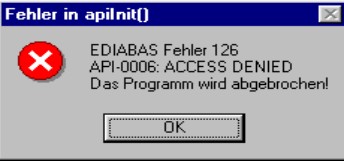
Reason: This error message appears if you start the Tool Set while an INPA BMW script is
running. This is also true the other way round. The reason for this is that only one
programme can access EDIABAS at a time.
Solution: Therefore, before you start the ToolSet, you must exit INPA!!!
3.IFH-0006: Command not accepted and IFH-0018: Initialization Error and
IFH-0038: Interface Command not implemented
Errors IFH-0006 and IFH-0018 occur if any SGBD is loaded in the Tool Set. Error IFH-0038
is generated when loading the utility file into the Tool Set.
Reason 1: The error was caused by another programme that accessed the COM1
interface. This programme could be “HotSync” for Palm or “ActiveSync”
for lpack.
Solution 1: Check the programmes that are started automatically when Windows is
started (see Chapter 4.1).
Reason 2: The COM1 interface is taken by a serial printer.
Solution 2: Uninstall the printer.
Reason 3: The infrared interface is active.
Solution 3: Deactivate the infrared interface.
Reason 4: There is no COM1 interface (COM3 instead, for example)
Solution 4a): Install the COM1 interface.
Solution 4b): Create a file with the name OBD.ini and make the following entry to set
the existing serial interface (COM3, for example)
[OBD]
Port = Com3
The file OBD.ini must be saved in the directory C:WINDOWS for
Windows XP or in directory C:WINNT for Windows NT up to the Ediabas
Package 1.3 and as of Ediabas Package 1.4 in directory
C:EDIABASBIN. The current version of the Ediabas Package can be
seen in the files C:EDIABASversion.txt or C:EDIABASpackage.pdf.
Reason 5: Only for IBM notebooks: The COM1 interface is reserved for the docking
station; the COM3 interface is installed instead.
Solution 5a): see solution 4b:
Solution 5b): Set the COM3 port to COM1: In the device manager (Windows XP:
Select “Start” “Control Panel” “System” “Hardware” and then
select COM3 from the ports under the menu item “Device Manager”.
Then use the right mouse button “Properties” “Port Settings”
“Advanced” to reach the “Advanced Settings for COM3”. Set COM1 in the
COM Port Number. The message that COM1 is already taken can be
ignored in this case.
Reason 6: The old OMITEC driver wasn’t uninstalled correctly.
Solution 6: Please uninstall the old OMITEC driver with the instructions
InstructionforOMITECInstallation.pdf via the GIS server
4 IFH-0006: Command not accepted
This error occurs if a SGBD is loaded in the Tool Set when the OBD connector is being used.
Reason 1: ODB has actually been set as the interface in Ediabas.ini, but the Tool Set uses
the multi-instance with another interface, e.g. K-Line. The setting for the multiinstance and the interfaces used here is made in the file Tool32.ini in the
directory C:Windows (for Windows XP) or alternatively C:Winnt (for Windows
NT). Then, the entries in Tool32.ini, or alternatively the interface apply and not
the ones in Ediabas.ini. The use of multi-instance in the Tool Set is identified in
the title bar, for example with “Tool32:1”, for single multi-instance.
Solution 2: Enter the interface that is being used in Tool32.ini or disable multi-instance with
the entry “No”.
Reason 2: A SGBD is loaded in the Tool Set when the diagnosis protocol UDS is being
used. For UDS-SGBDs You have to use the interface OMITEC but in the
EDIABAS.ini the setting fort he interface ist „STD:OBD“.
Solution 2: Change the setting for thr interface to „interface = STD:OMITEC“ in the
EDIABAS.ini file. The OMITEC connector has to be stressed by the voltage (blue
blinking). If the connector can’t be stressed by the voltage and You want to load
the SGBD yet, You will use the simulation mode. You can activate the simulation
mode e.g. with the menue „configuration -> EDIABAS“. Notice, if you want to use
the simulation mode, a simulation file for the interface will have to exist in the
simulation path.
5 IFH-0009: ECU isn’t connected or doesn’t respond
Reason 1: In the Ediabas.ini file, the interface is set to STD:ADS. However, you have
connected an OBD connector.
Solution 1: Modify the interface setting.
Reason 2: The ignition is switched off.
Solution 2: Switch the ignition on.
Reason 3: The device manager has been used to disable the FIFO buffer for COM1.
Solution 3: In the device manager (Windows XP: Enter “Start” “Control Panel”
“System” “Hardware” “Device Manager” Ports (COM & LPT)), and select
COM1 from the ports and under the “Port Settings” tab, select “Advanced”. There
must be a check-mark by “Use FIFO buffers” and the highest possible setting
must be selected for the receive buffer.
6 SYS-0002: ECU OBJECT FILE NOT FOUND
Reason 1: If the external table T_GRTB.prg doesn’t exist in the directory C:EDIABASECU
the error message will be displayed when You execute the job
IDENT_FUNKTIONAL of a functional SGBD.
Solution 1: You have to download the external table using the ECCO Web Export and copy it
in the directory C:EDIABASECU.
Reason 2: The SGBD, which You want to start doesn’t exist in the directory
C:EDIABASECU or is an old one.
Solution 2: You have to download the SGBD using the ECCO Web Client and copy it in the
directory C:EDIABASECU
7 SYS-0005: Controller description file not found. The programme will be
aborted!
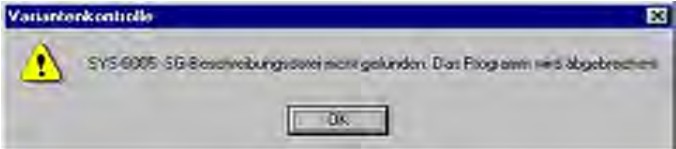
Reason 1: The SGBD is not located in the path C:EdiabasEcu.
Solution 1: Copy the SGBD into the Ecu directory.
Reason 2: This error occurs if the EcuPath in Ediabas.ini (C:EdiabasBin) isn’t set to
C:EDIABASECU.
Solution 2: Set the correct path
8 ToolSet Error: Runtime error ’372’
The following error message appears.

Reason: The old version msflxgrd.ocx exists under c:winntsystem32.
Solution: msflxgrd.ocx under c:Ediabasbin must be registered. To do this, select “Start”
“Run…” and execute regsvr32 :ediabasbinmsflxgrd.ocx in the window and
confirm with “OK“.
The following must be entered for Windows XP: “regsvr32 c:ediabasbin
msflxgrd.ocx
9 INPA BMW Tool Set Error: Run-time error ’5’ – Invalid Procedure Call
Reason: The Tool Set was started twice in a very short period of time.
Solution: Close all Tool Set processes that are running and start the Tool Set again with
only one double-click
10 INPA BMW Tool Set Problem: If an SGBD is opened, then only the hourglass
appears and the SGBD is not loaded.
Reason: An old version Richtx32.ocx exists under c:winntsystem32.
Solution: Richtx32.ocx under c:Ediabasbin must be registered. To do this, select “Start”
“Run…” and execute “regsvr32 :ediabasbinrichtx32.ocx“ in the window and
confirm with „OK“.
The following must be entered for Windows XP: „regsvr32 c:ediabasbin
richtx32.ocx
11 INPA BMW EDIABAS error 20: IFH-0010: Data transmission to control unit
disturbed
Reason 1: When using the EDIC card, the error message is issued when executing the
IDENT job.
Solution 1: Changes must be made in the file “XEDICC.ini” in the “…EdiabasBin” directory.
There, the parameters set for high-speed must be commented out and the
parameters for low-speed must be enabled:
; highspeed:
;Interface=1;
;Presc=0x01;
;SJW=0x01;
;TSEG1=0x08;
;TSEG2=0x07;
; lowspeed:
Interface=2;
Presc=0x0A;
SJW=0x02;
TSEG1=0x05;
TSEG2=0x02;
Reason 2: A SGBD is loaded in the Tool Set when the diagnosis protocol UDS is being
used. You use the interface OMITEC but the connector isn’t stressed by the
voltage (no blue blinking).
Solution 2: Connect the OMITEC wit the vehicle. The OMITEC connector has to be stressed
by the voltage (blue blinking). If the connector can’t be stressed by the voltage
and You want to load the SGBD yet, You will use the simulation mode. You can
activate the simulation mode e.g. with the menue „configuration -> EDIABAS“.
Notice, if you want to use the simulation mode, a simulation file for the interface
will have to exist in the simulation path
12 INPA BMW EDIABAS Error 134: API-0014: Result not found
The error occurs if a SGBD is loaded in the Tool Set when the diagnosis protocol UDS is
being used and the Job FS_LESEN is being executed.
Reason: You use the setting “read error like INPA”, but the Toolset can’t support the
function yet for UDS-SGBDs.
Solution: Please remove the setting “read error like INPA” in the menue “configuration ->
Toolset”.
13 INPA BMW takes too long to load an SGBD in the Tool S
Loading motor or transmission SGBDs takes an above average amount of time.
Reason: Large SGBDs often contain many and extensive tables and their information has
to be loaded.
Solution: Under the Configuration menu item in the Tool Set and then Tool Set, the
checkmark by the selection of table information must be removed
14.INPA BMW Black Windows in the Tool Set
After loading a SGBD one or more windows of the Tool Set are black windows.
Reason: The registration of the richtextbox is invalid.
Solution: You have to register the richtextbox. Execute the batch file REGSVR32.BAT in
the directory C:Ediabasbin
Finally ,for more detail information about INPA BMW ,pls click:
Professional Diagnostic Solution & Service Supplier
Website:www.vxdas.com
Follow Us To Get More Free Resource
www.facebook.com/groups/vxdas/

Share This Story, Choose Your Platform!
About the Author: Lucy

Related Posts
Page load link
Доброго времени суток жители форума ! Обращаюсь к Вам за советом и помощью, может кто сталкивался с этим! Я уже от безнадёги пишу , всё сам пытался разобраться но ничего не выходит ….. два дня капал в интернете , толком никаких выходов из моей ситуации нет , а если и есть какие , то все перепробывал и ничего не помогает. Буду писать как всё делал а вы поправите меня и по возможности поможите.
Задался целью собственноручно диагностить свою машинку и начал потихоньку это воплащать , тем самым покупая необходимые состовляющие:
1. BMW INPA / Ediabas OBD & ADS Interface

2. Ноутбук DELL latitude d600 , имеющий com — порт
3. ну и собственно com кабель сделал из модемных


После всего этого скачал необходимый софт с
http://forum.b-m-w.ru/soft-dlya-bmw/bmw-inpa-ediabas-5-0-5-0-2-manualy-po-bmw-inpa-ediabas/
0. Начисто поставил чистую лицензию Windows Xp + все дрова
1.Установил согласно мануалом BMW INPA Ediabas 5.0.2 ( пробовал туже самую версию и с других сайтов)
2. Выбрал интерфейс ADS ( запускал из папки файл ADSSETUP, и в EDIABAS.ini в строчке интрфейс прописал ADS)
3. Номер COM порта соотвествует номеру в настройках INPA, поменял бит данных на 8 в параметрах COM порта
Сама проблема: При подключении всего этого к машинке , INPA не видит на «батарейку» ни «зажигание», соотвественно при выборе допустим блока абс и любого другого выбивается окошко с ошибкой

Ошибку эту я пробил , в мануалах:
IFH-0010: DATATRANSMISSION TO CONTROLUNIT DISTURBEDEDIABAS_IFH_0010
Meaning:
The data transmission between the interface and the ECU is disturbed.
Causes:
Disturbance on the diagnostic line.
The interface EDIC is not loaded with the diagnostics protocol requested in the ECU description file (SGBD).
Error correction:
Repeat the last job.
Download the required EDIC firmware.
Target system:
WIN SCO QNX
воот решене этой проблемы
IFH-0010: Datatransmission to controlunit disturbed
Das Problem kann bei XP-Rechnern mit dem Interface OBD auftreten.
Grund: Einstellung des Receive und Transmit Buffers kann bei Windows XP noch nicht
automatisch wie bei Windows NT über die OBDSetup.exe durchgeführt werden
Lösung: Einstellung des Receive- und Transmit-Buffers auf 8, wie folgend dargestellt.
Rufen Sie über Start �� Einstellung �� Systemsteuerung �� System �� Hardware
�� Geräte Manager �� Ports(Com & LPT) mit der rechten Maustaste die Eigenschaften
des benutzten COM-Ports auf. Unter der Registerkarte Anschlusseinstellungen
stellen Sie die Datenbits des Receive- und Transmit-Buffer auf 8 ein.
это я всё проделал и ничего не помогло
И что ещё самое главное , на адаптере диагностики при нажатии на кнопку ( на фото выделена красным) ADS диод не загорается , а при нажатии OBD загорается зелёненьким , при этом средний диод зажигании при включении зажигания горит красным

И главное пробовал INPA щёлкать на компе не подключённой к машине выбивает тоже самое что и при подключённой , т.е. адаптер вообще не соединяется походу дела!
Моя машинка BMW E34 520 , 1995 г.в.
вот её диагностический разъём

какоие мозги у неё я не знаю!
Был на многих и зарубежных форумах и нигде толком ничего нет!Подскажите в чём дело и что я делаю не так ??? Почему так происходит??? Направьте на путь истины
This blog list 3 kinds of BMW ISTA errors and solutions you may need.
- ISTA NCS error IFH-0010+ solution
- ISTA error”MSVCP120.dll is missing”+ solution
- ISTA error “The vehicle could not be identified”+ solution
Note: All error solutions here are suitable for BMW ICOM A2+B+C and BMW ICOM NEXT!
ISTA error IFH-0010: DATATRANSMISSION TO CONTROLUNIT DISTURBED
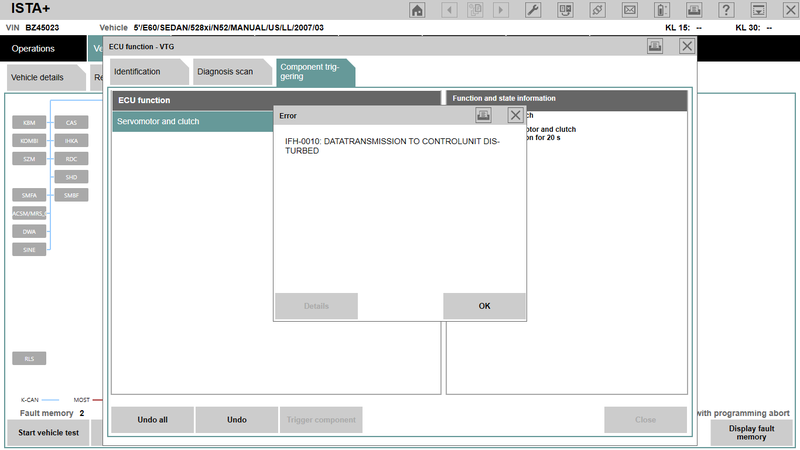
ISTA error: A communication fault occurred during activation
Incorrect state: ERROR ECU CONDITIONS NOT CORRECT OR REQUEST SEQUENCE ERROR
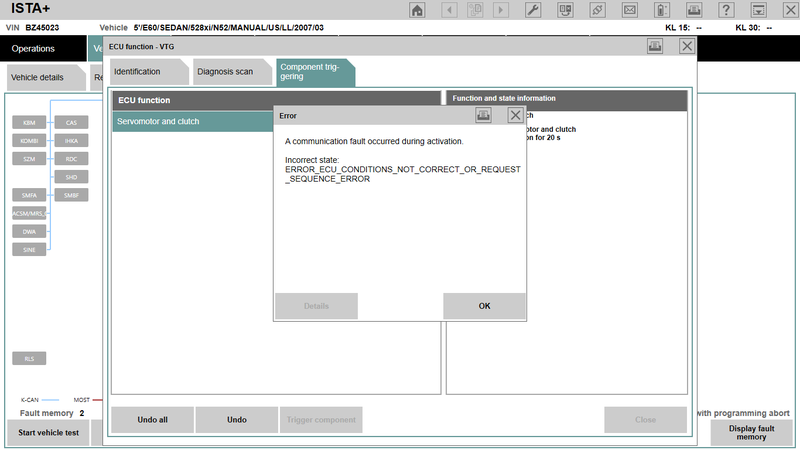
Solution: Try setting COM port latency to 1 in Advanced Settings for the port. You should change it to 1 to have the least lag/disturbances between data transfer.
BMW ISTA System error “MSVCP120.dll is missing”
The program can’t start because MSVCP120.dll is missing from your computer.

Solution: Reinstall VC++ Redistributables and try again. If you’re running x64, you will need both x86 and x64 bit versions installed.
Feedback: I got rid of this .dll error by installing an older version of VC++.
BMW ISTA error “The vehicle could not be identified. Please check the access to the vehicle and check whether the testing-analysis-diagnosis has been activated.”
Solution 1: I changed my com port to port 1 and it worked. It’s worth a shot, easy to change back if it doesn’t work.
Solution 2: Uncheck the Ethernet box and ICOM A2 ISTA-D worked.
Feedback: I changed COM9 to COM1. Its working!
Newest BMW Rheingold ISTA-D ISTA-P Download
- bmw icom
-
Список форумов
По жизни с BMW
Ремонт и обслуживание BMW
-


|
№1 19 04 2011, 00:30
Пытаюсь заставить работать ИНПУ на Карсофтовском адаптере. Вводные данные: Адаптер Карсофт китайский. Вот такой:
Переходник USB-COM вот такой MOXA UPort_1110 http://www.moxa.com/product/UPort_1110.htm Карсофт работает. И оригинальный ломаный английский, и русский. ИНПА не хочет. http://bmwpost.ru/forum/showthread.php?t=238 , http://forums.bimmerforums.com/forum/showthread.php?t=1312104 Вроде всё делаю как надо, переходник стоит как COM1, и в переменных средах патч прописан, и в ediabas.ini порт прописан … не работает…
Не работает.
|


|
№2 19 04 2011, 01:26 сожги его на костре
Ferrum : Ты не нормальный придурок откуси себе сам и припояй icom GUNhed : научись писать без ошибок! клоун б.л.я
|

|
№4 19 04 2011, 04:35 GUNhed : сожги его на костре и несколько раз! лучше купи инпу или на крайняк к-лайн
Рекламное место сдается. тел.: 555-555-555
|
|
№5 19 04 2011, 06:54 romanu, загляни на сайт bmwpost.ru и скачай там документ Мануал по BMW INPA — часто задаваемые вопросы. Frequently Asked Questions about EDIABAS, INPA and the Tool Set. Формат PDF. 32 страницы. В этом мануале есть, судя по содержанию, описание ошибки IFH-0010: Data transmission to control unit disturbed. Возможно, что-нибудь полезное будет написано.
[pic]34053[/pic]
|
|
№6 19 04 2011, 08:36 V_l_a_d_i_m_i_r, GUNhed, GUNhed : …потому что есть над чем резвиться…
Alexander_Br, Alexander_Br : Кстати да, давайте делиться опытом а не понтами, пусть и подкрепленными реальными знаниями
|


|
№7 19 04 2011, 13:46 romanu : Alexander_Br, Ну запускал: сначала запускаю оригинальный карсофт, читаю какой-нибудь блок (чтоб адаптер от него получил контрольные байты и запустился), а потом уже инпу. Это прокатывало через раз, иногда терялось соединение. А прокатывало только на железном СОМ-порте, через адаптер (причем хороший) Express card->COM работал только карсофт. Тот процессор идентификации который стоит в карсофтовском адаптере — инпе мешает шописец, поэтому нафуй карсофтовское железо И уж тем более саму прогу
Рекламное место сдается. тел.: 555-555-555
|
|
Рекомендуем почитать на тему Как заставить INPA работать на адаптере от Carsoft?
|


|
№8 19 04 2011, 19:49 Alexander_Br, спасибо. Alexander_Br : Это прокатывало через раз, иногда терялось соединение. А прокатывало только на железном СОМ-порте, через адаптер (причем хороший) Express card->COM работал только карсофт. Тот процессор идентификации который стоит в карсофтовском адаптере — инпе мешает шописец Так гораздо понятнее.
|